If you ve perused the ActivityPub feed of certificates whose keys are known to be compromised, and clicked on the Show More button to see the name of the certificate issuer, you may have noticed that some issuers seem to come up again and again.
This might make sense after all, if a CA is issuing a large volume of certificates, they ll be seen more often in a list of compromised certificates.
In an attempt to see if there is anything that we can learn from this data, though, I did a bit of digging, and came up with some illuminating results.
The Procedure
I started off by finding all the unexpired certificates logged in Certificate Transparency (CT) logs that have a key that is in the pwnedkeys database as having been publicly disclosed.
From this list of certificates, I removed duplicates by matching up issuer/serial number tuples, and then reduced the set by counting the number of unique certificates by their issuer.
This gave me a list of the issuers of these certificates, which looks a bit like this:
/C=BE/O=GlobalSign nv-sa/CN=AlphaSSL CA - SHA256 - G4
/C=GB/ST=Greater Manchester/L=Salford/O=Sectigo Limited/CN=Sectigo RSA Domain Validation Secure Server CA
/C=GB/ST=Greater Manchester/L=Salford/O=Sectigo Limited/CN=Sectigo RSA Organization Validation Secure Server CA
/C=US/ST=Arizona/L=Scottsdale/O=GoDaddy.com, Inc./OU=http://certs.godaddy.com/repository//CN=Go Daddy Secure Certificate Authority - G2
/C=US/ST=Arizona/L=Scottsdale/O=Starfield Technologies, Inc./OU=http://certs.starfieldtech.com/repository//CN=Starfield Secure Certificate Authority - G2
/C=AT/O=ZeroSSL/CN=ZeroSSL RSA Domain Secure Site CA
/C=BE/O=GlobalSign nv-sa/CN=GlobalSign GCC R3 DV TLS CA 2020
Rather than try to work with raw issuers (because, as Andrew Ayer says, The SSL Certificate Issuer Field is a Lie), I mapped these issuers to the organisations that manage them, and summed the counts for those grouped issuers together.
The Data
Insert obligatory "not THAT data" comment here
The end result of this work is the following table, sorted by the count of certificates which have been compromised by exposing their private key:
Issuer
Compromised Count
Sectigo
170
ISRG (Let's Encrypt)
161
GoDaddy
141
DigiCert
81
GlobalSign
46
Entrust
3
SSL.com
1
If you re familiar with the CA ecosystem, you ll probably recognise that the organisations with large numbers of compromised certificates are also those who issue a lot of certificates.
So far, nothing particularly surprising, then.
Let s look more closely at the relationships, though, to see if we can get more useful insights.
Volume Control
Using the issuance volume report from crt.sh, we can compare issuance volumes to compromise counts, to come up with a compromise rate .
I m using the Unexpired Precertificates colume from the issuance volume report, as I feel that s the number that best matches the certificate population I m examining to find compromised certificates.
To maintain parity with the previous table, this one is still sorted by the count of certificates that have been compromised.
Issuer
Issuance Volume
Compromised Count
Compromise Rate
Sectigo
88,323,068
170
1 in 519,547
ISRG (Let's Encrypt)
315,476,402
161
1 in 1,959,480
GoDaddy
56,121,429
141
1 in 398,024
DigiCert
144,713,475
81
1 in 1,786,586
GlobalSign
1,438,485
46
1 in 31,271
Entrust
23,166
3
1 in 7,722
SSL.com
171,816
1
1 in 171,816
If we now sort this table by compromise rate, we can see which organisations have the most (and least) leakiness going on from their customers:
Issuer
Issuance Volume
Compromised Count
Compromise Rate
Entrust
23,166
3
1 in 7,722
GlobalSign
1,438,485
46
1 in 31,271
SSL.com
171,816
1
1 in 171,816
GoDaddy
56,121,429
141
1 in 398,024
Sectigo
88,323,068
170
1 in 519,547
DigiCert
144,713,475
81
1 in 1,786,586
ISRG (Let's Encrypt)
315,476,402
161
1 in 1,959,480
By grouping by order-of-magnitude in the compromise rate, we can identify three bands :
The Super Leakers: Customers of Entrust and GlobalSign seem to love to lose control of their private keys.
For Entrust, at least, though, the small volumes involved make the numbers somewhat untrustworthy.
The three compromised certificates could very well belong to just one customer, for instance.
I m not aware of anything that GlobalSign does that would make them such an outlier, either, so I m inclined to think they just got unlucky with one or two customers, but as CAs don t include customer IDs in the certificates they issue, it s not possible to say whether that s the actual cause or not.
The Regular Leakers: Customers of SSL.com, GoDaddy, and Sectigo all have compromise rates in the 1-in-hundreds-of-thousands range.
Again, the low volumes of SSL.com make the numbers somewhat unreliable, but the other two organisations in this group have large enough numbers that we can rely on that data fairly well, I think.
The Low Leakers: Customers of DigiCert and Let s Encrypt are at least three times less likely than customers of the regular leakers to lose control of their private keys.
Good for them!
Now we have some useful insights we can think about.
Why Is It So?
If you don't know who Professor Julius Sumner Miller is, I highly recommend finding out
All of the organisations on the list, with the exception of Let s Encrypt, are what one might term traditional CAs.
To a first approximation, it s reasonable to assume that the vast majority of the customers of these traditional CAs probably manage their certificates the same way they have for the past two decades or more.
That is, they generate a key and CSR, upload the CSR to the CA to get a certificate, then copy the cert and key somewhere.
Since humans are handling the keys, there s a higher risk of the humans using either risky practices, or making a mistake, and exposing the private key to the world.
Let s Encrypt, on the other hand, issues all of its certificates using the ACME (Automatic Certificate Management Environment) protocol, and all of the Let s Encrypt documentation encourages the use of software tools to generate keys, issue certificates, and install them for use.
Given that Let s Encrypt has 161 compromised certificates currently in the wild, it s clear that the automation in use is far from perfect, but the significantly lower compromise rate suggests to me that lifecycle automation at least reduces the rate of key compromise, even though it doesn t eliminate it completely.
Sidebar: ACME Does Not Currently Rule The World
It is true that all of the organisations in this analysis also provide ACME issuance workflows, should customers desire it.
However, the traditional CA companies have been around a lot longer than ACME has, and so they probably acquired many of their customers before ACME existed.
Given that it s incredibly hard to get humans to change the way they do things, once they have a way that works , it seems reasonable to assume that most of the certificates issued by these CAs are handled in the same human-centric, error-prone manner they always have been.
If organisations would like to refute this assumption, though, by sharing their data on ACME vs legacy issuance rates, I m sure we d all be extremely interested.
Explaining the Outlier
The difference in presumed issuance practices would seem to explain the significant difference in compromise rates between Let s Encrypt and the other organisations, if it weren t for one outlier.
This is a largely traditional CA, with the manual-handling issues that implies, but with a compromise rate close to that of Let s Encrypt.
We are, of course, talking about DigiCert.
The thing about DigiCert, that doesn t show up in the raw numbers from crt.sh, is that DigiCert manages the issuance of certificates for several of the biggest hosted TLS providers, such as CloudFlare and AWS.
When these services obtain a certificate from DigiCert on their customer s behalf, the private key is kept locked away, and no human can (we hope) get access to the private key.
This is supported by the fact that no certificates identifiably issued to either CloudFlare or AWS appear in the set of certificates with compromised keys.
When we ask for all certificates issued by DigiCert , we get both the certificates issued to these big providers, which are very good at keeping their keys under control, as well as the certificates issued to everyone else, whose key handling practices may not be quite so stringent.
It s possible, though not trivial, to account for certificates issued to these hosted TLS providers, because the certificates they use are issued from intermediates branded to those companies.
With the crt.sh psql interface we can run this query to get the total number of unexpired precertificates issued to these managed services:
SELECT SUM(sub.NUM_ISSUED[2] - sub.NUM_EXPIRED[2])
  FROM (
    SELECT ca.name, max(coalesce(coalesce(nullif(trim(cc.SUBORDINATE_CA_OWNER), ''), nullif(trim(cc.CA_OWNER), '')), cc.INCLUDED_CERTIFICATE_OWNER)) as OWNER,
           ca.NUM_ISSUED, ca.NUM_EXPIRED
      FROM ccadb_certificate cc, ca_certificate cac, ca
     WHERE cc.CERTIFICATE_ID = cac.CERTIFICATE_ID
       AND cac.CA_ID = ca.ID
  GROUP BY ca.ID
  ) sub
 WHERE sub.name ILIKE '%Amazon%' OR sub.name ILIKE '%CloudFlare%' AND sub.owner = 'DigiCert';
The number I get from running that query is 104,316,112, which should be subtracted from DigiCert s total issuance figures to get a more accurate view of what DigiCert s regular customers do with their private keys.
When I do this, the compromise rates table, sorted by the compromise rate, looks like this:
Issuer
Issuance Volume
Compromised Count
Compromise Rate
Entrust
23,166
3
1 in 7,722
GlobalSign
1,438,485
46
1 in 31,271
SSL.com
171,816
1
1 in 171,816
GoDaddy
56,121,429
141
1 in 398,024
"Regular" DigiCert
40,397,363
81
1 in 498,732
Sectigo
88,323,068
170
1 in 519,547
All DigiCert
144,713,475
81
1 in 1,786,586
ISRG (Let's Encrypt)
315,476,402
161
1 in 1,959,480
In short, it appears that DigiCert s regular customers are just as likely as GoDaddy or Sectigo customers to expose their private keys.
What Does It All Mean?
The takeaway from all this is fairly straightforward, and not overly surprising, I believe.
The less humans have to do with certificate issuance, the less likely they are to compromise that certificate by exposing the private key.
While it may not be surprising, it is nice to have some empirical evidence to back up the common wisdom.
Fully-managed TLS providers, such as CloudFlare, AWS Certificate Manager, and whatever Azure s thing is called, is the platonic ideal of this principle: never give humans any opportunity to expose a private key.
I m not saying you should use one of these providers, but the security approach they have adopted appears to be the optimal one, and should be emulated universally.
The ACME protocol is the next best, in that there are a variety of standardised tools widely available that allow humans to take themselves out of the loop, but it s still possible for humans to handle (and mistakenly expose) key material if they try hard enough.
Legacy issuance methods, which either cannot be automated, or require custom, per-provider automation to be developed, appear to be at least four times less helpful to the goal of avoiding compromise of the private key associated with a certificate.
Humans Are, Of Course, The Problem
No thanks, Bender, I'm busy tonight
This observation that if you don t let humans near keys, they don t get leaked is further supported by considering the biggest issuers by volume who have not issued any certificates whose keys have been compromised: Google Trust Services (fourth largest issuer overall, with 57,084,529 unexpired precertificates), and Microsoft Corporation (sixth largest issuer overall, with 22,852,468 unexpired precertificates).
It appears that somewhere between most and basically all of the certificates these organisations issue are to customers of their public clouds, and my understanding is that the keys for these certificates are managed in same manner as CloudFlare and AWS the keys are locked away where humans can t get to them.
It should, of course, go without saying that if a human can never have access to a private key, it makes it rather difficult for a human to expose it.
More broadly, if you are building something that handles sensitive or secret data, the more you can do to keep humans out of the loop, the better everything will be.
Your Support is Appreciated
If you d like to see more analysis of how key compromise happens, and the lessons we can learn from examining billions of certificates, please show your support by buying me a refreshing beverage.
Trawling CT logs is thirsty work.
Appendix: Methodology Limitations
In the interests of clarity, I feel it s important to describe ways in which my research might be flawed.
Here are the things I know of that may have impacted the accuracy, that I couldn t feasibly account for.
Time Periods: Because time never stops, there is likely to be some slight mismatches in the numbers obtained from the various data sources, because they weren t collected at exactly the same moment.
Issuer-to-Organisation Mapping: It s possible that the way I mapped issuers to organisations doesn t match exactly with how crt.sh does it, meaning that counts might be skewed.
I tried to minimise that by using the same data sources (the CCADB AllCertificates report) that I believe that crt.sh uses for its mapping, but I cannot be certain of a perfect match.
Unwarranted Grouping: I ve drawn some conclusions about the practices of the various organisations based on their general approach to certificate issuance.
If a particular subordinate CA that I ve grouped into the parent organisation is managed in some unusual way, that might cause my conclusions to be erroneous.
I was able to fairly easily separate out CloudFlare, AWS, and Azure, but there are almost certainly others that I didn t spot, because hoo boy there are a lot of intermediate CAs out there.
In 2023, I finished and reviewed 53 books, continuing a trend of
year-over-year increases and of reading the most books since 2012 (the
last year I averaged five books a month). Reviewing continued to be
uneven, with a significant slump in the summer and smaller slumps in
February and November, and a big clump of reviews finished in October in
addition to my normal year-end reading and reviewing vacation.
The unevenness this year was mostly due to finishing books and not writing
reviews immediately. Reviews are much harder to write when the finished
books are piling up, so one goal for 2024 is to not let that happen again.
I enter the new year with one book finished and not yet reviewed, after
reading a book about every day and a half during my December vacation.
I read two all-time favorite books this year. The first was Emily Tesh's
debut novel Some
Desperate Glory, which is one of the best space opera novels I have ever
read. I cannot improve on Shelley Parker-Chan's blurb for this book:
"Fierce and heartbreakingly humane, this book is for everyone who loved
Ender's Game, but Ender's Game didn't love them back." This
is not hard science fiction but it is fantastic character fiction. It was
exactly what I needed in the middle of a year in which I was fighting a
"burn everything down" mood.
The second was Night
Watch by Terry Pratchett, the 29th Discworld and 6th Watch novel.
Throughout my Discworld read-through, Pratchett felt like he was on the
cusp of a truly stand-out novel, one where all the pieces fit and the book
becomes something more than the sum of its parts. This was that book.
It's a book about ethics and revolutions and governance, but also about
how your perception of yourself changes as you get older. It does all of
the normal Pratchett things, just... better. While I would love to point
new Discworld readers at it, I think you do have to read at least the
Watch novels that came before it for it to carry its proper emotional
heft.
This was overall a solid year for fiction reading. I read another 15
novels I rated 8 out of 10, and 12 that I rated 7 out of 10. The largest
contributor to that was my Discworld read-through, which was reliably
entertaining throughout the year. The run of Discworld books between
The Fifth Elephant
(read late last year) and Wintersmith (my last of this year) was the best run of Discworld
novels so far. One additional book I'll call out as particularly worth
reading is Thud!,
the Watch novel after Night Watch and another excellent entry.
I read two stand-out non-fiction books this year. The first was Oliver
Darkshire's delightful memoir about life as a rare book seller,
Once Upon a Tome.
One of the things I will miss about Twitter is the regularity with which I
stumbled across fascinating people and then got to read their books. I'm
off Twitter permanently now because the platform is designed to make me
incoherently angry and I need less of that in my life, but it was very
good at finding delightfully quirky books like this one.
My other favorite non-fiction book of the year was Michael Lewis's
Going Infinite, a
profile of Sam Bankman-Fried. I'm still bemused at the negative reviews
that this got from people who were upset that Lewis didn't turn the story
into a black-and-white morality play. Bankman-Fried's actions were
clearly criminal; that's not in dispute. Human motivations can be complex
in ways that are irrelevant to the law, and I thought this attempt to
understand that complexity by a top-notch storyteller was worthy of
attention.
Also worth a mention is Tony Judt's
Postwar, the first
book I reviewed in 2023. A sprawling history of post-World-War-II Europe
will never have the sheer readability of shorter, punchier books, but this
was the most informative book that I read in 2023.
2024 should see the conclusion of my Discworld read-through, after which I
may return to re-reading Mercedes Lackey or David Eddings, both of which I
paused to make time for Terry Pratchett. I also have another re-read
similar to my Chronicles of
Narnia reviews that I've been thinking about for a while. Perhaps I will
start that next year; perhaps it will wait for 2025.
Apart from that, my intention as always is to read steadily, write reviews
as close to when I finished the book as possible, and make reading time
for my huge existing backlog despite the constant allure of new releases.
Here's to a new year full of more new-to-me books and occasional old
favorites.
The full analysis includes some
additional personal reading statistics, probably only of interest to me.
This post should have marked the beginning of my yearly roundups of the favourite books and movies I read and watched in 2023.
However, due to coming down with a nasty bout of flu recently and other sundry commitments, I wasn't able to undertake writing the necessary four or five blog posts In lieu of this, however, I will simply present my (unordered and unadorned) highlights for now. Do get in touch if this (or any of my previous posts) have spurred you into picking something up yourself
Unenjoyable experiences included Alejandro G mez Monteverde's Sound of Freedom (2023), Alex Garland's Men (2022) and Steven Spielberg's The Fabelmans (2022).
Older releases
(Films released before 2022, and not including rewatches from previous years.)
Wolf Country is a short lesbian shifter romance by Mar Delaney, a
pen name for Layla Lawlor (who is also one of the writers behind the
shared pen name Zoe Chant).
Dasha Volkova is a werewolf, a member of a tribe of werewolves who keep to
themselves deep in the wilds of Alaska. She's just become an adult and is
wandering, curious and exploring, seeing what's in the world outside of
her sheltered childhood. A wild chase after a hare, purely for the fun of
it, is sufficiently distracting that she doesn't notice the snare before
she steps in it going full speed.
Laney Rosen is not a werewolf. She's a landscape painter who lives a
quiet and self-contained life in an isolated cabin in the wilderness.
She only stumbles across Dasha because she got lost on the snowmobile
tracks taking photographs. Laney assumes Dasha is a dog caught in a
poacher's trap, and is quite surprised when the pain of getting her out of
the snare causes Dasha to shapeshift into a naked woman.
This short book is precisely what it sounds like, which I appreciate in a
romance novel. Woman meets wolf and discovers her secret accidentally,
woman is of course entirely trustworthy although wolf can't know that,
attraction at first sight, they have to pitch a tent in the wilderness and
there's only one sleeping bag, etc. Nothing here is going to surprise
you, but it's gentle and kind and fulfills the romance contract of a happy
ending. It's not particularly steamy; the focus is on the relationship
and the mutual attraction rather than on the sex.
The best part of this book is probably the backdrop. Delaney lives in
Alaska, and it shows in both the attention to the details of survival and
heat and in the landscape descriptions (and the descriptions of Laney's
landscapes). Dasha's love of Laney's paintings is one of the most
heart-warming parts of the book. Laney has retinitis pigmentosa and is
slowly losing her vision, which I thought was handled gracefully and well
in the story. It creates real problems and limitations for her, but it
also doesn't define her or become central to her character.
Both Dasha and Laney are viewpoint characters and roughly alternate tight
third-person viewpoint chapters. There are a few twists: potential
parental disapproval on Dasha's part and some real physical danger from
the person who set the trap, but most of the story is the two woman
getting to know each other and getting past the early hesitancy to name
what they're feeling. Laney feels a bit older than Dasha just because
she's out on her own and Dasha was homeschooled and very sheltered, but
both of them feel very young. This is Dasha's first serious relationship.
Delaney does use the fated lover trope, which seems worth a warning in
case you're not in the mood for that. Werewolves apparently know when
they've found their fated mate and don't have a lot of choice in the
matter. This is a common paranormal and fantasy romance trope that I find
disturbing if I think about it too hard. Thankfully, here it's not much
of a distraction. Dasha is such an impulsive, think-with-her-heart sort
of character that the immediate conclusion that Laney is her fated mate
felt in character even without the werewolf lore.
I read this based on a random recommendation from Yoon Ha Lee when I was
in the mood for something light and kind and uncomplicated, and I got
exactly what I expected and was in the mood for. The writing isn't the
best, but the landscape descriptions aren't bad and the characterization
is reasonably good if you're in the mood for brightly curious but not
particularly wise. Recommended if you're looking for this sort of thing.
Rating: 7 out of 10
It s that time of year already! We have hit our first freeze of the year. While the kitties keep warm by the wood burning stove, I have been busy with many updates and fixes in a variety of projects.
KDE neon:
It s true, Neon unstable has been very unstable. Due to a few factors including a builder being out of space, timed with a new Qt release. There is a cost with living in unstable land with bleeding edge releases. It takes time and finesse to get everything happy, especially with major transitions such as Qt. The drive issue was just bad timing. We worked night and day ( quite literally with people spanning from the US, Europe and Australia ) to get everything happy again. I know it s frustrating when things are broken, but please keep in mind, most of us are volunteers. I am happy to report, it is once again stable. If you continue to experience issues please report them on https://bugs.kde.org there have been a few cases where there were rogue apt sources lists creating issues. We also have the User edition which is much more stable!
KDE Snaps:
The big move to snapcraft files per repo continues. With that comes a new version 23.08.2. This big win this week was Audiotube! I have finally got this snap working. With a combination of snappy-debug and snap run gdb audiotube I was able to find all the hidden dependencies such as yt-dlp needed to be built with ffmpeg support and it needed a newer ytmusicapi as the version it called for was broken with gettext translations. I also had to fix the dbus name as it was not the standard org.kde.app. The final fix was it required the alsa plug and layouts adjusted to point to the snap alsa libraries ( which fixed the very important sound feature ). Who says you can t teach an old dog new tricks. Unfortunately, it still requires devmode to run, as it has one last network issue even with all the network plugs. I have to set it aside for now, as I have many more snaps to migrate. However, if you want to enjoy youtube music with this super awesome app you can, just append devmode when installing. Enjoy!
The following apps have now migrated to their respective KDE repos and have the snap recipes in launchpad for automated builds:
Blinken
Bovo
Calindori
Dragon
Dolphin ( still needs work )
Digikam ( still needs work )
Elisa ( Working on new qml issue )
Falkon
Filelight
GCompris
Granatier
Ghostwriter
Gwenview ( working on missing dependency )
Haruna ( still needs work )
isoimagewriter ( working on gpg support )
Itinerary
Juk
K3b ( still needs work )
A new content pack with the latest Frameworks 5.110 and Qt 5.15.11 is complete and the neon extension update will follow after the required global autoconnect is approved from the store.
Debian:
I have caught up on my dashboard with new releases, fixed test failures, and FTBFS on the more obscure arches. The following debian packages have been uploaded to unstable:
If you have made it this far, thank you! As you can see I am quite busy and there is still much to do. If you can possibly spare a donation so I can continue my efforts in KDE neon / KDE Snaps / and Debian, it would be so appreciated. I enjoy doing this work and I hope it benefits someone out there. Have a lovely day and thanks for stopping by.
Donatehttps://gofund.me/b8b69e54
Welcome to the June 2023 report from the Reproducible Builds project
In our reports, we outline the most important things that we have been up to over the past month. As always, if you are interested in contributing to the project, please visit our Contribute page on our website.
We are very happy to announce the upcoming Reproducible Builds Summit which set to take place from October 31st November 2nd 2023, in the vibrant city of Hamburg, Germany.
Our summits are a unique gathering that brings together attendees from diverse projects, united by a shared vision of advancing the Reproducible Builds effort. During this enriching event, participants will have the opportunity to engage in discussions, establish connections and exchange ideas to drive progress in this vital field. Our aim is to create an inclusive space that fosters collaboration, innovation and problem-solving. We are thrilled to host the seventh edition of this exciting event, following the success of previous summits in various iconic locations around the world, including Venice, Marrakesh, Paris, Berlin and Athens.
If you re interesting in joining us this year, please make sure to read the event page] which has more details about the event and location. (You may also be interested in attending PackagingCon 2023 held a few days before in Berlin.)
This month, Vagrant Cascadian will present at FOSSY 2023 on the topic of Breaking the Chains of Trusting Trust:
Corrupted build environments can deliver compromised cryptographically signed binaries. Several exploits in critical supply chains have been demonstrated in recent years, proving that this is not just theoretical. The most well secured build environments are still single points of failure when they fail. [ ] This talk will focus on the state of the art from several angles in related Free and Open Source Software projects, what works, current challenges and future plans for building trustworthy toolchains you do not need to trust.
Hosted by the Software Freedom Conservancy and taking place in Portland, Oregon, FOSSY aims to be a community-focused event: Whether you are a long time contributing member of a free software project, a recent graduate of a coding bootcamp or university, or just have an interest in the possibilities that free and open source software bring, FOSSY will have something for you . More information on the event is available on the FOSSY 2023 website, including the full programme schedule.
Marcel Fourn , Dominik Wermke, William Enck, Sascha Fahl and Yasemin Acar recently published an academic paper in the 44th IEEE Symposium on Security and Privacy titled It s like flossing your teeth: On the Importance and Challenges of Reproducible Builds for Software Supply Chain Security . The abstract reads as follows:
The 2020 Solarwinds attack was a tipping point that caused a heightened awareness about the security of the software supply chain and in particular the large amount of trust placed in build systems. Reproducible Builds (R-Bs) provide a strong foundation to build defenses for arbitrary attacks against build systems by ensuring that given the same source code, build environment, and build instructions, bitwise-identical artifacts are created.
However, in contrast to other papers that touch on some theoretical aspect of reproducible builds, the authors paper takes a different approach. Starting with the observation that much of the software industry believes R-Bs are too far out of reach for most projects and conjoining that with a goal of to help identify a path for R-Bs to become a commonplace property , the paper has a different methodology:
We conducted a series of 24 semi-structured expert interviews with participants from the Reproducible-Builds.org project, and iterated on our questions with the reproducible builds community. We identified a range of motivations that can encourage open source developers to strive for R-Bs, including indicators of quality, security benefits, and more efficient caching of artifacts. We identify experiences that help and hinder adoption, which heavily include communication with upstream projects. We conclude with recommendations on how to better integrate R-Bs with the efforts of the open source and free software community.
Vagrant Cascadian mentioned that Packaging Con 2023 is being held in Berlin, the weekend before the Reproducible Builds summit later this year. In particular, Vagrant noticed that the Call for Proposals (CFP) closes at the end of July.
Larry Doolittle was searching Usenet archives and discovered a thread from December 1999 titled Time independent checksum(cksum) on comp.unix.programming. Larry notes that it starts with Jayan asking about comparing binaries that might have difference in their embedded timestamps (that is, perhaps, Foreshadowing diffoscope, amiright? ) and goes on to observe that:
The antagonist is David Schwartz, who correctly says There are dozens of complex reasons why what seems to be the same sequence of operations might produce different end results, but goes on to say I totally disagree with your general viewpoint that compilers must provide for reproducability [sic].
Dwight Tovey and I (Larry Doolittle) argue for reproducible builds. I assert Any program especially a mission-critical program like a compiler that cannot reproduce a result at will is broken. Also it s commonplace to take a binary from the net, and check to see if it was trojaned by attempting to recreate it from source.
Distribution work
27 reviews of Debian packages were added, 40 were updated and 8 were removed this month adding to our knowledge about identified issues. A new randomness_in_documentation_generated_by_mkdocs toolchain issue was added by Chris Lamb [], and the deterministic flag on the paths_vary_due_to_usrmerge issue as we are not currently testing usrmerge issues [] issues.
Roland Clobus posted his 18th update of the status of reproducible Debian ISO images on our mailing list. Roland reported that all major desktops build reproducibly with bullseye, bookworm, trixie and sid , but he also mentioned amongst many changes that not only are the non-free images being built (and are reproducible) but that the live images are generated officially by Debian itself. []
Jan-Benedict Glaw noticed a problem when building NetBSD for the VAX architecture. Noting that Reproducible builds [are] probably not as reproducible as we thought , Jan-Benedict goes on to describe that when two builds from different source directories won t produce the same result and adds various notes about sub-optimal handling of the CFLAGS environment variable. []
F-Droid added 21 new reproducible apps in June, resulting in a new record of 145 reproducible apps in total. []. (This page now sports missing data for March May 2023.) F-Droid contributors also reported an issue with broken resources in APKs making some builds unreproducible. []
Bernhard M. Wiedemann published another monthly report about reproducibility within openSUSE
Testing framework
The Reproducible Builds project operates a comprehensive testing framework (available at tests.reproducible-builds.org) in order to check packages and other artifacts for reproducibility. In June, a number of changes were made by Holger Levsen, including:
Additions to a (relatively) new Documented Jenkins Maintenance (djm) script to automatically shrink a cache & save a backup of old data [], automatically split out previous months data from logfiles into specially-named files [], prevent concurrent remote logfile fetches by using a lock file [] and to add/remove various debugging statements [].
Updates to the automated system health checks to, for example, to correctly detect new kernel warnings due to a wording change [] and to explicitly observe which old/unused kernels should be removed []. This was related to an improvement so that various kernel issues on Ubuntu-based nodes are automatically fixed. []
Holger and Vagrant Cascadian updated all thirty-five hosts running Debian on the amd64, armhf, and i386 architectures to Debian bookworm, with the exception of the Jenkins host itself which will be upgraded after the release of Debian 12.1. In addition, Mattia Rizzolo updated the email configuration for the @reproducible-builds.org domain to correctly accept incoming mails from jenkins.debian.net [] as well as to set up DomainKeys Identified Mail (DKIM) signing []. And working together with Holger, Mattia also updated the Jenkins configuration to start testing Debian trixie which resulted in stopped testing Debian buster. And, finally, Jan-Benedict Glaw contributed patches for improved NetBSD testing.
If you are interested in contributing to the Reproducible Builds project, please visit our Contribute page on our website. However, you can get in touch with us via:
The phrase "Root of Trust" turns up at various points in discussions about verified boot and measured boot, and to a first approximation nobody is able to give you a coherent explanation of what it means[1]. The Trusted Computing Group has a fairly wordy definition, but (a) it's a lot of words and (b) I don't like it, so instead I'm going to start by defining a root of trust as "A thing that has to be trustworthy for anything else on your computer to be trustworthy".
(An aside: when I say "trustworthy", it is very easy to interpret this in a cynical manner and assume that "trust" means "trusted by someone I do not necessarily trust to act in my best interest". I want to be absolutely clear that when I say "trustworthy" I mean "trusted by the owner of the computer", and that as far as I'm concerned selling devices that do not allow the owner to define what's trusted is an extremely bad thing in the general case)
Let's take an example. In verified boot, a cryptographic signature of a component is verified before it's allowed to boot. A straightforward implementation of a verified boot implementation has the firmware verify the signature on the bootloader or kernel before executing it. In this scenario, the firmware is the root of trust - it's the first thing that makes a determination about whether something should be allowed to run or not[2]. As long as the firmware behaves correctly, and as long as there aren't any vulnerabilities in our boot chain, we know that we booted an OS that was signed with a key we trust.
But what guarantees that the firmware behaves correctly? What if someone replaces our firmware with firmware that trusts different keys, or hot-patches the OS as it's booting it? We can't just ask the firmware whether it's trustworthy - trustworthy firmware will say yes, but the thing about malicious firmware is that it can just lie to us (either directly, or by modifying the OS components it boots to lie instead). This is probably not sufficiently trustworthy!
Ok, so let's have the firmware be verified before it's executed. On Intel this is "Boot Guard", on AMD this is "Platform Secure Boot", everywhere else it's just "Secure Boot". Code on the CPU (either in ROM or signed with a key controlled by the CPU vendor) verifies the firmware[3] before executing it. Now the CPU itself is the root of trust, and, well, that seems reasonable - we have to place trust in the CPU, otherwise we can't actually do computing. We can now say with a reasonable degree of confidence (again, in the absence of vulnerabilities) that we booted an OS that we trusted. Hurrah!
Except. How do we know that the CPU actually did that verification? CPUs are generally manufactured without verification being enabled - different system vendors use different signing keys, so those keys can't be installed in the CPU at CPU manufacture time, and vendors need to do code development without signing everything so you can't require that keys be installed before a CPU will work. So, out of the box, a new CPU will boot anything without doing verification[4], and development units will frequently have no verification.
As a device owner, how do you tell whether or not your CPU has this verification enabled? Well, you could ask the CPU, but if you're doing that on a device that booted a compromised OS then maybe it's just hotpatching your OS so when you do that you just get RET_TRUST_ME_BRO even if the CPU is desperately waving its arms around trying to warn you it's a trap. This is, unfortunately, a problem that's basically impossible to solve using verified boot alone - if any component in the chain fails to enforce verification, the trust you're placing in the chain is misplaced and you are going to have a bad day.
So how do we solve it? The answer is that we can't simply ask the OS, we need a mechanism to query the root of trust itself. There's a few ways to do that, but fundamentally they depend on the ability of the root of trust to provide proof of what happened. This requires that the root of trust be able to sign (or cause to be signed) an "attestation" of the system state, a cryptographically verifiable representation of the security-critical configuration and code. The most common form of this is called "measured boot" or "trusted boot", and involves generating a "measurement" of each boot component or configuration (generally a cryptographic hash of it), and storing that measurement somewhere. The important thing is that it must not be possible for the running OS (or any pre-OS component) to arbitrarily modify these measurements, since otherwise a compromised environment could simply go back and rewrite history. One frequently used solution to this is to segregate the storage of the measurements (and the attestation of them) into a separate hardware component that can't be directly manipulated by the OS, such as a Trusted Platform Module. Each part of the boot chain measures relevant security configuration and the next component before executing it and sends that measurement to the TPM, and later the TPM can provide a signed attestation of the measurements it was given. So, an SoC that implements verified boot should create a measurement telling us whether verification is enabled - and, critically, should also create a measurement if it isn't. This is important because failing to measure the disabled state leaves us with the same problem as before; someone can replace the mutable firmware code with code that creates a fake measurement asserting that verified boot was enabled, and if we trust that we're going to have a bad time.
(Of course, simply measuring the fact that verified boot was enabled isn't enough - what if someone replaces the CPU with one that has verified boot enabled, but trusts keys under their control? We also need to measure the keys that were used in order to ensure that the device trusted only the keys we expected, otherwise again we're going to have a bad time)
So, an effective root of trust needs to:
1) Create a measurement of its verified boot policy before running any mutable code 2) Include the trusted signing key in that measurement 3) Actually perform that verification before executing any mutable code
and from then on we're in the hands of the verified code actually being trustworthy, and it's probably written in C so that's almost certainly false, but let's not try to solve every problem today.
Does anything do this today? As far as I can tell, Intel's Boot Guard implementation does. Based on publicly available documentation I can't find any evidence that AMD's Platform Secure Boot does (it does the verification, but it doesn't measure the policy beforehand, so it seems spoofable), but I could be wrong there. I haven't found any general purpose non-x86 parts that do, but this is in the realm of things that SoC vendors seem to believe is some sort of value-add that can only be documented under NDAs, so please do prove me wrong. And then there are add-on solutions like Titan, where we delegate the initial measurement and validation to a separate piece of hardware that measures the firmware as the CPU reads it, rather than requiring that the CPU do it.
But, overall, the situation isn't great. On many platforms there's simply no way to prove that you booted the code you expected to boot. People have designed elaborate security implementations that can be bypassed in a number of ways.
[1] In this respect it is extremely similar to "Zero Trust" [2] This is a bit of an oversimplification - once we get into dynamic roots of trust like Intel's TXT this story gets more complicated, but let's stick to the simple case today [3] I'm kind of using "firmware" in an x86ish manner here, so for embedded devices just think of "firmware" as "the first code executed out of flash and signed by someone other than the SoC vendor" [4] In the Intel case this isn't strictly true, since the keys are stored in the motherboard chipset rather than the CPU, and so taking a board with Boot Guard enabled and swapping out the CPU won't disable Boot Guard because the CPU reads the configuration from the chipset. But many mobile Intel parts have the chipset in the same package as the CPU, so in theory swapping out that entire package would disable Boot Guard. I am not good enough at soldering to demonstrate that.
I m calling time on DNSSEC. Last week, prompted by a change in my DNS hosting setup, I began removing it from the few personal zones I had signed. Then this Monday the .nz ccTLD experienced a multi-day availability incident triggered by the annual DNSSEC key rotation process. This incident broke several of my unsigned zones, which led me to say very unkind things about DNSSEC on Mastodon and now I feel compelled to more completely explain my thinking:
For almost all domains and use-cases, the costs and risks of deploying DNSSEC outweigh the benefits it provides. Don t bother signing your zones.
The .nz incident, while topical, is not the motivation or the trigger for this conclusion. Had it been a novel incident, it would still have been annoying, but novel incidents are how we learn so I have a small tolerance for them. The problem with DNSSEC is precisely that this incident was not novel, just the latest in a long and growing list.
It s a clear pattern. DNSSEC is complex and risky to deploy. Choosing to sign your zone will almost inevitably mean that you will experience lower availability for your domain over time than if you leave it unsigned. Even if you have a team of DNS experts maintaining your zone and DNS infrastructure, the risk of routine operational tasks triggering a loss of availability (unrelated to any attempted attacks that DNSSEC may thwart) is very high - almost guaranteed to occur. Worse, because of the nature of DNS and DNSSEC these incidents will tend to be prolonged and out of your control to remediate in a timely fashion.
The only benefit you get in return for accepting this almost certain reduction in availability is trust in the integrity of the DNS data a subset of your users (those who validate DNSSEC) receive. Trusted DNS data that is then used to communicate across an untrusted network layer. An untrusted network layer which you are almost certainly protecting with TLS which provides a more comprehensive and trustworthy set of security guarantees than DNSSEC is capable of, and provides those guarantees to all your users regardless of whether they are validating DNSSEC or not.
In summary, in our modern world where TLS is ubiquitous, DNSSEC provides only a thin layer of redundant protection on top of the comprehensive guarantees provided by TLS, but adds significant operational complexity, cost and a high likelihood of lowered availability.
In an ideal world, where the deployment cost of DNSSEC and the risk of DNSSEC-induced outages were both low, it would absolutely be desirable to have that redundancy in our layers of protection. In the real world, given the DNSSEC protocol we have today, the choice to avoid its complexity and rely on TLS alone is not at all painful or risky to make as the operator of an online service. In fact, it s the prudent choice that will result in better overall security outcomes for your users.
Ignore DNSSEC and invest the time and resources you would have spent deploying it improving your TLS key and certificate management.
Ironically, the one use-case where I think a valid counter-argument for this position can be made is TLDs (including ccTLDs such as .nz). Despite its many failings, DNSSEC is an Internet Standard, and as infrastructure providers, TLDs have an obligation to enable its use. Unfortunately this means that everyone has to bear the costs, complexities and availability risks that DNSSEC burdens these operators with. We can t avoid that fact, but we can avoid creating further costs, complexities and risks by choosing not to deploy DNSSEC on the rest of our non-TLD zones.
But DNSSEC will save us from the evil CA ecosystem!
Historically, the strongest motivation for DNSSEC has not been the direct security benefits themselves (which as explained above are minimal compared to what TLS provides), but in the new capabilities and use-cases that could be enabled if DNS were able to provide integrity and trusted data to applications.
Specifically, the promise of DNS-based Authentication of Named Entities (DANE) is that with DNSSEC we can be free of the X.509 certificate authority ecosystem and along with it the expensive certificate issuance racket and dubious trust properties that have long been its most distinguishing features.
Ten years ago this was an extremely compelling proposition with significant potential to improve the Internet. That potential has gone unfulfilled.
Instead of maturing as deployments progressed and associated operational experience was gained, DNSSEC has been beset by the discovery of issue after issue. Each of these has necessitated further changes and additions to the protocol, increasing complexity and deployment cost. For many zones, including significant zones like google.com (where I led the attempt to evaluate and deploy DNSSEC in the mid 2010s), it is simply infeasible to deploy the protocol at all, let alone in a reliable and dependable manner.
While DNSSEC maturation and deployment has been languishing, the TLS ecosystem has been steadily and impressively improving. Thanks to the efforts of many individuals and companies, although still founded on the use of a set of root certificate authorities, the TLS and CA ecosystem today features transparency, validation and multi-party accountability that comprehensively build trust in the ability to depend and rely upon the security guarantees that TLS provides. When you use TLS today, you benefit from:
Free/cheap issuance from a number of different certificate authorities.
Regular, automated issuance/renewal via the ACME protocol.
Visibility into who has issued certificates for your domain and when through Certificate Transparency logs.
Confidence that certificates issued without certificate transparency (and therefore lacking an SCT) will not be accepted by the leading modern browsers.
The use of modern cryptographic protocols as a baseline, with a plausible and compelling story for how these can be steadily and promptly updated over time.
DNSSEC with DANE can match the TLS ecosystem on the first benefit (up front price) and perhaps makes the second benefit moot, but has no ability to match any of the other transparency and accountability measures that today s TLS ecosystem offers. If your ZSK is stolen, or a parent zone is compromised or coerced, validly signed TLSA records for a forged certificate can be produced and spoofed to users under attack with minimal chances of detection.
Finally, in terms of overall trust in the roots of the system, the CA/Browser forum requirements continue to improve the accountability and transparency of TLS certificate authorities, significantly reducing the ability for any single actor (say a nefarious government) to subvert the system. The DNS root has a well established transparent multi-party system for establishing trust in the DNSSEC root itself, but at the TLD level, almost intentionally thanks to the hierarchical nature of DNS, DNSSEC has multiple single points of control (or coercion) which exist outside of any formal system of transparency or accountability.
We ve moved from DANE being a potential improvement in security over TLS when it was first proposed, to being a definite regression from what TLS provides today.
That s not to say that TLS is perfect, but given where we re at, we ll get a better security return from further investment and improvements in the TLS ecosystem than we will from trying to fix DNSSEC.
But TLS is not ubiquitous for non-HTTP applications
The arguments above are most compelling when applied to the web-based HTTP-oriented ecosystem which has driven most of the TLS improvements we ve seen to date. Non-HTTP protocols are lagging in adoption of many of the improvements and best practices TLS has on the web. Some claim this need to provide a solution for non-HTTP, non-web applications provides a motivation to continue pushing DNSSEC deployment.
I disagree, I think it provides a motivation to instead double-down on moving those applications to TLS. TLS as the new TCP.
The problem is that costs of deploying and operating DNSSEC are largely fixed regardless of how many protocols you are intending to protect with it, and worse, the negative side-effects of DNSSEC deployment can and will easily spill over to affect zones and protocols that don t want or need DNSSEC s protection. To justify continued DNSSEC deployment and operation in this context means using a smaller set of benefits (just for the non-HTTP applications) to justify the already high costs of deploying DNSSEC itself, plus the cost of the risk that DNSSEC poses to the reliability to your websites. I don t see how that equation can ever balance, particularly when you evaluate it against the much lower costs of just turning on TLS for the rest of your non-HTTP protocols instead of deploying DNSSEC. MTA-STS is a worked example of how this can be achieved.
If you re still not convinced, consider that even DNS itself is considering moving to TLS (via DoT and DoH) in order to add the confidentiality/privacy attributes the protocol currently lacks. I m not a huge fan of the latency implications of these approaches, but the ongoing discussion shows that clever solutions and mitigations for that may exist.
DoT/DoH solve distinct problems from DNSSEC and in principle should be used in combination with it, but in a world where DNS itself is relying on TLS and therefore has eliminated the majority of spoofing and cache poisoning attacks through DoT/DoH deployment the benefit side of the DNSSEC equation gets smaller and smaller still while the costs remain the same.
OK, but better software or more careful operations can reduce DNSSEC s cost
Some see the current DNSSEC costs simply as teething problems that will reduce as the software and tooling matures to provide more automation of the risky processes and operational teams learn from their mistakes or opt to simply transfer the risk by outsourcing the management and complexity to larger providers to take care of.
I don t find these arguments compelling. We ve already had 15+ years to develop improved software for DNSSEC without success. What s changed that we should expect a better outcome this year or next? Nothing.
Even if we did have better software or outsourced operations, the approach is still only hiding the costs behind automation or transferring the risk to another organisation. That may appear to work in the short-term, but eventually when the time comes to upgrade the software, migrate between providers or change registrars the debt will come due and incidents will occur.
The problem is the complexity of the protocol itself. No amount of software improvement or outsourcing addresses that.
After 15+ years of trying, I think it s worth considering that combining cryptography, caching and distributed consensus, some of the most fundamental and complex computer science problems, into a slow-moving and hard to evolve low-level infrastructure protocol while appropriately balancing security, performance and reliability appears to be beyond our collective ability.
That doesn t have to be the end of the world, the improvements achieved in the TLS ecosystem over the same time frame provide a positive counter example - perhaps DNSSEC is simply focusing our attention at the wrong layer of the stack.
Ideally secure DNS data would be something we could have, but if the complexity of DNSSEC is the price we have to pay to achieve it, I m out. I would rather opt to remain with the simpler yet insecure DNS protocol and compensate for its short comings at higher transport or application layers where experience shows we are able to more rapidly improve and develop our security capabilities.
Summing up
For the vast majority of domains and use-cases there is simply no net benefit to deploying DNSSEC in 2023. I d even go so far as to say that if you ve already signed your zones, you should (carefully) move them back to being unsigned - you ll reduce the complexity of your operating environment and lower your risk of availability loss triggered by DNS. Your users will thank you.
The threats that DNSSEC defends against are already amply defended by the now mature and still improving TLS ecosystem at the application layer, and investing in further improvements here carries far more return than deployment of DNSSEC.
For TLDs, like .nz whose outage triggered this post, DNSSEC is not going anywhere and investment in mitigating its complexities and risks is an unfortunate burden that must be shouldered. While the full incident report of what went wrong with .nz is not yet available, the interim report already hints at some useful insights. It is important that InternetNZ publishes a full and comprehensive review so that the full set of learnings and improvements this incident can provide can be fully realised by .nz and other TLD operators stuck with the unenviable task of trying to safely operate DNSSEC.
Postscript
After taking a few days to draft and edit this post, I ve just stumbled across a presentation from the well respected Geoff Huston at last weeks RIPE86 meeting. I ve only had time to skim the slides (video here) - they don t seem to disagree with my thinking regarding the futility of the current state of DNSSEC, but also contain some interesting ideas for what it might take for DNSSEC to become a compelling proposition.
Probably worth a read/watch!
Review: The Mimicking of Known Successes, by Malka Older
Series:
Mossa and Pleiti #1
Publisher:
Tordotcom
Copyright:
2023
ISBN:
1-250-86051-2
Format:
Kindle
Pages:
169
The Mimicking of Known Successes is a science fiction mystery
novella, the first of an expected series. (The second novella is
scheduled to be published in February of 2024.)
Mossa is an Investigator, called in after a man disappears from the
eastward platform on the 4 63' line. It's an isolated platform, five
hours away from Mossa's base, and home to only four residential buildings
and a pub. The most likely explanation is that the man jumped, but his
behavior before he disappeared doesn't seem consistent with that theory.
He was bragging about being from Valdegeld University, talking to anyone
who would listen about the important work he was doing not typically the
behavior of someone who is suicidal. Valdegeld is the obvious next stop
in the investigation.
Pleiti is a Classics scholar at Valdegeld. She is also Mossa's
ex-girlfriend, making her both an obvious and a fraught person to ask for
investigative help. Mossa is the last person she expected to be waiting
for her on the railcar platform when she returns from a trip to visit her
parents.
The Mimicking of Known Successes is mostly a mystery, following
Mossa's attempts to untangle the story of what happened to the disappeared
man, but as you might have guessed there's a substantial sapphic romance
subplot. It's also at least adjacent to Sherlock Holmes: Mossa is
brilliant, observant, somewhat monomaniacal, and very bad at human
relationships. All of this story except for the prologue is told from
Pleiti's perspective as she plays a bit of a Watson role, finding Mossa
unreadable, attractive, frustrating, and charming in turn. Following more
recent Holmes adaptations, Mossa is portrayed as probably neurodivergent,
although the story doesn't attach any specific labels.
I have no strong opinions about this novella. It was fine? There's a
mystery with a few twists, there's a sapphic romance of the second chance
variety, there's a bit of action and a bit of hurt/comfort after the
action, and it all felt comfortably entertaining but kind of predictable.
Susan
Stepney has a "passes the time" review rating, and while that may be a
bit harsh, that's about where I ended up.
The most interesting part of the story is the science fiction setting.
We're some indefinite period into the future. Humans have completely
messed up Earth to the point of making it uninhabitable. We then took a
shot at terraforming Mars and messed that planet up to the point of
uninhabitability as well. Now, what's left of humanity (maybe not all of
it the story isn't clear) lives on platforms connected by rail lines
high in the atmosphere of Jupiter. (Everyone in the story calls Jupiter
"Giant" for reasons that I didn't follow, given that they didn't rename
any of its moons.) Pleiti's position as a Classics scholar means that she
studies Earth and its now-lost ecosystems, whereas the Modern faculty
focus on their new platform life.
This background does become relevant to the mystery, although exactly how
is not clear at the start.
I wouldn't call this a very realistic setting. One has to accept that
people are living on platforms attached to artificial rings around the
solar system's largest planet and walk around in shirt sleeves and only
minor technological support due to "atmoshields" of some unspecified
capability, and where the native atmosphere plays the role of London fog.
Everything feels vaguely Edwardian, including to the occasional human
porter and message runner, which matches the story concept but seems
unlikely as a plausible future culture. I also disbelieve in humanity's
ability to do anything to Earth that would make it less inhabitable than
the clouds of Jupiter.
That said, the setting is a lot of fun, which is probably more
important. It's fun to try to visualize, and it has that slightly
off-balance, occasionally surprising feel of science fiction settings
where everyone is recognizably human but the things they consider routine
and unremarkable are unexpected by the reader.
This novella also has a great title. The Mimicking of Known
Successes is simultaneously a reference a specific plot point from late
in the story, a nod to the shape of the romance, and an acknowledgment of
the Holmes pastiche, and all of those references work even better once you
know what the plot point is. That was nicely done.
This was not very memorable apart from the setting, but it was pleasant
enough. I can't say that I'm inspired to pre-order the next novella in
this series, but I also wouldn't object to reading it. If you're in the
mood for gender-swapped Holmes in an exotic setting, you could do worse.
Followed by The Imposition of Unnecessary Obstacles.
Rating: 6 out of 10
Kweather Snap
I have completed the 23.04.1 KDE Gear applications release for snaps! With this release comes several new KDE Snaps!
Kweather
Krecorder
Kclock
Alligator
Ghostwriter
Kasts
Tokodon
Plus many long outdated / broken snaps are updated and or fixed!
Check them all out here:
https://snapcraft.io/search?q=KDE
I have been busy triaging and squashing bugs in regards to snaps on https://bugs.kde.org
Snapcraft:
Updated the kde-neon extension for the newest content pack.
Made a core22 qmake plugin with tests PR
https://github.com/canonical/craft-parts/pull/463
Future work:
Top on my TO-DO list is still PIM. There are many parts, making it more complex. I am working on it though. QT6/KF6 is making it s way to the top of the list as well. KDE Neon has made significant progress here, so I am in early stages of updating our build scripts to generate our qt6/kf6 content snap.
Thanks for stopping by!
https://gofund.me/2c7b1808 All proceeds go to improving my ability to work. Thanks for your consideration!
Welcome to the April 2023 report from the Reproducible Builds project!
In these reports we outline the most important things that we have been up to over the past month. And, as always, if you are interested in contributing to the project, please visit our Contribute page on our website.
The absolute number may not be impressive, but what I hope is at least a useful contribution is that there actually is a number on how much of Trisquel is reproducible. Hopefully this will inspire others to help improve the actual metric.
Simon wrote another blog post this month on a new tool to ensure that updates to Linux distribution archive metadata (eg. via apt-get update) will only use files that have been recorded in a globally immutable and tamper-resistant ledger. A similar solution exists for Arch Linux (called pacman-bintrans) which was announced in August 2021 where an archive of all issued signatures is publically accessible.
Joachim Breitner wrote an in-depth blog post on a bootstrap-capable GHC, the primary compiler for the Haskell programming language. As a quick background to what this is trying to solve, in order to generate a fully trustworthy compile chain, trustworthy root binaries are needed and a popular approach to address this problem is called bootstrappable builds where the core idea is to address previously-circular build dependencies by creating a new dependency path using simpler prerequisite versions of software. Joachim takes an somewhat recursive approach to the problem for Haskell, leading to the inadvertently humourous question: Can I turn all of GHC into one module, and compile that?
Elsewhere in the world of bootstrapping, Janneke Nieuwenhuizen and Ludovic Court s wrote a blog post on the GNU Guix blog announcing The Full-Source Bootstrap, specifically:
[ ] the third reduction of the Guix bootstrap binaries has now been merged in the main branch of Guix! If you run guix pull today, you get a package graph of more than 22,000 nodes rooted in a 357-byte program something that had never been achieved, to our knowledge, since the birth of Unix.
The full-source bootstrap was once deemed impossible. Yet, here we are, building the foundations of a GNU/Linux distro entirely from source, a long way towards the ideal that the Guix project has been aiming for from the start.
There are still some daunting tasks ahead. For example, what about the Linux kernel? The good news is that the bootstrappable community has grown a lot, from two people six years ago there are now around 100 people in the #bootstrappable IRC channel.
Michael Ablassmeier created a script called pypidiff as they were looking for a way to track differences between packages published on PyPI. According to Micahel, pypidiff uses diffoscope to create reports on the published releases and automatically pushes them to a GitHub repository. This can be seen on the pypi-diff GitHub page (example).
Eleuther AI, a non-profit AI research group, recently unveiled Pythia, a collection of 16 Large Language Model (LLMs) trained on public data in the same order designed specifically to facilitate scientific research. According to a post on MarkTechPost:
Pythia is the only publicly available model suite that includes models that were trained on the same data in the same order [and] all the corresponding data and tools to download and replicate the exact training process are publicly released to facilitate further research.
These properties are intended to allow researchers to understand how gender bias (etc.) can affected by training data and model scale.
Back in February s report we reported on a series of changes to the Sphinx documentation generator that was initiated after attempts to get the alembic Debian package to build reproducibly. Although Chris Lamb was able to identify the source problem and provided a potential patch that might fix it, James Addison has taken the issue in hand, leading to a large amount of activity resulting in a proposed pull request that is waiting to be merged.
WireGuard is a popular Virtual Private Network (VPN) service that aims to be faster, simpler and leaner than other solutions to create secure connections between computing devices. According to a post on the WireGuard developer mailing list, the WireGuard Android app can now be built reproducibly so that its contents can be publicly verified. According to the post by Jason A. Donenfeld, the F-Droid project now does this verification by comparing their build of WireGuard to the build that the WireGuard project publishes. When they match, the new version becomes available. This is very positive news.
Author and public speaker, V. M. Brasseur published a sample chapter from her upcoming book on corporate open source strategy which is the topic of Software Bill of Materials (SBOM):
A software bill of materials (SBOM) is defined as a nested inventory for software, a list of ingredients that make up software components. When you receive a physical delivery of some sort, the bill of materials tells you what s inside the box. Similarly, when you use software created outside of your organisation, the SBOM tells you what s inside that software. The SBOM is a file that declares the software supply chain (SSC) for that specific piece of software. []
Several distributions noticed recent versions of the Linux Kernel are no longer reproducible because the BPF Type Format (BTF) metadata is not generated in a deterministic way. This was discussed on the #reproducible-builds IRC channel, but no solution appears to be in sight for now.
Chris Lamb attempted a number of ways to try and fix literal : .lead appearing in the page [][][], made all the Back to who is involved links italics [], and corrected the syntax of the _data/sponsors.yml file [].
Holger Levsen added his recent talk [], added Simon Josefsson, Mike Perry and Seth Schoen to the contributors page [][][], reworked the People page a little [] [], as well as fixed spelling of Arch Linux [].
Lastly, Mattia Rizzolo moved some old sponsors to a former section [] and Simon Josefsson added Trisquel GNU/Linux. []
Debian
Vagrant Cascadian reported on the Debian s build-essential package set, which was inspired by how close we are to making the Debian build-essential set reproducible and how important that set of packages are in general . Vagrant mentioned that: I have some progress, some hope, and I daresay, some fears . [ ]
Debian Developer Cyril Brulebois (kibi) filed a bug against snapshot.debian.org after they noticed that there are many missing dinstalls that is to say, the snapshot service is not capturing 100% of all of historical states of the Debian archive. This is relevant to reproducibility because without the availability historical versions, it is becomes impossible to repeat a build at a future date in order to correlate checksums. .
20 reviews of Debian packages were added, 21 were updated and 5 were removed this month adding to our knowledge about identified issues. Chris Lamb added a new build_path_in_line_annotations_added_by_ruby_ragel toolchain issue. [ ]
Mattia Rizzolo announced that the data for the stretch archive on tests.reproducible-builds.orghas been archived. This matches the archival of stretch within Debian itself. This is of some historical interest, as stretch was the first Debian release regularly tested by the Reproducible Builds project.
Upstream patches
The Reproducible Builds project detects, dissects and attempts to fix as many currently-unreproducible packages as possible. We endeavour to send all of our patches upstream where appropriate. This month, we wrote a large number of such patches, including:
Testing framework
The Reproducible Builds project operates a comprehensive testing framework (available at tests.reproducible-builds.org) in order to check packages and other artifacts for reproducibility. In April, a number of changes were made, including:
Holger Levsen:
Significant work on a new Documented Jenkins Maintenance (djm) script to support logged maintenance of nodes, etc. [][][][][][]
Add the new APT repo url for Jenkins itself with a new signing key. [][]
In the Jenkins shell monitor, allow 40 GiB of files for diffoscope for the Debian experimental distribution as Debian is frozen around the release at the moment. []
Updated Arch Linux testing to cleanup leftover files left in /tmp/archlinux-ci/ after three days. [][][]
Introduce the archived suites configuration option. []][]
Fix the KGB bot configuration to support pyyaml 6.0 as present in Debian bookworm. []
If you are interested in contributing to the Reproducible Builds project, please visit our Contribute page on our website. However, you can get in touch with us via:
Feeling a bit bored I asked ChatGPT Write a blog post in the style of Russell Coker and the result is in the section below. I don t know if ChatGPT knows that the person asking the question is the same as the person being asked about. If a human had created that I d be certain that great computer scientist and writer was an attempt at flattery, for a machine I m not sure.
I have not written a single book, but I expect that in some alternate universe some version of me has written several. I don t know if humans would describe my writing as being known for clarity, precision, and depth . I would not be surprised if no-one else wrote about it so I guess I m forced to read what he wrote would be a more common response.
The actual article part doesn t seem to be in my style at all. Firstly it s very short at only 312 words, while I have written some short posts most of them are much longer. To find this out I did some MySQL queries to get the lengths of posts (I used this blog post as inspiration [1]). Note that multiple sequential spaces counts as multiple words.
# get post ID and word count
SELECT id, LENGTH(post_content) - LENGTH(REPLACE(REPLACE(REPLACE(REPLACE(post_content, "\r", ""), "\n", ""), "\t", ""), " ", "")) + 1 AS wordcount FROM wp_posts where post_status = 'publish' and post_type='post';
# get average word count
SELECT avg(LENGTH(post_content) - LENGTH(REPLACE(REPLACE(REPLACE(REPLACE(post_content, "\r", ""), "\n", ""), "\t", ""), " ", "")) + 1) FROM wp_posts where post_status = 'publish' and post_type='post';
# get the first posts by length
SELECT id, LENGTH(post_content) - LENGTH(REPLACE(REPLACE(REPLACE(REPLACE(post_content, "\r", ""), "\n", ""), "\t", ""), " ", "")) + 1 AS wordcount, post_content FROM wp_posts where post_status = 'publish' and post_type='post' ORDER BY wordcount limit 10;
# get a count of the posts less than 312 words
SELECT count(*) from wp_posts where (LENGTH(post_content) - LENGTH(REPLACE(REPLACE(REPLACE(REPLACE(post_content, "\r", ""), "\n", ""), "\t", ""), " ", "")) + 1) < 312 and post_status = 'publish' and post_type='post';
# get a count of all posts
select count(*) from wp_posts where post_status = 'publish' and post_type='post';
It turns out that there are 333/1521 posts that are less than 312 words and the average length is 665 words. Of the shortest posts a large portion were written before Twitter became popular and had the sort of unimportant content that Twitter is good for.
It seems ironic that ChatGPT says that I'm known for "depth" and then writes a short post allegedly in my style.
As for the actual content of the "post", it's not something that I greatly disagree with but it's definitely not something I'd write. If some manager or marketing person wrote something like this and asked my opinion I'd probably suppress a sigh and say it's OK for it's target market.
I think that free software is better in many ways and for many reasons and that separately from the issue of merit free software is important because of the ways that it is used. We could debate various issues related to the quality of free software vs proprietary software but even people who don't believe that free software is of high quality have to admit that software that runs most mobile phones and most web servers is important. As much as I dislike Windows most desktop PCs and laptops run it so I can't claim it to be unimportant. So my first disagreement with the content is the issue of importance vs quality.
One thing that ChatGPT is known for is weak arguments that appear convincing. "This diversity often leads to better software, as bugs are found and fixed faster, and new features are added more quickly" could be opposed by "the payment for proprietary software often leads to better software, as bugs are found and fixed faster, and new features are added more quickly". I think that any case where "feature of option A gives this list of good results" can be rewritten as "feature of the opposite of option A gives the same list of good results" and be equally convincing is a poor argument. Also any argument that seems to rest on "free software is all written by hobbyists" is ignoring the demands of users who need things done on a non-hobby timeframe, the many profitable companies that develop and support free software, and the employment status of a large portion of my Facebook friends (many of whom are paid for ~2000 hours a year of free software development and many more of whom have paid free software development as part of their work supporting the use of free software). Really the entire blog post it wrote seems to me like something a human might write if their boss assigned them to write about the benefits of free software, and that they would then write a new article saying the exact opposite if their boss asked them to.
Finally I prefer the term "free software" to "open source software". The difference doesn't seem important to some people, but any being that doesn't know the difference won't do well at impersonating me.
ChatGPT Result
Hello everyone, I'm ChatGPT, and today I'm going to try my best to write a blog post in the style of the great computer scientist and writer, Russell Coker.
Russell Coker is a renowned software engineer and writer, who is best known for his contributions to the Linux community, especially the Debian project. He has authored several books and articles on topics ranging from security to software engineering, and his writing style is known for its clarity, precision, and depth.
So, without further ado, let's dive into the topic of this blog post, which is the importance of open-source software.
Open-source software is software whose source code is available for anyone to inspect, modify, and distribute. This means that anyone can use, study, and improve the software, without any restrictions or fees. Open-source software has been around for a long time, but it has become more prevalent and important in recent years, thanks to the rise of the internet and the digital economy.
Open-source software has several benefits, both for individuals and for society as a whole. One of the most significant benefits is that it fosters innovation and collaboration. When software is open-source, it means that anyone can contribute to it, which leads to a diverse range of perspectives and ideas. This diversity often leads to better software, as bugs are found and fixed faster, and new features are added more quickly.
Another benefit of open-source software is that it is often more secure than proprietary software. Because the source code is available for anyone to inspect, vulnerabilities and security flaws can be found and fixed faster. This means that open-source software is often more reliable and trustworthy than proprietary software, which may have hidden backdoors or vulnerabilities that can be exploited by attackers.
Open-source software is also often more cost-effective than proprietary software. Because it is free to use and distribute, organizations can save money on licensing fees and other costs associated with proprietary software. This can be particularly important for non-profit organizations or small businesses that may not have the resources to invest in expensive software licenses.
In conclusion, open-source software is an important part of the digital landscape, and its benefits are numerous. Whether you are a software developer, a business owner, or an individual user, open-source software has something to offer. So, the next time you are looking for software to use, consider open-source options, and help support the collaborative and innovative spirit of the open-source community.
Let s reflect on some of my recent work that started with understanding Trisquel GNU/Linux, improving transparency into apt-archives, working on reproducible builds of Trisquel, strengthening verification of apt-archives with Sigstore, and finally thinking about security device threat models. A theme in all this is improving methods to have trust in machines, or generally any external entity. While I believe that everything starts by trusting something, usually something familiar and well-known, we need to deal with misuse of that trust that leads to failure to deliver what is desired and expected from the trusted entity. How can an entity behave to invite trust? Let s argue for some properties that can be quantitatively measured, with a focus on computer software and hardware:
Deterministic Behavior given a set of circumstances, it should behave the same.
Verifiability and Transparency the method (the source code) should be accessible for understanding (compare scientific method) and its binaries verifiable, i.e., it should be possible to verify that the entity actually follows the intended deterministic method (implying efforts like reproducible builds and bootstrappable builds).
Accountable the entity should behave the same for everyone, and deviation should be possible prove in a way that is hard to deny, implying efforts such as Certificate Transparency and more generic checksum logs like Sigstore and Sigsum.
Liberating the tools and documentation should be available as free software to enable you to replace the trusted entity if so desired. An entity that wants to restrict you from being able to replace the trusted entity is vulnerable to corruption and may stop acting trustworthy. This point of view reinforces that open source misses the point; it has become too common to use trademark laws to restrict re-use of open source software (e.g., firefox, chrome, rust).
Essentially, this boils down to: Trust, Verify and Hold Accountable. To put this dogma in perspective, it helps to understand that this approach may be harmful to human relationships (which could explain the social awkwardness of hackers), but it remains useful as a method to improve the design of computer systems, and a useful method to evaluate safety of computer systems. When a system fails some of the criteria above, we know we have more work to do to improve it.
How far have we come on this journey? Through earlier efforts, we are in a fairly good situation. Richard Stallman through GNU/FSF made us aware of the importance of free software, the Reproducible/Bootstrappable build projects made us aware of the importance of verifiability, and Certificate Transparency highlighted the need for accountable signature logs leading to efforts like Sigstore for software. None of these efforts would have seen the light of day unless people wrote free software and packaged them into distributions that we can use, and built hardware that we can run it on. While there certainly exists more work to be done on the software side, with the recent amazing full-source build of Guix based on a 357-byte hand-written seed, I believe that we are closing that loop on the software engineering side.
So what remains? Some inspiration for further work:
Accountable binary software distribution remains unresolved in practice, although we have some software components around (e.g., apt-sigstore and guix git authenticate). What is missing is using them for verification by default and/or to improve the signature process to use trustworthy hardware devices, and committing the signatures to transparency logs.
Trustworthy hardware to run trustworthy software on remains a challenge, and we owe FSF s Respect Your Freedom credit for raising awareness of this. Many modern devices requires non-free software to work which fails most of the criteria above and are thus inherently untrustworthy.
Verifying rebuilds of currently published binaries on trustworthy hardware is unresolved.
Completing a full-source rebuild from a small seed on trustworthy hardware remains, preferably on a platform wildly different than X86 such as Raptor s Talos II.
We need improved security hardware devices and improved established practices on how to use them. For example, while Gnuk on the FST enable a trustworthy software and hardware solution, the best process for using it that I can think of generate the cryptographic keys on a more complex device. Efforts like Tillitis are inspiring here.
Onwards and upwards, happy hacking!
Update 2023-05-03: Added the Liberating property regarding free software, instead of having it be part of the Verifiability and Transparency .
I d like to describe and discuss a threat model for computational devices. This is generic but we will narrow it down to security-related devices. For example, portable hardware dongles used for OpenPGP/OpenSSH keys, FIDO/U2F, OATH HOTP/TOTP, PIV, payment cards, wallets etc and more permanently attached devices like a Hardware Security Module (HSM), a TPM-chip, or the hybrid variant of a mostly permanently-inserted but removable hardware security dongles.
Our context is cryptographic hardware engineering, and the purpose of the threat model is to serve as as a thought experiment for how to build and design security devices that offer better protection. The threat model is related to the Evil maid attack.
Our focus is to improve security for the end-user rather than the traditional focus to improve security for the organization that provides the token to the end-user, or to improve security for the site that the end-user is authenticating to. This is a critical but often under-appreciated distinction, and leads to surprising recommendations related to onboard key generation, randomness etc below.
The Substitution Attack
An attacker is able to substitute any component of the device (hardware or software) at any time for any period of time.
Your takeaway should be that devices should be designed to mitigate harmful consequences if any component of the device (hardware or software) is substituted for a malicious component for some period of time, at any time, during the lifespan of that component. Some designs protect better against this attack than other designs, and the threat model can be used to understand which designs are really bad, and which are less so.
Terminology
The threat model involves at least one device that is well-behaving and one that is not, and we call these Good Device and Bad Device respectively. The bad device may be the same physical device as the good key, but with some minor software modification or a minor component replaced, but could also be a completely separate physical device. We don t care about that distinction, we just care if a particular device has a malicious component in it or not. I ll use terms like security device , device , hardware key , security co-processor etc interchangeably.
From an engineering point of view, malicious here includes unintentional behavior such as software or hardware bugs. It is not possible to differentiate an intentionally malicious device from a well-designed device with a critical bug.
Don t attribute to malice what can be adequately explained by stupidity, but don t na vely attribute to stupidity what may be deniable malicious.
What is some period of time ?
Some period of time can be any length of time: seconds, minutes, days, weeks, etc.
It may also occur at any time: During manufacturing, during transportation to the user, after first usage by the user, or after a couple of months usage by the user. Note that we intentionally consider time-of-manufacturing as a vulnerable phase.
Even further, the substitution may occur multiple times. So the Good Key may be replaced with a Bad Key by the attacker for one day, then returned, and later this repeats a month later.
What is harmful consequences ?
Since a security key has a fairly well-confined scope and purpose, we can get a fairly good exhaustive list of things that could go wrong. Harmful consequences include:
Attacker learns any secret keys stored on a Good Key.
Attacker causes user to trust a public generated by a Bad Key.
Attacker is able to sign something using a Good Key.
Attacker learns the PIN code used to unlock a Good Key.
Attacker learns data that is decrypted by a Good Key.
Thin vs Deep solutions
One approach to mitigate many issues arising from device substitution is to have the host (or remote site) require that the device prove that it is the intended unique device before it continues to talk to it. This require an authentication/authorization protocol, which usually involves unique device identity and out-of-band trust anchors. Such trust anchors is often problematic, since a common use-case for security device is to connect it to a host that has never seen the device before.
A weaker approach is to have the device prove that it merely belongs to a class of genuine devices from a trusted manufacturer, usually by providing a signature generated by a device-specific private key signed by the device manufacturer. This is weaker since then the user cannot differentiate two different good devices.
In both cases, the host (or remote site) would stop talking to the device if it cannot prove that it is the intended key, or at least belongs to a class of known trusted genuine devices.
Upon scrutiny, this solution is still vulnerable to a substitution attack, just earlier in the manufacturing chain: how can the process that injects the per-device or per-class identities/secrets know that it is putting them into a good key rather than a malicious device? Consider also the consequences if the cryptographic keys that guarantee that a device is genuine leaks.
The model of the thin solution is similar to the old approach to network firewalls: have a filtering firewall that only lets through intended traffic, and then run completely insecure protocols internally such as telnet.
The networking world has evolved, and now we have defense in depth: even within strongly firewall ed networks, it is prudent to run for example SSH with publickey-based user authentication even on locally physical trusted networks. This approach requires more thought and adds complexity, since each level has to provide some security checking.
I m arguing we need similar defense-in-depth for security devices. Security key designs cannot simply dodge this problem by assuming it is working in a friendly environment where component substitution never occur.
Example: Device authentication using PIN codes
To see how this threat model can be applied to reason about security key designs, let s consider a common design.
Many security keys uses PIN codes to unlock private key operations, for example on OpenPGP cards that lacks built-in PIN-entry functionality. The software on the computer just sends a PIN code to the device, and the device allows private-key operations if the PIN code was correct.
Let s apply the substitution threat model to this design: the attacker replaces the intended good key with a malicious device that saves a copy of the PIN code presented to it, and then gives out error messages. Once the user has entered the PIN code and gotten an error message, presumably temporarily giving up and doing other things, the attacker replaces the device back again. The attacker has learnt the PIN code, and can later use this to perform private-key operations on the good device.
This means a good design involves not sending PIN codes in clear, but use a stronger authentication protocol that allows the card to know that the PIN was correct without learning the PIN. This is implemented optionally for many OpenPGP cards today as the key-derivation-function extension. That should be mandatory, and users should not use setups that sends device authentication in the clear, and ultimately security devices should not even include support for that. Compare how I build Gnuk on my PGP card with the kdf_do=required option.
Example: Onboard non-predictable key-generation
Many devices offer both onboard key-generation, for example OpenPGP cards that generate a Ed25519 key internally on the devices, or externally where the device imports an externally generated cryptographic key.
Let s apply the subsitution threat model to this design: the user wishes to generate a key and trust the public key that came out of that process. The attacker substitutes the device for a malicious device during key-generation, imports the private key into a good device and gives that back to the user. Most of the time except during key generation the user uses a good device but still the attacker succeeded in having the user trust a public key which the attacker knows the private key for. The substitution may be a software modification, and the method to leak the private key to the attacker may be out-of-band signalling.
This means a good design never generates key on-board, but imports them from a user-controllable environment. That approach should be mandatory, and users should not use setups that generates private keys on-board, and ultimately security devices should not even include support for that.
Example: Non-predictable randomness-generation
Many devices claims to generate random data, often with elaborate design documents explaining how good the randomness is.
Let s apply the substitution threat model to this design: the attacker replaces the intended good key with a malicious design that generates (for the attacker) predictable randomness. The user will never be able to detect the difference since the random output is, well, random, and typically not distinguishable from weak randomness. The user cannot know if any cryptographic keys generated by a generator was faulty or not.
This means a good design never generates non-predictable randomness on the device. That approach should be mandatory, and users should not use setups that generates non-predictable randomness on the device, and ideally devices should not have this functionality.
Case-Study: Tillitis
I have warmed up a bit for this. Tillitis is a new security device with interesting properties, and core to its operation is the Compound Device Identifier (CDI), essentially your Ed25519 private key (used for SSH etc) is derived from the CDI that is computed like this:
cdi = blake2s(UDS, blake2s(device_app), USS)
Let s apply the substitution threat model to this design: Consider someone replacing the Tillitis key with a malicious key during postal delivery of the key to the user, and the replacement device is identical with the real Tillitis key but implements the following key derivation function:
cdi = weakprng(UDS , weakprng(device_app), USS)
Where weakprng is a compromised algorithm that is predictable for the attacker, but still appears random. Everything will work correctly, but the attacker will be able to learn the secrets used by the user, and the user will typically not be able to tell the difference since the CDI is secret and the Ed25519 public key is not self-verifiable.
Conclusion
Remember that it is impossible to fully protect against this attack, that s why it is merely a thought experiment, intended to be used during design of these devices. Consider an attacker that never gives you access to a good key and as a user you only ever use a malicious device. There is no way to have good security in this situation. This is not hypothetical, many well-funded organizations do what they can to derive people from having access to trustworthy security devices. Philosophically it does not seem possible to tell if these organizations have succeeded 100% already and there are only bad security devices around where further resistance is futile, but to end on an optimistic note let s assume that there is a non-negligible chance that they haven t succeeded. In these situations, this threat model becomes useful to improve the situation by identifying less good designs, and that s why the design mantra of mitigate harmful consequences is crucial as a takeaway from this. Let s improve the design of security devices that further the security of its users!
Probably everyone is familiar with a regular VPN. The traditional use case is to connect to a corporate or home network from a remote location, and access services as if you were there.
But these days, the notion of corporate network and home network are less based around physical location. For instance, a company may have no particular office at all, may have a number of offices plus a number of people working remotely, and so forth. A home network might have, say, a PVR and file server, while highly portable devices such as laptops, tablets, and phones may want to talk to each other regardless of location. For instance, a family member might be traveling with a laptop, another at a coffee shop, and those two devices might want to communicate, in addition to talking to the devices at home.
And, in both scenarios, there might be questions about giving limited access to friends. Perhaps you d like to give a friend access to part of your file server, or as a company, you might have contractors working on a limited project.
Pretty soon you wind up with a mess of VPNs, forwarded ports, and tricks to make it all work. With the increasing prevalence of CGNAT, a lot of times you can t even open a port to the public Internet. Each application or device probably has its own gateway just to make it visible on the Internet, some of which you pay for.
Then you add on the question of: should you really trust your LAN anyhow? With possibilities of guests using it, rogue access points, etc., the answer is probably no .
We can move the responsibility for dealing with NAT, fluctuating IPs, encryption, and authentication, from the application layer further down into the network stack. We then arrive at a much simpler picture for all.
So this page is fundamentally about making the network work, simply and effectively.
How do we make the Internet work in these scenarios?
We re going to combine three concepts:
A VPN, providing fully encrypted and authenticated communication and stable IPs
Mesh Networking, in which devices automatically discover optimal paths to reach each other
Zero-trust networking, in which we do not need to trust anything about the underlying LAN, because all our traffic uses the secure systems in points 1 and 2.
By combining these concepts, we arrive at some nice results:
You can ssh hostname, where hostname is one of your machines (server, laptop, whatever), and as long as hostname is up, you can reach it, wherever it is, wherever you are.
Combined with mosh, these sessions will be durable even across moving to other host networks.
You could just as well use telnet, because the underlying network should be secure.
You don t have to mess with encryption keys, certs, etc., for every internal-only service. Since IPs are now trustworthy, that s all you need. hosts.allow could make a comeback!
You have a way of transiting out of extremely restrictive networks. Every tool discussed here has a way of falling back on routing things via a broker (relay) on TCP port 443 if all else fails.
There might sometimes be tradeoffs. For instance:
On LANs faster than 1Gbps, performance may degrade due to encryption and encapsulation overhead. However, these tools should let hosts discover the locality of each other and not send traffic over the Internet if the devices are local.
With some of these tools, hosts local to each other (on the same LAN) may be unable to find each other if they can t reach the control plane over the Internet (Internet is down or provider is down)
Some other features that some of the tools provide include:
Easy sharing of limited access with friends/guests
Taking care of everything you need, including SSL certs, for exposing a certain on-net service to the public Internet
Optional routing of your outbound Internet traffic via an exit node on your network. Useful, for instance, if your local network is blocking tons of stuff.
Let s dive in.
Types of Mesh VPNs
I ll go over several types of meshes in this article:
Fully decentralized with automatic hop routing
This model has no special central control plane. Nodes discover each other in various ways, and establish routes to each other. These routes can be direct connections over the Internet, or via other nodes. This approach offers the greatest resilience. Examples I ll cover include Yggdrasil and tinc.
Automatic peer-to-peer with centralized control
In this model, nodes, by default, communicate by establishing direct links between them. A regular node never carries traffic on behalf of other nodes. Special-purpose relays are used to handle cases in which NAT traversal is impossible. This approach tends to offer simple setup. Examples I ll cover include Tailscale, Zerotier, Nebula, and Netmaker.
Roll your own and hybrid approaches
This is a grab bag of other ideas; for instance, running Yggdrasil over Tailscale.
Terminology
For the sake of consistency, I m going to use common language to discuss things that have different terms in different ecosystems:
Every tool discussed here has a way of dealing with NAT traversal. It may assist with establishing direct connections (eg, STUN), and if that fails, it may simply relay traffic between nodes. I ll call such a relay a broker . This may or may not be the same system that is a control plane for a tool.
All of these systems operate over lower layers that are unencrypted. Those lower layers may be a LAN (wired or wireless, which may or may not have Internet access), or the public Internet (IPv4 and/or IPv6). I m going to call the unencrypted lower layer, whatever it is, the clearnet .
Evaluation Criteria
Here are the things I want to see from a solution:
Secure, with all communications end-to-end encrypted and authenticated, and prevention of traffic from untrusted devices.
Flexible, adapting to changes in network topology quickly and automatically.
Resilient, without single points of failure, and with devices local to each other able to communicate even if cut off from the Internet or other parts of the network.
Private, minimizing leakage of information or metadata about me and my systems
Able to traverse CGNAT without having to use a broker whenever possible
A lesser requirement for me, but still a nice to have, is the ability to include others via something like Internet publishing or inviting guests.
Fully or nearly fully Open Source
Free or very cheap for personal use
Wide operating system support, including headless Linux on x86_64 and ARM.
Fully Decentralized VPNs with Automatic Hop Routing
Two systems fit this description: Yggdrasil and Tinc. Let s dive in.
Yggdrasil
I ll start with Yggdrasil because I ve written so much about it already. It featured in prior posts such as:
Yggdrasil can be a private mesh VPN, or something more
Yggdrasil can be a private mesh VPN, just like the other tools covered here. It s unique, however, in that a key goal of the project is to also make it useful as a planet-scale global mesh network. As such, Yggdrasil is a testbed of new ideas in distributed routing designed to scale up to massive sizes and all sorts of connection conditions. As of 2023-04-10, the main global Yggdrasil mesh has over 5000 nodes in it. You can choose whether or not to participate.
Every node in a Yggdrasil mesh has a public/private keypair. Each node then has an IPv6 address (in a private address space) derived from its public key. Using these IPv6 addresses, you can communicate right away.
Yggdrasil differs from most of the other tools here in that it does not necessarily seek to establish a direct link on the clearnet between, say, host A and host G for them to communicate. It will prefer such a direct link if it exists, but it is perfectly happy if it doesn t.
The reason is that every Yggdrasil node is also a router in the Yggdrasil mesh. Let s sit with that concept for a moment. Consider:
If you have a bunch of machines on your LAN, but only one of them can peer over the clearnet, that s fine; all the other machines will discover this route to the world and use it when necessary.
All you need to run a broker is just a regular node with a public IP address. If you are participating in the global mesh, you can use one (or more) of the free public peers for this purpose.
It is not necessary for every node to know about the clearnet IP address of every other node (improving privacy). In fact, it s not even necessary for every node to know about the existence of all the other nodes, so long as it can find a route to a given node when it s asked to.
Yggdrasil can find one or more routes between nodes, and it can use this knowledge of multiple routes to aggressively optimize for varying network conditions, including combinations of, say, downloads and low-latency ssh sessions.
Behind the scenes, Yggdrasil calculates optimal routes between nodes as necessary, using a mesh-wide DHT for initial contact and then deriving more optimal paths. (You can also read more details about the routing algorithm.)
One final way that Yggdrasil is different from most of the other tools is that there is no separate control server. No node is special , in charge, the sole keeper of metadata, or anything like that. The entire system is completely distributed and auto-assembling.
Meeting neighbors
There are two ways that Yggdrasil knows about peers:
By broadcast discovery on the local LAN
By listening on a specific port (or being told to connect to a specific host/port)
Sometimes this might lead to multiple ways to connect to a node; Yggdrasil prefers the connection auto-discovered by broadcast first, then the lowest-latency of the defined path. In other words, when your laptops are in the same room as each other on your local LAN, your packets will flow directly between them without traversing the Internet.
Unique uses
Yggdrasil is uniquely suited to network-challenged situations. As an example, in a post-disaster situation, Internet access may be unavailable or flaky, yet there may be many local devices perhaps ones that had never known of each other before that could share information. Yggdrasil meets this situation perfectly. The combination of broadcast auto-detection, distributed routing, and so forth, basically means that if there is any physical path between two nodes, Yggdrasil will find and enable it.
Ad-hoc wifi is rarely used because it is a real pain. Yggdrasil actually makes it useful! Its broadcast discovery doesn t require any IP address provisioned on the interface at all (it just uses the IPv6 link-local address), so you don t need to figure out a DHCP server or some such. And, Yggdrasil will tend to perform routing along the contours of the RF path. So you could have a laptop in the middle of a long distance relaying communications from people farther out, because it could see both. Or even a chain of such things.
Yggdrasil: Security and Privacy
Yggdrasil s mesh is aggressively greedy. It will peer with any node it can find (unless told otherwise) and will find a route to anywhere it can. There are two main ways to make sure you keep unauthorized traffic out: by restricting who can talk to your mesh, and by firewalling the Yggdrasil interface. Both can be used, and they can be used simultaneously.
I ll discuss firewalling more at the end of this article. Basically, you ll almost certainly want to do this if you participate in the public mesh, because doing so is akin to having a globally-routable public IP address direct to your device.
If you want to restrict who can talk to your mesh, you just disable the broadcast feature on all your nodes (empty MulticastInterfaces section in the config), and avoid telling any of your nodes to connect to a public peer. You can set a list of authorized public keys that can connect to your nodes listening interfaces, which you ll probably want to do. You will probably want to either open up some inbound ports (if you can) or set up a node with a known clearnet IP on a place like a $5/mo VPS to help with NAT traversal (again, setting AllowedPublicKeys as appropriate). Yggdrasil doesn t allow filtering multicast clients by public key, only by network interface, so that s why we disable broadcast discovery. You can easily enough teach Yggdrasil about static internal LAN IPs of your nodes and have things work that way. (Or, set up an internal gateway node or two, that the clients just connect to when they re local). But fundamentally, you need to put a bit more thought into this with Yggdrasil than with the other tools here, which are closed-only.
Compared to some of the other tools here, Yggdrasil is better about information leakage; nodes only know details, such as clearnet IPs, of directly-connected peers. You can obtain the list of directly-connected peers of any known node in the mesh but that list is the public keys of the directly-connected peers, not the clearnet IPs.
Some of the other tools contain a limited integrated firewall of sorts (with limited ACLs and such). Yggdrasil does not, but is fully compatible with on-host firewalls. I recommend these anyway even with many other tools.
Yggdrasil: Connectivity and NAT traversal
Compared to the other tools, Yggdrasil is an interesting mix. It provides a fully functional mesh and facilitates connectivity in situations in which no other tool can. Yet its NAT traversal, while it exists and does work, results in using a broker under some of the more challenging CGNAT situations more often than some of the other tools, which can impede performance.
Yggdrasil s underlying protocol is TCP-based. Before you run away screaming that it must be slow and unreliable like OpenVPN over TCP it s not, and it is even surprisingly good around bufferbloat. I ve found its performance to be on par with the other tools here, and it works as well as I d expect even on flaky 4G links.
Overall, the NAT traversal story is mixed. On the one hand, you can run a node that listens on port 443 and Yggdrasil can even make it speak TLS (even though that s unnecessary from a security standpoint), so you can likely get out of most restrictive firewalls you will ever encounter. If you join the public mesh, know that plenty of public peers do listen on port 443 (and other well-known ports like 53, plus random high-numbered ones).
If you connect your system to multiple public peers, there is a chance though a very small one that some public transit traffic might be routed via it. In practice, public peers hopefully are already peered with each other, preventing this from happening (you can verify this with yggdrasilctl debug_remotegetpeers key=ABC...). I have never experienced a problem with this. Also, since latency is a factor in routing for Yggdrasil, it is highly unlikely that random connections we use are going to be competitive with datacenter peers.
Yggdrasil: Sharing with friends
If you re open to participating in the public mesh, this is one of the easiest things of all. Have your friend install Yggdrasil, point them to a public peer, give them your Yggdrasil IP, and that s it. (Well, presumably you also open up your firewall you did follow my advice to set one up, right?)
If your friend is visiting at your location, they can just hop on your wifi, install Yggdrasil, and it will automatically discover a route to you. Yggdrasil even has a zero-config mode for ephemeral nodes such as certain Docker containers.
Yggdrasil doesn t directly support publishing to the clearnet, but it is certainly possible to proxy (or even NAT) to/from the clearnet, and people do.
Yggdrasil: DNS
There is no particular extra DNS in Yggdrasil. You can, of course, run a DNS server within Yggdrasil, just as you can anywhere else. Personally I just add relevant hosts to /etc/hosts and leave it at that, but it s up to you.
Yggdrasil: Source code, pricing, and portability
Yggdrasil is fully open source (LGPLv3 plus additional permissions in an exception) and highly portable. It is written in Go, and has prebuilt binaries for all major platforms (including a Debian package which I made).
There is no charge for anything with Yggdrasil. Listed public peers are free and run by volunteers. You can run your own peers if you like; they can be public and unlisted, public and listed (just submit a PR to get it listed), or private (accepting connections only from certain nodes keys). A peer in this case is just a node with a known clearnet IP address.
Yggdrasil encourages use in other projects. For instance, NNCP integrates a Yggdrasil node for easy communication with other NNCP nodes.
Yggdrasil conclusions
Yggdrasil is tops in reliability (having no single point of failure) and flexibility. It will maintain opportunistic connections between peers even if the Internet is down.
The unique added feature of being able to be part of a global mesh is a nice one.
The tradeoffs include being more prone to need to use a broker in restrictive CGNAT environments. Some other tools have clients that override the OS DNS resolver to also provide resolution of hostnames of member nodes; Yggdrasil doesn t, though you can certainly run your own DNS infrastructure over Yggdrasil (or, for that matter, let public DNS servers provide Yggdrasil answers if you wish).
There is also a need to pay more attention to firewalling or maintaining separation from the public mesh. However, as I explain below, many other options have potential impacts if the control plane, or your account for it, are compromised, meaning you ought to firewall those, too. Still, it may be a more immediate concern with Yggdrasil.
Although Yggdrasil is listed as experimental, I have been using it for over a year and have found it to be rock-solid. They did change how mesh IPs were calculated when moving from 0.3 to 0.4, causing a global renumbering, so just be aware that this is a possibility while it is experimental.
tinc
tinc is the oldest tool on this list; version 1.0 came out in 2003! You can think of tinc as something akin to an older Yggdrasil without the public option.
I will be discussing tinc 1.0.36, the latest stable version, which came out in 2019. The development branch, 1.1, has been going since 2011 and had its latest release in 2021. The last commit to the Github repo was in June 2022.
Tinc is the only tool here to support both tun and tap style interfaces. I go into the difference more in the Zerotier review below. Tinc actually provides a better tap implementation than Zerotier, with various sane options for broadcasts, but I still think the call for an Ethernet, as opposed to IP, VPN is small.
To configure tinc, you generate a per-host configuration and then distribute it to every tinc node. It contains a host s public key. Therefore, adding a host to the mesh means distributing its key everywhere; de-authorizing it means removing its key everywhere. This makes it rather unwieldy.
tinc can do LAN broadcast discovery and mesh routing, but generally speaking you must manually teach it where to connect initially. Somewhat confusingly, the examples all mention listing a public address for a node. This doesn t make sense for a laptop, and I suspect you d just omit it. I think that address is used for something akin to a Yggdrasil peer with a clearnet IP.
Unlike all of the other tools described here, tinc has no tool to inspect the running state of the mesh.
Some of the properties of tinc made it clear I was unlikely to adopt it, so this review wasn t as thorough as that of Yggdrasil.
tinc: Security and Privacy
As mentioned above, every host in the tinc mesh is authenticated based on its public key. However, to be more precise, this key is validated only at the point it connects to its next hop peer. (To be sure, this is also the same as how the list of allowed pubkeys works in Yggdrasil.) Since IPs in tinc are not derived from their key, and any host can assign itself whatever mesh IP it likes, this implies that a compromised host could impersonate another.
It is unclear whether packets are end-to-end encrypted when using a tinc node as a router. The fact that they can be routed at the kernel level by the tun interface implies that they may not be.
tinc: Connectivity and NAT traversal
I was unable to find much information about NAT traversal in tinc, other than that it does support it. tinc can run over UDP or TCP and auto-detects which to use, preferring UDP.
tinc: Sharing with friends
tinc has no special support for this, and the difficulty of configuration makes it unlikely you d do this with tinc.
tinc: Source code, pricing, and portability
tinc is fully open source (GPLv2). It is written in C and generally portable. It supports some very old operating systems. Mobile support is iffy.
tinc does not seem to be very actively maintained.
tinc conclusions
I haven t mentioned performance in my other reviews (see the section at the end of this post). But, it is so poor as to only run about 300Mbps on my 2.5Gbps network. That s 1/3 the speed of Yggdrasil or Tailscale. Combine that with the unwieldiness of adding hosts and some uncertainties in security, and I m not going to be using tinc.
Automatic Peer-to-Peer Mesh VPNs with centralized control
These tend to be the options that are frequently discussed. Let s talk about the options.
Tailscale
Tailscale is a popular choice in this type of VPN. To use Tailscale, you first sign up on tailscale.com. Then, you install the tailscale client on each machine. On first run, it prints a URL for you to click on to authorize the client to your mesh ( tailnet ). Tailscale assigns a mesh IP to each system. The Tailscale client lets the Tailscale control plane gather IP information about each node, including all detectable public and private clearnet IPs.
When you attempt to contact a node via Tailscale, the client will fetch the known contact information from the control plane and attempt to establish a link. If it can contact over the local LAN, it will (it doesn t have broadcast autodetection like Yggdrasil; the information must come from the control plane). Otherwise, it will try various NAT traversal options. If all else fails, it will use a broker to relay traffic; Tailscale calls a broker a DERP relay server. Unlike Yggdrasil, a Tailscale node never relays traffic for another; all connections are either direct P2P or via a broker.
Tailscale, like several others, is based around Wireguard; though wireguard-go rather than the in-kernel Wireguard.
Tailscale has a number of somewhat unique features in this space:
Funnel, which lets you expose ports on your system to the public Internet via the VPN.
Exit nodes, which automate the process of routing your public Internet traffic over some other node in the network. This is possible with every tool mentioned here, but Tailscale makes switching it on or off a couple of quick commands away.
Node sharing, which lets you share a subset of your network with guests
Funnel, in particular, is interesting. With a couple of tailscale serve -style commands, you can expose a directory tree (or a development webserver) to the world. Tailscale gives you a public hostname, obtains a cert for it, and proxies inbound traffic to you. This is subject to some unspecified bandwidth limits, and you can only choose from three public ports, so it s not really a production solution but as a quick and easy way to demonstrate something cool to a friend, it s a neat feature.
Tailscale: Security and Privacy
With Tailscale, as with the other tools in this category, one of the main threats to consider is the control plane. What are the consequences of a compromise of Tailscale s control plane, or of the credentials you use to access it?
Let s begin with the credentials used to access it. Tailscale operates no identity system itself, instead relying on third parties. For individuals, this means Google, Github, or Microsoft accounts; Okta and other SAML and similar identity providers are also supported, but this runs into complexity and expense that most individuals aren t wanting to take on. Unfortunately, all three of those types of accounts often have saved auth tokens in a browser. Personally I would rather have a separate, very secure, login.
If a person does compromise your account or the Tailscale servers themselves, they can t directly eavesdrop on your traffic because it is end-to-end encrypted. However, assuming an attacker obtains access to your account, they could:
Tamper with your Tailscale ACLs, permitting new actions
Add new nodes to the network
Forcibly remove nodes from the network
Enable or disable optional features
Of note is that they cannot just commandeer an existing IP. I would say the riskiest possibility here is that could add new nodes to the mesh. Because they could also tamper with your ACLs, they could then proceed to attempt to access all your internal services. They could even turn on service collection and have Tailscale tell them what and where all the services are.
Therefore, as with other tools, I recommend a local firewall on each machine with Tailscale. More on that below.
Tailscale has a new alpha feature called tailnet lock which helps with this problem. It requires existing nodes in the mesh to sign a request for a new node to join. Although this doesn t address ACL tampering and some of the other things, it does represent a significant help with the most significant concern. However, tailnet lock is in alpha, only available on the Enterprise plan, and has a waitlist, so I have been unable to test it.
Any Tailscale node can request the IP addresses belonging to any other Tailscale node. The Tailscale control plane captures, and exposes to you, this information about every node in your network: the OS hostname, IP addresses and port numbers, operating system, creation date, last seen timestamp, and NAT traversal parameters. You can optionally enable service data capture as well, which sends data about open ports on each node to the control plane.
Tailscale likes to highlight their key expiry and rotation feature. By default, all keys expire after 180 days, and traffic to and from the expired node will be interrupted until they are renewed (basically, you re-login with your provider and do a renew operation). Unfortunately, the only mention I can see of warning of impeding expiration is in the Windows client, and even there you need to edit a registry key to get the warning more than the default 24 hours in advance. In short, it seems likely to cut off communications when it s most important. You can disable key expiry on a per-node basis in the admin console web interface, and I mostly do, due to not wanting to lose connectivity at an inopportune time.
Tailscale: Connectivity and NAT traversal
When thinking about reliability, the primary consideration here is being able to reach the Tailscale control plane. While it is possible in limited circumstances to reach nodes without the Tailscale control plane, it is a fairly brittle setup and notably will not survive a client restart. So if you use Tailscale to reach other nodes on your LAN, that won t work unless your Internet is up and the control plane is reachable.
Assuming your Internet is up and Tailscale s infrastructure is up, there is little to be concerned with. Your own comfort level with cloud providers and your Internet should guide you here.
Tailscale wrote a fantastic article about NAT traversal and they, predictably, do very well with it. Tailscale prefers UDP but falls back to TCP if needed. Broker (DERP) servers step in as a last resort, and Tailscale clients automatically select the best ones. I m not aware of anything that is more successful with NAT traversal than Tailscale. This maximizes the situations in which a direct P2P connection can be used without a broker.
I have found Tailscale to be a bit slow to notice changes in network topography compared to Yggdrasil, and sometimes needs a kick in the form of restarting the client process to re-establish communications after a network change. However, it s possible (maybe even probable) that if I d waited a bit longer, it would have sorted this all out.
Tailscale: Sharing with friends
I touched on the funnel feature earlier. The sharing feature lets you give an invite to an outsider. By default, a person accepting a share can make only outgoing connections to the network they re invited to, and cannot receive incoming connections from that network this makes sense. When sharing an exit node, you get a checkbox that lets you share access to the exit node as well. Of course, the person accepting the share needs to install the Tailnet client. The combination of funnel and sharing make Tailscale the best for ad-hoc sharing.
Tailscale: DNS
Tailscale s DNS is called MagicDNS. It runs as a layer atop your standard DNS taking over /etc/resolv.conf on Linux and provides resolution of mesh hostnames and some other features. This is a concept that is pretty slick.
It also is a bit flaky on Linux; dueling programs want to write to /etc/resolv.conf. I can t really say this is entirely Tailscale s fault; they document the problem and some workarounds.
I would love to be able to add custom records to this service; for instance, to override the public IP for a service to use the in-mesh IP. Unfortunately, that s not yet possible. However, MagicDNS can query existing nameservers for certain domains in a split DNS setup.
Tailscale: Source code, pricing, and portability
Tailscale is almost fully open source and the client is highly portable. The client is open source (BSD 3-clause) on open source platforms, and closed source on closed source platforms. The DERP servers are open source. The coordination server is closed source, although there is an open source coordination server called Headscale (also BSD 3-clause) made available with Tailscale s blessing and informal support. It supports most, but not all, features in the Tailscale coordination server.
Tailscale s pricing (which does not apply when using Headscale) provides a free plan for 1 user with up to 20 devices. A Personal Pro plan expands that to 100 devices for $48 per year - not a bad deal at $4/mo. A Community on Github plan also exists, and then there are more business-oriented plans as well. See the pricing page for details.
As a small note, I appreciated Tailscale s install script. It properly added Tailscale s apt key in a way that it can only be used to authenticate the Tailscale repo, rather than as a systemwide authenticator. This is a nice touch and speaks well of their developers.
Tailscale conclusions
Tailscale is tops in sharing and has a broad feature set and excellent documentation. Like other solutions with a centralized control plane, device communications can stop working if the control plane is unreachable, and the threat model of the control plane should be carefully considered.
Zerotier
Zerotier is a close competitor to Tailscale, and is similar to it in a lot of ways. So rather than duplicate all of the Tailscale information here, I m mainly going to describe how it differs from Tailscale.
The primary difference between the two is that Zerotier emulates an Ethernet network via a Linux tap interface, while Tailscale emulates a TCP/IP network via a Linux tun interface.
However, Zerotier has a number of things that make it be a somewhat imperfect Ethernet emulator. For one, it has a problem with broadcast amplification; the machine sending the broadcast sends it to all the other nodes that should receive it (up to a set maximum). I wouldn t want to have a lot of programs broadcasting on a slow link. While in theory this could let you run Netware or DECNet across Zerotier, I m not really convinced there s much call for that these days, and Zerotier is clearly IP-focused as it allocates IP addresses and such anyhow. Zerotier provides special support for emulated ARP (IPv4) and NDP (IPv6). While you could theoretically run Zerotier as a bridge, this eliminates the zero trust principle, and Tailscale supports subnet routers, which provide much of the same feature set anyhow.
A somewhat obscure feature, but possibly useful, is Zerotier s built-in support for multipath WAN for the public interface. This actually lets you do a somewhat basic kind of channel bonding for WAN.
Zerotier: Security and Privacy
The picture here is similar to Tailscale, with the difference that you can create a Zerotier-local account rather than relying on cloud authentication. I was unable to find as much detail about Zerotier as I could about Tailscale - notably I couldn t find anything about how sticky an IP address is. However, the configuration screen lets me delete a node and assign additional arbitrary IPs within a subnet to other nodes, so I think the assumption here is that if your Zerotier account (or the Zerotier control plane) is compromised, an attacker could remove a legit device, add a malicious one, and assign the previous IP of the legit device to the malicious one. I m not sure how to mitigate against that risk, as firewalling specific IPs is ineffective if an attacker can simply take them over. Zerotier also lacks anything akin to Tailnet Lock.
For this reason, I didn t proceed much further in my Zerotier evaluation.
Zerotier: Connectivity and NAT traversal
Like Tailscale, Zerotier has NAT traversal with STUN. However, it looks like it s more limited than Tailscale s, and in particular is incompatible with double NAT that is often seen these days. Zerotier operates brokers ( root servers ) that can do relaying, including TCP relaying. So you should be able to connect even from hostile networks, but you are less likely to form a P2P connection than with Tailscale.
Zerotier: Sharing with friends
I was unable to find any special features relating to this in the Zerotier documentation. Therefore, it would be at the same level as Yggdrasil: possible, maybe even not too difficult, but without any specific help.
Zerotier: DNS
Unlike Tailscale, Zerotier does not support automatically adding DNS entries for your hosts. Therefore, your options are approximately the same as Yggdrasil, though with the added option of pushing configuration pointing to your own non-Zerotier DNS servers to the client.
Zerotier: Source code, pricing, and portability
The client ZeroTier One is available on Github under a custom business source license which prevents you from using it in certain settings. This license would preclude it being included in Debian. Their library, libzt, is available under the same license. The pricing page mentions a community edition for self hosting, but the documentation is sparse and it was difficult to understand what its feature set really is.
The free plan lets you have 1 user with up to 25 devices. Paid plans are also available.
Zerotier conclusions
Frankly I don t see much reason to use Zerotier. The virtual Ethernet model seems to be a weird hybrid that doesn t bring much value. I m concerned about the implications of a compromise of a user account or the control plane, and it lacks a lot of Tailscale features (MagicDNS and sharing). The only thing it may offer in particular is multipath WAN, but that s esoteric enough and also solvable at other layers that it doesn t seem all that compelling to me. Add to that the strange license and, to me anyhow, I don t see much reason to bother with it.
Netmaker
Netmaker is one of the projects that is making noise these days. Netmaker is the only one here that is a wrapper around in-kernel Wireguard, which can make a performance difference when talking to peers on a 1Gbps or faster link. Also, unlike other tools, it has an ingress gateway feature that lets people that don t have the Netmaker client, but do have Wireguard, participate in the VPN. I believe I also saw a reference somewhere to nodes as routers as with Yggdrasil, but I m failing to dig it up now.
The project is in a bit of an early state; you can sign up for an upcoming closed beta with a SaaS host, but really you are generally pointed to self-hosting using the code in the github repo. There are community and enterprise editions, but it s not clear how to actually choose. The server has a bunch of components: binary, CoreDNS, database, and web server. It also requires elevated privileges on the host, in addition to a container engine. Contrast that to the single binary that some others provide.
It looks like releases are frequent, but sometimes break things, and have a somewhat more laborious upgrade processes than most.
I don t want to spend a lot of time managing my mesh. So because of the heavy needs of the server, the upgrades being labor-intensive, it taking over iptables and such on the server, I didn t proceed with a more in-depth evaluation of Netmaker. It has a lot of promise, but for me, it doesn t seem to be in a state that will meet my needs yet.
Nebula
Nebula is an interesting mesh project that originated within Slack, seems to still be primarily sponsored by Slack, but is also being developed by Defined Networking (though their product looks early right now). Unlike the other tools in this section, Nebula doesn t have a web interface at all. Defined Networking looks likely to provide something of a SaaS service, but for now, you will need to run a broker ( lighthouse ) yourself; perhaps on a $5/mo VPS.
Due to the poor firewall traversal properties, I didn t do a full evaluation of Nebula, but it still has a very interesting design.
Nebula: Security and Privacy
Since Nebula lacks a traditional control plane, the root of trust in Nebula is a CA (certificate authority). The documentation gives this example of setting it up:
So the cert contains your IP, hostname, and group allocation. Each host in the mesh gets your CA certificate, and the per-host cert and key generated from each of these steps.
This leads to a really nice security model. Your CA is the gatekeeper to what is trusted in your mesh. You can even have it airgapped or something to make it exceptionally difficult to breach the perimeter.
Nebula contains an integrated firewall. Because the ability to keep out unwanted nodes is so strong, I would say this may be the one mesh VPN you might consider using without bothering with an additional on-host firewall.
You can define static mappings from a Nebula mesh IP to a clearnet IP. I haven t found information on this, but theoretically if NAT traversal isn t required, these static mappings may allow Nebula nodes to reach each other even if Internet is down. I don t know if this is truly the case, however.
Nebula: Connectivity and NAT traversal
This is a weak point of Nebula. Nebula sends all traffic over a single UDP port; there is no provision for using TCP. This is an issue at certain hotel and other public networks which open only TCP egress ports 80 and 443.
I couldn t find a lot of detail on what Nebula s NAT traversal is capable of, but according to a certain Github issue, this has been a sore spot for years and isn t as capable as Tailscale.
You can designate nodes in Nebula as brokers (relays). The concept is the same as Yggdrasil, but it s less versatile. You have to manually designate what relay to use. It s unclear to me what happens if different nodes designate different relays. Keep in mind that this always happens over a UDP port.
Nebula: Sharing with friends
There is no particular support here.
Nebula: DNS
Nebula has experimental DNS support. In contrast with Tailscale, which has an internal DNS server on every node, Nebula only runs a DNS server on a lighthouse. This means that it can t forward requests to a DNS server that s upstream for your laptop s particular current location. Actually, Nebula s DNS server doesn t forward at all. It also doesn t resolve its own name.
The Nebula documentation makes reference to using multiple lighthouses, which you may want to do for DNS redundancy or performance, but it s unclear to me if this would make each lighthouse form a complete picture of the network.
Nebula: Source code, pricing, and portability
Nebula is fully open source (MIT). It consists of a single Go binary and configuration. It is fairly portable.
Nebula conclusions
I am attracted to Nebula s unique security model. I would probably be more seriously considering it if not for the lack of support for TCP and poor general NAT traversal properties. Its datacenter connectivity heritage does show through.
Roll your own and hybrid
Here is a grab bag of ideas:
Running Yggdrasil over Tailscale
One possibility would be to use Tailscale for its superior NAT traversal, then allow Yggdrasil to run over it. (You will need a firewall to prevent Tailscale from trying to run over Yggdrasil at the same time!) This creates a closed network with all the benefits of Yggdrasil, yet getting the NAT traversal from Tailscale.
Drawbacks might be the overhead of the double encryption and double encapsulation. A good Yggdrasil peer may wind up being faster than this anyhow.
Public VPN provider for NAT traversal
A public VPN provider such as Mullvad will often offer incoming port forwarding and nodes in many cities. This could be an attractive way to solve a bunch of NAT traversal problems: just use one of those services to get you an incoming port, and run whatever you like over that.
Be aware that a number of public VPN clients have a kill switch to prevent any traffic from egressing without using the VPN; see, for instance, Mullvad s. You ll need to disable this if you are running a mesh atop it.
Other
Combining with local firewalls
For most of these tools, I recommend using a local firewal in conjunction with them. I have been using firehol and find it to be quite nice. This means you don t have to trust the mesh, the control plane, or whatever. The catch is that you do need your mesh VPN to provide strong association between IP address and node. Most, but not all, do.
Performance
I tested some of these for performance using iperf3 on a 2.5Gbps LAN. Here are the results. All speeds are in Mbps.
Tool
iperf3 (default)
iperf3 -P 10
iperf3 -R
Direct (no VPN)
2406
2406
2764
Wireguard (kernel)
1515
1566
2027
Yggdrasil
892
1126
1105
Tailscale
950
1034
1085
Tinc
296
300
277
You can see that Wireguard was significantly faster than the other options. Tailscale and Yggdrasil were roughly comparable, and Tinc was terrible.
IP collisions
When you are communicating over a network such as these, you need to trust that the IP address you are communicating with belongs to the system you think it does. This protects against two malicious actor scenarios:
Someone compromises one machine on your mesh and reconfigures it to impersonate a more important one
Someone connects an unauthorized system to the mesh, taking over a trusted IP, and uses the privileges of the trusted IP to access resources
To summarize the state of play as highlighted in the reviews above:
Yggdrasil derives IPv6 addresses from a public key
tinc allows any node to set any IP
Tailscale IPs aren t user-assignable, but the assignment algorithm is unknown
Zerotier allows any IP to be allocated to any node at the control plane
I don t know what Netmaker does
Nebula IPs are baked into the cert and signed by the CA, but I haven t verified the enforcement algorithm
So this discussion really only applies to Yggdrasil and Tailscale. tinc and Zerotier lack detailed IP security, while Nebula expects IP allocations to be handled outside of the tool and baked into the certs (therefore enforcing rigidity at that level).
So the question for Yggdrasil and Tailscale is: how easy is it to commandeer a trusted IP?
Yggdrasil has a brief discussion of this. In short, Yggdrasil offers you both a dedicated IP and a rarely-used /64 prefix which you can delegate to other machines on your LAN. Obviously by taking the dedicated IP, a lot more bits are available for the hash of the node s public key, making collisions technically impractical, if not outright impossible. However, if you use the /64 prefix, a collision may be more possible. Yggdrasil s hashing algorithm includes some optimizations to make this more difficult. Yggdrasil includes a genkeys tool that uses more CPU cycles to generate keys that are maximally difficult to collide with.
Tailscale doesn t document their IP assignment algorithm, but I think it is safe to say that the larger subnet you use, the better. If you try to use a /24 for your mesh, it is certainly conceivable that an attacker could remove your trusted node, then just manually add the 240 or so machines it would take to get that IP reassigned. It might be a good idea to use a purely IPv6 mesh with Tailscale to minimize this problem as well.
So, I think the risk is low in the default configurations of both Yggdrasil and Tailscale (certainly lower than with tinc or Zerotier). You can drive the risk even lower with both.
Final thoughts
For my own purposes, I suspect I will remain with Yggdrasil in some fashion. Maybe I will just take the small performance hit that using a relay node implies. Or perhaps I will get clever and use an incoming VPN port forward or go over Tailscale.
Tailscale was the other option that seemed most interesting. However, living in a region with Internet that goes down more often than I d like, I would like to just be able to send as much traffic over a mesh as possible, trusting that if the LAN is up, the mesh is up.
I have one thing that really benefits from performance in excess of Yggdrasil or Tailscale: NFS. That s between two machines that never leave my LAN, so I will probably just set up a direct Wireguard link between them. Heck of a lot easier than trying to do Kerberos!
Finally, I wrote this intending to be useful. I dealt with a lot of complexity and under-documentation, so it s possible I got something wrong somewhere. Please let me know if you find any errors.
This blog post is a copy of a page on my website. That page may be periodically updated.
Three Ancient Civilizations
I have been reading books for a long time but somehow I don t know how or when I realized that there are three medieval civilizations that time and again seem to fascinate the authors, either American or European. The three civilizations that do get mentioned every now and then are Egyptian, Greece and Roman and I have no clue as to why. Another two civilizations closely follow them, Mesopotian and Sumerian Civilizations. Why most of the authors irrespective of genre are mystified by these 5 civilizations is beyond me but they also conjure lot of imagination. Now if I was on the right side of 40, maybe 22-25 onwards and had the means or the opportunity or both, I would have gone and tried to learn as much as I can about these various civilizations. There is still a lot of enigma attached and it seems that the official explanations of how these various civilizations ended seems too good to be true or whatever. One of the more interesting points has been how Greece mythology were subverted and flipped to make Roman mythology. Apparently, many Greek gods have a Roman aspect and the qualities are opposite to the Greek aspect. I haven t learned the reason why it is so, yet.
Apart from the Iziko Natural Museum in South Africa which did have its share of wonders (the whole South African experience was surreal) nowhere I have witnessed stuff from the above other than in Africa. The whole thing seemed just surreal. I could go on but as I don t know what is real and what is mythology when it comes to various cultures including whatever little I experienced in Africa.
Recent History
Having said the above, I also find that many Indians somehow do not either know or are not interested in understanding recent history. I am talking of the time between 1800s and 1950 s. British apologist Mr. William Dalrymple in his book Anarchy has shared how the East Indian Company looted India and gave less than half back to the British. So where did the rest of the money go ? It basically went to the tax free havens around UK. That tale is very much similar as to how the Axis gold was used to have an entity called Switzerland from scratch. There have been books as well as couple of miniseries or two that document that fact. But for me this is not the real story, this is more of a side dish per-se.
The real story perhaps is how the EU peace project was born. Because of Hitler s rise and the way World War 2 happened, the Allies knew that they couldn t subjugate Germany through another humiliation as they had after World War 1, who knows another Hitler might come. So while they did fine the Germans, they also helped them via the Marshall plan. Germany also realized that it had been warring with other European countries for over a thousand years as well as quite a few other countries. The first sort of treaty immediately in that regard was the Western Union Alliance . While on the face of it, it was a defense treaty between sovereign powers. Interestingly, as can be seen UK at that point in time wanted more countries to be part of the Treaty of Dunkirk. This was quickly followed 2 years later by the Treaty of London which made way for the Council of Europe to be formed. The reason I am sharing is because a lot of Indians whom I meet on SM do not know that UK was instrumental front and center for the formation of European Union (EU). Also they perhaps don t realize that after World War 2, UK was greatly diminished both financially and militarily. That is the reason it gave back its erstwhile colonies including India and other countries. If UK hadn t become a part of EU they would have been called the poor man of Europe as they had been called few hundred years ago.
In fact, after Brexit, UK has been the only nation that has fallen on the dire times as much as it has. They have practically no food, supermarkets running out of veggies and whatnot. electricity sky-high as they don t want to curtail profits of the gas companies which in turn donate money to Tory coffers. Sadly, most of my brethen do not know that hence I have had to share it. The EU became a power in its own right due to Gravity model of trade. The U.S. is attempting the same thing and calls it near off-shoring.
Tesla, Investor Day Presentation, Toyota and Free Software
The above brings it nicely about the Tesla Investor Day that happened couple of weeks back. The biggest news though was broken just 24 hours earlier when the governor of Monterrey] shared how Giga New Mexico would be happening and shared some site photographs. There have been bits of news on that off-and-on since then. Toyota meanwhile has been putting lot of anti-EV posters and whatnot. In fact, India seems to be mirroring Japan in a lot of ways, the only difference is Japan is still superior economically than India. I do sincerely hope that at least Japan can get out of its lost decades. I have asked privately if any of the Japanese translators would be willing to translate the anti-EV poster so we may all know.
Anti-EV poster by Toyota
Urinal outside UK Embassy
About a week back few people chanting Khalistan entered the Indian Embassy and showed the flags. This was in the UK. Now in a retaliatory move against a friendly nation, we want to make a Urinal. after making a security downgrade for the Embassy. The pettiness being shown by Indian Govt. especially when it has very few friends. There are also plans to do the same for the U.S. and other embassies as well. I do not know when we will get common sense.
Holi
Just a few weeks back, Holi happened. It used to be a sweet and innocent festival. But from the last few years, I have been hearing and seeing sexual harassment on the rise. In fact, saw quite a few lewd posts written to women on Holi or verge of Holi and also videos of the same. One of the most shameful incidents occurred with a Japanese tourist. She was not only sexually molested but also terrorized that if she were to report then she could be raped and murdered. She promptly left Delhi. Once it was reported in mass media, Delhi Police tried to show it was doing something. FWIW, Delhi s crime against women stats have been at record high and conviction at record low.
Ecommerce Rules being changed, logistics gonna be tough.
Just today there have been changes in Ecommerce rules (again) and this is gonna be a pain for almost all companies big and small with the exception of Adani and Ambani. Almost all players including the Tatas have called them out. Of course, all such laws have been passed without debate. In such a scenario, small startups like these cannot hope to grow their business.
Inertial Measurement Unit or Full Body Tracking with cheap hardware.
Apparently, a whole host of companies are looking at 3-D tracking using cheap hardware apparently known as IMU sensors. Sooner than later cheap 3-D glasses and IMU sensors should explode the 3-D market worldwide. There is a huge potential and upside to it and will probably overtake smartphones as well. But then the danger will be of our thoughts, ideas, nightmares etc. to be shared without our consent. The more we tap into a virtual world, what stops anybody from tapping into our brain and practically stealing our identity in more than one way. I dunno if there are any Debian people or FSF projects working on the above. Even Laws can only do so much, until and unless there are alternative places and ways it would be difficult to say the least
This is the second part of how I build a read-only root setup for my router. You might want to read part 1 first, which covers the initial boot and general overview of how I tie the pieces together. This post will describe how I build the squashfs image that forms the main filesystem.
Most of the build is driven from a script, make-router, which I ll dissect below. It s highly tailored to my needs, and this is a fairly lengthy post, but hopefully the steps I describe prove useful to anyone trying to do something similar.
Breakdown of make-router
#!/bin/bash# Either rb3011 (arm) or rb5009 (arm64)#HOSTNAME="rb3011"HOSTNAME="rb5009"if["x$ HOSTNAME"=="xrb3011"];then
ARCH=armhf
elif["x$ HOSTNAME"=="xrb5009"];then
ARCH=arm64
else
echo"Unknown host: $ HOSTNAME"exit 1
fi
It s a bash script, and I allow building for either my RB3011 or RB5009, which means a different architecture (32 vs 64 bit). I run this script on my Pi 4 which means I don t have to mess about with QemuUserEmulation.
BASE_DIR=$(dirname$0)IMAGE_FILE=$(mktemp--tmpdir router.$ ARCH.XXXXXXXXXX.img)MOUNT_POINT=$(mktemp-p /mnt -d router.$ ARCH.XXXXXXXXXX)# Build and mount an ext4 image file to put the root file system indd if=/dev/zero bs=1 count=0 seek=1G of=$ IMAGE_FILE
mkfs -t ext4 $ IMAGE_FILE
mount -o loop $ IMAGE_FILE$ MOUNT_POINT
I build the image in a loopback ext4 file on tmpfs (my Pi4 is the 8G model), which makes things a bit faster.
# Add dpkg excludesmkdir-p$ MOUNT_POINT/etc/dpkg/dpkg.cfg.d/
cat<<EOF > $ MOUNT_POINT/etc/dpkg/dpkg.cfg.d/path-excludes
# Exclude docs
path-exclude=/usr/share/doc/*
# Only locale we want is English
path-exclude=/usr/share/locale/*
path-include=/usr/share/locale/en*/*
path-include=/usr/share/locale/locale.alias
# No man pages
path-exclude=/usr/share/man/*
EOF
Create a dpkg excludes config to drop docs, man pages and most locales before we even start the bootstrap.
Actually do the debootstrap step, including a bunch of extra packages that we want.
# Install mqtt-arpcp$ BASE_DIR/debs/mqtt-arp_1_$ ARCH.deb $ MOUNT_POINT/tmp
chroot$ MOUNT_POINT dpkg -i /tmp/mqtt-arp_1_$ ARCH.deb
rm$ MOUNT_POINT/tmp/mqtt-arp_1_$ ARCH.deb
# Frob the mqtt-arp config so it starts after mosquittosed-i-e's/After=.*/After=mosquitto.service/'$ MOUNT_POINT/lib/systemd/system/mqtt-arp.service
I haven t uploaded mqtt-arp to Debian, so I install a locally built package, and ensure it starts after mosquitto (the MQTT broker), given they re running on the same host.
# Frob watchdog so it starts earlier than multi-usersed-i-e's/After=.*/After=basic.target/'$ MOUNT_POINT/lib/systemd/system/watchdog.service
# Make sure the watchdog is poking the device filesed-i-e's/^#watchdog-device/watchdog-device/'$ MOUNT_POINT/etc/watchdog.conf
watchdog timeouts were particularly an issue on the RB3011, where the default timeout didn t give enough time to reach multiuser mode before it would reset the router. Not helpful, so alter the config to start it earlier (and make sure it s configured to actually kick the device file).
# Clean up docs + localesrm-r$ MOUNT_POINT/usr/share/doc/*rm-r$ MOUNT_POINT/usr/share/man/*for dir in$ MOUNT_POINT/usr/share/locale/*/;do
if["$ dir"!="$ MOUNT_POINT/usr/share/locale/en/"];then
rm-r$ dirfi
done
Clean up any docs etc that ended up installed.
# Set root password to rootecho"root:root"chroot$ MOUNT_POINT chpasswd
The only login method is ssh key to the root account though I suppose this allows for someone to execute a privilege escalation from a daemon user so I should probably randomise this. Does need to be known though so it s possible to login via the serial console for debugging.
There are config files that are easier to replace wholesale, some of which are specific to the hardware (e.g. related to network interfaces). See below for some more details.
# Build symlinks into flash for boot / modulesln-s /mnt/flash/lib/modules $ MOUNT_POINT/lib/modules
rmdir$ MOUNT_POINT/boot
ln-s /mnt/flash/boot $ MOUNT_POINT/boot
The kernel + its modules live outside the squashfs image, on the USB flash drive that the image lives on. That makes for easier kernel upgrades.
# Put our git revision into os-releaseecho-n"GIT_VERSION=">>$ MOUNT_POINT/etc/os-release
(cd$ BASE_DIR; git describe --tags)>>$ MOUNT_POINT/etc/os-release
Always helpful to be able to check the image itself for what it was built from.
# Add some stuff to root's .bashrccat<<EOF >> $ MOUNT_POINT/root/.bashrc
alias ls='ls -F --color=auto'
eval "\$(dircolors)"
case "\$TERM" in
xterm* rxvt*)
PS1="\\[\\e]0;\\u@\\h: \\w\a\\]\$PS1"
;;
*)
;;
esac
EOF
Just some niceties for when I do end up logging in.
# Save the installed package list offchroot$ MOUNT_POINT dpkg --get-selections> /tmp/wip-installed-packages
Save off the installed package list. This was particularly useful when trying to replicate the existing router setup and making sure I had all the important packages installed. It doesn t really serve a purpose now.
In terms of the config files I copy into /etc, shared across both routers are the following:
Breakdown of shared config
Working in information security means building controls, developing technologies that ensure that sensitive material can only be accessed by people that you trust. It also means categorising people into "trustworthy" and "untrustworthy", and trying to come up with a reasonable way to apply that such that people can do their jobs without all your secrets being available to just anyone in the company who wants to sell them to a competitor. It means ensuring that accounts who you consider to be threats shouldn't be able to do any damage, because if someone compromises an internal account you need to be able to shut them down quickly.
And like pretty much any security control, this can be used for both good and bad. The technologies you develop to monitor users to identify compromised accounts can also be used to compromise legitimate users who management don't like. The infrastructure you build to push updates to users can also be used to push browser extensions that interfere with labour organisation efforts. In many cases there's no technical barrier between something you've developed to flag compromised accounts and the same technology being used to flag users who are unhappy with certain aspects of management.
If you're asked to build technology that lets you make this sort of decision, think about whether that's what you want to be doing. Think about who can compel you to use it in ways other than how it was intended. Consider whether that's something you want on your conscience. And then think about whether you can meet those requirements in a different way. If they can simply compel one junior engineer to alter configuration, that's very different to an implementation that requires sign-offs from multiple senior developers. Make sure that all such policy changes have to be clearly documented, including not just who signed off on it but who asked them to. Build infrastructure that creates a record of who decided to fuck over your coworkers, rather than just blaming whoever committed the config update. The blame trail should never terminate in the person who was told to do something or get fired - the blame trail should clearly indicate who ordered them to do that.
But most importantly: build security features as if they'll be used against you.
I've written about bearer tokens and how much pain they cause me before, but sadly wishing for a better world doesn't make it happen so I'm making do with what's available. Okta has a feature called Device Trust which allows to you configure access control policies that prevent people obtaining tokens unless they're using a trusted device. This doesn't actually bind the tokens to the hardware in any way, so if a device is compromised or if a user is untrustworthy this doesn't prevent the token ending up on an unmonitored system with no security policies. But it's an incremental improvement, other than the fact that for desktop it's only supported on Windows and MacOS, which really doesn't line up well with my interests.
Obviously there's nothing fundamentally magic about these platforms, so it seemed fairly likely that it would be possible to make this work elsewhere. I spent a while staring at the implementation using Charles Proxy and the Chrome developer tools network tab and had worked out a lot, and then Okta published a paper describing a lot of what I'd just laboriously figured out. But it did also help clear up some points of confusion and clarified some design choices. I'm not going to give a full description of the details (with luck there'll be code shared for that before too long), but here's an outline of how all of this works. Also, to be clear, I'm only going to talk about the desktop support here - mobile is a bunch of related but distinct things that I haven't looked at in detail yet.
Okta's Device Trust (as officially supported) relies on Okta Verify, a local agent. When initially installed, Verify authenticates as the user, obtains a token with a scope that allows it to manage devices, and then registers the user's computer as an additional MFA factor. This involves it generating a JWT that embeds a number of custom claims about the device and its state, including things like the serial number. This JWT is signed with a locally generated (and hardware-backed, using a TPM or Secure Enclave) key, which allows Okta to determine that any future updates from a device claiming the same identity are genuinely from the same device (you could construct an update with a spoofed serial number, but you can't copy the key out of a TPM so you can't sign it appropriately). This is sufficient to get a device registered with Okta, at which point it can be used with Fastpass, Okta's hardware-backed MFA mechanism.
As outlined in the aforementioned deep dive paper, Fastpass is implemented via multiple mechanisms. I'm going to focus on the loopback one, since it's the one that has the strongest security properties. In this mode, Verify listens on one of a list of 10 or so ports on localhost. When you hit the Okta signin widget, choosing Fastpass triggers the widget into hitting each of these ports in turn until it finds one that speaks Fastpass and then submits a challenge to it (along with the URL that's making the request). Verify then constructs a response that includes the challenge and signs it with the hardware-backed key, along with information about whether this was done automatically or whether it included forcing the user to prove their presence. Verify then submits this back to Okta, and if that checks out Okta completes the authentication.
Doing this via loopback from the browser has a bunch of nice properties, primarily around the browser providing information about which site triggered the request. This means the Verify agent can make a decision about whether to submit something there (ie, if a fake login widget requests your creds, the agent will ignore it), and also allows the issued token to be cross-checked against the site that requested it (eg, if g1thub.com requests a token that's valid for github.com, that's a red flag). It's not quite at the same level as a hardware WebAuthn token, but it has many of the anti-phishing properties.
But none of this actually validates the device identity! The entire registration process is up to the client, and clients are in a position to lie. Someone could simply reimplement Verify to lie about, say, a device serial number when registering, and there'd be no proof to the contrary. Thankfully there's another level to this to provide stronger assurances. Okta allows you to provide a CA root[1]. When Okta issues a Fastpass challenge to a device the challenge includes a list of the trusted CAs. If a client has a certificate that chains back to that, it can embed an additional JWT in the auth JWT, this one containing the certificate and signed with the certificate's private key. This binds the CA-issued identity to the Fastpass validation, and causes the device to start appearing as "Managed" in the Okta device management UI. At that point you can configure policy to restrict various apps to managed devices, ensuring that users are only able to get tokens if they're using a device you've previously issued a certificate to.
I've managed to get Linux tooling working with this, though there's still a few drawbacks. The main issue is that the API only allows you to register devices that declare themselves as Windows or MacOS, followed by the login system sniffing browser user agent and only offering Fastpass if you're on one of the officially supported platforms. This can be worked around with an extension that spoofs user agent specifically on the login page, but that's still going to result in devices being logged as a non-Linux OS which makes interpreting the logs more difficult. There's also no ability to choose which bits of device state you log: there's a couple of existing integrations, and otherwise a fixed set of parameters that are reported. It'd be lovely to be able to log arbitrary material and make policy decisions based on that.
This also doesn't help with ChromeOS. There's no real way to automatically launch something that's bound to localhost (you could probably make this work using Crostini but there's no way to launch a Crostini app at login), and access to hardware-backed keys is kind of a complicated topic in ChromeOS for privacy reasons. I haven't tried this yet, but I think using an enterprise force-installed extension and the chrome.enterprise.platformKeys API to obtain a device identity cert and then intercepting requests to the appropriate port range on localhost ought to be enough to do that? But I've literally never written any Javascript so I don't know. Okta supports falling back from the loopback protocol to calling a custom URI scheme, but once you allow that you're also losing a bunch of the phishing protection, so I'd prefer not to take that approach.
Like I said, none of this prevents exfiltration of bearer tokens once they've been issued, and there's still a lot of ecosystem work to do there. But ensuring that tokens can't be issued to unmanaged machines in the first place is still a step forwards, and with luck we'll be able to make use of this on Linux systems without relying on proprietary client-side tooling.
(Time taken to code this implementation: about two days, and under 1000 lines of new code. Time taken to figure out what the fuck to write: rather a lot longer)
[1] There's also support for having Okta issue certificates, but then you're kind of back to the "How do I know this is my device" situation
 If you ve perused the ActivityPub feed of certificates whose keys are known to be compromised, and clicked on the Show More button to see the name of the certificate issuer, you may have noticed that some issuers seem to come up again and again.
This might make sense after all, if a CA is issuing a large volume of certificates, they ll be seen more often in a list of compromised certificates.
In an attempt to see if there is anything that we can learn from this data, though, I did a bit of digging, and came up with some illuminating results.
If you ve perused the ActivityPub feed of certificates whose keys are known to be compromised, and clicked on the Show More button to see the name of the certificate issuer, you may have noticed that some issuers seem to come up again and again.
This might make sense after all, if a CA is issuing a large volume of certificates, they ll be seen more often in a list of compromised certificates.
In an attempt to see if there is anything that we can learn from this data, though, I did a bit of digging, and came up with some illuminating results.
 Insert obligatory "not THAT data" comment here
 If you don't know who Professor Julius Sumner Miller is, I highly recommend finding out
 No thanks, Bender, I'm busy tonight
 This post should have marked the beginning of my yearly roundups of the favourite books and movies I read and watched in 2023.
However, due to coming down with a nasty bout of flu recently and other sundry commitments, I wasn't able to undertake writing the necessary four or five blog posts In lieu of this, however, I will simply present my (unordered and unadorned) highlights for now. Do get in touch if this (or any of my previous posts) have spurred you into picking something up yourself
This post should have marked the beginning of my yearly roundups of the favourite books and movies I read and watched in 2023.
However, due to coming down with a nasty bout of flu recently and other sundry commitments, I wasn't able to undertake writing the necessary four or five blog posts In lieu of this, however, I will simply present my (unordered and unadorned) highlights for now. Do get in touch if this (or any of my previous posts) have spurred you into picking something up yourself










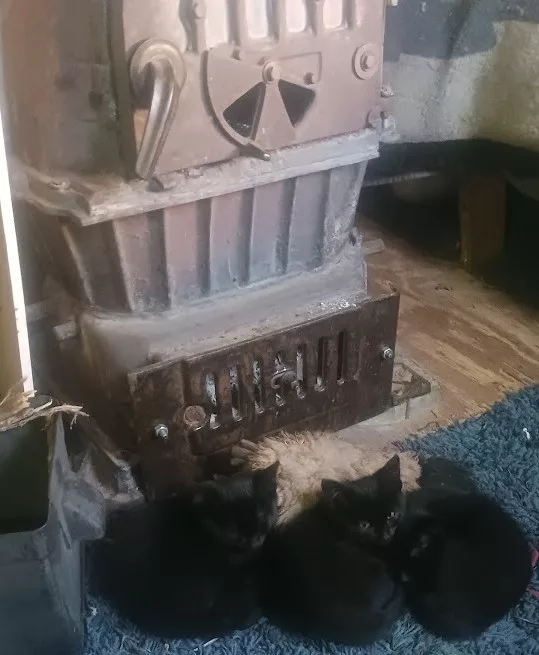
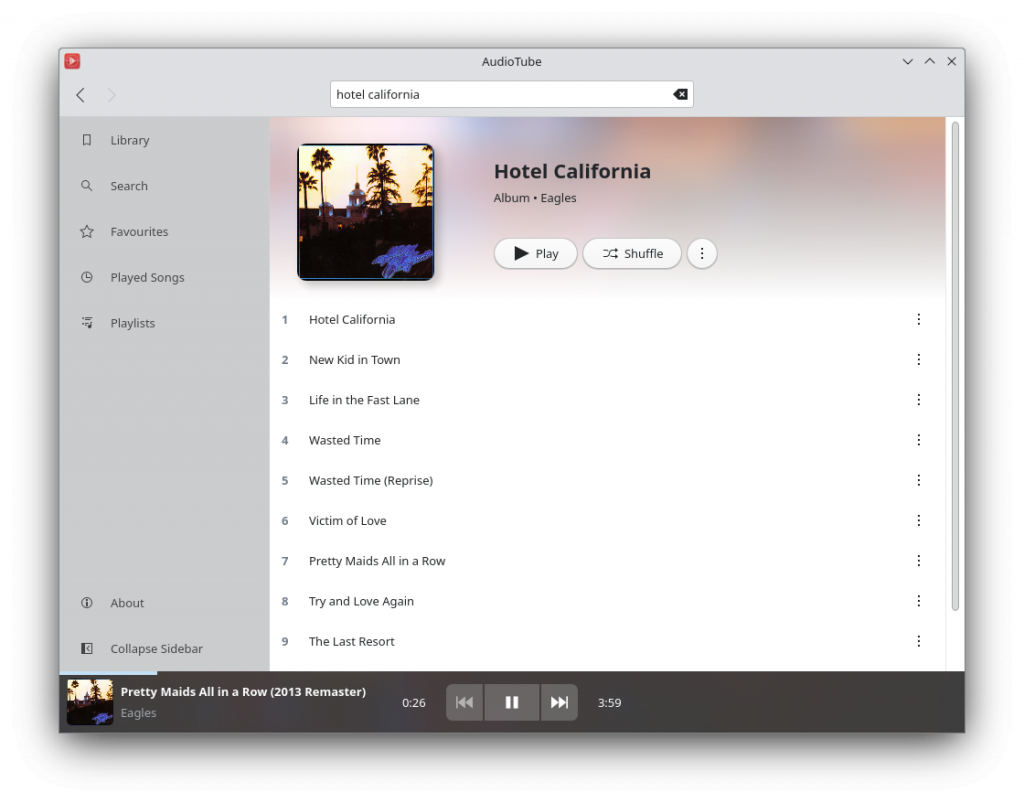






 The phrase "Root of Trust" turns up at various points in discussions about verified boot and measured boot, and to a first approximation nobody is able to give you a coherent explanation of what it means[1]. The Trusted Computing Group has a fairly wordy
  I m calling time on DNSSEC. Last week, prompted by a change in my DNS hosting setup, I began removing it from the few personal zones I had signed. Then this Monday the .nz ccTLD experienced a
  Kweather Snap








 This is the second part of how I build a read-only root setup for my router. You might want to read