I've always known that the browser uses the Domain Name Resolution (DNS) system to convert domain names like aezign.com.au into raw IP addresses, but have never actually understood how it works, outside of making sure my network config uses 1.1.1.1 or 8.8.8.8 instead of the crappy one the ISP provides. In this article, I set out to understand what nameservers do, and how they help anything that uses the internet find the right records.
DNS in a nutshellA well-used analogy is a phonebook; when you have someone's name and need to find their phone number, you look through the phonebook. Overall, DNS does the same thing: when you enter an address like example.com, your browser will contact a DNS server (the "phonebook") to determine its IP addresses. On Linux (or MacOS) systems, you can use dig on the command line to perform a DNS lookup and see what this looks like:
$ dig example.com
; <<>> DiG 9.20.29-1-Debian <<>> example.com
;; global options: +cmd
;; Got answer:
;; ->>HEADER<<- opcode: QUERY, status: NOERROR, id: 42782
;; flags: qr rd ra; QUERY: 1, ANSWER: 2, AUTHORITY: 0, ADDITIONAL: 1
;; OPT PSEUDOSECTION:
; EDNS: version: 0, flags:; udp: 1232
;; QUESTION SECTION:
;example.com.                   IN      A
;; ANSWER SECTION:
example.com.            221     IN      A       104.20.23.154
example.com.            221     IN      A       172.66.147.243
;; Query time: 20 msec
;; SERVER: 1.1.1.1#53(1.1.1.1) (UDP)
;; WHEN: Sun Sep 27 21:07:50 AWST 2026
;; MSG SIZE  rcvd: 72
Here, you can see the DNS server being used is 1.1.1.1 (Cloudflare's DNS server), and that it found the IPs 104.20.23.154 and 172.66.147.243 associated with the domain name example.com. Your browser will then contact these IP addresses directly to load the website you are trying to open.
Configuring DNS serversYou can configure DNS servers through your operating system's network settings, and for some applications such as Firefox, with the application itself. If you don't manually set a DNS server, your computer will use the ones provided by your modem. If those are not configured, the default defined by the modem manufacturer or your ISP will be used.The most well-used and reliable DNS servers you can use are Cloudflare's (1.1.1.1 and 1.0.0.1) and Google's (8.8.8.8 and 8.8.4.4). Having more than one DNS server means that if the first one in the list doesn't work or doesn't find the matching IPs for a domain name, it will move to the next one in the list, a backup DNS server.DNS servers must be configured as IP addresses. If your computer tried to use a DNS server at a domain name, then where would your computer find the IP address for that domain name? It wouldn't be able to, as this is the exact gap that DNS servers fulfill.
RecordsDNS is not used only to find IPs for a domain, but a whole host of other things. Collectively they are referred to as "records" (or "DNS records"). Each record is associated to a domain (e.g. example.com) or a subdomain (e.g. bar.example.com, foo.bar.example.com) Here are some of the most common and important types:
A - Map to an IPv4 address (e.g. 104.20.23.154).This is the fundamental function of DNS: to map from a domain name to a server's IP address. Multiple A records leads to load balancing, where browsers will randomly select one of the returned IP addresses such that traffic is evenly split between them.
AAAA - Map to an IPv6 address (e.g. 2606:4700:10::6814:179a).This serves the same purpose as A records but for IPv6. Multiple AAAA records results in the same load balancing behaviour. All modern websites should have both an A record for legacy compatibility, and an AAAA record to future-proof for the gradual shift towards IPv6 addresses.
CNAME - Alias to another domain name (e.g. example.com).DNS servers will recursively lookup records for the aliased domain name until they reach an IP address (in an A or AAAA record).
MX - Specify a Mail Exchange server (e.g. mail.example.com).This record tells email SMTP servers where to direct emails to. For instance, the MX record for aezign.com.au is mail.aezign.au; this directs SMTP servers like Gmail and Outlook to send emails to the mailserver running at mail.aezign.au. This also allows specifying a priority field, so that you can define multiple MX records (such as a main and a backup) and consumers will try to connect to the listed mailservers from lowest priority to highest.
TXT - Store arbitrary text dataThis is most commonly used for site verification (for instance, to link your website to Google Search Console) and for email security measures like DKIM, DMARC, and SPF.
NS - Specify the nameservers for a domain (e.g. zeus.ns.cloudflare.com).These authoritative nameservers are responsible for providing all the other record types when needed.
dig lets you query each of these. For instance, to list the MX records against aezign.com.au:
Here you can see there is only one mailserver configured for aezign.com.au, which is mail.aezign.au, and it has a priority of 10.If you compare this against something like gmail.com:
You can see that gmail.com has several mailservers configured as redundancies due to the Gmail's sheer scale. gmail-smtp-in.l.google.com has the highest priority of 5, so SMTP servers will attempt to contact that mailserver first, followed by alt1.gmail-smtp-in.l.google.com and so on.
NameserversNow there needs to be somewhere for DNS records against a domain name to be defined, right? This is where nameservers come in.Nameservers are DNS servers that answer queries about the domains they are authoritative for i.e. the domains they are in charge of. For example, the authoritative nameservers for example.com are hera.ns.cloudflare.com and elliott.ns.cloudflare.com, which means Cloudflare's nameservers are the source of truth when looking up DNS records for example.com. You can check this with dig:
Nameservers are configured with your domain name's registrar. The nameserver you set dictates where your remaining DNS records will live. For example.com, this means you would configure all your records on Cloudflare's dashboard, since they are responsible for the domain's DNS records.
Recursive resolutionThe DNS servers that our computers use follow a recursive resolution process behind-the-scenes to find the authoritative nameservers for a domain, followed by the records you are querying.
Finding the root nameserversDue to the recursive nature of the resolution process, there needs to be a starting point: the root (.) nameservers. The resolver uses a fixed list of root nameservers called root hints issued by IANA (named.root), to locate and contact the root nameservers. Resolvers will have this provided to them initially, and can dynamically update it themselves by querying one of the root nameservers for the root NS records to obtain a fresh list. For instance, we can query 198.41.0.4 (a.root-servers.net) to obtain a new list of root nameservers:
$ dig @198.41.0.4 NS .
; <<>> DiG 9.20.29-1-Debian <<>> @198.41.0.4 NS .
; (1 server found)
;; global options: +cmd
;; Got answer:
;; ->>HEADER<<- opcode: QUERY, status: NOERROR, id: 43677
;; flags: qr aa rd; QUERY: 1, ANSWER: 13, AUTHORITY: 0, ADDITIONAL: 27
;; WARNING: recursion requested but not available
;; OPT PSEUDOSECTION:
; EDNS: version: 0, flags:; udp: 4096
;; QUESTION SECTION:
;.				IN	NS
;; ANSWER SECTION:
.			518400	IN	NS	l.root-servers.net.
.			518400	IN	NS	j.root-servers.net.
.			518400	IN	NS	f.root-servers.net.
.			518400	IN	NS	h.root-servers.net.
.			518400	IN	NS	d.root-servers.net.
.			518400	IN	NS	b.root-servers.net.
.			518400	IN	NS	k.root-servers.net.
.			518400	IN	NS	i.root-servers.net.
.			518400	IN	NS	m.root-servers.net.
.			518400	IN	NS	e.root-servers.net.
.			518400	IN	NS	g.root-servers.net.
.			518400	IN	NS	c.root-servers.net.
.			518400	IN	NS	a.root-servers.net.
;; ADDITIONAL SECTION:
l.root-servers.net.	518400	IN	A	199.7.83.42
l.root-servers.net.	518400	IN	AAAA	2001:500:9f::42
j.root-servers.net.	518400	IN	A	192.58.128.30
j.root-servers.net.	518400	IN	AAAA	2001:503:c27::2:30
f.root-servers.net.	518400	IN	A	192.5.5.241
f.root-servers.net.	518400	IN	AAAA	2001:500:2f::f
h.root-servers.net.	518400	IN	A	198.97.190.53
h.root-servers.net.	518400	IN	AAAA	2001:500:1::53
d.root-servers.net.	518400	IN	A	199.7.91.13
d.root-servers.net.	518400	IN	AAAA	2001:500:2d::d
b.root-servers.net.	518400	IN	A	170.247.170.2
b.root-servers.net.	518400	IN	AAAA	2801:1b8:10::b
k.root-servers.net.	518400	IN	A	193.0.14.129
k.root-servers.net.	518400	IN	AAAA	2001:7fd::1
i.root-servers.net.	518400	IN	A	192.36.148.17
i.root-servers.net.	518400	IN	AAAA	2001:7fe::53
m.root-servers.net.	518400	IN	A	202.12.27.33
m.root-servers.net.	518400	IN	AAAA	2001:dc3::35
e.root-servers.net.	518400	IN	A	192.203.230.10
e.root-servers.net.	518400	IN	AAAA	2001:500:a8::e
g.root-servers.net.	518400	IN	A	192.112.36.4
g.root-servers.net.	518400	IN	AAAA	2001:500:12::d0d
c.root-servers.net.	518400	IN	A	192.33.4.12
c.root-servers.net.	518400	IN	AAAA	2001:500:2::c
a.root-servers.net.	518400	IN	A	198.41.0.4
a.root-servers.net.	518400	IN	AAAA	2001:503:ba3e::2:30
;; Query time: 476 msec
;; SERVER: 198.41.0.4#53(198.41.0.4) (UDP)
;; WHEN: Mon Sep 28 00:01:08 AWST 2026
;; MSG SIZE  rcvd: 811
Querying the root nameserversFor example.com, the first step is to query the root (.) nameservers to find the nameservers for the .com top-level domain (TLD). Using a.root-servers.net again:
$ dig @198.41.0.4 NS com
; <<>> DiG 9.20.29-1-Debian <<>> @198.41.0.4 NS com
; (1 server found)
;; global options: +cmd
;; Got answer:
;; ->>HEADER<<- opcode: QUERY, status: NOERROR, id: 22528
;; flags: qr rd; QUERY: 1, ANSWER: 0, AUTHORITY: 13, ADDITIONAL: 27
;; WARNING: recursion requested but not available
;; OPT PSEUDOSECTION:
; EDNS: version: 0, flags:; udp: 4096
;; QUESTION SECTION:
;com.				IN	NS
;; AUTHORITY SECTION:
com.			172800	IN	NS	l.gtld-servers.net.
com.			172800	IN	NS	j.gtld-servers.net.
com.			172800	IN	NS	h.gtld-servers.net.
com.			172800	IN	NS	d.gtld-servers.net.
com.			172800	IN	NS	b.gtld-servers.net.
com.			172800	IN	NS	f.gtld-servers.net.
com.			172800	IN	NS	k.gtld-servers.net.
com.			172800	IN	NS	m.gtld-servers.net.
com.			172800	IN	NS	i.gtld-servers.net.
com.			172800	IN	NS	g.gtld-servers.net.
com.			172800	IN	NS	a.gtld-servers.net.
com.			172800	IN	NS	c.gtld-servers.net.
com.			172800	IN	NS	e.gtld-servers.net.
;; ADDITIONAL SECTION:
l.gtld-servers.net.	172800	IN	A	192.41.162.30
l.gtld-servers.net.	172800	IN	AAAA	2001:500:d937::30
j.gtld-servers.net.	172800	IN	A	192.48.79.30
j.gtld-servers.net.	172800	IN	AAAA	2001:502:7094::30
h.gtld-servers.net.	172800	IN	A	192.54.112.30
h.gtld-servers.net.	172800	IN	AAAA	2001:502:8cc::30
d.gtld-servers.net.	172800	IN	A	192.31.80.30
d.gtld-servers.net.	172800	IN	AAAA	2001:500:856e::30
b.gtld-servers.net.	172800	IN	A	192.33.14.30
b.gtld-servers.net.	172800	IN	AAAA	2001:503:231d::2:30
f.gtld-servers.net.	172800	IN	A	192.35.51.30
f.gtld-servers.net.	172800	IN	AAAA	2001:503:d414::30
k.gtld-servers.net.	172800	IN	A	192.52.178.30
k.gtld-servers.net.	172800	IN	AAAA	2001:503:d2d::30
m.gtld-servers.net.	172800	IN	A	192.55.83.30
m.gtld-servers.net.	172800	IN	AAAA	2001:501:b1f9::30
i.gtld-servers.net.	172800	IN	A	192.43.172.30
i.gtld-servers.net.	172800	IN	AAAA	2001:503:39c1::30
g.gtld-servers.net.	172800	IN	A	192.42.93.30
g.gtld-servers.net.	172800	IN	AAAA	2001:503:eea3::30
a.gtld-servers.net.	172800	IN	A	192.5.6.30
a.gtld-servers.net.	172800	IN	AAAA	2001:503:a83e::2:30
c.gtld-servers.net.	172800	IN	A	192.26.92.30
c.gtld-servers.net.	172800	IN	AAAA	2001:503:83eb::30
e.gtld-servers.net.	172800	IN	A	192.12.94.30
e.gtld-servers.net.	172800	IN	AAAA	2001:502:1ca1::30
;; Query time: 772 msec
;; SERVER: 198.41.0.4#53(198.41.0.4) (UDP)
;; WHEN: Mon Sep 28 00:09:25 AWST 2026
;; MSG SIZE  rcvd: 828
Querying the TLD nameserversNow the resolver has .com nameservers and their IPs. We can use one of these, such as 192.5.6.30 (a.gtld-servers.net) to find the nameservers for example.com:
$ dig @192.5.6.30 NS example.com
; <<>> DiG 9.20.29-1-Debian <<>> @192.5.6.30 NS example.com
; (1 server found)
;; global options: +cmd
;; Got answer:
;; ->>HEADER<<- opcode: QUERY, status: NOERROR, id: 37419
;; flags: qr rd; QUERY: 1, ANSWER: 0, AUTHORITY: 2, ADDITIONAL: 13
;; WARNING: recursion requested but not available
;; OPT PSEUDOSECTION:
; EDNS: version: 0, flags:; udp: 4096
;; QUESTION SECTION:
;example.com.                   IN      NS
;; AUTHORITY SECTION:
example.com.            172800  IN      NS      hera.ns.cloudflare.com.
example.com.            172800  IN      NS      elliott.ns.cloudflare.com.
;; ADDITIONAL SECTION:
hera.ns.cloudflare.com. 172800  IN      A       108.162.192.162
hera.ns.cloudflare.com. 172800  IN      A       172.64.32.162
hera.ns.cloudflare.com. 172800  IN      A       173.245.58.162
hera.ns.cloudflare.com. 172800  IN      AAAA    2606:4700:50::adf5:3aa2
hera.ns.cloudflare.com. 172800  IN      AAAA    2803:f800:50::6ca2:c0a2
hera.ns.cloudflare.com. 172800  IN      AAAA    2a06:98c1:50::ac40:20a2
elliott.ns.cloudflare.com. 172800 IN    A       108.162.195.228
elliott.ns.cloudflare.com. 172800 IN    A       162.159.44.228
elliott.ns.cloudflare.com. 172800 IN    A       172.64.35.228
elliott.ns.cloudflare.com. 172800 IN    AAAA    2606:4700:58::a29f:2ce4
elliott.ns.cloudflare.com. 172800 IN    AAAA    2803:f800:50::6ca2:c3e4
elliott.ns.cloudflare.com. 172800 IN    AAAA    2a06:98c1:50::ac40:23e4
;; Query time: 80 msec
;; SERVER: 192.5.6.30#53(192.5.6.30) (UDP)
;; WHEN: Mon Sep 28 00:12:19 AWST 2026
;; MSG SIZE  rcvd: 359
Finding the domain's nameserverThe response tells the resolver that the nameservers for example.com are hera.ns.cloudflare.com and elliott.ns.cloudflare.com. Now since these Cloudflare nameservers are also .com domains and Cloudflare is so commonly used, the .com nameserver provides optional sibling glue records as defined in RFC 9471 to prevent further roundtrips and optimize the process.If we ignore the sibling glue records provided, the resolver would have to ask the .com nameservers for the nameservers for cloudflare.com:
$ dig @192.5.6.30 NS cloudflare.com
; <<>> DiG 9.20.29-1-Debian <<>> @192.5.6.30 NS cloudflare.com
; (1 server found)
;; global options: +cmd
;; Got answer:
;; ->>HEADER<<- opcode: QUERY, status: NOERROR, id: 40307
;; flags: qr rd; QUERY: 1, ANSWER: 0, AUTHORITY: 5, ADDITIONAL: 21
;; WARNING: recursion requested but not available
;; OPT PSEUDOSECTION:
; EDNS: version: 0, flags:; udp: 4096
;; QUESTION SECTION:
;cloudflare.com.                        IN      NS
;; AUTHORITY SECTION:
cloudflare.com.         172800  IN      NS      ns3.cloudflare.com.
cloudflare.com.         172800  IN      NS      ns5.cloudflare.com.
cloudflare.com.         172800  IN      NS      ns4.cloudflare.com.
cloudflare.com.         172800  IN      NS      ns6.cloudflare.com.
cloudflare.com.         172800  IN      NS      ns7.cloudflare.com.
;; ADDITIONAL SECTION:
ns3.cloudflare.com.     172800  IN      A       162.159.0.33
ns3.cloudflare.com.     172800  IN      A       162.159.7.226
ns3.cloudflare.com.     172800  IN      AAAA    2400:cb00:2049:1::a29f:21
ns3.cloudflare.com.     172800  IN      AAAA    2400:cb00:2049:1::a29f:7e2
ns5.cloudflare.com.     172800  IN      A       162.159.2.9
ns5.cloudflare.com.     172800  IN      A       162.159.9.55
ns5.cloudflare.com.     172800  IN      AAAA    2400:cb00:2049:1::a29f:209
ns5.cloudflare.com.     172800  IN      AAAA    2400:cb00:2049:1::a29f:937
ns4.cloudflare.com.     172800  IN      A       162.159.1.33
ns4.cloudflare.com.     172800  IN      A       162.159.8.55
ns4.cloudflare.com.     172800  IN      AAAA    2400:cb00:2049:1::a29f:121
ns4.cloudflare.com.     172800  IN      AAAA    2400:cb00:2049:1::a29f:837
ns6.cloudflare.com.     172800  IN      A       162.159.3.11
ns6.cloudflare.com.     172800  IN      A       162.159.5.6
ns6.cloudflare.com.     172800  IN      AAAA    2400:cb00:2049:1::a29f:30b
ns6.cloudflare.com.     172800  IN      AAAA    2400:cb00:2049:1::a29f:506
ns7.cloudflare.com.     172800  IN      A       162.159.4.8
ns7.cloudflare.com.     172800  IN      A       162.159.6.6
ns7.cloudflare.com.     172800  IN      AAAA    2400:cb00:2049:1::a29f:408
ns7.cloudflare.com.     172800  IN      AAAA    2400:cb00:2049:1::a29f:606
;; Query time: 163 msec
;; SERVER: 192.5.6.30#53(192.5.6.30) (UDP)
;; WHEN: Mon Sep 28 00:26:53 AWST 2026
;; MSG SIZE  rcvd: 573
Here, the .com nameserver provides in-domain glue records for cloudflare.com's nameservers. Without these, there would be a circular dependency, since the nameserver named is a subdomain of the domain being queried for. This is because nameservers are always defined by name, which means that in order to actually contact the nameserver, your computer needs to obtain its IP address with another DNS lookup.Next, we'd use one of these nameservers, say ns3.cloudflare.com, to obtain the IP for hera.ns.cloudflare.com:
$ dig @162.159.0.33 hera.ns.cloudflare.com
; <<>> DiG 9.20.29-1-Debian <<>> @162.159.0.33 hera.ns.cloudflare.com
; (1 server found)
;; global options: +cmd
;; Got answer:
;; ->>HEADER<<- opcode: QUERY, status: NOERROR, id: 16801
;; flags: qr aa rd; QUERY: 1, ANSWER: 3, AUTHORITY: 0, ADDITIONAL: 1
;; WARNING: recursion requested but not available
;; OPT PSEUDOSECTION:
; EDNS: version: 0, flags:; udp: 1232
;; QUESTION SECTION:
;hera.ns.cloudflare.com.                IN      A
;; ANSWER SECTION:
hera.ns.cloudflare.com. 86353   IN      A       108.162.192.162
hera.ns.cloudflare.com. 86353   IN      A       173.245.58.162
hera.ns.cloudflare.com. 86353   IN      A       172.64.32.162
;; Query time: 123 msec
;; SERVER: 162.159.0.33#53(162.159.0.33) (UDP)
;; WHEN: Mon Sep 28 01:11:37 AWST 2026
;; MSG SIZE  rcvd: 99
Querying the domain's authoritative nameserverNow we've reached the authoritative nameserver for example.com! The last thing to do is to fetch the A record for example.com to obtain its server's IP address:
$ dig @108.162.192.162 example.com
; <<>> DiG 9.20.29-1-Debian <<>> @108.162.192.162 example.com
; (1 server found)
;; global options: +cmd
;; Got answer:
;; ->>HEADER<<- opcode: QUERY, status: NOERROR, id: 43082
;; flags: qr aa rd; QUERY: 1, ANSWER: 2, AUTHORITY: 0, ADDITIONAL: 1
;; WARNING: recursion requested but not available
;; OPT PSEUDOSECTION:
; EDNS: version: 0, flags:; udp: 1232
;; QUESTION SECTION:
;example.com.                   IN      A
;; ANSWER SECTION:
example.com.            300     IN      A       104.20.23.154
example.com.            300     IN      A       172.66.147.243
;; Query time: 123 msec
;; SERVER: 108.162.192.162#53(108.162.192.162) (UDP)
;; WHEN: Mon Sep 28 01:13:47 AWST 2026
;; MSG SIZE  rcvd: 72
At last, we've determined that the IP addresses of the servers behind example.com are 104.20.23.154 and 172.66.147.243. This matches our earlier lookup directly against your computer's configured DNS server.The DNS servers your computer uses encapsulate this recursive resolution process behind the scenes, so that your computer only needs to make one round trip, and the servers can use their much faster data center connections and caching to optimize the process and make the query as fast as possible.
Checking DNS recordsTo check a website's records, the first thing to do is to ensure the domain name is pointed at the correct nameserver. For instance, aezign.com.au is supposed to use Cloudflare, since that is where all the DNS records have been set up. We can verify this using dig, (or alternatively with online tools like dnschecker.org):
If this is not set correctly, the DNS records you configure will not work, as resolvers will be fetching records from somewhere else. In most cases, you can update this in your domain registrar's settings. This is especially common for new domain names, which default to the registrar's nameservers; unless you plan to use their built-in DNS management, you'll need to point them to your chosen provider.Now we can check that the DNS records configured match those your DNS server returns. For aezign.com.au, these are the MX and TXT records configured on Cloudflare. The MX record and some TXT records configured for aezign.com.au on Cloudflare's dashboard.We can check these using dig, and using the +short option to show only the content of the records.
As we can see, this matches, which means that the nameservers for aezign.com.au are correct and the DNS records are what we intend them to be.Note that if you've recently changed the nameserver or DNS records for your domain, it can take anywhere between 10 seconds and 24 hours for the changes to take effect and propagate across the different DNS servers globally. Tools like dnschecker.org can check your records on different DNS servers worldwide to see if they're reflecting your changes. The reason for this is caching: DNS servers like 1.1.1.1 will cache results so it doesn't have to do the full resolution process every time, and uses the Time-To-Live (TTL) you configure in your DNS records as a guideline for caching duration.
The Domain Name System (DNS) is a fundamental piece of technology behind the modern internet. Thanks to its introduction in 1983, you're able to enter domain names like aezign.com.au instead of raw IP addresses in your browser's address bar and when sending emails. This article explains what it is, how it works, and how you can inspect your own website's DNS and ensure it is set up correctly.
DNS in a nutshellA well-used analogy is a phonebook; when you have someone's name and need to find their phone number, you look through the phonebook. Overall, DNS does the same thing: when you enter an address like example.com, your browser will contact a DNS server (the "phonebook") to determine its IP addresses. On Linux (or MacOS) systems, you can use dig on the command line to perform a DNS lookup and see what this looks like:
$ dig example.com
; <<>> DiG 9.20.29-1-Debian <<>> example.com
;; global options: +cmd
;; Got answer:
;; ->>HEADER<<- opcode: QUERY, status: NOERROR, id: 42782
;; flags: qr rd ra; QUERY: 1, ANSWER: 2, AUTHORITY: 0, ADDITIONAL: 1
;; OPT PSEUDOSECTION:
; EDNS: version: 0, flags:; udp: 1232
;; QUESTION SECTION:
;example.com.                   IN      A
;; ANSWER SECTION:
example.com.            221     IN      A       104.20.23.154
example.com.            221     IN      A       172.66.147.243
;; Query time: 20 msec
;; SERVER: 1.1.1.1#53(1.1.1.1) (UDP)
;; WHEN: Sun Sep 27 21:07:50 AWST 2026
;; MSG SIZE  rcvd: 72
Here, you can see the DNS server being used is 1.1.1.1 (Cloudflare's DNS server), and that it found the IPs 104.20.23.154 and 172.66.147.243 associated with the domain name example.com. Your browser will then contact these IP addresses directly to load the website you are trying to open.
Configuring DNS serversYou can configure DNS servers through your operating system's network settings, and for some applications such as Firefox, with the application itself. If you don't manually set a DNS server, your computer will use the ones provided by your modem. If those are not configured, the default defined by the modem manufacturer or your ISP will be used.The most well-used and reliable DNS servers you can use are Cloudflare's (1.1.1.1 and 1.0.0.1) and Google's (8.8.8.8 and 8.8.4.4). Having more than one DNS server means that if the first one in the list doesn't work or doesn't find the matching IPs for a domain name, it will move to the next one in the list, a backup DNS server.DNS servers must be configured as IP addresses. If your computer tried to use a DNS server at a domain name, then where would your computer find the IP address for that domain name? It wouldn't be able to, as this is the exact gap that DNS servers fulfill.
RecordsDNS is not used only to find IPs for a domain, but a whole host of other things. Collectively they are referred to as "records" (or "DNS records"). Each record is associated to a domain (e.g. example.com) or a subdomain (e.g. bar.example.com, foo.bar.example.com) Here are some of the most common and important types:
A - Map to an IPv4 address (e.g. 104.20.23.154).This is the fundamental function of DNS: to map from a domain name to a server's IP address. Multiple A records leads to load balancing, where browsers will randomly select one of the returned IP addresses such that traffic is evenly split between them.
AAAA - Map to an IPv6 address (e.g. 2606:4700:10::6814:179a).This serves the same purpose as A records but for IPv6. Multiple AAAA records results in the same load balancing behaviour. All modern websites should have both an A record for legacy compatibility, and an AAAA record to future-proof for the gradual shift towards IPv6 addresses.
CNAME - Alias to another domain name (e.g. example.com).DNS servers will recursively lookup records for the aliased domain name until they reach an IP address (in an A or AAAA record).
MX - Specify a Mail Exchange server (e.g. mail.example.com).This record tells email SMTP servers where to direct emails to. For instance, the MX record for aezign.com.au is mail.aezign.au; this directs SMTP servers like Gmail and Outlook to send emails to the mailserver running at mail.aezign.au. This also allows specifying a priority field, so that you can define multiple MX records (such as a main and a backup) and consumers will try to connect to the listed mailservers from lowest priority to highest.
TXT - Store arbitrary text dataThis is most commonly used for site verification (for instance, to link your website to Google Search Console) and for email security measures like DKIM, DMARC, and SPF.
NS - Specify the nameservers for a domain (e.g. zeus.ns.cloudflare.com).These authoritative nameservers are responsible for providing all the other record types when needed.
dig lets you query each of these. For instance, to list the MX records against aezign.com.au:
Here you can see there is only one mailserver configured for aezign.com.au, which is mail.aezign.au, and it has a priority of 10.If you compare this against something like gmail.com:
You can see that gmail.com has several mailservers configured as redundancies due to the Gmail's sheer scale. gmail-smtp-in.l.google.com has the highest priority of 5, so SMTP servers will attempt to contact that mailserver first, followed by alt1.gmail-smtp-in.l.google.com and so on.
NameserversNow there needs to be somewhere for DNS records against a domain name to be defined, right? This is where nameservers come in.Nameservers are DNS servers that answer queries about the domains they are authoritative for i.e. the domains they are in charge of. For example, the authoritative nameservers for example.com are hera.ns.cloudflare.com and elliott.ns.cloudflare.com, which means Cloudflare's nameservers are the source of truth when looking up DNS records for example.com. You can check this with dig:
Nameservers are configured with your domain name's registrar. The nameserver you set dictates where your remaining DNS records will live. For example.com, this means you would configure all your records on Cloudflare's dashboard, since they are responsible for the domain's DNS records.
Recursive resolutionThe DNS servers that our computers use follow a recursive resolution process behind-the-scenes to find the authoritative nameservers for a domain, followed by the records you are querying.
Finding the root nameserversDue to the recursive nature of the resolution process, there needs to be a starting point: the root (.) nameservers. The resolver uses a fixed list of root nameservers called root hints issued by IANA (named.root), to locate and contact the root nameservers. Resolvers will have this provided to them initially, and can dynamically update it themselves by querying one of the root nameservers for the root NS records to obtain a fresh list. For instance, we can query 198.41.0.4 (a.root-servers.net) to obtain a new list of root nameservers:
$ dig @198.41.0.4 NS .
; <<>> DiG 9.20.29-1-Debian <<>> @198.41.0.4 NS .
; (1 server found)
;; global options: +cmd
;; Got answer:
;; ->>HEADER<<- opcode: QUERY, status: NOERROR, id: 43677
;; flags: qr aa rd; QUERY: 1, ANSWER: 13, AUTHORITY: 0, ADDITIONAL: 27
;; WARNING: recursion requested but not available
;; OPT PSEUDOSECTION:
; EDNS: version: 0, flags:; udp: 4096
;; QUESTION SECTION:
;.				IN	NS
;; ANSWER SECTION:
.			518400	IN	NS	l.root-servers.net.
.			518400	IN	NS	j.root-servers.net.
.			518400	IN	NS	f.root-servers.net.
.			518400	IN	NS	h.root-servers.net.
.			518400	IN	NS	d.root-servers.net.
.			518400	IN	NS	b.root-servers.net.
.			518400	IN	NS	k.root-servers.net.
.			518400	IN	NS	i.root-servers.net.
.			518400	IN	NS	m.root-servers.net.
.			518400	IN	NS	e.root-servers.net.
.			518400	IN	NS	g.root-servers.net.
.			518400	IN	NS	c.root-servers.net.
.			518400	IN	NS	a.root-servers.net.
;; ADDITIONAL SECTION:
l.root-servers.net.	518400	IN	A	199.7.83.42
l.root-servers.net.	518400	IN	AAAA	2001:500:9f::42
j.root-servers.net.	518400	IN	A	192.58.128.30
j.root-servers.net.	518400	IN	AAAA	2001:503:c27::2:30
f.root-servers.net.	518400	IN	A	192.5.5.241
f.root-servers.net.	518400	IN	AAAA	2001:500:2f::f
h.root-servers.net.	518400	IN	A	198.97.190.53
h.root-servers.net.	518400	IN	AAAA	2001:500:1::53
d.root-servers.net.	518400	IN	A	199.7.91.13
d.root-servers.net.	518400	IN	AAAA	2001:500:2d::d
b.root-servers.net.	518400	IN	A	170.247.170.2
b.root-servers.net.	518400	IN	AAAA	2801:1b8:10::b
k.root-servers.net.	518400	IN	A	193.0.14.129
k.root-servers.net.	518400	IN	AAAA	2001:7fd::1
i.root-servers.net.	518400	IN	A	192.36.148.17
i.root-servers.net.	518400	IN	AAAA	2001:7fe::53
m.root-servers.net.	518400	IN	A	202.12.27.33
m.root-servers.net.	518400	IN	AAAA	2001:dc3::35
e.root-servers.net.	518400	IN	A	192.203.230.10
e.root-servers.net.	518400	IN	AAAA	2001:500:a8::e
g.root-servers.net.	518400	IN	A	192.112.36.4
g.root-servers.net.	518400	IN	AAAA	2001:500:12::d0d
c.root-servers.net.	518400	IN	A	192.33.4.12
c.root-servers.net.	518400	IN	AAAA	2001:500:2::c
a.root-servers.net.	518400	IN	A	198.41.0.4
a.root-servers.net.	518400	IN	AAAA	2001:503:ba3e::2:30
;; Query time: 476 msec
;; SERVER: 198.41.0.4#53(198.41.0.4) (UDP)
;; WHEN: Mon Sep 28 00:01:08 AWST 2026
;; MSG SIZE  rcvd: 811
Querying the root nameserversFor example.com, the first step is to query the root (.) nameservers to find the nameservers for the .com top-level domain (TLD). Using a.root-servers.net again:
$ dig @198.41.0.4 NS com
; <<>> DiG 9.20.29-1-Debian <<>> @198.41.0.4 NS com
; (1 server found)
;; global options: +cmd
;; Got answer:
;; ->>HEADER<<- opcode: QUERY, status: NOERROR, id: 22528
;; flags: qr rd; QUERY: 1, ANSWER: 0, AUTHORITY: 13, ADDITIONAL: 27
;; WARNING: recursion requested but not available
;; OPT PSEUDOSECTION:
; EDNS: version: 0, flags:; udp: 4096
;; QUESTION SECTION:
;com.				IN	NS
;; AUTHORITY SECTION:
com.			172800	IN	NS	l.gtld-servers.net.
com.			172800	IN	NS	j.gtld-servers.net.
com.			172800	IN	NS	h.gtld-servers.net.
com.			172800	IN	NS	d.gtld-servers.net.
com.			172800	IN	NS	b.gtld-servers.net.
com.			172800	IN	NS	f.gtld-servers.net.
com.			172800	IN	NS	k.gtld-servers.net.
com.			172800	IN	NS	m.gtld-servers.net.
com.			172800	IN	NS	i.gtld-servers.net.
com.			172800	IN	NS	g.gtld-servers.net.
com.			172800	IN	NS	a.gtld-servers.net.
com.			172800	IN	NS	c.gtld-servers.net.
com.			172800	IN	NS	e.gtld-servers.net.
;; ADDITIONAL SECTION:
l.gtld-servers.net.	172800	IN	A	192.41.162.30
l.gtld-servers.net.	172800	IN	AAAA	2001:500:d937::30
j.gtld-servers.net.	172800	IN	A	192.48.79.30
j.gtld-servers.net.	172800	IN	AAAA	2001:502:7094::30
h.gtld-servers.net.	172800	IN	A	192.54.112.30
h.gtld-servers.net.	172800	IN	AAAA	2001:502:8cc::30
d.gtld-servers.net.	172800	IN	A	192.31.80.30
d.gtld-servers.net.	172800	IN	AAAA	2001:500:856e::30
b.gtld-servers.net.	172800	IN	A	192.33.14.30
b.gtld-servers.net.	172800	IN	AAAA	2001:503:231d::2:30
f.gtld-servers.net.	172800	IN	A	192.35.51.30
f.gtld-servers.net.	172800	IN	AAAA	2001:503:d414::30
k.gtld-servers.net.	172800	IN	A	192.52.178.30
k.gtld-servers.net.	172800	IN	AAAA	2001:503:d2d::30
m.gtld-servers.net.	172800	IN	A	192.55.83.30
m.gtld-servers.net.	172800	IN	AAAA	2001:501:b1f9::30
i.gtld-servers.net.	172800	IN	A	192.43.172.30
i.gtld-servers.net.	172800	IN	AAAA	2001:503:39c1::30
g.gtld-servers.net.	172800	IN	A	192.42.93.30
g.gtld-servers.net.	172800	IN	AAAA	2001:503:eea3::30
a.gtld-servers.net.	172800	IN	A	192.5.6.30
a.gtld-servers.net.	172800	IN	AAAA	2001:503:a83e::2:30
c.gtld-servers.net.	172800	IN	A	192.26.92.30
c.gtld-servers.net.	172800	IN	AAAA	2001:503:83eb::30
e.gtld-servers.net.	172800	IN	A	192.12.94.30
e.gtld-servers.net.	172800	IN	AAAA	2001:502:1ca1::30
;; Query time: 772 msec
;; SERVER: 198.41.0.4#53(198.41.0.4) (UDP)
;; WHEN: Mon Sep 28 00:09:25 AWST 2026
;; MSG SIZE  rcvd: 828
Querying the TLD nameserversNow the resolver has .com nameservers and their IPs. We can use one of these, such as 192.5.6.30 (a.gtld-servers.net) to find the nameservers for example.com:
$ dig @192.5.6.30 NS example.com
; <<>> DiG 9.20.29-1-Debian <<>> @192.5.6.30 NS example.com
; (1 server found)
;; global options: +cmd
;; Got answer:
;; ->>HEADER<<- opcode: QUERY, status: NOERROR, id: 37419
;; flags: qr rd; QUERY: 1, ANSWER: 0, AUTHORITY: 2, ADDITIONAL: 13
;; WARNING: recursion requested but not available
;; OPT PSEUDOSECTION:
; EDNS: version: 0, flags:; udp: 4096
;; QUESTION SECTION:
;example.com.                   IN      NS
;; AUTHORITY SECTION:
example.com.            172800  IN      NS      hera.ns.cloudflare.com.
example.com.            172800  IN      NS      elliott.ns.cloudflare.com.
;; ADDITIONAL SECTION:
hera.ns.cloudflare.com. 172800  IN      A       108.162.192.162
hera.ns.cloudflare.com. 172800  IN      A       172.64.32.162
hera.ns.cloudflare.com. 172800  IN      A       173.245.58.162
hera.ns.cloudflare.com. 172800  IN      AAAA    2606:4700:50::adf5:3aa2
hera.ns.cloudflare.com. 172800  IN      AAAA    2803:f800:50::6ca2:c0a2
hera.ns.cloudflare.com. 172800  IN      AAAA    2a06:98c1:50::ac40:20a2
elliott.ns.cloudflare.com. 172800 IN    A       108.162.195.228
elliott.ns.cloudflare.com. 172800 IN    A       162.159.44.228
elliott.ns.cloudflare.com. 172800 IN    A       172.64.35.228
elliott.ns.cloudflare.com. 172800 IN    AAAA    2606:4700:58::a29f:2ce4
elliott.ns.cloudflare.com. 172800 IN    AAAA    2803:f800:50::6ca2:c3e4
elliott.ns.cloudflare.com. 172800 IN    AAAA    2a06:98c1:50::ac40:23e4
;; Query time: 80 msec
;; SERVER: 192.5.6.30#53(192.5.6.30) (UDP)
;; WHEN: Mon Sep 28 00:12:19 AWST 2026
;; MSG SIZE  rcvd: 359
Finding the domain's nameserverThe response tells the resolver that the nameservers for example.com are hera.ns.cloudflare.com and elliott.ns.cloudflare.com. Now since these Cloudflare nameservers are also .com domains and Cloudflare is so commonly used, the .com nameserver provides optional sibling glue records as defined in RFC 9471 to prevent further roundtrips and optimize the process.If we ignore the sibling glue records provided, the resolver would have to ask the .com nameservers for the nameservers for cloudflare.com:
$ dig @192.5.6.30 NS cloudflare.com
; <<>> DiG 9.20.29-1-Debian <<>> @192.5.6.30 NS cloudflare.com
; (1 server found)
;; global options: +cmd
;; Got answer:
;; ->>HEADER<<- opcode: QUERY, status: NOERROR, id: 40307
;; flags: qr rd; QUERY: 1, ANSWER: 0, AUTHORITY: 5, ADDITIONAL: 21
;; WARNING: recursion requested but not available
;; OPT PSEUDOSECTION:
; EDNS: version: 0, flags:; udp: 4096
;; QUESTION SECTION:
;cloudflare.com.                        IN      NS
;; AUTHORITY SECTION:
cloudflare.com.         172800  IN      NS      ns3.cloudflare.com.
cloudflare.com.         172800  IN      NS      ns5.cloudflare.com.
cloudflare.com.         172800  IN      NS      ns4.cloudflare.com.
cloudflare.com.         172800  IN      NS      ns6.cloudflare.com.
cloudflare.com.         172800  IN      NS      ns7.cloudflare.com.
;; ADDITIONAL SECTION:
ns3.cloudflare.com.     172800  IN      A       162.159.0.33
ns3.cloudflare.com.     172800  IN      A       162.159.7.226
ns3.cloudflare.com.     172800  IN      AAAA    2400:cb00:2049:1::a29f:21
ns3.cloudflare.com.     172800  IN      AAAA    2400:cb00:2049:1::a29f:7e2
ns5.cloudflare.com.     172800  IN      A       162.159.2.9
ns5.cloudflare.com.     172800  IN      A       162.159.9.55
ns5.cloudflare.com.     172800  IN      AAAA    2400:cb00:2049:1::a29f:209
ns5.cloudflare.com.     172800  IN      AAAA    2400:cb00:2049:1::a29f:937
ns4.cloudflare.com.     172800  IN      A       162.159.1.33
ns4.cloudflare.com.     172800  IN      A       162.159.8.55
ns4.cloudflare.com.     172800  IN      AAAA    2400:cb00:2049:1::a29f:121
ns4.cloudflare.com.     172800  IN      AAAA    2400:cb00:2049:1::a29f:837
ns6.cloudflare.com.     172800  IN      A       162.159.3.11
ns6.cloudflare.com.     172800  IN      A       162.159.5.6
ns6.cloudflare.com.     172800  IN      AAAA    2400:cb00:2049:1::a29f:30b
ns6.cloudflare.com.     172800  IN      AAAA    2400:cb00:2049:1::a29f:506
ns7.cloudflare.com.     172800  IN      A       162.159.4.8
ns7.cloudflare.com.     172800  IN      A       162.159.6.6
ns7.cloudflare.com.     172800  IN      AAAA    2400:cb00:2049:1::a29f:408
ns7.cloudflare.com.     172800  IN      AAAA    2400:cb00:2049:1::a29f:606
;; Query time: 163 msec
;; SERVER: 192.5.6.30#53(192.5.6.30) (UDP)
;; WHEN: Mon Sep 28 00:26:53 AWST 2026
;; MSG SIZE  rcvd: 573
Here, the .com nameserver provides in-domain glue records for cloudflare.com's nameservers. Without these, there would be a circular dependency, since the nameserver named is a subdomain of the domain being queried for. This is because nameservers are always defined by name, which means that in order to actually contact the nameserver, your computer needs to obtain its IP address with another DNS lookup.Next, we'd use one of these nameservers, say ns3.cloudflare.com, to obtain the IP for hera.ns.cloudflare.com:
$ dig @162.159.0.33 hera.ns.cloudflare.com
; <<>> DiG 9.20.29-1-Debian <<>> @162.159.0.33 hera.ns.cloudflare.com
; (1 server found)
;; global options: +cmd
;; Got answer:
;; ->>HEADER<<- opcode: QUERY, status: NOERROR, id: 16801
;; flags: qr aa rd; QUERY: 1, ANSWER: 3, AUTHORITY: 0, ADDITIONAL: 1
;; WARNING: recursion requested but not available
;; OPT PSEUDOSECTION:
; EDNS: version: 0, flags:; udp: 1232
;; QUESTION SECTION:
;hera.ns.cloudflare.com.                IN      A
;; ANSWER SECTION:
hera.ns.cloudflare.com. 86353   IN      A       108.162.192.162
hera.ns.cloudflare.com. 86353   IN      A       173.245.58.162
hera.ns.cloudflare.com. 86353   IN      A       172.64.32.162
;; Query time: 123 msec
;; SERVER: 162.159.0.33#53(162.159.0.33) (UDP)
;; WHEN: Mon Sep 28 01:11:37 AWST 2026
;; MSG SIZE  rcvd: 99
Querying the domain's authoritative nameserverNow we've reached the authoritative nameserver for example.com! The last thing to do is to fetch the A record for example.com to obtain its server's IP address:
$ dig @108.162.192.162 example.com
; <<>> DiG 9.20.29-1-Debian <<>> @108.162.192.162 example.com
; (1 server found)
;; global options: +cmd
;; Got answer:
;; ->>HEADER<<- opcode: QUERY, status: NOERROR, id: 43082
;; flags: qr aa rd; QUERY: 1, ANSWER: 2, AUTHORITY: 0, ADDITIONAL: 1
;; WARNING: recursion requested but not available
;; OPT PSEUDOSECTION:
; EDNS: version: 0, flags:; udp: 1232
;; QUESTION SECTION:
;example.com.                   IN      A
;; ANSWER SECTION:
example.com.            300     IN      A       104.20.23.154
example.com.            300     IN      A       172.66.147.243
;; Query time: 123 msec
;; SERVER: 108.162.192.162#53(108.162.192.162) (UDP)
;; WHEN: Mon Sep 28 01:13:47 AWST 2026
;; MSG SIZE  rcvd: 72
At last, we've determined that the IP addresses of the servers behind example.com are 104.20.23.154 and 172.66.147.243. This matches our earlier lookup directly against your computer's configured DNS server.The DNS servers your computer uses employ this recursive resolution technique behind the scenes, so that your computer only needs to make one round trip, and the servers can use their much faster data center connections and caching to optimize the process and make the query as fast as possible.
Verify your DNS recordsTo check your website's records, the first thing you'll want to do is ensure your domain name is pointed at the correct nameserver. For instance, aezign.com.au is supposed to use Cloudflare, since that is where all the DNS records have been set up. We can verify this using dig, (or alternatively with online tools like dnschecker.org):
If this is not set correctly, the DNS records you configure will not work, as resolvers will be fetching records from somewhere else. In most cases, you can update this in your domain registrar's settings. This is especially common for new domain names, which default to the registrar's nameservers; unless you plan to use their built-in DNS management, you'll need to point them to your chosen provider.Now we can check that the DNS records you've configured match those your DNS server returns. For aezign.com.au, these are the MX and TXT records configured on Cloudflare. The MX record and some TXT records configured for aezign.com.au on Cloudflare's dashboard.We can check these using dig, and using the +short option to show only the content of the records.
As we can see, this matches, which means that the nameservers for aezign.com.au are correct and the DNS records are what we intend them to be.Note that if you've recently changed the nameserver or DNS records for your domain, it can take anywhere between 10 seconds and 24 hours for the changes to take effect and propagate across the different DNS servers worldwide. Tools like dnschecker.org can check your records on different DNS servers worldwide to see if they're reflecting your changes. The reason for this is caching: DNS servers like 1.1.1.1 will cache results so it doesn't have to do the full resolution process every time, and uses the Time-To-Live (TTL) you configure in your DNS records as a guideline for caching duration.
-----BEGIN PGP SIGNED MESSAGE-----Hash:SHA512- -----BEGIN PGP SIGNED MESSAGE-----Hash:SHA512IamcurrentlytransitioningmyGPG/GPGkeyfromD/40960x12DDFA84AC23B2BBF04B313CAB645F406286A7D0toD/40960xA94C9FBFA49AA7CD4F40BB9F5E9030CCB48C1072.Thisfileisfirstsignedwiththenewkeyandthenwiththeoldone.------BEGINPGPSIGNATURE-----iQIzBAEBCgAdFiEEqUyfv6Sap81PQLufXpAwzLSMEHIFAmfE6RwACgkQXpAwzLSMEHJpUBAAwMAbOwGcRiuX/aBjqDMA9HerRgimNWE9xA35Asg3F+A5/AFrBo+BDng3jviCGxR6YdicSLZptaScLuRnqG1i/OcochGDxvHYVQ9I/G9SuHB7ylqD7zDnO5pwLldwx9jovkszgXMC+vs1E9tQ4vpuWNQ1I7q90rdikywhvNdNs8XUSCUNCLol5fzmu64hcKex3pwt7wYs6TxtgO5DLpp//5Z6NoZ5f/esC0837zqy5Py6+7scN3tgRmXjSyALlhfOCsy4+v22K5xk0VNelEWUg+VKqgMjPYbEfGQ3e4LXId6gGlKF+OuXCJX5Eqi2leO/O3c+1MZ8LMh3YQft1/TmYktASMTdwV7Y87qMgVkXsJqIvw8d9VNlZvETB3MMsuPK9VNKCokbSiHwB2ZQR235Hq6LPrBfMPnoVb5QzUgIk8Kz92wM3NWVAjzEoj/660SZ7SfbBi6qmQyMjYKSKN+kSZazQfoUZo0fK1Y1mywN/XkeeV+gq/ZiYPhIQLbjEfoeHEVcufgQCU0PvUuKr/+ud8BAwdH/9YWxYnObAzXFxgOJ9AvDqKxbD+rwMVXCU4xMtNHHDqgZ+pSdB0br/bYtIqh1YsFfHw16lUgj9lcmfnujhl+h700pob6doArO0Bjb0bM9PTRRAn3CMiz2UeerBzY6gvaSnO3oBQc/UAx3RgA==r9Sr------ENDPGPSIGNATURE----------BEGINPGPSIGNATURE-----iQIzBAEBCgAdFiEEEt36hKwjsrvwSzE8q2RfQGKGp9AFAmfE6U8ACgkQq2RfQGKGp9DEWA/+N1AtaPwVGRi3OTcC+mzjjVd3oB4H4E80559FCbWQLvbnlazCTgdVHxp5Pjlm4I/hKYSaWNirUvE7Dq7LNWYYhZRBunXc/VrrX2fkxj99D+F9co5fXYO3fsQnvlz1UZzq8OrvWJo5Cv65CkblQReB31SNY//gBk5SjaeL4bnH3qOLCn6gGrqIgkyjqb8vQzk9ssb0b2P2hNJlkYQA20LUshyShyfnaAJuEtmDYp3F3fWfuyTPEznJZ0AJefxfkYqQIznY36Om8dW0ec5LI3Xb+Obj4ccfNhWBfVG4RKruKHEhQCDtZbMSGPDnns4yOl5cqbN/2Gqa/Ww+LafWPsa73NYQNDOIM2XhVFLf2wikGMnb2bew3iZrEBo5BORucyd1sBFsdD2tXAZEaXBpuCU+7mI9bJz9Co2+NWf1+IDaKyvJSgl7cQxuUtd4tp7mDB7Czf4yDK+QHqeWY46DtU0dlDpyOt2IijkJzhH6nL9cfo+W4JUFJrhd42TrfRqjt7WeGrauX+d8wfvVV/KFrCkuw51ojLAtztvH7iwDP85wAOu95AlT1kT4ZwlEuEmdgtYE3GGwQKP2osndJZwic/tZuKrm7p5xFYJr8N95nsRNlk1ia4EkyvQbe49m2+JHO8Q0EjUGfV2+bSw4Eupi6qEgWp2s4sIGpHEGzWYfNqmozWE==A5kI-----END PGP SIGNATURE-----
This is a short announcement to say that I have changed my main
OpenPGP key. A signed statement is available with the
cryptographic details but, in short, the reason is that I stopped
using my old YubiKey NEO that I have worn on my keyring since
2015.
I now have a YubiKey 5 which supports ED25519 which features much
shorter keys and faster decryption. It allowed me to move all my
secret subkeys on the key (including encryption keys) while retaining
reasonable performance.
I have written extensive documentation on how to do that OpenPGP key
rotation and also YubiKey OpenPGP operations.
Warning on storing encryption keys on a YubiKey
People wishing to move their private encryption keys to such a
security token should be very careful as there are special
precautions to take for disaster recovery.
I am toying with the idea of writing an article specifically about
disaster recovery for secrets and backups, dealing specifically with
cases of death or disabilities.
Autocrypt changes
One nice change is the impact on Autocrypt headers, which are
considerably shorter.
Before, the header didn't even fit on a single line in an email, it
overflowed to five lines:
Note that I have implemented my own kind of ridiculous Autocrypt
support for the NotmuchEmacs email client I use, see this
elisp code. To import keys, I pipe the message into this
script which is basically just:
sq autocrypt decode gpg --import
... thanks to Sequoia best-of-class Autocrypt support.
Note on OpenPGP usage
While some have claimed OpenPGP's death, I believe those are
overstated. Maybe it's just me, but I still use OpenPGP for my
password management, to authenticate users and messages, and it's the
interface to my YubiKey for authenticating with SSH servers.
I understand people feel that OpenPGP is possibly insecure,
counter-intuitive and full of problems, but I think most of those
problems should instead be attributed to its current flagship
implementation, GnuPG. I have tried to work with GnuPG for years, and
it keeps surprising me with evilness and oddities.
I have high hopes that the Sequoia project can bring some sanity
into this space, and I also hope that RFC4880bis can eventually
get somewhere so we have a more solid specification with more robust
crypto. It's kind of a shame that this has dragged on for so
long, but Update: there's a separate draft called
openpgp-crypto-refresh that might actually be adopted as the
"OpenPGP RFC" soon! And
it doesn't keep real work from happening in Sequoia and other
implementations. Thunderbird rewrote their OpenPGP implementation with
RNP (which was, granted, a bumpy road because it lost
compatibility with GnuPG) and Sequoia now has a certificate store
with trust management (but still no secret storage), preliminary
OpenPGP card support and even a basic GnuPG compatibility
layer. I'm also curious to try out the OpenPGP CA
capabilities.
So maybe it's just because I'm becoming an old fart that doesn't want
to change tools, but so far I haven't seen a good incentive in
switching away from OpenPGP, and haven't found a good set of tools
that completely replace it. Maybe OpenSSH's keys and CA can eventually
replace it, but I suspect they will end up rebuilding most of OpenPGP
anyway, just more slowly. If they do, let's hope they avoid the
mistakes our community has done in the past at least...
Reduce the size of your c: partition to the smallest it can be and then turn off windows with the understanding that you will never boot this system on the iron ever again.
Boot into a netinst installer image (no GUI). hold alt and press left arrow a few times until you get to a prompt to press enter. Press enter.
In this example /dev/sda is your windows disk which contains the c: partition
and /dev/disk/by-id/usb0 is the USB-3 attached SATA controller that you have your SSD attached to (please find an example attached). This SSD should be equal to or larger than the windows disk for best compatability.
To find the literal path names of your detected drives you can run fdisk -l. Pay attention to the names of the partitions and the sizes of the drives to help determine which is which.
Once you have a shell in the netinst installer, you should maybe be able to run a command like the following. This will duplicate the disk located at if (in file) to the disk located at of (out file) while showing progress as the status.
If you confirm that dd is available on the netinst image and the previous command runs successfully, test that your windows partition is visible in the new disk s partition table. The start block of the windows partition on each should match, as should the partition size.
fdisk -l /dev/disk/by-id/usb0
fdisk -l /dev/sda
If the output from the first is the same as the output from the second, then you are probably safe to proceed.
Once you confirm that you have made and tested a full copy of the blocks from your windows drive saved on your usb disk, nuke your windows partition table from orbit.
dd if=/dev/zero of=/dev/sda bs=1M count=42
You can press alt-f1 to return to the Debian installer now. Follow the instructions to install Debian. Don t forget to remove all attached USB drives.
Once you install Debian, press ctrl-alt-f3 to get a root shell.
Add your user to the sudoers group:
# adduser cjac sudoers
log out
# exit
log in as your user and confirm that you have sudo
$ sudo ls
Don t forget to read the spider man advice
enter your password
you ll need to install virt-manager. I think this should help:
I personally create a volume group called /dev/vg00 for the stuff I want to run raw and instead of converting to qcow2 like all of the other users do, I instead write it to a new logical volume.
sudo lvcreate /dev/vg00 -n windows -L 42G # or however large your drive was
sudo dd if=/dev/disk/by-id/usb0 of=/dev/vg00/windows status=progress
Now that you ve got the qcow2 file created, press alt-left until you return to your GDM session.
The apt-get install command above installed virt-manager, so log in to your system if you haven t already and open up gnome-terminal by pressing the windows key or moving your mouse/gesture to the top left of your screen. Type in gnome-terminal and either press enter or click/tap on the icon.
I like to run this full screen so that I feel like I m in a space ship. If you like to feel like you re in a spaceship, too, press F11.
You can start virt-manager from this shell or you can press the windows key and type in virt-manager and press enter. You ll want the shell to run commands such as virsh console windows or virsh list
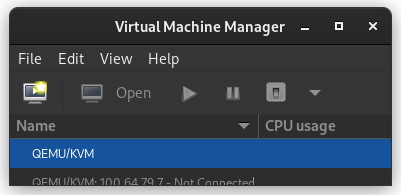
When virt-manager starts, right click on QEMU/KVM and select New.
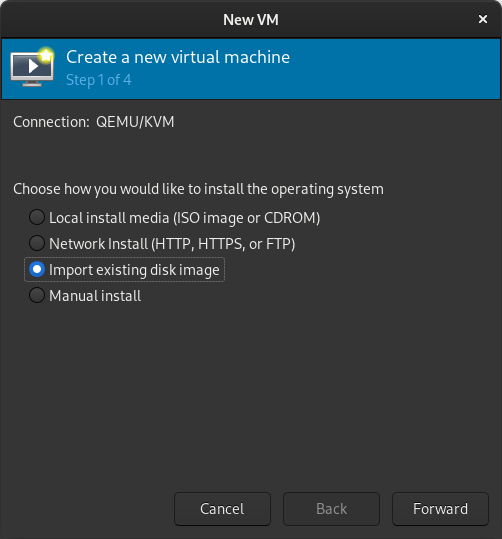
In the New VM window, select Import existing disk image
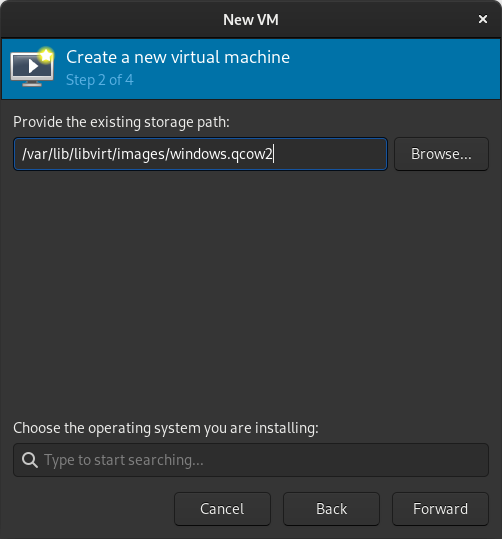
When prompted for the path to the image, use the one we created with sudo qemu-img convert above.
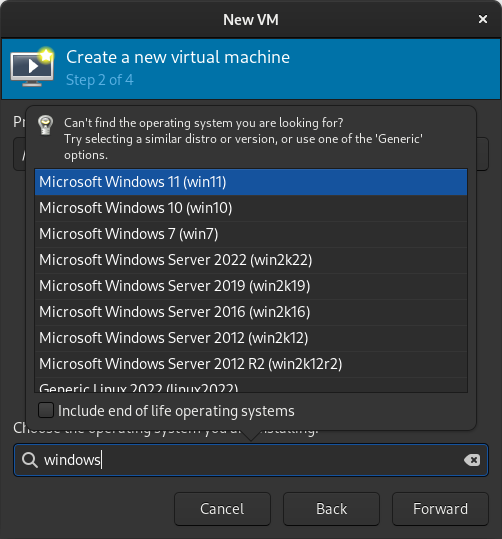
Select the version of Windows you want.
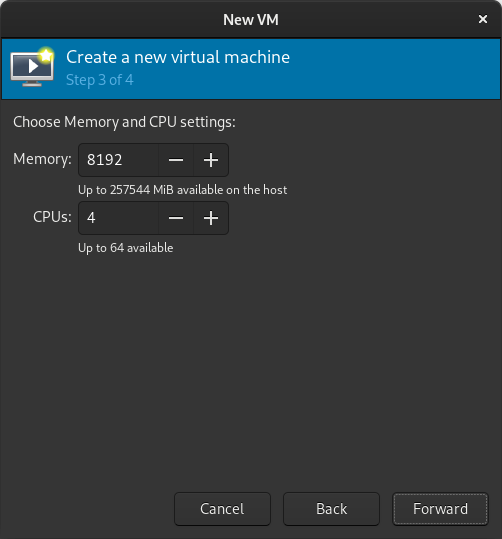
Select memory and CPUs to allocate to the VM.
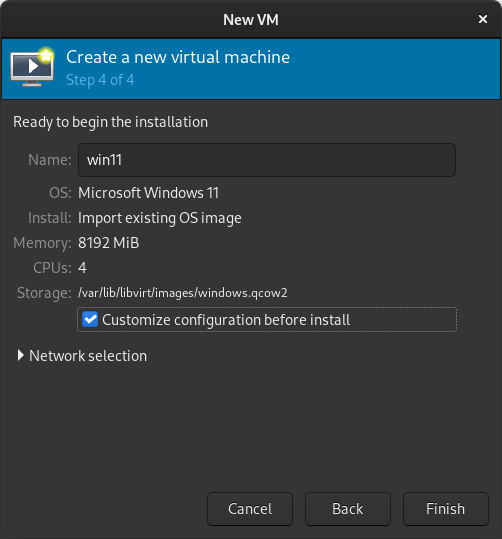
Tick the Customize configuration before install box
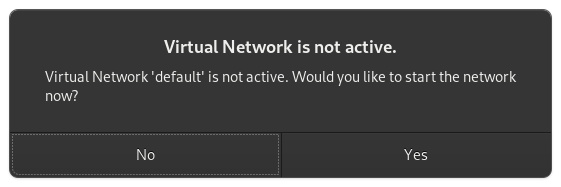
If you re prompted to enable the default network, do so now.
The default hardware layout should probably suffice. Get it as close to the underlying hardware as it is convenient to do. But Windows is pretty lenient these days about virtualizing licensed windows instances so long as they re not running in more than one place at a time.
Good luck! Leave comments if you have questions.
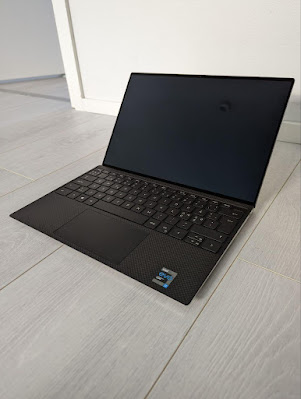
A look at the 2021 model of Dell XPS 13 - available with Linux pre-installed
I received a new laptop for work - a Dell XPS 13. Dell has been long famous for offering certain models with pre-installed Linux as a supported option, and opting for those is nice for moving some euros/dollars from certain PC desktop OS monopoly towards Linux desktop engineering costs. Notably Lenovo also offers Ubuntu and Fedora options on many models these days (like Carbon X1 and P15 Gen 2).
Obviously a smooth, ready-to-rock Ubuntu installation is nice for most people already, but I need openSUSE, so after checking everything is fine with Ubuntu, I continued to install openSUSE Tumbleweed as a dual boot option. As I m a funny little tinkerer, I obviously went with some special things. I wanted:
Ubuntu to remain as the reference supported OS on a small(ish) partition, useful to compare to if trying out new development versions of software on openSUSE and finding oddities.
openSUSE as the OS consuming most of the space.
LUKS encryption for openSUSE without LVM.
ext4 s new fancy fast_commit feature in use during filesystem creation.
As a result of all that, I ended up juggling back and forth installation screens a couple of times (even more than shown below, and also because I forgot I wanted to use encryption the first time around).
First boots to pre-installed Ubuntu and installation of openSUSE Tumbleweed as the dual-boot option:
(if the embedded video is not shown, use a direct link)
Some notes from the openSUSE installation:
openSUSE installer s partition editor apparently does not support resizing or automatically installing side-by-side another Linux distribution, so I did part of the setup completely on my own.
Installation package download hanged a couple of times, only passed when I entered a mirror manually. On my TW I ve also noticed download problems recently, there might be a problem with some mirror I need to escalate.
The installer doesn t very clearly show encryption status of the target installation - it took me a couple of attempts before I even noticed the small encrypted column and icon (well, very small, see below), which also did not spell out the device mapper name but only the main partition name. In the end it was going to do the right thing right away and use my pre-created encrypted target partition as I wanted, but it could be a better UX. Then again I was doing my very own tweaks anyway.
Let s not go to the details why I m so old-fashioned and use ext4 :)
openSUSE s installer does not work fine with HiDPI screen. Funnily the tty consoles seem to be fine and with a big font.
At the end of the video I install the two GNOME extensions I can t live without, Dash to Dock and Sound Input & Output Device Chooser.
 The MX record and some TXT records configured for
  I am currently transitioning my GPG/GPG key from
  Reduce the size of your c: partition to the smallest it can be and then turn off windows with the understanding that you will never boot this system on the iron ever again.
 To find the literal path names of your detected drives you can run fdisk -l. Pay attention to the names of the partitions and the sizes of the drives to help determine which is which.
Once you have a shell in the netinst installer, you should maybe be able to run a command like the following. This will duplicate the disk located at if (in file) to the disk located at of (out file) while showing progress as the status.
To find the literal path names of your detected drives you can run fdisk -l. Pay attention to the names of the partitions and the sizes of the drives to help determine which is which.
Once you have a shell in the netinst installer, you should maybe be able to run a command like the following. This will duplicate the disk located at if (in file) to the disk located at of (out file) while showing progress as the status.
 In the New VM window, select Import existing disk image
  When prompted for the path to the image, use the one we created with sudo qemu-img convert above.
 Select the version of Windows you want.
 Select memory and CPUs to allocate to the VM.
 Tick the Customize configuration before install box
 If you re prompted to enable the default network, do so now.
 The default hardware layout should probably suffice. Get it as close to the underlying hardware as it is convenient to do. But Windows is pretty lenient these days about virtualizing licensed windows instances so long as they re not running in more than one place at a time.
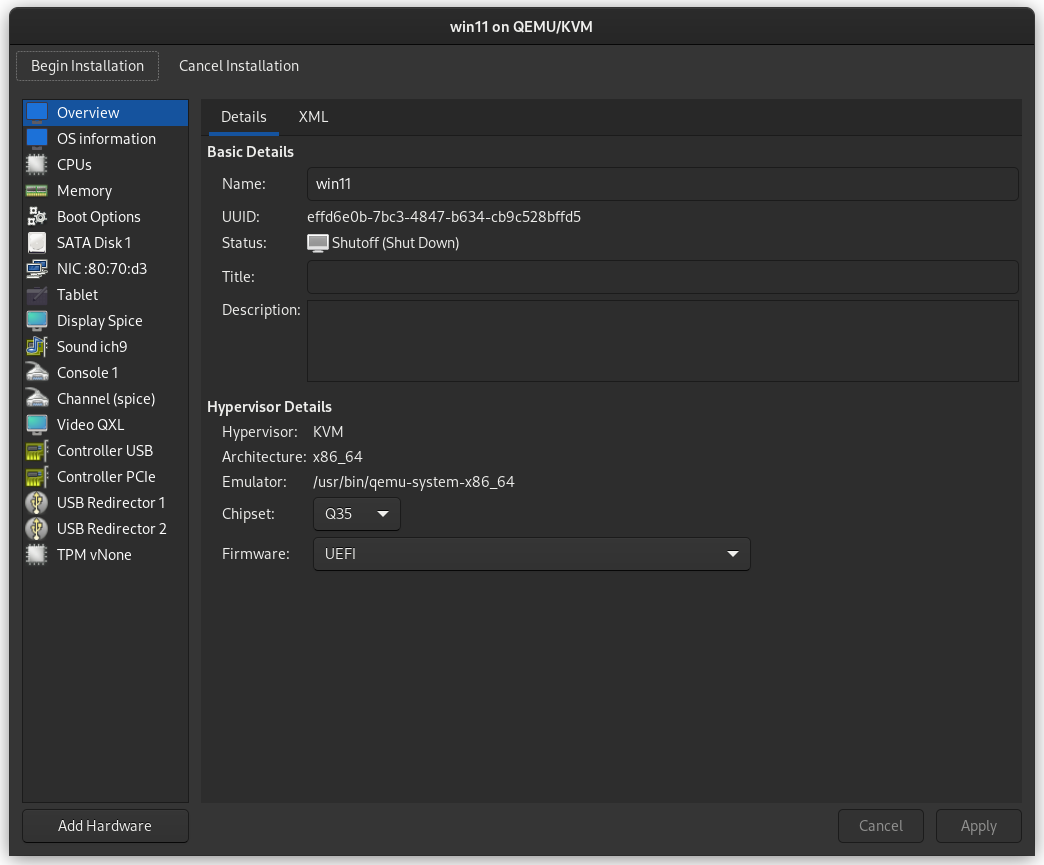 Good luck! Leave comments if you have questions.