I recently came a cross a x509 P(rivate)KI Root Certificate which had
a pathLen constrain set on the (self signed) Root Certificate.
Since that is not commonly seen I looked a bit around to get a
better understanding about how the pathLen basic constrain
should be used.
Primary source is
RFC 5280 section 4.2.1.9
The pathLenConstraint field is meaningful only if the cA boolean is
asserted and the key usage extension, if present, asserts the
keyCertSign bit (Section 4.2.1.3). In this case, it gives the
maximum number of non-self-issued intermediate certificates that may
follow this certificate in a valid certification path
Since the Root is always self-issued it doesn't count towards the limit,
and since it's the last certificate (or the first depending on how you count)
in a chain, it's pretty much pointless to configure a pathLen constrain
directly on a Root Certificate.
Another relevant resource are the
Baseline Requirements of the CA/Browser
Forum (currently v2.0.2).
Section 7.1.2.1.4 "Root CA Basic Constraints" describes it
as NOT RECOMMENDED for a Root CA.
Last but not least there is the awesome
x509 Limbo project
which has a
section for validating pathLen constrains.
Since the RFC 5280 based assumption is that self signed certs do not
count, they do not check a case with such a constrain on the Root itself, and what
the implementations do about it. So the assumption right now is that they
properly ignore it.
Summary: It's pointless to set the pathLen constrain on the Root Certificate, so just
don't do it.
for x in $(gh api graphql --paginate -f query='query($endCursor:String)   organization(login:"myorg")
    repositories(first: 100, after: $endCursor, isArchived:false)
        pageInfo
            hasNextPage
            endCursor

        nodes
            name


     ' --jq '.data.organization.repositories.nodes[].name'); do
    secrets=$(gh secret list --json name --jq '.[].name' -R "myorg/$ x "   tr '\n' ',')
    if ! [ -z "$ secrets " ]; then
        echo "$ x ,$ secrets "
    fi
done
Requests a list of all not archived repositories in a GitHub org and queries
repository secrets. If we find some we output the repo name and the
secrets in a comma separated list. Not real CSV, but good enough for further
processing. I've to admit it's kinda beautiful what you can do with the
gh cli by now. Sadly it seems the secrets are not yet available via GraphQL
(or I missed it in the docs), so I just use the gh cli to do the REST calls.
Earlier this month the DebConf team announced the DebConf24 Logo Contest
asking aspiring artists, designers, and contributors to submit an image that
would represent the host city of Busan, the host nation of South Korea, and
promote the next Debian Developer Conference.
The logo contest for DebConf24 received 10
submissions and garnered 354 responses with 3 proposals in particular getting
very close to first place. The winning logo received 88 votes, the 2nd favored
logo received 87 votes, and the 3rd most favored received 86
votes.
Thank you to Woohee Yang and Junsang Moon for sharing their artistic visions.
A very special Thank You to everyone who took the time to vote for our beautiful
new logo!
The DebConf24 Team is proud to
share for
preview only the winning logo for the 24th Debian Developer Conference:
'sun-seagull-sea' by Woohee Yang
This is a preview copy, other revisions will occur for sizing, print, and
media... but we had to share it with you all now. :).
Looking forward to seeing you all at #debconf24 in #Busan, South Korea 2024!
dkg's New OpenPGP certificate in December 2023
In December of 2023, I'm moving to a new OpenPGP certificate.
You might know my old OpenPGP certificate, which had an fingerprint of
C29F8A0C01F35E34D816AA5CE092EB3A5CA10DBA.
My new OpenPGP certificate has a fingerprint of:
D477040C70C2156A5C298549BB7E9101495E6BF7.
Both certificates have the same set of User IDs:
-----BEGIN PGP PUBLIC KEY BLOCK-----xjMEZXEJyxYJKwYBBAHaRw8BAQdA5BpbW0bpl5qCng/RiqwhQINrplDMSS5JsO/YO+5Zi7HCwAsEHxYKAH0FgmVxCcsDCwkHCRC7fpEBSV5r90cUAAAAAAAeACBzYWx0QG5vdGF0aW9ucy5zZXF1b2lhLXBncC5vcmfUAgfN9tyTSxpxhmHA1r63GiI4v6NQmrrWVLOBRJYuhQMVCggCmwECHgEWIQTUdwQMcMIValwphUm7fpEBSV5r9wAAmaEA/3MvYJMxQdLhIG4UDNMVd2bsovwdcTrReJhLYyFulBrwAQD/j/RS+AXQIVtkcO9bl6zZTAO9x6yfkOZbv0g3eNyrAs0QPGRrZ0BkZWJpYW4ub3JnPsLACwQTFgoAfQWCZXEJywMLCQcJELt+kQFJXmv3RxQAAAAAAB4AIHNhbHRAbm90YXRpb25zLnNlcXVvaWEtcGdwLm9yZ4l+Z3i19Uwjw3CfTNFCDjRsoufMoPOM7vM8HoOEdn/vAxUKCAKbAQIeARYhBNR3BAxwwhVqXCmFSbt+kQFJXmv3AAALZQEAhJsgouepQVV98BHUH6SvWvcKrb8dQEZOvHFbZQQPNWgA/A/DHkjYKnUkCg8Zc+FonqOS/35sHhNA8CwqSQFrtN4KzRc8ZGtnQGZpZnRoaG9yc2VtYW4ubmV0PsLACgQTFgoAfQWCZXEJywMLCQcJELt+kQFJXmv3RxQAAAAAAB4AIHNhbHRAbm90YXRpb25zLnNlcXVvaWEtcGdwLm9yZxLvwkgnslsAuo+IoSa9rv8+nXpbBdab2Ft7n4H9S+d/AxUKCAKbAQIeARYhBNR3BAxwwhVqXCmFSbt+kQFJXmv3AAAtFgD4wqcUfQl7nGLQOcAEHhx8V0Bg8v9ov8GsY1ei1BEFwAD/cxmxmDSO0/tA+x4pd5yIvzgfGYHSTxKS0Ww3hzjuZA7NE0RhbmllbCBLYWhuIEdpbGxtb3LCwA4EExYKAIAFgmVxCcsDCwkHCRC7fpEBSV5r90cUAAAAAAAeACBzYWx0QG5vdGF0aW9ucy5zZXF1b2lhLXBncC5vcmd7X4TgiINwnzh4jar0Pf/b5hgxFPngCFxJSmtr/f0YiQMVCggCmQECmwECHgEWIQTUdwQMcMIValwphUm7fpEBSV5r9wAAMuwBAPtMonKbhGOhOy+8miAb/knJ1cIPBjLupJbjM+NUE1WyAQD1nyGW+XwwMrprMwc320mdJH9B0jdokJZBiN7++0NoBM4zBGVxCcsWCSsGAQQB2kcPAQEHQI19uRatkPSFBXh8usgciEDwZxTnnRZYrhIgiFMybBDQwsC/BBgWCgExBYJlcQnLCRC7fpEBSV5r90cUAAAAAAAeACBzYWx0QG5vdGF0aW9ucy5zZXF1b2lhLXBncC5vcmfCopazDnq6hZUsgVyztl5wmDCmxI169YLNu+IpDzJEtQKbAr6gBBkWCgBvBYJlcQnLCRB3LRYeNc1LgUcUAAAAAAAeACBzYWx0QG5vdGF0aW9ucy5zZXF1b2lhLXBncC5vcmcQglI7G7DbL9QmaDkzcEuk3QliM4NmleIRUW7VvIBHMxYhBHS8BMQ9hghL6GcsBnctFh41zUuBAACwfwEAqDULksr8PulKRcIP6N9NI/4KoznyIcuOHi8qGk4qxMkBAIeV20SPEnWSw9MWAb0eKEcfupzr/C+8vDvsRMynCWsDFiEE1HcEDHDCFWpcKYVJu36RAUlea/cAAFD1AP0YsE3Eeig1tkWaeyrvvMf5Kl1tt2LekTNWDnB+FUG9SgD+Ka8vfPR8wuV8D3y5Y9Qq9xGO+QkEBCW0U1qNypg65QHOOARlcQnLEgorBgEEAZdVAQUBAQdAWTLEa0WmnhUmDBdWXX0ZlYAa4g1CK/fXg0NPOQSteA4DAQgHwsAABBgWCgByBYJlcQnLCRC7fpEBSV5r90cUAAAAAAAeACBzYWx0QG5vdGF0aW9ucy5zZXF1b2lhLXBncC5vcmexrMBZe0QdQ+ZJOZxFkAiwCw2I7yTSF2Ox9GVFWKmAmAKbDBYhBNR3BAxwwhVqXCmFSbt+kQFJXmv3AABcJQD/f4ltpSvLBOBEh/C2dIYadgSuqkCqq0B4WOhFRkWJZlcA/AxqLWG4o8UrrmwrmM42FhgxKtEXwCSHE00u8wR4Up8G=9Yc8-----END PGP PUBLIC KEY BLOCK-----
When I have some reasonable number of certifications, i'll update the
certificate associated with my e-mail addresses on
https://keys.openpgp.org, in DANE, and in WKD. Until then, those
lookups should continue to provide the old certificate.
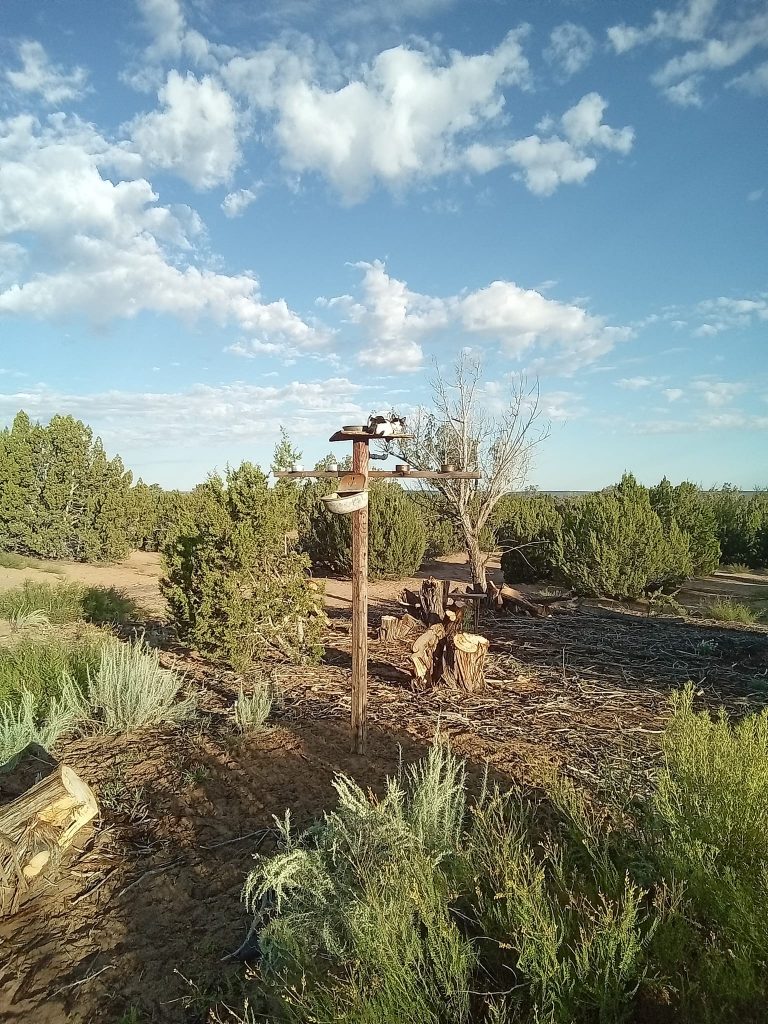
Yang the cat bird
While Yang our cat tries to lure in unsuspecting birds on the bird feeder, I have been busy working on many things. First things first though, a big thank you to all that donated to my Internet bill. I was able to continue my work without interruption.
KDE neon:
A busy week in KDE neon as https://kde.org/announcements/plasma/5/5.27.9/ was released! We have it ready to update in User edition or if you would like to download the new ISO you can find it here: https://neon.kde.org/download I highly advise the User Edition as Unstable is volatile right now with Qt6 transition and ABI breakage. Which leads me to the next busy work for the week. Plasma 6 exploded breaking unstable desktops all over, including mine! A library changed and it was not backward compatible, so we had to rebuild the Qt6 $world to get Plasma and PIM functional again. I am happy to report it is all fixed now, but I cannot stress enough, if you don t want to chance broken things, please use the User Edition! I also continued the orange -> green build effort in making sure all our runtime dependencies are up to date. This fixes odd UI bugs and developers have all the build dependencies needed to build their applications.
KDE Snaps:
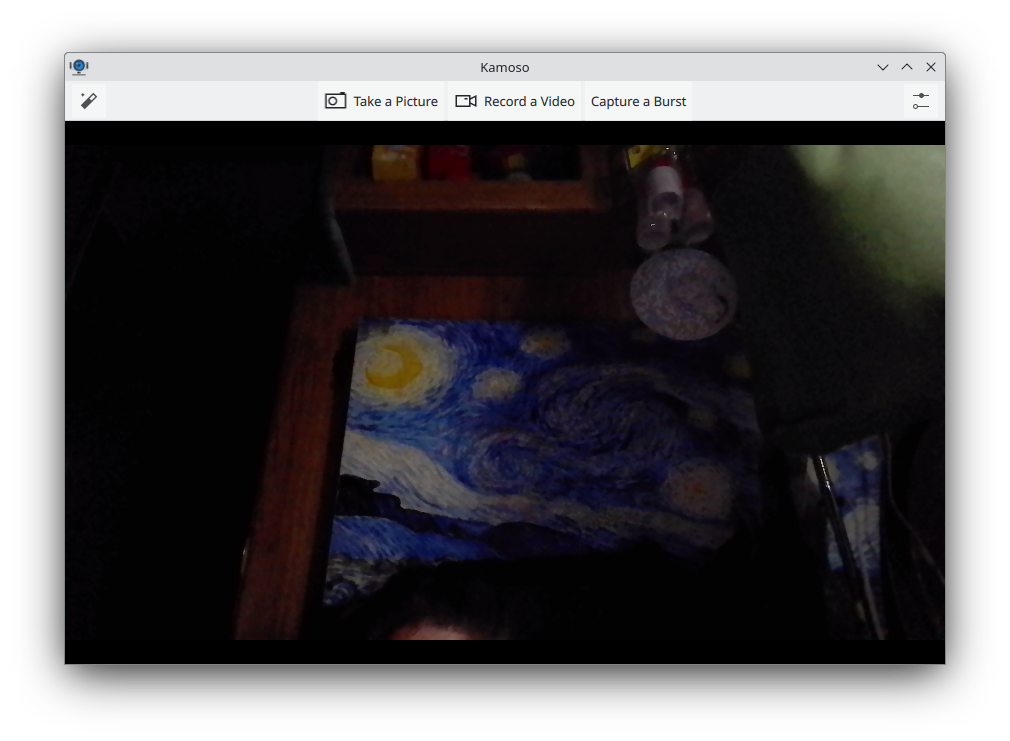
Several more 23.08.2 snaps have arrived in the snap store including the new to snaps Kamoso!
KDE snap Kamoso
I have an auto-connect request to the snap-store policy folks, but until it is approved please snap connect kamoso:camera :camera I have a pile of new MR s in for non release service applications and some fixes for issues found while testing. While this new workflow does take a bit longer waiting for approvals I like it much better as I am developing closer relationships with the application developers.
I have made significant progress on the Kf6 ( Qt6 based ) content snap. I am about 90% complete. While this doesn t mean much for users yet, it will when KDE applications release their qt6 ports starting the next major release cycle. I will be ready!
The last bit for snap work is I have almost completed my akonadi service snap. This will connect to all KDE PIM snaps so they share data. Akonadi is the background database that ties all the PIM applications together.
Debian:
This week I have worked on updates for several golang packages including charmbracelet/lipgloss charmbracelet/bubbles, and muesli-termenv. unfortunately I am stuck golang-github-aymanbagabas-go-osc52. The work is done in salsa but the maintainer has not uploaded. I have shot an email to the maintainer. I have also begun mentoring my first potential future DD! I reviewed his python-scienceplots and python-art which should land in Debian soon.
Thanks for stopping by! As usual, if you can please spare some change, consider a donation. All proceeds go to surviving another day to work on cool things to land on your desktop!
https://gofund.me/b8b69e54
<noscript><a href="https://liberapay.com/sgmoore/donate"><img alt="Donate using Liberapay" src="https://liberapay.com/assets/widgets/donate.svg" /></a></noscript>
Donate
I stick to some very archaic workflows, e.g. to connect
to some corp VPN I just run sudo vpnc-connect
and later on sudo vpnc-disconnect. In the past that also
managed to restore my resolv.conf, currently it doesn't.
According to a colleague that's also the case for Ubuntu.
Taking a step back, the sane way would be to use the
NetworkManager vpnc plugin, but that does not work with
this specific case because we use uncool VPN tech which
requires the Enable weak authentication setting for vpnc.
There is a feature request open for that one at
https://gitlab.gnome.org/GNOME/NetworkManager-vpnc/-/issues/11
Taking another step back I thought that it shouldn't be that
hard to add some checkbox, a boolean and render out another
config flag or line in a config file. Not as intuitive as I
thought this mix of XML and C. So let's quickly look elsewhere.
What happens is that the backup files in /var/run/vpnc/ are
created by the vpnc-scripts script called vpnc-script, but not
moved back, because it adds some pid as a suffix and the pid is
not the final pid of the vpnc process. Basically it can not find
the backup when it tries to restore it. So I decided to replace the
pid guessing code with a suffix made up of the gateway IP and the
tun interface name. No idea if that is stable in all circumstance
(someone with a vpn name DNS RR?) or several connections to different
gateways. But good enough for myself, so here is my patch:
vpnc-scripts [master]$ cat debian/patches/replace-pid-detection
Index: vpnc-scripts/vpnc-script
===================================================================
--- vpnc-scripts.orig/vpnc-script
+++ vpnc-scripts/vpnc-script
@@ -91,21 +91,15 @@ OS=" uname -s "
 HOOKS_DIR=/etc/vpnc
-# Use the PID of the controlling process (vpnc or OpenConnect) to
-# uniquely identify this VPN connection. Normally, the parent process
-# is a shell, and the grandparent's PID is the relevant one.
-# OpenConnect v9.0+ provides VPNPID, so we don't need to determine it.
-if [ -z "$VPNPID" ]; then
-    VPNPID=$PPID
-    PCMD= ps -c -o cmd= -p $PPID
-    case "$PCMD" in
-        *sh) VPNPID= ps -o ppid= -p $PPID  ;;
-    esac
+# This whole script is called twice via vpnc-connect. On the first run
+# the variables are empty. Catch that and move on when they're there.
+if [ -n "$VPNGATEWAY" ]; then
+    BACKUPID="$ VPNGATEWAY _$ TUNDEV "
+    DEFAULT_ROUTE_FILE=/var/run/vpnc/defaultroute.$ BACKUPID
+    DEFAULT_ROUTE_FILE_IPV6=/var/run/vpnc/defaultroute_ipv6.$ BACKUPID
+    RESOLV_CONF_BACKUP=/var/run/vpnc/resolv.conf-backup.$ BACKUPID
 fi
-DEFAULT_ROUTE_FILE=/var/run/vpnc/defaultroute.$ VPNPID
-DEFAULT_ROUTE_FILE_IPV6=/var/run/vpnc/defaultroute_ipv6.$ VPNPID
-RESOLV_CONF_BACKUP=/var/run/vpnc/resolv.conf-backup.$ VPNPID
 SCRIPTNAME= basename $0
 # some systems, eg. Darwin & FreeBSD, prune /var/run on boot
Or rolled into a debian package at https://sven.stormbind.net/debian/vpnc-scripts/
The colleague decided to stick to NetworkManager, moved the vpnc binary aside and
added a wrapper which invokes vpnc with --enable-weak-authentication. The beauty is,
all of this will break on updates, so at some point someone has to
understand GTK4 to fix the NetworkManager plugin for good.
Debian Project Bits
Volume 1, Issue 1August 05, 2023
Welcome to the inaugural issue of Debian Project Bits!
Those remembering the Debian Weekly News (DwN) will recognize some of the sections here which served as our inspiration.
Debian Project Bits posts will allow for a faster turnaround of some project
news on a monthly basis. The Debian Micronews
service will continue to share shorter news items, the Debian Project News
remains as our official newsletter which may move to a biannual archive format.
News
Debian Day
The Debian Project was officially
founded by Ian Murdock on August 16,
1993. Since then we have celebrated our Anniversary of that date each year with
events around the world. We would love it if you could join our revels
this very special year as we have the honor of turning 30!
Attend or organize a local Debian Day
celebration. You're invited to plan your own event: from Bug Squashing parties
to Key Signing parties, Meet-Ups, or any type of social event whether large or
small. And be sure to check our Debian reimbursement How
To if you need such
resources.
You can share your days, events, thoughts, or notes with us and the
rest of the community with the #debianday tag that will be used across most
social media platforms. See you then!
Events: Upcoming and Reports
Upcoming
Debian 30 anos
The Debian Brasil Community is organizing the
event Debian 30 anos to
celebrate the 30th anniversary of the Debian Project.
From August 14 to 18, between 7pm and 22pm (UTC-3) contributors will talk
online in Portuguese and we will live stream on
Debian Brasil YouTube channel.
DebConf23: Debian Developers Camp and Conference
The 2023 Debian Developers Camp (DebCamp) and Conference
(DebConf23) will be hosted this year in
Infopark, Kochi, India.
DebCamp is slated to run from September 3 through 9, immediately followed by
the larger DebConf, September 10 through 17.
If you are planning on attending the conference this year, now is the time to
ensure your travel documentation, visa
information,
bursary submissions, papers and relevant equipment are prepared. For more
information contact: debconf@debconf.
MiniDebConf Cambridge 2023
There will be a
MiniDebConf
held in Cambridge, UK, hosted by ARM for 4 days in November: 2 days for a
mini-DebCamp (Thu 23 - Fri 24), with space for dedicated development / sprint /
team meetings, then two days for a more regular MiniDebConf (Sat 25 - Sun 26)
with space for more general talks, up to 80 people.
Reports
During the last months, the Debian Community has organized some Bug Squashing Parties:
Tilburg, Netherlands. October 2022.
St-Cergue, Switzerland. January 2023
Montreal, Canada. February 2023
In January, Debian India hosted the MiniDebConf Tamil Nadu in Viluppuram, Tamil Nadu, India (Sat 28 - Sun 26).
The following month, the MiniDebConf Portugal 2023 was held in Lisbon (12 - 16 February 2023).
These events, seen as a stunning success by some of their attendees, demonstrate the vitality of
our community.
Debian Brasil Community at Campus Party Brazil 2023
Another edition of Campus Party Brazil
took place in the city of S o Paulo between July 25th and 30th. And one more
time the Debian Brazil Community was present. During the days in the available
space, we carry out some activities such as:
Gifts for attendees (stickers, cups, lanyards);
Workshop on how to contribute to the translation team;
Workshop on packaging;
Key signing party;
Information about the project;
For more info and a few photos, check out the organizers'
report.
MiniDebConf Bras lia 2023
From May 25 to 27, Bras lia hosted the MiniDebConf Bras lia
2023. This gathering was composed of
various activities such as talks, workshops, sprints, BSPs (Bug Squashing
Party), key signings, social events, and hacking, aimed to bring the community
together and celebrate the world's largest Free Software project: Debian.
For more information please see the
full report
written by the organizers.
Debian Reunion Hamburg 2023
This year the annual Debian Reunion Hamburg
was held from Tuesday 23 to 30 May starting with four days of
hacking followed by two days of talks, and then two more days of hacking. As
usual, people - more than forty-five attendees from Germany, Czechia, France,
Slovakia, and Switzerland - were happy to meet in person, to hack and chat
together, and much more. If you missed the live streams, the
video recordings
are available.
Translation workshops from the pt_BR team
The Brazilian translation team, debian-l10n-portuguese, had their first workshop
of 2023 in February with great results. The workshop was aimed at beginners,
working in DDTP/DDTSS.
For more information please see the full
report
written by the organizers.
And on June 13 another workshop took place to translate
The Debian Administrator's Handbook). The main
goal was to show beginners how to collaborate in the translation of this
important material, which has existed since 2004. The manual's translations
are hosted on
Weblate.
Releases
Stable Release
Debian 12 bookworm was released on
June 10, 2023. This new version
becomes the stable release of Debian and moves the prior Debian 11
bullseye release to
oldstable status. The Debian
community celebrated the release with 23
Release Parties all around the
world.
Bookworm's first point release 12.1
address miscellaneous bug fixes affecting 88 packages, documentation, and
installer updates was made available on July 22,
2023.
RISC-V support
riscv64 has recently been added to the
official Debian architectures for support of 64-bit little-endian
RISC-V hardware running the Linux kernel. We expect
to have full riscv64 support in Debian 13 trixie. Updates on bootstrap,
build daemon, porterbox, and development progress were recently shared by the
team in a Bits from the Debian riscv64 porters
post.
non-free-firmware
The Debian 12 bookworm archive now includes non-free-firmware; please be
sure to update your apt sources.list if your systems requires such components
for operation. If your previous sources.list included non-free for this
purpose it may safely be removed.
apt sources.list
The Debian archive holds several components:
main: Contains
DFSG-compliant packages,
which do not rely on software outside this area to operate.
contrib:
Contains packages that contain DFSG-compliant software, but have dependencies
not in main.
non-free:
Contains software that does not comply with the DFSG.
non-free-firmware: Firmware that is otherwise not part of the Debian system
to enable use of Debian with hardware that requires such firmware.
For more information and guidelines on proper configuration of the apt
source.list file please see the Configuring Apt Sources -
Wiki page.
Inside Debian
New Debian Members
Please welcome the following newest Debian Project Members:
Marius Gripsgard (mariogrip)
Mohammed Bilal (rmb)
Emmanuel Arias (amanu)
Robin Gustafsson (rgson)
Lukas M rdian (slyon)
David da Silva Polverari (polverari)
To find out more about our newest members or any Debian Developer, look
for them on the Debian People list.
Security
Debian's Security Team releases current advisories on a daily basis.
Some recently released advisories concern these packages:
trafficserver
Several vulnerabilities were discovered in Apache Traffic Server, a
reverse and forward proxy server, which could result in information
disclosure or denial of service.
asterisk
A flaw was found in Asterisk, an Open Source Private Branch Exchange. A
buffer overflow vulnerability affects users that use PJSIP DNS resolver.
This vulnerability is related to CVE-2022-24793. The difference is that
this issue is in parsing the query record parse_query(), while the issue
in CVE-2022-24793 is in parse_rr(). A workaround is to disable DNS
resolution in PJSIP config (by setting nameserver_count to zero) or use
an external resolver implementation instead.
flask
It was discovered that in some conditions the Flask web framework may
disclose a session cookie.
chromium
Multiple security issues were discovered in Chromium, which could result
in the execution of arbitrary code, denial of service or information
disclosure.
Other
Popular packages
gpgv - GNU privacy guard
signature verification tool. 99,053 installations.
gpgv is actually a stripped-down version of gpg which
is only able to check signatures. It is somewhat smaller than the fully-blown
gpg and uses a different (and simpler) way to check that the public keys used
to make the signature are valid. There are no configuration files and only a
few options are implemented.
dmsetup - Linux Kernel Device
Mapper userspace library. 77,769 installations.
The Linux Kernel Device Mapper is the LVM (Linux
Logical Volume Management) Team's implementation of a minimalistic kernel-space
driver that handles volume management, while keeping knowledge of the
underlying device layout in user-space. This makes it useful for not only LVM,
but software raid, and other drivers that create "virtual" block devices.
sensible-utils - Utilities
for sensible alternative selection. 96,001 daily users.
This package provides a number of small utilities which
are used by programs to sensibly select and spawn an appropriate browser,
editor, or pager. The specific utilities included are: sensible-browser
sensible-editor sensible-pager.
popularity-contest -
The popularity-contest package. 90,758 daily users.
The popularity-contest package sets up a cron job that
will periodically anonymously submit to the Debian developers statistics about
the most used Debian packages on the system. This information helps Debian
make decisions such as which packages should go on the first CD. It also lets
Debian improve future versions of the distribution so that the most popular
packages are the ones which are installed automatically for new users.
New and noteworthy packages in unstable
Toolkit for scalable simulation of distributed applications
SimGrid is a toolkit that provides core
functionalities for the simulation of distributed applications in heterogeneous
distributed environments. SimGrid can be used as a Grid simulator, a P2P
simulator, a Cloud simulator, a MPI simulator, or a mix of all of them. The
typical use-cases of SimGrid include heuristic evaluation, application
prototyping, and real application development and tuning. This package
contains the dynamic libraries and runtime.
LDraw mklist program
3D CAD programs and rendering programs using the LDraw
parts library of LEGO parts rely on a file called parts.lst containing a list
of all available parts. The program ldraw-mklist is used to generate this list
from a directory of LDraw parts.
Open Lighting Architecture - RDM Responder Tests
The DMX512 standard for Digital MultipleX is used for
digital communication networks commonly used to control stage lighting and
effects. The Remote Device Management protocol is an extension to DMX512,
allowing bi-directional communication between RDM-compliant devices without
disturbing other devices on the same connection. The Open Lighting
Architecture (OLA) provides a plugin framework for distributing DMX512 control
signals. The ola-rdm-tests package provides an automated way to check protocol
compliance in RDM devices.
parsec-service
Parsec is an abstraction layer that can be used to
interact with hardware-backed security facilities such as the Hardware Security
Module (HSM), the Trusted Platform Module (TPM), as well as firmware-backed and
isolated software services. The core component of Parsec is the security
service, provided by this package. The service is a background process that
runs on the host platform and provides connectivity with the secure facilities
of that host, exposing a platform-neutral API that can be consumed into
different programming languages using a client library. For a client library
implemented in Rust see the package librust-parsec-interface-dev.
Simple network calculator and lookup tool
Process and lookup network addresses from the command
line or CSV with ripalc. Output has a variety of customisable formats.
High performance, open source CPU/GPU miner and RandomX benchmark
XMRig is a high performance, open source, cross
platform RandomX, KawPow, CryptoNight, and GhostRider unified CPU/GPU miner and
RandomX benchmark.
Ping, but with a graph - Rust source code
This package contains the source for the Rust gping
crate, packaged by debcargo for use with cargo and dh-cargo.
Once upon a time in Debian:
2014-07-31 The Technical committee choose
libjpeg-turbo
as the default JPEG decoder.
2010-08-01
DebConf10 starts New York City, USA
2007-08-05
Debian Maintainers approved by vote
2009-08-05 Jeff Chimene files bug
#540000 against
live-initramfs.
Calls for help
The Publicity team calls for volunteers and help!
Your Publicity team is asking for help from you our readers, developers, and
interested parties to contribute to the Debian news effort. We implore you to
submit items that may be of interest to our community and also ask for your
assistance with translations of the news into (your!) other languages along
with the needed second or third set of eyes to assist in editing our work
before publishing. If you can share a small amount of your time to aid our
team which strives to keep all of us informed, we need you. Please reach out
to us via IRC on #debian-publicity
on OFTC.net, or our public mailing list,
or via email at press@debian.org for sensitive or
private inquiries.
Reduce the size of your c: partition to the smallest it can be and then turn off windows with the understanding that you will never boot this system on the iron ever again.
Boot into a netinst installer image (no GUI). hold alt and press left arrow a few times until you get to a prompt to press enter. Press enter.
In this example /dev/sda is your windows disk which contains the c: partition
and /dev/disk/by-id/usb0 is the USB-3 attached SATA controller that you have your SSD attached to (please find an example attached). This SSD should be equal to or larger than the windows disk for best compatability.
To find the literal path names of your detected drives you can run fdisk -l. Pay attention to the names of the partitions and the sizes of the drives to help determine which is which.
Once you have a shell in the netinst installer, you should maybe be able to run a command like the following. This will duplicate the disk located at if (in file) to the disk located at of (out file) while showing progress as the status.
If you confirm that dd is available on the netinst image and the previous command runs successfully, test that your windows partition is visible in the new disk s partition table. The start block of the windows partition on each should match, as should the partition size.
fdisk -l /dev/disk/by-id/usb0
fdisk -l /dev/sda
If the output from the first is the same as the output from the second, then you are probably safe to proceed.
Once you confirm that you have made and tested a full copy of the blocks from your windows drive saved on your usb disk, nuke your windows partition table from orbit.
dd if=/dev/zero of=/dev/sda bs=1M count=42
You can press alt-f1 to return to the Debian installer now. Follow the instructions to install Debian. Don t forget to remove all attached USB drives.
Once you install Debian, press ctrl-alt-f3 to get a root shell.
Add your user to the sudoers group:
# adduser cjac sudoers
log out
# exit
log in as your user and confirm that you have sudo
$ sudo ls
Don t forget to read the spider man advice
enter your password
you ll need to install virt-manager. I think this should help:
I personally create a volume group called /dev/vg00 for the stuff I want to run raw and instead of converting to qcow2 like all of the other users do, I instead write it to a new logical volume.
sudo lvcreate /dev/vg00 -n windows -L 42G # or however large your drive was
sudo dd if=/dev/disk/by-id/usb0 of=/dev/vg00/windows status=progress
Now that you ve got the qcow2 file created, press alt-left until you return to your GDM session.
The apt-get install command above installed virt-manager, so log in to your system if you haven t already and open up gnome-terminal by pressing the windows key or moving your mouse/gesture to the top left of your screen. Type in gnome-terminal and either press enter or click/tap on the icon.
I like to run this full screen so that I feel like I m in a space ship. If you like to feel like you re in a spaceship, too, press F11.
You can start virt-manager from this shell or you can press the windows key and type in virt-manager and press enter. You ll want the shell to run commands such as virsh console windows or virsh list
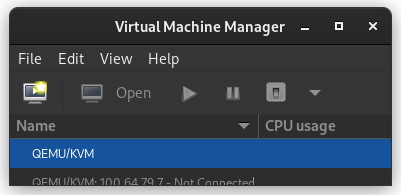
When virt-manager starts, right click on QEMU/KVM and select New.
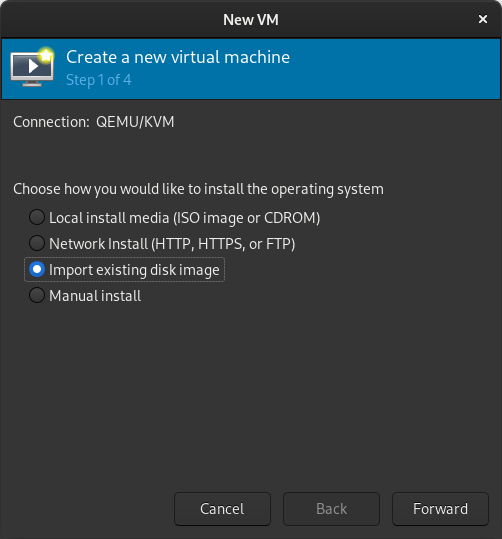
In the New VM window, select Import existing disk image
When prompted for the path to the image, use the one we created with sudo qemu-img convert above.
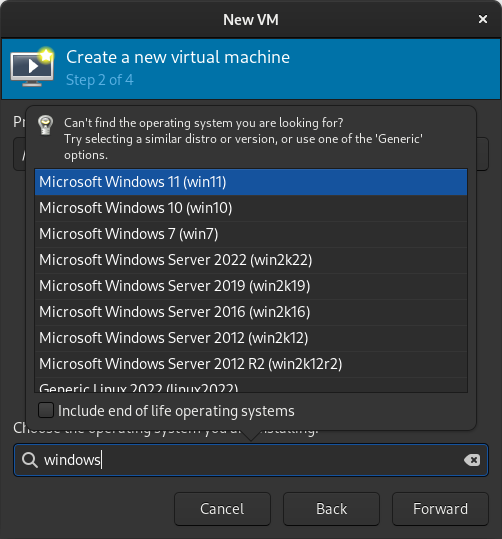
Select the version of Windows you want.
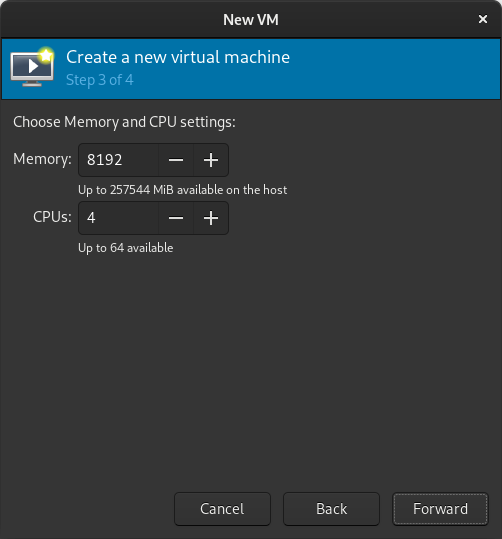
Select memory and CPUs to allocate to the VM.
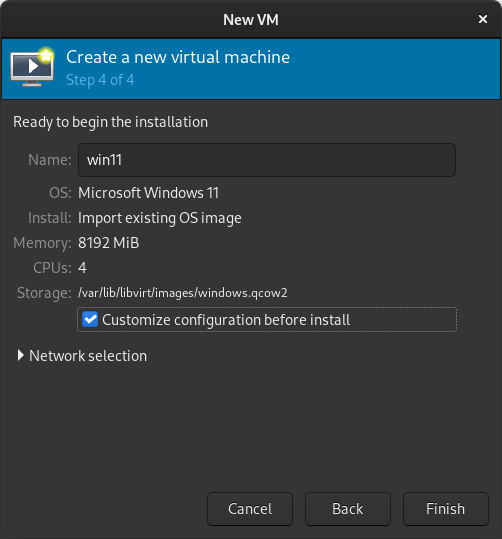
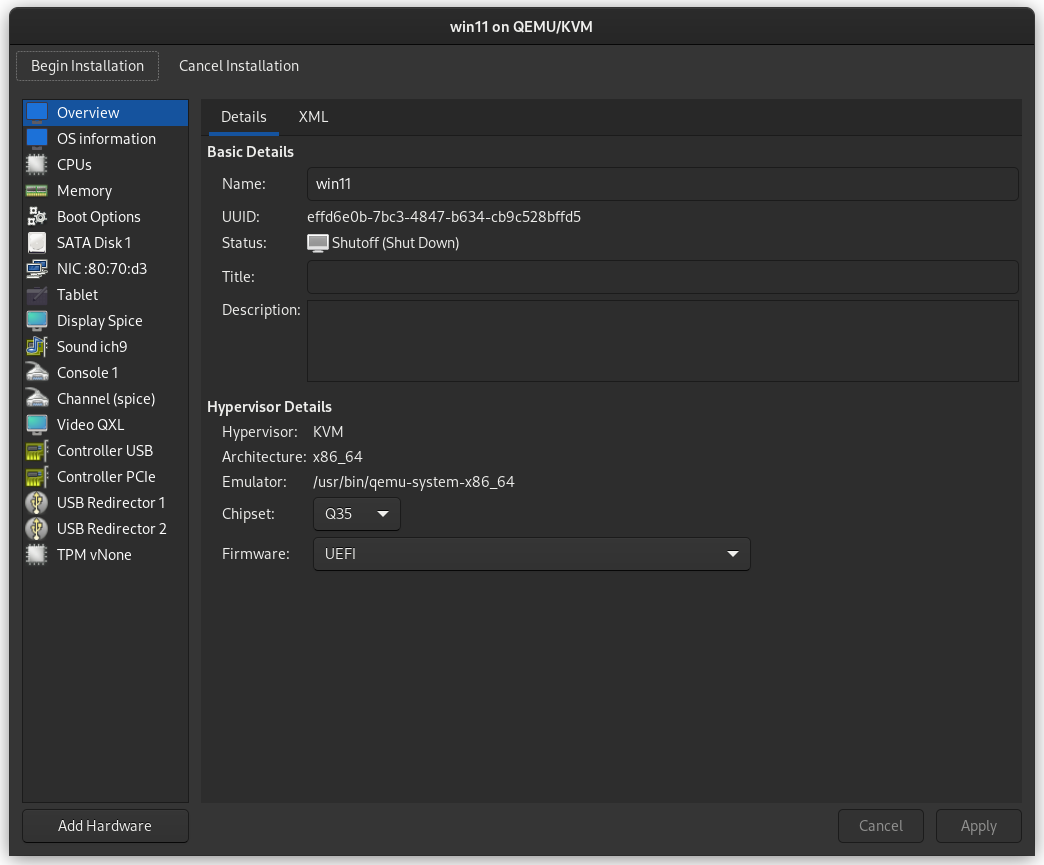
Tick the Customize configuration before install box
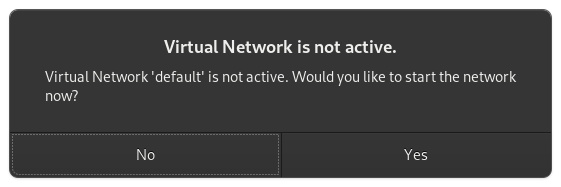
If you re prompted to enable the default network, do so now.
The default hardware layout should probably suffice. Get it as close to the underlying hardware as it is convenient to do. But Windows is pretty lenient these days about virtualizing licensed windows instances so long as they re not running in more than one place at a time.
Good luck! Leave comments if you have questions.
Always amusing to see some more or less famous
open source tools on stage or in movies. Lately
we watched THE ME
(german only) which is mixing live playing of actors and pre
recorded video material. In one of the early video sequences a
fictional console interface is displayed, claiming to be running
on a Macbook, and htop
is used to look for a suspicious process.
PSA for those foolish enough to use Google Cloud and try to use private service connect:
If you want to change the serviceAttachment your private service connect forwarding
rule points at, you must delete the forwarding rule and create a new one. Updates
are not supported. I've done that in the past via terraform, but lately encountered
strange errors like this:
Error updating ForwardingRule: googleapi: Error 400: Invalid value for field 'target.target':
'<https://www.googleapis.com/compute/v1/projects/mydumbproject/regions/europe-west1/serviceAttachments/
k8s1-sa-xyz-abc>'. Unexpected resource collection 'serviceAttachments'., invalid
Worked around that with the help of terrraform_data and lifecycle:
resource "terraform_data" "replacement"
    input = var.gcp_psc_data["target"]

resource "google_compute_forwarding_rule" "this"
    count   = length(var.gcp_psc_data["target"]) > 0 ? 1 : 0
    name    = "$ var.gcp_psc_name -psc"
    region  = var.gcp_region
    project = var.gcp_project
    target                = var.gcp_psc_data["target"]
    load_balancing_scheme = "" # need to override EXTERNAL default when target is a service attachment
    network               = var.gcp_network
    ip_address            = google_compute_address.this.id
    lifecycle
        replace_triggered_by = [
            terraform_data.replacement
        ]
In my day job someone today took the time in the team daily to explain
his research why some of our configuration is wrong. He spent quite
some time on his own to look at the history in git and how everything
was setup initially, and ended up in the current - wrong - way. That triggered
me to validate that quickly, another 5min of work. So we agreed
to change it. A one line change, nothing spectacular, but lifetime was
invested to figure out why it should've a different value.
When the pull request got opened a few minutes later there was nothing
of that story in the commit message. Zero, nada, nothing. I'm really
puzzled why someone invests lifetime to dig into company internal history
to try get something right, do a lengthy explanation to the whole team,
use the time of others, even mention that there was no explanation of
why it's not the default value anymore it should be, and repeat the same
mistake by not writing down anything in the commit message.
For the current company I'm inclined to propose a commit message validator.
For a potential future company I might join, I guess I ask for real world
git logs from repositories I should contribute to. Seems that this is another
valuable source of information to qualify the company culture. Next up to
the existence of whiteboards in the office.
I'm really happy that at least a majority of the people contributing to Debian
writes somewhat decent commit messages and changelogs. Let that be a reminder
to myself to improve in that area the next time I've to change something.
I recently bought a Banana Pi BPI-M5, which uses the Amlogic S905X3 SoC: these are my notes about installing Debian on it.
While this SoC is supported by the upstream U-Boot it is not supported by the Debian U-Boot package, so debian-installer does not work. Do not be fooled by seeing the DTB file for this exact board being distributed with debian-installer: all DTB files are, and it does not mean that the board is supposed to work.
As I documented in #1033504, the Debian kernels are currently missing some patches needed to support the SD card reader.
I started by downloading an Armbian Banana Pi image and booted it from an SD card. From there I partitioned the eMMC, which always appears as /dev/mmcblk1:
Make sure to leave enough space before the first partition, or else U-Boot will overwrite it: as it is common for many ARM SoCs, U-Boot lives somewhere in the gap between the MBR and the first partition.
I looked at Armbian's /usr/lib/u-boot/platform_install.sh and installed U-Boot by manually copying it to the eMMC:
I wanted to have a fully working flash-kernel, so I used Armbian's boot.scr as a template to create /etc/flash-kernel/bootscript/bootscr.meson and then added a custom entry for the Banana Pi to /etc/flash-kernel/db:
All things considered I do not think that I would recommend to Debian users to buy Amlogic-based boards since there are many other better supported SoCs.
I know a few people hold on to the exFAT fuse implementation due the
support for timezone offsets, so here is a small update for you.
Andrew released 1.4.0, which includes the timezone offset support, which
was so far only part of the git master branch. It also fixes a,
from my point of view very minor, security issue
CVE-2022-29973.
In addition to that it's the first build with fuse3 support. If you
still use this driver, pick it up in experimental (we're in the bookworm freeze
right now), and give it a try. I'm personally not using it anymore beyond a very
basic "does it mount" test.
Long ago I applied for my dream job at a company I have wanted to wok for since its beginning and I wasn t ready technically. Fast forward to now, I am ready! A big thank you goes out to Blue Systems for that. So I go out and find the perfect role and start the application process. The process was months long, but was going very well, the interviews and I passed the technical with flying colors. I got to the end where the hiring lead told me he was submitting my offer I was so excited, so much so, I told my husband and parents I got the job! I know, I jinxed myself there. Soon I receive the There was a problem .. One obscure assessment called GIA came back not so good. I remember that day, we were in the middle of a long series of winter storms and I when I took the test, my kitten decided right then it was me time. I couldn t very well throw her out into the snowstorm, so I continued on the best I could. It is my fault, it clearly states to be distraction free. So I speak again to the hiring lead and we both feel with my experience and technical knowledge and abilities we can still move forward. I still had hope. After some time passes, I asked for an update and got the dreaded rejection. I am told it wasn t just the GIA, but that I am not a good overall fit for the company. In one fell swoop my dreams are dashed and final, for this and all roles within that company. I wasn t given a reason either. I am devastated, heart broken, and shocked. I get along with everyone, I exceed the technical requirements, and I work well in the community. Dream door closed.
I will not let this get me down. I am moving on. I will find my place where I fit in .
With that said, I no longer have the will, passion, or drive to work on snaps anymore. I will leave instructions with Jonathon as to what needs to be done to move forward. The good news is my core22 kde-neon extension was merged into upstream snapcraft, so whomever takes over will have a much easier time knocking them out. @kubuntu-council I will do whatever it takes to pay back the money for the hardware you provided me to do snaps, I am truly sorry about this.
What does my future hold? I will still continue with my Debian efforts. In fact, I have ventured out from the KDE umbrella and joined the go-team. I am finalizing my packaging for
https://github.com/charmbracelet/gum
and it s dependencies: roff, mango, mango-kong. I had my first golang patch for a failing test and have submitted it upstream. I will upload these to experimental while the freeze is on.
I will be moving all the libraries in the mycroft team to the python umbrella as they are useful for other things and mycroft is no more.
During the holidays I was tinkering around with selenium UI testing and stumbled on some accessibility issues within KDE, so I think this is a good place for me to dive into for my KDE contributions.
I have been approached to collaborate with OpenOS on a few things, time permitting I will see what I can do there.
I have a possible gig to do some websites, while I move forward in my job hunt.
I will not give up! I will find my place where I fit in .
Meanwhile, I must ask for donations to get us by. Anything helps, thank you for your consideration.
https://gofund.me/a9c36b87
This is the report for the Debian Python Team remote sprint
that took place on December 2-3-4 2022.
Many thanks to those who participated, namely:
tienne Mollier (emollier)
Taihsiang Ho (tai271828)
Athos Ribeiro (athos)
Stuart Prescott (stuart)
Louis-Philippe V ronneau (pollo)
Ileana Dumitrescu (ildumi)
James Valleroy (jvalleroy)
Emmanuel Arias (eamanu)
Kurt Kremitzki (kkremitzki)
Mohammed Bilal (rmb)
Stefano Rivera (tumbleweed)
Jeroen Ploemen (jcfp)
Here is a list of issues we worked on:
pybuild autodep8 feature
About a year ago, Antonio Terceiro contributed code to pybuild to
make it possible to automatically run the upstream test suite as autopkgtests.
This feature has now been merged and uploaded to unstable. Although you can
find out more about it in the pybuild-autopkgtest manpage, an email
providing more details should be sent to the debian-python mailing list
relatively soon.
Fixing packages that run tests via python3 setup.py test
Last August, Stefano Rivera poked the team about the deprecation
of the python3 setup.py test command to run tests in pybuild. Although this
feature has been deprecated upstream for 6 years now, many packages
in the archive still use it to run the upstream test suite during build.
Around 29 of the 67 packages that are team-maintained by the Debian Python Team
were fixed during the sprint. Ideally, all of them would be before the feature
is removed from pybuild.
if a package you maintain still runs this command, please consider fixing it!
Fixing packages that use nosenose, provided by the python3-nose package, is an obsolete testing
framework for Python and has been unmaintained since 2015.
During the sprint, people worked on fixing some of the many bugs filled against
packages still running tests via nose, but there are still around 240
packages affected by this issue in the archive.
Again, if a package you maintain still runs this command, please consider
fixing it!
Removal of the remaining Python2 packages
With the upload of dh-python 5.20221202, Stefano Rivera officially removed
support for dh_python2 and dh_pypy, thus closing the "Python2 removal in
sid/bullseye" bug.
It seems some work still needs to be done for complete Python2
removal from Sid, but I expect this will be done in time for the
Bookworm release.
Working on Lintian tags for the Team
During the sprint, I managed to work on some Lintian issues that we had
targeted, namely:
the addition of a "missing-cpython-extension" tag to flag packages
that do not build CPython extensions for all the supported Python versions.
I also worked on a few other Lintian tags, but they were unrelated to the
Debian Python Team itself.
I'm also happy to report many of the tags I wrote for the team in the past few
months were merged by the awesome Russ Allbery and should land in unstable as
soon as a new release is made.
I'm particularly looking forward the new "uses-python-distutils" tag
that should help us flag packages that still use the deprecated distutils
library.
Patching distro-tracker (tracker.debian.org) to show pending team MRs
It's often hard to have a good overview of pending merge requests when working
with team-maintained packages, as by default, Salsa doesn't notify anyone when
a MR is opened.
Although our workflow typically does not involve creating merge requests, some
people still do and they end up sitting there, unnoticed.
During the sprint, Kurt Kremitzki worked on solving this issue by having
distro-tracker show the pending MRs on our team's tracker page.
Sadly, it seems little progress was made, as the removal of
python3-django-jsonfield from the archive and breaking changes in
python3-selenium has broken the test suite.
Migrate packages building with the flit plugin to the generic pyproject one
pybuild has been supporting building with PEP-517 style pyproject.toml files
via a generic plugin (pybuild-plugin-pyproject) for a while now.
As this plugin supersedes the old flit plugin, we've been thinking of
deprecating it in time for the Bookworm release.
To make this possible, most of the packages in the archive that still used this
plugin were migrated to the generic one and I opened bugs on the last handful
of packages that were not team-maintained.
Other work
Many other things were done during the sprint, such as:
improving existing packages (for example, adding or fixing autopkgtests)
Thanks
Thanks again to everyone who joined the sprint, and three big cheers for all
the folks who donate to Debian and made it possible for us to have a
food budget for the event.
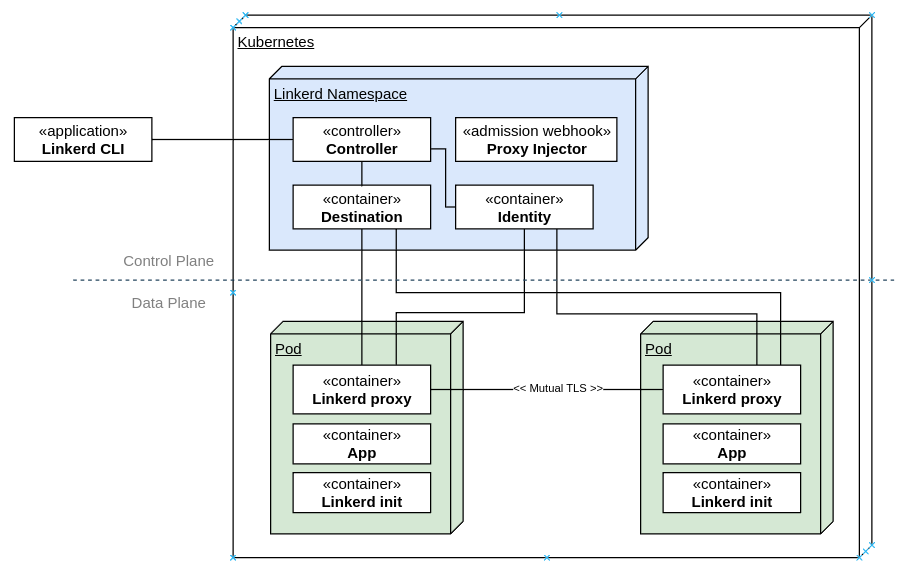
If you ve done anything in the Kubernetes space in recent years, you ve most likely come across the words Service Mesh . It s backed by a set of mature technologies that provides cross-cutting networking, security, infrastructure capabilities to be used by workloads running in Kubernetes in a manner that is transparent to the actual workload. This abstraction enables application developers to not worry about building in otherwise sophisticated capabilities for networking, routing, circuit-breaking and security, and simply rely on the services offered by the service mesh.In this post, I ll be covering Linkerd, which is an alternative to Istio. It has gone through a significant re-write when it transitioned from the JVM to a Go-based Control Plane and a Rust-based Data Plane a few years back and is now a part of the CNCF and is backed by Buoyant. It has proven itself widely for use in production workloads and has a healthy community and release cadence.It achieves this with a side-car container that communicates with a Linkerd control plane that allows central management of policy, telemetry, mutual TLS, traffic routing, shaping, retries, load balancing, circuit-breaking and other cross-cutting concerns before the traffic hits the container. This has made the task of implementing the application services much simpler as it is managed by container orchestrator and service mesh. I covered Istio in a prior post a few years back, and much of the content is still applicable for this post, if you d like to have a look.Here are the broad architectural components of Linkerd:The components are separated into the control plane and the data plane.The control plane components live in its own namespace and consists of a controller that the Linkerd CLI interacts with via the Kubernetes API. The destination service is used for service discovery, TLS identity, policy on access control for inter-service communication and service profile information on routing, retries, timeouts. The identity service acts as the Certificate Authority which responds to Certificate Signing Requests (CSRs) from proxies for initialization and for service-to-service encrypted traffic. The proxy injector is an admission webhook that injects the Linkerd proxy side car and the init container automatically into a pod when the linkerd.io/inject: enabled is available on the namespace or workload.On the data plane side are two components. First, the init container, which is responsible for automatically forwarding incoming and outgoing traffic through the Linkerd proxy via iptables rules. Second, the Linkerd proxy, which is a lightweight micro-proxy written in Rust, is the data plane itself.I will be walking you through the setup of Linkerd (2.12.2 at the time of writing) on a Kubernetes cluster.Let s see what s running on the cluster currently. This assumes you have a cluster running and kubectl is installed and available on the PATH.
On most systems, this should be sufficient to setup the CLI. You may need to restart your terminal to load the updated paths. If you have a non-standard configuration and linkerd is not found after the installation, add the following to your PATH to be able to find the cli:
export PATH=$PATH:~/.linkerd2/bin/
At this point, checking the version would give you the following:
$ linkerd version
Client version: stable-2.12.2
Server version: unavailable
Setting up Linkerd Control PlaneBefore installing Linkerd on the cluster, run the following step to check the cluster for pre-requisites:
kubernetes-api
--------------
  can initialize the client
  can query the Kubernetes API
kubernetes-version
------------------
  is running the minimum Kubernetes API version
  is running the minimum kubectl version
pre-kubernetes-setup
--------------------
  control plane namespace does not already exist
  can create non-namespaced resources
  can create ServiceAccounts
  can create Services
  can create Deployments
  can create CronJobs
  can create ConfigMaps
  can create Secrets
  can read Secrets
  can read extension-apiserver-authentication configmap
  no clock skew detected
linkerd-version
---------------
  can determine the latest version
  cli is up-to-date
Status check results are
All the pre-requisites appear to be good right now, and so installation can proceed.The first step of the installation is to setup the Custom Resource Definitions (CRDs) that Linkerd requires. The linkerd cli only prints the resource YAMLs to standard output and does not create them directly in Kubernetes, so you would need to pipe the output to kubectl apply to create the resources in the cluster that you re working with.
$ linkerd install --crds   kubectl apply -f -
Rendering Linkerd CRDs...
Next, run  linkerd install   kubectl apply -f -  to install the control plane.
customresourcedefinition.apiextensions.k8s.io/authorizationpolicies.policy.linkerd.io created
customresourcedefinition.apiextensions.k8s.io/httproutes.policy.linkerd.io created
customresourcedefinition.apiextensions.k8s.io/meshtlsauthentications.policy.linkerd.io created
customresourcedefinition.apiextensions.k8s.io/networkauthentications.policy.linkerd.io created
customresourcedefinition.apiextensions.k8s.io/serverauthorizations.policy.linkerd.io created
customresourcedefinition.apiextensions.k8s.io/servers.policy.linkerd.io created
customresourcedefinition.apiextensions.k8s.io/serviceprofiles.linkerd.io created
Next, install the Linkerd control plane components in the same manner, this time without the crds switch:
$ linkerd install   kubectl apply -f -
namespace/linkerd created
clusterrole.rbac.authorization.k8s.io/linkerd-linkerd-identity created
clusterrolebinding.rbac.authorization.k8s.io/linkerd-linkerd-identity created
serviceaccount/linkerd-identity created
clusterrole.rbac.authorization.k8s.io/linkerd-linkerd-destination created
clusterrolebinding.rbac.authorization.k8s.io/linkerd-linkerd-destination created
serviceaccount/linkerd-destination created
secret/linkerd-sp-validator-k8s-tls created
validatingwebhookconfiguration.admissionregistration.k8s.io/linkerd-sp-validator-webhook-config created
secret/linkerd-policy-validator-k8s-tls created
validatingwebhookconfiguration.admissionregistration.k8s.io/linkerd-policy-validator-webhook-config created
clusterrole.rbac.authorization.k8s.io/linkerd-policy created
clusterrolebinding.rbac.authorization.k8s.io/linkerd-destination-policy created
role.rbac.authorization.k8s.io/linkerd-heartbeat created
rolebinding.rbac.authorization.k8s.io/linkerd-heartbeat created
clusterrole.rbac.authorization.k8s.io/linkerd-heartbeat created
clusterrolebinding.rbac.authorization.k8s.io/linkerd-heartbeat created
serviceaccount/linkerd-heartbeat created
clusterrole.rbac.authorization.k8s.io/linkerd-linkerd-proxy-injector created
clusterrolebinding.rbac.authorization.k8s.io/linkerd-linkerd-proxy-injector created
serviceaccount/linkerd-proxy-injector created
secret/linkerd-proxy-injector-k8s-tls created
mutatingwebhookconfiguration.admissionregistration.k8s.io/linkerd-proxy-injector-webhook-config created
configmap/linkerd-config created
secret/linkerd-identity-issuer created
configmap/linkerd-identity-trust-roots created
service/linkerd-identity created
service/linkerd-identity-headless created
deployment.apps/linkerd-identity created
service/linkerd-dst created
service/linkerd-dst-headless created
service/linkerd-sp-validator created
service/linkerd-policy created
service/linkerd-policy-validator created
deployment.apps/linkerd-destination created
cronjob.batch/linkerd-heartbeat created
deployment.apps/linkerd-proxy-injector created
service/linkerd-proxy-injector created
secret/linkerd-config-overrides created
Kubernetes will start spinning up the data plane components and you should see the following when you list the pods:
kubernetes-api
--------------
  can initialize the client
  can query the Kubernetes API
kubernetes-version
------------------
  is running the minimum Kubernetes API version
  is running the minimum kubectl version
linkerd-existence
-----------------
  'linkerd-config' config map exists
  heartbeat ServiceAccount exist
  control plane replica sets are ready
  no unschedulable pods
  control plane pods are ready
  cluster networks contains all pods
  cluster networks contains all services
linkerd-config
--------------
  control plane Namespace exists
  control plane ClusterRoles exist
  control plane ClusterRoleBindings exist
  control plane ServiceAccounts exist
  control plane CustomResourceDefinitions exist
  control plane MutatingWebhookConfigurations exist
  control plane ValidatingWebhookConfigurations exist
  proxy-init container runs as root user if docker container runtime is used
linkerd-identity
----------------
  certificate config is valid
  trust anchors are using supported crypto algorithm
  trust anchors are within their validity period
  trust anchors are valid for at least 60 days
  issuer cert is using supported crypto algorithm
  issuer cert is within its validity period
  issuer cert is valid for at least 60 days
  issuer cert is issued by the trust anchor
linkerd-webhooks-and-apisvc-tls
-------------------------------
  proxy-injector webhook has valid cert
  proxy-injector cert is valid for at least 60 days
  sp-validator webhook has valid cert
  sp-validator cert is valid for at least 60 days
  policy-validator webhook has valid cert
  policy-validator cert is valid for at least 60 days
linkerd-version
---------------
  can determine the latest version
  cli is up-to-date
control-plane-version
---------------------
  can retrieve the control plane version
  control plane is up-to-date
  control plane and cli versions match
linkerd-control-plane-proxy
---------------------------
  control plane proxies are healthy
  control plane proxies are up-to-date
  control plane proxies and cli versions match
Status check results are
Everything looks good.Setting up the Viz ExtensionAt this point, the required components for the service mesh are setup, but let s also install the viz extension, which provides a good visualization capabilities that will come in handy subsequently. Once again, linkerd uses the same pattern for installing the extension.
$ linkerd viz install   kubectl apply -f -
namespace/linkerd-viz created
clusterrole.rbac.authorization.k8s.io/linkerd-linkerd-viz-metrics-api created
clusterrolebinding.rbac.authorization.k8s.io/linkerd-linkerd-viz-metrics-api created
serviceaccount/metrics-api created
clusterrole.rbac.authorization.k8s.io/linkerd-linkerd-viz-prometheus created
clusterrolebinding.rbac.authorization.k8s.io/linkerd-linkerd-viz-prometheus created
serviceaccount/prometheus created
clusterrole.rbac.authorization.k8s.io/linkerd-linkerd-viz-tap created
clusterrole.rbac.authorization.k8s.io/linkerd-linkerd-viz-tap-admin created
clusterrolebinding.rbac.authorization.k8s.io/linkerd-linkerd-viz-tap created
clusterrolebinding.rbac.authorization.k8s.io/linkerd-linkerd-viz-tap-auth-delegator created
serviceaccount/tap created
rolebinding.rbac.authorization.k8s.io/linkerd-linkerd-viz-tap-auth-reader created
secret/tap-k8s-tls created
apiservice.apiregistration.k8s.io/v1alpha1.tap.linkerd.io created
role.rbac.authorization.k8s.io/web created
rolebinding.rbac.authorization.k8s.io/web created
clusterrole.rbac.authorization.k8s.io/linkerd-linkerd-viz-web-check created
clusterrolebinding.rbac.authorization.k8s.io/linkerd-linkerd-viz-web-check created
clusterrolebinding.rbac.authorization.k8s.io/linkerd-linkerd-viz-web-admin created
clusterrole.rbac.authorization.k8s.io/linkerd-linkerd-viz-web-api created
clusterrolebinding.rbac.authorization.k8s.io/linkerd-linkerd-viz-web-api created
serviceaccount/web created
server.policy.linkerd.io/admin created
authorizationpolicy.policy.linkerd.io/admin created
networkauthentication.policy.linkerd.io/kubelet created
server.policy.linkerd.io/proxy-admin created
authorizationpolicy.policy.linkerd.io/proxy-admin created
service/metrics-api created
deployment.apps/metrics-api created
server.policy.linkerd.io/metrics-api created
authorizationpolicy.policy.linkerd.io/metrics-api created
meshtlsauthentication.policy.linkerd.io/metrics-api-web created
configmap/prometheus-config created
service/prometheus created
deployment.apps/prometheus created
service/tap created
deployment.apps/tap created
server.policy.linkerd.io/tap-api created
authorizationpolicy.policy.linkerd.io/tap created
clusterrole.rbac.authorization.k8s.io/linkerd-tap-injector created
clusterrolebinding.rbac.authorization.k8s.io/linkerd-tap-injector created
serviceaccount/tap-injector created
secret/tap-injector-k8s-tls created
mutatingwebhookconfiguration.admissionregistration.k8s.io/linkerd-tap-injector-webhook-config created
service/tap-injector created
deployment.apps/tap-injector created
server.policy.linkerd.io/tap-injector-webhook created
authorizationpolicy.policy.linkerd.io/tap-injector created
networkauthentication.policy.linkerd.io/kube-api-server created
service/web created
deployment.apps/web created
serviceprofile.linkerd.io/metrics-api.linkerd-viz.svc.cluster.local created
serviceprofile.linkerd.io/prometheus.linkerd-viz.svc.cluster.local created
A few seconds later, you should see the following in your pod list:
The viz components live in the linkerd-viz namespace.You can now checkout the viz dashboard:
$ linkerd viz dashboard
Linkerd dashboard available at:
http://localhost:50750
Grafana dashboard available at:
http://localhost:50750/grafana
Opening Linkerd dashboard in the default browser
Opening in existing browser session.
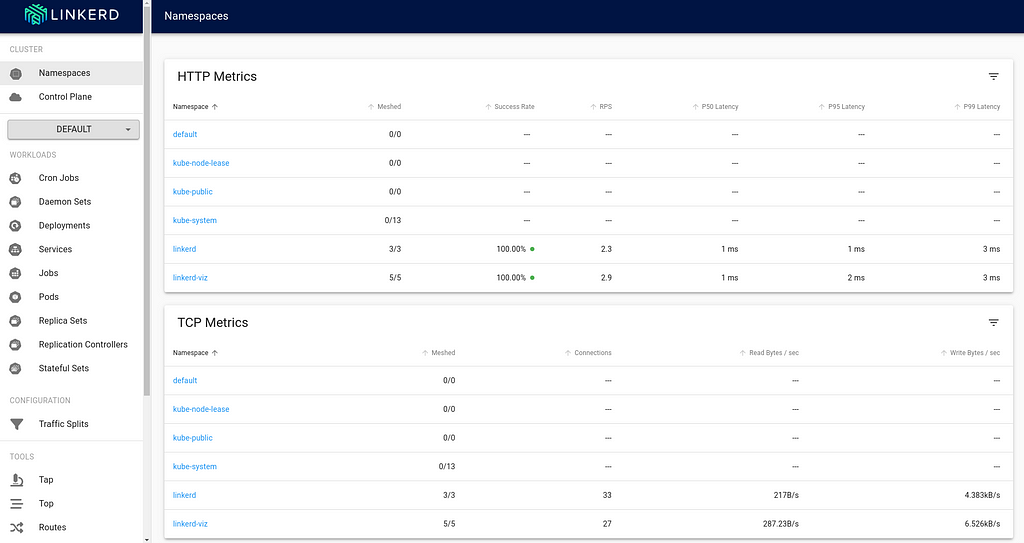
The Meshed column indicates the workload that is currently integrated with the Linkerd control plane. As you can see, there are no application deployments right now that are running.Injecting the Linkerd Data Plane componentsThere are two ways to integrate Linkerd to the application containers:1 by manually injecting the Linkerd data plane components 2 by instructing Kubernetes to automatically inject the data plane componentsInject Linkerd data plane manuallyLet s try the first option. Below is a simple nginx-app that I will deploy into the cluster:
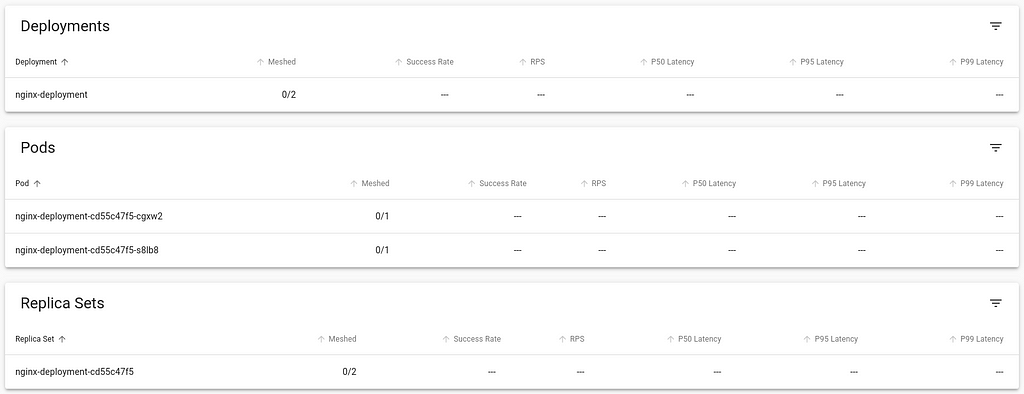
Back in the viz dashboard, I do see the workload deployed, but it isn t currently communicating with the Linkerd control plane, and so doesn t show any metrics, and the Meshed count is 0:Looking at the Pod s deployment YAML, I can see that it only includes the nginx container:
Let s directly inject the linkerd data plane into this running container. We do this by retrieving the YAML of the deployment, piping it to linkerd cli to inject the necessary components and then piping to kubectl apply the changed resources.
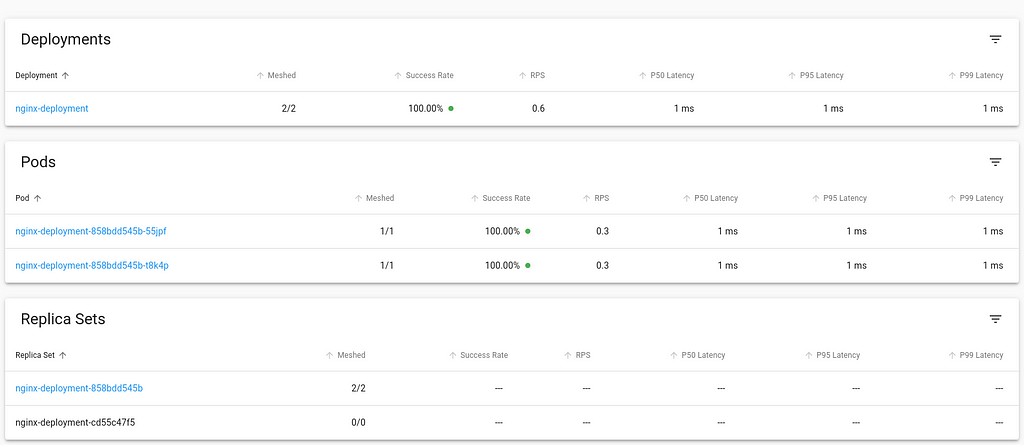
Back in the viz dashboard, the workload now is integrated into Linkerd control plane.Looking at the updated Pod definition, we see a number of changes that the linkerd has injected that allows it to integrate with the control plane. Let s have a look:
At this point, the necessary components are setup for you to explore Linkerd further. You can also try out the jaeger and multicluster extensions, similar to the process of installing and using the viz extension and try out their capabilities.Inject Linkerd data plane automaticallyIn this approach, we shall we how to instruct Kubernetes to automatically inject the Linkerd data plane to workloads at deployment time.We can achieve this by adding the linkerd.io/inject annotation to the deployment descriptor which causes the proxy injector admission hook to execute and inject linkerd data plane components automatically at the time of deployment.
This annotation can also be specified at the namespace level to affect all the workloads within the namespace. Note that any resources created before the annotation was added to the namespace will require a rollout restart to trigger the injection of the Linkerd components.Uninstalling LinkerdNow that we have walked through the installation and setup process of Linkerd, let s also cover how to remove it from the infrastructure and go back to the state prior to its installation.The first step would be to remove extensions, such as viz.
tl;dr; OpenSSL 3.0.1 leaks memory in ssl3_setup_write_buffer(), seems to be
fixed in 3.0.5 3.0.2. The issue manifests at least in stunnel
and keepalived on CentOS 9. In addition I learned the hard way that running a
not so recent VirtualBox version on Debian bullseye let to dh parameter generation
crashing in libcrypto in bn_sqr8x_internal().
A recent rabbit hole I went down. The actual bug in openssl was nailed down and
documented by
Quentin Armitage on GitHub in keepalived
My bugreport with all back and forth in the RedHat Bugzilla is
#2128412.
Act I - Hello stunnel, this is the OOMkiller Calling
We started to use stunnel on Google Cloud compute engine instances running CentOS 9.
The loadbalancer in front of those instances used a TCP health check to validate the
backend availability. A day or so later the stunnel instances got killed by the OOMkiller. Restarting stunnel and looking into /proc/<pid>/smaps showed a heap
segment growing quite quickly.
Act II - Reproducing the Issue
While I'm not the biggest fan of VirtualBox and Vagrant I've to admit it's quite
nice to just fire up a VM image, and give other people a chance to recreate that
setup as well. Since VirtualBox is no longer released with Debian/stable I just
recompiled what was available in unstable at the time of the bullseye release, and
used that. That enabled me now to just start a CentOS 9 VM, setup stunnel with a
minimal config, grab netcat and a for loop and watch the memory grow.
E.g. while true; do nc -z localhost 2600; sleep 1; done
To my surprise, in addition to the memory leak, I also observed some crashes but
did not yet care too much about those.
Act III - Wrong Suspect, a Workaround and Bugreporting
Of course the first idea was that something must be wrong in stunnel itself. But
I could not find any recent bugreports. My assumption is that there are
still a few people around using CentOS and stunnel, so someone else should probably
have seen it before. Just to be sure I recompiled the latest stunnel package from
Fedora. Didn't change anything. Next I recompiled it without almost all the patches
Fedora/RedHat carries. Nope, no progress.
Next idea: Maybe this is related to the fact that we do not initiate a TLS context
after connecting? So we changed the test case from nc to openssl s_client, and
the loadbalancer healthcheck from TCP to a TLS based one. Tada, a workaround, no
more memory leaking.
In addition I gave Fedora a try (they have Vagrant Virtualbox images in the "Cloud"
Spin, e.g.
here for Fedora 36)
and my local Debian installation a try. No leaks experienced on both.
Next I reported
#2128412.
Act IV - Crash in libcrypto and a VirtualBox Bug
When I moved with the test case from the Google Cloud compute instance to my
local VM I encountered some crashes. That morphed into a real problem when I
started to run stunnel with gdb and valgrind. All crashes happened in libcrypto
bn_sqr8x_internal() when generating new dh parameter (stunnel does that for
you if you do not use static dh parameter). I quickly worked around that by
generating static dh parameter for stunnel.
After some back and forth I suspected VirtualBox as the culprit. Recompiling
the current VirtualBox version (6.1.38-dfsg-3) from unstable on bullseye works
without any changes. Upgrading actually fixed that issue.
Epilog
I highly appreciate that RedHat, with all the bashing around the future of
CentOS, still works on community contributed bugreports. My kudos go to
Clemens Lang.
Now that the root cause is clear, I guess RedHat will push out a fix for the
openssl 3.0.1 based release they have in RHEL/CentOS 9. Until that is available
at least stunnel and keepalived are known to be affected. If you run stunnel
on something public it's not that pretty, because already a low rate of TCP
connections will result in a DoS condition.
# Download a binary device tree file and matching kernel a good soul uploaded to github
wget https://github.com/vfdev-5/qemu-rpi2-vexpress/raw/master/kernel-qemu-4.4.1-vexpress
wget https://github.com/vfdev-5/qemu-rpi2-vexpress/raw/master/vexpress-v2p-ca15-tc1.dtb
# Download the official Rasbian image without X
wget https://downloads.raspberrypi.org/raspios_lite_armhf/images/raspios_lite_armhf-2022-04-07/2022-04-04-raspios-bullseye-armhf-lite.img.xz
unxz 2022-04-04-raspios-bullseye-armhf-lite.img.xz
# Convert it from the raw image to a qcow2 image and add some space
qemu-img convert -f raw -O qcow2 2022-04-04-raspios-bullseye-armhf-lite.img rasbian.qcow2
qemu-img resize rasbian.qcow2 4G
# make sure we get a user account setup
echo "me:$(echo 'test123' openssl passwd -6 -stdin)" > userconf
sudo guestmount -a rasbian.qcow2 -m /dev/sda1 /mnt
sudo mv userconf /mnt
sudo guestunmount /mnt
# start qemu
qemu-system-arm -m 2048M -M vexpress-a15 -cpu cortex-a15 \
 -kernel kernel-qemu-4.4.1-vexpress -no-reboot \
 -smp 2 -serial stdio \
 -dtb vexpress-v2p-ca15-tc1.dtb -sd rasbian.qcow2 \
 -append "root=/dev/mmcblk0p2 rw rootfstype=ext4 console=ttyAMA0,15200 loglevel=8" \
 -nic user,hostfwd=tcp::5555-:22
# login at the serial console as user me with password test123
sudo -i
# enable ssh
systemctl enable ssh
systemctl start ssh
# resize partition and filesystem
parted /dev/mmcblk0 resizepart 2 100%
resize2fs /dev/mmcblk0p2
 Earlier this month the DebConf team announced the
 ![[DebConf24 Logo Contest Winner]](https://bits.debian.org/images/logo_win_dc24_skorea.png) 'sun-seagull-sea' by Woohee Yang
This is a preview copy, other revisions will occur for sizing, print, and
media... but we had to share it with you all now. :).
Looking forward to seeing you all at #debconf24 in #Busan, South Korea 2024!
'sun-seagull-sea' by Woohee Yang
This is a preview copy, other revisions will occur for sizing, print, and
media... but we had to share it with you all now. :).
Looking forward to seeing you all at #debconf24 in #Busan, South Korea 2024!

 Yang the cat bird
 KDE snap Kamoso
 Reduce the size of your c: partition to the smallest it can be and then turn off windows with the understanding that you will never boot this system on the iron ever again.
 To find the literal path names of your detected drives you can run fdisk -l. Pay attention to the names of the partitions and the sizes of the drives to help determine which is which.
Once you have a shell in the netinst installer, you should maybe be able to run a command like the following. This will duplicate the disk located at if (in file) to the disk located at of (out file) while showing progress as the status.
To find the literal path names of your detected drives you can run fdisk -l. Pay attention to the names of the partitions and the sizes of the drives to help determine which is which.
Once you have a shell in the netinst installer, you should maybe be able to run a command like the following. This will duplicate the disk located at if (in file) to the disk located at of (out file) while showing progress as the status.
 In the New VM window, select Import existing disk image
  When prompted for the path to the image, use the one we created with sudo qemu-img convert above.
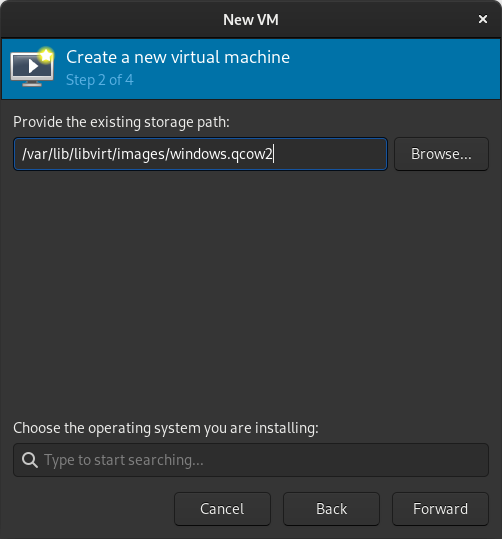 Select the version of Windows you want.
 Select memory and CPUs to allocate to the VM.
 Tick the Customize configuration before install box
 If you re prompted to enable the default network, do so now.
 The default hardware layout should probably suffice. Get it as close to the underlying hardware as it is convenient to do. But Windows is pretty lenient these days about virtualizing licensed windows instances so long as they re not running in more than one place at a time.
 Good luck! Leave comments if you have questions.
 I'm really
puzzled why someone invests lifetime to dig into company internal history
to try get something right, do a lengthy explanation to the whole team,
use the time of others, even mention that there was no explanation of
why it's not the default value anymore it should be, and repeat the same
mistake by not writing down anything in the commit message.
For the current company I'm inclined to propose a commit message validator.
For a potential future company I might join, I guess I ask for real world
git logs from repositories I should contribute to. Seems that this is another
valuable source of information to qualify the company culture. Next up to
the existence of whiteboards in the office.
I'm really happy that at least a majority of the people contributing to Debian
writes somewhat decent commit messages and changelogs. Let that be a reminder
to myself to improve in that area the next time I've to change something.
I'm really
puzzled why someone invests lifetime to dig into company internal history
to try get something right, do a lengthy explanation to the whole team,
use the time of others, even mention that there was no explanation of
why it's not the default value anymore it should be, and repeat the same
mistake by not writing down anything in the commit message.
For the current company I'm inclined to propose a commit message validator.
For a potential future company I might join, I guess I ask for real world
git logs from repositories I should contribute to. Seems that this is another
valuable source of information to qualify the company culture. Next up to
the existence of whiteboards in the office.
I'm really happy that at least a majority of the people contributing to Debian
writes somewhat decent commit messages and changelogs. Let that be a reminder
to myself to improve in that area the next time I've to change something.
 I recently bought a
  Icy morning Witch Wells Az
 This is the report for the