
Now that I m
freelancing, I need to
actually track my time, which is something I ve had the luxury of not having
to do before. That meant something of a rethink of the way I ve been
keeping track of my to-do list. Up to now that was a combination of things
like the bug lists for the projects I m working on at the moment, whatever
task tracking system Canonical was using at the moment (Jira when I left),
and a giant flat text file in which I recorded logbook-style notes of what
I d done each day plus a few extra notes at the bottom to remind myself of
particularly urgent tasks. I
could have started manually adding times to
each logbook entry, but ugh, let s not.
In general, I had the following goals (which were a bit reminiscent of my
address book):
- free software throughout
- storage under my control
- ability to annotate tasks with URLs (especially bugs and merge requests)
- lightweight time tracking (I m OK with having to explicitly tell it when
I start and stop tasks)
- ability to drive everything from the command line
- decent filtering so I don t have to look at my entire to-do list all the time
- ability to easily generate billing information for multiple clients
- optionally, integration with Android (mainly so I can tick off personal
tasks like change bedroom lightbulb or whatever that don t involve
being near a computer)
I didn t do an elaborate evaluation of multiple options, because I m not
trying to come up with the best possible solution for a client here. Also,
there are a bazillion to-do list trackers out there and if I tried to
evaluate them all I d never do anything else. I just wanted something that
works well enough for me.
Since it
came up on
Mastodon: a bunch
of people swear by
Org mode, which I know can do at
least some of this sort of thing. However, I don t use Emacs and don t plan
to use Emacs.
nvim-orgmode does
have some support for time tracking, but when I ve tried
vim-based
versions of Org mode in the past I ve found they haven t really fitted my
brain very well.
Taskwarrior and Timewarrior
One of the other Freexian collaborators mentioned
Taskwarrior and
Timewarrior, so I had a look at those.
The basic idea of Taskwarrior is that you have a
task command that tracks
each task as a blob of
JSON and provides subcommands to let you add, modify,
and remove tasks with a minimum of friction.
task add adds a task, and
you can add metadata like
project:Personal (I always make sure every task
has a project, for ease of filtering). Just running
task shows you a task
list sorted by Taskwarrior s idea of urgency, with an
ID for each task, and
there are various other reports with different filtering and verbosity.
task <id> annotate lets you attach more information to a task.
task <id>
done
marks it as done. So far so good, so a redacted version of my to-do
list looks like this:
$ task ls
ID A Project     Tags                 Description
17   Freexian                         Add Incus support to autopkgtest [2]
 7   Columbiform                      Figure out Lloyds online banking [1]
 2   Debian                           Fix troffcvt for groff 1.23.0 [1]
11   Personal                         Replace living room curtain rail
Once I got comfortable with it, this was already a big improvement. I
haven t bothered to learn all the filtering gadgets yet, but it was easy
enough to see that I could do something like
task all project:Personal and
it d show me both pending and completed tasks in that project, and that all
the data was stored in
~/.task - though I have to say that there are
enough reporting bells and whistles that I haven t needed to poke around
manually. In combination with the regular backups that I do anyway (you do
too, right?), this gave me enough confidence to abandon my previous
text-file logbook approach.
Next was time tracking. Timewarrior integrates with Taskwarrior, albeit in
an only semi-packaged way, and
it was easy enough to set that up. Now I can do:
$ task 25 start
Starting task 00a9516f 'Write blog post about task tracking'.
Started 1 task.
Note: '"Write blog post about task tracking"' is a new tag.
Tracking Columbiform "Write blog post about task tracking"
  Started 2024-01-10T11:28:38
  Current                  38
  Total               0:00:00
You have more urgent tasks.
Project 'Columbiform' is 25% complete (3 of 4 tasks remaining).
When I stop work on something, I do
task active to find the
ID, then
task
<id> stop
. Timewarrior does the tedious stopwatch business for me, and I
can manually enter times if I forget to start/stop a task. Then the really
useful bit: I can do something like
timew summary :month <name-of-client>
and it tells me how much to bill that client for this month. Perfect.
I also started using
VIT to simplify
the day-to-day flow a little, which means I m normally just using one or two
keystrokes rather than typing longer commands. That isn t really necessary
from my point of view, but it does save some time.
Android integration
I left Android integration for a bit later since it wasn t essential. When
I got round to it, I have to say that it felt a bit clumsy, but it did
eventually work.
The first step was to
set up a
taskserver. Most
of the setup procedure was
OK, but I wanted to use Let s Encrypt to minimize
the amount of messing around with CAs I had to do. Getting this to work
involved hitting things with sticks a bit, and there s still a local
CA
involved for client certificates. What I ended up with was a
certbot
setup with the
webroot authenticator and a custom deploy hook as follows
(with
cert_name replaced by a
DNS name in my house domain):
#! /bin/sh
set -eu
cert_name=taskd.example.org
found=false
for domain in $RENEWED_DOMAINS; do
    case "$domain" in
        $cert_name)
            found=:
            ;;
    esac
done
$found   exit 0
install -m 644 "/etc/letsencrypt/live/$cert_name/fullchain.pem" \
    /var/lib/taskd/pki/fullchain.pem
install -m 640 -g Debian-taskd "/etc/letsencrypt/live/$cert_name/privkey.pem" \
    /var/lib/taskd/pki/privkey.pem
systemctl restart taskd.service
I could then set this in
/etc/taskd/config (
server.crl.pem and
ca.cert.pem were generated using the documented taskserver setup procedure):
server.key=/var/lib/taskd/pki/privkey.pem
server.cert=/var/lib/taskd/pki/fullchain.pem
server.crl=/var/lib/taskd/pki/server.crl.pem
ca.cert=/var/lib/taskd/pki/ca.cert.pem
Then I could set
taskd.ca on my laptop to
/usr/share/ca-certificates/mozilla/ISRG_Root_X1.crt and otherwise follow
the client setup instructions, run
task sync init to get things started,
and then
task sync every so often to sync changes between my laptop and
the taskserver.
I used
TaskWarrior
Mobile
as the client. I have to say I wouldn t want to use that client as my
primary task tracking interface: the setup procedure is clunky even beyond
the necessity of copying a client certificate around, it expects you to give
it a
.taskrc rather than having a proper settings interface for that, and
it only seems to let you add a task if you specify a due date for it. It
also lacks Timewarrior integration, so I can only really use it when I don t
care about time tracking, e.g. personal tasks. But that s really all I
need, so it meets my minimum requirements.
Next?
Considering this is literally the first thing I tried, I have to say I m
pretty happy with it. There are a bunch of optional extras I haven t tried
yet, but in general it kind of has the
vim nature for me: if I need
something it s very likely to exist or easy enough to build, but the
features I don t use don t get in my way.
I wouldn t recommend any of this to somebody who didn t already spend most
of their time in a terminal - but I do. I m glad people have gone to all
the effort to build this so I didn t have to.
 I am upstream and Debian package maintainer of
python-debianbts, which is a Python library that allows for
querying Debian s Bug Tracking System (BTS). python-debianbts is used by
reportbug, the standard tool to report bugs in Debian, and therefore the glue
between the reportbug and the BTS.
debbugs, the software that powers Debian s BTS, provides a SOAP
interface for querying the BTS. Unfortunately, SOAP is not a very popular
protocol anymore, and I m facing the second migration to another underlying
SOAP library as they continue to become unmaintained over time. Zeep, the
library I m currently considering, requires a WSDL file in order to work
with a SOAP service, however, debbugs does not provide one. Since I m not
familiar with WSDL, I need help from someone who can create a WSDL file for
debbugs, so I can migrate python-debianbts away from pysimplesoap to zeep.
How did we get here?
Back in the olden days, reportbug was querying the BTS by parsing its HTML
output. While this worked, it tightly coupled the user-facing
presentation of the BTS with critical functionality of the bug reporting tool.
The setup was fragile, prone to breakage, and did not allow changing anything
in the BTS frontend for fear of breaking reportbug itself.
In 2007, I started to work on reportbug-ng, a user-friendly alternative
to reportbug, targeted at users not comfortable using the command line. Early
on, I decided to use the BTS SOAP interface instead of parsing HTML like
reportbug did. 2008, I extracted the code that dealt with the BTS into a
separate Python library, and after some collaboration with the reportbug
maintainers, reportbug adopted python-debianbts in 2011 and has used it ever
since.
2015, I was working on porting python-debianbts to Python 3.
During that process, it turned out that its major dependency, SoapPy was pretty
much unmaintained for years and blocking the Python3 transition. Thanks to the
help of Gaetano Guerriero, who ported python-debianbts to
pysimplesoap, the migration was unblocked and could proceed.
In 2024, almost ten years later, pysimplesoap seems to be unmaintained as well,
and I have to look again for alternatives. The most promising one right now
seems to be zeep. Unfortunately, zeep requires a WSDL file for working with
a SOAP service, which debbugs does not provide.
How can you help?
reportbug (and thus python-debianbts) is used by thousands of users and I have
a certain responsibility to keep things working properly. Since I simply don t
know enough about WSDL to create such a file for debbugs myself, I m looking
for someone who can help me with this task.
If you re familiar with SOAP, WSDL and optionally debbugs, please get in
touch with me. I don t speak Pearl, so I m not
really able to read debbugs code, but I do know some things about the SOAP
requests and replies due to my work on python-debianbts, so I m sure we can
work something out.
There is a WSDL file for a debbugs version used by GNU, but I
don t think it s official and it currently does not work with zeep. It may be a
good starting point, though.
The future of debbugs API
While we can probably continue to support debbugs SOAP interface for a while,
I don t think it s very sustainable in the long run. A simpler, well documented
REST API that returns JSON seems more appropriate nowadays. The queries and
replies that debbugs currently supports are simple enough to design a REST API
with JSON around it. The benefit would be less complex libraries on the client
side and probably easier maintainability on the server side as well. debbugs
maintainer seemed to be in agreement with this idea back in
2018. I created an attempt to define a new API
(HTML render), but somehow we got stuck and no progress has been
made since then. I m still happy to help shaping such an API for debbugs, but I
can t really implement anything in debbugs itself, as it is written in Perl,
which I m not familiar with.
I am upstream and Debian package maintainer of
python-debianbts, which is a Python library that allows for
querying Debian s Bug Tracking System (BTS). python-debianbts is used by
reportbug, the standard tool to report bugs in Debian, and therefore the glue
between the reportbug and the BTS.
debbugs, the software that powers Debian s BTS, provides a SOAP
interface for querying the BTS. Unfortunately, SOAP is not a very popular
protocol anymore, and I m facing the second migration to another underlying
SOAP library as they continue to become unmaintained over time. Zeep, the
library I m currently considering, requires a WSDL file in order to work
with a SOAP service, however, debbugs does not provide one. Since I m not
familiar with WSDL, I need help from someone who can create a WSDL file for
debbugs, so I can migrate python-debianbts away from pysimplesoap to zeep.
How did we get here?
Back in the olden days, reportbug was querying the BTS by parsing its HTML
output. While this worked, it tightly coupled the user-facing
presentation of the BTS with critical functionality of the bug reporting tool.
The setup was fragile, prone to breakage, and did not allow changing anything
in the BTS frontend for fear of breaking reportbug itself.
In 2007, I started to work on reportbug-ng, a user-friendly alternative
to reportbug, targeted at users not comfortable using the command line. Early
on, I decided to use the BTS SOAP interface instead of parsing HTML like
reportbug did. 2008, I extracted the code that dealt with the BTS into a
separate Python library, and after some collaboration with the reportbug
maintainers, reportbug adopted python-debianbts in 2011 and has used it ever
since.
2015, I was working on porting python-debianbts to Python 3.
During that process, it turned out that its major dependency, SoapPy was pretty
much unmaintained for years and blocking the Python3 transition. Thanks to the
help of Gaetano Guerriero, who ported python-debianbts to
pysimplesoap, the migration was unblocked and could proceed.
In 2024, almost ten years later, pysimplesoap seems to be unmaintained as well,
and I have to look again for alternatives. The most promising one right now
seems to be zeep. Unfortunately, zeep requires a WSDL file for working with
a SOAP service, which debbugs does not provide.
How can you help?
reportbug (and thus python-debianbts) is used by thousands of users and I have
a certain responsibility to keep things working properly. Since I simply don t
know enough about WSDL to create such a file for debbugs myself, I m looking
for someone who can help me with this task.
If you re familiar with SOAP, WSDL and optionally debbugs, please get in
touch with me. I don t speak Pearl, so I m not
really able to read debbugs code, but I do know some things about the SOAP
requests and replies due to my work on python-debianbts, so I m sure we can
work something out.
There is a WSDL file for a debbugs version used by GNU, but I
don t think it s official and it currently does not work with zeep. It may be a
good starting point, though.
The future of debbugs API
While we can probably continue to support debbugs SOAP interface for a while,
I don t think it s very sustainable in the long run. A simpler, well documented
REST API that returns JSON seems more appropriate nowadays. The queries and
replies that debbugs currently supports are simple enough to design a REST API
with JSON around it. The benefit would be less complex libraries on the client
side and probably easier maintainability on the server side as well. debbugs
maintainer seemed to be in agreement with this idea back in
2018. I created an attempt to define a new API
(HTML render), but somehow we got stuck and no progress has been
made since then. I m still happy to help shaping such an API for debbugs, but I
can t really implement anything in debbugs itself, as it is written in Perl,
which I m not familiar with.
 Having
 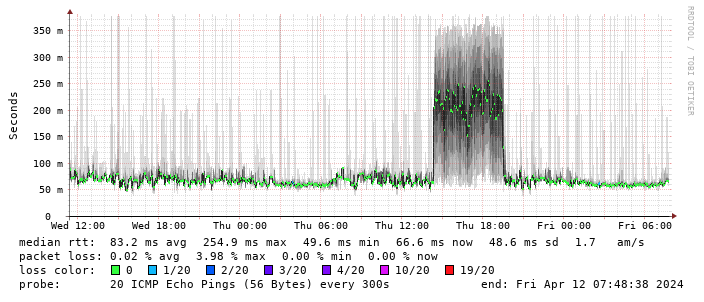 (There s a handy
 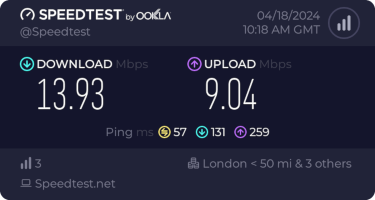 This is disappointing, but if it turns out to be a problem I can look at mounting it externally. I also assume as 5G is gradually rolled out further things will naturally improve, but that might be wishful thinking on my part.
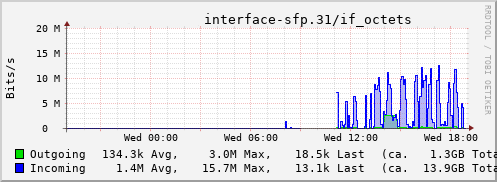
Rather than wait until my main link had a problem I decided to try a day working over the 5G connection. I spend a lot of my time either in browser based apps or accessing remote systems via SSH, so I m reasonably sensitive to a jittery or otherwise flaky connection. I picked a day that I did not have any meetings planned, but as it happened I ended up with an adhoc video call arranged. I m pleased to say that it all worked just fine; definitely noticeable as slower than the FTTP connection (to be expected), but all workable and even the video call was fine (at least from my end). Looking at the traffic graph shows the expected ~ 10Mb/s peak (actually a little higher, and looking at the FTTP stats for previous days not out of keeping with what we see there), and you can just about see the ~ 3Mb/s symmetric use by the video call at 2pm:
This is disappointing, but if it turns out to be a problem I can look at mounting it externally. I also assume as 5G is gradually rolled out further things will naturally improve, but that might be wishful thinking on my part.
Rather than wait until my main link had a problem I decided to try a day working over the 5G connection. I spend a lot of my time either in browser based apps or accessing remote systems via SSH, so I m reasonably sensitive to a jittery or otherwise flaky connection. I picked a day that I did not have any meetings planned, but as it happened I ended up with an adhoc video call arranged. I m pleased to say that it all worked just fine; definitely noticeable as slower than the FTTP connection (to be expected), but all workable and even the video call was fine (at least from my end). Looking at the traffic graph shows the expected ~ 10Mb/s peak (actually a little higher, and looking at the FTTP stats for previous days not out of keeping with what we see there), and you can just about see the ~ 3Mb/s symmetric use by the video call at 2pm:
 The test run also helped iron out the fact that the content filter was still enabled on the SIM, but that was easily resolved.
Up next, vaguely automatic failover.
The test run also helped iron out the fact that the content filter was still enabled on the SIM, but that was easily resolved.
Up next, vaguely automatic failover.

 A short status update of what happened on my side last month. I spent
quiet a bit of time reviewing new, code (thanks!) as well as
maintenance to keep things going but we also have some improvements:
Phosh
A short status update of what happened on my side last month. I spent
quiet a bit of time reviewing new, code (thanks!) as well as
maintenance to keep things going but we also have some improvements:
Phosh










 After seven years of service as member and secretary on the GHC Steering Committee, I have resigned from that role. So this is a good time to look back and retrace the formation of the GHC proposal process and committee.
In my memory, I helped define and shape the proposal process, optimizing it for effectiveness and throughput, but memory can be misleading, and judging from the paper trail in my email archives, this was indeed mostly Ben Gamari s and Richard Eisenberg s achievement: Already in Summer of 2016, Ben Gamari set up the
After seven years of service as member and secretary on the GHC Steering Committee, I have resigned from that role. So this is a good time to look back and retrace the formation of the GHC proposal process and committee.
In my memory, I helped define and shape the proposal process, optimizing it for effectiveness and throughput, but memory can be misleading, and judging from the paper trail in my email archives, this was indeed mostly Ben Gamari s and Richard Eisenberg s achievement: Already in Summer of 2016, Ben Gamari set up the  A new maintenance release 0.4.22 of
  Like each month, have a look at the work funded by
  The Rcpp Core Team is once again thrilled to announce a new release
1.0.12 of the
The Rcpp Core Team is once again thrilled to announce a new release
1.0.12 of the  This post describes how I m using