Search Results: "dkg"

12 January 2026

Daniel Kahn Gillmor: AI as a Compression Problem

A recent article in The Atlantic makes the case that very large language models effectively contain much of the works they're trained on. This article is an attempt to popularize the insights in the recent academic paper Extracting books from production language models from Ahmed et al. The authors of the paper demonstrate convincingly that well-known copyrighted textual material can be extracted from the chatbot interfaces of popular commercial LLM services. The Atlantic article cites a podcast quote about the Stable Diffusion AI image-generator model, saying "We took 100,000 gigabytes of images and compressed it to a two-gigabyte file that can re-create any of those and iterations of those". By analogy, this suggests we might think of LLMs (which work on text, not the images handled by Stable Diffusion) as a form of lossy textual compression. The entire text of Moby Dick, the canonical Big American Novel is merely 1.2MiB uncompressed (and less than 0.4MiB losslessly compressed with bzip2 -9). It's not surprising to imagine that a model with hundreds of billions of parameters might contain copies of these works. Warning: The next paragraph contains fuzzy math with no real concrete engineering practice behind it! Consider a hypothetical model with 100 billion parameters, where each parameter is stored as a 16-bit floating point value. The model weights would take 200 GB of storage. If you were to fill the parameter space only with losslessly compressed copies of books like Moby Dick, you could still fit half a million books, more than anyone can read in a lifetime. And lossy compression is typically orders of magnitude less in size than lossless compression, so we're talking about millions of works effectively encoded, with the acceptance of some artifacts being injected in the output. I first encountered this "compression" view of AI nearly three years ago, in Ted Chiang's insightful ChatGPT is a Blurry JPEG of the Web. I was suprised that The Atlantic article didn't cite Chiang's piece. If you haven't read Ted Chiang, i strongly recommend his work, and this piece is a great place to start. Chiang aside, the more recent writing that focuses on the idea of compressed works being "contained" in the model weights seems to be used by people interested in wielding some sort of copyright claims against the AI companies that maintain or provide access to these models. There are many many problems with AI today, but attacking AI companies based on copyright concerns seems similar to going after Al Capone for tax evasion. We should be much more concerned with the effect these projects have on cultural homogeneity, mental health, labor rights, privacy, and social control than whether they're violating copyright in some specific instance.

23 December 2025

Daniel Kahn Gillmor: AI and Secure Messaging Don't Mix

AI and Secure Messaging Don't Mix Over on the ACLU's Free Future blog, I just published an article titled AI and Secure Messaging Don't Mix. The blogpost assumes for the sake of the argument that people might actually want to have an AI involved in their personal conversations, and explores why Meta's Private Processing doesn't offer the level of assurance that they want it to offer. In short, the promises of "confidential cloud computing" are built on shaky foundations, especially against adversaries as powerful as Meta themselves. If you really want AI in your chat, the baseline step for privacy preservation is to include it in your local compute base, not to use a network service! But these operators clearly don't value private communication as much as they value binding you to their services. But let's imagine some secure messenger that actually does put message confidentiality first -- and imagine they had integrated some sort of AI capability into the messenger. That at least bypasses the privacy questions around AI use. Would you really want to talk with your friends, as augmented by their local AI, though? Would you want an AI, even one running locally with perfect privacy, intervening in your social connections? What if it summarized your friend's messages to you in a way that led you to misunderstand (or ignore) an important point your friend had made? What if it encouraged you to make an edgy joke that comes across wrong? Or to say something that seriously upsets a friend? How would you respond? How would you even know that it had happened? My handle is dkg. More times than i can count, i've had someone address me in a chat as "dog" and then cringe and apologize and blame their spellchecker/autocorrect. I can laugh these off because the failure mode is so obvious and transparent -- and repeatable. (also, dogs are awesome, so i don't really mind!) But when our attention (and our responses!) are being shaped and molded by these plausibility engines, how will we even know that mistakes are being made? What if the plausibility engine you've hooked into your messenger embeds subtle (or unsubtle!) bias? Don't we owe it to each other to engage with actual human attention?

21 November 2025

Daniel Kahn Gillmor: Transferring Signal on Android

Transferring a Signal account between two Android devices I spent far too much time recently trying to get a Signal Private Messenger account to transfer from one device to another. What I eventually found worked was a very finicky path to enable functioning "Wi-Fi Direct", which I go into below. I also offer some troubleshooting and recovery-from-failure guidance. All of this blogpost uses "original device" to refer to the Android pocket supercomputer that already has Signal installed and set up, and "new device" to mean the Android device that doesn't yet have Signal on it.

Why Transfer? Signal Private Messenger is designed with the expectation that the user has a "primary device", which is either an iPhone or an Android pocket supercomputer. If you have an existing Signal account, and try to change your primary device by backing up and restoring from backup, it looks to me like Signal will cause your long-term identity keys to be changed. This in turn causes your peers to see a message like "Your safety number with Alice has changed." These warning messages are the same messages that they would get if an adversary were to take over your account. So it's a good idea to minimize them when there isn't an account takeover false alarms train people to ignore real alarms. You can avoid "safety number changed" warnings by using signal's "account transfer" process during setup, at least if you're transferring between two Android devices. However, my experience was that the transfer between two Android devices was very difficult to get to happen at all. I ran into many errors trying to do this, until I finally found a path that worked.

Dealing with Failure After each failed attempt at a transfer, my original device's Signal installation would need to be re-registered. Having set a PIN meant that i could re-register the device without needing to receive a text message or phone call. Set a PIN before you transfer! Also, after a failure, you need to re-link any "linked device" (i.e. any Signal Desktop or iPad installation). If any message came in during the aborted transfer, the linked device won't get a copy of that message. Finally, after a failed transfer, i recommend completely uninstalling Signal from the new device, and starting over with a fresh install on the new device.

Permissions My understanding is that Signal on Android uses Wi-Fi Direct to accomplish the transfer. But to use Wi-Fi Direct, Signal needs to have the right permissions. On each device:
  • Entirely stop the Signal app
  • Go to Settings Apps Signal Permissions
  • Ensure that the following permissions are all enabled whenever the app is running:
  • Location
  • Nearby Devices
  • Network

Preparing for Wi-Fi Direct The transfer process depends on "Wi-Fi Direct", which is a bit of a disaster on its own. I found that if i couldn't get Wi-Fi Direct to work between the two devices, then the Signal transfer was guaranteed to fail. So, for clearer debugging, i first tried to establish a Wi-Fi Direct link on Android, without Signal being involved at all. Setting up a Wi-Fi Direct connection directly failed, multiple times, until i found the following combination of steps, to be done on each device:
  • Turn off Bluetooth
  • Ensure Wi-Fi is enabled
  • Disconnect from any Wi-Fi network you are connected to (go to the "Internet" or "Wi-Fi" settings page, long-press on the currently connected network, and choose "Disconnect"). If your device knows how to connect to multiple local Wi-Fi networks, disconnct from each of them in turn until you are in a stable state where Wi-Fi is enabled, but no network is connected.
  • Close to the bottom of the "Inteernet" or "Wi-Fi" settings page, choose "Network Preferences" and then "Wi-Fi Direct"
  • if there are any entries listed under "Remembered groups", tap them and choose to "Forget this group"
  • If there are Peer devices that say "Invited", tap them and choose to "Cancel invitation"
I found that this configuration is the most likely to enable a successful Wi-Fi Direct connection, where clicking "invite" on one device would pop up an alert on the other asking to accept the connection, and result in a "Connected" state between the two devices.

Actually Transferring Start with both devices fully powered up and physically close to one another (on the same desk should be fine). On the new device:
  • Reboot the device, and log into the profile you want to use
  • Enable Internet access via Wi-Fi.
  • Remove any old version of Signal.
  • Install Signal, but DO NOT OPEN IT!
  • Set up the permissions for the Signal app as described above
  • Open Signal, and choose "restore or transfer" -- you still need to be connected to the network at this point.
  • The new device should display a QR code.
On the original device:
  • Reboot the device, and log into the profile that has the Signal account you're looking to transfer
  • Enable Internet access via Wi-Fi, using the same network that the old device is using.
  • Make sure the permissions for Signal are set up as described above
  • Open Signal, and tap the camera button
  • Point the camera at the new device's QR code
Now tap the "continue" choices on both devices until they both display a message that they are searching for each other. You might see the location indicator (a green dot) turn on during this process. If you see an immediate warning of failure on either device, you probably don't have the permissions set up right. You might see an alert (a "toast") on one of the devices that the other one is trying to connect. You should click OK on that alert. In my experience, both devices are likely to get stuck "searching" for each other. Wait for both devices to show Signal's warning that the search has timed out. At this point, leave Signal open on both devices, and go through all the steps described above to prepare for Wi-Fi Direct. Your Internet access will be disabled. Now, tap "Try again" in Signal on both devices, pressing the buttons within a few seconds of each other. You should see another alert that one device is trying to connect to the other. Press OK there. At this point, the transfer should start happening! The old device will indicate what percentag has been transferred, and the new device will indicate how many messages hav been transferred. When this is all done, re-connect to Wi-Fi on the new device.

Temporal gap for Linked Devices Note that during this process, if new messages are arriving, they will be queuing up for you. When you reconnect to wi-fi, the queued messages will flow to your new device. But the process of transferring automatically unlinks any linked devices. So if you want to keep your instance of Signal Desktop with as short a gap as possible, you should re-link that installation promptly after the transfer completes.

Clean-up After all this is done successfully, you probably want to go into the Permissions settings and turn off the Location and Nearby Devices permissions for Signal on both devices. I recommend also going into Wi-Fi Direct and removing any connected devices and forgetting any existing connections.

Conclusion This is an abysmally clunky user experience, and I'm glad I don't have to do it often. It would have been much simpler to make a backup and restore from it, but I didn't want to freak out my contacts with a safety number change. By contrast, when i wanted extend a DeltaChat account across two devices, the transfer was prompt and entirely painless -- i just had to make sure the devices were on the same network, and then scanned a QR code from one to the other. And there was no temporal gap for any other deviees. And i could use Delta on both devices simultaneously until i was convinced that it would work on the new device -- Delta doesn't have the concept of a primary account. I wish Signal made it that easy! Until it's that easy, i hope the processes described here are useful to someone.

18 November 2025

Daniel Kahn Gillmor: App Store Oligopoly

A Call for Public Discussion about App Store Oligopoly Over on the ACLU's Free Future blog, I just published an article titled Your Smartphone, Their Rules: How App Stores Enable Corporate-Government Censorship. Free Software users and developers likely already understand the reasons why it matters who controls what tools you have access to. Hopefully this post can help clarify, even to people typically used to common non-free tooling, that there are real world risks to consolidated, proprietary control over computing and communication tools. Big shout out to the projects out there doing good work in the "pocket supercomputer" space, providing an escape valve for many users and a counter-example to centralized corporate control, including F-Droid, GrapheneOS, and phosh. The screws are tightening on user freedom, in the very place where most computing is happening today. The smartphone is already far too similar to an ankle monitor than it should be. Please, publish your own suggestions on creative forms of mutual technical liberation. These are communications tools, so no person can fix the problems alone. I would love to see a flourishing of non-Android, non-iOS systems in people's pockets, but i also know with the market the way it is, that is a long haul. Until that happens, we should also try to keep Android open, check out keepandroidopen.org for more suggestions.

2 May 2025

Daniel Lange: Cleaning a broken GnuPG (gpg) key

I've long said that the main tools in the Open Source security space, OpenSSL and GnuPG (gpg), are broken and only a complete re-write will solve this. And that is still pending as nobody came forward with the funding. It's not a sexy topic, so it has to get really bad before it'll get better. Gpg has a UI that is close to useless. That won't substantially change with more bolted-on improvements. Now Robert J. Hansen and Daniel Kahn Gillmor had somebody add ~50k signatures (read 1, 2, 3, 4 for the g l ory details) to their keys and - oops - they say that breaks gpg. But does it? I downloaded Robert J. Hansen's key off the SKS-Keyserver network. It's a nice 45MB file when de-ascii-armored (gpg --dearmor broken_key.asc ; mv broken_key.asc.gpg broken_key.gpg). Now a friendly:
$ /usr/bin/time -v gpg --no-default-keyring --keyring ./broken_key.gpg --batch --quiet --edit-key 0x1DCBDC01B44427C7 clean save quit

pub rsa3072/0x1DCBDC01B44427C7
erzeugt: 2015-07-16 verf llt: niemals Nutzung: SC
Vertrauen: unbekannt G ltigkeit: unbekannt
sub ed25519/0xA83CAE94D3DC3873
erzeugt: 2017-04-05 verf llt: niemals Nutzung: S
sub cv25519/0xAA24CC81B8AED08B
erzeugt: 2017-04-05 verf llt: niemals Nutzung: E
sub rsa3072/0xDC0F82625FA6AADE
erzeugt: 2015-07-16 verf llt: niemals Nutzung: E
[ unbekannt ] (1). Robert J. Hansen <rjh@sixdemonbag.org>
[ unbekannt ] (2) Robert J. Hansen <rob@enigmail.net>
[ unbekannt ] (3) Robert J. Hansen <rob@hansen.engineering>

User-ID "Robert J. Hansen <rjh@sixdemonbag.org>": 49705 Signaturen entfernt
User-ID "Robert J. Hansen <rob@enigmail.net>": 49704 Signaturen entfernt
User-ID "Robert J. Hansen <rob@hansen.engineering>": 49701 Signaturen entfernt

pub rsa3072/0x1DCBDC01B44427C7
erzeugt: 2015-07-16 verf llt: niemals Nutzung: SC
Vertrauen: unbekannt G ltigkeit: unbekannt
sub ed25519/0xA83CAE94D3DC3873
erzeugt: 2017-04-05 verf llt: niemals Nutzung: S
sub cv25519/0xAA24CC81B8AED08B
erzeugt: 2017-04-05 verf llt: niemals Nutzung: E
sub rsa3072/0xDC0F82625FA6AADE
erzeugt: 2015-07-16 verf llt: niemals Nutzung: E
[ unbekannt ] (1). Robert J. Hansen <rjh@sixdemonbag.org>
[ unbekannt ] (2) Robert J. Hansen <rob@enigmail.net>
[ unbekannt ] (3) Robert J. Hansen <rob@hansen.engineering>

Command being timed: "gpg --no-default-keyring --keyring ./broken_key.gpg --batch --quiet --edit-key 0x1DCBDC01B44427C7 clean save quit"
User time (seconds): 3911.14
System time (seconds): 2442.87
Percent of CPU this job got: 99%
Elapsed (wall clock) time (h:mm:ss or m:ss): 1:45:56
Average shared text size (kbytes): 0
Average unshared data size (kbytes): 0
Average stack size (kbytes): 0
Average total size (kbytes): 0
Maximum resident set size (kbytes): 107660
Average resident set size (kbytes): 0
Major (requiring I/O) page faults: 1
Minor (reclaiming a frame) page faults: 26630
Voluntary context switches: 43
Involuntary context switches: 59439
Swaps: 0
File system inputs: 112
File system outputs: 48
Socket messages sent: 0
Socket messages received: 0
Signals delivered: 0
Page size (bytes): 4096
Exit status: 0
And the result is a nicely useable 3835 byte file of the clean public key. If you supply a keyring instead of --no-default-keyring it will also keep the non-self signatures that are useful for you (as you apparently know the signing party). So it does not break gpg. It does break things that call gpg at runtime and not asynchronously. I heard Enigmail is affected, quelle surprise. Now the main problem here is the runtime. 1h45min is just ridiculous. As Filippo Valsorda puts it:
Someone added a few thousand entries to a list that lets anyone append to it. GnuPG, software supposed to defeat state actors, suddenly takes minutes to process entries. How big is that list you ask? 17 MiB. Not GiB, 17 MiB. Like a large picture. https://dev.gnupg.org/T4592
If I were a gpg / SKS keyserver developer, I'd That way another key can only be added to the keyserver network if it contains at least one signature from a previously known strong-set key. Attacking the keyserver network would become at least non-trivial. And the web-of-trust thing may make sense again. Updates 09.07.2019 GnuPG 2.2.17 has been released with another set of quickly bolted together fixes:
   gpg: Ignore all key-signatures received from keyservers.  This
    change is required to mitigate a DoS due to keys flooded with
    faked key-signatures.  The old behaviour can be achieved by adding
    keyserver-options no-self-sigs-only,no-import-clean
    to your gpg.conf.  [#4607]
   gpg: If an imported keyblocks is too large to be stored in the
    keybox (pubring.kbx) do not error out but fallback to an import
    using the options "self-sigs-only,import-clean".  [#4591]
   gpg: New command --locate-external-key which can be used to
    refresh keys from the Web Key Directory or via other methods
    configured with --auto-key-locate.
   gpg: New import option "self-sigs-only".
   gpg: In --auto-key-retrieve prefer WKD over keyservers.  [#4595]
   dirmngr: Support the "openpgpkey" subdomain feature from
    draft-koch-openpgp-webkey-service-07. [#4590].
   dirmngr: Add an exception for the "openpgpkey" subdomain to the
    CSRF protection.  [#4603]
   dirmngr: Fix endless loop due to http errors 503 and 504.  [#4600]
   dirmngr: Fix TLS bug during redirection of HKP requests.  [#4566]
   gpgconf: Fix a race condition when killing components.  [#4577]
Bug T4607 shows that these changes are all but well thought-out. They introduce artificial limits, like 64kB for WKD-distributed keys or 5MB for local signature imports (Bug T4591) which weaken the web-of-trust further. I recommend to not run gpg 2.2.17 in production environments without extensive testing as these limits and the unverified network traffic may bite you. Do validate your upgrade with valid and broken keys that have segments (packet groups) surpassing the above mentioned limits. You may be surprised what gpg does. On the upside: you can now refresh keys (sans signatures) via WKD. So if your buddies still believe in limiting their subkey validities, you can more easily update them bypassing the SKS keyserver network. NB: I have not tested that functionality. So test before deploying. 10.08.2019 Christopher Wellons (skeeto) has released his pgp-poisoner tool. It is a go program that can add thousands of malicious signatures to a GNUpg key per second. He comments "[pgp-poisoner is] proof that such attacks are very easy to pull off. It doesn't take a nation-state actor to break the PGP ecosystem, just one person and couple evenings studying RFC 4880. This system is not robust." He also hints at the next likely attack vector, public subkeys can be bound to a primary key of choice.

8 August 2024

Louis-Philippe V ronneau: A Selection of DebConf24 Talks

DebConf24 is now over! I'm very happy I was able to attend this year. If you haven't had time to look at the schedule yet, here is a selection of talks I liked.
What happens if I delete setup.py?: a live demo of upgrading to PEP-518 Python packaging A great talk by Weezel showcasing how easy it is to migrate to PEP-518 for existing Python projects. This is the kind of thing I've been doing a lot when packaging upstream projects that still use setup.py. I encourage you to send this kind of patch upstream, as it makes everyone's life much easier.
Debian on Chromebooks: What's New and What's Next? A talk by Alper Nebi Yasak, who has done great work on running Debian and the Debian Installer on Chromebooks. With Chromebooks being very popular machines in schools, it's nice to see people working on a path to liberate them.
Sequoia PGP, sq, gpg-from-sq, v6 OpenPGP, and Debian I had the chance to see Justus' talk on Sequoia an OpenPGP implementation in Rust at DebConf22 in Kosovo. Back then, the conclusion was that sq wasn't ready for production yet. Well it seems it now is! This in-depth talk goes through the history of the project and its goals. There is also a very good section on the current OpenPGP/LibrePGP schism.
Chameleon - the easy way to try out Sequoia - OpenPGP written in Rust A very short talk by Holger on Chameleon, a tool to make migration to Sequoia easier. TL;DW: apt install gpg-from-sq
Protecting OpenPGP keyservers from certificate flooding Although I used to enjoy signing people's OpenPGP keys, I completely gave up on this practice around 2019 when dkg's key was flooded with bogus certifications and have been refusing to do so since. In this talk, Gunnar talks about his PhD work on fixing this issue and making sure we can eventually restore this important function on keyservers.
Bits from the DPL Bits from the DPL! A DebConf classic.
Linux live patching in Debian Having to reboot servers after kernel upgrades is a hassle, especially with machines that have encrypted disk drives. Although kernel live patching in Debian is still a work in progress, it is encouraging to see people trying to fix this issue.
"I use Debian BTW": fzf, tmux, zoxide and friends A fun talk by Samuel Henrique on little changes and tricks one can make to their setup to make life easier.
Ideas to Move Debian Installer Forward Another in-depth talk by Alper, this time on the Debian Installer and his ideas to try to make it better. I learned a lot about the d-i internals!
Lightning Talks Lighting talks are always fun to watch! This year, the following talks happened:
  1. Customizing your Linux icons
  2. A Free Speech tracker by SFLC.IN
  3. Desktop computing is irrelevant
  4. An introduction to wcurl
  5. Aliasing in dpkg
  6. A DebConf art space
  7. Tiny Tapeout, Fomu, PiCI
  8. Data processing and visualisation in the shell

Is there a role for Debian in the post-open source era? As an economist, I've been interested in Copyright and business models in the Free Software ecosystem for a while. In this talk, Hatta-san and Bruce Perens discuss the idea of alternative licences that are not DFSG-free, like Post-Open.

7 August 2024

Jamie McClelland: Who ate my RAM?

One of our newest servers, with a hefty 256GB of RAM, recently began killing processes via the oomkiller. According to free, only half of the RAM was in use (125GB). About 4GB was free, with the remainer used by the file cache. I m used to seeing unexpected free RAM numbers like this and have been assured that the kernel is simply not wasting RAM. If it s not needed, use it to cache files to save on disk I/O. That make sense. However why is the oomkiller being called instead of flushing the file cache? I came up with all kinds of amazing and wrong theories: maybe the RAM is fragmented (is that even a thing?!?), maybe there is a spike in RAM and the kernel can t flush the cache quickly enough (I really don t think that s a thing). Maybe our kvm-manager has a weird bug (nope, but that didn t stop me from opening a spurious bug report). I learned lots of cool things, like the oomkiller report includes a table of the memory in use by each process (via the rss column) - and you have to muliply that number by 4096 because it s in 4K pages. That s how I discovered that the oomkiller was killing off processes with only half the memory in use. I also learned that lsof sometimes lists the same open file multiple times, which made me think a bunch of files were being opened repeatedly causing a memory problem, but really it amounted to nothing. That last thing I learned, courtesy of an askubuntu post is that the /dev filesystem is allocated by default exactly half the RAM on the system. What a coincidence! That is exactly how much RAM is useable on the server. And, on the server in question, that filesystem is full. What?!? Normally, that filesystem should be using 0 bytes because it s not a real filesystem. But in our case a process created a 127GB file there - it was only stopped because the file system filled up.

9 March 2024

Reproducible Builds: Reproducible Builds in February 2024

Welcome to the February 2024 report from the Reproducible Builds project! In our reports, we try to outline what we have been up to over the past month as well as mentioning some of the important things happening in software supply-chain security.

Reproducible Builds at FOSDEM 2024 Core Reproducible Builds developer Holger Levsen presented at the main track at FOSDEM on Saturday 3rd February this year in Brussels, Belgium. However, that wasn t the only talk related to Reproducible Builds. However, please see our comprehensive FOSDEM 2024 news post for the full details and links.

Maintainer Perspectives on Open Source Software Security Bernhard M. Wiedemann spotted that a recent report entitled Maintainer Perspectives on Open Source Software Security written by Stephen Hendrick and Ashwin Ramaswami of the Linux Foundation sports an infographic which mentions that 56% of [polled] projects support reproducible builds .

Mailing list highlights From our mailing list this month:

Distribution work In Debian this month, 5 reviews of Debian packages were added, 22 were updated and 8 were removed this month adding to Debian s knowledge about identified issues. A number of issue types were updated as well. [ ][ ][ ][ ] In addition, Roland Clobus posted his 23rd update of the status of reproducible ISO images on our mailing list. In particular, Roland helpfully summarised that all major desktops build reproducibly with bullseye, bookworm, trixie and sid provided they are built for a second time within the same DAK run (i.e. [within] 6 hours) and that there will likely be further work at a MiniDebCamp in Hamburg. Furthermore, Roland also responded in-depth to a query about a previous report
Fedora developer Zbigniew J drzejewski-Szmek announced a work-in-progress script called fedora-repro-build that attempts to reproduce an existing package within a koji build environment. Although the projects README file lists a number of fields will always or almost always vary and there is a non-zero list of other known issues, this is an excellent first step towards full Fedora reproducibility.
Jelle van der Waa introduced a new linter rule for Arch Linux packages in order to detect cache files leftover by the Sphinx documentation generator which are unreproducible by nature and should not be packaged. At the time of writing, 7 packages in the Arch repository are affected by this.
Elsewhere, Bernhard M. Wiedemann posted another monthly update for his work elsewhere in openSUSE.

diffoscope diffoscope is our in-depth and content-aware diff utility that can locate and diagnose reproducibility issues. This month, Chris Lamb made a number of changes such as uploading versions 256, 257 and 258 to Debian and made the following additional changes:
  • Use a deterministic name instead of trusting gpg s use-embedded-filenames. Many thanks to Daniel Kahn Gillmor dkg@debian.org for reporting this issue and providing feedback. [ ][ ]
  • Don t error-out with a traceback if we encounter struct.unpack-related errors when parsing Python .pyc files. (#1064973). [ ]
  • Don t try and compare rdb_expected_diff on non-GNU systems as %p formatting can vary, especially with respect to MacOS. [ ]
  • Fix compatibility with pytest 8.0. [ ]
  • Temporarily fix support for Python 3.11.8. [ ]
  • Use the 7zip package (over p7zip-full) after a Debian package transition. (#1063559). [ ]
  • Bump the minimum Black source code reformatter requirement to 24.1.1+. [ ]
  • Expand an older changelog entry with a CVE reference. [ ]
  • Make test_zip black clean. [ ]
In addition, James Addison contributed a patch to parse the headers from the diff(1) correctly [ ][ ] thanks! And lastly, Vagrant Cascadian pushed updates in GNU Guix for diffoscope to version 255, 256, and 258, and updated trydiffoscope to 67.0.6.

reprotest reprotest is our tool for building the same source code twice in different environments and then checking the binaries produced by each build for any differences. This month, Vagrant Cascadian made a number of changes, including:
  • Create a (working) proof of concept for enabling a specific number of CPUs. [ ][ ]
  • Consistently use 398 days for time variation rather than choosing randomly and update README.rst to match. [ ][ ]
  • Support a new --vary=build_path.path option. [ ][ ][ ][ ]

Website updates There were made a number of improvements to our website this month, including:

Reproducibility testing framework The Reproducible Builds project operates a comprehensive testing framework (available at tests.reproducible-builds.org) in order to check packages and other artifacts for reproducibility. In February, a number of changes were made by Holger Levsen:
  • Debian-related changes:
    • Temporarily disable upgrading/bootstrapping Debian unstable and experimental as they are currently broken. [ ][ ]
    • Use the 64-bit amd64 kernel on all i386 nodes; no more 686 PAE kernels. [ ]
    • Add an Erlang package set. [ ]
  • Other changes:
    • Grant Jan-Benedict Glaw shell access to the Jenkins node. [ ]
    • Enable debugging for NetBSD reproducibility testing. [ ]
    • Use /usr/bin/du --apparent-size in the Jenkins shell monitor. [ ]
    • Revert reproducible nodes: mark osuosl2 as down . [ ]
    • Thanks again to Codethink, for they have doubled the RAM on our arm64 nodes. [ ]
    • Only set /proc/$pid/oom_score_adj to -1000 if it has not already been done. [ ]
    • Add the opemwrt-target-tegra and jtx task to the list of zombie jobs. [ ][ ]
Vagrant Cascadian also made the following changes:
  • Overhaul the handling of OpenSSH configuration files after updating from Debian bookworm. [ ][ ][ ]
  • Add two new armhf architecture build nodes, virt32z and virt64z, and insert them into the Munin monitoring. [ ][ ] [ ][ ]
In addition, Alexander Couzens updated the OpenWrt configuration in order to replace the tegra target with mpc85xx [ ], Jan-Benedict Glaw updated the NetBSD build script to use a separate $TMPDIR to mitigate out of space issues on a tmpfs-backed /tmp [ ] and Zheng Junjie added a link to the GNU Guix tests [ ]. Lastly, node maintenance was performed by Holger Levsen [ ][ ][ ][ ][ ][ ] and Vagrant Cascadian [ ][ ][ ][ ].

Upstream patches The Reproducible Builds project detects, dissects and attempts to fix as many currently-unreproducible packages as possible. We endeavour to send all of our patches upstream where appropriate. This month, we wrote a large number of such patches, including:

If you are interested in contributing to the Reproducible Builds project, please visit our Contribute page on our website. However, you can get in touch with us via:

9 February 2024

Reproducible Builds (diffoscope): diffoscope 256 released

The diffoscope maintainers are pleased to announce the release of diffoscope version 256. This version includes the following changes:
* CVE-2024-25711: Use a determistic name when extracting content from GPG
  artifacts instead of trusting the value of gpg's --use-embedded-filenames.
  This prevents a potential information disclosure vulnerability that could
  have been exploited by providing a specially-crafted GPG file with an
  embedded filename of, say, "../../.ssh/id_rsa".
  Many thanks to Daniel Kahn Gillmor <dkg@debian.org> for reporting this
  issue and providing feedback.
  (Closes: reproducible-builds/diffoscope#361)
* Temporarily fix support for Python 3.11.8 re. a potential regression
  with the handling of ZIP files. (See reproducible-builds/diffoscope#362)
You find out more by visiting the project homepage.

7 December 2023

Daniel Kahn Gillmor: New OpenPGP certificate for dkg, December 2023

dkg's New OpenPGP certificate in December 2023 In December of 2023, I'm moving to a new OpenPGP certificate. You might know my old OpenPGP certificate, which had an fingerprint of C29F8A0C01F35E34D816AA5CE092EB3A5CA10DBA. My new OpenPGP certificate has a fingerprint of: D477040C70C2156A5C298549BB7E9101495E6BF7. Both certificates have the same set of User IDs:
  • Daniel Kahn Gillmor
  • <dkg@debian.org>
  • <dkg@fifthhorseman.net>
You can find a version of this transition statement signed by both the old and new certificates at: https://dkg.fifthhorseman.net/2023-dkg-openpgp-transition.txt The new OpenPGP certificate is:
-----BEGIN PGP PUBLIC KEY BLOCK-----
xjMEZXEJyxYJKwYBBAHaRw8BAQdA5BpbW0bpl5qCng/RiqwhQINrplDMSS5JsO/Y
O+5Zi7HCwAsEHxYKAH0FgmVxCcsDCwkHCRC7fpEBSV5r90cUAAAAAAAeACBzYWx0
QG5vdGF0aW9ucy5zZXF1b2lhLXBncC5vcmfUAgfN9tyTSxpxhmHA1r63GiI4v6NQ
mrrWVLOBRJYuhQMVCggCmwECHgEWIQTUdwQMcMIValwphUm7fpEBSV5r9wAAmaEA
/3MvYJMxQdLhIG4UDNMVd2bsovwdcTrReJhLYyFulBrwAQD/j/RS+AXQIVtkcO9b
l6zZTAO9x6yfkOZbv0g3eNyrAs0QPGRrZ0BkZWJpYW4ub3JnPsLACwQTFgoAfQWC
ZXEJywMLCQcJELt+kQFJXmv3RxQAAAAAAB4AIHNhbHRAbm90YXRpb25zLnNlcXVv
aWEtcGdwLm9yZ4l+Z3i19Uwjw3CfTNFCDjRsoufMoPOM7vM8HoOEdn/vAxUKCAKb
AQIeARYhBNR3BAxwwhVqXCmFSbt+kQFJXmv3AAALZQEAhJsgouepQVV98BHUH6Sv
WvcKrb8dQEZOvHFbZQQPNWgA/A/DHkjYKnUkCg8Zc+FonqOS/35sHhNA8CwqSQFr
tN4KzRc8ZGtnQGZpZnRoaG9yc2VtYW4ubmV0PsLACgQTFgoAfQWCZXEJywMLCQcJ
ELt+kQFJXmv3RxQAAAAAAB4AIHNhbHRAbm90YXRpb25zLnNlcXVvaWEtcGdwLm9y
ZxLvwkgnslsAuo+IoSa9rv8+nXpbBdab2Ft7n4H9S+d/AxUKCAKbAQIeARYhBNR3
BAxwwhVqXCmFSbt+kQFJXmv3AAAtFgD4wqcUfQl7nGLQOcAEHhx8V0Bg8v9ov8Gs
Y1ei1BEFwAD/cxmxmDSO0/tA+x4pd5yIvzgfGYHSTxKS0Ww3hzjuZA7NE0Rhbmll
bCBLYWhuIEdpbGxtb3LCwA4EExYKAIAFgmVxCcsDCwkHCRC7fpEBSV5r90cUAAAA
AAAeACBzYWx0QG5vdGF0aW9ucy5zZXF1b2lhLXBncC5vcmd7X4TgiINwnzh4jar0
Pf/b5hgxFPngCFxJSmtr/f0YiQMVCggCmQECmwECHgEWIQTUdwQMcMIValwphUm7
fpEBSV5r9wAAMuwBAPtMonKbhGOhOy+8miAb/knJ1cIPBjLupJbjM+NUE1WyAQD1
nyGW+XwwMrprMwc320mdJH9B0jdokJZBiN7++0NoBM4zBGVxCcsWCSsGAQQB2kcP
AQEHQI19uRatkPSFBXh8usgciEDwZxTnnRZYrhIgiFMybBDQwsC/BBgWCgExBYJl
cQnLCRC7fpEBSV5r90cUAAAAAAAeACBzYWx0QG5vdGF0aW9ucy5zZXF1b2lhLXBn
cC5vcmfCopazDnq6hZUsgVyztl5wmDCmxI169YLNu+IpDzJEtQKbAr6gBBkWCgBv
BYJlcQnLCRB3LRYeNc1LgUcUAAAAAAAeACBzYWx0QG5vdGF0aW9ucy5zZXF1b2lh
LXBncC5vcmcQglI7G7DbL9QmaDkzcEuk3QliM4NmleIRUW7VvIBHMxYhBHS8BMQ9
hghL6GcsBnctFh41zUuBAACwfwEAqDULksr8PulKRcIP6N9NI/4KoznyIcuOHi8q
Gk4qxMkBAIeV20SPEnWSw9MWAb0eKEcfupzr/C+8vDvsRMynCWsDFiEE1HcEDHDC
FWpcKYVJu36RAUlea/cAAFD1AP0YsE3Eeig1tkWaeyrvvMf5Kl1tt2LekTNWDnB+
FUG9SgD+Ka8vfPR8wuV8D3y5Y9Qq9xGO+QkEBCW0U1qNypg65QHOOARlcQnLEgor
BgEEAZdVAQUBAQdAWTLEa0WmnhUmDBdWXX0ZlYAa4g1CK/fXg0NPOQSteA4DAQgH
wsAABBgWCgByBYJlcQnLCRC7fpEBSV5r90cUAAAAAAAeACBzYWx0QG5vdGF0aW9u
cy5zZXF1b2lhLXBncC5vcmexrMBZe0QdQ+ZJOZxFkAiwCw2I7yTSF2Ox9GVFWKmA
mAKbDBYhBNR3BAxwwhVqXCmFSbt+kQFJXmv3AABcJQD/f4ltpSvLBOBEh/C2dIYa
dgSuqkCqq0B4WOhFRkWJZlcA/AxqLWG4o8UrrmwrmM42FhgxKtEXwCSHE00u8wR4
Up8G
=9Yc8
-----END PGP PUBLIC KEY BLOCK-----
When I have some reasonable number of certifications, i'll update the certificate associated with my e-mail addresses on https://keys.openpgp.org, in DANE, and in WKD. Until then, those lookups should continue to provide the old certificate.

27 September 2023

Jonathan McDowell: onak 0.6.3 released

Yesterday I tagged a new version of onak, my OpenPGP compatible keyserver. I d spent a bit of time during DebConf doing some minor cleanups, in particular an annoying systemd socket activation issue I d been seeing. That turned out to be due completely failing to compile in the systemd support, even when it was detected. There was also a signature verification issue with certain Ed225519 signatures (thanks Antoine Beaupr for making me dig into that one), along with various code cleanups. I also worked on Stateless OpenPGP CLI support, which is something I talked about when I released 0.6.2. It isn t something that s suitable for release, but it is sufficient to allow running the OpenPGP interoperability test suite verification tests, which I m pleased to say all now pass. For the next release I m hoping the OpenPGP crypto refresh process will have completed, which at the very least will mean adding support for v6 packet types and fingerprints. The PostgreSQL DB backend could also use some love, and I might see if performance with SQLite3 has improved any. Anyway. Available locally or via GitHub.
0.6.3 - 26th September 2023
  • Fix systemd detection + socket activation
  • Add CMake checking for Berkeley DB
  • Minor improvements to keyd logging
  • Fix decoding of signature creation time
  • Relax version check on parsing signature + key packets
  • Improve HTML escaping
  • Handle failed database initialisation more gracefully
  • Fix bug with EDDSA signatures with top 8+ bits unset

29 June 2023

C.J. Collier: Converting a windows install to a libvirt VM

Reduce the size of your c: partition to the smallest it can be and then turn off windows with the understanding that you will never boot this system on the iron ever again.
Boot into a netinst installer image (no GUI). hold alt and press left arrow a few times until you get to a prompt to press enter. Press enter. In this example /dev/sda is your windows disk which contains the c: partition
and /dev/disk/by-id/usb0 is the USB-3 attached SATA controller that you have your SSD attached to (please find an example attached). This SSD should be equal to or larger than the windows disk for best compatability. A photo of a USB-3 attached SATA controller To find the literal path names of your detected drives you can run fdisk -l. Pay attention to the names of the partitions and the sizes of the drives to help determine which is which. Once you have a shell in the netinst installer, you should maybe be able to run a command like the following. This will duplicate the disk located at if (in file) to the disk located at of (out file) while showing progress as the status.
dd if=/dev/sda of=/dev/disk/by-id/usb0 status=progress
If you confirm that dd is available on the netinst image and the previous command runs successfully, test that your windows partition is visible in the new disk s partition table. The start block of the windows partition on each should match, as should the partition size.
fdisk -l /dev/disk/by-id/usb0
fdisk -l /dev/sda
If the output from the first is the same as the output from the second, then you are probably safe to proceed. Once you confirm that you have made and tested a full copy of the blocks from your windows drive saved on your usb disk, nuke your windows partition table from orbit.
dd if=/dev/zero of=/dev/sda bs=1M count=42
You can press alt-f1 to return to the Debian installer now. Follow the instructions to install Debian. Don t forget to remove all attached USB drives. Once you install Debian, press ctrl-alt-f3 to get a root shell. Add your user to the sudoers group:
# adduser cjac sudoers
log out
# exit
log in as your user and confirm that you have sudo
$ sudo ls
Don t forget to read the spider man advice enter your password you ll need to install virt-manager. I think this should help:
$ sudo apt-get install virt-manager libvirt-daemon-driver-qemu qemu-system-x86
insert the USB drive. You can now create a qcow2 file for your virtual machine.
$ sudo qemu-img convert -O qcow2 \
/dev/disk/by-id/usb0 \
/var/lib/libvirt/images/windows.qcow2
I personally create a volume group called /dev/vg00 for the stuff I want to run raw and instead of converting to qcow2 like all of the other users do, I instead write it to a new logical volume.
sudo lvcreate /dev/vg00 -n windows -L 42G # or however large your drive was
sudo dd if=/dev/disk/by-id/usb0 of=/dev/vg00/windows status=progress
Now that you ve got the qcow2 file created, press alt-left until you return to your GDM session. The apt-get install command above installed virt-manager, so log in to your system if you haven t already and open up gnome-terminal by pressing the windows key or moving your mouse/gesture to the top left of your screen. Type in gnome-terminal and either press enter or click/tap on the icon. I like to run this full screen so that I feel like I m in a space ship. If you like to feel like you re in a spaceship, too, press F11. You can start virt-manager from this shell or you can press the windows key and type in virt-manager and press enter. You ll want the shell to run commands such as virsh console windows or virsh list When virt-manager starts, right click on QEMU/KVM and select New.
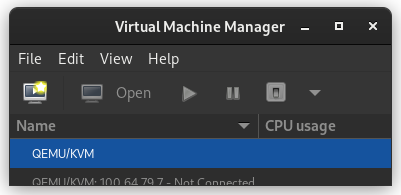
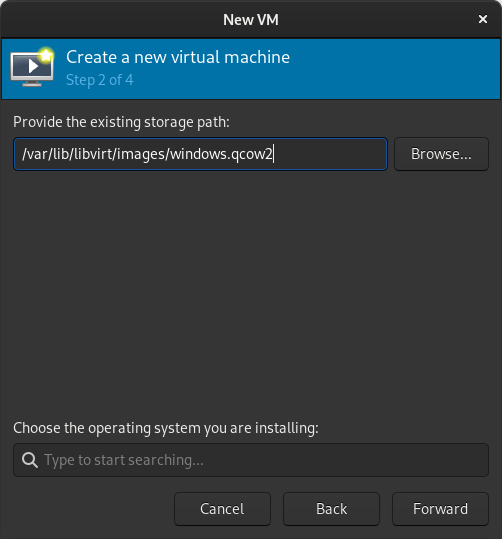
In the New VM window, select Import existing disk image
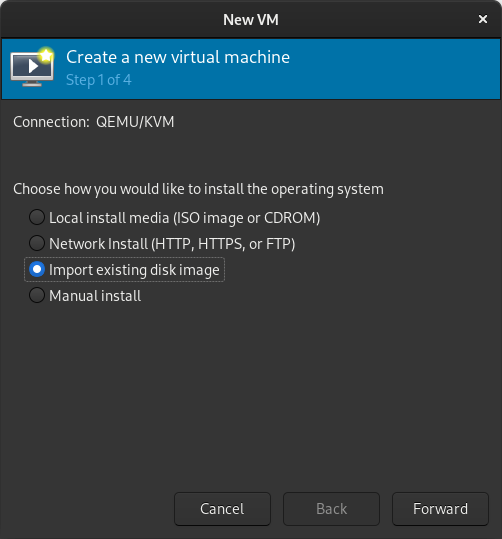
When prompted for the path to the image, use the one we created with sudo qemu-img convert above.
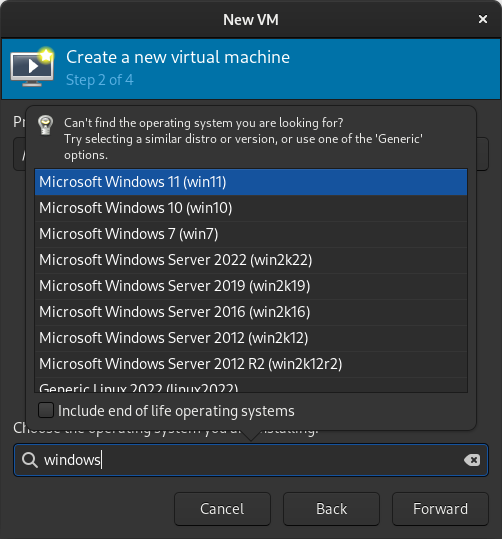
Select the version of Windows you want.
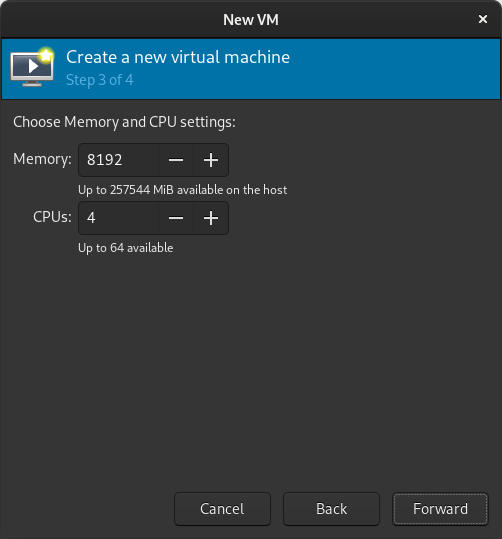
Select memory and CPUs to allocate to the VM.
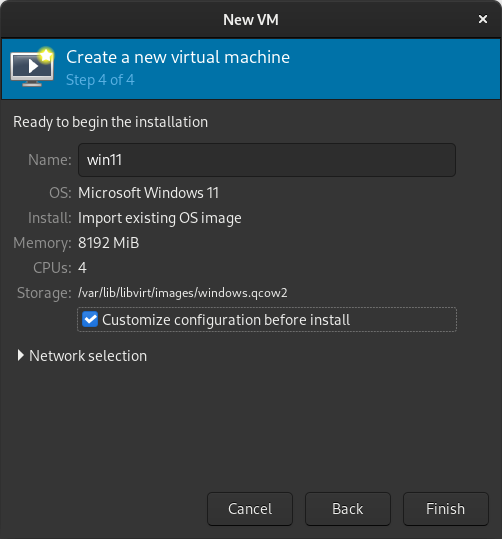
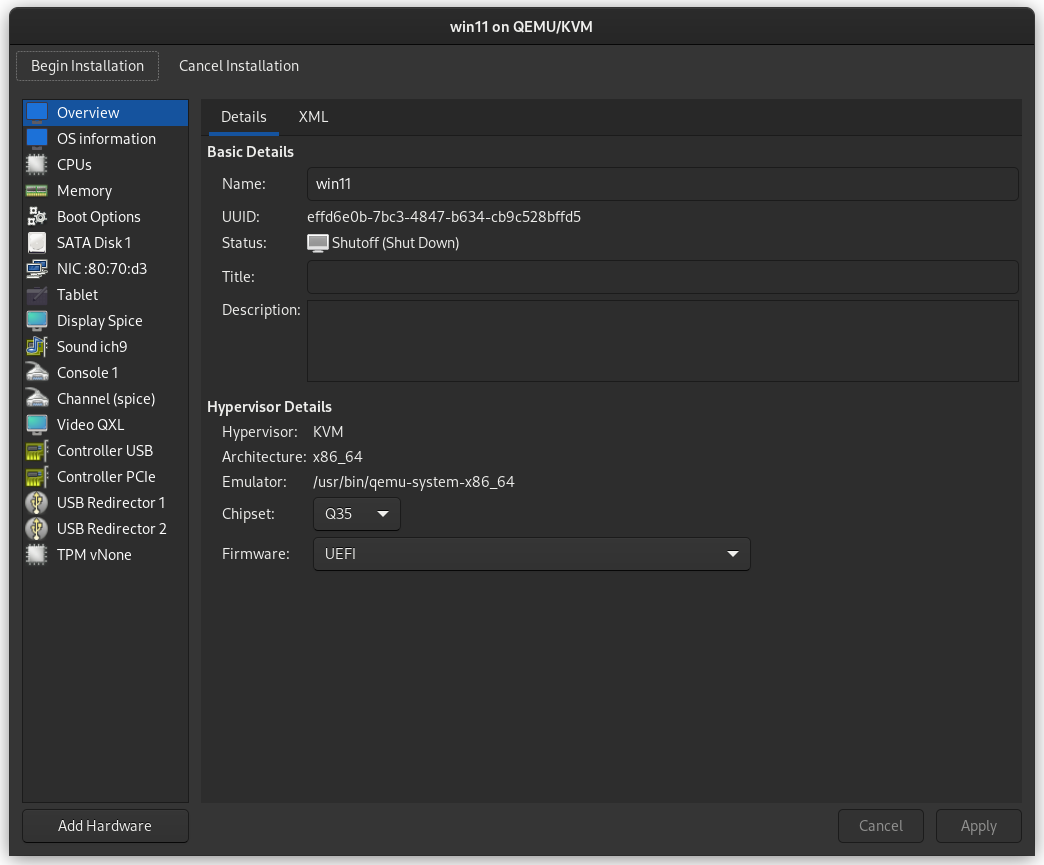
Tick the Customize configuration before install box
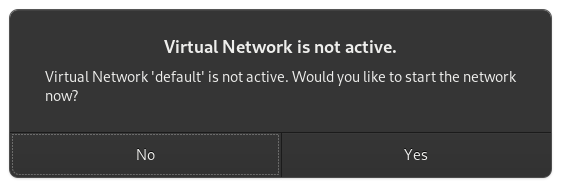
If you re prompted to enable the default network, do so now.
The default hardware layout should probably suffice. Get it as close to the underlying hardware as it is convenient to do. But Windows is pretty lenient these days about virtualizing licensed windows instances so long as they re not running in more than one place at a time. Good luck! Leave comments if you have questions.
29 November 2022

Jonathan McDowell: onak 0.6.2 released

Over the weekend I released a new version of onak, my OpenPGP compatible keyserver. At 2 years since the last release that means I ve at least managed to speed up a bit, but it s fair to say its development isn t a high priority for me at present. This release is largely driven by a collection of minor fixes that have built up, and the knowledge that a Debian freeze is coming in the new year. The fixes largely revolve around the signature verification that was introduced in 0.6.0, which makes it a bit safer to run a keyserver by only accepting key material that can be validated. All of the major items I wanted to work on post 0.6.0 remain outstanding. For the next release I d like to get some basic Stateless OpenPGP Command Line Interface support integrated. That would then allow onak to be tested with the OpenPGP interoperability test suite, which has recently added support for verification only OpenPGP implementations. I realise most people like to dismiss OpenPGP, and the tooling has been fairly dreadful for as long as I ve been using it, but I do think it fills a space that no competing system has bothered to try and replicate. And that s the web of trust, which helps provide some ability to verify keys without relying on (but also without preventing) a central authority to do so. Anyway. Available locally or via GitHub.
0.6.2 - 27th November 2022
  • Don t take creation time from unhashed subpackets
  • Fix ECDSA/SHA1 signature check
  • Fix handling of other signature requirement
  • Fix deletion of keys with PostgreSQL backend
  • Add support for verifying v3 signature packets

3 November 2022

Arturo Borrero Gonz lez: New OpenPGP key and new email

Post logo I m trying to replace my old OpenPGP key with a new one. The old key wasn t compromised or lost or anything bad. Is still valid, but I plan to get rid of it soon. It was created in 2013. The new key id fingerprint is: AA66280D4EF0BFCC6BFC2104DA5ECB231C8F04C4 I plan to use the new key for things like encrypted emails, uploads to the Debian archive, and more. Also, the new key includes an identity with a newer personal email address I plan to use soon: arturo.bg@arturo.bg The new key has been uploaded to some public keyservers. If you would like to sign the new key, please follow the steps in the Debian wiki.
-----BEGIN PGP PUBLIC KEY BLOCK-----
mQINBGNjvX4BEADE4w5x0SQmxWLAI1R17RCC98ngTkD/FMyos0GF5xmv0VJeLYhw
x6oJRmiNGHY8+gjq7SyVCWmlwbLKBEPFNI1k5WcrTB+ClgGkWB5KBnbLKm6CSP4N
ccSbrUQrZW+zxk3Q5h3CJljZpmflB2dvRfnDMSSaw8zOc37EtszW3AVVKNYAu3wj
mXpfwI72/OSELhSvhkr51L+ZlEYUMCITeO+jpiWsnU+sA8oKKPjW4+X8cjrN4eFa
1PAPILDf+Omst5SKM2aV5LGZ8rBzb5wNJF6yDexDw2XmfbFWLOfYzFRY6GTXJz/p
8Fh6O1wkHM9RnwmesCXTtkaGQsVFiVsoqGFyzrkIdWPUruB3RG5EzOkapWi/cnbD
1sy7yrUgy99Ew5yzmLaZ40hmRyq/gBBw4yRkdQaddbkErx+9hT+2tJELa5wrmWkb
FtaVZ38xC6gacOZqRjp0Xqtr0jobI0vED8vzIyY0zJwWM0Hu6qqq4hkLWZHjCy8a
T5Oe/Cb78Kqwa2mzJfncDahPxcgxpnbkYdvKokRtNBDftLVEz+Do8Dczw7Me4BoK
HmU8wLyeGeDTmeoBXpxKH90T+rQokgsiiD13bWZ+nBxILun1tjOTVVONG6SHdP3f
unolq8SU3K+m67lLa+pWjyYcNRS2OTWGOz/1zsH2R39ZOyfGD09/10aAKwARAQAB
tC1BcnR1cm8gQm9ycmVybyBHb256YWxleiA8YXJ0dXJvLmJnQGFydHVyby5iZz6J
AlQEEwEKAD4WIQSqZigNTvC/zGv8IQTaXssjHI8ExAUCY2O9fgIbAwUJA8JnAAUL
CQgHAwUVCgkICwUWAgMBAAIeAQIXgAAKCRDaXssjHI8ExCZdD/9Z3vR4sV7vBED4
+mCjdNWWf/mw5YlkZo+XQiMVVss4HfQLdt7VxXgGdcOz5Hond9ax3+qeCEo4DdXq
TC0ACpSCu/TPil6vzbE/kO6i6a4oZjFyteAbbcMXP35stbtDM0U5EZH0adIKknfF
msIPTIdJ/dpkcshtBJIoPqjuuTEBa7bF3OYCajHVqwP4Wsgjy4TvDOwl3hy7bhrQ
ZZHqbh7kW40+alQYaJ8jDvbDh/jhN1/pEiZS9ETu0JfBAF3PYPRLW6XedvwZiPWd
jTXwJd0E+vN5LE1Go8OaYvZb9iitZ21UaYOUnFuhw7SEOSQGfEUBs39+41gBj6vW
05HKCEA6kda9NpfptMbUoSSU+hwRfNA5TdnlxtcRv4NqUigzqa1LoXLdxTsyus+K
BL7dRpKXc72JCrEA3vClisD2FgsxLLRCCSDVM8UM/it/YW7tv42XuhQkTW+okQX4
c5laMzTL+ZV8UOoshseTDOsQsdXhskdnWbnuSwAez2/Dd1gHczuN/+lPiiEnyaTF
XgH17K/F25+92MmwPQcFRVPQcYcbyx1VylA6aCgK6gOEqHCejlZv5XLouzbQh1j1
k6MjUR1ncz8vPV5xSuOMAISqozJ9GxUZT2O3o9Vc9pNg5UEzqTvyURgLOdie8yM4
T93S3nKuHVZ++ZVxEOlPnfEfbFP+xbQrQXJ0dXJvIEJvcnJlcm8gR29uemFsZXog
PGFydHVyb0BkZWJpYW4ub3JnPokCVAQTAQoAPhYhBKpmKA1O8L/Ma/whBNpeyyMc
jwTEBQJjY73LAhsDBQkDwmcABQsJCAcDBRUKCQgLBRYCAwEAAh4BAheAAAoJENpe
yyMcjwTEMKQQAIe18Np+jdhwxHEFZNppBQ69BtyrnPQg4K5VngZ0NUZdVi+/FU7q
Tc9Z1qNydnXgmav3dafL2/l5zDX9wz7mQD2F0a6luOxZwl1PE6iP5f3cUD7uC9zb
148i1bZGEJbO4iNZKTlJKlbNR9m1PG47pv964CHZnNGp6lsnEspxe2G8DJD48Pje
gbhYukgOtIhQ1CaB1fc8aVwZvXZVSbNBLAqp7pAGhTFJqzHE8/U0sn1/V/wPzFAd
TZtWzKfYAkIIFJI5Rr6LVApIwIe7nWymTdgH4crCd2GZkGR+d6ihPKVSxUAUfoAx
EJQUSJY8rYi39gSDhPuEoK8BYXS1nWFGJiNV1o8xaljQo8rNT9myCaeZuQBLX41/
LRzK4XrxYPvjZpKNucc7fSK+UFriQGzdcAaWtW45Kp/8GmAoLVyCD0DPZNWNJdxp
IORhB33aWakhvDKgaLQa16MJ8fSc3ytn/1lxWzDXA1j05i81y/AOKPtCwBKzQWPF
biuZs3kJgZagLq6L6VOQDHlKqf+jqfl1fWeo04iDg98e0TYKABUfiTz8/MdQcV/X
8VkCgtuZ8BcPPyYzBjvuXWZTvdu0n2pikqAPL4u2cbWfD8JIP2AVCJp9HMGKvENo
XcJgY4h6T3rrC/9EidxECfXlsDbUJxLq0WfJLik84+LRtde3kZiReaIRtC5BcnR1
cm8gQm9ycmVybyBHb256YWxleiA8YXJ0dXJvQG5ldGZpbHRlci5vcmc+iQJUBBMB
CgA+FiEEqmYoDU7wv8xr/CEE2l7LIxyPBMQFAmNjvd8CGwMFCQPCZwAFCwkIBwMF
FQoJCAsFFgIDAQACHgECF4AACgkQ2l7LIxyPBMSP/g/+MHmxCAi/X+NMHodg9Qou
wEG4Vf1uluAE6c+c1QECCdtSsRjBs1dZoJzGsA23t4LWqluyaptuLDWJQEz+EVKR
mG0bvvropNaoOEShnY069pg7lUHuO/GLeDRhfEH3KT45sIVbLly8QkoGaINSCDLe
RBNaHC6feIC8NfQzQEt72nbi4SgdSQUg0F3lj4WxxECVhXsw/YCqh1d3QYqwRVEE
lCGQ4EbavjtRhO8U7dcL1VwHemKHNq3XvM3PJf1OoPgxWqFW5rHbAdlXdN3WAI6u
DAy7kY+qihz3w6rIDTFq6I3YBTrZ44J+5mN21ZC2iDXAsa/C3Uam0vFsjs/pizuq
WgGI9Vmsyap+bOOjuRSX4hemZoOT4a2GC723fS1dFresYWo3MmwfA3sjgV5tK3ZN
XIpxYIvi6HAHLOAarDaE8Sha1GHvrmPwfZ+cEgTL0mqW3efSF3AFmGHduMB+agzK
rM9sksrRQhbY2fHnBLo1t06SQx3rmhlz5mD1ljQEIzna9D6QKleRu4hgImRLHnCB
CN3o+mZa1MHhaIFzViaD2i3Fv2+bYgT7vnS4QAneLW8O/ZgpAc2MUxMoci5JNyfJ
mWdae7Kbs4Z8rrt/mH2gYyioSB0po4VtVwKWEUW9cLtZusA6mFnMviFpfjakb9TX
MimBAv9hAYpxd+HdfHinmqS0MEFydHVybyBCb3JyZXJvIEdvbnphbGV6IDxhYm9y
cmVyb0B3aWtpbWVkaWEub3JnPokCVAQTAQoAPhYhBKpmKA1O8L/Ma/whBNpeyyMc
jwTEBQJjY735AhsDBQkDwmcABQsJCAcDBRUKCQgLBRYCAwEAAh4BAheAAAoJENpe
yyMcjwTEGooP/20PR5N34m7CNtyaO96H5W0ULuAuSNuoXaKWDo5LGU6zzDriXbIu
ryYtR66vWF5suf7fHZYX8Ufq4PEsG1UNYEGA9hnjPg3oVwGzBJI7f6Rl2P5Pc8wJ
Eq2kN/xKmfUKIrvgh1f5xgFqC4hzcLDkVlLsPowZWfep8dLY4mtVrsrCD1URhelw
zRDGZ3rTVHWXmfXbSHWR2bgZIIrCtVF8BHStg5b6HuAWpj4Oa0eMfBde0N2RZkLE
ye/r2y/lraHfpT7MXnRMcEmltrv8fic7yvj/Nh4ESWr7UmfbV+GiSw9dc/AlVMXM
ihaW0eXv4F5uMtLJOiqI7bv3UfWSvoqwf2a8EPnzOeBBHhQOOJN7O4UzKBK5GAO8
C3k0I1AV3cTmrXrqT/5yoYAHSekDFCIPES//6Y/pO0ITtCbXkA5e8vaulJbtyXpE
g0Z7I7M1kikL6reZ2PuzsR0psEb/x81bWXODIegyOJolPXMRAY7n9J0xpCnSW9yr
CN4j6YT3Oame04JslwX5Xg1cyheuiusotETYNSKRaGaYBCxYffOWoTLNIBa+RCGc
SVOzJq5pd8fVRM1h2ZZFnfpPJBUb62qPsbk6VwmesGoGevB70zcNQYEI+c35kRfM
IOuJWRIN3Wxx0rpxb5E3i/3TASHM86Dix1VW9vsC/atGU/cgaoTOiNVztDdBcnR1
cm8gQm9ycmVybyBHb256YWxleiA8YXJ0dXJvLmJvcnJlcm8uZ2xlekBnbWFpbC5j
b20+iQJUBBMBCgA+FiEEqmYoDU7wv8xr/CEE2l7LIxyPBMQFAmNjvg8CGwMFCQPC
ZwAFCwkIBwMFFQoJCAsFFgIDAQACHgECF4AACgkQ2l7LIxyPBMS7NA/9F7OL/j7a
xnTDjxAHEiyrCzrBQc/DEAM/yim8E+0UBeTJSZR/bShtbvLbSukeL43tKksPhN/X
skjRF8sJ8KWUnpmSWjv1DQTh7AtkJqACnq7+VtQZq3yuKUCNRNpM8lSFxtmYDUqE
XXD4eMXKoJfdphQ+qpViba+RGXg6sd69Dq739zT/OFMuKZ33z8h7hVNXmoWGcBz6
txvN3cWVJhTLdiBvtn38/0dX7IupQLypLOtP0oZdjoUjkRxTo5biOxt3hUGnxS4x
97PPeRGc4j7lv5ADwFV8bo+g54ZMGRjOcyZmA7dlWFN51JrTx3udW2jgXkYqm7UM
xP4lNwDs9TmT3jan6wR08uwlDakOXfDm3gCQEviN+350sJs2tY+JKBN4QR7NpqeU
2aDFOo0G/0ggf0QbFsMkaTSozerVHRGXMdAi+pbYA6pPWPu8lHIkvvdoj4xUu+Ko
cHX0DCRxmL9mylTbZEanrp5gSpne79McrkbQX2/Yc8lWykCtL5/jHVTD4iNiO5Rf
IJYPAVmC2nlj2URfzwGjjoL5apTStZfng4H2Ccq+3cmhwOXI7pb+PsGeI5PND00A
qHFxe590HFhPxLHoftMIlspstoCvHYGcWQxHNbXW6ccmhHdNYT8Pn4ecKgfr6pCt
0ysilOD2ppPJ88hffKA4nTdtX2Tz2ZwOYwG5Ag0EY2O9fgEQALrapVuv1IcLDit8
9gejdA/Dtlufb2/baImVaQD+dTx2QdMxxEiNKl00a5OhMzXDj9tFrB1Lv4z0t8cY
iDJ+NuydDGgz3MlJgWW0GlpAz8yiul2iqTnkWl3cWeiI+VaX8wzL+acmmkPvlrN8
hM7I55BPr8uBWVIQ7VDmI+ts8gi73xE+Etzzrh13GSSnnYnezfGUQrNfYFcip7D0
hB3bpUIGiPdQ45vSZqXUQx/B6FlabiIGRau8Rt4vaEBGXGFZ9rIR+rMJWx6GqYX4
uY1KM2JZ3SKHk++MWGYdzHdM2oaP6xckZq+u/WiwutkYLLO2hnr03lcAu1IDT1C1
YNPrbTKfqUt+3r0oUK5BrG1Cjdc1mZqcXzYcexOLp79FJLb0t5wPdfgU8dT10kjE
uQxeSYiS4oSpikVQkKoFk++/U95d/z/y/81A6v+cfRus6mW+wRSFSwks7Q5ct7zW
UyKELLC4i4EDgnJXmavVcBD0TWzhH/rZpz9FsO4Mb18IYwbV1/144019/RjiPk5Z
MMNdsjorjV2MtrCIoeAGRgZhbFP2P7CcZOp6ZWzjj40ENlElbLp3VCfkYcTiPHJv
2iaiDz2Mhfmhb1Q/5d/a9tYTYINPmv2QVo+m5Zf+1/U29d2HZMRhD4aqDsivvgtd
GpAnKeus6ePSMqpwjO6v2bmQhjpbABEBAAGJAjwEGAEKACYWIQSqZigNTvC/zGv8
IQTaXssjHI8ExAUCY2O9fgIbDAUJA8JnAAAKCRDaXssjHI8ExA5AD/9VWS1/jHM9
aE3HKCDL4CpiXQPc4ds+3/ft6LXwuCMA/tkt8I4svKZGCCi/X5NfiQetVD+cSzVO
nmloctMt/24yjnGNNSFsDozkn/RqzZIhLJBI69gX4JWR4wpeh4kXMItNM5ZlYw3H
DmuLrf/ey8E2NzbFdzj1VQNoENuwtL2pIJrvK92AcS7acvP0FpiS8riLc5a933SW
oPgelQ1j/04WAH8cyKXB/pruq3OhtK0/b8ylIeI0f7a57dxQj5wysyBVKl+EJd/n
UhypVqMDRWL7N0FttGb9gZ6OVvQnt7iwbtS3tYqAK479+GZwi/Wh/RB2dCDyz8jk
zE0j6y7huP4XzpbBbPVntLDdVAYmpW6iIaTWYxlu79FEUw4JmZdY7hJoEDpHuDIz
ylo0YQgjnRfRfWSdnGCosFrY5UgThPVTaQAILCPtdVyWY4/6s1UaeNs3H0PRA5mz
UT4vDKxGq9gXHnE+qg3dfwMcLR3cDPPWUFVeTfNitZ3Y9eV7SdbQXt5NeOXzFadz
DBc9ZzNx3rBEyUUooU0MEmbltyUFM7R/hVcdpFxs12SgHrvgh13tuxVVVNBXTwwo
pSxmap42vHJERQ8ZJQ4lrvnxNZcuwLHSZK7xVzb0b/1wMooNnhw18vlStMWQJwKl
DiXs/L/ifab2amg9jshULAPgVSw7QeP2OQ==
=UABf
-----END PGP PUBLIC KEY BLOCK-----
If you are curious about what that long code block contains, check this https://cirw.in/gpg-decoder/ For the record, the old key fingerprint is: DD9861AB23DC3333892E07A968E713981D1515F8 Cheers!

10 May 2022

Daniel Kahn Gillmor: 2022 Digital Rights Job Fair

I'm lucky enough to work at the intersection between information communications technology and civil rights/civil liberties. I get to combine technical interests and social/political interests. I've talked with many folks over the years who are interested in doing similar work. Some come from a technical background, and some from an activist background (and some from both). Are you one of them? Are you someone who works as an activist or in a technical field who wants to look into different ways of meging these interests? Some great organizers maintain a job board for Digital Rights. Next month they'll host a Digital Rights Job Fair, which offers an opportunity to talk with good people at organizations that fight in different ways for a better world. You need to RSVP to attend. Digital Rights Job Fair

14 April 2022

Daniel Kahn Gillmor: Bitstream Vera Must Die

Bitstream Vera must die.

14 February 2021

Fran ois Marier: Creating a Kodi media PC using a Raspberry Pi 4

Here's how I set up a media PC using Kodi (formerly XMBC) and a Raspberry Pi 4.

Hardware The hardware is fairly straightforward, but here's what I ended up getting: You'll probably want to add a remote control to that setup. I used an old Streamzap I had lying around.

Installing the OS on the SD-card Plug the SD card into a computer using a USB adapter. Download the imager and use it to install Raspbian on the SDcard. Then you can simply plug the SD card into the Pi and boot.

System configuration Using sudo raspi-config, I changed the following:
  • Set hostname (System Options)
  • Wait for network at boot (System Options): needed for NFS
  • Disable screen blanking (Display Options)
  • Enable ssh (Interface Options)
  • Configure locale, timezone and keyboard (Localisation Options)
  • Set WiFi country (Localisation Options)
Then I enabled automatic updates:
apt install unattended-upgrades anacron
echo 'Unattended-Upgrade::Origins-Pattern  
        "origin=Debian,codename=$ distro_codename ,label=Debian";
        "origin=Debian,codename=$ distro_codename ,label=Debian-Security";
        "origin=Raspbian,codename=$ distro_codename ,label=Raspbian";
        "origin=Raspberry Pi Foundation,codename=$ distro_codename ,label=Raspberry Pi Foundation";
 ;'   sudo tee /etc/apt/apt.conf.d/51unattended-upgrades-raspbian

Headless setup Should you need to do the setup without a monitor, you can enable ssh by inserting the SD card into a computer and then creating an empty file called ssh in the boot partition. Plug it into your router and boot it up. Check the IP that it received by looking at the active DHCP leases in your router's admin panel. Then login:
ssh -o PreferredAuthentications=password -o PubkeyAuthentication=no pi@192.168.1.xxx
using the default password of raspberry.

Hardening In order to secure the Pi, I followed most of the steps I usually take when setting up a new Linux server. I created a new user account for admin and ssh access:
adduser francois
addgroup sshuser
adduser francois sshuser
adduser francois sudo
and changed the pi user password to a random one:
pwgen -sy 32
sudo passwd pi
before removing its admin permissions:
deluser pi adm
deluser pi sudo
deluser pi dialout
deluser pi cdrom
deluser pi lpadmin
Finally, I enabled the Uncomplicated Firewall by installing its package:
apt install ufw
and only allowing ssh connections. After starting ufw using systemctl start ufw.service, you can check that it's configured as expected using ufw status. It should display the following:
Status: active
To                         Action      From
--                         ------      ----
22/tcp                     ALLOW       Anywhere
22/tcp (v6)                ALLOW       Anywhere (v6)

Installing Kodi Kodi is very straightforward to install since it's now part of the Raspbian repositories:
apt install kodi
To make it start at boot/login, while still being able to exit and use other apps if needed:
cp /etc/xdg/lxsession/LXDE-pi/autostart ~/.config/lxsession/LXDE-pi/
echo "@kodi" >> ~/.config/lxsession/LXDE-pi/autostart

Network File System In order to avoid having to have all media storage connected directly to the Pi via USB, I setup an NFS share over my local network. First, give static IP allocations to the server and the Pi in your DHCP server, then add it to the /etc/hosts file on your NFS server:
192.168.1.3    pi
Install the NFS server package:
apt instal nfs-kernel-server
Setup the directories to share in /etc/exports:
/pub/movies    pi(ro,insecure,all_squash,subtree_check)
/pub/tv_shows  pi(ro,insecure,all_squash,subtree_check)
Open the right ports on your firewall by putting this in /etc/network/iptables.up.rules:
-A INPUT -s 192.168.1.3 -p udp -j ACCEPT
-A INPUT -s 192.168.1.0/24 -p tcp --dport 111 -j ACCEPT
-A INPUT -s 192.168.1.0/24 -p udp --dport 111 -j ACCEPT
-A INPUT -s 192.168.1.0/24 -p udp --dport 123 -j ACCEPT
-A INPUT -s 192.168.1.0/24 -p tcp --dport 600:1124 -j ACCEPT
-A INPUT -s 192.168.1.0/24 -p udp --dport 600:1124 -j ACCEPT
-A INPUT -s 192.168.1.0/24 -p tcp --dport 2049 -j ACCEPT
-A INPUT -s 192.168.1.0/24 -p udp --dport 2049 -j ACCEPT
Finally, apply all of these changes:
iptables-apply
systemctl restart nfs-kernel-server.service
On the Pi, put the server's static IP in /etc/hosts:
192.168.1.2    fileserver
and this in /etc/fstab:
fileserver:/data/movies  /kodi/movies  nfs  ro,bg,hard,noatime,async,nolock  0  0
fileserver:/data/tv      /kodi/tv      nfs  ro,bg,hard,noatime,async,nolock  0  0
Then create the mount points and mount everything:
mkdir -p /kodi/movies
mkdir /kodi/tv
mount /kodi/movies
mount /kodi/tv

26 January 2021

Gunnar Wolf: Back to school... As a student

Although it was a much larger step when I made a similar announcement seven years ago, when I started my Specialization, it is still a big challenge ahead, and I am very happy to pursue this: I have been admitted to a PhD program at UNAM, the university I have worked at for almost 20 years, and one of the top universities in Latin America. What program will I be part of? Doctorado en Ciencia e Ingenier a de la Computaci n (Computer Science and Engineering Doctorate Quite a broad program name, yes, sounds like anything goes). I am happy to say I managed to do as I hoped seven years ago. As that blog post says, I managed to keep an eye on my keyring-maint duties as well Will even try to link that work with what I do at school. Over the years I spent pursuing my Specialization and Masters degrees at IPN ESIME, I managed to publish two academic papers on the keyring-maint work: Strengthening a Curated Web of Trust in a Geographically Distributed Project and Insights on the large-scale deployment of a curated Web-of-Trust: the Debian project s cryptographic keyring. Since that time, several relevant things have happened. Mainly, the SKS Keyserver panorama started looking quite bleak: Various attacks such as the poisoned certificates or *certificate flooding have been mounted against the keyserver network, having as a direct outcome the questioning of the future of the decentralized transitional trust model we take for granted in the OpenPGP world. The global SKS keyserver network has quickly eroded, and its continued functioning is no longer something we can take as a given. Different methods have come up, attempting to answer to this situation, such as WKD and DANE, but they all lose something that can be seen as the essence, almost the heart of the distributed, decentralized Web-of-Trust paradigm: The ability to carry the full certificates for the keys. And that s the problem I will try to tackle with my work: How can we, in the light of the known weaknesses, keep a working, decentralized, distributed trust scheme?

1 January 2021

Andrej Shadura: Transitioning to a new OpenPGP key

Following dkg s example, I decided to finally transition to my new ed25519/cv25519 key. Unlike Daniel, I m not yet trying to split identities, but I m using this chance to drop old identities I no longer use. My new key only has my main email address and the Debian one, and only those versions of my name I still want around. My old PGP key (at the moment in the Debian keyring) is:
pub   rsa4096/0x6EA4D2311A2D268D 2010-10-13 [SC] [expires: 2021-11-11]
      782130B4C9944247977B82FD6EA4D2311A2D268D
uid                   [ultimate] Andrej Shadura <andrew@shadura.me>
uid                   [ultimate] Andrew Shadura <andrew@shadura.me>
uid                   [ultimate] Andrew Shadura <andrewsh@debian.org>
uid                   [ultimate] Andrew O. Shadoura <Andrew.Shadoura@gmail.com>
uid                   [ultimate] Andrej Shadura <andrewsh@debian.org>
sub   rsa4096/0xB2C0FE967C940749 2010-10-13 [E]
sub   rsa3072/0xC8C5F253DD61FECD 2018-03-02 [S] [expires: 2021-11-11]
sub   rsa2048/0x5E408CD91CD839D2 2018-03-10 [S] [expires: 2021-11-11]
The is the key I ve been using in Debian from the very beginning, and its copies at the SKS keyserver network still have my first DD signature from angdraug:
sig  sig   85EE3E0E 2010-12-03 __________ __________ Dmitry Borodaenko <angdraug@mail.ru>
sig  sig   CB4D38A9 2010-12-03 __________ __________ Dmitry Borodaenko <angdraug@debian.org>
My new PGP key is:
pub   ed25519/0xE8446B4AC8C77261 2016-06-13 [SC] [expires: 2022-06-25]
      83DCD17F44B22CC83656EDA1E8446B4AC8C77261
uid                   [ultimate] Andrej Shadura <andrew@shadura.me>
uid                   [ultimate] Andrew Shadura <andrew@shadura.me>
uid                   [ultimate] Andrej Shadura <andrewsh@debian.org>
uid                   [ultimate] Andrew Shadura <andrewsh@debian.org>
uid                   [ultimate] Andrei Shadura <andrew@shadura.me>
sub   cv25519/0xD5A55606B6539A87 2016-06-13 [E] [expires: 2022-06-25]
sub   ed25519/0x52E0EA6F91F1DB8A 2016-06-13 [A] [expires: 2022-06-25]
If you signed my old key and are reading this, please consider signing my new key; if you feel you need to re-confirm this, feel free to contact me; otherwise, a copy of this statement signed by both the old and new keys is available here. I have uploaded this new key to keys.openpgp.org, and also published it through WKD and the SKS network. Both keys can also be downloaded from my website.

31 December 2020

Daniel Kahn Gillmor: New OpenPGP certificate for dkg, 2021

dkg's 2021 OpenPGP transition As 2021 begins, I'm changing to a new OpenPGP certificate. I did a similar transition two years ago, and a fair amount has changed since then. You might know my old OpenPGP certificate as:
pub   ed25519 2019-01-19 [C] [expires: 2021-01-18]
      C4BC2DDB38CCE96485EBE9C2F20691179038E5C6
uid          Daniel Kahn Gillmor <dkg@fifthhorseman.net>
uid          Daniel Kahn Gillmor <dkg@debian.org>
My new OpenPGP certificate is:
pub   ed25519 2020-12-27 [C] [expires: 2023-12-24]
      C29F8A0C01F35E34D816AA5CE092EB3A5CA10DBA
uid           [ unknown] Daniel Kahn Gillmor
uid           [ unknown] <dkg@debian.org>
uid           [ unknown] <dkg@fifthhorseman.net>
You can find a signed transition statement if you're into that sort of thing. If you're interested in the rationale for why I'm making this transition, read on.

Dangers of Offline Primary Secret Keys There are several reasons for transitioning, but one i simply couldn't argue with was my own technical failure. I put the primary secret key into offline storage some time ago for "safety", and used ext4's filesystem-level encryption layered on top of dm-crypt for additional security. But either the tools changed out from under me, or there were failures on the storage medium, or I've failed to remember my passphrase correctly, because I am unable to regain access to the cleartext of the secret key. In particular, I find myself unable to use e4crypt add_key with the passphrase I know to get a usable working directory. I confess I still find e4crypt pretty difficult to use and I don't use it often, so the problem may entirely be user error (either now, or two years ago when I did the initial setup). Anyway, lesson learned: don't use cryptosystems that you're not comfortable with to encrypt data that you care about recovering. This is a lesson I'm pretty sure I've learned before, sigh, but it's a good reminder.

Split User IDs I'm trying to split out my User IDs again -- this way if you know me by e-mail address, you don't have to think/worry about certifying my name, and if you know me by name, you don't have to think/worry about certifying my e-mail address. I think that's simpler and more sensible. It's also nice because e-mail address-only User IDs can be used effectively in contexts like Autocrypt, which I think are increasingly important if we want to have usable encrypted e-mail. Last time around I initially tried split User IDs but rolled them back and I think most of the bugs I discovered then have been fixed.

Certificate Flooding Another reason for making a transition to a new certificate is that my older certificate is one of the ones that was "flooded" on the SKS keyserver network last year, which was one of the final straws for that teetering project. Transitioning to a new certificate lets that old flooded cert expire and people can just simply move on from it, ideally deleting it from their local keyrings. Hopefully as a community we can move on from SKS to key distribution mechanisms like WKD, Autocrypt, DANE, and keys.openpgp.org, all of which address some of the known problems with keyserver abuse.

Trying New Tools Finally, I'm also interested in thinking about how key and certificate management might be handled in different ways. While I'm reasonably competent in handling GnuPG, the larger OpenPGP community (which I'm a part of) has done a lot of thinking and a lot of work about how people can use OpenPGP. I'm particularly happy with the collaborative work that has gone into the Stateless OpenPGP CLI (aka sop), which helps to generate a powerful interoperability test suite. While sop doesn't offer the level of certificate management I'd need to use it to manage this new certificate in full, I wish something like it would! Starting from a fresh certificate and actually using it helps me to think through what I might actually need from a tool that is roughly as straightforward and opinionated as sop is. If you're a software developer who might use or implement OpenPGP, or a protocol designer, and you haven't played around with any of the various implementations of sop yet, I recommend taking a look. And feedback on the specification is always welcome, too, including ideas for new functionality (maybe even like certificate management).

Next Steps If you're the kind of person who's into making OpenPGP certifications, feel free to check in with me via whatever channels you're used to using to verify that this transition is legit. If you think it is, and you're comfortable, please send me (e-mail is probably best) your certifications over the new certficate. I'll keep on working to make OpenPGP more usable and acceptable. Hopefully, 2021 will be a better year ahead for all of us.

Next.