Debian Outreach Team: GSoC 2025 Introduction: Make Debian for Raspberry Pi Build Again
Hello everyone! I am Kurva Prashanth, Interested in the lower level working of system software, CPUs/SoCs and Hardware design. I was introduced to Open Hardware and Embedded Linux while studying electronics and embedded systems as part of robotics coursework. Initially, I did not pay much attention to it and quickly moved on. However, a short talk on Liberating SBCs using Debian by Yuvraj at MiniDebConf India, 2021 caught my interest. The talk focused on Open Hardware platforms such as Olimex and BeagleBone Black, as well as the Debian distributions tailored for these ARM-based single-board computers has intrigued me to delve deeper into the realm of Open Hardware and Embedded Linux.
These days I m trying to improve my abilities to contribute to Debian and Linux Kernel development. Before finding out about the Google Summer of Code project, I had already started my journey with Debian. I extensively used Debian system build tools(debootstrap, sbuild, deb-build-pkg, qemu-debootstrap) for Building Debian Image for Bela Cape a real-time OS for music making to achieve extremely fast audio and sensor processing times. In 2023, I had the opportunity to attend DebConf23 in Kochi, India - thanks to Nilesh Patra (@nilesh) and I met Hector Oron (@zumbi) over dinner at DebConf23 and It was nice talking about his contributions/work at Debian on armhf port and Debian System Administration that conversation got me interested in knowing more about Debian ARM, Installer and I found it fascinating that EmDebian was once a external project bringing Debian to embedded systems and now, Debian itself can be run on many embedded systems. And, also during DebCamp I got Introduced to PGP/GPG keys and the web of trust by Carlos Henrique Lima Melara (@charles) I learned how to use and generate GPG keys. After DebConf23 I tried debian packaging and
I miserably failed to get sponsorship for a python library I packaged.
I came across the Debian project for this year s Google Summer of Code and found the project titled Make Debian for Raspberry Pi Build Again quite interesting to me and applied. Gladly, on May 8th, I received an acceptance e-mail from GSoC. I got excited that I ll spend the summer working on something that I like doing.
I am thrilled to be part of this project and I am super excited for the summer of 25. I m looking forward to work on what I most like, new connections and learning opportunities.
So, let me talk a bit more about my project. I will be working on to Make Debian for Raspberry Pi SBC s under the guidance of Gunnar Wolf (@gwolf). In this post, I will describe the project I will be working on.
Why make Debian for Raspberry Pi build again?
There is an available set of images for running Debian in Raspberry Pi computers (all models below the 5 series)! However, the maintainer severely lacking time to take care for them; called for help for somebody to adopt them, but have not been successful. The image generation scripts might have bitrotted a bit, but it is mostly all done. And there is a lot of interest and use still in having the images freshly generated and decently tested! This GSoC project is about getting the [https://raspi.debian.net/ Raspberry Pi Debian images] site working reliably, daily-built images become automatic again and ideally making it easily deployable to be run in project machines and migrating exsisting hosting infrastructure to Debian.
flash-kernel
uboot
So, what next?
During the Community Bonding Period, I got hands-on with workflow improvements, set up test environments, and began reviewing Raspberry Pi support in Debian s U-Boot and flash-kernel and these are the logs of the project, where I provide weekly reports on the work done. You can check here: Community Bonding Period logs.
My next steps include submitting patches to the u-boot and flash-kernel packages to ensure all missing Raspberry Pi entries are built and shipped. And, also to confirm the kernel DTB installation paths and make sure the necessary files are included for all Raspberry Pi variants. Finally, plan to validate changes with test builds on Raspberry Pi hardware.
In parallel, I m organizing my tasks and setting up my environment to contribute more effectively. It s been exciting to explore how things work under the hood and to prepare for a summer of learning and contributing to this great community.
Why make Debian for Raspberry Pi build again?
There is an available set of images for running Debian in Raspberry Pi computers (all models below the 5 series)! However, the maintainer severely lacking time to take care for them; called for help for somebody to adopt them, but have not been successful. The image generation scripts might have bitrotted a bit, but it is mostly all done. And there is a lot of interest and use still in having the images freshly generated and decently tested! This GSoC project is about getting the [https://raspi.debian.net/ Raspberry Pi Debian images] site working reliably, daily-built images become automatic again and ideally making it easily deployable to be run in project machines and migrating exsisting hosting infrastructure to Debian.
How much it differ from Debian build process?
While the goal is to stay as close as possible to the Debian build process, Raspberry Pi boards require some necessary platform-specific changes primarily in the early boot sequence and firmware handling.
Unlike typical Debian systems, Raspberry Pi boards depend on a non-standard bootloader and use non-free firmware (raspi-firmware), Introducing some hardware-specific differences in the initialization process.
These differences are largely confined to the early boot and hardware initialization stages. Once the system boots, the userspace remains closely aligned with a typical Debian install, using Debian packages.
The current modifications are required due to non-free firmware. However, several areas merit review: but there are a few parts that might be worth changing.
-
Boot flow: Transitioning to a U-Boot based boot process (as used in
Debian installer images for many other SBCs) would reduce divergence
and better align with Debian Installer.
-
Current scripts/workarounds: Some existing hacks may now be
redundant with recent upstream support and could be removed.
-
Board-specific images: Shift to architecture-specific base images
with runtime detection could simplify builds and reduce duplication.
Debian already already building SD card images for a wide range of SBCs (e.g., BeagleBone, BananaPi, OLinuXino, Cubieboard, etc.) installer-arm64/images/u-boot and installer-armhf/images/u-boot, a similar approach for Raspberry Pi could improve maintainability and consistency with Debian s broader SBC support.
Quoted from Mail Discussion Thread with Mentor (Gunnar Wolf)
"One direction we wanted to explore was whether we should still be
building one image per family, or whether we could instead switch to
one image per architecture (armel, armhf, arm64). There were some
details to iron out as RPi3 and RPi4 were quite different, but I think
it will be similar to the differences between the RPi 0 and 1, which
are handled at first-boot time. To understand what differs between
families, take a look at Cyril Brulebois generate-recipe (in the
repo), which is a great improvement over the ugly mess I had before he
contributed it"
In this project, I intend to to build one image per architecture (armel, armhf, arm64) rather than continuing with the current model of building one image per board. This change simplifies image
management, reduces redundancy, and leverages dynamic configuration at boot time to support all supported boards within each architecture. By using U-Boot and flash-kernel, we can detect the board type and configure kernel parameters, DTBs, and firmware during the first boot, reducing duplication across images and simplifying the maintenance burden and we can also generalize image creation while still supporting board-specific behavior at runtime. This method aligns with existing practices in the DebianInstaller team and aligns with Debian s long-term maintainability goals and better leverages upstream capabilities, ensuring a consistent and scalable boot experience.
To streamline and standardize the process of building bootable Debian images for Raspberry Pi devices, I proposed a new workflow that leverages U-Boot and flash-kernel Debian packages. This provides a clean, maintainable, and reproducible way to generate images for armel, armhf and arm64 boards. The workflow is vmdb2, a lightweight, declarative tool designed to automate the creation of disk images. A typical vmdb2 recipe defines the disk layout, base system installation (via debootstrap), architecture-specific packages, and any custom post-install hooks and the image should includes U-Boot (the u-boot-rpi package), flash-kernel, and a suitable Debian kernel package like linux-image-arm64 or linux-image-armmp.
U-Boot serves as the platform s bootloader and is responsible for loading the kernel and initramfs. Unlike Raspberry Pi s non-free firmware/proprietary bootloader, U-Boot provides an open and scriptable interface, allowing us to follow a more standard Debian boot process. It can be configured to boot using either an extlinux.conf or a boot.scr script generated automatically by flash-kernel. The role of flash-kernel is to bridge Debian s kernel installation system with the specifics of embedded bootloaders like U-Boot. When installed, it automatically copies the kernel image, initrd, and device tree blobs (DTBs) to the /boot partition. It also generates the necessary boot.scr script if the board configuration demands it. To work correctly, flash-kernel requires that the target machine be identified via /etc/flash-kernel/machine, which must correspond to an entry in its internal machine database.\ Once the vmdb2 build is complete, the resulting image will contain a fully configured bootable system with all necessary boot components correctly installed. The image can be flashed to an SD card and used to boot on the intended device without additional manual configuration. Because all key packages (U-Boot, kernel, flash-kernel) are managed through Debian s package system, kernel updates and boot script regeneration are handled automatically during system upgrades.
Current Workflow: Builds one Image per family
The current vmdb2 recipe uses the Raspberry Pi GPU bootloader provided via the raspi-firmware package. This is the traditional boot process followed by Raspberry Pi OS, and it s tightly coupled with firmware files like bootcode.bin, start.elf, and fixup.dat. These files are installed to /boot/firmware, which is mounted from a FAT32 partition
labeled RASPIFIRM. The device tree files (*.dtb) are manually copied from /usr/lib/linux-image-*-arm64/broadcom/ into this partition.
The kernel is installed via the linux-image-arm64 package, and the boot arguments are injected by modifying /boot/firmware/cmdline.txt using sed commands. Booting depends on the root partition being labeled RASPIROOT, referenced through that file. There is no bootloader like UEFI-based or U-Boot involved the Raspberry Pi firmware directly loads the kernel, which is standard for Raspberry Pi boards.
- apt: install
packages:
...
- raspi-firmware
The boot partition contents and kernel boot setup are tightly controlled via scripting in the recipe.
Limitations of Current Workflow: While this setup works, it is
-
Proprietary and Raspberry Pi specific It relies on the
closed-source GPU bootloader the
raspi-firmware package, which is
tightly coupled to specific Raspberry Pi models.
-
Manual DTB handling Device tree files are manually copied and
hardcoded, making upgrades or board-specific changes error-prone.
-
Not easily extendable to future Raspberry Pi boards Any change in
bootloader behavior (as seen in the Raspberry Pi 5, which introduces
a more flexible firmware boot process) would require significant
rework.
-
No UEFI-based/U-Boot The current method bypasses the standard
bootloader layers, making it inconsistent with other Debian ARM
platforms and harder to maintain long-term.
As Raspberry Pi firmware and boot processes evolve, especially with the introduction of Pi 5 and potentially Pi 6, maintaining compatibility will require more flexibility - something best delivered by adopting U-Boot and flash-kernel.
New Workflow: Building Architecture-Specific Images with vmdb2, U-Boot, flash-kernel, and Debian Kernel
This workflow outlines an improved approach to generating bootable Debian images architecture specific, using vmdb2, U-Boot, flash-kernel, and Debian kernels and also to move away from Raspberry Pi s proprietary bootloader to a fully open-source boot process which improves maintainability, consistency, and cross-board support.
New Method: Shift to U-Boot + flash-kernel
U-Boot (via Debian su-boot-rpi package) and flash-kernel bring
the image building process closer to how Debian officially boots ARM devices. flash-kernel integrates with the system s initramfs and kernel packages to install bootloaders, prepare boot.scr or extlinux.conf, and copy kernel/initrd/DTBs to /boot in a format that U-Boot expects. U-Boot will be used as a second-stage bootloader, loaded by the Raspberry Pi s built-in firmware. Once U-Boot is in place, it will read standard boot scripts ( boot.scr) generated by flash-kernel, providing a Debian-compatible and board-flexible solution.
Extending YAML spec for vmdb2 build with U-Boot and flash-kernel
To improve an existing vmdb2 YAML spec(https://salsa.debian.org/raspi-team/image-specs/raspi_master.yaml), to integrate U-Boot, flash-kernel, and the architecture-specific Debian kernel into the image build process. By incorporating u-boot-rpi and flash-kernel from Debian packages, alongside the standard initramfs-tools, we align the image closer to Debian best practices while supporting both armhf and arm64 architectures.
Below are key additions and adjustments needed in a vmdb2 YAML spec to support the workflow: Install U-Boot, flash-kernel, initramfs-tools and the architecture-specific Debian kernel.
- apt: install
packages:
- u-boot-rpi
- flash-kernel
- initramfs-tools
- linux-image-arm64 # or linux-image-armmp for armhf
tag: tag-root
Replace linux-image-arm64 with the correct kernel package for specific target architecture. These packages should be added under the tag-root section in YAML spec for vmdb2 build recipe. This ensures that the necessary bootloader, kernel, and initramfs tools are included and properly configured in the image.
Configure Raspberry Pi firmware to Load U-Boot
Install the U-Boot binary as kernel.img in /boot/firmware we can also download and build U-Boot from source, but Debian provides tested binaries.
- shell:
cp /usr/lib/u-boot/rpi_4/u-boot.bin $ ROOT? /boot/firmware/kernel.img
echo "enable_uart=1" >> $ ROOT? /boot/firmware/config.txt
root-fs: tag-root
This makes the RPi firmware load u-boot.bin instead of the Linux kernel directly.
Set Up flash-kernel for Debian-style Boot
flash-kernel integrates with initramfs-tools and writes boot config suitable for U-Boot. We need to make sure /etc/flash-kernel/db contains an entry for board (most Raspberry Pi boards already supported in Bookworm).
Set up /etc/flash-kernel.conf with:
- create-file: /etc/flash-kernel.conf
contents:
MACHINE="Raspberry Pi 4"
BOOTPART="/dev/disk/by-label/RASPIFIRM"
ROOTPART="/dev/disk/by-label/RASPIROOT"
unless: rootfs_unpacked
This allows flash-kernel to write an extlinux.conf or boot.scr into /boot/firmware.
Clean up Proprietary/Non-Free Firmware Bootflow
Remove the direct kernel loading flow:
- shell:
rm -f $ ROOT? /boot/firmware/vmlinuz*
rm -f $ ROOT? /boot/firmware/initrd.img*
rm -f $ ROOT? /boot/firmware/cmdline.txt
root-fs: tag-root
Let U-Boot and flash-kernel manage kernel/initrd and boot parameters instead.
Boot Flow After This Change
[SoC ROM] -> [start.elf] -> [U-Boot] -> [boot.scr] -> [Linux Kernel]
-
This still depends on the Raspberry Pi firmware to start, but it
only loads U-Boot, not Linux kernel.
-
U-Boot gives you more flexibility (e.g., networking, boot menus,
signed boot).
-
Using
flash-kernel ensures kernel updates are handled the Debian Installer
way.
-
Test with a serial console (
enable_uart=1) in case HDMI doesn t
show early boot logs.
Advantage of New Workflow
-
Replaces the proprietary Raspberry Pi bootloader with upstream
U-Boot.
-
Debian-native tooling Uses flash-kernel and initramfs-tools to
manage boot configuration.
-
Consistent across boards Works for both armhf and arm64, unifying
the image build process.
-
Easier to support new boards Like the Raspberry Pi 5 and future
models.
This transition will standardize a bit image-building process, making it aligned with upstream Debian Installer workflows.
vmdb2 configuration for arm64 using u-boot and flash-kernel
NOTE: This is a baseline example and may require tuning.
# Raspberry Pi arm64 image using U-Boot and flash-kernel
steps:
# ... (existing mkimg, partitions, mount, debootstrap, etc.) ...
# Install U-Boot, flash-kernel, initramfs-tools and architecture specific kernel
- apt: install
packages:
- u-boot-rpi
- flash-kernel
- initramfs-tools
- linux - image - arm64 # or linux - image - armmp for armhf
tag: tag-root
# Install U-Boot binary as kernel.img in firmware partition
- shell:
cp /usr/lib/u-boot/rpi_arm64 /u-boot.bin $ ROOT? /boot/firmware/kernel.img
echo "enable_uart=1" >> $ ROOT? /boot/firmware/config.txt
root-fs: tag-root
# Configure flash-kernel for Raspberry Pi
- create-file: /etc/flash-kernel.conf
contents:
MACHINE="Generic Raspberry Pi ARM64"
BOOTPART="/dev/disk/by-label/RASPIFIRM"
ROOTPART="/dev/disk/by-label/RASPIROOT"
unless: rootfs_unpacked
# Remove direct kernel boot files from Raspberry Pi firmware
- shell:
rm -f $ ROOT? /boot/firmware/vmlinuz*
rm -f $ ROOT? /boot/firmware/initrd.img*
rm -f $ ROOT? /boot/firmware/cmdline.txt
root-fs: tag-root
# flash-kernel will manage boot scripts and extlinux.conf
# Rest of image build continues...
Required Changes to Support Raspberry Pi Boards in Debian (flash-kernel + U-Boot)
Overview of Required Changes
raspi-firmware), Introducing some hardware-specific differences in the initialization process.
These differences are largely confined to the early boot and hardware initialization stages. Once the system boots, the userspace remains closely aligned with a typical Debian install, using Debian packages.
The current modifications are required due to non-free firmware. However, several areas merit review: but there are a few parts that might be worth changing.
- Boot flow: Transitioning to a U-Boot based boot process (as used in Debian installer images for many other SBCs) would reduce divergence and better align with Debian Installer.
- Current scripts/workarounds: Some existing hacks may now be redundant with recent upstream support and could be removed.
- Board-specific images: Shift to architecture-specific base images with runtime detection could simplify builds and reduce duplication.
Quoted from Mail Discussion Thread with Mentor (Gunnar Wolf)
"One direction we wanted to explore was whether we should still be
building one image per family, or whether we could instead switch to
one image per architecture (armel, armhf, arm64). There were some
details to iron out as RPi3 and RPi4 were quite different, but I think
it will be similar to the differences between the RPi 0 and 1, which
are handled at first-boot time. To understand what differs between
families, take a look at Cyril Brulebois generate-recipe (in the
repo), which is a great improvement over the ugly mess I had before he
contributed it"
In this project, I intend to to build one image per architecture (armel, armhf, arm64) rather than continuing with the current model of building one image per board. This change simplifies image
management, reduces redundancy, and leverages dynamic configuration at boot time to support all supported boards within each architecture. By using U-Boot and flash-kernel, we can detect the board type and configure kernel parameters, DTBs, and firmware during the first boot, reducing duplication across images and simplifying the maintenance burden and we can also generalize image creation while still supporting board-specific behavior at runtime. This method aligns with existing practices in the DebianInstaller team and aligns with Debian s long-term maintainability goals and better leverages upstream capabilities, ensuring a consistent and scalable boot experience.
To streamline and standardize the process of building bootable Debian images for Raspberry Pi devices, I proposed a new workflow that leverages U-Boot and flash-kernel Debian packages. This provides a clean, maintainable, and reproducible way to generate images for armel, armhf and arm64 boards. The workflow is vmdb2, a lightweight, declarative tool designed to automate the creation of disk images. A typical vmdb2 recipe defines the disk layout, base system installation (via debootstrap), architecture-specific packages, and any custom post-install hooks and the image should includes U-Boot (the u-boot-rpi package), flash-kernel, and a suitable Debian kernel package like linux-image-arm64 or linux-image-armmp.
U-Boot serves as the platform s bootloader and is responsible for loading the kernel and initramfs. Unlike Raspberry Pi s non-free firmware/proprietary bootloader, U-Boot provides an open and scriptable interface, allowing us to follow a more standard Debian boot process. It can be configured to boot using either an extlinux.conf or a boot.scr script generated automatically by flash-kernel. The role of flash-kernel is to bridge Debian s kernel installation system with the specifics of embedded bootloaders like U-Boot. When installed, it automatically copies the kernel image, initrd, and device tree blobs (DTBs) to the /boot partition. It also generates the necessary boot.scr script if the board configuration demands it. To work correctly, flash-kernel requires that the target machine be identified via /etc/flash-kernel/machine, which must correspond to an entry in its internal machine database.\ Once the vmdb2 build is complete, the resulting image will contain a fully configured bootable system with all necessary boot components correctly installed. The image can be flashed to an SD card and used to boot on the intended device without additional manual configuration. Because all key packages (U-Boot, kernel, flash-kernel) are managed through Debian s package system, kernel updates and boot script regeneration are handled automatically during system upgrades.
Current Workflow: Builds one Image per family
The current vmdb2 recipe uses the Raspberry Pi GPU bootloader provided via the raspi-firmware package. This is the traditional boot process followed by Raspberry Pi OS, and it s tightly coupled with firmware files like bootcode.bin, start.elf, and fixup.dat. These files are installed to /boot/firmware, which is mounted from a FAT32 partition
labeled RASPIFIRM. The device tree files (*.dtb) are manually copied from /usr/lib/linux-image-*-arm64/broadcom/ into this partition.
The kernel is installed via the linux-image-arm64 package, and the boot arguments are injected by modifying /boot/firmware/cmdline.txt using sed commands. Booting depends on the root partition being labeled RASPIROOT, referenced through that file. There is no bootloader like UEFI-based or U-Boot involved the Raspberry Pi firmware directly loads the kernel, which is standard for Raspberry Pi boards.
- apt: install
packages:
...
- raspi-firmware
The boot partition contents and kernel boot setup are tightly controlled via scripting in the recipe.
Limitations of Current Workflow: While this setup works, it is
-
Proprietary and Raspberry Pi specific It relies on the
closed-source GPU bootloader the
raspi-firmware package, which is
tightly coupled to specific Raspberry Pi models.
-
Manual DTB handling Device tree files are manually copied and
hardcoded, making upgrades or board-specific changes error-prone.
-
Not easily extendable to future Raspberry Pi boards Any change in
bootloader behavior (as seen in the Raspberry Pi 5, which introduces
a more flexible firmware boot process) would require significant
rework.
-
No UEFI-based/U-Boot The current method bypasses the standard
bootloader layers, making it inconsistent with other Debian ARM
platforms and harder to maintain long-term.
As Raspberry Pi firmware and boot processes evolve, especially with the introduction of Pi 5 and potentially Pi 6, maintaining compatibility will require more flexibility - something best delivered by adopting U-Boot and flash-kernel.
New Workflow: Building Architecture-Specific Images with vmdb2, U-Boot, flash-kernel, and Debian Kernel
This workflow outlines an improved approach to generating bootable Debian images architecture specific, using vmdb2, U-Boot, flash-kernel, and Debian kernels and also to move away from Raspberry Pi s proprietary bootloader to a fully open-source boot process which improves maintainability, consistency, and cross-board support.
New Method: Shift to U-Boot + flash-kernel
U-Boot (via Debian su-boot-rpi package) and flash-kernel bring
the image building process closer to how Debian officially boots ARM devices. flash-kernel integrates with the system s initramfs and kernel packages to install bootloaders, prepare boot.scr or extlinux.conf, and copy kernel/initrd/DTBs to /boot in a format that U-Boot expects. U-Boot will be used as a second-stage bootloader, loaded by the Raspberry Pi s built-in firmware. Once U-Boot is in place, it will read standard boot scripts ( boot.scr) generated by flash-kernel, providing a Debian-compatible and board-flexible solution.
Extending YAML spec for vmdb2 build with U-Boot and flash-kernel
To improve an existing vmdb2 YAML spec(https://salsa.debian.org/raspi-team/image-specs/raspi_master.yaml), to integrate U-Boot, flash-kernel, and the architecture-specific Debian kernel into the image build process. By incorporating u-boot-rpi and flash-kernel from Debian packages, alongside the standard initramfs-tools, we align the image closer to Debian best practices while supporting both armhf and arm64 architectures.
Below are key additions and adjustments needed in a vmdb2 YAML spec to support the workflow: Install U-Boot, flash-kernel, initramfs-tools and the architecture-specific Debian kernel.
- apt: install
packages:
- u-boot-rpi
- flash-kernel
- initramfs-tools
- linux-image-arm64 # or linux-image-armmp for armhf
tag: tag-root
Replace linux-image-arm64 with the correct kernel package for specific target architecture. These packages should be added under the tag-root section in YAML spec for vmdb2 build recipe. This ensures that the necessary bootloader, kernel, and initramfs tools are included and properly configured in the image.
Configure Raspberry Pi firmware to Load U-Boot
Install the U-Boot binary as kernel.img in /boot/firmware we can also download and build U-Boot from source, but Debian provides tested binaries.
- shell:
cp /usr/lib/u-boot/rpi_4/u-boot.bin $ ROOT? /boot/firmware/kernel.img
echo "enable_uart=1" >> $ ROOT? /boot/firmware/config.txt
root-fs: tag-root
This makes the RPi firmware load u-boot.bin instead of the Linux kernel directly.
Set Up flash-kernel for Debian-style Boot
flash-kernel integrates with initramfs-tools and writes boot config suitable for U-Boot. We need to make sure /etc/flash-kernel/db contains an entry for board (most Raspberry Pi boards already supported in Bookworm).
Set up /etc/flash-kernel.conf with:
- create-file: /etc/flash-kernel.conf
contents:
MACHINE="Raspberry Pi 4"
BOOTPART="/dev/disk/by-label/RASPIFIRM"
ROOTPART="/dev/disk/by-label/RASPIROOT"
unless: rootfs_unpacked
This allows flash-kernel to write an extlinux.conf or boot.scr into /boot/firmware.
Clean up Proprietary/Non-Free Firmware Bootflow
Remove the direct kernel loading flow:
- shell:
rm -f $ ROOT? /boot/firmware/vmlinuz*
rm -f $ ROOT? /boot/firmware/initrd.img*
rm -f $ ROOT? /boot/firmware/cmdline.txt
root-fs: tag-root
Let U-Boot and flash-kernel manage kernel/initrd and boot parameters instead.
Boot Flow After This Change
[SoC ROM] -> [start.elf] -> [U-Boot] -> [boot.scr] -> [Linux Kernel]
-
This still depends on the Raspberry Pi firmware to start, but it
only loads U-Boot, not Linux kernel.
-
U-Boot gives you more flexibility (e.g., networking, boot menus,
signed boot).
-
Using
flash-kernel ensures kernel updates are handled the Debian Installer
way.
-
Test with a serial console (
enable_uart=1) in case HDMI doesn t
show early boot logs.
Advantage of New Workflow
-
Replaces the proprietary Raspberry Pi bootloader with upstream
U-Boot.
-
Debian-native tooling Uses flash-kernel and initramfs-tools to
manage boot configuration.
-
Consistent across boards Works for both armhf and arm64, unifying
the image build process.
-
Easier to support new boards Like the Raspberry Pi 5 and future
models.
This transition will standardize a bit image-building process, making it aligned with upstream Debian Installer workflows.
vmdb2 configuration for arm64 using u-boot and flash-kernel
NOTE: This is a baseline example and may require tuning.
# Raspberry Pi arm64 image using U-Boot and flash-kernel
steps:
# ... (existing mkimg, partitions, mount, debootstrap, etc.) ...
# Install U-Boot, flash-kernel, initramfs-tools and architecture specific kernel
- apt: install
packages:
- u-boot-rpi
- flash-kernel
- initramfs-tools
- linux - image - arm64 # or linux - image - armmp for armhf
tag: tag-root
# Install U-Boot binary as kernel.img in firmware partition
- shell:
cp /usr/lib/u-boot/rpi_arm64 /u-boot.bin $ ROOT? /boot/firmware/kernel.img
echo "enable_uart=1" >> $ ROOT? /boot/firmware/config.txt
root-fs: tag-root
# Configure flash-kernel for Raspberry Pi
- create-file: /etc/flash-kernel.conf
contents:
MACHINE="Generic Raspberry Pi ARM64"
BOOTPART="/dev/disk/by-label/RASPIFIRM"
ROOTPART="/dev/disk/by-label/RASPIROOT"
unless: rootfs_unpacked
# Remove direct kernel boot files from Raspberry Pi firmware
- shell:
rm -f $ ROOT? /boot/firmware/vmlinuz*
rm -f $ ROOT? /boot/firmware/initrd.img*
rm -f $ ROOT? /boot/firmware/cmdline.txt
root-fs: tag-root
# flash-kernel will manage boot scripts and extlinux.conf
# Rest of image build continues...
Required Changes to Support Raspberry Pi Boards in Debian (flash-kernel + U-Boot)
Overview of Required Changes
vmdb2 recipe uses the Raspberry Pi GPU bootloader provided via the raspi-firmware package. This is the traditional boot process followed by Raspberry Pi OS, and it s tightly coupled with firmware files like bootcode.bin, start.elf, and fixup.dat. These files are installed to /boot/firmware, which is mounted from a FAT32 partition
labeled RASPIFIRM. The device tree files (*.dtb) are manually copied from /usr/lib/linux-image-*-arm64/broadcom/ into this partition.
The kernel is installed via the linux-image-arm64 package, and the boot arguments are injected by modifying /boot/firmware/cmdline.txt using sed commands. Booting depends on the root partition being labeled RASPIROOT, referenced through that file. There is no bootloader like UEFI-based or U-Boot involved the Raspberry Pi firmware directly loads the kernel, which is standard for Raspberry Pi boards.
- apt: install
packages:
...
- raspi-firmware
-
Proprietary and Raspberry Pi specific It relies on the
closed-source GPU bootloader the
raspi-firmwarepackage, which is tightly coupled to specific Raspberry Pi models. - Manual DTB handling Device tree files are manually copied and hardcoded, making upgrades or board-specific changes error-prone.
- Not easily extendable to future Raspberry Pi boards Any change in bootloader behavior (as seen in the Raspberry Pi 5, which introduces a more flexible firmware boot process) would require significant rework.
- No UEFI-based/U-Boot The current method bypasses the standard bootloader layers, making it inconsistent with other Debian ARM platforms and harder to maintain long-term.
New Workflow: Building Architecture-Specific Images with vmdb2, U-Boot, flash-kernel, and Debian Kernel
This workflow outlines an improved approach to generating bootable Debian images architecture specific, using vmdb2, U-Boot, flash-kernel, and Debian kernels and also to move away from Raspberry Pi s proprietary bootloader to a fully open-source boot process which improves maintainability, consistency, and cross-board support.
New Method: Shift to U-Boot + flash-kernel
U-Boot (via Debian su-boot-rpi package) and flash-kernel bring
the image building process closer to how Debian officially boots ARM devices. flash-kernel integrates with the system s initramfs and kernel packages to install bootloaders, prepare boot.scr or extlinux.conf, and copy kernel/initrd/DTBs to /boot in a format that U-Boot expects. U-Boot will be used as a second-stage bootloader, loaded by the Raspberry Pi s built-in firmware. Once U-Boot is in place, it will read standard boot scripts ( boot.scr) generated by flash-kernel, providing a Debian-compatible and board-flexible solution.
Extending YAML spec for vmdb2 build with U-Boot and flash-kernel
To improve an existing vmdb2 YAML spec(https://salsa.debian.org/raspi-team/image-specs/raspi_master.yaml), to integrate U-Boot, flash-kernel, and the architecture-specific Debian kernel into the image build process. By incorporating u-boot-rpi and flash-kernel from Debian packages, alongside the standard initramfs-tools, we align the image closer to Debian best practices while supporting both armhf and arm64 architectures.
Below are key additions and adjustments needed in a vmdb2 YAML spec to support the workflow: Install U-Boot, flash-kernel, initramfs-tools and the architecture-specific Debian kernel.
- apt: install
packages:
- u-boot-rpi
- flash-kernel
- initramfs-tools
- linux-image-arm64 # or linux-image-armmp for armhf
tag: tag-root
Replace linux-image-arm64 with the correct kernel package for specific target architecture. These packages should be added under the tag-root section in YAML spec for vmdb2 build recipe. This ensures that the necessary bootloader, kernel, and initramfs tools are included and properly configured in the image.
Configure Raspberry Pi firmware to Load U-Boot
Install the U-Boot binary as kernel.img in /boot/firmware we can also download and build U-Boot from source, but Debian provides tested binaries.
- shell:
cp /usr/lib/u-boot/rpi_4/u-boot.bin $ ROOT? /boot/firmware/kernel.img
echo "enable_uart=1" >> $ ROOT? /boot/firmware/config.txt
root-fs: tag-root
This makes the RPi firmware load u-boot.bin instead of the Linux kernel directly.
Set Up flash-kernel for Debian-style Boot
flash-kernel integrates with initramfs-tools and writes boot config suitable for U-Boot. We need to make sure /etc/flash-kernel/db contains an entry for board (most Raspberry Pi boards already supported in Bookworm).
Set up /etc/flash-kernel.conf with:
- create-file: /etc/flash-kernel.conf
contents:
MACHINE="Raspberry Pi 4"
BOOTPART="/dev/disk/by-label/RASPIFIRM"
ROOTPART="/dev/disk/by-label/RASPIROOT"
unless: rootfs_unpacked
This allows flash-kernel to write an extlinux.conf or boot.scr into /boot/firmware.
Clean up Proprietary/Non-Free Firmware Bootflow
Remove the direct kernel loading flow:
- shell:
rm -f $ ROOT? /boot/firmware/vmlinuz*
rm -f $ ROOT? /boot/firmware/initrd.img*
rm -f $ ROOT? /boot/firmware/cmdline.txt
root-fs: tag-root
Let U-Boot and flash-kernel manage kernel/initrd and boot parameters instead.
Boot Flow After This Change
[SoC ROM] -> [start.elf] -> [U-Boot] -> [boot.scr] -> [Linux Kernel]
-
This still depends on the Raspberry Pi firmware to start, but it
only loads U-Boot, not Linux kernel.
-
U-Boot gives you more flexibility (e.g., networking, boot menus,
signed boot).
-
Using
flash-kernel ensures kernel updates are handled the Debian Installer
way.
-
Test with a serial console (
enable_uart=1) in case HDMI doesn t
show early boot logs.
Advantage of New Workflow
-
Replaces the proprietary Raspberry Pi bootloader with upstream
U-Boot.
-
Debian-native tooling Uses flash-kernel and initramfs-tools to
manage boot configuration.
-
Consistent across boards Works for both armhf and arm64, unifying
the image build process.
-
Easier to support new boards Like the Raspberry Pi 5 and future
models.
This transition will standardize a bit image-building process, making it aligned with upstream Debian Installer workflows.
vmdb2 configuration for arm64 using u-boot and flash-kernel
NOTE: This is a baseline example and may require tuning.
# Raspberry Pi arm64 image using U-Boot and flash-kernel
steps:
# ... (existing mkimg, partitions, mount, debootstrap, etc.) ...
# Install U-Boot, flash-kernel, initramfs-tools and architecture specific kernel
- apt: install
packages:
- u-boot-rpi
- flash-kernel
- initramfs-tools
- linux - image - arm64 # or linux - image - armmp for armhf
tag: tag-root
# Install U-Boot binary as kernel.img in firmware partition
- shell:
cp /usr/lib/u-boot/rpi_arm64 /u-boot.bin $ ROOT? /boot/firmware/kernel.img
echo "enable_uart=1" >> $ ROOT? /boot/firmware/config.txt
root-fs: tag-root
# Configure flash-kernel for Raspberry Pi
- create-file: /etc/flash-kernel.conf
contents:
MACHINE="Generic Raspberry Pi ARM64"
BOOTPART="/dev/disk/by-label/RASPIFIRM"
ROOTPART="/dev/disk/by-label/RASPIROOT"
unless: rootfs_unpacked
# Remove direct kernel boot files from Raspberry Pi firmware
- shell:
rm -f $ ROOT? /boot/firmware/vmlinuz*
rm -f $ ROOT? /boot/firmware/initrd.img*
rm -f $ ROOT? /boot/firmware/cmdline.txt
root-fs: tag-root
# flash-kernel will manage boot scripts and extlinux.conf
# Rest of image build continues...
Required Changes to Support Raspberry Pi Boards in Debian (flash-kernel + U-Boot)
Overview of Required Changes
flash-kernel integrates with the system s initramfs and kernel packages to install bootloaders, prepare boot.scr or extlinux.conf, and copy kernel/initrd/DTBs to /boot in a format that U-Boot expects. U-Boot will be used as a second-stage bootloader, loaded by the Raspberry Pi s built-in firmware. Once U-Boot is in place, it will read standard boot scripts ( boot.scr) generated by flash-kernel, providing a Debian-compatible and board-flexible solution.
Extending YAML spec for vmdb2 build with U-Boot and flash-kernel
To improve an existing vmdb2 YAML spec(https://salsa.debian.org/raspi-team/image-specs/raspi_master.yaml), to integrate U-Boot, flash-kernel, and the architecture-specific Debian kernel into the image build process. By incorporating u-boot-rpi and flash-kernel from Debian packages, alongside the standard initramfs-tools, we align the image closer to Debian best practices while supporting both armhf and arm64 architectures.
Below are key additions and adjustments needed in a vmdb2 YAML spec to support the workflow: Install U-Boot, flash-kernel, initramfs-tools and the architecture-specific Debian kernel.
- apt: install
packages:
- u-boot-rpi
- flash-kernel
- initramfs-tools
- linux-image-arm64 # or linux-image-armmp for armhf
tag: tag-root
linux-image-arm64 with the correct kernel package for specific target architecture. These packages should be added under the tag-root section in YAML spec for vmdb2 build recipe. This ensures that the necessary bootloader, kernel, and initramfs tools are included and properly configured in the image.
Configure Raspberry Pi firmware to Load U-Boot
Install the U-Boot binary as kernel.img in /boot/firmware we can also download and build U-Boot from source, but Debian provides tested binaries.
- shell:
cp /usr/lib/u-boot/rpi_4/u-boot.bin $ ROOT? /boot/firmware/kernel.img
echo "enable_uart=1" >> $ ROOT? /boot/firmware/config.txt
root-fs: tag-root
u-boot.bin instead of the Linux kernel directly.
Set Up flash-kernel for Debian-style Boot
flash-kernel integrates with initramfs-tools and writes boot config suitable for U-Boot. We need to make sure /etc/flash-kernel/db contains an entry for board (most Raspberry Pi boards already supported in Bookworm).
Set up /etc/flash-kernel.conf with:
- create-file: /etc/flash-kernel.conf
contents:
MACHINE="Raspberry Pi 4"
BOOTPART="/dev/disk/by-label/RASPIFIRM"
ROOTPART="/dev/disk/by-label/RASPIROOT"
unless: rootfs_unpacked
flash-kernel to write an extlinux.conf or boot.scr into /boot/firmware.
Clean up Proprietary/Non-Free Firmware Bootflow
Remove the direct kernel loading flow:
- shell:
rm -f $ ROOT? /boot/firmware/vmlinuz*
rm -f $ ROOT? /boot/firmware/initrd.img*
rm -f $ ROOT? /boot/firmware/cmdline.txt
root-fs: tag-root
[SoC ROM] -> [start.elf] -> [U-Boot] -> [boot.scr] -> [Linux Kernel]
- This still depends on the Raspberry Pi firmware to start, but it only loads U-Boot, not Linux kernel.
- U-Boot gives you more flexibility (e.g., networking, boot menus, signed boot).
-
Using
flash-kernelensures kernel updates are handled the Debian Installer way. -
Test with a serial console (
enable_uart=1) in case HDMI doesn t show early boot logs.
- Replaces the proprietary Raspberry Pi bootloader with upstream U-Boot.
- Debian-native tooling Uses flash-kernel and initramfs-tools to manage boot configuration.
- Consistent across boards Works for both armhf and arm64, unifying the image build process.
- Easier to support new boards Like the Raspberry Pi 5 and future models.
vmdb2 configuration for arm64 using u-boot and flash-kernel
NOTE: This is a baseline example and may require tuning.
# Raspberry Pi arm64 image using U-Boot and flash-kernel
steps:
# ... (existing mkimg, partitions, mount, debootstrap, etc.) ...
# Install U-Boot, flash-kernel, initramfs-tools and architecture specific kernel
- apt: install
packages:
- u-boot-rpi
- flash-kernel
- initramfs-tools
- linux - image - arm64 # or linux - image - armmp for armhf
tag: tag-root
# Install U-Boot binary as kernel.img in firmware partition
- shell:
cp /usr/lib/u-boot/rpi_arm64 /u-boot.bin $ ROOT? /boot/firmware/kernel.img
echo "enable_uart=1" >> $ ROOT? /boot/firmware/config.txt
root-fs: tag-root
# Configure flash-kernel for Raspberry Pi
- create-file: /etc/flash-kernel.conf
contents:
MACHINE="Generic Raspberry Pi ARM64"
BOOTPART="/dev/disk/by-label/RASPIFIRM"
ROOTPART="/dev/disk/by-label/RASPIROOT"
unless: rootfs_unpacked
# Remove direct kernel boot files from Raspberry Pi firmware
- shell:
rm -f $ ROOT? /boot/firmware/vmlinuz*
rm -f $ ROOT? /boot/firmware/initrd.img*
rm -f $ ROOT? /boot/firmware/cmdline.txt
root-fs: tag-root
# flash-kernel will manage boot scripts and extlinux.conf
# Rest of image build continues...
Required Changes to Support Raspberry Pi Boards in Debian (flash-kernel + U-Boot)
Overview of Required Changes
# Raspberry Pi arm64 image using U-Boot and flash-kernel
steps:
# ... (existing mkimg, partitions, mount, debootstrap, etc.) ...
# Install U-Boot, flash-kernel, initramfs-tools and architecture specific kernel
- apt: install
packages:
- u-boot-rpi
- flash-kernel
- initramfs-tools
- linux - image - arm64 # or linux - image - armmp for armhf
tag: tag-root
# Install U-Boot binary as kernel.img in firmware partition
- shell:
cp /usr/lib/u-boot/rpi_arm64 /u-boot.bin $ ROOT? /boot/firmware/kernel.img
echo "enable_uart=1" >> $ ROOT? /boot/firmware/config.txt
root-fs: tag-root
# Configure flash-kernel for Raspberry Pi
- create-file: /etc/flash-kernel.conf
contents:
MACHINE="Generic Raspberry Pi ARM64"
BOOTPART="/dev/disk/by-label/RASPIFIRM"
ROOTPART="/dev/disk/by-label/RASPIROOT"
unless: rootfs_unpacked
# Remove direct kernel boot files from Raspberry Pi firmware
- shell:
rm -f $ ROOT? /boot/firmware/vmlinuz*
rm -f $ ROOT? /boot/firmware/initrd.img*
rm -f $ ROOT? /boot/firmware/cmdline.txt
root-fs: tag-root
# flash-kernel will manage boot scripts and extlinux.conf
# Rest of image build continues...
Overview of Required Changes
| Component | Required Task |
|---|---|
| Debian U-Boot Package | Add build target for rpi_arm64 in u-boot-rpi. Optionally deprecate legacy 32-bit targets. |
| Debian flash-kernel Package | Add or verify entries in db/all.db for Pi 4, Pi 5, Zero 2W, CM4. Ensure boot script generation works via bootscr.uboot-generic. |
| Debian Kernel | Ensure DTBs are installed at /usr/lib/linux-image-<version>/ and available for flash-kernel to reference. |
flash-kernel
Already Supported Boards in flash-kernel Debian Package
https://sources.debian.org/src/flash-kernel/3.109/db/all.db/#L1700
| Model | Arch | DTB-Id |
|---|---|---|
| Raspberry Pi 1 A/B/B+, Rev2 | armel | bcm2835-* |
| Raspberry Pi CM1 | armel | bcm2835-rpi-cm1-io1.dtb |
| Raspberry Pi Zero/Zero W | armel | bcm2835-rpi-zero*.dtb |
| Raspberry Pi 2B | armhf | bcm2836-rpi-2-b.dtb |
| Raspberry Pi 3B/3B+ | arm64 | bcm2837-* |
| Raspberry Pi CM3 | arm64 | bcm2837-rpi-cm3-io3.dtb |
| Raspberry Pi 400 | arm64 | bcm2711-rpi-400.dtb |
uboot
Already Supported Boards in Debian U-Boot Package
https://salsa.debian.org/installer-team/flash-kernel/-/blob/master/db/all.db
arm64
Model Arch Upstream Defconfig Debian Target
- - -
Raspberry Pi 3B arm64 rpi_3_defconfig rpi_3
Raspberry Pi 4B arm64 rpi_4_defconfig rpi_4
Raspberry Pi 3B/3B+/CM3/CM3+/4B/CM4/400/5B/Zero 2W arm64 rpi_arm64_defconfig rpi_arm64
armhf
Model Arch Upstream Defconfig Debian Target
- - -
Raspberry Pi 2 armhf rpi_2_defconfig rpi_2
Raspberry Pi 3B (32-bit) armhf rpi_3_32b_defconfig rpi_3_32b
Raspberry Pi 4B (32-bit) armhf rpi_4_32b_defconfig rpi_4_32b
armel
Model Arch Upstream Defconfig Debian Target
- - -
Raspberry Pi armel rpi_defconfig rpi
Raspberry Pi 1/Zero armel rpi_0_w rpi_0_w
These boards are already defined in debian/rules under the u-boot-rpi source package and generates usable U-Boot binaries for corresponding Raspberry Pi models.
To-Do: Add Missing Board Support to U-Boot and flash-kernel in Debian
Several Raspberry Pi models are missing from the Debian U-Boot and flash-kernel packages, even though upstream support and DTBs exist in the Debian kernel but are missing entries in the flash-kernel database to enable support for bootloader installation and initrd handling.
Boards Not Yet Supported in flash-kernel Debian Package
arm64
Model Arch Upstream Defconfig Debian Target
- - -
Raspberry Pi 3B arm64 rpi_3_defconfig rpi_3
Raspberry Pi 4B arm64 rpi_4_defconfig rpi_4
Raspberry Pi 3B/3B+/CM3/CM3+/4B/CM4/400/5B/Zero 2W arm64 rpi_arm64_defconfig rpi_arm64
armhf
Model Arch Upstream Defconfig Debian Target
- - -
Raspberry Pi 2 armhf rpi_2_defconfig rpi_2
Raspberry Pi 3B (32-bit) armhf rpi_3_32b_defconfig rpi_3_32b
Raspberry Pi 4B (32-bit) armhf rpi_4_32b_defconfig rpi_4_32b
armel
Model Arch Upstream Defconfig Debian Target
- - -
Raspberry Pi armel rpi_defconfig rpi
Raspberry Pi 1/Zero armel rpi_0_w rpi_0_w
These boards are already defined in debian/rules under the u-boot-rpi source package and generates usable U-Boot binaries for corresponding Raspberry Pi models.
To-Do: Add Missing Board Support to U-Boot and flash-kernel in Debian
Several Raspberry Pi models are missing from the Debian U-Boot and flash-kernel packages, even though upstream support and DTBs exist in the Debian kernel but are missing entries in the flash-kernel database to enable support for bootloader installation and initrd handling.
Boards Not Yet Supported in flash-kernel Debian Package
rpi_2_defconfig rpi_2
Raspberry Pi 3B (32-bit) armhf rpi_3_32b_defconfig rpi_3_32b
Raspberry Pi 4B (32-bit) armhf rpi_4_32b_defconfig rpi_4_32b
armel
Model Arch Upstream Defconfig Debian Target
- - -
Raspberry Pi armel rpi_defconfig rpi
Raspberry Pi 1/Zero armel rpi_0_w rpi_0_w
These boards are already defined in debian/rules under the u-boot-rpi source package and generates usable U-Boot binaries for corresponding Raspberry Pi models.
To-Do: Add Missing Board Support to U-Boot and flash-kernel in Debian
Several Raspberry Pi models are missing from the Debian U-Boot and flash-kernel packages, even though upstream support and DTBs exist in the Debian kernel but are missing entries in the flash-kernel database to enable support for bootloader installation and initrd handling.
Boards Not Yet Supported in flash-kernel Debian Package
| Model | Arch | DTB-Id |
|---|---|---|
| Raspberry Pi 3A+ (32 & 64 bit) | armhf, arm64 | bcm2837-rpi-3-a-plus.dtb |
| Raspberry Pi 4B (32 & 64 bit) | armhf, arm64 | bcm2711-rpi-4-b.dtb |
| Raspberry Pi CM4 | arm64 | bcm2711-rpi-cm4-io.dtb |
| Raspberry Pi CM 4S | arm64 | - |
| Raspberry Zero 2 W | arm64 | bcm2710-rpi-zero-2-w.dtb |
| Raspberry Pi 5 | arm64 | bcm2712-rpi-5-b.dtb |
| Raspberry Pi CM5 | arm64 | - |
| Raspberry Pi 500 | arm64 | - |
Boards Not Yet Supported in Debian U-Boot Package
| Model | Arch | Upstream defconfig(s) |
|---|---|---|
| Raspberry Pi 3A+/3B+ | arm64 | -, rpi_3_b_plus_defconfig |
| Raspberry Pi CM 4S | arm64 | - |
| Raspberry Pi 5 | arm64 | - |
| Raspberry Pi CM5 | arm64 | - |
| Raspberry Pi 500 | arm64 | - |
So, what next?
During the Community Bonding Period, I got hands-on with workflow improvements, set up test environments, and began reviewing Raspberry Pi support in Debian s U-Boot and flash-kernel and these are the logs of the project, where I provide weekly reports on the work done. You can check here: Community Bonding Period logs.
My next steps include submitting patches to the u-boot and flash-kernel packages to ensure all missing Raspberry Pi entries are built and shipped. And, also to confirm the kernel DTB installation paths and make sure the necessary files are included for all Raspberry Pi variants. Finally, plan to validate changes with test builds on Raspberry Pi hardware.
In parallel, I m organizing my tasks and setting up my environment to contribute more effectively. It s been exciting to explore how things work under the hood and to prepare for a summer of learning and contributing to this great community.
Helpful links
- https://wiki.debian.org/SummerOfCode2025/ApprovedProjects/MakeDebianForRaspberryBuildAgain
- https://docs.u-boot.org/en/latest/board/broadcom/raspberrypi.html
- https://manpages.debian.org/unstable/flash-kernel/flash-kernel.8.en.html
- Progress Tracker: https://krvprashanth.in/gsoc2025/docs/weeklyprogress/
- Building Debian system images with vmdb2
- https://wiki.debian.org/SummerOfCode2025/ApprovedProjects/MakeDebianForRaspberryBuildAgain
- https://docs.u-boot.org/en/latest/board/broadcom/raspberrypi.html
- https://manpages.debian.org/unstable/flash-kernel/flash-kernel.8.en.html
- Progress Tracker: https://krvprashanth.in/gsoc2025/docs/weeklyprogress/
- Building Debian system images with vmdb2
There s a lot of discussion / moaning /arguing at this time, so I thought I d post something about how LAVA got into Debian Jessie, the work involved and the lessons I ve learnt. Hopefully, it will help someone avoid the disappointment of having their package missing the migration into a future stable release. This was going to be a talk at the Minidebconf-uk in Cambridge but I decided to put this out as a permanent blog entry in the hope that it will be a useful reference for the future, not just Jessie.
Context
LAVA relies on a number of dependencies which were at the time all this started NEW to Debian as well as many others already in Debian. I d been running LAVA using packages on my own system for a few months before the packages were ready for use on the main servers (I never actually installed LAVA using the old virtualenv method on my own systems, except in a VM). I did do quite a lot of this on my own but I also had a team supporting the effort and valuing the benefits of moving to a packaged system.
At the time, LAVA was based on Ubuntu (12.04 LTS Precise Pangolin) and a new Ubuntu LTS was close (Trusty Tahr 14.04) but I started work on this in 2013. By the time my packages were ready for general usage, it was winter 2013 and much too close to get anything into Ubuntu in time for Trusty. So I started a local repo using space provided by Linaro. At the same time, I started uploading the dependencies to Debian. json-schema-validator, django-testscenarios and others arrived in April and May 2014. (Trusty was released in April). LAVA arrived in NEW in May, being accepted into unstable at the end of June. LAVA arrived in testing for the first time in July 2014.
Upstream development continued apace and a regular monthly upload, with some hotfixes in between, continued until close to the freeze.
At this point, note that although upstream is a medium sized team, the Debian packaging also has a team but all the uploads were made by me. I planned ahead. I knew that I would be going to Macau for Linaro Connect in February a critical stage in the finalisation of the packages and the migration of existing instances from the old methods. I knew that I would be on vacation from August through to the end of September 2014 including at least two weeks with absolutely no connectivity of any kind.
Right at this time, Django1.7 arrived in experimental with the intent to go into unstable and hence into Jessie. This was a headache for me, I initially sought to delay the migration until after Jessie. However, we discussed it upstream, allocated time within the busy schedule and also sought help from within Debian with the RFH tag. Rapha l Hertzog contributed patches for django1.7 support and we worked on those patches upstream, once I was back from vacation. (The final week of my vacation was a work conference, so we had everyone together at one hacking table.)
Still there was more to do, the django1.7 patches allowed the unit tests to complete but broke other parts of the lava-server package and needed subsequent tweaks and fixes.
Even with all this, the auto-removal from testing for packages affected by RC bugs in their dependencies became very important to monitor (it still is). It would be useful if some packages had less complex dependency chains (I m looking at you, uwsgi) as the auto-removal also covers build-depends. This led to some more headaches with libmatheval. I m not good with functional programming languages, I did have some exposure to Scheme when working on Gnucash upstream but it wasn t pleasant. The thought of fixing a scheme problem in the test suite of libmatheval was daunting. Again though, asking for help, I found people in the upstream team who wanted to refresh their use of scheme and were able to help out. The fix migrated into testing in October.
Just for added complications, lava-server gained a few RC bugs of it s own during that time too fixed upstream but awkward nonetheless.
Achievement unlocked
So that s how a complex package like lava-server gets into stable. With a lot of help. The main problem with top-level packages like this is the sheer weight of the dependency chain. Something seemingly unrelated (like libmatheval) can seriously derail the migrations. The package doesn t use the matheval support provided by uwsgi. The bug in matheval wasn t in the parts of matheval used by uwsgi. It wasn t in a language I am at all comfortable in fixing but it s my name on the changelog of the NMU. That happened because I asked for help. OK, when django1.7 was scheduled to arrive in Debian unstable and I knew that lava was not ready, I reacted out of fear and anxiety. However, I sought help, help was provided and that help was enough to get upstream to a point where the side-effects of the required changes could be fixed.
Maintaining a top-level package in Debian is becoming more like maintaining a core package in Debian and that is a good thing. When your package has a lot of dependencies, those dependencies become part of the maintenance workload of your package. It doesn t matter if those are install time dependencies, build dependencies or reverse dependencies. It doesn t actually matter if the issues in those packages are in languages you would personally wish to be expunged from the archive. It becomes your problem but not yours alone.
Debian has a lot of flames right now and Enrico encouraged us to look at what else is actually happening in Debian besides those arguments. Well, on top of all this with lava, I also did what I could to help the arm64 port along and I m very happy that this has been accepted into Jessie as an official release architecture. That s a much bigger story than LAVA yet LAVA was and remains instrumental in how arm64 gained the support in the kernel and various upstreams which allowed patches to be accepted and fixes to be incorporated into Debian packages.
So a roll call of helpers who may otherwise not have been recognised via changelogs, in no particular order:
Debian has recently received a donation of 8 build machines from Marvell. The new machines come with 


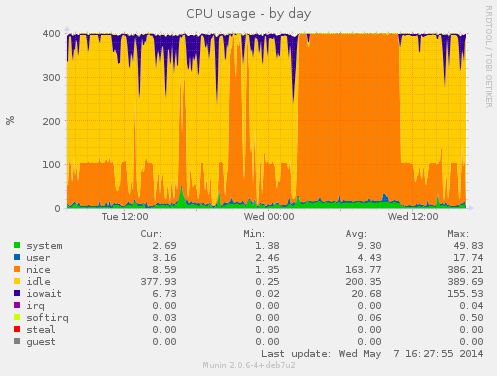
During this buildd cpu usage graph, we see most time only one CPU is consumed. So for fast package build times.. make sure your packages supports parallel building. For developers, abel.debian.org is porter machine with Armada XP. It has schroot's for both armel and armhf. set "DEB_BUILD_OPTIONS=parallel=4" and off you go. Finally I'd like to thank Thomas Petazzoni, Maen Suleiman, Hector Oron, Steve McIntyre, Adam Conrad and Jon Ward for making the upgrade happen. Meanwhile, we have unrelated trouble - a bunch of disks have broken within a few days apart. I take the warranty just run out... [1] only from Linux's point of view. - mv78200 has actually 2 cores, just not SMP or coherent. You could run an RTOS on the other core while you run Linux on the other.
When packaging software for Debian, there exist two important assumptions: