Search Results: "mak"

18 March 2010

Debian News: Debian selected for the Google Summer of Code 2010

Debian has been selected as a mentor organization for the Google Summer of Code 2010.

Whether your are a Debian Developer or a Student, this might be a good time to:

Remember that the sooner we get project ideas and personal proposals, the longer we can work on them to make them into great summer projects!

You can read more about the Google Summer of Code in their website. Also, if you are interested in participating, it is very important checking the program time line.

Obey Arthur Liu

Tore S. Bekkedal: Film wannabe FAIL

Some quick hints for this aspiring photographer: 1) If you want it to look like you shot it on film, SHOOT IT ON FILM. 2) If you want to fake shooting on film, DON T MARK YOUR FILM WITH 320TXP because that film, Kodak Tri-X Panchromatic 320, is BLACK AND WHITE. 3) The aspect ratio suggests the film would be 6 9cm, in which case the film markings would be on the SIDES. 44) There is no medium-format film long enough to take 44 pictures in any common format, let alone 6 9. 5) If you re going to include the film frame counter, then make sure it s showing the SAME NUMBER on both sides. 44 and 3 are different numbers. Love,
Tore. (Shot by the entrance to the Aker Brygge shopping center)

Neil Williams: Possibilities for Emdebian Crush

Crush 2.0 was abandoned last year when the freeze for Debian Squeeze was still scheduled to start at the end of 2009. Even with the expected delays in the timetable for the Debian release, there never was going to be enough time to get Crush 2.0 released with the resources available. Subsequent Crush releases have always been planned, only the release of Crush 2.0 alongside Debian 6.0 (Squeeze) was abandoned.

However, Emdebian Grip has developed nicely and Grip 2.0 is going to be a significant advance over Grip 1.0 - lots more packages, lots of bugs fixed for smoother installations, multistrap support, etc.

The success of Grip has led to a slim chance of working out something for Emdebian Crush. The current state of cross-building / multiarch in Debian means that cross-building more than a handful of packages is simply unrealistic with the resources available within Emdebian. Instead, Crush will be based on Grip for 2.0 and subsequent releases, until things settle out.

Packages that are in Grip and which are designed upstream for embedded situations will simply be made accessible in Crush without further changes. Cross-building packages like this results in binaries that are all but identical to the Grip equivalent. (There is a massive difference between adapting a package for Crush and designing the package from scratch for embedded use. Emdebian is not taking on that task.)

The changes that Crush will make are being calculated, using a shortlist of packages that are (typically) not designed for embedded use but which support a long, long string of --enable-foo options in the build system - most of which Crush can change into --disable-foo. This results in fewer dependencies for the resulting binary packages so that things like LDAP can be removed. The packages themselves are being selected on the basis of what was released in Crush 1.0 for compatibility reasons. The source packages and the resulting binary packages will be renamed (busybox-crush etc.) and suitable Provides: Replaces: and Conflicts: deployed, allowing mixing of Grip and Crush packages on one device.

Other changes are then based around replacing coreutils with a reconfigured busybox and removing perl completely. Wrapper scripts, helpers and other changes will try to stitch the gaps.

It's a chance, a bit slim but a chance nonetheless. The plan offers a possibility, a worthwhile experiment. If it works, Emdebian Crush 2.0 could be a reality on seven architectures and with 2,000 packages available, released alongside Debian 6.0 (Squeeze). If it fails, people will just have to wait for multiarch to settle out and Crush 3.0, due for release alongside Debian 7.0 (Squeeze+1). In the meantime, there's always Emdebian Grip.

17 March 2010

Gustavo Noronha Silva: WebKitGTK+ 1.1.90 is out!

We re coming close to GNOME 2.30 release date, and we are getting ready to branch a stable release off of WebKit s svn trunk in preparation for that. The idea of the stable branch is to try to maintain, and improve stability, with no additional features going in. Speaking of features, though, if you ve been paying attention you will have noticed WebKitGTK+ has come a long way, now. We came from not having basic features such as download support or openning links in new tabs, a more-or-less working HTML5 media implementation, and very few or missing in action developers to a thriving project, that gets more, and more attention, and contributors every day, with advanced features available, and rocking HTML5 media support that leaves little to be desired. It s been just over one year since we started rolling mostly bi-weekly releases, each adding more awesome features. There are still many issues, and we are not always equipped as a team to handle all the specifics of the engine ourselves, but I am really happy with the progress we ve made, and really thankful for the support my employer Collabora has given all the way for this to happen, including the early work on plugins, and many other things before my time as a contributor. When I switched to using Epiphany with the WebKit backend as my default browser back in January 2009, that meant having to deal with a whole lot of misbehaviour, and work-around a lot of painful brokeness. These days I enjoy a snappy, functional browser that makes me happy. If you haven t done so yet, go download, and test the newest Epiphany, with the latest WebKitGTK+, and help us make the GNOME 2.30 s web browser rock even more!

Gunnar Wolf: Getting away from Panam

Several months ago, around the Central American Free Software Encounter (ECSL) in Estel , Nicaragua, I started stirring the waters The Central American regions have vibrant, beautiful Free Software communities, but have mostly (with some very notable examples, of course) shied away from being active participants in major development projects. What was I to do about it? Of course, try to get them to become Debian contributors! During the following weeks, I talked about it with several friends from the region, and the result was an announcement and lots of arguments that followed it. Panam was decided as the host country, and many people have put a lot of work into making the MiniDebConf happen. Mauro Rosero and Anto Recio came up with what appears to be a wonderful local venue and a set of sponsored amenities, and the Debian project is sponsoring what is needed in terms of transportation for people from the whole region (spanning from Mexico to Ecuador and Venezuela IIRC). I am very sorry, however, that I cannot attend this meeting. This very same weekend, I will fly three hours, but in the opposite direction: I will go to Tijuana, where fate decided I will present my first round of CENEVAL equivalence exams (Acuerdo 286 Licenciatura). I expect that to be the topic of another post, to come soon. So, while my friends will be having a good time and talking about Debian and group work, I will sit through three periods of four hours, answering an exam for the first time in a very long time. Fun, hah? Anyway, I will meet Guillermo Amaral (thanks for hosting me! ;-) ), which ensures I will not miss all of the fun ;-)

Martin Michlmayr: Using the installer to flash the kernel again

Every once in a while someone asks how they can use the Debian installer to access their system on disk to run commands, for example to write the kernel and ramdisk to flash again. This is particularly useful on headless NAS devices. So here's how to do it:
  1. Start the Debian installer.
  2. Remove the SSH key from ~/.known_hosts because the installer will always generate a new key.
  3. Connect to the installer with SSH: ssh installer@...
  4. Follow the installer until you reach the partitioner, then choose "go back".
  5. Open a shell (look for Execute a shell towards the end of the menu).
  6. Run the commands below (the example assumes that /boot is /dev/sda1 and / is /dev/sda2.
mkdir -p /target
mount /dev/sda2 /target
mount /dev/sda1 /target/boot
mount --bind /dev /target/dev
mount -t proc none /target/proc
mount -t sysfs none /target/sys
chroot /target /bin/sh
# the prompt will change
# make modifications to the system and regenerate the initramfs
update-initramfs -u
exit
# the prompt will change again as you're leaving the chroot
umount /target/sys
umount /target/proc
umount /target/dev
umount /target/boot
umount /target
reboot

16 March 2010

Torsten Landschoff: New notebook: Dell Latitude E6400

It has been some time since I blogged about something. I wanted to write this post for a while, but never got around. Since beginning of february 2010, I have a new job and got a new work notebook: A shiny Dell Latitude E6400. Interestingly, the company usually relies on getting Lenovo Notebooks due to good Linux support, but we were unable to find a notebook without integrated camera and decent specs. We also researched some HP Notebooks. We ended up with a Dell since the website makes it really easy to find a system that fits your requirements. There is still room for improvement though you still have to select between Vostro, Latitude, Precision Mobile and XPS before you are allowed to configure the system. There is a filter on the left side of the shop, but filtering for a Core 2 Duo and 4 GB RAM won t show you the notebook I got. Instead there is some overpriced Latitude (~ 3000) and an XPS system. I just tried the XPS, but was unable to find a Core 2 Duo processor in the options. Anyway, somehow I made it through and got the following configuration:
Processor Intel(R) Core(TM)2 Duo CPU P8700 @ 2.53GHz
RAM 4 GB 800MHz DDR2
Graphics Mobile Intel Integrated Graphics Media Accelerator X4500HD
Display 14.1 Widescreen WXGA+ (1440X900), LED backlight, non-glare
Hard Drive Seagate ST9250410ASG 250GB
Webcam None, but microphone fitted
Battery 9-cell 85 Wh
WLAN Intel Wireless WiFi Link 5100 (according to lspci, I did not care too much)
LAN Intel 82567LM Gigabit Network Connection
I installed Ubuntu karmic (amd64) the day it arrived and I am impressed. I have yet to find a serious problem with hardware support. Everything just worked out of the box, installation was done after half an hour (I needed 10 minutes to find a network cable since the installer did not support the wireless). I wanted to install Debian on it but so far I did not get around to actually do it. But I expect sid to perform just as well with lenny probably lacking some of the needed drivers. So why am I writing this? The main point is that you can buy a notebook today and have it fully supported wrt. Linux. Open Source has come a long way! Second: If I replace my personal notebook (a Sony Vaio), I will probably buy Dell as well. Definitely nothing from Sony, because I did not find any way to change the display brightness for the 3 years old system, which makes it usable only next to a power outlet.

Bdale Garbee: TeleMetrum v1.0 Order Placed

I've been too busy (work, family, and fighting a nasty cold!) to write much text lately, other than the comments I put on launch photos uploaded to my Flickr stream, but the remainder of our testing of the prototype TeleMetrum v0.2 boards went really well! The only significant change we decided to make before going to production was to change the 3.3 volt regulator from a 100mA to a 150mA part. This will ensure adequate power for the companion boards we have planned, even when the GPS chip is in maximum power mode searching for satellites during a cold start. So... [drum roll, please] Keith and I just placed the orders for our first production lot of TeleMetrum v1.0 boards! With any luck, in 3-4 weeks we should have a pile of altimeters to sell, along with the associated TeleDongle ground stations already in stock. Stay tuned!

Russell Coker: Starting with KVM

I ve just bought a new Thinkpad that has hardware virtualisation support and I ve got KVM running. HugePages The Linux-KVM site has some information on using hugetlbfs to allow the use of 2MB pages for KVM [1]. I put vm.nr_hugepages = 1024 in /etc/sysctl.conf to reserve 2G of RAM for KVM use. The web page notes that it may be impossible to allocate enough pages if you set it some time after boot (the kernel can allocate memory that can t be paged and it s possible for RAM to become too fragmented to allow allocation). As a test I reduced my allocation to 296 pages and then increased it again to 1024, I was surprised to note that my system ran extremely slow while reserving the pages it seems that allocating such pages is efficient when done at boot time but not so efficient when done later. hugetlbfs /hugepages hugetlbfs mode=1770,gid=121 0 0 I put the above line in /etc/fstab to mount the hugetlbfs filesystem. The mode of 1770 allows anyone in the group to create files but not unlink or rename each other s files. The gid of 121 is for the kvm group. I m not sure how hugepages are used, they aren t used in the most obvious way. I expected that allocating 1024 huge pages would allow allocating 2G of RAM to the virtual machine, that s not the case as -m 2048 caused kvm to fail. I also expected that the number of HugePages free according to /proc/meminfo would reliably drop by an amount that approximately matches the size of the virtual machine which doesn t seem to be the case. I have no idea why KVM with Hugepages would be significantly slower for user and system CPU time but still slightly faster for the overall build time (see the performance section below). I ve been unable to find any documents explaining in which situations huge pages provide advantages and disadvantages or how they work with KVM virtualisation the virtual machine allocates memory in 4K pages so how does that work with 2M pages provided to it by the OS? But Hugepages does provide a slight benefit in performance and if you have plenty of RAM (I have 5G and can afford to buy more if I need it) you should just install it as soon as you start. I have filed Debian bug report #574073 about KVM displaying an error you normally can t see when it can t access the hugepages filesystem [6]. Permissions open /dev/kvm: Permission denied
Could not initialize KVM, will disable KVM support One thing that annoyed me about KVM is that the Debian/Lenny version will run QEMU instead if it can t run KVM. I discovered this when a routine rebuild of the SE Linux Policy packages in a Debian/Unstable virtual machine took an unreasonable amount of time. When I halted the virtual machine I noticed that it had displayed the above message on stderr before changing into curses mode (I m not sure the correct term for this) such that the message was obscured until the xterm was returned to the non-curses mode at program exit. I had to add the user in question to the kvm group. I ve filed Debian bug report #574063 about this [2]. Performance Below is a table showing the time taken for building the SE Linux reference policy on Debian/Unstable. It compares running QEMU emulation (using the kvm command but without permission to access /dev/kvm), KVM with and without hugepages, Xen, and a chroot. Xen is run on an Opteron 1212 Dell server system with 2*1TB SATA disks in a RAID-1 while the KVM/QEMU tests are on an Intel T7500 CPU in a Thinkpad T61 with a 100G SATA disk [4]. All virtual machines had 512M of RAM and 2 CPU cores. The Opteron 1212 system is running Debian/Lenny and the Thinkpad is running Debian/Lenny with a 2.6.32 kernel from Testing.
Elapsed User System
QEMU on Opteron 1212 with Xen installed 126m54 39m36 8m1
QEMU on T7500 95m42 42m57 8m29
KVM on Opteron 1212 7m54 4m47 2m26
Xen on Opteron 1212 6m54 3m5 1m5
KVM on T7500 6m3 2m3 1m9
KVM Hugepages on T7500 with NCurses console 5m58 3m32 2m16
KVM Hugepages on T7500 5m50 3m31 1m54
KVM Hugepages on T7500 with 1800M of RAM 5m39 3m30 1m48
KVM Hugepages on T7500 with 1800M and file output 5m7 3m28 1m38
Chroot on T7500 3m43 3m11 29
I was surprised to see how inefficient it is when compared with a chroot on the same hardware. It seems that the system time is the issue. Most of the tests were done with 512M of RAM for the virtual machine, I tried 1800M which improved performance slightly (less IO means less context switches to access the real block device) and redirecting the output of dpkg-buildpackage to /tmp/out and /tmp/err reduced the built time by 32 seconds it seems that the context switches for networking or console output really hurt performance. But for the default build it seems that it will take about 50% longer in a virtual machine than in a chroot, this is bearable for the things I do (of which building the SE Linux policy is the most time consuming), but if I was to start compiling KDE then I would be compelled to use a chroot. I was also surprised to see how slow it was when compared to Xen, for the tests on the Opteron 1212 system I used a later version of KVM (qemu-kvm 0.11.0+dfsg-1~bpo50+1 from Debian/Unstable) but could only use 2.6.26 as the virtualised kernel (the Debian 2.6.32 kernels gave a kernel Oops on boot). I doubt that the lower kernel version is responsible for any significant portion of the extra minute of build time. Storage One way of managing storage for a virtual machine is to use files on a large filesystem for it s block devices, this can work OK if you use a filesystem that is well designed for large files (such as XKS). I prefer to use LVM, one thing I have not yet discovered is how to make udev assign the KVM group to all devices that match /dev/V0/kvm-*. Startup KVM seems to be basically designed to run from a session, unlike Xen which can be started with xm create and then run in the background until you feel like running xm console to gain access to the console. One way of dealing with this is to use screen. The command screen -S kvm-foo -d -m kvm WHATEVER will start a screen session named kvm-foo that will be detached and will start by running kvm with WHATEVER as the command-line options. When screen is used for managing virtual machines you can use the command screen -ls to list the running sessions and then commands such as screen -r kvm-unstable to reattach to screen sessions. To detach from a running screen session you type ^A^D. The problem with this is that screen will exit when the process ends and that loses the shutdown messages from the virtual machine. To solve this you can put exec bash or sleep 200 at the end of the script that runs kvm. start-stop-daemon -S -c USERNAME --exec /usr/bin/screen -- -S kvm-unstable -d -m /usr/local/sbin/kvm-unstable On a Debian system the above command in a system boot script (maybe /etc/rc.local) could be used to start a KVM virtual machine on boot. In this example USERNAME would be replaced by the name of the account used to run kvm, and /usr/local/sbin/kvm-unstable is a shell script to run kvm with the correct parameters. Then as user USERNAME you can attach to the session later with the command screen -x kvm-unstable . Thanks to Jason White for the tip on using screen. I ve filed Debian bug report #574069 [3] requesting that kvm change it s argv[0] so that top(1) and similar programs can be used to distinguish different virtual machines. Currently when you have a few entries named kvm in top s output it is annoying to match the CPU hogging process to the virtual machine it s running. It is possible to use KVM with X or VNC for a graphical display by the virtual machine. I don t like these options, I believe that Xephyr provides better isolation, I ve previously documented how to use Xephyr [5]. kvm -kernel /boot/vmlinuz-2.6.32-2-amd64 -initrd /boot/initrd.img-2.6.32-2-amd64 -hda /dev/V0/unstable -hdb /dev/V0/unstable-swap -m 512 -mem-path /hugepages -append "selinux=1 audit=1 root=/dev/hda ro rootfstype=ext4" -smp 2 -curses -redir tcp:2022::22 The above is the current kvm command-line that I m using for my Debian/Unstable test environment. Networking I m using KVM options such as -redir tcp:2022::22 to redirect unprivileged ports (in this case 2022) to the ssh port. This works for a basic test virtual machine but is not suitable for production use. I want to run virtual machines with minimal access to the environment, this means not starting them as root. One thing I haven t yet investigated is the vde2 networking system which allows a private virtual network over multiple physical hosts and which should allow kvm to be run without root privs. It seems that all the other networking options for kvm which have appealing feature sets require that the kvm process be started with root privs. Is KVM worth using? It seems that KVM is significantly slower than a chroot, so for a basic build environment a secure chroot environment would probably be a better option. I had hoped that KVM would be more reliable than Xen which would offset the performance loss however as KVM and Debian kernel 2.6.32 don t work together on my Opteron system it seems that I will have some reliability issues with KVM that compare with the Xen issues. There are currently no Xen kernels in Debian/Testing so KVM is usable now with the latest bleeding edge stuff (on my Thinkpad at least) while Xen isn t. Qemu is really slow, so Xen is the only option for 32bit hardware. Therefore all my 32bit Xen servers need to keep running Xen. I don t plan to switch my 64bit production servers to KVM any time soon. When Debian/Squeeze is released I will consider whether to use KVM or Xen after upgrading my 64bit Debian server. I probably won t upgrade my 64bit RHEL-5 server any time soon maybe when RHEL-7 is released. My 64bit Debian test and development server will probably end up running KVM very soon, I need to upgrade the kernel for Ext4 support and that makes KVM more desirable. So it seems that for me KVM is only going to be seriously used on my laptop for a while. Generally I am disappointed with KVM. I had hoped that it would give almost the performance of Xen (admittedly it was only 14.5% slower). I had also hoped that it would be really reliable and work with the latest kernels (unlike Xen) but it is giving me problems with 2.6.32 on Opteron. Also it has some new issues such as deciding to quietly do something I don t want when it s unable to do what I want it to do.

Tollef Fog Heen: A small explanation about the yubikey

Russell Coker recently reviewed the Yubikey. The article mentions me, so I figured I'd correct a minor thing and respond to one of the comments. First, the yubikey-server-c is my reimplementation of the Yubikey authentication protocol. Yubico provides two implementations, one in PHP and one in Java, neither which I'm particuarly interesting on building my system security on. Any bugs, misfeatures, etc in the C implementation are mine and mine alone. Barak A. Pearlmutter, one of the commenters on Russell's blog writes: i don t understand. isn t this thing vulnerable to eavesdropping and replaying? even if it has a counter which changes etc, the things it is talking to (web sites) can t know that some generated string is being reused. and it doesn t even have a clock, so these things can be old. The way the Yubikey works is you have a central authentication server. This has a secret shared with the key. Setting this secret is the primary function of the personalisation tool. When you press the button, the key takes its internal state (various counters, uid field, etc) and encrypts this using AES-128. This is then sent to the application you are trying to access, be it Wordpress, SSH or something else. Said application then contacts the authentication server which decrypts the ticket, checks the values of the counters to make sure it's not a replay and responds with OK, bad ticket, replay and various other status codes. Based on this, the application grants or denies access. There are really two places you could attack this: in the communication between the web browser and application or between application and authentication server. Both of those can be secured using SSL. There is no way to use a single yubikey in multiple authentication realms without extra software. To do this, you would have a OpenID provider that uses the Yubikey for authentication, or you could have a Kerberos server with cross-realm trust. As for the PAM modules and other tools so far not being packaged, yes, I know, I might fix it, but the current setup has the bits I use, as I use RADIUS authentication to get services to support both Yubikey and passwords.

Russ Allbery: backport 1.25

This little script to help with Debian package backporting seems to be more widely used than I ever expected. I'm glad people are finding it useful! This release incorporates changes based on a patch by Eddy Petri or to extract the correct version number from the source package *.dsc file. Previously, backport grabbed the version from the file name, but this fails in the presence of epochs. (I should also extract the package name from the *.dsc file, at which point the name of the *.dsc file doesn't matter, but I'll do that another day.) Also new in this release is the addition of the backporter to the Uploaders control field automatically if they're not already in Maintainer or Uploaders. This is currently unconditional, since I think it's generally the right thing to do, but if someone complains I can make it conditional. Mostly to help with testing, I also added a new command-line option to just prepare the backport and not actually call pbuilder. Instead, the pbuilder command line is printed out. This may also be useful if additional work is required on the source package before actually building it; one can do that work and then cut and paste the command line. You can get the latest version from my scripts page.

Russell Coker: Thinkpad T61

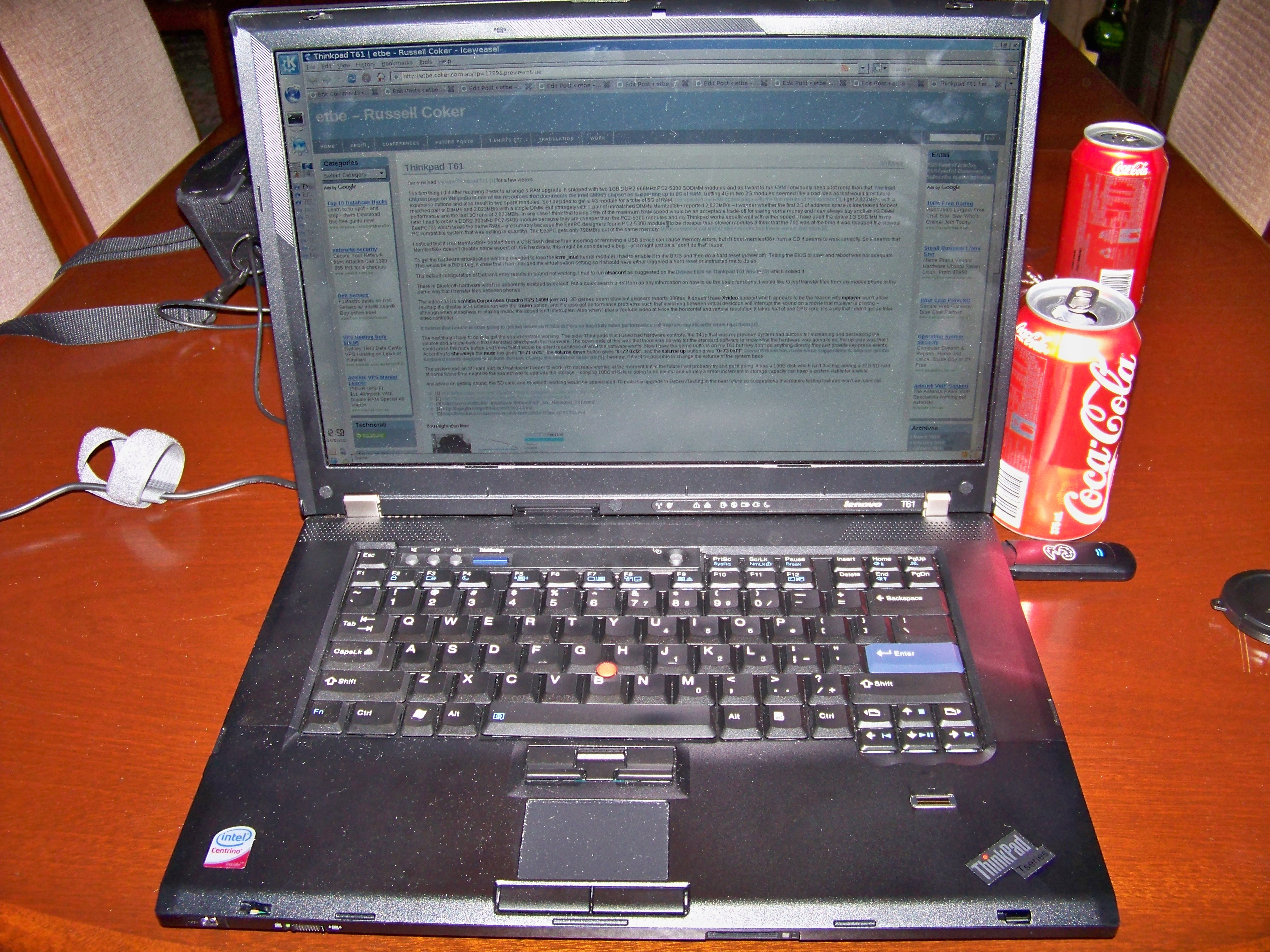
picture of my new Thinkpad T61 I ve now had my new Thinkpad T61 [1] for almost a month. The letters on the keyboard are not even starting to wear off which is unusual, either this Thinkpad is built with harder plastic than the older ones or I m typing more softly. Memory The first thing I did after receiving it was to arrange a RAM upgrade. It shipped with two 1GB DDR2 666MHz PC2-5300 SODIMM modules and as I want to run KVM I obviously need a lot more than that. The Intel Chipset page on Wikipedia is one of the resources that documents the Intel GM965 chipset as supporting up to 8G of RAM. Getting 4G in two 2G modules seemed like a bad idea as that would limit future expansion options and also result in two spare modules. So I decided to get a 4G module for a total of 5G of RAM. I ve updated my RAM speed page with the test results of this system [2], I get 2,823MB/s with a matched pair of DIMMs and 2,023MB/s with a single DIMM. But strangely with a pair of unmatched DIMMs Memtest86+ reported 2,823MB/s I wonder whether the first 2G of address space is interleaved for best performance and the last 3G runs at 2,023MB/s. In any case I think that losing 29% of the maximum RAM speed would be an acceptable trade-off for saving some money and I can always buy another 4G DIMM later. I had to order a DDR2-800MHz PC2-6400 module because they are cheaper than the PC2-5300 modules and my Thinkpad works equally well with either speed. I have used the spare 1G SODIMM in my EeePC701 which takes the same RAM presumably because the EeePC designers found PC2-5300 modules to be cheaper than slower modules (I think that the 701 was at the time it was released the slowest PC compatible system that was selling in quantity). The EeePC gets only 798MB/s out of the same memory. My document about Memtest86+ results has these results and more [2]. I noticed that if I run Memtest86+ booted from a USB flash device then inserting or removing a USB device can cause memory errors, but if I boot memtest86+ from a CD it seems to work correctly. So it seems that Memtest86+ doesn t disable some aspect of USB hardware, this might be considered a bug or it might just be a don t do that issue. Misc To get the hardware virtualisation working (needed to load the kvm_intel kernel module) I had to enable it in the BIOS and then do a hard reset (power off). Telling the BIOS to save and reboot was not adequate. This would be a BIOS bug, it knew that I had changed the virtualisation setting so it should have either triggered a hard reset or instructed me to do so. The default configuration of Debian/Lenny results in sound not working, I had to run alsaconf as suggested on the Debian Etch on Thinkpad T61 howto [3] which solved it. Generally I m happy with this system, the screen resolution is 1680*1050 which has 20% more pixels than the 1400*1050 screen on my Thinkpad T41p, it s a lot faster for CPU operations and should be a lot faster for video when I get the drivers sorted out (currently it s a lot slower), and I have virtualisation working again. But when you buy a system that s much like the last one but 6 years newer you expect it to be better. Generally the amount of effort involved in the process of buying a new system, upgrading the RAM to the desired specs, installing Linux and tweaking all the options is enough to make me want to wait at least another 6 years before buying another. Part of the reason for this difficulty is that I want to get so much functionality from the machine, a machine with more modest goals (such as a Netbook) takes a lot less time to configure. Problems There is Bluetooth hardware which is apparently enabled by default. But a quick search didn t turn up any information on how to do the basic functions, I would like to just transfer files from my mobile phone in the same way that I transfer files between phones. The video card is a nVidia Corporation Quadro NVS 140M (rev a1). 3D games seem slow but glxgears reports 300fps. It doesn t have Xvideo support which appears to be the reason why mplayer won t allow resizing it s display area unless run with the -zoom option, and it s also got performance problems such that switching between virtual desktops will interrupt the sound on a movie that mplayer is playing although when alsaplayer is playing music the sound isn t interrupted. Also when I play a Youtube video at twice the horizontal and vertical resolution it takes half of one CPU core. It s a pity that I didn t get an Intel video controller. It seems that Debian is soon going to get the Nouveau NVidia drivers so hopefully video performance will improve significantly when I get them [4]. The next thing I have to do is to get the sound controls working. The older Thinkpads that I used had hardware controls, the T41p that was my previous system had buttons for increasing and decreasing the volume and a mute button that interacted directly with the hardware. The down-side of this was that there was no way for the standard software to know what the hardware was going to do, the up-side was that I could press the mute button and know that it would be silent regardless of what the software wants. Now I have the same buttons on my T61 but they don t do anything directly, they just provide key-press events. According to showkeys the mute key gives 0 71 0xf1 , the volume down button gives 0 72 0xf2 , and the volume up button gives 0 73 0xf3 . Daniel Pittman has made some suggestions to help me get the keyboard events mapped to actions that can change the sound via software [5] which I haven t yet had time to investigate. I wonder if it will ever be possible to change the volume of the system beep. The system has an SD card slot, but that doesn t seem to work. I m not really worried at the moment but in the future I will probably try and get it going. It has a 100G disk which isn t that big, adding a 32G SD card at some future time might be the easiest way to upgrade the storage copying 100G of data is going to be painful and usually a small increment in storage capacity can keep a system viable for a while. Any advice on getting sound, the SD card, and Bluetooth working would be appreciated. I ll probably upgrade to Debian/Testing in the near future so suggestions that require testing features won t be ruled out.

15 March 2010

Joey Hess: pre to droid

in which the Pre unsuprisingly continues to suck My Palm Pre was killed by a forced over the air WebOS upgrade. You can't avoid those upgrades, even if you are sure they'll be bad news. The previous WebOS upgrade spared my Debian partition, but lost all other customizations (including Palm Pre privacy fixes), and wasted hours. When I went to use my phone and it didn't even boot, and displayed only "http://palm.com/rom", I knew that was the last straw. (Shouldn't forcing an upgrade that breaks a working phone to the point that it can't even call 911 be well, illegal?) switching cell providers in the US: suprisingly doable I thought about ditching the smart phone and using VOIP, but I seem to have gotten addicted. So I got a Droid. That meant switching cell phone companies. I've heard a lot about how horrible the US cell phone company contracts are. My experience has me wondering if all that is well... not overblown, but oversimplified. I was half a year into a two year contract. Today I got my closing statement, and I really got out of it with no early termination fee. The trick seems to be, switch to a different cell phone company. They'll be happy to get you out of your old contract, salivating at the chance of locking you in to a new one. They probably have a script to use when calling to cancel. Or "know a guy". Or claim to know a guy, then just use a script, and get lucky. Given the hard sells and vague promises they tried on me, I assume that these places are where all the car salesmen ended up. Trust == 0. But it worked. If you're good on the phone, and are looking for a new business idea: Start a business of getting people out of their cell phone contracts, for a reasonable fee and no other obligation. Use loopholes like rate changes. As long as the cell phone companies can raise their monthly rate 2 cents, and 99.9999% of their users accept it, and they make untold millions of dollars, for free, they seem to not care if the remaining fraction use a loophole to get out. Especially if they're able to take advantage of other comanies loopholes to switch over users. So there seems to be a niche there in which one could prosper. droid first impressions So now I have a slightly larger lump in my pocket and the Pre is on a shelf, and will either be used for future development and testing of Debian piggyback ideas, or donated to someone like Lennart who can make good use of it. Compared with the Pre, the droid's hardware is all superior. The keyboard, especially, is great, with arrow keys, and all the symbols I need. At the same time, the phone is bigger, and oddly clunky. But in an endearing way. Only thing I really dislike about the hardware is the "back" button is easy to accidentially swipe while typing on the keyboard. Compared with WebOS, the Android UI has some clunkiness and non-obvious things. Like the status bar at the top not doing anything when you click on it. And there being no way to close an app. Especially annoying is that this means opening the web browser returns to whatever page I was on last, which is never what I want. The UI is however much, much snappier. I don't use the Google email, etc services so can't comment on them; I assume the amount of info Google is gathering about me went up by a few percentage points; I've blocked their analytics on my network to knock it back down. (PS: DuckDuckGo now avoids logging IP addresses at all.) The best thing is the ConnectBot application, which is a very usable shell and ssh client. It's a terminal, in my pocket, which I can easily use for an hour without feeling like my interactions are feeding through a stifling soda straw. Between the keyboard and the app, the Pre has nothing at all that compares. Under the hood, Android annoys me terribly, with its lack of busybox, its kernel that does not even have the ext* filesystem, its hard-partitioned storage, and its general lack of every single thing I like in a Linux system. Compare this with the Pre, which has a package manager, a userspace based on busybox with a full standard Linux stack (all the way up to PulseAudio) and a kernel with lots of standard filesystems, and even LVM. Sigh. It's amazing that WebOS and Android have found such broadly different ways to suck. There is significant interest and activity around running a Debian chroot on the Droid. The best tries so far put it on a loop mounted ext2 filesystem (which means you need to get ahold of a matching ext2.ko somehow), living on the FAT formatted SSD. And there are apparently some bad problems with IO to that starving/locking the system, so I have not tried it.

Romain Beauxis: Security update: Mediawiki 1.15.2-1

I have just uploaded a new vesion of the mediawiki package, namely 1.15.2-1. This version fixes two security issues. One of which is present in all versions of mediawiki and the other one since 1.5.
A CSS validation issue was discovered which allows editors to display external images in wiki pages. This is a privacy concern on public wikis, since a malicious user may link to an image on a server they control, which would allow that attacker to gather IP addresses and other information from users of the public wiki. All sites running publicly-editable MediaWiki installations are advised to upgrade. All versions of MediaWiki (prior to this one) are affected. A data leakage vulnerability was discovered in thumb.php which affects wikis which restrict access to private files using img_auth.php, or some similar scheme. All versions of MediaWiki since 1.5 are affected.
This package should make it to testing quite soon (priority is high). I have also uploaded a similar package in backports.org I have also prepared a security update for the stable package, based on the diff from the 1.15.2 release. Before it is uploaded, you can find it there. Please, report any issue with this package. Of course, I recommend that any user of mediawiki upgrade to one of these package as soon as possible... :-)

Brett Parker: Twitter and irssi...

So, from the last post, it appears that most people got fed up with trying to get twirssi working in Lenny, and it was suggested that twircd was the viable alternative - I've not tried that (yet) mostly because it's PHP based, and (strangely) I try to avoid running any PHP unless I absolutely have to. Might be of interest to others though! I'm likely to see about making a cleaner package of libnet-twitter-lite at some point over the next week (for Lenny), but for the moment it's mostly working (I'm fairly sure the URL shortening bit won't, but I haven't tested that yet... right - tested and it doesn't work - fairly sure that's because it relies on a newer version of LWP than in stable... so I'll add that to the list of things I need to work around :)

Russell Coker: The Yubikey

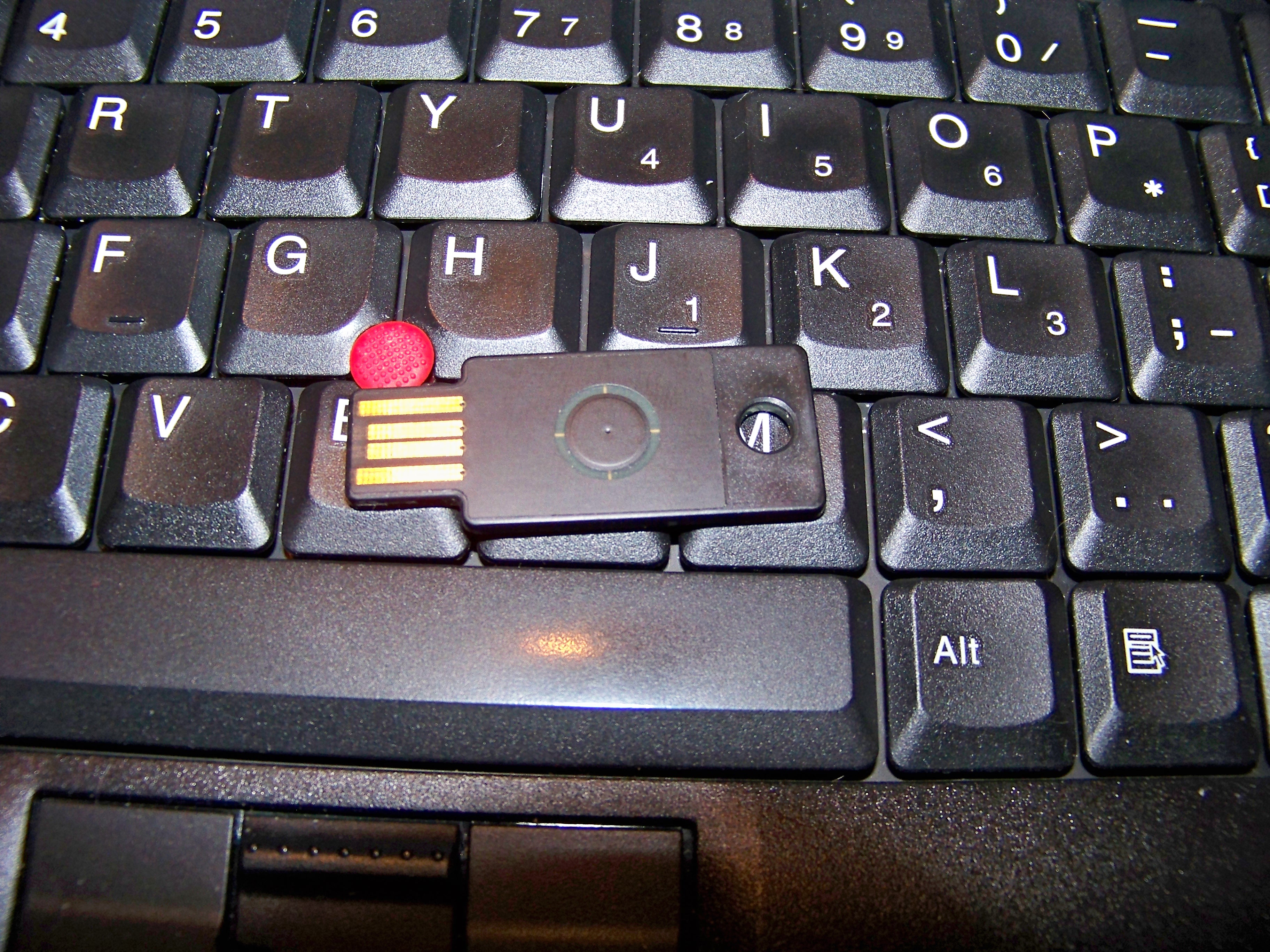
Picture of Yubikey Some time ago Yubico were kind enough to send me an evaluation copy of their Yubikey device. I ve finally got around to reviewing it and making deployment plans for buying some more. Above is a picture of my Yubikey on the keyboard of my Thinkpad T61 for scale. The newer keys apparently have a different color in the center of the circular press area and also can be purchased in white plastic. The Yubikey is a USB security token from Yubico [1]. It is a use-based token that connects via the USB keyboard interface (see my previous post for a description of the various types of token [2]). The Yubikey is the only device I know of which uses the USB keyboard interface, it seems that this is an innovation that they invented. You can see in the above picture that the Yubikey skips the metal that is used to surround most USB devices, this probably fails to meet some part of the USB specification but does allow them to make the key less than half as thick as it might otherwise be. Mechanically it seems quite solid. The Yubikey is affordable, unlike some token vendors who don t even advertise prices (if you need to ask then you can t afford it) and they have an online sales site. $US25 for a single key and discounts start when you buy 10. As it seems quite likely that someone who wants such a token will want at least two of them for different authentication domains, different users in one home, or as a backup in case one is lost or broken (although my experiments have shown that Yubikeys are very hardy and will not break easily). The discount rate of $20 will apply if you can find four friends who want to use them (assuming two each), or if you support several relatives (as I do). The next discount rate of $15 applies when you order 100 units, and they advise that customers contact their sales department directly if purchasing more than 500 units so it seems likely that a further discount could be arranged when buying more than 500 units. They accept payment via Paypal as well as credit cards. It seems to me that any Linux Users Group could easily arrange an order for 100 units (that would be 10 people with similar needs to me) and a larger LUG could possibly arrange an order of more than 500 units for a better discount. If an order of 500 can t be arranged then an order of 200 would be a good thing to get half black keys and half white ones you can only buy a pack of 100 in a single color. There is a Wordpress plugin to use Yubikey authentication [3]. It works, but I would be happier if it had an option to accept a Yubikey OR a password (currently it demands both a Yubikey AND a password). I know that this is less secure, but I believe that it s adequate for an account that doesn t have administrative rights. To operate the Yubikey you just insert it into a USB slot and press the button to have it enter the pass code via the USB keyboard interface. The pass code has a prefix that can be used to identify the user so it can replace both the user-name and password fields of course it is technically possible to use one Yubikey for authentication with multiple accounts in which case a user-name would be required. Pressing the Yubikey button causes the pass code to be inserted along with the ENTER key, this can take a little getting used to as a slow web site combined with a habit of pressing ENTER can result in a failed login (at least this has happened to me with Konqueror). As the Yubikey is use-based, it needs a server to track the usage count of each key. Yubico provides source to the server software as well as having their own server available on the net obviously it might be a bad idea to use the Yubico server for remote root access to a server, but for blog posting that is a viable option and saves some effort. If you have multiple sites that may be disconnected then you will either need multiple Yubikeys (at a cost of $20 or $15 each) or you will need to have one Yubikey work with multiple servers. Supporting a single key with multiple authentication servers means that MITM attacks become possible. The full source to the Yubikey utilities is available under the new BSD license. In Debian the base functionality of talking to the Yubikey is packaged as libyubikey0 and libyubikey-dev, the server (for validating Yubi requests via HTTP) is packaged as yubikey-server-c, and the utility for changing the AES key to use your own authentication server is packaged as yubikey-personalization thanks Tollef Fog Heen for packaging all this! The YubiPAM project (a PAM module for Yubikey) is licensed under the GPL [4]. It would be good if this could be packaged for Debian (unfortunately I don t have time to adopt more packages at the moment). There is a new model of Yubikey that has RFID support. They suggest using it for public transport systems where RFID could be used for boarding and the core Yubikey OTP functionality could be used for purchasing tickets. I don t think it s very interesting for typical hobbyist and sysadmin work, but RFID experts such as Jonathan Oxer might disagree with me on this issue.

Adnan Hodzic: FoolControl, Gnome, Squeeze?

Other day I read Refreshing The Ubuntu Brand , upcoming visual style changes for Ubuntu 10.04 Lucid Lynx and my only comment to this whole story was Don t tell me you re moving window control elements to the left side of window in Lucid Side Frown
Either way if this is the revolutionary change for Ubuntu, then I have a visual style suggestion for Squeeze as well. Since Gnome is default desktop environment in Debian and as it looks like right now 2.30 will be what s going to be included into Squeeze; nothing much, or nothing really will visually change in Gnome by then. So how about this Lamp For some time now I ve been troubled by some things in Gnome, and what s bothering me the most is System menu. Why? Well because the list of utilities listed both under Administration and Preferences is so long that it s almost useless. So without losing your precious seconds of your life and losing fair amount of nerves well this is what s required to find what you were initially looking for. Interesting enough is the fact (please do stress) that Gnome consists of a fine thing called gnome-control-center which is not included in any of Gnome menus. IDK I really do enjoy Gnome vanilla flavor (overall am fan of vanilla flavored apps.) but what I ve been doing for quite time now is fixing this ridicule by having my own version of Systems menu, which consists of Add/Remove App. (synaptic) and Fool Control (gnome-control-center) Final result is that I get what I m looking for in couple of seconds without any lost nerves Victory Either way, after reading the redesigning Ubuntu article, this only encouraged me to go live with this suggestion. I know it s a minor change, but how about we have this implemented into Squeeze? Of course change my silly button labels; if not, what are my options? Make package that will do this for you? Rolls Eyes I m really interested to hear your input on this topic. Talking about redesigning stuff, is anyone up to do start doing this with Debian homepage? Yea? Count me in Wink

Gerfried Fuchs: stable RC Bug Squashing, Part 2

A while ago I blogged about squashing release-critical bugs in stable. Yesterday we have reached a big milestone on that area: The amount of release-critical bugs in stable dropped below 1000 (blue graph). This might sound like it's still pretty high but given that we were well over 1600 RC bugs in stable a while ago I consider this quite a success. This is though no time for rest. There is still way too many RC bugs in stable, there are definitely still a lot of bugs that just aren't affecting stable and thus can be marked as such meaning no upload needs to get done for them. I'm taking a close look at those with higher numbers and most of those seem to be validly affecting stable too so they might require a bit more work than just tagging them. Thanks to all people who helped on that area, I can just remember a few names and don't want to make anyone else also working on stable to feel singled out, though I want to thank Lucas for tagging his FTBFS rounds with squeeze sid right from the start because the packages obviously have built before due to his regular rebuilds. Thanks to all, but like said, not the time to rest. The green squeeze graph is still around 250 bugs away from us!

Jaldhar Vyas: 7DRL Challenge - Final days

I'm afraid that in the end I failed the challenge. As the last minutes of Saturday night ticked down, I was still mired in the minutiae of C++ Run-Time Type Identification (RTTI.) Sunday was my 12th wedding anniversary and I know from past experience that this is one day when it is advisable to step away from the computer. So I have to concede defeat for now. But I only actually spent about 48 hours on this project this week so if you really think about it, I still have 120 hours available. That's what I choose to believe anyway. The galling thing is in theory I know how this is supposed to work. A.L.F.s model (in the model-view-controller design pattern) is a class called World. World has an array of Rooms which represent rooms in the dungeon. In my original almost working version of a few days back, this Room class had all manner of verious members for different objects in the dungeon but I decided to redesign it the right way by consolidating all the redundant bits into an abstract base class called Item which would have concrete subclasses: Potion, Treasure, Monster etc. Room now only has to hold a pointer to the Item associated with that room. (Later on I will consider allowing multiple items per room but for now there can only be one.) A factory function creates Items and assigns them to each Room (or leaves them empty) It returns a pointer to an object of the appropriate class but we can access that object through the Item* because they are derived from Item. So far so good. The fun part happens when we want to know what the Item* really is. For example, combat makes sense for Monsters but not for Treasure. I only want to activate combat if the Item* is a Monster*. It's easy in theory:

if(dynamic_cast<Monster*>(contents))
    return FIGHT;
                            
...but it didn't work. Problem number 1. C++ RTTI only works on polymorphous classes. (Ones that contain atleast one virtual member.) So a little redesign of my classes was necessary. Problem #2, once you start slinging pointers around, segfaults soon follow. I had to go back and make absolutely sure I wasn't double-deleting objects and things of that nature. As I write this, I think I have finally got it all sorted out. So I am going to persevere and finish this game, its just going to take a bit longer than 7 days.

Russell Coker: Types of Security Tokens

The Security Token Wikipedia page doesn t seem to clearly describe the types of token. Categories of Security Token It seems to me that the following categories encompass all security tokens:
  1. Biometric tokens which seems rather pointless to me. Having a device I control verify my biometric data doesn t seem to provide a benefit. The only possible benefit seems to be if the biometric token verifies the identity of the person holding it before acting as one of the other types of token.
  2. Challenge-response devices. The server will send a challenge (usually a random number) and will expect a response (usually some sort of cryptographically secure hash of the number and a shared secret). A challenge-response device may take a password from the user and combine it with the challenge from the server and the shared secret when calculating the response.
  3. Time-based tokens (one-time passwords). They will provide a new pseudo-random number that changes periodically, often a 30 second time interval is used and the number is presumably a cryptographically secure hash of the time and a shared secret. This requires a battery in the token and the token will become useless when the battery runs out. It also requires that the server have an accurate clock.
  4. Use-based tokens. They will give a new pseudo-random number every time a button is pressed (or some other event happens to indicate that a number has been used). These do not work well if you have multiple independent servers and an untrusted network.
Here is my analysis of the theory of token use, note that I am not sure how the implementations of the various token systems deal with these issues.
  1. Biometric security seems like a bad idea for most non-government use. I have seen a retina scanner in use at a government office that made some sense as the people being scanned were in a secure area (they had passed some prior checks) and they were observed (to prevent coercion and the use of fake eyes). Biometric authentication for logging in over the net just seems like a bad idea as you will never know if you can trust the scanner.
  2. It seems to me that challenge-response devices are by far the most secure option. CR is resistant to replay attacks provided that it is not possible to have re-used challenges. If the calculation of the response includes a password (which is performed on some tokens that resemble pocket calculators) then a CR token will meet the something you have and something you know criteria.
    One potential problem with CR systems is that of not including the server or account ID in the calculation. So if I was to use a terminal in an insecure location to login to a server or account with data that is not particularly important then it would be possible for an attacker who had compromised the terminal to perform a Man In The Middle (MITM) attack against other servers. Of course you are supposed to use a different password for each account, if you do this then a CR token that includes a password will be resistant to this attack but I expect that people who use tokens are more likely to use one password for multiple accounts.
  3. Time-based tokens have a weakness in that an attacker who can immediately discover the number used for one connection could then immediately login to other servers. One example of a potential attack using this avenue would be to compromise a terminal in an Internet cafe, steal a hash used for logging in to server A and then immediately login to server B. This means that it may not be safe to use the same token for logging in to servers (or accounts) that have different sensitivity levels unless a strong password was used as well I expect that people who have hardware tokens tend to use weaker passwords.
    Also one factor that will make some MITM attacks a lot easier is the fact that the combination of the hash from the token and the password are valid for a period of time so an attacker could establish a second connection within the 30 second interval. It seems that only allowing one login with a particular time-coded password is the correct thing to do, but this may be impossible if multiple independent servers use the same token.
    Time based tokens expire when the battery runs out. The measures taken to make them tamper-proof may make it difficult or impossible to replace the battery so a new token must be purchased every few years.
  4. Use-based tokens are very similar to time-based tokens, it s just a different number that is used for generating the hash. The difference in the token is that a time-based token needs a battery so that it can track the time while a use-based token needs a small amount of flash memory to store the usage count. The difference at the server end is that for a use-based token the server needs a database of the use count of each token, which is usually not overly difficult for a single server.
    One problem is the case of a restore from backup of the server which maintains the use count database. The only secure way of managing this is to either inspect every token (to discover it s use count) or to issue a new password (for using password plus token authentication). Either option would be really painful if you have many users at remote sites. Also it would be required to get the database transaction committed to disk before an authentication attempt is acknowledged so that a server crash could not lose the count this should be obvious but many people get these things wrong.
    An additional complication for use-based tokens comes with the case of a token that is used for multiple servers. One server needs to maintain the database of the usage counts and the other servers need to query it by secure links. If a login attempt with use count 100 has been made to server A then server B must not accept a login with a hash that has a use count less than or equal to 100. This is firstly to cover the case where a MITM attack is used to login to server B with credentials that were previously used for server A. The second aim of this is to cover the case where a token that is temporarily unguarded is used to generate dozens of hashes while the hashes could be immediately used it is desirable to have them expire as soon as possible, and having the next login update the use count and invalidate such hashes is a good thing.
    The requirement that all servers know the current use count requires that they all trust a single server. In some situations this may not be possible, so it seems that this only works for servers within a single authentication domain or for access to less important data.
Methods of Accessing Tokens It seems that the following are the main ways of accessing tokens. To avoid driver issues and allow the use on random machines it seems that the USB keyboard and manual entry types of token are best. While for corporate Intranet use it seems that a SmartCard is best as it can be used for opening doors as well, you could use a USB keyboard token (such as a Yubikey) to open doors but it would be slower and there is no off the shelf hardware. For low cost and ease of implementation it seems that use-based tokens that connect via the USB keyboard interface are best. For best security it seems that a smart-card or USB interface to a device with a keypad for entering a password is ideal.

Next.

Previous.