Joachim Breitner uploaded ghc/7.8.4-9 which uses a hash of the command line instead of the pid when calculating a random directory name.
Lunar uploaded mozilla-devscripts/0.42 which now properly sets the timezone. Patch by Reiner Herrmann.
Dmitry Shachnev uploaded python-qt4/4.11.4+dfsg-1 which now outputs the list of imported module in a stable order. The issue has been fixed upstream. Original patch by Reiner Herrmann.
Norbert Preining uploaded tex-common/6.00 which tries to ensure reproducible builds in files generated by dh_installtex.
Daniel Kahn Gillmor's report on help2man started a discussion with Brendan O'Dea and Ximin Luo about standardizing a common environment variable that would provide a replacement for an embedded build date. After various proposals and research by Ximin about date handling in several programming languages, the best solution seems to define SOURCE_DATE_EPOCH with a value suitable for gmtime(3).
Martin Borgert wondered if Sphinx could be changed in a way that would avoid having to tweak debian/rules in packages using it to produce HTML documentation.
#788238 on kfreebsd-10 by Steven Chamberlain: fix mtimes in source tarball.
#788246 on pyepr by Juan Picca: set documentation date for Sphinx.
#788247 on grapefruit by Juan Picca: set documentation date for Sphinx.
#788249 on pastescript by Juan Picca: set documentation date for Sphinx.
#788275 on geoip-database by Reiner Herrmann: sets the embedded timestamp to the date from the latest changelog entry and normalizes the used timezone to UTC..
#788336 on irrlicht by akira: removes $datetime from the file footer.html. Now fixed upstream..
#788393 on brian by Juan Picca: set documentation date for Sphinx.
#788402 on linop by Juan Picca: set documentation date for Sphinx.
#788403 on pyevolve by Juan Picca: set documentation date for Sphinx.
#788406 on argvalidate by Juan Picca: set documentation date for Sphinx.
#788467 on astroquery by Juan Picca: set documentation date for Sphinx.
#788476 on mpi4py by Juan Picca: set documentation date for Sphinx.
#788599 on wtforms by Juan Picca: set documentation date for Sphinx.
#788618 on rumor by Holger Levsen: set TZ to UTC when building the documentation.
#788722 on thuban by Reiner Herrmann: set the date embedded in man pages to the changelog date.
reproducible.debian.net
A new variation to better notice when a package captures the environment has been introduced. (h01ger)
The test on Debian packages works by building the package twice in a short time frame. But sometimes, a mirror push can happen between the first and the second build, resulting in a package built in a different build environment. This situation is now properly detected and will run a third build automatically. (h01ger)
OpenWrt, the distribution specialized in embedded devices like small routers, is now being tested for reproducibility. The situation looks very good for their packages which seems mostly affected by timestamps in the tarball. System images will require more work on debbindiff to be better understood. (h01ger)
debbindiff development
Reiner Herrmann added support for decompling Java .class file and .ipk package files (used by OpenWrt). This is now available in version 22 released on 2015-06-14.
Documentation update
Stephen Kitt
documented
the new --insert-timestamp available since
binutils-mingw-w64 version 6.2
available to insert a ready-made date in PE binaries built with
mingw-w64.
Package reviews
195 obsolete
reviews have
been removed, 65 added and 126 updated this week.
New identified issues:
Misc.
Holger Levsen reported an issue with the locales-all package that Provides: locales but is actually missing some of the files provided by locales.
Coreboot upstream has been quick to react after the
announcement
of the tests set up the week
before. Patrick Georgi has fixed all issues in a couple of days and all
Coreboot images are now reproducible (without a payload).
SeaBIOS is one of the most frequently used payload
on PC hardware and can now be made
reproducible
too.
Paul Kocialkowski wrote to the mailing
list
asking for help on getting U-Boot tested for
reproducibility.
Lunar had a chat with maintainers of Open Build
Service to better
understand the difference between their system and what we are doing for
Debian.
It is a bit work to figure out the ownership structure of companies
in Norway. The information is publicly available, but one need to
recursively look up ownership for all owners to figure out the complete
ownership graph of a given set of companies. To save me the work in
the future, I wrote a script to do this automatically, outputting the
ownership structure using the Graphviz/dotty format. The data source
is web scraping from Proff, because
I failed to find a useful source directly from the official keepers of
the ownership data, Br nn ysundsregistrene.
To get an ownership graph for a set of companies, fetch
the code from git and run it using the organisation number. I'm
using the Norwegian newspaper Dagbladet as an example here, as its
ownership structure is very simple:
% time ./bin/eierskap-dotty 958033540 > dagbladet.dot
real    0m2.841s
user    0m0.184s
sys     0m0.036s
%
The script accept several organisation numbers on the command line,
allowing a cluster of companies to be graphed in the same image. The
resulting dot file for the example above look like this. The edges
are labeled with the ownership percentage, and the nodes uses the
organisation number as their name and the name as the label:
To view the ownership graph, run "dotty dagbladet.dot" or
convert it to a PNG using "dot -T png dagbladet.dot >
dagbladet.png". The result can be seen below:
Note that I suspect the "Aller Holding A/S" entry to be incorrect
data in the official ownership register, as that name is not
registered in the official company register for Norway. The ownership
register is sensitive to typos and there seem to be no strict checking
of the ownership links.
Let me know if you improve the script or find better data sources.
The code is licensed according to GPL 2 or newer.
Update 2015-06-15: Since the initial post I've been told that
"Aller
Holding A/S" is a Danish company, which explain why it did not
have a Norwegian organisation number. I've also been told that there
is a web
services API available from Br nn ysundsregistrene, for those
willing to accept the terms or pay the price.
It s no secret that OpenStack is becoming the de-facto standard for private cloud and a way for telecom operators to differentiate against big names such as Amazon or Google.
OpenStack has already been adopted in some specific projects, but the wide adoption in enterprises is starting now, mostly because people simply find it difficult to understand. VMWare is still something to compare to, but OpenStack and cloud is different. While cloud implies virtualization, virtualization is not cloud.
Cloud is a huge shift in your organization and will change forever your way of working in the IT projects, improving your IT dramatically and cutting down costs.
In order to get the best of OpenStack, you need to understand deeply how cloud works. Moreover, you need to understand the whole picture beyond the software itself to provide new levels of agility, flexibility, and cost savings in your business.
Giuseppe Paterno , leading European consultant and recently awarded by HP, wrote OpenStack Explained to guide you through the OpenStack technology and reveal his secret ingredient to have a successful project. You can download the ebook for a small donation to provide emergency and reconstruction aid for Nepal. Your donation is certified by ZEWO , the Swiss federal agency that ensures that funds go to a real charity project.
but hurry up, the ebook is in a limited edition and it ends on July 2015.
Donate & Download here: https://life-changer.helvetas.ch/openstack
As with all the previous versions, I have prepared a mega update for the Kobo firmware 3.16.0, including all my favorite patches and features. Please see details for 3.15.0, 3.13.1 and 3.12.1. As before, the following addons are included: Kobo Start Menu, koreader, coolreader, pbchess, ssh access, custom dictionaries, plus as a new treat, some side-loaded fonts. What I dropped this time is most of the kobohack part, as the libraries seem to get outdated. But I included the dropbear ssh server from the kobohack package.
So what are all these items:
firmware (thread): the basic software of the device, shipped by Kobo company
Kobo Start Menu (V07, update 4 thread): an menu that pops up before the reading software (nickel) starts, which allows to start alternative readers (like koreader) etc.
KOreader (koreader-nightly-20150608, thread): an alternative document reader that supports epub, azw, pdf, djvu and many more
pbchess and CoolReader (2015.5, thread): a chess program and another alternative reader, bundled together with several other games
ssh access (old post: makes a full computer from your device by allowing you to log into it via ssh
custom dictionaries (thread): in particular Japanese-English
side-loaded fonts: GentiumBasic and GentiumBookBasic, Verdana, DroidSerif, and Charter-eInk
Please see this post for details.
Here is the combined Kobo-3.16.0-combined/KoboRoot.tgz
Update procedure
First install the normal firmware as obtained from above. Then, install the KoboRoot.tgz from above.
WARNINGS
Here a a few things you need to do after you have installed the mega update:
ssh passwords and telnet disabling needs to be done! This is an important step, please see this old post and follow the steps from step 9.
The combined KoboRoot.tgz is provided without warranty. If you need to reset your device, don t blame me!
Some people are very bad at responding to e-mails. Or they don t check
their mailbox as often as I do, who knows. Anyway, sometimes I want to
ping somebody about an e-mail that I sent some time ago. Till now, I
did it by going through a list of my sent e-mails and resending
messages that were unreplied. However, that was somewhat inefficient.
As a solution, I coded a post-new hook for
notmuch that tags all unreplied
messages. The implementation is rather short and straightforward (see
GitHub repo). It marks
all replied messages with response and everything else with
noresponse. The precise definition of replied message is: a
message whose ID is mentioned in at least one In-Reply-To header in
your mailbox.
To solve my initial problem, I also tag my sent, but unreplied
messages with noack so that I can easily obtain the list of people
to ping eventually. I also have the backlog tag which groups
e-mails sent to me and which I haven t replied yet.
Feel free to use it if you find it useful.
I have previously written about the gitlab CI runners that use docker. Yesterday I made some changes to procps and pushed them to gitlab which would then start the CI. This morning I checked and it said build failed ok, so that s not terribly unusual. The output from the runner was:
gitlab-ci-multi-runner 0.3.3 (dbaf96f)
Using Docker executor with image csmall/testdebian ...
Pulling docker image csmall/testdebian ...
Build failed with Error: image csmall/testdebian: not found
Hmm, I know I have that image, it just must be the runner so, let s see what images I have:
$ docker images
REPOSITORY TAG IMAGE ID CREATED VIRTUAL SIZE
Now, I know I have images, I had about 10 or so of them, where did they go? I even looked in the /var/lib/docker directories and can see the json configs, what have you done with my images docker?
Storage Drivers
The first hint I got from stackexchange where someone lost their AUFS images and needed to load the aufs kernel module. Now I know there are two places or methods where docker stores its images. They are called aufs and devicemapper. There is some debate around which one is better and to be honest with what I do I don t much care, I just want it to work.
The version of kernel is significant. It seems the default storage container was AUFS and this requires the aufs.ko kernel module. Linux 4.0 (the version shipped with Debian) does NOT have that module, or at least I couldn t find it.
For new images, this isn t a problem. Docker will just create the new images using devicemapper and everyone is happy. The problem is where you have old aufs images, like me. I want those images.
Rescue the Images
I m not sure if this is the best or most correct way of getting your images, but for me it worked. I got the idea basically from someone who wanted to switch from aufs to devicemapper images for other reasons.
You first need to reboot and select at the grub prompt a 3.x kernel that has aufs support. Then when the system comes up, you should see all your images, like this:
$ docker images
REPOSITORY TAG IMAGE ID CREATED VIRTUAL SIZE
csmall/testdebian latest 6979033105a4 5 weeks ago 369.4 MB
gcc5.1 b063030b23b8 5 weeks ago 1.225 GB
gcc 5.1.0 b063030b23b8 5 weeks ago 1.225 GB
gcc latest b063030b23b8 5 weeks ago 1.225 GB
ruby 2.1 236bf35223e7 6 weeks ago 779.8 MB
ruby 2.1.6 236bf35223e7 6 weeks ago 779.8 MB
debian jessie 41b730702607 6 weeks ago 125.1 MB
debian latest 41b730702607 6 weeks ago 125.1 MB
debian 8 41b730702607 6 weeks ago 125.1 MB
debian 8.0 41b730702607 6 weeks ago 125.1 MB
busybox buildroot-2014.02 8c2e06607696 8 weeks ago 2.433 MB
busybox latest 8c2e06607696 8 weeks ago 2.433 MB
What a relief to see this! Work out what images you need to transfer over. In my case it was just the csmall/testdebian one. You need to save it to a tar file.
$ docker save csmall/testdebian > csmall-testdebian.tar.gz
Once you have all your images you want, reboot back to your 4.x kernel. You then need to load each image back into docker.
$ docker load csmall-testdebian.tar.gz
and then test to see its there
$ docker images
REPOSITORY TAG IMAGE ID CREATED VIRTUAL SIZE
csmall/testdebian latest 6979033105a4 5 weeks ago 368.3 MB
The size of my image was slightly different. I m not too sure why this is the case but assume it is to do with the storage types. My CI builds now run, they re failing because my test program is trying to link with the library (it shouldn t be) but at least its not a docker problem.
A new release, now at version 0.1.3, of pkgKitten arrived on CRAN this morning.
The main change is (optional) support of the excellent whoami package by Gabor which allows us to fill in the Author: and Maintainer: fields of the DESCRIPTION file with automatically discovered values. This is however only a Suggests: and not a Depends: to not force the added dependencies on everywhere. We also alter the default values of Title: and Description: so that they actually pass the current level of tests enforced by R CMD check --as-cran.
Changes in version 0.1.3 (2015-06-12)
The fields Title: and Description: in the file DESCRIPTION file are now updated such that they actually pass R CMD check on current versions of R.
If installed, the whoami package (version 1.1.0 or later) is now used to discover the username and email in the DESCRIPTION file.
Previously I'd mentioned that we were moving from Edinburgh to Newcastle, such that my wife could accept a position in a training-program, and become a more specialized (medical) doctor.
Now the inevitable update: We're still moving, but we're no longer moving to Newcastle, instead we're moving to Helsinki, Finland.
Me? I care very little about where I end up. I love Edinburgh, I always have, and I never expected to leave here, but once the decision was made that we needed to be elsewhere the actual destination does/didn't matter too much to me.
Sure Newcastle is the home of Newcastle Brown Ale, and has the kind of proper-Northern accents I both love and miss but Finland has Leip juusto, Saunas, and lovely people.
Given the alternative - My wife moves to Finland, and I do not - Moving to Helsinki is a no-brainer.
I'm working on the assumption that I can keep my job and work more-remotely. If that turns out not to be the case that'll be a real shame given the way the past two years have worked out.
So .. 60 days or so left in the UK. Fun.
For reasons that fail my, my internal SATA DVD drive is very seldom seen by the kernel at startup. My guess is that it takes very long to start, and the kernel doesn't wait that long before deciding that it had all SCSI devices, so it misses it. It's actually very annoying, since you can't use the drive at all. After digging around, I finally stumbled on the rescan-scsi-bus tool from the scsitools package. Running (as root, of course)
~ rescan-scsi-bus -w -l
(sometimes two or three times) is enough to get the device back up, with the /dev/dvd udev symlink.Hope this'll help !
I know very little about hardware.
I think I have a good understanding on many aspects of what happens inside a computer, but my knowledge is clearly firmer on what happens once an operating system is already running. And even then, my understanding of the lower parts of reality is shaky at most At least according to my self-evaluation, of course, comparing to people I'm honored to call "my peers".
During the last ~18 months, my knowledge of this part of reality, while still far from complete, has increased quite a bit Maybe mostly showing that I'm basically very cheap: As I have come across very cheap (or even free for me!) hardware, I have tried to understand and shape what happens in levels below those where I dwell.
I have been meaning to do a writeup on the MIPS Creator CI20, which was shipped to me for free (thanks++!) by Imagination Technologies; I still want to get more familiar with the board and have better knowledge before reporting on it. Just as a small advance, as this has been keeping me somewhat busy: I got this board after their offer to Debian Developers, and prompted because I'll be teaching some modules on the Embedded Linux diploma course dictated by Facultad de Ingenier a, UNAM Again, I'll blog about that later.
My post today follows Riku's, titled Dystopia of things, where he very clearly finds holes in the Internet of Things offering of one specific product and one specific company, but allows for generalizations on what we will surely see as the model. Riku says:
Today, the GPL sources for hub are available - at least the kernel and a patch for busybox. The proper GPL release is still only through written offer. The sources appeared online April this year while Hub has been sold for two years already. Even if I ordered the GPL CD, it's unlikely I could build a modified system with it - too many proprietary bits. The whole GPL was invented by someone who couldn't make a printer do what he wanted. The dystopian today where I have to rewrite the whole stack running on a Linux-based system if I'm not happy what's running there as provided by OEM.
This is not exactly the situation on the boards/products (it's a disservice to call the cute CuBox-i just a board!) I mention I'm using, but it's neither too far. Being used to the easy x86 world, I am used to bitching on specific hardware that does not get promptly recognized by the Linux kernel But even with the extra work UEFI+SecureBoot introduces, getting the kernel to boot is something we just take for granted. In the MIPS and ARM worlds, this is not so much of a given; I'm still treating the whole SPL and DeviceTree world as a black box, but that's where a lot of the work happens.
The boards I am working on try to make a point they are Open Hardware. The CI20 is quite impressive in this regard, as not only it has a much more complete set of on-board peripherials than any other, but a wealth of schematics, datasheets and specifications for the different parts of its components. And, of course, the mere availability of the MIPSfpga program to universities worldwide is noteworthy Completely outside of my skillset, but looks most interesting.
However... Despite being so much almost-Free-with-a-capital-F, all those boards fail our definitions of freedom in several ways. And yes, they lead us to a situation similar to what Riku describes, to what Stallman feared... To a situation not really better to where we stand on openly closed-source, commodity x86 hardware: Relying on binary blobs and on non-free portions of code to just use our hardware, or at least to use many of the features that would be available to us otherwise.
As an example, both the CI20 and the CuBox-i vendors provide system images able to boot what they describe as a Debian 7 system, based on a 3.0 Linux kernel (which Debian never used; IIRC the CuBox-i site said it was derived from a known-good Android kernel)... Only that it's an image resulting of somebody else installing and configuring it. Why should we trust their image to be sane? Yes, the resulting installation is quite impressive (i.e. the CI20's 3D demos are quite impressive for a system that feels otherwise sluggish, and out of my ARM experience, I'd wager it feels sluggish mostly because of a slow SSD)...
I have managed to do clean Debian installs on most of my ARM machines (the CuBox-i as described in my previous blog post; this post from Elena of Valhalla'' prompted me into trying the already well documented way of running the official Debian Installer, which worked like a charm and gave me a very nice and responsive Debian 8 install Modulo yes, the Banana's non-free video interface, which AFAICT uses the non-free Mail binary driver... And which I haven't had the time to play with yet. Of course, my CuBox is in a similar situation, where it works like a charm as a personal server, but is completely worthless as a set-top box.
So, with those beautiful, small, cheap SoC systems, we are close to where we stood twenty years ago with x86 Linux: Good support for a small set of peripherials, but a far cry from having a functional system with exclusively free software. ,
Still... Playing with these boards has taught me a lot, and has clearly taught me I'm still standing on the first steps of the n00b level. I have a lot to learn to be able to responsibly teach my part of the diploma course, and I'm very thankful for the differences in hardware (and, of course, for the hardware manufacturers, specially for the MIPS Creator CI20 and the Lemaker Banana Pi for giving me boards to work on!)
I shall keep posting on this topic.
I've now had an "Internet of Things" device for about a year. It is Logitech Harmony HUB, an universal remote controller. It comes with a traditional remote, but the interesting part is that it allows me to use my smartphone/tablet as remote over WiFi. With the android app it provides a rather nice use experience, yet I can see the inevitable end in anger. Bare minimum GPL respectToday, the GPL sources for hub are available - at least the kernel and a patch for busybox. The proper GPL release is still only through written offer. The sources appeared online April this year while Hub has been sold for two years already. Even if I ordered the GPL CD, it's unlikely I could build a modified system with it - too many proprietary bits. The whole GPL was invented by someone who couldn't make a printer do what he wanted. The dystopian today where I have to rewrite the whole stack running on a Linux-based system if I'm not happy what's running there as provided by OEM.App onlyThe smartphone app is mandatory. The app is used to set up the hub. There is no HTML5 interface or any other way to control to the hub - just the bundled remote and phone apps. Fully proprietary apps, with limited customization options. And if app store update removes a feature you have used.. well you can't get it from anywhere anymore. The dystopian today where "Internet of Things" is actually "Smartphone App of Things".Locked APIMaybe instead of modifying the official app you could write your own UI? Like one screen with only the buttons you ever use when watching TV? There *is* an API with delightful headline "Better home experiences, together". However, not together with me, the owner of the harmony hub. The official API is locked to selected partners. And the API is not to control the hub - it's to let the hub connect to other IoT devices. Of course, for talented people, locked api is usually just undocumented api. People have reverse engineered how the app talks to the hub over wifi. Curiously it is actually Jabber based with some twists like logging credentials through Logitech servers. The dystopian today where I can't write programs to remotely control the internet connected thing I own without reverse engineering protocols.Central ServerDid someone say Logitech servers? Ah yes, all configuring of the remote happens via myharmony servers, where the database of remote controllers lives. There is some irony in calling the service *my* harmony when it's clearly theirs. The communication with cloud servers leaks at minimum back to Logitech what hardware I control with my hub. At the worst, it will become an avenue of exploits. And how long will Logitech manage these servers? The moment they are gone, harmony hub becomes a semi-brick. It will still work, but I can't change any configuration anymore. The dystopian future where the Internet of Thing will stop working *when* cloud servers get sunsetWhat nowThis is not just the Harmony hub - this is a pattern that many IoT products follow - Linux based gadget, smartphone app, cloud services, monetized apis. After the gadget is bought, the vendor has little incentive to provide any updates. After all, the next chance I'll carry them money is when the current gadget gets obsolete. I can see two ways out. The easy way is to get IoT gadgets as monthly paid service. Now the gadget vendor has the right incentive - instead of trying to convince me to buy their next gadget, their incentive is to keep me happily paying the monthly bill. The polar opposite is to start making open competing IoT's, and market to people the advantage of being yourself in control. I can see markets for both options. But half-way between is just pure dystopy.
The recent AWS introduction of the Elastic File System gives you an automatic grow-and-shrink capability as an NFS mount, an exciting option that takes away the previous overhead in creating shared block file systems for EC2 instances.
However it should be noted that the same auto-management of capacity is not true in the EC2 instance s Elastic Block Store (EBS) block storage disks; sizing (and resizing) is left to the customer. With current 2015 EBS, one cannot simply increase the size of an EBS Volume as the storage becomes full; (as at June 2015) an EBS volume, once created, has fixed size. For many applications, that lack of resize function on its local EBS disks is not a problem; many server instances come into existence for a brief period, process some data and then get Terminated, so long term managment is not needed.
However for a long term data store on an instance (instead of S3, which I would recommend looking closely at from a durability and pricing fit), and where I want to harness the capacity to grow (or shrink) disk for my data, then I will need to leverage some slightly more advanced disk management. And just to make life interesting, I wish to do all this while the data is live and in-use, if possible.
Enter: Logical Volume Management, or LVM. It s been around for a long, long time: LVM 2 made a debut around 2002-2003 (2.00.09 was Mar 2004) and LVM 1 was many years before that so it s pretty mature now. It s a powerful layer that sits between your raw storage block devices (as seen by the operating system), and the partitions and file systems you would normally put on them.
In this post, I ll walk through the process of getting set up with LVM on Debian in the AWS EC2 environment, and how you d do some basic maintenance to add and remove (where possible) storage with minimal interruption.
Getting Started
First a little prep work for a new Debian instance with LVM.
As I d like to give the instance its own ability to manage its storage, I ll want to provision an IAM Role for EC2 Instances for this host. In the AWS console, visit IAM, Roles, and I ll create a new Role I ll name EC2-MyServer (or similar), and at this point I ll skip giving it any actual privileges (later we ll update this). As at this date, we can only associate an instance role/profile at instance launch time.
Now I launch a base image Debian EC2 instance launched with this IAM Role/Profile; the root file system is an EBS Volume. I am going to put data that I ll be managing on a separate disk from the root file system.
First, I need to get the LVM utilities installed. It s a simple package to install: the lvm2 package. From my EC2 instance I need to get root privileges (sudo -i) and run:
apt update && apt install lvm2
After a few moments, the package is installed. I ll choose a location that I want my data to live in, such as /opt/. I want a separate disk for this task for a number of reasons:
Root EBS volumes cannot currently be encrypted using Amazon s Encrypted EBS Volumes at this point in time. If I want to also use AWS encryption option, it ll have to be on a non-root disk. Note that instance-size restrictions also exist for EBS Encrypted Volumes.
It s possibly not worth make a snapshot of the Operating System at the same time as the user content data I am saving. The OS install (except the /etc/ folder) can almost entirely be recreated from a fresh install. so why snapshot that as well (unless that s your strategy for preserving /etc, /home, etc).
The type of EBS volume that you require may be different for different data: today (Apr 2015) there is a choice of Magnetic, General Purpose 2 (GP2) SSD, and Provisioned IO/s (PIOPS) SSD, each with different costs; and depending on our volume, we may want to select one for our root volume (operating system), and something else for our data storage.
I may want to use EBS snapshots to clone the disk to another host, without the base OS bundled in with the data I am cloning.
I will create this extra volume in the AWS console and present it to this host. I ll start by using a web browser (we ll use CLI later) with the EC2 console.
The first piece of information we need to know is where my EC2 instance is running. Specifically, the AWS Region and Availability Zone (AZ). EBS Volumes only exist within the one designated AZ. If I accidentally make the volume(s) in the wrong AZ, then I won t be able to connect them to my instance. It s not a huge issue, as I would just delete the volume and try again.
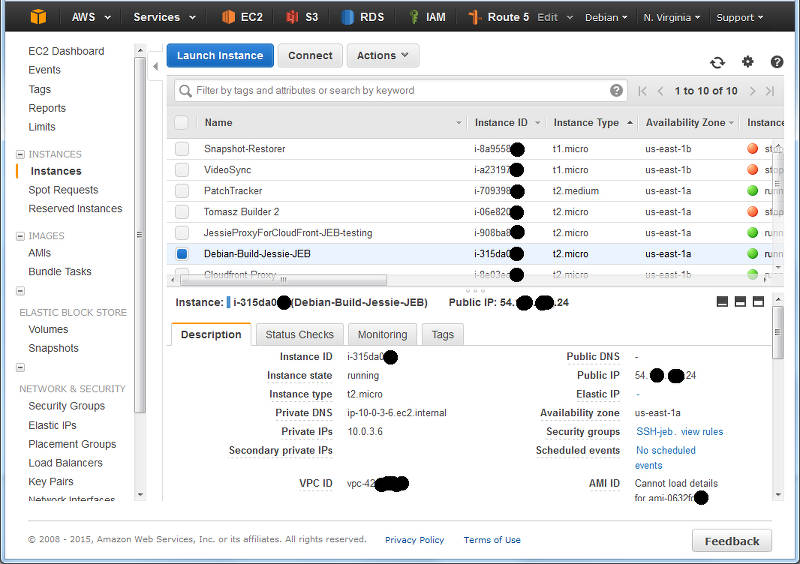
I navigate to the Instances panel of the EC2 Console, and find my instance in the list:
A (redacted) list of instance from the EC2 console.
Here I can see I have located an instance and it s running in US-East-1A: that s AZ A in Region US-East-1. I can also grab this with a wget from my running Debian instance by asking the MetaData server:
The returned text is simply: us-east-1a .
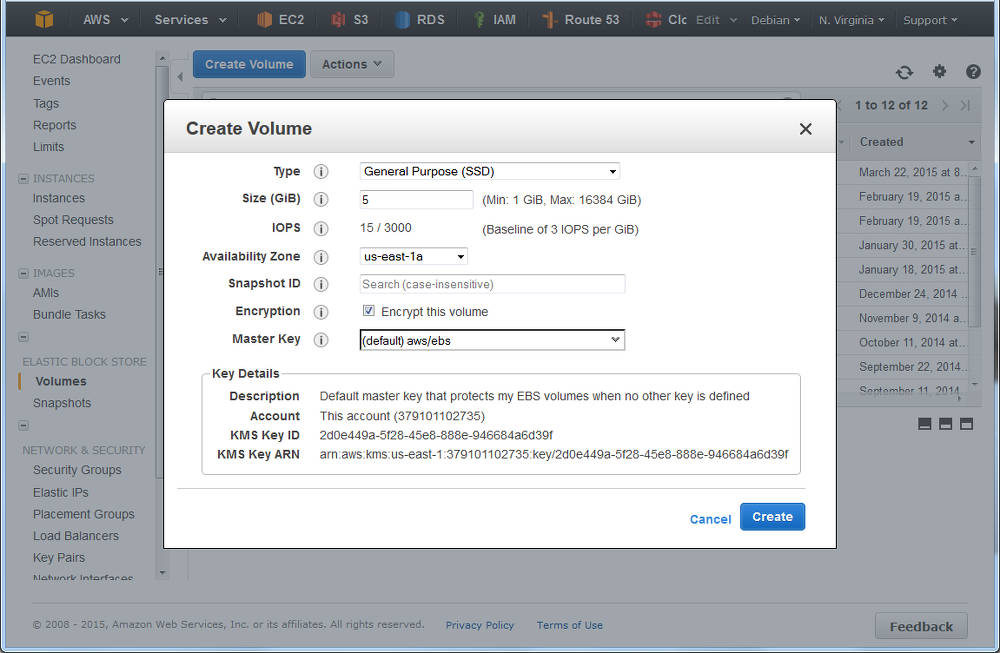
Time to navigate to Elastic Block Store , choose Volumes and click Create :
Creating a volume in AWS EC2: ensure the AZ is the same as your instance
You ll see I selected that I wanted AWS to encrypt this and as noted above, at this time that doesn t include the t2 family. However, you have an option of using encryption with LVM where the customer looks after the encryption key see LUKS.
What s nice is that I can do both have AWS Encrypted Volumes, and then use encryption on top of this, but I have to manage my own keys with LUKS, and should I lose them, then I can keep all the cyphertext!
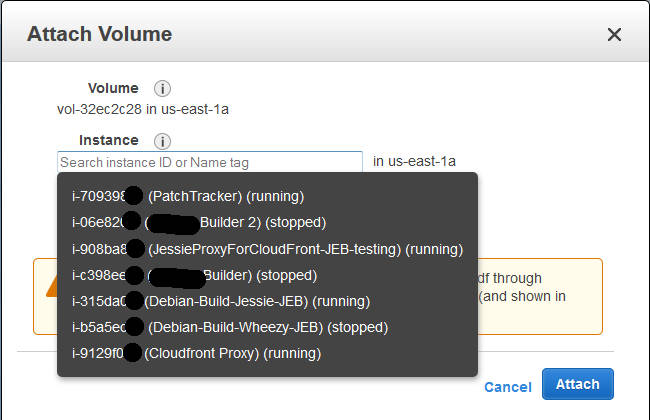
I deselected this for my example (with a t2.micro), and continue; I could see the new volume in the list as creating , and then shortly afterwards as available . Time to attach it: select the disk, and either right-click and choose Attach , or from the menu at the top of the list, chose Actions -> Attach (both do the same thing).
Attaching a volume to an instance: you ll be prompted for the compatible instances in the same AZ.
At this point in time your EC2 instance will now notice a new disk; you can confirm this with dmesg tail , and you ll see something like:
[1994151.231815] xvdg: unknown partition table
(Note the time-stamp in square brackets will be different).
Previously at this juncture you would format the entire disk with your favourite file system, mount it in the desired location, and be done. But we re adding in LVM here between this raw device, and the filesystem we are yet to make .
Marking the block device for LVM
Our first operation with LVM is to put a marker on the volume to indicate it s being use for LVM so that when we scan the block device, we know what it s for. It s a really simple command:
pvcreate /dev/xvdg
The device name above (/dev/xvdg) should correspond to the one we saw from the dmesg output above. The output of the above is rather straight forward:
Physical volume "/dev/xvdg" successfully created
Checking our EBS Volume
We can check on the EBS volume which LVM sees as a Physical Volume using the pvs command.
Here we see the entire disk is currently unused.
Creating our First Volume Group
Next step, we need to make an initial LVM Volume Group which will use our Physical volume (xvdg). The Volume Group will then contain one (or more) Logical Volumes that we ll format and use. Again, a simple command to create a volume group by giving it its first physical device that it will use:
# vgcreate  OptVG /dev/xvdg
  Volume group "OptVG" successfully created
And likewise we can check our set of Volume Groups with vgs :
The Attribute flags here indicate this is writable, resizable, and allocating extents in normal mode. Lets proceed to make our (first) Logical Volume in this Volume Group:
# lvcreate -n OptLV -L 4.9G OptVG
  Rounding up size to full physical extent 4.90 GiB
  Logical volume "OptLV" created
You ll note that I have created our Logical Volume as almost the same size as the entire Volume Group (which is currently one disk) but I left some space unused: the reason for this comes down to keeping some space available for any jobs that LVM may want to use on the disk and this will be used later when we want to move data between raw disk devices.
If I wanted to use LVM for Snapshots, then I d want to leave more space free (unallocated) again.
We can check on our Logical Volume:
The attribytes indicating that the Logical Volume is writeable, is allocating its data to the disk in inherit mode (ie, as the Volume Group is doing), and that it is active. At this stage you may also discover we have a device /dev/OptVG/OptLV, and this is what we re going to format and mount. But before we do, we should review what file system we ll use.
Filesystems
Popular Linux file systems
Name
Shrink
Grow
Journal
Max File Sz
Max Vol Sz
btrfs
Y
Y
N
16 EB
16 EB
ext3
Y off-line
Y
Y
2 TB
32 TB
ext4
Y off-line
Y
Y
16 TB
1 EB
xfs
N
Y
Y
8 EB
8 EB
zfs*
N
Y
Y
16 EB
256 ZB
For more details see Wikipedia comparison. Note that ZFS requires 3rd party kernel module of FUSE layer, so I ll discount that here. BTRFS only went stable with Linux kernel 3.10, so with Debian Jessie that s a possibility; but for tried and trusted, I ll use ext4.
The selection of ext4 also means that I ll only be able to shrink this file system off-line (unmounted).
I ll make the filesystem:
# mkfs.ext4 /dev/OptVG/OptLV
mke2fs 1.42.12 (29-Aug-2014)
Creating filesystem with 1285120 4k blocks and 321280 inodes
Filesystem UUID: 4f831d17-2b80-495f-8113-580bd74389dd
Superblock backups stored on blocks:
  32768, 98304, 163840, 229376, 294912, 819200, 884736
Allocating group tables: done
Writing inode tables: done
Creating journal (32768 blocks): done
Writing superblocks and filesystem accounting information: done
And now mount this volume and check it out:
# mount /dev/OptVG/OptLV /opt/
# df -HT /opt
Filesystem  Type  Size  Used Avail Use% Mounted on
/dev/mapper/OptVG-OptLV ext4  5.1G  11M  4.8G  1% /opt
Lastly, we want this to be mounted next time we reboot, so edit /etc/fstab and add the line:
/dev/OptVG/OptLV /opt ext4 noatime,nodiratime 0 0
With this in place, we can now start using this disk. I selected here not to update the filesystem every time I access a file or folder updates get logged as normal but access time is just ignored.
Time to expand
After some time, our 5 GB /opt/ disk is rather full, and we need to make it bigger, but we wish to do so without any downtime. Amazon EBS doesn t support resizing volumes, so our strategy is to add a new larger volume, and remove the older one that no longer suits us; LVM and ext4 s online resize ability will allow us to do this transparently.
For this example, we ll decide that we want a 10 GB volume. It can be a different type of EBS volume to our original we re going to online-migrate all our data from one to the other.
As when we created the original 5 GB EBS volume above, create a new one in the same AZ and attach it to the host (perhaps a /dev/xvdh this time). We can check the new volume is visible with dmesg again:
[1999786.341602] xvdh: unknown partition table
And now we initalise this as a Physical volume for LVM:
# pvcreate /dev/xvdh
  Physical volume "/dev/xvdh" successfully created
And then add this disk to our existing OptVG Volume Group:
# vgextend OptVG /dev/xvdh
  Volume group "OptVG" successfully extended
We can now review our Volume group with vgs, and see our physical volumes with pvs:
There are now 2 Physical Volumes we have a 4.9 GB filesystem taking up space, so 10.09 GB of unallocated space in the VG.
Now its time to stop using the /dev/xvgd volume for any new requests:
# pvchange -x n /dev/xvdg
  Physical volume "/dev/xvdg" changed
  1 physical volume changed / 0 physical volumes not changed
At this time, our existing data is on the old disk, and our new data is on the new one. Its now that I d recommend running GNU screen (or similar) so you can detach from this shell session and reconnect, as the process of migrating the existing data can take some time (hours for large volumes):
During the move, checking the Monitoring tab in the AWS EC2 Console for the two volumes should show one with a large data Read metric, and one with a large data Write metric clearly data should be flowing off the old disk, and on to the new.
A note on disk throughput
The above move was a pretty small, and empty volume. Larger disks will take longer, naturally, so getting some speed out of the process maybe key. There s a few things we can do to tweak this:
EBS Optimised: a launch-time option that reserves network throughput from certain instance types back to the EBS service within the AZ. Depending on the size of the instance this is 500 MB/sec up to 4GB/sec. Note that for the c4 family of instances, EBS Optimised is on by default.
Size of GP2 disk: the larger the disk, the longer it can sustain high IO throughput but read this for details.
Size and speed of PIOPs disk: if consistent high IO is required, then moving to Provisioned IO disk may be useful. Looking at the (2 weeks) history of Cloudwatch logs for the old volume will give me some idea of the duty cycle of the disk IO.
Back to the move
Upon completion I can see that the disk in use is the new disk and not the old one, using pvs again:
So all 5 GB is now unused (compare to above, where only 96 MB was PFree). With that disk not containing data, I can tell LVM to remove the disk from the Volume Group:
# vgreduce OptVG /dev/xvdg
  Removed "/dev/xvdg" from volume group "OptVG"
Then I cleanly wipe the labels from the volume:
# pvremove /dev/xvdg
  Labels on physical volume "/dev/xvdg" successfully wiped
If I really want to clean the disk, I could choose to use shred(1) on the disk to overwrite with random data. This can take a lng time
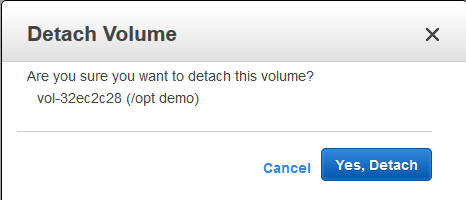
Now the disk is completely unused and disassociated from the VG, I can return to the AWS EC2 Console, and detach the disk:
Detach an EBS volume from an EC2 instance
Wait for a few seconds, and the disk is then shown as available ; I then chose to delete the disk in the EC2 console (and stop paying for it).
Back to the Logical Volume it s still 4.9 GB, so I add 4.5 GB to it:
# lvresize -L +4.5G /dev/OptVG/OptLV
  Size of logical volume OptVG/OptLV changed from 4.90 GiB (1255 extents) to 9.40 GiB (2407 extents).
  Logical volume OptLV successfully resized
We now have 0.6GB free space on the physical volume (pvs confirms this).
Finally, its time to expand out ext4 file system:
# resize2fs /dev/OptVG/OptLV
resize2fs 1.42.12 (29-Aug-2014)
Filesystem at /dev/OptVG/OptLV is mounted on /opt; on-line resizing required
old_desc_blocks = 1, new_desc_blocks = 1
The filesystem on /dev/OptVG/OptLV is now 2464768 (4k) blocks long.
And with df we can now see:
# df -HT /opt/
Filesystem  Type  Size  Used Avail Use% Mounted on
/dev/mapper/OptVG-OptLV ext4  9.9G  12M  9.4G  1% /opt
Automating this
The IAM Role I made at the beginning of this post is now going to be useful. I ll start by adding an IAM Policy to the Role to permit me to List Volumes, Create Volumes, Attach Volumes and Detach Volumes to my instance-id. Lets start with creating a volume, with a policy like this:
This policy puts some restrictions on the volumes that this instance can create: only within the given Availability Zone (matching our instance), only GP2 SSD (no PIOPs volumes), and size no more than 250 GB. I ll add another policy to permit this instance role to tag volumes in this AZ that don t yet have a tag called InstanceId:
Now that I can create (and then tag) volumes, this becomes a simple procedure as to what else I can do to this volume. Deleting and creating snapshots of this volume are two obvious options, and the corresponding policy:
Of course it would be lovely if I could use a variable inside the policy condition instead of the literal string of the instance ID, but that s not currently possible.
Clearly some of the more important actions I want to take are to attach and detach a volume to my instance:
Now with this in place, we can start to fire up the AWS CLI we spoke of. We ll let the CLI inherit its credentials form the IAM Instance Role and the polices we just defined.
and at this stage, the above manipulation of the raw block device with LVM can begin. Likewise you can then use the CLI to detach and destroy any unwanted volumes if you are migrating off old block devices.
After long time of waiting we finally released TeX Live 2015. Get some champagne, and ready to party!
Get it via downloading the net-installer, by obtaining a DVD, or downloading the iso. Besides the huge list up updates to packages and loads of bug fixes to all the programs, here are some notable news:
new LaTeX2e release which automatically includes fixltx2e
pdfTeX got improved jpeg support (exif and JFIF)
luaTeX got a new library newtokenlib
XeTeX got image handling fixes
MetaPost got a new numbersystem binary, and Japanese variants were added (upmpost and updvitomp)
MacTeX s Ghostscript packages got a facelift with better CJK support, other Unix-like distributions can do the same with my the newly included script cjk-gs-integrate (also one one my projects)
architectures: *kfreebsd was removed,and some additional platforms available as custom binaries. The DVD does not contain all platforms (due to space reasons), but all of them can be installed via the net-installer.
Regular updates of the repository will start in due course.
Thanks to all the contributors for the hard work. Let s have a party!
>22000 source packages in Debian main today
Just now Debian main for the first time had more than 22000 source packages in unstable, 22001 at this moment to be exact. Very few weeks ago for the first time there were more than 45000 binary packages for unstable/amd64(+all) in main - and today this number is up to 45542!
Thanks and kudos to everyone involved to make it happen. You make countless people smile each day! Keep up the good work!
(And, that said, cleaning the archive from cruft and making sure only "good" packages enter is also a very important part of this work. Thanks to those who care about that too.)
Since I wrote last about Linux backup tools, back in a 2008 article about BackupPC and similar toools and a 2011 article about dedpulicating filesystems, I ve revisited my personal backup strategy a bit.
I still use ZFS, with my tool simplesnap that I wrote about in 2014 to perform local backups to USB drives, which get rotated offsite periodically. This has the advantage of being very fast and very secure, but I also wanted offsite backups over the Internet. I began compiling criteria, which ran like this:
Remote end must not need any special software installed. Storage across rsync, sftp, S3, WebDAV, etc. should all be good candidates. The remote end should not need to support hard links or symlinks, etc.
Cross-host deduplication at at least the file level is required, so if I move a 4GB video file from one machine to another, my puny DSL wouldn t have to re-upload it.
All data that is stored remotely must be 100% encrypted 100% of the time. I must not need to have any trust at all in the remote end.
Each backup after the first must send only an incremental s worth of data across the line. No periodic re-uploading of the entire data set can be done.
The repository format must be well-documented and stable.
So, how did things stack up?
Didn t meet criteria
A lot of popular tools didn t meet the criteria. Here are some that I considered:
BackupPC requires software on the remote end and does not do encryption.
None of the rsync hardlink tree-based tools are suitable here.
rdiff-backup requires software on the remote end and does not do encryption or dedup.
duplicity requires a periodic re-upload of a full backup, or incremental chains become quite long and storage-inefficient. It also does not support dedup, although it does have an impressive list of dumb storage backends.
ZFS, if used to do backups the efficient way, would require software to be installed on the remote end. If simple zfs send images are used, the same limitations as with duplicity apply.
The tools must preserve POSIX attributes like uid/gid, permission bits, symbolic links, hard links, etc. Support for xattrs is also desireable but not required.
bup and zbackup are both interesting deduplicators, but do not yet have support for removing old data, so are impractical for this purpose.
burp requires software on the server side.
Obnam and Attic/Borg Backup
Obnam and Attic (and its fork Borg Backup) are both programs that have a similar concept at their heart, which is roughly this: the backup repository stores small chunks of data, indexed by a checksum. Directory trees are composed of files that are assembled out of lists of chunks, so if any given file matches another file already in the repository somewhere, the added cost is just a small amount of metadata.
Obnam was eventually my tool of choice. It has built-in support for sftp, but its reliance on local filesystem semantics is very conservative and it works fine atop davfs2 (and, I d imagine, other S3-backed FUSE filesystems). Obnam s repository format is carefully documented and it is very conservatively designed through and through clearly optimized for integrity above all else, including speed. Just what a backup program should be. It has a lot of configurable options, including chunk size, caching information (dedup tables can be RAM-hungry), etc. These default to fairly conservative values, and the performance of Obnam can be significantly improved with a few simple config tweaks.
Attic was also a leading contender. It has a few advantages over Obnam, actually. One is that it uses an rsync-like rolling checksum method. This means that if you add 1 byte at the beginning of a 100MB file, Attic will upload a 1-byte chunk and then reference the other chunks after that, while Obnam will have to re-upload the entire file, since its chunks start at the beginning of the file in fixed sizes. (The only time Obnam has chunks smaller than its configured chunk size is with very small files or the last chunk in a file.) Another nice feature of Attic is its use of packs , where it groups chunks together into larger pack files. This can have significant performance advantages when backing up small files, especially over high-latency protocols and links.
On the downside, Attic has a hardcoded fairly small chunksize that gives it a heavy metadata load. It is not at all as configurable as Obnam, and unlike Obnam, there is nothing you can do about this. The biggest reason I avoided it though was that it uses a single monolithic index file that would have to be uploaded from scratch after each backup. I calculated that this would be many GB in size, if not even tens of GB, for my intended use, and this is just not practical over the Internet. Attic assumes that if you are going remote, you run Attic on the remote so that the rewrite of this file doesn t have to send all the data across the network. Although it does work atop davfs2, this support seemed like an afterthought and is clearly not very practical.
Attic did perform much better than Obnam in some ways, largely thanks to its pack support, but the monolothic index file was going to make it simply impractical to use.
There is a new fork of Attic called Borg that may, in the future, address some of these issues.
Brief honorable mentions: bup, zbackup, syncany
There are a few other backup tools that people are talking about which do dedup. bup is frequently mentioned, but one big problem with it is that it has no way to delete old data! In other words, it is more of an archive than a backup tool. zbackup is a really neat idea it dedups anything you feed at it, such as a tar stream or zfs send stream, and can encrypt, too. But it doesn t (yet) support removing old data either.
syncany is fundamentally a syncing tool, but can also be used from the command line to do periodic syncs to a remote. It supports encryption, sftp, webdave, etc. natively, and runs on quite a number of platforms easily. However, it doesn t store a number of POSIX attributes, such as hard links, uid/gid owner, ACL, xattr, etc. This makes it impractical for use for even backing up my home directory; I make fairly frequent use of ln, both with and without -s. If there were some tool to create/restore archives of metadata, that might work out better.
My LTS May
With regrets I have had to realize that I'm currently to overloaded to work on Debian LTS, so we planned that I'll do 7h in May and then I would take a three months break from doing LTS work. And then I didn't even manage that, I've only managed to finally fix #783800 ("security-tracker: squeeze-lts/non-free not handled correctly") and file #788362 and that was that. I do hope to come back to do sensible and serious LTS work in autumn, but for now it's better to move this off my plate.
I'm really sorry for not being able to support Debian LTS at the moment. I still think it's very much needed, worth of and in need of support - just not by me at this point. Of course I'll also continue to use it myself - because it's great to be able to choose when to upgrade ones systems!
Long ago, in days of yore, we assumed that any software worth having would be
packaged by the operating system we used. Debian with its enormous pile of
software (over 20,000 sources last time I looked) looked to basically contain
every piece of free software ever. However as more and more people have come
to Linux-based and BSD-based systems, and the proliferation of *NIX-based
systems has become even more diverse, it has become harder and harder to ensure
that everyone has access to all of the software they might choose to use.
Couple that with the rapid development of new projects, who clearly want to get
users involved well before the next release cycle of a Linux-based distribution
such as Debian, and you end up with this recommendation to bypass the operating
system's packaging system and simply curl sudo bash -.
We, the OS-development literati, have come out in droves to say "eww, nasty,
don't do that please" and yet we have brought this upon ourselves. Our
tendency to invent, and reinvent, at the very basic levels of distributions has
resulted in so many operating systems and so many ways to package software (if
not in underlying package format then in policy and process) that third party
application authors simply cannot keep up. Couple that with the desire of the
consumers to not have their chosen platform discounted, and if you provide
Debian packages, you end up needing to provide for Fedora, RHEL, SuSE, SLES,
CentOS, Mint, Gentoo, Arch, etc.etc; let alone supporting all the various BSDs.
This leads to the simple expedience of curl sudo bash -.
Nobody, not even those who are most vehemently against this mechanism of
installing software, can claim that it is not quick, simple for users, easy to
copy/paste out of a web-page, and leaves all the icky complexity of sorting
things out up to a script which the computer can run, rather than the nascent
user of the software in question. As a result, many varieties of software have
ended up using this as a simple installation mechanism, from games to
orchestration frameworks - everyone can acknowledge how easy it is to use.
Now, some providers are wising up a little and ensuring that the url you are
curling is at least an https:// one. Some even omit the sudo from the
copy/paste space and have it in the script, allowing them to display some basic
information and prompting the user that this will occur as root before going
ahead and elevating. All of these myriad little tweaks to the fundamental idea
improve matters but are ultimately just putting lipstick on a fairly sad
looking pig.
So, what can be done? Well we (again the OS-development literati) got
ourselves into this horrendous mess, so it's up to us to get ourselves back
out. We're all too entrenched in our chosen packaging methodologies,
processes, and policies, to back out of those; yet we're clearly not properly
servicing a non-trivial segment of our userbase. We need to do better.
Not everyone who currently honours a curl sudo bash - is capable of
understanding why it's such a bad idea to do so. Some education may reduce
that number but it will never eliminate it.
For a long time I advocated a switch to wget && review && sudo ./script
approach instead, but the above comment, about people who don't understand why
it might be a bad idea, really applies to show how few of those users would
even be capable of starting to review a script they downloaded, let alone able
to usefully judge for themselves if it is really safe to run. Instead we need
something better, something collaborative, something capable of solving the
accessibility issues which led to the curl sudo bash - revolt in the first
place.
I don't pretend to know what that solution might be, and I don't pretend to
think I might be the one to come up with it, but I can hilight a few things I
think we'll need to solve to get there:
Any solution to this problem must be as easy as curl sudo bash - or
easier. This might mean a particular URI format which can have os-specific
ways to handle standardised inputs, or it might mean a pervasive tool which
does something like that.
Any solution must do its best to securely acquire the content the user
actually wanted. This means things like validating SSL certificates,
presenting information to the user which a layman stands a chance of
evaluating to decide if the content is likely to be what they wanted,
and then acting smoothly and cleanly to get that content onto the user's
system.
Any solution should not introduce complex file formats or reliance on any
particular implementation of a tool. Ideally it would be as easy to
implement the solution on FreeBSD in shell, or on Ubuntu as whizzy 3D GUIs
written in Haskell. (modulo the pain of working in shell of course)
The solution must be arrived at in a multi-partisan way. For such a
mechanism to be as usefully pervasive as curl sudo bash - as many platforms
as possible need to get involved. This means not only Debian, Ubuntu,
Fedora and SuSE; but also Arch, FreeBSD, NetBSD, CentOS etc. Maybe even
the OpenSolaris/Illumos people need to get involved.
Given the above, no solution can be "just get all the apps developers to learn
how to package software for all the OS distributions they want their app to run
on" since that way madness lies.
I'm sure there are other minor, and major, requirements on any useful solution
but the simple fact of the matter is that until and unless we have something
which at least meets the above, we will never be rid of curl sudo bash - :-
just like we can never seem to be rid of that one odd person at the party,
noone knows who invited them, and noone wants to tell them to leave because
they do fill a needed role, but noone really seems to like.
Until then, let's suck it up and while we might not like it, let's just let
people keep on curl sudo bash -ing until someone gets hurt.
P.S. I hate curl sudo bash - for the record.
Television loudness is the source of frustration for viewers
everywhere. Some channels are very load, others are less loud, and
ads tend to shout very high to get the attention of the viewers, and
the viewers do not like this. This fact is well known to the TV
channels. See for example the BBC white paper
"Terminology
for loudness and level dBTP, LU, and all that" from 2011 for a
summary of the problem domain. To better address the need for even
loadness, the TV channels got together several years ago to agree on a
new way to measure loudness in digital files as one step in
standardizing loudness. From this came the ITU-R standard BS.1770,
"Algorithms to
measure audio programme loudness and true-peak audio level".
The ITU-R BS.1770 specification describe an algorithm to measure
loadness in LUFS (Loudness Units, referenced to Full Scale). But
having a way to measure is not enough. To get the same loudness
across TV channels, one also need to decide which value to standardize
on. For European TV channels, this was done in the EBU Recommondaton
R128, "Loudness
normalisation and permitted maximum level of audio signals", which
specifies a recommended level of -23 LUFS. In Norway, I have been
told that NRK, TV2, MTG and SBS have decided among themselves to
follow the R128 recommondation for playout from 2016-03-01.
There are free software available to measure and adjust the loudness
level using the LUFS. In Debian, I am aware of a library named
libebur128
able to measure the loudness and since yesterday morning a new binary
named bs1770gain
capable of both measuring and adjusting was uploaded and is waiting
for NEW processing. I plan to maintain the latter in Debian under the
Debian
multimedia umbrella.
The free software based TV channel I am involved in,
Frikanalen, plan to follow the
R128 recommondation ourself as soon as we can adjust the software to
do so, and the bs1770gain tool seem like a good fit for that part of
the puzzle to measure loudness on new video uploaded to Frikanalen.
Personally, I plan to use bs1770gain to adjust the loudness of videos
I upload to Frikanalen on behalf of the
NUUG member organisation. The program seem to be able to measure
the LUFS value of any media file handled by ffmpeg, but I've only
successfully adjusted the LUFS value of WAV files. I suspect it
should be able to adjust it for all the formats handled by ffmpeg.
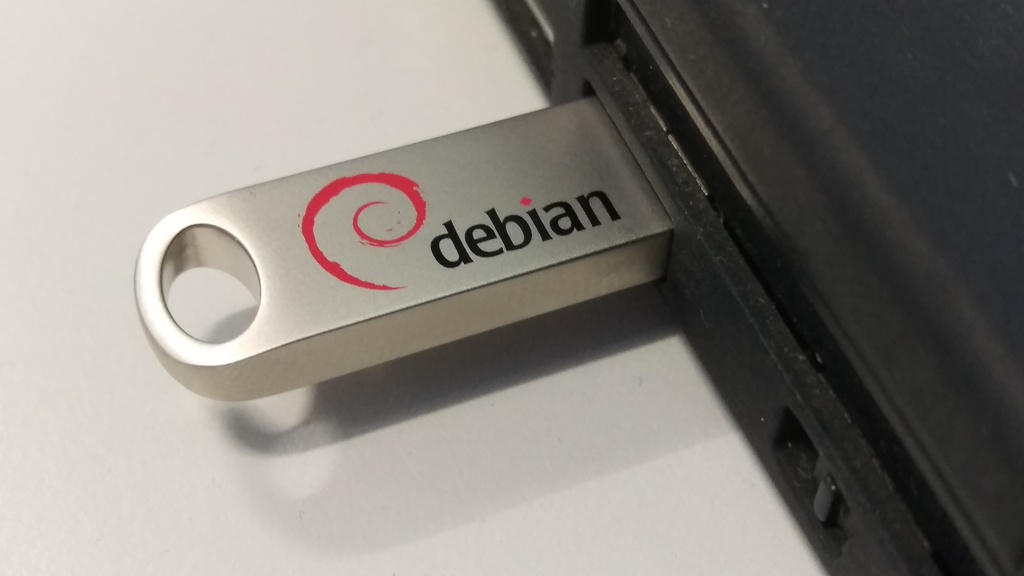
I've had some 8GB USB keys made, with the Debian swirl and text. By
buying a reasonable number, I've got what I think is a good price for
nice high-quality keys (metal body with a solid loop for attaching to
a keyring). I'm now selling these for 7 pounds each, and I'm planning
on bringing some to DebConf 15 too, where they'll be 10 EUR.
They're selling faster than I expected - if you're interested in
buying one (or several!), please let
me know. If there's enough demand, I may order more.
 What happened about the reproducible
builds effort for this week:
Presentations
On June 7th, Reiner Herrmann
presented the project at the
Gulaschprogrammiernacht 15 in Karlsruhe, Germany.
Video and audio
recordings
in German are available, and so are the slides in
English.
Toolchain fixes
 Note that I suspect the "Aller Holding A/S" entry to be incorrect
data in the official ownership register, as that name is not
registered in the official company register for Norway. The ownership
register is sensitive to typos and there seem to be no strict checking
of the ownership links.
Let me know if you improve the script or find better data sources.
The code is licensed according to GPL 2 or newer.
Update 2015-06-15: Since the initial post I've been told that
"
 It s no secret that OpenStack is becoming the de-facto standard for private cloud and a way for telecom operators to differentiate against big names such as Amazon or Google.

 As with all the previous versions, I have prepared a mega update for the Kobo firmware 3.16.0, including all my favorite patches and features. Please see details for

 A new release, now at version 0.1.3, of
 Previously I'd mentioned that we were moving from Edinburgh to Newcastle, such that my wife could accept a position in a training-program, and become a more specialized (medical) doctor.
Now the inevitable update: We're still moving, but we're no longer moving to Newcastle, instead we're moving to Helsinki, Finland.
Me? I care very little about where I end up. I love Edinburgh, I always have, and I never expected to leave here, but once the decision was made that we needed to be elsewhere the actual destination does/didn't matter too much to me.
Sure Newcastle is the home of
 I know very little about hardware.
I think I have a good understanding on many aspects of what happens inside a computer, but my knowledge is clearly firmer on what happens once an operating system is already running. And even then, my understanding of the lower parts of reality is shaky at most At least according to my self-evaluation, of course, comparing to people I'm honored to call "my peers".
During the last ~18 months, my knowledge of this part of reality, while still far from complete, has increased quite a bit Maybe mostly showing that I'm basically very cheap: As I have come across very cheap (or even free for me!) hardware, I have tried to understand and shape what happens in levels below those where I dwell.
I have been meaning to do a writeup on the
 The Thing on Internet

 The recent

 >22000 source packages in Debian main today
Just now Debian main for the first time had more than 22000 source packages in unstable,

 Long ago, in days of yore, we assumed that any software worth having would be
packaged by the operating system we used. Debian with its enormous pile of
software (over 20,000 sources last time I looked) looked to basically contain
every piece of free software ever. However as more and more people have come
to Linux-based and BSD-based systems, and the proliferation of *NIX-based
systems has become even more diverse, it has become harder and harder to ensure
that everyone has access to all of the software they might choose to use.
Couple that with the rapid development of new projects, who clearly want to get
users involved well before the next release cycle of a Linux-based distribution
such as Debian, and you end up with this recommendation to bypass the operating
system's packaging system and simply
 I've had some 8GB USB keys made, with the Debian swirl and text. By
buying a reasonable number, I've got what I think is a good price for
nice high-quality keys (metal body with a solid loop for attaching to
a keyring). I'm now selling these for 7 pounds each, and I'm planning
on bringing some to DebConf 15 too, where they'll be 10 EUR.