Search Results: "sto"

20 February 2009

Benjamin Mako Hill: LibrePlanet 2009

If you're interested in free software --- and free network services in particular --- and should try to join me in Boston for the weekend of March 21st and 22nd. The FSF is organizing its annual members meeting again. This year the model is very different. For a start, the audience isn't limited to FSF members and the conference is not just about FSF projects and work. Instead, the meeting has been rebranded LibrePlanet and has been broken up into a two-day event that is going to talk about and then try to tackle some of the biggest problems facing the world of free and open source software. Saturday March 21st will feature a series of talks about major issues facing free software. Sunday March 22nd will be focused on an unconference attempt to tackle and explore several of the key themes or tracks: network services, high priority projects, and the nascent LibrePlanet activism network. I'll be focused on the track around free network services which I'm helping organize in part through Autonomo.us. For more information on that angle, please take a look at my blog post over at Autonomo.us. We're going to have a great group of people at the track and I'm excited by the idea that that we'll be able to make some real progress on the issues. I encourage anyone who thinks they might be able to make it to consider doing so. There are details including travel, location, hotel information and much more on the event web page and wiki (login is required to RSVP). Please spread the word!

Wouter Verhelst: On Linux viruses

Some guy from New Zealand blogged about a vulnerability in .desktop files as used by Gnome and KDE, and claims you can write a virus with them for Linux. He actually meant a Trojan rather than a virus, but still. I'm not saying the vulnerability does not exist. It does, and the trojan he describes should work in theory. However, in practice, I believe that the real reason why there aren't any Linux viruses is not the fact that Linux is somehow 'safer', but really the fact that Linux isn't a monoculture like Windows is. If you want to write a Windows virus, you have to deal with, at most, four to five different versions of windows that are currently still in active use with most users. Target that, and your virus will live like there's no tomorrow. If you want to write a Linux virus, the range of target system is much, much larger. In his very blog entry that describes the vulnerability, 'foobar' describes already two special cases he has to consider: the fact that KDE and Gnome write .desktop entries that get executed on startup to different locations, and the fact that, while most distributions ship either curl or wget, none of them has standardized on either of those, requiring the virus writer to account for that, too. While his blog entry stops at that, there's way, way more he has to deal with. If our supposed trojan writer wants his trojan to proliferate, he will have to deal with distributions that come with or without SE Linux; distributions that ship with a /tmp mounted noexec; distributions that ship with python 2.3, 2.4, 2.5, or 3.0; users who use Thunderbird, Evolution, Kmail, mutt, pine, or another mail client; and possibly much, much more (this only describes what's required as described in the referenced blog post). All these differences would make writing some malware that would exploit the described vulnerability tedious, at best, and rather impractical in most cases. Again, I'm not saying the vulnerability does not exist; it does. But I think this lack of monoculture under Linux, not the (perceived) strength of the platform, is what helps users defend against malware on Linux.

19 February 2009

Ingo Juergensmann: Automatically restore files from lost+found - improved

Ok, my last version was a pure Bash solution: working, but slow. There were some comments how to improve the performance and I decided finally to reimplement the second script as Python script.
The Bash script didn't finish within a day. The Python script ends after 1-2 hours in my test scenario. So, here are the scripts again:

make-lsLR.sh - call this regularly (cron) to create the needed files that are stored in /root/. Of course you can alter the location easily and exclude other directories from being scanned. [download make-lsLR.sh]
CODE:
#!/bin/bash
#
# Usage: ./make-lsLR.sh
#
# Purpose:
# to make a file that is parseable for recovering
# a filled /lost+found directory by parsing
# filesize, md5sum, permisions and path+filename
#
# Author: Ingo Juergensman - http://blog.windfluechter.net
# License: GPL v2, see http://gnu.org for details.
#
# first: get all directories
nice -15 find / -path /sys -prune -o \
-path /proc -prune -o \
-path /var/lib/backuppc -prune -o \
-path /var/spool/squid -prune -o \
-type d -printf "%U:%G %#m " -print > /root/ls-md5sum-dirs.txt

exit 0

# next: get all relevant information
nice -15 find / -path /sys -prune -o \
-path /proc -prune -o \
-path /var/lib/backuppc -prune -o \
-path /var/spool/squid -prune -o \
-type f -printf "%s %U:%G %#m " \
-exec nice -15 md5sum \; tr -s " " > /root/ls-md5sum-files.txt


check_lost+found.py - The second script is to be run when your fsck managed to mess up with your files and stored them into lost+found directory. It takes 3 arguments: 1) the source directory where your messed up lost+found directory is, 2) the target directory to which the data will be saved and 3) a switch to actually make it happen instead of a dry-run. [download check_lostfound.py.sh]
CODE:
#!/usr/bin/python
#
# usage: check_lostfound.py <pathtolost+found> [make_it_so]
#
# Purpose: to find files in lost+found and trying to restore
# original files by comparing ls-md5sum-files.txt (generated by
# make-lsLR.sh
# Option make_it_so cause the data actually being written/moved
# whereas the script runs in dry mode per default.
#
# Author: Ingo Juergensman - http://blog.windfluechter.net
# License: GPL v2, see http://gnu.org for details.
#

from string import *
import sys, os
from os.path import *
import string

if len(sys.argv)<>4:
print "usage: "+sys.argv[0]+" <source> <target> <mode>"
sys.exit(1)
else:
mnt = sys.argv[1]
target = sys.argv[2]
mode = sys.argv[3]

dirs="/root/ls-md5sum-dirs.txt"
source="/root/ls-md5sum-files.txt"
lost="/root/lostfound-files.txt"
print "Creating list of files in %s/lost+found" % mnt
cmd = 'find %s/lost+found -type f -printf "%%s %%U:%%G %%#m " -exec nice -15 md5sum \; > /root/lostfound-files.txt' % mnt
os.system(cmd)

d = open(dirs, 'r+')
f = open(source, 'r+')
l = open(lost, 'r+')

sfiles=
lfiles=[]


# create the missing directories first
print "Creating missing directories in %s" % target
for entry in d:
ugid=string.split(entry, " ", 2)[0]
perm=string.split(entry, " ", 2)[1]
pfad="%s%s" % (target,string.split(replace(entry, "\n", ""), " ", 2)[2:][0])
res = isdir(pfad)
if (os.path.exists(pfad) and os.path.isdir(pfad)):
print "%s exists... " % pfad
else:
cmd = "%s %s - mkdir %s" % (ugid, perm, pfad)
print cmd
try:
if mode == "make_it_so":
os.makedirs(pfad)
uid, gid = string.split(ugid, ":")
os.chown(pfad, int(uid), int(gid))
os.chmod(pfad, int(perm))
except:
print "%s exists... " % pfad

# now parse /root/ls-md5sum-files.txt to get
# md5sum and /path/to/filename pairs
for line in f:
line=replace(line, "\n", "")
#size1 = split(line)[0]
#ugid1 = split(line)[1]
#perm1 = split(line)[2]
md5s1 = string.split(line)[3]
#path1 = split(line)[4]
sfiles[md5s1] = strip(str(string.split(line," ", 4)[4:][0]))

# next: do the same to the files in lost+found
for line in l:
size2 = string.split(line)[0]
ugid2 = string.split(line)[1]
perm2 = string.split(line)[2]
md5s2 = string.split(line)[3]
path2 = strip(str(string.split(replace(line, "\n", "")," ", 4)[4:][0]))
s = "%s %s %s %s %s" % (md5s2, ugid2, perm2, size2, path2)
lfiles.append(s)


# finally look at lost+found and copy the files
# to the appropriate place. Instead of copying
# the files can be moved as well, but to copy is
# safer in case of mistakes or errors
for lf in lfiles:
md5s = string.split(lf)[0]
lfile = string.split(lf, " ", 4)[4:][0]
if sfiles.has_key(md5s):
if os.path.exists(target+sfiles[md5s]):
pass
else:
targetfile = sfiles[md5s]
print "restoring %s%s " % (target, targetfile) #lfile
cmd = 'cp -p "%s" "%s%s"' % (lfile, target, targetfile)
if mode == "make_it_so":
os.system(cmd)
del sfiles[md5s]


I've chosen to copy the files to a different place instead of moving them within the same filesystem to their original place for safety reasons. Primary goal is to retrieve the files from lost+found, not to replace a full featured backup and restore application. Because of this the script doesn't handle hard- nor symlinks correctly. It just copy files.

Of course there's still room for improvements, like handling hard-/symlinks correctly or using inode number instead of md5sums to move data back to its prior location. But it works for me[tm] well enough in this way, so I'm satisfied so far. You're welcome, though, to improve this piece of ugliness if you like.

Maybe someone else finds this usefull as well. Use it on your own risk, of course. :)

Matthew Garrett

Aside from the inherent humour in Opensolaris's attempt to migrate to a 15 year old shell, today brings the thrilling news that I'll be moving to Boston to join the engineering team in Westford, MA. I look forward to the Applebee's. Some of the more entertaining aspects of US immigration mean that it'll probably be in July at the earliest (365 days with the company, plus time spent in the US since starting), which means that I have plenty of time to properly investigate my local pubs to console myself over having to spend the rest of my life drinking American beer.

18 February 2009

Russell Coker: Red Hat, Microsoft, and Virtualisation Support

Red Hat has just announced a deal with MS for support of RHEL virtual machines on Windows Server and Windows virtual machines on RHEL [1]. It seems that this deal won t deliver anything before calendar H2 2009 so nothing will immediately happen - but the amount of testing to get these things working correctly is significant. Red Hat has stated that the agreements contain no patent or open source licensing components and the agreements contain no financial clauses, other than industry-standard certification/validation testing fees so it seems that there is nothing controversial in this. Of course that hasn t stopped some people from getting worked up about it. I think that this deal is a good thing. I have some clients who run CentOS and RHEL servers (that I installed and manage) as well as some Windows servers. Some of these clients have made decisions about the Windows servers that concern me (such as not using ECC RAM, RAID, or backups). It seems to me that if I was to use slightly more powerful hardware for the Linux servers I could run Windows virtual machines for those clients, manage all the backups at the block device level (without bothering the Windows sysadmins). This also has the potential to save the client some costs in terms of purchasing hardware and managing it. When this deal with MS produces some results (maybe in 6 months time) I will recommend that some of my clients convert CentOS machines to RHEL to take advantage of it. If my clients take my advice in this regard then it will result in a small increase in revenue and market share for RHEL. So Red Hat s action in this regard seems to be a good business decision for them. If my clients take my advice and allow me to use virtualisation to better protect their critical data that is on Windows servers then it will be a significant benefit for the users.

Lior Kaplan: How to make an open source kindergarten


If you can read Hebrew, you ll find the original story at . Otherwise, you re welcome to read the post. Vitali Perchonok was asked to check the computer is his city of Kiryat Gat, he found a lot of old PCs (P1 and P2) with windows 98 and DOS games that don t work. He decided to find a way to use the computers with open source software. He found that he can run Gcompris, an educational software suite comprising of numerous activities for children aged 2 to 10, on the old computers. Now he just needs to update the Hebrew translation (last updated at 2005). Along side the translation he fixed bugs, recorded new sounds and replaced some of the graphics (all with the help of a few friends). To wrap it all, he decided to create a liveCD for the program, and this was the beginning of KG-Live. The changes were sent upstream and should be included in the next release. Today, the project waits for approval from the Israeli Ministry of Education, before distributing the software officially to the kindergartens. Posted in Free software applications, i18n & l10n, Israeli Community, Proud to use free software Tagged: education, free software, gcompris

Andrew Stribblehill: The story of ping(1)

How we laughed when we discovered that Linux s ping makes a reverse DNS lookup for every incoming ICMP echo reply! For added mirth and/or merriment, it also happens on flood-ping.

John Goerzen: How To Think About Compression, Part 2

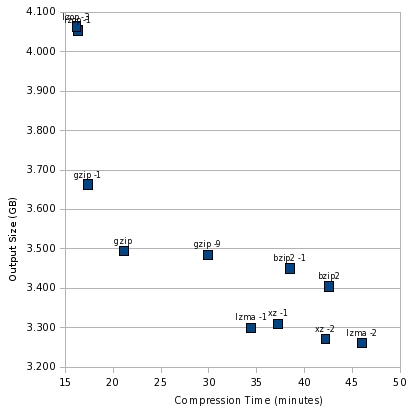
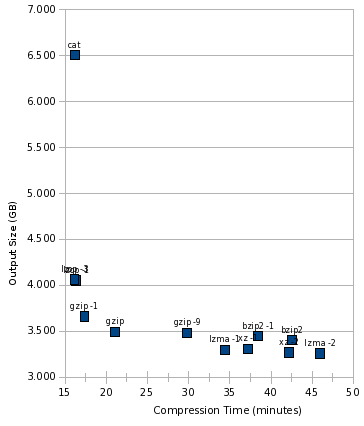
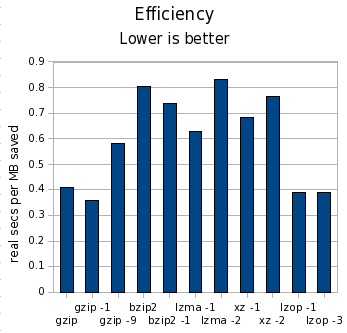
Yesterday, I posted part 1 of how to think about compression. If you haven t read it already, take a look now, so this post makes sense. Introduction In the part 1 test, I compressed a 6GB tar file with various tools. This is a good test if you are writing an entire tar file to disk, or if you are writing to tape. For part 2, I will be compressing each individual file contained in that tarball individually. This is a good test if you back up to hard disk and want quick access to your files. Quite a few tools take this approach rdiff-backup, rdup, and backuppc are among them. We can expect performance to be worse both in terms of size and speed for this test. The compressor tool will be executed once per file, instead of once for the entire group of files. This will magnify any startup costs in the tool. It will also reduce compression ratios, because the tools won t have as large a data set to draw on to look for redundancy. To add to that, we have the block size of the filesystem 4K on most Linux systems. Any file s actual disk consumption is always rounded up to the next multiple of 4K. So a 5-byte file takes up the same amount of space as a 3000-byte file. (This behavior is not unique to Linux.) If a compressor can t shrink enough space out of a file to cross at least one 4K barrier, it effectively doesn t save any disk space. On the other hand, in certain situations, saving one byte of data could free 4K of disk space. So, for the results below, I use du to calculate disk usage, which reflects the actual amount of space consumed by files on disk. The Tools Based on comments in part 1, I added tests for lzop and xz to this iteration. I attempted to test pbzip2, but it would have taken 3 days to complete, so it is not included here more on that issue below. The Numbers Let s start with the table, using the same metrics as with part 1:
Tool MB saved Space vs. gzip Time vs. gzip Cost
gzip 3081 100.00% 100.00% 0.41
gzip -1 2908 104.84% 82.34% 0.36
gzip -9 3091 99.72% 141.60% 0.58
bzip2 3173 97.44% 201.87% 0.81
bzip2 -1 3126 98.75% 182.22% 0.74
lzma -1 3280 94.44% 163.31% 0.63
lzma -2 3320 93.33% 217.94% 0.83
xz -1 3270 94.73% 176.52% 0.68
xz -2 3309 93.63% 200.05% 0.76
lzop -1 2508 116.01% 77.49% 0.39
lzop -2 2498 116.30% 76.59% 0.39
As before, in the MB saved column, higher numbers are better; in all other columns, lower numbers are better. I m using clock seconds here on a dual-core machine. The cost column is clock seconds per MB saved. Let s draw some initial conclusions: The Pretty Charts Now, let s look at an illustration of this. As before, the sweet spot is the lower left, and the worst spot is the upper right. First, let s look at the compression tools themselves: compress2-zoomed At the extremely fast, but not as good compression, end is lzop. gzip is still the balanced performer, bzip2 still looks really bad, and lzma -1 is still the best high-compression performer. Now, let s throw cat into the mix: compress2-big Here s something notable, that this graph makes crystal clear: lzop was just as fast as cat. In other words, it is likely that lzop was faster than the disk, and using lzop compression would be essentially free in terms of time consumed. And finally, look at the cost: compress2-efficiency What happened to pbzip2? I tried the parallel bzip2 implementation just like last time, but it ran extremely slow. Interestingly, pbzip2 < notes.txt > notes.txt.bz2 took 1.002 wall seconds, but pbzip2 notes.txt finished almost instantaneously. This 1-second startup time for pbzip2 was a killer, and the test would have taken more than 3 days to complete. I killed it early and omitted it from my results. Hopefully this bug can be fixed. I didn t expect pbzip2 to help much in this test, and perhaps even to see a slight degradation, but not like THAT. Conclusions As before, the difference in time was far more significant than the difference in space. By compressing files individually, we lost about 400MB (about 7%) space compared to making a tar file and then combining that. My test set contained 270,101 files. gzip continues to be a strong all-purpose contender, posting fast compression time and respectable compression ratios. lzop is a very interesting tool, running as fast as cat and yet turning in reasonable compression though 25% worse than gzip on its default settings. gzip -1 was almost as fast, though, and compressed better. If gzip weren t fast enough with -6, I d be likely to try gzip -1 before using lzop, since the gzip format is far more widely supported, and that s important to me for backups. These results still look troubling for bzip2. lzma -1 continued to turn in far better times and compression ratios that bzip2. Even bzip2 -1 couldn t match the speed of lzma -1, and compressed barely better than gzip. I think bzip2 would be hard-pressed to find a comfortable niche anywhere by now. As before, you can download my spreadsheet with all the numbers behind these charts and the table.

Matt Brown: Blacked Out - no Guilt Upon Accusation

If you re reading this post via the website rather than a feed/planet then you will notice that the site has gone completely black in support of the Creative Freedom Foundation s campaign against S92A of the NZ Copyright Amendment Act which is due to come into effect on 28th February 2009. I ve also joined the wave of people blacking out their avatar on Facebook/Jabber/MSN, etc. S92A introduces Guilt Upon Accusation whereby if you are accused of copyright infringement (downloading music and movies, etc) repeatedly (likely 3 or more times) you are at risk of being disconnected from the Internet by your ISP. The law does not require any proof or substantiation of the accusations and the entire process would occur outside of the courts and the established legal system. Not only does it place every user at risk, the wording is very unclear on exactly what type of organisation is considered an ISP and there is significant concern that schools, businesses, libraries and hospitals will be placed in the difficult position of determining whether their users have broken the law and require disconnection. Opposition to the law is not an attack on copyright, or a statement that we should be free to download all the movies and music that we desire. Those sorts of activities are clearly wrong, and I don t have any issue with copyright holders wanting to enforce their rights when their content is illegally copied. However, disconnecting people upon accusation, with no proof or formal legal process to prove guilt is not the right way to go about it. The fact that the law does not require proof of guilt is only the tip of the iceberg in terms of problems with it. For further background on the problems it causes for ISPs by placing them as the middle-man in copyright disputes you should refer to the following posts: Finally, I think it is worth pointing out that S92A was removed from the proposed Amendment at the select committee stage, but was later reintroduced by Judith Tizard during the final reading of the bill. Mark Harris has an excellent post on the history of the amendment which includes facts such as the official report on the amendment also recommended removing S92A as it was unecessary given existing ISP terms and conditions which forbid illegal activity. The fact that the select committee (based on public submissions) recognised the problems with S92A and removed it, only to have it added back in again at the last stage when we no longer had any say on it really hacks me off and I cant help but feel the influence of the big money American media companies pressuring our politicians to pass a law that they don t really understand the full consequences of. So what is to be done? The Blacked Out campaign, being run by the Creative Freedom Foundation is gathering steam and international attention. Peter Dunne of United Future (who originally voted for the amendment) has declared that the amendment is wrong, and doesn t do what they thought they were voting to do, we need to convince National and the rest of the house of the same. Time is running out for this to happen before the amendment comes into effect on Feb 28th, but there is still time to write to your local MP and sign the petition against S92A Guilt Upon Accusation . The Creative Freedom Foundation site has a nice easy list of what you can do to register your protest.

17 February 2009

Gunnar Wolf: Yay for Lenny! (But nay for installation media)

Yay! This blog post is not strictly speaking news anymore - But for those who don't know it yet, three days ago Debian 5.0 Lenny was released, after 22 months of work (plus fun, plus flamewars, plus everything that makes a Free Software lover tick). And, of course, that makes us all very happy and proud. As always, upgrading is a breeze. Hats off specially to Wolfgang and everybody who worked towards the great release notes - No, it is not a simple task, by far. And I _do_ feel ashamed I didn't even beep that way :-( So, many of us are in the middle of planning/executing our servers' migrations. So far, I'm amazed for good. Even hairy issues such as firmware removal are magically and beautifully taken care of - i.e. my firewall kindly informed me during update that I would need to install the non-free firmware for my BNX2 (Broadcom) network interfaces, and I was just a package away from absolute happiness. Lets see what happens next Friday, as I will be upgrading our storage+application server (which is _way_ more complex than the servers I've dealt with so far). Anyway... But what good is a blog post if you are not ranting? Many people recognize me as one of the most Debian-connected people in Mexico, and that's very good. And yes, besides being a Debian Developer, I am a co-sysadmin for the main Debian mirror in Mexico. Some people have already asked me for CD-ROMs and DVDs. Of course, if I had a BluRay drive, I'm sure I'd also get requests for it. People: Do you really want such media? Think again... Do you really want 31 CDs or five DVDs for your favorite architecture? Ok, maybe many will say "nah, just give me the first one" - Then, do you want to limit your Debian experience to just the software that lives on the first 1/31th (or 1/5th) of it all? Of course there are many situations where it is desirable. Low bandwidth users, or people with no regular connectivity, will be much better served by suitable media from which to install. However, most of us (computer geeks living in Mexico City - Yes, that's the people contacting me) have at least a 1Mbps connection at home. People, just get the Netinst or Businesscard (180 or 40MB) images and download whatever is left via the network. Debian is extremely network-friendly. And, believe me, even if packages are sorted by popularity (and that's why most people will be happy with the first DVD if needed), you never know if you will want precisely a package that sits towards the lonely tail of popularity. And, yes, I did have my CD images handy for the Potato, Woody and Sarge cycles - but increasingly, it became easier for me just to ask apt-get to fetch stuff from the web (which is done without me moving from my comfy chair while I do anything else) than asking apt-get to ask me to go search for the f.*ing CD which I left dont-remember-where. Anyway... I'm not saying I won't burn your CDs - If you want them, please tell me in advance and come to my office, I'll be glad to give you some Debian disks. But spare the environment. We don't need to burn more and more disks. Use the network, be a better human being!

Wouter Verhelst: RedHat sucks

So a customer of mine needs to use RedHat. It's not their choice, the choice was forced upon them by the people who wrote the tools they need to use. The new version of this particular tool which they wanted to use requires RHEL5, and they're currently running RHEL4. So I had to upgrade their systems from RHEL4 to RHEL5. No sweat, right? Yeah, right. RedHat has this nice 'Red Hat Network', where you can manage your servers, and remotely mark packages for upgrade. You can also, by way of a command line tool, say that you want it to upgrade from one release to another. This can't be done remotely, which sortof makes sense; upgrading from one release to another might cause problems that you really really don't want if you don't have an immediate shell. So you should use 'up2date --upgrade-to-release=5' to upgrade from RHEL4 to RHEL5. Except that that doesn't work. For some reason, RedHat chose not to support in-place upgrades from RedHat 4 to RedHat 5. Instead, you have to download installation media, boot from them (thereby inducing downtime) and select 'upgrade' in the installer. Which part of this distribution is "Enterprise", again? Oh well. So I download the first ISO, and start the upgrade process. Surely that'll work, right? Hah. No, I really need all six images. So I download them, and start again. Some minutes into the installation, the HP iLO session that I'm using times out, and takes my Virtual CD device with it. As such, the installer-in-upgrade-mode obviously can't find the CD-ROM anymore, and produces a read error. This is totally normal. The system provides me with a 'retry' button. That button doesn't work. That is to say, it works, but after two or so files, the installation goes to a grinding halt. I had to reboot, and start over. So after rebooting, changing my iLO session settings so the timeout is at 120 minutes (the maximum) rather than 30 minutes (what appears to be the default), and I restart the upgrade process, making sure to click in the iLO interface every once in a while to keep it active. When it's somewhere at 80% and 3 hours into the upgrade process (god, why does that have to take so long?), it suddenly finds itself out of disk space. Well, shit happens, of course; guess there's nothing to blame RedHat with that one. But the way this situation is handled, is beyond my comprehension: The only 'recover' option is 'reboot'. There's no 'retry'. I don't mind diving to a second console, mucking about a bit on the mounted partition, and doing 'retry', but the installer doesn't even offer me that option. Instead, I have to choose 'reboot'. Never mind that the system is halfway through an installation process and might be totally and utterly broken, and not even bootable. Well, that's what rescue modes on installation media are for, I guess, but still. After cleaning out some old files that aren't needed anymore and going back to the installer, you'd suppose that the system could figure out what it'd already done, and continue from there, right? Well, no, it can't. It starts over from scratch, thereby forcing me to sit and wait for another three hours. Times like these make me remember why I'm a Debian developer, and not a RedHat one. Why I chose not to finish that Linux From Scratch project that I'd started after using RedHat for three years and about six months before becoming a Debian Developer. Why I stopped hitting my computer screen around that time. Stupid piece of shit. disclaimer: this is all IMAO, and you don't have to agree with me. But what's a blog for, if not to rant? ;-)

Erich Schubert: Weird Sansa Bug with 20+ playlists

On my Sansa Clip, a playlist that worked fine before suddenly stopped working. I couldn't find anything wrong with the list: it had DOS line separators, DOS directory separators and relative paths (all stuff that Sansa needs, unfortunately). I had generated proper EXTINF meta data lines, the list was called .m3u8 to singal it's UTF-8. And after all: it had worked before.After deleting a leftover playlist, suddenly I noticed with another playlist that had worked the day before that it was now empty. Ouch. So I investigated a bit more...At some point, I ran across a post on a similar Sansa device titled
Firmware Bug - Playlists numbers 43, 46, and 49 are always empty
This is also what I'm seeing on my device. Certain 'slots' in the playlist list don't work.No, I'm not kidding.The way I 'fixed' my non-working playlist was this: I duplicated the file. Now the duplicate is on the broken slot, and the old copy is working again. Unfortunately, this also has shifted the later playlists into other slots, so I'll have to repeat this for the other affected playlists. I guess I'll just write a script to keep duplicate copies of all my playlists, since apparently there are no two consequent slots affected.Broken slots on my Sansa Clip v2: 22, 25, 28, 34, 37, 40 (I have 59 lists currently on the player, so there might be more broken 'blocks' somewhere)

Jon Dowland: too much debconf a bad thing

I think a desireable property of the helper stuff that debian packages wrap around the underlying program (such as mailservers, webservers, etc.) is that you are still exposed to some extend to the configuration of the underlying service. The exim4 debian "value-add" layer is so thick that despite using exim4 in Debian for more than 4 years, I have been totally insulated from the configuration and have no idea how to do even the simplest tasks. Upgrading to lenny and exim4-config will not install due to DEBCONF templates in my config file. Yes, they are there, the older exim4 packages put them there. When prompted by debconf during the initial upgrade attempt, I said "do not overwrite my local exim4 configuration, it's changed a little". Reading the resulting error messages, that was the wrong answer: Now I need domain knowledge that the debian package has kept from me for all these years to proceed at all, and the tone of NEWS.gz is that it's my own damn fault. Thanks to Brett Parker for the solution: cp /var/lib/exim4/config.autogenerated /etc/exim4/exim4.conf and finally put a stop to this poisonous relationship that the exim4 packaging and I have had for all this time.
This page is a draft.

Michal &#268;iha&#345;: Gammu test version 1.22.95

Okay, again delay :-). I wanted to push this version out yesterday, but real life has caught me and I did not manage to do it. So this time Gammu is released on Tuesday, but I want to get back to Monday releases next week. If all things go without problems, this is last testing release before 1.23.0. Besides changing files structure a lot (I hope current one better matches current state of code), there are only some minor fixes and cleanups. Full list of changes follows: You can download from usual place: http://cihar.com/gammu/, Debian users will find packages in experimental soon, SUSE, Fedora and Mandriva users can check experimental repository in OpenSuse Build Service.

Joey Hess: new project

So, I've had this plan for ages to follow up with what I did with my nslu2, and hide a Debian box inside a working stereo. Finally I've started work on this little project. I bought a cheap stereo with CD/tape/radio, mostly on the criteria: I got lucky.. after removing the CD drive, ripping out the battery compartment, and making other modifications to the interior of the case, I had just enough space to fit the qnap board, with centimeters to spare in some places, and millimeters in others. It fits perfectly. The board's LEDs and reset button will be accessible via the CD slot. I was able to keep the radio and amp working. Wiring up a USB sound card to that was easy. I could have kept the cassette deck working, but since I don't have any more of that media, I stripped it, and am planning to put a USB hub in there, accessible by pressing Stop/Eject. ;-) It seems I will even have a fair bit of empty space. Pondering adding a small UPS. Or, I might toss in an access point.
John Goerzen: How To Think About Compression

and the case against bzip2 Compression is with us all the time. I want to talk about general-purpose lossless compression here. There is a lot of agonizing over compression ratios: the size of output for various sizes of input. For some situations, this is of course the single most important factor. For instance, if you re Linus Torvalds putting your code out there for millions of people to download, the benefit of saving even a few percent of file size is well worth the cost of perhaps 50% worse compression performance. He compresses a source tarball once a month maybe, and we are all downloading it thousands of times a day. On the other hand, when you re doing backups, the calculation is different. Your storage media costs money, but so does your CPU. If you have a large photo collection or edit digital video, you may create 50GB of new data in a day. If you use a compression algorithm that s too slow, your backup for one day may not complete before your backup for the next day starts. This is even more significant a problem when you consider enterprises backing up terabytes of data each day. So I want to think of compression both in terms of resulting size and performance. Onward Starting Point I started by looking at the practical compression test, which has some very useful charts. He has charted savings vs. runtime for a number of different compressors, and with the range of different settings for each. If you look at his first chart, you ll notice several interesting things: All this was very interesting, but had one limitation: it applied only to the gimp source tree, which is something of a best-case scenario for compression tools. A 6GB Test
I wanted to try something a bit more interesting. I made an uncompressed tar file of /usr on my workstation, which comes to 6GB of data. My /usr contains highly compressible data such as header files and source code, ELF binaries and libraries, already-compressed documentation files, small icons, and the like. It is a large, real-world mix of data. In fact, every compression comparison I saw was using data sets less than 1GB in size hardly representative of backup workloads. Let s start with the numbers:
Tool MB saved Space vs. gzip Time vs. gzip Cost
gzip 3398 100.00% 100.00% 0.15
bzip2 3590 92.91% 333.05% 0.48
pbzip2 3587 92.99% 183.77% 0.26
lzma -1 3641 91.01% 195.58% 0.28
lzma -2 3783 85.76% 273.83% 0.37
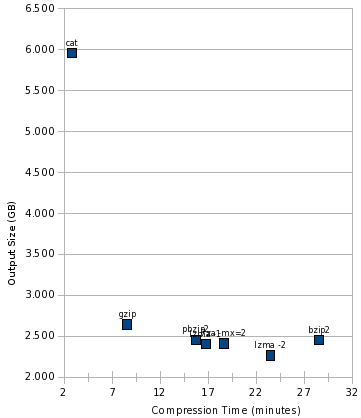
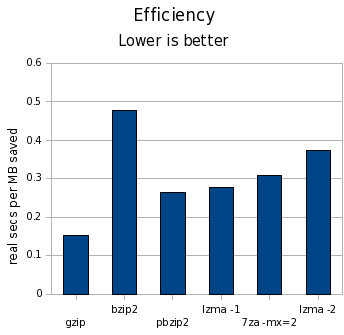
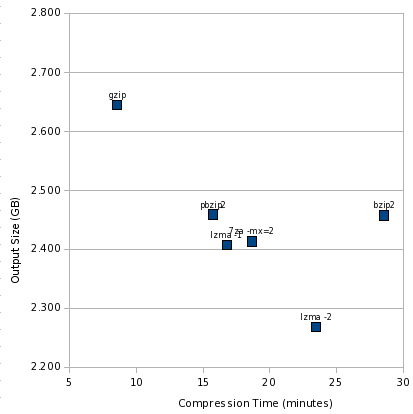
In the MB saved column, higher numbers are better; in all other columns, lower numbers are better. I m using clock seconds here on a dual-core machine. The cost column is clock seconds per MB saved. What does this tell us? Some Pretty Charts First, let s see how the time vs. size numbers look: compress-zoomed Like the other charts, the best area is the lower left, and worst is upper right. It s clear we have two outliers: gzip and bzip2. And a cluster of pretty similar performers. This view somewhat magnifies the differences, though. Let s add cat to the mix: compress-big And finally, look at the cost: compress-efficiency Conclusions First off, the difference in time is far larger than the difference in space. We re talking a difference of 15% at the most in terms of space, but orders of magnitude for time. I think this pretty definitively is a death knell for bzip2. lzma -1 can achieve better compression in significantly less time, and lzma -2 can achieve significantly better compression in a little less time. pbzip2 can help even that out in terms of clock time on multicore machines, but 7za already has a parallel LZMA implementation, and it seems only a matter of time before /usr/bin/lzma gets it too. Also, if I were to chart CPU time, the numbers would be even less kind to pbzip2 than to bzip2. bzip2 does have some interesting properties, such as resetting everything every 900K, which could provide marginally better safety than any other compressor here though I don t know if lzma provides similar properties, or could. I think a strong argument remains that gzip is most suitable for backups in the general case. lzma -1 makes a good contender when space is at more of a premium. bzip2 doesn t seem to make a good contender at all now that we have lzma. I have also made my spreadsheet (OpenOffice format) containing the raw numbers and charts available for those interested. Update Part 2 of this story is now available, which considers more compression tools, and looks at performance compressing files individually rather than the large tar file.

James Morrison: Larry

[This is something old I wrote up while I was in Brazil]

It turns out I can't have an uneventful *set* of flights when Brazil is involved. My first flights to Brazil would be the most uneventful, I got earlier flights than I had booked. The next time I tried to fly, I flew out of Brazil, which since I booked through an agency outside Brazil I had to get paper tickets. The paper tickets didn't get to me in time, so I basically had to rebuy my tickets.

So this time, I learned my lesson, I bought the international tickets separate from my inside brazil tickets. This means I could get electronic tickets all the way. One problem is that I can't pay any of the Brazilian carriers directly since I don't have a Brazilian CPF. So a friend bought my ticket the day before I left. The ticket had a small problem, I had to go through Rio to get to S o Paulo. I would have two hours between the flight from Rio to the flight to JFK. Unfortunatly the leg from Rio to S o Paulo was an hour late and I had to run to get checked into to the flight to JFK. It turns out I had lost my seat, but I did get on the plane and wasn't the last one to check in. The way back to Belo Horizonte was supposed to be simpler, I had a lot of time in S o Paulo before the direct flight to Belo Horizonte. Well, unfortunatly the boarding passes I was given was for Larry Morrison going to Lima, not for James Morrison going to S o Paulo. It feels really bad that the woman who checked me in, used checked two pieces of ID, and the security guy who checked my boarding pass didn't notice this. I didn't notice this either since I had two boarding passes with the first one going to Miami. Anyway, so after Larry and I had the same seat on the flight to Miami we figured out I had the wrong ticket. I got the right one then we were off. We arrived in Miami in good time, but our gate was occupied, which meant we disembarked 20 minutes late and 10 of us had to push through the aisles to get out and onto the connecting flight to S o Paulo. This flight was again uneventful. However, in S o Paulo there was a nice long wait at customs, no processing time for me, then the discovery that I had made it to S o Paulo, but my backpack hadn't. Fortunatly, there was a second flight from Miami arriving in 30 minutes (left 2 hours later than mine) that should have my bag. It turned out I did, so I could finally go check in for my flight to Belo Horizonte. That checkin was almost uneventful, but again the line took forever. I waited for 8 minutes as the second person in line. Again, I took no time getting processed. Given the time I take to go through customs and checking in, how could both those lines move so slow?

16 February 2009

Jon Dowland: hard sf

"Hard SF" is a sub-genre of Science Fiction where "Science" is key. It's very hard to draw solid lines around stories that are examples of Hard SF, but it's easier to provide examples of things which are not: "Star Wars", for example, where space ships, travel and light sabres are window-dressing around a fantasy story. If you look at the Wikipedia article on Hard SF, in particular it's edit history, you will see people continually argue back and forth. Editor Jonathan Strahan recently asked for some recommendations of Hard SF authors to be included in a new Hard SF anthology. I stumbled across this via sfsignal. There are some good comments at both sites, and a fair amount of disagreement over whether certain authors should be considered Hard SF authors or not. Alastair Reynolds was cited by people several times. I really enjoy much of Reynold's writing, but I wouldn't consider it Hard SF. I argued this point and Reynolds himself joined the discussion.
This page is a draft.

Christoph Haas: Debian 5.0 cake

Thanks to all involved people for the Debian 5.0 Lenny release! My wife made me a cake for my coworkers so we can celebrate a little. But even my boss believes that it must have been my birthday because no sane person would bring a cake to celebrate bits and bytes. Well, here it is (black forest cake style): My wife\'s contribution to the Debian 5.0 Lenny release (Sorry for the quality of the photo. My real camera died yesterday.) ((Now I have to verify the complaints of a coworker that LXDE still doesn t install.))

Joey Hess: mmmmm

I took the package of blackberries from the freezer, where it had sat, neglected since I picked them from my fecund vines in August. They had some frost on top; it didn't seem that the wait could have improved them. But, I figured, let's do this right. No store-bought pie crust, made my own with lots of love, and no little trepidation, since pie crust is not my strong suite. Put it back in the fridge to rest as I melted the frozen berries. Added some honey, then worried I'd sweetened it too much. Seemed too runny, so added some flour. Spent what seemed a long time criss-crossing strips of the pastry on top. Which, now that I look at it, doesn't seem to be quite the way it's typically done, but whatever. 45 minutes later, it came out, and bliss, it's the most perfect pie I've ever made. Crust acceptably flaky, berries just the right mix of tart and sweet. But mostly, it tastes of summer and care, and the wait seems to have been worth it. So that's my Debian release pie.
On the software side of things, I didn't do anything much toward making this release happen. Indeed, I have forgotten most of what I put into the mix earlier. (Something to do with armel, and firmware, and maybe boot menus?) It was a nice change to sit back and watch and not worry (much) about doing anything myself. I think that someone fell asleep in his chair while running the CD builds and had to get a wakeup call early this morning to finish. Dedication. Seems like there should be a better way, but you can't argue with the result. Previously: Easter Etch, Releases and Such, Where was I When ..

Next.

Previous.