Search Results: "xam"

21 March 2022

Antoine Beaupr : 20+ years of Emacs

I enjoyed reading this article named "22 years of Emacs" recently. It's kind of fascinating, because I realised I don't exactly know for how long I've been using Emacs. It's lost in the mists of history. If I would have to venture a guess, it was back in the "early days", which in that history is mapped around 1996-1997, when I installed my very own "PC" with FreeBSD 2.2.x and painstakingly managed to make XFree86 run on it. Modelines. Those were the days... But I digress.

I am old... The only formal timestamp I can put is that my rebuilt .emacs.d git repository has its first commit in 2002. Some people reading this may be born after that time. This means I'm at least significantly older than those people, to put things gently. Clever history nerds will notice that the commit is obviously fake: Git itself did not exist until 2005. But ah-ah! I was already managing my home directory with CVS in 2001! I converted that repository into git some time in 2009, and therefore you can see all my embarrassing history, including changes from two decades ago. That includes my first known .emacs file which is just bizarre to read right now: 200 lines, most of which are "customize" stuff. Compare with the current, 1000+ lines init.el which is also still kind of a mess, but actually shares very little with the original, thankfully. All this to say that in those years (decades, really) of using Emacs, I have had a very different experience than credmp who wrote packages, sent patches, and got name dropping from other developers. My experience is just struggling to keep up with everything, in general, but also in Emacs.

... and Emacs is too fast for me It might sound odd to say, but Emacs is actually moving pretty fast right now. A lot of new packages are coming out, and I can hardly keep up.
  • I am not using org mode, but did use it for time (and task) tracking for a while (and for invoicing too, funky stuff).
  • I am not using mu4e, but maybe I'm using something better (notmuch) and yes, I am reading my mail in Emacs, which I find questionable from a security perspective. (Sandboxing untrusted inputs? Anyone?)
  • I am using magit, but only when coding, so I do end up using git on the command line quite a bit anyways.
  • I do have which-key enabled, and reading about it reminded me I wanted to turn it off because it's kind of noisy and I never remember I can actually use it for anything. Or, in other words, I don't even remember the prefix key or, when I do, there's too many possible commands after for it to be useful.
  • I haven't setup lsp-mode, let alone Eglot, which I just learned about reading the article. I thought I would be super shiny and cool by setting up LSP instead of the (dying?) elpy package, but I never got around to it. And now it seems lsp-mode is uncool and I should really do eglot instead, and that doesn't help. UPDATE: I finally got tired and switched to lsp-mode. The main reason for choosing it over eglot is that it's in Debian (and eglot is not). (Apparently, eglot has more chance of being upstreamed, "when it's done", but I guess I'll cross that bridge when I get there.) lsp-mode feels slower than elpy but I haven't done any of the performance tuning and this will improve even more with native compilation (see below). I already had lsp-mode partially setup in Emacs so I only had to do this small tweak to switch and change the prefix key (because s-l or mod is used by my window manager). I also had to pin LSP packages to bookworm here and here.
  • I am not using projectile. It's on some of my numerous todo lists somewhere, surely. I suspect it's important to getting my projects organised, but I still live halfway between the terminal and Emacs, so it's not quite clear what I would gain.
  • I had to ask what native compilation was or why it mattered the first time I heard of it. And when I saw it again in the article, I had to click through to remember.
Overall, I feel there's a lot of cool stuff in Emacs out there. But I can't quite tell what's the best of which. I can barely remember which completion mechanism I use (company, maybe?) or what makes my mini-buffer completion work the way it does. Everything is lost in piles of customize and .emacs hacks that is constantly changing. Because a lot is in third-party packages, there are often many different options and it's hard to tell which one we should be using.

... or at least fast enough And really, Emacs feels fast enough for me. When I started, I was running Emacs on a Pentium I, 166MHz, with 8MB of RAM (eventually upgraded to 32MB, whoohoo!). Back in those days, the joke was that EMACS was an acronym for "Eight Megs, Always Scratching" and now that I write this down, I realize it's actually "Eight Megs, and Constantly Swapping", which doesn't sound as nice because you could actually hear Emacs running on those old hard drives back in the days. It would make a "scratching" noise as the hard drive heads would scramble maniacally to swap pages in and out of swap to make room for the memory-hungry editor. Now Emacs is pretty far down the list of processes in top(1) regardless of how you look at it. It's using 97MB of resident memory and close to 400MB of virtual memory, which does sound like an awful lot compared to my first computer... But it's absolutely nothing compared to things like Signal-desktop, which somehow manages to map a whopping 20.5GB virtual memory. (That's twenty Gigabytes of memory for old timers or time travelers from the past, and yes, that is now a thing.) I'm not exactly sure how much resident memory it uses (because it forks multiple processes), probably somewhere around 300MB of resident memory. Firefox also uses gigabytes of that good stuff, also spread around the multiple processes, per tab. Emacs "feels" super fast. Typing latency is noticeably better in Emacs than my web browser, and even beats most terminal emulators. It gets a little worse when font-locking is enabled, unfortunately, but it's still feels much better. And all my old stuff still works in Emacs, amazingly. (Good luck with your old Netscape or ICQ configuration from 2000.) I feel like an oldie, using Emacs, but I'm really happy to see younger people using it, and learning it, and especially improving it. If anything, one direction I would like to see it go is closer to what web browsers are doing (yes, I know how bad that sounds) and get better isolation between tasks. An attack on my email client shouldn't be able to edit my Puppet code, and/or all files on my system, for example. And I know, fundamentally, that's a really hard challenge in Emacs. But if you're going to treat your editor as your operating system (or vice versa, I lost track of where we are now that there's an Emacs Window Manager, which I do not use), at least we should get that kind of security. Otherwise I'll have to find a new mail client, and that's really something I try to limit to once a decade or so.

20 March 2022

Joerg Jaspert: Another shell script moved to rust

Shell? Rust! Not the first shell script I took and made a rust version of, but probably my largest yet. This time I took my little tm (tmux helper) tool which is (well, was) a bit more than 600 lines of shell, and converted it to Rust. I got most of the functionality done now, only one major part is missing.

What s tm? tm started as a tiny shell script to make handling tmux easier. The first commit in git was in July 2013, but I started writing and using it in 2011. It started out as a kind-of wrapper around ssh, opening tmux windows with an ssh session on some other hosts. It quickly gained support to open multiple ssh sessions in one window, telling tmux to synchronize input (send input to all targets at once), which is great when you have a set of machines that ought to get the same commands.

tm vs clusterssh / mussh In spirit it is similar to clusterssh or mussh, allowing to run the same command on many hosts at the same time. clusterssh sets out to open new terminals (xterm) per host and gives you an input line, that it sends everywhere. mussh appears to take your command and then send it to all the hosts. Both have disadvantages in my opinion: clusterssh opens lots of xterm windows, and you can not easily switch between multiple sessions, mussh just seems to send things over ssh and be done. tm instead just creates a tmux session, telling it to ssh to the targets, possibly setting the tmux option to send input to all panes. And leaves all the rest of the handling to tmux. So you can
  • detach a session and reattach later easily,
  • use tmux great builtin support for copy/paste,
  • see all output, modify things even for one machine only,
  • zoom in to one machine that needs just ONE bit different (cssh can do this too),
  • let colleagues also connect to your tmux session, when needed,
  • easily add more machines to the mix, if needed,
  • and all the other extra features tmux brings.

More tm tm also supports just attaching to existing sessions as well as killing sessions, mostly for lazyness (less to type than using tmux directly). At some point tm gained support for setting up sessions according to some session file . It knows two formats now, one is simple and mostly a list of hostnames to open synchronized sessions for. This may contain LIST commands, which let tm execute that command, expected output is list of hostnames (or more LIST commands) for the session. That, combined with the replacement part, lets us have one config file that opens a set of VMs based on tags our Ganeti runs, based on tags. It is simply a LIST command asking for VMs tagged with the replacement arg and up. Very handy. Or also all VMs on host X . The second format is basically free form tmux commands . Mostly commandline tmux call, just drop the tmux in front collection. Both of them supporting a crude variable replacement.

Conversion to Rust Some while ago I started playing with Rust and it somehow clicked , I do like it. My local git tells me, that I tried starting off with go in 2017, but that appearently did not work out. Fun, everywhere I can read says that Rust ought to be harder to learn. So by now I have most of the functionality implemented in the Rust version, even if I am sure that the code isn t a good Rust example. I m learning, after all, and already have adjusted big parts of it, multiple times, whenever I learn (and understand) something more - and am also sure that this will happen again

Compatibility with old tm It turns out that my goal of staying compatible with the behaviour of the old shell script does make some things rather complicated. For example, the LIST commands in session config files - in shell I just execute them commands, and shell deals with variable/parameter expansion, I just set IFS to newline only and read in what I get back. Simple. Because shell is doing a lot of things for me. Now, in Rust, it is a different thing at all:
  • Properly splitting the line into shell words, taking care of quoting (can t simply take whitespace) (there is shlex)
  • Expanding specials like ~ and $HOME (there is home_dir).
  • Supporting environment variables in general, tm has some that adjust behaviour of it. Which shell can use globally. Used lazy_static for a similar effect - they aren t going to change at runtime ever, anyways.
Properly supporting the commandline arguments also turned out to be a bit more work. Rust appearently has multiple crates supporting this, I settled on clap, but as tm supports getopts -style as well as free-form arguments (subcommands in clap), it takes a bit to get that interpreted right.

Speed Most of the time entirely unimportant in the tool that tm is (open a tmux with one to some ssh connections to some places is not exactly hard or time consuming), there are situations, where one can notice that it s calling out to tmux over and over again, for every single bit to do, and that just takes time: Configurations that open sessions to 20 and more hosts at the same time especially lag in setup time. (My largest setup goes to 443 panes in one window). The compiled Rust version is so much faster there, it s just great. Nice side effect, that is. And yes, in the end it is also only driving tmux, still, it takes less than half the time to do so.

Code, Fun parts As this is still me learning to write Rust, I am sure the code has lots to improve. Some of which I will sure find on my own, but if you have time, I love PRs (or just mails with hints).

Github Also the first time I used Github Actions to see how it goes. Letting it build, test, run clippy and also run a code coverage tool (Yay, more than 50% covered ) on it. Unsure my tests are good, I am not used to writing tests for code, but hey, coverage!

Up next I do have to implement the last missing feature, which is reading the other config file format. A little scared, as that means somehow translating those lines into correct calls within the tmux_interface I am using, not sure that is easy. I could be bad and just shell out to tmux on it all the time, but somehow I don t like the thought of doing that. Maybe (ab)using the control mode, but then, why would I use tmux_interface, so trying to handle it with that first. Afterwards I want to gain a new command, to save existing sessions and be able to recreate them easily. Shouldn t be too hard, tmux has a way to get at that info, somewhere.

18 March 2022

Bits from Debian: DebConf22 registration and call for proposals are open!

DebConf22 banner open registration Registration for DebConf22 is now open. The the 23rd edition of DebConf will take place from July 17th to 24th, 2022 at the Innovation and Training Park (ITP) in Prizren, Kosovo, and will be preceded by DebCamp, from July 10th to 16th. Along with the registration, the DebConf content team announced the call for proposals. Deadline to submit a proposal to be considered in the main schedule is April 15th, 2022 23:59:59 UTC (Friday). DebConf is an event open to everyone, no matter how you identify yourself or how others perceive you. We want to increase visibility of our diversity and work towards inclusion at Debian Project, drawing our attendees from people just starting their Debian journey, to seasoned Debian Developers or active contributors in different areas like packaging, translation, documentation, artwork, testing, specialized derivatives, user support and many other. In other words, all are welcome. To register for the event, log into the registration system and fill out the form. You will be able to edit and update your registration at any point. However, in order to help the organizers have a better estimate of how many people will attend the event, we would appreciate if you could access the system and confirm (or cancel) your participation in the conference as soon as you know if you will be able to come. The last day to confirm or cancel is July 1st, 2022 23:59:59 UTC. If you don't confirm or you register after this date, you can come to the DebConf22 but we cannot guarantee availability of accommodation, food and swag (t-shirt, bag, and so on). For more information about registration, please visit registration information. Submitting an event You can now submit an event proposal. Events are not limited to traditional presentations or informal sessions (BoFs): we welcome submissions of tutorials, performances, art installations, debates, or any other format of event that you think would be of interest to the Debian community. Regular sessions may either be 20 or 45 minutes long (including time for questions), other kinds of sessions (workshops, demos, lightning talks, and so on) could have different durations. Please choose the most suitable duration for your event and explain any special requests. In order to submit a talk, you will need to create an account on the website. We suggest that Debian Salsa account holders (including DDs and DMs) use their Salsa login when creating an account. However, this isn't required, as you can sign up with an e-mail address and password. Bursary for travel, accommodation and meals In an effort to widen the diversity of DebConf attendees, the Debian Project allocates a part of the financial resources obtained through sponsorships to pay for bursaries (travel, accommodation, and/or meals) for participants who request this support when they register. As resources are limited, we will examine the requests and decide who will receive the bursaries. They will be destined: Giving a talk, organizing an event or helping during DebConf22 is taken intoa account when deciding upon your bursary, so please mention them in your bursary application. For more information about bursaries, please visit applying for a bursary to DebConf. Attention: the registration for DebConf22 will be open until the conference starts, but the deadline to apply for bursaries using the registration form before May 1st, 2022 23:59:59 UTC. This deadline is necessary in order to the organizers use time to analyze the requests, and for successful applicants to prepare for the conference. DebConf would not be possible without the generous support of all our sponsors, especially our Platinum Sponsors Lenovo and Infomaniak. DebConf22 is accepting sponsors; if you are interested, or think you know of others who would be willing to help, please get in touch!

Enrico Zini: Context-dependent logger in Python

This is a common logging pattern in Python, to have loggers related to module names:
import logging
log = logging.getLogger(__name__)
class Bill:
    def load_bill(self, filename: str):
        log.info("%s: loading file", filename)
I often however find myself wanting to have loggers related to something context-dependent, like the kind of file that is being processed. For example, I'd like to log loading of bill loading when done by the expenses module, and not when done by the printing module. I came up with a little hack that keeps the same API as before, and allows to propagate a context dependent logger to the code called:
# Call this file log.py
from __future__ import annotations
import contextlib
import contextvars
import logging
_log: contextvars.ContextVar[logging.Logger] = contextvars.ContextVar('log', default=logging.getLogger())
@contextlib.contextmanager
def logger(name: str):
    """
    Set a default logger for the duration of this context manager
    """
    old = _log.set(logging.getLogger(name))
    try:
        yield
    finally:
        _log.reset(old)
def debug(*args, **kw):
    _log.get().debug(*args, **kw)
def info(*args, **kw):
    _log.get().info(*args, **kw)
def warning(*args, **kw):
    _log.get().warning(*args, **kw)
def error(*args, **kw):
    _log.get().error(*args, **kw)
And now I can do this:
from . import log
#  
    with log.logger("expenses"):
        bill = load_bill(filename)
# This code did not change!
class Bill:
    def load_bill(self, filename: str):
        log.info("%s: loading file", filename)

17 March 2022

Gunnar Wolf: Speaking about the OpenPGP WoT on LibrePlanet this Saturday

So, LibrePlanet, the FSF s conference, is coming! I much enjoyed attending this conference in person in March 2018. This year I submitted a talk again, and it got accepted of course, given the conference is still 100% online, I doubt I will be able to go 100% conference-mode (I hope to catch a couple of other talks, but well, we are all eager to go back to how things were before 2020!)

Anyway, what is my talk about? My talk is titled Current challenges for the OpenPGP keyserver network. Is there a way forward?. The abstract I submitted follows:
Many free projects use OpenPGP encryption or signatures for various important tasks, like defining membership, authenticating participation, asserting identity over a vote, etc. The Web-of-Trust upon which its operation is based is a model many of us hold dear, allowing for a decentralized way to assign trust to the identity of a given person. But both the Web-of-Trust model and the software that serves as a basis for the above mentioned uses are at risk due to attacks on the key distribution protocol (not on the software itself!) With this talk, I will try to bring awareness to this situation, to some possible mitigations, and present some proposals to allow for the decentralized model to continue to thrive towards the future.
I am on the third semester of my PhD, trying to somehow keep a decentralized infrastructure for the OpenPGP Web of Trust viable and usable for the future. While this is still in the early stages of my PhD work (and I still don t have a solution to present), I will talk about what the main problems are and will sketch out the path I intend to develop. What is the relevance? Mainly, I think, that many free software projects use the OpenPGP Web of Trust for their identity definitions Are we anachronistic? Are we using tools unfit for this century? I don t think so. I think we are in time to fix the main sore spots for this great example of a decentralized infrastructure.

When is my talk scheduled? This Saturday, 2022.03.19, at
GMT / UTC time
19:25 20:10
Conference schedule time (EDT/GMT-4)
15:25 16:10
Mexico City time (GMT-6)
13:25 14:10

How to watch it? The streams are open online. I will be talking in the Saturn room, feel free to just appear there and watch! The FSF asks people to [register for the conference](https://my.fsf.org/civicrm/event/info?reset=1&id=99) beforehand, in order to be able to have an active participation (i.e. ask questions and that). Of course, you might be interested in other talks take a look at the schedule! LibrePlanet keeps a video archive of their past conferences, and this talk will be linked from there. Of course, I will link to the recording once it is online. Update: As of 2022.03.30, LibrePlanet has posted the videos for all of their talks, all linked from the program. And of course, for convenience, I copied the talk over here: Current challenges for the OpenPGP keyserver network. Is there a way forward?

16 March 2022

Michael Ablassmeier: python logging messages and exit codes

Everyone knows that an application exit code should change based on the success, error or maybe warnings that happened during execution. Lately i came along some python code that was structured the following way:
#!/usr/bin/python3
import sys
import logging
def warnme():
    # something bad happens
    logging.warning("warning")
    sys.exit(2)
def evil():
    # something evil happens
    logging.error("error")
    sys.exit(1)
def main():
    logging.basicConfig(
        level=logging.DEBUG,
    )   
    [..]
the situation was a little bit more complicated, some functions in other modules also exited the application, so sys.exit() calls were distributed in lots of modules an files. Exiting the application in some random function of another module is something i dont consider nice coding style, because it makes it hard to track down errors. I expect:

How to do better? As the application is using the logging module, we have a single point to collect warnings and errors that might happen accross all modules. This works by passing a custom handler to the logging module which tracks emitted messages. Heres an small example:
#!/usr/bin/python3
import sys
import logging
class logCount(logging.Handler):
    class LogType:
        def __init__(self):
            self.warnings = 0
            self.errors = 0
    def __init__(self):
        super().__init__()
        self.count = self.LogType()
    def emit(self, record):
        if record.levelname == "WARNING":
            self.count.warnings += 1
        if record.levelname == "ERROR":
            self.count.errors += 1
            
def infome():
    logging.info("hello world")
def warnme():
    logging.warning("help, an warning")
def evil():
    logging.error("yikes")
def main():
    EXIT_WARNING = 2
    EXIT_ERROR = 1
    counter = logCount()
    logging.basicConfig(
        level=logging.DEBUG,
        handlers=[counter, logging.StreamHandler(sys.stderr)],
    )
    infome()
    warnme()
    evil()
    if counter.count.errors != 0:
        raise SystemExit(EXIT_ERROR)
    if counter.count.warnings != 0:
        raise SystemExit(EXIT_WARNING)
if __name__ == "__main__":
    main()
python3 count.py ; echo $?
INFO:root:hello world
WARNING:root:help, an warning
ERROR:root:yikes
1
This also makes easy to define something like:
  • hey, got 2 warnings, change exit code to error?
  • got 3 warnings, but no strict passed, ingore those, exit with success!
  • etc..

9 March 2022

Jonathan Dowland: Broken webcam aspect ratio

picture of my Sony RX100-III camera Sony RX100-III, relegated to a webcam

Sometimes I have remote meetings with Google Meet. Unlike the other video-conferencing services that I use (Bluejeans, Zoom), my video was stretched out of proportion under Google Meet with Firefox. I haven't found out why this was happening, but I did figure out a work-around. Thanks to Daniel Silverstone, Rob Kendrick, Gregor Herrmann and Ben Allen for pointing me in the right direction! Hardware The lovely Sony RX-100 mk3 that I bought in 2015 has spent most of its life languishing unused. During the Pandemic, once I was working from home all the time, I decided to press-gang it into service as a better-quality webcam. Newer models of this camera the mark 4 onwards have support for a USB mode called "PC Remote", which effectively makes them into webcams. Unfortunately my mark 3 does not support this, but it does have HDMI out, so I picked up a cheap "HDMI to USB Video Capture Card" from eBay. Video modes
Before: wrong aspect ratio Before: wrong aspect ratio
This device offers a selection of different video modes over a webcam interface. I used qv4l2 to explore the different modes. It became clear that the camera was outputting a signal at 16:9, but the modes on offer from the dongle were for a range of different aspect ratios. The picture for these other ratios was not letter or pillar-boxed, but stretched to fit. I also noticed that the modes which had the correct aspect ratio were at very low framerates: 1920x1080@5fps, 1360x768@8fps, 1280x720@10fps. It felt to me that I would look unnatural at such a low framerate. The most promising mode was close to the right ratio, 720x480 and 30 fps. Software
After: corrected aspect ratio After: corrected aspect ratio
My initial solution is to use the v4l2loopback kernel module, which provides a virtual loop-back webcam interface. I can write video data to it from one process, and read it back from another. Loading it as follows:
modprobe v4l2loopback exclusive_caps=1
The option exclusive_caps configures the module into a mode where it initially presents a write-only interface, but once a process has opened a file handle, it then switches to read-only for subsequent processes. Assuming there are no other camera devices connected at the time of loading the module, it will create /dev/video0.1 I experimented briefly with OBS Studio, the very versatile and feature-full streaming tool, which confirmed that I could use filters on the source video to fix the aspect ratio, and emit the result to the virtual device. I don't otherwise use OBS, though, so I achieve the same result using ffmpeg:
fmpeg -s 720x480 -i /dev/video1 -r 30 -f v4l2 -vcodec rawvideo \
    -pix_fmt yuyv422 -s 720x405 /dev/video0
The source options are to select the source video mode I want. The codec and pixel formats are to match what is being emitted (I determined that using ffprobe on the camera device). The resizing is triggered by supplying a different size to the -s parameter. I think that is equivalent to explicitly selecting a "scale" filter, and there might be other filters that could be used instead (to add pillar boxes for example). This worked just as well. In Google Meet, I select the Virtual Camera, and Google Meet is presented with only one video mode, in the correct aspect ratio, and no configurable options for it, so it can't misbehave. Future I'm planning to automate the loading (and unloading) of the module and starting the ffmpeg process in response to the real camera device being plugged or unplugged, using systemd events and services. (I don't leave the camera plugged in all the time due to some bad USB behaviour I've experienced if I do so.) If I get that working, I will write a follow-up.

  1. you can request a specific device name/number with another module option.

Dirk Eddelbuettel: RcppRedis 0.2.0: Major Updates

A new major release of RcppRedis arrived on CRAN today. RcppRedis is one of several packages connecting R to the fabulous Redis in-memory datastructure store (and much more). RcppRedis does not pretend to be feature complete, but it may do some things faster than the other interfaces, and also offers an optional coupling with MessagePack binary (de)serialization via RcppMsgPack. The package has carried production loads for several years now. This release integrates support for pub/sub, a popular messaging pattern in which one or more clients can subscribe to one or more channels . Whenever a client instances publishes, the Redis server immediately updates all clients listening on the given channel. This pattern is fairly common to transmit data to listeners. A there is a bit more to explain about this, I also added a brand-new vignette describing pub/sub with RcppRedis, along with another introductory vignette about Redis itself. We blogged about this exciting new feature and its particular use for market monitoring in R4 #36 recently too. The pub/sub feature was available in package rredis by Bryan Lewis and has now been ported over by Bryan in a truly elegant yet compact implementation. We placed the code for the pub/sub examples, both for a single symbol (SP 500) as well as for a set of (futures) symbols, into a new examples/ subdirectory. Other changes in this release are the removal of the build-dependency on Boost (or, rather, my BH package), an update to the included hiredis library (used if no system-wide version is found), and an updated to the UCRT build for R. That last one is a bit of a sore spot and nobody at CRAN deemed it necessary to tell me they were waiting for me to make this change; communication with the CRAN team can still be challenging (and I am being generous here). Anyway, the package is now on CRAN so all is well now, at long last. The detailed changes list follows.

Changes in version 0.2.0 (2022-03-08)
  • Two simple C++11 features remove needs for BH and lexical_cast() (Dirk in #45 addressing #44).
  • Redis pub/sub is now supported (Dirk in #43, Bryan in #46).
  • Bryan Lewis is now a coauthor.
  • Added pub/sub examples for single and multiple Globex symbols.
  • The included hiredis sources have been updated to release 1.0.2.
  • Two vignettes have been added to introduce Redis and to described a live market-monitoring application included in directory pubsub/.
  • The UCRT build was updated per a suggestion by Tomas.

Courtesy of CRANberries, there is also a diffstat report for this release. More information is on the RcppRedis page. If you like this or other open-source work I do, you can now sponsor me at GitHub.

This post by Dirk Eddelbuettel originated on his Thinking inside the box blog. Please report excessive re-aggregation in third-party for-profit settings.

6 March 2022

Dirk Eddelbuettel: nanotime 0.3.6 on CRAN: Updates

Leonardo and I are pleased to another update to our nanotime package bringing it to version 0.3.6 which landed on CRAN earlier today. nanotime relies on the RcppCCTZ package (as well as the RcppDate package for additional C++ operations) and offers efficient high(er) resolution time parsing and formatting up to nanosecond resolution, and the bit64 package for the actual integer64 arithmetic. Initially implemented using the S3 system, it has benefitted greatly from a rigorous refactoring by Leonardo who not only rejigged nanotime internals in S4 but also added new S4 types for periods, intervals and durations. This release corrects subsetting with %in% operator, integrates it better fit in the mixed S3/S4 setup, fixes a negative period parse, and updates class comparisons to rely on inherits(). The NEWS snippet has the full more details.

Changes in version 0.3.6 (2022-03-06)
  • Fix incorrect subsetting with operator %in% (Leonardo in #100 fixing #99).
  • Fix incorrect parsing for negative nanoperiod (Leonardo in #100 fixing #96).
  • Test for class via inherits() (Dirk).

Thanks to my CRANberries there is also a diff to the previous version. More details and examples are at the nanotime page; code, issue tickets etc at the GitHub repository and all documentation is provided at the nanotime documentation site. If you like this or other open-source work I do, you can now sponsor me at GitHub.

This post by Dirk Eddelbuettel originated on his Thinking inside the box blog. Please report excessive re-aggregation in third-party for-profit settings.

2 March 2022

Antoine Beaupr : procmail considered harmful

TL;DR: procmail is a security liability and has been abandoned upstream for the last two decades. If you are still using it, you should probably drop everything and at least remove its SUID flag. There are plenty of alternatives to chose from, and conversion is a one-time, acceptable trade-off.

Procmail is unmaintained procmail is unmaintained. The "Final release", according to Wikipedia, dates back to September 10, 2001 (3.22). That release was shipped in Debian since then, all the way back from Debian 3.0 "woody", twenty years ago. Debian also ships 25 uploads on top of this, with 3.22-21 shipping the "3.23pre" release that has been rumored since at least the November 2001, according to debian/changelog at least:
procmail (3.22-1) unstable; urgency=low
  * New upstream release, which uses the  standard' format for Maildir
    filenames and retries on name collision. It also contains some
    bug fixes from the 3.23pre snapshot dated 2001-09-13.
  * Removed  sendmail' from the Recommends field, since we already
    have  exim' (the default Debian MTA) and  mail-transport-agent'.
  * Removed suidmanager support. Conflicts: suidmanager (<< 0.50).
  * Added support for DEB_BUILD_OPTIONS in the source package.
  * README.Maildir: Do not use locking on the example recipe,
    since it's wrong to do so in this case.
 -- Santiago Vila <sanvila@debian.org>  Wed, 21 Nov 2001 09:40:20 +0100
All Debian suites from buster onwards ship the 3.22-26 release, although the maintainer just pushed a 3.22-27 release to fix a seven year old null pointer dereference, after this article was drafted. Procmail is also shipped in all major distributions: Fedora and its derivatives, Debian derivatives, Gentoo, Arch, FreeBSD, OpenBSD. We all seem to be ignoring this problem. The upstream website (http://procmail.org/) has been down since about 2015, according to Debian bug #805864, with no change since. In effect, every distribution is currently maintaining its fork of this dead program. Note that, after filing a bug to keep Debian from shipping procmail in a stable release again, I was told that the Debian maintainer is apparently in contact with the upstream. And, surprise! they still plan to release that fabled 3.23 release, which has been now in "pre-release" for all those twenty years. In fact, it turns out that 3.23 is considered released already, and that the procmail author actually pushed a 3.24 release, codenamed "Two decades of fixes". That amounts to 25 commits since 3.23pre some of which address serious security issues, but none of which address fundamental issues with the code base.

Procmail is insecure By default, procmail is installed SUID root:mail in Debian. There's no debconf or pre-seed setting that can change this. There has been two bug reports against the Debian to make this configurable (298058, 264011), but both were closed to say that, basically, you should use dpkg-statoverride to change the permissions on the binary. So if anything, you should immediately run this command on any host that you have procmail installed on:
dpkg-statoverride --update --add root root 0755 /usr/bin/procmail
Note that this might break email delivery. It might also not work at all, thanks to usrmerge. Not sure. Yes, everything is on fire. This is fine. In my opinion, even assuming we keep procmail in Debian, that default should be reversed. It should be up to people installing procmail to assign it those dangerous permissions, after careful consideration of the risk involved. The last maintainer of procmail explicitly advised us (in that null pointer dereference bug) and other projects (e.g. OpenBSD, in [2]) to stop shipping it, back in 2014. Quote:
Executive summary: delete the procmail port; the code is not safe and should not be used as a basis for any further work.
I just read some of the code again this morning, after the original author claimed that procmail was active again. It's still littered with bizarre macros like:
#define bit_set(name,which,value) \
  (value?(name[bit_index(which)] =bit_mask(which)):\
  (name[bit_index(which)]&=~bit_mask(which)))
... from regexp.c, line 66 (yes, that's a custom regex engine). Or this one:
#define jj  (aleps.au.sopc)
It uses insecure functions like strcpy extensively. malloc() is thrown around gotos like it's 1984 all over again. (To be fair, it has been feeling like 1984 a lot lately, but that's another matter entirely.) That null pointer deref bug? It's fixed upstream now, in this commit merged a few hours ago, which I presume might be in response to my request to remove procmail from Debian. So while that's nice, this is the just tip of the iceberg. I speculate that one could easily find an exploitable crash in procmail if only by running it through a fuzzer. But I don't need to speculate: procmail had, for years, serious security issues that could possibly lead to root privilege escalation, remotely exploitable if procmail is (as it's designed to do) exposed to the network. Maybe I'm overreacting. Maybe the procmail author will go through the code base and do a proper rewrite. But I don't think that's what is in the cards right now. What I expect will happen next is that people will start fuzzing procmail, throw an uncountable number of bug reports at it which will get fixed in a trickle while never fixing the underlying, serious design flaws behind procmail.

Procmail has better alternatives The reason this is so frustrating is that there are plenty of modern alternatives to procmail which do not suffer from those problems. Alternatives to procmail(1) itself are typically part of mail servers. For example, Dovecot has its own LDA which implements the standard Sieve language (RFC 5228). (Interestingly, Sieve was published as RFC 3028 in 2001, before procmail was formally abandoned.) Courier also has "maildrop" which has its own filtering mechanism, and there is fdm (2007) which is a fetchmail and procmail replacement. Update: there's also mailprocessing, which is not an LDA, but processing an existing folder. It was, however, specifically designed to replace complex Procmail rules. But procmail, of course, doesn't just ship procmail; that would just be too easy. It ships mailstat(1) which we could probably ignore because it only parses procmail log files. But more importantly, it also ships:
  • lockfile(1) - conditional semaphore-file creator
  • formail(1) - mail (re)formatter
lockfile(1) already has a somewhat acceptable replacement in the form of flock(1), part of util-linux (which is Essential, so installed on any normal Debian system). It might not be a direct drop-in replacement, but it should be close enough. formail(1) is similar: the courier maildrop package ships reformail(1) which is, presumably, a rewrite of formail. It's unclear if it's a drop-in replacement, but it should probably possible to port uses of formail to it easily.
Update: the maildrop package ships a SUID root binary (two, even). So if you want only reformail(1), you might want to disable that with:
dpkg-statoverride --update --add root root 0755 /usr/bin/lockmail.maildrop 
dpkg-statoverride --update --add root root 0755 /usr/bin/maildrop
It would be perhaps better to have reformail(1) as a separate package, see bug 1006903 for that discussion.
The real challenge is, of course, migrating those old .procmailrc recipes to Sieve (basically). I added a few examples in the appendix below. You might notice the Sieve examples are easier to read, which is a nice added bonus.

Conclusion There is really, absolutely, no reason to keep procmail in Debian, nor should it be used anywhere at this point. It's a great part of our computing history. May it be kept forever in our museums and historical archives, but not in Debian, and certainly not in actual release. It's just a bomb waiting to go off. It is irresponsible for distributions to keep shipping obsolete and insecure software like this for unsuspecting users. Note that I am grateful to the author, I really am: I used procmail for decades and it served me well. But now, it's time to move, not bring it back from the dead.

Appendix

Previous work It's really weird to have to write this blog post. Back in 2016, I rebuilt my mail setup at home and, to my horror, discovered that procmail had been abandoned for 15 years at that point, thanks to that LWN article from 2010. I would have thought that I was the only weirdo still running procmail after all those years and felt kind of embarrassed to only "now" switch to the more modern (and, honestly, awesome) Sieve language. But no. Since then, Debian shipped three major releases (stretch, buster, and bullseye), all with the same vulnerable procmail release. Then, in early 2022, I found that, at work, we actually had procmail installed everywhere, possibly because userdir-ldap was using it for lockfile until 2019. I sent a patch to fix that and scrambled to remove get rid of procmail everywhere. That took about a day. But many other sites are now in that situation, possibly not imagining they have this glaring security hole in their infrastructure.

Procmail to Sieve recipes I'll collect a few Sieve equivalents to procmail recipes here. If you have any additions, do contact me. All Sieve examples below assume you drop the file in ~/.dovecot.sieve.

deliver mail to "plus" extension folder Say you want to deliver user+foo@example.com to the folder foo. You might write something like this in procmail:
MAILDIR=$HOME/Maildir/
DEFAULT=$MAILDIR
LOGFILE=$HOME/.procmail.log
VERBOSE=off
EXTENSION=$1            # Need to rename it - ?? does not like $1 nor 1
:0
* EXTENSION ?? [a-zA-Z0-9]+
        .$EXTENSION/
That, in sieve language, would be:
require ["variables", "envelope", "fileinto", "subaddress"];
########################################################################
# wildcard +extension
# https://doc.dovecot.org/configuration_manual/sieve/examples/#plus-addressed-mail-filtering
if envelope :matches :detail "to" "*"  
  # Save name in $ name  in all lowercase
  set :lower "name" "$ 1 ";
  fileinto "$ name ";
  stop;
 

Subject into folder This would file all mails with a Subject: line having FreshPorts in it into the freshports folder, and mails from alternc.org mailing lists into the alternc folder:
:0
## mailing list freshports
* ^Subject.*FreshPorts.*
.freshports/
:0
## mailing list alternc
* ^List-Post.*mailto:.*@alternc.org.*
.alternc/
Equivalent Sieve:
if header :contains "subject" "FreshPorts"  
    fileinto "freshports";
  elsif header :contains "List-Id" "alternc.org"  
    fileinto "alternc";
 

Mail sent to root to a reports folder This double rule:
:0
* ^Subject: Cron
* ^From: .*root@
.rapports/
Would look something like this in Sieve:
if header :comparator "i;octet" :contains "Subject" "Cron"  
  if header :regex :comparator "i;octet"  "From" ".*root@"  
        fileinto "rapports";
   
 
Note that this is what the automated converted does (below). It's not very readable, but it works.

Bulk email I didn't have an equivalent of this in procmail, but that's something I did in Sieve:
if header :contains "Precedence" "bulk"  
    fileinto "bulk";
 

Any mailing list This is another rule I didn't have in procmail but I found handy and easy to do in Sieve:
if exists "List-Id"  
    fileinto "lists";
 

This or that I wouldn't remember how to do this in procmail either, but that's an easy one in Sieve:
if anyof (header :contains "from" "example.com",
           header :contains ["to", "cc"] "anarcat@example.com")  
    fileinto "example";
 
You can even pile up a bunch of options together to have one big rule with multiple patterns:
if anyof (exists "X-Cron-Env",
          header :contains ["subject"] ["security run output",
                                        "monthly run output",
                                        "daily run output",
                                        "weekly run output",
                                        "Debian Package Updates",
                                        "Debian package update",
                                        "daily mail stats",
                                        "Anacron job",
                                        "nagios",
                                        "changes report",
                                        "run output",
                                        "[Systraq]",
                                        "Undelivered mail",
                                        "Postfix SMTP server: errors from",
                                        "backupninja",
                                        "DenyHosts report",
                                        "Debian security status",
                                        "apt-listchanges"
                                        ],
           header :contains "Auto-Submitted" "auto-generated",
           envelope :contains "from" ["nagios@",
                                      "logcheck@",
                                      "root@"])
     
    fileinto "rapports";
 

Automated script There is a procmail2sieve.pl script floating around, and mentioned in the dovecot documentation. It didn't work very well for me: I could use it for small things, but I mostly wrote the sieve file from scratch.

Progressive migration Enrico Zini has progressively migrated his procmail setup to Sieve using a clever way: he hooked procmail inside sieve so that he could deliver to the Dovecot LDA and progressively migrate rules one by one, without having a "flag day". See this explanatory blog post for the details, which also shows how to configure Dovecot as an LMTP server with Postfix.

Other examples The Dovecot sieve examples are numerous and also quite useful. At the time of writing, they include virus scanning and spam filtering, vacation auto-replies, includes, archival, and flags.

Harmful considered harmful I am aware that the "considered harmful" title has a long and controversial history, being considered harmful in itself (by some people who are obviously not afraid of contradictions). I have nevertheless deliberately chosen that title, partly to make sure this article gets maximum visibility, but more specifically because I do not have doubts at this moment that procmail is, clearly, a bad idea at this moment in history.

Developing story I must also add that, incredibly, this story has changed while writing it. This article is derived from this bug I filed in Debian to, quite frankly, kick procmail out of Debian. But filing the bug had the interesting effect of pushing the upstream into action: as mentioned above, they have apparently made a new release and merged a bunch of patches in a new git repository. This doesn't change much of the above, at this moment. If anything significant comes out of this effort, I will try to update this article to reflect the situation. I am actually happy to retract the claims in this article if it turns out that procmail is a stellar example of defensive programming and survives fuzzing attacks. But at this moment, I'm pretty confident that will not happen, at least not in scope of the next Debian release cycle.

Fran ois Marier: Ways to refer to locahost in Chromium

The filter rules preventing websites from portscanning the local machine have recently been tightened in Brave. It turns out there are a surprising number of ways to refer to the local machine in Chromium. localhost and friends 127.0.0.1 is the first address that comes to mind when thinking of the local machine. localhost is typically aliased to that address (via /etc/hosts), though that convention is not mandatory. The IPv6 equivalent is [::1]. 0.0.0.0 0.0.0.0 is not a routable address, but that's what's used to tell a service to bind (listen) on all network interfaces. In Chromium, it resolves to the local machine, just like 127.0.0.1. The IPv6 equivalent is [::].

DNS-based Of course, another way to encode these numerical URLs is to create A / AAAA records for them under a domain you control. I've done this under my personal domain: For these to work, you'll need to:
  • Make sure you can connect to IPv6-only hosts, for example by connecting to an appropriate VPN if needed.
  • Put nameserver 8.8.8.8 in /etc/resolv.conf since you need a DNS server that will not filter these localhost domains. (For example, Unbound will do that if you use private-address: 127.0.0.0/8 in the server config.)
  • Go into chrome://settings/security and disable Always use secure connections to make sure the OS resolver is used.
  • Turn off the chrome://flags/#block-insecure-private-network-requests flag since that security feature (CORS-RFC1918) is designed to protect against these kinds of requests.
127.0.0.0/8 subnet Technically, the entire 127.0.0.0/8 subnet can used to refer to the local machine. However, it's not a reliable way to portscan a machine from a web browser because it only catches the services that listen on all interfaces (i.e. 0.0.0.0). For example, on my machine, if I nmap 127.0.0.1, I get:
PORT     STATE SERVICE   VERSION
22/tcp   open  ssh       OpenSSH 8.2p1
25/tcp   open  smtp      Postfix smtpd
whereas if I nmap 127.0.1.25, I only get:
PORT   STATE SERVICE VERSION
22/tcp open  ssh     OpenSSH 8.2p1
That's because I've got the following in /etc/postfix/main.cf:
inet_interfaces = loopback-only
which I assume is explicitly binding 127.0.0.1. Nevertheless, it would be good to get that fixed in Brave too.

1 March 2022

Paul Wise: FLOSS Activities February 2022

Focus This month I didn't have any particular focus. I just worked on issues in my info bubble.

Changes

Issues

Review

Administration
  • Debian BTS: fix usertags for some users, unarchive/reopen/triage bugs for reintroduced packages: horae dh-haskell shutter logging-tree openstreetmap-carto gnome-commander
  • Debian servers: restore wiki data from backup, restarted bacula director for TLS cert update
  • Debian wiki: restore wiki account from backup, approve accounts

Communication
  • Respond to queries from Debian users and contributors on the mailing lists and IRC

Sponsors The purple-discord, gensim, DiskANN, SPTAG, wsproto work was sponsored by my employer. All other work was done on a volunteer basis.

24 February 2022

Dirk Eddelbuettel: #36: pub/sub for live market monitoring with R and Redis

Welcome to the 36th post of the really randomly reverberating R, or R4 for short, write-ups. Today s post is about using Redis, and especially RcppRedis, for live or (near) real-time monitoring with R. market monitor There is an saying that you can take the boy out of the valley, but you cannot the valley out of the boy so for those of us who spent a decade or two in finance and on trading floors, having some market price information available becomes second nature. And/or sometimes it is just good fun to program this. A good while back Josh posted a gist on a simple-yet-robust while loop. It (very cleverly) uses his quantmod package to access the SP500 in real-time . (I use quotes here because at the end of retail broadband one is not at the same market action as someone co-located in a New Jersey data center. It is however not delayed: as an index, it is not immediately tradeable as a stock, etf, or derivative may be all of which are only disseminated as delayed price information, usually by ten minutes.) I quite enjoyed the gist and used it and started tinkering with it. For example, it collects data but only saves (i.e. persists ) it after market close. If for whatever reason one needs to restart recent history is gone. In any event, I used his code and generalized it a little and published this about a year ago as function intradayMarketMonitor() in my dang package. (See this blog post announcing it.) The chart of the left shows this in action, the chart is a snapshot from a couple of days ago when the vignettes (more on them below) were written. As lovely as intradayMarketMonitor() is, it also limits itself to market hours. And sometimes you want to see, say, how the market opens on Sunday (futures usually restart at 17h Chicago time), or how news dissipates during the night, or where markets are pre-open, or . So I both wanted to complement this with futures, and also cache it locally so that, say, one machine might collect data and one (or several others) can visualize. For such tasks, Redis is unparalleled. (Yet I also always felt Redis could do with another, simple, short and sweet introduction stressing the key features of i) being multi-lingual: write in one language, consume in another and ii) loose coupling: no linking as one talks to Redis via standard tcp/ip networking. So I wrote a new intro vignette that is now in RcppRedis. I hope this comes in handy. Comments welcome!) Our RcppRedis package had long been used for such tasks, and it was easy to set it up. Standard use is to loop, fetch some data, push it to Redis, sleep, and start over. Clients do the same: fetch most recent data, plot or report it, sleep, start over. That works, but it has a dual delay as the client sleeping may miss the data update! The standard answer to this is called publish/pubscribe, or pub/sub. Libraries such as 0mq or zeromq specialise in this. But it turns out Redis already has it. I had some initial difficulty adding it to RcppRedis so for a trial I tested the marvellous rredis package by Bryan and simply instantiated two Redis clients. Now the data getter simply publishes a new data point in a given channel, by convention named after the security it tracks. Clients register with the Redis server which does all the actual work of keeping track of who listens to what. The clients now simply listen (which is a blocking operation) and as soon as data comes in receive it. market monitor This is quite mesmerizing when you just run two command-line clients (in a byobu session, say). As sone as the data is written (as shown on console log) it is consumed. No measruable overhead. Just lovely. Bryan and I then talked a litte as he may or may not retire rredis. Having implemented the pub/sub logic for both sides once, he took a good hard look at RcppRedis and just like that added it there. With some really clever wrinkles for (optional) per-symbol callback as closure attached to the instance. Truly amazeballs And once we had it in there, generalizing from publishing or subscribing to just one symbol easily generalizes to having one listener collect and publish for multiple symbols, and having one or more clients subscribe and listen one, more or even all symbol. All with ease thanks tp Redis. The second chart, also from a few days ago, shows four symbols for four (front-contract) futures for Bitcoin, Crude Oil, SP500, and Gold. As all this can get a little technical, I wrote a second vignette for RcppRedis on just this: market monitoring. Give this a read, if interested, feedback on this one is most welcome too! But all the code you need is included in the package just run a local Redis instance. Before closing, one sour note. I uploaded all this in a new and much improved updated RcppRedis 0.2.0 to CRAN on March 13 ten days ago. Not only is it still not there , but CRAN in their most delightful way also refuses to answer any emails of mine. Just lovely. The package exhibited just one compiler warning: a C++ compiler objected to the (embedded) C library hiredis (included as a fallback) for using a C language construct. Yes. A C++ compiler complaining about C. It s a non-issue. Yet it s been ten days and we still have nothing. So irritating and demotivating. Anyway, you can get the package off its GitHub repo. If you like this or other open-source work I do, you can sponsor me at GitHub.

This post by Dirk Eddelbuettel originated on his Thinking inside the box blog. Please report excessive re-aggregation in third-party for-profit settings.

23 February 2022

Joey Hess: announcing zephyr-copilot

I recently learned about the Zephyr Project which is a rather neat embedded OS for devices too small to run Linux. This led me to wondering if I could adapt arduino-copilot to target Zephyr, and so be able to program any of the 350+ boards it supports using Haskell. At the same time I had an opportunity to give a talk at the Houston Functional Programmers group. On February 1st I decided to give that talk, about arduino-copilot. That left 2 weeks to buy some hardware supported by Zephyr and port arduino-copilot to it. The result is zephyr-copilot, and I was able to demo it during my talk. This example can be used with any of 293 different boards, and will blink an on-board LED:
module Examples.Blink.Demo where
import Copilot.Zephyr.Board.Generic
main :: IO ()
main = zephyr $ do
        led0 =: blinking
        delay =: MilliSeconds (constant 100)
Doing much more than that needs a board specific module to set up GPIO pins etc. So far I only have written those for a couple of boards I have, but they are fairly easy to write. I'd be happy to help anyone who wants to contribute one. Due to the time constraints I have not implemented serial port support, or PWM or ADC yet, although all should be fairly easy. Zephyr also has no end of other capabilities, from networking to file systems to sensors, that could perhaps be supported in zephyr-copilot. My talk has now been published on youtube. I really enjoyed presenting again for the first time in 4 years(!), and to a very nice group of people. Thanks to Claude Rubinson for his persistence in getting me to give a talk.
Development of zephyr-copilot was sponsored by Mark Reidenbach, Erik Bj reholt, Jake Vosloo, and Graham Spencer on Patreon.

Jonathan McDowell: Upgrading my home internet; a story of yak shaving

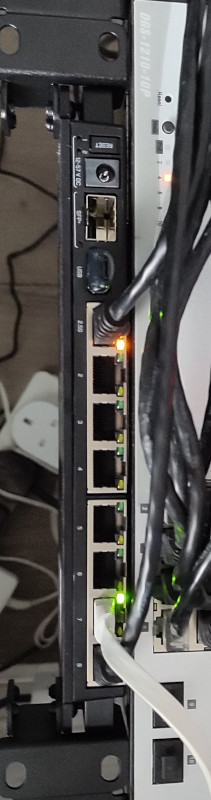
RB5009 This has ended up longer than I expected. I ll write up posts about some of the individual steps with some more details at some point, but this is an overview of the yak shaving I engaged in. The TL;DR is:
The desire for a faster connection When I migrated my home connection to FTTP I kept the same 80M/20M profile I d had on FTTC. I didn t have a pressing need for faster, and I saved money because I was no longer paying for the phone line portion. I wanted more, but at the time I think the only option was for a 160M/30M profile instead and I didn t need it and it wasn t enough better to convince me. Time passed and BT rolled out their GigE (really 900M) download option. And again, I didn t need it, but I wanted it. My provider, Aquiss, initially didn t offer this (I think they had up to 330M download options available by this point). So I stayed on 80M/20M. And the only time I really wanted it to be faster was when pushing off-site backups to rsync.net. Of course, we ve had the pandemic, and that s involved 2 adults working from home with plenty of video calls throughout the day. The 80M/20M connection has proved rock solid for this, so again, I didn t feel an upgrade was justified. We got a 4K capable TV last year and while the bandwidth usage for 4K streaming is noticeably higher, again the connection can handle it no problem. At some point last year I noticed Aquiss had added speed options all the way to 900M down. At the end of the year I accepted a new role, which is fully remote, so I had a bit of an acceptance about the fact that I wasn t going back into an office any time soon. The combination (and the desire for the increased upload speed) finally allowed me to justify the upgrade to myself.

Testing the current setup for bottlenecks The first thing to do was see whether my internal network could cope with an upgrade. I m mostly running Cat6 GigE so I wasn t worried about that side of things. However I m using an RB3011 as my core router, and while it has some coprocessors for routing acceleration they re not supported under mainline Linux (and unlikely to be any time soon). So I had to benchmark what it was capable of routing. I run a handful of VLANs within my home network, with stateful firewalling between them, so I felt that would be a good approximation of the maximum speed to the outside world I might be able to get if I had the external connection upgraded. I went for the easy approach and fired up iPerf3 on 2 hosts, both connected via ethernet but on separate networks, so routed through the RB3011. That resulted in slightly more than a 300Mb/s throughput. Ok. I confirmed that I could get 900Mb/s+ on 2 hosts both on the same network, just to be sure there wasn t some other issue I was missing. Nope, so unsurprisingly the router was the bottleneck. So. To upgrade my internet speed I need to upgrade my router. I could just buy something off the shelf, but I like being able to run Debian (or OpenWRT) on the router rather than some horrible vendor firmware. Lucky MikroTik launched the RB5009 towards the end of last year. RouterOS is probably more than capable, but what really interested me was the fact it s an ARM64 platform based on an Armada 7040, which is pretty well supported in mainline kernels already. There s a 10G connection from the internal switch to the CPU, as well as a 2.5Gb/s ethernet port and a 10G SFP+ cage. All good stuff. I ordered one just before the New Year. Thankfully the OpenWRT folk had done all of the hard work on getting a mainline kernel booting on the device; Sergey Sergeev and Robert Marko in particular fighting RouterBoot and producing a suitable device tree file to get everything up and running. I ended up soldering a serial console connection up to aid debugging, and lightly patching Rob s u-boot to fix the incorrect RAM size reported by RouterBoot. A few kernel tweaks were necessary to make the networking entirely happy and at that point it was time to think about actually doing a replacement.

Upgrading to Debian 11 (bullseye) My RB3011 is currently running Debian 10 (buster); an upgrade has been on my todo list, but with the impending replacement I decided I d hold off and create a new Debian 11 (bullseye) image for the RB5009. Additionally, I don t actually run off the internal NAND in the RB3011; I have a USB flash drive for the rootfs and just the kernel booting off internal NAND. Originally this was for ease of testing, then a combination of needing to figure out a good read-only root solution and a small enough image to fit in the 120M available. For the upgrade I decided to finally look at these pieces. I ve ended up with a script that will build me a squashfs image, and the initial rootfs takes care of mounting this and then a tmpfs as an overlay fs. That means I can easily see what pieces are being written to. The RB5009 has a total of 1G NAND so I m not as space constrained, but the squashfs ends up under 50M. I ve added some additional pieces to allow me to pre-populate the overlay fs with updates rather than always needing to rebuild the squashfs image. With that done I decided to try it out on the RB3011; I tweaked the build script to be able to build for armhf (the RB3011) or arm64 (the RB5009) and to deal with some slight differences in configuration between the two (e.g. interface naming). The idea here was to ensure I d got all the appropriate configuration sorted for the RB5009, in the known-good existing environment. Everything is still on a USB stick at this stage and the new device has an armhf busybox root meaning it can be used on either device, and the init script detects the architecture to select the appropriate squashfs to mount.

A problem with ESP8266 home automation devices Everything seemed to work fine - a few niggles with the watchdog, which is overly sensitive on the RB3011, but I got those sorted (and the build script updated) and the device came up and successfully did the PPPoE dance to bring up external connectivity. And then I noticed that my home automation devices were having problems connecting to the mosquitto MQTT server. It turned out it was only the ESP8266 based devices that were failing, and examining the serial debug output on one of my test devices revealed it was hitting an out of memory issue (displaying E:M 280) when establishing the TLS MQTT connection. I rolled back to the Debian 10 image and set about creating a test environment to look at the ESP8266 issues. My first action was to try and reduce my RAM footprint to try and ensure there was enough spare to establish the connection. I moved a few functions that were still sitting in IRAM into flash. I cleaned up a couple of buffers that are on the stack to be more correctly sized. I tried my new image, and I didn t get the memory issue. Instead I progressed a bit further and got a watchdog reset. Doh! It was obviously something related to the TLS connection, but I couldn t easily see what the difference was; the same x509 cert was in use, it looked like the initial handshake was the same (and trying with openssl s_client looked pretty similar too). I set about instrumenting the ancient Mbed TLS used in the Espressif SDK and discovered that whatever had changed between buster + bullseye meant the EPS8266 was now trying a TLS-DHE-RSA-WITH-AES-256-CBC-SHA256 handshake instead of a TLS-RSA-WITH-AES-256-CBC-SHA256 handshake and that was causing enough extra CPU usage that it couldn t complete in time and the watchdog kicked in. So I commented out MBEDTLS_KEY_EXCHANGE_DHE_RSA_ENABLED in the config_esp.h for mbedtls and rebuilt things. Hacky, but I ll go back to trying to improve this generally at some point.

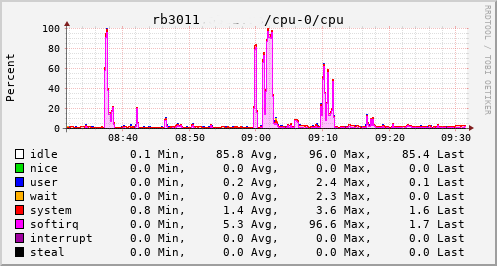
A detour into interrupt load Now, my testing of the RB3011 image is generally done at weekends, when I have enough time to tear down and rebuild the connection rather than doing it in the evening and having limited time to get things working again in time for work in the morning. So at the point I had an image ready to go I pulled the trigger on the line upgrade. I went with the 500M/75M option rather than the full 900M - I suspect I d have difficulty actually getting that most of the time and 75M of upload bandwidth seems fairly substantial for now. It only took a couple of days from the order to the point the line was regraded (which involved no real downtime - just a reconnection in the night). Of course this happened just after the weekend I d discovered the ESP8266 issue. collectd CPU usage for RB3011 This provided an opportunity to see just what the RB3011 could actually manage. In the configuration I had it turned out to be not much more than the 80Mb/s speeds I had previously seen. The upload jumped from a solid 20Mb/s to 75Mb/s, so I knew the regrade had actually happened. Looking at CPU utilisation clearly showed the problem; softirqs were using almost 100% of a CPU core. Now, the way the hardware is setup on the RB3011 is that there are two separate 5 port switches, each connected back to the CPU via a separate GigE interface. For various reasons I had everything on a single switch, which meant that all traffic was boomeranging in and out of the same CPU interface. The IPQ8064 has dual cores, so I thought I d try moving the external connection to the other switch. That puts it on its own GigE CPU interface, which then allows binding the interrupts to a different CPU core. That helps; throughput to the outside world hits 140Mb/s+. Still a long way from the expected max, but proof we just need more grunt.
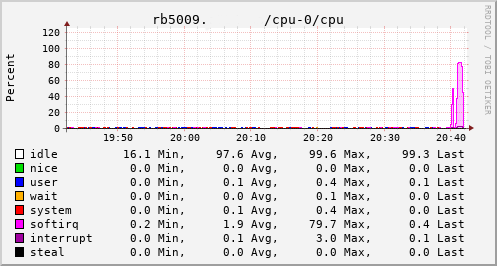
Success collectd CPU usage for RB5009 Which brings us to this past weekend, when, having worked out all the other bits, I tried the squashfs root image again on the RB3011. Success! The home automation bits connected to it, the link to the outside world came up, everything seemed happy. So I double checked my bootloader bits on the RB5009, brought it down to the comms room and plugged it in instead. And, modulo my failing to update the nftables config to allow it to do forwarding, it all came up ok. Some testing with iperf3 internally got a nice 912Mb/s sustained between subnets, and some less scientific testing with wget + speedtest-cli saw speeds of over 460Mb/s to the outside world. Time from ordering the router until it was in service? Just under 8 weeks

17 February 2022

Abiola Ajadi: Modifying expectations!

Hi everyone! In today s blog post I will be talking about the progress i have made , the hurdles I encountered and how my current progress differs from my original expectations. I applied to Debian community with a particular timeline and expected it to go that way, but after starting out i realized i had alot to learn in Ruby and the codebase. So far i have worked on issues i am proud of and when i use Debci i see some of the changes i added for example the self-service form remembering values that was filled after an error message / it reloads. Another milestone for me is writing test cases, I learnt about test driven development which is an awesome process is developing software. Looking back at the beginning before the internship started I can see how much experience i have gained and also improvement I made.

Road block Some tasks took longer than expected for example writing the test cases as i was new to this way of building and also i had to refactor some code, I was very careful doing this as i wanted to make sure i do it the right way.

The journey continues I had to modify my initial expectations and my mentors have been so supportive. I hope to add more features to Debci and also write more tests. So far, it has been a great experience. Till next time!

14 February 2022

Petter Reinholdtsen: Updated vlc bittorrent plugin in Debian (version 2.14)

I am very happy to report that a new version of the VLC bittorrent plugin was just uploaded into debian. The changes since last time is mostly code clean in the download code. The package is currently in Debian unstable, but should be available in Debian testing son. To test it, simply install it like this:
apt install vlc-plugin-bittorrent
After it is installed, you can try to use it to play a file downloaded live via bittorrent like this:
vlc https://archive.org/download/Glass_201703/Glass_201703_archive.torrent
It can also use magnet links and local .torrent files like the ones provided by the Internet Archive. Another example is the Love Nest Buster Keaton movie, where one can click on the 'Torrent' link to get going. As usual, if you use Bitcoin and want to show your support of my activities, please send Bitcoin donations to my address 15oWEoG9dUPovwmUL9KWAnYRtNJEkP1u1b.

Petter Reinholdtsen: Updated vlc bittorrent plugin in Debian (version 2.14)

I am very happy to report that a new version of the VLC bittorrent plugin was just uploaded into debian. The changes since last time is mostly code clean in the download code. The package is currently in Debian unstable, but should be available in Debian testing son. To test it, simply install it like this:
apt install vlc-plugin-bittorrent
After it is installed, you can try to use it to play a file downloaded live via bittorrent like this:
vlc https://archive.org/download/Glass_201703/Glass_201703_archive.torrent
It can also use magnet links and local .torrent files like the ones provided by the Internet Archive. Another example is the Love Nest Buster Keaton movie, where one can click on the 'Torrent' link to get going. As usual, if you use Bitcoin and want to show your support of my activities, please send Bitcoin donations to my address 15oWEoG9dUPovwmUL9KWAnYRtNJEkP1u1b.

11 February 2022

Ingo Juergensmann: Old Buildd.Net Database

Since March/April 2000 I was deeply involved in Debian m68k and operated multiple m68k autobuilder for over a decade. In fact my Amiga 3000 named arrakis was the second buildd for m68k in addition to the Debian owned Amiga 3000UX named kullervo . Back in that time there was some small website running on Kullervo to display some information about the Debian autobuilder. After some time we (as m68k porters) moved that webpage away from Kullervo to my root server. Step by step this site evolved to Buildd.Net and extended to other archs and suites beside unstable like backports or non-volatile. The project got more and more complex and beyond my ability to do a complete necessary rewrite. So, in 2016 I asked for adoption of the project and in 2018 I shut it down, because (apparently) there was nobody taking over. From November 2005 until January 2018 I do have entries in my PostgreSQL database for Buildd.Net. I think the data in the database might be interesting for those that want to examine that data. You can use the data to see how build times have increased over time, which e.g. led to the expulsion of m68k as release arch, because the arch couldn t keep up anymore. I could imagine that you could do other interesting analysis with that data. For example how new versions of the toolchain increased the build times, maybe even if a specific version of e.g. binutils or gcc had a positive effect on certain archs, but a negative effect on other archs. If there is interest in this data I could open the database to the public or even upload the dump of the database so that you can download and install it on your own.

10 February 2022

Patryk Cisek: Automating Let's Encrypt certificates with Gandi LiveDNS

As a Debian Developer I have a discount on using Gandi and I ve been using it for quite a long time and have been very happy with it. I ve been using it for registering domains. For example this blog s domain is managed by my Gandi account. Using publicly registered domain in private-only setup In addition to using this DNS registrar for public stuff, like a blog, one can also use it for a domain accessible only within a private network.

Next.

Previous.