Search Results: "tach"

14 September 2010

Gregory Colpart: Capture input/output of a process with gdb

My tip of day. When you lose control of a process (for example with a process launched with disown or, another example, when you close your SSH terminal with unsynced mutt), thanks gdb.
$ tty
/dev/pts/13
$ gdb --pid= pidof mutt 
(gdb) call close(0)
(gdb) call close(1)
(gdb) call close(2)
(gdb) call open("/dev/pts/13", 2, 0)
(gdb) call dup(0)
(gdb) call dup(0)
(gdb) detach
Detaching from program: /usr/bin/mutt-org, process 2932
Thanks to this comment on superuser.com for the original idea. Edit: correction on dup() calls. Thanks to Peter Pentchev for his explanation in comments.

10 September 2010

Bernd Zeimetz: refactoring the guruplug server plus

As mentioned in my last blog post the GuruPlug Server Plus needs some major refactoring before it can be used. Not doing so will make you end up with a fried brick. There are various stories in the forums about cooling it properly, so you might want to have a look first instead of following mine blindly. And of course - whatever you do - it is your fault when you end up with a brick, not mine!.

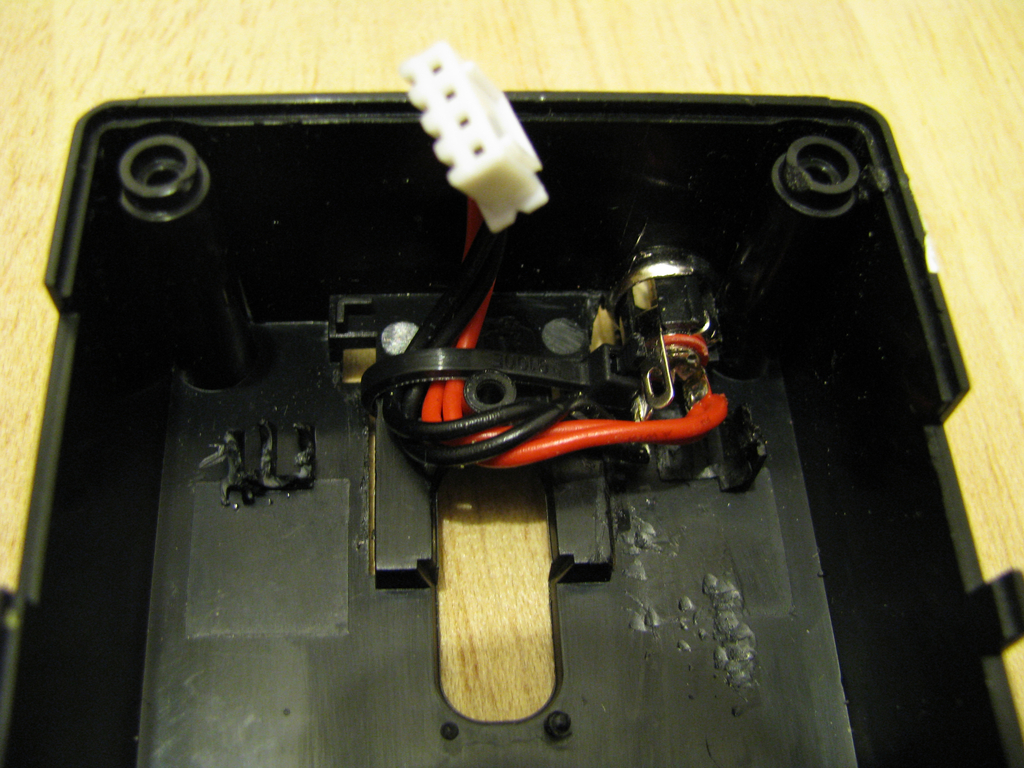
Replacing the power supply As I would never ever trust the PSU (see my last blog post for the gory details) and some additional free space in the case is necessary, it is time to rip it out. As replacement I've ordered an external 5V/20W PSU. To connect it to the plug I've drilled a hole into the case and added a proper connector after soldering the original cable from the old PSU to it. Make sure to add some retainer to stop the cable from touching the CPU/memory heat sinks later. GuruPlug Server Plus PSU replacement GuruPlug Server Plus PSU cabling

Proper heatsinks One of the biggest problems in the original GuruPlug design is the heat spreading and collecting piece of alloy, which probably makes things even worse than better. After some discussion in #debian-devel the idea came up, that the board should be able to run fine without a heatsink - at least when idling. That is the case, indeed. So let's get rid of that piece of alloy, together with the holders and springs. Unfortunately heat things are necessary to handle some work load. To mount them make sure you get some good thermal glue as you don't want to insulate the chips from their heat sinks. I've used Arctic Silver II thermal glue - not cheap, but working well. Make sure to clean the heat sinks and chips properly with alcohol (2-Propanol is my favourite for that), so there is no fat and dust left. When you use the glue be careful to read the documentation properly and make sure you apply only as much as necessary - a thin coating is enough. After applying the glue and mounting the heat sink you need a clamp to put some pressure on it while the glue dries.

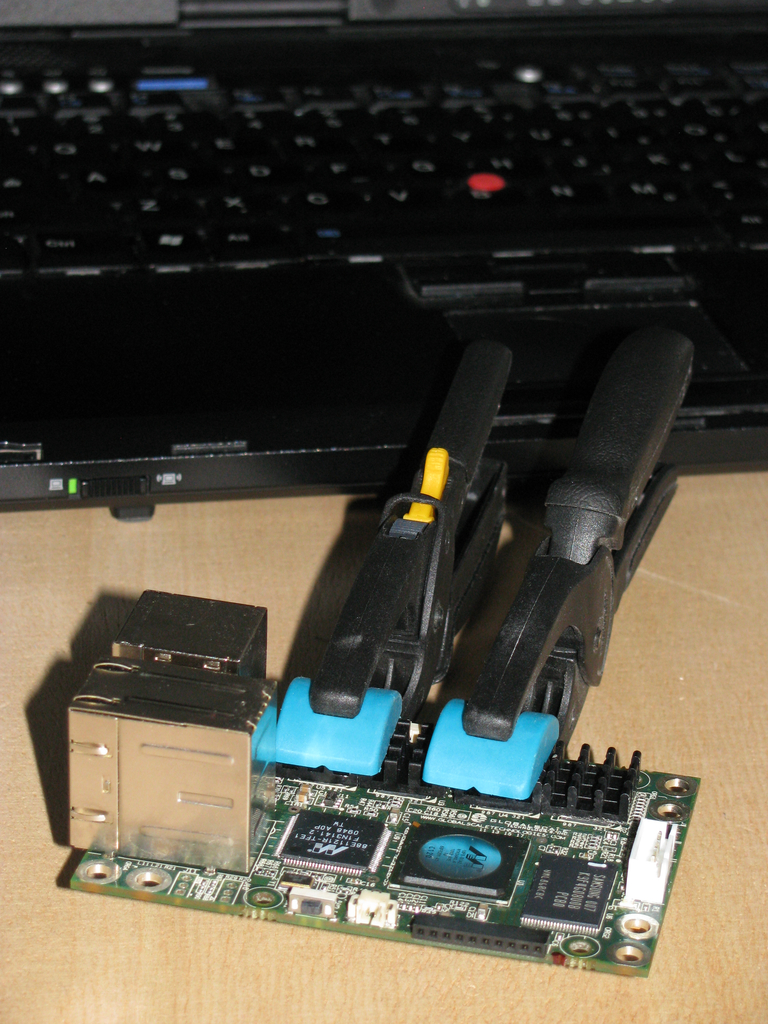
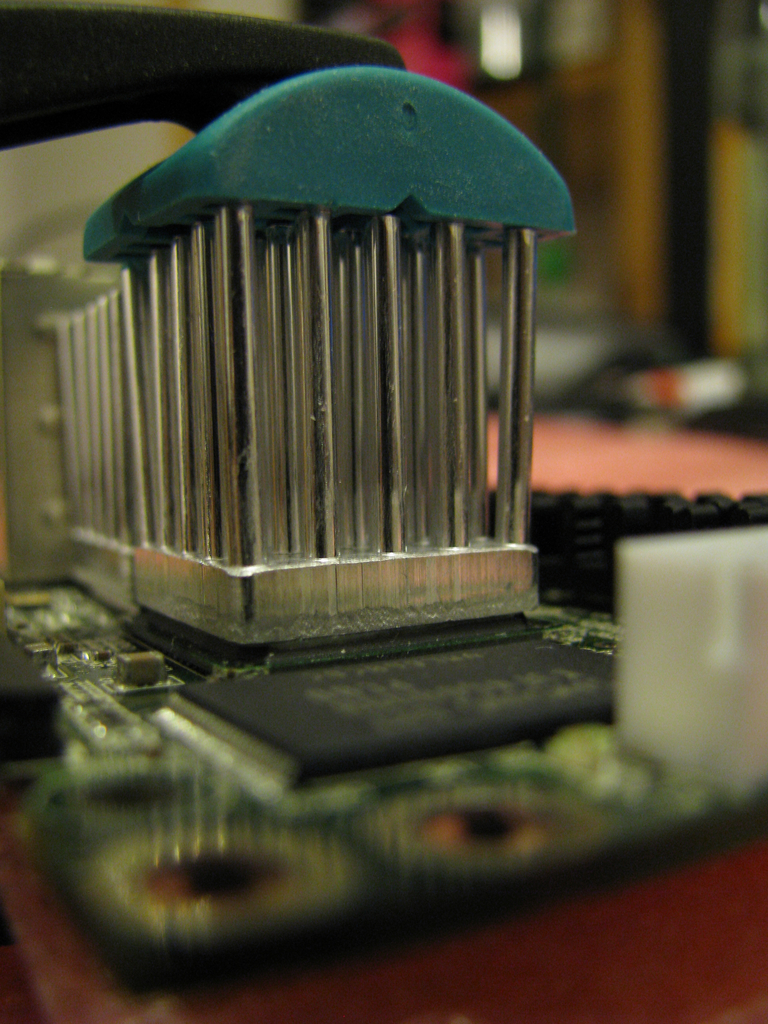
Heat sinks for the memory As there is a lot of space around the memory chips, I've got some 14x14x6mm heat sinks. Luckily there are only small parts on the other side of the board, so it was not hard to attach clamps to ensure the glue is able to dry properly. In case largish amounts of glue are squeezing out between heat sink and chip you probably want to start from scratch and clean everything (quickly!) with alcohol again. GuruPlug Server Plus memory heat sink clamping

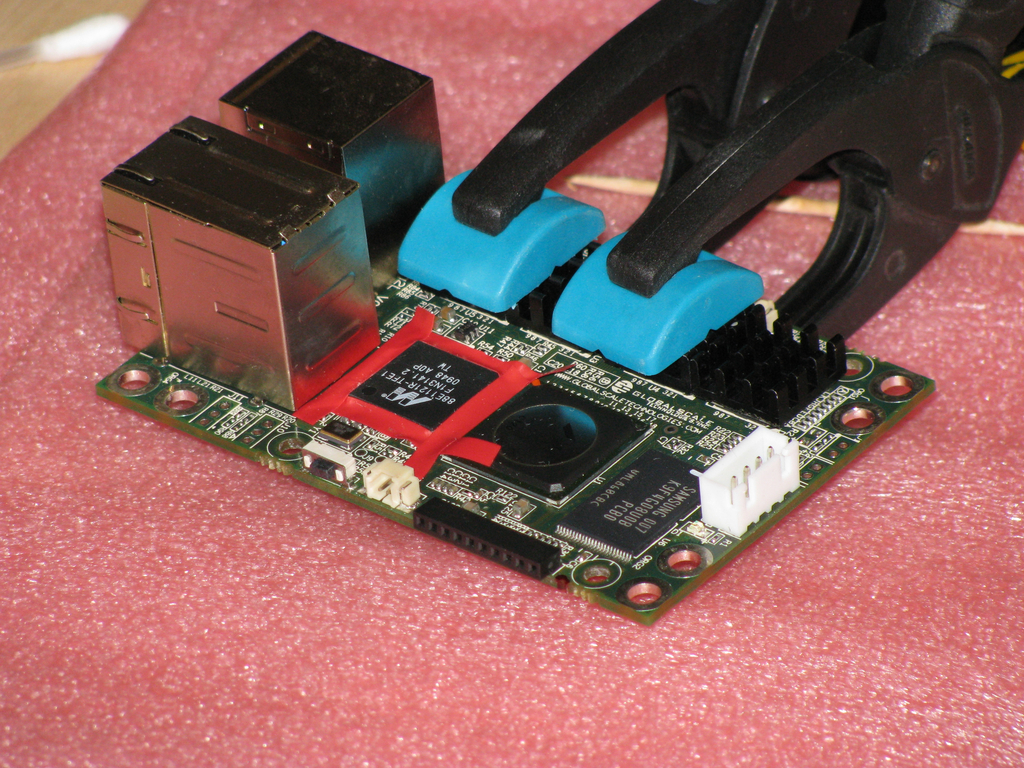
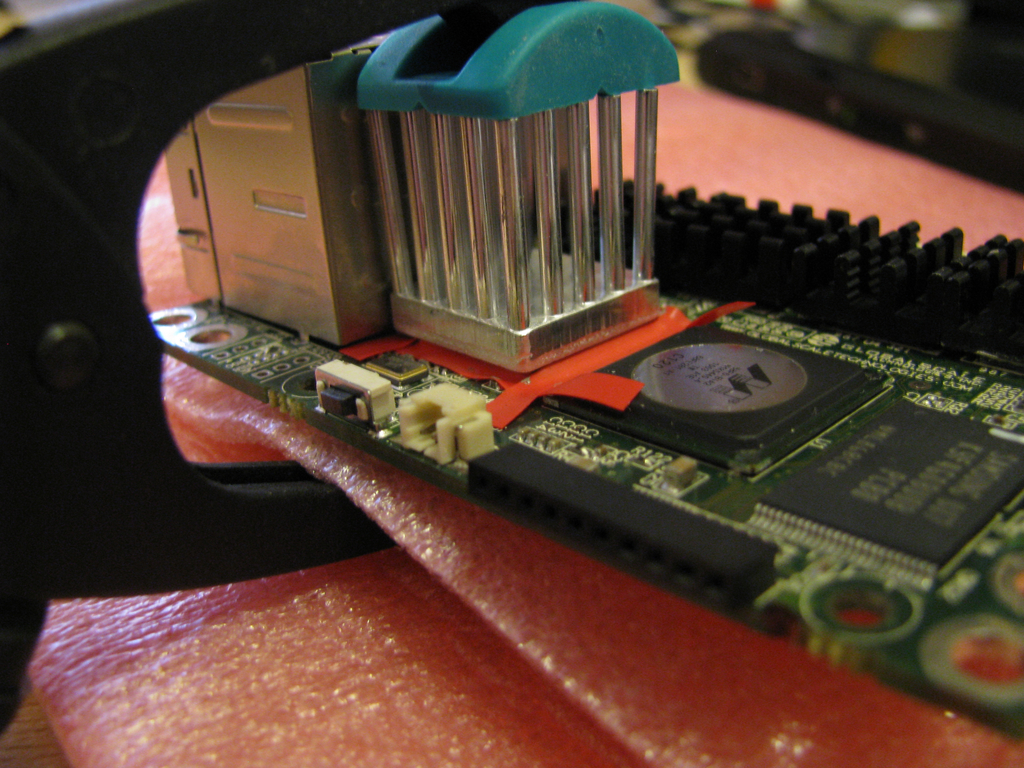
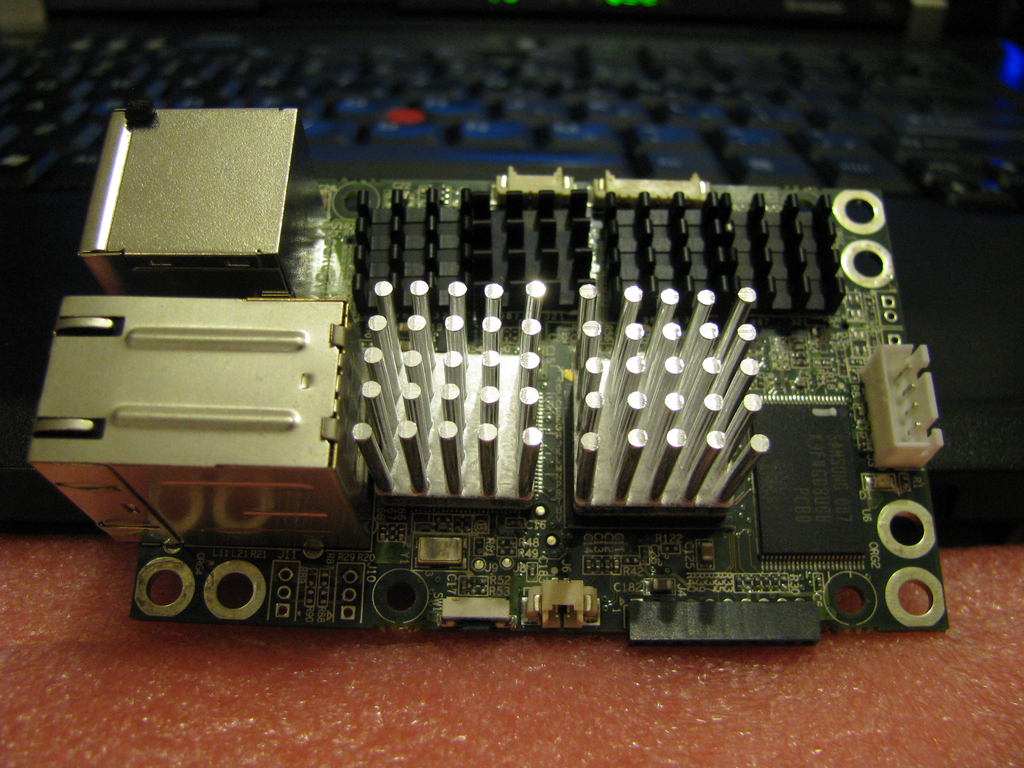
Gigabit Ethernet PHY and CPU heatsinks PHY and CPU need proper heatsinks as they're becoming pretty hot under load. Due to space limitations I had to stick with a 17x17x20mm heat sink for the PHY. I've tried to get a largish heat sink with BGA mount for the CPU, but I was not able to find one in short time and without ordering 1000 of them. So I've got another one of the 17x17x20mm model for the CPU. Later I found two other heat sinks which might fit on the GuruPlug's CPU: Malico 19x19x25mm or a Advanced Thermal Solutions Maxigrip. But for now the smaller one will have to do the job, also I'm scared to removed it without destroying the CPU. To mount the heat sink on the PHY a bit of preparation is necessary to ensure that the glue doesn't result in short cuts on the IC's pins. The arctic silver documentation recommends to use silicone on the pins to stop the glue. As I neither had the proper silicone nor did I want to make such a mess, I've decided to get a sticky insulating tape and some tooth picks to mount it properly on the IC pins. Make sure to do a proper job here! With good clamps you can work on the PHY while the memory heat sink glue is still drying. GuruPlug Server Plus - preparing the PHY The other problem on this side of the board is that some higher parts are mounted on the lower side of the board, so make sure to get some foam to protect them from your clamps. Except of the size of the heat sinks there is no real difference to the small ones: add glue, mount the heat sink and fix it with a clamp. GuruPlug Server Plus - mounting the PHY heatsink Before the glue dries completely make sure you remove the duct tape strips again. Be careful not to wipe any excess glue onto the IC pins. If you manage to do so you might want to remove and clean everything properly. So just be careful and everything should be fine. GuruPlug Server Plus - mounting the PHY heatsink 3 Mounting the heat sink on the CPU is easier as the CPU is a nice BGA package. No need to protect pins an there are none. GuruPlug Server Plus - mounting the CPU heatsink

Finished As you're able to see on the photo I did not the very perfect job, but fine enough to work properly. GuruPlug Server Plus - heatsinks

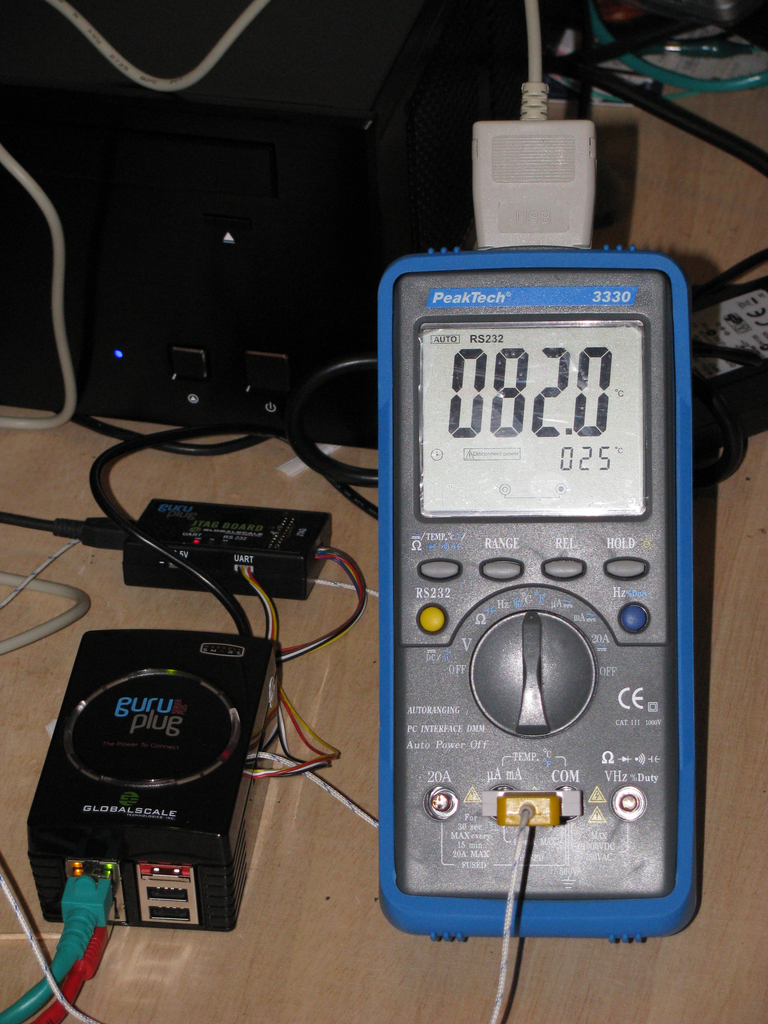
First tests with the new heatsinks Some tests with stress and some heavy network traffic showed quickly that the heat sinks are working well! But not well enough to be able to mount them into the original closed case (how the hell was this supposed to work before!?). Without any air to breath the temperature on the CPU heat sink went up to 85 deg C quickly. So on the CPU's die are > 100 deg C, which is at least close to the max allowed temperature. GuruPlug Server Plus - still too hot

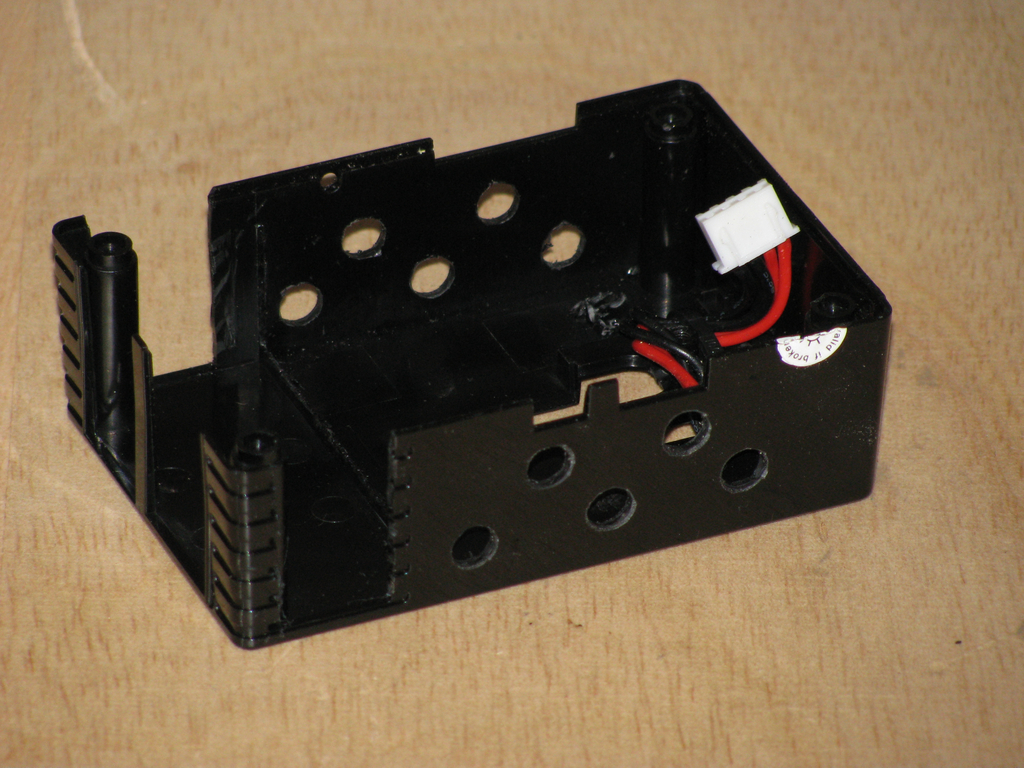
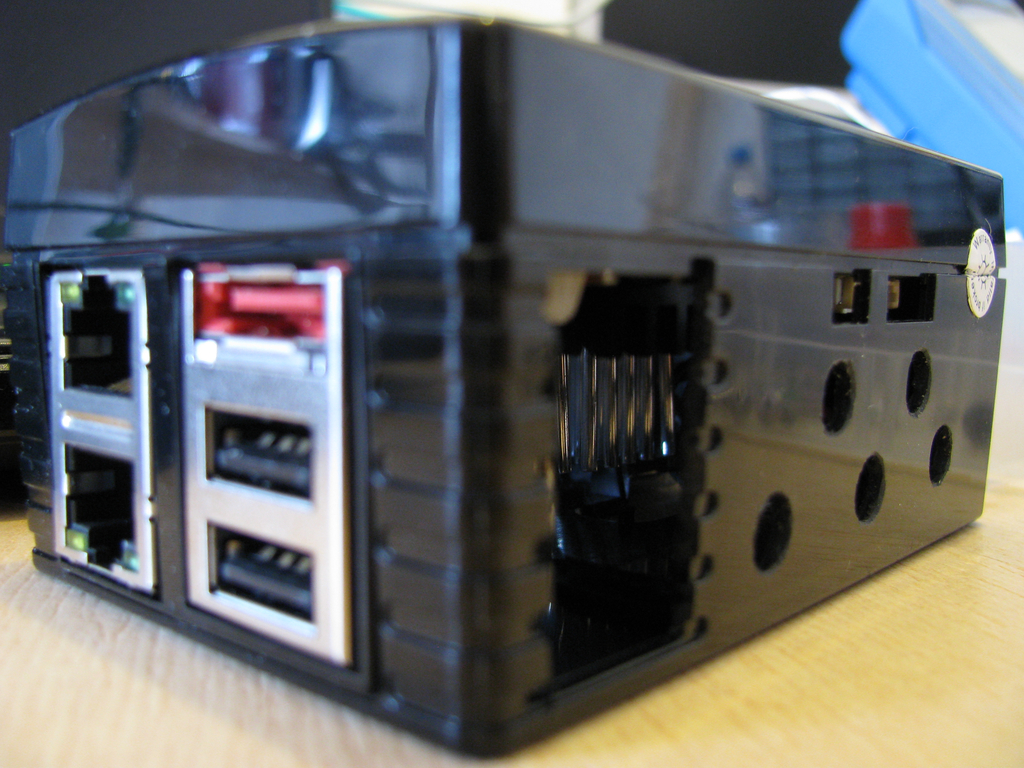
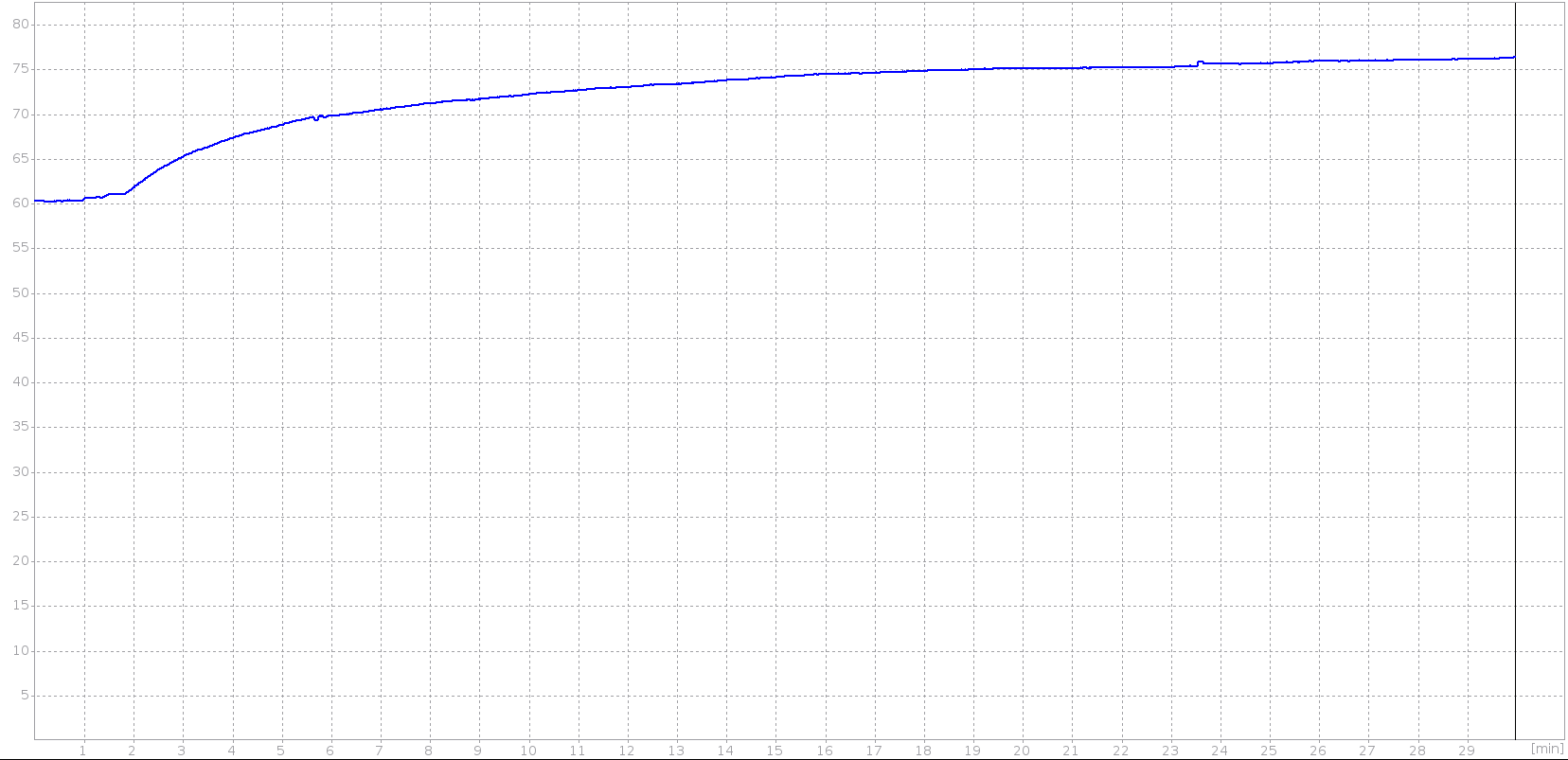
Adding air holes Obviously some additional air holes are necessary. After meeting my drill and cutter, the original case looks a bit like a piece of cheese now. GuruPlug Server Plus - case with air holes 1 GuruPlug Server Plus - case with air holes 2 Some more tests show that the temperature sticks around 76 deg C under heavy load now. That is still pretty hot, especially when the temperature in the room becomes hotter in summer. As I'm not going to run a lot of traffic trough it (my cable connection is limited to 20 MBit/s anyway), I guess it will work. Below is a graph I've recorded with my multimeter and qtdmm. It shows that the temperature rises to ~76 deg C and stays there. GuruPlug Server Plus - temperature curve Not sure if I could introuce some more load, the CPU had a load of 6 running stress. Network traffic was around 2x100MBit/s again. I could imagine with 2xGBit the CPU and PHY would become much hotter (no idea if it would be able to handle it at all, though). The PHY was usually a bit cooler than the CPU, so I didn't spend time to measure the temperature properly.

Conclusion My opinion is still the the original design of the plug is an insane QA and design failure. There is no way that it could ever work as shipped originally. If I'd have to design a new case for it, it should have a single insulated compartment for a PSU to ensure that no contact with high voltage is possible. The case around all other parts should be made of alloy with a lot of air holes. So the case could be used as heat sink (properly done, not with these insulating duct tape strips) and at the same time allow air circulation and a nice view on the LEDs on the board. Of course the case would be much more expensive than, but I'm sure it would work properly and would be worth the money. And if done peoperly, it would look much better than this blinking plastic thing. I could imagine it would sell well! So at the end I'm wondering what GlobalScale Technologies will do. I doubt it will be possible to create the 'professional upgrade kit' as they had announced before. Replacing all units is the only proper way. We'll see what happens. At least my GuruPlug is working well now and it will be used as replacement for my OpenWRT router soon. WiFi is not working, but that will be handled by my media center anyway. GuruPlug Server Plus - running plug

Lior Kaplan: Hebrew translation and Bidi issues in Openoffice 3.3 (beta)

In the last few years the Israeli government founded some work on openoffice.org by Tk Open Systems Ltd. During the years, the work has resulted with an Israeli version , released after the official release and includes a lot of patches to improve support for Bidi and Hebrew specifically. Although most patches were submitted to the hamburg , a lot of them weren t used and are still waiting for inclusion. The funding the that projects stopped a year ago (9/2009), and the last release of the Israeli version is 3.1.1. Since then we had a quiet period in which 3.2 and 3.2.1 were released. While still enjoying the fruits of the projects in these version, it seems that it s time for the community to take over, as we lost hopes for yet another funds from the government. In may Netanel and I started talking about taking over the Hebrew translation, and in June we got Hebrew added to the openoffice.org pootle server. We started with about 80%, and got to 86% in time to get to the list of languages getting a language pack built for. This was a first achievement as Hebrew didn t have a language pack since early on the 2.x versions. I believe that working as part of the openoffice.org l10n group and with openoffice.org release schedule will only benefit for the Hebrew translation process. We used the language pack to test the translation and improve it. We also were able to get to 89% with the help of more volunteers.I believe it s now much more consistent than before. In the process with manually checked Writer thoroughly, while Calc and Impress got less attention due to the time frame. But we fixed some major translation issues in all of the three components. While testing the translation we also started to report Bidi issues we saw in 3.3 beta, hoping they will be fixed for the final release. For example, the main openoffice.org screen on windows has is getting repainted wrongly when moving the mouse over the options (text, spreadsheet..). This looks very badly as this is the main screen! See issue #97556 for details
Openoffice.org main screen in RTL UI

In RTL UI the main screen doesn't get repaited properly.

In addition to report new issues, we also started to keep track of the already opened issues regarding Bidi and Hebrew. I m following the issue system for a few years now, but seeing the list of issues organized in the wiki gave me a better orientation in the problems we have. E.g. finding some related or similar issues and mention each other in the comments, when someone goes to first one, he could also fixed the other as the problem is similar and probably comes from the same code. Organizing also the already closed bugs in 3.x, gave me a some kind of a changelog for the Bidi and Hebrew related issues. In that manner, version 3.1 was a very good for Bidi, thanks for a lot of efforts and work with the Bidi meta issue #79434. The wiki page is in Hebrew, but looks quite OK with Google translate (see here). Hoping to have 3.4 a major release (Bidi wise), I ve opened issue #114236 as another meta issue for Bidi related issues. I ve kept Hebrew specific issues out, as to get it more general and also relevant for Bidi users in other languages. Any help of those issues will be more than welcome (starting with votes and ending with patches).
Filed under: i18n & l10n, Israeli Community, Openoffice.org

9 September 2010

Cyril Brulebois: SD: Bugzilla gets history support

(Disclaimer: Possibly one of my longest post ever, you may want to scroll to the bottom and only look at the pictures.) So, what s new in SD since last week? Fetching everything From http://bugs.freedesktop.org/, it was possible to download all the bugs I reported there (that means 2 ), but trying to download those reported by Julien led to a crash without any trace. Dichotomy FTW, I came up with a bunch of bugs which would lead to the same result, which confirmed that the amount of bugs processed at once wasn t the issue. Playing around with strace, it appeared that exchanges with the remote server were apparently fine, so an issue on the client-side SOAP machinery got suspected. So let s enable tracing:
use SOAP::Lite +trace => 'all';
Tada! The issue was indeed local: malformed XML got received, leading to a die call issued from the XML-RPC layer. Thankfully, one can set up a fault handler, which I used to display the range of bug IDs which triggered that bug, so that people can look into it and determine what to add to the blacklist until the underlying issue s been investigated (presumably, bugzilla s at fault). Speeding things up With that blacklisting of buggy bugs, one can then try to move to other queries, dealing with more bugs. Some examples follow:
reporter=kibi@d.o
product=xorg&component=Driver/VMWare
product=xorg&component=Driver/nouveau
product=xorg&component=Server/general
product=xorg&component=Driver/intel
Moving from 2 bugs to 10-100 bugs (Julien s or VMWare s) was OK. But then moving to several hundreds of bugs (Driver/nouveau = 500+ bugs) led to noticeable performance issues. Not to mention what happened when one reaches several thousands of bugs (Driver/intel = 2500+ bugs). Indeed, even with network exchanges cached into a local file, processing data was taking up to several dozens of minutes. I knew about Perl s -d:DProf, which helps figuring out where time is spent, but was pointed to -d:NYTProf (and its accompanying tool, nytprofhtml). Some hotspots got noticed: Things got better, but not good enough. There are several Prophet (the engine under the hood) backends, so one can play with:
PROPHET_REPLICA_TYPE=sqlite   # the default for SD
PROPHET_REPLICA_TYPE=prophet
Switching to prophet was a big win, but still not good enough. Indeed, many tiny files are written, and most of the time is spent in I/O. Although I m nothing like a performance guru, I guessed that running on an average laptop, with ext3 and its default commit interval of 5 seconds might not be helping, so I gave a quick try to -o remount,commit=60, and that seemed to help. Even though there are probably other tricks to find in that area (which hopefully won t require root privileges ), there s already a patch which landed in prophet s master branch, replacing File::Spec->catfile with an optimized version: that function alone was eating 10% of runtime In the sqlite case, disabling the auto-commit feature helped reducing the I/O load, but a proper patch is still lacking for now (running into locked database issues, or into missing tables after having created them isn t fun, so I postponed debugging that). Since performance issues looked like they could be solved eventually, I switched back to implementing missing features. Handling more than comments Currently 3 types of stuff are currently fetched from the bugzilla server: (Yes, that means that attachments are totally ignored for now.) Until now, only bug comments were considered. The first comment was used to determine a pseudo-title (using its first line), the reporter, and the creation date. This approach was chosen to try and get a basic sync working quickly, so as to get: Now, the algorithm is the following: from the bug status, determine a set of properties of interest; then walk the history backwards, and update the properties incrementally until the (presumed) initial state is reached. Then create the ticket using this initial state . Adding the incremental property changes to that initial ticket makes it possible to represent the bug s life as a list of Prophet::ChangeSet objects. That s where the fun begins, since properties in the bug status may not match properties in the bug history, so one needs to establish property correspondence. Also, some properties can be multivalued for added fun. I believe that s where most of the time is going to be spent while developing a new replica type in SD: once one knows how to get a hand on needed info on the remote server, the main question is what to do with it. For now, I decided to ignore many fields to make it possible to do a big sync like Server/general, property support will be improved later on. Screenshots Instead of pasting lengthy terminal excerpt, let s use some screenshots instead (sorry, I m not sure how to present such things in an accessible way, suggestions welcome). Cloning Julien s bugs, listing all open tickets, listing all tickets, searching using a regular expression: Cloning, listing, searching Displaying bug 42 (that s the local ID): Displaying Now, let s start the embedded web server through sd server --port 1234 and point the browser there. List of RESOLVED bugs: List of RESOLVED bugs Status and comments for bug 42: Status and comments for bug 42 History for bug 42: History for bug 42 Compared to the original bugzilla page: Same bug on FreeDesktop.org Next time Some items which need work: Flattr this!

8 September 2010

Mirco Bauer: Smuxi 0.8 "Godsend" Release

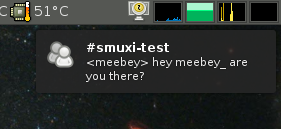
5 weeks after the 0.7.2.2 "Lovegood" release, I am very happy to announce the major feature release, 0.8 codenamed "Godsend". Major feature highlights of this release are desktop notifications (with full support of actions, icons, updates, append and sound), messaging menu / indicators (as provided by Ubuntu's Ayatana project) and working Twitter support with OAuth (basic auth was disabled by Twitter on 31st August). This version also fixes all bugs that were reported since the release of 0.7.2.2. Desktop Notifications
Messaging Menu
Further on, Smuxi comes with the following improvements in its user interface: Smuxi provides better connectivity and security by supporting: HTTP and SOCKS proxies as well as secure connections to IRC servers by using SSL with optional certificate validation. Last but not least, it comes with an enhanced Twitter experience by supporting the use of multiple Twitter accounts at the same time, reformatting tweets that contain newlines and showing the full retweet instead of a truncated version. Updated languages includes: French (Cl ment BOURGEOIS) and German (Bianca Mix) The #smuxi IRC channel can now also be found, in addition to OFTC, on other popular IRC networks such as freenode and GIMPnet. The messages on #smuxi are automatically relayed between the 3 IRC networks. If you like Smuxi and want to support it by making micro-donations, Smuxi is available on Flattr. There are also many other nice FOSS projects available on Flattr, see the Flattr-FOSS project. Smuxi is available for download from here. Binary Packages of Smuxi 0.8 are ready to be used by Debian/Experimental, Ubuntu/Maverick, Ubuntu/Lucid (via PPA), OpenSUSE, Foresight Linux, FreeBSD, and Windows.

7 September 2010

C.J. Adams-Collier: Debian on Sheeva Plug internal NAND flash

After a bit of work, I got the sheeva plug working the way I wanted it to. First of all, I grabbed a spare 1G USB flash disk I had laying around and installed Debian squeeze to it by following tbm s instructions here: http://www.cyrius.com/debian/kirkwood/sheevaplug/install.html After debian was installed to the USB disk, I removed it from the plug and used dd on my laptop to create an image of the filesystem. I mounted the filesystem as a loopback device and created a jffs2 partition image from it after doing a bit of minor tweaking. I placed the USB disk back in the plug and booted to it. Using this intermediate filesystem and the mtd-tools package, I wrote the new jffs2 image to the NAND mtd device. I then modified the uboot environment to suit, saved, and now have a working setup. Detailed instructions are below. pre-requisites Connect the plug to your network with the rj-45/cat5 cable. Connect a USB flash drive to the plug. I used a 1G drive, but 512M should be sufficient. Install the tftpd package on a machine on your network. You ll also need screen on the machine that you use to connect to the plug s serial terminal. I ll assume these are the same host. You need the IP address of the tftp server. In this example, we will assume that the IP is 192.168.1.2 and that you will assign 192.168.1.200 to the plug. $ sudo apt-get install tftpd screen Place uImage, uInitrd, and uBoot in the /srv/tftp directory: $ sudo wget -O /srv/tftp/uImage http://www.cyrius.com/tmp/beta1/marvell/sheevaplug/uImage
$ sudo wget -O /srv/tftp/uInitrd http://www.cyrius.com/tmp/beta1/marvell/sheevaplug/uInitrd
$ sudo wget -O /srv/tftp/uBoot http://wp.colliertech.org/cj/wp-content/uploads/2010/09/07/uboot.bin Connecting to the serial console We are now ready to boot the plug. Note that you have to be quick with the screen command. I recommend you type it out and get ready to press the enter key. You have to interrupt the bootloader in order to enter the u-boot console. Attach the power and immediately enter the following command: $ screen -S sheeva /dev/ttyUSB0 cs8,ixoff,115200 If you did this right, you should see a prompt like this: Marvell>> update uboot As per tbm s instructions, you can now update the uboot if needed. Instructions for that are here: http://www.cyrius.com/debian/kirkwood/sheevaplug/uboot-upgrade.html I ll put them inline here for completeness.
Marvell>> setenv serverip 192.168.1.2 # IP of your TFTP server
Marvell>> setenv ipaddr 192.168.1.200 # IP of the plug
Marvell>> bubt uboot.bin
be sure to answer n to the question about env parameters. Now reset the device. Don t forget to interrupt the bootloader so we can get back to the prompt:
Marvell>> reset
Let the device know that you will be running a mainline kernel and set the arcNumber:
Marvell>> setenv mainlineLinux yes
Marvell>> setenv arcNumber 2097
Marvell>> saveenv
Marvell>> reset
Install Debian to the USB disk Interrupt the boot process once more. We are now ready to run the debian installer. I ll leave the details as an exercise for the reader. The following should put you into the installer, which you are probably quite familiar with by now. NB: I will assume that you will use a single ext3 partition for the entire system. This will make it easier to build a jffs2 image out of the resultant partition on the USB disk.
Marvell>> setenv serverip 192.168.1.2
Marvell>> setenv ipaddr 192.168.1.147
Marvell>> tftpboot 0x01100000 uInitrd
Marvell>> tftpboot 0x00800000 uImage
Marvell>> setenv bootargs console=ttyS0,115200n8 base-installer/initramfs-tools/driver-policy=most
Marvell>> bootm 0x00800000 0x01100000
build a jffs2 image Once the installation has completed, power down the plug and remove the USB disk. Put the USB disk in the machine you used to get the console on the plug and note what device the kernel assigns to it. In my case, it was given sdc, so debian is installed to /dev/sdc1. I will use these values for this example. If the filesystem was automatically mounted, unmount it. Create a disk image of the partition and mount it as a loopback device.
$ sudo umount /dev/sdc1
$ dd if=/dev/sdc1 of=/tmp/debian.img
$ mkdir /tmp/mnt
$ sudo mount -o loop /tmp/debian.img /tmp/mnt
You can now remove the USB disk and return it to the plug. Modify the /etc/fstab file. The root filesystem will be /dev/mtdblock2 and of fs type jffs2. My fstab file looks like the following:
proc            /proc           proc    defaults        0       0
/dev/mtdblock2 /               jffs2    errors=remount-ro 0       1
We can now create a jffs2 image from the mounted and altered fresh install:
$ sudo mkfs.jffs2 -l \
  -e 0x20000 \
  -X zlib \
  --eraseblock=128KiB \
  --pad \
  --output=/tmp/rootfs.jffs2 \
  --compression-mode=priority \
  -n \
  --squash \
  -r /tmp/mnt
write jffs2 to nand Now that we have an image to flash to the NAND, let s boot off of the USB disk. It should now be attached to the plug. Power on the plug and use screen to get a console. Interrupt the bootloader and enter the following commands:
Marvell>> setenv bootargs_console console=ttyS0,115200
Marvell>> setenv bootcmd_usb 'usb start; ext2load usb 0:1 0x01100000 /boot/uInitrd; ext2load usb 0:1 0x00800000 /boot/uImage'
Marvell>> setenv bootcmd 'setenv bootargs $(bootargs_console); run bootcmd_usb; bootm 0x00800000 0x01100000'
Marvell>> run bootcmd
Log in as root with the credentials you configured during the install. You will need to install a few packages in order to complete the nand flash. You can then ssh to the host on which you created the jffs2 image and cat it to stdout, piping this to nandwrite:
$ sudo apt-get install mtd-utils
$ ssh user@192.168.1.2 cat /tmp/rootfs.jffs2   sudo nandwrite /dev/mtd2 -p -
You now have a jffs2 image on the nand. Configure u-boot One more reboot to set u-boot s environment, and you will be done. Power down and remove the USB disk. Power on and get the serial console using screen. Break into the bootloader and enter the following commands:
Marvell>> setenv bootargs_console console=ttyS0,115200
Marvell>> setenv mtdpartitions mtdparts=orion_mtd:0x400000@0x100000(uImage),0x1fb00000@0x500000(rootfs)
Marvell>> setenv bootargs_root root=/dev/mtdblock2 rw rootfstype=jffs2
Marvell>> setenv bootcmd 'setenv bootargs $(bootargs_console) $(mtdpartitions) $(bootargs_root); nand read.e 0x00800000 0x00100000 0x00400000; bootm 0x00800000'
Marvell>> saveenv
Marvell>> reset
You should now be good to go.

6 September 2010

Joey Hess: freedombox for a solar powered house

I'm swinging on the front porch shade, with happy wifi bars lit up on my laptop. A good network makes for a happy home, isn't that how the saying goes? (Maybe not yet.) Typically that's easy to achieve -- here it wasn't. The house is solar powered, the only connection to the outside is a phone line. So I needed a computer that would work in that environment, using minimal (12 volt) power, and getting the most out of the limited bandwidth while providing those happy wifi bars. At DebConf we learned that the name for these little home servers we have been building for years is "FreeDomBox". All right then, here's my latest FreedomBox build.
A typical inexplicable tangle of computer bits.
Since the solar house is in the sticks, the result is a server I call "stick".

Jan Hauke Rahm: tmux entered my system

Been playing with that thought for a while now, finally got to rebuilding it for lenny, now I m using it tmux is the new screen. To have fun already I read a few short introductions and got myself a few suggestions for a proper .tmux.conf. So, for root I have this one now: # Copy mode
unbind [
bind Escape copy-mode
# Use Vi mode
setw -g mode-keys vi
# Make mouse useful in copy mode
setw -g mode-mouse on
# More straight forward key bindings for splitting
unbind %
bind split-window -h
bind h split-window -h
unbind '"'
bind - split-window -v
bind v split-window -v
# History
set -g history-limit 4000
# Terminal emulator window title
set -g set-titles on
set -g set-titles-string '#S:#I.#P #W'
# Status Bar
set -g status-bg black
set -g status-fg white
set -g status-interval 1
set -g status-left '#[fg=green]#H#[default]'
# no line break here, it's just to long for my blog layout!
set -g status-right '#[fg=yellow]#(cut -d " " -f 1-4 /proc/loadavg)#[default] #[fg=cyan,bold]%Y-%m-%d %H:%M:%S#[default]'
# Notifying if other windows has activities
setw -g monitor-activity on
set -g visual-activity on
# Highlighting the active window in status bar
setw -g window-status-current-bg red
# Clock
setw -g clock-mode-colour green
setw -g clock-mode-style 24
# Create a default session
new -n htop -d htop
setw -t htop monitor-activity off
neww -n aptitude -d aptitude
neww -d
Then I added a new alias to my user s zsh config: alias root='su -c "tmux attach"' Why tmux attach ? Because tmux would start a new session which I don t want it to. The config already starts a session which we can immediately attach to. Also, when such session was started I can attach to it as a user with the very same command over and over again. That makes it pretty handy as I always have htop, aptitude and a free shell available in a nice tmux session. Great. How did I live until now? ;-)

Robert Millan: Debian Installer with ZFS

Long time no see Not much hacking in the last few months. Not much ranting either (some of you I m sure will appreciate ;-). Anyway, I recently grew excited to learn that ZFS is coming to Debian. I decided to bite the bullet, patched the missing bits in GRUB and Parted, a few small changes in D-I and there s now a modified Debian Installer with ZFS support for you to play with. Enjoy! Note1: I didn t have time or interest in warping D-I into the N:1:M model used in ZFS. Instead, this installer assumes each zpool has exactly one device and exactly one filesystem. However, you can later add more devices ( zpool attach ) or create new filesystems in the same pool ( zfs create ). Note2: Don t ask for i386, it was intentionally left out. ZFS is designed with modern CPUs in mind. It can work on i386 with special tuning but I don t want to encourage users to do this unless they re well aware of what they re doing.

4 September 2010

Petter Reinholdtsen: Some notes on Flash in Debian and Debian Edu

In the Debian popularity-contest numbers, the adobe-flashplugin package the second most popular used package that is missing in Debian. The sixth most popular is flashplayer-mozilla. This is a clear indication that working flash is important for Debian users. Around 10 percent of the users submitting data to popcon.debian.org have this package installed. In the report written by Lars Risan in August 2008 ( Skolelinux i bruk Rapport for Hurum kommune, Universitetet i Agder og stiftelsen SLX Debian Labs ), one of the most important problems schools experienced with Debian Edu/Skolelinux was the lack of working Flash. A lot of educational web sites require Flash to work, and lacking working Flash support in the web browser and the problems with installing it was perceived as a good reason to stay with Windows. I once saw a funny and sad comment in a web forum, where Linux was said to be the retarded cousin that did not really understand everything you told him but could work fairly well. This was a comment regarding the problems Linux have with proprietary formats and non-standard web pages, and is sad because it exposes a fairly common understanding of whose fault it is if web pages that only work in for example Internet Explorer 6 fail to work on Firefox, and funny because it explain very well how annoying it is for users when Linux distributions do not work with the documents they receive or the web pages they want to visit. This is part of the reason why I believe it is important for Debian and Debian Edu to have a well working Flash implementation in the distribution, to get at least popular sites as Youtube and Google Video to working out of the box. For Squeeze, Debian have the chance to include the latest version of Gnash that will make this happen, as the new release 0.8.8 was published a few weeks ago and is resting in unstable. The new version work with more sites that version 0.8.7. The Gnash maintainers have asked for a freeze exception, but the release team have not had time to reply to it yet. I hope they agree with me that Flash is important for the Debian desktop users, and thus accept the new package into Squeeze.

30 August 2010

Matt Zimmerman: Traveling at home

For me, the most enjoyable part of traveling is the inspiration that I derive from visiting different places, talking to people, and generally being outside of my normal environment. This bank holiday weekend, when so many Londoners visit faraway lands, my partner and I stayed in London instead, and my sought inspiration closer to home. The city has been delightfully quiet, and in contrast to the preceding week, the weather was mostly pleasant, apart from the sudden downpours the BBC described as squally showers .
Photo of deer in Richmond Park

Photo credit: M rcio Cabral de Moura


We spent Saturday afternoon in Richmond Park, a 2500-acre nature preserve easily accessible via public transport from London. The plentiful oak trees, fallow deer, and various species of water fowl made it easy to forget the city for a while. Having visited a few times on foot, I think it would be fun to cycle next time, and see different areas of the park. Afterward, we had dinner at a tapas restaurant in Parsons Green which offered notably excellent service as well as good food. By this time, it was nearly 7:00pm, and we took a chance on getting last-minute theatre tickets to see Jeff Goldblum and Mercedes Ruehl in Neil Simon s The Prisoner of Second Avenue. We arrived at the theatre just in time for the show, which was not sold out, and in fact had quite reasonable seats available. The show had several good laughs, holding up fairly well after nearly 40 years since the original Broadway production.
Photo of the exhibition at the Design Museum

Photo credit: Gary Bembridge


On Sunday, we visited the Design Museum for the first time. Having been disappointed by the nearby Fashion and Textile Museum, our expectations were not too high, but it turned out to be very worthwhile. The Brit Insurance Designs of the Year exhibition showcased designs from architecture, fashion, furniture, transport and more. Some of my favorites were: I was delighted to see that there were a half dozen or so exhibits which related to open source software. Even including the theatre tickets, it was a very inexpensive holiday compared to traveling overseas, and generated a lot less CO2. I was more than satisfied with the inspiration available within a relatively small radius. I don t think I ll give up traveling, as I really enjoy seeing friends who live far away, but I think I ll be more inclined to stay home during peak travel times and enjoy local activities.

28 August 2010

Antti-Juhani Kaijanaho: Dear Lazyweb: Does this software exist?

I ve been wondering if the following kind of testing management software exists (preferably free software, of course). It would allow one to specify a number of test cases. For each, one should be able to describe preconditions, testing instructions and expected outcome. Also, file attachments should be supported in case a test case needs a particular data set. It would publish a web site describing each test case. A tester (who in the free software world could be anyone) would take a test case, follow the instructions given and observe whatever outcome occurs. The tester would then file a test report with this software, either a terse success report or a more verbose failure report. The software should maintain testing statistics so that testers could easily choose test cases that have a dearth of reports. As a bonus, it would be nice if the software could submit a failure report as a bug report . (Note that this would be useful for handling the sort of tests that cannot be automated. There are many good ways already to run automated test suites.)

Erich Schubert: Facebook closing up for third party developers?

It looks a lot as if Facebook is closing up on third party developers. Seems like they've cherry picked the features they want to copy, and now are no longer interested in third parties anymore:Expect once-famous Facebook applications such as SuperPoke to disappear on the long run - their integration hooks have been pulled. The API gets more and more limited for the cash cow use case: games. And of course marketing. Oh, I forgot one type of "applications". The one that basically embeds you regular web page within a Facebook tab. Wow. That's technology!If it was really about the users, Facebook would seriously fight Facebook spam, worms and fraud. They still don't have that under control (and none of them used either of the removed features!). They do even less to prevent users from clicking on such bad links such as the Free iPad scam, which has been around for at least a week now. Or the famous "dislike button" scam. They could not spell much more clearly that they do not care about their users - they just want your data to sell more directed advertising to you. Forget about privacy, too!Now that all my three Facebook applications are pretty much dead, this comes with a good side for me: I've been considering to disable/suspend/kill my Facebook account for quite some time. But I wasn't sure if that would also kill my applications for their users. Now that they're dead anyway, there is not much keeping me anymore.

26 August 2010

Sylvain Le Gall: CentOS 5 chroot with schroot

OCaml compiles native executables in static mode. It allows to have a minimal set of dependencies when delivering an executable. It has also disadvantages like the size of the executable and problems arising when considering libraries update -- but this is another topic. There is still one strong dependency that you should not forget when you want to deliver a product for most of the Linux distributions: dependency on the glibc version. Trying to run OASIS compiled with Debian Lenny, on CentOS 5.5:
$ OASIS
.../OASIS: /lib64/libc.so.6: version  GLIBC_2.7' not found (required by .../OASIS)
So when compiling for delivery, one should choose the oldest distribution he targets. In my case, I choose CentOS 5 which comes with glibc v2.5. I usually choose Debian stable at the moment of writing Debian Lenny. But for now, the Debian Lenny's glibc is newer (v2.7) than the one coming from the CentOS 5.5 stable release. CentOS is a Red Hat like Linux distribution. I use a Debian Lenny amd64 host system and I decided to setup a chroot of CentOS 5 i386 and amd64. I also setup schroot to use my CentOS chroot. CentOS 5 amd64 setup First of all we use rinse, which can setup a RPM based distribution in a chroot. The version v1.3 shipped with Debian Lenny has some bugs: it doesn't install nss and other mandatory packages. So I downloaded v1.7 directly from Debian Sid. There is no dependencies problems and the package is arch:all, so it is straightforward to install:
$ wget http://ftp.de.debian.org/debian/pool/main/r/rinse/rinse_1.7-1_all.deb # Replace ftp.de.debian.org by your preferred Debian mirror
$ dpkg -i rinse_1.7-1_all.deb
Then I create the chroot directory and launch rinse:
$ mkdir /srv/chroot/centos5-amd64
$ rinse --arch amd64 --distribution centos-5 --directory /srv/chroot/centos5-amd64 # N.B. you must use --arch, the default is i386
Once installation is complete, you can add an entry for this distribution in /etc/schroot/schroot.conf:
[centos5-amd64]
description=Centos 5 (amd64)
location=/srv/chroot/centos5-amd64
priority=3
users=XXX
groups=
root-groups=root
type=directory
run-setup-scripts=true
run-exec-scripts=true
Replace XXX by your login. If you try to login directly, you will get warnings:
$ schroot -c centos5-i386
I : [chroot centos5-i386-a952de23-7f4b-4bae-a9b9-752ecee4a185] Ex cution de l'interpr teur de commandes initial :  /bin/bash 
-bash: /dev/null: Permission denied
This is a bit misleading because the real problem is that nothing is created in /dev/. CentOS delegates creating char/block devices to udev. You have two solutions to solve this issue:
$ MAKEDEV random
$ MAKEDEV console
$ MAKEDEV zero
$ MAKEDEV null
$ MAKEDEV stdout
$ MAKEDEV stdin
$ MAKEDEV stderr
$ rsync -av /srv/chroot/lenny-amd64/dev/* /srv/chroot/centos5-amd64/dev/
That's it, you now have a functional chrooted CentOS 5 environment:
$ schroot -c centos5-amd64 cat /etc/redhat-release
I : [chroot centos5-amd64-b9bae264-285b-4d17-a046-13386736cecd] Ex cution de la commande :   cat /etc/redhat-release  
CentOS release 5.5 (Final)
CentOS 5 i386 setup To setup an i386 environment, we follow almost the same scheme, except we need to fix a bug in rinse v1.7: we need to call linux32 before executing chroot. The problem is that the first stage installation of rinse install an i386/686 environment but as soon as you call chroot yum install ..., it will guess that the system is amd64 and will install missing packages. See the Debian bug report and the example patch attached to correct this behavior. WARNING: this patch is just an example, you can apply it for creating CentOS i386 chroot on Lenny amd64 host but you should remove the patch as soon as the installation is complete.
$ mkdir /srv/chroot/centos5-i386/
$ rinse --arch i386 --distribution centos-5 --directory /srv/chroot/centos5-i386 # With /usr/lib/rinse/centos-5/post-install.sh patched 
$ rsync -av /srv/chroot/lenny-i386/dev/* /srv/chroot/centos5-i386/dev/
Add this distribution to /etc/schroot/schroot.conf:
[centos5-i386]
description=Centos 5 (i386)
location=/srv/chroot/centos5-i386
priority=3
users=XXX
groups=
root-groups=root
type=directory
run-setup-scripts=true
run-exec-scripts=true
personality=linux32
You now have a schroot of CentOS 5 i386:
$ schroot -c centos5-i386 cat /etc/redhat-release
I : [chroot centos5-i386-9acafa91-9862-4488-aaef-4ab2a482771e] Ex cution de la commande :  cat /etc/redhat-release 
CentOS release 5.5 (Final)
Happy schroot hacking!

Uwe Hermann: openbiosprog-spi, a DIY Open Hardware and Free Software USB-based SPI BIOS chip flasher using flashrom

openbiosprog-spi device If you're following me on identi.ca you probably already know that I've been designing a small PCB for a USB-based SPI chip programmer named openbiosprog-spi. The main use-case of the device is to help you recover easily from a failed BIOS upgrade (either due to using an incorrect BIOS image, due to power outages during the flashing progress, or whatever). The device only supports SPI chips, as used in recent mainboards (in DIP-8 form factor, or via manual wiring possibly also soldered-in SO-8 variants). It can identify, read, erase, or write the chips. Of course the whole "toolchain" of software tools I used for creating the hardware is open-source, and the hardware itself (schematics and PCB layouts) are freely released under a Creative Commons license (i.e., it's an "Open Hardware" device). The user-space source code is part of flashrom (GPL, version 2), the schematics and PCB layouts are licensed under the CC-BY-SA 3.0 license and were created using the open-source Kicad EDA suite (GPL, version 2). openbiosprog-spi schematics
openbiosprog-spi Kicad PCB layout The schematics, PCB layouts, and other material is available from gitorious:
  $ git clone git://gitorious.org/openbiosprog/openbiosprog-spi.git
You can also download the final Gerber files (ZIP) for viewing them, or sending them to a PCB manufacturer. Some more design notes: Basic usage example of the device on Linux (or other OSes supported by flashrom):
  $ flashrom -p ft2232_spi:type=2232H,port=A -r backup.bin (reads the current chip contents into a file)
openbiosprog-spi PCBs
openbiosprog-spi parts list Over at the main projects page of openbiosprog-spi at http://randomprojects.org/wiki/Openbiosprog-spi I have put up a lot more photos and information such as the bill of materials, the Kicad settings I used for creating the PCBs, the Gerber files and the Excellon drill files and so on. The first few prototype boards I ordered at PCB-POOL.COM (but you can use any other PCB manufacturer of course), the bill of materials (BOM) lists the Mouser and CSD electronics part numbers and prices, but you can also buy the stuff elsewhere, of course (Digikey, Farnell, whatever). I already hand-soldered one or two prototypes and tested the device. Both hardware and software worked fine basically, you just need a small one-liner patch to fix an issue in flashrom, but that should be merged upstream soonish. In order to make it easy for interested users to get the PCBs I'll probably make them available in the BatchPCB Market Place soonish, so you can easily order them from there (you do still need to solder the components though). Note: I'm not making any money off of this, this is a pure hobby project. All in all I have to say that this was a really fun little project, and a useful one too. This was my first hardware project using Kicad (I used gEDA/PCB, also an open-source EDA toolsuite, for another small project) and I must say it worked very nicely. I didn't even have to read any manual really, it was all pretty intuitive. Please consider not using Eagle (or other closed-source PCB software) for your next Open Hardware project, there are at least two viable open-source options (Kicad, gEDA/PCB) which both work just fine.

25 August 2010

Russell Coker: A Netbook for Aircraft Navigation

There is apparently some MS-Windows software for navigating light aircraft in Australia. It takes input from a GPS device and knows the rules for certain types of common tasks (such as which direction to use when approaching an airport). My first question when I heard of this was so if the Windows laptop crashes does your plane crash? . But I ve been assured that paper maps will always be available. The requirement is for a touch-screen device because a regular laptop in the open position won t leave enough room for the control stick. So the question is, what is the best touch-screen Windows laptop? It must be relatively rugged spinning media for storage is unacceptable due to the risk of damage in turbulence, it should be relatively cheap (less than $1000), and can apparently have a somewhat low resolution for the screen. The pilot who asked me for advice on this matter is currently thinking of the ASUS Eee T91 which runs Windows XP home, has 16G of solid-state storage and a 1024*600 screen. I am concerned about the reliability of that system as the rotatable screen design seems inherently weak. The Smartbook concept sounds appealing, I don t expect that you would want to wait for a typical OS to boot while flying a plane. But those devices mostly use ARM CPUs and thus can t run MS-Windows. One particularly interesting device is the Always Innovating Touchbook [1] which has a detachable keyboard which would be handy for non-airline use. Unfortunately it seems that Always Innovating aren t doing production at the moment, they say The current Touch Book production is in stand-by and will resume in the summer when we will release our newest and craziest innovation well summer is almost over in the northern hemisphere so I guess that means there won t be anything from them for another 9 months. A device such as an iPad would also be a good option for looking at static documents. The pilot is considering using a MS-Windows PC to generate images and then viewing them on such a device. But he s not really enthusiastic about it. Are there any good and cheap touch-screen devices that run MS-Windows? Are there any particularly noteworthy PDF reader devices which would be better than an iPad for viewing maps while flying a plane? Is it possible to run a MS-Windows application that uses a GPS under Wine on a Netbook?

20 August 2010

David Welton: Moving data around your code - different approaches

I was thinking about this the other day, and I realized I can't particularly think of a label to attach to this concept. Anyone out there got a name for this? This could be due to my lack of formal computer science training, so I thought I'd ask, at the risk of looking stupid (I'm having an off day, so that's a very real possibility). If you have a series of functions, say: a(x), which in turn calls b(x), which calls c(x), and so on, and you end up with a faily long call chain, out to say m(x), and you subsequently decide that m(x) needs an additional piece of information that is contained in a local variable in the body of the a(x) function - how do you get it to m(x) ? It seems the answers are basically either 1) add the parameter to all the functions and everything that calls them, or 2) use some kind of composite type to stash the one or more values in.
It seems that this is a reasonable common thing to have to do, so it must have a name. How well does your language handle that kind of refactoring?

9 August 2010

Gustavo Noronha Silva: WebKitGTK+ and the Web Inspector

When I started working on WebKitGTK+ I was a web developer, writing IT applications using Python and Django, and building features for content portals running Plone (argh). Even though I was an Epiphany user ever since it was forked off Galeon, I still had to use Firefox for my work, because I couldn t really live without Firebug. It should come as no surprise, then, that one of my first patches to WebKitGTK+ was actually making the awesome Web Inspector work in our port. After the initial support, though, not a lot has been done to further improve it, partly because it was already good enough for many uses, partly because I somehow started doing non-web development again ;). These last weeks, through my R&D efforts in Collabora, I have been able to push Web Inspector features and integration a bit further. A simple change that boosts the Inspector s usability quite a bit is having the nodes that are being hovered highlighted. Along with that, the ability to attach the inspector to Epiphany s window should make it easier to use for poking the DOM. The Web Inspector has a number of settings that control its behaviour. Since, for instance, enabling javascript debugging may slow down javascript performance, the inspector usually has it disabled by default, and provides a button to enable it. It also provides an option for always enabling that feature, but that does not work right now, because we are not saving/restoring the relevant settings. A solution to that is in the works using the GSettings infrastructure that was recently merged into glib. Here s a simple screencast, showing these improvements in action (click the video to check it out in full size): <video controls="controls" src="http://kov.eti.br/media/webkit/inspector.ogv" width="400"></video>

5 August 2010

Adam Rosi-Kessel: Lake Champlain Sunset

IMG_2394 IMG_2395 IMG_2404 IMG_2421

4 August 2010

Russell Coker: Why Clusters Usually Don t Work

It s widely regarded that to solve reliability problems you can just install a cluster. It s quite obvious that if instead of having one system of a particular type you have multiple systems of that type and a cluster configured such that broken systems aren t used then reliability will increase. Also in the case of routine maintenance a cluster configuration can allow one system to be maintained in a serious way (EG being rebooted for a kernel or BIOS upgrade) without interrupting service (apart from a very brief interruption that may be needed for resource failover). But there are some significant obstacles in the path of getting a good cluster going. Buying Suitable Hardware If you only have a single server that is doing something important and you have some budget for doing things properly then you really must do everything possible to keep it going. You need RAID storage with hot-swap disks, hot-swap redundant PSUs, and redundant ethernet cables bonded together. But if you have redundant servers then the requirement for making one server reliable is slightly reduced. Hardware is getting cheaper all the time, a Dell R300 1RU server configured with redundant hot-plug PSUs, two 250G hot-plug SATA disks in a RAID-1 array, 2G of RAM, and a dual-core Xeon Pro E3113 3.0GHz CPU apparently costs just under $2,800AU (when using Google Chrome I couldn t add some necessary jumper cables to the list so I couldn t determine the exact price). So a cluster of two of them would cost about $5,600 just for the servers. But a Dell R200 1RU server with no redundant PSUs, a single 250G SATA disk, 2G of RAM, and a Core 2 Duo E7400 2.8GHz CPU costs only $1,048.99AU. So if a low end server is required then you could buy two R200 servers that have no redundancy built in which cost less than a single server that has hardware RAID and redundant PSUs. Those two servers have different sets of CPU options and probably other differences in the technical specs, but for many applications they will probably both provide more than adequate performance. Using a server that doesn t even have RAID is a bad idea, a minimal RAID configuration is a software RAID-1 array which only requires an extra disk per server. That takes the price of a Dell R200 to $1,203. So it seems that two low-end 1RU servers from Dell that have minimal redundancy features will be cheaper than a single 1RU server that has the full set of features. If you want to serve static content then that s all you need, and a cluster can save you money on hardware! Of course we can debate whether any cluster node should be missing redundant hot-plug PSUs and disks. But that s not an issue I want to address in this post. Also serving static content is the simplest form of cluster, if you have a cluster for running a database server then you will need a dual-attached RAID array which will make things start to get expensive (or software for replicating the data over the network which is difficult to configure and may be expensive), so while a trivial cluster may not cost any extra money a real-world cluster deployment is likely to add significant expense. My observation is that most people who implement clusters tend to have problems getting budget for decent hardware. When you have redundancy via the cluster you can tolerate slightly less expected uptime from the individual servers. While we can debate about whether a cluster member should have redundant PSUs and other expensive features it does seem that using a cheap desktop system as a cluster node is a bad idea. Unfortunately some managers think that a cluster solves the reliability problem and therefore you can just use recycled desktop systems as cluster nodes, this doesn t give a good result. Even if it is agreed that server class hardware is used for all servers so features such as ECC RAM are used you will still have problems if someone decides to use different hardware specs for each of the cluster nodes. Testing a Cluster Testing a non-clustered server or some servers that use a load-balancing device at the front-end isn t that difficult in concept. Sure you have lots of use cases and exception conditions to test, but they are all mostly straight-through tests. With a cluster you need to test node failover at unexpected times. When a node is regarded as having an inconsistent state (which can mean that one service it runs could not be cleanly shutdown when it was due to be migrated) it will need to be rebooted which is sometimes known as a STONITH. A STONITH event usually involves something like IPMI to cut the power or a command such as reboot -nf , this loses cached data and can cause serious problems for any application which doesn t call fsync() as often as it should. It seems likely that the vast majority of sysadmins run programs which don t call fsync() often enough, but the probability of losing data is low and the probability of losing data in a way that you will notice (IE it doesn t get automatically regenerated) is even lower. The low probability of data loss due to race conditions combined with the fact that a server with a UPS and redundant PSUs doesn t unexpectedly halt that often means that problems don t get found easily. But when clusters have problems and start calling STONITH the probability starts increasing. Getting cluster software to work in a correct manner isn t easy. I filed Debian bug #430958 about dpkg (the Debian package manager) not calling fsync() and thus having the potential to leave systems in an inconsistent or unusable state if a STONITH happened at the wrong time. I was inspired to find this problem after finding the same problem with RPM on a SUSE system. The result of applying a patch to call fsync() on every file was bug report #578635 about the performance of doing so, the eventual solution was to call sync() after each package is installed. Next time I do any cluster work on Debian I will have to test whether the sync() code seems to work as desired. Getting software to work in a cluster requires that not only bugs in system software such as dpkg be fixed, but also bugs in 3rd party applications and in-house code. Please someone write a comment claiming that their favorite OS has no such bugs and the commercial and in-house software they use is also bug-free I could do with a cheap laugh. For the most expensive cluster I have ever installed (worth about 4,000,000 UK pounds back when the pound was worth something) I was not allowed to power-cycle the servers. Apparently the servers were too valuable to be rebooted in that way, so if they did happen to have any defective hardware or buggy software that would do something undesirable after a power problem it would become apparent in production rather than being a basic warranty or patching issue before the system went live. I have heard many people argue that if you install a reasonably common OS on a server from a reputable company and run reasonably common server software then the combination would have been tested before and therefore almost no testing is required. I think that some testing is always required (and I always seem to find some bugs when I do such tests), but I seem to be in a minority on this issue as less testing saves money unless of course something breaks. It seems that the need for testing systems before going live is much greater for clusters, but most managers don t allocate budget and other resources for this. Finally there is the issue of testing issues related to custom code and the user experience. What is the correct thing to do with an interactive application when one of the cluster nodes goes down and how would you implement it at the back-end? Running a Cluster Systems don t just sit there without changing, you have new versions of the OS and applications and requirements for configuration changes. This means that the people who run the cluster will ideally have some specialised cluster skills. If you hire sysadmins without regard to cluster skills then you will probably end up not hiring anyone who has any prior experience with the cluster configuration that you use. Learning to run a cluster is not like learning to run yet another typical Unix daemon, it requires some differences in the way things are done. All changes have to be strictly made to all nodes in the cluster, having a cluster fail-over to a node that wasn t upgraded and can t understand the new data is not fun at all! My observation is that the typical experience of having a team of sysadmins who have no prior cluster experience being hired to run a cluster usually involves learning experiences for everyone. It s probably best to assume that every member of the team will break the cluster and cause down-time on at least one occasion! This can be alleviated by only having one or two people ever work on the cluster and having everyone else delegate cluster work to them. Of course if something goes wrong when the cluster experts aren t available then the result is even more downtime than might otherwise be expected. Hiring sysadmins who have prior experience running a cluster with the software that you use is going to be very difficult. It seems that any organisation that is planning a cluster deployment should plan a training program for sysadmins. Have a set of test machines suitable for running a cluster and have every new hire install the cluster software and get it all working correctly. It s expensive to buy extra systems for such testing, but it s much more expensive to have people who lack necessary skills try and run your most important servers! The trend in recent years has been towards sysadmins not being system programmers. This may be a good thing in other areas but it seems that in the case of clustering it is very useful to have a degree of low level knowledge of the system that you can only gain by having some experience doing system coding in C. It s also a good idea to have a test network which has machines in an almost identical configuration to the production servers. Being able to deploy patches to test machines before applying them in production is a really good thing. Conclusion Running a cluster is something that you should either do properly or not at all. If you do it badly then the result can easily be less uptime than a single well-run system. I am not suggesting that people avoid running clusters. You can take this post as a list of suggestions for what to avoid doing if you want a successful cluster deployment.

Next.

Previous.