Search Results: "ms"

30 January 2025

Dirk Eddelbuettel: RcppStreams 0.1.4: Maintenance

Streamulus A new maintenance release of RcppStreams is now on CRAN marking the first release in almost six years. RcppStreams brings the excellent Streamulus C++ template library for event stream processing to R. Streamulus, written by Irit Katriel, uses clever template meta-programming (via Boost Fusion) to implement an embedded domain-specific event language created specifically for event stream processing. This release covers only package and CRAN-specific updates. The NEWS file entries follows below:

Changes in version 0.1.4 (2024-01-29)
  • Package maintenance with updates to DESCRIPTION and README.md
  • Continunous integration has been update multiple times
  • No longer set a C++ compilation standard

Courtesy of my CRANberries, there is also a diffstat report for this release. More detailed information is on the RcppStreams page page and of course on the Streamulus page. For questions, suggestions, or issues please use the issue tracker at the GitHub repo.

This post by Dirk Eddelbuettel originated on his Thinking inside the box blog. If you like this or other open-source work I do, you can now sponsor me at GitHub.

29 January 2025

Keith Packard: picolibc-i18n

Internationalization support in Picolibc There are two major internationalization APIs in the C library: locales and iconv. Iconv is an isolated component which only performs charset conversion in ways that don't interact with anything else in the library. Locales affect pretty much every API that deals with strings and covers charset conversion along with a huge range of localized information from character classification to formatting of time, money, people's names, addresses and even standard paper sizes. Picolibc inherits it's implementation of both of these from newlib. Given that embedded applications rarely need advanced functionality from either these APIs, I hadn't spent much time exploring this space. Newlib locale code When run on Cygwin, Newlib's locale support is quite complete as it leverages the underlying Windows locale support. Without Windows support, everything aside from charset conversion and character classification data is stubbed out at the bottom of the stack. Because the implementation can support full locale functionality, the implementation is designed for that, with large data structures and lots of code. Charset conversion and character classification data for locales is all built-in; none of that can be loaded at runtime. There is support for all of the ISO-8859 charsets, three JIS variants, a bunch of Windows code pages and a few other single-byte encodings. One oddity in this code is that when using a JIS locale, wide characters are stored in EUC-JP rather than Unicode. Every other locale uses Unicode. This means APIs like wctype are implemented by mapping the JIS-encoded character to Unicode and then using the underlying Unicode character classification tables. One consequence of this is that there isn't any Unicode to JIS mapping provided as it isn't necessary. When testing the charset conversion and Unicode character classification data, I found numerous minor errors and a couple of pretty significant ones. The JIS conversion code had the most serious issue I found; most of the conversions are in a 2d array which is manually indexed with the wrong value for the length of each row. This led to nearly every translated value being incorrect. The charset conversion tables and Unicode classification data are now generated using python charset support and the standard Unicode data files. In addition, tests have been added which compare Picolibc to the system C library for every supported charset. Newlib iconv code The iconv charset support is completely separate from the locale charset support with a much wider range of supported targets. It also supports loading charset data from files at runtime, which reduces the size of application images. Because the iconv and locale implementations are completely separate, the charset support isn't the same. Iconv supports a lot more charsets, but it doesn't support all of those available to locales. For example, Iconv has Big5 support which locale lacks. Conversely, locale has Shift-JIS support which iconv does not. There's also a difference in how charset names are mapped in the two APIs. The locale code has a small fixed set of aliases, which doesn't include things like US-ASCII or ANSI X3.4. In contrast, the iconv code has an extensive database of charset aliases which are compiled into the library. Picolibc has a few tests for the iconv API which verify charset names and perform some translations. Without an external reference, it's hard to know if the results are correct. POSIX vs C internationalization In addition to including the iconv API, POSIX extends locale support in a couple of ways:
  1. Exposing locale objects via the newlocale, uselocale, duplocale and freelocale APIs.
  2. uselocale sets a per-thread locale, rather than the process-wide locale.
Goals for Picolibc internationalization support For charsets, supporting UTF-8 should cover the bulk of embedded application needs, and even that is probably more than what most applications require. Most (all?) compilers use Unicode for wide character and string constants. That means wchar_t needs to be Unicode in every locale. Aside from charset support, the rest of the locale infrastructure is heavily focused on creating human-consumable strings. I don't think it's a stretch to say that none of this is very useful these days, even for systems with sophisticated user interactions. For picolibc, the cost to provide any of this would be high. Having two completely separate charset conversion datasets makes for a confusing and error-prone experience for developers. Replacing iconv with code that leverages the existing locale support for translating between multi-byte and wide-character representations will save a bunch of source code and improve consistency. Embedded systems can be very sensitive to memory usage, both read-only and read-write. Applications not using internationalization capabilities shouldn't pay a heavy premium even when the library binary is built with support. For the most sensitive targets, the library should be configurable to remove unnecessary functionality. Picolibc needs to be conforming with at least the C language standard, and as much of POSIX as makes sense. Fortunately, the requirements for C are modest as it only includes a few locale-related APIs and doesn't include iconv. Finally, picolibc should test these APIs to make sure they conform with relevant standards, especially character set translation and character classification. The easiest way to do this is to reference another implementation of the same API and compare results. Switching to Unicode for JIS wchar_t This involved ripping the JIS to Unicode translations out of all of the wide character APIs and inserting them into the translations between multi-byte and wide-char representations. The missing Unicode to JIS translation was kludged by iterating over all JIS code points until a matching Unicode value was found. That's an obvious place for a performance improvement, but at least it works. Tiny locale This is a minimal implementation of locales which conforms with the C language standard while providing only charset translation and character classification data. It handles all of the existing charsets, but splits things into three levels
  1. ASCII
  2. UTF-8
  3. Extended, including any or all of: a. ISO 8859 b. Windows code pages and other 8-bit encodings c. JIS (JIS, EUC-JP and Shift-JIS)
When built for ASCII-only, all of the locale support is short-circuited, except for error checking. In addition, support in printf and scanf for wide characters is removed by default (it can be re-enabled with the -Dio-wchar=true meson option). This offers the smallest code size. Because the wctype APIs (e.g. iswupper) are all locale-specific, this mode restricts them to ASCII-only, which means they become wrappers on top of the ctype APIs with added range checking. When built for UTF-8, character classification for wide characters uses tables that provide the full Unicode range. Setlocale now selects between two locales, "C" and "C.UTF-8". Any locale name other than "C" selects the UTF-8 version. If the locale name contains "." or "-", then the rest of the locale name is taken to be a charset name and matched against the list of supported charsets. In this mode, only "us_ascii", "ascii" and "utf-8" are recognized. Because a single byte of a utf-8 string with the high-bit set is not a complete character, all of the ctype APIs in this mode can use the same implementation as the ASCII-only mode. This means the small ctype implementation is available. Calling setlocale(LC_ALL, "C.UTF-8") will allow the application to use the APIs which translate between multi-byte and wide-characters to deal with UTF-8 encoded strings. In addition, scanf and printf can read and write UTF-8 strings into wchar_t strings. Locale names are converted into locale IDs, an enumeration which lists the available locales. Each ID implies a specific charset as that's the only thing which differs between them. This means a locale can be encoded in a few bytes rather than an array of strings. In terms of memory usage, applications not using locales and not using the wctype APIs should see only a small increase in code space. That's due to the wchar_t support added to printf and scanf which need to translate between multi-byte and wide-character representations. There aren't any tables required as ASCII and UTF-8 are directly convertible to Unicode. On ARM-v7m, The added code in printf and scanf add up to about 1kB and another 32 bytes of RAM is used. The big difference when enabling extended charset support is that all of the charset conversion and character classification operations become table driven and dependent on the locale. Depending on the extended charsets supported, these can be quite large. With all of the extended charsets included, this adds an additional 30kB of code and static data and uses another 56 bytes of RAM. There are two known gaps in functionality compared with the newlib code:
  1. Locale strings that encode different locales for different categories. That's nominally required by POSIX as LC_ALL is supposed to return a string sufficient to restore the locale, but the only category which actually matters is LC_CTYPE.
  2. No nl_langinfo support. This would be fairly easy to add, returning appropriate constant values for each parameter.
Tiny locale was merged to picolibc main in this PR Tiny iconv Replacing the bulky newlib iconv code was far easier than swapping locale implementations. Essentially all that iconv does is compute two functions, one which maps from multi-byte to wide-char in one locale and another which maps from wide-char to multi-byte in another locale. Once the JIS locales were fixed to use Unicode, the new iconv implementation was straightforward. POSIX doesn't provide any _l version of mbrtowc or wcrtomb, so using standard C APIs would have been clunky. Instead, the implementation uses the internal APIs to compute the correct charset conversion functions. The entire implementation fits in under 200 lines of code. Tiny iconv is in process in this PR Future directions Right now, both of these new bits of code sit in the source tree parallel to the old versions. I'm not seeing any particular reason to keep the old versions around; they have provided a useful point of comparison in developing the new code, but I don't think they offer any compelling benefits going forward.

Sergio Talens-Oliag: Testing DeepSeek with Ollama and Open WebUI

With all the recent buzz about DeepSeek and its capabilities, I ve decided to give it a try using Ollama and Open WebUI on my work laptop which has an NVIDIA GPU:
$ lspci   grep NVIDIA
0000:01:00.0 3D controller: NVIDIA Corporation GA107GLM [RTX A2000 8GB Laptop GPU]
             (rev a1)
For the installation I initially I looked into the approach suggested on this article, but after reviewing it I decided to go for a docker only approach, as it leaves my system clean and updates are easier.

Step 0: Install dockerI already had it on my machine, so nothing to do here.

Step 1: Install the nvidia-container-toolkit packageAs it is needed to use the NVIDIA GPU with docker I followed the instructions to install the package using apt from the NVIDIA website.

Step 2: Run the Open WebUI container bundled with OllamaI could install ollama directly on linux or run it on docker, but I found out that there is a container with Open WebUI bundled with Ollama, so I decided to use it instead. To start the container I ve executed the following command:
docker run -d \
  -e OLLAMA_HOST="0.0.0.0:11434" -p 127.0.0.1:11434:11434 \
  -p 127.0.0.1:3000:8080 \
  -v ollama:/root/.ollama \
  -v open-webui:/app/backend/data \
  --gpus=all --name open-webui --restart always \
  ghcr.io/open-webui/open-webui:ollama
Once the container is up and running, I can access the Open WebUI on http://localhost:3000/ and the Ollama API on http://localhost:11434/ (I added the OLLAMA_HOST environment variable to be bind the server to all the container IPs, as it is needed to export it to the host).

Step 3: Install DeepSeek-R1 model from Open WebUIAfter creating an admin user on the Open WebUI, I went to the select a model button and asked to download the deepseek-r1 model (at the time of writing this it matches version deepseek-r1:7b, which uses 4.7GB of space). After the download was completed I was able to start chatting with the model on my local machine.

Step 4: Ask a questionThe first question I asked was Can you tell me what is Debian? and the answer I got was:
Debian is one of the most popular Linux distributions used worldwide. It is an
open-source operating system that has been around since 1993 and is known for
its stability, security, and reliability. Debian is widely used in servers, data
centers, and enterprise environments because it provides a robust base platform
with excellent documentation, tools, and community support.
### Key Features of Debian:

1. **History**:
   - Debian started as a project called "Pop!!" (Pootle) led by Lars Knutsen, a
     developer from Denmark.
   - It was initially forked from the Linux distribution Red Hat's RH-Debian to
     gain independence and reduce reliance on Red Hat.

2. **Use Cases**:
   - Debian is commonly used as an operating system for servers due to its
     reliability and ease of use in enterprise environments.
   - It is also used for individual user machines (laptops, desktops) because it
     offers a smooth and stable experience.
   - Debian provides the foundation for many popular derivatives like Ubuntu,
     which are designed for consumer use.

3. **Supported Architectures**:
   - Debian supports all major Linux architectures, including 32-bit and 64-bit
     systems, and runs on a wide range of hardware from old servers to modern
     smartphones.

4. **Package Management**:
   - Debian comes with a robust package management system called **Debian Policy
     Language (DPL)**, which allows users to easily install, update, and manage
     software packages.
   - This makes it easy for users to keep their systems up to date without
     needing to download multiple repositories or deal with version conflicts.

5. **Security Focus**:
   - Debian is known for its strong security practices. It has a reputation for
     being one of the most stable Linux distributions, making it a favorite
     among organizations that prioritize security.
   - The distribution regularly updates its software packages to patch
     vulnerabilities and protect against common attacks.

6. **Compatibility with Servers**:
   - Debian is widely used in data centers because it provides a consistent and
     reliable environment for running servers and applications.
   - Many open-source projects are compatible with Debian, making it an ideal
     choice for developers who want to work on servers or distributed systems.

7. **Popularity**:
   - Debian has a large and active community of users and contributors.
   - It is one of the most widely used Linux distributions in the world, with
     many enterprise organizations relying on it as their primary operating
     system.
### Comparison with Other Distributions:
- **Ubuntu**: Ubuntu is based on Debian but adds graphical user interfaces (like
  Gutsy Gibbon), modern tools (like GIMP and LibreOffice), and integrates with
  Microsoft services.
- **RHEL (Red Hat Enterprise Linux)**: RHEL is a derivative of Red Hat's
  distribution, which forked from Debian. It focuses more heavily on enterprise
  security and support compared to Debian.
### Why Debian?
Debian is popular because:
- It is free and open-source, making it accessible to anyone.
- It provides excellent documentation and tools for system administrators.
- It has a strong focus on stability and reliability.
- It supports a wide range of hardware and software needs.
If you're looking for a reliable and flexible Linux distribution that works well
in both personal and enterprise environments, Debian is an excellent choice.
Haven t tried the same question with ChatGPT, but the History, Package Management and Comparison with Other Distributions sections are hilarious, but they provided me with important data:
  • Now I know that APT is the real Debian Project Leader, what don t know is why we have elections each year ;)
  • Linux Distributions are recursive Debian was a fork of Red Hat, which was a fork of Debian, which was a fork of Red Hat,
As everybody is testing the model I will not talk more about the chat and the results, I just thought that this answer was really funny.

Step 5: Install the DeepSeek Coder and DeepSeek Coder v2 models from Open WebUIAs done before, to download the models I went to the select a model button and asked to download the deepseek-coder and deepseek-coder-v2 models (the default version of version one is said to be really quick and small, while version two is supposed to be better but slower and bigger, so I decided to install both for testing).

Step 6: Integrate Ollama with NeovimSince some months ago I ve been using Github Copilot with Neovim; I don t feel it has been very helpful in the general case, but I wanted to try it and it comes handy when you need to perform repetitive tasks when programming. It seems that there are multiple neovim plugins that support ollama, for now I ve installed and configured the codecompanion plugin on my config.lua file using packer:
require('packer').startup(function()
  [...]
  -- Codecompanion plugin
  use  
    "olimorris/codecompanion.nvim",
    requires =  
      "nvim-lua/plenary.nvim",
      "nvim-treesitter/nvim-treesitter",
     
   
  [...]
end)
[...]
-- --------------------------------
-- BEG: Codecompanion configuration
-- --------------------------------
-- Module setup
local codecompanion = require('codecompanion').setup( 
  adapters =  
    ollama = function()
      return require('codecompanion.adapters').extend('ollama',  
        schema =  
          model =  
            default = 'deepseek-coder-v2:latest',
           
         ,
       )
    end,
   ,
  strategies =  
    chat =   adapter = 'ollama',  ,
    inline =   adapter = 'ollama',  ,
   ,
 )
-- --------------------------------
-- END: Codecompanion configuration
-- --------------------------------
I ve tested it a little bit and it seems to work fine, but I ll have to test it more to see if it is really useful, I ll try to do it on future projects.

ConclusionAt a personal level I don t like nor trust AI systems, but as long as they are treated as tools and not as a magical thing you must trust they have their uses and I m happy to see that open source tools like Ollama and models like DeepSeek available for everyone to use.

Russ Allbery: Review: The Sky Road

Review: The Sky Road, by Ken MacLeod
Series: Fall Revolution #4
Publisher: Tor
Copyright: 1999
Printing: August 2001
ISBN: 0-8125-7759-0
Format: Mass market
Pages: 406
The Sky Road is the fourth book in the Fall Revolution series, but it represents an alternate future that diverges after (or during?) the events of The Sky Fraction. You probably want to read that book first, but I'm not sure reading The Stone Canal or The Cassini Division adds anything to this book other than frustration. Much more on that in a moment. Clovis colha Gree is a aspiring doctoral student in history with a summer job as a welder. He works on the platform for the project, which the reader either slowly discovers from the book or quickly discovers from the cover is a rocket to get to orbit. As the story opens, he meets (or, as he describes it) is targeted by a woman named Merrial, a tinker who works on the guidance system. The early chapters provide only a few hints about Clovis's world: a statue of the Deliverer on a horse that forms the backdrop of their meeting, the casual carrying of weapons, hints that tinkers are socially unacceptable, and some division between the white logic and the black logic in programming. Also, because this is a Ken MacLeod novel, everyone is obsessed with smoking and tobacco the way that the protagonists of erotica are obsessed with sex. Clovis's story is one thread of this novel. The other, told in the alternating chapters, is the story of Myra Godwin-Davidova, chair of the governing Council of People's Commissars of the International Scientific and Technical Workers' Republic, a micronation embedded in post-Soviet Kazakhstan. Series readers will remember Myra's former lover, David Reid, as the villain of The Stone Canal and the head of the corporation Mutual Protection, which is using slave labor (sort of) to support a resurgent space movement and its attempt to take control of a balkanized Earth. The ISTWR is in decline and a minor power by all standards except one: They still have nuclear weapons. So, first, we need to talk about the series divergence. I know from reading about this book on-line that The Sky Road is an alternate future that does not follow the events of The Stone Canal and The Cassini Division. I do not know this from the text of the book, which is completely silent about even being part of a series. More annoyingly, while the divergence in the Earth's future compared to The Cassini Division is obvious, I don't know what the Jonbar hinge is. Everything I can find on-line about this book is maddeningly coy. Wikipedia claims the divergence happens at the end of The Sky Fraction. Other reviews and the Wikipedia talk page claim it happens in the middle of The Stone Canal. I do have a guess, but it's an unsatisfying one and I'm not sure how to test its correctness. I suppose I shouldn't care and instead take each of the books on their own terms, but this is the type of thing that my brain obsesses over, and I find it intensely irritating that MacLeod didn't explain it in the books themselves. It's the sort of authorial trick that makes me feel dumb, and books that gratuitously make me feel dumb are less enjoyable to read. The second annoyance I have with this book is also only partly its fault. This series, and this book in particular, is frequently mentioned as good political science fiction that explores different ways of structuring human society. This was true of some of the earlier books in a surprisingly superficial way. Here, I would call it hogwash. This book, or at least the Myra portion of it, is full of people doing politics in a tactical sense, but like the previous books of this series, that politics is mostly embedded in personal grudges and prior romantic relationships. Everyone involved is essentially an authoritarian whose ability to act as they wish is only contested by other authoritarians and is largely unconstrained by such things as persuasion, discussions, elections, or even theory. Myra and most of the people she meets are profoundly cynical and almost contemptuous of any true discussion of political systems. This is the trappings and mechanisms of politics without the intellectual debate or attempt at consensus, turning it into a zero-sum game won by whoever can threaten the others more effectively. Given the glowing reviews I've seen in relatively political SF circles, presumably I am missing something that other people see in MacLeod's approach. Perhaps this level of pettiness and cynicism is an accurate depiction of what it's like inside left-wing political movements. (What an appalling condemnation of left-wing political movements, if so.) But many of the on-line reviews lead me to instead conclude that people's understanding of "political fiction" is stunted and superficial. For example, there is almost nothing Marxist about this book it contains essentially no economic or class analysis whatsoever but MacLeod uses a lot of Marxist terminology and sets half the book in an explicitly communist state, and this seems to be enough for large portions of the on-line commentariat to conclude that it's full of dangerous, radical ideas. I find this sadly hilarious given that MacLeod's societies tend, if anything, towards a low-grade libertarianism that would be at home in a Robert Heinlein novel. Apparently political labels are all that's needed to make political fiction; substance is optional. So much for the politics. What's left in Clovis's sections is a classic science fiction adventure in which the protagonist has a radically different perspective from the reader and the fun lies in figuring out the world-building through the skewed perspective of the characters. This was somewhat enjoyable, but would have been more fun if Clovis had any discernible personality. Sadly he instead seems to be an empty receptacle for the prejudices and perspective of his society, which involve a lot of quasi-religious taboos and an essentially magical view of the world. Merrial is a more interesting character, although as always in this series the romance made absolutely no sense to me and seemed to be conjured by authorial fiat and weirdly instant sexual attraction. Myra's portion of the story was the part I cared more about and was more invested in, aided by the fact that she's attempting to do something more interesting than launch a crewed space vehicle for no obvious reason. She at least faces some true moral challenges with no obviously correct response. It's all a bit depressing, though, and I found Myra's unwillingness to ground her decisions in a more comprehensive moral framework disappointing. If you're going to make a protagonist the ruler of a communist state, even an ironic one, I'd like to hear some real political philosophy, some theory of sociology and economics that she used to justify her decisions. The bits that rise above personal animosity and vibes were, I think, said better in The Cassini Division. This series was disappointing, and I can't say I'm glad to have read it. There is some small pleasure in finishing a set of award-winning genre books so that I can have a meaningful conversation about them, but the awards failed to find me better books to read than I would have found on my own. These aren't bad books, but the amount of enjoyment I got out of them didn't feel worth the frustration. Not recommended, I'm afraid. Rating: 6 out of 10

27 January 2025

Sergio Talens-Oliag: Running a Debian Sid on Ubuntu

Although I am a Debian Developer (not very active, BTW) I am using Ubuntu LTS (right now version 24.04.1) on my main machine; it is my work laptop and I was told to keep using Ubuntu on it when it was assigned to me, although I don t believe it is really necessary or justified (I don t need support, I don t provide support to others and I usually test my shell scripts on multiple systems if needed anyway). Initially I kept using Debian Sid on my personal laptop, but I gave it to my oldest son as the one he was using (an old Dell XPS 13) was stolen from him a year ago. I am still using Debian stable on my servers (one at home that also runs LXC containers and another one on an OVH VPS), but I don t have a Debian Sid machine anymore and while I could reinstall my work machine, I ve decided I m going to try to use a system container to run Debian Sid on it. As I want to use a container instead of a VM I ve narrowed my options to lxc or systemd-nspawn (I have docker and podman installed, but I don t believe they are good options for running system containers). As I will want to take snapshots of the container filesystem I ve decided to try incus instead of systemd-nspawn (I already have experience with it and while it works well it has less features than incus).

Installing incusAs this is a personal system where I want to try things, instead of using the packages included with Ubuntu I ve decided to install the ones from the zabbly incus stable repository. To do it I ve executed the following as root:
# Get the zabbly repository GPG key
curl -fsSL https://pkgs.zabbly.com/key.asc -o /etc/apt/keyrings/zabbly.asc
# Create the zabbly-incus-stable.sources file
sh -c 'cat <<EOF > /etc/apt/sources.list.d/zabbly-incus-stable.sources
Enabled: yes
Types: deb
URIs: https://pkgs.zabbly.com/incus/stable
Suites: $(. /etc/os-release && echo $ VERSION_CODENAME )
Components: main
Architectures: $(dpkg --print-architecture)
Signed-By: /etc/apt/keyrings/zabbly.asc
EOF'
Initially I only plan to use the command line tools, so I ve installed the incus and the incus-extra packages, but once things work I ll probably install the incus-ui-canonical package too, at least for testing it:
apt update
apt install incus incus-extra

Adding my personal user to the incus-admin groupTo be able to run incus commands as my personal user I ve added it to the incus-admin group:
sudo adduser "$(id -un)" incus-admin
And I ve logged out and in again of my desktop session to make the changes effective.

Initializing the incus environmentTo configure the incus environment I ve executed the incus admin init command and accepted the defaults for all the questions, as they are good enough for my current use case.

Creating a Debian containerTo create a Debian container I ve used the default debian/trixie image:
incus launch images:debian/trixie debian
This command downloads the image and creates a container named debian using the default profile. The exec command can be used to run a root login shell inside the container:
incus exec debian -- su -l
Instead of exec we can use the shell alias:
incus shell debian
which does the same as the previous command. Inside that shell we can try to update the machine to sid changing the /etc/apt/sources.list file and using apt:
root@debian:~# echo "deb http://deb.debian.org/debian sid main contrib non-free" \
  >/etc/apt/sources.list
root@debian:~# apt update
root@debian:~# apt dist-upgrade
As my machine has docker installed the apt update command fails because the network does not work, to fix it I ve executed the commands of the following section and re-run the apt update and apt dist-upgrade commands.

Making the incusbr0 bridge work with DockerTo avoid problems with docker networking we have to add rules for the incusbr0 bridge to the DOCKER-USER chain as follows:
sudo iptables -I DOCKER-USER -i incusbr0 -j ACCEPT
sudo iptables -I DOCKER-USER -o incusbr0 -m conntrack \
  --ctstate RELATED,ESTABLISHED -j ACCEPT
That makes things work now, but to make things persistent across reboots we need to add them each time the machine boots. As suggested by the incus documentation I ve installed the iptables-persistent package (my command also purges the ufw package, as I was not using it) and saved the current rules when installing:
sudo apt install iptables-persistent --purge

Integrating the DNS resolution of the container with the hostTo make DNS resolution for the ictus containers work from the host I ve followed the incus documentation. To set up things manually I ve run the following:
br="incusbr0";
br_ipv4="$(incus network get "$br" ipv4.address)";
br_domain="$(incus network get "$br" dns.domain)";
dns_address="$ br_ipv4%/* ";
dns_domain="$ br_domain:=incus ";
resolvectl dns "$br" "$ dns_address ";
resolvectl domain "$br" "~$ dns_domain ";
resolvectl dnssec "$br" off;
resolvectl dnsovertls "$br" off;
And to make the changes persistent across reboots I ve created the following service file:
sh -c "cat <<EOF   sudo tee /etc/systemd/system/incus-dns-$ br .service
[Unit]
Description=Incus per-link DNS configuration for $ br 
BindsTo=sys-subsystem-net-devices-$ br .device
After=sys-subsystem-net-devices-$ br .device
[Service]
Type=oneshot
ExecStart=/usr/bin/resolvectl dns $ br  $ dns_address 
ExecStart=/usr/bin/resolvectl domain $ br  ~$ dns_domain 
ExecStart=/usr/bin/resolvectl dnssec $ br  off
ExecStart=/usr/bin/resolvectl dnsovertls $ br  off
ExecStopPost=/usr/bin/resolvectl revert $ br 
RemainAfterExit=yes
[Install]
WantedBy=sys-subsystem-net-devices-$ br .device
EOF"
And enabled it:
sudo systemctl daemon-reload
sudo systemctl enable --now incus-dns-$ br .service
If all goes well the DNS resolution works from the host:
$ host debian.incus
debian.incus has address 10.149.225.121
debian.incus has IPv6 address fd42:1178:afd8:cc2c:216:3eff:fe2b:5cea

Using my host user and home dir inside the containerTo use my host user and home directory inside the container I need to add the user and group to the container. First I ve added my user group with the same GID used on the host:
incus exec debian -- addgroup --gid "$(id --group)" --allow-bad-names \
  "$(id --group --name)"
Once I have the group I ve added the user with the same UID and GID as on the host, without defining a password for it:
incus exec debian -- adduser --uid "$(id --user)" --gid "$(id --group)" \
  --comment "$(getent passwd "$(id --user -name)"   cut -d ':' -f 5)" \
  --no-create-home --disabled-password --allow-bad-names \
  "$(id --user --name)"
Once the user is created we can mount the home directory on the container (we add the shift option to make the container use the same UID and GID as we do on the host):
incus config device add debian home disk source=$HOME path=$HOME shift=true
We have the shell alias to log with the root account, now we can add another one to log into the container using the newly created user:
incus alias add ush "exec @ARGS@ -- su -l $(id --user --name)"
To log into the container as our user now we just need to run:
incus ush debian
To be able to use sudo inside the container we could add our user to the sudo group:
incus exec debian -- adduser "$(id --user --name)" "sudo"
But that requires a password and we don t have one, so instead we are going to add a file to the /etc/sudoers.d directory to allow our user to run sudo without a password:
incus exec debian -- \
  sh -c "echo '$(id --user --name) ALL = NOPASSWD: ALL' /etc/sudoers.d/user"

Accessing the container using sshTo use the container as a real machine and log into it as I do on remote machines I ve installed the openssh-server and authorized my laptop public key to log into my laptop (as we are mounting the home directory from the host that allows us to log in without password from the local machine). Also, to be able to run X11 applications from the container I ve adusted the $HOME/.ssh/config file to always forward X11 (option ForwardX11 yes for Host debian.incus) and installed the xauth package. After that I can log into the container running the command ssh debian.incus and start using it after installing other interesting tools like neovim, rsync, tmux, etc.

Taking snapshots of the containerAs this is a system container we can take snapshots of it using the incus snapshot command; that can be specially useful to take snapshots before doing a dist-upgrade so we can rollback if something goes wrong. To work with container snapshots we run use the incus snapshot command, i.e. to create a snapshot we use de create subcommand:
incus snapshot create debian
The snapshot sub commands include options to list the available snapshots, restore a snapshot, delete a snapshot, etc.

ConclusionSince last week I have a terminal running a tmux session on the Debian Sid container with multiple zsh windows open (I ve changed the prompt to be able to notice easily where I am) and it is working as expected. My plan now is to add some packages and use the container for personal projects so I can work on a Debian Sid system without having to reinstall my work machine. I ll probably write more about it in the future, but for now, I m happy with the results.

Russ Allbery: Review: The House That Fought

Review: The House That Fought, by Jenny Schwartz
Series: Uncertain Sanctuary #3
Publisher: Jenny Schwartz
Copyright: December 2020
Printing: September 2024
ASIN: B0DBX6GP8Z
Format: Kindle
Pages: 199
The House That Fought is the third and final book of the self-published space fantasy trilogy starting with The House That Walked Between Worlds. I read it as part of the Uncertain Sanctuary omnibus, which is reflected in the sidebar metadata. At the end of the last book, one of Kira's random and vibe-based trust decisions finally went awry. She has been betrayed! She's essentially omnipotent, the betrayal does not hurt her in any way, and, if anything, it helps the plot resolution, but she has to spend some time feeling bad about it first. Eventually, though, the band of House residents return to the problem of Earth's missing magic. By Earth here, I mean our world, which technically isn't called Earth in the confusing world-building of this series. Earth within this universe is an archetypal world that is the origin world for humans, the two types of dinosaurs, and Neanderthals. There are numerous worlds that have split off from it, including Human, the one world where humans are dominant, which is what we think of as Earth and what Kira calls Earth half the time. And by worlds, I mean entire universes (I think?), because traveling between "worlds" is dimensional travel, not space travel. But there is also space travel? The world building started out confusing and has degenerated over the course of the series. Given that the plot, such as it is, revolves around a world-building problem, this is not a good sign. Worse, though, is that the quality of the writing has become unedited, repetitive drivel. I liked the first book and enjoyed a few moments of the second book, but this conclusion is just bad. This is the sort of book that the maxim "show, don't tell" was intended to head off. The dull, thudding description of the justification for every character emotion leaves no room for subtlety or reader curiosity.
Evander was elf and I was human. We weren't the same. I had magic. He had the magic I'd unconsciously locked into his augmentations. We were different and in love. Speaking of our differences could be a trigger. I peeked at him, worried. My customary confidence had taken a hit. "We're different," he answered my unspoken question. "And we work anyway. We'll work to make us work."
There is page after page after page of this sort of thing: facile emotional processing full of cliches and therapy-speak, built on the most superficial of relationships. There's apparently a romance now, which happened with very little build-up, no real discussion or communication between the characters, and only the most trite and obvious relationship work. There is a plot underneath all this, but it's hard to make it suspenseful given that Kira is essentially omnipotent. Schwartz tries to turn the story into a puzzle that requires Kira figure out what's going on before she can act, but this is undermined by the confusing world-building. The loose ends the plot has accumulated over the previous two books are mostly dropped, sometimes in a startlingly casual way. I thought Kira would care who killed her parents, for example; apparently, I was wrong. The previous books caught my attention with a more subtle treatment of politics than I expect from this sort of light space fantasy. The characters had, I thought, a healthy suspicion of powerful people and a willingness to look for manipulation or ulterior motives. Unfortunately, we discover here that this is not due to an appreciation of the complexity of power and motive in governments. Instead, it's a reflexive bias against authority and structured society that sounds like an Internet libertarian complaining about taxes. Powerful people should be distrusted because all governments are corrupt and bad and steal your money in order to waste it. Oh, except for the cops and the military; they're generally good people you should trust. In retrospect, I should have expected this turn given the degree to which Schwartz stressed the independence of sorcerers. I thought that was going somewhere more interesting than sorcerers as self-appointed vigilantes who are above the law and can and should do anything they damn well please. Sadly, it was not. Adding to the lynch mob feeling, the ending of this book is a deeply distasteful bit of magical medieval punishment that I thought was vile, and which is, of course, justified by bad things happening to children. No societal problems were solved, but Kira got her petty revenge and got to be gleeful and smug about it. This is apparently what passes for a happy ending. I don't even know what to say about the bizarre insertion of Christianity, which makes little sense given the rest of the world-building. It's primarily a way for Kira to avoid understanding or thinking about an important part of the plot. As sadly seems to often be the case in books like this, Kira's faith doesn't appear to prompt any moral analysis or thoughtful ethical concern about her unlimited power, just certainty that she's right and everyone else is wrong. This was dire. It is one of those self-published books that I feel a little bad about writing this negative of a review about, because I think most of the problem was that the author's skill was not up to the story that she wanted to tell. This happens a lot in self-published fiction, particularly since Kindle Unlimited has started rewarding quantity over quality. But given how badly the writing quality degraded over the course of the series, and how offensive the ending was, I do want to warn other people off of the series. There is so much better fiction out there. Avoid this one, and probably the rest of the series unless you're willing to stop after the first book. Rating: 2 out of 10

26 January 2025

Russ Allbery: Review: Dark Matters

Review: Dark Matters, by Michelle Diener
Series: Class 5 #4
Publisher: Eclipse
Copyright: October 2019
ISBN: 0-6454658-6-0
Format: Kindle
Pages: 307
Dark Matters is the fourth book in the science fiction semi-romance Class 5 series. There are spoilers for all of the previous books, and although enough is explained that you could make sense of the story starting here, I wouldn't recommend it. As with the other books in the series, it follows new protagonists, but the previous protagonists make an appearance. You will be unsurprised to hear that the Tecran kidnapped yet another Earth woman. The repetitiveness of the setup would be more annoying if the book took itself too seriously, but it doesn't, and so I mostly find it entertaining. I thought Diener was going to dodge the obvious series structure, but now I am wondering if we're going to end up with one woman per Class 5 ship after all. Lucy is not on a ship, however, Tecran or otherwise. She is a captive in a military research facility on the Tecran home world. The Tecran are in very deep trouble given the events of the previous book and have decided that Lucy's existence is a liability. Only the intervention of some sympathetic Tecran scientists she partly befriended during her captivity lets her escape the facility before it's destroyed. Now she's alone, on an alien world, being hunted by the military. It's not entirely the fault of this book that it didn't tell the story that I wanted to read. The setup for Dark Matters implies this book will see the arrival of consequences for the Tecran's blatant violations of the Sentient Beings Agreement. I was looking forward to a more political novel about how such consequences could be administered. This is the sort of problem that we struggle with in our politics: Collective punishment isn't acceptable, but there have to be consequences sufficient to ensure that a state doesn't repeat the outlawed behavior, and yet attempting to deliver those consequences feels like occupation and can set off worse social ruptures and even atrocities. I wasn't expecting that deep of political analysis of what is, after all, a lighthearted SF adventure series, but Diener has been willing to touch on hard problems. The ethics of violence has been an ongoing theme of the series. Alas for me, this is not what we get. The arriving cavalry, in the form of a Class 5 and the inevitable Grih hunk to serve as the love interest du jour, quickly become more interested in helping Lucy elude pursuers (or escape captors) than in the delicate political situation. The conflict between the local population is a significant story element, but only as backdrop. Instead, this reads like a thriller or an action movie, complete with alien predators and a cinematic set piece finale. The political conflict between the Tecran and the United Council does reach a conclusion of sorts, but it's not that satisfying. Perhaps some of the political fallout will happen in future books, but here Diener simplifies the morality of the story in the climax and dodges out of the tricky ethical and social challenge of how to punish a sovereign nation. One of the things I like about this series is that it takes moral indignation seriously, but now that Diener has raised the (correct) complication that people have strong motivations to find excuses for the actions of their own side, I hope she can find a believable political resolution that isn't simple brute force. This entry in the series wasn't bad, but it didn't grab me. Lucy was fine as a protagonist; her ability to manipulate the Tecran into making mistakes fits the longer time she's had to study them and keeps her distinct from the other protagonists. But the small bit of politics we do see is unsatisfying and conveniently simplistic, and this book mostly degenerates into generic action sequences. Bane, the Class 5 ship featured in this story, is great when he's active, and I continue to be entertained by the obsession the Class 5 ships have with Earth women, but he's sidelined for too much of the story. I felt like Diener focused on the least interesting part of the story setup. If you've read this far, there's nothing wrong with this entry. You'll probably want to keep reading. But it felt like a missed opportunity. Followed in publication order by Dark Ambitions, a novella that returns to Rose to tell a side story. The next novel is Dark Class, in which we'll presumably see the last kidnapped Earth woman. Rating: 6 out of 10

Otto Kek l inen: 10 habits to help becoming a Debian Maintainer

Featured image of post 10 habits to help becoming a Debian MaintainerBecoming a Debian maintainer is a journey that combines technical expertise, community collaboration, and continuous learning. In this post, I ll share 10 key habits that will both help you navigate the complexities of Debian packaging without getting lost, and also enable you to contribute more effectively to one of the world s largest open source projects.

1. Read and re-read the Debian Policy, the Developer s Reference and the git-buildpackage manual Anyone learning Debian packaging and aspiring to become a Debian maintainer is likely to wade through a lot of documentation, only to realize that much of it is outdated or sometimes outright incorrect. Therefore, it is important to learn right from the start which sources are the most reliable and truly worth reading and re-reading. I recommend these documents, in order of importance:
  • The Debian Policy Manual: Describes the structure of the operating system, the package archive, and requirements for packages to be included in the Debian archive.
  • The Developer s Reference: A collection of best practices and process descriptions Debian packagers are expected to follow while interacting with one another.
  • The git-buildpackage man pages: While the Policy focuses on the end result and is intentionally void of practical instructions on creating or maintaining Debian packages, the Developer s Reference goes into greater detail. However, it too lacks step-by-step instructions. For the exact commands, consult the man pages of git-buildpackage and its subcommands (e.g., gbp clone, gbp import-orig, gbp pq, gbp dch, gbp push). See also my post on Debian source package git branch and tags for an easy to understand diagrams.

2. Make reading man pages a habit In addition to the above, try to make a habit of checking out the man page of every new tool you use to ensure you are using it as intended. The best place to read accurate and up-to-date documentation is manpages.debian.org. The manual pages are maintained alongside the tools by their developers, ensuring greater accuracy than any third-party documentation. If you are using a tool in the way the tool author documented, you can be confident you are doing the right thing, even if it wasn t explicitly mentioned in some third-party guide about Debian packaging best practices.

3. Read and write emails While members of the Debian community have many channels of communication, the mailing lists are by far the most prominent. Asking questions on the appropriate list is a good way to get current advice from other people doing Debian packaging. Staying subscribed to lists of interest is also a good way to read about new developments as they happen. Note that every post is public and archived permanently, so the discussions on the mailing lists also form a body of documentation that can later be searched and referred to. Regularly writing short and well-structured emails on the mailing lists is great practice for improving technical communication skills a useful ability in general. For Debian specifically, being active on mailing lists helps build a reputation that can later attract collaborators and supporters for more complex initiatives.

4. Create and use an OpenPGP key Related to reputation and identity, OpenPGP keys play a central role in the Debian community. OpenPGP is used to various degrees to sign git commits and tags, sign and encrypt email, and most importantly to sign Debian packages so their origin can be verified. The process of becoming a Debian Maintainer and eventually a Debian Developer culminates in getting your OpenPGP key included in the Debian keyring, which is used to control who can upload packages into the Debian archive. The earlier you create a key and start using it to gain reputation for that specific key that is used to sign your work, the better. Note that due to a recent schism in the OpenPGP standards working group, it is safest to create an OpenPGP key using GnuPG version 2.2.x (not 2.4.x), or using Sequoia-PGP.

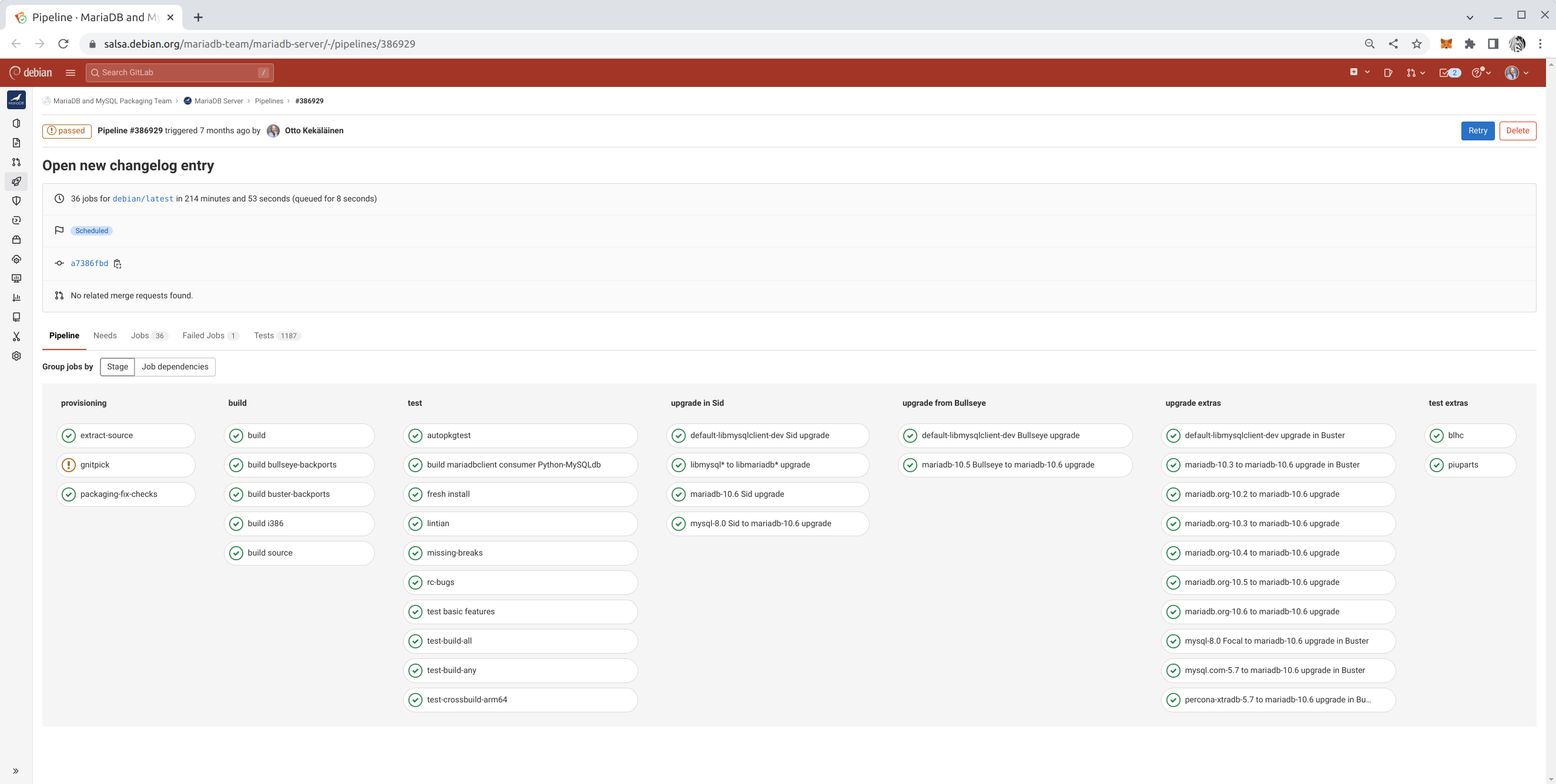
5. Integrate Salsa CI in all work One reason Debian remains popular, even 30 years after its inception, is due to its culture of maintaining high standards. For a newcomer, learning all the quality assurance tools such as Lintian, Piuparts, Adequate, various build variations, and reproducible builds may be overwhelming. However, these tasks are easier to manage thanks to Salsa CI, the continuous integration pipeline in Debian that runs tests on every commit at salsa.debian.org. The earlier you activate Salsa CI in the package repository you are working on, the faster you will achieve high quality in your package with fewer missteps. You can also further customize a package specific salsa-ci.yml to have more testing coverage. Example Salsa CI pipeline with customizations

6. Fork on Salsa and use draft Merge Requests to solicit feedback All modern Debian packages are hosted on salsa.debian.org. If you want to make a change to any package, it is easy to fork, make an initial attempt at the change, and publish it as a draft Merge Request (MR) on Salsa to solicit feedback. People might have surprising reasons to object to the change you propose, or they might need time to get used to the idea before agreeing to it. Also, some people might object to a vague idea out of suspicion but agree once they see the exact implementation. There may also be a surprising number of people supporting your idea, and if there is an MR, they have a place to show their support at. Don t expect every Merge Request to be accepted. However, proposing an idea as running code in an MR is far more effective than raising the idea on a mailing list or in a bug report. Get into the habit of publishing plenty of merge requests to solicit feedback and drive discussions toward consensus.

7. Use git rebase frequently Linear git history is much easier to read. The ease of reading git log and git blame output is vital in Debian, where packages often have updates from multiple people spanning many years even decades. Debian packagers likely spend more time than the average software developer reading git history. Make sure you master git commands such as gitk --all, git citool --amend, git commit -a --fixup <commit id>, git rebase -i --autosquash <target branch>, git cherry-pick <commit id 1> <id 2> <id 3>, and git pull --rebase. If rebasing is not done on your initiative, rest assured others will ask you to do it. Thus, if the commands above are familiar, rebasing will be quick and easy for you.

8. Reviews: give some, get some In open source, the larger a project becomes, the more it attracts contributions, and the bottleneck for its growth isn t how much code developers can create but how much code submissions can be properly reviewed. At the time of writing, the main Salsa group Debian has over 800 open merge requests pending reviews and approvals. Feel free to read and comment on any merge request you find. You don t have to be a subject matter expert to provide valuable feedback. Even if you don t have specific feedback, your comment as another human acknowledging that you read the MR and found no issues is viewed positively by the author. Besides, if you spend enough time reviewing MRs in a specific domain, you will eventually become an expert in it. Code reviews are not just about providing feedback to the submitter; they are also great learning opportunities for the reviewer. As a rule of thumb, you should review at least twice as many merge requests as you submit yourself.

9. Improve Debian by improving upstream It is common that while packaging software for Debian, bugs are uncovered and patched in Debian. Do not forget to submit the fixes upstream, and add a Forwarded field to the file in debian/patches! As the person building and packaging something in Debian, you automatically become an authority on that software, and the upstream is likely glad to receive your improvements. While submitting patches upstream is a bit of work initially, getting improvements merged upstream eventually saves time for everyone and makes packaging in Debian easier, as there will be fewer patches to maintain with each new upstream release.

10. Don t hold any habits too firmly Last but not least: Once people learn a specific way of working, they tend to stick to it for decades. Learning how to create and maintain Debian packages requires significant effort, and people tend to stop learning once they feel they ve reached a sufficient level. This tendency to get stuck in a local optimum is understandable and natural, but try to resist it. It is likely that better techniques will evolve over time, so stay humble and re-evaluate your beliefs and practices every few years. Mastering these habits takes time, but each small step brings you closer to making a meaningful impact on Debian. By staying curious, collaborative, and adaptable, you can ensure your contributions stand the test of time just like Debian itself. Good luck on your journey toward becoming a Debian Maintainer!

23 January 2025

Sergio Talens-Oliag: Ghostty Terminal Emulator

For a long time I ve been using the Terminator terminal emulator on Linux machines, but last week I read a LWN article about a new emulator called Ghostty that looked interesting and I decided to give it a try. The author sells it as a fast, feature-rich and cross-platform terminal emulator that follows the zero configuration philosophy.

Installation and configurationI installed the debian package for Ubuntu 24.04 from the ghostty-ubuntu project and started playing with it. The first thing I noticed is that the zero configuration part is true; I was able to use the terminal without a configuration file, although I created one to change the theme and the font size, but other than that it worked OK for me; my $HOME/.config/ghostty/config file is as simple as:
font-size=14
theme=/usr/share/ghostty/themes/iTerm2 Solarized Light

Starting the terminal maximizedAfter playing a little bit with the terminal I was turned off by the fact that there was no option to start it maximized, but is seemed to me that someone should have asked for the feature, or, if not, I could ask for it. I did a quick search on the project and I found out that there was a merged PR that added the option, so I downloaded the source code, installed Zig and built the program on my machine. As the change is going to be included on the next version on the package I replaced the binary with my version and started playing with the terminal.

Accessing remote machinesThe first thing I noticed was that when logging into remote machines using ssh the terminal variable was not known, but on the help section of the project documentation there was an entry about how to fix it copying the terminfo configuration to remote machines, it is as simple as running the following:
infocmp -x   ssh YOUR-SERVER -- tic -x -

Dead keys on UbuntuWith that sorted out everything looked good to me until I tried to add an accented character when editing a file and the terminal stopped working. Again, I looked at the project issues and found one that matched what was happening to me, and it remembered me about one of the best things about actively maintained open source software. It turns out that the issue is related to a bug on ibus, but other terminals were working right, so the ghostty developer was already working on a fix on the way the terminal handles the keyboard input on GTK, so I subscribed to the issue and stopped using ghostty until there was something new to try again (I use an Spanish keyboard map and I can t use a terminal that does not support dead keys). Yesterday I saw some messages about things being almost fixed, so I pulled the latest changes on my cloned repository, compiled it and writing accented characters works now, there is a small issue with the cursor (the dead key pressed is left on the block cursor unless you change the window focus), but that is something manageable for me.

ConclusionI think that ghostty is a good terminal emulator and I m going to keep using it on my laptop unless I find something annoying that I can t work with (i hope that the cursor issue will be fixed soon and I can live with it as the only thing I need to do to recover from it is changing the widow focus, and that can be done really quickly using keyboard shortcuts). As it is actively maintained and the developer seems to be quite active I don t expect problems and is nice to play with new things from time to time.

22 January 2025

Jonathan McDowell: Christmas Movies

I watch a lot of films. Since completing the IMDB Top 250 back in 2016 I ve kept an eye on it, and while I don t go out of my way to watch the films that newly appear in it I generally sit at over 240 watched. I should note I don t consider myself a film buff/critic, however. I watch things for enjoyment, and a lot of the time that s kicking back and relaxing and disengaging my brain. So I don t get into writing reviews, just high level lists of things I ve watched, sometimes with a few comments. With that in mind, let s talk about Christmas movies. Yes, I appreciate it s the end of January, but generally during December we watch things that have some sort of Christmas theme. New ones if we can find them, but also some of what we consider classics . This almost always starts with Scrooged after we ve put up the tree. I don t always like Bill Murray (I couldn t watch The Life Aquatic with Steve Zissou and I think Lost in Translation is overrated), but he s in a bunch of things I really like, and Scrooged is one of those. I don t care where you sit on whether Die Hard is a Christmas movie or not, it s a good movie and therefore regularly gets a December watch. Die Hard 2 also fits into that category of sequel at least as good as the original , though Helen doesn t agree. We watched it anyway, and I finally made the connection between the William Sadler hotel scene and Michael Rooker s in Mallrats. It turns out I m a Richard Curtis fan. Love Actually has not aged well; most times I watch it I find something new questionable about it, and I always end up hating Alan Rickman for cheating on Emma Thompson, but I do like watching it. He had a new one, That Christmas, out this year, so we watched it as well. Another new-to-us film this year was Spirited. I generally like Ryan Reynolds, and Will Ferrell is good as long as he s not too overboard, so I had high hopes. I enjoyed it, but for some reason not as much as I d expected, and I doubt it s getting added to the regular watch list. Larry doesn t generally like watching full length films, but he (and we), enjoyed The Grinch, which I actually hadn t seen before. He s not as fussed on The Muppet Christmas Carol, but we watched it every year, generally on Christmas or Boxing Day. Favourite thing I saw on the Fediverse in December was Do you know there s a book of The Muppet Christmas Carol, and they don t mention that there s muppets in it once? There are a various other light hearted Christmas films we regularly watch. This year included The Holiday (I have so many issues with even just the practicalities of a short notice house swap), and Last Christmas (lots of George Michael music, what s not to love? Also it was only on this watch through that we realised the lead character is the Mother of Dragons). We started, but could not finish, Carry On. I saw it described somewhere as copaganda, and that feels accurate. It does not accurately reflect any of my interactions with TSA at airports, especially during busy periods. Things we didn t watch this year, but are regularly in the mix, include Fatman, Violent Night (looking forward to the sequel, hopefully this year), and Lethal Weapon. Klaus is kinda at the other end of the spectrum, but very touching, and we ve watched it a couple of years now. Given what we seem to like, any suggestions for other films to add? It s nice to have enough in the mix that we get some variety every year.

20 January 2025

Dirk Eddelbuettel: RcppMsgPack 0.2.4 on CRAN: Maintenance

Another maintenance release of RcppMsgPack got onto CRAN today. MessagePack itself is an efficient binary serialization format. It lets you exchange data among multiple languages like JSON. But it is faster and smaller. Small integers are encoded into a single byte, and typical short strings require only one extra byte in addition to the strings themselves. RcppMsgPack brings both the C++ headers of MessagePack as well as clever code (in both R and C++) Travers wrote to access MsgPack-encoded objects directly from R. This is the first release in over six years, and contains mostly maintenance. One somewhat embarassing aspect is that Travers and I forgot about a PR that had been ready all this since the last release, it has now been integrated. Details follow from the NEWS file.

Changes in version 0.2.4 (2025-01-19)
  • Use Rcpp::RawVector instead of std::vector<unsigned char> saving extra copy (Travers in #16)
  • Several updates to README.md with R Journal paper, add badges, add Authors@R, add CITATION file, add repo info to DESCRIPTION
  • Update continuous integration via r-ci
  • Update to no longer require compilation standard

Courtesy of my CRANberries, there is also a diffstat report for this release. For questions, suggestions, or issues please use the [issue tracker][issue tickets] at the GitHub repo.

This post by Dirk Eddelbuettel originated on his Thinking inside the box blog. If you like this or other open-source work I do, you can now sponsor me at GitHub.

19 January 2025

Fran ois Marier: Blocking comment spammers on an Ikiwiki blog

Despite comments on my ikiwiki blog being fully moderated, spammers have been increasingly posting link spam comments on my blog. While I used to use the blogspam plugin, the underlying service was likely retired circa 2017 and its public repositories are all archived. It turns out that there is a relatively simple way to drastically reduce the amount of spam submitted to the moderation queue: ban the datacentre IP addresses that spammers are using.

Looking up AS numbers It all starts by looking at the IP address of a submitted comment: From there, we can look it up using whois:
$ whois -r 2a0b:7140:1:1:5054:ff:fe66:85c5
% This is the RIPE Database query service.
% The objects are in RPSL format.
%
% The RIPE Database is subject to Terms and Conditions.
% See https://docs.db.ripe.net/terms-conditions.html
% Note: this output has been filtered.
%       To receive output for a database update, use the "-B" flag.
% Information related to '2a0b:7140:1::/48'
% Abuse contact for '2a0b:7140:1::/48' is 'abuse@servinga.com'
inet6num:       2a0b:7140:1::/48
netname:        EE-SERVINGA-2022083002
descr:          servinga.com - Estonia
geoloc:         59.4424455 24.7442221
country:        EE
org:            ORG-SG262-RIPE
mnt-domains:    HANNASKE-MNT
admin-c:        CL8090-RIPE
tech-c:         CL8090-RIPE
status:         ASSIGNED
mnt-by:         MNT-SERVINGA
created:        2020-02-18T11:12:49Z
last-modified:  2024-12-04T12:07:26Z
source:         RIPE
% Information related to '2a0b:7140:1::/48AS207408'
route6:         2a0b:7140:1::/48
descr:          servinga.com - Estonia
origin:         AS207408
mnt-by:         MNT-SERVINGA
created:        2020-02-18T11:18:11Z
last-modified:  2024-12-11T23:09:19Z
source:         RIPE
% This query was served by the RIPE Database Query Service version 1.114 (SHETLAND)
The important bit here is this line:
origin:         AS207408
which referts to Autonomous System 207408, owned by a hosting company in Germany called Servinga.

Looking up IP blocks Autonomous Systems are essentially organizations to which IPv4 and IPv6 blocks have been allocated. These allocations can be looked up easily on the command line either using a third-party service:
$ curl -sL https://ip.guide/as207408   jq .routes.v4 >> servinga
$ curl -sL https://ip.guide/as207408   jq .routes.v6 >> servinga
or a local database downloaded from IPtoASN. This is what I ended up with in the case of Servinga:
[
  "45.11.183.0/24",
  "80.77.25.0/24",
  "194.76.227.0/24"
]
[
  "2a0b:7140:1::/48"
]

Preventing comment submission While I do want to eliminate this source of spam, I don't want to block these datacentre IP addresses outright since legitimate users could be using these servers as VPN endpoints or crawlers. I therefore added the following to my Apache config to restrict the CGI endpoint (used only for write operations such as commenting):
<Location /blog.cgi>
        Include /etc/apache2/spammers.include
        Options +ExecCGI
        AddHandler cgi-script .cgi
</Location>
and then put the following in /etc/apache2/spammers.include:
<RequireAll>
    Require all granted
    # https://ipinfo.io/AS207408
    Require not ip 46.11.183.0/24
    Require not ip 80.77.25.0/24
    Require not ip 194.76.227.0/24
    Require not ip 2a0b:7140:1::/48
</RequireAll>
Finally, I can restart the website and commit my changes:
$ apache2ctl configtest && systemctl restart apache2.service
$ git commit -a -m "Ban all IP blocks from Servinga"

Future improvements I will likely automate this process in the future, but at the moment my blog can go for a week without a single spam message (down from dozens every day). It's possible that I've already cut off the worst offenders. I have published the list I am currently using.

Petter Reinholdtsen: 121 packages in Debian mapped to hardware for automatic recommendation

For some years now, I have been working on a automatic hardware based package recommendation system for Debian and other Linux distributions. The isenkram system I started on back in 2013 now consist of two subsystems, one locating firmware files using the information provided by apt-file, and one matching hardware to packages using information provided by AppStream. The former is very similar to the mechanism implemented in debian-installer to pick the right firmware packages to install. This post is about the latter system. Thanks to steady progress and good help from both other Debian and upstream developers, I am happy to report that the Isenkram system now are able to recommend 121 packages using information provided via AppStream. The mapping is done using modalias information provided by the kernel, the same information used by udev when creating device files, and the kernel when deciding which kernel modules to load. To get all the modalias identifiers relevant for your machine, you can run the following command on the command line:
find /sys/devices -name modalias -print0   xargs -0 sort -u
The modalias identifiers can look something like this:
acpi:PNP0000
cpu:type:x86,ven0000fam0006mod003F:feature:,0000,0001,0002,0003,0004,0005,0006,0007,0008,0009,000B,000C,000D,000E,000F,0010,0011,0013,0015,0016,0017,0018,0019,001A,001B,001C,001D,001F,002B,0034,003A,003B,003D,0068,006B,006C,006D,006F,0070,0072,0074,0075,0076,0078,0079,007C,0080,0081,0082,0083,0084,0085,0086,0087,0088,0089,008B,008C,008D,008E,008F,0091,0092,0093,0094,0095,0096,0097,0098,0099,009A,009B,009C,009D,009E,00C0,00C5,00E1,00E3,00EB,00ED,00F0,00F1,00F3,00F5,00F6,00F9,00FA,00FB,00FD,00FF,0100,0101,0102,0103,0111,0120,0121,0123,0125,0127,0128,0129,012A,012C,012D,0140,0160,0161,0165,016C,017B,01C0,01C1,01C2,01C4,01C5,01C6,01F9,024A,025A,025B,025C,025F,0282
dmi:bvnDellInc.:bvr2.18.1:bd08/14/2023:br2.18:svnDellInc.:pnPowerEdgeR730:pvr:rvnDellInc.:rn0H21J3:rvrA09:cvnDellInc.:ct23:cvr:skuSKU=NotProvided
pci:v00008086d00008D3Bsv00001028sd00000600bc07sc80i00
platform:serial8250
scsi:t-0x05
usb:v413CpA001d0000dc09dsc00dp00ic09isc00ip00in00
The entries above are a selection of the complete set available on a Dell PowerEdge R730 machine I have access to, to give an idea about the various styles of hardware identifiers presented in the modalias format. When looking up relevant packages in a Debian Testing installation on the same R730, I get this list of packages proposed:
% sudo isenkram-lookup
firmware-bnx2x
firmware-nvidia-graphics
firmware-qlogic
megactl
wsl
%
The list consist of firmware packages requested by kernel modules, as well packages with program to get the status from the RAID controller and to maintain the LAN console. When the edac-utils package providing tools to check the ECC RAM status will enter testing in a few days, it will also show up as a proposal from isenkram. In addition, once the mfiutil package we uploaded in October get past the NEW processing, it will also propose a tool to configure the RAID controller. Another example is the trusty old Lenovo Thinkpad X230, which have hardware handled by several packages in the archive. This is running on Debian Stable:
% isenkram-lookup 
beignet-opencl-icd
bluez
cheese
ethtool
firmware-iwlwifi
firmware-misc-nonfree
fprintd
fprintd-demo
gkrellm-thinkbat
hdapsd
libpam-fprintd
pidgin-blinklight
thinkfan
tlp
tp-smapi-dkms
tpb
%
Here there proposal consist of software to handle the camera, bluetooth, network card, wifi card, GPU, fan, fingerprint reader and acceleration sensor on the machine. Here is the complete set of packages currently providing hardware mapping via AppStream in Debian Unstable: air-quality-sensor, alsa-firmware-loaders, antpm, array-info, avarice, avrdude, bmusb-v4l2proxy, brltty, calibre, colorhug-client, concordance-common, consolekit, dahdi-firmware-nonfree, dahdi-linux, edac-utils, eegdev-plugins-free, ekeyd, elogind, firmware-amd-graphics, firmware-ath9k-htc, firmware-atheros, firmware-b43-installer, firmware-b43legacy-installer, firmware-bnx2, firmware-bnx2x, firmware-brcm80211, firmware-carl9170, firmware-cavium, firmware-intel-graphics, firmware-intel-misc, firmware-ipw2x00, firmware-ivtv, firmware-iwlwifi, firmware-libertas, firmware-linux-free, firmware-mediatek, firmware-misc-nonfree, firmware-myricom, firmware-netronome, firmware-netxen, firmware-nvidia-graphics, firmware-qcom-soc, firmware-qlogic, firmware-realtek, firmware-ti-connectivity, fpga-icestorm, g810-led, galileo, garmin-forerunner-tools, gkrellm-thinkbat, goldencheetah, gpsman, gpstrans, gqrx-sdr, i8kutils, imsprog, ledger-wallets-udev, libairspy0, libam7xxx0.1, libbladerf2, libgphoto2-6t64, libhamlib-utils, libm2k0.9.0, libmirisdr4, libnxt, libopenxr1-monado, libosmosdr0, librem5-flash-image, librtlsdr0, libticables2-8, libx52pro0, libykpers-1-1, libyubikey-udev, limesuite, linuxcnc-uspace, lomoco, madwimax, media-player-info, megactl, mixxx, mkgmap, msi-keyboard, mu-editor, mustang-plug, nbc, nitrokey-app, nqc, ola, openfpgaloader, openocd, openrazer-driver-dkms, pcmciautils, pcscd, pidgin-blinklight, ponyprog, printer-driver-splix, python-yubico-tools, python3-btchip, qlcplus, rosegarden, scdaemon, sispmctl, solaar, spectools, sunxi-tools, t2n, thinkfan, tlp, tp-smapi-dkms, trezor, tucnak, ubertooth, usbrelay, uuu, viking, w1retap, wsl, xawtv, xinput-calibrator, xserver-xorg-input-wacom and xtrx-dkms. In addition to these, there are several with patches pending in the Debian bug tracking system, and even more where no-one wrote patches yet. Good candiates for the latter are packages with udev rules but no AppStream hardware information. The isenkram system consist of two packages, isenkram-cli with the command line tools, and isenkram with a GUI background process. The latter will listen for dbus events from udev emitted when new hardware become available (like when inserting a USB dongle or discovering a new bluetooth device), look up the modalias entry for this piece of hardware in AppStream (and a hard coded list of mappings from isenkram - currently working hard to move this list to AppStream), and pop up a dialog proposing to install any not already installed packages supporting this hardware. It work very well today when inserting the LEGO Mindstorms RCX, NXT and EV3 controllers. :) If you want to make sure more hardware related packages get recommended, please help out fixing the remaining packages in Debian to provide AppStream metadata with hardware mappings. As usual, if you use Bitcoin and want to show your support of my activities, please send Bitcoin donations to my address 15oWEoG9dUPovwmUL9KWAnYRtNJEkP1u1b.

18 January 2025

Petter Reinholdtsen: What is the most supported MIME type in Debian in 2025?

Seven and twelve years ago, I measured what the most supported MIME type in Debian was, first by analysing the desktop files in all packages in the archive, then by analysing the DEP-11 AppStream data set. I guess it is time to repeat the measurement, only for unstable as last time: Debian Unstable:
  count MIME type
  ----- -----------------------
     63 image/png
     63 image/jpeg
     57 image/tiff
     54 image/gif
     51 image/bmp
     50 audio/mpeg
     48 text/plain
     42 audio/x-mp3
     40 application/ogg
     39 audio/x-wav
     39 audio/x-flac
     36 audio/x-vorbis+ogg
     35 audio/x-mpeg
     34 audio/x-mpegurl
     34 audio/ogg
     33 application/x-ogg
     32 audio/mp4
     31 audio/x-scpls
     31 application/pdf
     29 audio/x-ms-wma
The list was created like this using a sid chroot:
cat /var/lib/apt/lists/*sid*_dep11_Components-amd64.yml.gz   \
  zcat   awk '/^  - \S+\/\S+$/  print $2  '   sort   \
  uniq -c   sort -nr   head -20
It is nice to see that the same number of packages now support PNG and JPEG. Last time JPEG had more support than PNG. Most of the MIME types are known to me, but the 'audio/x-scpls' one I have no idea what represent, except it being an audio format. To find the packages claiming support for this format, the appstreamcli command from the appstream package can be used:
% appstreamcli what-provides mediatype audio/x-scpls   grep Package:   sort -u
Package: alsaplayer-common
Package: amarok
Package: audacious
Package: brasero
Package: celluloid
Package: clapper
Package: clementine
Package: cynthiune.app
Package: elisa
Package: gtranscribe
Package: kaffeine
Package: kmplayer
Package: kylin-burner
Package: lollypop
Package: mediaconch-gui
Package: mediainfo-gui
Package: mplayer-gui
Package: mpv
Package: mystiq
Package: parlatype
Package: parole
Package: pragha
Package: qmmp
Package: rhythmbox
Package: sayonara
Package: shotcut
Package: smplayer
Package: soundconverter
Package: strawberry
Package: syncplay
Package: vlc
%
Look like several video and auto tools understand the format. Similarly one can check out the number of packages supporting the STL format commonly used for 3D printing:
% appstreamcli what-provides mediatype model/stl   grep Package:   sort -u
Package: cura
Package: freecad
Package: open3d-viewer
%
How strange the slic3r and prusa-slicer packages do not support STL. Perhaps just missing package metadata? Luckily the amount of package metadata in Debian is getting better, and hopefully this way of locating relevant packages for any file format will be the preferred one soon. As usual, if you use Bitcoin and want to show your support of my activities, please send Bitcoin donations to my address 15oWEoG9dUPovwmUL9KWAnYRtNJEkP1u1b.

Dominique Dumont: How we solved storage API throttling on our Azure Kubernetes clusters

Hi This issue was quite puzzling, so I m sharing how we investigated this issue. I hope it can be useful for you. My client informed me that he was no longer able to install new instances of his application. k9s showed that only some pods could not be created, only the ones that created physical volume (PV). The description of these pods showed a HTTP error 429 when creating pods: New PVC could not be created because we were throttled by Azure storage API. This issue was confirmed by Azure diagnostic console on Kubernetes ( menu Diagnose and solve problems Cluster and Control Plane Availability and Performance Azure Resource Request Throttling ). We had a lot of throttling:
2025-01-18_11-01-k8s-throttles.png
Which were explained by the high call rate:
2025-01-18_11-01-k8s-calls.png
The first clue was found at the bottom of Azure diagnostic page:
2025-01-18_11-27-throttles-by-user-agent.png
According, to this page, throttling is done by services whose user agent is:
Go/go1.23.1 (amd64-linux) go-autorest/v14.2.1 Azure-SDK-For-Go/v68.0.0
storage/2021-09-01microsoft.com/aks-operat azsdk-go-armcompute/v1.0.0 (go1.22.3; linux)
The main information is Azure-SDK-For-Go, which means the program making all these calls to storage API is written in Go. All our services are written in Typescript or Rust, so they are not suspect. That leaves controllers running in kube-systems namespace. I could not find anything suspects in the logs of these services. At that point I was convinced that a component in Kubernetes control plane was making all those calls. Unfortunately, AKS is managed by Microsoft and I don t have access to the control plane logs. However, we re realized that we had quite a lot of volumesnapshots that are created in our clusters using k8s-scheduled-volume-snapshotter: We suspected that kubernetes reconciliation loop is throttled when checking the status of all these snapshots. May be so, but we also had the same issues and throttle rates on preprod and prod were the number of snapshots were quite different. We tried to get more information using Azure console on our snapshot account, but it was also broken by the throttling issue. We were so puzzled that we decided to try L odagan s advice (tout cr mer pour repartir sur des bases saines, loosely translated as burn everything down to start from scratch ) and we destroyed piece by piece our dev cluster while checking if the throttling stopped. First, we removed all our applications, no change. Then, all ancillary components like rabbitmq, cert-manager were removed, no change. Then, we tried remove the namespace containing our applications. But, we faced another issue: Kubernetes was unable to remove the namespace because it could not destroy some PVC and volumesnapshots. That was actually good news, because it meant that we were close to the actual issue. We managed to destroy the PVC and volumesnapshots by removing their finalizers. Finalizers are some kind of markers that tell kubernetes that something needs to be done before actually deleting a resource. The finalizers were removed with a command like:
kubectl patch volumesnapshots $ volumesnapshot  \
  -p ' \"metadata\": \"finalizers\":null '  --type merge
Then, we got the first progress : the throttling and high call rate stopped on our dev cluster. To make sure that the snapshots were the issue, we re-installed the ancillary components and our applications. Everything was copacetic. So, the problem was indeed with PVC and snapshots. Even though we have backups outside of Azure, we weren t really thrilled at trying L odagan s method on our prod cluster So we looked for a better fix to try on our preprod cluster. Poking around in PVC and volumesnapshots, I finally found this error message in the description on a volumesnapshotcontents:
Code="ShareSnapshotCountExceeded" Message="The total number of snapshots
for the share is over the limit."
The number of snapshots found in our cluster was not that high. So I wanted to check the snapshots present in our storage account using Azure console, which was still broken. Fortunately, Azure CLI is able to retry HTTP calls when getting 429 errors. I managed to get a list of snapshots with
az storage share list --account-name [redacted] --include-snapshots \
      tee preprod-list.json
There, I found a lot of snapshots dating back from 2024. These were no longer managed by Kubernetes and should have been cleaned up. That was our smoking gun. I guess that we had a chain of events like: To make things worse, k8s-scheduled-volume-snapshotter creates new snapshots when it cannot list the old ones. So we had 4 new snapshots per day instead of one. Since we had the chain of events, fixing the issue was not too difficult (but quite long ):
  1. stop k8s-scheduled-volume-snapshotter by disabling its cron job
  2. delete all volumesnapshots and volume snapshots contents from k8s.
  3. since Azure API was throttled, we also had to remove their finalizers
  4. delete all snapshots from azure using az command and a Perl script (this step took several hours)
  5. re-enable k8s-scheduled-volume-snapshotter
After these steps, preprod was back to normal. I m now applying the same recipe on prod. We still don t know why we had all these stale snapshots. It may have been a human error or a bug in k8s-scheduled-volume-snapshotter. Anyway, to avoid this problem is the future, we will: My name is Dominique Dumont, I m a devops freelance. You can find the devops and audit services I propose on my website or reach out to me on LinkedIn. All the best

17 January 2025

Russell Coker: Systemd Hardening and Sending Mail

A feature of systemd is the ability to reduce the access that daemons have to the system. The restrictions include access to certain directories, system calls, capabilities, and more. The systemd.exec(5) man page describes them all [1]. To see an overview of the security of daemons run systemd-analyze security and to get details of one particular daemon run a command like systemd-analyze security mon.service . I created a Debian wiki page for a systemd-analyze security goal [2]. At this time release goals aren t a serious thing for Debian so this won t result in release critical bug reports, but it is still something we can aim for. For a simple daemon (EG BIND, dhcpd, and syslogd) this isn t difficult to do. It might be difficult to understand the implications of some changes (especially when restricting system calls) but you can do some quick tests. The functionality of such programs has a limited scope and once you get it basically working it s done. For some daemons it s harder. Network-Manager is one of the well known slightly more difficult cases as it could do things like starting a VPN connection. The larger scope and the use of plugins makes it difficult to test the combinations. The systemd restrictions apply to child processes too unlike restrictions by SE Linux and AppArmor which permit a child process to run in a different security context. The messages when a daemon fails due to systemd restrictions are usually unclear which makes things harder to setup and makes it more important to get it right. My mon package (which I forked upstream as etbe-mon [3] is one of the difficult daemons as local test can involve probing large parts of the system. But I have got that working reasonably well for most cases. I have a bug report about running mon with Exim [4]. The problem with this is that Exim has a single process model which means that the process doing local delivery can be a child of the process that initially received the message. So the main mon process needs all the access for delivering mail (writing to /home etc). This also means that every other child of mon will get such access including programs that receive untrusted data from the Internet. Most of the extra access needed by Exim is not a problem, but /home access is a potential risk. It also means that more effort is needed when reviewing the access control. The problem with this Exim design is that it applies to many daemons. Every daemon that sends email or that potentially could send email in some configuration needs extra access to be granted. Can Exim be configured to have it s sendmail -T type operation just write a file in a spool directory for another program to process? Do we need to grant permissions to most of the system just for Exim?

Michael Ablassmeier: sshcont

Due to circumstances: sshcont: ssh daemon that starts and enters a throwaway docker container for testing

16 January 2025

Sergio Talens-Oliag: Command line tools to process templates

I ve always been a fan of template engines that work with text files, mainly to work with static site generators, but also to generate code, configuration files, and other text-based files. For my own web projects I used to go with Jinja2, as all my projects were written in Python, while for static web sites I used the template engines included with the tools I was using, i.e. Liquid with Jekyll and Go Templates (based on the text/template and the html/template go packages) for Hugo. When I needed to generate code snippets or configuration files from shell scripts I used to go with sed and/or envsubst, but lately things got complicated and I started to use a command line application called tmpl that uses the Go Template Language with functions from the Sprig library.

tmplI ve been using my fork of the tmpl program to process templates on CI/CD pipelines (gitlab-ci) to generate configuration files and code snippets because it uses the same syntax used by helm (easier to use by other DevOps already familiar with the format) and the binary is small and can be easily included into the docker images used by the pipeline jobs. One interesting feature of the tmpl tool is that it can read values from command line arguments and from multiple files in different formats (YAML, JSON, TOML, etc) and merge them into a single object that can be used to render the templates. There are alternatives to the tmpl tool and I ve looked at them (i.e. simple ones like go-template-cli or complex ones like gomplate), but I haven t found one that fits my needs. For my next project I plan to evaluate a move to a different tool or template format, as tmpl is not being actively maintained (as I said, I m using my own fork) and it is not included on existing GNU/Linux distributions (I packaged it for Debian and Alpine, but I don t want to maintain something like that without an active community and I m not interested in being the upstream myself, as I m trying to move to Rust instead of Go as the compiled programming language for my projects).

Mini JinjaLooking for alternate tools to process templates on the command line I found the minijinja rust crate, a minimal implementation of the Jinja2 template engine that also includes a small command line utility (minijinja-cli) and I believe I ll give it a try on the future for various reasons:
  • I m already familiar with the Jinja2 syntax and it is widely used on the industry.
  • On my code I can use the original Jinja2 module for Python projects and MiniJinja for Rust programs.
  • The included command line utility is small and easy to use, and the binaries distributed by the project are good enough to add them to the docker container images used by CI/CD pipelines.
  • As I want to move to Rust I can try to add functionalities to the existing command line client or create my own version of it if they are needed (don t think so, but who knows).

13 January 2025

Kentaro Hayashi: Stick to boot from 6.11 linux-image

Since Dec 2024, there is a compatibility issue with linux-image 6.12 and nvidia-driver 535.216.03. #1089513 - nvidia-driver: crash in drm_open_helper on Linux 6.12.3 - Debian Bug report logs It seems that the upstream was already fixed this issue in newer release, but not available yet on Debian sid. If you keep installed linux-image-amd64 or linux-headers-amd64, it will be booted from 6.12 by default. Surely it will boot, but it still has the resolution issue. It can't be your daily driver. Thus workaround is sticking to boot from 6.11 linux-image. As usually older image was listed in "Advanced options for ..." submenu, you need to explicitly choose 6.11 image during booting. In such a case, the changing default boot image is useful. (another option is just purge all 6.12 linux-image, linux-image-amd64 and linux-headers-amd64, but it's out of scope in this article) See /boot/grub/grub.cfg and collect each menuentry_id_option. You need to collect the following menuentry id. Then, edit GRUB_DEFAULT entry in /etc/default/grub. GRUB_DEFAULT should be combination with [1] and [2] which is concatenated with ">" e.g. NOTE: the actual value might vary on your environment

GRUB_DEFAULT="gnulinux-advanced-2e0e7dd0-7e10-4b58-92f7-518dabb5b547>gnulinux-6.11.10-amd64-advanced-2e0e7dd0-7e10-4b58-92f7-518dabb5b547"
After that, update grub entry with sudo update-grub. /boot/grub/grub.cfg will be updated correctly.

Freexian Collaborators: Monthly report about Debian Long Term Support, December 2024 (by Roberto C. S nchez)

Like each month, have a look at the work funded by Freexian s Debian LTS offering.

Debian LTS contributors In December, 19 contributors have been paid to work on Debian LTS, their reports are available:
  • Abhijith PA did 14.0h (out of 14.0h assigned).
  • Adrian Bunk did 47.75h (out of 53.0h assigned and 47.0h from previous period), thus carrying over 52.25h to the next month.
  • Andrej Shadura did 6.0h (out of 17.0h assigned and -7.0h from previous period after hours given back), thus carrying over 4.0h to the next month.
  • Bastien Roucari s did 22.0h (out of 22.0h assigned).
  • Ben Hutchings did 15.0h (out of 0.0h assigned and 18.0h from previous period), thus carrying over 3.0h to the next month.
  • Chris Lamb did 18.0h (out of 18.0h assigned).
  • Daniel Leidert did 23.0h (out of 17.0h assigned and 9.0h from previous period), thus carrying over 3.0h to the next month.
  • Emilio Pozuelo Monfort did 32.25h (out of 40.5h assigned and 19.5h from previous period), thus carrying over 27.75h to the next month.
  • Guilhem Moulin did 22.5h (out of 9.75h assigned and 12.75h from previous period).
  • Jochen Sprickerhof did 2.0h (out of 3.5h assigned and 6.5h from previous period), thus carrying over 8.0h to the next month.
  • Lee Garrett did 8.5h (out of 14.75h assigned and 45.25h from previous period), thus carrying over 51.5h to the next month.
  • Lucas Kanashiro did 32.0h (out of 10.0h assigned and 54.0h from previous period), thus carrying over 32.0h to the next month.
  • Markus Koschany did 40.0h (out of 20.0h assigned and 20.0h from previous period).
  • Roberto C. S nchez did 13.5h (out of 6.75h assigned and 17.25h from previous period), thus carrying over 10.5h to the next month.
  • Santiago Ruano Rinc n did 18.75h (out of 24.75h assigned and 0.25h from previous period), thus carrying over 6.25h to the next month.
  • Sean Whitton did 6.0h (out of 2.0h assigned and 4.0h from previous period).
  • Sylvain Beucler did 10.5h (out of 21.5h assigned and 38.5h from previous period), thus carrying over 49.5h to the next month.
  • Thorsten Alteholz did 11.0h (out of 11.0h assigned).
  • Tobias Frost did 12.0h (out of 12.0h assigned).

Evolution of the situation In December, we have released 29 DLAs. The LTS Team has published updates to several notable packages. Contributor Guilhem Moulin published an update of php7.4, a widely-used open source general purpose scripting language, which addressed denial of service, authorization bypass, and information disclosure vulnerabilities. Contributor Lucas Kanashiro published an update of clamav, an antivirus toolkit for Unix and Linux, which addressed denial of service and authorization bypass vulnerabilities. Finally, contributor Tobias Frost published an update of intel-microcode, the microcode for Intel microprocessors, which well help to ensure that processor hardware is protected against several local privilege escalation and local denial of service vulnerabilities. Beyond our customary LTS package updates, the LTS Team has made contributions to Debian s stable bookworm release and its experimental section. Notably, contributor Lee Garrett published a stable update of dnsmasq. The LTS update was previously published in November and in December Lee continued working to bring the same fixes (addressing the high profile KeyTrap and NSEC3 vulnerabilities) to the dnsmasq package in Debian bookworm. This package was accepted for inclusion in the Debian 12.9 point release scheduled for January 2025. Addititionally, contributor Sean Whitton provided assistance, via upload sponsorships, to the Debian maintainers of xen. This assistance resulted in two uploads of xen into Debian s experimental section, which will contribute to the next Debian stable release having a version of xen with better longterm support from the upstream development team.

Thanks to our sponsors Sponsors that joined recently are in bold.

Next.

Previous.