Search Results: "js"

9 January 2014

Daniel Pocock: JSCommunicator to power DruCall 2.x

JSCommunicator 1.0.0 appeared over the festive season, making it even easier for people to build WebRTC real-time voice and video capabilities into their web sites. In fact, it is so easy to use that I was simply able to drop it over the top of the drupal-phone.tpl.php template file in DruCall, tweak the drucall.js module to call JSCommManager.init() and DruCall is now the first solid implementation of JSCommunicator. Put it to the test Before pushing this new version out to the community, it is undergoing some testing / baptism by fire. Lumicall recently announced free calling from desktop browser to mobile app powered by JsSIP's "tryit" demo code. The DruCall module has now been deployed here on the Lumicall website as a parallel solution to access the same free calling service. Browser version sensitivity WebRTC is the next big thing: it won't work in old browsers. It depends on JavaScript. At best, we aim to give some helpful error when it can not run. CSS styling opportunity JSCommunicator comes from server-side developers rather than web developers. It provides a solid communications tool but it doesn't look great. The project aims to be a HTML fragment that can drop into just about any page on any web site, so it has been designed to be as raw as possible and allow the styling of the existing web site to influence it. Nonetheless, it could still look a little bit nicer and I would be delighted to see any CSS-based skins that people may develop to enhance it. This is a phone: and now this is too:


and here it is in HTML

6 January 2014

Vincent Sanders: NetSurf Developer Workshop Redux

The NetSurf Developers bringing you alternative LOLcat viewing software since 2002Once again the NetSurf developers congregated in Cambridge at the Collabora offices where we were made welcome in a nice environment for the event.

Five developers managed to attend from around the UK Rob Kendrick, Vincent Sanders, Daniel Silverstone, John-Mark Bell and Michael Drake. We also had Chris Young and Fran ois Revol providing some bug fixes remotely.

This was the first time we had all met since the previous event towards the end of 2012 and we took full advantage of this to discuss a pretty extensive agenda in addition to the practical programming tasks.

From Friday lunchtime through to Sunday evening we managed 30 hours of work consisting of over 70 commits to over 100 files.

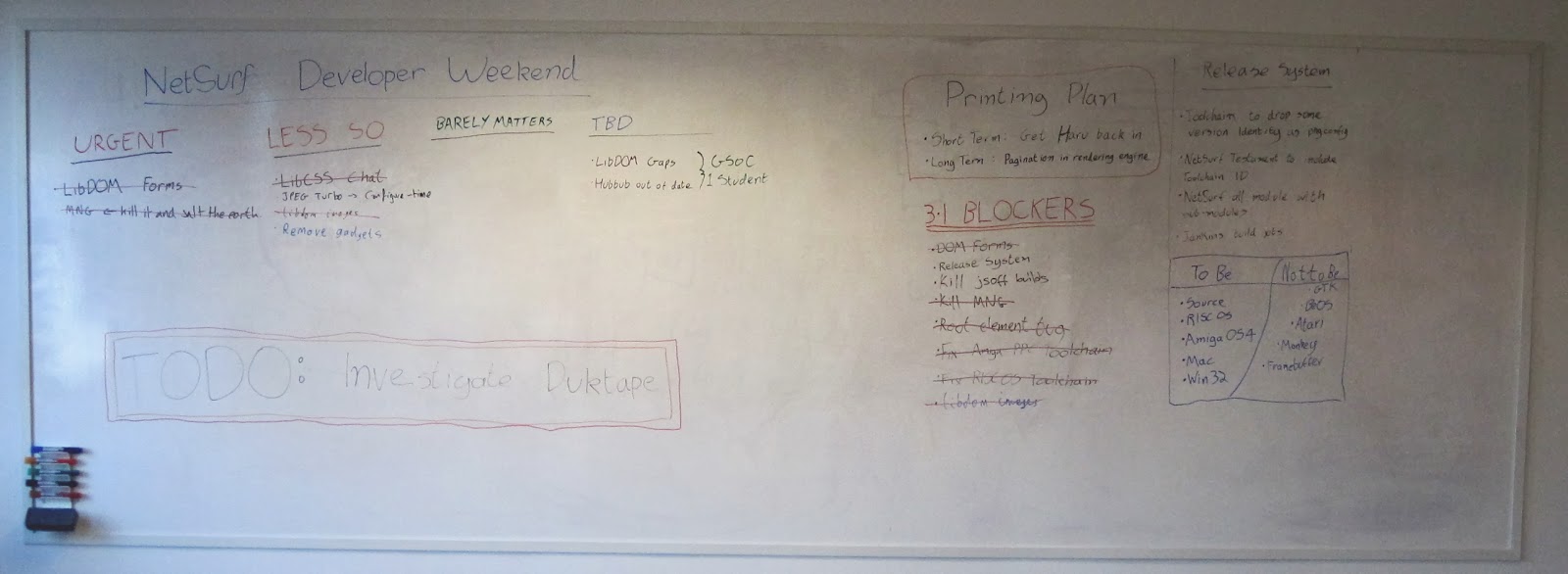
The whiteboard of our notes

Our main focus was working towards a 3.1 release which is scheduled for early April. Along with the source the release will have binary builds for RISC OS, AmigaOS, Windows and Mac OS X (x86 and ppc). Although the NetSurf project will not be directly releasing binaries for the GTK and Framebuffer frontends we will be ensuring the Debian packages are updated which is our prefered method of distribution for those targets.

We analysed the 3.0 release and formulated an improved process for the future. The 3.1 release will be generated automatically by the CI system ensuring constant results and removing the problems we encountered previously.

A set of release blocking issues was derived which we used as a task list during the workshop.The majority of these were completed including:
DOM based forms
Web forms are a feature Netsurf has supported for a long time and their implementation has not kept up with the rest of the browser. This is a long standing problem area which has resulted in numerous strange bugs with form submission. With this change the form system has been reworked to correctly operate directly from the DOM resulting in the squashing of a large number of bugs and a much improved user experience.

DOM based image loading
Up to now image fetching was performed only during the rendering of a page. With this change when the image link is placed into the DOM during the page parse it is scheduled to be fetched, this should give an improved user experience as images should be available earlier in a pages render.

Removal of MNG support
NetSurf has supported MNG since the 1.0 release, indeed the MNG library used to provide the PNG support too though we have long ago transitioned to libPNG. Alas the web has moved on and MNG has been largely forgotten, the libMNG library that performs the image decoding is old and generally unsupported specifically lacking security updates.

The build issues with libMNG (lack of pkg-config, reliance on libcms1 etc.) were causing maintenance issues in code nobody was actually using (there were crash bugs discovered during its removal!). Because of these issues it was decided to join the vast majority of browsers and remove support for this format.
The developers also addressed several issues with toolchain construction and a number of annoying usability bugs.

Plans for how to improve printing support we made. Initially we intend to fix the existing haru based pdf generation using this to print via pdf and in future have correct css styled page paginated printing render output.

The perennial issue of javascript was discussed however, while efforts to improve the existing support are ongoing, our usage of the spidermonkey library continues to raise various challenges including platform support and API changes between versions.

Due to these issues it has been suggested that we might add support for using the duktape JS engine instead, initial results are promising but given the size of the task of implementing an additional javascript engine binding further investigation is necessary before making a commitment.

Amongst the other discussions the group has also agreed that we will once again apply to be a GSoC organisation for a single student with some very focused projects:
  • Improving our HTML5 parser (hubbub)
  • Improving the DOM library implementing missing functionality.
While neither of these projects are as fashionable as some of our previous proposals they are well defined enough that as a group we believe we could offer enough support to the student to make their experience a pleasurable one and get the resulting code reviewed and merged promptly.

This event was very successful with a great deal achieved, the project is much more likely to be in a good shape to release 3.1 by April now and the meeting has given the developers a much welcomed boost.

I would like to extend the groups thanks to Robert McQueen for letting us use the Collabora offices, Dor e Carrier for organising all the administrative things and to Vivek Dasmohapatra for coming out on his Sunday afternoon to let us back in after locking ourselves out.


5 January 2014

Lisandro Damián Nicanor Pérez Meyer: Qt 5.2.0 in Debian experimental, now available for more archs

Qt 5.2.0 is already available in experimental until we get a transition slot, but don't be afraid to test it. With this release we had major improvements. With 5.1.1 currently in sid we have the following buildd chart:

Qt 5.1.1 in Debian Sid
Now with 5.2.0 in Debian experimental we have:

Qt 5.2.0 in Debian experimental

As you can see Qt has compiled in more archs, thanks to the effort of the Debian's porters and from the Qt/KDE team.

Note that Qt JS Backend has dissapeared: it's functionality (the javascript engine) is now in Qt Declarative itself. It has been ported away from Google's v8 to a Qt-based engine, allowing it to build in more archs among other features.

You can also note that we still have quite some FTBFS, mostly coming from Qt Webkit. Feel free to send patches ;-)

1 January 2014

Vincent Bernat: Testing infrastructure with serverspec

Checking if your servers are configured correctly can be done with IT automation tools like Puppet, Chef, Ansible or Salt. They allow an administrator to specify a target configuration and ensure it is applied. They can also run in a dry-run mode and report servers not matching the expected configuration. On the other hand, serverspec is a tool to bring the well known RSpec, a testing tool for the Ruby programming language frequently used for test-driven development, to the infrastructure world. It can be used to remotely test server state through an SSH connection. Why one would use such an additional tool? Many things are easier to express with a test than with a configuration change, like for example checking that a service is correctly installed by checking it is listening to some port.

Getting started Good knowledge of Ruby may help but is not a prerequisite to the use of serverspec. Writing tests feels like writing what we expect in plain English. If you think you need to know more about Ruby, here are two short resources to get started: serverspec s homepage contains a short and concise tutorial on how to get started. Please, read it. As a first illustration, here is a test checking a service is correctly listening on port 80:
describe port(80) do
  it   should be_listening  
end
The following test will spot servers still running with Debian Squeeze instead of Debian Wheezy:
describe command("lsb_release -d") do
  it   should return_stdout /wheezy/  
end
Conditional tests are also possible. For example, we want to check the miimon parameter of bond0, but only when the interface is present:
has_bond0 = file('/sys/class/net/bond0').directory?
# miimon should be set to something other than 0, otherwise, no checks
# are performed.
describe file("/sys/class/net/bond0/bonding/miimon"), :if => has_bond0 do
  it   should be_file  
  its(:content)   should_not eq "0\n"  
end
serverspec comes with a complete documentation of available resource types (like port and command) that can be used after the keyword describe. When a test is too complex to be expressed with simple expectations, it can be specified with arbitrary commands. In the below example, we check if memcached is configured to use almost all the available system memory:
# We want memcached to use almost all memory. With a 2GB margin.
describe "memcached" do
  it "should use almost all memory" do
    total = command("vmstat -s   head -1").stdout #  
    total = /\d+/.match(total)[0].to_i
    total /= 1024
    args = process("memcached").args #  
    memcached = /-m (\d+)/.match(args)[1].to_i
    (total - memcached).should be > 0
    (total - memcached).should be < 2000
  end
end
A bit more arcane, but still understandable: we combine arbitrary shell commands (in ) and use of other serverspec resource types (in ).

Advanced use Out of the box, serverspec provides a strong fundation to build a compliance tool to be run on all systems. It comes with some useful advanced tips, like sharing tests among similar hosts or executing several tests in parallel. I have setup a GitHub repository to be used as a template to get the following features:
  • assign roles to servers and tests to roles;
  • parallel execution;
  • report generation & viewer.

Host classification By default, serverspec-init generates a template where each host has its own directory with its unique set of tests. serverspec only handles test execution on remote hosts: the test execution flow (which tests are executed on which servers) is delegated to some Rakefile1. Instead of extracting the list of hosts to test from a directory hiearchy, we can extract it from a file (or from an LDAP server or from any source) and attach a set of roles to each of them:
hosts = File.foreach("hosts")
  .map    line  line.strip  
  .map do  host 
   
    :name => host.strip,
    :roles => roles(host.strip),
   
end
The roles() function should return a list of roles for a given hostname. It could be something as simple as this:
def roles(host)
  roles = [ "all" ]
  case host
  when /^web-/
    roles << "web"
  when /^memc-/
    roles << "memcache"
  when /^lb-/
    roles << "lb"
  when /^proxy-/
    roles << "proxy"
  end
  roles
end
In the snippet below, we create a task for each server as well as a server:all task that will execute the tests for all hosts (in ). Pay attention, in , at how we attach the roles to each server.
namespace :server do
  desc "Run serverspec to all hosts"
  task :all => hosts.map    h  h[:name]   #  
  hosts.each do  host 
    desc "Run serverspec to host # host[:name] "
    ServerspecTask.new(host[:name].to_sym) do  t 
      t.target = host[:name]
      #  : Build the list of tests to execute from server roles
      t.pattern = './spec/ ' + host[:roles].join(",") + ' /*_spec.rb'
    end
  end
end
You can check the list of tasks created:
$ rake -T
rake check:server:all      # Run serverspec to all hosts
rake check:server:web-10   # Run serverspec to host web-10
rake check:server:web-11   # Run serverspec to host web-11
rake check:server:web-12   # Run serverspec to host web-12
Then, you need to modify spec/spec_helper.rb to tell serverspec to fetch the host to test from the environment variable TARGET_HOST instead of extracting it from the spec file name.

Parallel execution By default, each task is executed when the previous one has finished. With many hosts, this can take some time. rake provides the -j flag to specify the number of tasks to be executed in parallel and the -m flag to apply parallelism to all tasks:
$ rake -j 10 -m check:server:all

Reports rspec is invoked for each host. Therefore, the output is something like this:
$ rake spec
env TARGET_HOST=web-10 /usr/bin/ruby -S rspec spec/web/apache2_spec.rb spec/all/debian_spec.rb
......
Finished in 0.99715 seconds
6 examples, 0 failures
env TARGET_HOST=web-11 /usr/bin/ruby -S rspec spec/web/apache2_spec.rb spec/all/debian_spec.rb
......
Finished in 1.45411 seconds
6 examples, 0 failures
This does not scale well if you have dozens or hundreds of hosts to test. Moreover, the output is mangled with parallel execution. Fortunately, rspec comes with the ability to save results in JSON format. Those per-host results can then be consolidated into a single JSON file. All this can be done in the Rakefile:
  1. For each task, set rspec_opts to --format json --out ./reports/current/# target .json. This is done automatically by the subclass ServerspecTask which also handles passing the hostname in an environment variable and a more concise and colored output.
  2. Add a task to collect the generated JSON files into a single report. The test source code is also embedded in the report to make it self-sufficient. Moreover, this task is executed automatically by adding it as a dependency of the last serverspec-related task.
Have a look at the complete Rakefile for more details on how this is done. A very simple web-based viewer can handle those reports2. It shows the test results as a matrix with failed tests in red: Report viewer example Clicking on any test will display the necessary information to troubleshoot errors, including the test short description, the complete test code, the expectation message and the backtrace: Report viewer showing detailed error I hope this additional layer will help making serverspec another feather in the IT cap, between an automation tool and a supervision tool.

  1. A Rakefile is a Makefile where tasks and their dependencies are described in plain Ruby. rake will execute them in the appropriate order.
  2. The viewer is available in the GitHub repository in the viewer/ directory.

29 December 2013

Joachim Breitner: Sim Serim as a browser game

Recently, I gave the very elegant board game Sim Serim away as a present, without actually playing it, leaving me curious about the game. One can easily play it on paper (you just need a paper, and 4 tokens like coins for each player, BoardGameGeek has English rules the of game), but I took this as an opportunity to learn more about HTML5 canvas and nodejs, and so I created the browser game Sum Serum , implementing the game mechanics of Sim Serim . You can play it locally with two people, or over the network. Contributions are welcome! Especially slicker graphics...
In other news, given that in recent years I became one, I m on BoardGameGeek myself now, see my profile there.

Hideki Yamane: creating Ubuntu chroot becomes easier - ubuntu-archive-keyring package in Debian

Hi, I've just uploaded ubuntu-keyring source package to Debian (its RFP was posted in 26th Dec 2007 - wow 6 years ago) and it was accepted quickly (thanks to ftpmasters :-)

If you're using Debian as primary environment and need to rebuild package for Ubuntu, you'd create Ubuntu pbuilder/cowbuilder/chroot environment on your box. But you'll get an error as below.
henrich@hp:~ $ sudo cowbuilder --create --distribution saucy --mirror http://archive.ubuntu.com/ubuntu --basepath /var/cache/pbuilder/saucy
-> Invoking pbuilder
forking: pbuilder create --buildplace /var/cache/pbuilder/saucy --mirror http://archive.ubuntu.com/ubuntu --distribution saucy --no-targz --extrapackages cowdancer
I: Running in no-targz mode
I: Distribution is saucy.
I: Current time: Mon Dec 30 01:00:05 JST 2013
I: pbuilder-time-stamp: 1388332805
I: Building the build environment
I: running debootstrap
/usr/sbin/debootstrap
I: Retrieving Release
I: Retrieving Release.gpg
I: Checking Release signature
E: Release signed by unknown key (key id 3B4FE6ACC0B21F32)
E: debootstrap failed
W: Aborting with an error
pbuilder create failed
forking: rm -rf /var/cache/pbuilder/saucy

"E: Release signed by unknown key (key id 3B4FE6ACC0B21F32)", because your system doesn't know about Ubuntu release key. Okay, then "$ sudo apt-get install ubuntu-archive-keyring" and add "--debootstrapopts "--keyring /usr/share/keyrings/ubuntu-archive-keyring.gpg"" option to cowbuilder.
henrich@hp:~ $ sudo cowbuilder --create --distribution saucy --mirror http://archive.ubuntu.com/ubuntu --basepath /var/cache/pbuilder/saucy --debootstrapopts "--keyring=/usr/share/keyrings/ubuntu-archive-keyring.gpg"
-> Invoking pbuilder
forking: pbuilder create --debootstrapopts --keyring=/usr/share/keyrings/ubuntu-archive-keyring.gpg --buildplace /var/cache/pbuilder/saucy --mirror http://archive.ubuntu.com/ubuntu --distribution saucy --no-targz --extrapackages cowdancer
I: Running in no-targz mode
I: Distribution is saucy.
I: Current time: Mon Dec 30 01:06:30 JST 2013
I: pbuilder-time-stamp: 1388333190
I: Building the build environment
I: running debootstrap
/usr/sbin/debootstrap
I: Retrieving Release
I: Retrieving Release.gpg
I: Checking Release signature
I: Valid Release signature (key id 790BC7277767219C42C86F933B4FE6ACC0B21F32)
I: Retrieving Packages
I: Validating Packages
I: Resolving dependencies of required packages...
I: Resolving dependencies of base packages...
I: Checking component main on http://archive.ubuntu.com/ubuntu...
I: Retrieving apt 0.9.9.1~ubuntu3
I: Validating apt 0.9.9.1~ubuntu3
I: Retrieving base-files 6.12ubuntu4
(snip)
Good :)

note: Just add "--keyring" option (--keyring /usr/share/keyrings/ubuntu-archive-keyring.gpg) doesn't work as expected, bug?

difference with ubuntu-keyring package in Ubuntu

  • Binary package name is "ubuntu-archive-keyring", not "ubuntu-keyring". It's better to use "foobar-archive-keyring" for packages, same as debian-archive-keyring.
  • No udebs. Probably we don't need it.


27 December 2013

John Goerzen: Richly Blessed

It s wedding week! Wedding week! Wedding week! Wedding week! Oh, also Christmas. Oh dad, it s wedding week! I can t believe it! It s finally here! Wedding week! Jacob, age 7, Sunday Oh dad, this is the best Christmas EVER! Jacob, Wednesday Dad, is the wedding TODAY? Oliver, age 4, every morning this week This has certainly been a Christmas like no other. I have never known something to upstage Christmas for Jacob, but apparently a wedding can! Laura and I got to celebrate our first Christmas together this year together, of course, with the boys. We enjoyed a wonderful day in the middle of a busy week, filled with play, family togetherness, warmth, and happiness. At one point, while I was helping the boys with their new model train components, Laura was enjoying playing Christmas tunes on the piano. Every time she d reach the end, Jacob paused, and said, That was awesome! , beating me to it. That s a few days before Christmas Jacob and Oliver demanding snow ice cream, and of course who am I to refuse? Cousins opening presents After his school Christmas program, Jacob has enjoyed singing. Here he is after the Christmas Eve program, where he excitedly ran up into the choir loft, picked up a hymnal, and pretended to sing. And, of course, opening of presents at home. Sometimes I think about how I didn t know life could get this good. Soon Laura and I will be married, and it will be even better. Truly we have been richly blessed.

25 December 2013

Petter Reinholdtsen: Debian Edu interview: Dominik George

The Debian Edu / Skolelinux project consist of both newcomers and old timers, and this time I was able to get an interview with a newcomer in the project who showed up on the IRC channel a few weeks ago to let us know about his successful installation of Debian Edu Wheezy in his School. Say hello to Dominik George. Who are you, and how do you spend your days? I am a 23 year-old student from Germany who has spent half of his life with open source. In "real life", I am, as already mentioned, a student in the fields of Computer Science, Electrical Engineering, Information Technologies and Anglistics. Due to my (only partially voluntary) huge engagement in the open source world, these things are a bit vacant right now however. I also have been working as a project teacher at a Gymasnium (public school) for various years now. I took up that work some time around 2005 when still attending that school myself and have continued it until today. I also had been running the (kind of very advanced) network of that school together with a team of very interested and talented students in the age of 11 to 15 years, who took the chance to learn a lot about open source and networking before I left the school to help building another school's informational education concept from scratch. That said, one might see me as a kind of "glue" between school kids and the elderly of teachers as well as between the open source ecosystem and the (even more complex) educational ecosystem. When I am not busy with open source or education, I like Geocaching and cycling. How did you get in contact with the Skolelinux / Debian Edu project? I think that happened some time around 2009 when I first attended FrOSCon and visited the project booth. I think I wasn't too interested back then because I used to have an attitude of disliking software that does too much stuff on its own. Maybe I was too inexperienced to realise the upsides of an "out-of-the-box" solution ;). The first time I actively talked to Skolelinux people was at OpenRheinRuhr 2011 when the BiscuIT project, a home-grewn software used by my school for various really cool things from timetables and class contact lists to lunch ordering, student ID card printing and project elections first got to a stage where it could have been published. I asked the Skolelinux guys running the booth if the project were interested in it and gave a small demonstration, but there wasn't any real feedback and the guys seemed rather uninterested. After I left the school where I developed the software, it got mostly lost, but I am now reimplementing it for my new school. I have reusability and compatibility in mind, and I hop there will be a new basis for contributing it to the Skolelinux project ;)! What do you see as the advantages of Skolelinux / Debian Edu? The most important advantage seems to be that it "just works". After overcoming some minor (but still very annoying) glitches in the installer, I got a fully functional, working school network, without the month-long hassle I experienced when setting all that up from scratch in earlier years. And above that, it rocked - I didn't have any real hardware at hand, because the school was just founded and has no money whatsoever, so I installed a combined server (main server, terminal services and workstation) in a VM on my personal notebook, bridging the LTSP network interface to the ethernet port, and then PXE-booted the Windows notebooks that were lying around from it. I could use 8 clients without any performance issues, by using a tiny little VM on a tiny little notebook. I think that's enough to say that it rocks! Secondly, there are marketing reasons. Life's bad, and so no politician will ever permit a setup described as "Debian, an universal operating system, with some really cool educational tools" while they will be jsut fine with "Skolelinux, a single-purpose solution for your school network", even if both turn out to be the very same thing (yes, this is unfair towards the Skolelinux project, and must not be taken too seriously - you get the idea, anyway). What do you see as the disadvantages of Skolelinux / Debian Edu? I have not been involved with Skolelinux long enough to really answer this question in a fair way. Thus, please allow me to put it in other words: "What do you expect from Skolelinux to keep liking it?" I can list a few points about that: I'm really sorry I cannot say much more about that :(! Which free software do you use daily? First of all, all software I use is free and open. I have abandoned all non-free software (except for firmware on my darned phone) this year. I run Debian GNU/Linux on all PC systems I use. On that, I mostly run text tools. I use mksh as shell, jupp as very advanced text editor (I even got the developer to help me write a script/macro based full-featured student management software with the two), mcabber for XMPP and irssi for IRC. For that overly coloured world called the WWW, I use Iceweasel (Firefox). Oh, and mutt for e-mail. However, while I am personally aware of the fact that text tools are more efficient and powerful than anything else, I also use (or at least operate) some tools that are suitable to bring open source to kids. One of these things is Jappix, which I already introduced to some kids even before they got aware of Facebook, making them see for themselves that they do not need Facebook now ;). Which strategy do you believe is the right one to use to get schools to use free software? Well, that's a two-sided thing. One side is what I believe, and one side is what I have experienced. I believe that the right strategy is showing them the benefits. But that won't work out as long as the acceptance of free alternatives grows globally. What I mean is that if all the kids are almost forced to use Windows, Facebook, Skype, you name it at home, they will not see why they would want to use alternatives at school. I have seen students take seat in front of a fully-functional, modern Debian desktop that could do anything their Windows at home could do, and they jsut refused to use it because "Linux sucks". It is something that makes the council of our city spend around 600000 to buy software - not including hardware, mind you - for operating school networks, and for installing a system that, as has been proved, does not work. For those of you readers who are good at maths, have you already found out how many lives could have been saved with that money if we had instead used it to bring education to parts of the world that need it? I have, and found it to be nothing less dramatic than plain criminal. That said, the only feasible way appears to be the bottom up method. We have to bring free software to kids and parents. I have founded an association named Teckids here in Germany that does just that. We organise several events for kids and adolescents in the area of free and open source software, for example the FrogLabs, which share staff with Teckids and are the youth programme of the Free and Open Source Software Conference (FrOSCon). We do a lot more than most other conferences - this year, we first offered the FrogLabs as a holiday camp for kids aged 10 to 16. It was a huge success, with approx. 30 kids taking part and learning with and about free software through a whole weekend. All of us had a lot of fun, and the results were really exciting. Apart from that, we are preparing a campaign that is supposed to bring the message of free alternatives to stuff kids use every day to them and their parents, e.g. the use of Jabber / Jappix instead of Facebook and Skype. To make that possible, we are planning to get together a team of clever kids who understand very well what their peers need and can bring it across to them. So we will have a peer-driven network of adolescents who teach each other and collect feedback from the community of minors. We then take that feedback and our own experience to work closely with open source projects, such as Skolelinux or Jappix, at improving their software in a way that makes it more and more attractive for the target group. At least I hope that we will have good cooperation with Skolelinux in the future ;)! So in conclusion, what I believe is that, if it weren't for the world being so bad, it should be very clear to the political decision makers that the only way to go nowadays is free software for various reasons, but I have learnt that the only way that seems to work is bottom up.

21 December 2013

Kees Cook: DOM scraping

For a long time now I ve used mechanize (via either Perl or Python) for doing website interaction automation. Stuff like playing web games, checking the weather, or reviewing my balance at the bank. However, as the use of javascript continues to increase, it s getting harder and harder to screen-scrape without actually processing DOM events. To do that, really only browsers are doing the right thing, so getting attached to an actual browser DOM is generally the only way to do any kind of web interaction automation. It seems the thing furthest along this path is Selenium. Initially, I spent some time trying to make it work with Firefox, but gave up. Instead, this seems to work nicely with Chrome via the Chrome WebDriver. And even better, all of this works out of the box on Ubuntu 13.10 via python-selenium and chromium-chromedriver. Running /usr/lib/chromium-browser/chromedriver2_server from chromium-chromedriver starts a network listener on port 9515. This is the WebDriver API that Selenium can talk to. When requests are made, chromedriver2_server spawns Chrome, and all the interactions happen against that browser. Since I prefer Python, I avoided the Java interfaces and focused on the Python bindings:
#!/usr/bin/env python
import sys
from selenium import webdriver
from selenium.common.exceptions import NoSuchElementException
from selenium.webdriver.common.keys import Keys
caps = webdriver.DesiredCapabilities.CHROME
browser = webdriver.Remote("http://localhost:9515", caps)
browser.get("https://bank.example.com/")
assert "My Bank" in browser.title
try:
    elem = browser.find_element_by_name("userid")
    elem.send_keys("username")
    elem = browser.find_element_by_name("password")
    elem.send_keys("wheee my password" + Keys.RETURN)
except NoSuchElementException:
    print "Could not find login elements"
    sys.exit(1)
assert "Account Balances" in browser.title
xpath = "//div[text()='Balance']/../../td[2]/div[contains(text(),'$')]"
balance = browser.find_element_by_xpath(xpath).text
print balance
browser.close()
This would work pretty great, but if you need to save any state between sessions, you ll want to be able to change where Chrome stores data (since by default in this configuration, it uses an empty temporary directory via --user-data-dir=). Happily, various things about the browser environment can be controlled, including the command line arguments. This is configurable by expanding the desired capabilities variable:
caps = webdriver.DesiredCapabilities.CHROME
caps["chromeOptions"] =  
        "args": ["--user-data-dir=/home/user/somewhere/to/store/your/session"],
     
A great thing about this is that you get to actually watch the browser do its work. However, in cases where this interaction is going to be fully automated, you likely won t have a Xorg session running, so you ll need to wrap the WebDriver in one (since it launches Chrome). I used Xvfb for this:
#!/bin/bash
# Start WebDriver under fake X and wait for it to be listening
xvfb-run /usr/lib/chromium-browser/chromedriver2_server &
pid=$!
while ! nc -q0 -w0 localhost 9515; do
    sleep 1
done
the-chrome-script
rc=$?
# Shut down WebDriver
kill $pid
exit $rc
Alternatively, all of this could be done in the python script too, but I figured it s easier to keep the support infrastructure separate from the actual test script itself. I actually leave the xvfb-run call external too, so it s easier to debug the browser in my own X session. One bug I encountered was that the WebDriver s cache of the browser s DOM can sometimes get out of sync with the actual browser s DOM. I didn t find a solution to this, but managed to work around it. I m hoping later versions fix this. :)

2013, Kees Cook. This work is licensed under a Creative Commons Attribution-ShareAlike 3.0 License.
Creative Commons License

20 December 2013

Christoph Egger

Greetings from the FAU Security Team (FAUST), the Uni Erlangen CTF group. We were participating in the RuCTFe competition and made it to 4th place. Following is my write-up on the nsaless service, the main crypto challenge in the competition. nsaless is a nodejs webservice providing a short message service. People can post messages and their followers receive the message encrypted to their individual RSA key.

About the gameserver protocol
The gameserver created groups of 8 users on the service 7 were just following the first user (and authorized by the first user to do so) while the first user sent a tweet containing the flag. The service used 512bit RSA with 7 as public exponent. While RSA512 is certainly weak, it's strong enough to make it unfeasible to break directly.

Attacking RSA
There are some known attacks against RSA with small exponents if no proper padding is done. The most straightforward version just takes the e-th root of the cipher-text and, if the clear message was small enough, outputs that root as plain-text. As the flag was long enough to make this attack impossible, we need a somewhat improved Attack.

H stad's Broadcast Attack
Reminder:
  • In RSA, given a plain-text A, the sender computes A mod N to build the cipher-text B.
  • Given simultaneous congruences we can efficiently compute a x such that x satisfies all congruences using the Chinese remainder theorem.
For NSAless we actually get several such B for different N (each belonging to different users receiving the tweet because they follow the poster). This effectively means we get A in mod N for different N. Using the Chinese remainder theorem we can now compute a x A mod N . If we use at least e different B for this we are guaranteed that x actually equals A (in ): A needs to be smaller than N for all N used (otherwise we lose information during encryption), therefore A needs to be smaller than N . Computing now the e-th root of x we get the plain-text A the flag.

Fix
Fixing your service is easy enough, just increase e to an suitable number > 8. At the end of the contest 5 Teams had fixed this vulnerability by either using 17 or 65537.

EXPLOIT
The basic exploit is shown below. Unfortunately it needs to retrieve all tweets for all users the compute the flags which just takes too long to be feasible (at least at the end of the competition where tons of users already existed) so you would need some caching to make it actually work. Would have been a great idea to have users expire after an hour or two in the service!
#!/usr/bin/python
import httplib
import urllib
import re
import json
import pprint
import gmpy
import sys
userparse_re = re.compile('<a [^>]*>([^<]*)</a></div>\s*<div>([^<]*)</div>')
tweetparse_re = re.compile("<div id='last_tweet'>([0-9]+)</div>")
followingparse_re = re.compile('<div><a href="/[0-9]+">([0-9]+)</a></div>')
def my_parse_number(number):
    string = "%x" % number
    if len(string) != 64:
        return ""
    erg = []
    while string != '':
        erg = erg + [chr(int(string[:2], 16))]
        string = string[2:]
    return ''.join(erg)
def extended_gcd(a, b):
    x,y = 0, 1
    lastx, lasty = 1, 0
    while b:
        a, (q, b) = b, divmod(a,b)
        x, lastx = lastx-q*x, x
        y, lasty = lasty-q*y, y
    return (lastx, lasty, a)
def chinese_remainder_theorem(items):
  N = 1
  for a, n in items:
    N *= n
  result = 0
  for a, n in items:
    m = N/n
    r, s, d = extended_gcd(n, m)
    if d != 1:
      raise "Input not pairwise co-prime"
    result += a*s*m
  return result % N, N
def get_tweet(uid):
    try:
        conn = httplib.HTTPConnection("%s:48879" % sys.argv[1], timeout=60)
        conn.request("GET", "/%s" % uid)
        r1 = conn.getresponse()
        data = r1.read()
        tweet = re.findall(tweetparse_re, data)
        if len(tweet) != 1:
            return None
        followers = re.findall(followingparse_re, data)
        return tweet[0], followers
    except:
        return None
def get_users():
    conn = httplib.HTTPConnection("%s:48879" % sys.argv[1], timeout=60)
    conn.request("GET", "/users")
    r1 = conn.getresponse()
    data1 = r1.read(1024 * 1024)
    data = dict()
    for i in re.findall(userparse_re, data1)[:100]:
        userinfo = get_tweet(i[0])
        if userinfo != None:
            data[i[0]] = (json.loads(i[1].replace('&quot;', '"'))['n'], userinfo)
    return data
users = get_users()
allusers = users.keys()
masters = [ user for user in allusers if len(users[user][1][1]) > 0 ]
for test in masters:
    try:
        followers = users[test][1][1]
        data = []
        for fol in followers:
            n = int(users[fol][0])
            tweet = int(users[fol][1][0])
            data = data + [(tweet, n)]
        x, n = chinese_remainder_theorem(data)
        realnum = gmpy.mpz(x).root(7)[0].digits()
        print my_parse_number(int(realnum))
    except:
        pass

Dirk Eddelbuettel: New RcppEigen release 0.3.2.0.1 -- and a new maintainer

In a recent email to the Rcpp and lme4 mailing lists, Doug Bates announced that was turning away from R, Rcpp, lme4 and hence also RcppEigen for which he had been both the primary author and maintainer. This is huge loss for the R community. I have known Doug since the 1990s. He has been a fairly central figure around R during all those years in which I got more and more involved with R. I have learned a lot from him, and enjoyed the work together---initially on the Debian R package (which I took over from him), and all the way to joint work on Rcpp and RcppEigen, including our JSS paper. I am certain to miss him around R. Now, in order to keep RcppEigen viable within CRAN and the R ecosystem, I have offered to maintain it. A first new upload is now on CRAN (and I also uploaded it to Debian where I started to maintain it too as a depedency for lme4). I have also started to make a few minor changes such as tightening Suggests: a little, and editing a few descriptive files. Details are in the Github repo. Questions, comments etc about RcppEigen should go to the rcpp-devel mailing list off the R-Forge page.

This post by Dirk Eddelbuettel originated on his Thinking inside the box blog. Please report excessive re-aggregation in third-party for-profit settings.

11 December 2013

Daniel Pocock: Get WebRTC going faster

On Saturday, Lumicall began offering free calls from browser to mobile using the free and open WebRTC technology. It should be no surprise that the service has been popular. Is it really free and open? The only way to prove this technology is free is to help people implement this for themself. On Monday, I uploaded reSIProcate v1.9.0 beta7 packages to Debian. The reSIProcate SIP proxy, repro, is one of the core components of the solution behind the free Lumicall service. Simply install the repro and resiprocate-turn-server packages using apt-get and make the following changes to the configuration (use your own IP addresses of course). I've taken this diff from my own runtime environment, only hiding my passwords, so that you can see exactly how I got it working:
--- repro.config.orig	2013-12-11 17:36:27.179228324 +0100
+++ repro-ws.sip5060.net.config	2013-12-11 17:48:24.159938649 +0100
@@ -143,6 +143,41 @@
 # Transport6TlsClientVerification = None
 # Transport6RecordRouteUri = sip:h1.sipdomain.com;transport=WS
 
+Transport1Interface = 195.8.117.57:80
+Transport1Type = WS
+Transport1RecordRouteUri = auto
+
+Transport2Interface = 2001:67c:1388:1000::57:80
+Transport2Type = WS
+Transport2RecordRouteUri = auto
+
+Transport3Interface = 195.8.117.57:5060
+Transport3Type = TCP
+Transport3RecordRouteUri = auto
+
+Transport4Interface = 2001:67c:1388:1000::57:5060
+Transport4Type = TCP
+Transport4RecordRouteUri = auto
+
+Transport5Interface = 195.8.117.57:443
+Transport5Type = WSS
+#Transport5RecordRouteUri = auto
+Transport5TlsDomain = ws.sip5060.net
+Transport5TlsClientVerification = None
+Transport5RecordRouteUri = sip:ws.sip5060.net;transport=WSS
+Transport5TlsCertificate = /etc/ssl/ssl.crt/ws.sip5060.net-bundle.crt
+Transport5TlsPrivateKey = /etc/ssl/private/ws.sip5060.net-key.pem
+
+Transport6Interface = 2001:67c:1388:1000::57:443
+Transport6Type = WSS
+#Transport6RecordRouteUri = auto
+Transport6TlsDomain = ws.sip5060.net
+Transport6TlsClientVerification = None
+Transport6RecordRouteUri = sip:ws.sip5060.net;transport=WSS
+Transport6TlsCertificate = /etc/ssl/ssl.crt/ws.sip5060.net-bundle.crt
+Transport6TlsPrivateKey = /etc/ssl/private/ws.sip5060.net-key.pem
+
+
 # Comma separated list of DNS servers, overrides default OS detected list (leave blank 
 # for default)
 DNSServers =
@@ -455,7 +490,7 @@
 ForceRecordRouting = false
 
 # Assume path option
-AssumePath = false
+AssumePath = true
 
 # Disable registrar
 DisableRegistrar = false
@@ -481,7 +516,7 @@
 # WARNING: Before enabling this, ensure you have a RecordRouteUri setup, or are using
 # the alternate transport specification mechanism and defining a RecordRouteUri per
 # transport: TransportXRecordRouteUri
-DisableOutbound = true
+DisableOutbound = false
 
 # Set the draft version of outbound to support (default: RFC5626)
 # Other accepted values are the versions of the IETF drafts, before RFC5626 was issued
@@ -505,7 +540,7 @@
 # WARNING: Before enabling this, ensure you have a RecordRouteUri setup, or are using
 # the alternate transport specification mechanism and defining a RecordRouteUri per
 # transport: TransportXRecordRouteUri
-EnableFlowTokens = false
+EnableFlowTokens = true
 
 # Enable use of flow-tokens in non-outbound cases for clients detected to be behind a NAT.  
 # This a more selective flow token hack mode for clients not supporting RFC5626.  The 

This is a diff against the /etc/repro/repro.config file distributed in the Debian package version 1.9.0~beta7-1. In the example above, I've included WSS transport defintions for WebSockets over TLS. Use the standard procedure for creating webserver SSL certificates to create certificates for repro and make sure you insert the correct filenames in the TLS parameters above. I've also duplicated every transport for IPv6. If you don't want TLS/WSS or IPv6, just comment those entries out (and renumber the remaining transports). Web-based SIP proxy setup Once you have repro running, go to the web admin interface (port 5080, username: admin, password: admin) and finish the setup using the web UI. The following steps are essential:
  • Add your domain (and restart the repro daemon after adding your domain)
  • Add some users
  • Add any routes to external services (optional - in my next blog I'll demonstrate how to route WebRTC calls to Asterisk using the Debian packages and less than 20 lines of configuration)
Set up reTurn, the TURN server Just put your IP addresses in /etc/reTurnServer.config and add the following line to /etc/reTurnServer-users.txt:
test:notasecret:reTurn:authorized
IMPORTANT: the realm in the users file (reTurn in the example and default config) must be identical to the AuthenticationRealm in the /etc/reTurnServer.config file. On your own web site Simply install your own apache server and clone the webrtc.lumicall.org demo site. Modify the file js/custom.js and include the settings for your own server.
# cd /var/www
# mkdir webcall
# cd webcall
# wget -r -nH http://webrtc.lumicall.org
# vi js/custom.js
In the custom.js, make sure you use a ws:// URL if you didn't set up SSL certificates and use a wss:// URL if you did. The IP or domain of your repro server must be in the ws:// or wss:// URL. Now navigate to the URL ending with /webcall on your server. For RHEL, Fedora and other RPM users Can somebody please assist with the review of the cajun-jsonapi dependency package so I can upload this new version of reSIProcate to Fedora? I'm also planning to make v1.9.0 available in EPEL6 when it is released in January. Questions? Please come and ask questions or discuss your experiences on the Free RTC mailing list sponsored by FSF Europe.

10 December 2013

Dimitri John Ledkov: Hi! My name is... (what?) My name is... (who?) My name is... Slim Shady

On the 21st of November I have become a British citizen, and on the 9th of December I have changed my name by signing a statutory declaration with the following clauses:
I absolutely and entirely renounce, relinquish and abandon the use of my former name of Dmitrijs edkovs and assume, adopt and determine to take and use from the date hereof the new name of Dimitri John Ledkov in substitution for my former name of Dmitrijs edkovs.
I shall at all times hereafter, in all records, deeds, documents and other writings and in all actions and proceedings, as well as in all dealings and transactions and on all occasions whatsoever, use and subscribe my new name of Dimitri John Ledkov in substitution for my former name of Dmitrijs edkovs so relinquished to the intent that I may hereafter be called, known and identified by the new name of Dimitri John Ledkov and not by my former name of Dmitrijs edkovs.
I authorise and require all persons, at all times, to identify, describe and address me by my new name of Dimitri John Ledkov. I make this solemn declaration conscientiously, believing the same to be true and by virtue of the provisions of the Statutory Declarations Act 1835.
Now I need to get new passport, IDs and change my name pretty much everywhere. I have started the ball rolling and hopefully I'll be known by my new name everywhere soon enough.

Regards,

Dimitri.

7 December 2013

Daniel Pocock: Free calling from browser to mobile with free software

Lumicall is now offering free calls from browser to mobile. The whole service is powered by free software using open standards.
  • The person receiving the call must have the open source Lumicall app on their phone (Android and Cyanogenmod phones supported)
  • The person making the call just goes to http://webrtc.lumicall.org and dials the number in international format. For example, for the UK mobile 07123 45678, you need to dial +44712345678
Credits Various open source projects have made this possible, in particular: The service is enabled by WebRTC which is part of the latest HTML and JavaScript standards. You need to have the latest version of Mozilla Firefox, Google Chrome or another modern web browser supporting WebRTC - so there is no need to install any plugin. Feedback and discussion Please come and join us on the mailing list for any of the third-party projects that are involved. Please also join the Free real-time communications list sponsored by the FSF Europe for any general discussion about the future of free communications with free software. WebRTC Conference this week I'll be presenting some of my own work with WebRTC at the WebRTC Conference and Exhibition 2013 in Paris this week. Various other free software developers are also in the program, including Ludovic Dubost from xWiki and Emil Ivov from Jitsi

6 December 2013

Steve Kemp: So PaaS

I just realised a lot of my projects are deployed in the same way: This includes both Apache-based projects, and node.js projects. I'm sure I could generalize this, and do clever things with git-hooks. Right now for example I have run-scripts which look like this:

#!/bin/sh
#
# /etc/service/blogspam.js/run - Runs the blogspam.net API.
#
# update the repository.
git pull --update --quiet
# install dependencies, if appropriate.
npm install
# launche
exec node server.js
It seems the only thing that differs is the name of the directory and the remote git clone URL. With a bit of scripting magic I'm sure you could push applications to a virgin Debian installation and have it do the right thing. I think the only obvious thing I'm missing is a list of Debian dependencies. Perhaps adding soemthing like the packages.json file I could add an extra step:
apt-get update -qq
apt-get install --yes --force-yes $(cat packages.apt)
Making deployments easy is a good thing, and consistency helps..

17 November 2013

Dmitrijs Ledkovs: libnih (upstart dependency) ported to kFreeBSD/eglibc


Back in September at the Linux Plumbers Conference in New Orleans, James Hunt and I presented Upstart roadmap, which included porting Upstart to kFreeBSD/glibc. The first milestone is now complete.

Libnih is ported to kFreeBSD/eglibc. During the course to get there the following has happened:

  • Later libnih test-suite gets a test case failure, which is then reported to FreeBSD.org. Turns out some syscalls on FreeBSD returned bogus siginfo_t.si_status information in some cases. Luckily there is now a full test-case and kernel patch posted by Jilles Tjoelker. Once that's committed upstream, I'll push for uploads to the affected kernels in Debian.


  • A few small patches applied to libnih, mostly adding POSIX compliant header includes and the like.
So with a patched libc and patched kernel one can compile libnih & run its test-suite. There are however some caveats feature miss-partiy:

  • nih_watch / inotify support is disabled. This is TODO on my list to port nih_watch to use kevent/kqueue EVFILT_VNODE.
  • FreeBSD kernel doesn't have abstract namespace domain sockets, so at the moment I have disabled some abstract namespace test-cases & changed dbus-connection tests to use pathname sockets instead. This is still a TODO because unlink before bind is not done, and the socket is not cleaned up after servers close it at the moment.


With all caveats above, here are the test-suite results:

================================================
libnih 1.0.4: nih-dbus-tool/test-suite.log
================================================

# TOTAL: 2492
# PASS: 2492
# SKIP: 0
# XFAIL: 0
# FAIL: 0
# XPASS: 0
# ERROR: 0

.. contents:: :depth: 2

===========================================
libnih 1.0.4: nih-dbus/test-suite.log
===========================================

# TOTAL: 110
# PASS: 110
# SKIP: 0
# XFAIL: 0
# FAIL: 0
# XPASS: 0
# ERROR: 0

.. contents:: :depth: 2

======================================
libnih 1.0.4: nih/test-suite.log
======================================

# TOTAL: 788
# PASS: 787
# SKIP: 0
# XFAIL: 1
# FAIL: 0
# XPASS: 0
# ERROR: 0

.. contents:: :depth: 2

PASS: test_watch
================

not ok 1 - nih_watch not supprted yet # TODO
XFAIL: test_watch 1 - nih_watch not supprted yet # TODO

at tests/test_watch.c:1594 (main).
1..1

14 November 2013

Steve Kemp: Meanwhile, behind the facade of this innocent book store

In brief:

13 November 2013

Petter Reinholdtsen: Lets make a wireless community network in Oslo!

Today NUUG and Hackeriet announced our plans to join forces and create a wireless community network in Oslo. The workshop to help people get started will take place Thursday 2013-11-28, but we already are collecting the geolocation of people joining forces to make this happen. We have 9 locations plotted on the map, but we will need more before we have a connected mesh spread across Oslo. If this sound interesting to you, please join us at the workshop. If you are too impatient to wait 15 days, please join us on the IRC channel #nuug on irc.freenode.net right away. :)

Andrea Veri: Configuring DNSSEC on your personal domain

Today I ll be working out how to properly configure DNSSEC on a BIND9 installation, I ll also make sure to give you all the needed instructions to properly verify if a specific domain is being correctly covered by DNSSEC itself. In addition to that a few more details will be provided about adding the relevant SSHFP s entries on your DNS zone files to be able to automatically verify the authenticity of your domain when connecting to it with SSH avoiding any possible MITM attack. First of all, let s create the Zone Signing Key (ZSK) which is the key that will be responsible to sign any other record on the zone file which is not a DNSKEY record itself:
dnssec-keygen -a RSASHA1 -b 1024 -n ZONE gnome.org


Note: the dnssec-keygen binary file should be part of bind97 (RHEL 5) or bind (RHEL6) package according to yum whatprovides: RHEL 5:
32:bind97-9.7.0-17.P2.el5_9.2.x86_64 : The Berkeley Internet Name Domain (BIND) DNS (Domain Name System) server
Repo : rhel-x86_64-server-5
Matched from:
Filename : /usr/sbin/dnssec-keygen


RHEL 6:
32:bind-9.8.2-0.17.rc1.el6.3.x86_64 : The Berkeley Internet Name Domain (BIND) DNS (Domain Name System) server
Repo : rhel-x86_64-server-6
Matched from:
Filename : /usr/sbin/dnssec-keygen


Then, create the Key Signing Key (KSK), which will be used to sign all the DNSKEY records:
dnssec-keygen -a RSASHA1 -b 2048 -n ZONE -f KSK gnome.org


Creating the above keys can take several minutes, when done copy the public keys to the zone file this way:
cat Kgnome.org*.key >> gnome.org


When done you can clean out the useless bits from the zone file and just leave the DNSKEY records (which are not commented out as you will notice) An additional and cleaner way of accomplishing the above is to use the INCLUDE rule on the zone file itself as follows:
$INCLUDE /srv/dnssec-keys/Kgnome.org+005+12345.key
$INCLUDE /srv/dnssec-keys/Kgnome.org+005+67890.key


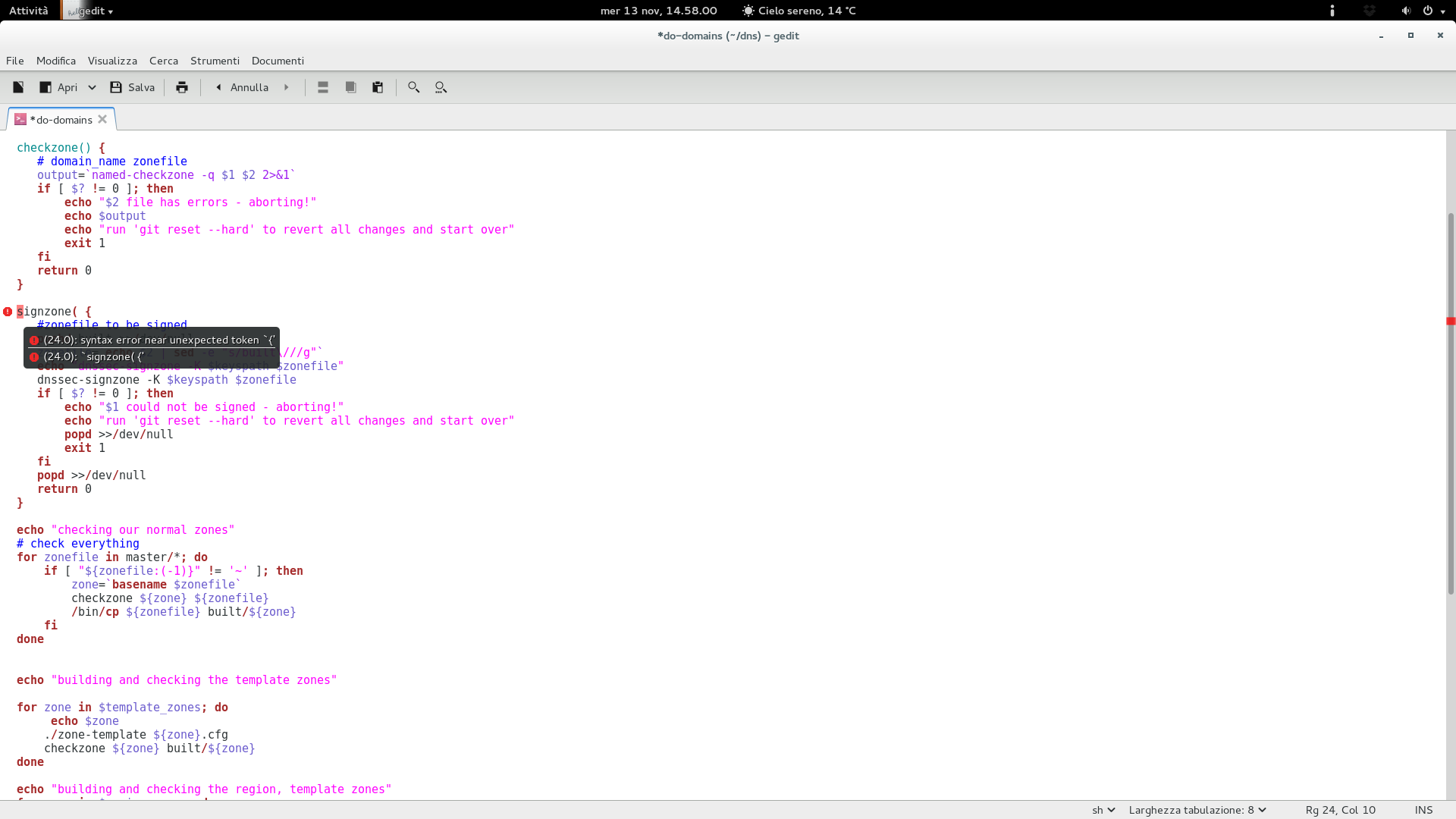
Choosing which method to use is really up to you. Once that is done you can go ahead and sign the zone file. As of myself I m making use of the do-domain script taken from the Fedora Infrastructure Team s repositories. If you are going to use it yourself, make sure to adjust all the relevant variables to match your setup, especially keyspath, region_zones, template_zone, signed_zones and AREA. The do-domain script also checks your zone file through named-checkzone before signing it.
/me while editing the do-domains script with the preview of gnome-code-assistance!

/me while editing the do-domains script with the preview of gnome-code-assistance!

If instead you don t want to use the script above, you can sign the zone file manually in the following way:
dnssec-signzone -K /path/to/your/dnssec/keys -e +3024000 -N INCREMENT gnome.org


By default, the above command will append .signed to the file name, you can modify that behaviour by appending the -f flag to the dnssec-signzone call. The -N INCREMENT will increment the serial number automatically making use of the RFC 1982 arithmetics while the -e flag will extend the zone signature end date from the default 30 days to 35. (this way we can safely run a monthly cron job that will sign the zone file automatically) You can make use of the following script to achieve the above:
#!/bin/sh
SIGNZONE="/usr/sbin/dnssec-signzone"
DNSSEC_KEYS="/srv/dnssec-keys"
NAMEDCHROOT="/var/named/chroot"
ZONEFILES="gnome.org"
cd $NAMEDCHROOT
for ZONE in $ZONEFILES; do
$SIGNZONE -K $DNSSEC_KEYS -e +3024000 -f $ZONE.signed -N INCREMENT $ZONE
done
/sbin/service named reload


Once the zone file has been signed just make sure to include it on named.conf and restart named:
zone "gnome.org"  
file "gnome.org.signed";
 ;


When you re done with that we should be moving ahead adding a DS record for our domain at our domain registrar. My example is taken from the known gandi.net registrar.
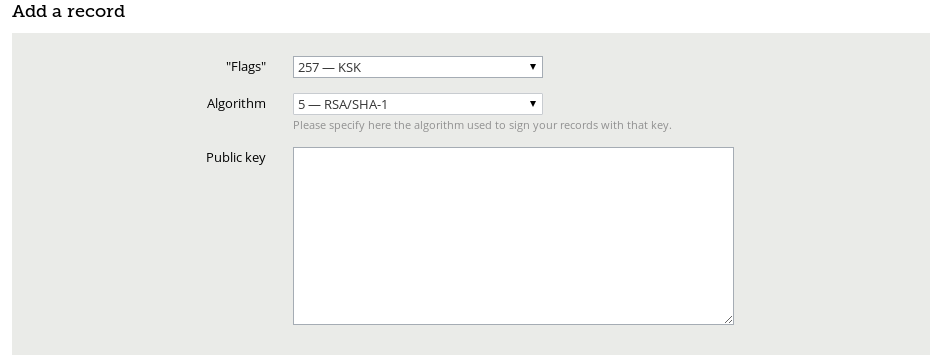
gandi

Gandi s DNSSEC interface

Select KSK (257) and (RSA/SHA-1) on the dropdown list and paste your public key on the box. You will find the public key you need on one of the Kgnome.org*.key files, you should look for the DNSKEY 257 entry as dig DNSKEY gnome.org shows:
;; ANSWER SECTION:
gnome.org. 888 IN DNSKEY 257 3 5 AwEAAbRD7AymDFuKc2iXta7HXZMleMkUMwjOZTsn4f75ZUp0of8TJdlU DtFtqifEBnFcGJU5r+ZVvkBKQ0qDTTjayL54Nz56XGGoIBj6XxbG8Es+ VbZCg0RsetDk5EsxLst0egrvOXga27jbsJ+7Me3D5Xp1bkBnQMrXEXQ9 C43QfO2KUWJVljo1Bii3fTfnHSLRUsbRn8Puz+orK71qxs3G9mgGR6rm n91brkpfmHKr3S9Rbxq8iDRWDPiCaWkI7qfASdFk4TLV0gSVlA3OxyW9 TCkPZStZ5r/WRW2jhUY/kjHERQd4qX5dHAuYrjJSV99P6FfCFXoJ3ty5 s3fl1RZaTo8=


Once that is done you should have a fully covered DNSSEC domain, you can verify that this way:
dig . DNSKEY   grep -Ev '^($ ;)' > root.keys
dig +sigchase +trusted-key=./root.keys gnome.org. A   cat -n


The result:
105 ;; WE HAVE MATERIAL, WE NOW DO VALIDATION
106 ;; VERIFYING DS RRset for org. with DNSKEY:59085: success
107 ;; OK We found DNSKEY (or more) to validate the RRset
108 ;; Ok, find a Trusted Key in the DNSKEY RRset: 19036
109 ;; VERIFYING DNSKEY RRset for . with DNSKEY:19036: success
110
111 ;; Ok this DNSKEY is a Trusted Key, DNSSEC validation is ok: SUCCESS

Bonus content: Adding SSHFP entries for your domain and verifying them You can retrieve the SSHFP entries for a specific host with the following command:
ssh-keygen -r $(hostname --fqdn) -f /etc/ssh/ssh_host_rsa_key.pub


When retrieved just add the SSHFP entry on the zone file for your domain and verify it:
ssh -oVerifyHostKeyDNS=yes -v subdomain.gnome.org


Or directly add the above parameter into your /etc/ssh/ssh_config file this way:
VerifyHostKeyDNS=yes


And run ssh -v subdomain.gnome.org , the result you should receive:
debug1: Server host key: RSA 00:39:fd:1a:a4:2c:6b:28:b8:2e:95:31:c2:90:72:03
debug1: found 1 secure fingerprints in DNS
debug1: matching host key fingerprint found in DNS
debug1: ssh_rsa_verify: signature correct

That s it! Enjoy!

10 November 2013

Sylvain Le Gall: opam2debian, a tool to create Debian binary package out of OPAM

One week ago, a thread in opam-devel mailing list started about the possibility to create binary snapshot to distribute OPAM packages. Distributing binary packages with everything already compiled is pretty useful when you want to make sure that everyone has the same version of packages installed and you don't want to spend time configuring all the computer of your colleague. As a matter of fact I was also interested to see that happening. I have several computers where I want to install a set of packages and I want to snapshot OPAM archives when I am ready for an upgrade. I have tested for a long time another source distribution: GODI. I even wrote a puppet module to drive it. This was a fun experience, but as with any source only distribution, there are some drawbacks. Especially even if it is fully automated, you get a lot of errors and timeout when trying to build automatically from source. This is how opam2debian has started. I wanted a replacement for puppet-godi that takes advantage of OPAM and the possibility to distribute my set of packages everywhere quickly. The goals of this project are:
  1. generate a Debian binary package with all the dependencies set on external packages (like libpcre)
  2. use OPAM to build everything
  3. use standard Debian process to build package
  4. create snapshot of OPAM repository that allow to rebuild exactly the same thing on different arches
The real challenge behind opam2debian was to be able to use standard Debian process to create package to get all the power of dependencies computation provided by the Debian maintainer scripts. My great achievement on this topic was to find a tool called proot that allows you to bind mount a directory as a user. This is an achievement because it allows to create a package using a directory where you are not allowed to write (i.e. /opt/opam2debian directory which is owned by root). This is a way to do it on any Jenkins builder without root access and a standard way for Debian to build packages. Usage example I need to compile a set of package to install on all my Jenkins builder. Here is the list of packages I need and I also want to use the latest OCaml version. I want to build a Debian package for Debian Wheezy which has only OCaml 3.12.1. Building the package:
$ opam2debian create --build --name opam2debian-test2 --compiler 4.01.0 \
 ocamlfind fileutils ocaml-data-notation ocaml-expect ounit \
 ocamlmod ocamlify oasis yojson sexplib extlib pcre-ocaml \
 calendar ocaml-inifiles ocamlnet ocurl gettext inotify ocaml-sqlexpr \
 ocamlrss ocaml-xdg-basedir
Getting the package list right can be tricky because the process will stop at the first error -- and if it is because the last package fails to build it can be long. I have implemented a --keep-build-dir in case you want to tune the package list live. The program will build everything and it can takes quite a while. At the end you get a file opam2debian-test2_20131105_amd64.deb which has a reasonable size of 232MB. That is big, but it looks like the biggest directory is $OPAMROOT/4.01.0/build, I am not sure if I can remove it but we may save some space here (the build directory represents 50% of the package size). Then you can just do a standard Debian installation:
$ sudo dpkg -i opam2debian-test2_20131105_amd64.deb
And you can use it:
$ eval $(opam config env --root /opt/opam2debian/opam2debian-test2/)
$ which ocamlfind
 /opt/opam2debian/opam2debian-test2/4.01.0/bin/ocamlfind
$ ocamlfind list
 [...]
 stdlib              (version: [distributed with Ocaml])
 str                 (version: [distributed with Ocaml])
 threads             (version: [distributed with Ocaml])
 threads.posix       (version: [internal])
 threads.vm          (version: [internal])
 type_conv           (version: 109.41.00)
 unidiff             (version: 0.0.2)
 unix                (version: [distributed with Ocaml])
 userconf            (version: 0.3.1)
 xdg-basedir         (version: 0.0.3)
 xmlm                (version: 1.1.1)
 yojson              (version: 1.1.5)
A nice thing to note, is that it is a standard OPAM install. You can install, update and upgrade OPAM from there, as root. However, I would recommend not to do it, and just rebuild a newer Debian package to upgrade. Install You will need the opam and proot Debian package available in Debian jessie and sid. You will also need various OCaml libraries (cmdliner, calendar, fileutils and jingoo). Download the opam2debian tarball on the forge, build and install it. The project is hosted on github. Open issues On the initial list of goals of the project. Not everything is completed. I have still several open issues. In particular 4. (create snapshot of OPAM repository) was blocked by a bug in opam-mk-repo, that prevents snapshots (see my pull-request to solve it). Another issues is about licenses of the included files. I should list them all and I need to figure out a way to extract every licences. Submit bugs directly to github.

Next.

Previous.