Adrian von Bidder: Irony ...

Errors were encountered while processing:
 debian-policy
E: Sub-process /usr/bin/dpkg returned an error code (1)
(I haven't looked closer yet, but I had to laugh.)
Errors were encountered while processing: debian-policy E: Sub-process /usr/bin/dpkg returned an error code (1)(I haven't looked closer yet, but I had to laugh.)
 , But It doesn’t really matter, now I’m not worrying about the correction of the package. This is just a quick solution to test how the tool update-nsswitch works in a real environment.
well… dpkg -i libpam-libnss-260.deb
YEAH, It doesn’t work!!!
Why? some Troubles have been found on our update-nsswitch.pl


/var/lib/dpkg/info/*. post,pre inst,rm on my laptop,
which contains ATM 3612 scripts. Here is the result:
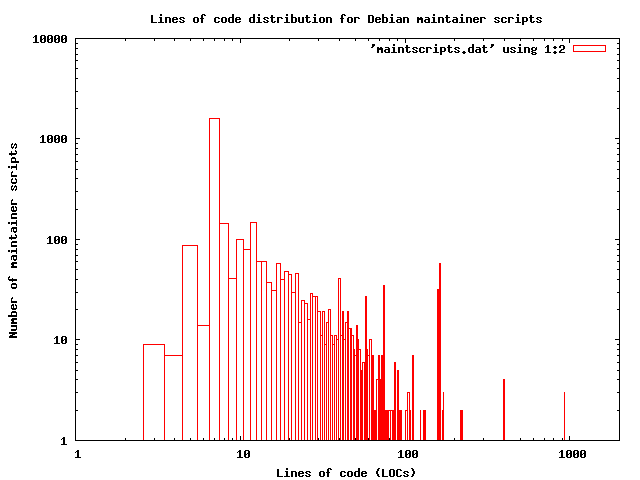 The obvious (though, I repeat, absolutely empirically obtained)
point is that, as expected, most of the scripts are really short,
with 1/3 of them being just 7 LOCs. And I guess you can guess
(sorry) what the 7 lines are about:
    #!/bin/sh
    set -e
    # Automatically added by dh_makeshlibs
    if [ "$1" = "configure" ]; then
            ldconfig
    fi
    # End automatically added section
dear old debhelper boilerplate.
The longest script, not shown properly in the graph due to my
low gnuplot karma, is 1905 LOCs (and the winner is:
/var/lib/dpkg/info/xserver-xorg.postinst). The
shortest scripts are 5 LOCs, but they are structurally equivalent
to the 7 LOCs above, sometimes invoking some other idempotent
update-bla tool, and sporting less newlines.
 (tl;dr: if you have a few minutes, please add information here)
Joss,
the problem with the new package formats is that there is nothing that actually uses the additional information in a way that adds significant new functionality, so the net result of the change was that we throw away the information at a different layer in our software stack, and one of the interfaces got a lot more complicated in the process.
One possible application would be a "poor man's patch tracking" inside the BTS, perhaps with a new state "fixed in patch".
I can see two ways of implementing that:
 There are obviously some things we need to remind if we don t want something like the OpenSSL debacle to happen again. It doesn t mean we need to throw stones nor to rush into changing our processes without thinking. However, there are already some things that should be obvious but unfortunately are not.
dpkg-source: info: building lustre in lustre_1.6.5~rc3-1.dsc
dpkg-genchanges -S >../lustre_1.6.5~rc3-1_source.changes
dpkg-genchanges: including full source code in upload
dpkg-buildpackage: source only upload (original source is included)
chroot: cannot run command  cowdancer-ilistcreate': No such file or directory
W: cowdancer-ilistcreate failed to run within chroot, falling back to old method
 -> Running in no-targz mode
I: using fakeroot in build.
Current time: Sat May 17 12:18:30 CEST 2008
pbuilder-time-stamp: 1211019510
 -> copying local configuration
 -> mounting /proc filesystem
 -> mounting /dev/pts filesystem
 -> policy-rc.d already exists
Obtaining the cached apt archive contents
Installing the build-deps
cowdancer: .ilist size unexpected
cowdancer: .ilist size unexpected
Can't open perl script "/usr/bin/dpkg-architecture": Cannot allocate memory
 -> Attempting to satisfy build-dependencies
 -> Creating pbuilder-satisfydepends-dummy package
cowdancer: .ilist size unexpected
cowdancer: .ilist size unexpected
cowdancer: .ilist size unexpected
cowdancer: .ilist size unexpected
cowdancer: .ilist size unexpected
sh: /tmp/satisfydepends-aptitude/pbuilder-satisfydepends-dummy/DEBIAN/control: Cannot allocate memory
E: pbuilder-satisfydepends failed.
Copying back the cached apt archive contents
 -> unmounting dev/pts filesystem
 -> unmounting proc filesystem
 -> Copying COW directory
 -> Invoking pbuilder
 -> Cleaning COW directory
Command /bin/sh -c pdebuild "--pbuilder" "cowbuilder" "--" "--basepath" "/var/cache/pbuilder/etch.cow" failed
After some research I found that a change of cowdancer
(something related to .ilist) is responible for this issue. After
that I asked on #debian-devel if someone else had this problem and
were told that removing an re-creating the chroot will help. But
that results in the same error msg. After that I decided to wrote a
bugreport against cowdancer, since this is in my eyes a major
defect in this software to do not support the latest stable
release. I filled this report as RC Bug and got very fast a
answer:
severity 481344 wishlist
retitle 481344  provide cowdancer etch backport
[ ... ]
I think this is the wrong way to fix a problem in unstable with
a backport of a software. Providing a fallback for older debian
releases would be the better way. Is anybody else having this
problems?
python-ldap python-cairo python-crypto kiki python-foomatic python-mysqldb
python-logilab-common python-egenix-mxtools python-numarray python-pygresql
python-imaging-sane python-imaging python-xml python-reportlab
Deleting /usr/lib/python2.3 (
dpkg -S didn’t show any package relationship nor did I find something in /var/lib/dpkg/info/) and reinstalling the above mentioned packages did not recreate the files/symlinks. So it seems the directory can be safely removed. Maybe I missed some announcement or one (or more) packages need to be fixed. No time to examine it atm.
Update
This is known as Debian bug #409390. Thanks to Josselin Mouette for the information.
openssl over the last couple of
years or so. Yes, you read it right: COUPLE.
Upgrading to the new OpenSSL is easy. Generating new keys is another story.
To save (or add to, depending on how you handle this) your pain, there is a
simple checker that can currently see if your OpenSSH or OpenVPN public
keys are weak enough to warrant replacement. I await a version that can handle
X.509 certificates too (though I only just generated a new one today, before
the announcement, so that means I have to do it again (and get its CSR to
CACert for signing, etc.)
And yeah, if you're running openssh-server, consider regenerating your
host RSA and DSA keys, e.g.:
# mv /etc/ssh/ssh_host_ dsa,rsa _key* /some/place/else
# dpkg-reconfigure -plow openssh-server
/etc/ssh.
The hard part (of making sure all the keys of your systems are updated and
tested) is still up to you, however.
UPDATE: The Debian wiki has up-to-date information regarding other
packages that generate SSH/SSL keys at postinst. Please refer to that while
the key-rollover page isn't up yet.
UPDATE 2: openssh-server is updated (with corresponding
DSA-1576-1) that is linked to the updated OpenSSL library. Be sure to
upgrade! The new package also pulls in openssh-blacklist, a new package
that contains the database needed by the new ssh-vulnkey for checking SSH
public keys.
 They're not yet available in the official debian mirror but at least in mine they are. You can download the i386 debs from my repo, my deb-repo (using
experimental suite!) for apt-get install or make you own using the apt-get repo with apt-get source.
Another easy way is to do:
dget --build http://debian.ghostbar.ath.cx/libtorrent/0.12.2-1/libtorrent_0.12.2-1.dsc
dpkg -i libtorrent*.deb
dget --build http://debian.ghostbar.ath.cx/rtorrent/0.8.2-1/rtorrent_0.8.2-1.dsc
dpkg -i rtorrent*.deb
Enjoy them! :)
Please note that you should install language-support-he to get full support for this language (spell checkers, OpenOffice and Mozilla locale packages, etc.).


 I hope someone will upload it to experimental by the moment and see how works, in the meanwhile you can find it here. Goes to experimental because is the unstable branch of libtorrent/rtorrent.Want the debs? Then do:
$ dget http://debian.ghostbar.ath.cx/libtorrent/0.12.1-1/libtorrent_0.12.1-1.dsc
$ dpkg-source -x libtorrent_0.12.1-1.dsc
$ cd libtorrent-0.12.1; dpkg-buildpackage -rfakeroot
You'll end with two debs, enjoy them :)
deb file:/home/ftp/debian unstable main contrib non-free
deb file:/home/ftp/debian-multimedia/ unstable main
With a file URL, apt-get doesn’t need to download any packages, and thus doesn’t need to cache anything in /var/cache/apt/archives. No need to keep it empty, it just is empty. In a related post, Andrew Pollock suggests adding DPkg::Post-Invoke “apt-get clean”; ; to /etc/apt/apt.conf. That would be fine if you ONLY ever ran “apt-get update ; apt-get dist-upgrade”. It’s not fine if you run “apt-get -d” to download packages first, then install a few packages with “apt-get install package”, and then run “apt-get dist-upgrade”. If you try that, then the DPKG::Post-Invoke rule will clean out /var/cache/apt/archives when you install the individual package(s). When you then run the dist-upgrade, apt-get will have to download all the packages again. Better just to get into the habit of running apt-get clean or autoclean occasionally when you want to reclaim some disk space. Syndicated from Craig Sanders' Errata: Miscellaneous Thoughts Keeping apt archives empty…or not.
 Steven Hanley was pondering how to
keep /var/cache/apt/archives empty on the mirror that I help administer.
This sounds vaguely similar to mounting the /usr filesystem
read-write at the start of an APT run and read-only again at the end. (A
practice I used to believe in, but due to various package upgrades making
/usr busy for no good reason, and it artificially inflating the
maximal mount-count and prematurely causing a fsck at boot, I've
discontinued)
So, putting
DPkg::Post-Invoke "apt-get clean"; ;in /etc/apt/apt.conf (or in a file in /etc/apt/apt.conf.d) ought to do the trick.
RULES = [ ‘days’:14, ‘interval’:0 , ‘days’:31, ‘interval’:1 , ‘days’:365, ‘interval’:31 , ‘days’:3650, ‘interval’:365 , ]That means we now keep all files from the last 14 days. Then keep one per week. Then one per month and finally one per year for up to ten years. All the rest gets deleted. Space usage of our dumps now: 4.8Gb. Thats 66Gb gained. Source is in dak bzr if you want it, MIT licensed. If you improvie it further I love to see patches.
 One thing that's been bothering me since quite a while is the fact
that apt and friends are not very verbose when things go wrong. Usually
that's just fine; if a package can't be installed, there isn't much you
can do about it anyway.
However, for those of us who have to maintain buildd machines, a
message like the following is not very helpful:
ome packages could not be installed. This may mean that you have
requested an impossible situation or if you are using the unstable
distribution that some required packages have not yet been created
or been moved out of Incoming.
The following information may help to resolve the situation:
The following packages have unmet dependencies:
  kdelibs4-dev: Depends: kdelibs4c2a (= 4:3.5.9.dfsg.1-2) but it is not going tobe installed
                Depends: libarts1-dev (>= 1.5.0) but it is not going to be installed
                Depends: libavahi-qt3-dev (>= 0.4) but it is not going to be installed
                Depends: libopenexr-dev (>= 1.2.2-3) but it is not going to be installed
                Depends: libqt3-mt-dev (>= 3:3.3.5) but it is not going to be installed
E: Broken packages
If you're not convinced, let me tell you that the culprit is
libopenexr2ldbl. If you've noticed that libopenexr2 is not
mentioned anywhere in the above output, you understand why I hate this.
Usually, figuring out this stuff requires you to manually walk the
dependency tree, which is silly. So today, I finally spent some time to
sit down and write a couple of perl scripts to help me with that:
wouter@country:~/code/perl$ ./cache-packages Packages
Reading data... done (20492 packages). Closing cache... ready. Have a nice day!
wouter@country:~/code/perl$ ./check-dep-waits
kdelibs4-dev
checking dependencies of kdelibs4-dev
 checking dependencies of kdelibs4c2a (= 4:3.5.9.dfsg.1-2)
   checking dependencies of kdelibs-data (>> 4:3.5.9.dfsg.1)
[... copious output snipped ...]
  checking dependencies of  libopenexr2ldbl (>= 1.2.2)
libopenexr2ldbl is not available in any version
So, there. Obviously the "Packages" file in the first command line above came from a Debian mirror. The "cache-packages" script writes a file "~/.packages-dbm", which contains an MLDBM tiehash of all the packages, indexed on package name. If you have no clue what that means, just remember that it parses the Packages file into something my laptop can load in a split-second rather than requiring 45 seconds to open and parse the Packages file. Once you've ran that, you can call 'check-dep-waits' as many times as you want, that is, until the Packages file is outdated and you need to download a new one. The second command will just sit and wait. On the first line, you give it a piece of Depends: information, and it will parse that and see whether the dependency can be resolved. There's a lot of output; but given how I want to verify dependencies, I thought I'd rather have too much than too little information. If there are version numbers involved, this script will call dpkg --compare-versions to do the actual verification, so I don't have to watch policy for any possible changes, which is helpful; but it does mean that it'll only work on a Debian machine. The code is available for download at http://comp.uter.be/perl-Packages, FTWCA buildds. Update: While on the train, I realized that I'd totally forgotten about virtual packages. That's now been fixed; if you downloaded the code before, you may want to re-fetch it...
 The following script, or any script like it will not work. Do not waste your time and end up hosing your box like I did today:
#!/bin/bash
echo "==> installing cdebootstrap"
apt-get install cdebootstrap
echo "==> reticulating splines"
dpkg -l   cut -f3 -d' ' >> /tmp/packages.installed
pkg= cat /tmp/packages.installed   xargs
pkg= echo $pkg   sed -e 's#bunch of crap elided here##g'
echo "==> installing libc6-amd64"
apt-get install libc6-amd64
echo "==> installing base system"
cdebootstrap -a amd64 lenny /
for pkg in $pkg; do
echo "==> reinstalling $pkg"
apt-get install --reinstall --force-yes $pkg
done
Don’t let this happen to you. I had the pleasure of discovering that Bacula was not properly backing up my MySQL databases. What an excellent way of finding out.
 Where, oh, where do I start with this one??
$ parsechangelog   wc

     97     644    4793
dpkg-buildpackage -a actually works. It means that work can really proceed on autobuilders for toolchains (glibc and uClibc) and for cross built target packages for embedded devices. I'll be watching the dpkg migration closely and if 1.14.18 is not migrated for some reason, I will have revert the changes for this element to restore the old workarounds.apt-cache policy which is actually quite unreliable with respect to CD/DVD sources and some unofficial sources or mixed testing/unstable configurations.CVS has a nice cvs-debi so I've now got a shell one-liner that can do the same for SVN:$ dcmd ls $(eval find ../build-area/ -name '*.changes' grep $(eval parsechangelog grep Version cut -d' ' -f2)) grep '.deb$' xargs sudo dpkg -iapt-get install cryptsetup1- Setup the encrypted partition as root:
swapoff -a2- Add this line to /etc/crypttab:
cryptsetup -h sha256 -c aes-cbc-essiv:sha256 -s 256 luksFormat /dev/hda2
cryptsetup luksOpen /dev/hda2 cswap
mkswap /dev/mapper/cswap
cswap /dev/hda2 none swap,luks,timeout=303- Set the swap partition to be this in /etc/fstab:
/dev/mapper/cswap none swap sw 0 04- Configure uswsusp to use /dev/mapper/cswap and write unencrypted data
dpkg-reconfigure -plow uswsuspYou will of course want to replace /dev/hda2 with the partition that currently holds your unencrypted swap.
Next.