Search Results: "tim"

30 April 2012

Raphael Geissert: An ever-growing mirrors network

As of the time of writing, Debian's mirrors network has around 330 mirrors serving the archive over http, and around 300 serving it over ftp.

This month alone, 6 more mirrors were added. Other 6 more were added last month.

There are mirrors in 73 countries. All this couldn't be possible without the help of the sponsors.

However, some interesting questions arise: do people actually use those new mirrors? is having so many mirrors worth the extra load put on the primary mirrors?

I would personally answer: no, and maybe.

Blogosphere: When was the last time you took a look at the mirrors list and/or tried to find a mirror that served you better?

Pietro Abate: unburden my home dir

Today I installed unburden-home-dir and I'm very please with it. It's a simple script that takes care of your temporary files to move them outside your home directory. The main reason why I installed it is to minimize the number of read/writes of iceweasel. My favorite browser is apparently the culprit of 80% of read / write operations on disk even when it is idle... Moving the cache to tmpfs, I hope to reduce the IO on disk and to extend my battery life. Using a SSD I haven't noticed any remarkable benefits regarding performances, but I hope I'll manage to squeeze a bit more from my battery. Installing and configuring unburden-home-dir is straightforward. It is packaged for debian (experimental at the time of writing), and it is very easy to configure. Remember that if you want to have your cache on tmpfs, you need to ether mount a tmpfs-enabled file system somewhere or enable RAMTMP=yes in /etc/default/rcS (default in wheezy). After installing unburden-home-dir iotop shows a delightful page full of zeros :) ps: if you use duplicity, remember to specify the option --archive-dir to move the duplicity cache somewhere else...

Russell Coker: The Royal Caribbean Official Android app

I ve just played with the official Android app [1] for the Royal Carribean cruise line [2]. The cruise line is apparently great (I ve never been on one of their ships but the reviews are good) but the Android app isn t. Net Access The most obvious and significant problem with this app is that it s entirely useless without net access. All data of note comes from the Internet which means that the program is useless in any location where Internet access is unavailable (or unreasonably expensive). They wrote an app about cruising that can t be used on a cruise ship! Did they even think about what they were doing? The correct thing to do when writing such an application is to have all basic data about all ships included in the app. This means that when they change the deck plan of a ship they need to release a new version of the app and have people download it. Having done a lot of software development I understand that forcing software updates (even updates to included data files) involves some effort and expense. But when they spend $20,000,000 to update a ship (which is about the minimum that is spent for a major ship in dry-dock according to TV documentaries I ve watched) it seems quite reasonable to budget $10,000 to release new software. Also one benefit of updating the software is that it can promote the changes, after spending tens of millions of dollars improving a ship they probably want to promote that to customers and pushing a new app update with adverts for the improved ship seems like a good way of doing that. There is some data that can t reasonably be included in the app due to size constraints with photos of ships being the most notable example. The solution to this is to provide an option for the user to cache the data that interests them. For example if I was meeting some people to discuss the possibility of a group cruise on a RCL ship then I could download all the pictures of that ship on my home Wifi network and then have them all available with no delay or 3G costs. Also the app seems to hang if net access is temporarily interrupted. As phones are expected to have unreliable net access this is also a significant flaw. Maps The maps of the ships are comprised of a series of pictures which each show one deck. In addition to being downloaded (not cached or included in the app) they aren t scalable (they should be SVG or at least allow zooming the high resolution pictures) and they don t allow a 3D view. The paper maps used to promote cruises (including RCI cruises) and which are given to all passengers on Princess cruises (I m not sure about other lines) show a side cutaway view of the ship which is handy for working out which things are near where you are. It seems that an ideal cruise ship mapping program would have some sort of 3D component, maybe X3D. My experience is that a two night cruise isn t long enough to become familiar with one of the smaller cruise ships. Using a map is essential and a smart phone is a good way of managing such a map as typical 2D paper maps just aren t good enough for such a large and complex structure. Photos One of the significant things that is wrong with the app is a lack of care in displaying the photos of ships. They display three pictures of the Allure of the Seas (one of the two newest, biggest, and most luxurious ships in their fleet), but one of those three photos is actually of the Oasis of the Seas. The fact that the two ships are almost identical is no excuse, there is a principle at stake! Also only having three pictures is pretty poor, there is no way that less than 50 pictures could do justice to such a big ship! A Google search for the words cruise and photos turns up many sites with pictures of cruise ships and it s not particularly difficult to find pictures of any particular ship. Photographs by customers are often of high quality as some of the better DSLR cameras are in the same price range as some of the cheaper tickets for cruise ships. Probably the best thing that RCI could do is to run a contest and allow their customers to enter photos and vote towards the winning entries. That would get them photos that aren t as sterile as the official photos and which include the things that are of most interest to customers. Finally in terms of caching, pictures are the most easily cached source of data and as phones get higher resolution they keep getting bigger. The storage space for a modern phone is equivalent to the entire 3G download quota for about a year on an affordable Australian 3G plan. When dealing with photos downloaded from the net the default should be to cache everything. Navigation Navigating a smart-phone app is a lot more difficult than navigating the same data on a desktop system (which would be in a web browser). Users can compensate for some deficiencies with web site organisation by using a large monitor and having several web browser windows with multiple tabs. But with a phone it should be possible to switch between things quickly. The main menu has a View Our Ships option (which allows viewing deck plans and pictures) and a View Our Staterooms option which offers a list of ships and then describes the state rooms available for each one. This means that you can t see all the information about a ship in one place and even worse you can t easily compare ships. As it seems likely that people will want to use this app for selecting a cruise it should be possible to select a few ships that are of interest and then quickly flip between them. For example the Rhapsody of the Seas and the Voyager of the Seas are cruising in my part of the world so it would be nice if I could tell the app to compare those ships and then allow me to view a page about one ship and then flick to the equivalent page about the other ship. Another notable problem is that the ships are listed in alphabetical order. The sensible thing to do is to list them by class going from biggest to smallest. Lessons to be Learned These problems aren t specific to the RCI app, many other Android apps have the same flaws. For example the Google Play market app doesn t cache the icons of the installed apps so every time I want to see a list of installed apps it goes slow and wastes some of my bandwidth. Doing something wrong in the same way as Google isn t necessarily a great mistake, although using the Google Play market on a cruise ship is probably very uncommon. Probably the biggest problem is a lack of testing. They should have sent the developers on a cruise as a live test. Every cruise ship has a sales desk for booking future cruises so it wouldn t be difficult to have a dozen Android phones at the sales desk to see how real customers who really want to book a cruise find it. I presume that even if net access was available then such a test would fail dismally. If a 3D display of a ship combined with all the data management capabilities of a modern smart phone (which is a lot more powerful than the desktop systems I used prior to 2000) can t at least be a useful supplement to a stack of paper brochures then it s probably a failure. I think that the RCI app is an example of how to make an Android app which doesn t fall into the more common failings (such as being a quick and dirty port from iOS) but yet still isn t useful to customers. I recommend that people who develop apps which have an objective of imparting information to users try it out as an example of what not to do. Try a few basic tasks like comparing the three biggest classes of RCI ships in terms of features, after failing to do that with the app you can then use Wikipedia to get the result. But don t use the Wikipedia client apps, use a tabbed browser such as Opera Mini. Related posts:
  1. An Introduction to Android I gave a brief introductory talk about Android at this...
  2. Choosing an Android Phone My phone contract ends in a few months, so I m...
  3. Galaxy S vs Xperia X10 and Android Network Access Galaxy S Review I ve just been given an indefinite loan...

29 April 2012

Sune Vuorela: Boat to akademy?

I m planning on taking the Tallink Silja boat from Stockholm to Tallin to get to (and from) Akademy. It is a all-night boat with restaurants, bars and almost whatever you would like. The boat leaves shortly before dinner and arrives shortly after breakfast and it is full of great fun. Last time (Akademy 2010 in Tampere), Inge, Ryan, Chani, Martin and me were on such a boat and it was a nice experience. Anyone up for such a experience this year ? You hopefully know how to reach me

Peter Eisentraut: Setting the time zone on remote SSH hosts

The tasks: I have one or more desktop/laptop machines with varying local time zones (because the persons using them are actually in different time zones, or because the one person using them travels). I also have a number of servers configured in some random time zones. (It could be the time zone where they are physically located, or the time zone of the person who installed it, or UTC for neutrality.) Now what I would like to have happen is that if I log in using SSH from a desktop to a server, I see time on that server in my local time zone. For things like ls -l, for example. Obviously, this illusion will never be perfect. Nothing (except something very complicated) will adjust the time stamps in the syslog output, for example. But the ls -l case in particular seems to come up a lot, to check how long ago was this file modified. This should be completely doable in principle, because you can set the TZ environment variable to any time zone you like, and it will be used for things like ls -l. But how do you get the TZ setting from here to there? First, you have to make the remote SSH server accept the TZenvironment variable. At least on Debian, this is not done by default. So make a setting like this in /etc/ssh/sshd_config:
# Allow client to pass locale environment variables
AcceptEnv LANG LC_* TZ
You also need to make the equivalent setting on the client side, either in /etc/ssh/ssh_config or in ~/.ssh/config:
SendEnv LANG LC_* TZ
Which leaves the question, how do you get your local time zone into the TZ variable to pass to the remote server? The actual time zone configuration is the file /etc/localtime, which belongs to glibc. In current Debian, this is (normally) a copy of some file under /usr/share/zoneinfo/. In the distant past, it was a symlink, which would have made things easier, but now it's a copy, so you don't know where it came from. But the name of the time zone is also written to /etc/timezone, so you can use that. The format of the TZ environment variable can be found in the glibc documentation. If you skip past most of the text, you will see the relevant parts:
The third format looks like this: :CHARACTERS Each operating system interprets this format differently; in the GNU C library, CHARACTERS is the name of a file which describes the time zone.
So what you could do is set
TZ=":$(cat /etc/timezone)"
Better yet, for hopping through multiple SSH hosts in particular, make sure to preserve an already set TZ:
TZ=$ TZ:-":$(cat /etc/timezone)" 
And finally, how does one hook this into ssh? The best I could think of is a shell alias:
alias ssh='TZ=$ TZ:-":$(cat /etc/timezone)"  ssh'
Now this set up has a number of flaws, including: But it practice it has turned out to be quite useful. Comments? Improvements? Better ideas? Related thoughts:

28 April 2012

Raphael Geissert: Your APT caching proxy is not that efficient

So you read about an "APT caching proxy" and that it can "save time and network bandwidth."
Sounds like something you should have, right? After all, the trade-off is just some additional disk space. APT already has its own cache at /var/cache/apt/archives/, so part of what the caching proxy would store in disk is already there.

Truth is, for a single client a caching proxy might not provide any benefit and might even cause a slowdown, but for at least one of the alternatives it is even worse: every request that goes through the proxy that requires a download from a mirror creates a new connection.

It is 2012 and a piece of software that aims to "save time and network bandwidth" can't even use keep-alive connections?

Andrew Cater: Raspberry Pi - shipping in volume

Farnell are now shipping in volume worldwide and will shortly be relaxing the restriction to one Raspberry Pi per customer: RS are also in the process of inviting those with expressions of interest in time order.

The OS of choice is currently Debian - the developers at Broadcom in Cambridge are releasing SD card images fairly regularly at the moment.

There is a large amount of interest worldwide and this before release for education - this can only be good.

[Mine is due week beginning 28 May :) ]

27 April 2012

Richard Hartmann: , ,

I have no idea if the literal translation carries over, but to be on the safe side: I like what I've seen up to now. First impressions are always the most honest (and I may have sketchy access to the Internet at best in the coming days) so here goes. I haven't even been here for 24 hours so take everything I say with a sack of salt.

Ana Beatriz Guerrero Lopez: Debian in the Google Summer of Code 2012

This year our efforts have paid off and despite there being more mentoring organizations than there were in 2011 (175 in 2011 and 180 in 2012), this year in Debian we got 81 submissions versus 43 submissions in 2011.
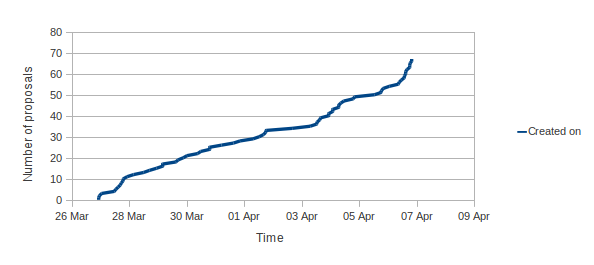
You can see here the graphs of applications against time from this year: 2012 The result is this year we ll have 15 students in Debian versus 9 students last year! Without further ado, here is the list of projects and student who will be working with us this summer: If you want to know more about these projects, follow the links and ask the students (and mentors)!

Riku Voipio

Cross Compiling with MultiArch Congrats to the Ubuntu Folk for the new LTS release. Incidentally this is also the first release where our work on MultiArch bears fruit. We can now cross-compile relatively easily without resorting to hacks like scratchbox, qemu chroot or dpkg-cross/xdeb. Lets show short practical guide on cross-building Qemu for armhf. The instructions refer to precise, but the goodiness is on the way to Debian as well. Biggest missing piece being the cross-compiler packages, which we have an Summer of Code project. The example is operated in a chroot to avoid potentially messing up your working machine. Qemu-linaro is not a shining example, as cross-building it doesn't work out of box. But that is educational, it allows me to show what kind of issues you can bump into, and how to fix them.

$ sudo debootstrap --variant=buildd precise /srv/precise
Edit the /srv/precise/etc/apt.sources.list to the following (replace amd64 with i386 if you made an i386 chroot)

deb [arch=amd64] http://archive.ubuntu.com/ubuntu precise main universe
deb [arch=armhf] http://ports.ubuntu.com/ubuntu-ports precise main universe
deb-src http://archive.ubuntu.com/ubuntu precise main universe
Edit the /srv/precise/etc/dpkg/dpkg.cfg.d/multiarch by adding the following line:

foreign-architecture armhf
Finally disable install of recommends by editing /srv/precise/etc/apt/apt.conf.d/10local:

APT::Install-Recommends "0";
APT::Install-Suggests "0";
Install the armhf crosscompiler the chroot

$ sudo chroot /srv/precise/
# unset LANG LANGUAGE
# mount -t proc proc /proc
# apt-get update
# apt-get install g++-arm-linux-gnueabihf pkg-config-arm-linux-gnueabihf
Get the sources and try to install the cross-buildeps:

# cd /tmp
# apt-get source qemu-linaro
# cd qemu-linaro-*
# apt-get build-dep -aarmhf qemu-linaro
As we see, the build-dep bombs out ugly, with a them of "perl" being unable to be installed. This is because apt-get can't figure out if we should install and armhf or amd64 version of perl. We don't use the required syntax yet in Build-Dep line, "perl:any", as dpkg and apt in previous released don't support it. Thus back porting would no longer be possible. One way to fix it, would be to drop perl build-dep, as perl is already pulled by other build-deps. But lets instead show howto install it the build-deps manually. First we build system build-deps, then target architecture ones:

# apt-get install debhelper texinfo
# apt-get install zlib1g-dev:armhf libasound2-dev:armhf libsdl1.2-dev:armhf libx11-dev:armhf libpulse-dev:armhf libncurses5-dev:armhf libbrlapi-dev:armhf libcurl4-gnutls-dev:armhf libgnutls-dev:armhf libsasl2-dev:armhf uuid-dev:armhf libvdeplug2-dev:armhf libbluetooth-dev:armhf
And try the build[1]:

# dpkg-buildpackage -aarmhf -B
Which sadly errors out. Turns out the cross-build support in debian/rules is broken. Instead of --cc we need to feed an --cross-prefix to the ./configure of qemu. Edit the debian/rules with replacing

- conf_arch += --cc=$(DEB_HOST_GNU_TYPE)-gcc --cpu=$(QEMU_CPU)
+ conf_arch += --cross-prefix=$(DEB_HOST_GNU_TYPE)-
Optional: Since we are cross-compiling from a multicore machine, lets also add parallel building support, by changing the override_dh_auto_build: rule to have --parallel flags in debian/rules as well:

override_dh_auto_build:
# system build
dh_auto_build -B system-build --parallel
ifeq ($(DEB_HOST_ARCH_OS),linux)
# user build
dh_auto_build -B user-build --parallel

# static user build
dh_auto_build -B user-static-build --parallel

Try the build again:

# export DEB_BUILD_OPTIONS=parallel=4 # I have dual-core hyperthreading machine, build with all four threads
# time dpkg-buildpackage -aarmhf -B
...
dpkg-buildpackage: binary only upload (no source included)

real 18m53.425s
user 65m42.570s
sys 2m50.383s
The Native build of qemu-linaro took 4h 11min. [1] You should not build as root - but to keep instructions short, I'm not explaining howto add and use a unprivileged user in a chroot. Do as I *say*, not as I *do*!

Russell Coker: BTRFS and ZFS as Layering Violations

LWN has an interesting article comparing recent developments in the Linux world to the Unix Wars that essentially killed every proprietary Unix system [1]. The article is really interesting and I recommend reading it, it s probably only available to subscribers at the moment but should be generally available in a week or so (I used my Debian access sponsored by HP to read it). A comment on that article cites my previous post about the reliability of RAID [2] and then goes on to disagree with my conclusion that using the filesystem for everything is the right thing to do. The Benefits of Layers I don t believe as strongly in the BTRFS/ZFS design as the commentator probably thinks. The current way my servers (and a huge number of other Linux systems) work of having RAID to form a reliable array of disks from a set of cheap disks for the purpose of reliability and often capacity or performance is a good thing. I have storage on top of the RAID array and can fix the RAID without bothering about the filesystem(s) and have done so in the past. I can also test the RAID array without involving any filesystem specific code. Then I have LVM running on top of the RAID array in exactly the same way that it runs on top of a single hard drive or SSD in the case of a laptop or netbook. So Linux on a laptop is much the same as Linux on a server in terms of storage once we get past the issue of whether a single disk or a RAID array is used for the LVM PV, among other things this means that the same code paths are used and I m less likely to encounter a bug when I install a new system. LVM provides multiple LVs which can be used for filesystems, swap, or anything else that uses storage. So if a filesystem gets badly corrupted I can umount it, create an LVM snapshot, and then take appropriate measures to try and fix it without interfering with other filesystems. When using layered storage I can easily add or change layers when it s appropriate. For example I have encryption on only some LVs on my laptop and netbook systems (there is no point encrypting the filesystem used for .iso files of Linux distributions) and on some servers I use RAID-0 for cached data. When using a filesystem like BTRFS or ZFS which includes subvolumes (similar in result to LVM in some cases) and internal RAID you can t separate the layers. So if something gets corrupted then you have to deal with all the complexity of BTRFS or ZFS instead of just fixing the one layer that has a problem. Update: One thing I forgot to mention when I first published this is the benefits of layering for some uncommon cases such as network devices. I can run an Ext4 filesystem over a RAID-1 array which has one device on NBD on another system. That s a bit unusual but it is apparently working well for some people. The internal RAID on ZFS and BTRFS doesn t support such things and using software RAID underneath ZFS or BTRFS loses some features. When using DRBD you might have two servers with local RAID arrays, DRBD on top of that, and then an Ext4 filesystem. As any form of RAID other than internal RAID loses reliability features for ZFS and BTRFS that means that no matter how you might implement those filesystems with DRBD it seems that you will lose somehow. It seems that neither BTRFS nor ZFS supports a disconnected RAID mode (like a Linux software RAID with a bitmap so it can resync only the parts that didn t change) so it s not possible to use BTRFS or ZFS RAID-1 with an NBD device. The only viable way of combining ZFS data integrity features with DRBD replication seems to be using a zvol for DRBD and then running Ext4 on top of that. The Benefits of Integration When RAID and the filesystem are separate things (with some added abstraction from LVM) it s difficult to optimise the filesystem for RAID performance at the best of times and impossible in many cases. When the filesystem manages RAID it can optimise it s operation to match the details of the RAID layout. I believe that in some situations ZFS will use mirroring instead of RAID-Z for small writes to reduce the load and that ZFS will combine writes into a single RAID-Z stripe (or set of contiguous RAID-Z stripes) to improve write performance. It would be possible to have a RAID driver that includes checksums for all blocks, it could then read from another device when a checksum fails and give some of the reliability features that ZFS and BTRFS offer. Then to provide all the reliability benefits of ZFS you would at least need a filesystem that stores multiple copies of the data which would of course need checksums (because the filesystem could be used on a less reliable block device) and therefore you would end up with two checksums on the same data. Note that if you want to have a RAID array with checksums on all blocks then ZFS has a volume management feature (which is well described by Mark Round) [3]. Such a zvol could be used for a block device in a virtual machine and in an ideal world it would be possible to use one as swap space. But the zvol is apparently managed with all the regular ZFS mechanisms so it s not a direct list of blocks on disk and thus can t be extracted if there is a problem with ZFS. Snapshots are an essential feature by today s standards. The ability to create lots of snapshots with low overhead is a significant feature of filesystems like BTRFS and ZFS. Now it is possible to run BTRFS or ZFS on top of a volume manager like LVM which does snapshots to cover the case of the filesystem getting corrupted. But again that would end up with two sets of overhead. The way that ZFS supports snapshots which inherit encryption keys is also interesting. Conclusion It s technically possible to implement some of the ZFS features as separate layers, such as a software RAID implementation that put checksums on all blocks. But it appears that there isn t much interest in developing such things. So while people would use it (and people are using ZFS ZVols as block devices for other filesystems as described in a comment on Mark Round s blog) it s probably not going to be implemented. Therefore we have a choice of all the complexity and features of BTRFS or ZFS, or the current RAID+LVM+Ext4 option. While the complexity of BTRFS and ZFS is a concern for me (particularly as BTRFS is new and ZFS is really complex and not well supported on Linux) it seems that there is no other option for certain types of large storage at the moment. ZFS on Linux isn t a great option for me, but for some of my clients it seems to be the only option. ZFS on Solaris would be a better option in some ways, but that s not possible when you have important Linux software that needs fast access to the storage. Related posts:
  1. Starting with BTRFS Based on my investigation of RAID reliability [1] I have...
  2. ZFS vs BTRFS on Cheap Dell Servers I previously wrote about my first experiences with BTRFS [1]....
  3. Reliability of RAID ZDNet has an insightful article by Robin Harris predicting the...

26 April 2012

Sylvain Le Gall: On the importance of memory buffer...

I have been working since a long time on trying to solve random crashes on the OCaml Forge. I have first suspected failing hardware to be the cause of it, but found no evidence about that. In despair of a solution, I have installed cacti to investigate the issue. The good news is that it has allowed me to catch a pretty nice graph of a crash. Load average - Crash Just before the crash the average load was 200... My conclusion was that too many processes were running at the same time. So I start to hunt processes that load the server for nothing. One of them was darcsweb. This process doesn't really create a load, but it calls darcs for various operations and most of them are quite expensive. The most expensive one is darcs diff. I first turn on the caching of darcsweb, which already reduce the number of invocation of darcs. But it doesn't make a real difference (except that the website was faster to load). I continued to investigate. In order to reduce globally the load of the server, I installed various robots.txt to prevent crawler to call diff for all VCS on the forge. Crawler traffic is 10 times the normal traffic and indexing diff in Google is not very interesting. It doesn't make a real difference. Load average - Peaks I installed a script to analyze all the peak load above 2. The peaks happen every hour and are more or less important (from 4 to 10). I discovered that this peak were related to the hourly cronjob of FusionForge that fixed repository permissions. I was pretty surprise because updating permissions should no generate this load. This morning, I had a simple idea. There are a lot of process on the server and one of them (the bzr daemon, loggerhead) eats a big chunk of memory (at least never frees it). I just had a quick at the "buffers" memory... Only 4MB ! I just restarted loggerhead. The improvement made on robots.txt makes it a lot more stable with regard to memory consumption, since we don't run bzr diff anymore. The "buffers" memory is now at 100MB and guess what ! No more peaks... Here is the result: Load average - Restart Conclusion: sometimes the cause of a high load lies in a single number...

Alexander Pashaliyski: Google Summer of Code 2012 Clang support for build services in Debian

This project is about extension of the Debian infrastructure with ability to build packages with clang. The key idea is to have an alternative way to build packages and easily switch between clang and gcc/g++. Clang is faster than gcc, uses less memory, and produces faster code. It is getting better with time. It is available under the BSD license. It is well documented. It can help programmers find and analyze easily their errors, because clang has much more detailed error and warning messages and it allows better diagnostics. It also provides a good alternative for programmers using gcc in the coding and compiling processes. It enforces better code quality. In the compiling process, compiler choice is usually done by setting the environment variable CC. When Makefile is generated, it contains initialization of the CC variable based on the current environment. If CC is not set, the default compiler is gcc. CC is always used by make. I proved this with tests (I set CC=/usr/bin/clang).
There must be an easy way to switch the default compiler between gcc/g++ and clang. One way would be by issuing a command like
dpkg-reconfigure default-compiler . I think that debuild, sbuild can be changed to take optional compiler argument (something like clang gcc). If this argument is not specified, the default compiler is used (according to CC)
Also I think that when the default compiler is set to clang, some special cases should be checked.
Example: There is gcc hard coded in the Makefile. In this case there should be a dialog box that offers several options to choose from:
1. Leave gcc in this line.
2. Change gcc with the CC variable.
3. Edit with the default text editor.
I have seen the 3rd option in many applications, like svn or crontab. When some file modification is required, the default editor is launched to modify the file.
Also, I ll check what are the compiling problems of the current packages that can t compile by just changing gcc with clang. This way I ll see what checks for special cases to implement.

Olly Betts: Xapian GSoC 2012 Projects

At the end of the previous episode, you may remember our gallant heroes had a pile of 30 proposals to review. We soon spotted one more to mark as invalid (just a paste with our ideas list plus a some biographical details), and another got withdrawn by the student without explanation (but was low quality anyway), so that left us with 28. We had six volunteers for mentoring, and in the initial allocation we received five student slots from Google, but we asked nicely if we could have an extra one, and were lucky enough to get it. Last year we had four students, so that's a 50% increase. Here's those 28, broken down by the project idea:
  • 8 - Weighting Schemes
  • 6 - Learning to Rank
  • 3 - Dynamic Snippets
  • 2 - Lucene Backend
  • 2 - QueryParser improvements
  • 1 - Erlang Bindings
  • 1 - Improve C# and Java bindings
  • 1 - Improve PHP Bindings
  • 1 - Improve Python Bindings
  • 1 - Improving Japanese Support
  • 1 - Node.js Bindings
  • 1 - Postlist encodings
I find it interesting that the most popular three ideas have closer connections to Information Retrieval theory than most - probably these appeal to students who have taken IR courses and already have an interest and some knowledge of the project area. I think we should aim to get more ideas like these on the list in future years. It's worth noting that in several cases students had taken an idea in sufficiently different directions that there wasn't much overlap, so we didn't just pick the best proposal for each project idea to narrow things down. Also, the proposal isn't the only factor - we like to see applicants work on patch, and to interact with us on IRC and/or email. But in the end it happens we ended up with proposals which were all from different ideas - here are those we selected:
My congratulations to the lucky six, and my commiserations to those we weren't able to select. It wasn't an easy selection to make, and we truly appreciate the time you spent writing your proposal, working on patches, and on the rest of the application process. We'd encourage you to remain involved with Xapian, and to apply to us again next year if you're still eligible for GSoC.

Paul Wise: What happens when a Debian derivative shuts down?

Over the past months we have seen the end of two Debian derivatives. In January the news came that Junta de Extremadura (Spain) were abandoning the development of LinEx and switching to Debian itself. Early in March the Debian derivatives census scripts noted that the Vanillux apt repository was down. Fabrice Quenneville then confirmed that he had to put a hold on the Vanillux project due to the cost of bandwidth and servers. In addition the future of StormOS is in doubt after Illumian was created. StormOS is a port of Debian to the OpenSolaris kernel and Illumian is similar but uses only apt/dpkg and repackages everything else. The LinEx page in the Debian derivatives census did not reveal much information about the project that would have been useful to Debian, in particular it does not list any apt repositories. As a result it is quite hard to say what has potentially been lost. Two mails from people close to or involved in the project indicate that much of the LinEx distribution was already merged into Debian. It is probably safe to say that everything of value has been merged into Debian, including at least one of the developers involved in LinEx. Vanillux was a small distribution with few developers according to the Google caches of their website. If we look at the patches created by the derivatives census scripts, we can see that the 5 source packages that were possibly derived from Debian source packages were simply imported from Christian Marillat's repository of non-free, patented, legally restricted and multimedia-related packages. The patches indicate that 3 source packages were forked from Debian and that 2 source packages were done from scratch. The forked packages seem to be mainly about enabling support for proprietary and patented codecs in several programs. This is a surprisingly small number of altered/differing packages, so what else could Vanillux folks have been working on? It appears that there were 12 new source packages that were not derived from Debian source packages. These appear to be mainly multimedia-related packages, one font imported from an Ubuntu PPA, some syslinux themes and a metapackage. The multimedia packages are all from Christian Marillat's repository. The Debian multimedia team is working hard on bringing multimedia related software to Debian and welcomes help with that. The font (Cantarell) is now in Debian under a different source package name. The metapackage appears to be very similar to from the ubuntu-meta source package from Ubuntu that uses germinate. So at first glance, the contribution of Vanillux to the world of Linux distributions appears to be in the area of artwork and package selection. The artwork produced is basically Vanillux branding and is thus not usable by Debian, although we would like more artists involved in Debian. The meta-package is not easily useful to Debian since we use a different mechanism for our task packages and our task packages have already been updated for the GNOME 3 transition. Still, the amount of difference between to source packages is relatively small. So, what else? Perusing the diff between the list of source packages exposed by the Packages and Sources files, I noted that a number of binary packages in the Packages files reference source packages not listed in the Sources files. When I saw picasa in that list, it occurred to me that Vanillux might have directly imported some binary packages without their corresponding source packages. Perusing their apt metadata confirms that they have imported some binary packages of non-free software directly from vendors. These include Google Desktop, Opera, Picasa and VirtualBox 3.2. The rest of the packages in the diff appear to be caused by some sort of issue with the import process from Debian and other apt repos. Most of the above could be achieved by adding some external commerical repositories to a normal Debian system or by merging some of those repositories (such as the Opera one) into Debian. The interesting thing about the Debian derivatives census is that it allows us to perform analyses like these and figure out what patches and packages we might like to integrate into Debian. In this way we can salvage some of the value of our derivatives if they abandon ship. If you have any ideas or code for improving the census or are running a Debian derivative, please join us at the Debian derivatives frontdesk.

25 April 2012

Alessandro Ghedini: Rakudo Perl 6 2012.01 uploaded to unstable

I ve uploaded yesterday the rakudo package version 0.1~2012.01-1 to unstable. It ships the Rakudo upstream release from January, running on top of the Parrot stable release 4.0.0 (which was uploaded earlier). Rakudo is a compiler that implements the Perl 6 specification and runs on top of the Parrot virtual machine (if you are interested on Perl 6 you may have a look at some nice articles, and at the talk of Damian Conway, about Perl 6). This is the first upload since a few months, and the first release being uploaded to Debian based on the nom (New Object Model) development branch of Rakudo, which opened the door for substantial performance improvements. This release brings other nice things too, such as the support for meta-programming, better package and exception handling and more. The latest upstream release 2012.04 (which brings, among other things, improvements in startup times thanks to bounded serialization) has been released a few days ago and uses the new Parrot stable release 4.3.0 (which has been released about a week ago), so we hope to test and upload both in time for the Wheezy freeze (and hopefully we ll be a bit more timely for future updates too).

Vincent Bernat: XBMC Eden on Debian Wheezy

I bought some HTPC a few years ago to run XBMC, a neat media center solution. At the time, to avoid any problems, I installed it on top of a minimal Ubuntu Lucid installation with the official packages from the team XBMC. Recently, XBMC Eden has been released and XBMC has landed into Debian unstable. It was a good occasion to make the switch. Unofficial XBMC logo for Eden TL;DR: Installing XBMC on Debian Wheezy is quite easy: it almost works out of the box. The big difficulty is the configuration of the remote control: either it works as you expect or you will have to scratch your head over the pile of layers needed to work with a remote control. The configuration of my HTPC is as follows:

Installation

Installing Debian Wheezy Installing Debian Wheezy2 is pretty easy. Nowadays, getting a bootable USB key from a netinst image of Debian Installer for Wheezy is simplified:
$ sudo dd if=debian-testing-i386-netinst.iso \
>         of=/dev/disk/by-id/usb...
The installation was smooth with the exception of GRUB which was unable to install itself on the disk. This is a known bug when dealing with LVM and it comes with a simple workaround. I hope it will be corrected in time for Wheezy release. While this has little to do with the installation of XBMC, I wanted to test systemd which may become the default init in Debian (at least in Debian GNU/Linux). From README.Debian:
systemd can be installed alongside sysvinit and will not change the behaviour of the system out of the box. This is intentional. To test systemd, add init=/bin/systemd to the kernel command line and then rebooting, or install the systemd-sysv package.
The final system boots in about 15 seconds.

Configuring X Because video decoding in nouveau driver is still a work in progress, the use of the proprietary NVIDIA drivers is mandatory to be able to watch high resolution videos. Therefore, /etc/apt/sources.list should be completed with contrib and non-free repository. Then, you can install the appropriate packages: xserver-xorg-video-nvidia, nvidia-vdpau-driver and xserver-xorg. Here is my /etc/X11/xorg.conf.d/nvidia.conf:
Section "Device"
    Identifier     "NVidia ION"
    Driver         "nvidia"
    VendorName     "NVIDIA Corporation"
    Option         "HWCursor" "False"
    Option         "NoFlip" "False"
    Option         "FlatPanelProperties" "Scaling = Native"
    Option         "DynamicTwinView" "False"
    Option         "ConnectedMonitor" "DFP-1"
    Option         "CustomEDID" "DFP-1:/etc/X11/edid.bin"
    Option         "NoLogo" "True"
EndSection
Section "Extensions"
    Option "Composite" "false"
EndSection
The CustomEDID option allows the driver to get an appropriate EDID even when the AV receiver is off. You can get yours, free of charge, with get-edid from read-edid package.

Installing XBMC Thanks to the work of Andr s Mej a, XBMC is now available in Debian Wheezy. To install it, just type aptitude install xbmc. I have dropped the following xbmc.service in /etc/systemd/system directory:
[Unit]
Description = XBMC media center
After = syslog.target
[Service]
User = xbmc
Group = xbmc
Type = simple
ExecStart = /usr/bin/xinit /usr/bin/xbmc-standalone -- :0
Restart = on-failure
[Install]
WantedBy = multi-user.target
Enable this service on boot with systemctl enable xbmc.service. You need to allow xbmc user to run X. The simplest way is to run dpkg-reconfigure -plow x11-common and to allow anybody to run X. sudo may be an alternative.

Configuration

Sound While I wanted to use PulseAudio, I want the AV receiver to be able to upmix stereo streams itself. With PulseAudio, it would always receive a 6-channel signal. Therefore, I directly use ALSA. First, unmute the appropriate outputs:
$ amixer scontrols   grep IEC958
Simple mixer control 'IEC958',0
Simple mixer control 'IEC958 Default PCM',0
Simple mixer control 'IEC958',1
$ amixer sset 'IEC958',0 unmute
$ amixer sset 'IEC958 Default PCM',0 unmute
$ amixer sset 'IEC958',1 unmute
$ sudo systemctl stop alsa-utils.service
The order of channels is incorrect. With the following /etc/asound.conf, we declare a new output, hdmi2, with a different mapping:
pcm.hdmi2  
  type asym
  playback.pcm  
    type plug
    slave.pcm "remap-surround51"
   
 
pcm.!remap-surround51  
  type route
  slave.pcm "hdmi"
  ttable  
    0.0= 1
    1.1= 1
    2.4= 1
    3.5= 1
    4.2= 1
    5.3= 1
   
 
In XBMC, this output should be used instead of the default one. hdmi should still be used for passthrough. To check if each speaker is mapped correctly, one can use speaker-test -D hdmi2 -c 6.

LCD display The LCD display integrated into the SoundGraph iMON is supported by the imon kernel module and the lcdproc package. I have only modified a few lines of /etc/LCDd.conf to make it work:
[server]
Driver=imonlcd
ServerScreen=off
[imonlcd]
Protocol=1
OnExit=2
Contrast=400

Remote control This is the most difficult part. I have a Logitech Harmony remote which is a great universal remote. Its support in Linux is acceptable: you can configure through Logitech website and use congruity to push the new configuration.

Remote controls and Linux Before Linux 2.6.36, most remote controls would need LIRC to work:
  • The driver receives the signal from the IR receiver and make it available through /dev/lirc.
  • lircd, with the help of a configuration file describing the protocol used by the remote control, will read the signal and turn it into the appropriate LIRC code.
  • XBMC connects to lircd and receives incoming LIRC codes. It will translate them to an XBMC command. This translation is specified in Lircmap.xml.
  • XBMC maps each command to an action (like Play, Fullscreen, ) using a keymap. This keymap can handle commands received by a remote control, but also by a keyboard, a mouse or a joystick.
Since Linux 2.6.36, remote controls will be mapped as a generic input device (just like a keyboard):
  • The driver receives the signal from the IR receiver.
  • The signal will be handled by a decoder. The configuration of this decoder is done in userland by ir-keytable. The decoder will turn the signal into the appropriate event (usually, some keypress).
  • X will listen to those events and turn them into X key events.
  • XBMC will receive them and use the appropriate keymap to turn them into actions.
And to add more complexity to the mix, in this last case, you can still use LIRC: lircd will listen to events generated by the kernel and turn them into LIRC codes. This can be very confusing. Moreover, the SoundGraph iMON IR receiver accepts two IR protocols: the iMON protocol and the RC-6 one. The Linux driver accepts both of them but uses the first one by default. The RC-6 protocol is the protocol used by many MCE remote controls. I hope you are still with me here.

The easy way To get a reasonable configuration out of the box, here is how to configure each layer:
Logitech Harmony remote
Configure it as a Microsoft branded Media Center PC: Windows Media Center SE.
iMON IR receiver
It must use RC-6 protocol. See below for more details.
LIRC
In /etc/lirc/hardware.conf, put DEVICE=/dev/input/by-id/usb-15c2_0038-event-if00 and DRIVER=devinput. In /etc/lirc/lircd.conf, just put include "/usr/share/lirc/remotes/devinput/lircd.conf.devinput".
XBMC
With the previous bits done, it should just work out of the box.
To switch to RC-6 protocol, install the ir-keytable package and use the following commands:
$ sudo modprobe rc-imon-mce
$ sudo ir-keytable -s rc0 -p rc-6 -c -w /lib/udev/rc_keymaps/imon_mce
Read imon_mce table
Old keytable cleared
Wrote 77 keycode(s) to driver
Protocols changed to RC-6
To make the change permanent, add the rc-imon-mce module to /etc/modules and create /etc/udev/rules.d/90-imon.rules with the following content:
# Override the keytable for iMON
ACTION=="add change", SUBSYSTEM=="rc", DRV_NAME="imon", \
   RUN+="/usr/bin/ir-keytable -s $name -p rc-6 -c -w /lib/udev/rc_keymaps/imon_mce"

The hard way Now, you may want to bind custom actions to some (physical or virtual) buttons. Basically, you are left with two solutions:
  1. Start from the basic configuration with LIRC and add more buttons at each levels (there are five of them!).
  2. Remove LIRC and start with the Logitech Harmony acting as a Microsoft MCE keyboard.
The first option can be quite difficult. You need to find an unused code for the Logitech Harmony. You can try to make it learn a new code if you have some RC-6 remote control. Then, you need to ensure that this code will be present in the keytable used by ir-keytable. If not, you need to add it. That s not easy since you need a to enable some debug stuff in the kernel to find the appropriate scancode. After that, the code needs to be translated in lircd.conf. You will then have to translate it again in Lircmap.xml. At least, you need to add it to a keymap in XBMC. The other way is not ideal but seems less cumbersome. The first step is to configure the Logitech Harmony as a Microsoft MCE keyboard: it has a lot of available keys. Because of the lack of multimedia keys, let s match the keyboard configuration of XBMC:
Button Command Button Command
Channel Down PageDown Stop X
Channel Up PageUp Skip back Comma
Prev Backspace Skip forward .
Up DirectionUp Play P
Down DirectionDown Rewind R
Left DirectionLeft Fast forward F
Right DirectionRight Star Delete
OK Enter Pound W
Menu C Red F1
Exit Esc Green F2
Guide Tab Yellow F3
Info I Blue F4
Unfortunately, the keytables provided with ir-keytable are not complete enough. I have built a more complete table3. With this table and the bindings described above, most functions will work out of the box without LIRC. Additional keys can be configured in a dedicated keymap4. Here is an excerpt of mine:
<keymap>
 <global>
  <keyboard>
    <end>XBMC.ShutDown()</end>
    <f1>XBMC.ActivateWindow(MusicLibrary)</f1>
    <f2>XBMC.ActivateWindow(Videos,TvShowTitles)</f2>
    <f3>XBMC.ActivateWindow(Videos,MovieTitles)</f3>
    <f4>XBMC.ActivateWindow(Weather)</f4>
  </keyboard>
 </global>
 <FullscreenVideo>
  <keyboard>
   <opensquarebracket>SubtitleDelayMinus</opensquarebracket>
   <closesquarebracket>SubtitleDelayPlus</closesquarebracket>
   <f6>xbmc.runscript(script.xbmc.subtitles)</f6>
  </keyboard>
 </FullscreenVideo>
</keymap>

FTP Instead of using SSH, I prefer to drop new files with anonymous FTP. vsftpd fits this purpose. Here is my configuration file:
listen=YES
xferlog_enable=YES
use_localtime=YES
setproctitle_enable=YES
secure_chroot_dir=/var/run/vsftpd/empty
nopriv_user=ftp
ftpd_banner=XBMC
hide_ids=YES
ftp_username=xbmc
anon_umask=022
anon_root=/home/xbmc/media
anonymous_enable=YES
write_enable=YES
anon_upload_enable=YES
anon_world_readable_only=YES
It is currently not compatible with systemd (see bug #670308). I have removed the symlink in /etc/rc2.d and I have used the following unit file:
[Unit]
Description=Vsftpd ftp daemon
After=syslog.target network.target
[Service]
Type=simple
ExecStart=/usr/sbin/vsftpd /etc/vsftpd.conf
ExecReload=/bin/kill -HUP $MAINPID
ExecStartPre=-/bin/mkdir -p /var/run/vsftpd/empty
[Install]
WantedBy=multi-user.target

Miscellaneous
  1. In /etc/default/grub, reduce TIMEOUT to 0 to shorten the boot time.
  2. Enabling dirty regions can help speed up XBMC.
  3. aptitude install upower pm-utils to be able to shutdown/suspend from XBMC. Since XBMC was configured to be started outside any session, you need to explicitely give the appropriate rights by creating the following /var/lib/polkit-1/localauthority/50-local.d/xbmc.pkla:
    [Actions for xbmc user]
    Identity=unix-user:xbmc
    Action=org.freedesktop.upower.*;org.freedesktop.consolekit.system.*
    ResultAny=yes
    ResultInactive=yes
    ResultActive=yes
    

  1. The readibility of the LCD screen is very bad. You should look at the VFD version. The IR receiver reception is poor. The provided remote control is a joke.
  2. Debian Wheezy is not yet released. If you are unfamiliar with Debian, it may be cumbersome to maintain it until the freeze happens in a few months.
  3. Some keys are missing from the provided table. For example, there is no exclamation mark. While there is a scan code for such a key in RC-6 protocol, there is no appropriate key code to translate to: on a QWERTY keyboard, the exclamation mark is on the same key as the number 1. It is possible to map it to some other key code, but the mapping would have been difficult to use.
  4. For example, in ~/.xbmc/userdata/keymaps/harmony.xml.

24 April 2012

Michal &#268;iha&#345;: phpMyAdmins projects in GSoC 2012

There already has been official announcement for this years GSoC at phpMyAdmin and it's time to share my bits. First of all more details about chosen projects are available on our wiki (missing bits will get updated soon). This year I'll be mentoring again three students. As usual, it was quite tough job to choose students and I hope we've chosen really good ones. Anyway we'll see this later during there summer :-). As we're currently on a (long) way to phpMyAdmin 4.0, basically all projects are somehow about cleanup and refactoring of quite historical code which lives in some dark places of phpMyAdmin. The only big difference is automated testing project, which is purely about writing new test cases and making tests cover more functionality. Anyway I'm looking forward to see first improvements from my students - Alex Marin, Yasitha Pandithawatta and Chanaka Indrajith.

Filed under: English Phpmyadmin 0 comments Flattr this!

Bartosz Fe&#324;ski: Changing the job

It was almost 6 years in NetArt company (probably known better as nazwa.pl).
Time for changes. Starting on May I ll be working for Akamai. Wish me luck few hundreds of servers against almost 100 thousands looks like a real challenge ;)

Jonathan McDowell: The future is here again

Back in 2004 when Simon and I went full time with Black Cat one of the first things I did was sort out an ADSL offering, including native IPv6. We were one of the first UK ISPs to offer this (possibly the first; I know A&A had been doing tunneled IPv6 for a lot longer, but I'm not sure exactly when they enabled IPv6 on the PPP session. Also Bogons were fairly quick to enable it as well). By the middle of 2004 I was fully IPv6 enabled; my colo box had a native connection, my entire home network (a /64 for the wired, a /64 for the wireless) was configured, BCN had multiple native IPv6 connections to other ISPs (such as peering over LoNAP). By and large it just worked; I remember at one point looking at a traffic graph link from someone in Australia and them indicating surprise that I'd come in over v6. I hadn't noticed anything different than normal, which is exactly how it should be. When we sold BCN in 2007 unfortunately one of the casualties was the v6 support. The ISP that took over the ADSL wasn't setup to be able to continue the v6 support, nor were RapidSwitch, who took over most of the hosting (I note with sadness that RapidSwitch still don't seem to be offering v6, though they keep saying it's a work in progress). So I stopped having any v6 for some time, refusing to slum it with a tunnel. This changed at the start of last year, when I sought out new hosting for the. I ended up selecting Bytemark, partly because I knew of their commitment to v6. I'd chosen Sonic as my US access ISP, again partly because they offered an IPv6 tunnel service (while not as nice as native v6 over the DSL I felt that a tunnel provided by the DSL ISP was acceptable for access). However a combination of not having a machine that was always on at home, and a dynamic IP on my connection, meant that I never got round to configuring anything permanent up. Recently I got around to buying a little low powered box to be always-on and this week I finally looked at configuring it up as the tunnel endpoint, planning to do some sort of screen scraping of the web interface to automatically update the tunnel broker information for the rare occurrences when my IP changes. The first nice surprise was that Sonic are now doing static IPs for free (previously you could only have a block of 8 for $20/month extra). That makes things a lot easier. So tonight I configured up the little server as the tunnel endpoint, installing radvd and some basic v6 firewalling. As expected my laptop sees the RAs, automatically configures everything up and my ssh sessions start to go over IPv6 instead. Looks like my phone also does the same. I'm not entirely sure what the NAT on the ADSL router is doing and if inbound connections will fail if there's nothing outbound holding the translation entry active, but I'm sure I can work around that if it turns out to be a problem. I care more about access than hosting anything on the end of my DSL anyway. This means I'm finally almost back to where I was nearly 8 years ago, just in time for World IPv6 Launch day.

Next.

Previous.