Search Results: "mak"

1 June 2010

Joey Hess: making the bed

This should solve the yurt's bed problem. Over the past two years I've learned there are really two: It's not a fully dry environment so anything left on the floor will mildew; and the yurt makes no pretense of having a level floor. Thus this custom bed with independently levelable legs, custom sized to hold together a multipart matress. In keeping with the yurt thing, it's disassemblable and portable, but not too easily. :) Couldn't have been done without Mark's skilled ripping of the plywood. Anna cut the smaller boards and assisted, and we were very happy with what we managed to accomplish in a few hours. It's sturdy, and even level.

Julien Danjou: Thoughts and rambling on the X protocol

Two years ago, while working on awesome, I joined the Freedesktop initiative to work on XCB. I had to learn the arcane of the X11 protocol and all the mysterious and old world that goes with it. Now that I've swum all this months in this mud, I just feel like I need to share my thoughts about what become a mess over the decades. When I was unborn

the Toto band were releasing their song "Africa" and some smart guys were working on a windowing system: the X Window System (this is its full name) which therefore has a (too) long history. The latest version of its protocol, the 11th one, has been designed in the 80's. You can learn more about the history in the Wikipedia article about X. In 2010, we still listen disco music and we still use various protocols designed in the 80's and even before X. Music have evolved, protocols have evolved, and so did X11. The problem is that X11 did not evolve that well. The guys at MIT-and-some other-places-with-very-smart-people-in-it created X version 1 in 1984, and updated it until X version 11 (the one we're still using) in 1987. Eleven version in 3 years, that was following the "release early, release often" model. But I don't know why, it just stopped to happen for the last 23 years1. I don't know what changes have been made in the first 11 major versions of the X protocol, but I'm rather sure we should have deserve a couple of major version updates this last 2 decades. In my humble opinion, X11 was not designed to live 23 years. But hey, I'm not blaming anyone here: I was 4 years old and playing Lego when they released this latest version of the X protocol, so there is little chance I'd have done something better.

1. That's not totally true: they added (and then deprecated) many extensions. We won't fix. We'll work-around.

That is probably one of the guideline of the X protocol for the last years. And don't misread me: I'm not bashing anyone thereafter. Since the X11 protocol was aging, the X guys started to add extensions. They added tons of them over the years. This, in application of one of the early principles of X:

It is as important to decide what a system is not as to decide what it is. Do not serve all the world's needs; rather, make the system extensible so that additional needs can be met in an upwardly compatible fashion.

All of them with no exception were added because, bad luck, the X11 protocol did not anticipated the things that happened in the last 23 years, like video, OpenGL, multiple monitors, or the pleasure to draw oval windows. Some of this extensions are still in use, while some of them have been dropped. While this is not a bad thing to extends the protocol, it seems like a bad thing to try to fix the protocol with for example the XFixes extension, even with all the good intentions Keith Packard might have in his greatness. Actually it's even worst than you think

The X11 protocol (without extensions) defines about 120 types of requests: create a window, move a window, etc. Nowadays, there's at least 25 % of them which are useless: usage of server-side font, or the drawing of squares and polygon, are unused by any modern application or toolkit. All of this is superseded by requests from extensions, like the XRender one. The handling of multiple monitors displays has totally been screwed up. X11 has been designed to work in Zaphod mode (independent monitors). But Xinerama, and nowadays XRandR have replaced it up: recent X servers (released after ~2007) does not support Zaphod mode anymore, even if it's a core piece of the X11 protocol. Worst: on many requests, there's limitation or design flaws, like described in this document: Why X Is Not Our Ideal Window System by DEC researchers. We'll add more broken standard on top of that

Following its early principle, X does not define policies but only mechanisms, which seems like a good thing, Consequently, people started writing specifications to determine a number of stuff and dogmas: ICCCM. That was 22 years ago in 1988. It's useless to add that many things in this specification are now obsolete, useless, or that it misses many modern stuff. I was not the only one to think that. The people from what will be the major desktop environments, KDE and GNOME, saw that too in the 90's while I was learning to count. So they wrote EWMH, another standard that comes on top of ICCCM and extends it with nifty features like maximization, full screen mode, etc. The problem is that this standard has also been written by narrow-minded people who at that time, were working on GNOME or KDE (and maybe others). This desktop environments were having and still have some strong concepts of how should work a desktop: "it should have work-spaces", "a window is only on one workspace", "we only see a workspace at a time", "you do not have multiple screens", etc. Dude, we don't care: we have toolkits!

This vision of how the desktop should work have now been written in marble in all applications and libraries implementing EWMH, like GTK+ or Qt. Nowadays, everybody forgot about all of this standards. Toolkits have implemented this, circumvented the X11 protocol limitation and flaws, and nobody wants to look back. Like all standards, obviously some people implemented them badly. This had some side effects, like OpenOffice acting like a pager. We don't look back? Worst, we forgot where we came from!

With all these layers of bad designed standards, the desktop continued to evolve for more than a decade. They continued to add more standard, the more recent ones being based on D-Bus like the Desktop Notification Specification or the latest Status Notifier Specification developed by KDE. The Status Notifier is a new implementation of the good old system tray based on XEmbed, using D-Bus instead of the X11 mechanisms, and adding the possibility to show the system tray with something else than icons. This specification draft saw an important issue and design flaw raised by Wolfgang Draxinger in this thread on the XDG mailing-list. What Wolfgang points out, is that X is network-oriented, and D-Bus is not. Therefore, making the Status Notifier specification to use D-Bus to pass system tray messages around is a bad idea, since running a X application from host A on host B will draw the system tray on the wrong host! Apparently, reading the thread, this does not fear some of the KDE people:

of course this is a bizarre corner case not worth much thought. at least that's what you'll think until you actually run into it yourself (be it because you are testing something or because you are setting up some weird kiosk environment).

What Oswald describes as a corner case is an actual common use case for many of us. Of course, YMMV. From my point of view, this is a step back in the wrong direction. But we can conclude that the network part of X is now worthless, to at least KDE. I used to believe in XCB

When I joined Freedesktop, it was to work on XCB, the X C Binding. XCB is a nice, clean, 21st century technology based API to play with the X11 protocol. Its code is auto generated based on XML file describing the protocol. In comparison, Xlib is 80's obfuscated code with almost no comments and hard-coded things. Only a few people can understand some of its corner like its i18n or XKB implementations. And all its code is synchronous. For people not knowing it yet, X is a network protocol where you send request (like a GET in HTTP) and then get a response. Xlib forces the application to wait for the reply to its request, so the application is blocked until the X server sends the reply to the request. XCB on the other hand does not block and allows the application to send a batch of requests, do some other stuff in the mean time, and then gets the replies. It's like your Web browser would send one request at a time to a Web server, and would wait until you downloaded all the images one by one to display the page. In cases where X and all its clients are on the same host, the latency is small and not really visible, therefore the gain for XCB to be asynchronous is small. On slow network however, the gain can be huge, as proved in the rewrite of xlsclients with XCB by Peter Harris. One of the long standing goal of the XCB folks is to kick-out Xlib, to increase speed and hides latency in X11 applications. That requires to port many libraries, because almost none of them (Cairo being an exception) supports XCB. From where I stand, I don't really see if the work is worth it now. The desktop world is trusted by GNOME and KDE, meaning GTK+ and Qt. It seems none of this toolkits are interested to work on XCB, neither on the X protocol. They probably put hard effort in bypassing X limitation and flaws, and they now sit on top of crap of workarounds and broken-by-design-standard implementation. It seems to me they don't want to go back in the layers and improves things. They're too high to go back down and they don't see what the gain would be. Enlightenment with its EFL was the first toolkit to have an XCB back-end with the work of Vincent Torri. Unfortunately, the back-end is not maintained and nobody cares about it. Last time I tried it, it did not compile at all. X12 ?

There's a page called X12 on the Freedesktop wiki, listing all the things that should be fixed some days. Unfortunately, the list continues to grow up an no one talks about working on X12. On the other hand, there's a handset of people trying to work when they will have time on XKB2, the second version of the "let's-try-to-fix-up-the keyboard-part-of-the-protocol-we-wrote-23-years-ago-a-second-time" extension. To me, it does not seem X12 will happen in the next decade neither. Alternative ?

Do we got alternative to X ? There's Wayland, but it's far from being usable. There's DirectFB, but that's not very portable. None seems candidate to replace X some days to me. Anyhow, none of the main toolkits around support this alternative. GTK+ once supported DirectFB, but as far as I know, it is not supported nor works nowadays, as stated by Josselin Mouette. This is why recent versions of the Debian installer have migrated to X for the graphic part, thanks to Cyril Brulebois work. Conclusion

XCB has been around for more than half-a-decade, and very few people showed interested in it. As far as I can see, nobody is interested to use the X protocol and everybody tries to encapsulate it in some higher-level API as soon as possible to stop seeing it. This leads to poorly written application and toolkits, with a lot of ugly hack. All of that also means that starting to write applications and graphical toolkits based on XCB would be a very interesting project, but that would lead to spend too much time learning to circumvent the X protocol flaws, things that have been done in years by predecessors like Qt and GTK+. Major toolkits implementations have almost nothing to win in going back in the dark water of X. I guess most of their folks prefer to work on shiny 3D effects based on your GPS location, rather than redefining better basis for everyone. The manpower available in the X world is very small. Debian lacking of X maintainers is just the summit of that. There is very smart and very competent and skilled guys in the X world, as you can see by simply reading blog posts on Planet Freedesktop for example (me excluded). Unfortunately, there's not enough of them to cover all the things involved in X: input devices, graphics devices, new protocol extension specification and so on. The X server is really late, and it seems most of the developers prefers to work on the server itself than on the protocol behalf. Which is understandable. I'm curious to see where all of that will lead in the upcoming years. I've been walking in the X world hallways for about 3 years now, and I feel desktop alternatives to KDE and GNOME will all die sooner or later. The time were you could choose between a dozen "modern" window managers has passed away. After all, maybe that is simply Darwinism applied to computer software.

31 May 2010

Neil Williams: multistrap 2.1.5

multistrap is gaining some important functionality. When preparing a root filesystem for a new product, the sources used to generate the system need to be made available. So, multistrap has an option to retain the sources and 2.1.5 adds the functionality of downloading the source packages to go alongside the binaries that are downloaded to make the system itself, into a directory outside the final system.

Equally, 2.1.5 includes the idea (contributed by Rodolfo Giometti) of not listing deb-src entries inside the final filesystem - a useful idea to save space on systems where there is no likelihood of sources actually being downloaded "on-device".

Also in 2.1.5, is a handler for device tables. udev is one thing but when creating new systems from scratch, some devices still need to be created with mknod. MAKEDEV is too general, creating dozens of nodes when maybe only a handful are needed yet also omitting device nodes that actually are needed. So, /usr/share/multistrap/device-table.pl can parse a mini device table file (a tab-separated-value file), creating directories, symlinks and device nodes in a specified directory.

The aim is to combine the entire generation of a bootable root filesystem in a single call to multistrap - to which two further steps are necessary.
  1. Packing up into a tarball at the end

  2. Running a customised script outside the eventual filesystem, passing it the location and architecture of the filesystem.


Both are in 2.1.5 - the config script can be used to pre-seed debconf questions, write out custom configuration changes, run the device table parser and various other tasks.

As with earlier versions, multistrap supports creating package building chroots (including cross-building chroots) and, to go alongside this functionality, pdebuild-cross has now entered unstable. pdebuild-cross is a set of hooks for pbuilder to support cross-building inside a pbuilder chroot created by multistrap.

I'm hoping to be able to cover more about these issues at DebConf10.

If debootstrap is not doing what you need, multistrap is probably the answer - and if it doesn't quite do what you need yet, ask.

Piotr Galiszewski: Hello Word

Hello Planet Debian readers!

I've never thought that such a thing can ever happen, but I've started blogging ;) So now it is time to introduce myself.

My name is Piotr Galiszewski and I am second year student of computer science at AGH - University of Science and Technology in Krakow (Poland). I have been GNU/Linux user for about 5 years (mostly Debian based distributions).

Thanks for Debian and Google, this summer I will be working on creating Qt-based user interface for aptitude as my Google Summer of Code project. I hope that my mentors Sune Vuorela and Daniel Barrows will be patient with me ;) I am sure I will learn a lot from them. Please look at abstract of my project made by Debian GSoC administrator Obey Arthur Liu:
Qt GUI for aptitude. Currently, KDE users need to use Aptitude via the console interface, or install the newly developed GTK frontend, which does not fit well into KDE desktop. Making Qt frontend to Aptitude would solve this problem and bring an advanced and fully Debian-compliant graphical package manager to KDE.
As I wrote in my proposal I will split my work into three main parts:
  1. writing low level classes which will abstract aptitude signals and slots (which uses sigc++) into Qt slots and signals.
  2. creating and evaluating GUI mockups
  3. implementing GUI on top of classes from the first point
Point 1 and 2 will be made simultaneously and will take all May and half of June. Low level classes should implement all necessary functions for further use in GUI. This classes allow me to avoid direct usage of none Qt code in GUI classes and also give much more time to prepare completed and usability-wise mockups. Every mockups version will be presented and discussed on this blog. First version should be ready in next few days and updates will appear each week (or to weeks).
After finishing this two steps I will start coding GUI. With mockups and finished low level classes this should not be complicated (Yeah, I know that this is only my dream).

Full text of my proposal (including more precise time-line) can be found at Debian wiki.

Currently, project is slightly behind the schedule . It is caused by changes in my studies plan. The Juwanalia students' festival took place earlier, and yesterday it finished. But my first exam will take place one week later on 18 May, so I will have more time to catch up with time-line.

This project is my first direct contribution to Debian, but not first involvement in free software movement. I've been Kadu Instant Messenger developer for more then two year. In last two years I have been second most active developer with more than 700 commits in master branch. During GSoC period my Kadu activities will be limited. If time allows me to do this, I will be still contributing to Kadu. I still can be found at Kadu forum or #kadu channel on irc.freenode.net. I will also continue reviewing patches and fixing low time-consuming bugs.

My plans for the next few days:
If you have any thoughts about this project, please add comment to this post or contact me directly. I will be glad to read all yours opinions

Cheers

PS. As you can see English is not my mother tongue, so please forgive me my mistakes

Christian Perrier: [life] Running update

What happened in my running life since my last update? In short, I achieved two races I was planning to do. I ran my first trail on May 16th, Le Trail des Cerfs ("deer trail"). The experience of trail running is awesome. Runners are very friendly and all of them are nature lovers. So, the feeling is completely different from mass macadam races (those are also a must-do, still!). I had a great time running that trail (which ended up to be exactly the distance of an half marathon). I completed it in less than 1h50, which is good, as the positive slope was about 300 meters, with sometimes very though rampswhere walking was nearly mandatory. At this occasion, during the "after", I discovered some members of an online community of runners, named Kikourou ("Who is running where?"), and I'm now a member of this online community (yet another one...). That makes the promise of lots of beers after races...:-) Today, I completed my "Maureparathon", a full marathon ran alone on small roads and bicycle lanes in my home city, and was happy to break my personal best by 6 minutes, down to 3h43'14". Yay. For sure, still very far from SuperNo l (3:03:56 in Mainz), but he's younger..:) As I planned, I'll be running the Sur les Traces du Loup ("The Wolf Track"?) 33km trail in La Ville aux Clercs, 2 hours away from our place. Elizabeth is very happy to come with me in a 2-day trip in Chateaudun neighbourhood. Renaissance castle visit mandatory for the following Sunday...:-) Nice planning, eh? And, guess what? I'm already trying to spot some local 10km races while being in New York. I would find it an interesting experience to run with local runners. Just like free software...and beer...and cheese, running is much better when shared.

Carl Chenet: pykickstart in Debian

The python-pykickstart package just landed in sid. If you wish to create or modify your kickstart configuration file from python, pykickstart is developed by Redhat fellows in order to make your job with kickstart easier. Kickstart aims to make automated systems installations for redhat/fedora.

Gunnar Wolf: Pleasant perception changes

My day started late, although I didn't scratch the plan: Enjoy 40Km cycling, as as every last Sunday of the month we have the delicious Ciclot n 32Km, plus ~10km from and to my house. Approximately 12:00-14:20, including stopping at a service station to patch my rear tire. Yes, I was pressing my way up the last bridge (Circuito Interior over Coyoac n and Universidad) when the road was opened to motorized traffic. Two hours of cycling are enough to make me a happy person. However, I have been downish lately, and during the afternoon (which I spent doing some home maintenance, as I usually do on weekends), I felt this downness grow somewhat. Nothing terrible, just I guess the processes that I have to live through. Then, after ~1hr reading a somewhat tough book, I closed it thinking, "this was a good day". And surprised myself with the reflection. So, while I don't think this can put me back into the activity/productivity status I have held and would love to regain... Is certainly a very nice push forward. Time to get something for dinner, as my body also reminded me it is not exempt of such needs (as it faithfully reminds me, often more frequently than it should)

30 May 2010

Gregor Herrmann: RC bugs 2010/19 - 2010/21

as a short reminder that there are still a few RC bugs waiting to be fixed here's a short list of the ones I've worked on in the last time:

Kees Cook: Linux Security Summit 2010

The Call For Participation is open for the 2010 Linux Security Summit, being held just before this year s LinuxCon. If you re interested in helping make Linux more secure, you ve got ideas to present, want to have your opinion heard, or generally just want to hang out, please join us and/or suggest a topic for discussion (CFP ends June 4th, so please hurry). I m hoping to get a chance to discuss what I m calling the popular kernel hardening patches which appear in a lot of distros yet remain missing from the upstream Linux kernel.

29 May 2010

Bernhard R. Link: Ghostscript brain-dead...

Some little warning to everyone using ghostscript: Ghostscript always looks for files in the current directory first, including a file that is always executed first (before any safe mode is activated). So by running ghostscript in a directory you do not control, you might execute arbitrary stuff. Two things make this worse: You have been warned.

Bernd Zeimetz: installing debian on the guruplug server plus

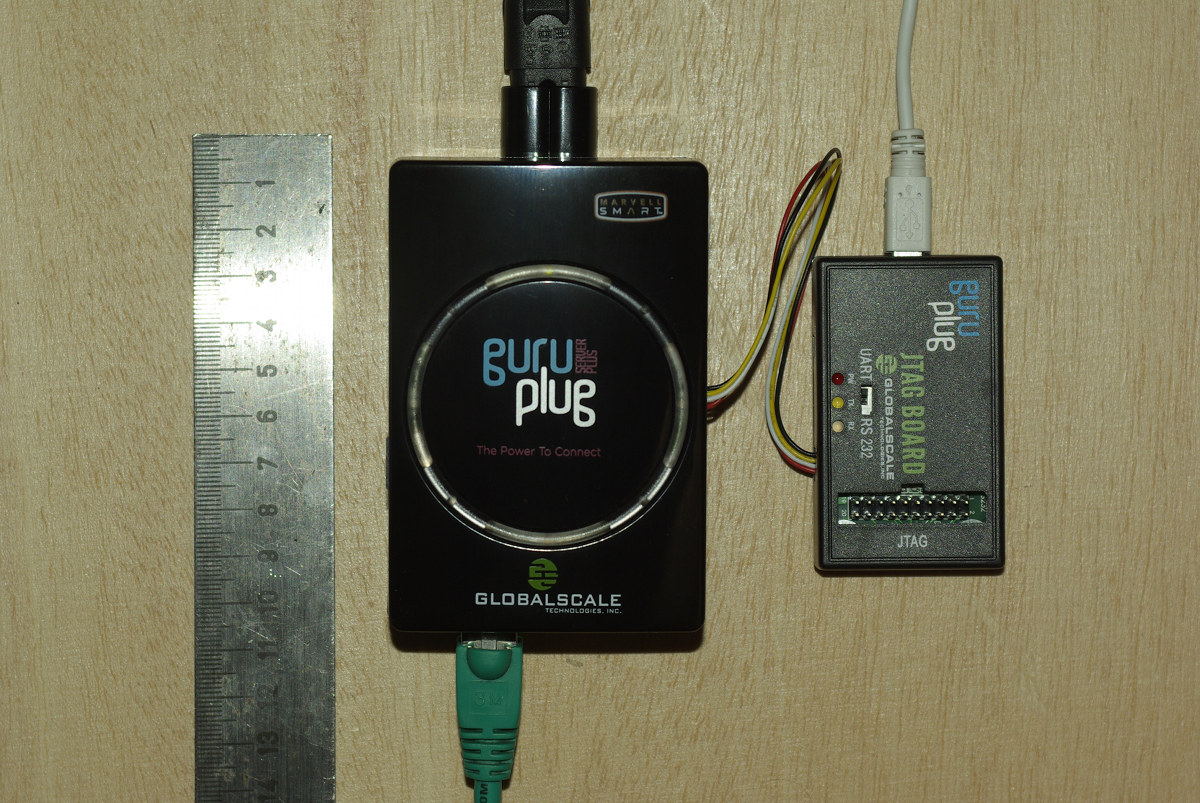
Yesterday finally my GuruPlug Server Plus arrived. Took longer than expected, but as it seems Globalscale had some issues with the power supplies and they were replaced before shipping the GuruPlugs. GuruPlug Server Plus and JTAG Board

The GuruPlug Basically the GuruPlugs are an enhanced version of the well known SheevaPlugs, the biggest difference is probably the need for an external JTAG/UART<>RS232 board to access the serial console. Good thing is that the board comes with a normal JTAG connector and an additional RS232 connector and 2.5V DC power outlet, so it will be useful for other devices, too. Globalscale could have chosen different connectors with less wiggly cables, though. As I was not able to find a useful howto about installing Debian on the Guruplug, I've written down what I did to install Debian unstable on a micro SD card using the Debian installer for the GuruPlug. I did not have a look who modified the Debian installer to work on the plug, but thanks for that! The instructions below are based on Martin Michlmayer's awesome SheevaPlug documentation, the hints from oinkzwurgl.org/guruplug and various forum posts in the plugforum.

Preparations Please note that I'm not resposible for whatever you're doing with your plug. If you follow this tutorial and end up with a brick, it is your fault, not mine. To install the GuruPlug you need the JTAG Board. Connect the UART port to the GuruPlug and the JTAG board to your computer, it should show up as FTDI (thanks for using good chips!) USB<>Serial converter. Serial port settings are 115200, 8-N-1, no hw/sw flow control. The other thing you should prepare is a working tftpd, I'm using aftpd.
apt-get install aftpd
Recent versions share files from /srv/tftp/, in case you're running Lenny /var/lib/tftpboot/ should be the place to drop your files. When everything is connected properly the boot process should show up in minicom, make sure to press some key to enter uBoot. The first thing you should do is to save the original uBoot environment in case you want to restore the factory settings later. Run
printenv
and save the output somewhere.

Upgrading uBoot Unfortunately the uBoot version on the GuruPlug is pretty old and seems to have some issues in booting from USB devices, so the first thing you should do is to upgrade it. You might want to investigate if there is even a better, more recent uBoot version available somewhere, or build one on your own, but I didn't bother and took the uBoot.guruplug.bin from here. The main issue with that is that booting from USB still seems to be buggy (even for FAT partitions) and that ext2load is still not supported. Otherwise it works well :-). I'm mainly following Martin Michlmayer's tutorial again. Download the uBoot.guruplug.bin and drop it into the tftpd directory. Make sure you always set the plug's IP address (ipaddr) and your server's IP address (serverip) properly. I'll use 192.168.121.253 for the plug and 192.168.121.2 for the server in all examples, make sure to change that for your own needs. Stop if something goes wrong, especially when the tftp download failed.
setenv ipaddr 192.168.121.253
setenv serverip 192.168.121.2
tftp 0x6400000 uBoot.guruplug.bin
nand erase 0x00000000 0x0100000
nand write 0x6400000 0x0000000 0x80000
reset
Enter uBoot again after the reset.

Preparing the installer Download uImage and uInitrd to your tftpd directory. Although I've heard that setting mainlineLinux/arcNumber in the uBoot environment is not necessary anymore for very recent kernel, lets set them to make sure the Debian kernel works:
setenv mainlineLinux yes
setenv arcNumber 2097
saveenv
reset
Again, enter uBoot after the reset.

Running the installer Run the following in the uBoot console:
setenv ipaddr 192.168.121.253
setenv serverip 192.168.121.2
tftpboot 0x01100000 uInitrd
tftpboot 0x00800000 uImage
setenv bootargs console=ttyS0,115200n8 base-installer/initramfs-tools/driver-policy=most
bootm 0x00800000 0x01100000
You should see the installer starting now. You might want to follow the following hints:
  • Before configuring the network, go back and set the debconf priority to low, Then continue. While chosing the Debian mirror, chose sid as the Debian version to install. If you don't have sid as choice, use a different mirror. The kernel in testing does not boot on the GuruPlug, you need 2.6.32-13 from sid.
  • You might want to load the 'network console' installer component and continue via ssh. Makes things fater and colourful.
  • Suggested partitioning: I've installed Debian to an 8GB micro SDcard. The SDcard reader is connected via USB and shows up as /dev/sdb (/dev/sda should be the internal NAND and not shown by the installer). I've used 150MB ext2 for /boot and the rest of the space for /, using ext4. You might want to use the noatime option on both filesystems to avoid unnecessary write access to the SDcard. You might choose to add a swap partition, but SDcards are so slow, so I've skipped that.
When you continue the installation, you will hit the following problem:
  • The installer might fail on 'Make the system bootable' (not sure if it does for you, it did so with the kernel from testing).
  • The uBoot is not able to boot from your /boot anyway. USB support is buggy and ext2load missing.
We'll work around these issues by writing the kernel and initrd into the plug's NAND. To do so, enter a shell in the installer and chroot into the install target. We'll then create the necessary uImage.bin and uInitrd and scp them to our tftpd directory:
chroot /target /bin/bash
cd /boot
mkimage -n vmlinuz -A arm -O linux -T kernel -C none -a 0x00008000 -e 0x00008000 -d /boot/vmlinuz uImage.bin
mkimage -n 'vmlinuz initrd' -A arm -O linux -T ramdisk -C gzip -d /boot/initrd.img uInitrd
scp uI* root@192.168.121.2:/srv/tftp
Now leave the shell, finish the installation and reboot, enter uBoot again.

Make the plug bootable To write kernel and initrd to the NAND memory, we have to transfer it via tftp first, then erase the NAND area we want to write to and then write it to the NAND. The values I've chosen here should be fine for the current Debian kernel, but you might need to change the necessary size for the initrd. To do so have a look at the output while transferring the initrd - the transferred bytes are displayed. They have to fit into the amount of bytes you write (the last option to nand write.e).
setenv ipaddr 192.168.121.253
setenv serverip 192.168.121.2
tftp 0x6400000 uImage.bin
nand erase 0x100000 0x400000
nand write.e 0x6400000 0x100000 0x400000
tftp 0x6400000 uInitrd
nand erase 0x500000 0x1fb00000
nand write.e 0x6400000 0x500000 0x600000
Now we need to set the necessary boot options. Make sure to change the root device if you've chosen a different layout from that I've suggested above, or if you're not using a SDcard.
setenv bootargs_debian 'console=ttyS0,115200 root=/dev/sdb2'
setenv bootcmd_nand 'nand start; nand read.e 0x00800000 0x100000 0x400000; nand read.e 0x01100000 0x500000 0x600000'
setenv bootcmd 'setenv bootargs $(bootargs_debian); run bootcmd_nand; bootm 0x00800000 0x01100000'
saveenv
run bootcmd

Finish Your GuruPlug should boot your new Debian installation now. Have fun! I'll try to keep the howto updated for changes in uBoot and the installer, but I might not have the time to so quickly. Patches and comments are welcome!.
root@guruplug:~# uname -a
Linux guruplug 2.6.32-5-kirkwood #1 Fri May 21 05:44:29 UTC 2010 armv5tel GNU/Linux
root@guruplug:~# cat /proc/cpuinfo 
Processor   : Feroceon 88FR131 rev 1 (v5l)
BogoMIPS    : 1192.75
Features    : swp half thumb fastmult edsp 
CPU implementer : 0x56
CPU architecture: 5TE
CPU variant : 0x2
CPU part    : 0x131
CPU revision    : 1
Hardware    : Marvell GuruPlug Reference Board
Revision    : 0000
Serial      : 0000000000000000
root@guruplug:~# 

Thibaut Girka: First week of GSoC

It's almost been a week since the GSoC started! Before describing what I've been doing this week I would like to write a word on the project and thank the ones I'm thankful to. The project Currently, Debian can be installed on the Neo Freerunner (FR) by running a shell script called install.sh on an already running Linux installation on the device (more information here). This works. However, it doesn't make use of the Debian Installer, and it is specific to the FR. The plan is to port Debian Installer to the FR and other similar devices. In order to succeed in this project, I'm mentored by Gaudenz Steinlin and Per Andersson, who I want to thank for their guidance (and the patience they'll probably need to have :p). I have to thank Obey Arhur Liu for all his organizing work, especially for the DebConf 10 sponsoring. While I'm at thanking, I want to thank Google, whithout which this program wouldn't exist at all, and especially Carol Smith, who makes an amazing job at organizing every aspect of the GSoC! What I've been doing Now, what have I been doing this week? As we did not set up git repositories yet, I'll not share the full patches, but only a few files for now: If you want to try the uImage, here is how to boot it. What's coming next First, I hope everything will be in place to share the full sources by then. The first thing I'll do next week is finishing identifying and including the needed drivers. Then, depending on how good goes the installation process, I may:

Martin-&#201;ric Racine: Ubuntu building its i386 libc6 with -m686 ?

This is something that makes me deeply worried about the future of Ubuntu.

Russell Coker: Logging in as Root

Martin Meredith wrote a blog post about logging in as root and the people who so strongly advocate against it [1]. The question is whether you should ssh directly to the root account on a remote server or whether you should ssh to a non-root account and use sudo or su to gain administrative privileges. Does sudo/su make your system more secure? Some years ago the administrator of a SE Linux Play Machine used the same home directory for play users to login as for administrative logins as for his own logins he used newrole to gain administrative access (like su or sudo but for SE Linux). His machine was owned by one of his friends who created a shell function named newrole in one of his login scripts that used netcat to send the administrative password out over the net. He didn t immediately realise that this was a problem until his friend changed the password and locked him out! This is one example of a system being 0wned due to having the double-authentication of course if he had logged in directly with administrative privs while using the same home directory that the attacker could write to then he would still have lost but the attacker would have had to do a little more work. When you login you have lots of shell scripts run on your behalf which have the ability to totally control your environment, if someone has taken over those scripts then they can control everything you see, when you think you run sudo or something they can get the password. When you ssh in to a server your security relies on the security of the client end-point, the encryption of the ssh protocol (including keeping all keys secure to prevent MITM attacks), and the integrity of all the programs that are executed before you have control of the remote system. One benefit for using sshd to spawn a session without full privileges is in the case where you fear an exploit against sshd and are running SE Linux or some other security system that goes way beyond Unix permissions. It is possible to configure SE Linux in the strict configuration to deny administrative rights to any shell that is launched directly by the sshd. Therefore someone who cracks sshd could only wait until an administrator logs in and runs newrole and they wouldn t be able to immediately take over the system. If the sysadmin suspected that a sshd compromise is possible then a sysadmin could login through some other method (maybe visit the server and login at the console) to upgrade the sshd. This is however a very unusual scenario and I suspect that most people who advocate using sudo exclusively don t use a SE Linux strict configuration. Does su/sudo improve auditing? If you have multiple people with root access to one system it can be difficult to determine who did what. If you force everyone to use su or sudo then you will have a record of which Unix account was used to start the root session. Of course if multiple people start root shells via su and leave them running then it can be difficult to determine which of the people who had such shells running made the mistake but at least that reduces the list of suspects. If you put PermitUserEnvironment yes in /etc/ssh/sshd_config then you have the option of setting environment variables by ssh authorized_keys entries, so you could have an entry such as the following: environment= ORIG_USER=john@example.com ssh-rsa AAAAB3Nz[...]/w== john@example.com Then you could have the .bashrc file (or a similar file for your favorite shell) have code such as the following to log the relevant data to syslogd:
if [ "$SSH_TTY" = "" ]; then
logger -p auth.info "user $ORIG_USER ran command \"$BASH_EXECUTION_STRING\" as root"
else
logger -p auth.info "user $ORIG_USER logged in as root on tty $(tty)"
fi I think that forcing the use of su or sudo might improve the ability to track other sysadmins if the system is not well configured. But it seems obvious that the same level of tracking can be implemented in other ways with a small amount of effort. It took me about 30 minutes to devise the above shell code and configuration options, it should take people who read this blog post about 5 minutes to implement it (or maybe 10 minutes if they use a different shell or have some other combination of Bash configuration that results in non-obvious use of initialisation scripts (EG if you have a .bash_profile file then .bashrc may not be executed). Once you have the above infrastructure for logging root login sessions it wouldn t be difficult to run a little script that asks the sysadmin what is the purpose for your root login and logs what they type. If several sysadmins are logged in at the same time and one of them describes the purpose of their login as to reconfigure LDAP then you know who to talk to if your LDAP server stops working! Should you run commands with minimum privilege? It s generally regarded that running each command with the minimum privilege is a good idea. But if the only reason you login to a server is to do root tasks (restarting daemons, writing to files that are owned by root, etc) then there really isn t a lot of potential for achieving anything by doing so. If you need to use a client for a particular service (EG a web browser to test the functionality of a web server or proxy server) then you can login to a different account for that purpose the typical sysadmin desktop has a dozen xterms open at once, using one for root access to do the work and another for non-root access to do the testing is probably a good option. Can root be used for local access? Linux Journal has an article about the distribution that used to be known as Lindows (later Linspire) which used root as the default login for desktop use [2]. It suggests using a non-root account because If someone can trick you into running a program or if a virus somehow runs while you are logged in, that program then has the ability to do anything at all of course someone could trick you into running a program or virus that attempts to run sudo (to see if you enabled it without password checks) and if that doesn t work waits until you run sudo and sniffs the password (using pty interception or X event sniffing). The article does correctly note that you can easily accidentally damage your system as root. Given that the skills of typical Linux desktop users are significantly less than those of typical system administrators it seems reasonable to assume that certain risks of mistake which are significant for desktop users aren t a big deal with skilled sysadmins. I think that it was a bad decision by the Lindows people to use root for everything due to the risk of errors. If you make a mistake on a desktop system as non-root then if your home directory was backed up recently and you use IMAP or caching IMAP for email access then you probably won t lose much of note. But if you make a serious mistake as root then the minimum damage is being forced to do a complete reinstall, which is time consuming and annoying even if you have the installation media handy and your Internet connection has enough quota for the month to complete the process. Finally there are some services that seek out people who use the root account for desktop use. Debian has some support channels on IRC [3] and I decided to use the root account from my SE Linux Play Machine [4] to see how they go. #debian has banned strings matching root. #linpeople didn t like me because Deopped you on channel #linpeople because it is registered with channel services . #linuxhelp and #help let me in, but nothing seemed to be happening in those channels. Last time I tried this experiment I had a minor debate with someone who repeated a mantra about not using root and didn t show any interest in reading my explanation of why root:user_r:user_t is safe for IRC. I can t imagine that good the #debian people expect to gain from denying people the ability to access that channel with an IRC client that reports itself to be running as root. Doing so precludes the possibility of educating them if you think that they are doing something wrong (such as running a distribution like Lindows/Linspire). Conclusion I routinely ssh directly to servers as root. I ve been doing so for as long as ssh has been around and I used to telnet to systems as root before that. Logging in to a server as root without encryption is in most cases a really bad idea, but before ssh was invented it was the only option that was available. For the vast majority of server deployments I think that there is no good reason to avoid sshing directly as root.

28 May 2010

Ana Beatriz Guerrero Lopez: KOffice 2.2.0 packages for Debian

As some of you might have seen, KOffice 2.2.0 was finally released today. Quoting the release announcement: There are still areas in the user interface that we want to work on before stating that KOffice is fit for the general public. We are, however, at a stage where we think that KOffice can be used for real work by some users.
I agree with this statement and it is still to be decided if KOffice 2.2.0 will make it into Squeeze. I am inclined to do so but I would love some well argumented feedback. Take into consideration some applications are more mature than others. The packages will be uploaded to the official archive soon, but they still need some minor work and given they include new deb files (kformula shape and kexi), they need to go thru the NEW queue, it might take some time. Meanwhile, you can find packages for amd64 & i386 from the semi-official repository at: http://qt-kde.debian.net/.
You also have available the localization packages (see the list here) and braindump, an interesting application based in KOffice libraries. These packages are not in the Debian archive so please *don t* report bugs against them in the Debian Bug Tracking System. If you see any packaging problem, please report it in the debian-kde mailing list.
If you find a bug, miss a feature or have a wishlist, please file a report in the KDE bugzilla: https://bugs.kde.org/ Include all the information you can about your system (Debian experimental, KOffice 2.2.0) and all the details you are able to give. In the case of crashes, install the package koffice-dbg to get a backtrace. Read more at this techbase article.

Russell Coker: Brother MFC-9120CN Color LASER Printer

I have just bought a Brother MFC-9120CN Multi-Function Color LED LASER Printer for a relative. It was a replacement for the Lexmark printer which turned out not to support Linux properly [1]. This printer cost about $545. I bought it from OfficeWorks [2] under their price-matching deal. If you find a better price anywhere else they will beat it by 5%. I went to StaticIce.com.au and found the cheapest online store in Australia that sold the printer and then took the URL of the online store to OfficeWorks on a USB stick. After they verified the price they sold me the printer for 5% less than the online cost plus the delivery cost, which saved my relative a little more than $50. Craig Sanders had convinced me to choose a LASER printer because the toner doesn t have a short shelf-life unlike the ink for ink-jet printers. My parents have been using a LASER printer for more than 12 years and each toner cartridge lasts at least 4 years which is a much better result than all the ink-jet printers I ve supported which tend to regularly need more expensive ink. I guess I ll find out over the next few years whether this printer lives up to the general reputation of LASER printers in this regard. The LED printers use LEDs for the LASER light, this apparently makes them more reliable and efficient but means that they tend to have a lower resolution, and often the horizontal and vertical resolutions are not equal. The printer I got is listed as 600*2400dpi resolution but that might end up giving much the same result as a 600*600dpi printer. But 600*600dpi should be good enough for a long time anyway. A4 paper (the standard size for office paper in Australia) is 210*297mm, that is about 8.27*11.69 inches or 4961*7015 pixels at 600dpi. Even if we assume that 10% of the width and height is wasted on margins that would take a 28 megapixel camera to produce a picture that can actually use 600dpi for the most common case where high quality is needed for home use printing a single photo on an A4 sheet. The printer ships with 64M of RAM which was not enough to print some pictures that I sent it, it has a slot for a 144pin SO-DIMM (laptop RAM) for memory expansion, it can take one SO-DIMM of up to 512M capacity that is at least PC-100. I ve got a spare 256M PC-133 memory module that I will install in it, hopefully that will be enough to print pictures. Buying PC-100/PC-133 RAM nowadays probably isn t going to be easy, particularly not 512M modules as many of the laptops which used PC-100/PC-133 RAM didn t support that capacity (I believe that my ancient Thinkpads which used such memory didn t support 512M modules). The requirement was for a printer that could print photos in reasonable quality, could make photo-copies, and ideally work as a scanner. I got CUPS to talk to it without much effort, I just installed a PPD file from the Brother Solutions Center web site [3] and it just worked. It occurred to me later that I should have tried configuring it before installing the PPD file maybe the version of CUPS in Debian/Squeeze supports the Brother printer natively. So the current state of the printer is that it prints documents very well, it doesn t print photos but that should be solved when I add more RAM, and I just have to try and get scanning to work. Everyone is happy! The only down-side is that the printer is huge. It takes a lot of desk space to run it (they will need a new desk in their computer room), and when it s in it s box it s much larger than most things that you will normally transport by car. Update: I ve installed a 256M PC-133 SO-DIMM and can now print full color pictures. Thanks for Rodney Brown for giving me some Thinkpad parts which included RAM.

Kees Cook: too lazy to recompile

I have a camera that takes .MP4 files. MythTV s Gallery plugin has a static list of extensions it recognizes. MP4 is not one of them. I can rename all my files (which is wrong they re MP4s not something else), or I can edit the source and recompile. Or, since I want to watch them RIGHT NOW, I can binary-edit the shared library and replace something I ll not have any of (WMV) with MP4.
# strings -a /usr/lib/mythtv/plugins/libmythgallery.so   grep WMV
*.WMV
# sed -i -e 's/\.WMV/.MP4/' /usr/lib/mythtv/plugins/libmythgallery.so
Ta-da. Just need to make sure I don t change the size of the binary. :) (Oddly, I m not too lazy to open a bug and propose a patch.)

27 May 2010

Petter Reinholdtsen: Parallellized boot seem to hold up well in Debian/testing

A few days ago, parallel booting was enabled in Debian/testing. The feature seem to hold up pretty well, but three fairly serious issues are known and should be solved: All in all not many surprising issues, and all of them seem solvable before Squeeze is released. In addition to these there are some packages with bugs in their dependencies and run level settings, which I expect will be fixed in a reasonable time span. If you report any problems with dependencies in init.d scripts to the BTS, please usertag the report to get it to show up at the list of usertagged bugs related to this. Update: Correct bug number to file-rc issue.

C.J. Adams-Collier: Building libvirt on CentOS5 (incomplete)

Much thanks to Brett for the pointers on rpm-fu. http://grantmcwilliams.com/index.php?option=com_content&view=article&id=229: $ sudo yum install \
xen-devel \
xhtml1-dtds \
hal-devel \
libpcap-devel \
cyrus-sasl-devel \
parted-devel \
numactl-devel \
avahi-devel \
slang-devel \
libvolume_id-devel \
openldap-devel # device-mapper-devel \
# xmlrpc-c-devel \ for pkg in \
libssh2-devel-1.2.5-1.el5.pp.x86_64.rpm \
libssh2-1.2.5-1.el5.pp.x86_64.rpm \
libssh-0.2.1-0.2.svn193.el5.pp.x86_64.rpm \
libssh-devel-0.2.1-0.2.svn193.el5.pp.x86_64.rpm
do
wget ftp://ftp.pbone.net/mirror/ftp.pramberger.at/systems/linux/contrib/rhel5/x86_64/$pkg
rpm -i $pkg
done wget http://www.fateyev.com/RPMS/RHEL5/x86_64/xmlrpc-c-devel-1.14.8-1.el5.x86_64.rpm
wget http://www.fateyev.com/RPMS/RHEL5/x86_64/xmlrpc-c-1.14.8-1.el5.x86_64.rpm
rpm -i xmlrpc-c-*1.14*el5*.rpm wget ftp://ftp.icm.edu.pl/vol/rzm1/linux-fedora-secondary/development/source/SRPMS/corosync-0.95-2.fc11.src.rpm
alien -t corosync-0.95-2.fc11.src.rpm
mv corosync-0.95.tgz /tmp
cd ~/rpm/SOURCES
tar xfz /tmp/corosync-0.95.tgz
patch -p0
--- corosync.spec.orig  2010-05-26 19:17:15.000000000 +0000
+++ corosync.spec       2010-05-26 19:21:39.000000000 +0000
@@ -39,11 +39,7 @@
 fi
 %endif
-% _configure   CFLAGS="$(echo '% optflags ')" \
-               --prefix=/usr \
-               --sysconfdir=/etc \
-               --localstatedir=/var \
-               --libdir=% _libdir 
+% configure    CFLAGS="$(echo '% optflags ')"
 %build
 make % _smp_mflags 
@@ -52,8 +48,8 @@
 rm -rf % buildroot 
 make install DESTDIR=% buildroot 
-install -d % buildroot % _initddir 
-install -m 755 init/redhat % buildroot % _initddir /corosync
+install -d % buildroot % _sysconfdir /init.d
+install -m 755 init/redhat % buildroot % _sysconfdir /init.d/corosync
 ## tree fixup
 # drop static libs
@@ -95,7 +91,7 @@
 % _sbindir /corosync-fplay
 % _sbindir /corosync-pload
 %config(noreplace) /etc/corosync.conf
-% _initddir /corosync
+% _sysconfdir /init.d/corosync
 %dir % _libexecdir /lcrso
 % _libexecdir /lcrso/coroparse.lcrso
 % _libexecdir /lcrso/objdb.lcrso
rpmbuild -bb corosync.spec
sudo rpm -i ~/rpm/RPMS/x86_64/corosynclib*.rpm wget ftp://ftp.icm.edu.pl/vol/rzm1/linux-fedora-secondary/development/source/SRPMS/openais-0.94-1.fc11.src.rpm
alien -t openais-0.94-1.fc11.src.rpm
mv openais-0.94.tgz /tmp
cd ~/rpm/SOURCES
tar xfz /tmp/openais-0.94.tgz
rpmbuild -bb openais.spec
sudo rpm -i ~/rpm/RPMS/x86_64/openaislib-*.rpm wget ftp://ftp.icm.edu.pl/vol/rzm1/linux-fedora-secondary/development/source/SRPMS/lvm2-2.02.45-4.fc11.src.rpm
alien -t lvm2-2.02.45-4.fc11.src.rpm
mv lvm2-2.02.45.tgz /tmp
cd ~/rpm/SOURCES
tar xfz /tmp/lvm2-2.02.45.tgz
rpmbuild -bb lvm2.spec

Matt Zimmerman: Rethinking the Ubuntu Developer Summit

This is a repost from the ubuntu-devel mailing list, where there is probably some discussion happening by now. After each UDS, the organizers evaluate the event and consider how it could be further improved in the future. As a result of this process, the format of UDS has evolved considerably, as it has grown from a smallish informal gathering to a highly structured matrix of hundreds of 45-to-60-minute sessions with sophisticated audiovisual facilities. If you participated in UDS 10.10 (locally or online), you have hopefully already completed the online survey, which is an important part of this evaluation process. A survey can t tell the whole story, though, so I would also like to start a more free-form discussion here among Ubuntu developers as well. I have some thoughts I d like to share, and I m interested in your perspectives as well. Purpose The core purpose of UDS has always been to help Ubuntu developers to explore, refine and share their plans for the subsequent release. It has expanded over the years to include all kinds of contributors, not only developers, but the principle remains the same. We arrive at UDS with goals, desires and ideas, and leave with a plan of action which guides our work for the rest of the cycle. The status quo UDS looks like this: This screenshot is only 1600 1200, so there are another 5 columns off the right edge of the screen for a total of 18 rooms. With 7 time slots per day over 5 days, there are over 500 blocks in the schedule grid. 9 tracks are scattered over the grid. We produce hundreds of blueprints representing projects we would like to work on. It is an impressive achievement to pull this event together every six months, and the organizers work very hard at it. We accomplish a great deal at every UDS, and should feel good about that. We must also constantly evaluate how well it is working, and make adjustments to accommodate growth and change in the project. How did we get here? (this is all from memory, but it should be sufficiently accurate to have this discussion) In the beginning, before it was even called UDS, we worked from a rough agenda, adding items as they came up, and ticking them off as we finished talking about them. Ad hoc methods worked pretty well at this scale. As the event grew, and we held more and more discussions in parallel, it was hard to keep track of who was where, and we started to run into contention. Ubuntu and Launchpad were planning their upcoming work together at the same time. One group would be discussing topic A, and find that they needed the participation of person X, who was already involved in another discussion on topic B. The A group would either block, or go ahead without the benefit of person X, neither of which was seen to be very effective. By the end of the week, everyone was mentally and physically exhausted, and many were ill. As a result, we decided to adopt a schedule grid, and ensure that nobody was expected to be in two places at once. Our productivity depended on getting precisely the right people face to face to tackle the technical challenges we faced. This meant deciding in advance who should be present in each session, and laying out the schedule to satisfy these constraints. New sessions were being added all the time, so the UDS organizers would stay up late at night during the event, creating the schedule grid for the next day. In the morning, over breakfast, everyone would tell them about errors, and request revisions to the schedule. Revisions to the schedule were painful, because we had to re-check all of the constraints by hand. So, in the geek spirit, we developed a program which would read in the constraints and generate an error-free schedule. The UDS organizers ran this at the end of each day during the event, checked it over, and posted it. In the morning, over breakfast, everyone would tell them about constraints they hadn t been aware of, and request revisions to the schedule. Revisions to the schedule were painful, because a single changed constraint would completely rearrange the schedule. People found themselves running all over the place to different rooms throughout the day, as they were scheduled into many different meetings back-to-back. At around this point, UDS had become too big, and had too many constraints, to plan on the fly (unconference style). We resolved to plan more in advance, and agree on the scheduling constraints ahead of time. We divided the event into tracks, and placed each track in its own room. Most participants could stay in one place throughout the day, taking part in a series of related meetings except where they were specifically needed in an adjacent track. We created the schedule through a combination of manual and automatic methods, so that scheduling constraints could be checked quickly, but a human could decide how to resolve conflicts. There was time to review the schedule before the start of the event, to identify and fix problems. Revisions to the schedule during the event were fewer and less painful. We added keynote presentations, to provide opportunities to communicate important information to everyone, and ease back into meetings after lunch. Everyone was still exhausted and/or ill, and tiredness took its toll on the quality of discussion, particularly toward the end of the week. Concerns were raised that people weren t participating enough, and might stay on in the same room passively when they might be better able to contribute to a different session happening elsewhere. As a result, the schedule was randomly rearranged so that related sessions would not be held in the same room, and everyone would get up and move at the end of each hour. This brings us roughly to where things stand today. Problems with the status quo
  1. UDS is big and complex. Creating and maintaining the schedule is a lot of work in itself, and this large format requires a large venue, which in turn requires more planning and logistical work (not to mention cost). This is only worthwhile if we get proportionally more benefit out of the event itself.
  2. UDS produces many more blueprints than we need for a cycle. While some of these represent an explicit decision not to pursue a project, most of them are set aside simply because we can t fit them in. We have the capacity to implement over 100 blueprints per cycle, but we have *thousands* of blueprints registered today. We finished less than half of the blueprints we registered for 10.04. This means that we re spending a lot of time at UDS talking about things which can t get done that cycle (and may never get done).
  3. UDS is (still) exhausting. While we should work hard, and a level of intensity helps to energize us, I think it s a bit too much. Sessions later in the week are substantially more sluggish than early on, and don t get the full benefit of the minds we ve brought together. I believe that such an intense format does not suit the type of work being done at the event, which should be more creative and energetic.
  4. The format of UDS is optimized for short discussions (as many as we can fit into the grid). This is good for many technical decisions, but does not lend itself as well to generating new ideas, deeply exploring a topic, building broad consensus or tackling big picture issues facing the project. These deeper problems sometimes require more time. They also benefit tremendously from face-to-face interaction, so UDS is our best opportunity to work on them, and we should take advantage of it.
  5. UDS sessions aim for the minimum level of participation necessary, so that we can carry on many sessions in parallel: we ask, who do we need in order to discuss this topic? This is appropriate for many meetings. However, some would benefit greatly from broader participation, especially from multiple teams. We don t always know in advance where a transformative idea will come from, and having more points of view represented would be valuable for many UDS topics.
  6. UDS only happens once per cycle, but design and planning need to continue throughout the cycle. We can t design everything up front, and there is a lot of information we don t have at the beginning. We should aim to use our time at UDS to greatest effect, but also make time to continue this work during the development cycle. design a little, build a little, test a little, fly a little
Proposals
  1. Concentrate on the projects we can complete in the upcoming cycle. If we aren t going to have time to implement something until the next cycle, the blueprint can usually be deferred to the next cycle as well. By producing only moderately more blueprints than we need, we can reduce the complexity of the event, avoid waste, prepare better, and put most of our energy into the blueprints we intend to use in the near future.
  2. Group related sessions into clusters, and work on them together, with a similar group of people. By switching context less often, we can more easily stay engaged, get less fatigued, and make meaningful connections between related topics.
  3. Organize for cross-team participation, rather than dividing teams into tracks. A given session may relate to a Desktop Edition feature, but depends on contributions from more than just the Desktop Team. There is a lot of design going on at UDS outside of the Design track. By working together to achieve common goals, we can more easily anticipate problems, benefit from diverse points of view, and help each other more throughout the cycle.
  4. Build in opportunities to work on deeper problems, during longer blocks of time. As a platform, Ubuntu exists within a complex ecosystem, and we need to spend time together understanding where we are and where we are going. As a project, we have grown rapidly, and need to regularly evaluate how we are working and how we can improve. This means considering more than just blueprints, and sometimes taking more than an hour to cover a topic.

Next.

Previous.