Search Results: "ed"

16 August 2015

Russ Allbery: git-pbuilder 1.35

Today is the day for minor software releases. It's amazing how much more free time I have when I'm not unpacking boxes. Osamu Aoki submitted a bug report a while back asing for --update, --create, and --login to be supported as options to git-pbuilder, in addition to the versions without leading hyphens, since pbuilder and cowbuilder require the hyphens and people are used to typing them. I've finally merged his patch and released git-pbuilder 1.35 with that change. It will probably show up in git-buildpackage shortly. (Still need to rewrite this script in Python one of these days so that it can be properly and fully merged with git-buildpackage.) You can get the latest version of git-pbuilder from my scripts page.

Ben Armstrong: McIntosh Run Hike the Greenbelt event, August 2015

Just came back from a wonderful time hiking with my daughter at the finale Hike the Greenbelt event at the Backlands/McIntosh Run! This photo slideshow is from my HP snapshot camera which unfortunately has dust in the lens. But I felt it was more important to get them up soon than to get them perfect, so please click the photo below to start the slideshow. I want to thank everyone who made this event a success, and not going to name specific names as I m sure I ll miss someone important. But thanks especially to Martin, the leader of our group. [slb_group]
Marcos Zentilli explaining geology of the region. Click photo to start slideshow.Marcos Zentilli explaining geology of the region. Click photo to start slideshow.
Barrens Barrens Barrens Barrens DIGITAL CAMERA Jack Pine in Jack Pine ;) DIGITAL CAMERA DIGITAL CAMERA DIGITAL CAMERA DIGITAL CAMERA Part of the waterway DIGITAL CAMERA DIGITAL CAMERA DIGITAL CAMERA DIGITAL CAMERA DIGITAL CAMERA DIGITAL CAMERA DIGITAL CAMERA DIGITAL CAMERA DIGITAL CAMERA DIGITAL CAMERA DIGITAL CAMERA DIGITAL CAMERA DIGITAL CAMERA
facebooktwittergoogle_plusredditpinterestlinkedinmail

John Goerzen: First steps: Debian on an Asus t100, and some negative experience with Gnome

The Asus t100 tablet is this amazing and odd little thing: it sells for under $200, yet has a full-featured Atom 64-bit CPU, 2GB RAM, 32 or 64GB SSD, etc. By default, it ships with Windows 8.1. It has a detachable keyboard, so it can be used as a tablet or a very small 10 laptop. I have never been a fan of Windows on it. It does the trick for web browsing and email, but I d like to ssh into my machines sometimes, and I just can t bring myself to type sensitive passwords into Windows. I decided to try installing Debian on it. After a lot of abortive starts due to the UEFI-only firmware, I got jessie installed. (The installer was fine; it was Debian Live that wouldn t boot.) I got wifi and battery status working via an upgrade to the 4.1 kernel. A little $10 Edimax USB adapter was handy to spare a bunch of copying via USB disks. I have been using XFCE with XMonad for so many years that I am somewhat a stranger to other desktop environments. XMonad isn t really suitable for a tablet, however, so I thought I d try Gnome, especially after a fairly glowing review about its use on a tablet. I am already disappointed after just a few minutes. There is no suspend button on the menu. Some Googling showed that holding Alt while hovering over the power off button will change it to a suspend button. And indeed it does. But uh, what? That is so common and so non-obvious. And pushing the power button does nothing. That s right, nothing. Apparently the way to enable some action when you push the power button is to type in a settings command in a terminal. There s no setting in the settings panel. I initially ditched Gnome some years ago due to its penchant for removing features. I had hoped that this much time later, it would have passed that stage, but I m already disappointed. I was hoping for some really nice integration with the system. But my XFCE setup has a very clear When power button is pressed setting. I have no idea why Gnome doesn t. Also, the touch screen works fine and it registers my touches, but whenever I touch anywhere, the cursor disappears. Weird, eh? There are some things to fix yet on the tablet (sound, brightness adjustment, and making suspend reliable) but others have solved these in Ubuntu so I don t think it ll be too hard. In the meantime, any suggestions regarding Gnome? Is it just going to annoy me? Maybe I should try KDE also. I ve heard good things about Plasma Active, but don t see it in Debian though.

Russ Allbery: Net::Duo 1.01

Net::Duo is a Perl implementation of the Duo API that's a bit more comprehensive and sophisticated than the sample code provided by Duo Security. This release is a compatibility bug fix that adjusts for a change in JSON::XS 3.0 that broke automatic mapping of boolean values in some JSON generation. It should hopefully continue to work with older versions of JSON::XS as well. You can get the latest versiom from the Net::Duo distribution page.

Ana Beatriz Guerrero Lopez: Debconf15 and happy birthday Debian!

Debconf15 started yesterday and as expected, talk rooms are always fully crowded! I had to stand up in a couple of talks and I watched another couple of them from outside thanks to the real time streaming. Thanks to the fantastic work of the video team, video recordings of the talks from yesterday have started to be available at http://meetings-archive.debian.net/pub/debian-meetings/2015/debconf15/.
I would heartily recommend you to watch Debian s Central Role in the Future of Software Freedom by Bradley M. Kuhn (video available).
I was expecting a good talk and Bradley exceeded my expectations. I also got to meet again Simon Kainz and to get my DUCK branded lighter from the duck challenge :) After dinner, we celebrated Debian s 22 birthday, that s exactly today. We had a wonderful cake made by DebConf attendees made by small pieces of pastry with fruits drawing a mosaic with a Debian swirl.
While the cake was a very nice detail, the best part of it was watching the people making the cake. Everybody had a great time and this kind of things are what make Debian (and DebConf) great. When people work together to make something wonderful.

Lunar: Reproducible builds: week 16 in Stretch cycle

What happened in the reproducible builds effort this week: Toolchain fixes Valentin Lorentz sent a patch for ispell to initialize memory structures before dumping their content. In our experimental repository, qt4-x11 has been rebased on the latest version (Dhole), as was doxygen (akira). Packages fixed The following packages became reproducible due to changes in their build dependencies: backup-manager, cheese, coinor-csdp, coinor-dylp, ebook-speaker, freefem, indent, libjbcrypt-java, qtquick1-opensource-src, ruby-coffee-script, ruby-distribution, schroot, twittering-mode. The following packages became reproducible after getting fixed: Some uploads fixed some reproducibility issues but not all of them: Patches submitted which have not made their way to the archive yet: akira found another embedded code copy of texi2html in maxima. reproducible.debian.net Work on testing several architectures has continued. (Mattia/h01ger) Package reviews 29 reviews have been removed, 187 added and 34 updated this week. 172 new FTBFS reports were filled, 137 solely by Chris West (Faux). josch spent time investigating the issue with fonts in PDF files. Chris Lamb documented the issue affecting documentation generated by ocamldoc. Misc. Lunar presented a general Reproducible builds HOWTO talk at the Chaos Communication Camp 2015 in Germany on August 13th. Recordings are already available, as well as slides and script. h01ger and Lunar also used CCCamp15 as an opportunity to have discussions with members of several different projects about reproducible builds. Good news should be coming soon.

Benjamin Drung: DebConf 15

I am still alive and currently attending DebConf 15. Feel free to grab me for a talk. I am just shy, not antisocial.

15 August 2015

Matthieu Caneill: A one-liner to catch'em all!

I wrote a Bash one-liner to open the source code (in Debsources) of any file on your system (if it belongs to a Debian package). It will simply retrieve the associated package and point your default browser to its source code. Add this somewhere in your $PATH, and name this file debsrc:
#!/bin/bash
function debsrc  
    readlink -f $1   xargs dpkg-query --search   awk -F ": " ' print $1 '   xargs apt-cache showsrc   grep-dctrl -s 'Package' -n ''   awk -F " " ' print "http://sources.debian.net/src/"$1"/latest/" '   xargs x-www-browser
 
CMD="$1"
debsrc $ CMD 
And try something like debsrc /usr/share/doc/acpi/AUTHORS. Enjoy! Update: improved the one-liner thanks to josch's advice.

Simon Kainz: DUCK challenge: week 6

Well, here are the stats for week 6 of the DUCK challenge: So we had 9 packages fixed and uploaded by 7 different uploaders. A big "Thank You" to you!! Since the start of this challenge, a total of 68 packages, were fixed. Here is a quick overview:
Week 1 Week 2 Week 3 Week 4 Week 5 Week 6 Week 7
# Packages 10 15 10 14 10 9 -
Total 10 25 35 49 59 68 -
The list of the fixed and updated packages is availabe here. I will try to update this ~daily. If I missed one of your uploads, please drop me a line. So, assuming that the current rate of packages fixed will be somewhat stable and there will be no additional regessions, the number of packages with issues should be down to 0 in about 209 weeks (~ 4 years ) I just arrived at DebConf15 in Heidelberg, and will try to find all of you who fixed & uploaded packages. If you are one of the guys and see me lingering around, please talk to me and get your lighter! The DUCK Challenge will run until the end of DebConf15, but as there might be some delay by my scripts detecting your upload, please contact my directly. Pevious articles are here: Week 1, Week 2, Week 3, Week 4, Week 5.

Lars Wirzenius: Obnam 1.14 released (backup software)

I have just released version 1.14 of Obnam, my backup program. See the website at http://obnam.org for details on what the program does. The new version is available from git (see http://git.liw.fi) and as Debian packages from http://code.liw.fi/debian, and uploaded to Debian, and soon in unstable. The NEWS file extract below gives the highlights of what's new in this version. Version 1.14, released 2015-08-14 Bug fixes:

Sune Vuorela: Debconf 2015 1

When greeted by Clint with one single word: kamel s , one has arrived to Debconf.

Norbert Preining: Kobo GloHD firmware 3.17.0 mega update (KSM, nickel patch, ssh, fonts)

As with all the previous versions, I have prepared a mega update for the Kobo firmware 3.17.0. Big warning for a start this is for Mark6 hardware, thus GloHD only. The update includes all my favorite patches and features. Please see details (although for for Kobo Glo) for 3.16.0, 3.15.0, 3.13.1 and 3.12.1. As before, the following addons are included: Kobo Start Menu, koreader, coolreader, pbchess, ssh access, custom dictionaries, and some side-loaded fonts. What I dropped this time is most of the kobohack part, as the libraries seem to get outdated. But I included the dropbear ssh server from the kobohack package. Kobo Logo So what are all these items: Install procedure Latest firmware Warning: Sideloading or crossloading the incorrect firmware can break/brick your device. The link below is for Kobo GloHD ONLY. The first step is to update the Kobo to the latest firmware. This can easily be done by just getting the latest firmware (thread, direct link for Kobo 3.17.0 for GloHD) and unpacking the zip file into the .kobo directory on your device. Eject and enjoy the updating procedure. Mega update Get the combined Kobo-3.17.0-combined/KoboRoot.tgz and put it into the .kobo directory, then eject and enjoy the updating procedure again. After this the device should reboot and you will be kicked into KSM, from where after some time of waiting Nickel will be started. If you consider the fonts too small, select Configure, then the General, and add item, then select kobomenuFontsize=55 and save. Remarks to some of the items included The full list of included things is above, here are only some notes about what specific I have done. WARNINGS After installing this patch, you need to fix the password for root and disable telnet. This is an important step, here are the steps you have to take (taken from this old post):
  1. Turn on Wifi on the Kobo and find IP address
    Go to Settings Connect and after this is done, go to Settings Device Information where you will see something like
    IP Address: 192.168.1.NN

    (numbers change!)
  2. telnet into your device
    telnet 192.168.1.NN
    it will ask you the user name, enter root (without the quotes) and no password
  3. (ON THE GLO) change home directory of root
    edit /etc/passwd with vi and change the entry for root by changing the 6th field from: / to /root (without the quotes). After this procedure the line should look like
    root::0:0:root:/root:/bin/sh
    don t forget to save the file
  4. (ON THE GLO) create ssh keys for dropbear
    [root@(none) ~]# mkdir /etc/dropbear
    [root@(none) ~]# cd /etc/dropbear
    [root@(none) ~]# dropbearkey -t dss -f dropbear_dss_host_key
    [root@(none) ~]# dropbearkey -t rsa -f dropbear_rsa_host_key
  5. (ON YOUR PERSONAL COMPUTER) check that you can log in with ssh
    ssh root@192.168.1.NN
    You should get dropped into your device again
  6. (ON THE GLO) log out of the telnet session (the first one you did)
    [root@(none) ~]# exit
  7. (ON THE GLO) in your ssh session, change the password of root
    [root@(none) ~]# passwd
    you will have to enter the new password two times. Remember it well, you will not be easily able to recover it without opening your device.
  8. (ON THE GLO) disable telnet login
    edit the file /etc/inetd.conf.local on the GLO (using vi) and remove the telnet line (the line starting with 23).
  9. restart your device
The combined KoboRoot.tgz is provided without warranty. If you need to reset your device, don t blame me!

14 August 2015

Ben Hutchings: DebCamp 2015

I've now spent nearly at week in Heidelberg, attending DebCamp and working on 'kernel stuff'. It's been very sunny and warm here, sometimes uncomfortably so. I've been sitting in a outdoor hacklab - covered but otherwise open to the elements. Right now it is mild and raining, and quite comfortable here. Linux 3.2.71 Hot on the heels of Linux 3.2.70, I prepared another stable update for 3.2 which was announced today. I've now caught up with fixes in Linus's tree up to 4.2-rc5, though there are plenty of others still to consider. Kernel packaging in git I finally completed the scripts and configuration needed to convert the kernel team's Subversion repository to git, with most of the history of the relevant packages accurately represented. (Several packages are obsolete or had been separately moved to git.) Thanks to Subversion's flexibility with directory layout, this was quite challenging. There were a number of changes of layout in 2005-2006, tags that were copied from the wrong directory level, and merges that somehow didn't get recorded as such. I pushed the new git repositories onto Alioth on Tuesday and disabled writes to the packaging in Subversion. So far no-one's complained about breakage, so I think I got it all right. Autopkgtest for Linux I've been worried for a while that I have so little ability to test for regressions in the kernel. I am mostly reliant on getting bug reports on versions in experimental and unstable to prevent these from getting to testing and stable. However this doesn't help with stable updates for security or general bug fixes. The autopkgtest framework provides a way to (mostly) automatically test Debian packages, and I've been exploring how this can be used for the linux package. It already allows for tests that need a whole (virtual) machine to themselves and that may need to reboot the machine, so installing and running new kernel packages is fine. I don't want to have to reconfigure a boot loader, and there is no way to specify which boot loader should be used, so at least initially I'm using kexec to boot into the test kernel. The linux source tree includes a growing number of self-test programs which roughly follow a single spec, although the requirements for some of them (kernel and machine configuration) are not all clearly documented. So far, I have most of the tests passing on 4.2-rc6 under autopkgtest, a few failures that are expected given the kernel configuration we use, and several more failures that I don't yet understand. Once I have these self-tests integrated, I'd like to move on and add some separate test suites such as xfstests and LTP. Or I may add to the self-tests myself. liblockdep I reviewed the 2014 version of "What's new in the Linux kernel" in order to write the follow-up section at the start of this year's talk. Last year I mentioned liblockdep, a port of lockdep to userland that tests use of the pthreads locking APIs, which wasn't packaged. As this is part of the linux source tree, I probably should have worked on it myself. To avoid embarrassment right at the start of my talk, I worked to add liblockdep binary packages to the linux-tools source package. These are now in the binary-NEW queue, headed for experimental. As lockdep is sadly lacking in documentation and liblockdep seems to be missing the ability to explicitly define lock classes, I'm not sure how useful it will be. Packaging it should make it easier for people to try out, though. What's new in the Linux kernel I'm about half way through writing the 2015 version of this talk, which I'm due to give on Monday afternoon. This year I think I've avoided having to spend most of the preceding day preparing it, which was why I skipped the day trip last year.

Wouter Verhelst: Multi-pass transcoding to WebM with normalisation

Transcoding video from one format to another seems to be a bit of a black art. There are many tools that allow doing this kind of stuff, but one issue that most seem to have is that they're not very well documented. I ran against this a few years ago, when I was first doing video work for FOSDEM and did not yet have proper tools to do the review and transcoding workflow. At the time, I just used mplayer to look at the .dv files, and wrote a text file with a simple structure to remember exactly what to do with it. That file was then fed to a perl script which wrote out a shell script that would use the avconv command to combine and extract the "interesting" data from the source DV files into a single DV file per talk, and which would then call a shell script which used gst-launch and sox to do a multi-pass transcode of those intermediate DV files into a WebM file. While all that worked properly, it was a rather ugly hack, never cleaned up, and therefore I never really documented it properly either. Recently, however, someone asked me to do so anyway, so here goes. Before you want to complain about how this ate the videos of your firstborn child, however, note the above. The perl script spent a somewhat large amount of code reading out the text file and parsing it into an array of hashes. I'm not going to reproduce that, since the actual format of the file isn't all that important anyway. However, here's the interesting bits:
foreach my $pfile(keys %parts)  
        my @files = @ $parts $pfile ;
        say "#" x (length($pfile) + 4);
        say "# " . $pfile . " #";
        say "#" x (length($pfile) + 4);
        foreach my $file(@files)  
                my $start = "";
                my $stop = "";
                if(defined($file-> start ))  
                        $start = "-ss " . $file-> start ;
                 
                if(defined($file-> stop ))  
                        $stop = "-t " . $file-> stop ;
                 
                if(defined($file-> start ) && defined($file-> stop ))  
                        my @itime = split /:/, $file-> start ;
                        my @otime = split /:/, $file-> stop ;
                        $otime[0]-=$itime[0];
                        $otime[1]-=$itime[1];
                        if($otime[1]<0)  
                                $otime[0]-=1;
                                $otime[1]+=60;
                         
                        $otime[2]-=$itime[2];
                        if($otime[2]<0)  
                                $otime[1]-=1;
                                $otime[2]+=60;
                         
                        $stop = "-t " . $otime[0] . ":" . $otime[1] .  ":" . $otime[2];
                 
                if(defined($file-> start )   defined($file-> stop ))  
                        say "ln " . $file-> name  . ".dv part-pre.dv";
                        say "avconv -i part-pre.dv $start $stop -y -acodec copy -vcodec copy part.dv";
                        say "rm -f part-pre.dv";
                  else  
                        say "ln " . $file-> name  . ".dv part.dv";
                 
                say "cat part.dv >> /tmp/" . $pfile . ".dv";
                say "rm -f part.dv";
         
        say "dv2webm /tmp/" . $pfile . ".dv";
        say "rm -f /tmp/" . $pfile . ".dv";
        say "scp /tmp/" . $pfile . ".webm video.fosdem.org:$uploadpath   true";
        say "mv /tmp/" . $pfile . ".webm .";
 
That script uses avconv to read one or more .dv files and transcode them into a single .dv file with all the start- or end-junk removed. It uses /tmp rather than the working directory, since the working directory was somewhere on the network, and if you're going to write several gigabytes of data to an intermediate file, it's usually a good idea to write them to a local filesystem rather than to a networked one. Pretty boring. It finally calls dv2webm on the resulting .dv file. That script looks like this:
#!/bin/bash
set -e
newfile=$(basename $1 .dv).webm
wavfile=$(basename $1 .dv).wav
wavfile=$(readlink -f $wavfile)
normalfile=$(basename $1 .dv)-normal.wav
normalfile=$(readlink -f $normalfile)
oldfile=$(readlink -f $1)
echo -e "\033]0;Pass 1: $newfile\007"
gst-launch-0.10 webmmux name=mux ! fakesink \
  uridecodebin uri=file://$oldfile name=demux \
  demux. ! ffmpegcolorspace ! deinterlace ! vp8enc multipass-cache-file=/tmp/vp8-multipass multipass-mode=1 threads=2 ! queue ! mux.video_0 \
  demux. ! progressreport ! audioconvert ! audiorate ! tee name=t ! queue ! vorbisenc ! queue ! mux.audio_0 \
  t. ! queue ! wavenc ! filesink location=$wavfile
echo -e "\033]0;Audio normalize: $newfile\007"
sox --norm $wavfile $normalfile
echo -e "\033]0;Pass 2: $newfile\007"
gst-launch-0.10 webmmux name=mux ! filesink location=$newfile \
  uridecodebin uri=file://$oldfile name=video \
  uridecodebin uri=file://$normalfile name=audio \
  video. ! ffmpegcolorspace ! deinterlace ! vp8enc multipass-cache-file=/tmp/vp8-multipass multipass-mode=2 threads=2 ! queue ! mux.video_0 \
  audio. ! progressreport ! audioconvert ! audiorate ! vorbisenc ! queue ! mux.audio_0
rm $wavfile $normalfile
... and is a bit more involved. Multi-pass encoding of video means that we ask the encoder to first encode the file but store some statistics into a temporary file (/tmp/vp8-multipass, in our script), which the second pass can then reuse to optimize the transcoding. Since DV uses different ways of encoding things than does VP8, we also need to do a color space conversion (ffmpegcolorspace) and deinterlacing (deinterlace), but beyond that the video line in the first gstreamer pipeline isn't very complicated. Since we're going over the file anyway and we need the audio data for sox, we add a tee plugin at an appropriate place in the audio line in the first gstreamer pipeline, so that we can later on pick up that same audio data an write it to a wav file containing linear PCM data. Beyond the tee, we go on and do a vorbis encoding, as is needed for the WebM format. This is not actually required for a first pass, but ah well. There's some more conversion plugins in the pipeline (specifically, audioconvert and audiorate), but those are not very important. We next run sox --norm on the .wav file, which does a fully automated audio normalisation on the input. Audio normalisation is the process of adjusting volume levels so that the audio is not too loud, but also not too quiet. Sox has pretty good support for this; the default settings of its --norm parameter make it adjust the volume levels so that the highest peak will just about reach the highest value that the output format can express. As such, you have no clipping anywhere in the file, but also have an audio level that is actually useful. Next, we run a second-pass encoding on the input file. This second pass uses the statistics gathered in the first pass to decide where to put its I- and P-frames so that they are placed at the most optimal position. In addition, rather than reading the audio from the original file, we now read the audio from the .wav file containing the normalized audio which we produced with sox, ensuring the audio can be understood. Finally, we remove the intermediate audio files we created; and the shell script which was generated by perl also contained an rm command for the intermediate .dv file. Some of this is pretty horrid, and I never managed to clean it up enough so it would be pretty (and now is not really the time). However, it Just Works(tm), and I am happy to report that it continues to work with gstreamer 1.0, provided you replace the ffmpegcolorspace by an equally simple videoconvert, which performs what ffmpegcolorspace used to perform in gstreamer 0.10.

Dirk Eddelbuettel: Rblpapi: Connecting R to Bloomberg

big deal Whit, John and I are thrilled to announce Rblapi, a new CRAN package which connects R to the Bloomberg backends. Rebuilt from scratch using only the Bloomberg C++ API and the Rcpp and BH packages, it offers efficient and direct access from R to a truly vast number of financial data series, pricing tools and more. The package has been tested on Windows, OS X and Linux. As is standard for CRAN packages, binaries for Windows and OS X are provided (or will be once the builders caught up). Needless to say, a working Bloomberg installation is required to use the package. Please see the Rblapi package page for more details, including a large part of the introductory vignette document. As a teaser, here are just three of the core functions:
## Bloomberg Data Point Query
bdp(c("ESA Index", "SPY US Equity"), c("PX_LAST", "VOLUME"))
## Bloomberg Data Set Query
bds("GOOG US Equity", "TOP_20_HOLDERS_PUBLIC_FILINGS")
## Bloomberg Data History Query
bdh("SPY US Equity", c("PX_LAST", "VOLUME"), start.date=Sys.Date()-31)
## Get OHLCV bars (by default hourly and just six of them)
getBars("ES1 Index")
## Get Tick Data (by default last hour)
getTicks("ES1 Index")
Source code for the package is at the Rblpapi GitHub repo where issue tickets can be filed as well. The sibbling blp GitHub repo contains the Bloomberg code required to build and link the package (which is automated during the build of the CRAN package). Last but not least the Rblpapi package page has more details about the package.

This post by Dirk Eddelbuettel originated on his Thinking inside the box blog. Please report excessive re-aggregation in third-party for-profit settings.

Tiago Bortoletto Vaz: c3video for debconf #5

This is a follow-up to my previous post related the DebConf videoteam using a new software stack for the next conferences: http://acaia.ca/~tiago/posts/c3video-for-dc-take-4/. This is about the encoding step from C3TT, mostly done by the script named D-encoding. We can have many different encoding templates in the system. They're XSLT files which will generate the XML needed to create the local encoding commands. We can have more than one encoding template assigned for a conference.
/images/c3tt_encoding.png

XSLT encoding templates

A general comment: each meta ticket (say, the original ticket with meta info about the talk) will generate two children tickets over time, a recording one and a encoding one, with their own states. If things go wrong, a ingest ticket is created. More details can be checked here.
/images/c3tt_children_tickets.png

Children tickets

So I've got the proper encoded files in my Processing.Path.Output directory. The ticket is marked as encoded by the script. There's also a postencoding step, executed by E-postencoding. As I could understand, it's intended to be a general post-processing hook for encoded files. For instance, it can produces an audio file and make it available on Auphonic service. As we won't use that, we may want to set the property Processing.Auphonic.Enable to no. The next step starts from the operator side. Just going to the Releasing tab in the web interface, choosing the ticket to check and doing a quick review in the encoded file:
/images/c3tt_releasing.png

Releasing tab

Then, if everything looks fine, click Everthing's fine:
/images/c3tt_check.png

Check encoded file

From this point the ticket will be marked as checked and the next script (F-postprocessing) will take care of pushing the video(s)/audio(s) to the target place, as defined by Publishing.UploadTarget. I had to set myself the encoding template property EncodingProfile.Extension. We can optionally set Publishing.UploadOptions. (keep that in mind, seems not documented elsewhere) So I have now the first DebCamp encoded video file uploaded to an external host, entirely processed using the C3TT software stack. We may also want to use a very last script to release the videos (eg. as torrents, to different mirrors and other onlive services) if needed. This is script-G-release.pl, which unlike others, won't be run by the screen UI in the sequence. It has some parameters hardcoded on it, although code is very clear and ready to be hacked. It'll also mark the ticket as Released.
/images/c3tt_released.png

Released!

That's all for now! In summary: I've been able to install and set C3TT up during a few days in DebCamp, and will be playing with it during DebConf. In case things go well we'll probably be using this system as our video processing environment for the next events. We can access most CCC VoC software from https://github.com/voc. By having a look at what they're developing I feel that we (DebConf and CCC) share quite the same technical needs. And most important, the same spirit of community work for bringing part of the conference to those unable to attend. DebCamp was warm!

Alberto Garc a: I/O limits for disk groups in QEMU 2.4

QEMU 2.4.0 has just been released, and among many other things it comes with some of the stuff I have been working on lately. In this blog post I am going to talk about disk I/O limits and the new feature to group several disks together. Disk I/O limits Disk I/O limits allow us to control the amount of I/O that a guest can perform. This is useful for example if we have several VMs in the same host and we want to reduce the impact they have on each other if the disk usage is very high. The I/O limits can be set using the QMP command block_set_io_throttle, or with the command line using the throttling.* options for the -drive parameter (in brackets in the examples below). Both the throughput and the number of I/O operations can be limited. For a more fine-grained control, the limits of each one of them can be set on read operations, write operations, or the combination of both: Example:
-drive if=virtio,file=hd1.qcow2,throttling.bps-write=52428800,throttling.iops-total=6000
In addition to that, it is also possible to configure the maximum burst size, which defines a pool of I/O that the guest can perform without being limited: One additional parameter named iops_size allows us to deal with the case where big I/O operations can be used to bypass the limits we have set. In this case, if a particular I/O operation is bigger than iops_size then it is counted several times when it comes to calculating the I/O limits. So a 128KB request will be counted as 4 requests if iops_size is 32KB. Group throttling All of these parameters I ve just described operate on individual disk drives and have been available for a while. Since QEMU 2.4 however, it is also possible to have several drives share the same limits. This is configured using the new group parameter. The way it works is that each disk with I/O limits is member of a throttle group, and the limits apply to the combined I/O of all group members using a round-robin algorithm. The way to put several disks together is just to use the group parameter with all of them using the same group name. Once the group is set, there s no need to pass the parameter to block_set_io_throttle anymore unless we want to move the drive to a different group. Since the I/O limits apply to all group members, it is enough to use block_set_io_throttle in just one of them. Here s an example of how to set groups using the command line:
-drive if=virtio,file=hd1.qcow2,throttling.iops-total=6000,throttling.group=foo
-drive if=virtio,file=hd2.qcow2,throttling.iops-total=6000,throttling.group=foo
-drive if=virtio,file=hd3.qcow2,throttling.iops-total=3000,throttling.group=bar
-drive if=virtio,file=hd4.qcow2,throttling.iops-total=6000,throttling.group=foo
-drive if=virtio,file=hd5.qcow2,throttling.iops-total=3000,throttling.group=bar
-drive if=virtio,file=hd6.qcow2,throttling.iops-total=5000
In this example, hd1, hd2 and hd4 are all members of a group named foo with a combined IOPS limit of 6000, and hd3 and hd5 are members of bar. hd6 is left alone (technically it is part of a 1-member group). Next steps I am currently working on providing more I/O statistics for disk drives, including latencies and average queue depth on a user-defined interval. The code is almost ready. Next week I will be in Seattle for the KVM Forum where I will hopefully be able to finish the remaining bits.
I will also attend LinuxCon North America. Igalia is sponsoring the event and we have a booth there. Come if you want to talk to us or see our latest demos with WebKit for Wayland. See you in Seattle!

Enrico Zini: expectations-needs

Expectations and needs
All people ever say is: "thank you" (a celebration of life) and "please" (an opportunity to make life more wonderful). (Marshall Rosenberg)
Sometimes, when I see the word "expectation" I try to read it as "need" and see how things change. I noticed that this tends to reframe situations in a way that makes me feel more comfortable. I noticed that I tend to instinctively perceive "expectations" as "do this or there will be consequences", and I tend to instinctively perceive "needs" as "do this if you want to see me happy". I noticed that my motivation to care for someone's expectations tend to be something close to fear, and my motivation to care for someone's needs tends to be something close to love. This might give me a bit more hints on The art of asking: I will not expect you to do something for me, I'll just allow myself to be loved, liked or helped by you, and I'll try to be open about what I need. I smile realising that since a long time, on the professional side of my life, I learnt to lead interaction with my customers along the same lines: "let's talk about what you need, not about what you expect of me".

Neil Williams: The problem of SD mux

I keep being asked about automated bootloader testing and the phrase which crops up is SD mux hardware to multiplex SD card access (typically microSD). Each time, the questioner comes up with a simple solution which can be built over a weekend, so I ve decided to write out the actual objective, requirements and constraints to hopefully illustrate that this is not a simple problem and the solution needs to be designed to a fully scalable, reliable and maintainable standard. The objective Support bootloader testing by allowing fully automated tests to write a custom, patched, bootloader to the principal boot media of a test device, hard reset the board and automatically recover if the bootloader fails to boot the device by switching the media from the test device to a known working support device with full write access to overwrite everything on the card and write a known working bootloader. The environment 100 test devices, one SD mux each (potentially), in a single lab with support for all or any to be switched simultaneously and repeatedly (maybe a hundred times a day to and fro) with 99.99% reliability. The history First attempt was a simplistic solution which failed to operate reliably. Next attempt was a complex solution (LMP) which failed to operate as designed in a production environment (partially due to a reliance on USB) and has since suffered from a lack of maintenance. The most recent attempt was another simplistic solution which delivered three devices for test with only one usable and even that became unreliable in testing. The requirements (None of these are negotiable and all are born from real bugs or real failures of previous solutions in the above environment.)
  1. Ethernet yes, really. Physical, cat5/6 RJ45 big, bulky, ugly gigabit ethernet port. No wifi. This is not about design elegance, this is about scalability, maintenance and reliability. Must have a fully working TCP/IP stack with stable and reliable DHCP client. Stable, predictable, unique MAC addresses for every single board guaranteed. No dynamic MAC addresses, no hard coded MAC addresses which cannot be modified. Once modified, retain permanence of the required MAC address across reboots.
  2. No USB involement yes, really. The server writing to the media to recover a bricked device usually has only 2 USB ports but supports 20 devices. Powered hubs are not sufficiently reliable.
  3. Removable media only eMMC sounds useful but these are prototype development boards and some are already known to intermittently fry SD card controller chips causing permanent and irreversible damage to the SD card. If that happened to eMMC, the entire device would have to be discarded.
  4. Cable connections to the test device. This is a solved problem, the cables already exist due to the second attempt at a fix for this problem which resulted in a serviceable design for just the required cables. Do not consider any fixed connection, the height of the connector will never match all test device requirements and will be a constant source of errors when devices are moved around within the rack.
  5. Guaranteed unique, permanent and stable serial numbers for every device. With 100 devices in a lab, it is absolutely necessary that every single one is uniquely addressable.
  6. Interrogation there must be an interface for the control device to query the status of the SD mux and be assured that the results reflect reality at all times. The device must allow the control device to read and write to the media without requiring the test device to acknowledge the switch or even be powered on.
  7. No feature creep. There is no need to make this be able to switch ethernet or HDMI or GPIO as well as SD. Follow the software principle of pick one job and do it properly.
  8. Design for scalability this is not a hobbyist project, this is a serious task requiring genuine design. The problem is not simple, it is not acceptable to make a simple solution.
  9. Power the device must boot directly from power-on without requiring manual intervention of any kind and boot into a default safe mode where the media is only accessible to the control device. 5V power with a barrel connector is preferable definitely not power over USB. Device must raise the TCP/IP control interface automatically and be prepared to react to commands immediately that the interface is available.
  10. Software: some logic to prevent queued requests from causing repeated switching without any interval in between, e.g. if the device had to be power cycled.
  11. Ongoing support and maintenance of hardware, firmware and software. Test devices continue to develop and will require further changes or fixes as time goes on.
  12. Mounting holes sounds obvious but the board needs to be mounted in a sensible manner. Dangling off the end of a cat5 cable is not acceptable.
If any of those seem insurmountable or awkward or unappealing, please go back to the drawing board or leave well alone. Beyond the absolutes, there are other elements. The device is likely to need some kind of CPU and something ARM would be preferable, Cortex-M or Cortex-A if relevant, but creating a cape for a beaglebone-black is likely to be overkill. The available cables are short and the device will need to sit quite close to the test device. Test devices never put the SD card slot in the same place twice or in any location which is particularly accessible. Wherever possible, the components on the device should be commodity parts, replaceable and serviceable. The device would be best not densely populated there is no need for the device to be any particular size and overly small boards tend to be awkward to position correctly once cables are connected. There are limits, of course, so boards which end up bigger than typical test devices would seem excessive. So these are the reasons why we don t have automated bootloader testing and won t have it any time soon. If you ve got this far, maybe there is a design which meets all the criteria so contact me and let s see if this is a fixable problem after all.

Norbert Preining: QMapShack GPS and Maps on Linux

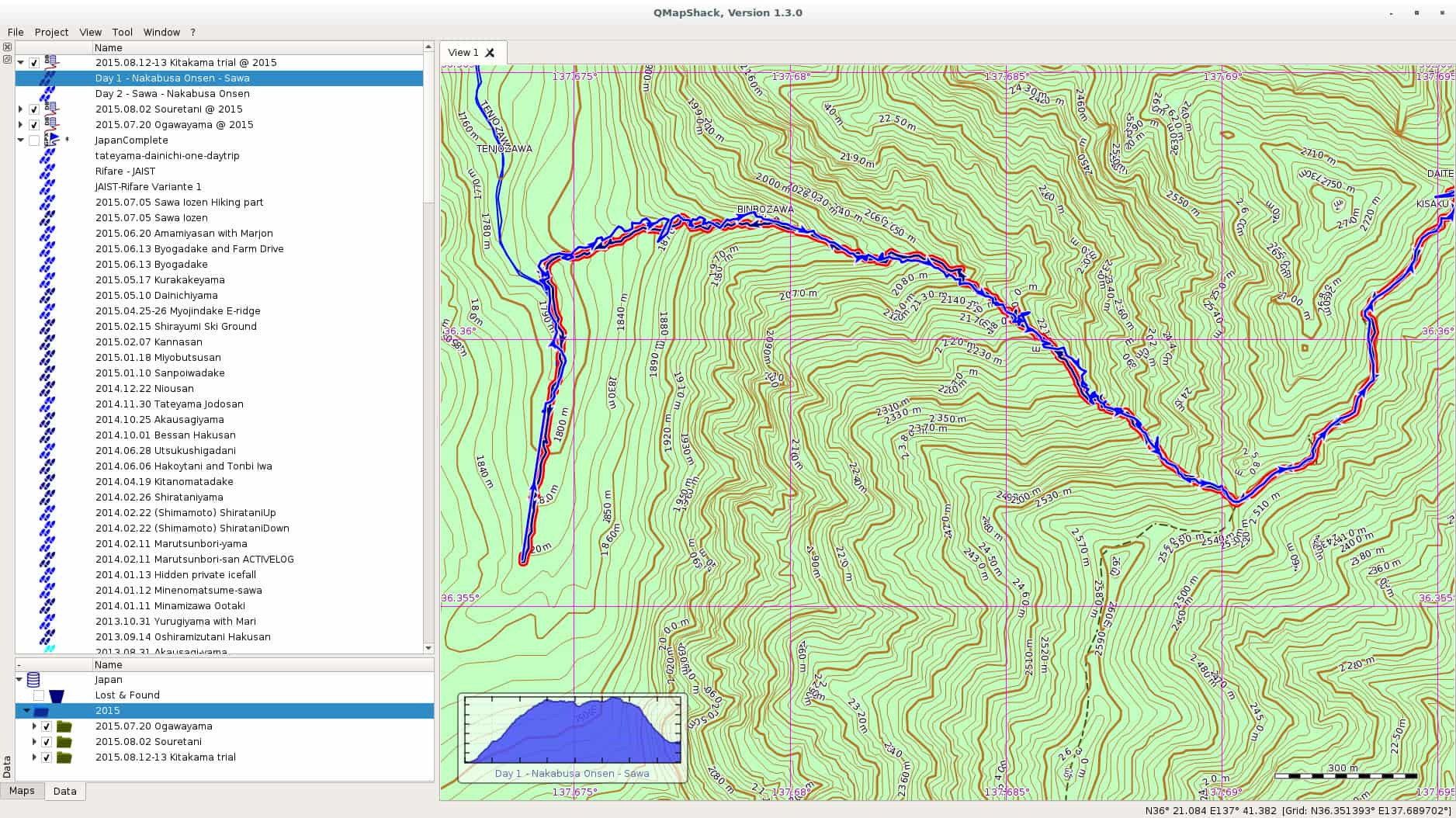
In one of the comments on my last post on Windows 10, a friendly reader from my home country pointed me at QMapShack as a replacement for QuoVadis. I have been using QuoVadis now for many many years, and it contains my mountaineering history all the way back. All the guiding work, all the track. QuoVadis is a great program, able to work with various commercial digital maps as well as GPS receivers. It only has one disadvantage, it doesn t work on Linux. QMapShack is very similar in the target audience, but very different in usage. The one big difference is of course the set of maps one can use with QMapShack. Fortunately, Garmin Maps are supported, and since all my maps regarding Japan are Garmin maps, I am now in the process to converting to QMapShack at least for my Japan GPS data. qmapshack Let us start with the program I was using since ages, and still are using, QuoVadis. QuoVadis is a great program, there is nothing to complain. It is extremely feature-rich, and above all it can work with many different maps. While working as mountain guide in Europe it was an essential tool for me. I could use the digital raster maps of Austria, Switzerland (SwissTOPO), Germany, France, Italy, as well as Garmin vector maps. For serious work as a professional it was indispensable for me. Unfortunately, it never worked on Linux. For some time I had a VirtualBox installation of Windows, but that was more a clutch than anything else. So for most of the GPS work I had to reboot my laptop to Windows, do my stuff there, and then switch back to Linux. QMapShack is far from as feature rich as QuoVadis, but as far as I see now, it does have enough features for me and my mountaineering in Japan. Dealing with GPS units is not a problem, this is the easy part. The difficult part are the digital maps. Fortunately, QMapShack supports Garmin vector maps, the only maps that are (as far as I know) available digitally for Japan. Getting used to QMapShack is a bit a challenge coming from QuoVadis, but the Wiki help pages allowed a quick start. Within short time I had maps set up. Next step was to download a data from my last weekend trip to Yarigadake, Kitakama-ridge (unfortunately we had to turn back due to rain). Connecting the unit and mounting it was already enough to show up in QMapShack, and allowed me to copy the tracks to my local database. Next I switched to Windows and exported some tracks from my Japan folder to a gpx file. After rebooting to Linux, I loaded the gpx file into QMapShack and without failure all the tracks and routes showed up, as it can be seen in the above screenshot (click on it to get a bigger version). Also the display of the Garmin map worked perfectly. Update: Please see the comment section for explanation of the necessary functions. QMapShack does provide similar functionality. Thanks to Oliver for pointing me at it! After some time of working there are a few functions from QuoVadis I am missing for now at QMapShack: Although these two functionalities are missing, all in all I am very happy for now with QMapShack. My next steps are: Finally, above all, I see a future where I do not need to reboot into Windows for doing my GPS work. For now I will import all the data into both applications, but if QMapShack holds its promises from the first day of usage, I am confident that this will not be necessary in future. Enjoy.

Next.

Previous.