Jonathan McDowell: Digging into Kubernetes containers
 Having build a single node Kubernetes cluster and had a poke at what it s doing in terms of networking the next thing I want to do is figure out what it s doing in terms of containers. You might argue this should have come before networking, but to me the networking piece is more non-standard than the container piece, so I wanted to understand that first.
Let s start with a process listing on the host.
Having build a single node Kubernetes cluster and had a poke at what it s doing in terms of networking the next thing I want to do is figure out what it s doing in terms of containers. You might argue this should have come before networking, but to me the networking piece is more non-standard than the container piece, so I wanted to understand that first.
Let s start with a process listing on the host.
ps faxno user,stat,cmd
There are a number of processes from the host kernel we don t care about:
kernel processes
There are various basic host processes, including my SSH connections, and Docker. I note it s using USER STAT CMD
0 S [kthreadd]
0 I< \_ [rcu_gp]
0 I< \_ [rcu_par_gp]
0 I< \_ [kworker/0:0H-events_highpri]
0 I< \_ [mm_percpu_wq]
0 S \_ [rcu_tasks_rude_]
0 S \_ [rcu_tasks_trace]
0 S \_ [ksoftirqd/0]
0 I \_ [rcu_sched]
0 S \_ [migration/0]
0 S \_ [cpuhp/0]
0 S \_ [cpuhp/1]
0 S \_ [migration/1]
0 S \_ [ksoftirqd/1]
0 I< \_ [kworker/1:0H-kblockd]
0 S \_ [cpuhp/2]
0 S \_ [migration/2]
0 S \_ [ksoftirqd/2]
0 I< \_ [kworker/2:0H-events_highpri]
0 S \_ [cpuhp/3]
0 S \_ [migration/3]
0 S \_ [ksoftirqd/3]
0 I< \_ [kworker/3:0H-kblockd]
0 S \_ [kdevtmpfs]
0 I< \_ [netns]
0 S \_ [kauditd]
0 S \_ [khungtaskd]
0 S \_ [oom_reaper]
0 I< \_ [writeback]
0 S \_ [kcompactd0]
0 SN \_ [ksmd]
0 SN \_ [khugepaged]
0 I< \_ [kintegrityd]
0 I< \_ [kblockd]
0 I< \_ [blkcg_punt_bio]
0 I< \_ [edac-poller]
0 I< \_ [devfreq_wq]
0 I< \_ [kworker/0:1H-kblockd]
0 S \_ [kswapd0]
0 I< \_ [kthrotld]
0 I< \_ [acpi_thermal_pm]
0 I< \_ [ipv6_addrconf]
0 I< \_ [kstrp]
0 I< \_ [zswap-shrink]
0 I< \_ [kworker/u9:0-hci0]
0 I< \_ [kworker/2:1H-kblockd]
0 I< \_ [ata_sff]
0 I< \_ [sdhci]
0 S \_ [irq/39-mmc0]
0 I< \_ [sdhci]
0 S \_ [irq/42-mmc1]
0 S \_ [scsi_eh_0]
0 I< \_ [scsi_tmf_0]
0 S \_ [scsi_eh_1]
0 I< \_ [scsi_tmf_1]
0 I< \_ [kworker/1:1H-kblockd]
0 I< \_ [kworker/3:1H-kblockd]
0 S \_ [jbd2/sda5-8]
0 I< \_ [ext4-rsv-conver]
0 S \_ [watchdogd]
0 S \_ [scsi_eh_2]
0 I< \_ [scsi_tmf_2]
0 S \_ [usb-storage]
0 I< \_ [cfg80211]
0 S \_ [irq/130-mei_me]
0 I< \_ [cryptd]
0 I< \_ [uas]
0 S \_ [irq/131-iwlwifi]
0 S \_ [card0-crtc0]
0 S \_ [card0-crtc1]
0 S \_ [card0-crtc2]
0 I< \_ [kworker/u9:2-hci0]
0 I \_ [kworker/3:0-events]
0 I \_ [kworker/2:0-events]
0 I \_ [kworker/1:0-events_power_efficient]
0 I \_ [kworker/3:2-events]
0 I \_ [kworker/1:1]
0 I \_ [kworker/u8:1-events_unbound]
0 I \_ [kworker/0:2-events]
0 I \_ [kworker/2:2]
0 I \_ [kworker/u8:0-events_unbound]
0 I \_ [kworker/0:1-events]
0 I \_ [kworker/0:0-events]
containerd. We also see kubelet, the Kubernetes node agent.
host processes
And that just leaves a bunch of container related processes:
    USER STAT CMD
       0 Ss   /sbin/init
       0 Ss   /lib/systemd/systemd-journald
       0 Ss   /lib/systemd/systemd-udevd
     101 Ssl  /lib/systemd/systemd-timesyncd
       0 Ssl  /sbin/dhclient -4 -v -i -pf /run/dhclient.enx00e04c6851de.pid -lf /var/lib/dhcp/dhclient.enx00e04c6851de.leases -I -df /var/lib/dhcp/dhclient6.enx00e04c6851de.leases enx00e04c6851de
       0 Ss   /usr/sbin/cron -f
     104 Ss   /usr/bin/dbus-daemon --system --address=systemd: --nofork --nopidfile --systemd-activation --syslog-only
       0 Ssl  /usr/sbin/dockerd -H fd://
       0 Ssl  /usr/sbin/rsyslogd -n -iNONE
       0 Ss   /usr/sbin/smartd -n
       0 Ss   /lib/systemd/systemd-logind
       0 Ssl  /usr/bin/containerd
       0 Ss+  /sbin/agetty -o -p -- \u --noclear tty1 linux
       0 Ss   sshd: /usr/sbin/sshd -D [listener] 0 of 10-100 startups
       0 Ss    \_ sshd: root@pts/1
       0 Ss        \_ -bash
       0 R+            \_ ps faxno user,stat,cmd
       0 Ss    \_ sshd: noodles [priv]
    1000 S         \_ sshd: noodles@pts/0
    1000 Ss+           \_ -bash
       0 Ss   /lib/systemd/systemd --user
       0 S     \_ (sd-pam)
    1000 Ss   /lib/systemd/systemd --user
    1000 S     \_ (sd-pam)
       0 Ssl  /usr/bin/kubelet --bootstrap-kubeconfig=/etc/kubernetes/bootstrap-kubelet.conf --kubeconfig=/etc/kubernetes/kubelet.conf --config=/var/lib/kubelet/config.yaml --network-plugin=cni --pod-infra-container-image=k8s.gcr.io/pause:3.4.1
container processes
There s a lot going on there. Some bits are obvious; we can see the nginx ingress controller, our echoserver (the other nginx process hanging off 0 Sl /usr/bin/containerd-shim-runc-v2 -namespace moby -id fd95c597ff3171ff110b7bf440229e76c5108d5d93be75ffeab54869df734413 -address /run/containerd/containerd.sock
0 Ss \_ /pause
0 Sl /usr/bin/containerd-shim-runc-v2 -namespace moby -id c2ff2c50f0bc052feda2281741c4f37df7905e3b819294ec645148ae13c3fe1b -address /run/containerd/containerd.sock
0 Ss \_ /pause
0 Sl /usr/bin/containerd-shim-runc-v2 -namespace moby -id 589c1545d9e0cdf8ea391745c54c8f4db49f5f437b1a2e448e7744b2c12f8856 -address /run/containerd/containerd.sock
0 Ss \_ /pause
0 Sl /usr/bin/containerd-shim-runc-v2 -namespace moby -id 6f417fd8a8c573a2b8f792af08cdcd7ce663457f0f7218c8d55afa3732e6ee94 -address /run/containerd/containerd.sock
0 Ss \_ /pause
0 Sl /usr/bin/containerd-shim-runc-v2 -namespace moby -id afa9798c9f663b21df8f38d9634469e6b4db0984124547cd472a7789c61ef752 -address /run/containerd/containerd.sock
0 Ssl \_ kube-scheduler --authentication-kubeconfig=/etc/kubernetes/scheduler.conf --authorization-kubeconfig=/etc/kubernetes/scheduler.conf --bind-address=127.0.0.1 --kubeconfig=/etc/kubernetes/scheduler.conf --leader-elect=true --port=0
0 Sl /usr/bin/containerd-shim-runc-v2 -namespace moby -id 4b3708b62f4d427690f5979848c59fce522dab6c62a9c53b806ffbaef3f88e62 -address /run/containerd/containerd.sock
0 Ssl \_ kube-controller-manager --authentication-kubeconfig=/etc/kubernetes/controller-manager.conf --authorization-kubeconfig=/etc/kubernetes/controller-manager.conf --bind-address=127.0.0.1 --client-ca-file=/etc/kubernetes/pki/ca.crt --cluster-name=kubernetes --cluster-signing-cert-file=/etc/kubernetes/pki/ca.crt --cluster-signing-key-file=/etc/kubernetes/pki/ca.key --controllers=*,bootstrapsigner,tokencleaner --kubeconfig=/etc/kubernetes/controller-manager.conf --leader-elect=true --port=0 --requestheader-client-ca-file=/etc/kubernetes/pki/front-proxy-ca.crt --root-ca-file=/etc/kubernetes/pki/ca.crt --service-account-private-key-file=/etc/kubernetes/pki/sa.key --use-service-account-credentials=true
0 Sl /usr/bin/containerd-shim-runc-v2 -namespace moby -id 89f35bf7a825eb97db7035d29aa475a3a1c8aaccda0860a46388a3a923cd10bc -address /run/containerd/containerd.sock
0 Ssl \_ kube-apiserver --advertise-address=192.168.53.147 --allow-privileged=true --authorization-mode=Node,RBAC --client-ca-file=/etc/kubernetes/pki/ca.crt --enable-admission-plugins=NodeRestriction --enable-bootstrap-token-auth=true --etcd-cafile=/etc/kubernetes/pki/etcd/ca.crt --etcd-certfile=/etc/kubernetes/pki/apiserver-etcd-client.crt --etcd-keyfile=/etc/kubernetes/pki/apiserver-etcd-client.key --etcd-servers=https://127.0.0.1:2379 --insecure-port=0 --kubelet-client-certificate=/etc/kubernetes/pki/apiserver-kubelet-client.crt --kubelet-client-key=/etc/kubernetes/pki/apiserver-kubelet-client.key --kubelet-preferred-address-types=InternalIP,ExternalIP,Hostname --proxy-client-cert-file=/etc/kubernetes/pki/front-proxy-client.crt --proxy-client-key-file=/etc/kubernetes/pki/front-proxy-client.key --requestheader-allowed-names=front-proxy-client --requestheader-client-ca-file=/etc/kubernetes/pki/front-proxy-ca.crt --requestheader-extra-headers-prefix=X-Remote-Extra- --requestheader-group-headers=X-Remote-Group --requestheader-username-headers=X-Remote-User --secure-port=6443 --service-account-issuer=https://kubernetes.default.svc.cluster.local --service-account-key-file=/etc/kubernetes/pki/sa.pub --service-account-signing-key-file=/etc/kubernetes/pki/sa.key --service-cluster-ip-range=10.96.0.0/12 --tls-cert-file=/etc/kubernetes/pki/apiserver.crt --tls-private-key-file=/etc/kubernetes/pki/apiserver.key
0 Sl /usr/bin/containerd-shim-runc-v2 -namespace moby -id 2dabff6e4f59c96d931d95781d28314065b46d0e6f07f8c65dc52aa465f69456 -address /run/containerd/containerd.sock
0 Ssl \_ etcd --advertise-client-urls=https://192.168.53.147:2379 --cert-file=/etc/kubernetes/pki/etcd/server.crt --client-cert-auth=true --data-dir=/var/lib/etcd --initial-advertise-peer-urls=https://192.168.53.147:2380 --initial-cluster=udon=https://192.168.53.147:2380 --key-file=/etc/kubernetes/pki/etcd/server.key --listen-client-urls=https://127.0.0.1:2379,https://192.168.53.147:2379 --listen-metrics-urls=http://127.0.0.1:2381 --listen-peer-urls=https://192.168.53.147:2380 --name=udon --peer-cert-file=/etc/kubernetes/pki/etcd/peer.crt --peer-client-cert-auth=true --peer-key-file=/etc/kubernetes/pki/etcd/peer.key --peer-trusted-ca-file=/etc/kubernetes/pki/etcd/ca.crt --snapshot-count=10000 --trusted-ca-file=/etc/kubernetes/pki/etcd/ca.crt
0 Sl /usr/bin/containerd-shim-runc-v2 -namespace moby -id 73fae81715b670255b66419a7959798b287be7bbb41e96f8b711fa529aa02f0d -address /run/containerd/containerd.sock
0 Ss \_ /pause
0 Sl /usr/bin/containerd-shim-runc-v2 -namespace moby -id 26d92a720c560caaa5f8a0217bc98e486b1c032af6c7c5d75df508021d462878 -address /run/containerd/containerd.sock
0 Ssl \_ /usr/local/bin/kube-proxy --config=/var/lib/kube-proxy/config.conf --hostname-override=udon
0 Sl /usr/bin/containerd-shim-runc-v2 -namespace moby -id 7104f65b5d92a56a2df93514ed0a78cfd1090ca47b6ce4e0badc43be6c6c538e -address /run/containerd/containerd.sock
0 Ss \_ /pause
0 Sl /usr/bin/containerd-shim-runc-v2 -namespace moby -id 48d735f7f44e3944851563f03f32c60811f81409e7378641404035dffd8c1eb4 -address /run/containerd/containerd.sock
0 Ssl \_ /usr/bin/weave-npc
0 S< \_ /usr/sbin/ulogd -v
0 Sl /usr/bin/containerd-shim-runc-v2 -namespace moby -id 36b418e69ae7076fe5a44d16cef223d8908016474cb65910f2fd54cca470566b -address /run/containerd/containerd.sock
0 Ss \_ /bin/sh /home/weave/launch.sh
0 Sl \_ /home/weave/weaver --port=6783 --datapath=datapath --name=12:82:8f:ed:c7:bf --http-addr=127.0.0.1:6784 --metrics-addr=0.0.0.0:6782 --docker-api= --no-dns --db-prefix=/weavedb/weave-net --ipalloc-range=192.168.0.0/24 --nickname=udon --ipalloc-init consensus=0 --conn-limit=200 --expect-npc --no-masq-local
0 Sl \_ /home/weave/kube-utils -run-reclaim-daemon -node-name=udon -peer-name=12:82:8f:ed:c7:bf -log-level=debug
0 Sl /usr/bin/containerd-shim-runc-v2 -namespace moby -id 534c0a698478599277482d97a137fab8ef4d62db8a8a5cf011b4bead28246f70 -address /run/containerd/containerd.sock
0 Ss \_ /pause
0 Sl /usr/bin/containerd-shim-runc-v2 -namespace moby -id 9ffd6b668ddfbf3c64c6783bc6f4f6cc9e92bfb16c83fb214c2cbb4044993bf0 -address /run/containerd/containerd.sock
0 Ss \_ /pause
0 Sl /usr/bin/containerd-shim-runc-v2 -namespace moby -id 4a30785f91873a7e6a191e86928a789760a054e4fa6dcd7048a059b42cf19edf -address /run/containerd/containerd.sock
0 Ssl \_ /coredns -conf /etc/coredns/Corefile
0 Sl /usr/bin/containerd-shim-runc-v2 -namespace moby -id 649a507d45831aca1de5231b49afc8ff37d90add813e7ecd451d12eedd785b0c -address /run/containerd/containerd.sock
0 Ssl \_ /coredns -conf /etc/coredns/Corefile
0 Sl /usr/bin/containerd-shim-runc-v2 -namespace moby -id 62b369de8d8cece4d33ec9fda4d23a9718379a8df8b30173d68f20bff830fed2 -address /run/containerd/containerd.sock
0 Ss \_ /pause
0 Sl /usr/bin/containerd-shim-runc-v2 -namespace moby -id 7cbb177bee18dbdeed21fb90e74378e2081436ad5bf116b36ad5077fe382df30 -address /run/containerd/containerd.sock
0 Ss \_ /bin/bash /usr/local/bin/run.sh
0 S \_ nginx: master process nginx -g daemon off;
65534 S \_ nginx: worker process
0 Ss /lib/systemd/systemd --user
0 S \_ (sd-pam)
0 Sl /usr/bin/containerd-shim-runc-v2 -namespace moby -id 6669168db70db4e6c741e8a047942af06dd745fae4d594291d1d6e1077b05082 -address /run/containerd/containerd.sock
0 Ss \_ /pause
0 Sl /usr/bin/containerd-shim-runc-v2 -namespace moby -id d5fa78fa31f11a4c5fb9fd2e853a00f0e60e414a7bce2e0d8fcd1f6ab2b30074 -address /run/containerd/containerd.sock
101 Ss \_ /usr/bin/dumb-init -- /nginx-ingress-controller --publish-service=ingress-nginx/ingress-nginx-controller --election-id=ingress-controller-leader --ingress-class=nginx --configmap=ingress-nginx/ingress-nginx-controller --validating-webhook=:8443 --validating-webhook-certificate=/usr/local/certificates/cert --validating-webhook-key=/usr/local/certificates/key
101 Ssl \_ /nginx-ingress-controller --publish-service=ingress-nginx/ingress-nginx-controller --election-id=ingress-controller-leader --ingress-class=nginx --configmap=ingress-nginx/ingress-nginx-controller --validating-webhook=:8443 --validating-webhook-certificate=/usr/local/certificates/cert --validating-webhook-key=/usr/local/certificates/key
101 S \_ nginx: master process /usr/local/nginx/sbin/nginx -c /etc/nginx/nginx.conf
101 Sl \_ nginx: worker process
101 Sl \_ nginx: worker process
101 Sl \_ nginx: worker process
101 Sl \_ nginx: worker process
101 S \_ nginx: cache manager process
/usr/local/bin/run.sh), and some things that look related to weave. The rest appears to be Kubernete s related infrastructure.
kube-scheduler, kube-controller-manager, kube-apiserver, kube-proxy all look like core Kubernetes bits. etcd is a distributed, reliable key-value store. coredns is a DNS server, with plugins for Kubernetes and etcd.
What does Docker claim is happening?
docker ps
Ok, that s interesting. Before we dig into it, what does Kubernetes say? (I ve trimmed the RESTARTS + AGE columns to make things fit a bit better here; they weren t interesting).
CONTAINER ID   IMAGE                                 COMMAND                  CREATED      STATUS      PORTS     NAMES
d5fa78fa31f1   k8s.gcr.io/ingress-nginx/controller   "/usr/bin/dumb-init  "   3 days ago   Up 3 days             k8s_controller_ingress-nginx-controller-5b74bc9868-bczdr_ingress-nginx_4d7d3d81-a769-4de9-a4fb-04763b7c1605_0
6669168db70d   k8s.gcr.io/pause:3.4.1                "/pause"                 3 days ago   Up 3 days             k8s_POD_ingress-nginx-controller-5b74bc9868-bczdr_ingress-nginx_4d7d3d81-a769-4de9-a4fb-04763b7c1605_0
7cbb177bee18   k8s.gcr.io/echoserver                 "/usr/local/bin/run. "   3 days ago   Up 3 days             k8s_echoserver_hello-node-59bffcc9fd-8hkgb_default_c7111c9e-7131-40e0-876d-be89d5ca1812_0
62b369de8d8c   k8s.gcr.io/pause:3.4.1                "/pause"                 3 days ago   Up 3 days             k8s_POD_hello-node-59bffcc9fd-8hkgb_default_c7111c9e-7131-40e0-876d-be89d5ca1812_0
649a507d4583   296a6d5035e2                          "/coredns -conf /etc "   4 days ago   Up 4 days             k8s_coredns_coredns-558bd4d5db-flrfq_kube-system_f8b2b52e-6673-4966-82b1-3fbe052a0297_0
4a30785f9187   296a6d5035e2                          "/coredns -conf /etc "   4 days ago   Up 4 days             k8s_coredns_coredns-558bd4d5db-4nvrg_kube-system_1976f4d6-647c-45ca-b268-95f071f064d5_0
9ffd6b668ddf   k8s.gcr.io/pause:3.4.1                "/pause"                 4 days ago   Up 4 days             k8s_POD_coredns-558bd4d5db-flrfq_kube-system_f8b2b52e-6673-4966-82b1-3fbe052a0297_0
534c0a698478   k8s.gcr.io/pause:3.4.1                "/pause"                 4 days ago   Up 4 days             k8s_POD_coredns-558bd4d5db-4nvrg_kube-system_1976f4d6-647c-45ca-b268-95f071f064d5_0
36b418e69ae7   df29c0a4002c                          "/home/weave/launch. "   4 days ago   Up 4 days             k8s_weave_weave-net-mchmg_kube-system_b9af9615-8cde-4a18-8555-6da1f51b7136_1
48d735f7f44e   weaveworks/weave-npc                  "/usr/bin/launch.sh"     4 days ago   Up 4 days             k8s_weave-npc_weave-net-mchmg_kube-system_b9af9615-8cde-4a18-8555-6da1f51b7136_0
7104f65b5d92   k8s.gcr.io/pause:3.4.1                "/pause"                 4 days ago   Up 4 days             k8s_POD_weave-net-mchmg_kube-system_b9af9615-8cde-4a18-8555-6da1f51b7136_0
26d92a720c56   4359e752b596                          "/usr/local/bin/kube "   4 days ago   Up 4 days             k8s_kube-proxy_kube-proxy-6d8kg_kube-system_8bf2d7ec-4850-427f-860f-465a9ff84841_0
73fae81715b6   k8s.gcr.io/pause:3.4.1                "/pause"                 4 days ago   Up 4 days             k8s_POD_kube-proxy-6d8kg_kube-system_8bf2d7ec-4850-427f-860f-465a9ff84841_0
89f35bf7a825   771ffcf9ca63                          "kube-apiserver --ad "   4 days ago   Up 4 days             k8s_kube-apiserver_kube-apiserver-udon_kube-system_1af8c5f362b7b02269f4d244cb0e6fbf_0
afa9798c9f66   a4183b88f6e6                          "kube-scheduler --au "   4 days ago   Up 4 days             k8s_kube-scheduler_kube-scheduler-udon_kube-system_629dc49dfd9f7446eb681f1dcffe6d74_0
2dabff6e4f59   0369cf4303ff                          "etcd --advertise-cl "   4 days ago   Up 4 days             k8s_etcd_etcd-udon_kube-system_c2a3008c1d9895f171cd394e38656ea0_0
4b3708b62f4d   e16544fd47b0                          "kube-controller-man "   4 days ago   Up 4 days             k8s_kube-controller-manager_kube-controller-manager-udon_kube-system_1d1b9018c3c6e7aa2e803c6e9ccd2eab_0
fd95c597ff31   k8s.gcr.io/pause:3.4.1                "/pause"                 4 days ago   Up 4 days             k8s_POD_kube-scheduler-udon_kube-system_629dc49dfd9f7446eb681f1dcffe6d74_0
589c1545d9e0   k8s.gcr.io/pause:3.4.1                "/pause"                 4 days ago   Up 4 days             k8s_POD_kube-controller-manager-udon_kube-system_1d1b9018c3c6e7aa2e803c6e9ccd2eab_0
6f417fd8a8c5   k8s.gcr.io/pause:3.4.1                "/pause"                 4 days ago   Up 4 days             k8s_POD_kube-apiserver-udon_kube-system_1af8c5f362b7b02269f4d244cb0e6fbf_0
c2ff2c50f0bc   k8s.gcr.io/pause:3.4.1                "/pause"                 4 days ago   Up 4 days             k8s_POD_etcd-udon_kube-system_c2a3008c1d9895f171cd394e38656ea0_0
noodles@udon:~$ kubectl get pods --all-namespaces
NAMESPACE       NAME                                        READY   STATUS
default         hello-node-59bffcc9fd-8hkgb                 1/1     Running
ingress-nginx   ingress-nginx-admission-create-8jgkt        0/1     Completed
ingress-nginx   ingress-nginx-admission-patch-jdq4t         0/1     Completed
ingress-nginx   ingress-nginx-controller-5b74bc9868-bczdr   1/1     Running
kube-system     coredns-558bd4d5db-4nvrg                    1/1     Running
kube-system     coredns-558bd4d5db-flrfq                    1/1     Running
kube-system     etcd-udon                                   1/1     Running
kube-system     kube-apiserver-udon                         1/1     Running
kube-system     kube-controller-manager-udon                1/1     Running
kube-system     kube-proxy-6d8kg                            1/1     Running
kube-system     kube-scheduler-udon                         1/1     Running
kube-system     weave-net-mchmg                             2/2     Running
systemd-cgls
Again, there s a lot going on here, but if you look for the Control group /:
-.slice
user.slice
user-0.slice
session-29.scope
515899 sshd: root@pts/1
515913 -bash
3519743 systemd-cgls
3519744 cat
user@0.service
init.scope
515902 /lib/systemd/systemd --user
515903 (sd-pam)
user-1000.slice
user@1000.service
init.scope
2564011 /lib/systemd/systemd --user
2564012 (sd-pam)
session-110.scope
2564007 sshd: noodles [priv]
2564040 sshd: noodles@pts/0
2564041 -bash
init.scope
1 /sbin/init
system.slice
containerd.service
21383 /usr/bin/containerd-shim-runc-v2 -namespace moby -id fd95c597ff31
21408 /usr/bin/containerd-shim-runc-v2 -namespace moby -id c2ff2c50f0bc
21432 /usr/bin/containerd-shim-runc-v2 -namespace moby -id 589c1545d9e0
21459 /usr/bin/containerd-shim-runc-v2 -namespace moby -id 6f417fd8a8c5
21582 /usr/bin/containerd-shim-runc-v2 -namespace moby -id afa9798c9f66
21607 /usr/bin/containerd-shim-runc-v2 -namespace moby -id 4b3708b62f4d
21640 /usr/bin/containerd-shim-runc-v2 -namespace moby -id 89f35bf7a825
21648 /usr/bin/containerd-shim-runc-v2 -namespace moby -id 2dabff6e4f59
22343 /usr/bin/containerd-shim-runc-v2 -namespace moby -id 73fae81715b6
22391 /usr/bin/containerd-shim-runc-v2 -namespace moby -id 26d92a720c56
26992 /usr/bin/containerd-shim-runc-v2 -namespace moby -id 7104f65b5d92
27405 /usr/bin/containerd-shim-runc-v2 -namespace moby -id 48d735f7f44e
27531 /usr/bin/containerd-shim-runc-v2 -namespace moby -id 36b418e69ae7
27941 /usr/bin/containerd-shim-runc-v2 -namespace moby -id 534c0a698478
27960 /usr/bin/containerd-shim-runc-v2 -namespace moby -id 9ffd6b668ddf
28131 /usr/bin/containerd-shim-runc-v2 -namespace moby -id 4a30785f9187
28159 /usr/bin/containerd-shim-runc-v2 -namespace moby -id 649a507d4583
514667 /usr/bin/containerd-shim-runc-v2 -namespace moby -id 62b369de8d8c
514976 /usr/bin/containerd-shim-runc-v2 -namespace moby -id 7cbb177bee18
698904 /usr/bin/containerd-shim-runc-v2 -namespace moby -id 6669168db70d
699284 /usr/bin/containerd-shim-runc-v2 -namespace moby -id d5fa78fa31f1
2805479 /usr/bin/containerd
systemd-udevd.service
2805502 /lib/systemd/systemd-udevd
cron.service
2805474 /usr/sbin/cron -f
docker.service
528 /usr/sbin/dockerd -H fd://
kubelet.service
2805501 /usr/bin/kubelet --bootstrap-kubeconfig=/etc/kubernetes/bootstrap
systemd-journald.service
2805505 /lib/systemd/systemd-journald
ssh.service
2805500 sshd: /usr/sbin/sshd -D [listener] 0 of 10-100 startups
ifup@enx00e04c6851de.service
2805675 /sbin/dhclient -4 -v -i -pf /run/dhclient.enx00e04c6851de.pid -lf
rsyslog.service
2805488 /usr/sbin/rsyslogd -n -iNONE
smartmontools.service
2805499 /usr/sbin/smartd -n
dbus.service
527 /usr/bin/dbus-daemon --system --address=systemd: --nofork --nopidfile
systemd-timesyncd.service
2805513 /lib/systemd/systemd-timesyncd
system-getty.slice
getty@tty1.service
536 /sbin/agetty -o -p -- \u --noclear tty1 linux
systemd-logind.service
533 /lib/systemd/systemd-logind
kubepods.slice
kubepods-burstable.slice
kubepods-burstable-pod1af8c5f362b7b02269f4d244cb0e6fbf.slice
docker-6f417fd8a8c573a2b8f792af08cdcd7ce663457f0f7218c8d55afa3732e6ee94.scope
21493 /pause
docker-89f35bf7a825eb97db7035d29aa475a3a1c8aaccda0860a46388a3a923cd10bc.scope
21699 kube-apiserver --advertise-address=192.168.33.147 --allow-privi
kubepods-burstable-podf8b2b52e_6673_4966_82b1_3fbe052a0297.slice
docker-649a507d45831aca1de5231b49afc8ff37d90add813e7ecd451d12eedd785b0c.scope
28187 /coredns -conf /etc/coredns/Corefile
docker-9ffd6b668ddfbf3c64c6783bc6f4f6cc9e92bfb16c83fb214c2cbb4044993bf0.scope
27987 /pause
kubepods-burstable-podc2a3008c1d9895f171cd394e38656ea0.slice
docker-c2ff2c50f0bc052feda2281741c4f37df7905e3b819294ec645148ae13c3fe1b.scope
21481 /pause
docker-2dabff6e4f59c96d931d95781d28314065b46d0e6f07f8c65dc52aa465f69456.scope
21701 etcd --advertise-client-urls=https://192.168.33.147:2379 --cert
kubepods-burstable-pod629dc49dfd9f7446eb681f1dcffe6d74.slice
docker-fd95c597ff3171ff110b7bf440229e76c5108d5d93be75ffeab54869df734413.scope
21491 /pause
docker-afa9798c9f663b21df8f38d9634469e6b4db0984124547cd472a7789c61ef752.scope
21680 kube-scheduler --authentication-kubeconfig=/etc/kubernetes/sche
kubepods-burstable-podb9af9615_8cde_4a18_8555_6da1f51b7136.slice
docker-48d735f7f44e3944851563f03f32c60811f81409e7378641404035dffd8c1eb4.scope
27424 /usr/bin/weave-npc
27458 /usr/sbin/ulogd -v
docker-36b418e69ae7076fe5a44d16cef223d8908016474cb65910f2fd54cca470566b.scope
27549 /bin/sh /home/weave/launch.sh
27629 /home/weave/weaver --port=6783 --datapath=datapath --name=12:82
27825 /home/weave/kube-utils -run-reclaim-daemon -node-name=udon -pee
docker-7104f65b5d92a56a2df93514ed0a78cfd1090ca47b6ce4e0badc43be6c6c538e.scope
27011 /pause
kubepods-burstable-pod4d7d3d81_a769_4de9_a4fb_04763b7c1605.slice
docker-6669168db70db4e6c741e8a047942af06dd745fae4d594291d1d6e1077b05082.scope
698925 /pause
docker-d5fa78fa31f11a4c5fb9fd2e853a00f0e60e414a7bce2e0d8fcd1f6ab2b30074.scope
699303 /usr/bin/dumb-init -- /nginx-ingress-controller --publish-ser
699316 /nginx-ingress-controller --publish-service=ingress-nginx/ing
699405 nginx: master process /usr/local/nginx/sbin/nginx -c /etc/ngi
1075085 nginx: worker process
1075086 nginx: worker process
1075087 nginx: worker process
1075088 nginx: worker process
1075089 nginx: cache manager process
kubepods-burstable-pod1976f4d6_647c_45ca_b268_95f071f064d5.slice
docker-4a30785f91873a7e6a191e86928a789760a054e4fa6dcd7048a059b42cf19edf.scope
28178 /coredns -conf /etc/coredns/Corefile
docker-534c0a698478599277482d97a137fab8ef4d62db8a8a5cf011b4bead28246f70.scope
27995 /pause
kubepods-burstable-pod1d1b9018c3c6e7aa2e803c6e9ccd2eab.slice
docker-589c1545d9e0cdf8ea391745c54c8f4db49f5f437b1a2e448e7744b2c12f8856.scope
21489 /pause
docker-4b3708b62f4d427690f5979848c59fce522dab6c62a9c53b806ffbaef3f88e62.scope
21690 kube-controller-manager --authentication-kubeconfig=/etc/kubern
kubepods-besteffort.slice
kubepods-besteffort-podc7111c9e_7131_40e0_876d_be89d5ca1812.slice
docker-62b369de8d8cece4d33ec9fda4d23a9718379a8df8b30173d68f20bff830fed2.scope
514688 /pause
docker-7cbb177bee18dbdeed21fb90e74378e2081436ad5bf116b36ad5077fe382df30.scope
514999 /bin/bash /usr/local/bin/run.sh
515039 nginx: master process nginx -g daemon off;
515040 nginx: worker process
kubepods-besteffort-pod8bf2d7ec_4850_427f_860f_465a9ff84841.slice
docker-73fae81715b670255b66419a7959798b287be7bbb41e96f8b711fa529aa02f0d.scope
22364 /pause
docker-26d92a720c560caaa5f8a0217bc98e486b1c032af6c7c5d75df508021d462878.scope
22412 /usr/local/bin/kube-proxy --config=/var/lib/kube-proxy/config.c
kubepods.slice piece then you can see our pods are divided into two sets, kubepods-burstable.slice and kubepods-besteffort.slice. Under those you can see the individual pods, all of which have at least 2 separate cgroups, one of which is running /pause. Turns out this is a generic Kubernetes image which basically performs the process reaping that an init process would do on a normal system; it just sits and waits for processes to exit and cleans them up. Again, Ian Lewis has more details on the pause container.
Finally let s dig into the actual containers. The pause container seems like a good place to start. We can examine the details of where the filesystem is (may differ if you re not using the overlay2 image thingy). The hex string is the container ID listed by docker ps.
# docker inspect --format=' .GraphDriver.Data.MergedDir ' 6669168db70d
/var/lib/docker/overlay2/5a2d76012476349e6b58eb6a279bac400968cefae8537082ea873b2e791ff3c6/merged
# cd /var/lib/docker/overlay2/5a2d76012476349e6b58eb6a279bac400968cefae8537082ea873b2e791ff3c6/merged
# find .   sed -e 's;^./;;'
pause
proc
.dockerenv
etc
etc/resolv.conf
etc/hostname
etc/mtab
etc/hosts
sys
dev
dev/shm
dev/pts
dev/console
# file pause
pause: ELF 64-bit LSB executable, x86-64, version 1 (GNU/Linux), statically linked, for GNU/Linux 3.2.0, BuildID[sha1]=d35dab7152881e37373d819f6864cd43c0124a65, stripped
# docker inspect --format=' .GraphDriver.Data.MergedDir ' 7cbb177bee18
/var/lib/docker/overlay2/09042bc1aff16a9cba43f1a6a68f7786c4748e989a60833ec7417837c4bfaacb/merged
# cd /var/lib/docker/overlay2/09042bc1aff16a9cba43f1a6a68f7786c4748e989a60833ec7417837c4bfaacb/merged
# find .   wc -l
3358
/etc/os-release shows why:
# grep PRETTY etc/os-release
PRETTY_NAME="Ubuntu 16.04.2 LTS"
# docker exec d5fa78fa31f1 grep PRETTY /etc/os-release
PRETTY_NAME="Alpine Linux v3.13"
 Let's say you're building some form of appliance on top of general purpose x86 hardware. You want to be able to verify the software it's running hasn't been tampered with. What's the best approach with existing technology?
 As the President of the GNOME Foundation Board of Directors, I m really pleased to see the
  Here's my monthly update covering what I have been doing in the free software world for May 2021 (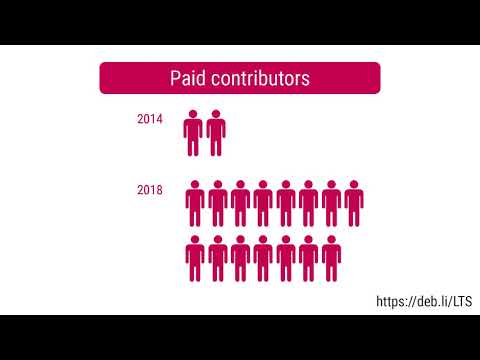
 Ten years ago
 Zeeshan of IYC (India Youth Congress) along with Salman Khan s non-profit Being Human getting oxygenators
  The pandemic was a bit of a mess for most FLOSS conferences. The two
conferences that I help organize --
The pandemic was a bit of a mess for most FLOSS conferences. The two
conferences that I help organize -- 
 I knew about GSoC since my first year of college but had this misconception that only great coders get selected for GSoC which did not let me apply to the program until my 3rd year of engineering. I applied this year not because I thought I have turned into one but because I actually wanted to give a fair try to this before the time I become ineligible to participate.
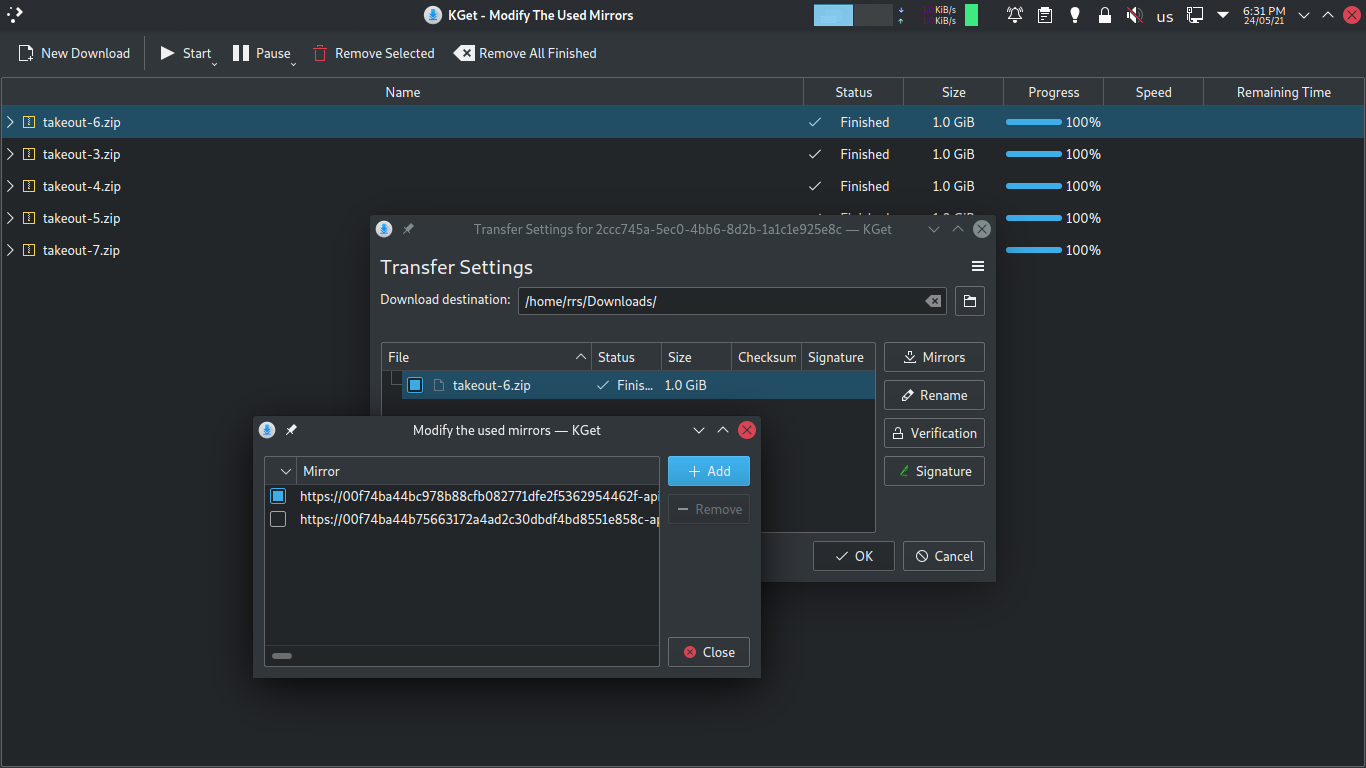
 Why is it so hard to have a proper download manager in today s day ? We had it in the previous decade. Or do tech giants self-proclaim that the world lives only in their cloud.
At one point, there used to be great download managers for all major web browsers, either in-built, or external. Then came the latest trend with Chrome and Firefox, where they make it difficult to have an external download manager work proper. On either one s extension store, I find it difficult to see a proper download manager.
And I wonder what Google was consuming when making Google Takeout. They provide you with a specially crafted link for the downloads, and if for any reason your network gets lost, you are forced to redownload your takeout again. And with the pathetic download manager in Chrome and Firefox, an average Joe user would run in loops. THANK YOU GOOG.
While I can understand the reason behind making the links time bound and invalidating them as soon as the time expires. But, enlighten your PMs that the world is not even. Not everyone has the same internet bandwidth. And admit that the download manager in your browser is crap. And then devise a better workflow and a product.
Why is it so hard to have a proper download manager in today s day ? We had it in the previous decade. Or do tech giants self-proclaim that the world lives only in their cloud.
At one point, there used to be great download managers for all major web browsers, either in-built, or external. Then came the latest trend with Chrome and Firefox, where they make it difficult to have an external download manager work proper. On either one s extension store, I find it difficult to see a proper download manager.
And I wonder what Google was consuming when making Google Takeout. They provide you with a specially crafted link for the downloads, and if for any reason your network gets lost, you are forced to redownload your takeout again. And with the pathetic download manager in Chrome and Firefox, an average Joe user would run in loops. THANK YOU GOOG.
While I can understand the reason behind making the links time bound and invalidating them as soon as the time expires. But, enlighten your PMs that the world is not even. Not everyone has the same internet bandwidth. And admit that the download manager in your browser is crap. And then devise a better workflow and a product.
 Prerequisites
You will need the following prerequisites :
Prerequisites
You will need the following prerequisites :
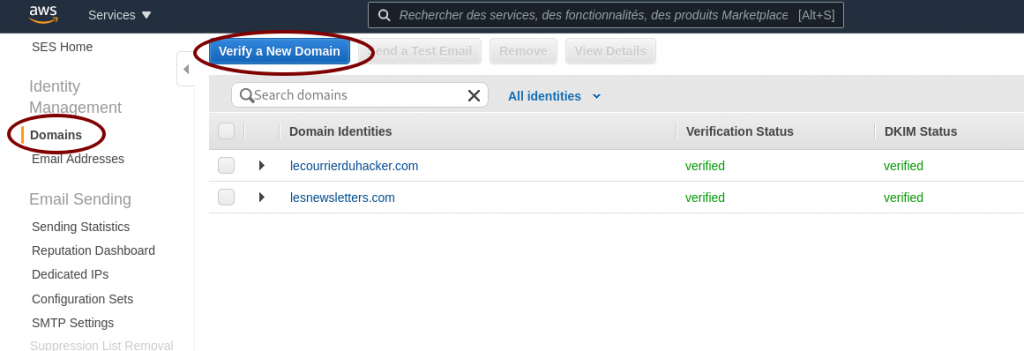 Ask AWS SES to verify a domain
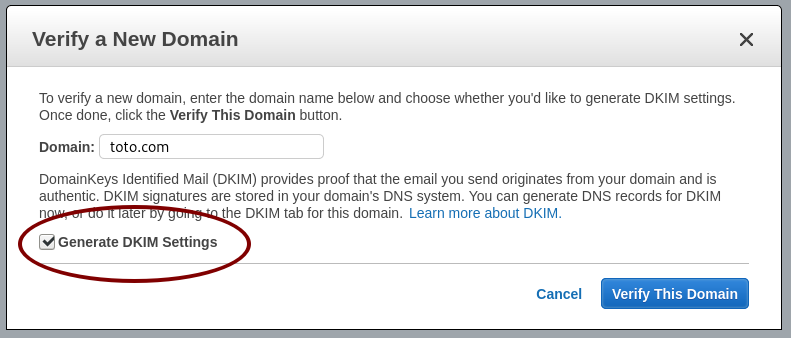 Generate the DKIM settings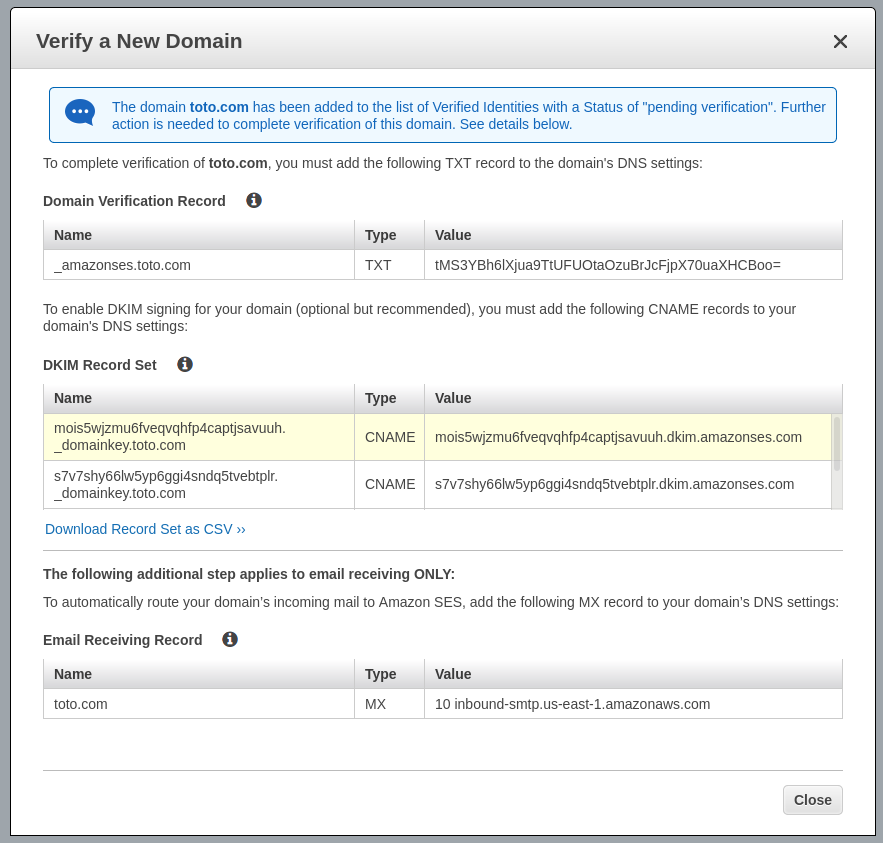
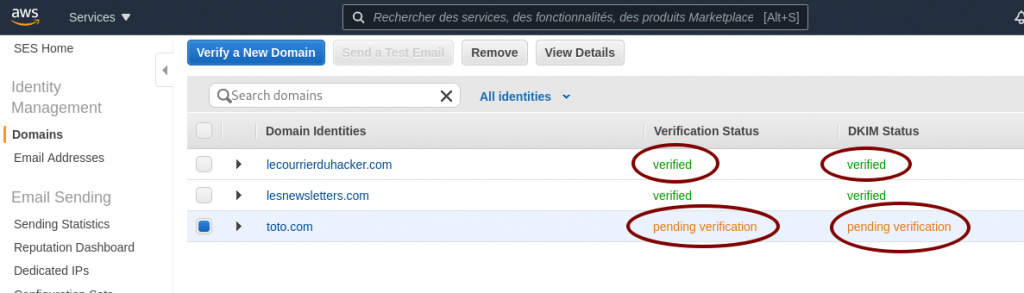 AWS SES pending verification
 AWS SES SMTP settings and credentials
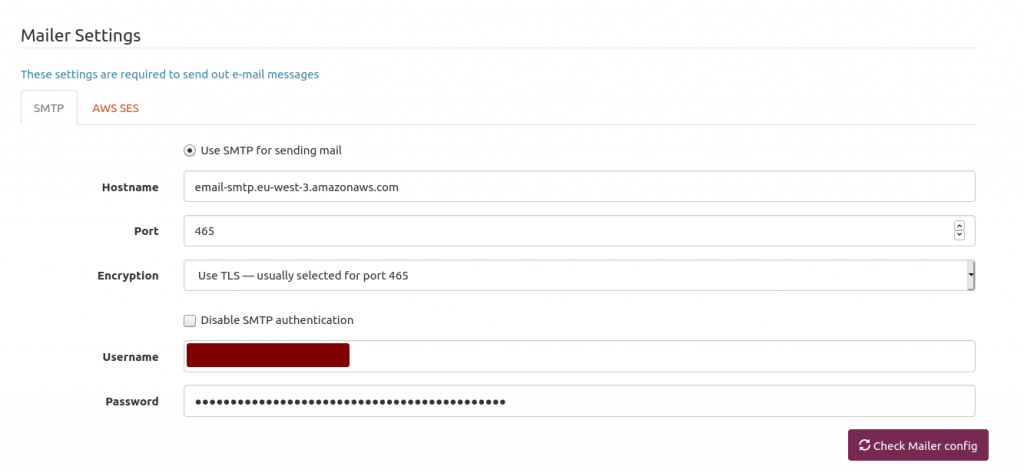 Mailtrain mailer setup
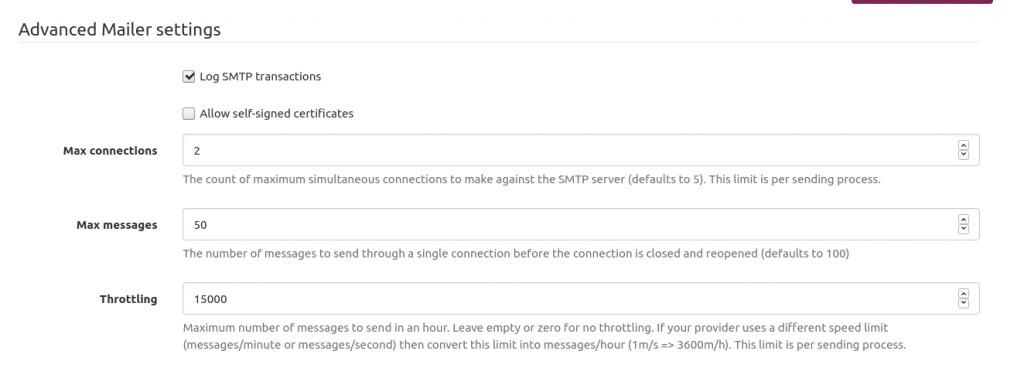 Mailtrain to throttle sending emails to AWS SES
 .
On the global stage, about a decade ago, Stephen J. Dubner and Steven Levitt argued in their book
.
On the global stage, about a decade ago, Stephen J. Dubner and Steven Levitt argued in their book 
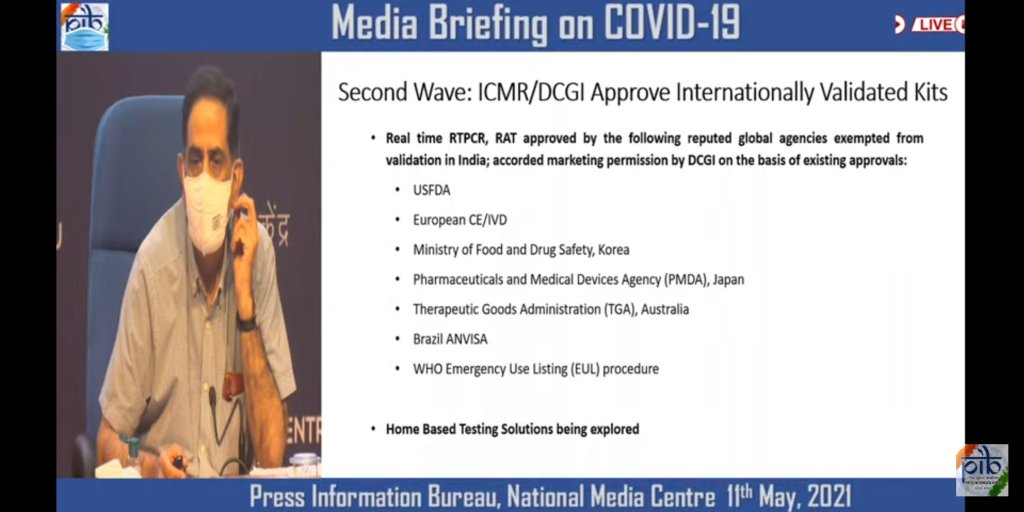

 Pappu Yadav, President Jan Adhikar Party, Bihar May 11, 2021


 I have uploaded most of my Machine Learning lecture to YouTube.
The slides are in English, but the audio is in German.
Some very basic contents (e.g., a demo of standard k-means clustering) were left out from this advanced class,
and instead only a link to recordings from an earlier class were given. In this class, I wanted to focus
on the improved (accelerated) algorithms instead. These are not included here (yet).
I believe there are some contents covered in this class you will find nowhere else (yet).
The first unit is pretty long (I did not split it further yet). The later units are shorter recordings.
ML F1: Principles in Machine Learning
I have uploaded most of my Machine Learning lecture to YouTube.
The slides are in English, but the audio is in German.
Some very basic contents (e.g., a demo of standard k-means clustering) were left out from this advanced class,
and instead only a link to recordings from an earlier class were given. In this class, I wanted to focus
on the improved (accelerated) algorithms instead. These are not included here (yet).
I believe there are some contents covered in this class you will find nowhere else (yet).
The first unit is pretty long (I did not split it further yet). The later units are shorter recordings.
ML F1: Principles in Machine Learning