Search Results: "nate"

1 March 2023

Debian XMPP Team: XMPP What's new in Debian 12 bookworm

On Tue 13 July 2021 there was a blog post of new XMPP related software releases which have been uploaded to Debian 11 (bullseye). Today, we will inform you about updates for the upcoming Debian release bookworm. A lot of new releases have been provided by the upstream projects. There were lot of changes to the XMPP clients like Dino, Gajim, Profanity, Poezio and others. Also the XMPP servers have been enhanced. Unfortunately, we can not provide a list of all the changes which have been done, but will try to highlight some of the changes and new features. BTW, feel free to join the Debian User Support on Jabber at xmpp:debian@conference.debian.org?join. You can find a list of 58 packages of the Debian XMPP team on the XMPP QA Page. Server Libs Others Happy chatting - keep in touch with your family and friends via Jabber / XMPP - XMPP is an open standard of the Internet Engineering Task Force (IETF) for instant messaging.

24 February 2023

Dirk Eddelbuettel: ttdo 0.0.9 on CRAN: Small Update

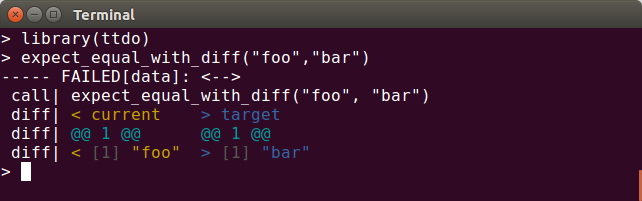
A new minor release of our ttdo package arrived on CRAN a few days ago. The ttdo package extends the excellent (and very minimal / zero depends) unit testing package tinytest by Mark van der Loo with the very clever and well-done diffobj package by Brodie Gaslam to give us test results with visual diffs (as shown in the screenshot below) which seemingly is so compelling an idea that it eventually got copied by another package which shall remain unnamed ttdo screenshot This release adds a versioned dependency on the just released tinytest version 1.4.1. As we extend tinytest (for use in the autograder we deploy within the lovely PrairieLearn framework) by consuming the tinytest code we have to update in sync. There were no other code changes in the package beside the usual maintenance of badges and continuous integration setup. As usual, the NEWS entry follows.

Changes in ttdo version 0.0.9 (2023-02-21)
  • Minor cleanup in README.md
  • Minor continuous integration update
  • Updated (versioned) depends on tinytest to 1.4.1

My CRANberries provides the usual summary of changes to the previous version. Please use the GitHub repo and its issues for any questions. If you like this or other open-source work I do, you can now sponsor me at GitHub.

This post by Dirk Eddelbuettel originated on his Thinking inside the box blog. Please report excessive re-aggregation in third-party for-profit settings.

22 February 2023

Dirk Eddelbuettel: RcppArmadillo 0.12.0.1.0 on CRAN: New Upstream, New Features

armadillo image Armadillo is a powerful and expressive C++ template library for linear algebra and scientific computing. It aims towards a good balance between speed and ease of use, has a syntax deliberately close to Matlab, and is useful for algorithm development directly in C++, or quick conversion of research code into production environments. RcppArmadillo integrates this library with the R environment and language and is widely used by (currently) 1042 other packages on CRAN, downloaded 28.1 million times (per the partial logs from the cloud mirrors of CRAN), and the CSDA paper (preprint / vignette) by Conrad and myself has been cited 513 times according to Google Scholar. This release brings a new upstream release 12.0.1. We found a small regression with the 12.0.0 release when we tested prior to a CRAN upload. Conrad very promptly fixed this with a literal one liner and made it 12.0.1 which we wrapped up as 0.12.0.1.0. Subsequent testing revealed no issues for us, and CRAN autoprocessed it as I tweeted earlier. This is actually quite impressive given the over 1000 CRAN packages using it all of which got tested again by CRAN. All this is testament to the rigour, as well as the well-oiled process at the repository. Our thanks go to the tireless maintainers! The releases actually has a rather nice set of changes (detailed below) to which we added one robustification thanks to Kevin. The full set of changes follows. We include the previous changeset as we may have skipped the usual blog post here.

Changes in RcppArmadillo version 0.12.0.1.0 (2023-02-20)
  • Upgraded to Armadillo release 12.0.1 (Cortisol Profusion)
    • faster fft() and ifft() via optional use of FFTW3
    • faster min() and max()
    • faster index_min() and index_max()
    • added .col_as_mat() and .row_as_mat() which return matrix representation of cube column and cube row
    • added csv_opts::strict option to loading CSV files to interpret missing values as NaN
    • added check_for_zeros option to form 4 of sparse matrix batch constructors
    • inv() and inv_sympd() with options inv_opts::no_ugly or inv_opts::allow_approx now use a scaled threshold similar to pinv()
    • set_cout_stream() and set_cerr_stream() are now no-ops; instead use the options ARMA_WARN_LEVEL, or ARMA_COUT_STREAM, or ARMA_CERR_STREAM
    • fix regression (mis-compilation) in shift() function (reported by us in #409)
  • The include directory order is now more robust (Kevin Ushey in #407 addressing #406)

Changes in RcppArmadillo version 0.11.4.4.0 (2023-02-09)
  • Upgraded to Armadillo release 11.4.4 (Ship of Theseus)
    • extended pow() with various forms of element-wise power operations
    • added find_nan() to find indices of NaN elements
    • faster handling of compound expressions by sum()
  • The package no longer sets a compilation standard, or progagates on in the generated packages as R ensures C++11 on all non-ancient versions
  • The CITATION file was updated to the current format

Courtesy of my CRANberries, there is a diffstat report relative to previous release. More detailed information is on the RcppArmadillo page. Questions, comments etc should go to the rcpp-devel mailing list off the R-Forge page. If you like this or other open-source work I do, you can sponsor me at GitHub.

This post by Dirk Eddelbuettel originated on his Thinking inside the box blog. Please report excessive re-aggregation in third-party for-profit settings.

19 February 2023

Russell Coker: New 18 Core CPU and NVMe

I just got a E5-2696 v3 CPU for my ML110 Gen9 home workstation, this has a Passmark score of 23326 which is almost 3 times faster than the E5-2620 v4 which rated 9224. Previously it took over 40 minutes real time to compile a 6.10 kernel that was based on the Debian kernel configuration, now it takes 14 minutes of real time, 202 minutes of user time, and 37 minutes of system CPU time. That s a definite benefit of having a faster CPU, I don t often compile kernels but when I do I don t want to wait 40+ minutes for a result. I also expanded the system from 96G of RAM to 128G, most of the time I don t need so much RAM but it s better to have too much than too little, particularly as my friend got me a good deal on RAM. The extra RAM might have helped improve performance too, going from 6/8 DIMM slots full to 8/8 might help the CPU balance access. That series of HP machines has a plastic mounting bracket for the CPU, see this video about the HP Proliant Smart Socket for details [1]. I was working on this with a friend who has the same model of HP server as I do, after buying myself a system I was so happy with it that I bought another the same when I saw it going for a good price and then sold it to my friend when I realised that I had too many tower servers at home. It turns out that getting the same model of computer as a friend is a really good strategy so then you can work together to solve problems with it. My friend s first idea was to try and buy new clips for the new CPUs (which would have delayed things and cost more money), but Reddit and some blog posts suggested that you can just skip the smart-socket guide clip and when the chip was resting in the socket it felt secure as the protrusions on the sides of the socket fit firmly enough into the notches in the CPU to prevent it moving far enough to short a connection. Testing on 2 systems showed that you don t need the clip. As an aside it would be nice if Intel made every CPU that fits a particular socket have the same physical dimensions so clips and heatsinks can work well on all CPUs. The TDP of the new CPU is 145W and the old one was 85W. One would hope that in a server class system that wouldn t make a lot of difference but unfortunately the difference was significant. Previously I could have the system running 7/8 cores with BOINC 24*7 and I wouldn t notice the fans being louder. It is possible that 100% CPU use on a hot day might make the fans sound louder if I didn t have an air-conditioner on that was loud enough to drown them out, but the noteworthy fact is that with the previous CPU the system fans were a minor annoyance. Now if I have 16 cores running BOINC it s quite loud, the sort of noise that makes most people avoid using tower servers as workstations! I ve found that if I limit it to 4 or 5 cores then the system is about as quiet as it was before. As a rough approximation I can use as much CPU power as before without making the fans louder but if I use more CPU power than was previously available it gets noisy. I also got some new NVMe devices, I was previously using 2*Crucial 1TB P1 NVMes in a BTRFS RAID-1 and now I have 2*Crucial 1TB P3 NVMes (where P1 is the slowest Crucial offering, P3 is better and more expensive, P5 is even better, etc). When doing the BTRFS migrations to move my workstation to new NVMe devices and my server to the old NVMe devices I found that the P3 series seem to have a limit of about 70MB/s for sustained random writes and the P1 series is about 35MB/s. Apparently with the cheaper NVMe devices they slow down if you do lots of random writes, pity that all the review articles talking about GB/s speeds don t mention this. To see how bad reviews are Google some reviews of these SSDs, you will find a couple of comment threads on places like Reddit of them slowing down with lots of writes and lots of review articles on well known sites that don t mention it. Generally I d recommend not upgrading from P1 to P3 NVMe devices, the benefit isn t enough to cover the effort. For every capacity of NVMe devices the most expensive devices cost more than twice as much as the cheapest devices, and sometimes it will be worth the money. Getting the most expensive device won t guarantee great performance but getting cheap devices will guarantee that it s slow. It seems that CPU development isn t progressing as well as it used to, the CPU I just bought was released in 2015 and scored 23,343 according to Passmark [2]. The most expensive Intel CPU on offer at my local computer store is the i9-13900K which was released this year and scores 62,914 [3]. One might say that CPUs designed for servers are different from ones designed for desktop PCs, but the i9 in question has a TDP Up of 253W which is too big for the PSU I have! According to the HP web site the new ML110 Gen10 servers aren t sold with a CPU as fast as the E5-2696 v3! In the period from 1988 to about 2015 every year there were new CPUs with new capabilities that were worth an upgrade. Now for the last 8 years or so there hasn t been much improvement at all. Buy a new PC for better USB ports or something not for a faster CPU!

17 February 2023

Jonathan McDowell: First impressions of the VisionFive 2

VisionFive 2 packaging Back in September last year I chose to back the StarFive VisionFive 2 on Kickstarter. I don t have a particular use in mind for it, but I felt it was one of the first RISC-V systems that were relatively capable (mentally I have it as somewhere between a Raspberry Pi 3 + a Pi 4). In particular it s a quad 1.5GHz 64-bit RISC-V core with 8G RAM, USB3, GigE ethernet and a single M.2 PCIe slot. More than ample as a personal machine for playing around with RISC-V and doing local builds. I ended up paying 67 for the Early Bird variant (dual GigE ethernet rather than 1 x 100Mb and 1 x GigE). A couple of weeks ago I got an email with a tracking number and last week it finally turned up. Being impatient the first thing I did was plug it into a monitor, connect up a keyboard, and power it on. Nothing except some flashing lights. Looking at the boot selector DIP switches suggested it was configured to boot from UART, so I flipped them to (what I thought was) the flash setting. It wasn t - turns out the ON marking on the switches represents logic 0 and it was correctly setup when I got it. I went to read the documentation which talked about writing an image to a MicroSD card, but also had details of the UART connection. Wanting to make sure the device was at least doing something before I actually tried an OS on it I hooked up a USB/serial dongle and powered the board up again. Success! U-Boot appeared and I could interact with it. I went to the VisionFive2 Debian page and proceeded to torrent the Image-69 image, writing it to a MicroSD card and inserting it in the slot on the bottom of the board. It booted fine. I can t even tell you what graphical environment it booted up because I don t remember; it worked fine though (at 1080p, I ve seen reports that 4K screens will make it croak). Poking around the image revealed that it s built off a snapshot.debian.org snapshot from 20220616T194833Z, which is a little dated at this point but I understand the rationale behind picking something that works and sticking with it. The kernel is of course a vendor special, based on 5.15.0. Further investigation revealed that the entire X/graphics stack is living in /usr/local, which isn t overly surprising; it s Imagination based. I was pleasantly surprised to discover there is work to upstream the Imagination support, but I m not planning to run the board with a monitor attached so it s not a high priority for me. Having discovered all that I decided to see how well a clean Debian unstable install from Debian Ports would go. I had a spare Intel Optane lying around (it s a stupid 22110 M.2 which is too long for any machine I own), so I put it in the slot on the bottom of the board. To my surprise it Just Worked and was detected ok:
# lspci
0000:00:00.0 PCI bridge: PLDA XpressRich-AXI Ref Design (rev 02)
0000:01:00.0 USB controller: VIA Technologies, Inc. VL805/806 xHCI USB 3.0 Controller (rev 01)
0001:00:00.0 PCI bridge: PLDA XpressRich-AXI Ref Design (rev 02)
0001:01:00.0 Non-Volatile memory controller: Intel Corporation NVMe Datacenter SSD [Optane]
I created a single partition with an ext4 filesystem (initially tried btrfs, but the StarFive kernel doesn t support it), and kicked off a debootstrap with:
# mkfs -t ext4 /dev/nvme0n1p1
# mount /dev/nvme0n1p1 /mnt
# debootstrap --keyring=/etc/apt/trusted.gpg.d/debian-ports-archive-2023.gpg \
	unstable /mnt https://deb.debian.org/debian-ports
The u-boot setup has a convoluted set of vendor scripts that eventually ends up reading a /boot/extlinux/extlinux.conf config from /dev/mmcblk1p2, so I added an additional entry there using the StarFive kernel but pointing to the NVMe device for /. Made sure to set a root password (not that I ve been bitten by that before, too many times), and rebooted. Success! Well. Sort of. I hit a bunch of problems with having a getty running on ttyS0 as well as one running on hvc0. The second turns out to be a console device from the RISC-V SBI. I did a systemctl mask serial-getty@hvc0.service which made things a bit happier, but I was still seeing odd behaviour and output. Turned out I needed to reboot the initramfs as well; the StarFive one was using Plymouth and doing some other stuff that seemed to be confusing matters. An update-initramfs -k 5.15.0-starfive -c built me a new one and everything was happy. Next problem; the StarFive kernel doesn t have IPv6 support. StarFive are good citizens and make their 5.15 kernel tree available, so I grabbed it, fed it the existing config, and tweaked some options (including adding IPV6 and SECCOMP, which chrony wanted). Slight hiccup when it turned out trying to do things like make sound modular caused it to fail to compile, and having to backport the fix that allowed the use of GCC 12 (as present in sid), but it got there. So I got cocky and tried to update it to the latest 5.15.94. A few manual merge fixups (which I may or may not have got right, but it compiles and boots for me), and success. Timings:
$ time make -j 4 bindeb-pkg
  [linux-image-5.15.94-00787-g1fbe8ac32aa8]
real	37m0.134s
user	117m27.392s
sys	6m49.804s
On the subject of kernels I am pleased to note that there are efforts to upstream the VisionFive 2 support, with what appears to be multiple members of StarFive engaging in multiple patch submission rounds. It s really great to see this and I look forward to being able to run an unmodified mainline kernel on my board. Niggles? I have a few. The provided u-boot doesn t have NVMe support enabled, so at present I need to keep a MicroSD card to boot off, even though root is on an SSD. I m also seeing some errors in dmesg from the SSD:
[155933.434038] nvme nvme0: I/O 436 QID 4 timeout, completion polled
[156173.351166] nvme nvme0: I/O 48 QID 3 timeout, completion polled
[156346.228993] nvme nvme0: I/O 108 QID 3 timeout, completion polled
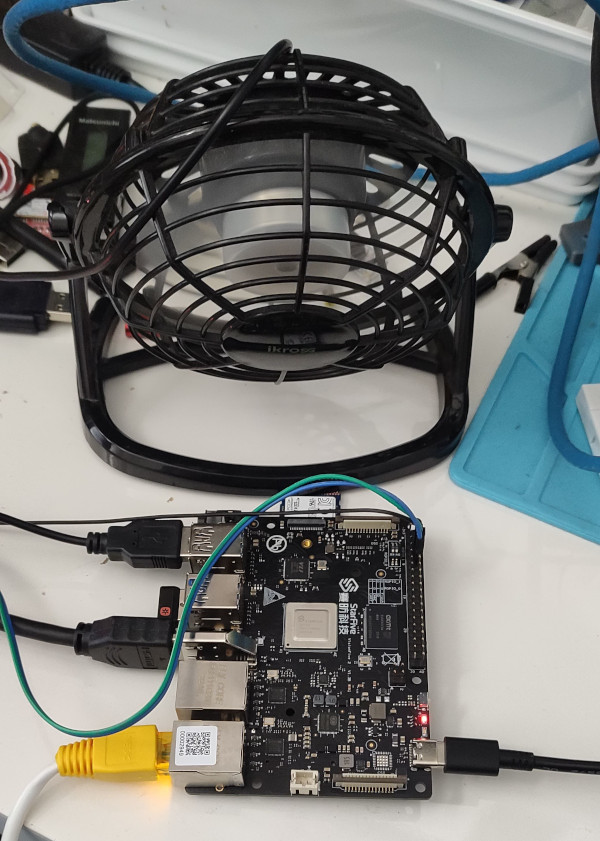
It doesn t seem to cause any actual issues, and it could be the SSD, the 5.15 kernel or an actual hardware thing - I ll keep an eye on it (I will probably end up with a different SSD that actually fits, so that ll provide another data point). More annoying is the temperature the CPU seems to run at. There s no heatsink or fan, just the metal heatspreader on top of the CPU, and in normal idle operation it sits at around 60 C. Compiling a kernel it hit 90 C before I stopped the job and sorted out some additional cooling in the form of a desk fan, which kept it as just over 30 C. Bare VisionFive 2 SBC board with a small desk fan pointed at it I haven t seen any actual stability problems, but I wouldn t want to run for any length of time like that. I ve ordered a heatsink and also realised that the board supports a Raspberry Pi style PoE Hat , so I ve got one of those that includes a fan ordered (I am a complete convert to PoE especially for small systems like this). With the desk fan setup I ve been able to run the board for extended periods under load (I did a full recompile of the Debian 6.1.12-1 kernel package and it took about 10 hours). The M.2 slot is unfortunately only a single PCIe v2 lane, and my testing topped out at about 180MB/s. IIRC that is about half what the slot should be capable of, and less than a 10th of what the SSD can do. Ethernet testing with iPerf3 sustained about 941Mb/s, so basically maxing out the port. The board as a whole isn t going to set any speed records, but it s perfectly usable, and pretty impressive for the price point. On the Debian side I ve not hit any surprises. There s work going on to move RISC-V to a proper release architecture, and I m hoping to be able to help out with that, but the version of unstable I installed from the ports infrastructure has looked just like any other Debian install. Which is what you want. And that pretty much sums up my overall experience of the VisionFive 2; it s not noticeably different than any other single board computer. That s a good thing, FWIW, and once the kernel support lands properly upstream (it ll be post 6.3 at least it seems) it ll be a boring mainline supported platform that just happens to be RISC-V.

16 February 2023

Gunnar Wolf: We are GREAT at handling multimedia!

I have mentioned several times in this blog, as well as by other communication means, that I am very happy with the laptop I bought (used) about a year and a half ago: an ARM-based Lenovo Yoga C630. Yes, I knew from the very beginning that using this laptop would pose a challenge to me in many ways, as full hardware support for ARM laptops are nowhere as easy as for plain boring x86 systems. But the advantages far outweigh the inconvenience (i.e. the hoops I had to jump through to handle video-out when I started teaching presentially, which are fortunately a thing of the past now). Anyway This post is not about my laptop. Back in 2018, I was honored to be appointed as a member of the Debian Technical Committee. Of course, that meant (due to the very clear and clever point 6.2.7.1 of the Debian Constitution that my tenure in the Committee (as well as Niko Tyni s) finished in January 1, 2023. We were invited to take part of a Jitsi call as a last meeting, as well as to welcome Matthew Garrett to the Committee. Of course, I arranged so I would be calling from my desktop system at work (for which I have an old, terrible webcam but as long as I don t need to control screen sharing too finely, mostly works). Out of eight people in the call, two had complete or quite crippling failures with their multimedia setup, and one had a frozen image (at least as far as I could tell). So Yes, Debian is indeed good and easy and simple and reliable for most nontechnical users using standard tools. But I guess that we power users enjoy tweaking our setup to our precise particular liking. Or that we just don t care about frivolities such as having a working multimedia setup. Or I don t know what happens. But the fact that close to half of the Technical Committee, which should consist of Debian Developers who know their way around technical obstacles, cannot get a working multimedia setup for a simple, easy WebRTC call (even after a pandemic that made us all work via teleconferencing solutions on a daily basis!) is just Beautiful

13 February 2023

Jonathan Dowland: A visit to Prusa Labs

.
.

In September I was in Czechia for a Red Hat event. I ended up travelling via Prague, and had an unexpected extra day due to an airline strike causing my flight home to be cancelled. I took the opportunity to visit Prusa's offices/factory/Lab, and it was amazing! The Prusa team were all busy getting ready for the Prague Maker Faire that was happening the day afterwards.1 On arriving at the street which houses Prusa's Lab and Office buildings, the first thing that hit me was the smell. I find the melted-plastic smell of FDM printing (with PLA, at least) quite pleasant, and this was a super-condensed version of that, pumping out of their ground-floor windows. I started at the reception area on the ground floor. Outside reception there's a lovely sculpture representing the history of the development of the MK3S+.
The Reception The Reception
SLS Farm in the former Hack lab SLS Farm in the former Hack lab
History of the MK3S+ History of the MK3S+

At the reception you have a small waiting area with shelves of demonstration prints and some spools of Prusament. From here, our kind guide first took us to a region on the ground floor that used to be (prior to COVID times) the public maker/hack lab. The lab contained two modest farms of printers: one of their flagship FDM printer, the MK3S+, and another of their SLS resin printers. A close up of some example resin models is pictured above. The bicycle was tiny: about the size of a thumbnail.
A Historic display A Historic display
Bespoke QE equipment Bespoke QE equipment
The MK3S+ Farm The MK3S+ Farm

. Moi in the Farm
2KG orange PLA spools for the Farm 2KG orange PLA spools for the Farm
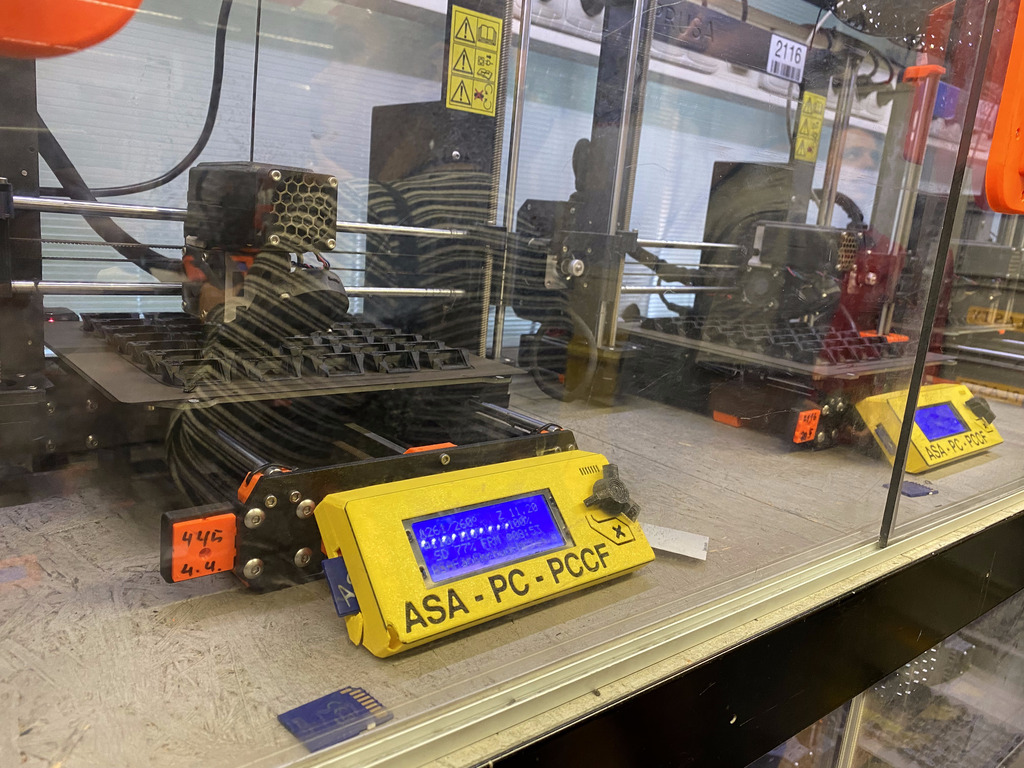
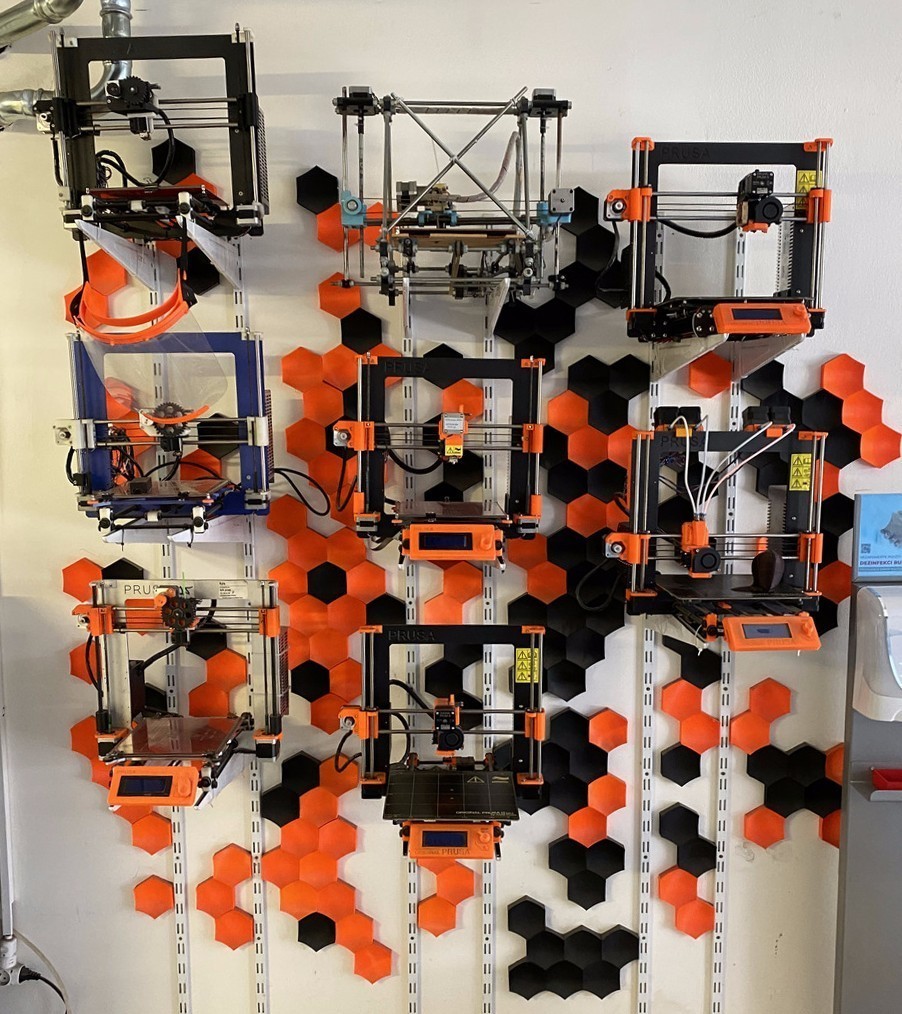
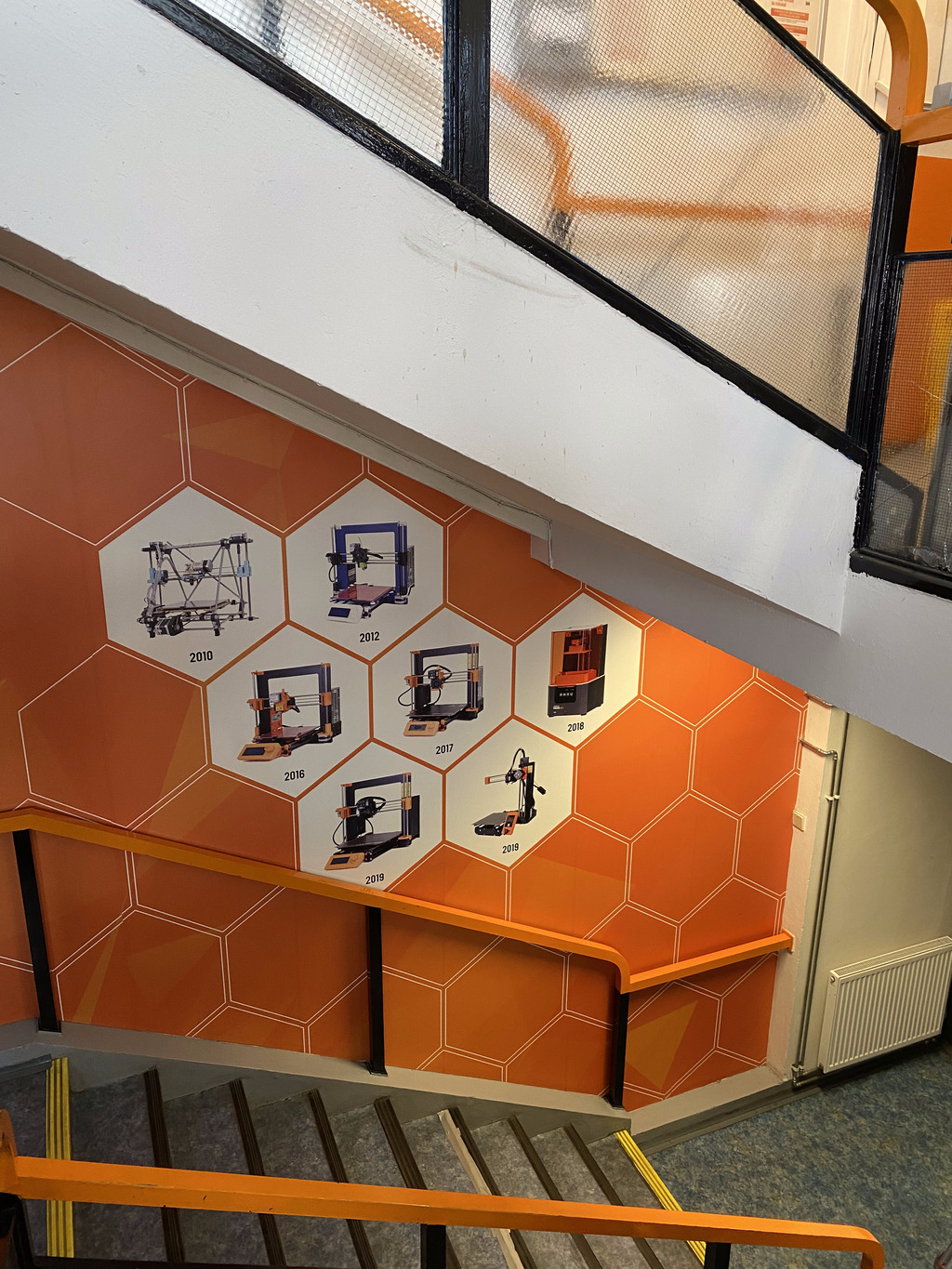
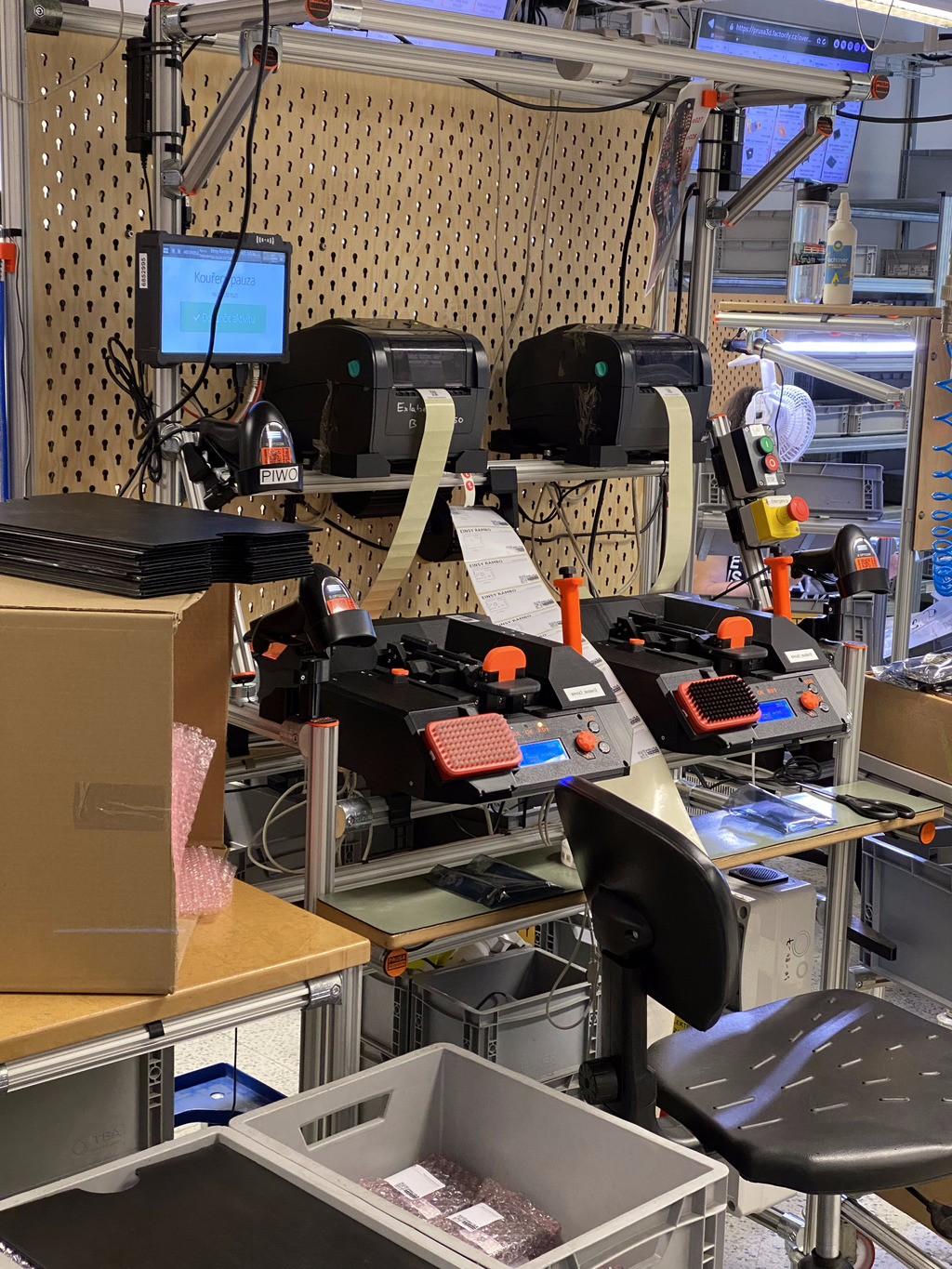
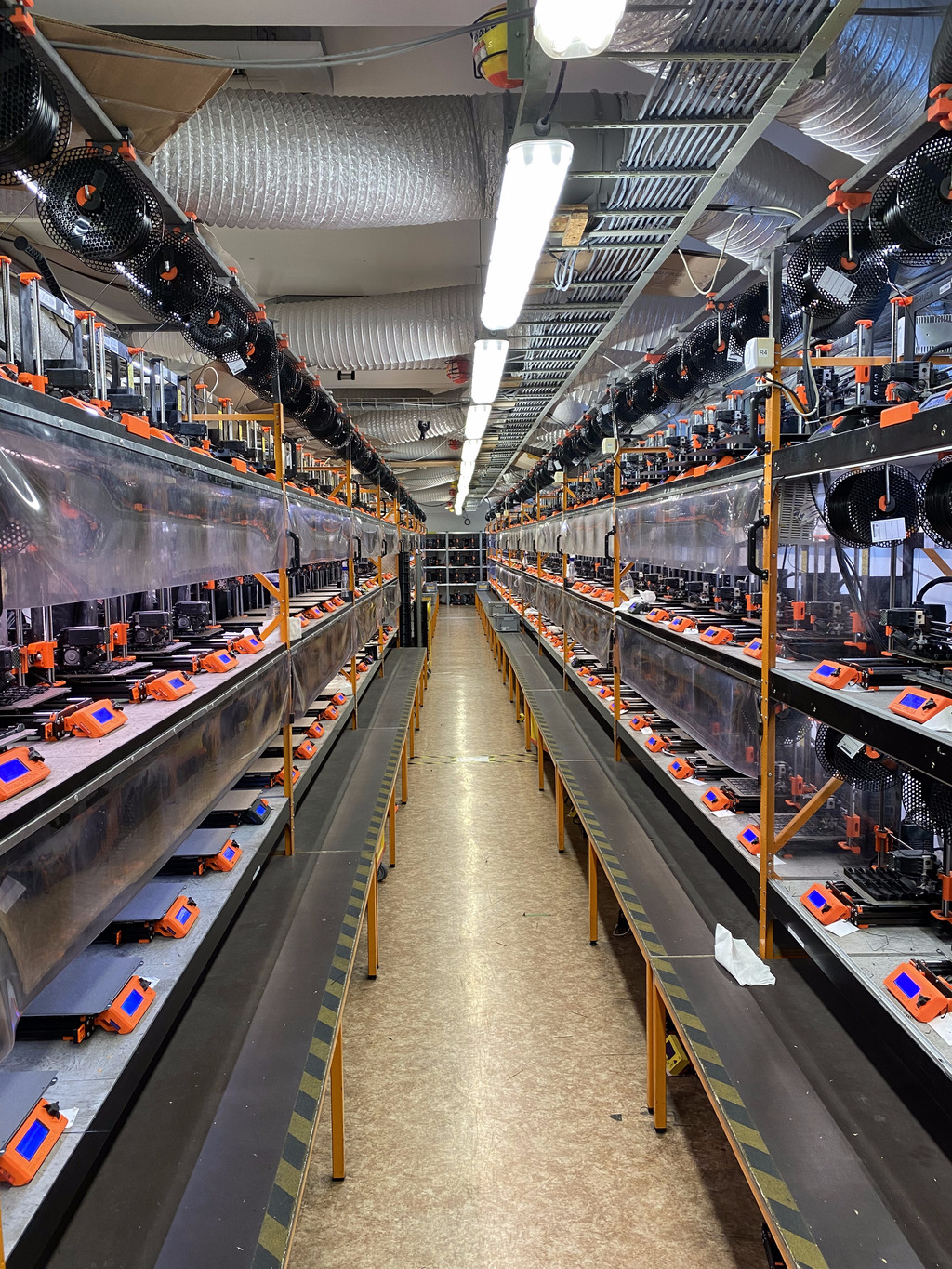
The rest of the ground floor area was full of heavy machinery and prototyping equipment. Onwards we went to the upstairs floors. Upstairs, past a nice graphic of Prusa's historic products, we visited the assembly and QE testing areas. They have a very organised system of parts buckets and some thorough QE processes, including some bespoke equipment that produces the "receipt" of tests and calibration that they provide for you in the box when you buy a 3D printer. After that, we visited the production Farm: a large room full of MK3S+ printers churning out parts for other printers. The noise was remarkable. The printers were running custom firmware to continually print the part they had been set for. Some of the printers were designated for printing with ASA: they were colour-coded (yellow controller surround) and within boxed regions to prevent the fumes causing problems. (picture at the top) Outside the room sat palettes of orange PETG plastic for the printer farm on 2KG spools (not a size they sell to the public just yet) The final part of the trip was outside, to the real farm: Prusa have a smallholding with Alpacas at the rear of their estate. Whilst we visited it, Josef Prusa himself turned up (in a snazzy looking custom colour Tesla) to feed the animals, say hello and pose for a picture. Overall, it was a fantastic visit. I'm very grateful to Air France for cancelling my flight home, and to Prusa Labs (in particular Luk ) for allowing me to come and say hello!

  1. I managed to squeeze that in too on my way to my rescheduled flight, although it was a rush visit and I don't have much to say or show from it. Suffice to say that it was lovely and bittersweet since the UK Maker Faire used to be hosted in my fair home city of Newcastle before they stopped.

Vincent Bernat: Building a SQL-like language to filter flows

Akvorado collects network flows using IPFIX or sFlow. It stores them in a ClickHouse database. A web console allows a user to query the data and plot some graphs. A nice aspect of this console is how we can filter flows with a SQL-like language:
Filter editor in Akvorado console
Often, web interfaces expose a query builder to build such filters. I think combining a SQL-like language with an editor supporting completion, syntax highlighting, and linting is a better approach.1 The language parser is built with pigeon (Go) from a parsing expression grammar or PEG. The editor component is CodeMirror (TypeScript).

Language parser PEG grammars are relatively recent2 and are an alternative to context-free grammars. They are easier to write and they can generate better error messages. Python switched from an LL(1)-based parser to a PEG-based parser in Python 3.9. pigeon generates a parser for Go. A grammar is a set of rules. Each rule is an identifier, with an optional user-friendly label for error messages, an expression, and an action in Go to be executed on match. You can find the complete grammar in parser.peg. Here is a simplified rule:
ConditionIPExpr "condition on IP"  
  column:("ExporterAddress"i   return "ExporterAddress", nil  
        / "SrcAddr"i   return "SrcAddr", nil  
        / "DstAddr"i   return "DstAddr", nil  ) _ 
  operator:("=" / "!=") _ 
  ip:IP  
    return fmt.Sprintf("%s %s IPv6StringToNum(%s)",
      toString(column), toString(operator), quote(ip)), nil
   
The rule identifier is ConditionIPExpr. It case-insensitively matches ExporterAddress, SrcAddr, or DstAddr. The action for each case returns the proper case for the column name. That s what is stored in the column variable. Then, it matches one of the possible operators. As there is no code block, it stores the matched string directly in the operator variable. Then, it tries to match the IP rule, which is defined elsewhere in the grammar. If it succeeds, it stores the result of the match in the ip variable and executes the final action. The action turns the column, operator, and IP into a proper expression for ClickHouse. For example, if we have ExporterAddress = 203.0.113.15, we get ExporterAddress = IPv6StringToNum('203.0.113.15'). The IP rule uses a rudimentary regular expression but checks if the matched address is correct in the action block, thanks to netip.ParseAddr():
IP "IP address"   [0-9A-Fa-f:.]+  
  ip, err := netip.ParseAddr(string(c.text))
  if err != nil  
    return "", errors.New("expecting an IP address")
   
  return ip.String(), nil
 
Our parser safely turns the filter into a WHERE clause accepted by ClickHouse:3
WHERE InIfBoundary = 'external' 
AND ExporterRegion = 'france' 
AND InIfConnectivity = 'transit' 
AND SrcAS = 15169 
AND DstAddr BETWEEN toIPv6('2a01:e0f:ffff::') 
                AND toIPv6('2a01:e0f:ffff:ffff:ffff:ffff:ffff:ffff')

Integration in CodeMirror CodeMirror is a versatile code editor that can be easily integrated into JavaScript projects. In Akvorado, the Vue.js component, InputFilter, uses CodeMirror as its foundation and leverages features such as syntax highlighting, linting, and completion. The source code for these capabilities can be found in the codemirror/lang-filter/ directory.

Syntax highlighting The PEG grammar for Go cannot be utilized directly4 and the requirements for parsers for editors are distinct: they should be error-tolerant and operate incrementally, as code is typically updated character by character. CodeMirror offers a solution through its own parser generator, Lezer. We don t need this additional parser to fully understand the filter language. Only the basic structure is needed: column names, comparison and logic operators, quoted and unquoted values. The grammar is therefore quite short and does not need to be updated often:
@top Filter  
  expression
 
expression  
 Not expression  
 "(" expression ")"  
 "(" expression ")" And expression  
 "(" expression ")" Or expression  
 comparisonExpression And expression  
 comparisonExpression Or expression  
 comparisonExpression
 
comparisonExpression  
 Column Operator Value
 
Value  
  String   Literal   ValueLParen ListOfValues ValueRParen
 
ListOfValues  
  ListOfValues ValueComma (String   Literal)  
  String   Literal
 
// [ ]
@tokens  
  // [ ]
  Column   std.asciiLetter (std.asciiLetter std.digit)*  
  Operator   $[a-zA-Z!=><]+  
  String  
    '"' (![\\\n"]   "\\" _)* '"'?  
    "'" (![\\\n']   "\\" _)* "'"?
   
  Literal   (std.digit   std.asciiLetter   $[.:/])+  
  // [ ]
 
The expression SrcAS = 12322 AND (DstAS = 1299 OR SrcAS = 29447) is parsed to:
Filter(Column, Operator, Value(Literal),
  And, Column, Operator, Value(Literal),
  Or, Column, Operator, Value(Literal))
The last step is to teach CodeMirror how to map each token to a highlighting tag:
export const FilterLanguage = LRLanguage.define( 
  parser: parser.configure( 
    props: [
      styleTags( 
        Column: t.propertyName,
        String: t.string,
        Literal: t.literal,
        LineComment: t.lineComment,
        BlockComment: t.blockComment,
        Or: t.logicOperator,
        And: t.logicOperator,
        Not: t.logicOperator,
        Operator: t.compareOperator,
        "( )": t.paren,
       ),
    ],
   ),
 );

Linting We offload linting to the original parser in Go. The /api/v0/console/filter/validate endpoint accepts a filter and returns a JSON structure with the errors that were found:
 
  "message": "at line 1, position 12: string literal not terminated",
  "errors": [ 
    "line":    1,
    "column":  12,
    "offset":  11,
    "message": "string literal not terminated",
   ]
 
The linter source for CodeMirror queries the API and turns each error into a diagnostic.

Completion The completion system takes a hybrid approach. It splits the work between the frontend and the backend to offer useful suggestions for completing filters. The frontend uses the parser built with Lezer to determine the context of the completion: do we complete a column name, an operator, or a value? It also extracts the column name if we are completing something else. It forwards the result to the backend through the /api/v0/console/filter/complete endpoint. Walking the syntax tree was not as easy as I thought, but unit tests helped a lot. The backend uses the parser generated by pigeon to complete a column name or a comparison operator. For values, the completions are either static or extracted from the ClickHouse database. A user can complete an AS number from an organization name thanks to the following snippet:
results := []struct  
  Label  string  ch:"label" 
  Detail string  ch:"detail" 
 
columnName := "DstAS"
sqlQuery := fmt.Sprintf( 
 SELECT concat('AS', toString(%s)) AS label, dictGet('asns', 'name', %s) AS detail
 FROM flows
 WHERE TimeReceived > date_sub(minute, 1, now())
 AND detail != ''
 AND positionCaseInsensitive(detail, $1) >= 1
 GROUP BY label, detail
 ORDER BY COUNT(*) DESC
 LIMIT 20
 , columnName, columnName)
if err := conn.Select(ctx, &results, sqlQuery, input.Prefix); err != nil  
  c.r.Err(err).Msg("unable to query database")
  break
 
for _, result := range results  
  completions = append(completions, filterCompletion 
    Label:  result.Label,
    Detail: result.Detail,
    Quoted: false,
   )
 
In my opinion, the completion system is a major factor in making the field editor an efficient way to select flows. While a query builder may have been more beginner-friendly, the completion system s ease of use and functionality make it more enjoyable to use once you become familiar.

  1. Moreover, building a query builder did not seem like a fun task for me.
  2. They were introduced in 2004 in Parsing Expression Grammars: A Recognition-Based Syntactic Foundation. LR parsers were introduced in 1965, LALR parsers in 1969, and LL parsers in the 1970s. Yacc, a popular parser generator, was written in 1975.
  3. The parser returns a string. It does not generate an intermediate AST. This makes it simpler and it currently fits our needs.
  4. It could be manually translated to JavaScript with PEG.js.

12 February 2023

Russell Coker: T320 iDRAC Failure and new HP Z640

The Dell T320 Almost 2 years ago I made a Dell PowerEdge T320 my home server [1]. It was a decent upgrade from the PowerEdge T110 II that I had used previously. One benefit of that system was that I needed more RAM and the PowerEdge T1xx series use unbuffered ECC RAM which is unreasonably expensive as well as the DIMMs tending to be smaller (no Load Reduced DIMMS) and only having 4 slots. As I had bought two T320s I put all the RAM in a single server getting a total of 96G and then put some cheap DIMMs in the other one and sold it with 48G. The T320 has all the server reliability features including hot-swap redundant PSUs and hot-swap hard drives. One thing it doesn t have redundancy on is the motherboard management system known as iDRAC. 3 days ago my suburb had a power outage and when power came back on the T320 gave an error message about a failure to initialise the iDRAC and put all the fans on maximum speed, which is extremely loud. When a T320 is running in a room that s not particularly hot and it doesn t have SAS disks it s a very quiet server, one of the quietest I ve ever owned. When it goes into emergency cooling mode due to iDRAC failure it s loud enough to be heard from the other end of the house with doors closed in between. Googling this failure gave a few possible answers. One was for some combinations of booting with the iDRAC button held down, turning off for a while and booting with the iDRAC button held down, etc (this didn t work). One was for putting a iDRAC firmware file on the SD card so iDRAC could automatically load it (which I tested even though I didn t have the flashing LED which indicates that it is likely to work, but it didn t do anything). The last was to enable serial console and configure the iDRAC to load new firmware via TFTP, I didn t get a iDRAC message from the serial console just the regular BIOS stuff. So it looks like I ll have to sell the T320 for parts or find someone who wants to run it in it s current form. Currently to boot it I have to press F1 a few times to bypass BIOS messages (someone on the Internet reported making a device to key-jam F1). Then when it boots it s unreasonably loud, but apparently if you are really keen you can buy fans that have temperature sensors to control their own speed and bypass the motherboard control. I d appreciate any advice on how to get this going. At this stage I m not going to go back to it but if I can get it working properly I can sell it for a decent price. The HP Z640 I ve replaced the T320 with a HP Z640 workstation with 32G of RAM which I had recently bought to play with Stable Diffusion. There were hundreds of Z640 workstations with NVidia Quadro M6000 GPUs going on eBay for under $400 each, it looked like a company that did a lot of ML work had either gone bankrupt or upgraded all their employees systems. The price for the systems was surprisingly cheap, at regular eBay prices it seems that the GPU and the RAM go for about the same price as the system. It turned out that Stable Diffusion didn t like the video card in my setup for unknown reasons but also that the E5-1650v3 CPU could render an image in 15 minutes which is fast enough to test it out but not fast enough for serious use. I had been planning to blog about that. When I bought the T320 server the DDR3 Registered ECC RAM it uses cost about $100 for 8*8G DIMMs, with 16G DIMMs being much more expensive. Now the DDR4 Registered ECC RAM used by my Z640 goes for about $120 for 2*16G DIMMs. In the near future I ll upgrade that system to 64G of RAM. It s disappointing that the Z640 only has 4 DIMM sockets per CPU so if you get a single-CPU version (as I did) and don t get the really expensive Load Reduced RAM then you are limited to 64G. So the supposed capacity benefit of going from DDR3 to DDR4 doesn t seem to apply to this upgrade. The Z640 I got has 4 bays for hot-swap SAS/SATA 2.5 SSD/HDDs and 2 internal bays for 3.5 hard drives. The T320 has 8*3.5 hot swap bays and I had 3 hard drives in them in a BTRFS RAID-10 configuration. Currently I ve got one hard drive attached via USB but that s obviously not a long-term solution. The 3 hard drives are 4TB, they have worked since 4TB was a good size. I have a spare 8TB disk so I could buy a second ($179 for a shingle HDD) to make a 8TB RAID-1 array. The other option is to pay $369 for a 4TB SSD (or $389 for a 4TB NVMe + $10 for the PCIe card) to keep the 3 device RAID-10. As tempting as 4TB SSDs are I ll probably get a cheap 8TB disk which will take capacity from 6TB to 8TB and I could use some extra 4TB disks for backups. I haven t played with the AMT/MEBX features on this system, I presume that they will work the same way as AMT/MEBX on the HP Z420 I ve used previously [2]. Update: HP has free updates for the BIOS etc available here [3]. Unfortunately it seems to require loading a kernel module supplied by HP to do this. This is a bad thing, kernel code that isn t in the mainline kernel is either of poor quality or isn t licensed correctly. I had to change my monitoring system to alert on temperatures over 100% of the high range while on the T320 I had it set at 95% of high and never got warnings. This is disappointing, enterprise class gear running in a reasonably cool environment (ambient temperature of about 22C) should be able to run all CPU cores at full performance without hitting 95% of the high temperature level.

10 February 2023

Jonathan Dowland: HLedger, 1 year on

It's been a year since I started exploring HLedger, and I'm still going. The rollover to 2023 was an opportunity to revisit my approach. Some time ago I stumbled across Dmitry Astapov's HLedger notes (fully-fledged hledger, which I briefly mentioned in eventual consistency) and decided to adopt some of its ideas. new year, new journal First up, Astapov encourages starting a new journal file for a new calendar year. I do this for other, accounting-adjacent files as a matter of course, and I did it for my GNUCash files prior to adopting HLedger. But the reason for those is a general suspicion that a simple mistake with those softwares could irrevocably corrupt my data. I'm much more confident with HLedger, so rolling over at years end isn't necessary for that. But there are other advantages. A quick obvious one is you can get rid of old accounts (such as expense accounts tied to a particular project, now completed). one journal per import In the first year, I periodically imported account data via CSV exports of transactions and HLedger's (excellent) CSV import system. I imported all the transactions, once each, into a single, large journal file. Astapov instead advocates for creating a separate journal for each CSV that you wish to import, and keep around the CSV, leaving you with a 1:1 mapping of CSV:journal. Then use HLedger's "include" mechanism to pull them all into the main journal. With the former approach, where the CSV data was imported precisely, once, it was only exposed to your import rules once. The workflow ended up being: import transactions; notice some that you could have matched with import rules and auto-coded; write the rule for the next time. With Astapov's approach, you can re-generate the journal from the CSV at any point in the future with an updated set of import rules. tracking dependencies Now we get onto the job of driving the generation of all these derivative journal files. Astapov has built a sophisticated system using Haskell's "Shake", which I'm not yet familiar, but for my sins I'm quite adept at (GNU-flavoured) UNIX Make, so I started building with that. An example rule
import/jon/amex/%.journal: import/jon/amex/%.csv rules/amex.csv.rules
    rm -f $(@D)/.latest.$*.csv $@
    hledger import --rules-file rules/amex.csv.rules -f $@ $<
This captures the dependency between the journal and the underlying CSV but also to the relevant rules file; if I modify that, and this target is run in the future, all dependent journals should be re-generated.1 opening balances It's all fine and well starting over in a new year, and I might be generous to forgive debts, but I can't count on others to do the same. We need to carry over some balance information from one year to the next. Astapov has a more complex (or perhaps featureful) scheme for this involving a custom Haskell program, but I bodged something with a pair of make targets:
import/opening/2023.csv: 2022.journal
    mkdir -p import/opening
    hledger bal -f $< \
                $(list_of_accounts_I_want_to_carry_over) \
        -O csv -N > $@
import/opening/2023.journal: import/opening/2023.csv rules/opening.rules
    rm -f $(@D)/.latest.2023.csv $@
    hledger import --rules-file rules/opening.rules \
        -f $@ $<
I think this could be golfed into a year-generic rule with a little more work. The nice thing about this approach is the opening balances for a given year might change, if adjustments are made in prior years. They shouldn't, for real accounts, but very well could for more "virtual" liabilities. (including: deciding to write off debts.) run lots of reports Astapov advocates for running lots of reports, and automatically. There's a really obvious advantage of that to me: there's no chance anyone except me will actually interact with HLedger itself. For family finances, I need reports to be able to discuss anything with my wife. Extending my make rules to run reports is trivial. I've gone for HTML reports for the most part, as they're the easiest on the eye. Unfortunately the most useful report to discuss (at least at the moment) would be a list of transactions in a given expense category, and the register/aregister commands did not support HTML as an output format. I submitted my first HLedger patch to add HTML output support to aregister: https://github.com/simonmichael/hledger/pull/2000 addressing the virtual posting problem I wrote in my original hledger blog post that I had to resort to unbalanced virtual postings in order to record both a liability between my personal cash and family, as well as categorise the spend. I still haven't found a nice way around that. But I suspect having broken out the journal into lots of other journals paves the way to a better solution to the above. The form of a solution I am thinking of is: some scheme whereby the two destination accounts are combined together; perhaps, choose one as a primary and encode the other information in sub-accounts under that. For example, repeating the example from my hledger blog post:
2022-01-02 ZTL*RELISH
    family:liabilities:creditcard        -3.00
    family:dues:jon                       3.00
    (jon:expenses:snacks)                 3.00
This could become
2022-01-02 ZTL*RELISH
    family:liabilities:creditcard        -3.00
    family:liabilities:jon:snacks
(I note this is very similar to a solution proposed to me by someone responding on twitter). The next step is to recognise that sometimes when looking at the data I care about one aspect, and at other times the other, but rarely both. So for the case where I'm thinking about family finances, I could use account aliases to effectively flatten out the expense category portion and ignore it. On the other hand, when I'm concerned about how I've spent my personal cash and not about how much I owe the family account, I could use aliases to do the opposite: rewrite-away the family:liabilities:jon prefix and combine the transactions with the regular jon:expenses account heirarchy. (this is all speculative: I need to actually try this.) catching errors after an import When I import the transactions for a given real bank account, I check the final balance against another source: usually a bank statement, to make sure they agree. I wasn't using any of the myriad methods to make sure that this remains true later on, and so there was the risk that I make an edit to something and accidentally remove a transaction that contributed to that number, and not notice (until the next import). The CSV data my bank gives me for accounts (not for credit cards) also includes a 'resulting balance' field. It was therefore trivial to extend the CSV import rules to add balance assertions to the transactions that are generated. This catches the problem. There are a couple of warts with balance assertions on every such transaction: for example, dealing with the duplicate transaction for paying a credit card: one from the bank statement, one from the credit card. Removing one of the two is sufficient to correct the account balances but sometimes they don't agree on the transaction date, or the transactions within a given day are sorted slightly differently by HLedger than by the bank. The simple solution is to just manually delete one or two assertions: there remain plenty more for assurance. going forward I've only scratched the surface of the suggestions in Astapov's "full fledged HLedger" notes. I'm up to step 2 of 14. I'm expecting to return to it once the changes I've made have bedded in a little bit. I suppose I could anonymize and share the framework (Makefile etc) that I am using if anyone was interested. It would take some work, though, so I don't know when I'd get around to it.

  1. the rm latest bit is to clear up some state-tracking files that HLedger writes to avoid importing duplicate transactions. In this case, I know better than HLedger.

8 February 2023

Antoine Beaupr : Major outage with Oricom uplink

The server that normally serves this page, all my email, and many more services was unavailable for about 24 hours. This post explains how and why.

What happened? Starting February 2nd, I started seeing intermittent packet loss on the network. Every hour or so, the link would go down for one or two minutes, then come back up. At first, I didn't think much of it because I was away and could blame the crappy wifi or the uplink I using. But when I came in the office on Monday, the service was indeed seriously degraded. I could barely do videoconferencing calls as they would cut out after about half an hour. I opened a ticket with my uplink, Oricom. They replied that it was an issue they couldn't fix on their end and would need someone on site to fix. So, the next day (Tuesday, at around 10EST) I called Oricom again, and they made me do a full modem reset, which involves plugging a pin in a hole for 15 seconds on the Technicolor TC4400 cable modem. Then the link went down, and it didn't come back up at all. Boom. Oricom then escalated this to their upstream (Oricom is a reseller of Videotron, who has basically the monopoly on cable in Qu bec) which dispatched a tech. This tech, in turn, arrived some time after lunch and said the link worked fine and it was a hardware issue. At this point, Oricom put a new modem in the mail and I started mitigation.

Mitigation

Website The first thing I did, weirdly, was trying to rebuild this blog. I figured it should be pretty simple: install ikiwiki and hit rebuild. I knew I had some patches on ikiwiki to deploy, but surely those are not a deal breaker, right? Nope. Turns out I wrote many plugins and those still don't ship with ikiwiki, despite having been sent upstream a while back, some years ago. So I deployed the plugins inside the .ikiwiki directory of the site in the hope of making things a little more "standalone". Unfortunately, that didn't work either because the theme must be shipped in the system-wide location: I couldn't figure out how to put it to have it bundled with the main repository. At that point I mostly gave up because I had spent too much time on this and I had to do something about email otherwise it would start to bounce.

Email So I made a new VM at Linode (thanks 2.5admins for the credits) to build a new mail server. This wasn't the best idea, in retrospect, because it was really overkill: I started rebuilding the whole mail server from scratch. Ideally, this would be in Puppet and I would just deploy the right profile and the server would be rebuilt. Unfortunately, that part of my infrastructure is not Puppetized and even if it would, well the Puppet server was also down so I would have had to bring that up first. At first, I figured I would just make a secondary mail exchanger (MX), to spool mail for longer so that I wouldn't lose it. But I decided against that: I thought it was too hard to make a "proper" MX as it needs to also filter mail while avoiding backscatter. Might as well just build a whole new server! I had a copy of my full mail spool on my laptop, so I figured that was possible. I mostly got this right: added a DKIM key, installed Postfix, Dovecot, OpenDKIM, OpenDMARC, glue it all together, and voil , I had a mail server. Oh, and spampd. Oh, and I need the training data, oh, and this and... I wasn't done and it was time to sleep. The mail server went online this morning, and started accepting mail. I tried syncing my laptop mail spool against it, but that failed because Dovecot generated new UIDs for the emails, and isync correctly failed to sync. I tried to copy the UIDs from the server in the office (which I had still access to locally), but that somehow didn't work either. But at least the mail was getting delivered and stored properly. I even had the Sieve rules setup so it would get sorted properly too. Unfortunately, I didn't hook that up properly, so those didn't actually get sorted. Thankfully, Dovecot can re-filter emails with the sieve-filter command, so that was fixed later. At this point, I started looking for other things to fix.

Web, again I figured I was almost done with the website, might as well publish it. So I installed the Nginx Debian package, got a cert with certbot, and added the certs to the default configuration. I rsync'd my build in /var/www/html and boom, I had a website. The Goatcounter analytics were timing out, but that was easy to turn off.

Resolution Almost at that exact moment, a bang on the door told me mail was here and I had the modem. I plugged it in and a few minutes later, marcos was back online. So this was a lot (a lot!) of work for basically nothing. I could have just taken the day off and wait for the package to be delivered. It would definitely have been better to make a simpler mail exchanger to spool the mail to avoid losing it. And in fact, that's what I eventually ended up doing: I converted the linode server in a mail relay to continue accepting mail with DNS propagates, but without having to sort the mail out of there... Right now I have about 200 mails in a mailbox that I need to move back into marcos. Normally, this would just be a simple rsync, but because both servers have accepted mail simultaneously, it's going to be simpler to just move those exact mails on there. Because dovecot helpfully names delivered files with the hostname it's running on, it's easy to find those files and transfer them, basically:
rsync -v -n --files-from=<(ssh colette.anarc.at find Maildir -name '*colette*' ) colette.anarc.at: colette/
rsync -v -n --files-from=<(ssh colette.anarc.at find Maildir -name '*colette*' ) colette/ marcos.anarc.at:
Overall, the outage lasted about 24 hours, from 11:00EST (16:00UTC) on 2023-02-07 to the same time today.

Future work I'll probably keep a mail relay to make those situations more manageable in the future. At first I thought that mail filtering would be a problem, but that happens post queue anyways and I don't bounce mail based on Spamassassin, so back-scatter shouldn't be an issue. I basically need Postfix, OpenDMARC, and Postgrey. I'm not even sure I need OpenDKIM as the server won't process outgoing mail, so it doesn't need to sign anything, just check incoming signatures, which OpenDMARC can (probably?) do. Thanks to everyone who supported me through this ordeal, you know who you are (and I'm happy to give credit here if you want to be deanonymized)!

5 February 2023

Russell Coker: Wayland in Bookworm

We are getting towards the freeze for Debian/Bookworm so the current state of packages isn t going to change much before the release. Bugs will get fixed but missing features will mostly be missing until the next release. Anarcat wrote an excellent blog post about using Wayland with the Sway window manager [1]. It seems pretty good if you like Sway, but I like KDE and plan to continue using it. Several of the important utility programs referenced by Anarcat won t run with KDE/Wayland and give errors such as Compositor doesn t support wlr-output-management-unstable-v1 . One noteworthy thing about Wayland is the the Window manager and the equivalent to the X server are the same program so KDE has different Wayland code than Sway and doesn t support some features. The lack of these features limits my ability to manage multiple displays and therefore makes KDE/Wayland unsuitable for many laptop uses. My work laptop runs Ubuntu 22.04 with KDE and wouldn t correctly display on the pair of monitors on a USB-C dock that s the standard desktop configuration where I work. In my previous post about Wayland [2] I wrote about converting 2 of my systems to Wayland. Since then I had changed them back to X because of problems with supporting strange monitor configurations on laptops and also due to the KDE window manager crashing occasionally which terminates the session in Wayland but merely requires restarting the window manager in X. More recently I had a problem with the GPU in my main workstation sometimes not being recognised by the system (reporting no PCIe device), when I got a new one I couldn t get X to work with the error Cannot run in framebuffer mode. Please specify busIDs for all framebuffer devices so I tried Wayland again. Now in the later stage of the Bookworm development process it seems that the problem with the KDE window manager crashing has been solved or mitigates and there is a new problem of the plasmashell process crashing. As I can restart plasmashell without logging out that s much less annoying. So now my main workstation is running on Wayland with a slower GPU than I previously had while also giving a faster user experience so Wayland is providing a definite performance benefit. Maybe for Trixie (the next release of Debian after Bookworm) we should have a release goal of having full Wayland support in all the major GUI systems.

4 February 2023

Tim Retout: AlmaLinux and SBOMs

At CentOS Connect yesterday, Jack Aboutboul and Javier Hernandez presented a talk about AlmaLinux and SBOMs [video], where they are exploring a novel supply-chain security effort in the RHEL ecosystem. Now, I have unfortunately ignored the Red Hat ecosystem for a long time, so if you are in a similar position to me: CentOS used to produce debranded rebuilds of RHEL; but Red Hat changed the project round so that CentOS Stream now sits in between Fedora Rawhide and RHEL releases, allowing the wider community to try out/contribute to RHEL builds before their release. This is credited with making early RHEL point releases more stable, but left a gap in the market for debranded rebuilds of RHEL; AlmaLinux and Rocky Linux are two distributions that aim to fill that gap. Alma are generating and publishing Software Bill of Material (SBOM) files for every package; these are becoming a requirement for all software sold to the US federal government. What s more, they are sending these SBOMs to a third party (CodeNotary) who store them in some sort of Merkle tree system to make it difficult for people to tamper with later. This should theoretically allow end users of the distribution to verify the supply chain of the packages they have installed? I am currently unclear on the differences between CodeNotary/ImmuDB vs. Sigstore/Rekor, but there s an SBOM devroom at FOSDEM tomorrow so maybe I ll soon be learning that. This also makes me wonder if a Sigstore-based approach would be more likely to be adopted by Fedora/CentOS/RHEL, and whether someone should start a CentOS Software Supply Chain Security SIG to figure this out, or whether such an effort would need to live with the build system team to be properly integrated. It would be nice to understand the supply-chain story for CentOS and RHEL. As I write this, I m also reflecting that perhaps it would be helpful to explain what happens next in the SBOM consumption process; i.e. can this effort demonstrate tangible end user value, like enabling AlmaLinux to integrate with a vendor-neutral approach to vulnerability management? Aside from the value of being able to sell it to the US government!

2 February 2023

John Goerzen: Using Yggdrasil As an Automatic Mesh Fabric to Connect All Your Docker Containers, VMs, and Servers

Sometimes you might want to run Docker containers on more than one host. Maybe you want to run some at one hosting facility, some at another, and so forth. Maybe you d like run VMs at various places, and let them talk to Docker containers and bare metal servers wherever they are. And maybe you d like to be able to easily migrate any of these from one provider to another. There are all sorts of very complicated ways to set all this stuff up. But there s also a simple one: Yggdrasil. My blog post Make the Internet Yours Again With an Instant Mesh Network explains some of the possibilities of Yggdrasil in general terms. Here I want to show you how to use Yggdrasil to solve some of these issues more specifically. Because Yggdrasil is always Encrypted, some of the security lifting is done for us.

Background Often in Docker, we connect multiple containers to a single network that runs on a given host. That much is easy. Once you start talking about containers on multiple hosts, then you start adding layers and layers of complexity. Once you start talking multiple providers, maybe multiple continents, then the complexity can increase. And, if you want to integrate everything from bare metal servers to VMs into this well, there are ways, but they re not easy. I m a believer in the KISS principle. Let s not make things complex when we don t have to.

Enter Yggdrasil As I ve explained before, Yggdrasil can automatically form a global mesh network. This is pretty cool! As most people use it, they join it to the main Yggdrasil network. But Yggdrasil can be run entirely privately as well. You can run your own private mesh, and that s what we ll talk about here. All we have to do is run Yggdrasil inside each container, VM, server, or whatever. We handle some basics of connectivity, and bam! Everything is host- and location-agnostic.

Setup in Docker The installation of Yggdrasil on a regular system is pretty straightforward. Docker is a bit more complicated for several reasons:
  • It blocks IPv6 inside containers by default
  • The default set of permissions doesn t permit you to set up tunnels inside a container
  • It doesn t typically pass multicast (broadcast) packets
Normally, Yggdrasil could auto-discover peers on a LAN interface. However, aside from some esoteric Docker networking approaches, Docker doesn t permit that. So my approach is going to be setting up one or more Yggdrasil router containers on a given Docker host. All the other containers talk directly to the router container and it s all good.

Basic installation In my Dockerfile, I have something like this:
FROM jgoerzen/debian-base-security:bullseye
RUN echo "deb http://deb.debian.org/debian bullseye-backports main" >> /etc/apt/sources.list && \
    apt-get --allow-releaseinfo-change update && \
    apt-get -y --no-install-recommends -t bullseye-backports install yggdrasil
...
COPY yggdrasil.conf /etc/yggdrasil/
RUN set -x; \
    chown root:yggdrasil /etc/yggdrasil/yggdrasil.conf && \
    chmod 0750 /etc/yggdrasil/yggdrasil.conf && \
    systemctl enable yggdrasil
The magic parameters to docker run to make Yggdrasil work are:
--cap-add=NET_ADMIN --sysctl net.ipv6.conf.all.disable_ipv6=0 --device=/dev/net/tun:/dev/net/tun
This example uses my docker-debian-base images, so if you use them as well, you ll also need to add their parameters. Note that it is NOT necessary to use --privileged. In fact, due to the network namespaces in use in Docker, this command does not let the container modify the host s networking (unless you use --net=host, which I do not recommend). The --sysctl parameter was the result of a lot of banging my head against the wall. Apparently Docker tries to disable IPv6 in the container by default. Annoying.

Configuration of the router container(s) The idea is that the router node (or more than one, if you want redundancy) will be the only ones to have an open incoming port. Although the normal Yggdrasil case of directly detecting peers in a broadcast domain is more convenient and more robust, this can work pretty well too. You can, of course, generate a template yggdrasil.conf with yggdrasil -genconf like usual. Some things to note for this one:
  • You ll want to change Listen to something like Listen: ["tls://[::]:12345"] where 12345 is the port number you ll be listening on.
  • You ll want to disable the MulticastInterfaces entirely by just setting it to [] since it doesn t work anyway.
  • If you expose the port to the Internet, you ll certainly want to firewall it to only authorized peers. Setting AllowedPublicKeys is another useful step.
  • If you have more than one router container on a host, each of them will both Listen and act as a client to the others. See below.

Configuration of the non-router nodes Again, you can start with a simple configuration. Some notes here:
  • You ll want to set Peers to something like Peers: ["tls://routernode:12345"] where routernode is the Docker hostname of the router container, and 12345 is its port number as defined above. If you have more than one local router container, you can simply list them all here. Yggdrasil will then fail over nicely if any one of them go down.
  • Listen should be empty.
  • As above, MulticastInterfaces should be empty.

Using the interfaces At this point, you should be able to ping6 between your containers. If you have multiple hosts running Docker, you can simply set up the router nodes on each to connect to each other. Now you have direct, secure, container-to-container communication that is host-agnostic! You can also set up Yggdrasil on a bare metal server or VM using standard procedures and everything will just talk nicely!

Security notes Yggdrasil s mesh is aggressively greedy. It will peer with any node it can find (unless told otherwise) and will find a route to anywhere it can. There are two main ways to make sure your internal comms stay private: by restricting who can talk to your mesh, and by firewalling the Yggdrasil interface. Both can be used, and they can be used simultaneously. By disabling multicast discovery, you eliminate the chance for random machines on the LAN to join the mesh. By making sure that you firewall off (outside of Yggdrasil) who can connect to a Yggdrasil node with a listening port, you can authorize only your own machines. And, by setting AllowedPublicKeys on the nodes with listening ports, you can authenticate the Yggdrasil peers. Note that part of the benefit of the Yggdrasil mesh is normally that you don t have to propagate a configuration change to every participatory node that s a nice thing in general! You can also run a firewall inside your container (I like firehol for this purpose) and aggressively firewall the IPs that are allowed to connect via the Yggdrasil interface. I like to set a stable interface name like ygg0 in yggdrasil.conf, and then it becomes pretty easy to firewall the services. The Docker parameters that allow Yggdrasil to run are also sufficient to run firehol.

Naming Yggdrasil peers You probably don t want to hard-code Yggdrasil IPs all over the place. There are a few solutions:
  • You could run an internal DNS service
  • You can do a bit of scripting around Docker s --add-host command to add things to /etc/hosts

Other hints & conclusion Here are some other helpful use cases:
  • If you are migrating between hosts, you could leave your reverse proxy up at both hosts, both pointing to the target containers over Yggdrasil. The targets will be automatically found from both sides of the migration while you wait for DNS caches to update and such.
  • This can make services integrate with local networks a lot more painlessly than they might otherwise.
This is just an idea. The point of Yggdrasil is expanding our ideas of what we can do with a network, so here s one such expansion. Have fun!
Note: This post also has a permanent home on my webiste, where it may be periodically updated.

Dirk Eddelbuettel: RInside 0.2.18 on CRAN: Maintenance

A new release 0.2.18 of RInside arrived on CRAN and in Debian today. This is the first release in ten months since the 0.2.17 release. RInside provides a set of convenience classes which facilitate embedding of R inside of C++ applications and programs, using the classes and functions provided by Rcpp. This release brings a contributed change to how the internal REPL is called: Dominick found the current form more reliable when embedding R on Windows. We also updated a few other things around the package. The list of changes since the last release:

Changes in RInside version 0.2.18 (2023-02-01)
  • The random number initialization was updated as in R.
  • The main REPL is now running via 'run_Rmainloop()'.
  • Small routine update to package and continuous integration.

My CRANberries also provides a short report with changes from the previous release. More information is on the RInside page. Questions, comments etc should go to the rcpp-devel mailing list off the Rcpp R-Forge page, or to issues tickets at the GitHub repo. If you like this or other open-source work I do, you can now sponsor me at GitHub.

This post by Dirk Eddelbuettel originated on his Thinking inside the box blog. Please report excessive re-aggregation in third-party for-profit settings.

31 January 2023

Jonathan McDowell: Enabling retrogaming with Kodi on Debian

For some reason my son has started to be really into watching playthroughs of Mario and similar games on Youtube. I don t understand the appeal, but it s less distracting as background than Paw Patrol, so I m not complaining. He s not quite at the stage he s ready to play the games himself, but it s coming. So I figured it would be neat to sort out some retrogaming bits ready for when that happens. I already have a Kodi box underneath the TV; it doesn t get as much use these days as a lot of our viewing is through commercial streaming services, but it s got all of our DVDs ripped so is still useful. Recent version of Kodi have support for games as well, so I decided it would be perfect if I could tie in to that. However. The normal ways of doing this seems to be to download someone s pre-rolled setup, and I d much rather be able to get the bits I need from Debian, as that s what the machine is running (it does a few minor things other than Kodi). The best retrogaming environment out there seems to be RetroArch. It s available for Linux/OS X/Windows and RetroPie provides a nice easy standalone setup if you re not interested in the Kodi side. If you are then game.libretro provides a wrapper for libretro cores under Kodi. This seemed like the right track. Unfortunately RetroArch and related packages were in need of some love in Debian. So I ended up engaging in some yak shaving to try and get to where I wanted to be. First up was RetroArch itself, which was over 4 years out of date, at 1.7.3. It turned out that wanted an updated assets package which contains the necessary icons etc for the interface. RetroArch is only a frontend. To actually play games you need a suitable core. The first one I tried was genesisplusgx (I have fond memories of Sonic from the Master System era), which again was several years out of date. I pulled recent git (I wish folk would tag releases at least every now and then) and updated things. And successfully managed to play Sonic (badly, I am way out of practice). genesisplusgx is in non-free, due to a prohibition on commercial distribution. So it s not actually part of Debian. I switched my attention to libretro-bsnes-mercury, which would then allow SNES emulation and is part of main. Again, not to hard to update, some packaging cleanups, and I was playing Super Mario. Again, badly. That meant I knew I had working emulation with libretro cores. It was time to integrate with Kodi. That meant taking game.libretro, filing an ITP and doing a bunch of bits to get it ready to upload (including introducing a retroarch-dev binary package that contains the appropriate include files as part of retroarch). It sat in NEW for a while (including an initial reject because I d missed an attribution in the debian/copyright), and was accepted yesterday. There s a final piece of the puzzle, and that s the Kodi config that ties together the libretro core with game.libretro and presents the emulator to Kodi as a fully fledged add-on. The kodi-game folk have a neat tool, kodi-game-scripting which automates the heavy lifting of producing this config. I ve done some local modifications that make it bit more useful for producing config that can be embedded in the Debian libretro-* packages directly, which I should upload somewhere but it s all a bit rough n ready at present. It was enough to allow me to produce some kodi-game-libretro-bsnes-* packages as part of libretro-bsnes-mercury. With that complete, all the packages needed for playing SNES games under Kodi are now present in Debian. I need to upload libretro-bsnes-mercury to unstable (it went to experimental while waiting for kodi-game-libretro to be accepted), and kodi-game-libretro needs another source-only upload, but once that s done both should be in good shape to migrate to testing and be part of the upcoming bookworm release. What else is there to do? I d like to get Kodi config included in the other libretro packages that are already part of Debian. That s going to need the Controller Topology Project to be packaged so that the controller details are available (I was lucky in that the SNES controller is already part of the Kodi package). I need to work out if I can turn kodi-game-scripting into some sort of dh helper to help automate things. But I ve done some local testing with genesisplusgx and it works fine as expected. The other thing is that games are not yet first class citizens in Kodi; the normal browser interface you get for movies, music and TV shows is not available for games. Currently I ve been trying out the ROM Collection Browser though I find its automated scraping isn t as good as I d like. A friend has recommended the Advanced Emulator Launcher but I haven t taken a look at it. Either way I d like to ultimately get one of them packaged up as well, though not in time for bookworm. Anyway. My hope is that these updated and new packages prove useful to someone else. You can tell I m biased towards 90s era consoles, but if you ve enough CPU grunt there are a bunch of more recent cores available too. Big thanks to the Debian FTP Master team for letting these through NEW so close to release. And all the upstream devs - RetroArch is a great framework from my perspective as a user, and the Kodi Game folk have done massive amounts of work that made my life much easier when preparing things for Debian.

Dirk Eddelbuettel: #39: Faster Feedback Systems A Continuous Integration Example

Welcome to the 39th post in the relatively randomly recurring rants, or R4 for short. Today s post picks up where the previous post #38: Faster Feedback Systems started. As we argued in #38, the need for fast feedback loops is fairly universal and widespread. Fairly shortly after we posted #38, useR! 2022 happened and one presentation had the key line
Waiting 1-24 minutes for a build to finish can be a massive time suck.
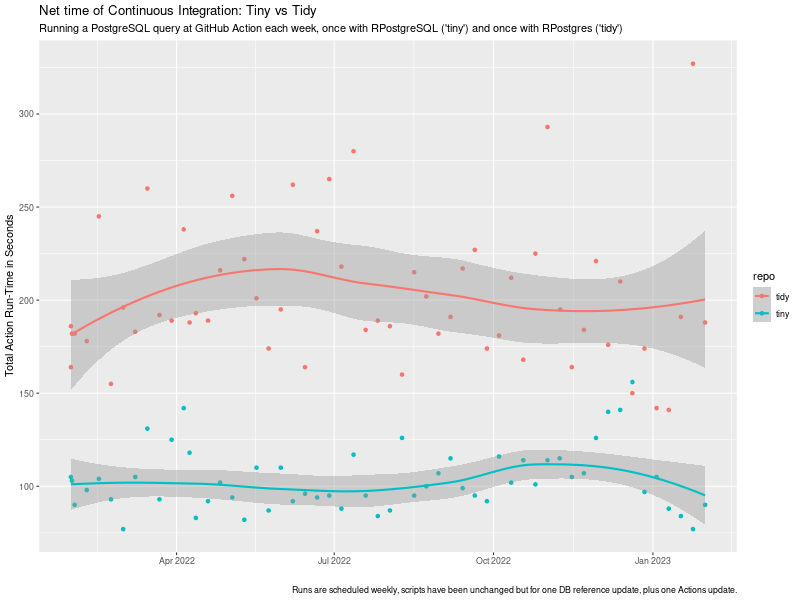
which we would like to come back to today. Furthermore, the unimitable @b0rk had a fabulous tweet just weeks later stating the same point debugging strategy: shorten your feedback loop as a key in a successful debugging strategy. So in sum: shorter is better. Nobody likes to wait. And shorter i.e. faster is a key and recurrent theme in the R4 series. Today we have a fairly nice illustration of two aspects we have stressed before: The combined effects can be staggering as we show below. The example is motivated by a truly surprising (we are being generous here) comment we received as an aside when discussing the eternal topic of whether R users do, or do not, have a choice when picking packages, or approaches, or verses. To our surprise, we were told that packages are not substitutable . Which is both demonstrably false (see below) and astonishing as it came from an academic. I.e. someone trained and paid to abstract superfluous detail away and recognise and compare core features of items under investigation. Truly stunning. But I digress. CRAN by now has many packages, slowly moving in on 20,000 in total, and is a unique success we commented-on time and time before. By now many packages shadow or duplicate each other, reinvent one another, or revise/review. One example is the pair of packages accessing PostgreSQL databases. There are several, but two are key. The older one is RPostgreSQL which has been around since Sameer Kumar Prayaga wrote it as a Google Summer of Code student in 2008 under my mentorship. The package has now been maintained well (if quietly) for many years by Tomoaki Nishiyama. The other entrant is more recent, though not new, and is RPostgres by Kirill M ller and others. We will for the remainder of this post refer to these two as the tiny and the tidy version as either can been as being a representative of a certain verse . The aforementioned comment on non-substitutability struck us as eminently silly, so we set out to prove just how absurd it really is. So about a year ago we set up pair of GitHub repos with minimal code in a pair we called lim-tiny and lim-tidy. Our conjecture was (and is!) that less is more just as post #34 titled Less Is More argued with respect to package dependencies. Each of the repos just does one thing: a query to a (freely accessible but remote) PostgreSQL database. The tiny version just retrieves a data frame using only the dependencies needed for RPostgreSQL namely DBI and nothing else. The tidy version retrieves a tibble and has access to everything else that comes when installing RPostgres: DBI, dplyr, and magrittr plus of course their respective dependencies. We were able to let the code run in (very default) GitHub Actions on a weekly schedule without intervention apart from one change to the SQL query when the remote server (providing public bioinformatics data) changed its schema slighly, plus one update to the action yaml code version. No other changes. We measure the time a standard continuous integration run takes in total using the default GitHub Action setup in the tidy case (which relies on RSPM/PPM binaries, caching, , and does not rebuild from source each time), and our own r-ci script (introduced in #32 for CI with R. It switched to using r2u during the course of this experiment but already had access to binaries via c2d4u so it is always binaries-based (see e.g. #37 or #13 for more). The chart shows the evolution of these run-times over the course of the year with one weekly run each.
tiny vs tidy ci timing impact chart tiny vs tidy ci timing impact chart

This study reveals a few things: The key point there is that while the net-time to fire off a single PostgreSQL is likely (near-)identical, the net cost of continuous integration is not. In this setup, it is about twice the run-time simply because Less Is More which (in this setup) comes out to about being twice as fast. And that is a valid (and concrete, and verifiable) illustration of the overall implicit cost of adding dependencies to creating and using development, test, or run-time environments. Faster feedback loops make for faster builds and faster debugging. Consider using fewer dependencies, and/or using binaries as provided by r2u.

This post by Dirk Eddelbuettel originated on his Thinking inside the box blog. Please report excessive re-aggregation in third-party for-profit settings.

29 January 2023

Dirk Eddelbuettel: RcppTOML 0.2.2 on CRAN: Now with macOS-on-Intel Builds

Just days after a build-fix release (for aarch64) and still only a few weeks after the 0.2.0 release of RcppTOML and its switch to toml++, we have another bugfix release 0.2.2 on CRAN also bringing release 3.3.0 of toml++ (even if we had large chunks of 3.3.0 already incorporated). TOML is a file format that is most suitable for configurations, as it is meant to be edited by humans but read by computers. It emphasizes strong readability for humans while at the same time supporting strong typing as well as immediate and clear error reports. On small typos you get parse errors, rather than silently corrupted garbage. Much preferable to any and all of XML, JSON or YAML though sadly these may be too ubiquitous now. TOML is frequently being used with the projects such as the Hugo static blog compiler, or the Cargo system of Crates (aka packages ) for the Rust language. The package was building fine on Intel-based macOS provided the versions were recent enough. CRAN, however, aims for the broadest possibly reach of binaries and builds on a fairly ancient macOS 10.13 with clang version 10. This confused toml++ into (wrongly) concluding it could not build when it in fact can. After a hint from Simon that Apple in their infinite wisdom redefines clang version ids, this has been reflected in version 3.3.0 of toml++ by Mark so we should now build everywhere. Big thanks to everybody for the help. The short summary of changes follows.

Changes in version 0.2.2 (2023-01-29)
  • New toml++ version 3.3.0 with fix to permit compilation on ancient macOS systems as used by CRAN for the Intel-based builds.

Courtesy of my CRANberries, there is a diffstat report for this release. More information is on the RcppTOML page page. Please use the GitHub issue tracker for issues and bugreports. If you like this or other open-source work I do, you can sponsor me at GitHub.

This post by Dirk Eddelbuettel originated on his Thinking inside the box blog. Please report excessive re-aggregation in third-party for-profit settings.

28 January 2023

Russ Allbery: Review: The Library of the Dead

Review: The Library of the Dead, by T.L. Huchu
Series: Edinburgh Nights #1
Publisher: Tor
Copyright: 2021
Printing: 2022
ISBN: 1-250-76777-6
Format: Kindle
Pages: 329
The Library of the Dead is the first book in a post-apocalyptic (sort of) urban fantasy series set in Edinburgh, written by Zimbabwean author (and current Scotland resident) T.L. Huchu. Ropa is a ghosttalker. This means she can see people who have died but are still lingering because they have unfinished business. She can stabilize them and understand what they're saying with the help of her mbira. At the age of fourteen, she's the sole source of income for her small family. She lives with her grandmother and younger sister in a caravan (people in the US call it an RV), paying rent to an enterprising farmer turned landlord. Ropa's Edinburgh is much worse off than ours. Everything is poorer, more run-down, and more tenuous, but other than a few hints about global warming, we never learn the history. It reminded me a bit of the world in Octavia Butler's Parable of the Sower in the feel of civilization crumbling without a specific cause. Unlike that series, The Library of the Dead is not about the collapse or responses to it. The partial ruin of the city is the mostly unremarked backdrop of Ropa's life. Much of the book follows Ropa's daily life carrying messages for ghosts and taking care of her family. She does discover the titular library when a wealthier friend who got a job there shows it off to her, but it has no significant role in the plot. (That was disappointing.) The core plot, once Ropa is convinced by her grandmother to focus on it, is the missing son of a dead woman, who turns out to not be the only missing child. This is urban fantasy with the standard first-person perspective, so Ropa is the narrator. This style of book needs a memorable protagonist, and Ropa is certainly that. She's a talker who takes obvious delight in narrating her own story alongside a constant patter of opinions, observations, and Scottish dialect. Ropa is also poor. That last may not sound that notable; a lot of urban fantasy protagonists are not well-off. But most of them feel culturally middle-class in a way that Ropa does not. Money may be a story constraint in other books, but it rarely feels like a life constraint and experience the way it does here. It's hard to describe the difference in tone succinctly, since it's a lot of small things: the constant presence of money concerns, the frustration of possessions that are stolen or missing and can't be replaced, the tedious chores one has to do when there's no money, even the language and vulgarity Ropa uses. This is rare in fantasy and excellent characterization work. Given that, I am still frustrated with myself over how much I struggled with Ropa as a narrator. She's happy to talk about what is happening to her and what she's learning about (she listens voraciously to non-fiction while running messages), but she deflects, minimizes, or rushes past any mention of what she's feeling. If you don't like the angst that's common from urban fantasy protagonists, this may be the book for you. I have complained about that angst before, and therefore feel like this should have been the book for me, but apparently I need a minimum level of emotional processing and introspection from the narrator. Ropa is utterly unwilling to do any of that. It's possible to piece together what she's feeling and worrying about, but the reader has to rely on hints and oblique comments that she passes over quickly. It didn't help that Ropa is not interested in the same things in her world that I was interested in. She's not an unreliable narrator in the conventional sense; she doesn't lie to the reader or intentionally hide information. And yet, the experience of reading this book was, for me, similar to reading a book with an unreliable narrator. Ropa consistently refused to look at what I wanted her to look at or think about what I wanted her to think about. For example, when she has an opportunity to learn magic through books from the titular library, her initial enthusiasm is infectious. Huchu does a great job showing the excitement of someone who likes new ideas and likes telling other people about the neat things she just learned. But when things don't work the way she expected from the books, she doesn't follow up, experiment, or try to understand why. When her grandmother tries to explain something to her from a different angle, she blows her off and refuses to pay attention. And when she does get magic to work, she never tries to connect that to her previous understanding. I kept waiting for Ropa to try to build her own mental model of magic, but she would only toy with an idea for a few pages and then put it down and never mention it again. This is not a fault in the book, just a mismatch between the book and what I wanted to read. All of this is consistent with Ropa's defensive strategies, emotional resiliency, and approach to understanding the world. (I strongly suspect Huchu was giving Ropa some ADHD characteristics, and if so, I think he got it spot on.) Given that, I tried to pivot to appreciating the characterization and the world, but that ran into another mismatch I had with this book, and the reason why I passed on it when it initially came out. I tend to avoid fantasy novels about ghosts. This is not because I mind ghosts themselves, but I've learned from experience that authors who write about ghosts usually also write about other things that I don't want to read about. That unfortunately was the case here; The Library of the Dead was too far into horror for me. There's child abuse, drugs, body horror, and similar nastiness here, more than I wanted in my head. Ropa's full-speed-ahead attitude and refusal to dwell on anything made it a bit easier to read, but it was still too much for me. Ropa is a great character who is refreshingly different than the typical urban fantasy protagonist, and the few hints of the magical library and world background we get were intriguing. This book was not for me, but I can see why other people will love it. Followed by Our Lady of Mysterious Ailments. Rating: 6 out of 10

27 January 2023

Matthew Garrett: Further adventures in Apple PKCS#11 land

After my previous efforts, I wrote up a PKCS#11 module of my own that had no odd restrictions about using non-RSA keys and I tested it. And things looked much better - ssh successfully obtained the key, negotiated with the server to determine that it was present in authorized_keys, and then went to actually do the key verification step. At which point things went wrong - the Sign() method in my PKCS#11 module was never called, and a strange
debug1: identity_sign: sshkey_sign: error in libcrypto
sign_and_send_pubkey: signing failed for ECDSA "testkey": error in libcrypto"

error appeared in the ssh output. Odd. libcrypto was originally part of OpenSSL, but Apple ship the LibreSSL fork. Apple don't include the LibreSSL source in their public source repo, but do include OpenSSH. I grabbed the OpenSSH source and jumped through a whole bunch of hoops to make it build (it uses the macosx.internal SDK, which isn't publicly available, so I had to cobble together a bunch of headers from various places), and also installed upstream LibreSSL with a version number matching what Apple shipped. And everything worked - I logged into the server using a hardware-backed key.

Was the difference in OpenSSH or in LibreSSL? Telling my OpenSSH to use the system libcrypto resulted in the same failure, so it seemed pretty clear this was an issue with the Apple version of the library. The way all this works is that when OpenSSH has a challenge to sign, it calls ECDSA_do_sign(). This then calls ECDSA_do_sign_ex(), which in turn follows a function pointer to the actual signature method. By default this is a software implementation that expects to have the private key available, but you can also register your own callback that will be used instead. The OpenSSH PKCS#11 code does this by calling EC_KEY_set_method(), and as a result calling ECDSA_do_sign() ends up calling back into the PKCS#11 code that then calls into the module that communicates with the hardware and everything works.

Except it doesn't under macOS. Running under a debugger and setting a breakpoint on EC_do_sign(), I saw that we went down a code path with a function called ECDSA_do_sign_new(). This doesn't appear in any of the public source code, so seems to be an Apple-specific patch. I pushed Apple's libcrypto into Ghidra and looked at ECDSA_do_sign() and found something that approximates this:
nid = EC_GROUP_get_curve_name(curve);
if (nid == NID_X9_62_prime256v1)  
  return ECDSA_do_sign_new(dgst,dgst_len,eckey);
 
return ECDSA_do_sign_ex(dgst,dgst_len,NULL,NULL,eckey);
What this means is that if you ask ECDSA_do_sign() to sign something on a Mac, and if the key in question corresponds to the NIST P256 elliptic curve type, it goes down the ECDSA_do_sign_new() path and never calls the registered callback. This is the only key type supported by the Apple Secure Enclave, so I assume it's special-cased to do something with that. Unfortunately the consequence is that it's impossible to use a PKCS#11 module that uses Secure Enclave keys with the shipped version of OpenSSH under macOS. For now I'm working around this with an SSH agent built using Go's agent module, forwarding most requests through to the default session agent but appending hardware-backed keys and implementing signing with them, which is probably what I should have done in the first place.

comment count unavailable comments

Next.

Previous.