| Publisher: | Xlibris |
| Copyright: | 2008 |
| ISBN: | 1-4363-8132-0 |
| Format: | Trade paperback |
| Pages: | 165 |
--- repro.config.orig 2013-12-11 17:36:27.179228324 +0100 +++ repro-ws.sip5060.net.config 2013-12-11 17:48:24.159938649 +0100 @@ -143,6 +143,41 @@ # Transport6TlsClientVerification = None # Transport6RecordRouteUri = sip:h1.sipdomain.com;transport=WS +Transport1Interface = 195.8.117.57:80 +Transport1Type = WS +Transport1RecordRouteUri = auto + +Transport2Interface = 2001:67c:1388:1000::57:80 +Transport2Type = WS +Transport2RecordRouteUri = auto + +Transport3Interface = 195.8.117.57:5060 +Transport3Type = TCP +Transport3RecordRouteUri = auto + +Transport4Interface = 2001:67c:1388:1000::57:5060 +Transport4Type = TCP +Transport4RecordRouteUri = auto + +Transport5Interface = 195.8.117.57:443 +Transport5Type = WSS +#Transport5RecordRouteUri = auto +Transport5TlsDomain = ws.sip5060.net +Transport5TlsClientVerification = None +Transport5RecordRouteUri = sip:ws.sip5060.net;transport=WSS +Transport5TlsCertificate = /etc/ssl/ssl.crt/ws.sip5060.net-bundle.crt +Transport5TlsPrivateKey = /etc/ssl/private/ws.sip5060.net-key.pem + +Transport6Interface = 2001:67c:1388:1000::57:443 +Transport6Type = WSS +#Transport6RecordRouteUri = auto +Transport6TlsDomain = ws.sip5060.net +Transport6TlsClientVerification = None +Transport6RecordRouteUri = sip:ws.sip5060.net;transport=WSS +Transport6TlsCertificate = /etc/ssl/ssl.crt/ws.sip5060.net-bundle.crt +Transport6TlsPrivateKey = /etc/ssl/private/ws.sip5060.net-key.pem + + # Comma separated list of DNS servers, overrides default OS detected list (leave blank # for default) DNSServers = @@ -455,7 +490,7 @@ ForceRecordRouting = false # Assume path option -AssumePath = false +AssumePath = true # Disable registrar DisableRegistrar = false @@ -481,7 +516,7 @@ # WARNING: Before enabling this, ensure you have a RecordRouteUri setup, or are using # the alternate transport specification mechanism and defining a RecordRouteUri per # transport: TransportXRecordRouteUri -DisableOutbound = true +DisableOutbound = false # Set the draft version of outbound to support (default: RFC5626) # Other accepted values are the versions of the IETF drafts, before RFC5626 was issued @@ -505,7 +540,7 @@ # WARNING: Before enabling this, ensure you have a RecordRouteUri setup, or are using # the alternate transport specification mechanism and defining a RecordRouteUri per # transport: TransportXRecordRouteUri -EnableFlowTokens = false +EnableFlowTokens = true # Enable use of flow-tokens in non-outbound cases for clients detected to be behind a NAT. # This a more selective flow token hack mode for clients not supporting RFC5626. The
test:notasecret:reTurn:authorizedIMPORTANT: the realm in the users file (reTurn in the example and default config) must be identical to the AuthenticationRealm in the /etc/reTurnServer.config file. On your own web site Simply install your own apache server and clone the webrtc.lumicall.org demo site. Modify the file js/custom.js and include the settings for your own server.
# cd /var/www # mkdir webcall # cd webcall # wget -r -nH http://webrtc.lumicall.org # vi js/custom.jsIn the custom.js, make sure you use a ws:// URL if you didn't set up SSL certificates and use a wss:// URL if you did. The IP or domain of your repro server must be in the ws:// or wss:// URL. Now navigate to the URL ending with /webcall on your server. For RHEL, Fedora and other RPM users Can somebody please assist with the review of the cajun-jsonapi dependency package so I can upload this new version of reSIProcate to Fedora? I'm also planning to make v1.9.0 available in EPEL6 when it is released in January. Questions? Please come and ask questions or discuss your experiences on the Free RTC mailing list sponsored by FSF Europe.
Probably you know, most of Debian contributors are in Euro/America(North and South), not in Asia. But there are lots of talented people. It means: there is huge possibility for Debian :)
Whatever you do with translations, consider translation management issues. For example, you are developing a multilingual web site. All kinds of labels and buttons and form fields are nicely translatable with trans template tag and ugettext. You have po files that follow your code from dev to stage to production environment.

Yesterday I asked myself, how to setup a crossbuild environment on a Debian wheezy/amd64 to build binary packages compatible for Raspbian.
After digging around it seemed to be the easiest way to use mk-sbuild to setup such a build environment.Some more packages are needed for crossbuilding:aptitude install sbuild ubuntu-dev-tools
Setting up the chroot is quite easy with:aptitude install qemu-user-static binfmt-support linux-image-amd64
Unfortunately you get thrown an error about bad signing key:mk-sbuild --arch=armhf --debootstrap-mirror=http://archive.raspbian.org/raspbian jessie
Release signed by unknown key (key id 9165938D90FDDD2E)
This happens cause debootstrap is using per default /usr/share/keyrings/$ DISTRO -archive-keyring.gpg, which doesn't ship the Raspbian signing key indeed. After looking how to solve that problem, I decided to use a quik&dirty fix:
echo 'DEBOOTSTRAP_KEYRING="--keyring=/usr/share/keyrings/raspbian-archive-keyring.gpg"' >> \ /root/.mk-sbuild.rc cp -a /usr/bin/mk-sbuild /tmp/mk-sbuild patch -p0<./mk-sbuild_raspbian.diff /tmp/mk-sbuild
/tmp/mk-sbuild --arch=armhf --debootstrap-mirror=http://archive.raspbian.org/raspbian wheezy
At first we need to install Icinga and lighttpd:
We need to enable the lighttpd cgi and authentication module:aptitude install icinga lighttpd
Let's create a config for Icinga (in a subdir of the default vHost). As you can see, you don't need any 'setenv.add-environment' on wheezy (at least):lighttpd-enable-mod cgi && ighttpd-enable-mod auth
vi /etc/lighttpd/conf-available/50-icinga.conf
Now we just need to enable the icinga config and reload the lighttpd:htpasswd -c /etc/icinga/htpasswd.users icingaadmin
At this point you should find a working Icinga setup at http://yourip/icinga P.S. Does anybody know how to setup a buildenv (preferable as crossbuild on amd64) for Raspbian, as the Debian armhf packages are not compatible to raspbian and so there is no access to the Backports repository? Cool would be to get a sbuild env running, so it can be integrated into a buildd.lighttpd-enable-mod icinga && /etc/init.d/lighttpd force-reload
| Series: | Poseidon's Children #1 |
| Publisher: | Ace |
| Copyright: | January 2012 |
| Printing: | June 2012 |
| ISBN: | 0-441-02071-2 |
| Format: | Hardcover |
| Pages: | 505 |
After running a QNAP TS-459 Pro+ for the last 3 or 4 years at home, my monitoring was alerting me about memory warnings cause I upgraded my SqueezeBox Server to the latest nightly version. So I looked into how to upgrade the shipped Adata SU3S1333B1G9-B.
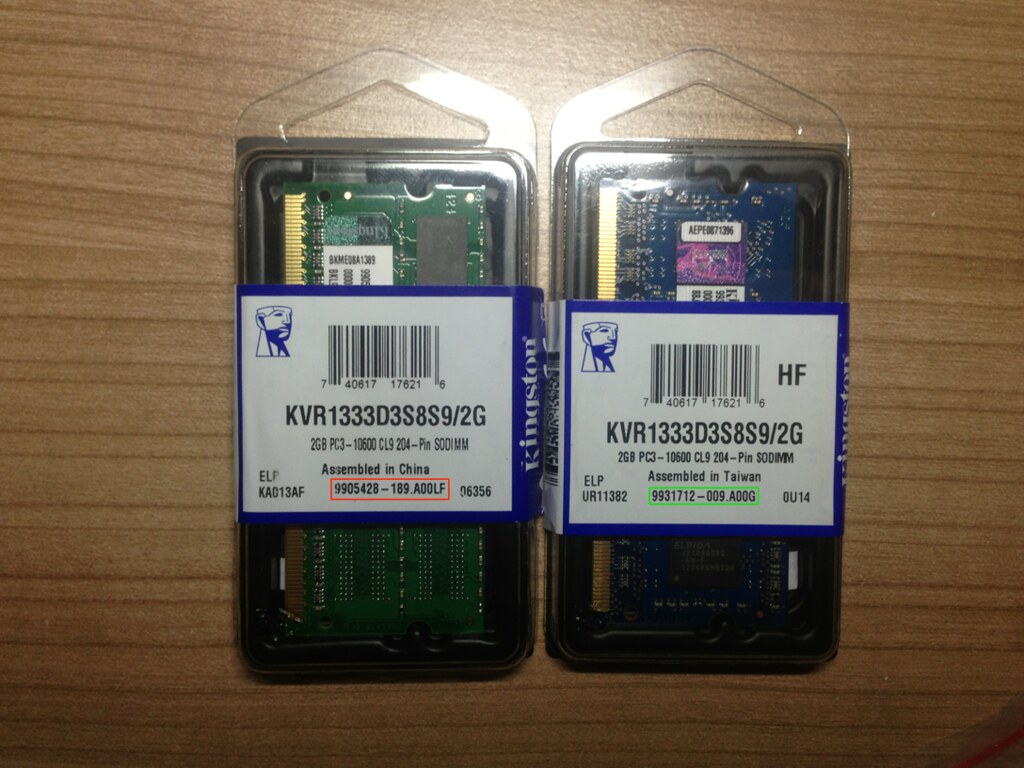
It seems that the KVR1333D3S8S9/2G should work, so I ordered one. After plugin it in, it revealed that the module wasn't working while it worked for others. After digging around, it seems essentially that the modul has a 8-chip design. Indeed, my modul just has only 8 memory chips, but the design is a 16 chip. So I thought it would be a nice try to order the one from amazon that worked for others.
And like expected it's not the same module but has the same Kingston Part Number.
As you can see, the 16 chip design module has printed '9905428-189.A00lf' on and the 8 chip design '9931712-009.A00G'. It's something like in the Wireless LAN USB dongle business where they sell totally different hardware with the same Part Number but different Revisions.
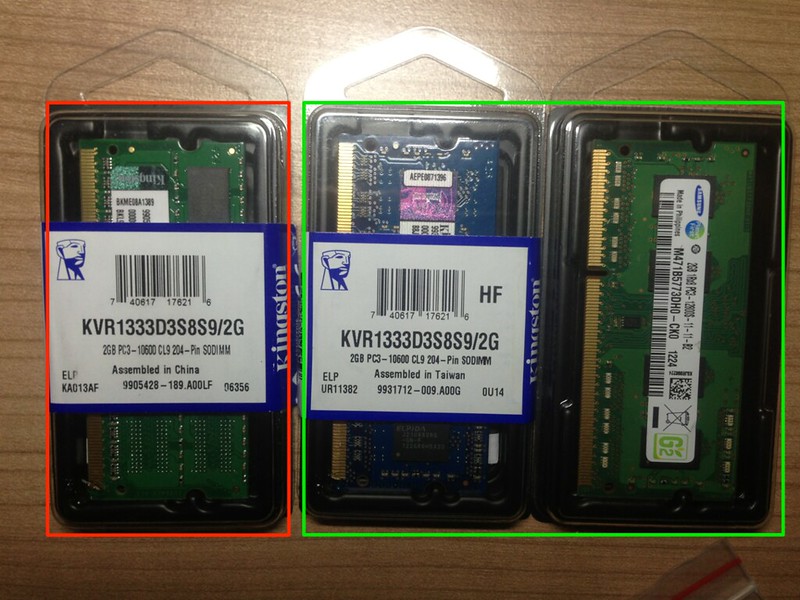
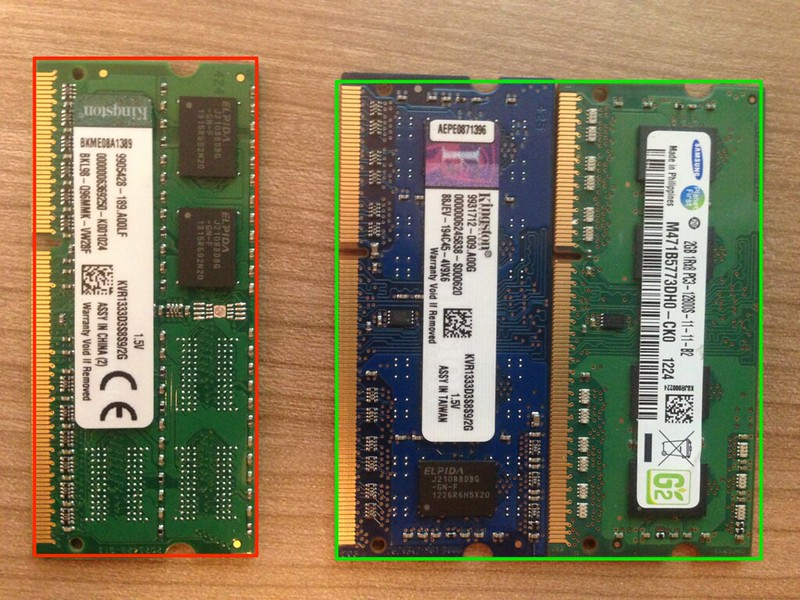
I also ordered a Samsung M471B5773DH0-CH9 cause that's also a 8 chip design.
To make it short, both 8 chips design modules worked like a charm, the M471B5773DH0-CH9 and the KVR1333D3S8S9/2G (9931712-009.A00G). - Please avoid the Adolf one from Kingston! ;)
I ve been investigating the generation of WebID profiles for Debian project members for some time.
After earlier experiments on webid.debian.net, in a static and very hackish manner, I ve investigated the use of Django. Django is no random choice, as it is being used in several ongoing efforts to rewrite some Debian Web services.
Among these is a new LDAP UserDir, which could replace the current version which runs db.debian.org, started by Luca Filipozzi and Martin Zobel-Helas.
I ve worked on integrating some of the LDAP querying code written by Luca together with the Django WebID provider app written by Ben Nomadic (both modified by me), and the result is a bit hackish for the moment.
It s very early, but allows the generation of WebID profiles for Debian project members, using data queried in Debian s LDAP directory, and adding TLS certs to the profiles. The TLS certs could in principle be used later as a WebID + TLS authentication mechanism.
There s plenty of work ahead, and this may never be deployed, but as an example see the kind of way such WebID profile documents may look (in Turtle format) :
@prefix cert: <http://www.w3.org/ns/auth/cert#> . @prefix foaf: <http://xmlns.com/foaf/0.1/> . @prefix rdf: <http://www.w3.org/1999/02/22-rdf-syntax-ns#> . @prefix rdfs: <http://www.w3.org/2000/01/rdf-schema#> . @prefix wot: <http://xmlns.com/wot/0.1/> . @prefix xml: <http://www.w3.org/XML/1998/namespace> . @prefix xsd: <http://www.w3.org/2001/XMLSchema#> . <> a foaf:PersonalProfileDocument ; foaf:primaryTopic <http://db.debian.org/olivier#me> . <#gpgkey> a wot:Pubkey ; wot:fingerprint "ACE46EBD89F6656D6642660BE941DEDA7C5BB6A5" ; wot:pubkeyAddress <ttps://db.debian.org/fetchkey.cgi?fingerprint=ACE46EBD89F6656D6642660BE941DEDA7C5BB6A5> . <http://db.debian.org/olivier#me> a foaf:Person ; cert:key [ a cert:RSAPublicKey ; rdfs:label "key made on [...] on my laptop" ; cert:exponent 65537 ; cert:modulus "bb7d5735181c7687a09abf3c88a064513badfe351f14fc2d738978a7f573d12eb831140a7a02c579f31f4617c14145493aeff4009832ba7fd1c579d6da92f68cd4437072266b000451d6eb45c03cd00b20e1f2230d83bdc3caeebb317e6618dd38a3f53abbbb2b6495a893495d3df685a2f0f599be8a74ef88841ce283dd8f65"^^xsd:hexBinary ], [ a cert:RSAPublicKey ; rdfs:label "key made on [...] on my laptop" ; cert:exponent 65537 ; cert:modulus "b078dedb61d215348adaa3315f478eca803513a8750753255f50fd335e3b6afdafd385afb62878edc412bbbc0c125d1805abef2920cb3dccb94d818b4973435f4f312ddfad960db7b7ec4522036e5c1fb1e5d7154756a97e924075b301cdf95e97e3bb665a97cdf0187c2aa229939962b0e9975dfb97c71ea60384af465aa40726fe8a2a1dd504da6a168e7f80fc37a1363d5f583a1a8d4f8253af0e7e5c0f3d2fabb61dd9cde17aba328022fd4be4e0214f407d83a95ec06b2d70c61835bb78ba3b46e8b82be3a4d6d53d88a94123144ef9b7a7c97e9396767505f34995488c62bcd697180f92244c82147a71a5b86a25f2c8ddf0ea965fc8ced8d6b84cff97"^^xsd:hexBinary ] ; foaf:homepage <http://www.olivierberger.org/> ; foaf:mbox "mailto:obergix@debian.org" ; foaf:name "Olivier Berger" ; foaf:nick "obergix" ; wot:hasKey <#gpgkey> .If you re interested in WebID in the frame of Debian project services, see the discussion list.
| Series: | Celaeno #2 |
| Publisher: | Bold Strokes |
| Copyright: | 2004 |
| Printing: | March 2005 |
| ISBN: | 1-60282-349-9 |
| Format: | Kindle |
| Pages: | 320 |
Some catchup blogging: Kurt Elling was
back in town on October 19, and not just in Chicago but quite literally in our little 'burb
as the headliner for this season's concerts at Domiminican University.
They had done us the favour of inviting
Dianne Reeves
back in March 2009,
but this was clearly going to be a real treat. And I managed to snatch four front row (!!)
tickets as soon as I heard about it, and the show once again didn't disappoint.
Elling was as usual accompanied by his long-time collaborator Laurence Hobgood on piano,
as well as local heros Clark Sommers on bass and
John McLean on guitar. This time,
Quincy Davies was on
drums. And this band is realiably excellent, as is Elling in any live setting.
The set was dominated by pieces from his most recent record
and augmented by a few other standout pieces. There is a pretty rich set of
live music by Elling on YouTube, see for example
On Broadway (which
was part of the set in a wonderfully fast and funked-up variant),
Golden Lady (from
the previous album, and also played live this time) or for example this wonderful version of
You Send Me (also
part of the concert).
I snatched a photo or two (while at least turning my flash off, unlike the
weird gal to my left, but I digress) and
posted one on Google+.
Kurt Elling will be back in Chicago at
the Green Mill in early
January. Expect to me there, and I hope to see you too!
This post by Dirk Eddelbuettel originated on his Thinking inside the box blog. Please report excessive re-aggregation in third-party for-profit settings.
As some of you might have noticed, the Site PHP.net was infected yesterday with Malware.**Description**
Linux Malware Detect (LMD) is a malware scanner for Linux released under the
GNU GPLv2 license, that is designed around the threats faced in shared hosted
environments. It uses threat data from network edge intrusion detection systems
to extract malware that is actively being used in attacks and generates
signatures for detection. In addition, threat data is also derived from user
submissions with the LMD checkout feature and from malware community resources.
The signatures that LMD uses are MD5 file hashes and HEX pattern matches, they
are also easily exported to any number of detection tools such as ClamAV.
**Features**
- MD5 file hash detection for quick threat identification
- HEX based pattern matching for identifying threat variants
- statistical analysis component for detection of obfuscated threats (e.g: base64)
- integrated detection of ClamAV to use as scanner engine for improved performance
- integrated signature update feature with -u update
- integrated version update feature with -d update-ver
- scan-recent option to scan only files that have been added/changed in X days
- scan-all option for full path based scanning
- checkout option to upload suspected malware to rfxn.com for review / hashing
- full reporting system to view current and previous scan results
- quarantine queue that stores threats in a safe fashion with no permissions
- quarantine batching option to quarantine the results of a current or past scans
- quarantine restore option to restore files to original path, owner and perms
- quarantine suspend account option to Cpanel suspend or shell revoke users
- cleaner rules to attempt removal of malware injected strings
- cleaner batching option to attempt cleaning of previous scan reports
- cleaner rules to remove base64 and gzinflate(base64 injected malware
- daily cron based scanning of all changes in last 24h in user homedirs
- daily cron script compatible with stock RH style systems, Cpanel & Ensim
- kernel based inotify real time file scanning of created/modified/moved files
- kernel inotify monitor that can take path data from STDIN or FILE
- kernel inotify monitor convenience feature to monitor system users
- kernel inotify monitor can be restricted to a configurable user html root
- kernel inotify monitor with dynamic sysctl limits for optimal performance
- kernel inotify alerting through daily and/or optional weekly reports
- e-mail alert reporting after every scan execution (manual & daily)
- path, extension and signature based ignore options
- background scanner option for unattended scan operations
- verbose logging & output of all actions
The recent development can be found at Github and in the last days I worked on packaging this into a Debian package 'maldetect'.
If you want to give it a try on Debian, you could install the packages from our restricted repository:
For adding our archive key, you can just install the package "debian-cyconet-archive-keyring"# wget "http://ftp.cyconet.org/debian/sources.list.d/restricted-cyconet.list" \ -O /etc/apt/sources.list.d/restricted-cyconet.list # aptitude update # aptitude -t restricted install maldetect
This post is just a bunch of random notes, but I think that things are going
well, this time.
coursera-dl has a new home:
a github organization of its own!
ffmpeg -i audio.m4a -i video.mp4 -vcodec copy -acodec copy combined.mp4
If you prefer having a Matroska container instead of an mp4 container
(which, BTW, results in smaller muxing overhead), then you can use the
command line:
mkvmerge -o combined.mkv audio.m4a video.mp4
Oh, those m4a and mp4 extensions are a new addition that
I just sent upstream (in the past, both would have been named with an
extension of mp4).
As, an aside, I like formats 135 for video and 140 for audio, for the
reasons that I mentioned in a comments to issue 1612:
Otherwise, to download 480p videos (which I do for lectures and so on with other projects of mine, like edx-dl) I have to call youtube-dl twice: once for format 135 and another for format 140, since the oldWhile this is unfortunate for some, this is a good thing for others: I once had a blind user offormat 35 files are much smaller than the lower resolution 360p files (due to the former being encoded in High profile vs. the latter being encoded in Constrained Baseline profile).
youtube-dl asking me if he could avoid downloading the
whole video just to extract the audio, so that he save on bandwidth. Well,
now this is possible.
Expect a new version of youtube-dl to be uploaded soon to Debian unstable.
Just found out that I was cited academically for the first time: Pablo Buiras and Alejandro Russo s paper Lazy Programs Leak Secrets at NordSec2013 builds upon my work dup Explicit un-sharing in Haskell , which I had submitted to last year s Haskell symposium and Haskell Implementers Workshop, but eventually only published on arXiv.
After my server that has hosted my blog for some years had given out its last breath (second motherboard failure), I decited it was time for a change. And not just server change, but also change in the blog engine itself. As I now focus on Python and Django almost exclusively at work, it felt logical to use some kind of Django-based blog or CMS. I tried django-cms and mezzanine and ... Mezzanine is so fast and simple, that I simply stopped looking.
After simply following the tutorial and creating a skeleton project, I had a ready-to go site with all the CMS features, incuding a blog. I just had to change a few settings to have the blog module be the home page of the site, change site settings for the title and Google Analytics settings and such and tweak the theme a bit to my liking.
This was my first real exposure to a Bootstrap design. I must say - it is very simple to understand and modify if your needs fit within its limits. For example, I wanted to remove the left sidebar and expand the main content block to fill that. All I had to do was to remove the div element with class "left-sidebar span-2" and change the class of the main content part from "span-7" to "span-9". To do that I simply copied the templates/base.html file from mezzanine default templates and modified it. The information from django-debug-toolbar showed me what files were used in rendering the page.
But the feature that really got me hooked was the Wordpress import. Using a simple management command I was able to feed into Mezzanine instance the XML export file from Wordpress. It created blog posts, categories, comments, static pages and even redirects from Wordpress permalinks to Mezzanine permalinks. It was not flawless - there were a few issues:
After my server that has hosted my blog for some years had given out its last breath (second motherboard failure), I decited it was time for a change. And not just server change, but also change in the blog engine itself. As I now focus on Python and Django almost exclusively at work, it felt logical to use some kind of Django-based blog or CMS. I tried django-cms and mezzanine and ... Mezzanine is so fast and simple, that I simply stopped looking.
After simply following the tutorial and creating a skeleton project, I had a ready-to go site with all the CMS features, incuding a blog. I just had to change a few settings to have the blog module be the home page of the site, change site settings for the title and Google Analytics settings and such and tweak the theme a bit to my liking.
This was my first real exposure to a Bootstrap design. I must say - it is very simple to understand and modify if your needs fit within its limits. For example, I wanted to remove the left sidebar and expand the main content block to fill that. All I had to do was to remove the div element with class "left-sidebar span-2" and change the class of the main content part from "span-7" to "span-9". To do that I simply copied the templates/base.html file from mezzanine default templates and modified it. The information from django-debug-toolbar showed me what files were used in rendering the page.
But the feature that really got me hooked was the Wordpress import. Using a simple management command I was able to feed into Mezzanine instance the XML export file from Wordpress. It created blog posts, categories, comments, static pages and even redirects from Wordpress permalinks to Mezzanine permalinks. It was not flawless - there were a few issues:
Next.