Search Results: "evo"

15 August 2013

Bits from Debian: Happy 20th birthday Debian!

Today is Debian's 20 anniversary. This anniversary would have been impossible without a strong community of users and developers. That's why for its commemoration, we asked the Debian community what Debian meant to them. Below you have a selection of the answers we got.
Since I run Debian on my computers, I do not play anymore to 3D shooting games, not because of the lack of Free 3D drivers, but because developing Debian is more fun and addictive. Debian is a truly community based distro which is devoted to FOSS ideas and standards. It perfectly works on high variety of hardware. Users from all over the world have been using Debian and contributing to it during 20 years. And I am proud to be one of them. Happy Birthday, Debian! When I considered switching to Linux I asked friends which distribution to choose. I was told skip other distributions that were considered more newbie-friendly at the time and go straight to Debian instead. It might be more work initially, they said, but it would save me the hassle of switching to Debian later on, which I would inevitably do. Turns out they were right. I started my Linux experience more than ten years ago with Debian and have yet to see a better Linux distribution. [...] You are a worldwide community of volunteers working together for 20 years now. To me this is an encouraging example and, given the sorry state of the world we live in, more important than the technical quality of the operating system. I wish you another successful twenty years and to stay as independent as you are. I initially started in Debian as it was an interesting technical challenge. Over the years the community and having good standards around what Free Software is has become more important. As a user of Debian for 14 years, and a former Debian Developer for 10, I would like to wish a happy birthday to the best project on the internet, and the best Linux distribution ever. Thanks for all of your support over the years! "Rock Solid Stability and Absolute Freedom" Thats what Debian means to me. Debian gives me a feeling that I am using the best linux has to offer. You know your machine is in safe hands. As a long time Debian user and sometimes supporter [...] I wish Debian all the best for next 20 years and beyond! Debian is the universal operating system. And it's free (and not just as in beer ;-) Debian is an awesome combination of obsessive high quality software and software freedom. It's a pleasure to be able to use and contribute to this project. Thanks to all for their excellent work! Cheers to 2**20 years more! [...] I am so very thankful to all of the people who have contributed to and continue to contribute to such a wonderful ecosystem of tools. I love the commitment to the long term goals of security, freedom and transparency with respect to the computer systems that we all use and rely upon and the information that we store on them. Debian is the operating system that makes me free. Debian is a family gathered around great idea. Its pure love.

12 August 2013

Sylvestre Ledru: Merchandising at Debconf

Debian France and Debian Swiss associations are now selling products at Debconf. We are now selling
Buff
23 CHF / 18 euros
Black polo
31 CHF / 25 euros
Rugby polo
50 CHF / 40 euros
Mousepad
13 CHF / 10 euros
We have also some new hoodies.
They come in 4 colors: black, white, grey and dark blue.
With or without zip:
Without zip: 44 CHF / 35 euros
With zip: 50 CHF / 40 euros With also have hats:
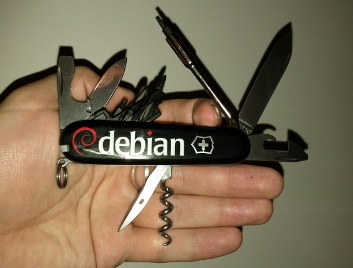
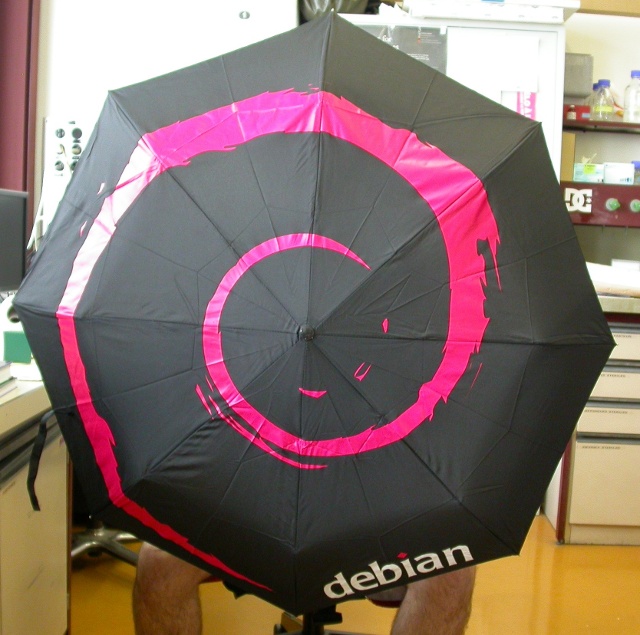
Price: 10 CHF / 9 euros We have also the Debian umbrellas and knifes.

Photo credit Kibi
For those who are at Debconf, they are for sell at the Debconf front desk from 4 to 6 and will be probably available for sell on enventelibre after the event.

5 August 2013

Sylvestre Ledru: Switch to OpenJDK 7

As announcement on debian-devel-announce, I just uploaded java-common version 0.49. This version changes the default version of OpenJDK to version 7. That means that packages depending on default-jdk/default-jre will be now built with OpenJDK 7 (instead of the 6) and also that the java/javac commands will be providing Java 7.
I also used the opportunity of this upload to update the Java policy.

3 August 2013

EvolvisForge blog: Nicht Hardlink, sondern ?

TANSTA softlink . ITYM: symlink(7) Actually, there s link (also hardlink ) and symbolic link (short symlink ). (Oh, and reparse points, but let s not get there, lest we mention *.lnk files ) Inspired by a posting on the klibc mailing list.

Russell Coker: Religious Conversion

Today I was in the center of Melbourne and I saw two stands run by Muslims advocating their faith. They had a selection of DVDs and brochures to give away and seemed friendly enough for anyone who wanted a chat. I think that this is a good thing, if the majority of the Australian population would think of the Muslim minority as people who give away DVDs rather than as potential suicide bombers then it would be a great benefit for society. Then I saw a Christian stand which had placards indicating that Jesus loves Muslims, which is fine. One of the workers on that stand then gleefully told me that there had been a Muslim stand in that area but the Muslims departed when they arrived. It would be good if advocates for the various religions could work together to promote positive things that they all agree on (generally related to being nice to other people). When they seem to be essentially bullying other religious groups into leaving the area they aren t making a good case for a kind and caring god. The Christian who was so happy about the Muslims departing then tried to convert me. He started by talking about a mobile phone not being able to appear from nothing which was the start of an utterly stupid argument about creationism. That was stupid firstly because it s obvious that evolution doesn t apply to consumer electronics, if I leave a phone lying on top of another phone overnight I m not going to get some little phones appearing as a result. But the bigger stupidity is in even promoting creationism in the first place. Advocating creationism is essentially claiming that god is so incapable that ze can t manage an evolutionary process. An all-seeing all-knowing god of infinite intelligence could just create a plasma cloud that will form into a solar system and evolve life. People who argue for creationism don t believe in a capable god, they believe in a being that resembles a god in the way a magician resembles someone who can actually perform magic. Arguing for creationism is arguing for a limited being which probably isn t worthy of worship (why worship space aliens who are probably only a few thousand years ahead of us). Regardless of the scientific evidence (which is strongly in favor of evolution) just logically thinking about the issue in regard to what a being with infinite powers might actually do suggests that ze could just as easily create or evolve all life and probably wouldn t care about what we believe. Genesis should be taken as metaphor because it s obvious that nothing that s taught in a year 7 science class could be taught to your typical stone age goat-herd, but even if it was taken literally it s not specified as a required belief (as opposed to a belief in a single god, repenting sins, and other beliefs which are required). The greatest stupidity however is the fact that even if it made any sense to promote creationism it wouldn t make sense to do so immediately. Any time you want to convert someone to a set of beliefs it s a good strategy to start with the ones which will seem least wacky. I can have have a conversation with Christians about positive things which we generally agree on such as donating to charity and trying to do good things in various ways. But when they start with the stupid stuff I walk away. When the weather is better I plan to interview representatives of the various religious groups who are trying to convert people on the street and rate them according to how wacky they are. I ll be a little limited in my ability to review them by the total lack of any right to free speech in Australia (our laws are much the same as those in the UK). But I should still be able to give them a reasonable review.

29 July 2013

EvolvisForge blog: SSD

Following the Wiki I put discard entries into my fstab(5) for swap (but not / as it s suggested to use fstrim instead, and I had noatime for /boot and relatime for / already) and changed the scheduler. What wasn t written there was to set vm.swappiness=0 in sysctl.d/local.conf *shrug* but it helps. What they also didn t mention: mount -t tmpfs swap /var/cache/apt/archives And in sid, which my dayjob-laptop is running, APT _finally_ creates the missing partial/ subdirectory itself. Thanks! I had the filesystems already created, so I changed the ext options with tune2fs: tune2fs -E stride=1024,stripe_width=1024 /dev/sda2 # 1 KiB blocks: /boot
tune2fs -E stride=256,stripe_width=256 /dev/sda4 # 4 KiB blocks: /
I wonder how well that works. I also did _not_ manage to find out my device s flash block size (search engine fodder: erase block size), so I assumed 1 MiB (also used for partition alignment already) as worst-case scenario. Input welcome on how to find *that* out.

27 July 2013

Julien Danjou: OpenStack Ceilometer Havana-2 milestone released

Last week, the second milestone of the Havana developement branch of Ceilometer has been released and is now available for testing and download. This means the first half of the OpenStack Havana development has passed! New features Ten blueprints have been implemented as you can see on the release page. I'm going to talk through some of them here, that are the most interesting for users.
The Ceilometer API now returns all the samples sorted by timestamp. This blueprint is the first one implemented by Terri Yu, our OPW intern! In the same spirit, I've added the ability to limit the number of samples returned. On the alarming front, things evolved a lot. I've implemented the notifier system that will be used to run actions when alarms are triggered. To trigger these alarms, Eoghan Glynn (RedHat) worked on the alarm evaluation system that will use the Ceilometer API to check for alarm states. I've reworked the publisher system so it now uses URL formatted target for publication. That now allows to publish different meters to different target using the same publishing protocol (e.g. via UDP toward different hosts). Sandy Walsh (RackSpace) have been working on the StackTach like functionality and added the ability for the collector to optionally store the notification events received. Finally, Mehdi Abaakouk (eNovance) implemented a TTL system for the database, so you're now able to expire your data whenever you like. Bug fixes Thirty-five bugs were fixed, though most of them might not interest you so I won't elaborate too much on that. Go read the list if you are curious. Toward Havana 3 We now have 30 blueprints targeting the Ceilometer's third Havana milestone, with some of them are already started.I'll try to make sure we'll get there without too much trouble for the 6th September 2013. Stay tuned!

23 July 2013

Keith Packard: present sync

Implementing Vblank Synchronization in the Present Extension This is mostly a status update on how the Present extension is doing; the big news this week is that I ve finished implementing vblank synchronized blts and flips, and things seem to be working quite well. Vblank Synchronized Blts The goal here is to have the hardware executing the blt operation in such a way as to avoid any tearing artifacts. In current drivers, there are essentially two different ways to make this happen:
  1. Insert a command into the ring which blocks execution until a suitable time immediately preceding the blt operation.
  2. Queue the blt operation at vblank time so that it executes before the scanout starts.
Option 1. provides the fewest artifacts; if the hardware can blt faster than scanout, there shouldn t ever be anything untoward visible on the screen. However, it also blocks future command execution within the same context. For example, if two vblank synchronized blts are queued at the same time, its possible for the second blt to be delayed by yet another frame, causing both applications to run at half of the frame rate. Option 2. avoids blocking the hardware, allowing for ongoing operations to proceed on the hardware without waiting for the synchronized blt to complete. However, it can cause artifacts if the delay from the vblank event to the eventual execution of the blt command is too long. Queuing the blt right when it needs to execute means that we also have the opportunity to skip some blts; if the application presents two buffers within the same frame time, the blt of the first buffer can be skipped, saving memory bandwidth and time. Present uses Option 2, which may occasionally cause a tearing artifact, but avoids slowing down applications while allowing the X server to discard overlapping blt operations when possible. Queuing the Blt at Vblank There are several options for getting the blt queued and executed when the vblank occurs:
  1. Queue the blt from the interrupt handler
  2. Queue the blt from a kernel thread running in response to the interrupt
  3. Send an event up to user space and have the X server construct the blt command.
These are listed in increasing maximum latency, but also in decreasing complexity. Option 1. is made more complicated as much of the work necessary to get a command queued to the hardware cannot be done from interrupt context. One can imagine having the desired command already present in the ring buffer and have the interrupt handler simply move the ring tail pointer value. Future operations to be queued before the vblank operation could then re-write the ring as necessary. A queued operation could also be adjusted by the X server as necessary to keep it correct across changes to the window system state. Option 2. is similar, but the kernel implementation should be quite a bit simpler as the queuing operation is done in process context and can use the existing driver infrastructure. For the X server, this is the same as Option 1, requiring that it construct a queued blt operation and deliver that to the kernel, and then revoke and re-queue if the X server state changed before the operation was completed. Option 3 is the simplest of all, requiring no changes within the kernel and few within the X server. The X server waits to receive a vblank notification event for the appropriate frame and then simply invokes existing mechanisms to construct and queue the blt operation to the kernel. Oddly, Present currently uses Option 3. If that proves to generate too many display artifacts, we can come back and change the code to try something more complicated. Flipping the Frame Buffer Taking advantage of the hardware s ability to quickly shift scanout from one chunk of memory to another is critical to providing efficient buffer presentation within the X server. It is slightly more complicated to implement than simply copying data to the current scanout buffer for a few reasons:
  1. The presented pixmap is owned by the application, and so it shouldn t be used except when the presented window covers the whole screen. When the window gets reconfigured, we end up copying the window s pixmap to the regular screen pixmap.
  2. The kernel flipping API is asynchronous, and doesn t provide any abort mechanism. This isn t usually much of an issue; we simply delay reporting the actual time of flip until the kernel sends the notification event to the X server. However, if the window is reconfigured or destroyed while the flip is still pending, cleaning that up must wait until the flip has finished.
  3. The applications buffer remains busy until it is no longer being used for scanout; that means that applications will have to be aware of this and ensure that they don t deadlock waiting for the current scanout buffer to become idle before switching to a new scanout buffer.
Present is different from DRI2 in using application-allocated buffers for this operation. For DRI2, when flipping to a window buffer, that buffer becomes the screen pixmap the driver flips the new buffer object into the screen pixmap and releases the previous buffer object for other use. For Present, as the buffer is owned by the application, I figured it would be better to switch back to the real screen buffer when necessary. This also means that applications aren t left holding a handle to the frame buffer, which seems like it might be a nice feature. The hardest part of this work was dealing with client and server shutdown, dealing with objects getting deleted in random orders while other data structures retained references. (The kernel DRM drivers use the term page flipping to mean an atomic flip between one frame buffer and another, generally implemented by simply switching the address used for the scanout buffer. I d like to avoid using the word page in this context as we re not flipping memory pages individually, but rather a huge group of memory that forms an entire frame buffer. We could use plane flipping (as intel docs do), frame buffer flipping (but that s a mouthful), display flipping or almost anything but page flipping ). Overall DRI3000 Status At this point, the DRI3 extension is complete and the Present extension is largely complete, except for redirection for compositors. The few piglit tests for GLX_OML_sync_control all pass now, which is at least better than DRI2 does. I think I ve effectively replicated the essential features of DRI2 while offering room to implement a couple of new GL extensions: The code for this stuff has all been pushed to a number of repositories:

20 July 2013

Charles Plessy: triggers in Dpkg and RPM: a comparaison.

Dpkg and RPM provide a mechanism called triggers. But are they doing the same thing? There are two different types of triggers for Dpkg: explicit and file. In the case of explicit triggers, the script of a package A will activate a package B. The file type is more frequently used. In that case, the creation, modification or deletion of a file in a path declared by a package B will activate the package B. The triggers are often used when a package A has to register an information to a package B. For instance, when a graphical application is installed, its package will add its description in the /usr/share/applications directory, which will trigger the desktop-file-utils package, which will do what is necessary to add a new menu entry in the window manager. RPM's triggers function differently. The installation, update or removal of a package A will activate a package B if this package B declares its interest for the package A in its SPEC file (with possible restrictions on package A's version). The documentation of RPM and Fedora gives a few examples of use, like the update of symbolic links when one mail server is replaced by another. Altogether, despite both mechanisms have the same name, they do not have the same goal. In the case of Dpkg, the triggers are especially useful to group similar actions. For instance, to update the list of manual pages once after installing a hundred of packages, instead of a hundred of times, after installing each package. They are also useful to transfer commands from a large number of packages to a central one, thus easing the evolution of the system. In the case of RPM, the triggers seem more specialised, as they always are about the relationship between a pair of packages.

16 July 2013

Gunnar Wolf: Open Repositories 2013 #OR2013 Charlottetown, P.E.I., Canada

I just came back home from the Open Repositories 2013 conference, in Charlottetown, Prince Edward Island, Canada; a conference on Open Access publishing, digital repositories, preservation strategies... It was quite an interesting conference, and gave me the opportunity to meet several interesting people. Mostly worthy of note, I spent some good time with the team behind the EPrints software, which powers my institute's repository, and with whom I expect to do some work trying to get EPrints more in shape to be considered as uploadable to Debian. I presented a (very non-technical) talk titled RAD-UNAM: Genesis and evolution of a repository administrators group, describing the experiences we have had at our group in UNAM setting up a federated repository (link to the talk in the OR2013 site). It was a very good experience as well as a nice trip. Oh And if you come over to my blog, you will see here the photos I took during the week of a very nice, little Canadian city.

12 July 2013

Daniel Pocock: Practical VPNs with strongSwan, Shorewall, Linux firewalls and OpenWRT routers

There is intense interest in communications privacy at the moment thanks to the Snowden scandal. Open source software has offered credible solutions for privacy and encryption for many years. Sadly, making these solutions work together is not always plug-and-play. In fact, secure networking, like VoIP, has been plagued by problems with interoperability and firewall/filtering issues although now the solutions are starting to become apparent. Here I will look at some of them, such as the use of firewall zones to simplify management or the use of ECDSA certificates to avoid UDP fragmentation problems. I've drawn together a lot of essential tips from different documents and mailing list discussions to demonstrate how to solve a real-world networking problem. A typical network scenario and requirements Here is a diagram of the network that will be used to help us examine the capabilities of these open source solutions. Some comments about the diagram:
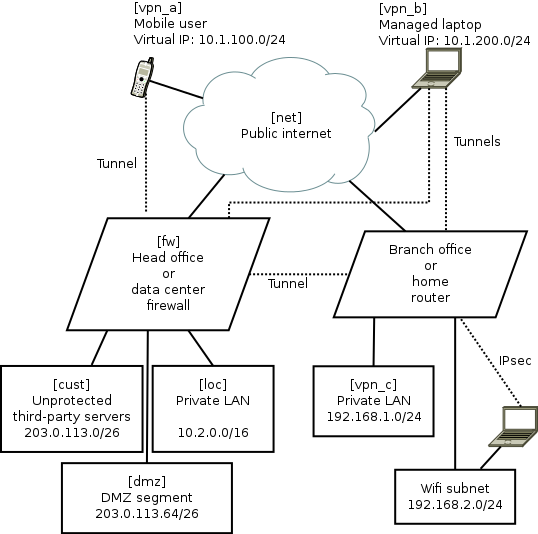
  • The names in square brackets are the zones for Shorewall, they are explained later.
  • The dotted lines are IPsec tunnels over the untrusted Internet.
  • The road-warrior users (mobiles and laptops) get virtual IP addresses from the VPN gateway. The branch offices/home routers do not use virtual IPs.
  • The mobile phones are largely untrusted: easily lost or stolen, many apps have malware, they can only tunnel to the central VPN and only access a very limited range of services.
  • The laptops are managed devices so they are trusted with access to more services. For efficiency they can connect directly to branch office/home VPNs as well as the central server.
  • Smart-phone user browsing habits are systematically monitored by mobile companies with insidious links into mass-media and advertising. Road-warriors sometimes plug-in at client sites or hotels where IT staff may monitor their browsing. Therefore, all these users want to tunnel all their browsing through the VPN.
  • The central VPN gateway/firewall is running strongSwan VPN and Shorewall firewall on Linux. It could be Debian, Fedora or Ubuntu. Other open source platforms such as OpenBSD are also very well respected for building firewall and VPN solutions, but Shorewall, which is one of the key ingredients in this recipe, only works on Linux at present.
  • The branch office/home network could be another strongSwan/Shorewall server or it could also be an OpenWRT router
  • The default configuration for most wifi routers creates a bridge joining wifi users with wired LAN users. Not here, it has been deliberately configured as an independent network. Road-warriors who attach to the wifi must use VPN tunnelling to access the local wired network. In OpenWRT, it is relatively easy to make the Wifi network an independent subnet. This is an essential security precaution because wifi passwords should not be considered secure: they are often transmitted to third parties, for example, by the cloud backup service in many newer smart phones.
Package mayhem The major components are packaged on all the major Linux distributions. Nonetheless, in every case, I found that it is necessary to re-compile fresh strongSwan packages from sources. It is not so hard to do but it is necessary and worth the effort. Here are related blog entries where I provide the details about how to re-build fresh versions of the official packages with all necessary features enabled: Using X.509 certificates as a standard feature of the VPN For convenience, many people building a point-to-point VPN start with passwords (sometimes referred to as pre-shared keys (PSK)) as a security mechanism. As the VPN grows, passwords become unmanageable. In this solution, we only look at how to build a VPN secured by X.509 certificates. The certificate concept is not hard. In this scenario, there are a few things that make it particularly easy to work with certificates:
  • strongSwan comes with a convenient command line tool, ipsec pki. Many of it's functions are equivalent to things you can do with OpenSSL or GnuTLS. However, the ipsec pki syntax is much more lightweight and simply provides a convenient way to do the things you need to do when maintaining a VPN.
  • Many of the routine activities involved in certificate maintainence can be scripted. My recent blog about using Android clients with strongSwan gives a sample script demonstrating how ipsec pki commands can be used to prepare a PKCS#12 (.p12) file that can be easily loaded into an Android device using the SD-card.
  • For building a VPN, there is no need to use a public certificate authority such as Verisign. Consequently, there is no need to fill in all their forms or make any payments for each device/certificate. Some larger organisations do choose to outsource their certificate management to such firms. For smaller organisations, an effective and sometimes better solution can be achieved by maintaining the process in-house with a private root CA.
UDP fragmentation during IPsec IKEv2 key exchange and ECDSA A common problem for IPsec VPNs using X.509 certificates is the fragmentation of key exchange datagrams during session setup. Sometimes it works, sometimes it doesn't. Various workarounds exist, such as keeping copies of all certificates from potential peers on every host. As the network grows, this becomes inconvenient to maintain and to some extent it eliminates the benefits of using PKI. Fortunately, there is a solution: Elliptic Curve Cryptography (ECC). Many people currently use RSA key-pairs. Best practice suggests using RSA keys of at least 2048 bits and often 4096 bits. Using ECC with a smaller 384-bit key is considered to be equivalent to a 7680 bit RSA key pair. Consequently, ECDSA certificates are much smaller than RSA certificates. Furthermore, at these key sizes, the key exchange packets are almost always smaller than the typical 1500 byte MTU. A further demand for ECDSA is arising due to the use of ECC within smart cards. Many smartcards don't support any RSA key larger than 2048 bits. The highly secure 384-bit ECC key is implemented in quite a few common smart cards. Smart card vendors have shown a preference for the ECC keys due to the US Government's preference for ECC and the lower computational overheads make them more suitable for constrained execution environments. Anyone who wants to use smart cards as part of their VPN or general IT security now, or in the future, needs to consider ECC/ECDSA. Making the network simple with Shorewall zones For this example, we are not just taking some easy point-to-point example. We have a real-world, multi-site, multi-device network with road warriors. Simplifying this architecture is important to help us understand and secure it. The solution? Each of these is abstracted to a "zone" in Shorewall. In the diagram above, the zone names are in square brackets. The purpose of each zone is described below:
Zone name Description
loc This is the private LAN and contains servers like databases, private source code respositories and NFS file servers
dmz This is the DMZ and contains web servers that are accessible from the public internet. Some of these servers talk to databases or message queues in the LAN network loc
vpn_a These are road warriors that are not very trustworthy, such as mobile devices. They are occasionally stolen and usually full of spyware (referred to by users as "apps"). They have limited access to ports on some DMZ servers, e.g. for sending and receiving mail using SMTP and IMAP (those ports are not exposed to the public Internet at large). They use the VPN tunnel for general internet access/browsing, to avoid surveillance by their mobile carrier.
vpn_b These are managed laptops that have a low probability of malware infection. They may well be using smart cards for access control. Consequently, they are more trusted than the vpn_a users and have access to some extra intranet pages and file servers. Like the smart-phone users, they use the VPN tunnel for general internet access/browsing, to avoid surveillance by third-party wifi hotspot operators.
vpn_c This firewall zone represents remote sites with managed hardware, such as branch offices or home networks with IPsec routers running OpenWRT.
cust These are servers hosted for third-parties or collaborative testing/development purposes. They have their own firewall arrangements if necessary.
net This zone represents traffic from the public Internet.
A practical Shorewall configuration Shorewall is chosen to manage the iptables and ip6tables firewall rules. Shorewall provides a level of abstraction that makes netfilter much more manageable than manual iptables scripting. The Shorewall concept of zones is very similar to the zones implemented in OpenWRT and this is an extremely useful paradigm for firewall management. Practical configuration of Shorewall is very well explained in the Shorewall quick start. The one thing that is not immediately obvious is a strategy for planning the contents of the /etc/shorewall/policy and /etc/shorewall/rules files. The exact details for making it work effectively with a modern IPsec VPN are not explained in a single document, so I've gathered those details below as well. An effective way to plan the Shorewall zone configuration is with a table like this:
Destination zone
loc dmz vpn_a vpn_b vpn_c cust net
Source zone loc \
dmz ? \ X X X
vpn_a ? ? \ X X
vpn_b ? ? X \ X
vpn_c X \
cust X ? X X X \
net X ? X X X \
The symbols in the table are defined:
Symbol Meaning
ACCEPT in policy file
X REJECT or DROP in policy file
? REJECT or DROP in policy file, but ACCEPT some specific ports in the rules file
Naturally, this modelling technique is valid for both IPv4 and IPv6 firewalling (with Shorewall6) Looking at the diagram in two dimensions, it is easy to spot patterns. Each pattern can be condensed into a single entry in the rules file. For example, it is clear from the first row that the loc zone can access all other zones. That can be expressed very concisely with a single line in the policy file:
loc all ACCEPT
Specific Shorewall tips for use with IPsec VPNs and strongSwan Shorewall has several web pages dedicated to VPNs, including the IPsec specific documentation.. Personally, I found that I had to gather a few details from several of these pages to make an optimal solution. Here are those tips:
  • Ignore everything about the /etc/shorewall/tunnels file. It is not needed and not used any more
  • Name the VPN zones (we call them vpn_a, vpn_b and vpn_c) in the zones file but there is no need to put them in the /etc/shorewall/interfaces file.
  • The /etc/shorewall/hosts file is not just for hosts and can be used to specify network ranges, such as those associated with the VPN virtual IP addresses. The ranges you put in this file should match the rightsourceip pool assignments in strongSwan's /etc/ipsec.conf
  • One of the examples suggests using mss=1400 in the /etc/shorewall/zones file. I found that is too big and leads to packets being dropped in some situations. To start with, try a small value such as 1024 and then try larger values later after you prove everything works. Setting mss for IPsec appears to be essential.
  • Do not use the routefilter feature in the /etc/shorewall/interfaces file as it is not compatible with IPsec
Otherwise, just follow the typical examples from the Shorewall quick start guide and configure it to work the way you want. Here is an example /etc/shorewall/zones file:
fw firewall
net ipv4
dmz ipv4
loc ipv4
cust ipv4
vpn_a ipsec mode=tunnel mss=1024
vpn_b ipsec mode=tunnel mss=1024
vpn_c ipsec mode=tunnel mss=1024
Here is an example /etc/shorewall/hosts file describing the VPN ranges from the diagram:
vpn_a eth0:10.1.100.0/24 ipsec
vpn_b eth0:10.1.200.0/24 ipsec
vpn_c eth0:192.168.1.0/24 ipsec
Here is an example /etc/shorewall/policy file based on the table above:
loc all ACCEPT
vpn_c all ACCEPT
cust net ACCEPT
net cust ACCEPT
all all REJECT
Here is an example /etc/shorewall/rules file based on the network:
SECTION ALL
# allow connections to the firewall itself to start VPNs:
# Rule  source    dest    protocol/port details
ACCEPT   all       fw                ah
ACCEPT   all       fw                esp
ACCEPT   all       fw                udp 500
ACCEPT   all       fw                udp 4500
# allow access to HTTP servers in DMZ:
ACCEPT   all       dmz               tcp 80
# allow connections from HTTP servers to MySQL database in private LAN:
ACCEPT   dmz       loc:10.2.0.43     tcp 3306
# allow connections from all VPN users to IMAPS server in private LAN:
ACCEPT vpn_a,vpn_b,vpn_c loc:10.2.0.58 tcp 993
# allow VPN users (but not the smartphones in vpn_a) to the
# PostgresQL database for PostBooks accounting system:
ACCEPT vpn_b,vpn_c loc:10.2.0.48      tcp 5432
SECTION ESTABLISHED
ACCEPT   all       all
SECTION RELATED
ACCEPT   all       all
Once the files are created, Shorewall can be easily activated with:
# shorewall compile && shorewall restart
strongSwan IPsec VPN setup Like Shorewall, strongSwan is also very well documented and I'm just going to focus on those specific areas that are relevant to this type of VPN project.
  • Allow the road-warriors to send all browsing traffic over the VPN means including leftsubnet=0.0.0.0/0 in the VPN server's /etc/ipsec.conf file. Be wary though: sometimes the road-warriors start sending the DHCP renewal over the tunnel instead of to their local DHCP server.
  • As we are using Shorewall zones for firewalling, you must set the options leftfirewall=no and lefthostaccess=no in ipsec.conf. Shorewall already knows about the remote networks as they are defined in the /etc/shorewall/hosts file and so firewall rules don't need to be manipulated each time a tunnel goes up or down.
  • As discussed above, X.509 certificates are used for peer authentication. In the certificate Distinguished Name (DN), store the zone name in the Organizational Unit (OU) component, for example, OU=vpn_c, CN=gw.branch1.example.org
  • In the ipsec.conf file, match the users to connections using wildcard specifications such as rightid="OU=vpn_a, CN=*"
  • Put a subjectAltName with hostname in every certificate. The --san option to the ipsec pki commands adds the subjectAltName.
  • Keep the certificate distinguished names (DN) short, this makes the certificate smaller and reduces the risk of fragmented authentication packets. Many examples show a long and verbose DN such as C=GB, O=Acme World Wide Widget Corporation, OU=Engineering, CN=laptop1.eng.acme.example.org. On a private VPN, it is rarely necessary to have all that in the DN, just include OU for the zone name and CN for the host name.
  • As discussed above, use the ECDSA scheme for keypairs (not RSA) to ensure that the key exchange datagrams don't suffer from fragmentation problems. For example, generate a keypair with the command ipsec pki --gen --type ecdsa --size 384 > user1Key.der
  • Road warriors should have leftid=%fromcert in their ipsec.conf file. This forces them to use the Distinguished Name and not the subjectAltName (SAN) to identify themselves.
  • For road warriors who require virtual tunnel IPs, configure them to request both IPv4 and IPv6 addresses (dual stack) with leftsourceip=%config4,%config6 and on the VPN gateway, configure the ranges as arguments to rightsourceip
  • To ensure that roadwarriors query the LAN DNS, add the DNS settings to strongswan.conf and make sure road warriors are using a more recent strongSwan version that can dynamically update /etc/resolv.conf. Protecting DNS traffic is important for privacy reasons. It also makes sure that the road-warriors can discover servers that are not advertised in public DNS records.
Central firewall/VPN gateway configuration Although they are not present in the diagram, IPv6 networks are also configured in these strongSwan examples. It is very easy to combine IPv4 and IPv6 into a single /etc/ipsec.conf file. As long as the road-warriors have leftsourceip=%config4,%config6 in their own configurations, they will operate dual-stack IPv4/IPv6 whenver they connect to the VPN. Here is an example /etc/ipsec.conf for the central VPN gateway:
config setup
        charonstart=yes
        charondebug=all
        plutostart=no
conn %default
        ikelifetime=60m
        keylife=20m
        rekeymargin=3m
        keyingtries=1
        keyexchange=ikev2
conn branch1
        left=198.51.100.1
        leftsubnet=203.0.113.0/24,10.0.0.0/8,2001:DB8:12:80:/64
        leftcert=fw1Cert.der
        leftid=@fw1.example.org
        leftfirewall=no
        lefthostaccess=no
        right=%any
        rightid=@branch1-fw.example.org
        rightsubnet=192.168.1.0/24
        auto=add
conn rw_vpn_a
        left=198.51.100.1
        leftsubnet=0.0.0.0/0,::0/0
        leftcert=fw1Cert.der
        leftid=@fw1.example.org
        leftfirewall=no
        lefthostaccess=no
        right=%any
        rightid="OU=vpn_a, CN=*"
        rightsourceip=10.1.100.0/24,2001:DB8:1000:100::/64
        auto=add
conn rw_vpn_b
        left=198.51.100.1
        leftsubnet=0.0.0.0/0,::0/0
        leftcert=fw1Cert.der
        leftid=@fw1.example.org
        leftfirewall=no
        lefthostaccess=no
        right=%any
        rightid="OU=vpn_b, CN=*"
        rightsourceip=10.1.200.0/24,2001:DB8:1000:200::/64
        auto=add
Sample branch office or home router VPN configuration Here is an example /etc/ipsec.conf for the Linux server or OpenWRT VPN at the branch office or home:
conn head_office
        left=%defaultroute
        leftid=@branch1-fw.example.org
        leftcert=branch1-fwCert.der
        leftsubnet=192.168.1.0/24,2001:DB8:12:80:/64
        leftfirewall=no
        lefthostaccess=no
        right=fw1.example.org
        rightid=@fw1.example.org
        rightsubnet=203.0.113.0/24,10.0.0.0/8,2001:DB8:1000::/52
        auto=start
# notice we only allow vpn_b users, not vpn_a
# these users are given virtual IPs from our own
# 192.168.1.0 subnet
conn rw_vpn_b
        left=branch1-fw.example.org
        leftsubnet=192.168.1.0/24,2001:DB8:12:80:/64
        leftcert=branch1-fwCert.der
        leftid=@branch1-fw.example.org
        leftfirewall=no
        lefthostaccess=no
        right=%any
        rightid="OU=vpn_b, CN=*"
        rightsourceip=192.168.1.160/27,2001:DB8:12:80::8000/116
        auto=add
Further topics Shorewall and Shorewall6 don't currently support a unified configuration. This can make it slightly tedious to duplicate rules between the two IP variations. However, the syntax for IPv4 and IPv6 configuration is virtually identical. Shorewall only currently supports Linux netfilter rules. In theory it could be extended to support other types of firewall API, such as pf used by OpenBSD and the related BSD family of systems. A more advanced architecture would split the single firewall into multiple firewall hosts, like the inner and outer walls of a large castle. The VPN gateway would also become a standalone host in the DMZ. This would require more complex routing table entries. Smart cards with PIN numbers provide an effective form of two-factor authentication that can protect certificates for remote users. Smart cards are documented well by strongSwan already so I haven't repeated any of that material in this article. Managing a private X.509 certificate authority in practice may require slightly more effort than I've described, especially when an organisation grows. Small networks and home users don't need to worry about these details too much, but for most deployments it is necessary to consider things like certificate revocation lists and special schemes to protect the root certificate's private key. EJBCA is one open source project that might help. Some users may want to consider ways to prevent the road-warriors from accidentally browsing the Internet when the IPsec tunnel is not active. Such policies could be implemented with some basic iptables firewalls rules in the road-warrior devices. Summary Using these strategies and configuration tips, planning and building a VPN will hopefully be much simpler. Please feel free to ask questions on the mailing lists for any of the projects discussed in this blog.


7 July 2013

Sylvestre Ledru: LLVM toolchain packages

In parallel of my work on the LLVM Debian/Ubuntu nightly packages, I uploaded a couple months ago the same packages for the stable releases of the LLVM toolchain. By toolchain, this means LLVM + Clang + Clang extra tools + compiler-rt + polly + LLDB.
Previously, they were packaged as separate source packages. Making the maintenance harder and, especially, limiting the packaging of LLDB and polly. Currently, we have in the archive: For the 3.2 release, I am planning to focus on RC bug fixes.
The 3.3 and snapshot releases will get the feature improvements.
llvm-default will point to the 3.3 release once it builds on all architectures and it reached testing aka Jessie (probably during summer).

6 July 2013

Sylvestre Ledru: Automatic scan-build on the LLVM toolchain

After setting an automatic code coverage tool, I just plugged an automatic scan-build on the LLVM toolchain trunk: http://buildd-clang.debian.net/scan-build/ Note that: This work is done through the Debian/LLVM jenkins instance.
The report is updated twice a day.
The scan-build/clang used to produce the report is the one published on http://llvm.org/apt/. That means that a new feature/fix done on scan-build will appear only about a day after on report. As a side effect, it tests automatically the packages distributed on llvm.org/apt/. For a project of this size, the number of reported errors / warnings is pretty low. At time of writing, only 329 errors are reported and many of them are in generated code (AttrDump.inc and LLDBWrapPython.cpp for example) or in unit tests. [1]
/tmp/buildd/llvm-toolchain-snapshot-3.4~svn185728/build-llvm/Release/bin/clang -fno-exceptions -fPIC -funwind-tables -I/tmp/buildd/llvm-toolchain-snapshot-3.4~svn185728/projects/compiler-rt/lib -I/tmp/buildd/llvm-toolchain-snapshot-3.4~svn185728/projects/compiler-rt/include -Wall -Werror -O3 -fomit-frame-pointer -m64 -fPIE -fno-builtin -gline-tables-only -fno-rtti -DASAN_FLEXIBLE_MAPPING_AND_OFFSET=1 -c -o /tmp/buildd/llvm-toolchain-snapshot-3.4~svn185728/build-llvm/tools/clang/runtime/compiler-rt/clang_linux/asan-x86_64/x86_64/SubDir.lib__sanitizer_common/sanitizer_symbolizer_itanium.o /tmp/buildd/llvm-toolchain-snapshot-3.4~svn185728/projects/compiler-rt/lib/sanitizer_common/sanitizer_symbolizer_itanium.cc

5 July 2013

EvolvisForge blog: Send Alt-SysRq-* to virt-manager guest using virsh

virsh send-key guestname KEY_LEFTALT KEY_SYSRQ KEY_H This doesn t work in virt-manager, but the virsh CLI tool is just fine. PS: zerofree rocks! And can be installed in Grml 2011.05 just finely.

4 July 2013

EvolvisForge blog: Fun with ssh pubkey auth

Okay, so imagine this: you just generated an SSH RSA key and threw its public part on system B into ~foo/.ssh/authorized_keys and its private part on system A into ~bar/.ssh/id_rsa but can t login. Why? Automated processes (Jenkins *cough*) often need you to ssh(1) manually once, to accept the remote host s server key. Do that. The id_rsa file on system A must be owned by the user bar and chmod 0600 or 0400 (similarily, the .ssh directory has strict permission checks, and everything in the path until there). Check those. And, the most surprising one of the day: if there s an id_rsa.pub it will be used for offering a key to the remote host (B) even if it does not match the secret key. Deleting A:~bar/.ssh/id_rsa.pub apparently makes OpenSSH generate the public part from the secret key each time (or just put the correct pubkey there), but if one s there, it seems to like to use them. (That was the only part of this post that was news to even me, of course ) And, as bottom line: hello to Planet Debian from mirabilos at work , too. I ll occasionally tag posts so they show up here, if I think they re of interest, since I m doing Debian work at the dayjob, too.

28 June 2013

Daniel Leidert: Idea: A new toy (ein neues Spielzeug) ... HP Microserver N54L

Ich fertige regelm ig Backups meiner Systeme an. Diese werden auf der Systemplatte meines Notebooks abgelegt und via rsync auf mobilen Speicher dupliziert. Hierzu verwende ich eine USB-Festplatte. Diese enth lt auch Medien-Dateien und wird regelm ig an den Fernseher angeschlossen. Prinzipiell halte ich meine Daten daher f r sicher. Aber vor kurzem stie ich an die Grenzen ihrer Kapazit t. Schon l nger habe ich nach einer Alternative gesucht, nicht zuletzt da heute viel gr ere Festplatten m glich sind und mein Laptop ber einen eSATA-Anschluss verf gt, der schneller als USB2.0 ist. Meine bevorzugte Variante war ein FANTEC DB-ALU3e Geh use mit einer WD Red WD20EFRX 2TB (5400 RPM) Festplatte, die f r den 24/7 Betrieb zertifiziert ist (und zudem ber eine ausgezeichnete Reputation verf gt). Die Kombination lief sehr gut und schnell, sieht edel aus, ben tigt aber eine externe Stromversorgung. Ich kann Sie als Speicherl sung absolut empfehlen. Allerdings hatte ich zu diesem Zeitpunkt noch weitere Anspr che, die mit der o.g. L sung nicht zu befriedigen sind. So trage ich mich bereits l nger mit dem Gedanken an ein RAID-1-NAS. Au erdem spiegelt sich die Beanspruchung meiner Notebook-Festplatte durch das Pakete-Bauen f r Debian im S.M.A.R.T.-Status wieder. Daher wollte ich diese Arbeit an einen robusten lokalen buildd-Boliden abgeben und habe ber den Kauf eines g nstigen Rechners nachgedacht. Ein NAS verbraucht aber deutlich weniger Strom als ein Desktop-Rechner. Also wie l sst sich ein buildd und ein energiesparendes NAS vereinen? Per Zufall stie ich bei einem lokalen H ndler auf den HP ProLiant MicroServer N40L. Das Angebot klang super und so entschied ich mich zum Kauf meines neuen Spielzeuges: ein HP ProLiant MicroServer N54L, der zuk nftig folgende Aufgaben verrichten soll:
Datensicherung
Die Sicherung der Daten erfolgt cron-gesteuert auf den RAID-Verbund in eine gesonderte (verschl sselte) Partition. Der S.M.A.R.T.-Status der Festplatten wird via smartd berwacht. Sollte eine Platte kaputt gehen, bestehen gute Aussichten, die Daten zu retten. Eine zuk nftige Option w re auch noch ein RAID-6 Verbund.
NAS / File-Server
Das Ger t verf gt ber bis zu 6 SATA Anschl sse. Davon werden vier standardm ig via Wechselrahmen belegt. Die mitgelieferte 250GB Festplatte wird vorerst das Betriebssystem aufnehmen und an den drei verbleibenden Anschl ssen werden zun chst drei WD Red WD20EFRX 2TB (5400 RPM) Festplatten als RAID-5-Verbund f r den notwendigen Platz sorgen. Letzterer l sst sich ohne Erweiterung nur via Software-Raid und mdadm realisieren.
buildd
Betriebssystem wird Debian GNU/Linux. Der Hauptspeicher wird auf mindestens 8GB ECC-Ram aufger stet.
HTPC (XBMC)
Der Microserver l sst sich nicht als Massenspeicher an einen Fernseher anschlie en. Daher soll vorr. XBMC in Verbindung mit einem USB3.0 BR/DVD-Player den Server zum Entertainment-Ger t erheben.
Das ganze soll m glichst wenig Strom verbrauchen und leise sein. Zum Anschluss an das lokale Netzwerk habe ich mich f r WLAN entschieden, da kein Gigabit-Ethernet vorhanden ist. Folgende Teile ben tige ich f r "meinen" Server:
Server
HP ProLiant N54L MicroServer mit Turion II Neo 2,2 GHz, 2GB RAM/250GB HDD - ca. 200 EUR (lokal)
Bel ftung / Lautst rke
Scythe Slip Stream Geh usel fter 120mm 800RPM 11dB - ca. 9 EUR (SY1225SL12L)
Scythe Slip Stream Geh usel fter 120mm 500RPM 7,5dB - ca. 8 EUR (SY1225SL12SL)
Netzwerk
TP-Link TL-WN722N(C) 150Mbps USB-Adapter - ca. 15 EUR (TL-WN722N(C))
File-Server
3x WD Red WD20EFRX 2TB 5400 RPM SATA600 f r NAS 24/7 - ca. 95 EUR / St. (WD20EFRX)
buildd
8GB (2x4GB) Kingston ValueRAM DDR3-1333 CL9 ECC Modul RAM-Kit - ca. 85 EUR (KVR1333D3E9SK2/8G)
16GB (2x8GB) Kingston ValueRAM DDR3-1333 CL9 ECC Modul RAM-Kit - ca. 145 EUR (KVR1333D3E9SK2/16G)
HTPC
Sapphire Radeon HD 5450/6450/6570/6670/7750 PCIe 16x Low-Profile passiv/aktiv - ca. 25..100 EUR (11166-45-20G, 11190-09-20G, 11191-27-20G, 11191-02-20G, 11192-18-20G, 11202-10-20G)
SILVERSTONE PCIe 1x USB3.0 2xInt 2xExt - ca. 21 EUR (SST-EC04-P)
Logitech K400 od. Keysonic ACK-540RF - ca. 40 EUR (920-003100 bzw. ACK-540 RF)
BR/DVD-Player od. Brenner mit USB3.0 Anschluss - 50..100 EUR
LCD-Mod
LDC Display Modul mind. 4x20 - ca. 10 EUR
Interessant ist auch noch die Option einer echten RAID-Karte. Ich stie dabei auf die IBM ServeRAID M1015 (46M0831) und diesen Hinweis. Kauft man stattdessen den "Schl ssel" zur Freischaltung des vollen Funktionsumfanges, dann bezahlt man (lokal) zus tzlich ca. 150 EUR! Aber das nur BTW. N tzliche Links:

27 June 2013

Russ Allbery: Review: The Odd Clauses

Review: The Odd Clauses, by Jay Wexler
Publisher: Beacon
Copyright: 2011
ISBN: 0-8070-0089-2
Format: Trade paperback
Pages: 193
The subtitle of this book summarizes it nicely: Understanding the Constitution through Ten of Its Most Curious Provisions. (The constitution in question is the United States Constitution.) It's a sort of popularization of US constitutional law, but rather than look at the most well-known and controversial parts, it takes a look at some of the odd side points, obscure clauses, or clauses that one rarely thinks about because they rarely appear in the news. This is partly a tour of curiosity aimed at those who like legal trivia, but it also provides, indirectly, a look at how constitutional law is made and debated, and at some of the burning concerns at the time of the writing that have since faded away. Sometimes why the concern has faded is as interesting as the original problem. This is the sort of book whose table of contents provides a lot of insight into what you're getting. It has ten chapters, each devoted to a particular clause or amendment: incompatibility, weights and measures, recess appointments (one of the rare ones that has made the news), original jurisdiction, natural-born citizen (odd, but sadly now not at all obscure), letters of marque and reprisal, titles of nobility, bills of attainder, and the 3rd and 21st amendments. (For those who haven't memorized all the amendments to the US Constitution, the 3rd is the prohibition on quartering soldiers in private homes and the 21st is Prohibition, which here is examined not for its core intent but for the implications for federalism.) As you can see, this is quite a selection, and while the clauses are often obscure, the issues raised by them are still generally quite active. There are some that were intensely controversial at the time of the original debate that are little more than amusing trivia at this point (the prohibition on officers of the United States taking titles of nobility), or have become so much a part of the structure of the government that people rarely given them a second thought (such as the incompatibility clause, which prohibits members of Congress from holding positions in the executive branch). But most of these clauses establish ground rules for the US government that are still quite current today, even if the legal terminology used at the time is no longer familiar. A good example is the clause prohibiting bills of attainder, something that the writers of the US Constitution saw no need to define. A bill of attainder is an act of a legislature declaring a person guilty of a crime and assigning some punishment without trial. Framed that way, it seems like an obvious extension of the separation of powers system that the US government is constructed around, but unlikely to provoke much modern controversy. However, as Wexler explains quite lucidly, there's a reason why this clause is right next to the prohibition on ex post facto laws. While no one would stand for the US Congress declaring guilt on a matter of criminal law, it has written some startlingly specific laws that seem aimed solely at specific individuals or organizations, which is exactly the sort of behavior that this prohibition, interpreted broadly, was intended to prevent. Similarly, one might think that Congress's power to issue letters of marque and reprisal is little more than ground for an interesting history lesson. But that clause is deeply entangled with the checkered history of US declarations of war and controversies over Congressional oversight, and Wexler uses it as a jumping-off point to take a look at the implications for the modern habit of undeclared wars fought by military contractors. This is a short book, so these treatments are necessarily brief. Some of them are also fairly minor; for example, the discussion of the weights and measures clause is mostly an extended rant on the US refusal to adopt the metric system. That's a sentiment with which I entirely agree, but I'm not sure it has much to do with constitutional law. But Wexler is an entertaining and concise writer; even when the discussion is relatively shallow, I enjoyed reading his analysis. (I will warn, though, that he takes a few potshots from a liberal perspective, so one's enjoyment of his humor may to some extent depend on your personal political allegiances.) I wouldn't rush out to find this book, but I found it mildly diverting and occasionally quite informative. The chapter on original jurisdiction, for instance, explained how the Supreme Court handles certain classes of cases that must be filed directly with it, despite not being a trial court. This was a question that I didn't even know I had, and a side system of judicial procedure that turned out to be surprisingly interesting. I suspect The Odd Clauses will be the most interesting to people who have only a news media understanding of the US Constitution. I went through a personal libertarian period, during which I read the constitution in detail and sought out some discussions of its specifics, so quite a bit of this book was familiar ground to me. Others without that study background may find more novelty. But even with that background, I was entertained, and don't regret buying it. One note, though: I bought this book on the recommendation of Kevin Underhill, author Lowering the Bar, which is a masterpiece of dry humor. If you're looking for legal humor, parts of The Odd Clauses are mildly funny, but Lowering the Bar is the sort of site that will have you staying up late reading just one more page of archives and reading bits aloud to anyone nearby. Rating: 7 out of 10

26 June 2013

Matt Zimmerman: Scaling Human Systems: From implicit to explicit

This is part 2 in a series on organizational design and growth. What it means Carefully communicating about what s going on, and making fewer assumptions about what others know or think. Why it s important As companies grow, many new people join who don t have as much shared context. Many employees will also interact less frequently with each other, as we may not be able to maintain the same level of relationship with everyone. When we make assumptions about what our co-workers know, think or feel, we will increasingly be making errors of judgment. By replacing these tacit assumptions with explicit communication, we can help avoid mistakes and support cooperation within and between teams. Explicit communication is a vital tool for coming to agreement: by putting an agreement into words, we stand a better chance of understanding what we re agreeing to, and can change it together. Old status quo We take a lot for granted. We know quality when we see it, but can t explain it. New team members are expected to learn through osmosis or trial and error. Expectations are often ambiguous. Procedures live in our heads, and evolve in ad hoc fashion. New status quo We exercise care and thoughtfulness in our internal communications, telling others clearly what we expect and what they can expect from us. Key information and procedures are written down, and can be instantly shared with as many people as needed. We change them whenever we need to, and everyone concerned stays in the loop. Behaviors that help Obstacles that hold us back

17 June 2013

Evgeni Golov: Running Debian without Unity on a machine that is 64 bit capable!

Sorry Bryan,
I can show you plenty of hardware that is perfectly 64 bit capable but probably never will run Ubuntu and/or Unity. First, what is 64 bit for you? Looking at ubuntu.com/download and getting images from there, one gets the impression, that 64 bit is amd64 (also called x86_64). If one digs deeper to cdimage.ubuntu.com, one will find non-Intel images too: PowerPC and amrhf. As the PowerPC images are said to boot on G3 and G4 PowerPCs, these are 32 bit. Armhf is 32 bit too (arm64/aarch64 support in Linux is just evolving). So yes, if 64 bit means amd64, I do have hardware that can run Unity. But you asked if I have hardware that is 64 bit capable and can run Ubuntu/Unity, so may I apply my definiton of 64 bit here? I have an old Sun Netra T1-200 (500MHz UltraSPARC IIe) running Debian s sparc port, which has a 64 bit kernel and 32 bit userland. Unity? No wai. I do not own any ia64 or s390/s390x machines, but I am sure people do. And guess what, no Unity there either :) Sorry for ranting like this, but 64 bit really just means that the CPU can handle 64 bit big addresses etc. End even then, it not always will do so ;)

5 June 2013

Guido G nther: Calendar synchronisation between Nokia N900 and the Calypso CalDAV server

One of the replies to the post about Debian's last groupware meeting was from Patrick Ohly of syncevolution fame pointing out that syncevolution already implements calendar autodetection for CalDAV calendars as described in draft-daboo-srv-caldav-10. While looking at the code I noticed that there's a backend for the N900s calendar by Ove K ven as well. When I tried Ove's latest package on my N900 it lead to an immediate crash when doing a:
syncevolution --print-items target-config@webdav calendar
According to Patrick the bug was supposed to be fixed in recent versions so I set up scratchbox and built a newer git snapshot for maemo (sources). This wouldn't crash but didn't show up any items either. It turned out to be a minor bug in calypso returning no content type for REPORT queries which resulted in libneon discarding the whole reply (now already fixed in calypso upstream). With this out of the way setting up synchronisation is quiet simple:
# Configuration
CALDAV_SERVER=192.168.0.10
syncevolution --configure username=<username> password=<password> \
              calendar/backend=caldav calendar/database=https://$ CALDAV_SERVER :5233/private/my_calendar \
              target-config@webdav calendar
syncevolution --configure --template SyncEvolution_Client sync=none syncURL=local://@webdav username= password= webdav
syncevolution --configure sync=two-way backend=calendar webdav calendar
You should then be able to print the items on the local (N900) and from the remote (CalDAV server) end:
# This lists the current calendar items on the server
syncevolution --print-items target-config@webdav calendar
# This lists the current calendar items on the N900
syncevolution --print-items @default calendar
And from there on sync away:
# initial slow sync
syncevolution --sync slow webdav
# from there on
syncevolution webdav
The syncevolution source code has great documentation about debugging problems (e.g. src/backends/webdav/README). So check that in case you run into problems. The tl;dr version is
SYNCEVOLUTION_DEBUG=1 src/syncevolution loglevel=10 --print-items target-config@webdav calendar
to debug CalDAV related problems. In case you need to run syncevoluton from source be sure to set these beforehand:
export SYNCEVOLUTION_TEMPLATE_DIR=$PWD/src/templates/
export SYNCEVOLUTION_XML_CONFIG_DIR=$PWD/src/syncevo/configs/
On the CalDAV side I used current Calypso git which (with some additional minor fixes) now also interoperates nicely with Iceowl/Icowl-Extension aka Sunbird/Lightning on the desktop side. There's also an ITP for it. So it'll hopefully end up in Debian soon.

Next.

Previous.