Search Results: "ah"

24 June 2017

Steve Kemp: Linux security modules, round two.

So recently I wrote a Linux Security Module (LSM) which would deny execution of commands, unless an extended attribute existed upon the filesystem belonging to the executables. The whitelist-LSM worked well, but it soon became apparent that it was a little pointless. Most security changes are pointless unless you define what you're defending against - your "threat model". In my case it was written largely as a learning experience, but also because I figured it seemed like it could be useful. However it wasn't actually as useful because you soon realize that you have to whitelist too much: In short there comes a point where user alice must run executable blah. If alice can run it, then so can mallory. At which point you realize the exercise is not so useful. Taking a step back I realized that what I wanted to to prevent was the execution of unknown/unexpected, and malicious binaries How do you identify known-good binaries? Well hashes & checksums are good. So for my second attempt I figured I'd not look for a mere "flag" on a binary, instead look for a valid hash. Now my second LSM is invoked for every binary that is executed by a user: In practice this is the same behaviour as the previous LSM - a binary is either executable, because there is a good hash, or it is not, because it is missing or bogus. If somebody deploys a binary rootkit this will definitely stop it from executing, but of course there is a huge hole - scripting-languages: Despite that the project was worthwhile, I can clearly describe what it is designed to achieve ("Deny the execution of unknown binaries", and "Deny binaries that have been modified"), and I learned how to hash a file from kernel-space - which was surprisingly simple.
(Yes I know about IMA and EVM - this was a simple project for learning purposes. Public-key signatures will be something I'll look at next/soon/later. :)
Perhaps the only other thing to explore is the complexity in allowing/denying actions based on the user - in a human-readable fashion, not via UIDs. So www-data can execute some programs, alice can run a different set of binaries, and git can only run /usr/bin/git. Of course down that path lies apparmour, selinux, and madness..

21 June 2017

Reproducible builds folks: Reproducible Builds: week 112 in Stretch cycle

Here's what happened in the Reproducible Builds effort between Sunday June 11 and Saturday June 17 2017: Upcoming events Upstream patches and bugs filed Reviews of unreproducible packages 1 package review has been added, 19 have been updated and 2 have been removed in this week, adding to our knowledge about identified issues. Weekly QA work During our reproducibility testing, FTBFS bugs have been detected and reported by: diffoscope development tests.reproducible-builds.org As you might have noticed, Debian stretch was released last week. Since then, Mattia and Holger renamed our testing suite to stretch and added a buster suite so that we keep our historic results for stretch visible and can continue our development work as usual. In this sense, happy hacking on buster; may it become the best Debian release ever and hopefully the first reproducible one! Axel Beckert is currently in the process of setting up eight LeMaker HiKey960 boards. These boards were sponsored by Hewlett Packard Enterprise and will be hosted by the SOSETH students association at ETH Zurich. Thanks to everyone involved here and also thanks to Martin Michlmayr and Steve Geary who initiated getting these boards to us. Misc. This week's edition was written by Chris Lamb, Holger Levsen & reviewed by a bunch of Reproducible Builds folks on IRC & the mailing lists.

18 June 2017

Simon Josefsson: OpenPGP smartcard under GNOME on Debian 9.0 Stretch

I installed Debian 9.0 Stretch on my Lenovo X201 laptop today. Installation went smooth, as usual. GnuPG/SSH with an OpenPGP smartcard I use a YubiKey NEO does not work out of the box with GNOME though. I wrote about how to fix OpenPGP smartcards under GNOME with Debian 8.0 Jessie earlier, and I thought I d do a similar blog post for Debian 9.0 Stretch . The situation is slightly different than before (e.g., GnuPG works better but SSH doesn t) so there is some progress. May I hope that Debian 10.0 Buster gets this right? Pointers to which package in Debian should have a bug report tracking this issue is welcome (or a pointer to an existing bug report). After first login, I attempt to use gpg --card-status to check if GnuPG can talk to the smartcard.
jas@latte:~$ gpg --card-status
gpg: error getting version from 'scdaemon': No SmartCard daemon
gpg: OpenPGP card not available: No SmartCard daemon
jas@latte:~$ 
This fails because scdaemon is not installed. Isn t a smartcard common enough so that this should be installed by default on a GNOME Desktop Debian installation? Anyway, install it as follows.
root@latte:~# apt-get install scdaemon
Then try again.
jas@latte:~$ gpg --card-status
gpg: selecting openpgp failed: No such device
gpg: OpenPGP card not available: No such device
jas@latte:~$ 
I believe scdaemon here attempts to use its internal CCID implementation, and I do not know why it does not work. At this point I often recall that want pcscd installed since I work with smartcards in general.
root@latte:~# apt-get install pcscd
Now gpg --card-status works!
jas@latte:~$ gpg --card-status
Reader ...........: Yubico Yubikey NEO CCID 00 00
Application ID ...: D2760001240102000006017403230000
Version ..........: 2.0
Manufacturer .....: Yubico
Serial number ....: 01740323
Name of cardholder: Simon Josefsson
Language prefs ...: sv
Sex ..............: male
URL of public key : https://josefsson.org/54265e8c.txt
Login data .......: jas
Signature PIN ....: not forced
Key attributes ...: rsa2048 rsa2048 rsa2048
Max. PIN lengths .: 127 127 127
PIN retry counter : 3 3 3
Signature counter : 8358
Signature key ....: 9941 5CE1 905D 0E55 A9F8  8026 860B 7FBB 32F8 119D
      created ....: 2014-06-22 19:19:04
Encryption key....: DC9F 9B7D 8831 692A A852  D95B 9535 162A 78EC D86B
      created ....: 2014-06-22 19:19:20
Authentication key: 2E08 856F 4B22 2148 A40A  3E45 AF66 08D7 36BA 8F9B
      created ....: 2014-06-22 19:19:41
General key info..: sub  rsa2048/860B7FBB32F8119D 2014-06-22 Simon Josefsson 
sec#  rsa3744/0664A76954265E8C  created: 2014-06-22  expires: 2017-09-04
ssb>  rsa2048/860B7FBB32F8119D  created: 2014-06-22  expires: 2017-09-04
                                card-no: 0006 01740323
ssb>  rsa2048/9535162A78ECD86B  created: 2014-06-22  expires: 2017-09-04
                                card-no: 0006 01740323
ssb>  rsa2048/AF6608D736BA8F9B  created: 2014-06-22  expires: 2017-09-04
                                card-no: 0006 01740323
jas@latte:~$ 
Using the key will not work though.
jas@latte:~$ echo foo gpg -a --sign
gpg: no default secret key: No secret key
gpg: signing failed: No secret key
jas@latte:~$ 
This is because the public key and the secret key stub are not available.
jas@latte:~$ gpg --list-keys
jas@latte:~$ gpg --list-secret-keys
jas@latte:~$ 
You need to import the key for this to work. I have some vague memory that gpg --card-status was supposed to do this, but I may be wrong.
jas@latte:~$ gpg --recv-keys 9AA9BDB11BB1B99A21285A330664A76954265E8C
gpg: failed to start the dirmngr '/usr/bin/dirmngr': No such file or directory
gpg: connecting dirmngr at '/run/user/1000/gnupg/S.dirmngr' failed: No such file or directory
gpg: keyserver receive failed: No dirmngr
jas@latte:~$ 
Surprisingly, dirmngr is also not shipped by default so it has to be installed manually.
root@latte:~# apt-get install dirmngr
Below I proceed to trust the clouds to find my key.
jas@latte:~$ gpg --recv-keys 9AA9BDB11BB1B99A21285A330664A76954265E8C
gpg: key 0664A76954265E8C: public key "Simon Josefsson " imported
gpg: no ultimately trusted keys found
gpg: Total number processed: 1
gpg:               imported: 1
jas@latte:~$ 
Now the public key and the secret key stub are available locally.
jas@latte:~$ gpg --list-keys
/home/jas/.gnupg/pubring.kbx
----------------------------
pub   rsa3744 2014-06-22 [SC] [expires: 2017-09-04]
      9AA9BDB11BB1B99A21285A330664A76954265E8C
uid           [ unknown] Simon Josefsson 
sub   rsa2048 2014-06-22 [S] [expires: 2017-09-04]
sub   rsa2048 2014-06-22 [E] [expires: 2017-09-04]
sub   rsa2048 2014-06-22 [A] [expires: 2017-09-04]
jas@latte:~$ gpg --list-secret-keys
/home/jas/.gnupg/pubring.kbx
----------------------------
sec#  rsa3744 2014-06-22 [SC] [expires: 2017-09-04]
      9AA9BDB11BB1B99A21285A330664A76954265E8C
uid           [ unknown] Simon Josefsson 
ssb>  rsa2048 2014-06-22 [S] [expires: 2017-09-04]
ssb>  rsa2048 2014-06-22 [E] [expires: 2017-09-04]
ssb>  rsa2048 2014-06-22 [A] [expires: 2017-09-04]
jas@latte:~$ 
I am now able to sign data with the smartcard, yay!
jas@latte:~$ echo foo gpg -a --sign
-----BEGIN PGP MESSAGE-----
owGbwMvMwMHYxl2/2+iH4FzG01xJDJFu3+XT8vO5OhmNWRgYORhkxRRZZjrGPJwQ
yxe68keDGkwxKxNIJQMXpwBMRJGd/a98NMPJQt6jaoyO9yUVlmS7s7qm+Kjwr53G
uq9wQ+z+/kOdk9w4Q39+SMvc+mEV72kuH9WaW9bVqj80jN77hUbfTn5mffu2/aVL
h/IneTfaOQaukHij/P8A0//Phg/maWbONUjjySrl+a3tP8ll6/oeCd8g/aeTlH79
i0naanjW4bjv9wnvGuN+LPHLmhUc2zvZdyK3xttN/roHvsdX3f53yTAxeInvXZmd
x7W0/hVPX33Y4nT877T/ak4L057IBSavaPVcf4yhglVI8XuGgaTP666Wuslbliy4
5W5eLasbd33Xd/W0hTINznuz0kJ4r1bLHZW9fvjLduMPq5rS2co9tvW8nX9rhZ/D
zycu/QA=
=I8rt
-----END PGP MESSAGE-----
jas@latte:~$ 
Encrypting to myself will not work smoothly though.
jas@latte:~$ echo foo gpg -a --encrypt -r simon@josefsson.org
gpg: 9535162A78ECD86B: There is no assurance this key belongs to the named user
sub  rsa2048/9535162A78ECD86B 2014-06-22 Simon Josefsson 
 Primary key fingerprint: 9AA9 BDB1 1BB1 B99A 2128  5A33 0664 A769 5426 5E8C
      Subkey fingerprint: DC9F 9B7D 8831 692A A852  D95B 9535 162A 78EC D86B
It is NOT certain that the key belongs to the person named
in the user ID.  If you *really* know what you are doing,
you may answer the next question with yes.
Use this key anyway? (y/N) 
gpg: signal Interrupt caught ... exiting
jas@latte:~$ 
The reason is that the newly imported key has unknown trust settings. I update the trust settings on my key to fix this, and encrypting now works without a prompt.
jas@latte:~$ gpg --edit-key 9AA9BDB11BB1B99A21285A330664A76954265E8C
gpg (GnuPG) 2.1.18; Copyright (C) 2017 Free Software Foundation, Inc.
This is free software: you are free to change and redistribute it.
There is NO WARRANTY, to the extent permitted by law.
Secret key is available.
pub  rsa3744/0664A76954265E8C
     created: 2014-06-22  expires: 2017-09-04  usage: SC  
     trust: unknown       validity: unknown
ssb  rsa2048/860B7FBB32F8119D
     created: 2014-06-22  expires: 2017-09-04  usage: S   
     card-no: 0006 01740323
ssb  rsa2048/9535162A78ECD86B
     created: 2014-06-22  expires: 2017-09-04  usage: E   
     card-no: 0006 01740323
ssb  rsa2048/AF6608D736BA8F9B
     created: 2014-06-22  expires: 2017-09-04  usage: A   
     card-no: 0006 01740323
[ unknown] (1). Simon Josefsson 
[ unknown] (2)  Simon Josefsson 
gpg> trust
pub  rsa3744/0664A76954265E8C
     created: 2014-06-22  expires: 2017-09-04  usage: SC  
     trust: unknown       validity: unknown
ssb  rsa2048/860B7FBB32F8119D
     created: 2014-06-22  expires: 2017-09-04  usage: S   
     card-no: 0006 01740323
ssb  rsa2048/9535162A78ECD86B
     created: 2014-06-22  expires: 2017-09-04  usage: E   
     card-no: 0006 01740323
ssb  rsa2048/AF6608D736BA8F9B
     created: 2014-06-22  expires: 2017-09-04  usage: A   
     card-no: 0006 01740323
[ unknown] (1). Simon Josefsson 
[ unknown] (2)  Simon Josefsson 
Please decide how far you trust this user to correctly verify other users' keys
(by looking at passports, checking fingerprints from different sources, etc.)
  1 = I don't know or won't say
  2 = I do NOT trust
  3 = I trust marginally
  4 = I trust fully
  5 = I trust ultimately
  m = back to the main menu
Your decision? 5
Do you really want to set this key to ultimate trust? (y/N) y
pub  rsa3744/0664A76954265E8C
     created: 2014-06-22  expires: 2017-09-04  usage: SC  
     trust: ultimate      validity: unknown
ssb  rsa2048/860B7FBB32F8119D
     created: 2014-06-22  expires: 2017-09-04  usage: S   
     card-no: 0006 01740323
ssb  rsa2048/9535162A78ECD86B
     created: 2014-06-22  expires: 2017-09-04  usage: E   
     card-no: 0006 01740323
ssb  rsa2048/AF6608D736BA8F9B
     created: 2014-06-22  expires: 2017-09-04  usage: A   
     card-no: 0006 01740323
[ unknown] (1). Simon Josefsson 
[ unknown] (2)  Simon Josefsson 
Please note that the shown key validity is not necessarily correct
unless you restart the program.
gpg> quit
jas@latte:~$ echo foo gpg -a --encrypt -r simon@josefsson.org
-----BEGIN PGP MESSAGE-----
hQEMA5U1Fip47NhrAQgArTvAykj/YRhWVuXb6nzeEigtlvKFSmGHmbNkJgF5+r1/
/hWENR72wsb1L0ROaLIjM3iIwNmyBURMiG+xV8ZE03VNbJdORW+S0fO6Ck4FaIj8
iL2/CXyp1obq1xCeYjdPf2nrz/P2Evu69s1K2/0i9y2KOK+0+u9fEGdAge8Gup6y
PWFDFkNj2YiVa383BqJ+kV51tfquw+T4y5MfVWBoHlhm46GgwjIxXiI+uBa655IM
EgwrONcZTbAWSV4/ShhR9ug9AzGIJgpu9x8k2i+yKcBsgAh/+d8v7joUaPRZlGIr
kim217hpA3/VLIFxTTkkm/BO1KWBlblxvVaL3RZDDNI5AVp0SASswqBqT3W5ew+K
nKdQ6UTMhEFe8xddsLjkI9+AzHfiuDCDxnxNgI1haI6obp9eeouGXUKG
=s6kt
-----END PGP MESSAGE-----
jas@latte:~$ 
So everything is fine, isn t it? Alas, not quite.
jas@latte:~$ ssh-add -L
The agent has no identities.
jas@latte:~$ 
Tracking this down, I now realize that GNOME s keyring is used for SSH but GnuPG s gpg-agent is used for GnuPG. GnuPG uses the environment variable GPG_AGENT_INFO to connect to an agent, and SSH uses the SSH_AUTH_SOCK environment variable to find its agent. The filenames used below leak the knowledge that gpg-agent is used for GnuPG but GNOME keyring is used for SSH.
jas@latte:~$ echo $GPG_AGENT_INFO 
/run/user/1000/gnupg/S.gpg-agent:0:1
jas@latte:~$ echo $SSH_AUTH_SOCK 
/run/user/1000/keyring/ssh
jas@latte:~$ 
Here the same recipe as in my previous blog post works. This time GNOME keyring only has to be disabled for SSH. Disabling GNOME keyring is not sufficient, you also need gpg-agent to start with enable-ssh-support. The simplest way to achieve that is to add a line in ~/.gnupg/gpg-agent.conf as follows. When you login, the script /etc/X11/Xsession.d/90gpg-agent will set the environment variables GPG_AGENT_INFO and SSH_AUTH_SOCK. The latter variable is only set if enable-ssh-support is mentioned in the gpg-agent configuration.
jas@latte:~$ mkdir ~/.config/autostart
jas@latte:~$ cp /etc/xdg/autostart/gnome-keyring-ssh.desktop ~/.config/autostart/
jas@latte:~$ echo 'Hidden=true' >> ~/.config/autostart/gnome-keyring-ssh.desktop 
jas@latte:~$ echo enable-ssh-support >> ~/.gnupg/gpg-agent.conf 
jas@latte:~$ 
Log out from GNOME and log in again. Now you should see ssh-add -L working.
jas@latte:~$ ssh-add -L
ssh-rsa AAAAB3NzaC1yc2EAAAADAQABAAABAQDFP+UOTZJ+OXydpmbKmdGOVoJJz8se7lMs139T+TNLryk3EEWF+GqbB4VgzxzrGjwAMSjeQkAMb7Sbn+VpbJf1JDPFBHoYJQmg6CX4kFRaGZT6DHbYjgia59WkdkEYTtB7KPkbFWleo/RZT2u3f8eTedrP7dhSX0azN0lDuu/wBrwedzSV+AiPr10rQaCTp1V8sKbhz5ryOXHQW0Gcps6JraRzMW+ooKFX3lPq0pZa7qL9F6sE4sDFvtOdbRJoZS1b88aZrENGx8KSrcMzARq9UBn1plsEG4/3BRv/BgHHaF+d97by52R0VVyIXpLlkdp1Uk4D9cQptgaH4UAyI1vr cardno:000601740323
jas@latte:~$ 
Topics for further discussion or research include 1) whether scdaemon, dirmngr and/or pcscd should be pre-installed on Debian desktop systems; 2) whether gpg --card-status should attempt to import the public key and secret key stub automatically; 3) why GNOME keyring is used by default for SSH rather than gpg-agent; 4) whether GNOME keyring should support smartcards, or if it is better to always use gpg-agent for GnuPG/SSH, 5) if something could/should be done to automatically infer the trust setting for a secret key. Enjoy!

15 June 2017

Rhonda D'Vine: Apollo 440

It's been a while. And currently I shouldn't even post but rather pack my stuff because I'll get the keys to my flat in 6 days. Yay! But, for packing I need a good sound track. And today it is Apollo 440. I saw them live at the Sundance Festival here in Vienna 20 years ago. It's been a while, but their music still gives me power to pull through. So, without further ado, here are their songs: As always, enjoy!

/music permanent link Comments: 3 Flattr this

14 June 2017

Steve Kemp: Porting pfctl to Linux

If you have a bunch of machines running OpenBSD for firewalling purposes, which is pretty standard, you might start to use source-control to maintain the rulesets. You might go further, and use some kind of integration testing to deploy changes from your revision control system into production. Of course before you deploy any pf.conf file you need to test that the file contents are valid/correct. If your integration system doesn't run on OpenBSD though you have a couple of choices: I looked at this last year and got pretty far, but then got distracted. So the other day I picked it up again. It turns out that if you're patient it's not hard to use bison to generate some C code, then glue it together such that you can validate your firewall rules on a Linux system.
  deagol ~/pf.ctl $ ./pfctl ./pf.conf
  ./pf.conf:298: macro 'undefined_variable' not defined
  ./pf.conf:298: syntax error
Unfortunately I had to remove quite a lot of code to get the tool to compile, which means that while some failures like that above are caught others are missed. The example above reads:
vlans=" vlan1,vlan2 "
..
pass out on $vlans proto udp from $undefined_variable
Unfortunately the following line does not raise an error:
pass out on vlan12 inet proto tcp from <unknown> to $http_server port  80,443 
That comes about because looking up the value of the table named unknown just silently fails. In slowly removing more and more code to make it compile I lost the ability to keep track of table definitions - both their names and their values - Thus the fetching of a table by name has become a NOP, and a bogus name will result in no error. Now it is possible, with more care, that you could use a hashtable library, or similar, to simulate these things. But I kinda stalled, again. (Similar things happen with fetching a proto by name, I just hardcoded inet, gre, icmp, icmp6, etc. Things that I'd actually use.) Might be a fun project for somebody with some time anyway! Download the OpenBSD source, e.g. from a github mirror - yeah, yeah, but still. CVS? No thanks! - Then poke around beneath sbin/pfctl/. The main file you'll want to grab is parse.y, although you'll need to setup a bunch of headers too, and write yourself a Makefile. Here's a hint:
  deagol ~/pf.ctl $ tree
  .
    inc
      net
        pfvar.h
      queue.h
      sys
          _null.h
          refcnt.h
          tree.h
    Makefile
    parse.y
    pf.conf
    pfctl.h
    pfctl_parser.h
    y.tab.c
  3 directories, 11 files

Mike Gabriel: Ayatana Indicators

In the near future various upstream projects related to the Ubuntu desktop experience as we have known it so far may become only sporadically maintained or even fully unmaintained. Ubuntu will switch to the Gnome desktop environment with 18.04 LTS as its default desktop, maybe even earlier. The Application Indicators [1] brought into being by Canonical Ltd. will not be needed in Gnome (AFAIK) any more. We can expect the Application Indicator related projects become unmaintained upstream. (In fact I have recently been offered continuation of upstream maintenance of libdbusmenu). Historical Background This all started at Ubuntu Developer Summit 2012 when Canonical Ltd. announced Ubuntu to become the successor of Windows XP in business offices. The Unity Greeter received an Remote Login Service enhancement: since then it supports Remote Login to Windows Terminal Servers. The question came up, why Remote Login to Linux servers--maybe even Ubuntu machines--is not on the agenda. It turned out, that it wasn't even a discussable topic. At that time, I started looking into the Unity Greeter code, adding support for X2Go Logon into Unity Greeter. I never really stopped looking at the greeter code from time to time. Since then, it turned into some sort of a hobby... While looking into the Unity Greeter code over the past years and actually forking Unity Greeter as Arctica Greeter [2] in September 2015, I also started looking into the Application Indicators concept just recently. And I must say, the more I have been looking into it, the more I have started liking the concept behind Application Indicators. The basic idea is awesome. However, lately all indicators became more and more Ubuntu-centric and IMHO too polluted by code related to the just declared dead Ubuntu phablet project. Forking Application Indicators Saying all this, I recently forked Application Indicators as Ayatana Indicators. At the moment I represent upstream and Debian package maintainer in one person. Ideally, this is only temporary and more people join in. (I heard some Unity 7 maintainers think about switching to Ayatana Indicators for the now community maintained Unity 7). The goal is to provide Ayatana Indicators to all desktop environments generically, all that want to use them, either as default or optionally. Release-wise, the idea is to strictly differentiate between upstream and Debian downstream in the release cycles of the various related components. I hope, noone is too concerned about the choice of name, as the "Ayatana" word actually was first used for upstream efforts inside Ubuntu [3]. Using the Ayatana term for the indicator forks is meant as honouring the previously undertaken efforts. I have seen very good work, so far, while going through the indicators' code. The upstream code must not be distro-specific, but, of course, can be distro-aware. Contributions Welcome The Ayatana Indicators upstream project components are currently hosted on Github under the umbrella of the Arctica Project. Regarding Debian, first uploads have recently been accepted to Debian experimental. The Debian packages are maintained under the umbrella of the revived Ayatana Packagers team [4]. Meet you at the Ayatana Indicators BoF at DebConf 17 (hopefully) For DebConf 17 (yeah, I am going there, if all plans work out well!!!!) I have submitted a BoF on this topic (let's hope, it gets accepted...). I'd like to give a quick overview on the current status of above named efforts and reasonings behind my commitment to the work. Most of the time during that BoF I would like to get into discussion with desktop maintainers, possibly upstream developers, Ubuntu developers, etc. Anyone who sees an asset in the Indicators approach is welcome to share and contribute. References

13 June 2017

Reproducible builds folks: Reproducible Builds: week 111 in Stretch cycle

Here's what happened in the Reproducible Builds effort between Sunday June 4 and Saturday June 10 2017: Past and upcoming events On June 10th, Chris Lamb presented at the Hong Kong Open Source Conference 2017 on reproducible builds. Patches and bugs filed Reviews of unreproducible packages 7 package reviews have been added, 10 have been updated and 14 have been removed in this week, adding to our knowledge about identified issues. Weekly QA work During our reproducibility testing, FTBFS bugs have been detected and reported by: Two FTBFS issues of LEDE (exposed in our setup) were found and were fixed: diffoscope development tests.reproducible-builds.org: Alexander 'lynxis' Couzens made some changes for testing LEDE and OpenWrt: Hans-Christoph Steiner, for testing F-Droid: Daniel Shahaf, for testing Debian: Holger 'h01ger' Levsen, for testing Debian: Misc. This week's edition was written by Ximin Luo, Chris Lamb and Holger Levsen & reviewed by a bunch of Reproducible Builds folks on IRC & the mailing lists.

Gunnar Wolf: Reporting progress on the translation infrastructure

Some days ago, I blogged asking for pointers to get started with the translation of Made with Creative Commons. Thank you all for your pointers and ideas! To the people that answered via private mail, via IRC, via comments on the blog. We have made quite a bit of progress so far; I want to test some things before actually sending a call for help. What do we have?
Git repository set up
I had already set up a repository at GitLab; right now, the contents are far from useful, they merely document what I have done so far. I have started talking with my Costa Rican friend Leo Arias, who is also interested in putting some muscle behind this translation, and we are both the admins to this project.
Talked with the authors
Sarah is quite enthusiastic about us making this! I asked her to hold a little bit before officially announcing there is work ongoing... I want to get bits of infrastructure ironed out first. Important Talking with her, she discussed the tools they used for authoring the book. It made me less of a purist :) Instead of starting from something "pristine", our master source will be the PDF export of the Google Docs document.
Markdown conversion
Given that translation tools work over the bits of plaintext, we want to work with the "plainest" rendition of the document, which is Markdown. I found that Pandoc does a very good approximation to what we need (that is, introduces very little "ugly" markup elements). Converting the ODT into Markdown is as easy as:
$ pandoc -f odt MadewithCreativeCommonsmostup-to-dateversion.odt -t markdown > MadewithCreativeCommonsmostup-to-dateversion.md
Of course, I want to fine-tune this as much as possible.
Producing a translatable .po file
I have used Gettext to translate user interfaces; it is a tool very well crafted for that task. Translating a book is quite different: How and where does it break and join? How are paragraphs "strung" together into chapters, parts, a book? That's a task for PO 4 Anything (po4a). As simple as this:
po4a-gettextize -f text -m MadewithCreativeCommonsmostup-to-dateversion.md -p MadewithCreativeCommonsmostup-to-dateversion.po -M utf-8
I tested the resulting file with my good ol' trusty poedit, and it works... Very nicely!
What is left to do?

6 June 2017

Reproducible builds folks: Reproducible Builds: week 110 in Stretch cycle

Here's what happened in the Reproducible Builds effort between Sunday May 28 and Saturday June 3 2017: Past an upcoming events Documentation updates Toolchain development and fixes Patches and bugs filed 4 package reviews have been added, 6 have been updated and 25 have been removed in this week, adding to our knowledge about identified issues. Weekly QA work During our reproducibility testing, FTBFS bugs have been detected and reported by: diffoscope development tests.reproducible-builds.org Mattia Rizzolo: Daniel Kahn Gillmor: Vagrant Cascadian: Holger Levsen: Misc. This week's edition was written by Chris Lamb, Bernhard M. Wiedemann and Holger Levsen & reviewed by a bunch of Reproducible Builds folks on IRC & the mailing lists.

1 June 2017

Paul Wise: FLOSS Activities May 2017

Changes

Issues

Review

Administration
  • Debian: discuss mail bounces with a hoster, check perms of LE results, add 1 user to a group, re-sent some TLS cert expiry mail, clean up mail bounce flood, approve some debian.net TLS certs, do the samhain dance thrice, end 1 samhain mail flood, diagnose/fix LDAP update issue, relay DebConf cert expiry mails, reboot 2 non-responsive VM, merged patches for debian.org-sources.debian.org meta-package,
  • Debian mentors: lintian/security updates & reboot
  • Debian wiki: delete stray tmp file, whitelist 14 email addresses, disable 1 accounts with bouncing email, ping 3 persons with bouncing email
  • Debian website: update/push index/CD/distrib
  • Debian QA: deploy my changes, disable some removed suites in qadb
  • Debian PTS: strip whitespace from existing pages, invalidate sigs so pages get a rebuild
  • Debian derivatives census: deploy changes
  • Openmoko: security updates & reboots.

Communication
  • Invite Purism (on IRC), XBian (also on IRC), DuZeru to the Debian derivatives census
  • Respond to the shutdown of Parsix
  • Report BlankOn fileserver and Huayra webserver issues
  • Organise a transition of Ubuntu/Endless Debian derivatives census maintainers
  • Advocate against Debian having a monopoly on hardware certification
  • Advocate working with existing merchandise vendors
  • Start a discussion about Debian membership in other organisations
  • Advocate for HPE to join the LVFS & support fwupd

Sponsors All work was done on a volunteer basis.

31 May 2017

Chris Lamb: Free software activities in May 2017

Here is my monthly update covering what I have been doing in the free software world (previous month):
Reproducible builds

Whilst anyone can inspect the source code of free software for malicious flaws, most software is distributed pre-compiled to end users. The motivation behind the Reproducible Builds effort is to permit verification that no flaws have been introduced either maliciously or accidentally during this compilation process by promising identical results are always generated from a given source, thus allowing multiple third-parties to come to a consensus on whether a build was compromised. (I have generously been awarded a grant from the Core Infrastructure Initiative to fund my work in this area.) This month I:
I also made the following changes to our tooling:
diffoscope

diffoscope is our in-depth and content-aware diff utility that can locate and diagnose reproducibility issues.

  • Don't fail when run under perversely-recursive input files. (#780761).

strip-nondeterminism

strip-nondeterminism is our tool to remove specific non-deterministic results from a completed build.

  • Move from verbose_print to nonquiet_print so we print when normalising a file. This is so we can start to target the removal of strip-nondeterminism itself.
  • Only print log messages by default if the file was actually modified. (#863033)
  • Update package long descriptions to clarify that the tool itself is a temporary workaround. (#862029)


Debian My activities as the current Debian Project Leader are covered in my "Bits from the DPL" email to the debian-devel-announce list. However, I:
  • Represented Debian at the OSCAL 2017 in Tirana, Albania.
  • Attended the Reproducible Builds hackathon in Hamburg, Germany. (Report)
  • Finally, I attended Debian SunCamp 2017 in Lloret de Mar in Catalonia, Spain.

Patches contributed
  • xarchiver: Adding files to .tar.xz deletes existing content. (#862593)
  • screen-message: Please invert the default colours. (#862056)
  • fontconfig: fc-cache returns with exit code 0 on 256 errors. (#863427)
  • quadrapassel: Segfaults when unpausing a paused finished game. (#863106)
  • camping: Broken symlink. (#861040)
  • dns-root-data: Does not build if /bin/sh is Bash. (#862252)
  • dh-python: bit.ly link doesn't work anymore. (#863074)

Debian LTS

This month I have been paid to work 18 hours on Debian Long Term Support (LTS). In that time I did the following:
  • "Frontdesk" duties, triaging CVEs, adding links to upstream patches, etc.
  • Issued DLA 930-1 fixing a remote application crash vulnerability in libxstream-java, a Java library to serialize objects to XML and back again
  • Issued DLA 935-1 correcting a local denial of service vulnerability in lxterminal, the terminal emulator for the LXDE desktop environment.
  • Issued DLA 940-1 to remedy an issue in sane-backends which allowed remote attackers to obtain sensitive memory information via a crafted SANE_NET_CONTROL_OPTION packet.
  • Issued DLA 943-1 for the deluge bittorrent client to fix a directory traversal attack vulnerability in the web user interface.
  • Issued DLA 949-1 fixing an integer signedness error in the miniupnpc UPnP client that could allow remote attackers to cause a denial of service attack.
  • Issued DLA 959-1 for the libical calendaring library. A use-after-free vulnerability could allow remote attackers could cause a denial of service and possibly read heap memory via a specially crafted .ICS file.

Uploads
  • redis (3:3.2.9-1) New upstream release.
  • python-django:
    • 1:1.11.1-1 New upstream minor release.
    • 1:1.11.1-2 & 1:1.11.1-3 Add missing Build-Depends on libgdal-dev due to new GIS tests.
  • docbook-to-man:
    • 1:2.0.0-36 Adopt package. Apply a patch to prevent undefined behaviour caused by a memcpy(3) parameter overlap. (#842635, #858389)
    • 1:2.0.0-37 Install manpages using debian/docbook-to-man.manpages over manual calls.
  • installation-birthday Initial upload and misc. subsequent fixes.
  • bfs:
    • 1.0-3 Fix FTBFS on hurd-i386. (#861569)
    • 1.0.1-1 New upstream release & correct debian/watch file.

I also made the following non-maintainer uploads (NMUs):
  • ca-certificates (20161130+nmu1) Remove StartCom and WoSign certificates as they are now untrusted by the major browser vendors. (#858539)
  • sane-backends (1.0.25-4.1) Correct missing error handler in (generated) prerm script. (#862334)
  • seqan2 (2.3.1+dfsg-3.1) Fix broken /usr/bin/splazers symlink on 32-bit architectures. (#863669)
  • jackeq (0.5.9-2.1) Fix a segmentation fault caused by passing a truncated pointer instead of a GtkType. (#863416)
  • kluppe (0.6.20-1.1) Fix segmentation fault at startup. (#863421)
  • coyim (0.3.7-2.1) Skip tests that require internet access to avoid FTBFS. (#863414)
  • pavuk (0.9.35-6.1) Fix segmentation fault when opening "Limitations" window. (#863492)
  • porg (2:0.10-1.1) Fix broken LD_PRELOAD path. (#863495)
  • timemachine (0.3.3-2.1) Fix two segmentation faults caused by truncated pointers. (#863420)

Debian bugs filed
  • acct: Docs incorrectly installed to "accounting.html" directory. (#862180)
  • git-hub: Does not work with 2FA-enabled accounts. (#863265)
  • libwibble: Homepage and Vcs-Darcs fields are outdated. (#861673)


I additionally filed 2 bugs for packages that access the internet during build against flower and r-bioc-gviz.


I also filed 6 FTBFS bugs against cronutils, isoquery, libgnupg-interface-perl, maven-plugin-tools, node-dateformat, password-store & simple-tpm-pk11.

FTP Team

As a Debian FTP assistant I ACCEPTed 105 packages: boinc-app-eah-brp, debug-me, e-mem, etcd, fdroidcl, firejail, gcc-6-cross-ports, gcc-7-cross-ports, gcc-defaults, gl2ps, gnome-software, gnupg2, golang-github-dlclark-regexp2, golang-github-dop251-goja, golang-github-nebulouslabs-fastrand, golang-github-pkg-profile, haskell-call-stack, haskell-foundation, haskell-nanospec, haskell-parallel-tree-search, haskell-posix-pty, haskell-protobuf, htmlmin, iannix, libarchive-cpio-perl, libexternalsortinginjava-java, libgetdata, libpll, libtgvoip, mariadb-10.3, maven-resolver, mysql-transitional, network-manager, node-async-each, node-aws-sign2, node-bcrypt-pbkdf, node-browserify-rsa, node-builtin-status-codes, node-caseless, node-chokidar, node-concat-with-sourcemaps, node-console-control-strings, node-create-ecdh, node-create-hash, node-create-hmac, node-cryptiles, node-dot, node-ecc-jsbn, node-elliptic, node-evp-bytestokey, node-extsprintf, node-getpass, node-gulp-coffee, node-har-schema, node-har-validator, node-hawk, node-jsprim, node-memory-fs, node-pbkdf2, node-performance-now, node-set-immediate-shim, node-sinon-chai, node-source-list-map, node-stream-array, node-string-decoder, node-stringstream, node-verror, node-vinyl-sourcemaps-apply, node-vm-browserify, node-webpack-sources, node-wide-align, odil, onionshare, opensvc, otb, perl, petsc4py, pglogical, postgresql-10, psortb, purl, pymodbus, pymssql, python-decouple, python-django-rules, python-glob2, python-ncclient, python-parse-type, python-prctl, python-sparse, quoin-clojure, quorum, r-bioc-genomeinfodbdata, radlib, reprounzip, rustc, sbt-test-interface, slepc4py, slick-greeter, sparse, te923con, trabucco, traildb, typescript-types & writegood-mode. I additionally filed 6 RC bugs against packages that had incomplete debian/copyright files against: libgetdata, odil, opensvc, python-ncclient, radlib and reprounzip.

30 May 2017

Reproducible builds folks: Reproducible Builds: week 109 in Stretch cycle

Here's what happened in the Reproducible Builds effort between Sunday May 21 and Saturday May 27 2017: Past and upcoming events Bernhard M. Wiedemann gave a short talk on reproducible builds in openSUSE at the openSUSE Conference 2017. Slides and video recordings are available on that page. Chris Lamb will present at the Hong Kong Open Source Conference 2017 on reproducible builds on June 9th. Our next IRC meeting has been scheduled for Thursday June 1 at 16:00 UTC with this agenda. Academia Justin Cappos continued his work on the reproducible builds paper, with text and suggestions from Ximin Luo integrated. Toolchain developments #863470: "ftp.debian.org: security sync must not exclude .buildinfo" - while this bug isn't fixed, you need to make sure not to build jessie updates with stretch's dpkg, or else the upload will be rejected. Ximin Luo built GCC twice and ran diffoscope on them. Unfortunately the results were 1.7 GB in size and it can't be displayed in a web browser. 99/171 of the .debs are reproducible, though. He's now working on diffoscope (see below) to make it generate output more intelligently for such large size diffs. Here is a summary diff where the recursion depth cut-off was set low, so the size is reasonable and one can still see the outlines of where to look next. debuerreotype was newly added to Debian unstable. It is a reproducible, snapshot-based Debian rootfs builder. Patches and bugs filed Reviews of unreproducible packages 29 package reviews have been added, 49 have been updated and 23 have been removed in this week, adding to our knowledge about identified issues. Weekly QA work During our reproducibility testing, FTBFS bugs have been detected and reported by: diffoscope development Development continued in git, with commits from: strip-nondeterminism development Version 0.034-1 was uploaded to unstable by Chris Lamb. It included previous weeks' contributions from: tests.reproducible-builds.org: Misc. This week's edition was written by Ximin Luo, Bernhard M. Wiedemann, Chris Lamb and Holger Levsen & reviewed by a bunch of Reproducible Builds folks on IRC & the mailing lists.

Keith Packard: DRM-lease-3

DRM leasing part three (Vulkan) With the kernel APIs off for review, and the X RandR bits looking like they're in reasonable shape, I finally found some time to sit down and figure out how I wanted to integrate this into Vulkan. Avoiding two DRM file descriptors Given that a DRM lease is represented by a DRM master file descriptor, we want to use that for all of the operations in the driver, including rendering and mode setting. Using the vulkan driver render node and the lease master node together would require passing buffer objects between the kernel contexts using even more file descriptors. The Mesa Vulkan drivers open the device nodes while enumerating devices, not when they are created. This seems a bit early to me, but it makes sure that the devices being enumerated are actually available for use, and not just present in the system. To replace the render node fd with the lease master fd means hooking into the system early enough that the enumeration code can see the lease fd. And that means creating an instance extension as the instance gets created before devices are enumerated. The VK_KEITHP_kms_display instance extension This simple instance extension provides the necessary hooks to get the lease information from the application down into the driver before the DRM node is opened. In the first implementation, I added a function that could be called before the devices were enumerated to save the information in the Vulkan loader. That worked, but required quite a bit of study of the Vulkan loader and its XML description of the full Vulkan API. Mark Young suggested that a simpler plan would be to chain the information into the VkInstanceCreateInfo pNext field; with no new APIs added to Vulkan, there shouldn't be any need to change the Vulkan loader -- the device driver would advertise the new instance extension and the application could find it. That would have worked great, except the Vulkan loader 'helpfully' elides all instance extensions it doesn't know about before returning the list to the application. I'd say this was a bug and should be fixed, but for now, I've gone ahead and added the few necessary definitions to the loader to make it work. In the application, it's a simple matter of searching for this extension, constructing the VkKmsDisplayInfoKEITHP structure, chaining that into the VkInstanceCreateInfo pNext list and passing that in to the vkCreateInstance call.
typedef struct VkKmsDisplayInfoKEITHP  
    VkStructureType         sType;  /* VK_STRUCTURE_TYPE_KMS_DISPLAY_INFO_KEITHP */
    const void*             pNext;
    int                     fd;
    uint32_t                crtc_id;
    uint32_t                *connector_ids;
    int                     connector_count;
    drmModeModeInfoPtr      mode;
  VkKmsDisplayInfoKEITHP;
As you can see, this includes the master file descriptor along with all of the information necessary to set the desired video mode using the specified resources. The driver just walks the pNext list from the VkInstanceCreateInfo structure looking for any provided VkKmsDisplayInfoKEITHP structure and pulls the data out. To avoid questions about file descriptor lifetimes, the driver dup's the provided fd. The application is expected to close their copy at a suitable time. The VK_KHR_display extension Vulkan already has an API for directly accessing the raw device, including code for exposing video modes and everything. As tempting as it may be to just go do something simpler, there's a lot to be said for using existing APIs. This extension doesn't provide any direct APIs for acquiring display resources, relying on the VK_EXT_acquire_xlib_display extension for that part. And that takes a VkPhysicalDisplay parameter, which is only available after the device is opened, which is why I created the VK_KEITHP_kms_display extension instead of just using the VK_EXT_acquire_xlib_display extension -- we can't increase the capabilities of the render node opened by the driver, and we don't want to keep two file descriptors around. With the information provided by the VK_KEITHP_kms_display extension, we can implement all of the VK_KHR_display extension APIs, including enumerating planes and modes and creating the necessary display surface. Of course, there's only one plane and one mode, so some of the implementation is pretty simplistic. The big piece of work was to create the swap chain structure and associated frame buffers. A working example I've taken the 'cube' example from the Vulkan loader and hacked it up to use XCB to construct a DRM lease, the VK_KEITHP_kms_display extension to pass that lease into the Vulkan driver. The existing support for the VK_KHR_display extension "just worked", which was pretty satisfying. It's a bit of a mess I'm not satisfied with the mesa code at this point; there's a bunch of code in the radeon driver which should be in the vulkan WSI bits, and the vulkan WSI bits should probably not have the KMS interfaces wired in. I'll ask around and see what other Mesa developers think I should do before restructuring it further; I'll probably have to rewrite it all at least one more time before it's ready to upstream. Seeing the code I'll be cleaning the code up a bit before sending it out for review, but it's already visible in my own repositories:

27 May 2017

Russ Allbery: Optimistic haul

I never have as much time to read as I wish I did, but I keep buying books, of course. Maybe someday I'll have a good opportunity to take extended time off work and just read for a bit. Well, retirement, at least, right? Charlie Jane Anders All the Birds in the Sky (sff)
Peter C. Brown, et al. Make It Stick (nonfiction)
April Daniels Dreadnought: Nemesis (sff)
T. Kingfisher The Halcyon Fairy Book (sff collection)
T. Kingfisher Jackalope Wives and Other Stories (sff collection)
Margot Lee Shetterly Hidden Figures (nonfiction)
Cordwainer Smith Norstrilia (sff)
Kristine Smith Code of Conduct (sff)
Jonathan Taplin Move Fast and Break Things (nonfiction)
Sarah Zettel Fool's War (sff)
Sarah Zettel Playing God (sff)
Sarah Zettel The Quiet Invasion (sff) It doesn't help that James Nicoll keeps creating new lists of books that all sound great. And there's some really interesting nonfiction being written right now. Make It Stick is the current book for the work book club.

24 May 2017

Steve Kemp: Getting ready for Stretch

I run about 17 servers. Of those about six are very personal and the rest are a small cluster which are used for a single website. (Partly because the code is old and in some ways a bit badly designed, partly because "clustering!", "high availability!", "learning!", "fun!" - seriously I had a lot of fun putting together a fault-tolerant deployment with haproxy, ucarp, etc, etc. If I were paying for it the site would be both retired and static!) I've started the process of upgrading to stretch by picking a bunch of hosts that do things I could live without for a few days - in case there were big problems, or I needed to restore from backups. So far I've upgraded: All upgrades were painless, with only one real surprise - the attic-backup software was removed from Debian. Although I do intend to retry using Larss' excellent obnum in the near future pragmatically I wanted to stick with what I'm familiar with. Borg backup is a fork of attic I've been aware of for a long time, but I never quite had a reason to try it out. Setting it up pretty much just meant editing my backup-script:
s/attic/borg/g
Once I did that, and created some new destinations all was good:
borg@rsync.io ~ $ borg init /backups/git.steve.org.uk.borg/
borg@rsync.io ~ $ borg init /backups/master.steve.org.uk.borg/
borg@rsync.io ~ $ ..
Upgrading other hosts, for example my website(s), and my email-box, will be more complex and fiddly. On that basis they will definitely wait for the formal stretch release. But having a couple of hosts running the frozen distribution is good for testing, and to let me see what is new.

18 May 2017

Michael Prokop: Debugging a mystery: ssh causing strange exit codes?

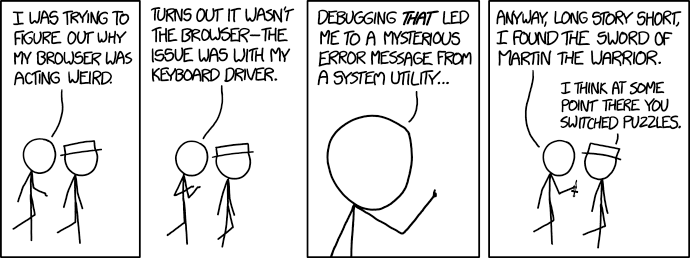
XKCD comic 1722 Recently we had a WTF moment at a customer of mine which is worth sharing. In an automated deployment procedure we re installing Debian systems and setting up MySQL HA/Scalability. Installation of the first node works fine, but during installation of the second node something weird is going on. Even though the deployment procedure reported that everything went fine: it wasn t fine at all. After bisecting to the relevant command lines where it s going wrong we identified that the failure is happening between two ssh/scp commands, which are invoked inside a chroot through a shell wrapper. The ssh command caused a wrong exit code showing up: instead of bailing out with an error (we re running under set -e ) it returned with exit code 0 and the deployment procedure continued, even though there was a fatal error. Initially we triggered the bug when two ssh/scp command lines close to each other were executed, but I managed to find a minimal example for demonstration purposes:
# cat ssh_wrapper 
chroot << "EOF" / /bin/bash
ssh root@localhost hostname >/dev/null
exit 1
EOF
echo "return code = $?"
What we d expect is the following behavior, receive exit code 1 from the last command line in the chroot wrapper:
# ./ssh_wrapper 
return code = 1
But what we actually get is exit code 0:
# ./ssh_wrapper 
return code = 0
Uhm?! So what s going wrong and what s the fix? Let s find out what s causing the problem:
# cat ssh_wrapper 
chroot << "EOF" / /bin/bash
ssh root@localhost command_does_not_exist >/dev/null 2>&1
exit "$?"
EOF
echo "return code = $?"
# ./ssh_wrapper 
return code = 127
Ok, so if we invoke it with a binary that does not exist we properly get exit code 127, as expected.
What about switching /bin/bash to /bin/sh (which corresponds to dash here) to make sure it s not a bash bug:
# cat ssh_wrapper 
chroot << "EOF" / /bin/sh
ssh root@localhost hostname >/dev/null
exit 1
EOF
echo "return code = $?"
# ./ssh_wrapper 
return code = 1
Oh, but that works as expected!? When looking at this behavior I had the feeling that something is going wrong with file descriptors. So what about wrapping the ssh command line within different tools? No luck with stdbuf -i0 -o0 -e0 ssh root@localhost hostname , nor with script -c ssh root@localhost hostname /dev/null and also not with socat EXEC: ssh root@localhost hostname STDIO . But it works under unbuffer(1) from the expect package:
# cat ssh_wrapper 
chroot << "EOF" / /bin/bash
unbuffer ssh root@localhost hostname >/dev/null
exit 1
EOF
echo "return code = $?"
# ./ssh_wrapper 
return code = 1
So my bet on something with the file descriptor handling was right. Going through the ssh manpage, what about using ssh s -n option to prevent reading from standard input (stdin)?
# cat ssh_wrapper
chroot << "EOF" / /bin/bash
ssh -n root@localhost hostname >/dev/null
exit 1
EOF
echo "return code = $?"
# ./ssh_wrapper 
return code = 1
Bingo! Quoting ssh(1):
     -n      Redirects stdin from /dev/null (actually, prevents reading from stdin).
             This must be used when ssh is run in the background.  A common trick is
             to use this to run X11 programs on a remote machine.  For example,
             ssh -n shadows.cs.hut.fi emacs & will start an emacs on shadows.cs.hut.fi,
             and the X11 connection will be automatically forwarded over an encrypted
             channel.  The ssh program will be put in the background.  (This does not work
             if ssh needs to ask for a password or passphrase; see also the -f option.)
Let s execute the scripts through strace -ff -s500 ./ssh_wrapper to see what s going in more detail.
In the strace run without ssh s -n option we see that it s cloning stdin (file descriptor 0), getting assigned to file descriptor 4:
dup(0)            = 4
[...]
read(4, "exit 1\n", 16384) = 7
while in the strace run with ssh s -n option being present there s no file descriptor duplication but only:
open("/dev/null", O_RDONLY) = 4
This matches ssh.c s ssh_session2_open function (where stdin_null_flag corresponds to ssh s -n option):
        if (stdin_null_flag)                                              
                in = open(_PATH_DEVNULL, O_RDONLY);
          else  
                in = dup(STDIN_FILENO);
         
This behavior can also be simulated if we explicitly read from /dev/null, and this indeed works as well:
# cat ssh_wrapper
chroot << "EOF" / /bin/bash
ssh root@localhost hostname >/dev/null </dev/null
exit 1
EOF
echo "return code = $?"
# ./ssh_wrapper 
return code = 1
The underlying problem is that both bash and ssh are consuming from stdin. This can be verified via:
# cat ssh_wrapper
chroot << "EOF" / /bin/bash
echo "Inner: pre"
while read line; do echo "Eat: $line" ; done
echo "Inner: post"
exit 3
EOF
echo "Outer: exit code = $?"
# ./ssh_wrapper
Inner: pre
Eat: echo "Inner: post"
Eat: exit 3
Outer: exit code = 0
This behavior applies to bash, ksh, mksh, posh and zsh. Only dash doesn t show this behavior.
To understand the difference between bash and dash executions we can use the following test scripts:
# cat stdin-test-cmp
#!/bin/sh
TEST_SH=bash strace -v -s500 -ff ./stdin-test 2>&1   tee stdin-test-bash.out
TEST_SH=dash strace -v -s500 -ff ./stdin-test 2>&1   tee stdin-test-dash.out
# cat stdin-test
#!/bin/sh
: $ TEST_SH:=dash 
$TEST_SH <<"EOF"
echo "Inner: pre"
while read line; do echo "Eat: $line"; done
echo "Inner: post"
exit 3
EOF
echo "Outer: exit code = $?"
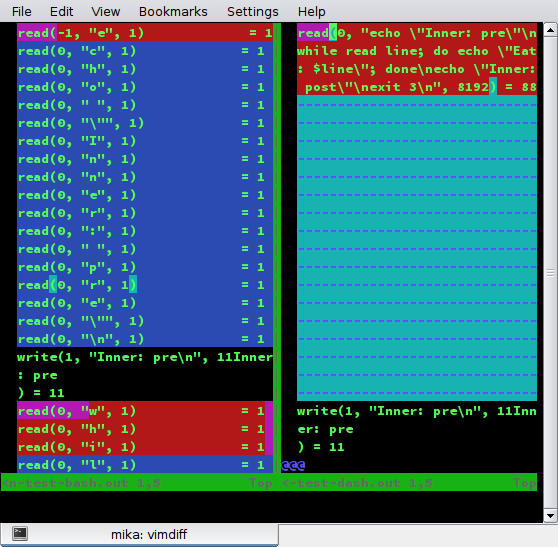
When executing ./stdin-test-cmp and comparing the generated files stdin-test-bash.out and stdin-test-dash.out you ll notice that dash consumes all stdin in one single go (a single read(0, ) ), instead of character-by-character as specified by POSIX and implemented by bash, ksh, mksh, posh and zsh. See stdin-test-bash.out on the left side and stdin-test-dash.out on the right side in this screenshot: screenshot of vimdiff on *.out files So when ssh tries to read from stdin there s nothing there anymore. Quoting POSIX s sh section:
When the shell is using standard input and it invokes a command that also uses standard input, the shell shall ensure that the standard input file pointer points directly after the command it has read when the command begins execution. It shall not read ahead in such a manner that any characters intended to be read by the invoked command are consumed by the shell (whether interpreted by the shell or not) or that characters that are not read by the invoked command are not seen by the shell. When the command expecting to read standard input is started asynchronously by an interactive shell, it is unspecified whether characters are read by the command or interpreted by the shell. If the standard input to sh is a FIFO or terminal device and is set to non-blocking reads, then sh shall enable blocking reads on standard input. This shall remain in effect when the command completes.
So while we learned that both bash and ssh are consuming from stdin and this needs to prevented by either using ssh s -n or explicitly specifying stdin, we also noticed that dash s behavior is different from all the other main shells and could be considered a bug (which we reported as #862907). Lessons learned: Thanks to Guillem Jover for review and feedback regarding this blog post.

17 May 2017

Michal &#268;iha&#345;: Weblate 2.14

Weblate 2.14 has been released today slightly ahead of the schedule. There are quite a lot of security improvements based on reports we got from HackerOne program, API extensions and other minor improvements. Full list of changes: If you are upgrading from older version, please follow our upgrading instructions. You can find more information about Weblate on https://weblate.org, the code is hosted on Github. If you are curious how it looks, you can try it out on demo server. You can login there with demo account using demo password or register your own user. Weblate is also being used on https://hosted.weblate.org/ as official translating service for phpMyAdmin, OsmAnd, Turris, FreedomBox, Weblate itself and many other projects. Should you be looking for hosting of translations for your project, I'm happy to host them for you or help with setting it up on your infrastructure. Further development of Weblate would not be possible without people providing donations, thanks to everybody who have helped so far! The roadmap for next release is just being prepared, you can influence this by expressing support for individual issues either by comments or by providing bounty for them.

Filed under: Debian English SUSE Weblate

15 May 2017

intrigeri: GNOME and Debian usability testing, May 2017

During the Contribute your skills to Debian event that took place in Paris last week-end, we conducted a usability testing session. Six people were tasked with testing a few aspects of the GNOME 3.22 desktop environment and of the Debian 9 (Stretch) operating system. A number of other people observed them and took notes. Then, two observers and three testers analyzed the results, that we are hereby presenting: we created a heat map visualization, summed up the challenges met during the tests, and wrote this blog post together. We will point the relevant upstream projects to our results. A couple of other people also did some usability testing but went in much more depth: their feedback is much more detailed and comes with a number of improvement ideas. I will process and publish their results as soon as possible. Missions Testers were provided a laptop running GNOME on a a Debian 9 (Stretch) Live system. A quick introduction (mostly copied from the one we found in some GNOME usability testing reports) was read. Then they were asked to complete the following tasks. A. Nautilus Mission A.1 Download and rename file in Nautilus
  1. Download a file from the web, a PDF document for example.
  2. Open the folder in which the file has been downloaded.
  3. Rename the dowloaded file to SUCCESS.pdf.
  4. Toggle the browser window to full screen.
  5. Open the file SUCCESS.pdf.
  6. Go back to the File manager.
  7. Close the file SUCCESS.pdf.
Mission A.2 Manipulate folders in Nautilus
  1. Create a new folder named cats in your user directory.
  2. Create a new folder named to do in your user directory.
  3. Move the cats folder to the to do folder.
  4. Delete the cats folder.
Mission A.3 Create a bookmark in Nautilus
  1. Create a folder named unicorns in your personal directory.
  2. This folder is important. Add a bookmark for unicorns in order to find it again in a few weeks.
Mission A.4 Nautilus display settings Folders and files are usually listed as icons, but they can also be displayed differently.
  1. Configure the File manager to make it show items as a list, with one file per line.
  2. You forgot your glasses and the font size is too small for you to see the text: increase the size of the text.
B. Package management Introduction On Debian, each application is available as a "package" which contains every file needed for the software to work. Unlike in other operating systems, it is rarely necessary and almost never a good idea, to download and install software from the authors website. We can rather install it from an online library managed by Debian (like an appstore). This alternative offers several advantages, such as being able to update all the software installed in one single action. Specific tools are available to install and update Debian packages. Mission B.1 Install and remove packages
  1. Install the vlc package.
  2. Start VLC.
  3. Remove the vlc package.
Mission B.2 Search and install a package
  1. Find a piece of software which can download files with BitTorrent in a graphical interface.
  2. Install the corresponding package.
  3. Launch that BitTorrent software.
Mission B.3 Upgrade the system Make sure the whole system (meaning all installed packages) is up to date. C. Settings Mission C.1 Change the desktop background
  1. Download an image you like from the web.
  2. Set the downloaded image as the desktop wallpaper.
Mission C.2 Tweak temporary files management Configure the system so that temporary files older than three days are deleted automatically. Mission C.3 Change the default video player
  1. Install VLC (ask for help if you could not do it during the previous mission).
  2. Make VLC the default video player.
  3. Download a video file from the web.
  4. Open the downloaded video, then check if it opens with VLC.
Mission C.4 Add and remove world clocks When you click the time and date in the top bar, a menu pops-up. There, you can display clocks in several time-zones.
  1. Add a clock with Rio de Janeiro timezone, then another showing the current time in Boston.
  2. Check that the time and date menu now displays these two additional clocks.
  3. Remove the Boston clock.
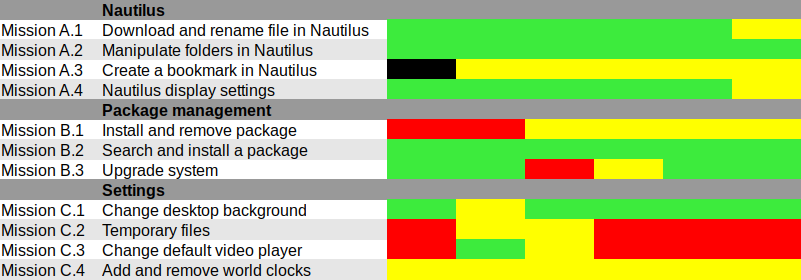
Results and analysis Heat map We used Jim Hall's heat map technique to summarize our usability test results. As Renata puts it, it is "a great way to see how the users performed on each task. The heat map clarifies how easy or difficult it was for the participant to accomplish a certain task.
  1. Scenario tasks (from the usability test) are arranged in rows.
  2. Test participants (for each tester) are arranged in columns.
  3. The colored blocks represent each tester s difficulty with each scenario task.
Green blocks represent the ability of the participant to accomplish the tasks with little or no difficulty. Yellow blocks indicate the tasks that the tester had significant difficulties accomplishing. Red blocks indicate that testers experienced extreme difficulty or where testers completed the tasks incorrectly. Black blocks indicate tasks the tester was unable to complete." Alternatively, here is the spreadsheet that was used to create this picture, with added text to avoid relying on colors only. Most tasks were accomplished with little or no difficulty so we will now focus on the problematic parts. What were the challenges? The heat map shows several "hot" rows, that we will now be looking at in more details. Mission A.3 Create a bookmark in Nautilus Most testers right-clicked the folder first, and eventually found they could simply drag'n'drop to the bookmarks location in the sidebar. One tester thought that he could select a folder, click the hamburger icon, and from there use the "Bookmark this folder" menu item. However, this menu action only works on the folder one has entered, not on the selected one. Mission B.1 Install and remove a package Here we faced a number of issues caused by the fact that Debian Live images don't include package indices (with good reason), so no package manager can list available software. Everyone managed to start a graphical package manager via the Overview (or via the CLI or Alt-F2 for a couple power users). Some testers tried to use GNOME Software, which listed only already installed packages (Debian bug #862560) and provided no way we could find to refresh the package indices. That's arguably a bug in Debian Live, but still: GNOME Software might display some useful information when it detects this unusual situation. We won't list here all the obstacles that were met in Synaptic: it's no news its usability is rather sub-optimal and better alternatives (such as GNOME Software) are in the works. Mission C.2 Tweak temporary files management The mission was poorly phrased: some observers had to clarify that it was specifically about GNOME, and not generic Linux system administration: some power-users were already searching the web for command-line tools to address the task at hand. Even with this clarification, no tester would have succeeded without being told they were allowed to use the web with a search query including the word "GNOME", or use the GNOME help or the Overview. Yet eventually all testers succeeded. It's interesting to note that regular GNOME users had the same problem as others: they did not try searching "temporary" in the Overview and did not look-up the GNOME Help until they were suggested to do so. Mission C.3 Change the default video player One tester configured one single video file format to be opened by default with VLC, via right-click in Nautilus Open with etc. He believed this would be enough to make VLC the default video player, missing the subtle difference between "default video player" and "default player for one single video format". One tester tried to complete this task inside VLC itself and then needed some help to succeed. It might be that the way web browsers ask "Do you want ThisBrowser to become the default web browser?" gave a hint an application GUI is the right place to do it. Two testers searched "default" in the Overview (perhaps the previous mission dealing with temporary files was enough to put them in this direction). At least one tester was confused since the only search result (Details View information about your system), which is the correct one to get there, includes the word View, which suggests that one cannot modify settings there, but only view them. One long-term GNOME user looked in Tweak Tool first, and then used the Overview. Here again, GNOME users experienced essentially the same issues as others. Mission C.4 Add and remove world clocks One tester tried to look for the clock on the top right corner of the screen, then realized it was in the middle. Other than this, all testers easily found a way to add world clocks. However, removing a world clock was rather difficult; although most testers managed to do it, it took them a number of attempts to succeed:
  1. Several testers left-clicked or right-clicked the clock they wanted to remove, expecting this would provide them with a way to remove it (which is not the case).
  2. After a while, all testers noticed the Select button (that has no text label nor tooltip info), which allowed them to select the clock they wanted to remove; then, most testers clicked the 1 selected button, hoping it would provide a contextual menu or some other way to act on the selected clocks (it doesn't).
  3. Eventually, everyone managed to locate the Delete button on the bottom right corner of the window; some testers mentioned that it is less visible and flashy than the blue bar that appears on the top of the screen once they had entered "Selection" mode.
General notes and observations

8 May 2017

Lars Wirzenius: Ick2 design discussion

Recently, Daniel visited us in Helsinki. In addition to enjoying local food and scenerey, we spent some time together in front of a whiteboard to sketch out designs for Ick2. Ick is my continuous integration system, and it's all Daniel's fault for suggesting the name. Ahem. I am currently using the first generation of Ick and it is a rigid, cumbersome, and fragile thing. It works well enough that I don't miss Jenkins, but I would like something better. That's the second generation of Ick, or Ick2, and that's what we discussed with Daniel. Where pretty much everything in Ick1 is hardcoded, everything in Ick2 will be user-configurable. It's my last, best chance to go completely overboard in the second system syndrome manner. Where Ick1 was written in a feverish two-week hacking session, rushed because my Jenkins install at the time had broken one time too many, we're taking our time with Ick2. Slow and careful is the tune this time around. Our "minimum viable product" or MVP for Ick2 is defined like this:
Ick2 builds static websites from source in a git repository, using ikiwiki, and published to a web server using rsync. A change to the git repository triggers a new build. It can handle many separate websites, and if given enough worker machines, can build many of them concurrently.
This is a real task, and something we already do with Ick1 at work. It's a reasonable first step for the new program. Some decisions we made: The initial pipelines will be basically like this, but expressed in some way by the user:
  1. Clone the source repoistory.
  2. Run ikiwiki --build to build the website.
  3. Run rsync to publish the website on a server.
Assumptions: Actions the Ick2 controller API needs to support: A sketch API: Sequence: The next step will probably be to sketch a yarn test suite of the API and implement a rudimentary one.

6 May 2017

Vasudev Kamath: Magic: Attach a HTML file to mail and get different on other side

It's been a long time I did not write any new blog posts, and finally I got something which is interesting enough for a new post and so here it is. I actually wanted some bills from my ISP for some work and I could not find mail from the ISP which had bills for some specific months in my mailbox. Problem with my ISP is bills are accessible in their account which can be only accessed from their own network. They do have a mobile app and that does not seem to work especially for the billing section. I used mobile app and selected month for which I did not have bill and clicked Send Mail button. App happily showed message saying it sent the bill to my registered mail address but that was a fancy lie. After trying several time I gave up and decided I will do it once I get back home. Fast forward few hours, I'm back home from office and then I sat in front of my laptop and connected to ISP site, promptly downloaded the bills, then used notmuch-emacs and fire up a mail composer, attach those HTML file (yeah they produce bill in HTML file :-/) send it to my gmail and forget about it. Fast forward few more days, I just remember I need those bills. I got hold of mail I sent earlier in gmail inbox and clicked on attachment and when browser opened the attachment I was shocked/surprised . Did you ask why?. See what I saw when I opened attachment. Well I was confused for moment on what happened, I tried downloading the file and opened it an editor, and I see Chinese characters here also. After reaching home I checked the Sent folder in my laptop where I keep copy of mails sent using notmuch-emacs's notmuch-fcc-dirs variable. I open the file and open the attachement and I see same character as I saw in browser!. I open the original bills I downloaded and it looks fine. To check if I really attached the correct files I again drafted a mail this time to my personal email and sent it. Now I open the file from Sent folder and voila again there is different content inside my attachment!. Same happens when I receive the mail and open the attachment everything inside is Chinese characters!. Totally lost I finally opened the original file using emacs, since I use spacemacs it asked me for downloading of html layer and after which I was surprised because everything inside the editor is in Chinese!. OK finally I've something now so I opened same file at same time in nano from terminal and there it looks fine!. OK that is weird again I read carefully content and saw this line in beginning of file
<?xml version="1.0" encoding="UTF-16" ?>
<html xmlns="http://www.w3.org/1999/xhtml>....
OK that is new XML tag had encoding declared as UTF-16, really?. And just for checking I changed it to UTF-8 and voila file is back to normal in Emacs window!. To confirm this behavior I created a sample file with following content
<?xml version="1.0" encoding="utf-8"?><html xmlns="http://www.w3.org/1999/xhtml"><head><meta http-equiv="Content-Type" content="text/html; charset=iso-8859-1" /><title> Something weird </title><body>blablablablablalabkabakba</body></html>
Yeah with long line because ISP had similar case and now I opened the same file in nano using terminal and changed encoding="UTF-8" to encoding="UTF-16" and the behavior repeated I see Chinese character in the emacs buffer which has also opened the same file. Below is the small gif showing this happening in real time, see what happens in emacs buffer when I change the encoding in terminal below. Fun right?. I made following observation from above experiments.
  1. When I open original file in browser or my sample file with encoding="UTF-16" its normal, no Chinese characters.
  2. When I attach the mail and send it out the attachment some how gets converted into HTML file with Chinese characters and viewing source from browser shows header containing xml declarations and original <html> declarations get ripped off and new tags show up which I've pasted below.
  3. If I download the same file and open in editor only Chinese characters are present and no HTML tags inside it. So definitely the new tags which I saw by viewing source in browser is added by Firefox.
  4. I create similar HTML file and change encoding I can see the characters changing back and forth in emacs web-mode when I change encoding of the file.
<!DOCTYPE HTML PUBLIC "-//W3C//DTD HTML 4.01 Transitional//EN">
<html>
  <head><META http-equiv="Content-Type"  content="text/html; charset=utf-8">
So if I'm understanding this correctly, Emacs due to encoding declaration interprets the actual contents differently. To see how Emacs really interpreted the content I opened the sent mail I had in raw format and saw following header lines for attachment.
Content-Type: text/html; charset=utf-8
Content-Disposition: attachment;
             filename=SOA-102012059675-FEBRUARY-2017.html
Content-Transfer-Encoding: base64
This was followed with base64 encoded data. So does this mean emacs interpreted the content as UTF-16 and encoded the content using UTF-8?. Again I've no clue, so I changed the encoding in both the files to be as UTF-8 and sent the mail by attaching these files again to see what happens. And my guess was right I could get the attachment as is on the receiving side. And inspecting raw mail the attachment headers now different than before.
Content-Type: text/html
Content-Disposition: attachment;
             filename=SOA-102012059675-DECEMBER-2016.html
Content-Transfer-Encoding: quoted-printable
See how Content-Type its different now also see the Content-Transfer-Encoding its now quoted-printable as opposed to base64 earlier. Additionally I can see HTML content below the header. When I opened the attachment from mail I get the actual bill. As far as I understand base64 encoding is used when the data to be attached is base64. So I guess basically due to wrong encoding declared inside the file Emacs interpreted the content as a binary data and encoded it differently than what it really should be. Phew that was a lot of investigation to understand the magic but it was worth it. Do let me know your thoughts on this.

Next.

Previous.