Search Results: "ag"

8 February 2015

Laura Arjona: How contributors.debian.org helped in my email address migration

Some months ago I changed my preferred email address. I updated my profile in different sites to point to the new address, and changed my subscriptions in mailing lists. I forgot about subscriptions to Debian bugs. I like that you don t need a user to participate in Debian BTS (you just need an email address) but I learned that there s no way to get a list of the bugs you re subscribed to (for mailing lists it s possible: send mail to majordomo at lists.debian.org with which your.email.address in the body). Then, I remembered that I m listed in contributors.debian.org as BTS contributor, and that there is an extra info link, so I went there and got redirected to: https://bugs.debian.org/cgi-bin/pkgreport.cgi?correspondent=MYOLDADDRESS which lists all the bugs for which I sent an email (not only the bugs that I submitted). So now, I have a list of bug numbers to send -unsubscribe mails from my old address and then -subscribe mails from the new address. I m probably subscribed to some more bugs in which I didn t participate (just lurking or interested in how people deal with them) but I suppose they are not many. (I could have retrieved the list of bugs from the BTS interface, but contributors.debian.org came first to my mind, and it s nice to have that link handy there, isn t it?)
Filed under: Tools Tagged: Bugs, Contributing to libre software, Debian, Email, English

Dirk Eddelbuettel: rfoaas 0.1.3

A brand new version of rfoaas is now on CRAN. It shadows the 0.1.3 release of FOAAS just how an earlier 0.1.2 had done (but there was something not quite right at the server backend which we coded around with an interim release 0.1.2.1; neither one of these was ever released to CRAN). The rfoaas package provides an interface for R to the most excellent FOAAS service--which provides a modern, scalable and RESTful web service for the frequent need to tell someone to f$#@ off. Release 0.1.3 of FOAAS brings support for filters which the initial support going to the absolutely outstanding shoutcloud.io service. This can be enabled by adding filter="shoutcloud" as an argument to any of the access functions. And thanks to shoutcloud.io, the result will be LOUD AND CLEAR. As usual, CRANberries provides a diff to the previous CRAN release. Questions, comments etc should go to the GitHub issue tracker.

This post by Dirk Eddelbuettel originated on his Thinking inside the box blog. Please report excessive re-aggregation in third-party for-profit settings.

Dirk Eddelbuettel: drat Tutorial: First Steps towards Lightweight R Repositories

Now that drat is on CRAN and I got a bit of feedback (or typo corrections) in three issue tickets, I thought I could show how to quickly post such an interim version in a drat repository. Now, I obviously already have a checkout of drat. If you, dear reader, wanted to play along and create your own drat repository, one rather simple way would be to simply clone my repo as this gets you the desired gh-pages branch with the required src/contrib/ directories. Otherwise just do it by hand. Back to a new interim version. I just pushed commit fd06293 which bumps the version and date for the new interim release based mostly on the three tickets addresses right after the initial release 0.0.1. So by building it we get a new version 0.0.1.1:
edd@max:~/git$ R CMD build drat
* checking for file  drat/DESCRIPTION  ... OK
* preparing  drat :
* checking DESCRIPTION meta-information ... OK
* checking for LF line-endings in source and make files
* checking for empty or unneeded directories
* building  drat_0.0.1.1.tar.gz 
edd@max:~/git$ 
Because I want to use the drat repo next, I need to now switch from master to gh-pages; a step I am omitting as we can assume that your drat repo will already be on its gh-pages branch. Next we simply call the drat function to add the release:
edd@max:~/git$ r -e 'drat:::insert("drat_0.0.1.1.tar.gz")'
edd@max:~/git$ 
As expected, now have two updated PACKAGES files (compressed and plain) and a new tarball:
edd@max:~/git/drat(gh-pages)$ git status
On branch gh-pages
Your branch is up-to-date with 'origin/gh-pages'.
Changes not staged for commit:
  (use "git add <file>..." to update what will be committed)
  (use "git checkout -- <file>..." to discard changes in working directory)
        modified:   src/contrib/PACKAGES
        modified:   src/contrib/PACKAGES.gz
Untracked files:
  (use "git add <file>..." to include in what will be committed)
        src/contrib/drat_0.0.1.1.tar.gz
no changes added to commit (use "git add" and/or "git commit -a")
edd@max:~/git/drat(gh-pages)$
All is left to is to add, commit and push---either as I usually via the spectacularly useful editor mode, or on the command-line, or by simply adding commit=TRUE in the call to insert() or insertPackage(). I prefer to use littler's r for command-line work, so I am setting the desired repos in ~/.littler.r which is read on startup (since the recent littler release 0.2.2) with these two lines:

## add RStudio CRAN mirror
drat:::add("CRAN", "http://cran.rstudio.com")
## add Dirk's drat
drat:::add("eddelbuettel")
After that, repos are set as I like them (at home at least):
edd@max:~/git$ r -e'print(options("repos"))'
$repos
                                 CRAN                          eddelbuettel 
            "http://cran.rstudio.com" "http://eddelbuettel.github.io/drat/" 
edd@max:~/git$ 
And with that, we can just call update.packages() specifying the package directory to update:
edd@max:~/git$ r -e 'update.packages(ask=FALSE, lib.loc="/usr/local/lib/R/site-library")'                                                                                                                            
trying URL 'http://eddelbuettel.github.io/drat/src/contrib/drat_0.0.1.1.tar.gz'
Content type 'application/octet-stream' length 5829 bytes
opened URL
==================================================
downloaded 5829 bytes
* installing *source* package  drat  ...
** R
** inst
** preparing package for lazy loading
** help
*** installing help indices
** building package indices
** testing if installed package can be loaded
* DONE (drat)
The downloaded source packages are in
         /tmp/downloaded_packages 
edd@max:~/git$
and presto, a new version of a package we have installed (here the very drat interim release we just pushed above) is updated. Writing this up made me realize I need to update the handy update.r script (see e.g. the littler examples page for more) and it hard-wires just one repo which needs to be relaxed for drat. Maybe in install2.r which already has docopt support...

7 February 2015

Eddy Petri&#537;or: Using Gentoo to create a cross toolchain for the old NSLU2 systems (armv5te)

This is mostly written so I don't forget how to create a custom (Arm) toolchain the Gentoo way (in a Gentoo chroot).

I have been a Debian user since 2001, and I like it a lot. Yet I have had my share of problems with it, mostly because due to lack of time I have very little disposition to try to track unstable or testing, so I am forced to use stable.

This led me to be a fan of Russ Albery's backport script and to create a lot of local backports of packages that are already in unstable or testing.

But this does not help when packages are simply missing from Debian or when something like creating an arm uclibc based system that should be kept up to date, from a security PoV.

I have experience with Buildroot and I must say I like it a lot for creating custom root filesystems and even toolchains. It allows a lot of flexibility that binary distros like Debian don't offer, it does its designated work, creating root filesystems. But buildroot is not appropriate for a system that should be kept up to date, because it lacks a mechanism by which to be able to update to new versions of packages without recompiling the entire rootfs.

So I was hearing from the guys from the Linux Action Show (and Linux Unplugged - by the way, Jupiter Broadcast, why do I need scripts enabled from several sites just to see the links for the shows?) how Arch is great and all, that is a binary rolling release, and that you can customize packages by building your own packages from source using makepkg. I tried it, but Arm support is provided for some specific (modern) devices, my venerable Linksys NSLU2's (I have 2 of them) not being among them.

So I tried Arch in a chroot, then dropped it in favour of a Gentoo chroot since I was under the feeling running Arch from a chroot wasn't such a great idea and I don't want to install Arch on my SSD.

I used succesfully Gentoo in the past to create an arm-unknown-linux-gnueabi chroot back in 2008 and I always liked the idea of USE flags from Gentoo, so I knew I could do this.


So here it goes:


# create a local portage overlay - necessary for cross tools
export LP=/usr/local/portage
mkdir -p $LP/ metadata,profiles
echo 'mycross' > $LP/profiles/repo_name
echo 'masters = gentoo' > $LP/metadata/layout.conf
chown -R portage:portage $LP
echo 'PORTDIR_OVERLAY="'$LP' $ PORTDIR_OVERLAY "' >> /etc/portage/make.conf
unset LP

# install crossdev, setup for the desired target, build toolchain
emerge crossdev
crossdev --init-target -t arm-softfloat-linux-gnueabi -oO /usr/local/portage/mycross
crossdev -t arm-softfloat-linux-gnueabi


Ben Hutchings: Debian LTS work, January 2015

This was my second month working on Debian LTS, paid for by Freexian's Debian LTS initiative via Codethink. I spent 11.75 hours working on the kernel package (linux-2.6) and committed my changes but did not complete an update. I or another developer will probably release an update soon. I have committed fixes for CVE-2013-6885, CVE-2014-7822, CVE-2014-8133, CVE-2014-8134, CVE-2014-8160 CVE-2014-9419, CVE-2014-9420, CVE-2014-9584, CVE-2014-9585 and CVE-2015-1421. In the process of looking at CVE-2014-9419, I noticed that Linux 2.6.32.y is missing a series of fixes to FPU/MMX/SSE/AVX state management that were made in Linux 3.3 and backported to 3.2.y some time ago. These addressed possible corruption of these registers when switching tasks, although it's less likely to happen in 2.6.32.y. The fix for CVE-2014-9419 depends on them. So I've backported and committed all these changes, but may yet decide that they're too risky to include in the next update.

Richard Hartmann: Release Critical Bug report for Week 06

Belated post due to meh real life situations. As you may have heard, if a package is removed from testing now, it will not be able to make it back into Jessie. Also, a lot of packages are about to be reoved for being buggy. If those are gone, they are gone. The UDD bugs interface currently knows about the following release critical bugs: How do we compare to the Squeeze and Wheezy release cycles?
Week Squeeze Wheezy Jessie
43 284 (213+71) 468 (332+136) 319 (240+79)
44 261 (201+60) 408 (265+143) 274 (224+50)
45 261 (205+56) 425 (291+134) 295 (229+66)
46 271 (200+71) 401 (258+143) 427 (313+114)
47 283 (209+74) 366 (221+145) 342 (260+82)
48 256 (177+79) 378 (230+148) 274 (189+85)
49 256 (180+76) 360 (216+155) 226 (147+79)
50 204 (148+56) 339 (195+144) ???
51 178 (124+54) 323 (190+133) 189 (134+55)
52 115 (78+37) 289 (190+99) 147 (112+35)
1 93 (60+33) 287 (171+116) 140 (104+36)
2 82 (46+36) 271 (162+109) 157 (124+33)
3 25 (15+10) 249 (165+84) 172 (128+44)
4 14 (8+6) 244 (176+68) 187 (132+55)
5 2 (0+2) 224 (132+92) 175 (124+51)
6 release! 212 (129+83) 161 (109+52)
7 release+1 194 (128+66)
8 release+2 206 (144+62)
9 release+3 174 (105+69)
10 release+4 120 (72+48)
11 release+5 115 (74+41)
12 release+6 93 (47+46)
13 release+7 50 (24+26)
14 release+8 51 (32+19)
15 release+9 39 (32+7)
16 release+10 20 (12+8)
17 release+11 24 (19+5)
18 release+12 2 (2+0)
Graphical overview of bug stats thanks to azhag:

6 February 2015

Antoine Beaupr : Migrating from Drupal to Ikiwiki

TLPL; j'ai chang de logiciel pour la gestion de mon blog. TLDR; I have changed my blog from Drupal to Ikiwiki. Note: since this post uses ikiwiki syntax (i just copied it over here), you may want to read the original version instead of this one. will continue operating for a while to
give a chance to feed aggregators to catch that article. It will also
give time to the Internet archive to catchup with the static
stylesheets (it turns out it doesn't like Drupal's CSS compression at
all!) An archive will therefore continue being available on the
internet archive for people that miss the old stylesheet. Eventually, I will simply redirect the anarcat.koumbit.org URL to
the new blog location, . This will likely be my
last blog post written on Drupal, and all new content will be
available on the new URL. RSS feed URLs should not change.

Why I am migrating away from Drupal because it is basically impossible to
upgrade my blog from Drupal 6 to Drupal 7. Or if it is, I'll have to
redo the whole freaking thing again when Drupal 8 comes along. And frankly, I don't really need Drupal to run a blog. A blog was
originally a really simple thing: a web blog. A set of articles
written on the corner of a table. Now with Drupal, I can add
ecommerce, a photo gallery and whatnot to my blog, but why would I do
that? and why does it need to be a dynamic CMS at all, if I get so
little comments? So I'm switching to ikiwiki, for the following reason:
  • no upgrades necessary: well, not exactly true, i still need to
    upgrade ikiwiki, but that's covered by the Debian package
    maintenance and I only have one patch to it, and there's no data migration! (the last such migration in ikiwiki was in 2009 and was fully supported)
  • offline editing: this is a a big thing for me: i can just note
    things down and push them when I get back online
  • one place for everything: this blog is where I keep my notes, it's
    getting annoying to have to keep track of two places for that stuff
  • future-proof: extracting content from ikiwiki is amazingly
    simple. every page is a single markdown-formatted file. that's it.
Migrating will mean abandoning the
barlow theme, which was
seeing a declining usage anyways.

What So what should be exported exactly. There's a bunch of crap in the old
blog that i don't want: users, caches, logs, "modules", and the list
goes on. Maybe it's better to create a list of what I need to extract:
  • nodes
    • title ([[ikiwiki/directive/meta]] title and guid tags, guid to avoid flooding aggregators)
    • body (need to check for "break comments")
    • nid (for future reference?)
    • tags (should be added as \[[!tag foo bar baz]] at the bottom)
    • URL (to keep old addresses)
    • published date ([[ikiwiki/directive/meta]] date directive)
    • modification date ([[ikiwiki/directive/meta]] updated directive)
    • revisions?
    • attached files
  • menus
    • RSS feed
    • contact
    • search
  • comments
    • author name
    • date
    • title
    • content
  • attached files
    • thumbnails
    • links
  • tags
    • each tag should have its own RSS feed and latest posts displayed

When Some time before summer 2015.

Who Well me, who else. You probably really don't care about that, so let'S
get to the meat of it.

How How to perform this migration... There are multiple paths:
  • MySQL commandline: extracting data using the commandline mysql tool (drush sqlq ...)
  • Views export: extracting "standard format" dumps from Drupal and
    parse it (JSON, XML, CSV?)
Both approaches had issues, and I found a third way: talk directly to
mysql and generate the files directly, in a Python script. But first,
here are the two previous approaches I know of.

MySQL commandline LeLutin switched using MySQL requests,
although he doesn't specify how content itself was migrated. Comments
importing is done with that script:
echo "select n.title, concat('  [[!comment  format=mdwn  username=\"', c.name, '\"  ip=\"', c.hostname, '\"  subject=\"', c.subject, '\"  date=\"', FROM_UNIXTIME(c.created), '\"  content=\"\"\" ', b.comment_body_value, ' \"\"\"]]') from node n, comment c, field_data_comment_body b where n.nid=c.nid and c.cid=b.entity_id;"   drush sqlc   tail -n +2   while read line; do if [ -z "$i" ]; then i=0; fi; title=$(echo "$line"   sed -e 's/[    ]\+ .*//' -e 's/ /_/g' -e 's/[:(),?/+]//g'); body=$(echo "$line"   sed 's/[^ ]*  //'); mkdir -p ~/comments/$title; echo -e "$body" &gt; ~/comments/$title/comment_$i._comment; i=$((i+1)); done
Kind of ugly, but beats what i had before (which was "nothing"). I do think it is the good direction to take, to simply talk to the
MySQL database, maybe with a native Python script. I know the Drupal
database schema pretty well (still! this is D6 after all) and it's
simple enough that this should just work.

Views export [[!img 2015-02-03-233846_1440x900_scrot.png class="align-right" size="300x" align="center" alt="screenshot of views 2.x"]] mvc recommended views data export on Lelutin's
blog. Unfortunately, my experience with the views export interface has
been somewhat mediocre so far. Yet another reason why I don't like
using Drupal anymore is this kind of obtuse dialogs: I clicked through those for about an hour to get JSON output that
turned out to be provided by views bonus instead of
views_data_export. And confusingly enough, the path and
format_name fields are null in the JSON output
(whyyy!?). views_data_export unfortunately only supports XML,
which seems hardly better than SQL for structured data, especially
considering I am going to write a script for the conversion anyways. Basically, it doesn't seem like any amount of views mangling will
provide me with what i need. Nevertheless, here's the [[failed-export-view.txt]] that I was able to
come up with, may it be useful for future freedom fighters.

Python script I ended up making a fairly simple Python script to talk directly to
the MySQL database. The script exports only nodes and comments, and nothing else. It makes
a bunch of assumptions about the structure of the site, and is
probably only going to work if your site is a simple blog like mine,
but could probably be improved significantly to encompass larger and
more complex datasets. History is not preserved so no interaction is
performed with git.

Generating dump First, I imported the MySQL dump file on my local mysql server for easier
development. It is 13.9MiO!!
mysql -e 'CREATE DATABASE anarcatblogbak;'
ssh aegir.koumbit.net "cd anarcat.koumbit.org ; drush sql-dump"   pv   mysql anarcatblogbak
I decided to not import revisions. The majority (70%) of the content has
1 or 2 revisions, and those with two revisions are likely just when
the node was actually published, with minor changes. ~80% have 3
revisions or less, 90% have 5 or less, 95% 8 or less, and 98% 10 or
less. Only 5 articles have more than 10 revisions, with two having the
maximum of 15 revisions. Those stats were generated with:
SELECT title,count(vid) FROM anarcatblogbak.node_revisions group
by nid;
Then throwing the output in a CSV spreadsheet (thanks to
mysql-workbench for the easy export), adding a column numbering the
rows (B1=1,B2=B1+1), another for generating percentages
(C1=B1/count(B$2:B$218)) and generating a simple graph with
that. There were probably ways of doing that more cleanly with R,
and I broke my promise to never use a spreadsheet again, but then
again it was Gnumeric and it's just to get a rough idea. There are 196 articles to import, with 251 comments, which means an
average of 1.15 comment per article (not much!). Unpublished articles
(5!) are completely ignored. Summaries are also not imported as such (break comments are
ignored) because ikiwiki doesn't support post summaries.

Calling the conversion script The script is in [[drupal2ikiwiki.py]]. It is called with:
./drupal2ikiwiki.py -u anarcatblogbak -d anarcatblogbak blog -vv
The -n and -l1 have been used for first tests as well. Use this
command to generate HTML from the result without having to commit and
push all:
ikiwiki --plugin meta --plugin tag --plugin comments --plugin inline  . ../anarc.at.html
More plugins are of course enabled in the blog, see the setup file for
more information, or just enable plugin as you want to unbreak
things. Use the --rebuild flag on subsequent runs. The actual
invocation I use is more something like:
ikiwiki --rebuild --no-usedirs --plugin inline --plugin calendar --plugin postsparkline --plugin meta --plugin tag --plugin comments --plugin sidebar  . ../anarc.at.html
I had problems with dates, but it turns out that I wasn't setting
dates in redirects... Instead of doing that, I started adding a
"redirection" tag that gets ignored by the main page.

Files and old URLs The script should keep the same URLs, as long as pathauto is enabled
on the site. Otherwise, some logic should be easy to add to point to
node/N. To redirect to the new blog, rewrite rules, on original blog, should
be as simple as:
Redirect / http://anarc.at/blog/
When we're sure:
Redirect permanent / http://anarc.at/blog/
Now, on the new blog, some magic needs to happen for files. Both
/files and /sites/anarcat.koumbit.org/files need to resolve
properly. We can't use symlinks because
ikiwiki drops symlinks on generation. So I'll just drop the files in /blog/files directly, the actual
migration is:
cp $DRUPAL/sites/anarcat.koumbit.org/files $IKIWIKI/blog/files
rm -r .htaccess css/ js/ tmp/ languages/
rm foo/bar # wtf was that.
rmdir *
sed -i 's#/sites/anarcat.koumbit.org/files/#/blog/files/#g' blog/*.mdwn
sed -i 's#http://anarcat.koumbit.org/blog/files/#/blog/files/#g' blog/*.mdwn
chmod -R -x blog/files
sudo chmod -R +X blog/files
A few pages to test images:
  • http://anarcat.koumbit.org/node/157
  • http://anarcat.koumbit.org/node/203
There are some pretty big files in there, 10-30MB MP3s - but those are
already in this wiki! so do not import them! Running fdupes on the result helps find oddities. The meta guid directive is used to keep the aggregators from finding
duplicate feed entries. I tested it with Liferea, but it may freak out
some other sites.

Remaining issues
  • postsparkline and calendar archive disrespect meta(date)
  • merge the files in /communication with the ones in /blog/files
    before import
  • import non-published nodes
  • check nodes with a format different than markdown (only a few 3=Full
    HTML
    found so far)
  • replace links to this wiki in blog posts with internal links
More progress information in [[the script drupal2ikiwiki.py]] itself.

Daniel Pocock: Lumicall's 3rd Birthday

Today, 6 February, is the third birthday of the Lumicall app for secure SIP on Android. Happy birthday Lumicall's 1.0 tag was created in the Git repository on this day in 2012. It was released to the Google Play store, known as the Android Market back then, while I was in Brussels, the day after FOSDEM. Since then, Lumicall has also become available through the F-Droid free software marketplace for Android and this is the recommended way to download it. An international effort Most of the work on Lumicall itself has taken place in Switzerland. Many of the building blocks come from Switzerland's neighbours:
  • The ice4j ICE/STUN/TURN implementation comes from the amazing Jitsi softphone, which is developed in France.
  • The ZORG open source ZRTP stack comes from PrivateWave in Italy
  • Lumicall itself is based on the Sipdroid project that has a German influence, while Sipdroid is based on MjSIP which comes out of Italy.
  • The ENUM dialing logic uses code from ENUMdroid, published by Nominet in the UK. The UK is not exactly a neighbour of Switzerland but there is a tremendous connection between the two countries.
  • Google's libPhoneNumber has been developed by the Google team in Zurich and helps Lumicall format phone numbers for dialing through international VoIP gateways and ENUM.
Lumicall also uses the reSIProcate project for server-side infrastructure. The repro SIP proxy and TURN server run on secure and reliable Debian servers in a leading Swiss data center. An interesting three years for free communications Free communications is not just about avoiding excessive charges for phone calls. Free communications is about freedom. In the three years Lumicall has been promoting freedom, the issue of communications privacy has grabbed more headlines than I could have ever imagined. On 5 June 2013 I published a blog about the Gold Standard in Free Communications Technology. Just hours later a leading British newspaper, The Guardian, published damning revelations about the US Government spying on its own citizens. Within a week, Edward Snowden was a household name. Google's Eric Schmidt had previously told us that "If you have something that you don't want anyone to know, maybe you shouldn't be doing it in the first place.". This statement is easily debunked: as CEO of a corporation listed on a public stock exchange, Schmidt and his senior executives are under an obligation to protect commercially sensitive information that could be used for crimes such as insider trading. There is no guarantee that Lumicall will keep the most determined NSA agent out of your phone but nonetheless using a free and open source application for communications does help to avoid the defacto leakage of your conversations to a plethora of marketing and profiling companies that occurs when using a regular phone service or messaging app. How you can help free communications technology evolve As I mentioned in my previous blog on Lumicall, the best way you can help Lumicall is by helping the F-Droid team. F-Droid provides a wonderful platform for distributing free software for Android and my own life really wouldn't be the same without it. It is a privilege for Lumicall to be featured in the F-Droid eco-system. That said, if you try Lumicall and it doesn't work for you, please feel free to send details from the Android logs through the Lumicall issue tracker on Github and they will be looked at. It is impossible for Lumicall developers to test every possible phone but where errors are obvious in the logs some attempt can be made to fix them. Beyond regular SIP Another thing that has emerged in the three years since Lumicall was launched is WebRTC, browser based real-time communications and VoIP. In its present form, WebRTC provides tremendous opportunities on the desktop but it does not displace the need for dedicated VoIP apps on mobile handsets. WebRTC applications using JavaScript are a demanding solution that don't integrate as seamlessly with the Android UI as a native app and they currently tend to be more intensive users of the battery. Lumicall users can receive calls from desktop users with a WebRTC browser using the free calling from browser to mobile feature on the Lumicall web site. This service is powered by JSCommunicator and DruCall for Drupal.

Carl Chenet: Backup Checker 1.0, the fully automated backup checker

Follow me on Identi.ca or Twitter or Diaspora*diaspora-banner Backup Checker is the new name of the Brebis project. Backup Checker is a CLI software developed in Python 3.4, allowing users to verify the integrity of archives (tar,gz,bz2,lzma,zip,tree of files) and the state of the files inside an archive in order to find corruptions or intentional of accidental changes of states or removal of files inside an archive. Brebis version 0.9 was downloaded 1092 times. In order to keep the project growing, several steps were adopted recently: This new version 1.0 does not only provide project changes. Starting from 1.0, Backup Checker now verifies the owner name and the owner group name of a file inside an archive, enforcing the possible checks for both an archive and a tree of files. Moreover, the recent version 0.10 of Brebis published 9 days ago provided the following features As usual, any feedback is welcome, through bug reports, emails of the author or comments on this blog.

Olivier Berger: Configuring the start of multiple docker container with Vagrant in a portable manner

I ve mentioned earlier the work that our students did on migrating part of the elements of the Database MOOC lab VM to docker. While docker seems quite cool, let s face it, participants to the MOOCs aren t all using Linux where docker can be available directly. Hence the need to use boot2docker, for instance on Windows. Then we re back quite close to the architecture of the Vagrang VM, which relies too on a VirtualBox VM to run a Linux machine (boot2docker does exactly that with a minimal Linux which runs docker). If VirtualBox is to be kept around, then why not stick to Vagrant also, as it offers a docker provider. This docker provider for Vagrant helps configure basic parameters of docker containers in a Vagrantfile, and basically uses the vagrant up command instead of using docker build + docker run. If on Linux, it only triggers docker, and if not, then it ll start boot2docker (or any other Linux box) in between. This somehow offers a unified invocation command, which renders a bit more portable the documentation. Now, there are some tricks when using this docker provider, in particular for debugging what s happening inside the VM. One nice feature is that you can debug on Linux what is to be executed on Windows, by explicitely requiring the start of the intermediary boot2docker VM even if it s not really needed. By using a custom secondary Vagrantfile for that VM, it is possible to tune some parameters of that VM (like its graphic memory to allow to start it with a GUI allowing to connect another alternative is to ssh -p 2222 docker@localhost once you know that its password is tcuser ). I ve committed an example of such a setup in the moocbdvm project s Git, which duplicates the docker provisioning files that our students had already published in the dedicated GitHub repo. Here s an interesting reference post about Vagrant + docker and multiple containers, btw.

5 February 2015

Holger Levsen: 20150205-lts-january-2015

My LTS January It was very nice to hear many appreciations for our work on Squeeze LTS during the last weekend at FOSDEM. People really seem to like and use LTS a lot - and start to rely on it. I was approached more than once about Wheezy LTS already... (Most of my FOSDEM time I spent with reproducible builds however, though this shall be the topic of another report, coming hopefully soon.) So, about LTS. First I'd like to describe some current practices clearly: I hope this clarifies things. And as usual, things are open for discussion and best practices will change over time. In January 2014 I spent 12h on Debian LTS work and managed to get four DLAs released, plus I've marked some CVEs as not affecting squeeze. The DLAs I released were: Thanks to everyone who is supporting Squeeze LTS in whatever form! We like to hear from you, we love your contributions, but it's also totally ok to silently enjoy a good old quality distribution :-) Finally, something for the future: checking for previous DLAs is currently best done via said mailing list archive, as DLAs are not yet integrated into the website due to a dependency loop of blocking bugs... see #761945 for a starting point.

Daniel Pocock: Debian Maintainer Dashboard now provides iCalendar feeds

Contributors to Debian can now monitor their list of pending activities using iCalendar clients on their desktop or mobile device. Thanks to the tremendous work of the Debian QA team, the Ultimate Debian Database has been scooping up data from all around the Debian universe and storing it in a PostgreSQL back-end. The Debian Maintainer Dashboard allows developers to see a summary of outstanding issues across all their packages in a range of different formats. With today's update, an aggregated list of Debian tasks and to-dos can now be rendered in iCalendar format and loaded into a range of productivity tools. Using the iCalendar URL Many productivity tools like Mozilla Lightning (Iceowl extension on Debian) allow you to poll any calendar or task list just using a URL. For UDD iCalendar feeds, the URLs look like this:
https://udd.debian.org/dmd/?format=ics&email1=daniel%40pocock.pro
You can also get the data by visiting the Debian Maintainer Dashboard, filling out the form and selecting the iCalendar output format. Next steps Currently, the priority and deadline attributes are not set on any of the tasks in the feed. The strategy of prioritizing issues has been raised in bug #777112. iCalendar also supports other possibilities such as categories and reminders/alarms. It is likely that each developer has their own personal preferences about using these features. Giving feedback through the Debian QA mailing list or the bug tracker is welcome. Screenshots

Patrick Matth i: OTRS 4 in Debian!

Hola, and finaly I have packaged, tested and uploaded otrs 4.0.5-1 to Debian experimental. :-)
Much fun with it!

Dirk Eddelbuettel: Introducing drat: Lightweight R Repositories

A new package of mine just got to CRAN in its very first version 0.0.1: drat. Its name stands for drat R Archive Template, and an introduction is provided at the drat page, the GitHub repository, and below. drat builds on a core strength of R: the ability to query multiple repositories. Just how one could always query, say, CRAN, BioConductor and OmegaHat---one can now adds drats of one or more other developers with ease. drat also builds on a core strength of GitHub. Every user automagically has a corresponding github.io address, and by appending drat we are getting a standardized URL. drat combines both strengths. So after an initial install.packages("drat") to get drat, you can just do either one of
library(drat)
addRepo("eddelbuettel")
or equally
drat:::add("eddelbuettel")
to register my drat. Now install.packages() will work using this new drat, as will update.packages(). The fact that the update mechanism works is a key strength: not only can you get a package, but you can gets its updates once its author replaces them into his drat. How does one do that? Easy! For a package foo_0.1.0.tar.gz we do
library(drat)
insertPackage("foo_0.1.0.tar.gz")
The default git repository locally is taken as the default ~/git/drat/ but can be overriden as both a local default (via options()) or directly on the command-line. Note that this also assumes that you a) have a gh-pages branch and b) have that branch as the currently active branch. Automating this / testing for this is left for a subsequent release. Also available is an alternative unexported short-hand function:
drat:::insert("foo_0.1.0.tar.gz", "/opt/myWork/git")
show here with the alternate use case of a local fileshare you can copy into and query from---something we do at work where we share packages only locally. The easiest way to obtain the corresponding file system layout may be to just fork the drat repository. So that is it. Two exported functions, and two unexported (potentially name-clobbering) shorthands. Now drat away! Courtesy of CRANberries, there is also a copy of the DESCRIPTION file for this initial release. More detailed information is on the drat page.

This post by Dirk Eddelbuettel originated on his Thinking inside the box blog. Please report excessive re-aggregation in third-party for-profit settings.

Daniel Pocock: Github iCalendar issue feed now scans all repositories

The Github iCalendar feed has now been updated to scan issues in all of your repositories. It is no longer necessary to list your repositories in the configuration file or remember to add new repositories to the configuration from time to time. Screenshot Below is a screenshot from Mozilla Lightning (known as Iceowl extension on Debian) showing the issues from a range of my projects on Github. Notice in the bottom left corner that I can switch each of my feeds on and off just by (un)ticking a box.

4 February 2015

Johannes Schauer: I became a Debian Developer

Thanks to akira for the confetti to celebrate the occasion!

Charles Plessy: News of the package mime-support.

The package mime-support is installed by default on Debian systems. It has two roles: first to provide the file /etc/mime.types that associates media types (formerly called MIME types) to suffixes of file names, and second to provide the mailcap system that associates media types with programs. I adopted this package at the end of the development cycle of Wheezy. Changes since Wheezy. The version distributed in Jessie brings a few additions in /etc/mime.types. Among them, application/vnd.debian.binary-package and text/vnd.debian.copyright, which as their name suggest describe two file formats designed by Debian. I registered these types to the IANA, which is more open to the addition of new types since the RFC 6838. The biggest change is the automatic extraction of the associations between programs and media types that are declared in the menu files in FreeDesktop format. Before, it was the maintainer of the Debian package who had to extract this information and translate it in mailcap format by hand. The automation is done via dpkg triggers. A big thank you to Kevin Ryde who gave me a precious help for the developments and corrections to the run-mailcap program, and to all the other contributors. Your help is always welcome! Security updates. In December, Debian has been contacted by Timothy D. Morgan, who found that an attacker could get run-mailcap to execute commands by inserting them in file names (CVE-2014-7209). This first security update for me went well, thanks to the help and instructions of Salvatore Bonaccorso from the Security team. The problem is solved in Wheezy, Jessie and Sid, as well as in Squeeze through its long term support. One of the consequences of this security update is that run-mailcap will systematically use the absolute path to the files to open. For harmless files, this is a bit ugly. This will perhaps be improved after Jessie is released. Future projects The file /etc/mime.types is kept up to date by hand; this is slow and inefficient. The package shared-mime-info contains similar information, that could be used to autogenerate this file, but that would require to parse a XML source that is quite complex. For the moment, I am considering to import Fedora's mailcap package, where the file /etc/mime.types is very well kept up to date. I have not yet decided how to do it, but maybe just by moving that file from one package to the other. In that case, we would have the mime-support package that would provide mailcap support, and the package whose source is Fedora's mailcap package who would provide /etc/mime.types. Perhaps it will be better to use clearer names, such as mailcap-support for the first and media-types for the second? Separating the two main functionalities of mime-support would have an interesting consequence: the possibility of not installing the support for the mailcap system, or to make it optional, and instead to use the FreeDesktop sytem (xdg-open), from the package xdg-utils. Something to keep in mind...

Christoph Berg: apt.postgresql.org statistics

At this year's FOSDEM I gave a talk in the PostgreSQL devroom about Large Scale Quality Assurance in the PostgreSQL Ecosystem. The talk included a graph about the growth of the apt.postgresql.org repository that I want to share here as well: The yellow line at the very bottom is the number of different source package names, currently 71. From that, a somewhat larger number of actual source packages that include the "pgdgXX" version suffixes targeting the various distributions we have is built (blue). The number of different binary package names (green) is in about the same range. The dimension explosion then happens for the actual number of binary packages (black, almost 8000) targeting all distributions and architectures. The red line is the total size of the pool/ directory, currently a bit less than 6GB. (The graphs sometimes decrease when packages in the -testing distributions are promoted to the live distributions and the old live packages get removed.)
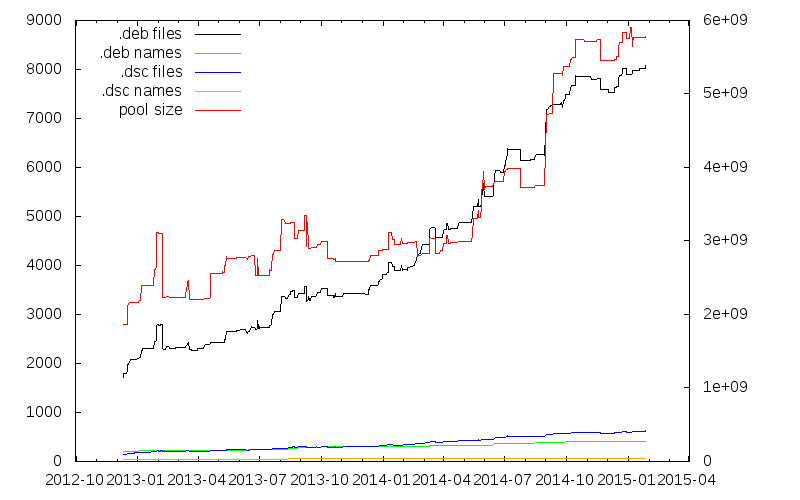
Vincent Bernat: Directory bookmarks with Zsh

There are numerous projects to implement directory bookmarks in your favorite shell. An inherent limitation of those implementations is they being only an enhanced cd command: you cannot use a bookmark in an arbitrary command. UPDATED: My initial implementation with Zsh was using dynamic named directories. I have been pointed on Twitter that there is a simpler way to implement bookmarks. The article has been updated to reflect that. As a side note, it is also possible to just use shell variables1. Zsh comes with a not well-known feature called static named directories. They are declared with the hash builtin and can be refered by prepending ~ to them:
$ hash -d -- -lldpd=/home/bernat/code/deezer/lldpd
$ echo ~-lldpd/README.md
/home/bernat/code/deezer/lldpd/README.md
$ head -n1 ~-lldpd/README.md
lldpd: implementation of IEEE 802.1ab (LLDP)
Because ~-lldpd is substituted during file name expansion, it is possible to use it in any command like a regular directory, like shown above. The - prefix is only here to avoid collision with home directories. Bookmarks are kept into a dedicated directory, $MARKPATH. Each bookmark is a symbolic link to the target directory: for example, ~-lldpd should be expanded to $MARKPATH/lldpd which points to the appropriate directory. Assuming that you have populated $MARKPATH with some links, here is how bookmarks are registered:
for link ($MARKPATH/*(N@))  
    hash -d -- -$ link:t =$ link:A 
 
You also automatically get completion and prompt expansion:
$ pwd
/home/bernat/code/deezer/lldpd/src/lib
$ echo $ (%):-%~ 
~-lldpd/src/lib
The last step is to manage bookmarks without adding or removing symbolic links manually. The following bookmark() function will display the existing bookmarks when called without arguments, will remove a bookmark when called with -d or add the current directory as a bookmark otherwise.
bookmark()  
    if (( $# == 0 )); then
        # When no arguments are provided, just display existing
        # bookmarks
        for link in $MARKPATH/*(N@); do
            local markname="$fg[green]$ link:t $reset_color"
            local markpath="$fg[blue]$ link:A $reset_color"
            printf "%-30s -> %s\n" $markname $markpath
        done
    else
        # Otherwise, we may want to add a bookmark or delete an
        # existing one.
        local -a delete
        zparseopts -D d=delete
        if (( $+delete[1] )); then
            # With  -d , we delete an existing bookmark
            command rm $MARKPATH/$1
        else
            # Otherwise, add a bookmark to the current
            # directory. The first argument is the bookmark
            # name.  .  is special and means the bookmark should
            # be named after the current directory.
            local name=$1
            [ $name == "." ] && name=$ PWD:t 
            ln -s $PWD $MARKPATH/$name
        fi
    fi
 
Find the complete version on GitHub.

Dynamic named directories Another (more complex) way to achieve the same thing is using dynamic named directories. I was initially using this solution but it is far more complex. This section is only here for historical reason. You can find the complete implementation in my GitHub repository. During file name expansion, a ~ followed by a string in square brackets is provided to the zsh_directory_name() function which will eventually reply with a directory name. This feature can be used to implement directory bookmarks:
$ cd ~[@lldpd]
$ pwd
/home/bernat/code/deezer/lldpd
$ echo ~[@lldpd]/README.md
/home/bernat/code/deezer/lldpd/README.md
$ head -n1 ~[@lldpd]/README.md
lldpd: implementation of IEEE 802.1ab (LLDP)
Like for static named directories, because ~[@lldpd] is substituted during file name expansion, it is possible to use it in any command like a regular directory.

Basic implementation Bookmarks are still kept into a dedicated directory, $MARKPATH and are still symbolic links. Here is how the core feature is implemented:
_bookmark_directory_name()  
    emulate -L zsh #  
    setopt extendedglob
    case $1 in
        n)
            [ [ $2 != ( #b)"@"(?*) ]] && return 1 #  
            typeset -ga reply
            reply=($ $ :-$MARKPATH/$match[1] :A ) #  
            return 0
            ;;
        *)
            return 1
            ;;
    esac
    return 0
 
add-zsh-hook zsh_directory_name _bookmark_directory_name
zsh_directory_name() is a function accepting hooks2: instead of defining it directly, we define another function and register it as a hook with add-zsh-hook. The hook is expected to handle different situations. The first one is to be able to transform a dynamic name into a regular directory name. In this case, the first parameter of the function is n and the second one is the dynamic name. In , the call to emulate will restore the pristine behaviour of Zsh and also ensure that any option set in the scope of the function will not have an impact outside. The function can then be reused safely in another environment. In , we check that the dynamic name starts with @ followed by at least one character. Otherwise, we declare we don t know how to handle it. Another hook will get the chance to do something. (#b) is a globbing flag. It activates backreferences for parenthesised groups. When a match is found, it is stored as an array, $match. In , we build the reply. We could have just returned $MARKPATH/$match[1] but to hide the symbolic link mechanism, we use the A modifier to ask Zsh to resolve symbolic links if possible. Zsh allows nested substitutions. It is therefore possible to use modifiers and flags on anything. $ :-$MARKPATH/$match[1] is a common trick to turn $MARKPATH/$match[1] into a parameter substitution and be able to apply the A modifier on it.

Completion Zsh is also able to ask for completion of a dynamic directory name. In this case, the completion system calls the hook function with c as the first argument.
_bookmark_directory_name()  
    # [...]
    case $1 in
        c)
            # Completion
            local expl
            local -a dirs
            dirs=($MARKPATH/*(N@:t)) #  
            dirs=("@"$ ^dirs ) #  
            _wanted dynamic-dirs expl 'bookmarked directory' compadd -S\] -a dirs
            return
            ;;
        # [...]
    esac
    # [...]
 
First, in , we create a list of possible bookmarks. In *(N@:t), N@ is a glob qualifier. N allows us to not return nothing if there is no match (otherwise, we would get an error) while @ only returns symbolic links. t is a modifier which will remove all leading pathname components. This is equivalent to use basename or $ something##*/ in POSIX shells but it plays nice with glob expressions. In , we just add @ before each bookmark name. If we have b1, b2 and b3 as bookmarks, $ ^dirs expands to b1,b2,b3 and therefore "@"$ ^dirs expands to the (@b1 @b2 @b3) array. The result is then feeded into the completion system.

Prompt expansion Many people put the name of the current directory in their prompt. It would be nice to have the bookmark name instead of the full name when we are below a bookmarked directory. That s also possible!
$ pwd
/home/bernat/code/deezer/lldpd/src/lib
$ echo $ (%):-%~ 
~[@lldpd]/src/lib
The prompt expansion system calls the hook function with d as first argument and the file name to transform.
_bookmark_directory_name()  
    # [...]
    case $1 in
        d)
            local link slink
            local -A links
            for link ($MARKPATH/*(N@))  
                links[$  #link:A $'\0'$ link:A ]=$ link:t  #  
             
            for slink ($ (@On)$ (k)links )  
                link=$ slink#*$'\0'  #  
                if [ [ $2 = ( #b)($ link )( /*) ]]; then
                    typeset -ga reply
                    reply=("@"$ links[$slink]  $(( $  #match[1]  )) )
                    return 0
                fi
             
            return 1
            ;;
        # [...]
    esac
    # [...]
 
OK. This is some black Zsh wizardry. Feel free to skip the explanation. This is a bit complex because we want to substitute the most specific bookmark, hence the need to sort bookmarks by their target lengths. In , the associative array $links is created by iterating on each symbolic link ($link) in the $MARKPATH directory. The goal is to map a target directory with the matching bookmark name. However, we need to iterate on this map from the longest to the shortest key. To achieve that, we prepend each key with its length. Remember, $ link:A is the absolute path with symbolic links resolved. So, $ #link:A is the length of this path. We concatenate the length of the target directory with the target directory name and use $'\0' as a separator because this is the only safe character for this purpose. The result is mapped to the bookmark name. The second loop is an iteration on the keys of the associative array $links (thanks to the use of the k parameter flag in $ (k)links ). Those keys are turned into an array (@ parameter flag) and sorted numerically in descending order (On parameter flag). Since the keys are directory names prefixed by their lengths, the first match will be the longest one. In , we extract the directory name from the key by removing the length and the null character at the beginning. Then, we check if the extracted directory name matches the file name we have been provided. Again, (#b) just activates backreferences. With extended globbing, we can use the or operator, . So, when either the file name matches exactly the directory name or is somewhere deeper, we create the reply which is an array whose first member is the bookmark name and the second member is the untranslated part of the file name.

Easy typing Typing ~[@ is cumbersome. Hopefully, Zsh line editor can be extended with additional bindings. The following snippet will substitute @@ (if typed without a pause) by ~[@:
vbe-insert-bookmark()  
    emulate -L zsh
    LBUFFER=$ LBUFFER "~[@"
 
zle -N vbe-insert-bookmark
bindkey '@@' vbe-insert-bookmark
In combination with the autocd option and completion, it is quite easy to jump to a bookmarked directory.

  1. For example:
    $ lldpd=/home/bernat/code/deezer/lldpd
    $ echo $lldpd/README.md
    /home/bernat/code/deezer/lldpd/README.md
    $ head -n1 $lldpd/README.md
    lldpd: implementation of IEEE 802.1ab (LLDP)
    
    The drawback is that you don t have a separate namespace for your bookmarks. You can still use a special prefix for that. Also, no prompt expansion.
  2. Other functions accepting hooks are chpwd() or precmd().

Tiago Bortoletto Vaz: Raspberry Pi Foundation moving away from its educational mission?

From the news:
"...we want to make Raspberry Pi more open over time, not less."
Right.
"For the last six months we ve been working closely with Microsoft to bring the forthcoming Windows 10 to Raspberry Pi 2"
Hmmm... From a comment:
I m sad to see Windows 10 as a selling point though. This community should not be supporting restrictive proprietary software The Pi is about tinkering and making things while Microsoft is about marketing and spying.
Right. From an answer:
"But I suggest you rethink your comments about MS, spying is going a bit far, don t you think?"
Wrong.

Next.

Previous.