Search Results: "will"

15 March 2011

Sam Hartman: Moonshooting Jabber

Last fall, Moonshot was steaming forward. We ran into some non-technical obstacles and progress on the implementation was disturbingly quite from the end of October through February. That changed: the code was released February 25. Since then, the project has picked up the momentum of last fall. There s a new developers corner with helpful links for participating in the project, obtaining the code, and preparing for our upcoming Second Moonshot Meeting. Standards work in the ABFAB working group has been making steady progress the entire time. The jabber chat room has been quite active. Developers have been working in three time zones. Whenever In get up there s likely to be interesting progress awaiting me and new things to work on in the chat logs. Today was no exception. Luke moonshooted jabber. This is exciting: it s the first tim our code has been used to authenticate some real application instead of a test service. Other discussion from the chat room not reflected in e-mail is equally exciting. He has Moonshot working with OpenSSH in controlled environments. It appears to require some updates to the OpenSSH GSS-API support. Now is a really great time to get involved in Moonshot. We hope to see you on our lists and in our chat. With last night s news, we need to think towards eating our own dogfood and using Moonshot to authenticate to our own Jabber server and to authenticate to our repository for commits. Right now, there are some security issues with the code (lack of EAP channel binding) that might make that undesirable. However in a very small number of weeks or months I expect we will be there!

Colin Watson: Wubi bug 693671

I spent most of last week working on Ubuntu bug 693671 ("wubi install will not boot - phase 2 stops with: Try (hd0,0): NTFS5"), which was quite a challenge to debug since it involved digging into parts of the Wubi boot process I'd never really touched before. Since I don't think much of this is very well-documented, I'd like to spend a bit of time explaining what was involved, in the hope that it will help other developers in the future. Wubi is a system for installing Ubuntu into a file in a Windows filesystem, so that it doesn't require separate partitions and can be uninstalled like any other Windows application. The purpose of this is to make it easy for Windows users to try out Ubuntu without the need to worry about repartitioning, before they commit to a full installation. Wubi started out as an external project, and initially patched the installer on the fly to do all the rather unconventional things it needed to do; we integrated it into Ubuntu 8.04 LTS, which involved turning these patches into proper installer facilities that could be accessed using preseeding, so that Wubi only needs to handle the Windows user interface and other Windows-specific tasks. Anyone familiar with a GNU/Linux system's boot process will immediately see that this isn't as simple as it sounds. Of course, ntfs-3g is a pretty solid piece of software so we can handle the Windows filesystem without too much trouble, and loopback mounts are well-understood so we can just have the initramfs loop-mount the root filesystem. Where are you going to get the kernel and initramfs from, though? Well, we used to copy them out to the NTFS filesystem so that GRUB could read them, but this was overly complicated and error-prone. When we switched to GRUB 2, we could instead use its built-in loopback facilities, and we were able to simplify this. So all was more or less well, except for the elephant in the room. How are you going to load GRUB? In a Wubi installation, NTLDR (or BOOTMGR in Windows Vista and newer) still owns the boot process. Ubuntu is added as a boot menu option using BCDEdit. You might then think that you can just have the Windows boot loader chain-load GRUB. Unfortunately, NTLDR only loads 16 sectors - 8192 bytes - from disk. GRUB won't fit in that: the smallest core.img you can generate at the moment is over 18 kilobytes. Thus, you need something that is small enough to be loaded by NTLDR, but that is intelligent enough to understand NTFS to the point where it can find a particular file in the root directory of a filesystem, load boot loader code from it, and jump to that. The answer for this was GRUB4DOS. Most of GRUB4DOS is based on GRUB Legacy, which is not of much interest to us any more, but it includes an assembly-language program called GRLDR that supports doing this very thing for FAT, NTFS, and ext2. In Wubi, we build GRLDR as wubildr.mbr, and build a specially-configured GRUB core image as wubildr. Now, the messages shown in the bug report suggested a failure either within GRLDR or very early in GRUB. The first thing I did was to remember that GRLDR has been integrated into the grub-extras ntldr-img module suitable for use with GRUB 2, so I tried building wubildr.mbr from that; no change, but this gave me a modern baseline to work on. OK; now to try QEMU (you can use tricks like qemu -hda /dev/sda if you're very careful not to do anything that might involve writing to the host filesystem from within the guest, such as recursively booting your host OS ... [update: Tollef Fog Heen and Zygmunt Krynicki both point out that you can use the -snapshot option to make this safer]). No go; it hung somewhere in the middle of NTLDR. Still, I could at least insert debug statements, copy the built wubildr.mbr over to my test machine, and reboot for each test, although it would be slow and tedious. Couldn't I? Well, yes, I mostly could, but that 8192-byte limit came back to bite me, along with an internal 2048-byte limit that GRLDR allocates for its NTFS bootstrap code. There were only a few spare bytes. Something like this would more or less fit, to print a single mark character at various points so that I could see how far it was getting:
	pushal
	xorw	%bx, %bx	/* video page 0 */
	movw	$0x0e4d, %ax	/* print 'M' */
	int	$0x10
	popal
In a few places, if I removed some code I didn't need on my test machine (say, CHS compatibility), I could even fit in cheap and nasty code to print a single register in hex (as long as you didn't mind 'A' to 'F' actually being ':' to '?' in ASCII; and note that this is real-mode code, so the loop counter is %cx not %ecx):
	/* print %edx in dumbed-down hex */
	pushal
	xorw	%bx, %bx
	movb	$0xe, %ah
	movw	$8, %cx
1:
	roll	$4, %edx
	movb	%dl, %al
	andb	$0xf, %al
	int	$0x10
	loop	1b
	popal
After a considerable amount of work tracking down problems by bisection like this, I also observed that GRLDR's NTFS code bears quite a bit of resemblance in its logical flow to GRUB 2's NTFS module, and indeed the same person wrote much of both. Since I knew that the latter worked, I could use it to relieve my brain of trying to understand assembly code logic directly, and could compare the two to look for discrepancies. I did find a few of these, and corrected a simple one. Testing at this point suggested that the boot process was getting as far as GRUB but still wasn't printing anything. I removed some Ubuntu patches which quieten down GRUB's startup: still nothing - so I switched my attentions to grub-core/kern/i386/pc/startup.S, which contains the first code executed from GRUB's core image. Code before the first call to real_to_prot (which switches the processor into protected mode) succeeded, while code after that point failed. Even more mysteriously, code added to real_to_prot before the actual switch to protected mode failed too. Now I was clearly getting somewhere interesting, but what was going on? What I really wanted was to be able to single-step, or at least see what was at the memory location it was supposed to be jumping to. Around this point I was venting on IRC, and somebody asked if it was reproducible in QEMU. Although I'd tried that already, I went back and tried again. Ubuntu's qemu is actually built from qemu-kvm, and if I used qemu -no-kvm then it worked much better. Excellent! Now I could use GDB:
(gdb) target remote   qemu -gdb stdio -no-kvm -hda /dev/sda
This let me run until the point when NTLDR was about to hand over control, then interrupt and set a breakpoint at 0x8200 (the entry point of startup.S). This revealed that the address that should have been real_to_prot was in fact garbage. I set a breakpoint at 0x7c00 (GRLDR's entry point) and stepped all the way through to ensure it was doing the right thing. In the process it was helpful to know that GDB and QEMU don't handle real mode very well between them. Useful tricks here were: Single-stepping showed that GRLDR was loading the entirety of wubildr correctly and jumping to it. The first instruction it jumped to wasn't in startup.S, though, and then I remembered that we prefix the core image with grub-core/boot/i386/pc/lnxboot.S. Stepping through this required a clear head since it copies itself around and changes segment registers a few times. The interesting part was at real_code_2, where it copies a sector of the kernel to the target load address, and then checks a known offset to find out whether the "kernel" is in fact GRUB rather than a Linux kernel. I checked that offset by hand, and there was the smoking gun. GRUB recently acquired Reed-Solomon error correction on its core image, to allow it to recover from other software writing over sectors in the boot track. This moved the magic number lnxboot.S was checking somewhat further into the core image, after the first sector. lnxboot.S couldn't find it because it hadn't copied it yet! A bit of adjustment and all was well again. The lesson for me from all of this has been to try hard to get an interactive debugger working. Really hard. It's worth quite a bit of up-front effort if it saves you from killing neurons stepping through pages of code by hand. I think the real-mode debugging tricks I picked up should be useful for working on GRUB in the future.


14 March 2011

Erich Schubert: GNOME3 in Debian experimental - python and dconf

As GNOME3 slowly enters Debian experimental, things become a bit ... experimental.
The file manager can be set to still draw icons on the desktop, but that doesn't entirely work yet (it will also open folders as desktop then...)
One machine had lost the keyboard settings. I could not set the fonts I wanted...
There is a tool called dconf-editor that will allow you to manually tweak some settings such as the fonts. But it doesn't seem to have support for value lists yet - and the keyboard mappings setting is a string list.
So here's sample python code to modify such a value:
from gi.repository import Gio
s = Gio.Settings.new("org.gnome.libgnomekbd.keyboard")
s.set_strv("layouts", ["de"])
Update: you could also install the optional libglib2.0-bin and use the gsettings command.

Erich Schubert: What is really happening at Fukushima?

As far as I can tell, neither the Japanese government, nor the operating companies tell the truth.
Here's my take of the story:
  • The tsunami not only destroyed the generators, but the complete cooling systems.
  • Thus, the cores will overheat and melt, they have no way to prevent this, they can only try to keep the damage as low as possible.
  • The cooling water turned into gas and disassociated into hydrogen and oxygen. Unfortunately, this is highly explosive. So the best they can do is to try to get the gas out of the core containment, and let is explode outside where it does not cause too much radioactive pollusion (are core explosion would be really bad). This already happened at reactors 1 and 3, and will happen at reactor 2 the next one or two days.
  • They use the sea water to slow down the core meltdown and keep the core containment stable. They probably do this by flooding the second containment, where there it no direct radioactive materials.
So essentially, I don't see much of a risk of a nuclear explosion, and I expect the radioactive pollution to be quite low, mostly via indirect radiation from the coolant in the outer containment. The reactor however is trashed and full of highly radioactive waste, that will require constant cooling for the next few years.
However, I'm really concerned that apparently, the government and the companies involed lied to us. This is happening a lot when it comes to nuclear power, they barely are truthful about what is happening.
Nuclear power is only safe as long it is operated by altruistic and responsible people. Once you bring free market, politics and money in, it is a dangerous toy that should not be toyed with by humans.

Evgeni Golov: Desktop in a shell: newsbeuter

Another week, another post from my desktop in a shell series. This time: newsbeuter, my RSS/Atom/whatever feed-reader of choice.Newsbeuter is a config-and-forget kind of tool. You only have to touch it when you change from a static ~/.newsbeuter/urls to Google Reader or something (like I did some time ago). In the following I will explain both ways (as both are short and it would not fill a whole post then *g*).newsbeuter with a static urls fileFirst you create a ~/.newsbeuter/urls with all your feed URLs (one per line). Then you already can start newsbeuter and it will just work . But you also can customize it (see newsbeuter s online doc) by writing a ~/.newsbeuter/config. Mine was rather short:
 auto-reload yes
 refresh-on-startup yes
 goto-next-feed no
Which means newsbeuter will refresh the feeds every 60 minutes (tuneable via reload-time) and on startup and won t jump to the next feed when pressing n in a feed which has no unread items.Yes, sorry, this is all. Newsbeuter just works ;)newsbeuter with Google ReaderWant to use newsbeuter with your Google Reader account? Add
 urls-source "googlereader"
 googlereader-login "you@gmail.com"
 googlereader-password "password"
to your ~/.newsbeuter/config and it works :)
Most people want to add googlereader-show-special-feeds no as they do not care about Google s suggestions etc.
The only culprit here is than one has to use Google Reader to subscribe to feeds, as newsbeuter does not support this (it s a viewer only).Oh, and here comes the screenshot you waited for:

And no, I do not post my config here, you have to copy-paste it from above, hard, isn t it? :)

Colin Watson: Wubi bug 693671

I spent most of last week working on Ubuntu bug 693671 ("wubi install will not boot - phase 2 stops with: Try (hd0,0): NTFS5"), which was quite a challenge to debug since it involved digging into parts of the Wubi boot process I'd never really touched before. Since I don't think much of this is very well-documented, I'd like to spend a bit of time explaining what was involved, in the hope that it will help other developers in the future. Wubi is a system for installing Ubuntu into a file in a Windows filesystem, so that it doesn't require separate partitions and can be uninstalled like any other Windows application. The purpose of this is to make it easy for Windows users to try out Ubuntu without the need to worry about repartitioning, before they commit to a full installation. Wubi started out as an external project, and initially patched the installer on the fly to do all the rather unconventional things it needed to do; we integrated it into Ubuntu 8.04 LTS, which involved turning these patches into proper installer facilities that could be accessed using preseeding, so that Wubi only needs to handle the Windows user interface and other Windows-specific tasks. Anyone familiar with a GNU/Linux system's boot process will immediately see that this isn't as simple as it sounds. Of course, ntfs-3g is a pretty solid piece of software so we can handle the Windows filesystem without too much trouble, and loopback mounts are well-understood so we can just have the initramfs loop-mount the root filesystem. Where are you going to get the kernel and initramfs from, though? Well, we used to copy them out to the NTFS filesystem so that GRUB could read them, but this was overly complicated and error-prone. When we switched to GRUB 2, we could instead use its built-in loopback facilities, and we were able to simplify this. So all was more or less well, except for the elephant in the room. How are you going to load GRUB? In a Wubi installation, NTLDR (or BOOTMGR in Windows Vista and newer) still owns the boot process. Ubuntu is added as a boot menu option using BCDEdit. You might then think that you can just have the Windows boot loader chain-load GRUB. Unfortunately, NTLDR only loads 16 sectors - 8192 bytes - from disk. GRUB won't fit in that: the smallest core.img you can generate at the moment is over 18 kilobytes. Thus, you need something that is small enough to be loaded by NTLDR, but that is intelligent enough to understand NTFS to the point where it can find a particular file in the root directory of a filesystem, load boot loader code from it, and jump to that. The answer for this was GRUB4DOS. Most of GRUB4DOS is based on GRUB Legacy, which is not of much interest to us any more, but it includes an assembly-language program called GRLDR that supports doing this very thing for FAT, NTFS, and ext2. In Wubi, we build GRLDR as wubildr.mbr, and build a specially-configured GRUB core image as wubildr. Now, the messages shown in the bug report suggested a failure either within GRLDR or very early in GRUB. The first thing I did was to remember that GRLDR has been integrated into the grub-extras ntldr-img module suitable for use with GRUB 2, so I tried building wubildr.mbr from that; no change, but this gave me a modern baseline to work on. OK; now to try QEMU (you can use tricks like qemu -hda /dev/sda if you're very careful not to do anything that might involve writing to the host filesystem from within the guest, such as recursively booting your host OS ...). No go; it hung somewhere in the middle of NTLDR. Still, I could at least insert debug statements, copy the built wubildr.mbr over to my test machine, and reboot for each test, although it would be slow and tedious. Couldn't I? Well, yes, I mostly could, but that 8192-byte limit came back to bite me, along with an internal 2048-byte limit that GRLDR allocates for its NTFS bootstrap code. There were only a few spare bytes. Something like this would more or less fit, to print a single mark character at various points so that I could see how far it was getting:
	pushal
	xorw	%bx, %bx	/* video page 0 */
	movw	$0x0e4d, %ax	/* print 'M' */
	int	$0x10
	popal
In a few places, if I removed some code I didn't need on my test machine (say, CHS compatibility), I could even fit in cheap and nasty code to print a single register in hex (as long as you didn't mind 'A' to 'F' actually being ':' to '?' in ASCII; and note that this is real-mode code, so the loop counter is %cx not %ecx):
	/* print %edx in dumbed-down hex */
	pushal
	xorw	%bx, %bx
	movb	$0xe, %ah
	movw	$8, %cx
1:
	roll	$4, %edx
	movb	%dl, %al
	andb	$0xf, %al
	int	$0x10
	loop	1b
	popal
After a considerable amount of work tracking down problems by bisection like this, I also observed that GRLDR's NTFS code bears quite a bit of resemblance in its logical flow to GRUB 2's NTFS module, and indeed the same person wrote much of both. Since I knew that the latter worked, I could use it to relieve my brain of trying to understand assembly code logic directly, and could compare the two to look for discrepancies. I did find a few of these, and corrected a simple one. Testing at this point suggested that the boot process was getting as far as GRUB but still wasn't printing anything. I removed some Ubuntu patches which quieten down GRUB's startup: still nothing - so I switched my attentions to grub-core/kern/i386/pc/startup.S, which contains the first code executed from GRUB's core image. Code before the first call to real_to_prot (which switches the processor into protected mode) succeeded, while code after that point failed. Even more mysteriously, code added to real_to_prot before the actual switch to protected mode failed too. Now I was clearly getting somewhere interesting, but what was going on? What I really wanted was to be able to single-step, or at least see what was at the memory location it was supposed to be jumping to. Around this point I was venting on IRC, and somebody asked if it was reproducible in QEMU. Although I'd tried that already, I went back and tried again. Ubuntu's qemu is actually built from qemu-kvm, and if I used qemu -no-kvm then it worked much better. Excellent! Now I could use GDB:
(gdb) target remote   qemu -gdb stdio -no-kvm -hda /dev/sda
This let me run until the point when NTLDR was about to hand over control, then interrupt and set a breakpoint at 0x8200 (the entry point of startup.S). This revealed that the address that should have been real_to_prot was in fact garbage. I set a breakpoint at 0x7c00 (GRLDR's entry point) and stepped all the way through to ensure it was doing the right thing. In the process it was helpful to know that GDB and QEMU don't handle real mode very well between them. Useful tricks here were: Single-stepping showed that GRLDR was loading the entirety of wubildr correctly and jumping to it. The first instruction it jumped to wasn't in startup.S, though, and then I remembered that we prefix the core image with grub-core/boot/i386/pc/lnxboot.S. Stepping through this required a clear head since it copies itself around and changes segment registers a few times. The interesting part was at real_code_2, where it copies a sector of the kernel to the target load address, and then checks a known offset to find out whether the "kernel" is in fact GRUB rather than a Linux kernel. I checked that offset by hand, and there was the smoking gun. GRUB recently acquired Reed-Solomon error correction on its core image, to allow it to recover from other software writing over sectors in the boot track. This moved the magic number lnxboot.S was checking somewhat further into the core image, after the first sector. lnxboot.S couldn't find it because it hadn't copied it yet! A bit of adjustment and all was well again. The lesson for me from all of this has been to try hard to get an interactive debugger working. Really hard. It's worth quite a bit of up-front effort if it saves you from killing neurons stepping through pages of code by hand. I think the real-mode debugging tricks I picked up should be useful for working on GRUB in the future.

Erich Schubert: Google Circles rumor

The media are spreading a rumor about a social networking platform by Google, called Circles.
So far, these things have been debunked.
I do not believe that Google could succeed with a "Facebook clone". The market is already taken, Facebook is too big and had successfully been taking away international markets from local clones. For example in Germany, the other social networks used to be a lot bigger, but Facebook overtook them in just a few months, and the people I know pretty much quit the other networks then.
And I assume Google is aware that unless they have a strong strategy, the network would go the Wave-Buzz route.
At least here in Germany, people are surprisingly concerned by the amount of data Google might have on them, while at the same time they give it to Facebook for free. This is probably due to the media attention received with StreetView. It's not fair, but that's life.
However, "social network" is a broad term. Just think of what people actually use facebook for:
  • Games (often even not with their social circle!)
  • Microblogging
  • Photo sharing
  • Email
  • Automatic address book
Now, if you look closely at this list, Google pretty much has all of these, if we ignore the browser games (and they are all over the internet by now, Facebook and without!), then there is just one key ingredient missing for Google: the address book thing.
I believe this "Google circles" thing will largely by a "smart address book" that helps people managing their social contacts in a social network style. And obviously, this can be integrated in various products such as Mail, Picasa, Buzz, ...
If Google manages to launch a "contact manager" that makes it really easy for people to manage their social circles, this can be quite a killer. Facebook has "lists" but they are awful to use. It likes to "hide" friends to reduce the amount of information it throws at you. But it doesn't really organize it for you, for example by social circles or topics. These days for example Facebook could split the news feed into "Japan" and "everything else" I guess.

Raphaël Hertzog: Missing firmware in Debian? Learn how to deal with the problem

You know it already, since Debian 6.0 non-free firmware are no longer provided by a standard Debian installation. This will cause some troubles to users who need them. I m thus going to do a small overview on the topic and teach you what you need to know to deal with the problem. What are firmware and how are they used? From the user s point of view, a firmware is just some data that is needed by some piece of hardware in order to function properly. The driver for that hardware typically loads the firmware on the device as part of its initialization. In the Linux kernel, the drivers are all using a standardized interface (request_firmware) to retrieve the firmware before sending it to the device. Thanks to this standardization, it s possible to either embed the firmware in the kernel or to have it request the firmware from user-space when needed. Debian (like most distributions) has selected the latter option. Thus when the kernel needs a firmware, it sends out a request to user-space. udev is getting the request with the name of the firmware, and in its default configuration (see /lib/udev/rules.d/80-drivers.rules) it executes /lib/udev/firmware.agent in response. Where are firmware stored? firmware.agent is a simple shell script that tries to locate a firmware before sending it back to the kernel through a sysfs entry. It looks into the following directories: Firmware provided by packages are thus usually in /lib/firmware and you can use /usr/local/lib/firmware for manually installed firmware. How do I know whether I need a firmware? First of, you can notice messages from the kernel telling you that it tried to load a firmware but it failed. They look like this:

e100: eth0: e100_request_firmware: Failed to load firmware "e100/d101m_ucode.bin": -2
But you might be informed sooner. When you install a new version of the Linux kernel with the official Debian packages, the post-installation script will go through all loaded modules (those listed by lsmod) and it will verify whether this module as provided by the newly installed kernel might require firmware files. This information can be retrieved with modinfo:
$ modinfo -F firmware /lib/modules/2.6.32-5-amd64/kernel/drivers/net/e100.ko
e100/d102e_ucode.bin
e100/d101s_ucode.bin
e100/d101m_ucode.bin
If one (or more) of those firmware is (are) not yet available on the system, you will get a warning message similar to this one:
update-initramfs will also generate a similar warning on the terminal:
update-initramfs: Generating /boot/initrd.img-2.6.32-5-amd64
W: Possible missing firmware /lib/firmware/e100/d102e_ucode.bin for module e100
W: Possible missing firmware /lib/firmware/e100/d101s_ucode.bin for module e100
W: Possible missing firmware /lib/firmware/e100/d101m_ucode.bin for module e100
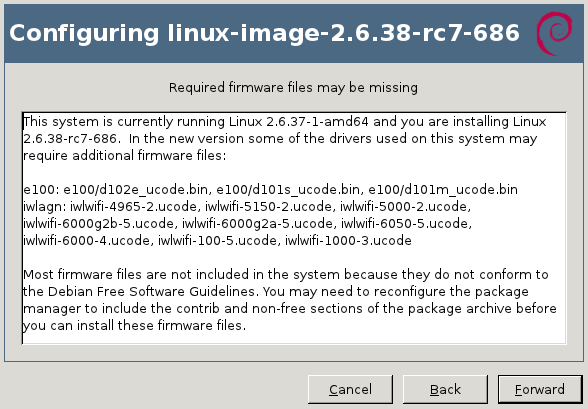
The Debian installer also detects when you have hardware that might require a missing firmware file. You have the option to supply the missing files on a USB stick (either directly or through the corresponding package). How do I find and install the missing firmware? Now that you have the name of the firmware file that you want, it s relatively easy to identify the package that provides the required file. You can use apt-cache search <filename> because the firmware packages embed the list of firmware files in their description. You can also use apt-file (provided by the package of the same name) or the web interface at packages.debian.org.
$ apt-cache search d101m_ucode.bin
firmware-linux-nonfree - Binary firmware for various drivers in the Linux kernel
$ apt-file search d101m_ucode.bin
firmware-linux-nonfree: /lib/firmware/e100/d101m_ucode.bin
If the above commands return nothing, you probably need to enable the non-free repository in your /etc/apt/sources.list (you can also enable it within synaptic). And you also want to run sudo apt-file update to have the latest information. Now you can install the right package, in the example above it was firmware-linux-nonfree. How do I install all firmware just to be sure I don t miss any? There s no meta-package depending on all firmware packages so there s no easy answer to this question. Furthermore not all firmware packages respect the naming convention firmware-* (there s for example zd1211-firmware). So your best bet is to look up all the packages with a generic search like this one:
$ apt-file --package-only search /lib/firmware/
atmel-firmware
[...]
And then install them all. Are there DVD or CD images with non-free firmware? Yes. Debian provides an unofficial netinst image for i386/amd64/powerpc with the non-free firmware, you can find it here: http://cdimage.debian.org/cdimage/unofficial/non-free/cd-including-firmware/. I provide complete DVD sets with firmware, and Multi-Arch CD/DVD with firmware, it s over there in my DVD shop: http://raphaelhertzog.com/go/debian-cd/ (i386/amd64 only) When using those installation discs, the Debian-installer will be able to find the required firmware immediately. There s no need for you to provide them on a USB stick. Other questions? I think I covered the most important things you have to know about firmware on Debian. But should you still have a question, feel free to share it in the comments so that I can improve this article.
Click here to subscribe to my free newsletter and get my monthly analysis on what s going on in Debian and Ubuntu. Or just follow along via the RSS feed, Identi.ca, Twitter or Facebook.

6 comments Liked this article? Click here. My blog is Flattr-enabled.

Russell Coker: Effective Computers for Schools

Sam Varghese has written an article that is very skeptical of the educational value of the OLPC project [1].Are Laptops Any Good for Schools?Sam cites an article in the New York Times by Winnie Hu about schools removing laptop programs due to a lack of success [2]. Winnie s article gives an example of a school shutting a program because of getting new teachers who lacked computer skills and some examples of schools which had issues with the repair cost. The solution to that would be computers that are more robust and easier to use by all accounts the OLPC systems are solidly constructed and easy to use!It is claimed that using laptops doesn t increase test scores. Using only test scores to compare educational methods is a way to lose, probably any school which does nothing other than try to increase test scores is worth avoiding. One example from Winnie s article is a report by Mr. Warschauer of students at a middle school in Yarmouth, Me., who used their laptops to create a Spanish book for poor children in Guatemala and debate Supreme Court cases found online . What value can you place on having students develop books for poor children in other countries and debate Supreme Court cases? If this sort of program became popular then it would lead to the countries which do it becoming better places to live in future decades!Mr. Warschauer also claims that If the goal is to get kids up to basic standard levels, then maybe laptops are not the tool. But if the goal is to create the George Lucas and Steve Jobs of the future, then laptops are extremely useful . I would go further than that, I think that providing the educational environment that involves international charity work and analysis of important court cases would lead to students having the skills to become good engineers, designers, and artists who work for people like George Lucas and Steve Jobs. No matter what you might do the vast majority of children will not grow up to be like George Lucas and Steve Jobs, there is a very limited number of positions for such people. But those people employ a huge number of creative people who do interesting and enjoyable work for good pay.I don t think that Winnie s article supports criticism of the OLPC project. I don t think that Winnie s article even contains sufficient evidence to match the headline.Playing GamesSam also cites an article about the misuse of school computers for playing games [3]. Of course there are ways of limiting access to games based on time etc. For a Linux system you could have a root cron job that runs chmod on /usr/games at various times, and preventing users from easily running programs that they install isn t difficult.Not that games are all bad, the flash-based games on www.physicsgames.net do teach kids some things about physics although I admit that much of that could be learned by playing with balls, skate-boards, etc.The Problem with the OLPC ProjectI think that the policy change to make OLPC systems only available to disadvantaged children was a mistake. The give one get one program was a great idea, maybe not the most effective way of getting funding but good for getting developers. While the new Sugar on a Stick project to put the OLPC GUI on a bootable USB device [4] it doesn t compare well to having dedicated hardware IMHO.Minimal Use of ComputersI have previously written about the weight of school bags and how laptops can alleviate the risk of health problems related to carrying heavy text books [5]. Since that time ebook readers and tablets have become incredibly cheap. Ebook readers are really light and the recent tablets are also very light (particularly the smaller ones). It seems to me that every school should at least be moving towards every student having an ebook reader and to use ebooks for all books that are part of the curriculum.At the moment there are a bunch of tablets on sale for about $150, that includes tablets that can access the Internet via Wifi or via 3G and a cheap 3G plan costs less than $150 per annum. If tablets were used for some of the computer tasks related to schools then a lot of the difficulty of repairing hardware would be removed. Tablets don t offer as many options for messing up the software configuration and if the hardware breaks it s easy to transfer the data onto a new tablet from the cloud with a maximum cost of $150 to replace the hardware.Also a cloud-based computing model could permit students to access all the same data from school and home while using desktop computers at both locations.Current SuccessNatalie Craig wrote an interesting article for The Age about The Lab a drop-in computer center for kids on the Autism Spectrum run by Dale Linegar and Stefan Schutt [6]. The fact that kids who have communication difficulties can find it easier to communicate electronically should be fairly obvious to everyone in the free software community, but the creation of an organisation to support such kids is noteworthy I think that such centers should be funded by the government and run in every city.Salman Khan gave an interesting TED talk about his project the Khan Academy [7] which is an online video-based teaching system that evolved from some Youtube videos he produced to tutor his cousins. Salman pointed out that his cousins said that they would rather watch his videos than have him teach them in person, it seems that they liked being able to pause and rewind the talk as well as avoiding the pressure of human interaction. The Khan Academy has videos in Adobe flash format, but conveniently they have download links so those of us who don t have the Flash plugin can still view the content [8].One of the interesting things about the Khan Academy is that in school use the videos are being assigned to kids as homework and the class time is used for teaching children to do worked examples what has traditionally been homework.So it seems that there are real examples of special-needs kids and average kids benefiting from different types of electronic learning.ConclusionI think that almost everything about the education system is broken. I also think that in many ways the education system has reached a local maximum, so there is no small way of improving things, and adding computers without making any of the significant changes needed to fix the big problems probably can t do a lot of good. In spite of this computers can provide some real benefits and I expect that those benefits can be better than the benefits of other potential ways of spending the money (IE it s worth the opportunity cost). I also have no doubt that almost anything can give a negative result if done badly enough, so I don t interpret examples of computer use failing in a school as anything other than evidence of a failing school.While the Khan Academy has some results that seem very positive I think that s only the first step of what needs to be done. It also seems to be based around users who have good Internet access which often isn t the case in places where the OLPC is being deployed. This implies that we need to get systems like the Khan Academy designed to operate in a disconnected manner, maybe with a remote server that s not connected to the Internet. This should be possible if funding is available.Sam suggested that there needs to be a scientific study of the effectiveness of the OLPC. I think that every project which involves significant amounts of public funding should be researched to ensure that it s an effective use of resources. 400,000 laptops is going to cost something more than $40,000,000 so it seems reasonable to devote a few person-years of research to determine how effective they are and which of the possible ways of using an OLPC will give the best results.I am confident that a good study of the effectiveness of the OLPC would demonstrate that it provides real educational benefits when correctly incorporated into an educational program. I also expect that such a study would show some significant differences in the effectiveness of various ways of using them. But we shouldn t be relying on confidence, we need some test results.

Russell Coker: Radiation Poisoning

There have been ongoing news reports about the nuclear power plant problems in Japan following the earth-quake and tidal-wave. The Wikipedia page about the Fukushima I nuclear accidents seems to have the best current summary of the situation [1].I think it s worth noting that Potassium Iodide can be ingested to reduce the incidence of thyroid damage in the event of radiation leaks (which apparently usually contain radioactive iodine). KI can be ingested immediately after exposure and there s apparently little harm in taking it before a time of risk (it can be good to take it for a couple of days before exposure). So getting some KI right now might be a good idea for people who live in the vicinity. Apparently the Japanese government have issued iodine tablets to the people closest to the disaster, but it s probably worth spreading the word to people who are further away.Leigh Krietsch Boerner gave a good explanation of how Iodine significantly reduces the risk of thyroid cancer [2].The Nuclear War Survival Skills site has a good description of how to make your own KI solution [3]. This probably isn t a viable option for anyone in Japan unless they can raid a chemistry lab as mail-order of chemicals will surely be too slow. This is probably something that s best considered for future plans for anyone who lives near a nuclear reactor.It would be good if airport pharmacies sold packs of KI tablets for the benefit of travelers who don t live near a reactor but who are visiting a country that has them. It s something I d like to buy before my next trip to Japan.

13 March 2011

David Bremner: Debugging Duplicity Duplication

It seems kind of unfair, given the name, but duplicity really doesn't like to be run in parallel. This means that some naive admin (not me of course, but uh, this guy I know ;) ) who writes a crontab
 @daily  duplicity incr $ARGS $SRC $DEST
 @weekly duplicity full $ARGS $SRC $DEST 
is in for a nasty surprise when both fire at the same time. In particular one of them will terminate with the not very helpful.
 AttributeError: BackupChain instance has no attribute 'archive_dir'
After some preliminary reading of mailing list archives, I decided to delete ~/.cache/duplicity on the client and try again. This was not a good move.
  1. It didn't fix the problem
  2. Resyncing from the server required decrypting some information, which required access to the gpg private key.
Now for me, one of the main motivations for using duplicity was that I could encrypt to a key without having the private key accessible. Luckily the following crazy hack works.
  1. A host where the gpg private key is accessible, delete the ~/.cache/duplicity, and perform some arbitrary duplicity operation. I did duplicity clean $DEST
  2. Now rsync the ./duplicity/cache directory to the backup client.
Now at first you will be depressed, because the problem isn't fixed yet. What you need to do is go onto the backup server (in my case Amazon s3) and delete one of the backups (in my case, the incremental one). Of course, if you are the kind of reader who skips to the end, probably just doing this will fix the problem and you can avoid the hijinks. And, uh, some kind of locking would probably be a good plan... For now I just stagger the cron jobs.

Francois Marier: Setting up RAID on an existing Debian/Ubuntu installation

I run RAID1 on all of the machines I support. While such hard disk mirroring is not a replacement for having good working backups, it means that a single drive failure is not going to force me to have to spend lots of time rebuilding a machine.

The best possible time to set this up is of course when you first install the operating system. The Debian installer will set everything up for you if you choose that option and Ubuntu has alternate installation CDs which allow you to do the same.

This post documents the steps I followed to retrofit RAID1 into an existing Debian squeeze installation. Getting a mirrored setup after the fact.

OverviewBefore you start, make sure the following packages are installed:
apt-get install mdadm rsync initramfs-tools
Then go through these steps:
  1. Partition the new drive.
  2. Create new degraded RAID arrays.
  3. Install GRUB2 on both drives.
  4. Copy existing data onto the new drive.
  5. Reboot using the RAIDed drive and test system.
  6. Wipe the original drive by adding it to the RAID array.
  7. Test booting off of the original drive.
  8. Resync drives.
  9. Test booting off of the new drive.
  10. Reboot with the two drives and resync the array.
(My instructions are mostly based on this old tutorial but also on this more recent one.)

1- Partition the new driveOnce you have connected the new drive (/dev/sdb), boot into your system and use one of cfdisk or fdisk to display the partition information for the existing drive (/dev/sda on my system).

The idea is to create partitions of the same size on the new drive. (If the new drive is bigger, leave the rest of the drive unpartitioned.)

Partition types should all be: fd (or "linux raid autodetect").

2- Create new degraded RAID arraysThe newly partioned drive, consisting of a root and a swap partition, can be added to new RAID1 arrays using mdadm:
mdadm --create /dev/md0 --level=1 --raid-devices=2 missing /dev/sdb1
mdadm --create /dev/md1 --level=1 --raid-devices=2 missing /dev/sdb2
and formatted like this:
mkswap /dev/md1
mkfs.ext4 /dev/md0
Specify these devices explicitly in /etc/mdadm/mdadm.conf:
DEVICE /dev/sda* /dev/sdb*
and append the RAID arrays to the end of that file:
mdadm --detail --scan >> /etc/mdadm/mdadm.conf
dpkg-reconfigure mdadm
You can check the status of your RAID arrays at any time by running this command:
cat /proc/mdstat

3- Install GRUB2 on both drivesThe best way to ensure that GRUB2, the default bootloader in Debian and Ubuntu, is installed on both drives is to reconfigure its package:
dpkg-reconfigure grub-pc
and select both /dev/sda and /dev/sdb (but not /dev/md0) as installation targets.

This should cause the init ramdisk (/boot/initrd.img-2.6.32-5-amd64) and the grub menu (/boot/grub/grub.cfg) to be rebuilt with RAID support.

4- Copy existing data onto the new driveCopy everything that's on the existing drive onto the new one using rsync:
mkdir /tmp/mntroot
mount /dev/md0 /tmp/mntroot
rsync -auHxv --exclude=/proc/* --exclude=/sys/* --exclude=/tmp/* /* /tmp/mntroot/

5- Reboot using the RAIDed drive and test systemBefore rebooting, open /tmp/mntroot/etc/fstab, and change /dev/sda1 and /dev/sda2 to /dev/md0 and /dev/md1 respectively.

Then reboot and from within the GRUB menu, hit "e" to enter edit mode and make sure that you will be booting off of the new disk:
set root='(md/0)'
linux /boot/vmlinuz-2.6.32-5-amd64 root=/dev/md0 ro quiet
Once the system is up, you can check that the root partition is indeed using the RAID array by running mount and looking for something like:
/dev/md0 on / type ext4 (rw,noatime,errors=remount-ro)

6- Wipe the original drive by adding it to the RAID arrayOnce you have verified that everything is working on /dev/sdb, it's time to change the partition types on /dev/sda to fd and to add the original drive to the degraded RAID array:
mdadm /dev/md0 -a /dev/sda1
mdadm /dev/md1 -a /dev/sda2
You'll have to wait until the two partitions are fully synchronized but you can check the sync status using:
watch -n1 cat /proc/mdstat

7- Test booting off of the original driveOnce the sync is finished, update the boot loader menu:
update-grub
and shut the system down:
shutdown -h now
before physically disconnecting /dev/sdb and turning the machine back on to test booting with only /dev/sda present.

After a successful boot, shut the machine down and plug the second drive back in before powering it up again.

8- Resync drivesIf everything works, you should see the following after running cat /proc/mdstat:
md0 : active raid1 sda1[1]
280567040 blocks [2/1] [_U]
indicating that the RAID array is incomplete and that the second drive is not part of it.

To add the second drive back in and start the sync again:
mdadm /dev/md0 -a /dev/sdb1

9- Test booting off of the new driveTo complete the testing, shut the machine down, pull /dev/sda out and try booting with /dev/sdb only.

10- Reboot with the two drives and resync the arrayOnce you are satisfied that it works, reboot with both drives plugged in and re-add the first drive to the array:
mdadm /dev/md0 -a /dev/sda1
Your setup is now complete and fully tested.

Ongoing maintenanceI recommend making sure the two RAIDed drives stay in sync by enabling periodic RAID checks. The easiest way is to enable the checks that are built into the Debian package:
dpkg-reconfigure mdadm
but you can also create a weekly or monthly cronjob which does the following:
echo "check" > /sys/block/md0/md/sync_action
Something else you should seriously consider is to install the smartmontools package and run weekly SMART checks by putting something like this in your /etc/smartd.conf:
/dev/sda -a -d ata -o on -S on -s (S/../.././02 L/../../6/03)
/dev/sdb -a -d ata -o on -S on -s (S/../.././02 L/../../6/03)
These checks, performed by the hard disk controllers directly, could warn you of imminent failures ahead of time. Personally, when I start seeing errors in the SMART log (smartctl -a /dev/sda), I order a new drive straight away.

12 March 2011

Joey Hess: JEST results

Four months ago I opted out of daylight savings time. How did it work out? Tomorrow I will be in sync with everyone else. That might take some getting used to. I plan to keep my timezone setting, and will be doing this again next winter.

Julien Blache: forked-daapd: v0.13

forked-daapd v0.13 is available! This release has been in the making for a long time, got delayed for a lot of reasons and had its content changed a few times along the way. Nonetheless, it s here now and if all goes to plan at least a couple releases should appear in the coming months, say before the summer. In this release: Thanks to all the contributors that sent bugs and patches for this release! I know development doesn t go quite as fast as some would like, but keep in mind that I m doing this in whatever free time I have and that the public git tree doesn t tell the whole story. There are several parallel feature branches you don t get to see, for instance. Hopefully 0.14 will appear in a few weeks. Tarballs available at http://alioth.debian.org/~jblache/forked-daapd/ ; GPG signatures made with my Debian key F5D65169.

11 March 2011

Eddy Petri&#537;or: HOWTO: Making Windows usable and avoiding accidental sending of mails in Microsoft Outlook

I've changed jobs recently and after 5 years of not having to work with a Windows system I am having all sorts of adaptation-to-Windows problems at the new job.

First I just had to have the usual X-mouse behaviour and so I installed True X-Mouse Gizmo for Windows. This provides focus under mouse, middle click paste after select (not perfect, but it works), right click to push to bottom the window.

Second I had to have a virtual desktop, so I installed Microsoft's Virtual Desktop Manager from the PowerToys page. I tried another virtual desktop manager before using MSVDM, but I found it too clumsy so I switched to MSVDM which I knew from way back when I used Windows the last time. Good, now I can have my applications organised the way I am used to.

UPDATE:
I gave up on MSVDM in favour of Virtual Dimension since I wasn't able to send a particular window to the intended desktop unless I had in the taskbar all apps visible (Shared Desktop option). I might try other suggestions (Virtual Dimension does not have a way to send a window directly to a specific desktop, but just to the neighbours of the current one.)


Third, I had to make Caps Lock work as Ctrl. I just can't go back to an inferior setup. I found information on this page and ended up at this page from where I got a zip file with various registry keys which allow the deactivation of caps, or turning it into another Ctrl.

Fourth, I am used to write with diacritics in Romanian with the secondary layout of the standard (SR 13392:2004), so I rushed to Cristian Secar 's page for the keyboard driver since on XP the Romanian layout is retarded (some history in which some arbitrary German guy decided y and z had to be switched on Romanian keyboards and some other similarly weird stuff). Since the installation, my keyboard behaves according to this layout:


Things started to look well, but I soon was reminded that Outlook is an idiotic mailer since it doesn't require a confirmation on send, not even if you didn't set a subject. And this is problematic since sending the mail is done via Alt+S, so if the current layer is NOT Romanian, when I want to type (s with a comma below), a fairly common character in Romanian words, you end up looking like an idiot on the recipient side since they receive an incomplete mail. Remember, no confirmation AND no default spell checking before send. Yay!

At my second such accidental mail sending (of which the last two were sent to the same person), I decided to see if this can't be fixed. I initially looked for changing the short cut, but I couldn't find it (I might be inept at finding things in Windows, remember, I haven't touched Windows systems in the last 5 years) but I found another workaround and decided it's good enough to share with other people that might hit the problem.

Just setup a delay rule following these steps.
1. Go to Tools....Rules Wizard
2. Click 'New' Rule
3. Select "Check messages after sending"
4. Click Next on "Which conditions you want to Check?" dialog.
5. Press yes to "This Rule will be applied to every message" message box
6. In the "What do you want to do with message?" dialog, Select "Defer delivery by a number of minutes"
7. Select your favourite number of minutes.... I usually select 2 mins.
8. Select Finish. and close the Rules Wizard.

Now everytime you send an email it will sit in your outbox
for specified number of minutes. If you ever wanted to change it, delete it etc, You have sufficient time to do it :)


I used 3 minutes for the delay. At least now I can prevent looking retarded in front of people... more than necessary :D .


Oh, and Windows' clock display is retarded. It shows, by default, the hour and minutes, but there's no way to change that in a sane way. If you want the date, you must hover over the clock and it shows it, but the day of week is missing. Great job! You can see that information, too, but you have to drag the toolbar to be 2 or even 3 rows high (here it requires 2, but I've seen people saying they needed 3) to get that information, too. Great! One has to choose between wasting desktop real estate and having access to useful information. Or you could install an independent application for the clock... retarded. I am not making this shit up.

I hope this helped.

Guido G nther: git-buildpackage tip #4: creating remote repositories

In order to ease creation of remote repositories to publish your Debian packaging work git-buildpackage ships gbp-create-remote-repo: If you run
gbp-create-remote-repo --remote-url-pattern='ssh://git.debian.org/home/users/agx/public_git/%(pkg)s.git'
from inside a git repository it will create a remote repository on git.debian.org in the given directory, push your debian, upstream and pristine-tar branches into it and set up branch tracking so you can easily use gbp-pull or git pull to update your local repository from there. '%(pkg)s' will be replaced by the source packages name. If you want to be more explicit you can use:
gbp-create-remote-repo --remote-url-pattern='ssh://git.debian.org/home/users/agx/public_git/foo.git'
so no substitution will take place. In case you only want to push to that repository but not pull from there you can use the --no-track option so gbp-create-repo won't set up any branch tracking. If you specify the remote-url-pattern via gbp.conf calling:
gbp-create-remote-repo
is enough to create a repo on your favorite git server. The default is to create new repositories in the collab-maint repository on alioth.debian.org. This feature is available in your $PATH since 0.5.16 (it was shipped in examples/ before) and was inspired by the Debian OCaml Maintainers dom-new-git-repo work. This blog is flattr enabled.

10 March 2011

Adrian von Bidder: New Toy

Getting a birthday present is always nice, of course. This one made me itch to go outside and hunt for nice motifs, though ... Images are straight from the camera, just a bit cropped (look at the EXIF if you feel like it.) If you don't want to look at the EXIF: the beautiful new lens is the Canon Canon EF 70-200mm 1:2.8 L IS II USM (like all manufacturers, Canon likes to collect funny abbreviations at the end of their product names though I feel they're not as bad as some...), and I truly like what I'm seeing so far. That this lens has excellent sharpness goes without saying (especially on the 40D with modest 10MPixel on a crop sensor), see the comparison with the old EF 100-300mm f/4.5-5.6 USM (the piccolo picture.) Beyond sharpness, there's the 1:2.8 aperture, the IS really keeps what it promises (and is absolutely silent), and AF is quiet and ultra fast as well. I've only got it today, so I took only a few shots I'm confident that CA, flare resistance etc. will live up to reputation though. Now I'm really starting about a full frame camera with higher MP count to take full advantage of my lenses (you may remember that I quite like decent equipment; the wideangle is said to be usable for full frame down to ca. 14mm although it's really designed for crop sensor...) The obvious question is if I really can take better pictures just because I'm now lugging around a 6kg bag of stuff ... but honestly, having a telephoto lens without image stabilisation was a pain, so getting the old tele replaced was the obvious next step.Oh yes, and: see you in Banja Luka! :-)

Michal &#268;iha&#345;: Contributing to phpMyAdmin and GSoC 2011

It looks like questions about contributing to phpMyAdmin are more and more frequent with upcoming GSoC. The fact that is still time for organizations to apply and it's not yet decided whether we will be accepted or not does not change anything. But before asking, please try to look up existing resources. We have lot of information available on wiki, with entry point being contribution page on website. You should find there all basic information how project works. Should you specifically ask for GSoC, we have an applicant guide, which tells you what to do if you want to apply. After last year experiences, we will be even stricter on previous contributions, because it turned out to be good filter for people who would have problems with contributing during GSoC as well. In case you don't know where to start, there is list of junior jobs which should not be that complicated and then there is of course GSoC ideas list with things primarily targeted on GSoC.

Filed under: English Phpmyadmin 0 comments Flattr this!

Rapha&#235;l Hertzog: My Debian package maintainer pledge

When coming back from DebConf9, I wrote this pledge:
As a package maintainer, I will do my best to help the Debian project release a stable version of our operating system. In particular, I will work together with the release team and I will keep all packages associated to my name free of release critical bugs. To this effect, if I m not registered as being busy or in vacation, I will start working on my release critical bugs as soon as possible (in less than 1 week in common cases). If I can t deal with them in a timely fashion, I will state it clearly in the associated bug reports, tag them help and invite other contributors either to provide a patch or to do a non-maintainer upload. If I do not manage to handle release critical bugs in the above described way, or if I almost never deal with any of my RC bugs by myself, I will:
  • not refuse help and even propose co-maintenance to good contributors
  • recognize my failure and actively try to find a new maintainer and/or co-maintainers
  • not complain if the quality assurance team decides to orphan the package
I recognize that my work is not limited to unstable. I will also work with the stable release team and the security team to provide updated packages for the stable and/or testing distribution when some issues deserve it. I am aware of the limits of my skills and my available time and I will avoid packaging software that I would not be able to maintain properly.
It tries to sum up the minimal expectations that Debian should have towards the package maintainers. I tried first to get this pledge integrated into the NM/DM process but the discussion concluded that it would be best to document this in the developers-reference. There s already a chapter called Debian Developer s Duties where this can nicely fit. I submitted this as a wishlist request for the developers-reference soon after and it s still open. Now I went to the next step and prepared a patch that restructures the chapter about developer duties. See #548867 for details.
Follow me on Identi.ca, Twitter and Facebook. Or subscribe to this blog by RSS or by email.

4 comments Liked this article? Click here. My blog is Flattr-enabled.

9 March 2011

Wouter Verhelst: NBD in d-i

Success! It only took, erm,
wouter@celtic:~/debian/debian-installer-wouter/partman-nbd/debian$ cat changelog 
partman-nbd (0.1) UNRELEASED; urgency=low
  * Initial release.
 -- Wouter Verhelst <wouter>  Fri, 28 Dec 2007 11:45:43 +0100
just over three years, but I've finally gotten it to work. More or less. That is to say, I have a VM currently running which is finishing up an installation. It hasn't completed yet, but it's gotten past the critical point now and I'm hopeful that a reboot test will be successful. If it is, I'll need to make sure that the updates that I've done on the live installer to massage it into running are committed to packages too, and then I'm all set. Looks like you'll be able to install wheezy on a system without hard disk. How's that for 'Universal operating system'?

Next.

Previous.