Search Results: "tar"

26 March 2011

Thorsten Glaser: Various joys

I m online again. (In case you didn t notice, duh ) Seems as if we (the Telco/ISP guy and me) just needed to look at it hard enough for it to go away first he could dial in, using my account data, which I probably should change now, then herc with ppp(8) and pppoe(8) was working (although at about 50 KiB/s down, he showed me 508 KiB/s a rate I had never achieved with his WiXP), then I took my notebook, which worked with pppoe(4). Now herc s working again. (Maybe altq(9) can explain the slowdown? Hm, from debian.netcologne.de I get 500 so it looks okay.)
But eurynome isn t, oh the joy. Luckily, gecko2 who administers its host system just woke up. Things we do want to see: the Telco/ISP guy accepting that I run MirBSD on a P-233MMX box with Hercules graphics card and a 9 monitor with no comment other than considering its age (and that it usually runs 24/7) as partial cause for the bug. Thanks, Netcologne! Things we don t want to see:
Mar 26 10:40:02 blau /bsd: signal 11 received by (screen:16857) UID(2999) EUID(2999), parent (screen:19111) UID(2999) EUID(2999)
Suddenly the Dungeon collapses!! - You die... (luckily, I get it about once a year only) ObCoffeeSpices: Marrakech (Cumin, Allspice, Cumin Aroma) though, due to its relative strength compared to the others, the only coffee spice I have left. And another hint: pre-warming the coffee cup with hot water, so it doesn t cool down too fast with the amounts of milk I put in, rocks. I just wore the Squeeze Release (FOSDEM, Spacefun) T-Shirt to the bakery and got asked by a neighbour: Oh, a Debian fan? Developer, even now imagine the typical informed interested guy talk for a conference booth of your OS of choice here. How proud he was to get his wife and himself Windows -free at home; how he likes to tinker a bit (if he s got any time left), which has become harder with Windows; how his time constraints have him at OpenSuSE currently but asked how squeeze is; and the usual complaints at places like $ork where they have to use Windows and MSIE (apparently you can t centrally manage Firefox, eh, good someone tells me, because that s what we do ). Wow. Anyway, it s spring, so people, wear your shirts. (Hrm, what do I make of the fact that this is my only Debian shirt although I m thinking how to get Tartan Trousers if money were no issue and nobody had ever commented on my various BSD, FOSDEM, FrOSCon, etc. wear )

Joerg Jaspert: Debian FTPMaster meeting 2011 - Internet! Is that thing still around?

And here we are again. And we still have energy for one more day (and a half). Barely, but still. And it is actually looking good, we do think we will have a working archive when we are leaving here tomorrow at noon. And compared to last year we won t even need a session until 3AM to make this work (and still have half of the tools not working). Yay. Yesterday had Ansgar fixing up various issues until we set him onto Generate Packages/Sources files out of the database . Which got us some funny quotes later on, like are 3.6 seconds to write a Sources file ok or too slow? (compared to the roughly 90 seconds it takes today). Torsten had various bugfixes (as we all, somehow there is never an end of them) and is currently looking at DSUS , which is the result we got out of a GSOC project. Mark tried to continue the multi-archive stuff but got distracted a lot, we regularly asked him to look at other items and then we also made him restart all the thoughts on it by slightly redefining the parameters for the multiple archives. I myself continued with shell scripting around the buildd autosigning and today I take to check up on all our cronjobs (besides unchecked/dinstall which we know do work) to ensure we can turn them back on starting this afternoon.

25 March 2011

Dirk Eddelbuettel: R inside Qt: A simple RInside application

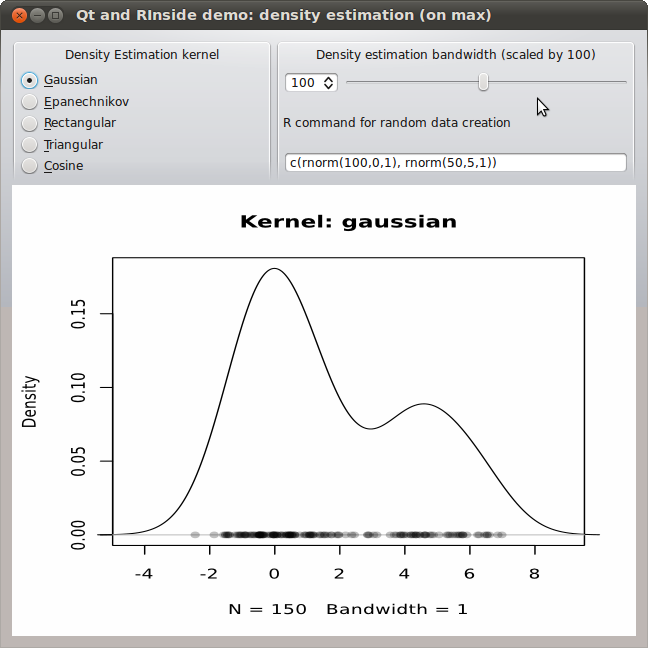
The RInside package makes it pretty simple and straightforward to embed R, the wonderful statistical programming environment and language, inside of a C++ application. This uses both the robust embedding API provided by R itself, and the higher-level abstractions from our Rcpp package. A number of examples are shown on this blog both here and here as well as on the RInside page; and the source package actually contains well over a dozen complete examples which cover anything from simple examples to parallel use via MPI for parallel computing. Beginning users sometimes ask about how to use RInside inside larger projects. And as I had meant to experiment with embedding inside of the powerful Qt framework anyway, I started to dabble a little. A first result is now in the SVN sources of RInside. My starting point was the classic tkdensity demo that comes with R itself. It is a good point of departure as Tcl/Tk makes it very portable---in fact it should run on every platform that runs R---and quite expressive. And having followed some of the GUI experiments around R over the years, I have also seen various re-implementations using different GUI frameworks. And so I am adding mine to this body of work: Example of embedding R via RInside into a Qt C++ application: density estimation for a mixture The problem I addressed first was actual buildability. For the RInside examples, Romain and I provide a Makefile that just works by making calls to R itself to learn about flags for R, Rcpp and RInside such that all required headers and libraries are found. That is actually relatively straightforward (and documented in our vignettes) but a little intimidating at first---which is why a ready-made Makefile is a good thing. Qt of course uses qmake and the .pro files to encode / resolve dependencies. So task one was to map what our Makefile does into its variables. Turns out that wasn't all that hard:
## -*- mode: Makefile; c-indent-level: 4; c-basic-offset: 4;  tab-width: 8; -*-
##
## Qt usage example for RInside, inspired by the standard 'density
## sliders' example for other GUI toolkits
##
## Copyright (C) 2011  Dirk Eddelbuettel and Romain Francois
TEMPLATE =              app
HEADERS =               qtdensity.h 
SOURCES =               qtdensity.cpp main.cpp
QT +=                   svg
## comment this out if you need a different version of R, 
## and set set R_HOME accordingly as an environment variable
R_HOME =                $$system(R RHOME)
## include headers and libraries for R 
RCPPFLAGS =             $$system($$R_HOME/bin/R CMD config --cppflags)
RLDFLAGS =              $$system($$R_HOME/bin/R CMD config --ldflags)
RBLAS =                 $$system($$R_HOME/bin/R CMD config BLAS_LIBS)
RLAPACK =               $$system($$R_HOME/bin/R CMD config LAPACK_LIBS)
## if you need to set an rpath to R itself, also uncomment
#RRPATH =               -Wl,-rpath,$$R_HOME/lib
## include headers and libraries for Rcpp interface classes
RCPPINCL =              $$system($$R_HOME/bin/Rscript -e \'Rcpp:::CxxFlags\(\)\')
RCPPLIBS =              $$system($$R_HOME/bin/Rscript -e \'Rcpp:::LdFlags\(\)\')
## for some reason when building with Qt we get this each time
## so we turn unused parameter warnings off
RCPPWARNING =           -Wno-unused-parameter 
## include headers and libraries for RInside embedding classes
RINSIDEINCL =           $$system($$R_HOME/bin/Rscript -e \'RInside:::CxxFlags\(\)\')
RINSIDELIBS =           $$system($$R_HOME/bin/Rscript -e \'RInside:::LdFlags\(\)\')
## compiler etc settings used in default make rules
QMAKE_CXXFLAGS +=       $$RCPPWARNING $$RCPPFLAGS $$RCPPINCL $$RINSIDEINCL
QMAKE_LFLAGS +=         $$RLDFLAGS $$RBLAS $$RLAPACK $$RCPPLIBS $$RINSIDELIBS
## addition clean targets
QMAKE_CLEAN +=          qtdensity Makefile
The double dollar signs and escaping of parentheses are a little tedious, but hey it works and expands the compiler and linker flags such that everything <emjust works="Works">. The code itself is pretty straightforward too. We instantiate the RInside object as well as the main Qt application object. We then instantiate a new object of class QtDensity that will launch the main widget; it is given a reference to the RInside object.
// -*- mode: C++; c-indent-level: 4; c-basic-offset: 4;  tab-width: 8; -*-
//
// Qt usage example for RInside, inspired by the standard 'density
// sliders' example for other GUI toolkits
//
// Copyright (C) 2011  Dirk Eddelbuettel and Romain Francois
#include <QApplication>
#include "qtdensity.h"
int main(int argc, char *argv[])
 
    RInside R(argc, argv);  		// create an embedded R instance
    QApplication app(argc, argv);
    QtDensity qtdensity(R);
    return app.exec();
 
The definition of the main object is pretty simple: a few private variables, and a few functions to interact with the GUI and get values from the radio buttons, slider or input field---as well as functions to update the chart or re-draw the random variables.
// -*- mode: C++; c-indent-level: 4; c-basic-offset: 4;  tab-width: 8; -*-
//
// Qt usage example for RInside, inspired by the standard 'density
// sliders' example for other GUI toolkits
//
// Copyright (C) 2011  Dirk Eddelbuettel and Romain Francois
#ifndef QTDENSITY_H
#define QTDENSITY_H
#include <RInside.h>
#include <QMainWindow>
#include <QHBoxLayout>
#include <QSlider>
#include <QSpinBox>
#include <QLabel>
#include <QTemporaryFile>
#include <QSvgWidget>
class QtDensity : public QMainWindow
 
    Q_OBJECT
public:
    QtDensity(RInside & R);
private slots:
    void getBandwidth(int bw);
    void getKernel(int kernel);
    void getRandomDataCmd(QString txt);
    void runRandomDataCmd(void);
private:
    void setupDisplay(void);    // standard GUI boilderplate of arranging things
    void plot(void);            // run a density plot in R and update the
    void filterFile(void);      // modify the richer SVG produced by R
    QSvgWidget *m_svg;          // the SVG device
    RInside & m_R;              // reference to the R instance passed to constructor
    QString m_tempfile;         // name of file used by R for plots
    QString m_svgfile;          // another temp file, this time from Qt
    int m_bw, m_kernel;         // parameters used to estimate the density
    QString m_cmd;              // random draw command string
 ;
#endif
Lastly, no big magic in the code either (apart from the standard magic provided by RInside). A bit of standard GUI layouting, and then some functions to pick values from the inputs as well as to compute / update the output. One issue is worth mentioning. The screenshot and code show the second version of this little application. I built a first one using a standard portable network graphics (png) file. That was fine, but not crisp as png is a pixel format so I went back and experimented with scalable vector graphics (svg) instead. One can create svg output with R in a number of ways, one of which is the cairoDevice package by Michael Lawrence (who also wrote RGtk2 and good chunks of Ggobi). Now, it turns out that Qt displays the so-called SVG tiny standard whereas R creates a fuller SVG format. Some discussion with Michael reveals that one can modify the svg file suitably (which is what the function filterFile below does) and it all works. Well: almost. There is a bug (and Michael thinks it is the SVG rendering) in which the density estimate does not get clipped to the plotting region.
// -*- mode: C++; c-indent-level: 4; c-basic-offset: 4;  tab-width: 8; -*-
//
// Qt usage example for RInside, inspired by the standard 'density
// sliders' example for other GUI toolkits -- this time with SVG
//
// Copyright (C) 2011  Dirk Eddelbuettel and Romain Francois
#include <QtGui>
#include "qtdensity.h"
QtDensity::QtDensity(RInside & R) : m_R(R)
 
    m_bw = 100;                 // initial bandwidth, will be scaled by 100 so 1.0
    m_kernel = 0;               // initial kernel: gaussian
    m_cmd = "c(rnorm(100,0,1), rnorm(50,5,1))"; // simple mixture
    m_R["bw"] = m_bw;           // pass bandwidth to R, and have R compute a temp.file name
    m_tempfile = QString::fromStdString(Rcpp::as<std::string>(m_R.parseEval("tfile <- tempfile()")));
    m_svgfile = QString::fromStdString(Rcpp::as<std::string>(m_R.parseEval("sfile <- tempfile()")));
    m_R.parseEvalQ("library(cairoDevice)");
    setupDisplay();
 
void QtDensity::setupDisplay(void)   
    QWidget *window = new QWidget;
    window->setWindowTitle("Qt and RInside demo: density estimation");
    QSpinBox *spinBox = new QSpinBox;
    QSlider *slider = new QSlider(Qt::Horizontal);
    spinBox->setRange(5, 200);
    slider->setRange(5, 200);
    QObject::connect(spinBox, SIGNAL(valueChanged(int)), slider, SLOT(setValue(int)));
    QObject::connect(slider, SIGNAL(valueChanged(int)), spinBox, SLOT(setValue(int)));
    spinBox->setValue(m_bw);
    QObject::connect(spinBox, SIGNAL(valueChanged(int)), this, SLOT(getBandwidth(int)));
    QLabel *cmdLabel = new QLabel("R command for random data creation");
    QLineEdit *cmdEntry = new QLineEdit(m_cmd);
    QObject::connect(cmdEntry,  SIGNAL(textEdited(QString)), this, SLOT(getRandomDataCmd(QString)));
    QObject::connect(cmdEntry,  SIGNAL(editingFinished()), this, SLOT(runRandomDataCmd()));
    QGroupBox *kernelRadioBox = new QGroupBox("Density Estimation kernel");
    QRadioButton *radio1 = new QRadioButton("&Gaussian");
    QRadioButton *radio2 = new QRadioButton("&Epanechnikov");
    QRadioButton *radio3 = new QRadioButton("&Rectangular");
    QRadioButton *radio4 = new QRadioButton("&Triangular");
    QRadioButton *radio5 = new QRadioButton("&Cosine");
    radio1->setChecked(true);
    QVBoxLayout *vbox = new QVBoxLayout;
    vbox->addWidget(radio1);
    vbox->addWidget(radio2);
    vbox->addWidget(radio3);
    vbox->addWidget(radio4);
    vbox->addWidget(radio5);
    kernelRadioBox->setMinimumSize(260,140);
    kernelRadioBox->setMaximumSize(260,140);
    kernelRadioBox->setSizePolicy(QSizePolicy::Fixed, QSizePolicy::Fixed);
    kernelRadioBox->setLayout(vbox);
    QButtonGroup *kernelGroup = new QButtonGroup;
    kernelGroup->addButton(radio1, 0);
    kernelGroup->addButton(radio2, 1);
    kernelGroup->addButton(radio3, 2);
    kernelGroup->addButton(radio4, 3);
    kernelGroup->addButton(radio5, 4);
    QObject::connect(kernelGroup, SIGNAL(buttonClicked(int)), this, SLOT(getKernel(int)));
    m_svg = new QSvgWidget();
    runRandomDataCmd();         // also calls plot()
    QGroupBox *estimationBox = new QGroupBox("Density estimation bandwidth (scaled by 100)");
    QHBoxLayout *spinners = new QHBoxLayout;
    spinners->addWidget(spinBox);
    spinners->addWidget(slider);
    QVBoxLayout *topright = new QVBoxLayout;
    topright->addLayout(spinners);
    topright->addWidget(cmdLabel);
    topright->addWidget(cmdEntry);
    estimationBox->setMinimumSize(360,140);
    estimationBox->setMaximumSize(360,140);
    estimationBox->setSizePolicy(QSizePolicy::Fixed, QSizePolicy::Fixed);
    estimationBox->setLayout(topright);
    QHBoxLayout *upperlayout = new QHBoxLayout;
    upperlayout->addWidget(kernelRadioBox);
    upperlayout->addWidget(estimationBox);
    QHBoxLayout *svglayout = new QHBoxLayout;
    svglayout->addWidget(m_svg);
    QVBoxLayout *outer = new QVBoxLayout;
    outer->addLayout(upperlayout);
    outer->addLayout(svglayout);
    window->setLayout(outer);
    window->show();
 
void QtDensity::plot(void)  
    const char *kernelstrings[] =   "gaussian", "epanechnikov", "rectangular", "triangular", "cosine"  ;
    m_R["bw"] = m_bw;
    m_R["kernel"] = kernelstrings[m_kernel]; // that passes the string to R
    std::string cmd1 = "Cairo(width=6,height=6,pointsize=10,surface='svg',filename=tfile); "
                       "plot(density(y, bw=bw/100, kernel=kernel), xlim=range(y)+c(-2,2), main=\"Kernel: ";
    std::string cmd2 = "\"); points(y, rep(0, length(y)), pch=16, col=rgb(0,0,0,1/4));  dev.off()";
    std::string cmd = cmd1 + kernelstrings[m_kernel] + cmd2; // stick the selected kernel in the middle
    m_R.parseEvalQ(cmd);
    filterFile();               // we need to simplify the svg file for display by Qt 
    m_svg->load(m_svgfile);
 
void QtDensity::getBandwidth(int bw)  
    if (bw != m_bw)  
        m_bw = bw;
        plot();
     
 
void QtDensity::getKernel(int kernel)  
    if (kernel != m_kernel)  
        m_kernel = kernel;
        plot();
     
 
void QtDensity::getRandomDataCmd(QString txt)  
    m_cmd = txt;
 
void QtDensity::runRandomDataCmd(void)  
    std::string cmd = "y <- " + m_cmd.toStdString();
    m_R.parseEvalQ(cmd);
    plot();                     // after each random draw, update plot with estimate
 
void QtDensity::filterFile()  
    // cairoDevice creates richer SVG than Qt can display
    // but per Michaele Lawrence, a simple trick is to s/symbol/g/ which we do here
    QFile infile(m_tempfile);
    infile.open(QFile::ReadOnly);
    QFile outfile(m_svgfile);
    outfile.open(QFile::WriteOnly   QFile::Truncate);
    
    QTextStream in(&infile);
    QTextStream out(&outfile);
    QRegExp rx1("<symbol"); 
    QRegExp rx2("</symbol");    
    while (!in.atEnd())  
        QString line = in.readLine();
        line.replace(rx1, "<g"); // so '<symbol' becomes '<g ...'
        line.replace(rx2, "</g");// and '</symbol becomes '</g'
        out << line << "\n";
     
    infile.close();
    outfile.close();
 
What the little application does is actually somewhat neat for the few lines. One key features is that the generated data can be specified directly by an R expression which allows for mixtures (as shown, and as is the default). With that it easy to see how many points are needed in the second hump to make the estimate multi-modal, and how much of a distance between both centers is needed and so on. Obviously, the effect of the chosen kernel and bandwidth can also be visualized. And with the chart the being a support vector graphics display, we can resize and scale at will and it still looks crisp. The code (for both the simpler png variant and the svg version shown here) is in the SVN repository for RInside and will be in the next release. Special thanks to Michael Lawrence for patiently working through some svg woes with me over a few emails.

Update: Some typos fixed.

Update 2: Two URLs corrected.

Julien Blache: forked-daapd: v0.14

forked-daapd v0.14 is available. This release includes a number of improvements to the sort headers/sort fields handling by Kai that got entangled into a larger database revamp at the end of last year. That will be the subject of the next release. Also in this release: This release performs a heavy database upgrade process that dumps and reloads the files table; this can take some time on big libraries, so please be patient while this process takes place. You should backup your database file before upgrading, just in case. See you in about two weeks for 0.15 with some database speedups that will finally see the light :-) Tarballs available at http://alioth.debian.org/~jblache/forked-daapd/ ; GPG signatures made with my Debian key F5D65169.

Philipp Kern: Debian ftpmaster Meeting The wanna-build/buildd part

I've joined the Debian ftpmaster team in the Linuxhotel in Essen-Horst and so far my coding/hacking has been quite productive (it wasn't on dak after all). Linuxhotel has both a nice working and holiday atmosphere. Albeit I'm not taking much time off anyway.
  • Reenabled mipsel d-i autobuilding. (#618989)
  • Added support to filter the buildd overview pages by out-of-date/uncompiled. (#555527)
  • Adapted the wanna-build triggers (i.e. the scripts that import an archive into wanna-build and which are called by dak instances, for instance) to not start processing immediately but flag that a push happened. The real work is then done by a cronjob that loops through the various flags until there's nothing to do anymore. That avoids losing triggers on the way due to locking. (#602841)
  • All buildds (regardless whether they are running lenny or squeeze) are now running sbuild/buildd 0.61.0. Of course there are quite some patches on top of the upstream version. Packages are available in our repository.
  • Autosigning: adjusted buildd to pass a keyid to sbuild and to arrange for the then-signed .changes to be uploaded (configurable per dist in .builddrc); this involved some hackery in sbuild to actually cope correctly with a keyid passed on the CLI and to sign the package at the right time in the build process
  • Updated the unit tests of the build log importer: mocking more objects (especially the PostgreSQL log database; the tests were broken ever since pkg_history was added as a table) and testing that the actual content we write to disk matches up with our expectations
  • Added support for MIME encoded build logs to the build log importer. The log is still transmitted by mail from the buildd to the admins/security team and to the central log host. However it's now gzip-compressed, which shouldn't cause "this mail is too big" bounces anymore and also save some unneeded traffic for our buildd host sponsors. Furthermore .changes files are now attached to the mail instead of placed somewhere within the log, so it's also easier to sign packages without relying on regular expressions identifying the right portion within the log.
  • Added initial support for arch:all autobuilding to the database, wanna-build and buildd. The merging still needs more thinking as the cases in which an arch:all needs to be built still need to be determined. (Also it needs a Packages file for all the arch:all packages in a suite because it's not guaranteed that the newest arch:all is listed in any of the arch-specific Packages files.)
  • Adjusted my own scripts for build processing (which are used by a few others) to at least ignore autosigned logs. It still needs to grow deMIME abilities, though.
Autosigning will get its own posting later on, unless Joerg gets there first. There is currently one buildd (zandonai/s390) that has working autosigning for all suites on ftp-master (but not for security, backports or edu). More will be added in the next days.

Joerg Jaspert: Debian FTPMaster meeting 2011 - No, he's pretty dumb. He's in all the same special classes I am.

Should you have thought we are gone, let me assure you - we are not. I just blog a bit later than I did the last days. Anyways, we did have a good day yesterday. Turns out that, when Ansgar said I don t know much Python so might not be able to do much he actually meant Just point me at problems, no matter how complicated, and I come up with the python code to fix them . And so we did point him at various problems and got lots of code. And we intend to continue this until Sunday. Yesterday Mark got his Packages/Sources tool so far that we are about ready to ditch the old things, even though he took time to finalize my generate-release changes too. Not to speak about that database changes I wrote about in my last entry, which he now seems to have finally wrapped his brain around in a way to get those done. Short cite: good god, this will overhaul about all our code and database handling . And thats where he is currently working on too. He did draw a plenty complicated thats how it works onto the flip chart, and now seems to dump his brain into some form of python code. I m curious about the result, lets see. Torsten fixed up the code that generated the Maintainers and Uploaders files. The old code was just plain silly and took about 15 minutes just for the Uploaders file. It is now doing both of them in less than two. Of course there had been lots of bugfixes and code enhances too, not really good to list in a blog like this. My work, besides getting a bit sick in the evening, consisted of writing shell scripts to enable us and wanna-build admins to handle the keys needed for the automated signing of packages build on DSA maintained buildds. I have those ready now, so we are able to start doing the autosign stuff today/tomorrow. Phil - well, did whatever buildd related stuff he has to. Different place, I dont see much of it, but he has a blog himself, look over there.

24 March 2011

Russ Allbery: backport 1.28

I finally found some time to convert my backport script to support squeeze (mostly because I finally did my first backport to squeeze). The script now treats squeeze as the default target and knows that it's the current stable, treats lenny as oldstable, and knows the correct version suffix to use for squeeze backports. It also now uses regular expressions to try to determine what code name a backport is targetted at, which should work better for more non-Debian internal distribution cases. You can get the latest version from my scripts distribution page.

Jan Wagner: Virtualisation on HP ProLiant hardware with squeeze

In case you are using HP ProLiant G6-series or G7-series with Intel-based hardware and you are thinking about virtualistion (e.g. booting the hypervisor), you should have a look into this customer advisory. To make it short, the following should work:

# grep GRUB_CMDLINE_XEN /etc/default/grub
GRUB_CMDLINE_XEN= pci=use_crs
# update-grub It took me two workdays to discover this solution for a DL180G6. Anyways I m still having trouble on a DL160G6 when booting the hypervisor, suggestions are welcome.

Joerg Jaspert: Debian FTPMaster meeting 2011 - I didn't do it, nobody saw me do it, there's no way you can prove anything!

And here we are, with another day of work ahead. And another huge unchecked/dinstall run about to finish. Yesterday evening Ansgar and later on Phil turned up, so we are now 5 persons sitting here and mostly coding happily away. Mark continued trying to wrap his brain around the changes we need to properly support multiple archives, with different sets of rights attached to them. It is a complex topic giving lots of headache. Besides that he is on a very good way of letting us completly remove apt-ftparchive by importing all the data we need to write Packages/Sources files on our own. And even better, the same work we can use to rewrite our rm and cruft-report commands in a sane way, not parsing Packages files anymore. Torsten did help with various database issues around the Packages/Sources issue and continued working on importing all the source filenames into the database, so we can soon provide a Contents file for sources. My own work, besides writing blog entries and preparing meeting minutes, consists of a rewrite of the script generating our Release files, the old one just wasn t up to it anymore. Especially not as we are on our way of having more and more of our tools use parallel processing, to fully use the power our ftp-master host has. And when I am done with this I will be off to tackle the keyring maintenance part we will need to enable autosigning by buildds to work. Should get interesting, with the shit of an interface one usually finds to gpg Ansgar started out by working on changes to our NEW handling, something I started with the dpkg bug #619131 and he just finished our site of the NEW handling scripts. Which means that, as soon as the dpkg maintainers added the code on their side and support this field in the .dsc files, NEW handling for packages like linux-2.6 will be much smoother. He is now implementing version control constraints into our control-suite tool. Phil is working on wanna-build stuff. And while this is just a short overview of what we did, there is always lots of discussion and bugfixing going on. It is incredibly useful to have a team sitting in one room for some days.

23 March 2011

MJ Ray: #Budget11 one #coops response

I ve posted #Budget11 one #coops response on UK.coop because it s a bit long and I doubt many of the people reading this through software-related sites will want to read it. If you re interested in UK co-ops and the budget, click through to read points including: Comment here or there, as you prefer. I ll read both every day or so for the next little while.

Kumar Appaiah: Review of "Linux Shell Scripting Cookbook"

I have been reading Linux Shell Scripting Cookbook by Sarath Lakshman, published by Packt, for a while. While most people I know learn shell scripts themselves, I was looking to refresh my concepts a little as well as have a reference lying around on the table for fast access. Since I was asked to review it for someone else, I thought I might as well post the review here.First of all, let me remark by saying that shell scripting is something learned more on a need basis than as a tool to solve the main problem. People would seldom write shell scripts as standalone programs (exceptions exist). However, what makes shell scripting invaluable to know is the fact that knowing some tricks can save several minutes, or hours, of work by automating and simplifying certain tasks, generally (but not restricted to) file management and data processing. Linux Shell Scripting Cookbook does go quite far in pursuing this goal, and is appropriate for both beginners who are looking to gain dexterity in shell scripting, as well as intermediate users who wish to polish their skills. The book also can double up as a quick reference, though I would argue that the "Advanced Bash Scripting Guide" would suit that more.At the outset, the author clarifies that the focus will be on Bash. This, people may or may not like, but the fact that bash has become ubiquitous in terms of the available shells on Unix-like systems today, starting out with bash is not a bad thing to do. Besides, learning other shell scripting languages while knowing bash isn't too hard, since the paradigm remains the same.Let's go through the books from the aspects I found most relevant.OrganizationThe book is organized into chapters based more on utility than scripting concepts themselves, although the language aspects are brought onto the reader gradually. For instance, the examples in the first chapter focus more on the basic data elements (variables, arrays, functions etc.) as well as operators (for numbers, files etc.), and all the examples demonstrate simple usage of these concepts, and he further chapters build upon these in a gradual manner.At the same time, if the reader has some familiarity with shell scripting and needs to only refresh or learn a certain concept, he/she needs to just read the relevant chapter. It is not too difficult to grasp the examples of the later chapters, provided some basic shell knowledge is assumed.Content and PresentationA positive trait in the presentation of this book is that it is all based on practical everyday examples which, with minor adaptation, can be used by many for their own daily tasks. For instance, there are several examples which describe searching for and processing files, which, I'd imagine, many users would want to do on a regular basis. Thus, providing realistic examples allows the book to double its utility. The language and approach used is simple and conversational, and the presentation is very clear, with each idea being described as a problem statement followed by a "How to do it" section with the actual code, and ending with a discussion of the nitty-gritties of the code. It is easy to go for a quick scan for those in a hurry, while those who with to read in more detail will not be disappointed either.The book also covers a wide array of applications. For instance, there are examples on automating fetching web pages and processing them, demonstrations of parsing and simplifying and even some queries around databases wrapped around in shell. It also spans to utilities and tasks connected to statistics, backups, compression, version control and many more.Breadth and DepthThe book goes into a fair amount of detail in terms of describing the shell scripting concept under consideration. The examples used go into a fair amount of detail in order to describe to the user all the aspects involved in the method or command being used. The concepts described are fairly complete, and would be sufficient for the reader to use immediately or with just a little bit of fine tuning. In terms of breadth, the book covers most of the features of shell scripting while also describing the various facilities the shell provides access to in a Unix-like environment. Thus, the book does not disappoint in this front either.In summary...In summary, probably the only thing I'd have liked to see more of is some emphasis on how to write more efficient shell scripts. Granted, most of the shell scripts described in the book are very simple and succinct, but a some words on how loops can be made better, or how to spot situations where pipes are not needed to solve a problem etc. might have been a nice addition. Some explanation of differences with dash, tcsh, zsh etc. might also have been nice, since a lot of users have different default shells. But all this isn't going to prevent me from giving this book a high rating, since it delivers quite well on the promises it makes at the beginning.This is definitely a good book to have near your desk, and kudos to the author for having taken the effort to put it together. I would highly recommend it to the beginner and occasional shell user for a thorough read, and to an intermediate to have on his/her desk for borrowing the cool scripting ideas and applications the author has written in this book.

Kapil Paranjape: John Willard Milnor: Abel Prize 2011

The Abel prize for 2011 has been awarded to John Willard Milnor.[1] In response to a query from Dr. R. Ramachandran who writes about Science and Science Policy for The Hindu'' newspaper group, I wrote the following short piece which others may find interesting as well. Milnor is well-known for his work on topology and geometry. He has also made significant contributions to algebra and even number theory. In addition, he has written a number of books which are loved by graduate students in Mathematics all over the world. One of the striking early results of Milnor was the example he gave of a seven dimensional space which is topologically a sphere but its geometric (differentiable) structure is different. This was the first example of an "exotic sphere". A nice way to state his main result (due to Ajit Sanzgiri) is that "Groups of homotopy spheres are homotopy groups of spheres". Milnor received the Fields' Medal in 1962. In addition, the work of a number of later Fields' medallists such as Donaldson, Thurston, Mori and Voevodsky can be seen as having roots in the work of Milnor.
A more personal perspective The first time I came across the name Milnor was when I heard that the only dimensions in which one can do algebra with division is 1, 2, 4 and 8; I was told that an "easy" proof was based on Characteristic Classes on which Milnor had written a nice book. In later years, I read a number of his other books like Topology from a differentiable viewpoint'', Morse theory'', Isolated singularities of complex hypersurfaces'' and Algebraic K-theory''. These books not only explained the results and definitions, but laid the foundations of my geometric intuition --- the same is probably true for many others in my generation. When I joined TIFR, Raghunathan was full of praise for the work of Milnor and how his deep ideas on differential topology would "lead somewhere". One of the first lectures in our graduate seminar was by Ajit Sanzgiri on Milnor's paper on exotic spheres --- the title of the talk was Groups of homotopy spheres are homotopy groups of spheres''. When Srinivas taught me (algebraic) K-theory, the only available reference text was Milnor's book (Milnor K-theory forms a crucial component of Voevodsky's early 21st century work that won him his Fields Medal!); since then Srinivas has written a more modern and comprehensive book on the topic. Later, when A. J. Parameswaran started work on his Ph.D. under the guidance of Srinivas, AJP and I read Milnor's book on isolated singularities together --- as a prelude to the sequel to Milnor's book (by Looijenga). Much of the modern work on the algebraic theory of singularities (which forms a crucial component of Mori's Fields medal winning work on terminal three dimensional singularities) starts with the notion of "Milnor number" and "Milnor fibrations". If the impact of a mathematician is to be measured not only by his own fantastic results but the great results of others that grow out of his work, then Milnor is certainly one of the greats of the latter half of the twentieth century. Much of the topology and geometry that I have used in my work relies on simpler versions of Milnor's results that were proved by his predecessors. So (unfortunately!) I cannot quote a result that I have proved which actually uses a theorem of Milnor's.
Groups of homotopy spheres are homotopy spheres'' I think the idea of joining two spaces by a tube to make a new space (called connected sum) is due to Whitney or Kervaire. This leads the "algebra of spaces" or to give it its mathematical name "the cobordism group". Milnor showed us how to perform calculations with this group. Another group studied by topologists combines the different ways in which a sphere of one dimension wraps around'' a sphere of a (possibly) different dimension; this is called a homotopy group of the second sphere. Milnor's brilliant idea was to show that in certain cases, the two groups obtained are the same. Said pithily, "Groups of homotopy spheres (exotic spheres)" are the same as "homotopy groups of spheres".
Some remarks A number of people have remarked that what we need in order for institutes like IISER to grow are teaching researchers''. The system of universities in the USA has thrown up a few shining examples --- Richard Feynman in Physics and John Milnor in Mathematics are two names that immediately spring to mind.

[1]The last time I wrote about the Abel Prize was to contribute to a guest post to Rahul Basu's science blog: The Far Side. Unfortunately, Rahul is no longer among us. This post is dedicated to the memory of Rahul Basu.

Gerfried Fuchs: LXC and NAT on notebook

Yesterday I was hinted towards lxc when I wondered what happened to openvz in unstable (which unfortunately isn't documented at all in the kernel changelogs, but that's a different story). So I started off taking a look. From a bit of experimenting around with it I consider it something that I want to play more with, and I want to share the problems I stumbled upon with you so that you don't have to figure them out on your own. First of all, LXC uses the cgroup kernel facility for resource management. The according file system isn't mounted by default, and LXC doesn't care for where it is mounted, it just needs to be. It seems like /sys/fs/cgroup seems to be the proper place (see 601757), so add the line cgroup /sys/fs/cgroup cgroup defaults 0 0 to your /etc/fstab file and sudo mount cgroup it. Next, it seems like bridging is the defacto standard for networking with lxc, but given that I want to use it on my notebook while being mobile I can't bind the bridge to any specific interface. To make this happen, one needs the bridge-utils package installed, and secondly, this is the path that I chose. I've added to /etc/network/interfaces this snippet:
auto br0
iface br0 inet static
    bridge_maxwait 0
    bridge_ports dummy0
    address 10.80.80.1
    netmask 255.255.255.0
This will bring up the bridge and act as gateway. For the running system, call sudo ifup br0. To make the host universally being able to work as gateway, of course ip_forward needs to be enabled. For this I added the line net.ipv4.ip_forward=1 to /etc/sysctl.d/local.conf (and for the running system, echo 1 into /proc/sys/net/ipv4/ip_forward). As I am using ferm for configuring the firewall on my notebook I have to add some parts into its configuration. This is the raw part that needs to get added, mix it into your existing configuration:
table filter  
    chain INPUT  
        # allow DNS queries from LXContainers
        proto (udp tcp) dport domain source 10.80.80.0/24 ACCEPT;
     
    chain FORWARD  
        # allow LXContainers into the net
        source 10.80.80.0/24 ACCEPT;
     
 
table nat  
    chain POSTROUTING  
        # NAT LXContainers
        source 10.80.80.0/24 MASQUERADE;
     
 
For DNS I installed dnsmasq so that I won't have to touch the /etc/resolv.conf inside the containers whenever I switch networks. So far for the host part, now to the actual containers. There is the /usr/lib/lxc/templates/lxc-debian helper script which uses debootstrap to create you a lenny chroot at least in the squeeze package this is hardwired, likewise with using cdn.debian.net. Copy the script and edit it to your likes if you feel like it. From what I understood it expects you to store the containers below /var/lib/lxc, I haven't yet tested for different places. So this was my commandline for that:
sudo /usr/lib/lxc/templates/lxc-debian -p /var/lib/lxc/vm0 A while later you'll end up below that directory with two entries: The config file and the rootfs subdirectory which is actually the bootstrapped distribution part. Now comes the configuration of the container. Open the config file with your favorite editor and add the following lines to the end:
lxc.utsname = vm0
lxc.network.type = veth
lxc.network.flags = up
lxc.network.link = br0
# lxc.network.name = eth0
lxc.network.hwaddr = 00:FF:80:80:80:80
lxc.network.ipv4 = 10.80.80.80/24
The network.name part is commented out, it defaults to that name internally; you though can change it to whatever you prefer. Caution, even though this is the documented approach, it does not work for Debian containers. It will always try to get its IP address through dhcp, lxc.network.ipv4 has no meaning for us. We need to change inside the rootfs the file etc/network/interfaces to read like this instead:
auto lo
iface lo inet loopback
auto eth0
iface eth0 inet static
   address 10.80.80.80
   netmask 255.255.255.0
   gateway 10.80.80.1
I suggest to keep the config and the interfaces file aligned with respect to the ipv4 setting so if this gets fixed upstream you won't stumble into any surprises. Also like mentioned before, we need to change the nameserver entries inside the rootfs file etc/resolv.conf to read nameserver 10.80.80.1. Now it's time to start it up and log in! sudo lxc-start -n vm0 -d will start the container in the background, and sudo lxc-console -n vm0 will give you the login to the container. The default password for the root user is root, obviously you want to change that before you install any networking services into the container like ssh-server. In case you want to quit from that console notice the message upon starting it, it's bound to <Ctrl+a q>. One more issue that I had: The default route wasn't set. I had to manually call ip r a default via 10.80.80.1 dev eth0 to be able to use the network inside the container. It seems to be related to that netbase isn't installed by default. If you install it the default route will be set upon starting the container automatically. This should get you started, there is of course more to explore and experiment with. Actually it is also suggested to create a tarball from your vm0 after you did the basic setup and installed the basic components you want to have around so you won't have to bootstrap over and over again. Do this after you have shut down the container, either through a halt from a container shell or through sudo lxc-stop -n vm0. The tarball can then get extracted to a different directory and just needs minor tweaks in the config and rootfs/etc/network/interfaces file to not create any clash with other containers (lxc.rootfs, lxc.mount.entry, lxc.utsname, lxc.network.hwaddr and ipv4 address). About limiting the containers, you can do it dynamically through the cgroup file system, and set it permanently through the config file. See man lxc.conf about these settings, amongst others. Enjoy, use, experiment. With sudo lxc-checkconfig you will see what your kernel actually supports for your LXCs. You will most probably notice the missing for the memory controller, this is tracked in the Debian bug report 534964.

/debian permanent link Comments: 6 Flattr this

Joerg Jaspert: Debian FTPMaster meeting 2011 - Maybe, just once, someone will call me 'Sir' without adding, 'You're making a scene.'

Good morning, and welcome to another day of archive damage, i mean hackery. Well, at least at the time of this writing it is morning and we are starting off into another day of work. As we promised to try to have at least a once-a-day-installation run I am currently processing the queue of uploaded packages, around 4gigabytes from 431 changes files. After that a dinstall will follow to push that all out. Lets see how often we can do this again today, yesterday we managed multiple times. Yesterday my work consisted of getting the ries sync into something nice and acceptable, starting to think of the change to only use the suite codenames in future (long term making lots of code issues easier, but short term a good headache) and doing the groundwork so we can upgrade the security and backports archive to squeeze/pg9 too. Mark finished of the Built-Using flag and then moved on to think about database file tracking changes related to multiple archives/locations. Which sounds simple in so few words but is definitely not simple at all. Torsten started to work on source contents and also on generating the packages/sources files out of our database. Both together is taking a good amount of time, so he continues to work on those today. In the evening we had a meeting with the Debian Hurd porters about the future of their port within the Debian archive. The perceived Hurd situation until then was that every port has to follow certain rules or gets thrown out but Hurd doesn t seem to ever get into a releasable state . Well, we did get a clean view on both sides standpoint and in the end emerged with a solution which works for both sides: The Hurd port stays on FTPMaster until Wheezy is released. Should they have managed to get the port into a state that it is released together with all the others (probably as a technology preview), it is kept in the archive. Should they not manage this, the port will be removed from the main archive and move fully to debian-ports.org. It may then reenter the main archive whenever it is ready to get released with the next release. For today we are all continuing in our parts, Mark is yelling at the insanity of the multi-location thing (something we DO need when we want to merge multiple archives, which we do want), Torsten curses the code for Packages/Sources and while I hope that DSA can find time today to upgrade our security- and backports-archive machines to Squeeze, I try to wrap my head around the code we kindly got provided by Serafeim Zanikolas - the dinstall programming fun task I asked a while ago. Im not sure yet I will succeed. :) And then we will get more arrivals this evening, so more people doing stuff tomorrow.

22 March 2011

Axel Beckert: Different Flavours of Planet Commandline

Since there were quite some requests for a Planet Commandline feed without the microblogging feeds included, I splitted Planet Commandline into different flavours. I m quite happy with that solution, because I must admit that the amount of microblogging postings in relation to normal blog postings was indeed higher than initially expected So from now on Planet Commandline has a basic flavour at http://planet-commandline.org/ and one with the microblogging feeds (climagic and commandlinefu) included at http://planet-commandline.org/+snippets/. For making this possible I hacked our Planet Venus wrapper to accept arbitary configuration snippets to be added at the end of the configuration as well as as sed-based modifications to the concatenated configuration before Planet Venus is run on them. This also allowed me to create further flavours of Planet Commandline: I hope nobody minds this diversification of Planet Commandline. Currently no combination of flavours is supported, but if there s a relevant demand for the one or the other combination of flavours I may have a look if that can be automated, too.

Pietro Abate: Xen brouter setup

A while ago I received a new desktop machine (8 cores, 8Gb of memory ...) at work. Since for the moment I kinda happy to work on my laptop using an external screen, I decided to put the hw to a good use and to explore a bit more some more exotic (at least for me) xen features. In particular I spend half a day playing with different xen network settings. The bridge model, that should work out of the shelf, is the easiest one. To setup this up, you basically need to specify a couple of options in the xend-config file and you're done. This is the "default" network configuration and is should work out of the box in most situations. Using this method, since all VMs' interfaces are bridged together (surprise !) with the public interface, your network card is left in promiscuous mode (not a big problem if you ask me...). Once your VMs are up, you can then decided to use your default dhcp server, autoconf your VMs with ipv6 only, or do nothing as you please. An other popular method, albeit a bit more complex, is to setup a natted network using the script network-nat (this one is an evolution of the third method that is 'network-routed') . I played with it, but since I wanted to have all my DomU on the same subnet, this setup wasn't satisfying for me. In particular, by default, 'network-nat' assigns a different subnet to each DomU. Using the natted set up you can also configure a local dhcp server to give private IPs to your VMs all done transparently by the xen network scripts. I've noticed that there is a bug in the xen script that does not make it very squeeze friendly. Since the default dhcp server in squeeze is isc-dhcp and few configuration files got shuffled in the process (notably /etc/dhcp3.conf is not /etc/dhcp/dhcp.conf) , the script needs a little fix to work properly. I'll report this bug sometimes soon... Goggling around I found a different setup that is called brouter, that is a hybrid between a bridge configuration and a routed configuration. This is the original (??) article well hidden in an old suse wiki.
 
I've done few modifications here to add natting. So basically, all virtual interfaces connected each to one DomU are linked together by a bridge (xenbr0). The bridge with address 10.0.0.1 is also the router of the subnet. All DomU are configured to used dhcp that assigns a new ip and specifies the router of the subnet. The dhcp server is configured to answer requests only on the xenb0 interface avoiding problems on the public network... routing is configured using iptables :
iptables -t nat -A POSTROUTING -o $ netdev -j MASQUERADE
iptables -A FORWARD -i $ bridge -j ACCEPT
echo 1 >/proc/sys/net/ipv4/ip_forward
/etc/init.d/isc-dhcp-server restart
Note that since the dhcp server is configured to give addresses only on the virtual network, we need to restart it after creating the bridge interface, otherwise isc-dhcp-server will refuse to run. Mum says that I should configure the bridge in /etc/network/interfaces to make the dhcp server happy at startup, but I felt a bit lazy, so I let to task to xen... In the next episode, I'll add ipv6 connectivity to the virtual subnet and then start playing with puppet... ipv6 is almost done, puppet... I started with the doc... The complete script from the suse wiki and with my modifications is below (only lightly tested):
#!/bin/sh
#============================================================================
# Default Xen network start/stop script.
# Xend calls a network script when it starts.
# The script name to use is defined in /etc/xen/xend-config.sxp
# in the network-script field.
#
# This script creates a bridge (default xenbr$ vifnum ), gives it an IP address
# and the appropriate route. Then it starts the SuSEfirewall2 which should have
# the bridge device in the zone you want it.
#
# If all goes well, this should ensure that networking stays up.
# However, some configurations are upset by this, especially
# NFS roots. If the bridged setup does not meet your needs,
# configure a different script, for example using routing instead.
#
# Usage:
#
# vnet-brouter (start stop status) VAR=VAL *
#
# Vars:
#
# bridgeip Holds the ip address the bridge should have in the
# the form ip/mask (10.0.0.1/24).
# brnet Holds the network of the bridge (10.0.0.1/24).
#
# vifnum Virtual device number to use (default 0). Numbers >=8
# require the netback driver to have nloopbacks set to a
# higher value than its default of 8.
# bridge The bridge to use (default xenbr$ vifnum ).
#
# start:
# Creates the bridge
# Gives it the IP address and netmask
# Adds the routes to the routing table.
#
# stop:
# Removes all routes from the bridge
# Removes any devices on the bridge from it.
# Deletes bridge
#
# status:
# Print addresses, interfaces, routes
#
#============================================================================

#set -x

dir=$(dirname "$0")
. "$dir/xen-script-common.sh"
. "$dir/xen-network-common.sh"

findCommand "$@"
evalVariables "$@"

vifnum=$ vifnum:-0
bridgeip=$ bridgeip:-10.6.7.1/24
brnet=$ brnet:-10.6.7.0/24
netmask=$ netmask:-255.255.255.0
bridge=$ bridge:-xenbr$ vifnum

##
# link_exists interface
#
# Returns 0 if the interface named exists (whether up or down), 1 otherwise.
#
link_exists()

if ip link show "$1" >/dev/null 2>/dev/null
then
return 0
else
return 1
fi


# Usage: create_bridge bridge
create_bridge ()
local bridge=$1

# Don't create the bridge if it already exists.
if [ ! -d "/sys/class/net/$ bridge /bridge" ]; then
brctl addbr $ bridge
brctl stp $ bridge off
brctl setfd $ bridge 0
fi
ip link set $ bridge up


# Usage: add_to_bridge bridge dev
add_to_bridge ()
local bridge=$1
local dev=$2
# Don't add $dev to $bridge if it's already on a bridge.
if ! brctl show grep -wq $ dev ; then
brctl addif $ bridge $ dev
fi


# Usage: show_status dev bridge
# Print interface configuration and routes.
show_status ()
local dev=$1
local bridge=$2

echo '============================================================'
ip addr show $ dev
ip addr show $ bridge
echo ' '
brctl show $ bridge
echo ' '
ip route list
echo ' '
route -n
echo '============================================================'
echo ' '
iptables -L
echo ' '
iptables -L -t nat
echo '============================================================'


op_start ()
if [ "$ bridge " = "null" ] ; then
return
fi

create_bridge $ bridge

if link_exists "$bridge"; then
ip address add dev $bridge $bridgeip
ip link set $ bridge up arp on
ip route add to $brnet dev $bridge
fi

if [ $ antispoof = 'yes' ] ; then
antispoofing
fi
iptables -t nat -A POSTROUTING -o $ netdev -j MASQUERADE
iptables -A FORWARD -i $ bridge -j ACCEPT
echo 1 >/proc/sys/net/ipv4/ip_forward
/etc/init.d/isc-dhcp-server restart


op_stop ()
if [ "$ bridge " = "null" ]; then
return
fi
if ! link_exists "$bridge"; then
return
fi

ip route del to $brnet dev $bridge
ip link set $ bridge down arp off
ip address del dev $bridge $bridgeip
##FIXME: disconnect the interfaces from the bridge 1st
brctl delbr $ bridge
/etc/init.d/isc-dhcp-server restart


case "$command" in
start)
op_start
;;

stop)
op_stop
;;

status)
show_status $ netdev $ bridge
;;

*)
echo "Unknown command: $command" >&2
echo 'Valid commands are: start, stop, status' >&2
exit 1
esac

Dirk Eddelbuettel: 2011 March Madness Half Marathon in Cary

On Sunday the annual March Madness Half Marathon in Cary took place, which (at least informally) opens the running season in greater Chicago. Following my participation in 2005. 2006, 2007, 2008, 2009). and 2010, I kept that streak going. Weather was pretty bad: A forecast of rain materialized with a shower at the start, another at about the halfway mark and a more solid downpour at the end, while temperature where in the lower 40s. And as I train less than I used to, I was also few just a few second slower than last year at 1:39:55 (hand-stopped) but managed to sneak in just under 100 minutes (and having taken six seconds to the starting lime, the official non-chip time has me just over that mark). All-in-all another nice half-marathon and I was appropriately sore yesterday.

Michal &#268;iha&#345;: phpMyAdmin translation status

We're heading to release candidates for phpMyAdmin 3.4.0, so the translators have less time to make the translations better. There are still 13 translations at 100%: There are still lot of translations which would need some love, for example: Recently, new people started to work on Bulgarian and Brazilian Portuguese translations, so we will hopefully have these two on the list soon as well. You can help make translation to your language better! If your language is missing just let me know (either in comments or by email).

Filed under: English Phpmyadmin 1 comments Flattr this!

Joerg Jaspert: Debian FTPMaster meeting 2011

I am at the next edition of Debian FTPMaster meetings in the LinuxHotel Essen currently. We arrived Sunday evening and will stay until 27th March, giving us again a nice week of time to work on outstanding archive issues. And our todo does list a good number of points. Currently we are 3 persons, all 3 FTPMasters. On Wednesday evening one wanna-build member will join and on Friday evening one FTPTeam member arrives for the weekend. While thats not all of our team it still gives us a good base to work on. And so we already did, starting Sunday evening with unbreaking some fallout from Lenny->Squeeze update of the ftpmaster host as well as discussing some of our agenda points and how to tackle them. Today I started changing our backup strategy. Instead of dumping the whole dak database at dinstall start and end, a 4gb file each time, later compressing and then expiring them, we don t dump them at all anymore. Instead we save the postgres transaction id and let the Debian Sysadmin team do the backup. Which they do anyways, using the PostgreSQL WAL stuff. Which means we can just tell them to please reset the dak db to the place of transaction $BLA . Something that only works as we are switching to Postgres 9.0 and will use replication to sync our DD-accessible machine. Torsten started work by explaining us his ORMObject idea in our database layer, then violently vomitting when I pointed him at some code to fixup. Seems that code isn t all the most beautiful one, so he switched to cleanup in a different place. Lets see if I get him back to that bad code. Mark is playing with our database and trying to get that from 8.4 to 9.0, seems like some stuff we are using isn t all that en vogue anymore in 9.0, so might need adjustments.

Rapha&#235;l Hertzog: Download ISO images of Debian CD/DVD at light speed with Jigdo

Debian CD/DVD ISO images are huge files (4.7 GB for a DVD). It can take a long time to download if your connection with the server is not very fast. Jigdo can help you download them much more quickly if you have a high-speed connection to a normal Debian mirror. If your download rate from your usual Debian mirror is not better than the download rate from the closest Debian CD mirror, then you should download your images straight from the Debian CD mirror. Otherwise read on and learn how you can save lots of time. Jigdo is based on a simple idea: the CD images contain mainly thousands of .deb files (and source files too) that are already available on all Debian mirrors. So instead of downloading the ISO image in its entirety, you could reconstruct it with all the files that it contains, that you would download from your usual Debian mirror. Thus when you download a .jigdo file, you only download a little text file (compressed with gzip) that contains enough information to reconstruct the complete image: The tool that we will use to regenerate the ISO images is called jigdo-lite, it s available on Windows if you don t have any Debian system yet. Otherwise just install the jigdo-file Debian package. We just need the URL of a .jigdo file (get one from the Debian CD page) and we pass it to jidgo-lite on the command line. It asks for a path of Files to scan : if we have an older version of the same CD image, we can indicate a path where it is mounted and it will avoid redownloading the files that we already have, otherwise just press Enter. Then it asks for the Debian mirror to use and by default suggests the one used in /etc/apt/sources.list. Again pressing Enter is usually enough. You can even use --noask to avoid the prompts.

$ jigdo-lite http://cdimage.debian.org/cdimage/release/6.0.1/multi-arch/jigdo-dvd/debian-6.0.1-i386-amd64-source-DVD-1.jigdo
Jigsaw Download "lite"
Copyright (C) 2001-2005     jigdo@
Richard Atterer             atterer.net
Getting mirror information from /etc/apt/sources.list
Downloading .jigdo file
--2011-03-22 09:08:11--  http://[2001:6b0:e:2018::163]/cdimage/release/6.0.1/multi-arch/jigdo-dvd/debian-6.0.1-i386-amd64-source-DVD-1.jigdo
[...]
-----------------------------------------------------------------
Images offered by  http://cdimage.debian.org/cdimage/release/6.0.1/multi-arch/jigdo-dvd/debian-6.0.1-i386-amd64-source-DVD-1.jigdo':
  1: 'Debian GNU/Linux 6.0.1 "Squeeze" - Official Multi-architecture i386/amd64/source DVD #1 20110319-14:55 (20110319)' (debian-6.0.1-i386-amd64-source-DVD-1.iso)
Further information about  debian-6.0.1-i386-amd64-source-DVD-1.iso':
Generated on Sat, 19 Mar 2011 15:11:27 +0000
-----------------------------------------------------------------
If you already have a previous version of the CD you are
downloading, jigdo can re-use files on the old CD that are also
present in the new image, and you do not need to download them
again. Mount the old CD ROM and enter the path it is mounted under
(e.g.  /mnt/cdrom').
Alternatively, just press enter if you want to start downloading
the remaining files.
Files to scan: 
-----------------------------------------------------------------
The jigdo file refers to files stored on Debian mirrors. Please
choose a Debian mirror as follows: Either enter a complete URL
pointing to a mirror (in the form
 ftp://ftp.debian.org/debian/'), or enter any regular expression
for searching through the list of mirrors: Try a two-letter
country code such as  de', or a country name like  United
States', or a server name like  sunsite'.
Debian mirror [http://ftp.fr.debian.org/debian]: 
Downloading .template file
--2011-03-22 09:12:41--  http://cdimage.debian.org/cdimage/release/6.0.1/multi-arch/jigdo-dvd/debian-6.0.1-i386-amd64-source-DVD-1.template
[...]
Successfully created  debian-6.0.1-i386-amd64-source-DVD-1.iso'
-----------------------------------------------------------------
Finished!
The fact that you got this far is a strong indication that  debian-6.0.1-i386-amd64-source-DVD-1.iso'
was generated correctly. I will perform an additional, final check,
which you can interrupt safely with Ctrl-C if you do not want to wait.
OK: Checksums match, image is good!
And you re done, you have successfully downloaded an official Debian DVD with jigdo-lite. You can head over to the Debian CD page and find out the URL of the .jigdo files for the latest stable release. One last thing, Bluray images are only available with Jigdo because they are so huge that keeping complete ISO images would be a waste of disk resources of the CD images server (and its mirrors). Of course, if downloading ISO images and burning CD/DVD is not for you, you can always order some professionally printed CD/DVD. You will even help Debian by doing this.
If you want to read more articles like this one, click here to subscribe to my free newsletter. You can also follow me on Identi.ca, Twitter and Facebook.

6 comments Liked this article? Click here. My blog is Flattr-enabled.

Next.

Previous.