Search Results: "tach"

4 January 2011

Luke Faraone: Google Cr-48 first impressions

On a lark, I signed up for the pilot program of the Google Cr-48 about a week ago. To my surprise, I found the distinctive box on my doorstep a week later. After initially mistaking it for an overpacked, late-model OLPC XO-1 I would have to repair, I sort of did a double-take as I realized what I had received. Using Chrome OS

My Cr-48 and a Kindle

Wow, they weren t kidding about the boot time. Chrome OS responds (to suspend / resume and boot / power-off) very quickly. Responsiveness elsewhere in the OS of course varies on system load and other factors. On the terms page, there is a system security setting which tells me I have a Trusted Platform Module, and that my TPM has a randomly generated password. The dialog could use some rewording; I m pretty familiar with the idea of a TPM, but I m still not sure what I m to do with that information. Cloud print is really a problem for me, right now. I use school printers for the majority of my work, which I was previously able to use by adding them by IP address. Unless there s some magic I m missing here, I can t do that with Chrome OS, and such a feature will not be supported. (except by connectors on Windows and Mac computers) General thoughts I can t imagine using a system running Chrome OS as a primary computer. The biggest missing feature is PGP (or any sort of encryption) support for email. This is probably not terribly difficult to implement as an extension, but the idea of my cryptographic software being automatically updated is rather unsettling. I think I ll have to agree with Paul Buchheit that ChromeOS will have to merge with Android; there is a utility for local apps, even if they re becoming less and less critical.

30 December 2010

Jonathan McDowell: Why Linux? (Part 5: Flexibility)

(This is part of a series of posts on Why Linux?) I find Linux more flexible. Maybe that's the familiarity showing, maybe it's about the package management, but it's a powerful reason for me to use it. For example, a couple of years ago I wanted to try out some iSCSI stuff against a SAN. Of course I have test boxes available I can do this on, but this was just to try out a few bits and pieces rather than anything more concrete. So I installed open-iscsi on my desktop and was able to merrily do the tests I wanted with very little additional work. Or I wanted to try out some BitKeeper to git conversion work recently. I wasn't sure how much resource it would take on a build server, and didn't want to tie things up there. So I ran it on my desktop overnight, where I could easily setup the appropriate environment and wouldn't impact on anyone else's resources. Problems talking to dodgy hardware? Linux is much better about giving you some idea what's going on, without needing to install extra software. I had a workmate grappling with an old USB music player recently; hooking it up to her Windows laptop wasn't providing a lot of joy so I attached it to my Linux box and was able to see that it did identify ok, but was disconnecting randomly at times too. Want to script querying an AD server for the current employee list and displaying who's joined and who's left since the last time you did so? I found that easy enough with the common Linux LDAP tools. I'm sure it's doable under Windows too, but I'm not sure it would be quite so simple. For bonus points add graphviz into the mix for automatic organisation charts (modulo accuracy of the AD data). This flexibility is something that helps me do my job. Sure, as I mentioned above I do have access to test boxes that I can use for this, but being able to do it on my desktop can be useful - for example if I'm offline, or on a slow network connection, or just geographically distant from my test machines so network latency is higher than I'd like. (Also, it's something that makes a Linux box a really great test box. I'm lucky in that I have a mix of OSes available to me for testing, but the one that I use most often is the Debian box. Much easier to get and install decent diagnosis tools for it that can give me packet level dumps, or do really odd stuff that turns out to be really useful.)

23 December 2010

Raphaël Hertzog: People behind Debian: Mehdi Dogguy, release assistant

Mehdi Dogguy

Picture of Mehdi taken by Antoine Madet

Mehdi is a Debian developer for a bit more than a year, and he s already part of the Debian Release Team. His story is quite typical in that he started there by trying to help while observing the team do its work. That s a recurrent pattern for people who get co-opted in free software teams. Read on for more info about the release team, and Mehdi s opinion on many topics. My questions are in bold, the rest is by Mehdi (except for the additional information that I inserted in italics). Who are you? I m 27 years old. I grew up in Ariana in northern Tunisia, but have been living in Paris, France, since 2002. I m a PhD Student at the PPS laboratory where I study synchronous concurrent process calculi. I became interested in Debian when I saw one of my colleagues, Samuel Mimram (first sponsor and advocate) trying to resolve #440469, which is a bug reported against a program I wrote. We have never been able to resolve it but my intent to contribute was born there. Since then, I started to maintain some packages and help where I can. What s your biggest achievement within Debian? I don t think I had time to accomplish a lot yet :) I ve been mostly active in the OCaml team where we designed a tool to compute automatically the dependencies between OCaml packages, called dh-ocaml. This was a joint work with St phane Glondu, Sylvain Le Gall and Stefano Zacchiroli. I really appreciated the time spent with them while developing dh-ocaml. Some of the bits included in dh-ocaml have been included upstream in their latest release. I ve also tried to give a second life to the Buildd Status Pages because they were (kind of) abandoned. I intend to keep them alive and add new features to them. If you had a wand and could change one thing in Debian, what would that be? Make OCaml part of a default Debian installation :D But, since I m not a magician yet, I d stick to more realistic plans:
  1. A lot of desktop users fear Debian. I think that the Desktop installation offered by Debian today is very user-friendly and we should be able to attract more and more desktop users. Still, there is some work to be done in various places to make it even more attractive. The idea is trying to enhance the usability and integration of various tools together. Each fix could be easy or trivial but the final result would be an improved Desktop experience for our users. Our packaged software run well. So, each person can participate since the most difficult part is to find the broken scenarios. Fixes could be found together with maintainers, upstream or other interested people.

    I ll try to come up with a plan, a list of things that need polishing or fixes and gather a group of people to work on it. I d definitely be interested in participating in such a project and I hope that I ll find other people to help. If the plan is clear enough and has well described objectives and criteria, it could be proposed to the Release Team to consider it as a Release Goal for Wheezy.

  2. NMUs are a great way to make things move forward. But, sometimes, an NMU could break things or have some undesirable effects. For now, NMUers have to manually track the package s status for some time to be sure that everything is alright. It could be a good idea to be auto-subscribed to the bugs notifications of NMUed packages for some period of time (let s say for a month) to be aware of any new issues and try to fix them. NMUing a package is not just applying a patch and hitting enter after dput. It s also about making sure that the changes are correct and that no regressions have been introduced, etc

  3. Orphaned packages: It could be considered as too strict and not desired, but what about not keeping orphaned and buggy packages in Testing? What about removing them from the archive if they are buggy and still unmaintained for some period? Our ftp archive is growing. It could make sense to do some (more strict) housekeeping. I believe that this question can be raised during the next QA meeting. We should think about what we want to do with those packages before they rot in the archive.
[Raphael Hertzog: I would like to point out that pts-subscribe provided by devscripts makes it easy to temporarily subscribe to bug notifications after an Non-Maintainer Upload (NMU).] You re a Debian developer since August 2009 and you re already an assistant within the Release Management team. How did that happen and what is this about? In the OCaml team, we have to start a transition each time we upload a new version of the OCaml compiler (actually, for each package). So, some coordination with the Release Team is needed to make the transition happen. When we are ready to upload a new version of the compiler, we ask the Release Team for permission and wait for their ack. Sometimes, their reply is fast (e.g. if their is no conflicting transition running), but it s not always the case. While waiting for an ack, I used to check what was happening on debian-release@l.d.o. It made me more and more interested in the activities of the Release Team. Then (before getting my Debian account), I had the chance to participate in DebConf9 where I met Luk and Phil. It was a good occasion to see more about the tools used by the Release Team. During April 2010, I had some spare time and was able to implement a little tool called Jamie to inspect the relations between transitions. It helps us to quickly see which transitions can run in parallel, or what should wait. And one day (in May 2010, IIRC), I got offered by Adam to join the team. As members of the Release Team, we have multiple areas to work on:
  1. Taking care of transitions during the development cycle, which means making sure that some set of packages are correctly (re-)built or fixed against a specific (to each transition) set of packages, and finding a way to tell Britney that those packages can migrate and it would be great if she also shared the same opinion. [Raphael Hertzog: britney is the name of the software that controls the content of the Testing distribution.]
  2. Paying attention to what is happening in the archive (uploads, reported RC bugs, etc ). The idea is to try to detect unexpected transitions, blocked packages, make sure that RC bug fixes reach Testing in a reasonable period of time, etc
  3. During a freeze, making sure that unblock requests and freeze exceptions are not forgotten and try to make the RC bug count decrease.
There are other tasks that I ll let you discover by joining the game. Deciding what goes (or not) in the next stable release is a big responsibility and can be incredibly difficult at times. You have to make judgement calls all the time. What are your own criteria? That s a very hard to answer question (at least, for me). It really depends on the case . I try to follow the criteria that we publish in each release update. Sometimes, an unblock request doesn t match those criteria and we have to decide what to accept from the set of proposed changes. Generally, new features and non-fixes (read new upstream versions) changes are not the kind of changes that we would accept during the freeze. Some of them could be accepted if they are not intrusive, easy and well defended. When, I m not sure I try to ask other members of the Release Team to see if they share my opinion or if I missed something important during the review. The key point is to have a clear idea on what s the benefit of the proposed update, and compare it to the current situation. For example, accepting a new upstream release (even if it fixes some critical bugs) is taking a risk to break other features and that s why we (usually) ask for a backported fix. It s also worth noticing that (most of the time) we don t decide what goes in, but (more specifically) what version of a given package goes in and try to give to the contributors an idea on what kind of changes are acceptable during the freeze. There are some exceptions though. Most of them are to fix a critical package or feature. Do you have plans to improve the release process for Debian Wheezy? We do have plans to improve every bit in Debian. Wheezy will be the best release ever. We just don t know the details yet :) During our last meeting in Paris last October, the Release Team agreed to organize a meeting after Squeeze s release to discuss (among other questions) Wheezy s cycle. But the details of the meeting are not fixed yet (we still have plenty of time to organize it and other more important tasks to care about). We would like to be able to announce a clear roadmap for Wheezy and enhance our communication with the rest of the project. We certainly want to avoid what happened for Squeeze. Making things a bit more predictable for developers is one of our goals. Do you think the Constantly Usable Testing project will help? The original idea by Joey Hess is great because it allows d-i developers to work with a stable version of the archive. It allows them to focus on the new features they want to implement or the parts they want to fix (AIUI). It also allows to have constantly available and working installation images. Then, there is the idea of having a constantly usable Testing for users. The idea seems nice. People tend to like the idea behind CUT because they miss some software disappearing from Testing and because of the long delays for security fixes to reach Testing. If the Release Team has decided to remove a package from Testing, I think that there must be a reason for that. It either means that the software is broken, has unfixed security holes or was asked for the removal by its maintainer. I think that we should better try to spend some time to fix those packages, instead of throwing a broken version in a new suite. It could be argued that one could add experimental s version in CUT (or sid s) but every user is free to cherry-pick packages from the relevant suite when needed while still following Testing as a default branch. Besides, it s quite easy to see what was removed recently by checking the archive of debian-testing-changes or by querying UDD. IMO, It would be more useful to provide a better interface of that archive for our users. We could even imagine a program that alerts the user about installed software that got recently removed from Testing, to keep the user constantly aware any issue that could affect his machine. About the security or important updates, one has to recall the existence of Testing-security and testing-proposed-updates that are used specifically to let fixes reach Testing as soon as possible when it s not possible to go through Unstable. I m sure that the security team would appreciate some help to deal with security updates for Testing. We also have ways to speed migrate packages from Unstable to Testing. I have to admit that I m not convinced yet by the benefits brought by CUT for our users.
Thank you to Mehdi for the time spent answering my questions. I hope you enjoyed reading his answers as I did. Subscribe to my newsletter to get my monthly summary of the Debian/Ubuntu news and to not miss further interviews. You can also follow along on Identi.ca, Twitter and Facebook.

2 comments Liked this article? Click here. My blog is Flattr-enabled.

20 December 2010

Gerfried Fuchs: 5 Reasons why Debian Unstable is Not for End-Users

Debian unstable is not conceived as a product for end-users, and for very good reasons. There seems to be some misunderstanding and people trying to push end-users to use unstable. This blog post tries to address the claims raised and put them into proper light. 1. It contains mainly stable versions of the software The critical part here is the term mainly. Yes, developers are advised to only upload packages to unstable that they deem to be suitable for the next stable release. This is no hard requirement though and no one actually playing a gate-keeper enforcing this recommendation. Also, there is a fine amount of packages that follow either VCS snapshots or development branches, and only time can tell how stable those releases actually are. That's actually why there is a delay of several days before a package can transition over to testing. 2. It doesn't break badly every other day That's right but if you look at it, it also means that it does break badly eventually. And if you don't know how to move on from there, including knowing the location of maintainer scripts and how to edit them in those cases, or even resort to a rescue system, you are in troubles. 3. It's the basis of other distributions That's right in itself too, but it doesn't address the fact that those other distributions do put a lot of effort into quality assurance to work around the most nasty and annoying bugs that do affect unstable every other day. 4. It's not inherently less secure than Stable or Testing It's not inherently more secure than stable or testing either. And this is also ignoring the fact that some security bugs don't even get into stable or testing, they only affect unstable and have to get addressed just there. 5. I use it on my main computer This is the reason that you should ignore as most. People using unstable are often enough deeply involved into Debian maintenance, know how to write maintainer scripts, know where they are located in case of troubles, know how to use a rescue system in case of bootloader or kernel troubles. Just think about whether you would consider yourself to be at the same knowledge level than the person who wrote the blog article you read that used this as a convincing argument. Conclusion: Stories always have several truths attached to them. If you feel adventurous, like to understand what's going on and have a tendency for digging into things that go wrong, you most probably are using unstable already anyway and are reporting bugs that you find along your way. If you on the other hand rather just want to use your computer and don't want to work around (smaller) bugs every other day, you rather should stick with the release that is actually provided as purpose to suit the needs of end-users: stable.

/debian permanent link Comments: 19 Flattr this

17 December 2010

John Goerzen: KR0L: Amateur Radio, Wikis, and Linux

Since I got my amateur radio license back in July, I ve had a lot of fun with it. It s a great hobby for anyone technically-inclined or anyone socially-inclined, and between those categories that includes a lot of people. I ve learned quite a bit over the last few months and really enjoyed it all. I passed my extra class exam back this fall, and thus got my new callsign, KR0L. So long, KD0MJT. I ve enjoyed some contesting, as well as general conversations on the system. I ve also done some work with the keyboard-to-keyboard digital modes on HF. Debian includes a very nice program called fldigi for this. Of late, I have developed an interest in packet radio. Packet radio uses a networking protocol called AX.25 over RF links. AX.25 bears a familial resemblance to TCP/IP, and in fact, you can run TCP/IP over AX.25 and AX.25 over TCP/IP. My learning curve on packet was somewhat steep. It has declined in popularity significantly since the growth of generally-available Internet access, though seems to be once again growing now. So a lot of information about it is 10 years old. As I was learning about packet, I of course was using my Debian system. The Linux kernel has long had AX.25 support integrated as a first-class networking protocol. You can open AX.25 sockets, monitor AX.25 traffic, etc. from the Linux kernel. You can use soundmodem to make a software-defined packet modem (called a TNC), or you can use kissattach to hook up to a traditional TNC via a serial port and a protocol strongly similar to SLIP (which, for those of you with shorter memories, is a predecessor to PPP). Linux can do what you d expect out of a modern networking system: multiplexing with AX.25, handling lots of simultaneous users, etc. So I was a bit surprised and baffled to keep running into systems that only supported 1 user at a time, couldn t easily do some things I was taking for granted, etc. Until I realized that Linux is the only major operating system with integrated AX.25 support in the kernel. Things started to make a bit more sense. I hadn t realized just how awesome a setup I had until I started learning about the hoops some other people went through. It is pretty easy to run a basic client on Windows, but to run the server side of things as I am doing well some of the features just aren t there or are really kludgy. Anyhow, I have decided to start documenting things I learn as I go. Beyond amateur radio, I also have sometimes wanted places to stick bits of information. Things that other people might benefit from if they Google, but that maybe aren t the best blog fodder or website material. So I have set up a wiki, openly editable of course, at http://wiki.complete.org/. To date, only the amateur radio section has much content in it. I m also sending in patches and bug reports to the various projects involved in amateur radio in Linux, and am glad to see development has resumed on several of those.

Julien Viard de Galbert: Triage X Bugs of the Week 6 (TXBW6)

An other week, a few more bugs looked, unfortunately in the mean time the number of bug grew to 875 The X Strike Force (still) needs you ! You can have a look at the X Strike Force Bug Closing Procedure and check XSF unstable bugs sorted by date.

Tiago Bortoletto Vaz: S o Paulo police treat street artists like criminals

This guy is very known by people who use to walk around the Paulista Avenue at night. This week Gilberto Kassab mayor of S o Paulo authorized the local police to arrest him and all other artists in order to replace them by one more crap christmas tree playing those well known depressed songs. SAD :_(
street artist treated like shit in S o Paulo - Brazil

street artist treated like shit in S o Paulo - Brazil


14 December 2010

Theodore Ts'o: Is Nokia Doomed?

There s been a lot of discussion regarding whether or not Nokia is Doomed or not. The people who say Nokia are doomed basically point out that Nokia doesn t have any attractive products at the high end, and at the low end the margins are extremely thin. The high end products suffer from the Symbian being essentially dead (even Nokia is recommending that developers not develop native applications for Symbian, but to use Qt instead), and Nokia doesn t have much of a development community following it, and it certainly does have much in the way of 3rd party applications, either targetting Symbian or Qt at the moment. So what do I think of the whole debate between Tomi and Scoble? First of all, I think there is a huge difference in American and European assumptions and perspectives, and a big question is whether the rest of the world will end up looking more like Europe or America vis-a-vis two key areas: cost of data plans, and whether phones become much more application centric. Tomi took Apple to task in the comments section of his 2nd article for not having an SD card slot (how else would people share photos with their friends?) and for not supporting MMS in its earlier phones. My first reaction to that was: Um, isn t that what photo-sharing sites are for? Is it really that hard to attach a photo to an e-mail? And then it hit me. In Europe, data is still like MMS a few years ago a place for rapacious carriers to make way too much money. Many European telco s don t have unlimited data plans, and charge by the megabyte and even if you re lucky enough to live in a country which does have an American-like data plan, the cost of data roaming is still incredibly expensive. In contrast, in the US, I can pay $30/month for an unlimited data plan, and I can travel 2000 miles south or west and it will still be valid. Try doing that in Europe! The US had consumer-friendly data plans much earlier than Europe did, and so perhaps it s not surprising that Nokia has engineered phones that were far more optimized for the limitations caused by the Europe s Wireless carriers. The second area of debate where I think Scoble and Tomi are far apart is whether phones of the future are fundamentally about applications or well, making phone calls. Here I don t have proof that this is a fundamentally European vs. US difference, but I have my suspicions that it might be. Tomi spent a lot of time dwelling on how Nokia was much better at making phone calls (i.e., better microphones, better radios, etc). And my reaction to that was, Who cares? I rarely use my phone for making phone calls these days! And that was certainly one of the reasons why I gave up on Nokia after the E70 its contacts database was garbage! It was OK as a phone directory, but as a place for storing multiple addresses and e-mail addresses, it didn t hold a candle to the Palm PDA. And that s perhaps the key question how much is a smart phone and about being a phone , versus being a PDA (and these days I want a cloud-synchronized PDA, for my calendar, contacts, and todo lists), and how much is it about applications? This is getting long, so I think I ll save my comments about whether I think Meego will be an adequate savior for Nokia for another post. But it s worthwhile to talk here about Tomi s comments about most smartphones being much cheaper than the luxury iPhone, and so it doesn t matter that Nokia s attempt in the higher end smart phones has been a continuous history of fail. First of all, it s worth noting that there are much cheaper Android phones available on the market today, which are price-competitive with Nokia s low-end smartphones (i.e., available for free from T-Mobile in the States with a two year commitment). Secondly, the history in the computer market over the last twenty years is that features inevitably waterfall into the cheaper models, and prices will tend to drop over time as well. Apple started only with the iPod, but over time they added the iPod Nano and the iPod Shuffle. And it would not surprise me if they introduce a lower-end iPhone as well in time as well. It would shock me if they aren t experimenting with such models even as we speak, and have simply chosen not to push one out to the market yet. So even if you buy Tomi s argument that the high-end smartphones don t matter, and you only care about volume, and not about profit margins (talk to the people at Nokia that will need to be laid off to make their expenses match with their lowered revenue run rates; I bet they will care), the question is really about whether Nokia has time to execute on the Meego vision before it s too late and the current application-centric smartphone ecosystems (Android and iPhone) start eating into the lower-end smartphone segment. More on that in my next post. No related posts.

Theodore Ts'o: Is Nokia Doomed?

There s been a lot of discussion regarding whether or not Nokia is Doomed or not. The people who say Nokia are doomed basically point out that Nokia doesn t have any attractive products at the high end, and at the low end the margins are extremely thin. The high end products suffer from the Symbian being essentially dead (even Nokia is recommending that developers not develop native applications for Symbian, but to use Qt instead), and Nokia doesn t have much of a development community following it, and it certainly does have much in the way of 3rd party applications, either targetting Symbian or Qt at the moment. So what do I think of the whole debate between Tomi and Scoble? First of all, I think there is a huge difference in American and European assumptions and perspectives, and a big question is whether the rest of the world will end up looking more like Europe or America vis-a-vis two key areas: cost of data plans, and whether phones become much more application centric. Tomi took Apple to task in the comments section of his 2nd article for not having an SD card slot (how else would people share photos with their friends?) and for not supporting MMS in its earlier phones. My first reaction to that was: Um, isn t that what photo-sharing sites are for? Is it really that hard to attach a photo to an e-mail? And then it hit me. In Europe, data is still like MMS a few years ago a place for rapacious carriers to make way too much money. Many European telco s don t have unlimited data plans, and charge by the megabyte and even if you re lucky enough to live in a country which does have an American-like data plan, the cost of data roaming is still incredibly expensive. In contrast, in the US, I can pay $30/month for an unlimited data plan, and I can travel 2000 miles south or west and it will still be valid. Try doing that in Europe! The US had consumer-friendly data plans much earlier than Europe did, and so perhaps it s not surprising that Nokia has engineered phones that were far more optimized for the limitations caused by the Europe s Wireless carriers. The second area of debate where I think Scoble and Tomi are far apart is whether phones of the future are fundamentally about applications or well, making phone calls. Here I don t have proof that this is a fundamentally European vs. US difference, but I have my suspicions that it might be. Tomi spent a lot of time dwelling on how Nokia was much better at making phone calls (i.e., better microphones, better radios, etc). And my reaction to that was, Who cares? I rarely use my phone for making phone calls these days! And that was certainly one of the reasons why I gave up on Nokia after the E70 its contacts database was garbage! It was OK as a phone directory, but as a place for storing multiple addresses and e-mail addresses, it didn t hold a candle to the Palm PDA. And that s perhaps the key question how much is a smart phone and about being a phone , versus being a PDA (and these days I want a cloud-synchronized PDA, for my calendar, contacts, and todo lists), and how much is it about applications? This is getting long, so I think I ll save my comments about whether I think Meego will be an adequate savior for Nokia for another post. But it s worthwhile to talk here about Tomi s comments about most smartphones being much cheaper than the luxury iPhone, and so it doesn t matter that Nokia s attempt in the higher end smart phones has been a continuous history of fail. First of all, it s worth noting that there are much cheaper Android phones available on the market today, which are price-competitive with Nokia s low-end smartphones (i.e., available for free from T-Mobile in the States with a two year commitment). Secondly, the history in the computer market over the last twenty years is that features inevitably waterfall into the cheaper models, and prices will tend to drop over time as well. Apple started only with the iPod, but over time they added the iPod Nano and the iPod Shuffle. And it would not surprise me if they introduce a lower-end iPhone as well in time as well. It would shock me if they aren t experimenting with such models even as we speak, and have simply chosen not to push one out to the market yet. So even if you buy Tomi s argument that the high-end smartphones don t matter, and you only care about volume, and not about profit margins (talk to the people at Nokia that will need to be laid off to make their expenses match with their lowered revenue run rates; I bet they will care), the question is really about whether Nokia has time to execute on the Meego vision before it s too late and the current application-centric smartphone ecosystems (Android and iPhone) start eating into the lower-end smartphone segment. More on that in my next post. No related posts.

10 December 2010

Jonathan McDowell: Why Linux? (Part 2: Efficiency)

(This is part of a series of posts on Why Linux?) My first PC was an Amstrad PPC640D; an 8088 with twin 720k 3.5" disk drives. It never ran Windows (3.0 was current at that point in time and I don't think it would manage to run off a single floppy), so ran DOS. I moved on to an 8086 desktop machine, complete with 10M full height 5.25" HDD and CGA graphics. It still runs DOS. From there I moved to an 80386DX-40 desktop, with 4M RAM and SVGA graphics. A massive leap forward, and something actually capable of running more than DOS. Except I didn't. I had a Windows for Workgroups 3.11 install, but mostly I still did what I needed to from DOS. The machine was never networked; it had a modem attached but that was used to connect to Fidonet which was well serviced by DOS tools. I put Linux on the box at one point but it was C and TCP/IP and I was Pascal and Fido in those days, so I didn't really know what to make of it. Fast forward a few years and I'm still mostly using DOS, but I'm on a 486 and am running a separate machine as a BBS. It's using RemoteAccess under DOS and it feels like with 486 hardware I should be able to do some of this multitasking lark. I try OS/2 and Windows 95, but both end up dropping modem data when doing other things (I've moved on to ISDN at this point). Maybe I just needed to tweak things more, but I deem multitasking with BBS software a failure and go back to DOS and 2 machines. When I went to university one of my new course mates had brought a machine running Linux, and various of the older students are already running it. There was a wealth of information and interest available to me. So I try again. I've learnt C and TCP/IP networking since last time, and suddenly it all makes more sense and I'm able to do more with it (I'm sure a summer using HP/UX on my desktop at Nortel helped). And, as I finally get to the point, it's efficient. It makes use of the extra memory in the machine that DOS can only touch with kludges. It allows me to multitask in a usable fashion. I don't feel the need for a GUI so I don't have to run one, which no doubt helps, but everything that's running is easily visible and tunable. I start running it as my desktop at university and convert the BBS over to it at some point soon after. It doesn't drop modem data. I rejoice, and don't look back. In those days I was running hardware that was probably at the low end of what the popular multitasking OSes wanted (I remember seeing Win95 on a 4M machine when it first came out, and it crawled). These days my main machines are (I would hope) more than capable of running Windows well. The efficiency angle is still an appeal of Linux though; for example in the server space I don't understand why you'd want to run something with the overhead of an always on GUI (people who leave Linux servers running GDM confuse me). I want to be able to do everything I need on a server remotely, be that via SSH or, in a pinch, a serial console. I don't want to sit at the box and use a GUI. Linux lets me run only what I actually need on the machine.

8 December 2010

Luke Faraone: Simple two-factor authentication

Do you want to allow "Rebooting of Cluster 19" as Jane Doe, Foo Corp? Yes/No

Mockup of mobile UI

I ve been thinking a lot recently about information security and passwords. It s widely agreed that two-factor authentication, which combines something-you-know (a password) with something you have (eg. a smart card or some one-time-password) is superior to using a password by itself. Most solutions I ve seen, short of client-side certificates, both require a trusted third party and provide little auditability. I m working on a project which attempts to address those problems. Basically, the idea is that you attempt to perform an action on a website, like logging in, moving some money between accounts, or restarting a cluster. Then, your mobile device1 (Android, iPhone, or some custom hardware) starts buzzing, displaying the text of the action. When you approve or deny the action, your device uses a locally stored private key to sign the text of the approval and send it back to the server. The server checks that you approved the same transaction number and text, then allows the action. The server can store the approval notice to allow auditors later to determine that somebody in possession of the private key signed the action request. So far, I ve written a small Django server application, and a Python CLI device and client. They re not yet ready for a public release; I need to write up installation instructions and test it a bit more, but I ll publish them soon on Launchpad. On the usability side of things, I plan to conduct some trials in January comparing it to things like Google Authenticator. This should be less susceptible to MITM attacks than one-time-passwords, since you can authenticate specific transactions, rather than entire sessions. On the other hand, I m no security researcher. Dear lazyweb, are there any problems with the above approach? Also, if I m going to release this (as I plan to once I get something working), I need a name. Ideas?
  1. iPhone used in the graphic to the right because a SVG was handy. Image adapted from work by Virgile Pypaert [CC-BY-SA-3.0], via Wikimedia Commons

Jan Hauke Rahm: Google maps irritated?

<fb:share-button href="http://blog.jhr-online.de/169" type="button"></fb:share-button>Countless times already have I used Google s amazing feature called maps. Admittedly, if you know me, you might wonder how I can be advertising Google. At least as often as I used google maps, I have told people about google s evilness. They re making their users transparent in ways most people can t even imagine transparent to other users (just like Facebook does) but, more importantly, transparent to themselves and their advertising customers. Technically skilled people reading my blog probably just nod and scoll down now :) Well, there still is something about Google that makes me use their developments: they are good. I don t know any other online service to create own maps, get directions etc. with as much detail and huge amount of data as google delivers. Thus, Google maps became my main source for locations and directions world wide. As such, I wanted to use it to get directions between places in Berlin, Germany. Apparently, Google s software had some kind of hick up or whatever, though. They got the directions right but somehow I doubt the map is anyhow related to what I requested. See for yourself Google maps irritatedYes, yes, no software is perfect but still :)

<iframe allowtransparency="true" frameborder="0" scrolling="no" src="http://www.facebook.com/plugins/like.php?href=http://blog.jhr-online.de/169&amp;layout=standard&amp;show_faces=true&amp;width=450&amp;action=like&amp;colorscheme=light" style="border:none; overflow:hidden; width:450px; height:65px"></iframe>

7 December 2010

Matt Brown: Under the cover of the Kindle 3

For my birthday back in October, my wonderful wife gave me a Kindle 3 from Amazon. I d been considering other e-book readers for quite some time, but I had mostly ignored the Kindle due to the lack of EPUB support and a general dislike of Amazon s DRM enforcement. In the end, the superior hardware and ecosystem of the Kindle overpowered those concerns and overall I m very pleased with the purchase. The screen is amazing, literally just like reading off a piece of paper and the selection of books is OK. I ve been buying almost all my books from Amazon to date since it s so easy (the Whispernet is amazingly quick!) but it s not terribly difficult to get EPUBs from elsewhere onto the device after a quick run through Calibre to turn them into a MOBI file, so I keep telling myself I ve still got some flexibility. Almost as much fun as reading on the device has been learning about how it works. The Mobile Read forums have lots of step by step posts on how to do specific tasks like replacing the screensaver image, but they don t give much background detail on how the Kindle is actually operating which is what really interests me. Luckily among all the step by step posts I also found a usbnetwork package which also adds an SSH server to the Kindle, so after installing that and then SSHing in to my Kindle I ve been poking around. Under the cover the Kindle reveals a fairly standard Linux installation. While the hardware and IO devices are obviously unique, compared to something like an Android phone, the Kindle is refreshingly normal . Hardware Software The application/framework code is heavily obfuscated apparently using the Allatori Java Obfuscator. The jrename and jd-gui utilities have proven very handy in helping to untangle the puzzle, although they still only leave you with a pile of Java source code with mostly single letter alphabetic variable and class names! I ve been using IntelliJ s support for refactoring/renaming Java code to slowly work through it (thanks in large part to error/log messages and string constants found through the code which can t be obfuscated easily and help to explain what is going on), and I m slowly beginning to piece together how the book reading functionality works. I ll maybe write more on this in a future post. In one of my initial tweets about the Kindle I mentioned that it seemed to be regularly uploading syslog data to Amazon based on some sendlogs scripts I d noticed and a few syslog lines containing GPS co-ordinates that had been pasted on the Mobile Read forums. I can t find any trace of GPS co-ordinates in any syslog messages I ve seen on my device, but there is definitely information about the cell sites that my Kindle can see, the books that I m opening and where I m up to in them:

101206:235431 wand[2515]: I dtp:diag: t=4cfd77b7,MCC MNC=272 01,Channel=10762,Band=WCDMA I IMT 2000,Cell ID=1362209,LAC=3021,RAC=1
,Network Time=0000/00/00 00.00.00,Local Time Offset=Not provided,Selection Mode=Automatic,Test Mode=0,Bars=4,Roaming=1,RSSI=-88,Tx
Power=6,System Mode=WCDMA,Data Service Mode=HSDPA,Service Status=Service,Reg Status=Success,Call Status=Conversation,MM Attach St
ate=Attach accept,MM LU State=LU update,GMM Attach State=Attach accept,GMM State=Registered,GMM RAU State=Not available,PDP State=
Active,Network Mode=CS PS separate attach mode,PMM Mode=Connected,SIM Status=Valid; PIN okay; R3,MM Attach Error=No error,MM LU Er
ror=No error,GMM Attach Error=No error,GMM RAU Error=Not available,PDP Rej Reason=No error,Active/Monitored Sets=0;39;-11 1;180;-1
5,RSCP=-111,DRX=64,HSDPA Status=Active,HSDPA Indication=HSDPA HSUPA unsupp,Neighbor Cells=,Best 6 Cells=,Pathloss=,MFRM=,EGPRS Ind
ication=,HPLMN=,RPLMN=272;01 ,FPLMN=234;33 234;30 234;20 272;05 ,n=1:
101206:235758 cvm[3426]: I Reader:BOOK INFO:book asin=B003IWZZ3Y,file size=233168,file last mod date=2010-11-27 19.18.22 +0000,con
tent type=ebook,length=MobiPosition_ 465747,access=2010-12-06 09.44.32 +0000,last read position=MobiPosition_ 464387,isEncrypted=f
alse,isSample=false,isNew=false,isTTSMetdataPresent=false,isTTSMetadataAllowed=true,fileExtn=azw:
101206:233416 udhcpc[5639]: Offer from server xxx.xxx.2.254 received
101206:233416 udhcpc[5639]: Sending select for xxx.xxx.2.10...
Interestingly you can see from the last two lines, that Amazon has taken some care to preserve privacy by not including the full IP address given to the device by my local Wifi network, so in light of that I find it interesting that they decided not to obfuscate the Cell and Book IDs in those respective log messages too. Seems rather inconsistent. As to how and when these logs are sent to Amazon, the picture is a little bit murky. Every 15 minutes tinyrot runs out of cron and rotates /var/log/messages if it is greater than 256k in size. Rotated logs are stored into /var/local/log under filenames like messages_00000044_20101207000006.gz and alongside the log files are a set of state files named nexttosendfile, messages_oldest, messages_youngest. Something regularly sweeps through this directory to update the state and remove the old logs (after sending them up to Amazon I assume). I suspect that something is buried in the Java application code mentioned above. On the whole the Kindle is a fascinating piece of technology. It delivers a wonderful reading experience on top of a familiar Linux system and is going to provide me with many more hours of entertainment as I unpack all the tricks and techniques that have gone into this device. I would recommended it as a present for geeks everywhere.

6 December 2010

Vincent Sanders: New Video Camera

Last week they boys were playing with their remote control car in the snow (which was fun) and Alex wanted to record what his car saw. I immediately dissuaded him from the idea that he can use the family's DV camcorder taped to his car!

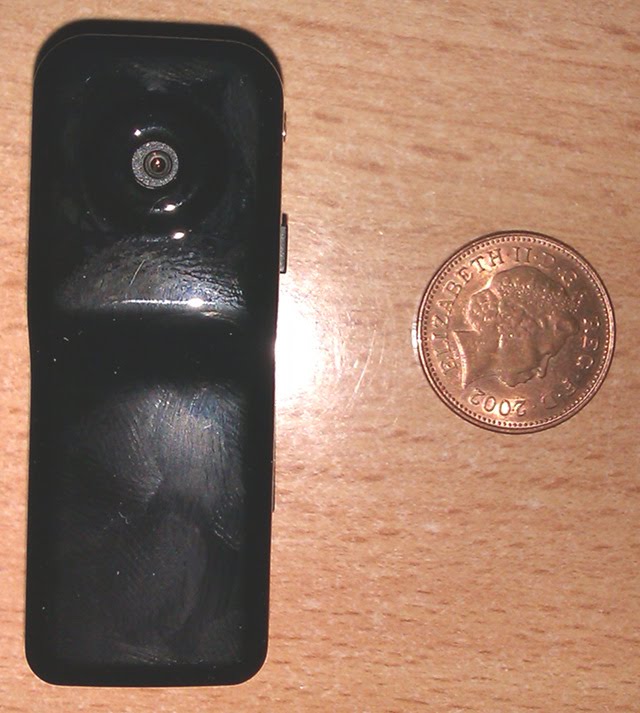
The camera and a UK penny
Later on that day though I saw a rocket project on LMR which used a micro camera and suggested such cameras were available from ebay very cheaply. I did a quick search and ordered on from a UK seller at 15 plus 2.99 pnp and thought no more of it.

This afternoon the camera arrived and it really is tiny and Alex is already scheming of ways to use it in addition to attaching it to his RC car.

The video output is low quality (very blurry in low light) and I have yet to figure out how to disable the time stamp (which is wrong) but it does indeed record video to the storage and can download it via USB and played using VLC.

So if you want a tiny video camera (and an 8Gig micro SD card) which is so cheap you do not care if it gets broken, I can recommend these.

<object class="BLOG_video_class" classid="clsid:D27CDB6E-AE6D-11cf-96B8-444553540000" codebase="http://download.macromedia.com/pub/shockwave/cabs/flash/swflash.cab#version=6,0,40,0" height="266" id="BLOG_video-e10aebbc1dd937ed" width="320"><param name="movie" value="http://www.youtube.com/get_player"><param name="bgcolor" value="#FFFFFF"><param name="allowfullscreen" value="true"><param name="flashvars" value="flvurl=http%3A%2F%2Fv7.nonxt4.googlevideo.com%2Fvideoplayback%3Fid%3De10aebbc1dd937ed%26itag%3D5%26app%3Dblogger%26ip%3D0.0.0.0%26ipbits%3D0%26expire%3D1293804875%26sparams%3Did%252Citag%252Cip%252Cipbits%252Cexpire%26signature%3D4F186A3751631F2931BE78DB408398983676DB8E.2FDDADC2413DD729039774AA440EAB1C95EA068A%26key%3Dck1&amp;iurl=http%3A%2F%2Fvideo.google.com%2FThumbnailServer2%3Fapp%3Dblogger%26contentid%3De10aebbc1dd937ed%26offsetms%3D5000%26itag%3Dw160%26sigh%3Dx99eVmNAybTlHHC3EkTV9GH9eUI&amp;autoplay=0&amp;ps=blogger"><embed allowfullscreen="true" bgcolor="#FFFFFF" flashvars="flvurl=http%3A%2F%2Fv7.nonxt4.googlevideo.com%2Fvideoplayback%3Fid%3De10aebbc1dd937ed%26itag%3D5%26app%3Dblogger%26ip%3D0.0.0.0%26ipbits%3D0%26expire%3D1293804875%26sparams%3Did%252Citag%252Cip%252Cipbits%252Cexpire%26signature%3D4F186A3751631F2931BE78DB408398983676DB8E.2FDDADC2413DD729039774AA440EAB1C95EA068A%26key%3Dck1&amp;iurl=http%3A%2F%2Fvideo.google.com%2FThumbnailServer2%3Fapp%3Dblogger%26contentid%3De10aebbc1dd937ed%26offsetms%3D5000%26itag%3Dw160%26sigh%3Dx99eVmNAybTlHHC3EkTV9GH9eUI&amp;autoplay=0&amp;ps=blogger" height="266" src="http://www.youtube.com/get_player" type="application/x-shockwave-flash" width="320"></object>

Rapha&#235;l Hertzog: State of the Debian-Ubuntu relationship

Debian welcoming contributions from derivativesThe relationship between Debian and Ubuntu has been the subject of many vigorous debates over the years, ever since Ubuntu s launch in 2004. Six years later, the situation has improved and both projects are communicating better. The Natty Narwhal Ubuntu Developer Summit (UDS) featured like all UDS for more than 2 years a Debian Health Check session where current cooperation issues and projects are discussed. A few days after that session, Lucas Nussbaum gave a talk during the mini-Debconf Paris detailing the relationship between both projects, both at the technical and social level. He also shared some concerns for Debian s future and gave his point of view on how Debian should address them. Both events give valuable insights on the current state of the relationship. Lucas Nussbaum s Debian-Ubuntu talk Lucas started by introducing himself. He s an Ubuntu developer since 2006 and a Debian developer since 2007. He has worked to improve the collaboration between both projects, notably by extending the Debian infrastructure to show Ubuntu-related information. He attended conferences for both projects (Debconf, UDS) and has friends in both communities. For all of these reasons, he believes himself to be qualified to speak on this topic. Collaboration at the technical level He then quickly explained the task of a distribution: taking upstream software, integrating it in standardized ways, doing quality assurance on the whole, delivering the result to users, and assuring some support afterward. He pointed out that in the case of Ubuntu, the distribution has one special upstream: Debian. Indeed Ubuntu gets most of its software from Debian (89%), and only 7% are new packages coming from other upstream projects (the remaining 4% are unknown, they are newer upstream releases of software available in Debian but he was not able to find out whether the Debian packaging had been reused or not). From all the packages imported from Debian, 17% have Ubuntu-specific changes. The reasons for those changes are varied: bugfixes, integration with Launchpad/Ubuntu One/etc., or toolchain changes. The above figures are based on Ubuntu Lucid (10.04) while excluding many Ubuntu-specific packages (language-pack-*, language-support-*, kde-l10n-*, *ubuntu*, *launchpad*). The different agendas and the differences in philosophy (Debian often seeking perfect solutions to problems; Ubuntu accepting temporary suboptimal workarounds) also explain why so many packages are modified on the Ubuntu side. It s simply not possible to always do the work in Debian first. But keeping changes in Ubuntu requires a lot of work since they merge with Debian unstable every 6 months. That s why they have a strong incentive to push changes to upstream and/or to Debian. There are 3 channels that Ubuntu uses to push changes to Debian: they file bug reports (between 250 to 400 during each Ubuntu release cycle), they interact directly with Debian maintainers (often the case when there s a maintenance team), or they do nothing and hope that the Debian maintainer will pick up the patch directly from the Debian Package Tracking System (it relays information provided by patches.ubuntu.com). Lucas pointed out that those changes are not the only thing that Debian should take back. Ubuntu has a huge user base resulting in lots of bug reports sitting in Launchpad, often without anyone taking care of them. Debian maintainers who already have enough bugs on their packages are obviously not interested in even more bugs, but those who are maintaining niche packages, with few reports, might be interested by the user feedback available in Launchpad. Even if some of the reports are Ubuntu-specific, many of them are advance warnings of problems that will affect Debian later on, when the toolchain catches up with Ubuntu s aggressive updates. To make this easier for Debian maintainers, Lucas improved the Debian Package Tracking System so that they can easily get Ubuntu bug reports for their packages even without interacting with Launchpad. Human feelings on both sides Lucas witnessed a big evolution in the perception of Ubuntu on the Debian side. The initial climate was rather negative: there were feelings of its work being stolen, claims of giving back that did not match the observations of the Debian maintainers, and problems with specific Canonical employees that reflected badly on Ubuntu as a whole. These days most Debian developers find something positive in Ubuntu: it brings a lot of new users to Linux, it provides something that works for their friends and family, it brings new developers to Debian, and it serves as a technological playground for Debian. On the Ubuntu side, the culture has changed as well. Debian is no longer so scary for Ubuntu contributors and contributing to Debian is The Right Thing to do. More and more Ubuntu developers are getting involved in Debian as well. But at the package level there s not always much to contribute, as many bugfixes are only temporary workarounds. And while Ubuntu s community follows this philosophy, Canonical is a for-profit company that contributes back mainly when it has compelling reasons to do so. Consequences for Debian In Lucas s eyes, the success of Ubuntu creates new problems. For many new users Linux is a synonym for Ubuntu, and since much innovation happens in Ubuntu first, Debian is overshadowed by its most popular derivative. He goes as far as saying that because of that Debian becomes less relevant . He went on to say that Debian needs to be relevant because the project defends important values that Ubuntu does not. And it needs to stay as an independent partner that filters what comes out of Ubuntu, ensuring that quality prevails in the long term. Fixing this problem is difficult, and the answer should not be to undermine Ubuntu. On the contrary, more cooperation is needed. If Debian developers are involved sooner in Ubuntu s projects, Debian will automatically get more credit. And if Ubuntu does more work in Debian, their work can be showcased sooner in the Debian context as well. The other solution that Lucas proposed is that Debian needs to communicate on why it s better than Ubuntu. Debian might not be better for everybody but there are many reasons why one could prefer Debian over Ubuntu. He listed some of them: Debian has better values since it s a volunteer-based project where decisions are made publicly and it has advocated the free software philosophy since 1993. On the other hand, Ubuntu is under control of Canonical where some decisions are imposed, it advocates some proprietary web services (Ubuntu One), the installer recommends adding proprietary software, and copyright assignments are required to contribute to Canonical projects. Debian is also better in terms of quality because every package has a maintainer who is often an expert in the field of the package. As a derivative, Ubuntu does not have the resources to do the same and instead most packages are maintained on a best effort basis by a limited set of developers who can t know everything about all packages. In conclusion, Lucas explained that Debian can neither ignore Ubuntu nor fight it. Instead it should consider Ubuntu as a chance and should leverage it to get back in the center of the FLOSS ecosystem . The Debian health check UDS session While this session has existed for some time, it s only the second time that a Debian Project Leader was present at UDS to discuss collaboration issues. During UDS-M (the previous summit), this increased involvement from Debian was a nice surprise to many. Stefano Zacchiroli the Debian leader collected and shared the feedback of Debian developers and the session ended up being very productive. Six months later is a good time to look back and verify if decisions made during UDS-M (see blueprint) have been followed through. Progress has been made On the Debian side, Stefano set up a Derivatives Front Desk so that derivative distributions (not just Ubuntu) have a clear point of contact when they are trying to cooperate but don t know where to start. It s also a good place to share experiences among the various derivatives. In parallel, a #debian-ubuntu channel has been started on OFTC (the IRC network used by Debian). With more than 50 regulars coming from both distributions, it s a good place for quick queries when you need advice on how to interact with the distribution that you re not familiar with. Ubuntu has updated its documentation to prominently feature how to cooperate with Debian. For example, the sponsorship process documentation explains how to forward patches both to the upstream developers and to Debian. It also recommends ensuring that the patch is not Ubuntu-specific and gives some explanation on how to do it (which includes checking against a list of common packaging changes made by Ubuntu). The Debian Derivative Front Desk is mentioned as a fallback when the Debian maintainer is unresponsive. While organizing Ubuntu Developer Week, Ubuntu now reaches out to Debian developers and tries to have sessions on working with Debian . Launchpad has also been extended to provide a list of bugs with attached patches and that information has been integrated in the Debian Package Tracking system by Lucas Nussbaum. Still some work to do Some of the work items have not been completed yet: many Debian maintainers would like a simpler way to issue a sync request (a process used to inject a package from Debian into Ubuntu). There s a requestsync command line tool provided by the ubuntu-dev-tools package (which is available in Debian) but it s not yet usable because Launchpad doesn t know the GPG keys of Debian maintainers. Another issue concerns packages which are first introduced in Ubuntu. Most of them have no reason to be Ubuntu-specific and should also end up in Debian. It has thus been suggested that people packaging new software for Ubuntu also upload them to Debian. They could however immediately file a request for adoption (RFA) to find another Debian maintainer if they don t plan to maintain it in the long term. If Ubuntu doesn t make this effort, it can take a long time until someone decides to reintegrate the Ubuntu package into Debian just because nobody knows about it. This represents an important shift in the Ubuntu process and it s not certain that it s going to work out. As with any important policy change, it can take several years until people are used to it. Both issues have been rescheduled for this release cycle, so they re still on the agenda. This time the UDS session was probably less interesting than the previous one. Stefano explained once more what Debian considers good collaboration practices: teams with members from both distributions, and forwarding of bugs if they have been well triaged and are known to apply to Debian. He also invited Ubuntu to discuss big changes with Debian before implementing them. An interesting suggestion that came up was that some Ubuntu developers could participate in Debcamp (one week hack-together before Debconf) to work with some Debian developers, go through Ubuntu patches, and merge the interesting bits. This would nicely complement Ubuntu s increased presence at Debconf: for the first time, community management team member Jorge Castro was at DebConf 10 giving a talk on collaboration between Debian and Ubuntu. There was also some brainstorming on how to identify packages where the collaboration is failing. A growing number of Ubuntu revisions (identified for example by a version like 1.0-1ubuntu62) could indicate that no synchronization was made with Debian, but it would also identify packages which are badly maintained on the Debian side. If Ubuntu consistently has a newer upstream version compared to Debian, it can also indicate a problem: maybe the person maintaining the package for Ubuntu would be better off doing the same work in Debian directly since the maintainer is lagging or not doing their work. Unfortunately this doesn t hold true for all packages since many Gnome packages are newer in Ubuntu but are actively maintained on both sides. Few of those discussions led to concrete decisions. It seems most proponents are reasonably satisfied with the current situation. Of course, one can always do better and Jono Bacon is going to ensure that all Canonical teams working on Ubuntu are aware of how to properly cooperate with Debian. The goal is to avoid heavy package modifications without coordination. Conclusion The Debian-Ubuntu relationships used to be a hot topic, but that s no longer the case thanks to regular efforts made on both sides. Conflicts between individuals still happen, but there are multiple places where they can be reported and discussed (#debian-ubuntu channel, Derivatives Front Desk at derivatives@debian.org on the Debian side or debian@ubuntu.com on the Ubuntu side). Documentation and infrastructure are in place to make it easier for volunteers to do the right thing. Despite all those process improvements, the best results still come out when people build personal relationships by discussing what they are doing. It often leads to tight cooperation, up to commit rights to the source repositories. Regular contacts help build a real sense of cooperation that no automated process can ever hope to achieve.
This article was first published in Linux Weekly News. You can get my monthly summary of the Debian/Ubuntu news, all you have to do is to click here to subscribe to my free newsletter.

5 comments Liked this article? Click here. My blog is Flattr-enabled.

29 November 2010

MJ Ray: What Price Networking?

How much would you pay to participate in a social network and what would you expect for that? On the web, I m used to some social networks being available for free. Usefulness and size varies massively, but there s quite a choice of them. There s a price to access them (computer, internet access, time) but once you ve paid that, there are free-to-use networks. Offline, a lot of networking opportunities cost money and not just access costs (travel, time). Especially business networks. OK, there are paid business networks online too, but some of the biggest ones have some long-term free access level, to try to entice people to upgrade. Offline, it seems like the reverse: there are some free networks and some that have short-term free access, but the norm seems to be pay-to-play. Often you get nothing except entry for the basic subscription, but at least our co-op usually prefers networks where we re proper members with some say in how things are run. Not that democracy always works. One networking organisations made a mistake in posting out ballot papers that means we can t vote in its leadership election. This isn t the first administrative problem we ve suffered and their last decent event was at least a year ago, too. At what point should we quit? I think I ll try to address this through the membership democracy first. In this recession, some of our offline networks are reviewing their prices. In one case, a network which was free is going to become one of our more expensive annual subscriptions if we renew. If I look at it as a simple does this bring in enough work to pay for itself? decision then probably it won t. How much value do you attach to being there and to being visible, though?

25 November 2010

Michal &#268;iha&#345;: More on Attachmate and Novell

Surprisingly, my Monday blog post has received much more attention than I did expect and was source for at least one article full of speculations (in Czech). Hey, there was no new information in the post, nor some secret information leak (not that I know something what is not known publicly). Anyway meanwhile public announcement about UNIX copyrights has been made. I don't think it changes much, but it seems to be one if things people wanted to know. What I find more interesting (and hard to read and understand) is explanation of the currently publicly available bits from a transactional lawyer at The Standards Blog. At least it gave me basic idea why some things are so complex in this deal and just confirmed that I want to avoid need for contact with lawyers language as much as possible :-).

Filed under: Suse 0 comments Flattr this!

24 November 2010

Sergio Talens-Oliag: The Freaky Wall (Part 2: Initial Installation)

For the Freaky Wall I have installed a Debian GNU/kFreeBSD system using the installer with ZFS support announced on: http://robertmh.wordpress.com/2010/09/06/debian-installer-with-zfs/ I used the mini.iso found on: http://people.debian.org/~rmh/zfs/kfreebsd-amd64/monolithic/mini.iso the 12th of October of 2010; as I had some problems and reported them to Robert is possible that the current image solves part of them. Installation plan I did a standard installation on a machine with two hard disks, but only used the first one from the installer. The plan was to use ZFS with RAID-1, but current versions of grub do not support booting from a ZFS + RAID file system, so I had to use the same technique used for Linux for a long time; three partitions: a swap partition, a small /boot partition and a big partition for /; / and /boot were formated to use ZFS. First reboot After the installation the system failed to boot because of a bug when building the /boot/grub/grub.cfg (some routes were missing a //@ prefix); to be able to boot Iwe edited the config on the grub prompt and later fixed the file:
    --- grub.cfg.orig       2010-10-13 16:40:39.000000000 +0200
    +++ grub.cfg    2010-10-13 18:38:47.535436766 +0200
    @@ -64,7 +64,7 @@
            set root='(hd0,1)'
            search --no-floppy --fs-uuid --set a371979bb836d1fe
            echo                    'Loading kernel of FreeBSD 8.1-1-amd64 ...'
    -       kfreebsd                /kfreebsd-8.1-1-amd64.gz
    +       kfreebsd                //@/kfreebsd-8.1-1-amd64.gz
            insmod part_msdos
            insmod zfs
            set root='(hd0,3)'
    @@ -75,7 +75,7 @@
            insmod zfs
            set root='(hd0,1)'
            search --no-floppy --fs-uuid --set a371979bb836d1fe
    -       kfreebsd_module         /zfs/zpool.cache type=/boot/zfs/zpool.cache
    +       kfreebsd_module         //@/zfs/zpool.cache type=/boot/zfs/zpool.cache
            set kFreeBSD.vfs.root.mountfrom=zfs:dkfbf1-ad4s3
            set kFreeBSD.vfs.root.mountfrom.options=rw
      
I haven't tested the installer since that day, but I believe that the current ZFS installer was fixed by Robert to deal with that problem. Once the system was booted I had to fix a couple of things: Adjusting ZFS to do RAID-1 On the second disk I created the same partitions as the ones on the first disk using parted; the final result was:
    # parted -l     
    Model: ST3250620NS/3BKS (ide)
    Disk /dev/ad6: 250GB
    Sector size (logical/physical): 512B/512B
    Partition Table: msdos
    Number  Start   End     Size    Type     File system  Flags
     1      1049kB  256MB   255MB   primary
     2      256MB   4256MB  4000MB  primary
     3      4256MB  250GB   246GB   primary
    Model: ST3250620NS/3BKS (ide)
    Disk /dev/ad4: 250GB
    Sector size (logical/physical): 512B/512B
    Partition Table: msdos
    Number  Start   End     Size    Type     File system     Flags
      1      1049kB  256MB   255MB   primary
      2      256MB   4256MB  4000MB  primary  linux-swap(v1)
      3      4256MB  250GB   246GB   primary
To use the second partition of both disks as swap I added the following to /etc/fstab:
    /dev/ad4s2      none            swap    sw              0       0
    /dev/ad6s2      none            swap    sw              0       0
To configure the mirroring for the root file system I did the following:
    zpool attach dkfbf1-ad4s3 ad4s3 ad6s3
As the /boot can't work as a replica I adjusted it to make two copies of every file:
    zfs   set copies=2     dkfbf1-ad4s1
Leaving the second disk copy alone, although my plan is to configure it to hold a copy of the /boot partition synchronized with rsync each night. After all those changes the system didn't boot, as the grub-pc generates a buggy /boot/grub/grub.cfg; the problem is on the /etc/grub.d/10_kfreebsd section:
    ### BEGIN /etc/grub.d/10_kfreebsd ###
    menuentry 'Debian GNU/kFreeBSD, with kFreeBSD 8.1-1-amd64' --class debian \
      --class gnu-kfreebsd --class gnu --class os  
          insmod part_msdos
          insmod zfs
          set root='(hd0,1)'
          search --no-floppy --fs-uuid --set a371979bb836d1fe
          echo 'Loading kernel of FreeBSD 8.1-1-amd64 ...'
          kfreebsd /kfreebsd-8.1-1-amd64.gz
          set kFreeBSD.vfs.root.mountfrom=unknown:/dev/ad4s3
          set kFreeBSD.vfs.root.mountfrom.options=rw
     
    ### END /etc/grub.d/10_kfreebsd ###
To fix it there has to be a copy of the modules for ZFS on the boot partition (in my case I moved the /lib/modules directory to /boot and created a link on the root partition to the new directory):
    cd /boot
    mkdir lib
    mv /lib/modules lib
    cd /lib
    ln -s ../boot/lib/modules
And instead of fixing the /etc/grub.d/10_kfreebsd code I wrote a new script (/etc/grub.d/09_zfs_kfreebsd) that creates the right config for my current configuration on the grub.cfg file:
    #!/bin/sh
    prefix=/usr
    exec_prefix=$ prefix 
    bindir=$ exec_prefix /bin
    libdir=$ exec_prefix /lib
    . $ libdir /grub/grub-mkconfig_lib
    prepare_boot_cache="$(prepare_grub_to_access_device $ GRUB_DEVICE_BOOT    sed -e "s/^/\t/")"
    kfreebsd_versions="$(ls /lib/modules/)"
    zfs_root_device="$(zfs list   awk '/\/$/   print $1  '   head -1)"
    for kversion in $kfreebsd_versions; do
      cat << EOF
    # Entry when using ZFS (we have issues with /etc/grub.d/10_kfreebsd)
    menuentry 'Debian GNU/kFreeBSD, with kFreeBSD $kversion and ZFS' --class debian --class gnu-kfreebsd --class gnu --class os  
    $ prepare_boot_cache 
          echo                    'Loading kernel of FreeBSD $kversion ...'
          kfreebsd                //@/kfreebsd-$kversion.gz
          kfreebsd_module_elf     //@/lib/modules/$kversion/opensolaris.ko
          kfreebsd_module_elf     //@/lib/modules/$kversion/zfs.ko
          kfreebsd_module         //@/zfs/zpool.cache type=/boot/zfs/zpool.cache
          set kFreeBSD.vfs.root.mountfrom=zfs:$zfs_root_device
          set kFreeBSD.vfs.root.mountfrom.options=rw
     
    EOF
    done
I solved the problem this way to have a working solution that does not break with squeeze upgrades, assuming that a future grub-pc package will deal well with my config and I'll be able to remove this script, but I guess I'll have to install it from backports. The entry generated by the script when called from update-grub will be similar to:
    ### BEGIN /etc/grub.d/09_zfs-kfreebsd ###
    # Entry when using ZFS (we have issues with /etc/grub.d/10_kfreebsd)
    menuentry 'Debian GNU/kFreeBSD, with kFreeBSD 8.1-1-amd64 @ ITI' --class debian --class gnu-kfreebsd --class gnu --class os  
          insmod part_msdos
          insmod zfs
          set root='(hd0,1)'
          search --no-floppy --fs-uuid --set a371979bb836d1fe
          echo                    'Loading kernel of FreeBSD 8.1-1-amd64 ...'
          kfreebsd                //@/kfreebsd-8.1-1-amd64.gz
          kfreebsd_module_elf     //@/lib/modules/8.1-1-amd64/opensolaris.ko
          kfreebsd_module_elf     //@/lib/modules/8.1-1-amd64/zfs.ko
          kfreebsd_module         //@/zfs/zpool.cache type=/boot/zfs/zpool.cache
          set kFreeBSD.vfs.root.mountfrom=zfs:dkfbf1-ad4s3
          set kFreeBSD.vfs.root.mountfrom.options=rw
     
    ### END /etc/grub.d/10_iti-kfreebsd ###
And after rebooting the machine with this new configuration the system boots OK. On my next post I'll continue explaining how to compile a kernel that supports the use of the OpenBSD Packet Filter and related technologies (CARP, pflog, etc.).

23 November 2010

Dominique Dumont: How about a configfs with Config::Model ?

Hello During the Config::Model presentation at Debian mini-conf, I was asked whether Config::Model could be used from other languages than Perl. Of course, config-edit command line can be launched from any program with any language, but we can hardly call it an API. There s also the possibility to use Config::Model::SimpleUI to fork a process and send commands on its STDIN and get results on STDOUT. But using this from another program is awkward. On kernel side, /proc and /sys are widely used to get information from the kernel and set kernel configuration. How about using a similar approach with system configuration data ? Configuration data from config files is already mapped into a tree within Config::Model. This tree can also be mapped to a file system structure. This file system structure could have the following layout:
/conf/
system/
sshd/
PermitRootLogin # contain 0 or 1
ssh/

popcon/
As a bonus, this file system would provide a unified access to all system configuration data available through Config::Model. In any case, people would still be able to tinker configuration with their favorite text editor on a file in /etc. The modification will be propagated to the corresponding entry in the /conf virtual file system. The reverse will also be done. Anyone interested ? All the best PS: Further technical discussion will be held on Config::Model mailing list: config-model-users at lists.sourceforge.net 2010.11.25 edit: specified that config data can still be written in usual config file.

Russell Coker: A First Digital Camera

I ve just been asked for advice on buying a digital camera. I m not an expert on cameras but I have a good general knowledge of technology and I m sure that the readers of my blog will correct me rapidly if I make any serious mistakes. ;)Types of CameraThe Wikipedia Page about Digital Cameras is worth reading [1].Here are the types of camera that are useful as a stand-alone camera (IE not camera phones or industrial cameras):I suggest that people not start out a hobby of digital photography with a DSLR or other interchangeable lens camera. I think that it s best to start out with simple gear that s cheap if you decide that digital photography is not your thing then you have wasted less money, and if you really get into it then you ll be able to make a more informed choice about an expensive camera after getting some experience.A spare cheap compact camera can be useful even if you own a more expensive camera. There are times when you don t want the bulk of a DSLR or Bridge Camera and when you have a risk of theft or accidental damage such that you don t want to take an expensive camera. People who are really serious about photography apparently take a camera everywhere, you could have a compact camera in your front pocket for fast pictures and a bulky camera in your backpack for when you have time to prepare a quality shot. So buying a cheap camera and then buying an expensive one a few months later would not be wasting money!As the person who asked for advice has never owned a digital camera before I ll focus on cheap compact cameras for the rest of this post.Pixels and LensesCameras are typically advertised with the resolution in Megapixels described in bold. Presumably most people search for the camera with the highest resolution. The first thing to beware of is cameras that don t have hardware which is capable of taking a picture of the stated resolution, they use interpolation to generate a higher resolution image. There are probably some cameras with interpolation that are OK and provide a decent picture at a low price, but generally I recommend avoiding all cameras that do interpolation.Optical zoom is a very important feature. Often pictures have to be cropped to remove unwanted background, if you zoom in appropriately you can avoid cropping and make better use of the available resolution. Beware of cameras that advertise things such as advanced zoom , anything that doesn t exactly say optical zoom is using digital zoom IE interpolation. I suggest not considering a compact camera unless it can do at least 4* optical zoom, with 5* or better being preferable.The physical size of the lens is important. A bigger lens allows better pictures in adverse lighting and also allows a faster shutter speed to give better photos of moving objects and better photos when you are moving. Generally you can get a rough idea of the potential that a camera has by just glancing at the lens, if it s the size of a lens in a mobile phone then the pictures won t be that great. If it is on a telescopic mount and it s wide then the result will be better. When buying a lens for a DSLR or other detachable lens camera you should be able to read specifications of the lens which indicate it s size. For compact cameras the specifications of the lens are usually available from the vendor and often available from review sites but generally aren t included in adverts by retailers. If you are comparing cameras in the store looking at them seems like the best option.The ratio of the lens area to the number of pixels determines how much light is received by the sensors for each pixel. So when there are two cameras that are essentially identical apart from the number of megapixels the one with the highest number isn t necessarily better in all situations. A 12MP camera might not give a better result than a 10MP camera, a monitor described as Full HD has a resolution of 1920*1080 which is 2MP. A 5MP camera is useful to allow cropping but if the aim is to display pictures on current monitors then anything much bigger than 5MP is probably wasted at this time and 10MP will provide pictures that can use the capabilities of monitors that are developed for a while.PrintingSome printers that are affordable for home use might require something like a 7MP camera to print a picture at A4 or Letter size at the highest quality. Professional printing will probably require something even greater. But if your intended use of a digital camera doesn t involve printing the pictures, or only rarely involves printing them at A4 or Letter size then you don t need a high resolution for printing. I expect that there are some available printers that can use paper at sizes such as B3 which might require a 20MP camera for best quality. But if the aim of the printing is to put a picture on your wall (the most common case) then even if it s not at the ideal resolution then probably no-one will notice the difference you can t see the pixels from a few meters away.If the aim of the camera is to photograph professional artwork for the purpose of selling it on the Internet then a high resolution camera really isn t desired. You want to offer pictures on the Internet which aren t good enough to be usefully printed.VideoThe capabilities for recording video can vary significantly between different cameras in the same range. If you don t care about video then that s fine, but if video matters to you then you have to read the specs. It s also worth considering digital video cameras, I have previously summarised the available digital video cameras although I m sure that there have been some new models since then [3]. A good (expensive) digital camera will have video functionality that compares well to most digital video cameras but it will cost a lot more.Choosing a Compact CameraThere are many compact cameras in the $100 to $150 price range. Ted s has the Samsung Digimax ES65 for $99.95 which has 10MP and 5* optical zoom. This seems like a good deal. Practice with a cheap camera could easily allow you to make a better choice when buying a more expensive camera that saves you more than $100 so it seems unlikely that you will have any great regrets about buying a $100 camera.Buying from the specs is a bad idea, I recommend testing a camera in the store before buying every store that you want to buy from allows this. But don t expect that quality pictures in the store means much, the people who run the camera stores usually set them up with good lighting so that pictures will tend to turn out well. The aim of an in-store test is not to discover what the camera does well, but to discover what (if anything) it does badly. Also it s useful to test the ergonomics of the camera before buying, discover whether you would be happy to hold the camera for an hour.It s a good idea to ask the staff at a camera store for advice, but don t rely on such advice. My experience is that they tend not to ask what the prospective customer plans to do with the camera and this significantly limits the quality of their recommendations.ConclusionMake your first digital camera a cheap compact camera that doesn t cost much more than $100. Make sure it has at least 4* optical zoom with 5* being preferred. Don t worry too much about the number of megapixels, anything more than 5 will do. Test the camera in the store to look for any obvious reasons that make it unsuitable for your use. If you want video then be prepared to pay a little more as the cheapest cameras have a low resolution for video.

Next.

Previous.