Search Results: "rra"

2 January 2016

Iain R. Learmonth: Fun in Hamburg Airport

Today I'm travelling home from 32c3, back to Aberdeen via London from Hamburg Airport. My experience passing through security to get to the gates this morning has angered me to the point that I had to vent. They have full-body scanners installed, which in my opinion are a massive invasion of my personal privacy. As I approached the security checkpoint, I noticed a sign where it stated that use of the scanner was not mandatory and that a manual screening process was available. Once I'd loaded my bags into the trays, I asked the security officer how to opt for the manual screening at which point I was told it was not available due to a lack of staff. I was forced to allow for an intimate scan to take place or miss my flight. I'm not really in a position to be making alternative arrangements for travel and so I had to submit but it has left me outraged. Privacy is about the ability to choose what I share and who I share it with. This was meant to be a right protected by the ECHR, but I guess human rights are outdated now we're entering 2016. Bring on the dystopian future!

29 December 2015

Ritesh Raj Sarraf: Device Mapper Multipath status in Debian

For Debian Jessie, the multipath support relied on sysvinit scripts. So, if you were using systemd, the level of testing would have been minimal. At DebConf15, I got to meet many people whom I'd worked with, over emails, over the years. With every person, my ask was to use the SAN Storage stack in a test environement, and report bugs early. Not after the next release. This applies also to the usual downstream distribution projects. That said, today, I spent time building a Root File System on SAN setup using the following stack, of the versions that'd be part of the next stable release:
  • Linux
  • Open-iSCSI Initiator
  • Device Mapper Multipath
  • LIO Target
I'm pretty happy that nothing much has changed in terms of setup, from what has already been documented in README.Debian files. The systemd integration has been very transparent. But that is my first hand experience. I'm request all users of the above mentioned stack to build the setup and report issues, if any. Please do not wait for the last minute of the release/freeze.
root@debian-sanboot:~# systemctl status -l multipath-tools
  multipathd.service - Device-Mapper Multipath Device Controller
   Loaded: loaded (/lib/systemd/system/multipathd.service; enabled; vendor preset: enabled)
   Active: active (running) since Tue 2015-12-29 18:38:58 IST; 1min 23s ago
  Process: 246 ExecStartPre=/sbin/modprobe dm-multipath (code=exited, status=0/SUCCESS)
 Main PID: 260 (multipathd)
   Status: "running"
   CGroup: /system.slice/multipathd.service
            260 /sbin/multipathd -d -s
Dec 29 18:39:04 debian-sanboot multipathd[260]: sdb [8:16]: path added to devmap sanroot
Dec 29 18:39:04 debian-sanboot multipathd[260]: sdc: add path (uevent)
Dec 29 18:39:04 debian-sanboot multipathd[260]: sanroot: load table [0 16777216 multipath 0 0 3 1 service-time 0 1 1 8:16 1 service-time 0 1 1 8:0 1 service-time 0 1 1 8:32 1]
Dec 29 18:39:04 debian-sanboot multipathd[260]: sdc [8:32]: path added to devmap sanroot
Dec 29 18:39:04 debian-sanboot multipathd[260]: sdd: add path (uevent)
Dec 29 18:39:04 debian-sanboot multipathd[260]: sanroot: load table [0 16777216 multipath 0 0 4 1 service-time 0 1 1 8:16 1 service-time 0 1 1 8:32 1 service-time 0 1 1 8:48 1 service-time 0 1 1 8:0 1]
Dec 29 18:39:04 debian-sanboot multipathd[260]: sdd [8:48]: path added to devmap sanroot
Dec 29 18:39:13 debian-sanboot multipathd[260]: sanroot: sda - directio checker reports path is up
Dec 29 18:39:13 debian-sanboot multipathd[260]: 8:0: reinstated
Dec 29 18:39:13 debian-sanboot multipathd[260]: sanroot: remaining active paths: 4
root@debian-sanboot:~# multipath -ll
sanroot (36001405ead943c8222140268e019ba49) dm-0 LIO-ORG,IBLOCK
size=8.0G features='0' hwhandler='0' wp=rw
 -+- policy='service-time 0' prio=1 status=active
   - 4:0:0:0 sdb 8:16 active ready running
 -+- policy='service-time 0' prio=1 status=enabled
   - 3:0:0:0 sdc 8:32 active ready running
 -+- policy='service-time 0' prio=1 status=enabled
   - 5:0:0:0 sdd 8:48 active ready running
 -+- policy='service-time 0' prio=1 status=enabled
   - 2:0:0:0 sda 8:0  active ready running
root@debian-sanboot:~# iscsiadm -m session
tcp: [1] 172.16.20.40:3260,1 iqn.2003-01.org.linux-iscsi.debian.sanboot (non-flash)
tcp: [2] 172.16.20.41:3260,1 iqn.2003-01.org.linux-iscsi.debian.sanboot (non-flash)
tcp: [3] 172.16.20.42:3260,1 iqn.2003-01.org.linux-iscsi.debian.sanboot (non-flash)
tcp: [4] 172.16.20.43:3260,1 iqn.2003-01.org.linux-iscsi.debian.sanboot (non-flash)
root@debian-sanboot:~# mount   grep sanroot
/dev/mapper/sanroot on / type ext4 (rw,relatime,errors=remount-ro,stripe=8191,data=ordered)

Categories:

Keywords:

Like:

22 December 2015

John Goerzen: Amtrak Airlines

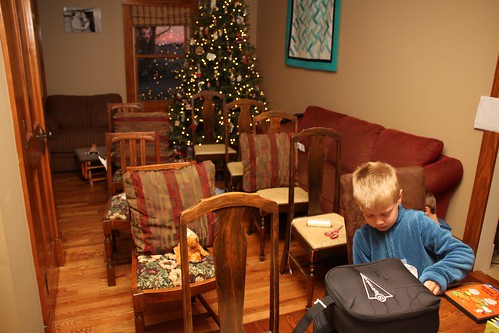
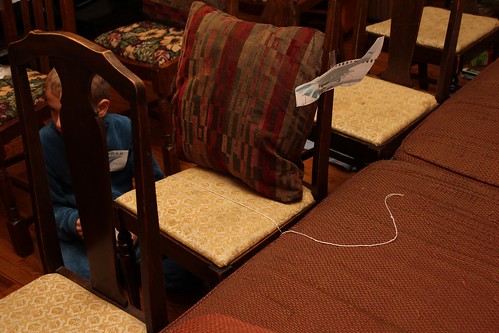
I came downstairs this morning and found a surprise waiting for me. Chairs from all over had been gathered up and arranged in rows, airline style. Taped to the wall was a food court sign. At the front was a picture of an airplane, decked out with the Amtrak logo of all things, and a timetable taped to our dining room table. IMG_6123 Jacob soon got out string to be seatbelts, too. And, using his copy machine, printed out a picture of a wing to tape to the side of the airplane . IMG_6128 And here is the food court sign Oliver made: IMG_6126 This plane was, according to the boys, scheduled to leave at 9:30. It left a fashionable 2 hours late or so. They told me I would be the pilot, and had me find headphones to be my headset . (I didn t wear my real headset on the grounds that then I wouldn t be able to hear them.) Jacob decided he would be a flight attendant, his grandma would be the co-pilot, and Oliver would be the food court worker. The food court somehow seemed to travel with the plane. Oliver made up a menu for the food court. It consisted of, and I quote: trail mix, banana, trail mix, half banana, trail mix, trail mix, trail mix . He s already got the limited selection of airport food down pat, I can see. Jacob said the flight would be from Chicago to Los Angeles, and so it was. Since it was Amtrak Airlines, we were supposed to pretend to fly over the train tracks the whole way. If it s not Christmas yet, we just invent some fun, eh? Pretty clever.

15 December 2015

Antoine Beaupr : Using a Yubikey NEO for SSH and OpenPGP on Debian jessie

I recently ordered two Yubikey devices from Yubico, partly because of a special offer from Github. I ordered both a Yubikey NEO and a Yubikey 4, although I am not sure I remember why I ordered two - you can see their Yubikey product comparison if you want to figure that out, but basically, the main difference is that the NEO has support for NFC while the "4" has support for larger RSA key sizes (4096). This article details my experiment on the matter. It is partly based on first hand experience, but also links to various other tutorials that helped me along the way. Especially thanks to folks on various IRC channels that really helped me out in understanding this. My objective in getting a hardware security token like this was three-fold:
  1. use 2FA on important websites like Github, to improve the security of critical infrastructure (like my Borg backup software)
  2. login to remote SSH servers without exposing my password or my private key material on third party computers
  3. store OpenPGP key material on the key securely, so that the private key material can never be compromised
To make a long story short: this article documents step 2 and implicitly step 3 (because I use OpenPGP to login to SSH servers). However it is not possible to use the key on arbitrary third party computers, given how much setup was necessary to make the thing work at all. 2FA on the Github site completely failed, but could be used on other sites, although this is not covered by this article. I have also not experimented in details the other ways the Yubikey can also be used (sorry for the acronym flood) as: Update: OATH works! It is easy to configure and i added a section below.

Not recommended After experimenting with the device and doing a little more research, I am not sure it was the right decision to buy a Yubikey. I would not recommend buying Yubikey devices because they don't allow changing the firmware, making the device basically proprietary, even in the face of an embarrassing security vulnerability on the Yubikey NEO that came out in 2015. A security device, obviously, should be as open as the protocols it uses, otherwise it's basically impossible to trust that the crypto hasn't been backdoored or compromised, or, in this case, is vulnerable to the simplest drive-by attacks. Furthermore, it turns out that the primary use case that Github was promoting is actually not working as advertised: to use the Yubikey on Github, you actually first need to configure 2FA with another tool, either with your phone's text messages (SMS) or with something like Google Authenticator. After contacting Github support, they explained that the Yubikey is seen as a "backup device", which seems really odd to me, especially considering the promotion and the fact that I don't have a "smart" (aka "Google", it seems these days) phone or the desire to share my personal phone number with Github. Finally, as I mentioned before, the fact that those devices are fairly new and the configuration necessary to make them work at all is completely obtuse, non-standardized or at least not available by default on arbitrary computers makes them basically impossible to use on other computers than your own specially crafted gems.

Plugging it in The Yubikey, when inserted into a USB port, seems to be detected properly. It shows up both as a USB keyboard and a generic device.
d c 14 17:23:26 angela kernel: input: Yubico Yubikey NEO OTP+U2F as /devices/pci0000:00/0000:00:12.0/usb3/3-2/3-2:1.0/0003:1050:0114.0016/input/input127
d c 14 17:23:26 angela kernel: hid-generic 0003:1050:0114.0016: input,hidraw3: USB HID v1.10 Keyboard [Yubico Yubikey NEO OTP+U2F] on usb-0000:00:12.0-2/input0
d c 14 17:23:26 angela kernel: hid-generic 0003:1050:0114.0017: hiddev0,hidraw4: USB HID v1.10 Device [Yubico Yubikey NEO OTP+U2F] on usb-0000:00:12.0-2/input1
We'll be changing this now - we want to to support OTP, U2F and CCID. Don't worry about those acronyms now, but U2F is for the web, CCID is for GPG/SSH, and OTP is for the One Time Passwords stuff mentionned earlier. I am using the Yubikey Personalization tool from stretch because the jessie one is too old, according to Gorzen. Indeed, I found out that the jessie version doesn't ship with the proper udev rules. Also, note that we need to run as sudo otherwise we get a permission denied:
$ sudo apt install yubikey-personalization/stretch
$ sudo ykpersonalize -m86
Firmware version 3.4.3 Touch level 1541 Program sequence 1
The USB mode will be set to: 0x86
Commit? (y/n) [n]: y
To understand better what the above does, see the NEO composite device documentation. The next step is to reconnect the key, for the udev rules to kick in. If you were like me, you enthusiastically plugged in the device before installing the yubikey-personalization package, and the udev rules were not present then.

Configuring a PIN Various operations will require you to enter a PIN when talking to the key. The default PIN is 123456 and the default admin PIN is 12345678. You will want to change that, otherwise someone that gets a hold of your key could do any operation without your consent. For this, you need to use:
$ gpg --card-edit
> passwd
> admin
> passwd
Be sure to remember those passwords! Of course, the key material on the Yubikey can be revoked when you loose the key, but only if you still have control of the master key, or if you have a OpenPGP revocation certification (which you should have).

Configuring GPG To do OpenPGP operations (like decryption, signatures and so on), or SSH operations (like authentication on a remote server), you need to talk with GPG. Yes, OpenPGP keys are RSA keys that can be used to authenticate with SSH servers, that's not new and I have already been doing this with Monkeysphere for a while. Now the challenge is how to make GPG talk with the Yubikey. So the next step is to see if gpg can see the key alright, as described in the Yubikey importing keys howto - you will need first to install scdaemon and pcscd (according to this howto) for gpg-agent to be able to talk with the key:
$ sudo apt install scdaemon gnupg-agent pcscd
$ gpg-connect-agent --hex "scd apdu 00 f1 00 00" /bye
ERR 100663404 Card error <SCD>
Well that failed. At this point, touching the key types a bunch of seemingly random characters wherever my cursor is sitting - fun but totally useless still. That was because I failed to reconnect the key: make sure the udev rules are in place and reconnect the key, the above should work:
$ gpg-connect-agent --hex "scd apdu 00 f1 00 00" /bye
D[0000]  01 00 10 90 00                                     .....
OK
This shows it is running the firmware 1.10, which is not vulnerable to the infamous security issue. (Note: I also happened to install opensc and gpgsm because of this suggestion but I am not sure they are required at all.)

Using SSH To make GPG work with SSH, you need somehow to start gpg-agent with ssh support, for example with:
gpg-agent --daemon --enable-ssh-support bash
Of course, this will work better if it's started with your Xsession. Such an agent should already be started, so you just need to add the ssh emulation to its configuration file and restart your X session.
echo 'enable-ssh-support' >> .gnupg/gpg-agent.conf
In Debian Jessie, the ssh-agent wrapper will not start if it detects that you have already one running (for example from gpg-agent) but if that fails, you can try commenting out use-ssh-agent from /etc/X11/Xsession.options to keep it from starting up in your session. (Thanks to stackexchange for that reference.) Here I assume you have already created an authentication subkey on your PGP key. If you haven't, I suggest trying out simply monkeysphere gen-subkey, which will generate an authentication subkey for you. You can also do it by hand by following one of the OpenPGP/SSH tutorials from Yubikey, especially the more complete one. If you are going to generate a completely new OpenPGP key, you may want to follow this simpler tutorial here. Then you need to move your authentication subkey to the Yubikey. For this, you need to edit the key and use the keytocard command:
$ gpg2 --edit-key anarcat@debian.org
> toggle
> key 2
> keytocard
> save
Here, we use toggle to show the OpenPGP private key material. You should see a key marked with A for Authentication. Mine was the second one so I selected it with key 2 which put a star next to it. The keytocard command moved it to the key and save ensure the key was removed from the local keyring. Obviously, backups are essential before doing this, because it's perfectly possible to loose that key in the process, for example if you destroy or lose the key or forget the password. It's probably better to create a completely different authentication subkey for just this purpose, but that may require reconfiguring all remote SSH hosts, and you may not want to do that. Then SSH should magically talk with the GPG agent and ask you for the PIN! That's pretty much all there is to it - if it doesn't, it means that gpg-agent is not your SSH agent, and obviously things will fail... Also, you should be able to see the key being loaded in the agent when it is:
$ ssh-add -l
2048 23:f3:be:bf:1e:da:e8:ad:4b:c7:f6:60:5e:03:c2:a6 cardno:000603647189 (RSA)
.. that's about it! I have yet to cover 2FA and OpenPGP support, but that got me going for a while and I'll stop geeking around with that thing for now. It was fun, for sure, but not sure it's worth it for now.

Using OATH This is pretty neat: it allows you to add two factor authentication to a lot of things. For example, PAM has such a module, which I will configure here to allow myself to login to my server from untrusted machines. While I will expose my main password to keyloggers, the OTP password will prevent that from being reused. This is a simplified version of this OATH tutorial. We install the PAM module with:
sudo apt install libpam-oath
Then, we can hook it into any PAM consumer, for example with sshd:
--- a/pam.d/sshd
+++ b/pam.d/sshd
@@ -1,5 +1,8 @@
 # PAM configuration for the Secure Shell service
+# for the yubikey
+auth required pam_oath.so usersfile=/etc/users.oath window=5 digits=8
+
 # Standard Un*x authentication.
 @include common-auth
We also needed to allow OTP passwords in sshd explicitely, with:
ChallengeResponseAuthentication yes
This will force the user to enter a valid oath token on the server. Unfortunately, this will affect all users, regardless of whether they are present in the users.oath file. I filed bug #807990 regarding this, with a patch. Also, it means the main password is still exposed on the client machine - you can use the sufficient keyword instead of required to workaround that, but then it means anyone with your key can login to your machine, which is something to keep in mind. The /etc/users.oath file needs to be created with something like:
#type   username        pin     start seed
HOTP    anarcat -   00
00 is obviously a fake, and insecure string. Generate a proper one with:
dd if=/dev/random bs=1k count=1   sha1sum # create a random secret
Then the shared secret needs to be added to the Yubikey:
ykpersonalize -1 -o oath-hotp -o oath-hotp8 -o append-cr -a
You simply paste the random secret you created above, when prompted, and that shared secret will be saved in a Yubikey slot for future use. Next time you login to the SSH server, you will be prompted for a OATH password, you just touch the button on the key and it will be pasted there:
$ ssh -o PubkeyAuthentication=no anarc.at
One-time password (OATH) for  anarcat':
Password:
[... logged in!]
Final note: the centralized file approach makes it hard, if not impossible, for users to update their own secret token.. It would be nice if there would be a user-accessible token file, maybe ~/.oath? Filed feature request #807992 about this as well.

8 December 2015

Dirk Eddelbuettel: Rblpapi 0.3.2

The second update to the Rblpapi package (since the initial CRAN upload in August) is now available. Rblpapi connects R to the Bloomberg system, giving access to a truly vast array of time series data and custom calculations. This release brings a new subscribe() function for real-time data, written by Whit. Don't get too excited because R's single-threadedness places some limits of the usefulness of this--but it is still tremendously valuable for checking other data sources etc pp. Also included in this release are a ton of bug fixes, many contributed by Rademeyer -- see below for more details.
Changes in Rblpapi version 0.3.2 (2015-12-07)
  • A new subscribe() function supports live data subscription for a set of tickers and fields (#88).
  • In the beqs() example the correct date format is used (PR #85 by Rademeyer).
  • Both getTicks() and getBars() now check the start and end times for proper Datetime class.
  • The getBars() function now also return the value traded (request of #89).
  • An error in the documentation for bdh was corrected (PR #93 by Rademeyer closing #85).
  • The beqs() function is now more robust with respect to empty return columns (PR #100 by Rademeyer fixing ticket #99).
  • The getBars() function now uses a single (named) vector options to pass optional values to the underlying function (PR #105 updating PR #48 and fixing #47).
  • When R is built with libcurl support, it used to download the build-time library and headers; otherwise curl is used. This avoids an issue on OS X where curl is insufficient.
Courtesy of CRANberries, there is also a diffstat report for the this release. As always, more detailed information is on the Rblpapi page. Questions, comments etc should go to the issue tickets system at the GitHub repo.

This post by Dirk Eddelbuettel originated on his Thinking inside the box blog. Please report excessive re-aggregation in third-party for-profit settings.

7 December 2015

Ritesh Raj Sarraf: Touchpad Gestures

If you have a modern laptop, you must be having a touchpad with multitouch capability, in hardware. But on the software front, it must be crap. And if you've always craved for having support for those multitouch gestures, you must have been following the X/Wayland development. From what I've known so far, libinput is the successor to all older input support in X/Wayland. But it does have some conditions at this time. Like: Multitouch Gesture is only available in Wayland, not in X. Similarly, if you use GNOME/Wayland, not all RandR functionalities are available in Wayland, that are there in X. So if you'll still be using X for some time, and want Touchpad Gestures, you may consider looking at: https://github.com/bulletmark/libinput-gestures For Debian, this still needs to fixed before you can use. But if you read till here, you know your way.

Categories:

Keywords:

Like:

4 December 2015

Joachim Breitner: Reproducible Builds World Summit

This week, I was attending the first Reproducible Builds World Summit in Athens. A while ago, I have fixed some reproducibility bugs in the Haskell compiler GHC (parts of #4012), and that got me a ticket to this fully sponsored and nicely organised event. This was the first event I attended that had a dedicated and professional moderator, Gunner from Aspiration, who came up with a suitable on-the-fly-schedule, ensured the time was structured by shorter plenary rounds with all ~40 attendees as well as longer working sessions in groups of usually at most 10 people, motivated people to run ( facilitate ) these working groups as well as ensured that any results were noted and collected. This definitely makes a difference to the otherwise unstructured let s all sit in a big circle and endlessly discuss things or let s all just hack on what we want to hack on right now structure of less professionally organised meetings. But after 1 days of talking, a certain desire to hack and get work done could be felt throughout the group, so most of us were happy to be allowed to make use of the laptop on Wednesday afternoon. At least as far as possible the wireless was not expecting this crowd, it seems. Besides the few patches above, my involvement in the project is rather rudimentary, so I tried to contribute as far as possible during the event itself. This was not always easy, as many of the working sessions were either self-reflecting or forward-facing: What problems do we see? What should we get done next? How do we talk to users/upstream/press/doners? Where possible, I tried to at least be helpful in the discussion. During the hacking sessions, I found it most useful to contribute to diffoscope, a program to recursively and deeply show the difference between files of any format, so there are now patches to implement a multi-file HTML output, to more efficiently include large diffs, and more importantly I assisted Lunar in making diffoscope multi-threaded. In Python this is not a very great experience; I guess I am spoiled by Haskell (as it is often the case). I enjoyed the group; a bit like DebConf but with many new faced from similarly-minded, but different projects. It was, however, again a Free Software event with an embarrassing low number of female participants. I liked discussing a proof of G del s first incompleteness theorem during a skill exchange session. Unfortunately, I had to leave very timely after the event on Thursday evening, in order to attend the Haskell in Leipzig workshop.

Lunar: Why is Jack so angry?

Last summer, Innuendo Studios made a series of 6 short videos trying to understand why would anyone get involved in a coordinated harrasment campaign. The recent articles making straw man arguments and gross mischaracterization of the actions of people trying to grow the pool of free software contributors reminded me of these videos, especially the fifth episode which describes why some people get so angry when others point out that maybe the general homogeneity of backgrounds is also related to how we treat people. Guess we can transpose one of the explanation in the video to free software communities:
Bad People do bad things; a sexist is a wife-beater or sexual assailant; I am neither; therefore I am a Good Person and the things I do are good; I work on free software where people report sexist biases; therefore they say I am a wife-beater or sexual assailant; this is a false and ridiculous claim; therefore they are bad.
This slightly helps to better understand why some people would attack efforts that don't concern them so strongly. Sadly, it doesn't help much with what we could do about it. Perhaps we can help them understand that they might be just as biased as everyone else living in an institutionally sexist and racist society. This does not make them bad people. It's just something we all need to keep in mind to improve the situation. (Also, be sure to read the follow-up post if you watch the series until the last episode.) Thanks to Nicolas Dandrimont for his comments and suggestions.

Ritesh Raj Sarraf: Freedom, Privacy and Our Choices

When I bought my Lenovo Yoga 2 13, I had great plans. I wanted a device, that I could use both, as a laptop, and also as a tablet. The path hasn't been easy. But then, no path in Free Software against Freedom and Privacy has been easy. The choice is left to us, the users. I had been a long time KDE User. With KDE's decision to have different UIs for different form factors (plasma active, plasma netbook, plasma desktop), it was now time to try something different. I had 2 choices to explore: Unity and GNOME. But given that Unity is not feasible in Debian, the obvious first option to explore was GNOME. And I guess my timing was perfect. I started with 3.14 which showed great promises about touch support, followed by 3.16 and now 3.18. There's still a long way to go, but GNOME definitely is in the right direction and improves impressively with each release. I would like to thank the Debian GNOME Team. You guys just are amazing. The pace at which the packages are prepared and pushed, it is a tough job. So, thank you. Now that I use GNOME, I also follow some GNOME development, file bugs and read User Feedback. While (many of) the design decisions that GNOME makes today is in line with what I desire, there are other users who aren't happy. Many don't like the new UI design GNOME is heading to, i.e. the fusion of the UI such that it is usable on both form factors: Desktop and Tablet. People find the Toolbars bloated. GNOME developer Allan Day has a good blog post showing the facts. But I think there's the other aspect which needs to be emphasized. By improving the same tools, the GNOME devs are making them capable to be used both, on Laptops and Tablets. This is important to me as a user. I still have the freedom of the tools I use.. And those tools don't sniff. By using the same tools in both modes, I also can reliably build a workflow. I remember when I was moving from IceDove to Evolution. It was painful, but once done, I now have an email client I can still use with basic touch workflow. If you take current GNOME out of the picture, what would a user do. Live with a Laptop and a Tablet, 2 separate device. The laptop running Debian and the Tablet ??? In the direction GNOME is in, it allows me to be liberated for both the use cases. My most valuable assets: data and time, both are efficient in use. And not to forget the reason for this blog entry: Freedom and Privacy. Sure you can choose not to buy/use a tablet at all, and live in a world 10yrs behind. By improving the same tools for both use cases, GNOME is also ensuring that they don't throw away learnings from the past. Today Gtk is touch ready and the same libs also are running when on Laptop. A feature addition/enhancement gets leveraged by both. The Search Bar addition into File Dialog is available both, in Laptop and Tablet mode. And the list could go on.... On the other hand, I'm not sure what the KDE User Experience is today. But if I have to log out of my plasma desktop session, to use in Tablet Mode (plasma active), that workflow is already a broken one. I do miss the flexibility KDE used to provide, where in a substantial part of the user flow could be heavily customized. This is one gripe I have with the GNOME Project in general. They just don't balance things at all. Elegance is not about cutting out features. There are simple things you'll miss in GNOME if you come from KDE. Like Ctrl+R in Kwrite. You can't do that in GEdit. Today, with companies like Google, who are developing tools that are cross-platform, stand as good examples as to what GNOME/KDE should do. Don't bloat the UI, but then again don't strip it off either. The Chromium Browser's UI is a great example. The Chromium UI Devs are pretty strict on what new visible field can be added. But under one Wrench button, they provide a world for everyone to be happy. Power Users can run through the option available, and Super Power Users can use things like chrome://settings and chrome://flags I the new world today, where without a proprietary stack running on your mobil device, it is literally useless; Efforts like that of from the GNOME Project, gives some hope.

Categories:

Keywords:

Like:

2 December 2015

Andrea Veri: Three years and counting

It s been a while since my last what s been happening behind the scenes e-mail so I m here to report on what has been happening within the GNOME Infrastructure, its future plans and my personal sensations about a challenge that started around three (3) years ago when Sriram Ramkrishna and Jeff Schroeder proposed my name as a possible candidate for coordinating the team that runs the systems behind the GNOME Project. All this followed by the official hiring achieved by Karen Sandler back in February 2013. The GNOME Infrastructure has finally reached stability both in terms of reliability and uptime, we didn t have any service disruption this and the past year and services have been running smoothly as they were expected to in a project like the one we are managing. As many of you know service disruptions and a total lack of maintenance were very common before I joined back in 2013, I m so glad the situation has dramatically changed and developers, users, passionates are now able to reach our websites, code repositories, build machines without experiencing slowness, downtimes or
unreachability. Additionally all these groups of people now have a reference point they can contact in case they need help when coping with the infrastructure they daily use. The ticketing system allows users to get in touch with the members of the Sysadmin Team and receive support right away within a very short period of time (Also thanks to Pagerduty, service the Foundation is kindly sponsoring) Before moving ahead to the future plans I d like to provide you a summary of what has been done during these roughly three years so you can get an idea of why I define the changes that happened to the infrastructure a complete revamp:
  1. Recycled several ancient machines migrating services off of them while consolidating them by placing all their configuration on our central configuration management platform ran by Puppet. This includes a grand total of 7 machines that were replaced by new hardware and extended warranties the Foundation kindly sponsored.
  2. We strenghten our websites security by introducing SSL certificates everywhere and recently replacing them with SHA2 certificates.
  3. We introduced several services such as Owncloud, the Commits Bot, the Pastebin, the Etherpad, Jabber, the GNOME Github mirror.
  4. We restructured the way we backup our machines also thanks to the Fedora Project sponsoring the disk space on their backup facility. The way we were used to handle backups drastically changed from early years where a magnetic tape facility was in charge of all the burden of archiving our data to today where a NetApp is used together with rdiff-backup.
  5. We upgraded Bugzilla to the latest release, a huge thanks goes to Krzesimir Nowak who kindly helped us building the migration tools.
  6. We introduced the GNOME Apprentice program open-sourcing our internal Puppet repository and cleansing it (shallow clones FTW!) from any sensitive information which now lives on a different repository with restricted access.
  7. We retired Mango and our OpenLDAP instance in favor of FreeIPA which allows users to modify their account information on their own without waiting for the Accounts Team to process the change.
  8. We documented how our internal tools are customized to play together making it easy for future Sysadmin Team members to learn how the infrastructure works and supersede existing members in case they aren t able to keep up their position anymore.
  9. We started providing hosting to the GIMP and GTK projects which now completely rely on the GNOME Infrastructure. (DNS, email, websites and other services infrastructure hosting)
  10. We started providing hosting not only to the GIMP and GTK projects but to localized communities as well such as GNOME Hispano and GNOME Greece
  11. We configured proper monitoring for all the hosted services thanks to Nagios and Check-MK
  12. We migrated the IRC network to a newer ircd with proper IRC services (Nickserv, Chanserv) in place.
  13. We made sure each machine had a configured management (mgmt) and KVM interface for direct remote access to the bare metal machine itself, its hardware status and all the operations related to it. (hard reset, reboot, shutdown etc.)
  14. We upgraded MoinMoin to the latest release and made a substantial cleanup of old accounts, pages marked as spam and trashed pages.
  15. We deployed DNSSEC for several domains we manage including gnome.org, guadec.es, gnomehispano.es, guadec.org, gtk.org and gimp.org
  16. We introduced an account de-activation policy which comes into play when a contributor not committing to any of the hosted repositories at git.gnome.org since two years is caught by the script. The account in question is marked as inactive and the gnomecvs (from the old cvs days) and ftpadmin groups are removed.
  17. We planned mass reboots of all the machines roughly every month for properly applying security and kernel updates.
  18. We introduced Mirrorbrain (MB), the mirroring service serving GNOME and related modules tarballs and software all over the world. Before introducing MB GNOME had several mirrors located in all the main continents and at the same time a very low amount of users making good use of them. Many organizations and companies behind these mirrors decided to not host GNOME sources anymore as the statistics of usage were very poor and preferred providing the same service to projects that really had a demand for these resources. MB solved all this allowing a proper redirect to the closest mirror (through mod_geoip) and making sure the sources checksum matched across all the mirrors and against the original tarball uploaded by a GNOME maintainer and hosted at master.gnome.org.
I can keep the list going for dozens of other accomplished tasks but I m sure many of you are now more interested in what the future plans actually are in terms of where the GNOME Infrastructure should be in the next couple of years. One of the main topics we ve been discussing will be migrating our Git infrastructure away from cgit (which is mainly serving as a code browsing tool) to a more complete platform that is surely going to include a code review tool of some sort. (Gerrit, Gitlab, Phabricator) Another topic would be migrating our mailing lists to Mailman 3 / Hyperkitty. This also means we definitely need a staging infrastructure in place for testing these kind of transitions ideally bound to a separate Puppet / Ansible repository or branch. Having a different repository for testing purposes will also mean helping apprentices to test their changes directly on a live system and not on their personal computer which might be running a different OS / set of tools than the ones we run on the GNOME Infrastructure. What I also aim would be seeing GNOME Accounts being the only authentication resource in use within the whole GNOME Infrastructure. That means one should be able to login to a specific service with the same username / password in use on the other hosted services. That s been on my todo list for a while already and it s probably time to push it forward together with Patrick Uiterwijk, responsible of Ipsilon s development at Red Hat and GNOME Sysadmin. While these are the top priority items we are soon receiving new hardware (plus extended warranty renewals for two out of the three machines that had their warranty renewed a while back) and migrating some of the VMs off from the current set of machines to the new boxes is definitely another task I d be willing to look at in the next couple of months (one machine (ns-master.gnome.org) is being decommissioned giving me a chance to migrate away from BIND into NSD). The GNOME Infrastructure is evolving and it s crucial to have someone maintaining it. On this side I m bringing to your attention the fact the assigned Sysadmin funds are running out as reported on the Board minutes from the 27th of October. On this side Jeff Fortin started looking for possible sponsors and came up with the idea of making a brochure with a set of accomplished tasks that couldn t have been possible without the Sysadmin fundraising campaign launched by Stormy Peters back in June 2010 being a success. The Board is well aware of the importance of having someone looking at the infrastructure that runs the GNOME Project and is making sure the brochure will be properly reviewed and published. And now some stats taken from the Puppet Git Repository:
$ cd /git/GNOME/puppet && git shortlog -ns
3520 Andrea Veri
506 Olav Vitters
338 Owen W. Taylor
239 Patrick Uiterwijk
112 Jeff Schroeder
71 Christer Edwards
4 Daniel Mustieles
4 Matanya Moses
3 Tobias Mueller
2 John Carr
2 Ray Wang
1 Daniel Mustieles Garc a
1 Peter Baumgarten
and from the Request Tracker database (52388 being my assigned ID):
mysql> select count(*) from Tickets where LastUpdatedBy = '52388';
+----------+
  count(*)  
+----------+
  3613  
+----------+
1 row in set (0.01 sec)
mysql> select count(*) from Tickets where LastUpdatedBy = '52388' and Status = 'Resolved';
+----------+
  count(*)  
+----------+
  1596  
+----------+
1 row in set (0.03 sec)
It s been a long run which made me proud, for the things I learnt, for the tasks I ve been able to accomplish, for the great support the GNOME community gave me all the time and most of all for the same fact of being part of the team responsible of the systems hosting the GNOME Project. Thank you GNOME community for your continued and never ending backing, we daily work to improve how the services we host are delivered to you and the support we receive back is fundamental for our passion and enthusiasm to remain high!

30 November 2015

Chris Lamb: Free software activities in November 2015

Here is my monthly update covering a large part of what I have been doing in the free software world (previously):
Debian
  • Presented at MiniDebConf Cambridge 2015 on the current status of Debian's Reproducible Builds effort.
  • Contributed initial Debian support to Red Hat Product Security's repository of certificates shipped by various vendors and Open Source Projects. (#1)
  • Wrote a proof-of-concept version of Guix's challenge command to determine if an installed binary package is reproducible or not. (code)
  • Started initial work on a b2evolution package.
  • Arranged logistics for the Reproducible Builds summit in Athens.
My work in the Reproducible Builds project was also covered in more depth in Lunar's weekly reports (#27, #28, #29, #30).
LTS

This month I have been paid to work 13 hours on Debian Long Term Support (LTS). In that time I did the following:
  • Issued DLA 349-1 for python-django correcting an potential settings leak.
  • Issued DLA 351-1 for redmine fixing a data disclosure vulnerability.
  • Worked on multiple iterations of a fix for CVE-2011-5325 in busybox, not yet complete in order to additionally cover hardlinks.
  • Frontdesk duties.

Uploads
  • redis Addressing CVE-2015-8080, a buffer-overflow security issue.
  • python-django Uploading the latest RC release to experimental.
  • strip-nondeterminism Disable stripping Mono binaries as it is was too aggressive preventing some package installs.
  • gunicorn Correct Python interpreter path references in gunicorn3-debian.
  • python-redis New upstream release.
  • ispell-lt Making the build reproducible.


27 November 2015

Simon Josefsson: Automatic Replicant Backup over USB using rsync

I have been using Replicant on the Samsung SIII I9300 for over two years. I have written before on taking a backup of the phone using rsync but recently I automated my setup as described below. This work was prompted by a screen accident with my phone that caused it to die, and I noticed that I hadn t taken regular backups. I did not lose any data this time, since typically all content I create on the device is immediately synchronized to my clouds. Photos are uploaded by the ownCloud app, SMS Backup+ saves SMS and call logs to my IMAP server, and I use DAVDroid for synchronizing contacts, calendar and task lists with my instance of ownCloud. Still, I strongly believe in regular backups of everything, so it was time to automate this. For my use-case, taking backups of the phone whenever I connect it to one of my laptops is sufficient. I typically connect it to my laptops for charging at least every other day. My laptops are all running Debian, but this should be applicable to most modern GNU/Linux system. This is not Replicant-specific, although you need a rooted phone. I thought that automating this would be simple, but I got to learn the ins and outs of systemd and udev in the process and this ended up taking the better part of an evening. I started out adding an udev rule and a small script, thinking I could invoke the backup process from the udev rule. However rsync would magically die after running a few seconds. After an embarrassing long debugging session, finally I found someone with a similar problem which led me to a nice writeup on the topic of running long-running services on udev events. I created a file /etc/udev/rules.d/99-android-backup.rules with the following content:
ACTION=="add", SUBSYSTEMS=="usb", ENV ID_SERIAL_SHORT =="323048a5ae82918b", TAG+="systemd", ENV SYSTEMD_WANTS +="android-backup@$env ID_SERIAL_SHORT .service"
ACTION=="add", SUBSYSTEMS=="usb", ENV ID_SERIAL_SHORT =="4df9e09c25e75f63", TAG+="systemd", ENV SYSTEMD_WANTS +="android-backup@$env ID_SERIAL_SHORT .service"
The serial numbers correspond to the device serial numbers of the two devices I wish to backup. The adb devices command will print them for you, and you need to replace my values with the values from your phones. Next I created a systemd service to describe a oneshot service. The file /etc/systemd/system/android-backup@.service have the following content:
[Service]
Type=oneshot
ExecStart=/usr/local/sbin/android-backup %I
The at-sign ( @ ) in the service filename signal that this is a service that takes a parameter. I m not enough of an udev/systemd person to explain these two files using the proper terminology, but at least you can pattern-match and follow the basic idea of them: the udev rule matches the devices that I m interested in (I don t want this to happen to all random Android devices I attach, hence matching against known serial numbers), and it causes a systemd service with a parameter to be started. The systemd service file describe the script to run, and passes on the parameter. Now for the juicy part, the script. I have /usr/local/sbin/android-backup with the following content.
#!/bin/bash
DIRBASE=/var/backups/android
export ANDROID_SERIAL="$1"
exec 2>&1   logger
if ! test -d "$DIRBASE-$ANDROID_SERIAL"; then
    echo "could not find directory: $DIRBASE-$ANDROID_SERIAL"
    exit 1
fi
set -x
adb wait-for-device
adb root
adb wait-for-device
adb shell printf "address 127.0.0.1\nuid = root\ngid = root\n[root]\n\tpath = /\n" \> /mnt/secure/rsyncd.conf
adb shell rsync --daemon --no-detach --config=/mnt/secure/rsyncd.conf &
adb forward tcp:6010 tcp:873
sleep 2
rsync -av --delete --exclude /dev --exclude /acct --exclude /sys --exclude /proc rsync://localhost:6010/root/ $DIRBASE-$ANDROID_SERIAL/
: rc $?
adb forward --remove tcp:6010
adb shell rm -f /mnt/secure/rsyncd.conf
This script warrant more detailed explanation. Backups are placed under, e.g., /var/backups/android-323048a5ae82918b/ for later off-site backup (you do backup your laptop, right?). You have to manually create this directory, as a safety catch to not wildly rsync data into non-existing directories. The script logs everything using syslog, so run a tail -F /var/log/syslog& when setting this up. You may want to reduce verbosity of rsync if you prefer (replace rsync -av with rsync -a). The script runs adb wait-for-device which you rightly guessed will wait for the device to settle. Next adb root is invoked to get root on the device (reading all files from the system naturally requires root). It takes some time to switch, so another wait-for-device call is needed. Next a small rsyncd configuration file is created in /mnt/secure/rsyncd.conf on the phone. The file tells rsync do listen on localhost, run as root, and use / as the path. By default, rsyncd is read-only so the host will not be able to upload any data over rsync, just read data out. Next rsync is started on the phone. The adb forward command forwards port 6010 on the laptop to port 873 on the phone (873 is the default rsyncd port). Unfortunately, setting up the TCP forward appears to take some time, and adb wait-for-device will not wait for that to complete, hence an ugly sleep 2 at this point. Next is the rsync invocation itself, which just pulls in everything from the phone to the laptop, excluding some usual suspects. The somewhat cryptic : rc $? merely logs the exit code of the rsync process into syslog. Finally we clean up the TCP forward and remove the rsyncd.conf file that was temporarily created. This setup appears stable to me. I can plug in a phone and a backup will be taken. I can even plug in both my devices at the same time, and they will run at the same time. If I unplug a device, the script or rsync will error out and systemd cleans up. If anyone has ideas on how to avoid the ugly temporary rsyncd.conf file or the ugly sleep 2, I m interested. It would also be nice to not have to do the adb root dance, and instead have the phone start the rsync daemon when connecting to my laptop somehow. TCP forwarding might be troublesome on a multi-user system, but my laptops aren t. Killing rsync on the phone is probably a good idea too. If you have ideas on how to fix any of this, other feedback, or questions, please let me know!

Russ Allbery: rra-c-util 5.9

A minor release of my C utility library, including some changes required for the previous release of pam-afs-session and the upcoming release of remctl. The Kerberos portability layer now correctly defines the strings for dealing with anonymous principals when built with Heimdal, and adds KRB5_ANON_REALM (required for doing the authentication). The PAM testing framework has some improvements for handling pam_modutil_getpwnam and supports testing against PAM_SESSION_ERR. You can get the latest version from the rra-c-util distribution page.

23 November 2015

Gergely Nagy: Keyboard updates

Last Friday, I compiled a list of keyboards I'm interested in, and received a lot of incredible feedback, thank you all! This allowed me to shorten the list considerably, two basically two pieces. I'm reasonably sure by now which one I want to buy (both), but will spend this week calming down to avoid impulse-buying. My attention was also brought to a few keyboards originally not on my list, and I'll take this opportunity to present my thoughts on those too.The FinalistsErgoDoxErgoDoxPros Cons SummaryThe keyboard looks interesting, primarily due to the thumb keys. From the ErgoDox EZ campaign, I'm looking at $270. That's friendly, and makes ErgoDox a viable option! (Thanks @miffe!)There's also another option, FalbaTech, which ships sooner, I can customize the keyboard to some extent, and Poland is much closer to Hungary than the US. With this option, I'm looking at $205 + shipping, a very low price for what the keyboard has to offer. (Thanks @pkkolos for the suggestion!)Keyboardio M01Keyboardio Model 01Pros Cons SummaryWith shipping cost and whatnot, I'm looking at something in the $370 ballpark, which is on the more expensive side. On the other hand, I get a whole lot of bang for my buck: LEDs, two center bars (tripod mounting sounds really awesome!), hardwood body, and a key layout that is very similar to what I came to love on the TypeMatrix.I also have a thing for wooden stuff. I like the look of it, the feel of it.The VerdictRight now, I'm seriously considering the Model 01, because even if it is about twice the price of the ErgoDox, it also offers a lot more: hardwood body (I love wood), LEDs, palm key. I also prefer the layout of the thumb keys on the Model 01.The Model 01 also comes pre-assembled, looks stunning, while the ErgoDox pales a little in comparsion. I know I could make it look stunning too, but I do not want to build things. I'm not good at it, I don't want to be good at it, I don't want to learn it. I hate putting things together. I'm the kind of guy who needs three tries to put together a set of IKEA shelves, and I'm not exaggerating. I also like the shape of the keys better on the Model 01.Nevertheless, the ErgoDox is still an option, due to the price. I'd love to buy both, if I could. Which means that once I'm ready to replace my keyboard at work, I will likely buy an ErgoDox. But for home, Model 01 it is, unless something even better comes along before my next pay.The Kinesis Advantage was also a strong contender, but I ended up removing it from my preferred options, because it doesn't come with blank keys, and is not a split keyboard. And similar to the ErgoDox, I prefer the Model 01's thumb-key layout. Despite all this, I'm very curious about the key wells, and want to try it someday.Suggested optionsYogitypeYogitypeSuggested by Andred Carter, a very interesting keyboard with a unique design.Pros Cons SummaryI like the idea of the keyboard, and if it wouldn't need a special inlay, but used a small screen or something to show the keys, I'd like it even more. Nevertheless, I'm looking for a mechanical keyboard right now, which I can also use for coding.But I will definitely keep the Yogitype in mind for later!Matias Ergo ProMatias Ergo ProPros Cons SummaryThis keyboard hardly meets any of my desired properties, and doesn't have anything standing out in comparison with the others. I had a quick look at this when compiling my original list, but was quickly discarded. Nevertheless, people asked me why, so I'm including my reasoning here:While it is a split keyboard, with a fairly simple design, it doesn't come in the layout I'd prefer, nor with blank keys. It lacks the thumb key area that ErgoDox and the Model 01 have, and which I developed an affection for.Microsoft Sculpt Ergonomic KeyboardMicrosoft SculptPros Cons SummaryThis keyboard does not buy me much over my current TypeMatrix 2030. If I'd be looking for the cheapest possible among ergonomic keyboards, this would be my choice. But only because of the price.Truly Ergonomic KeyboardTruly Ergonomic KeyboardPros Cons SummaryTwo important factors for me are physical layout and splittability. This keyboard fails both. While it is a portable device, that's not a priority for me at this time.

20 November 2015

Gergely Nagy: Looking for a keyboard

Even though I spend more time staring at the screen than typing, there are times when I - after lots and lots of prior brain work - sit down and start typing, a lot. A couple of years ago, I started to feel pain in my wrists, and there were multiple occasions when I had to completely stop writing for longer periods of time. These were situations I obviously did not want repeated, so I started to look for remedies. First, I bought a new keyboard, a TypeMatrix 2300, which while not ergonomic, was a huge relief for my hands and wrists. I also started to learn Dvorak, but that's still something that is kind-of in progress: my left hand can write Dvorak reasonably fast, but my right one seems to be Qwerty-wired, even after a month of typing Dvorak almost exclusively.This keyboard served me well for the past five year or so. But recently, I started to look for a replacement, partly triggered by a Clojure/conj talk I watched. I got as far as assembling a list of keyboards I'm interested in, but I have a hard time choosing. This blog post here serves two purposes then: first to make a clear pros/cons list for myself, second, to solicit feedback from others who may have more experience with any of the options below.Update: There is a [follow up post], with a few more keyboards explored, and a semi-final verdict. Thanks everyone for the feedback and help, much appreciated!Lets start with the current keyboard!TypeMatrix 2030TypeMatrix 2030Pros Cons SummaryAll in all, this is a keyboard I absolutely love, and am very happy with. Yet, I feel I'm ready to try something different. With my skins aging, and the aforementioned Clojure/conj talk, the desire to switch has been growing for a while now.Desired propertiesThere are a few desired properties of the keyboard I want next. The perfect keyboard need not have all of these, but the more the merrier. I plan to buy one keyboard for a start, but may end up buying another to bring to work (like I did with the TypeMatrix, except my employer at the time bought the second one for me). At work, I will continue using the TypeMatrix, most likely, but I'm not sure yet.Anyhow, there are a number of things I do with my computer that require a keyboard: I am looking for a keyboard that helps me do these things. A keyboard that will stay with me not for five years or a decade, but pretty much forever.The optionsUltimate Hacking KeyboardUltimate Hacking KeyboardPros Cons SummaryThe keyboard looks nice, has a lot of appealing features. It is programmable, so much so that by the looks of it, I could emulate the hardware dvorak switch my TypeMatrix has. However, I'm very unhappy with the addons, so there's that too.All in all, this would cost me about $304 (base keyboard, modules, palm rest and shipping). Not too bad, certainly a strong contender, despite the shortcomings.ErgoDoxErgoDoxPros Cons SummaryThe keyboard looks interesting, primarily due to the thumb keys. From the ErgoDox EZ campaign, I'm looking at $270. That's friendly, and makes ErgoDox a viable option! (Thanks @miffe!)Kinesis AdvantageKinesis AdvantagePros Cons SummaryThe key wells look interesting, but it's not a split keyboard, nor is it open source. The cost come out about $325 plus shipping and VAT and so on, so I'm probably looking at something closer to $400. Nah. I'm pretty sure I can rule this out.Kinesis FreeStyle2Kinesis FreeStyle2Pros Cons SummaryWhile a split keyboard, at a reasonably low cost ($149 + shipping + VAT), it lacks too many things to be considered a worthy contender.MaltronMaltronPros Cons SummaryWithout shipping, I'm looking at 450. That's a very steep price. I love the wells, and the thumb keys, but it's not split, and customisability is a big question here.AtreusAtreusPros Cons SummaryWhile not a split keyboard, it does look very interesting, and the price is much lower than the rest: $149 + shipping ($50 or so). It is similar - in spirit - to my existing TypeMatrix. It wouldn't take much to get used to, and is half the price of the alternatives. A strong option, for sure.Keyboardio M01Keyboardio Model 01Pros Cons SummaryWith shipping cost and whatnot, I'm looking at something in the $370 ballpark, which is on the more expensive side. On the other hand, I get a whole lot of bang for my buck: LEDs, two center bars (tripod mounting sounds really awesome!), hardwood body, and a key layout that is very similar to what I came to love on the TypeMatrix.I also have a thing for wooden stuff. I like the look of it, the feel of it.The Preference ListAfter writing this all up, I think I prefer the Model 01, but the UHK and ErgoDox come close too!The UHK is cheaper, but not by a large margin. It lacks the thumb keys and the palm key the M01 has. It also looks rather dull (sorry). They'd both ship about the same time, but, the M01 is already funded, while the UHK is not (mind you, there's a pretty darn high chance it will be).The ErgoDox has thumb keys, split keyboard, and is open source. Compared to the UHK, we have the thumb keys, and less distraction, for a better price. But the case is not so nice. Compared to the Model 01: no leds, or center bar, and an inferior case. But, much better price, which is an important factor too.Then, there's the Atreus. While it's a DIY kit, it is much more affordable than the rest, and I could have it far sooner. Yet... it doesn't feel like a big enough switch from my current keyboard. I might as well continue using the TypeMatrix then, right?The rest, I ruled out earlier, while I was reviewing them anyway.So, the big question is: should I invest close to $400 into a keyboard that looks stunning, and will likely grow old with me? Or should I give up some of the features, and settle for one of the $300 ones, that'll also grow old with me. Or is there an option I did not consider, that may match my needs and preferences better?If you, my dear reader, got this far, and have a suggestion, please either tweet at me, or write an email, or reach me over any other medium I am reachable at (including IRC, hanging out as algernon on FreeNode and OFTC).Thank you in advance, to all of you who contact me, and help me choose a keyboard!

Sylvain Beucler: Rebuilding Android proprietary SDK binaries

Going back to Android recently, I saw that all tools binaries from the Android project are now click-wrapped by a quite ugly proprietary license, among others an anti-fork clause (details below). Apparently those T&C are years old, but the click-wrapping is newer. This applies to the SDK, the NDK, Android Studio, and all the essentials you download through the Android SDK Manager. Since I keep my hands clean of smelly EULAs, I'm working on rebuilding the Android tools I need.
We're talking about hours-long, quad-core + 8GB-RAM + 100GB-disk-eating builds here, so I'd like to publish them as part of a project who cares. As a proof-of-concept, the Replicant project ships a 4.2 SDK and I contributed build instructions for ADT and NDK (which I now use daily). (Replicant is currently stuck to a 2013 code base though.) I also have in-progress instructions on my hard-drive to rebuild various newer versions of the SDK/API levels, and for the NDK whose releases are quite hard to reproduce (no git tags, requires fixes committed after the release, updates are partial rebuilds, etc.) - not to mention that Google doesn't publish the source code until after the official release (closed development) :/ And in some cases like Android Support Repository [not Library] I didn't even find the proper source code, only an old prebuilt. Would you be interested in contributing, and would you recommend a structure that would promote Free, rebuilt Android *DK? The legalese Anti-fork clause:
3.4 You agree that you will not take any actions that may cause or result in the fragmentation of Android, including but not limited to distributing, participating in the creation of, or promoting in any way a software development kit derived from the SDK.
So basically the source is Apache 2 + GPL, but the binaries are non-free. By the way this is not a GPL violation because right after:
3.5 Use, reproduction and distribution of components of the SDK licensed under an open source software license are governed solely by the terms of that open source software license and not this License Agreement.
Still, AFAIU by clicking "Accept" to get the binary you still accept the non-free "Terms and Conditions". (Incidentally, if Google wanted SDK forks to spread and increase fragmentation, introducing an obnoxious EULA is probably the first thing I'd have recommended. What was its legal team thinking?) Indemnification clause:
12.1 To the maximum extent permitted by law, you agree to defend, indemnify and hold harmless Google, its affiliates and their respective directors, officers, employees and agents from and against any and all claims, actions, suits or proceedings, as well as any and all losses, liabilities, damages, costs and expenses (including reasonable attorneys fees) arising out of or accruing from (a) your use of the SDK, (b) any application you develop on the SDK that infringes any copyright, trademark, trade secret, trade dress, patent or other intellectual property right of any person or defames any person or violates their rights of publicity or privacy, and (c) any non-compliance by you with this License Agreement.
Usage restriction:
3.1 Subject to the terms of this License Agreement, Google grants you a limited, worldwide, royalty-free, non-assignable and non-exclusive license to use the SDK solely to develop applications to run on the Android platform. 3.3 You may not use the SDK for any purpose not expressly permitted by this License Agreement. Except to the extent required by applicable third party licenses, you may not: (a) copy (except for backup purposes), modify, adapt, redistribute, decompile, reverse engineer, disassemble, or create derivative works of the SDK or any part of the SDK; or (b) load any part of the SDK onto a mobile handset or any other hardware device except a personal computer, combine any part of the SDK with other software, or distribute any software or device incorporating a part of the SDK.
If you know the URLs, you can still direct-download some of the binaries which don't embed the license, but all this feels fishy. GNU licensing didn't answer me (yet). Maybe debian-legal has an opinion? In any case, the difficulty to reproduce the *DK builds is worrying enough to warrant an independent rebuild. Did you notice this?

16 November 2015

Norbert Preining: Movies: Monuments Men and Interstellar

Over the rainy weekend we watched two movies: Monuments Men (in Japanese it is called Michelangelo Project!) and Interstellar. Both blockbuster movies from the usual American companies, they are light-years away when it comes to quality. The Monuments Men are boring, without a story, without depth, historically inaccurate, a complete failure. Interstellar, although a long movie, keeps you frozen in the seat while being as scientific as possible and starts your brain working heavily. monuments-men-interstellar My personal verdict: 3 rotten eggs (because Rotten Tomatoes are not stinky enough) for the Monuments Men, and 4 stars for Interstellar. Story First for the plot of the two movies: The Monuments Men is loosely based on a true story about rescuing pieces of art at the end of the second world war, before the Nazis destroy them or the Russian take them away. A group of art experts is sent into Europe and manages to find several hiding places of art taken by the Nazis. Interstellar is set in near future where the conditions on the earth are deteriorating to a degree that human life seems to be soon impossible. Some years before the movie plays a group of astronauts were sent through a wormhole into a different galaxy to search for new inhabitable planets. Now it is time to check out these planets, and try to establish colonies there. Cooper, a retired NASA officer and pilot, now working as farmer, and his daughter are guided by some mysterious way to a secret NASA facility. Cooper is drafted for being a pilot on the reconnaissance mission, and leaves earth and our galaxy through the same wormhole. (Not telling more!) Monuments Men Looking at the cast of Monuments Men (George Clooney, Matt Damon, Bill Murray, John Goodman, Jean Dujardin, Bob Balaban, Hugh Bonneville, and Cate Blanchett) one would expect a great movie but from the very first to the very last scene, it is a slowly meandering shallow flow of sticked together scenes without much coherence. Tension is generated only through unrelated events (stepping onto a landmine, patting a horse), but never developed properly. Dialogs are shallow and boring with one exception: When Frank Stokes (George Clooney) meets the one German and inquires general about the art, predicting his future being hanged. Historically, the movie is as inaccurate as it can be despite Clooney stating that 80 percent of the story is still completely true and accurate, and almost all of the scenes happened . That contrasts starkly with the verdict of Nigel Pollard (Swansea University): There s a kernel of history there, but The Monuments Men plays fast and loose with it in ways that are probably necessary to make the story work as a film, but the viewer ends up with a fairly confused notion of what the organisation was, and what it achieved. The movie leaves a bitter aftertaste, hailing of American heroism paired with the usual stereotypes (French amour, German retarded, Russian ignorance, etc). Together with the half baked dialogues it feels like a permanent coitus interruptus. Interstellar Interstellar cannot serve with a similar cast, but still a few known people (Matthew McConaughey, Anne Hathaway, and Michael Caine!). But I believe this is actually a sign of quality. Well balancing scientific accuracy and the requirements for blockbusters, the movie successfully spans the bridge between complicated science, in particular general gravity, and entertainment. While not going so far to call the move edutainment (like both the old and new Cosmos), it is surprising how much of hard science is packed into this movie. This is mostly thanks to the theoretical physicist Kip Thorne acting as scientific consultant for the movie, but also due to the director Christopher Nolan being serious about it and studying relativity at Caltech. Of course, scientific accuracy has limits nobody knows what happens if one crosses the event horizon of a black hole, and even the existence of wormholes is purely theoretical by now. Still, throughout the movie it follows the two requirements laid out by Kip Thorne: First, that nothing would violate established physical laws. Second, that all the wild speculations would spring from science and not from the fertile mind of a screenwriter. I think the biggest compliment was that, despite the length, despite a long day out (see next blog), despite the rather unfamiliar topic, my wife, who is normally not interested in space movies and that kind, didn t fall asleep throughout the movie, and I had to stop several times to explain details of the theory of gravity and astronomy. So in some sense it was perfect edutainment!

15 November 2015

Lunar: Reproducible builds: week 29 in Stretch cycle

What happened in the reproducible builds effort this week: Toolchain fixes Emmanuel Bourg uploaded eigenbase-resgen/1.3.0.13768-2 which uses of the scm-safe comment style by default to make them deterministic. Mattia Rizzolo started a new thread on debian-devel to ask a wider audience for issues about the -Wdate-time compile time flag. When enabled, GCC and clang print warnings when __DATE__, __TIME__, or __TIMESTAMP__ are used. Having the flag set by default would prompt maintainers to remove these source of unreproducibility from the sources. Packages fixed The following packages have become reproducible due to changes in their build dependencies: bmake, cyrus-imapd-2.4, drobo-utils, eigenbase-farrago, fhist, fstrcmp, git-dpm, intercal, libexplain, libtemplates-parser, mcl, openimageio, pcal, powstatd, ruby-aggregate, ruby-archive-tar-minitar, ruby-bert, ruby-dbd-odbc, ruby-dbd-pg, ruby-extendmatrix, ruby-rack-mobile-detect, ruby-remcached, ruby-stomp, ruby-test-declarative, ruby-wirble, vtprint. The following packages became reproducible after getting fixed: Some uploads fixed some reproducibility issues, but not all of them: Patches submitted which have not made their way to the archive yet: reproducible.debian.net The fifth and sixth armhf build nodes have been set up, resulting in five more builder jobs for armhf. More than 10,000 packages have now been identified as reproducible with the reproducible toolchain on armhf. (Vagrant Cascadian, h01ger) Helmut Grohne and Mattia Rizzolo now have root access on all 12 build nodes used by reproducible.debian.net and jenkins.debian.net. (h01ger) reproducible-builds.org is now linked from all package pages and the reproducible.debian.net dashboard. (h01ger) profitbricks-build5-amd64 and profitbricks-build6-amd64, responsible for running amd64 tests now run 398.26 days in the future. This means that one of the two builds that are being compared will be run on a different minute, hour, day, month, and year. This is not yet the case for armhf. FreeBSD tests are also done with 398.26 days difference. (h01ger) The design of the Arch Linux test page has been greatly improved. (Levente Polyak) diffoscope development Three releases of diffoscope happened this week numbered 39 to 41. It includes support for EPUB files (Reiner Herrmann) and Free Pascal unit files, usually having .ppu as extension (Paul Gevers). The rest of the changes were mostly targetting at making it easier to run diffoscope on other systems. The tlsh, rpm, and debian modules are now all optional. The test suite will properly skip tests that need optional tools or modules when they are not available. As a result, diffosope is now available on PyPI and thanks to the work of Levente Polyak in Arch Linux. Getting these versions in Debian was a bit cumbersome. Version 39 was uploaded with an expired key (according to the keyring on ftp.debian.org which will hopefully be updated soon) which is currently handled by keeping the files in the queue without REJECTing them. This prevented any other Debian Developpers to upload the same version. Version 40 was uploaded as a source-only upload but failed to build from source which had the undesirable side effect of removing the previous version from unstable. The package faild to build from source because it was built passing -I to debbuild. This excluded the ELF object files and static archives used by the test suite from the archive, preventing the test suite to work correctly. Hopefully, in a nearby future it will be possible to implement a sanity check to prevent such mistakes in the future. It has also been identified that ppudump outputs time in the system timezone without considering the TZ environment variable. Zachary Vance and Paul Gevers raised the issue on the appropriate channels. strip-nondeterminism development Chris Lamb released strip-nondeterminism version 0.014-1 which disables stripping Mono binaries as it is too aggressive and the source of the problem is being worked on by Mono upstream. Package reviews 133 reviews have been removed, 115 added and 103 updated this week. Chris West and Chris Lamb reported 57 new FTBFS bugs. Misc. The video of h01ger and Chris Lamb's talk at MiniDebConf Cambridge is now available. h01ger gave a talk at CCC Hamburg on November 13th, which was well received and sparked some interest among Gentoo folks. Slides and video should be available shortly. Frederick Kautz has started to revive Dhiru Kholia's work on testing Fedora packages. Your editor wish to once again thank #debian-reproducible regulars for reviewing these reports weeks after weeks.

14 November 2015

Daniel Pocock: Migrating data from Windows phones

Many of the people who have bought Windows phones seek relief sooner or later. Sometimes this comes about due to peer pressure or the feeling of isolation, in other cases it is the frustration of the user interface or the realization that they can't run cool apps like Lumicall. Frequently, the user has been given the phone as a complimentary upgrade when extending a contract without perceiving the time, effort and potential cost involved in getting their data out of the phone, especially if they never owned a smartphone before. When a Windows phone user does decide to cut their losses, they are usually looking to a friend or colleague with technical expertise to help them out. Personally, I'm not sure that anybody I would regard as an IT expert has ever had a Windows phone though, meaning that many experts are probably also going to be scratching their heads when somebody asks them for help. Therefore, I've put together this brief guide to help deal with these phones more expediently when they are encountered. The Windows phones have really bad support for things like CalDAV and WebDAV so don't get your hopes up about using such methods to backup the data to any arbitrary server. Searching online you can find some hacks that involve creating a Google or iCloud account in the phone and then modifying the advanced settings to send the data to an arbitrary server. These techniques vary a lot between specific versions of the Windows Phone OS and so the techniques I've described below are probably easier. Identify the Windows Live / Hotmail account The user may not remember or realize that a Microsoft account was created when they first obtained the phone. It may have been created for them by the phone, a friend or the salesperson in the phone shop. Look in the settings (Accounts) to find the account ID / email address. If the user hasn't been using this account, they may not recognize it and probably won't know the password for it. It is essential to try and obtain (or reset) the password before going any further, so start with the password recovery process. Microsoft may insist on sending a password reset email to some other email address that the user has previously provided or linked to their phone. Extracting data from the phone In many cases, the easiest way to extract the data is to download it from Microsoft live.com rather than extracting it from the phone. Even if the user doesn't realize it, the data is probably all replicated in live.com and so there is no further loss of privacy by logging in there to extract it. Set up an IMAP mail client An IMAP client will be used to download the user's emails (from the live.com account they may never have used) and SMS. Install Mozilla Thunderbird (IceDove on Debian), GNOME Evolution or a similar program on the user's PC. Configure the IMAP mail client to connect to the live.com account. Some clients, like Thunderbird, will automatically set up all the server details when you enter the live.com account ID. For manual account setup, the details here may help. Email backup If the user was not using the live.com account ID for email correspondence, there may not be a lot of mail in it. There may be some billing receipts or other things that are worth keeping though. Create a new folder (or set of folders) in the user's preferred email account and drag and drop the messages from the live.com Inbox to the new folder(s). SMS backup SMS backup can also be done through live.com. It is slightly more complicated than email backup, but similar.
  • In the live.com Outlook email index page, look for the settings button and click Manage Categories.
  • Enable the Contacts and Photos categories with a tick in each of them.
  • Go back to the main Inbox page and look for the categories section on the bottom left-hand side of the screen, under the folder list. Click the Contacts category.
  • The page may now appear blank. That is normal.
  • On the top right-hand corner of the page, click the Arrange menu and choose Conversation.
  • All the SMS messages should now appear on the screen.
  • Under the mail folders list on the left-hand side of the page, click to create a new folder with a name like SMS.
  • Select all the SMS messages and look for the option to move them to a folder. Send them to the SMS folder you created.
  • Now use the IMAP mail client to locate the SMS folder and copy everything from there to a new folder in the user's preferred mail server or local disk.
Contacts backup On the top left-hand corner of the live.com email page, there is a chooser to select other live.com applications. Select People. You should now see a list of all the user's contacts. Look for the option to export them to Outlook and other programs. This will export them as a CSV file. You can now import the CSV file into another application. GNOME Evolution has an import wizard with an option for Outlook file format. To load the contacts into a WebDAV address book, such as DAViCal, configure the address book in Evolution and then select it as the destination when running the CSV import wizard. WARNING: beware of using the Mozilla Thunderbird address book with contact data from mobile devices and other sources. It can't handle more than two email addresses per contact and this can lead to silent data loss if contacts are not fully saved. Calendar backup Now go to the live.com application chooser again and select the calendar application. Microsoft provides instructions to extract the calendar, summarised here:
  • Look for the Share button at the top somewhere and click it.
  • On the left-hand side of the page, click Get a link
  • On the right-hand side, choose Show event details to ensure you get a full calendar and then click Create underneath it.
  • Look for the link with a webcals prefix. If you are downloading with a tool like wget, change the scheme prefix to https. Fetch the file from this link and save it with an ics extension.
  • Inspect the ics calendar file to make sure it looks like real iCalendar data.
You can now import the ics file into another application. GNOME Evolution has an import wizard with an option for iCalendar file format. To load the calendar entries into a CalDAV server, such as DAViCal, configure the calendar server in Evolution and then select it as the destination when running the import wizard. Backup the user's photos, videos and other data files Hopefully you will be able to do this step without going through live.com. Try enabling the MTP or PTP mode in the phone and attach it to the computer using the USB cable. Hopefully the computer will recognize it in at least one of those modes. Use the computer's file manager or another tool to simply backup the entire directory structure. Reset the phone to factory defaults Once the user has their hands on a real phone, it is likely they will never want to look at that Windows phone again. It is time to erase the Windows phone, there is no going back. Go to the Settings and About and tap the factory reset option. It is important to do this before obliterating the live.com account, otherwise there are scenarios where you could be locked out of the phone and unable to erase it. Erasing may take some time. The phone will reboot and then display an animation of some gears spinning around for a few minutes and then reboot again. Wait for it to completely erase. Permanently close the Microsoft live.com account Keeping track of multiple accounts and other services is tedious and frustrating for most people, especially with services that try to force the user to receive email in different places. You can help eliminate user fatigue by helping them permanently close the live.com account so they never have to worry about it again. Follow the instructions on the Microsoft site. At some point it will suggest certain actions you should take before closing the account, most can be ignored. One thing you should do is remove the link between the live.com account ID and the phone. It is a good idea to do this as otherwise you may have problems erasing the device, if you haven't already done so. Before completely closing the account, also verify that the factory reset of the phone completed successfully. Dispose of the Windows phone safely If you can identify any faults with the phone, the user may be able to return it under the terms of the warranty. Some phone companies may allow the user to exchange it for something more desirable when it fails under warranty. It may be tempting to sell the phone to a complete stranger on eBay or install a custom ROM on it. In practice, neither option may be worth the time and effort involved. You may be tempted to put it beyond use so nobody else will suffer with it, but please try to do so in a way that is respectful of the environment. Putting the data into a new phone Prepare the new phone with a suitable ROM such as Replicant or Cyanogenmod. Install the F-Droid app on the new phone. From F-droid, install the DAVdroid app. DAVdroid will allow you to quickly sync the new phone against any arbitrary CalDAV and WebDAV server to populate it with the user's calendar and contact / address book data. Now is a good time to install other interesting apps like Lumicall, Conversations and K-9 Mail.

13 November 2015

Daniel Pocock: How much video RAM for a 4k monitor?

I previously wrote about my experience moving to a 4K monitor. I've been relatively happy with it except for one thing: I found that 1GB video RAM simply isn't sufficient for a stable system. This wasn't immediately obvious as it appeared to work in the beginning, but over time I've observed that it was not sufficient. I'm not using it for gaming or 3D rendering. My typical desktop involves several virtual workspaces with terminal windows, web browsers, a mail client, IRC and Eclipse. Sometimes I use vlc for playing media files. Using the nvidia-settings tool, I observed that the Used Dedicated memory statistic would frequently reach the maximum, 1024MB. On a few occasions, X crashed with errors indicating it was out of memory. After observing these problems, I put another card with 4GB video RAM into the system and I've observed it using between 1024 MB and 1300 MB at any one time. This leaves me feeling that people with only basic expectations for their desktop should aim for at least 2GB video RAM for 4k. That said, I've continued to enjoy many benefits of computing with a 4K monitor. In addition to those mentioned in my previous blog, here are some things that were easier for me with 4K:
  • Using gitk to look through many commits on the master branch of reSIProcate and cherry-pick some things to the resiprocate-1.9 branch. gitk only used half the screen and I was able to use the right hand side of the screen to look at the code in an editor in more detail.
  • Simultaneously monitoring logs from two Android devices running Lumicall and a repro SIP proxy server in three terminal windows arranged side by side, up to 125 lines of text in each.
  • Using WebRTC sites in the Mozilla browser while having a browser console window, source code and SIP proxy logs all open at the same time, none of them overlapping.
You can do much of this with a pair of monitors, but there is something quite nice about doing it all on a single 4K screen.

Next.

Previous.