Search Results: "mak"

10 September 2010

Keith Packard: altos-release

AltOS The Altus Metrum Operating System Altos is the core of the software for all of the Altus Metrum products. It runs on the 8051-based micro-controllers within both the flight computer and the ground station devices. AltOS a small cooperatively multi-tasking operating system. AltOS Version 0.7.1 Released Bdale and I have just released AltOS version 0.7.1. Version 0.7.1 is the first release to include the new Java-based ground station software which runs on Linux, Mac OS X and various Windows flavors. AltOS Changes in 0.7.1
  1. Deal with Windows and Mac OSX USB stacks. These two operating systems do interesting things with USB and found some boundary conditions within the AltOS USB stack which couldn t be tested on Linux. With test cases discovered, the panic calls were turned into code that dealt with these cases correctly.
  2. Increase packet mode payload size and add callsigns. The callsigns are set by the master end of the packet link (normally the TeleDongle) so that the entire radio conversation conforms to regulatory requirements. Increasing the payload size makes data transfers go faster.
  3. Place configuration data in fixed flash addresses. This change makes it possible to read the serial number and radio calibration data back out of the flash data when reprogramming a device.
TeleMetrum Changes in 0.7.1
  1. Ensure GPS date information is written to on-board data logger. The GPS date information is used when constructing eeprom log file names; without this, the eeprom downloading tool would generate a filename based on the current date.
  2. Allow TeleMetrum to be used as a programming dongle. This means the user can reprogram a TeleDongle or another TeleMetrum using the TeleMetrum as a programming dongle. Before this, only the TeleDongle could be used to program other devices.
AltosUI - Ground Station Software for Altus Metrum devices Version 0.7.1 is the first release containing our new cross-platform Java-based user interface. AltosUI can: Three Operating Systems, One AltosUI AltosUI provides all of these features on the three target operating systems, Linux, Mac OS X (version 10.5 or newer) and Windows (XP, Vista or 7). The bulk of the software is written in Java and is built once and tested and delivered on all three target platforms. A tiny shim library is built on each system to provide access to the Altus Metrum devices connected over the USB link. Thanks to our contributors! We ve gotten lots of help getting this software built and tested: Future Plans With the basic AltOS and AltosUI functionality running, we ve got lots of ideas about where to take the system in the future. And, we d love to hear ideas from you as well. Some of the ideas we ve like to get done include:
  1. Google Earth file export. We had a Linux-based C program to export a KML (Keyhole Markup Language) file that Google Earth can read and present to the user overlayed on satellite photo data.
  2. Data Plotting. Being able to plot flight data right in the UI would be nice, and there are several Java plotting packages available to try out.
  3. State-dependent display. When the rocket is on the pad, you only want to know if it s ready to fly. When the rocket is descending on a chute, you want to know where it is in the sky and how fast its falling. Presenting a limited amount of information that is most likely interesting to the user should make the display more useful.
  4. Ejection charge testing. The TeleMetrum firmware has the ability to fire ejection charges over the USB or radio links. Safely hooking this up to the user interface will allow for wireless ejection system testing. The key here is safely , of course, which means figuring out a fool proof user interface.
I m sure there are any number of additions that could be made to this list; feel free to send along ideas that you ve got. Of course, all of this software is licensed under the GNU General Public License, so you can get the source and hack on it in the comfort of your own home.

Dirk Eddelbuettel: Rcpp 0.8.6

After a somewhat longer than usual break, we now have a new release of Rcpp on CRAN and in Debian. This release adds quite few things. The main one may be the addition of density, distribution, quantile and random number function for a rather large number of statistical distribution. Usage is pretty much as it would be in R, yet it is vectorised at the C++ level. A fair number of unit tests were added too, but some work is left to do there too.
Support for complex number was enhanced both in the expressive 'sugar' context and via a few binary operators that had been missing. We also started a new vignette to provide a 'quick reference'; unfortunately this is not quite complete yet. The NEWS entry follows below:
0.8.6   2010-09-09
    o	new macro RCPP_VERSION and Rcpp_Version to allow conditional compiling
        based on the version of Rcpp
    
           #if defined(RCPP_VERSION) && RCPP_VERSION >= Rcpp_Version(0,8,6)
           ...
           #endif
    o   new sugar functions for statistical distributions (d-p-q-r functions)
	with distributions : unif, norm, gamma, chisq, lnorm, weibull, logis,
	f, pois, binom, t, beta.
    o   new ctor for Vector taking size and function pointer so that for example
    	   NumericVector( 10, norm_rand )
	generates a N(0,1) vector of size 10
    o   added binary operators for complex numbers, as well as sugar support 
    o   more sugar math functions: sqrt, log, log10, exp, sin, cos, ...
    o	started new vignette Rcpp-quickref : quick reference guide of Rcpp API
        (still work in progress)
    o	various patches to comply with solaris/suncc stricter standards
    o	minor enhancements to ConvolutionBenchmark example
    o	simplified src/Makefile to no longer require GNU make; packages using
        Rcpp still do for the compile-time test of library locations
    
As always, even fuller details are in Rcpp Changelog page and the Rcpp page which also leads to the downloads, the browseable doxygen docs and zip files of doxygen output for the standard formats. A local directory has source and documentation too. Questions, comments etc should go to the rcpp-devel mailing list off the R-Forge page

9 September 2010

Cyril Brulebois: SD: Bugzilla gets history support

(Disclaimer: Possibly one of my longest post ever, you may want to scroll to the bottom and only look at the pictures.) So, what s new in SD since last week? Fetching everything From http://bugs.freedesktop.org/, it was possible to download all the bugs I reported there (that means 2 ), but trying to download those reported by Julien led to a crash without any trace. Dichotomy FTW, I came up with a bunch of bugs which would lead to the same result, which confirmed that the amount of bugs processed at once wasn t the issue. Playing around with strace, it appeared that exchanges with the remote server were apparently fine, so an issue on the client-side SOAP machinery got suspected. So let s enable tracing:
use SOAP::Lite +trace => 'all';
Tada! The issue was indeed local: malformed XML got received, leading to a die call issued from the XML-RPC layer. Thankfully, one can set up a fault handler, which I used to display the range of bug IDs which triggered that bug, so that people can look into it and determine what to add to the blacklist until the underlying issue s been investigated (presumably, bugzilla s at fault). Speeding things up With that blacklisting of buggy bugs, one can then try to move to other queries, dealing with more bugs. Some examples follow:
reporter=kibi@d.o
product=xorg&component=Driver/VMWare
product=xorg&component=Driver/nouveau
product=xorg&component=Server/general
product=xorg&component=Driver/intel
Moving from 2 bugs to 10-100 bugs (Julien s or VMWare s) was OK. But then moving to several hundreds of bugs (Driver/nouveau = 500+ bugs) led to noticeable performance issues. Not to mention what happened when one reaches several thousands of bugs (Driver/intel = 2500+ bugs). Indeed, even with network exchanges cached into a local file, processing data was taking up to several dozens of minutes. I knew about Perl s -d:DProf, which helps figuring out where time is spent, but was pointed to -d:NYTProf (and its accompanying tool, nytprofhtml). Some hotspots got noticed: Things got better, but not good enough. There are several Prophet (the engine under the hood) backends, so one can play with:
PROPHET_REPLICA_TYPE=sqlite   # the default for SD
PROPHET_REPLICA_TYPE=prophet
Switching to prophet was a big win, but still not good enough. Indeed, many tiny files are written, and most of the time is spent in I/O. Although I m nothing like a performance guru, I guessed that running on an average laptop, with ext3 and its default commit interval of 5 seconds might not be helping, so I gave a quick try to -o remount,commit=60, and that seemed to help. Even though there are probably other tricks to find in that area (which hopefully won t require root privileges ), there s already a patch which landed in prophet s master branch, replacing File::Spec->catfile with an optimized version: that function alone was eating 10% of runtime In the sqlite case, disabling the auto-commit feature helped reducing the I/O load, but a proper patch is still lacking for now (running into locked database issues, or into missing tables after having created them isn t fun, so I postponed debugging that). Since performance issues looked like they could be solved eventually, I switched back to implementing missing features. Handling more than comments Currently 3 types of stuff are currently fetched from the bugzilla server: (Yes, that means that attachments are totally ignored for now.) Until now, only bug comments were considered. The first comment was used to determine a pseudo-title (using its first line), the reporter, and the creation date. This approach was chosen to try and get a basic sync working quickly, so as to get: Now, the algorithm is the following: from the bug status, determine a set of properties of interest; then walk the history backwards, and update the properties incrementally until the (presumed) initial state is reached. Then create the ticket using this initial state . Adding the incremental property changes to that initial ticket makes it possible to represent the bug s life as a list of Prophet::ChangeSet objects. That s where the fun begins, since properties in the bug status may not match properties in the bug history, so one needs to establish property correspondence. Also, some properties can be multivalued for added fun. I believe that s where most of the time is going to be spent while developing a new replica type in SD: once one knows how to get a hand on needed info on the remote server, the main question is what to do with it. For now, I decided to ignore many fields to make it possible to do a big sync like Server/general, property support will be improved later on. Screenshots Instead of pasting lengthy terminal excerpt, let s use some screenshots instead (sorry, I m not sure how to present such things in an accessible way, suggestions welcome). Cloning Julien s bugs, listing all open tickets, listing all tickets, searching using a regular expression: Cloning, listing, searching Displaying bug 42 (that s the local ID): Displaying Now, let s start the embedded web server through sd server --port 1234 and point the browser there. List of RESOLVED bugs: List of RESOLVED bugs Status and comments for bug 42: Status and comments for bug 42 History for bug 42: History for bug 42 Compared to the original bugzilla page: Same bug on FreeDesktop.org Next time Some items which need work: Flattr this!

Matthew Garrett: Linux backlight control

Backlight control is one of those things that you'd think would be simple, but ha ha this is computing so of course it's an utter disaster and everything is a huge mess. There's three main classes of backlight control in the x86 world, all of which have drawbacks:
Right now, if there's an ACPI backlight interface then that's usually the only thing we'll show you. We can do that because we can identify if there's an ACPI backlight interface when we parse the ACPI tables at the start of booting, and that information can be registered before we start setting up any other backlights. The problem comes when we have no ACPI backlight interface. We don't have any idea whether there's a platform mechanism until a platform driver loads, which could be at any time. As a result, we've been reluctant to expose GPU-level backlight control because doing so would often give you two separate backlight controls and no indication as to which should be used. Userspace doesn't really have a way to make that decision either, so everyone ends up unhappy.

This is especially problematic with some machines which provide no ACPI or known platform control (or, in the case of some Samsungs, only provide platform control if you have a special Linux BIOS that Samsung won't give you) but can control the backlight via the gpu. Right now you get nothing, because giving you something would potentially break other systems and the needs of the many etc. Sorry! But this is obviously problematic in the long term, especially because multi-GPU machines tend to have multiple ACPI backlight interfaces, so I've been working on a better approach.

When a backlight device is registered, it appears under /sys/class/backlight. If it's an ACPI device it has a symlink pointing to some random ACPI device. If it's a platform device it's pointing at something like "dell-laptop" which is approximately unhelpful when it comes to figuring out what it controls. If it's a GPU-level device then it probably points at the PCI device, which is helpful except in the case where you have multiple backlight controls on a single GPU. So, by and large, you have no good way to identify which backlight control is preferable unless you keep a huge list of all possible backlights along with some scoring.

The first thing I've added to improve this is a "type" attribute. This tells you whether a given backlight is firmware-level (like ACPI), platform-level (like the various laptop drivers) or performs raw register writes (like a GPU driver). That lets userspace decide which interface is preferable. It'll typically be the ACPI interface, because that's the most likely to keep synchronisation and so avoid bizarre brightness bugs. The next thing has been to start fixing up the parent links. There's nothing we can do for the platform level devices, but the ACPI drivers could at least point at PCI devices rather than into ACPI space. That means that multi-GPU systems can now identify which interface to use based on the currently active GPU. Finally, I've started pointing the GPU-level backlight controls at the specific output rather than merely at the PCI device. This probably makes little difference for laptops as such, but once we start exposing backlight control for monitors that support ddcci it'll make things much easier as we'll know which backlight control corresponds to which monitor.

I've then written a small library that accepts information about the output and picks the "best" backlight for the device. It's obviously based on a pile of heuristics and there's a couple of bits of API that I suspect need to be nailed down yet, but it means that this code only needs to be written once. It's then simple to glue this into X drivers, which means that they can expose a "Backlight" xrandr property on each relevant display. That means that backlight control is then handled at the session level with the X server acting as the privileged agent, which simplifies a bunch of things and means we can finally let hal die entirely. Long-term this means we'll have unified backlight control for all of your displays, which is a wonderful thing.

Summary: We kind of suck right now, but there's a reasonably clear path to getting better.

Neil Williams: pbuilder not finding $ HOME /.pbuilderrc anymore?

This took a bit of searching, so it's here for reference. I'm sure it'll catch out people who upgrade from Lenny to Squeeze as the initial presentation can be deeply mysterious and frustrating.

I keep my pbuilder stuff outside /var/, so I have a file /home/neil/.pbuilderrc and until recently, this worked fine. Naturally, pbuilder needs sudo to call it, so sudo pbuilder update was a routine command. Then it suddenly stopped working and it was mysterious, pbuilder was looking for /home/root/.pbuilderrc which was just weird. root/.pbuilderrc might make a little more sense, /home/root is just plain wrong.

First, blame pbuilder, no, not changed recently - certainly not since I last ran the command successfully. Hmm.

sudo then? Recently updated, aha, the changes listed in the PTS describes something being documented in NEWS.Debian relating to pbuilder - dig, dig, the answer (indirectly) was in the README. Need to add a command to user lines in sudoers:
, env_keep+="HOME"

Also, act on this guidance in sudo visudo:
# Uncomment to allow members of group sudo to not need a password


Even more nastily, sudo does still need a password (because I've set rootpw later) but this line is still required.

Now restart sudo sudo invoke-rc.d sudo restart which is horribly recursive. (Yes, I did mess up visudo at one point and have to use just plain su to get back access.)

Ho hum. It works, so why do I feel that I've done something bad?

(comments still disabled because of spammers - captchas simply don't work, neither does OpenID, so don't blame me. Those who know me already know how to contact me. The details aren't exactly hidden.)

Kartik Mistry: non-free (web) services

* I was thinking to move out of as many as non-free (FaiF) web services after reading mako s this post and now zack wrote about it with good explanations and reasons. What things I m using? And its replacement: - GMail [and related stuffs] (I don t own server/email setup, may be next year s plan?)
- Facebook (Big question here how will I keep touch with my wife?)
- LinkedIn (My profile there is crap, half baked. Can leave it without worry)
- Twitter (Identi.ca)
- Orkut (Already not using much)
- Github (Gitorious) Thank God. WordPress is amazing and free. I can keep in touch with this amazing blue pill virtual world with blog posts at least. Starting acting on the list from bottom-up. Lets see how far I can go.

Biella Coleman: Experiential Amnesia

So, conventional wisdom is that once you experience something first hand, it sits close to you, so that you can learn from it, think about it, and possibly invoke it. This rings true for me, except for one particular type of experience finishing a large and complicated project like writing a dissertation, taking PhD qualifying exams, like writing a very complicated review article. Once it is done and over with and a few months have walked away, I no longer can fathom, at all, how I even did it. It is as if I went through the experience and then amnesia set in, erasing and wiping out the fibers of events, emotions, and thoughts that went into making and finishing the project. I find this unnerving, for various reasons. First, this di-juncture is not one I experience with other experiences, even unpleasant ones, like pain (broken collarbone, burnt hand, terrible earache), for I am able, nearly always, to shore up some shadow of those experience. More practically, when I am faced again with needing to conquer what feels unconquerable (which, unsurprisingly, is my current predicament), I have no experiential reserve to guide me. Instead, it is like I am standing at a new shore, for the first time. I tell myself, I have done and I can do it but there is no concomitant emotional register or memory that assures me that this is in fact true. Maybe a few more projects like these and there will be some imprint to steer me in the future but somehow I suspect my experiential amnesia will remain the same.

Stefano Zacchiroli: yes we can

(... achieve Debian world domination without endorsing Facebook) Yes Raphael, we can.
Nobody said it would have been easy, to reach Total World Domination endorsing Free Software only, but that's not a reason to stop trying. I've recently stumbled upon a very nice article by Benjamin Mako Hill, titled Free Software Needs Free Tools, which I believe it's the best possible commentary to the proposal of having an official Debian Facebook page. Of course there is nothing wrong in having non-official, or let's call them "fan" pages, about Debian on Facebook. As a matter of fact we already have one, as you point out. And I also agree that it would be better to know who is behind that page. Individuals, including Debian Developers, are obviously free to use whatever media they please to spread the cause of Debian. After all, as individuals, each of us decide upon her own personal trade-offs (for instance, a trade-off of mine is to have both identi.ca and twitter accounts and to post only to the former with forwarding to the latter). There is no way to have an official Debian Facebook page and pretend that we are not, de facto, endorsing Facebook. That's why I believe having official Debian presence on Facebook, or on any other non Free Software platform, will just weaken our cause. It will send out the message that Free Software it's something which is good for others to use, but not necessarily for Debian as a project. That does not mean that we live under a rock and that we consider social networks useless to promote the Debian cause. It just mean that we should be picky in choosing social networks that respect our Free Software principles, as we are picky in choosing licenses that are DSFG-free. For instance, I'm glad to mention here that the Debian publicity team has recently obtained access to http://identi.ca/debian and will start using it soon. Subscribe! :-) PS This post also gives me a chance to comment on a so called "community page" of mine on Facebook. As I've briefly commented a few days ago I've nothing to do with that page. TTBOMK its content is just automatically injected from Wikipedia. The "Stefano Zacchiroli is on Facebook" claim on the upper left is true only in the sense that there are other people with my name on Facebook. IANAL, but such a claim (not the page in itself) will probably be considered an abusive advertisement in many countries around the world. update: re-word the identi.ca/debian paragraph, to better blend with surrounding text
update: mention "Debian" in heading

8 September 2010

Roland Mas: Gnus, Dovecot, OfflineIMAP, search: a HOWTO

A long time ago, when I was first introduced to email, I was using the Mail program from Unix. I quickly converted to Elm, then Mutt, which were both better in terms of interface. Then I found out about Gnus, and I wouldn't dream of letting it go now. However, Gnus has started showing its age several times, and several times have I needed to upgrade the way I was using it: first because I needed to sort and split email, then because I took the sorting out of Gnus and into Procmail for more advanced filtering (including spam filtering), then because I switched to storing the emails on an IMAP server so I could read them remotely from several computers. My setup as of a few days ago was functional, but since I have grown over time to splitting emails into several hundred folders, checking for new messages was becoming more and more boring. So it's time to jump in with all the cool kids and switch to a modern solution: still Gnus of course, but with Dovecot, OfflineIMAP for synchronisation, and let's add email searches into the mix while we're at it. My web searches didn't turn up a simple step-by-step HOWTO, but I assembled bits from different places, and here's my attempt at documenting my new setup. Goals Assumptions Dovecot setup We'll use Dovecot as a local IMAP server. And since we're lazy, we'll access it over a pipe, and dispense with the network part. OfflineIMAP setup OfflineIMAP is basically an optimised two-way synchronisation mechanism between two email repositories . We'll use it in IMAP-to-IMAP mode.

 [general]
 accounts = MyAccount
 pythonfile = .offlineimap.py
 [Account MyAccount]
 localrepository = LocalIMAP
 remoterepository = RemoteIMAP
 # autorefresh = 5
 # postsynchook = notmuch new
 [Repository LocalIMAP]
 type = IMAP
 preauthtunnel = MAIL=maildir:$HOME/Maildir /usr/lib/dovecot/imap
 holdconnectionopen = yes
 [Repository RemoteIMAP]
 type = IMAP
 remotehost = mail.example.com
 remoteuser = jsmith
 remotepass = swordfish
 ssl = yes
 nametrans = lambda name: re.sub('^INBOX.', '', name)
 # folderfilter = lambda name: name in [ 'INBOX.important', 'INBOX.work' ]
 # folderfilter = lambda name: not (name in [ 'INBOX.spam', 'INBOX.commits' ])
 # holdconnectionopen = yes
 maxconnections = 3
 # foldersort = lld_cmp
 # Propagate gnus-expire flag
 from offlineimap import imaputil
 def lld_flagsimap2maildir(flagstring):
   flagmap =  '\\seen': 'S',
              '\\answered': 'R',
              '\\flagged': 'F',
              '\\deleted': 'T',
              '\\draft': 'D',
              'gnus-expire': 'E' 
   retval = []
   imapflaglist = [x.lower() for x in flagstring[1:-1].split()]
   for imapflag in imapflaglist:
       if flagmap.has_key(imapflag):
           retval.append(flagmap[imapflag])
   retval.sort()
   return retval
 def lld_flagsmaildir2imap(list):
   flagmap =  'S': '\\Seen',
              'R': '\\Answered',
              'F': '\\Flagged',
              'T': '\\Deleted',
              'D': '\\Draft',
              'E': 'gnus-expire' 
   retval = []
   for mdflag in list:
       if flagmap.has_key(mdflag):
           retval.append(flagmap[mdflag])
   retval.sort()
   return '(' + ' '.join(retval) + ')'
 imaputil.flagsmaildir2imap = lld_flagsmaildir2imap
 imaputil.flagsimap2maildir = lld_flagsimap2maildir
 # Grab some folders first, and archives later
 high = ['^important$', '^work$']
 low = ['^archives', '^spam$']
 import re
 def lld_cmp(x, y):
   for r in high:
       xm = re.search (r, x)
       ym = re.search (r, y)
       if xm and ym:
           return cmp(x, y)
       elif xm:
           return -1
       elif ym:
           return +1
   for r in low:
       xm = re.search (r, x)
       ym = re.search (r, y)
       if xm and ym:
           return cmp(x, y)
       elif xm:
           return +1
       elif ym:
           return -1
   return cmp(x, y)
The first part of this file adds a new flag that OfflineIMAP will propagate back and forth. By default, only the standard IMAP flags are propagated; we also want to synchronize the gnus-expire flag that Gnus uses to mark expirable articles. It's a hack, but it works for now (maybe someday OfflineIMAP will propagate all the flags it finds?). The second part of that file can be dispensed with (and won't be used unless the foldersort option is uncommented in .offlineimaprc): it's only there to ensure that some important folders are propagated first, and some others go last. I don't know exactly how they are sorted by default, but I'd like the most important ones to come first, so I can start reading them while the archives and the spam are still being fetched. Gnus configuration
(require 'offlineimap)
(add-hook 'gnus-before-startup-hook 'offlineimap)
Bonus: email searches The simple way:
(require 'nnir)
This goes in your .gnus. Then your group buffer will get a new command. Mark some folders with #, then M-x gnus-group-make-nnir-group (or use the G G shortcut), and type in a set of keywords. This search is performed by the IMAP server (Dovecot), which may or may not be very efficient, especially if you select many folders. Bonus+: email searches, faster The real cool kids use Notmuch nowadays, at least for email indexing and searching. It's fast, it allows complex queries, and it's generally cool. The downside is that it uses up quite some disk space for its indices, in addition to the actual emails. For that reason I'll keep it to my main computer, and I'll stick to nnir on my laptop (which has the same setup apart from that).
(require 'notmuch)
(add-hook 'gnus-group-mode-hook 'lld-notmuch-shortcut)
(require 'org-gnus)
(defun lld-notmuch-shortcut ()
(define-key gnus-group-mode-map "GG" 'notmuch-search)
)
(defun lld-notmuch-file-to-group (file)
"Calculate the Gnus group name from the given file name.
"
(let ((group (file-name-directory (directory-file-name (file-name-directory file)))))
  (setq group (replace-regexp-in-string ".*/Maildir/" "nnimap+local:" group))
  (setq group (replace-regexp-in-string "/$" "" group))
  (if (string-match ":$" group)
      (concat group "INBOX")
    (replace-regexp-in-string ":\\." ":" group))))
(defun lld-notmuch-goto-message-in-gnus ()
"Open a summary buffer containing the current notmuch
article."
(interactive)
(let ((group (lld-notmuch-file-to-group (notmuch-show-get-filename)))
      (message-id (replace-regexp-in-string
                   "^id:" "" (notmuch-show-get-message-id))))
  (if (and group message-id)
      (progn 
  (switch-to-buffer "*Group*")
  (org-gnus-follow-link group message-id))
    (message "Couldn't get relevant infos for switching to Gnus."))))
(define-key notmuch-show-mode-map (kbd "C-c C-c") 'lld-notmuch-goto-message-in-gnus)
Wrap-up This setup can be replicated on several computers, of course. I have it on two, and there's no reason I couldn't have more. The flags do get propagated back and forth, including the Gnus-specific expirable flag. Accessing the local Dovecot is much faster than going through the DSL to the master IMAP server, and I'm pretty convinced that OfflineIMAP and its multi-threading is also faster than Gnus is, even talking to the same remote server. The email searching with Notmuch is a nice bonus, especially since they're fast too (and this despite my 8-year-old computer). There are a few minor glitches. I can live with them, but I should let you know anyway. Apart from that, I'm pretty happy with this new setup. So I hope this documentation will be useful to others, so I can spread the happiness around. Send your thanks to the authors of the software involved (Gnus, Dovecot, OfflineIMAP, offlineimap.el, Procmail, and so on). Let's see how many years I'll keep that system!

Mirco Bauer: Smuxi 0.8 "Godsend" Release

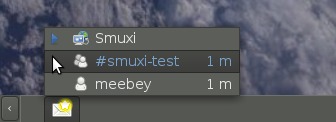
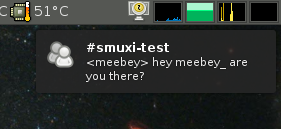
5 weeks after the 0.7.2.2 "Lovegood" release, I am very happy to announce the major feature release, 0.8 codenamed "Godsend". Major feature highlights of this release are desktop notifications (with full support of actions, icons, updates, append and sound), messaging menu / indicators (as provided by Ubuntu's Ayatana project) and working Twitter support with OAuth (basic auth was disabled by Twitter on 31st August). This version also fixes all bugs that were reported since the release of 0.7.2.2. Desktop Notifications
Messaging Menu
Further on, Smuxi comes with the following improvements in its user interface: Smuxi provides better connectivity and security by supporting: HTTP and SOCKS proxies as well as secure connections to IRC servers by using SSL with optional certificate validation. Last but not least, it comes with an enhanced Twitter experience by supporting the use of multiple Twitter accounts at the same time, reformatting tweets that contain newlines and showing the full retweet instead of a truncated version. Updated languages includes: French (Cl ment BOURGEOIS) and German (Bianca Mix) The #smuxi IRC channel can now also be found, in addition to OFTC, on other popular IRC networks such as freenode and GIMPnet. The messages on #smuxi are automatically relayed between the 3 IRC networks. If you like Smuxi and want to support it by making micro-donations, Smuxi is available on Flattr. There are also many other nice FOSS projects available on Flattr, see the Flattr-FOSS project. Smuxi is available for download from here. Binary Packages of Smuxi 0.8 are ready to be used by Debian/Experimental, Ubuntu/Maverick, Ubuntu/Lucid (via PPA), OpenSUSE, Foresight Linux, FreeBSD, and Windows.

Wouter Verhelst: goudengids.be

... or, 'yellow pages.be'. Or something. I like it that there is an on-line version of the Belgian yellow pages. Who wants to look up a phone number in a huge book, anyway? And that's ignoring the fact that it isn't any good for the environment. I also like it that the yellow pages are now no longer distributed by default on paper. You can still get them, if you so wish, but you have to explicitly request them. Of course, searching an on-line database is also faster than flipping through pages until you find what you're looking for. What's more, you can limit your search to your location rather than whatever shops just happen to be in the version of the book that is distributed to your house. That makes it much more efficient, since rather than all thousands of computer shops in the whole province, you'll find the computer shops in your municipality. Or the ones that are in a radius around your address, if you choose that option. Rather, that would be the case. But for some unfathomable1 reason, truvo, the company behind the yellow pages, decided to make the option that gets you the names and numbers of companies that serve your region, rather than companies that actually are in your region, as the default. And since there's really n o limit to what companies can enter as the 'region' they serve, you suddenly get a name for a shop hundreds of kilometers away when all you wanted was to find the closest grocery store. D'oh. 1 Yes, yes, I can guess that money has something to do with it. But whatever, that don't matter.

John Goerzen: Stories of Amateur Radio

It was back in July that I got my amateur radio license, and I haven t written much about it since. It s about time I do. I ve been really enjoying it. I am now wishing I hadn t put off getting into it for so many years. It s a lot of fun and promises to be a lot of fun for a long time. Why? I am frequently asked, What can you do with amateur radio? Yes, you can talk to people all around the world, but of course you can do that with the Internet. Talking to people all around the world can be done with no infrastructure in between, so that s a pretty neat feature, but not compelling to everyone. I have realized that the question is poorly-framed. I had asked that question myself for a long time and only recently realized that I was asking the wrong question. I think the better question would be, What makes amateur radio fun and a good way to spend your time? One thing I ve discovered is that the amateur radio community has an amazing sense of community. Hams, almost universally, seem to love helping out each other, whatever the task may be: setting up antennas, learning how to operate a radio, even fixing a flat tire. I ve seen this directly, and heard about it from others, time and time again. There s an excellent article out there by Nate Bargmann called Why I consider Amateur Radio an asset in my life that makes for good reading. There is a lot of fun in amateur radio. It was quite exciting the first time I talked to someone out of state, realizing that the piece of wire in my trees, and 100W of transmitter power, were all it took to get a message 700 miles away. And even more exciting when I talked to a person in Kazakhstan the same way. No satellites, no phone lines, no undersea cables just my antenna, his, and radio waves. Then there s the fun in talking to somewhat random people. It s not completely random, as I m only talking to people that have passed a test there are about a million of us in the USA. (And for the long-distance HF communication, a more rigorous exam is required, so the number is probably less than that.) But when I call CQ an invitation for anyone listening to reply I never know who will reply. I ve talked to a retired Canadian museum curator, a Mississippi farmer, a resident of Long Island, Russians participating in a contest, two Hawaiians participating in a different contest, and the list goes on. Some of these have been brief contacts lasting only seconds, while others have been conversations that stretch on towards an hour. I liken amateur radio to buying my first iPod. I had never owned a portable MP3 player. I had always figured, why bother? How often am I away from a computer or a CD player? But once I got one, I realized how nice it was. It was convenient to just store my entire library on there and not have to try to sync it across multiple devices. It was convenient to not have to carry CDs with me in the car, and to listen to music at places I hadn t tried to before. The same sort of thing applied to getting a Kindle, and to amateur radio. I didn t realize how much fun it would be until I tried. Some Memorable Moments Towards the end of showing you some things that have been exciting, here are a few memorable moments from my ham radio experience so far. Saturday night was one. I was tuning around listening to anybody to talk to. I heard some people calling CQ in heavy accents. I eventually realized that the All-Asia contest was going on, and figured out how to participate. I made my first voice-mode contact with people on a different continent and it was with Kazakhstan! Within a few minutes, I also talked with three stations in Russia. I had not expected that. I ve made contact with several stations in the Indianapolis area, where I used to live. It was particularly fun to talk to W9IMS, located at the Indianapolis Motor Speedway, which operates around race times only. Again I discovered that station simply by tuning around on the band. I took a 5W handheld radio with me to New York City during my trip there for Debconf. It was a lot of fun to talk to random New Yorkers while visiting, and they were all very interested in my impression of the city, what I ve done so far, and what they thought I ought to do. Some offered specific tips (such as which train from Manhattan to Brooklyn offers a good view while elevated). A local ham, W0BH, gave me some basic training on how to operate during amateur radio contests. During these contests, hams try to make contact with as many other hams in as many places as they can. I didn t think this sounded like a lot of fun. Until I tried it. It was indeed a lot of fun, and interesting being occasionally that rare Kansas station that a bunch of people are trying to talk to at once. One evening, we lost power. I tried calling the electric company, but there was no answer over there for some reason. We re out in the country, and there are no neighbors visible that can inform us whether it s a big problem that the power company probably knows about, or whether it s localized to us. So after wondering what to do for a minute, I thought I d get on the radio and ask. (We own a backup generator for these situations.) Almost right away I heard from a person driving in his pickup. He told me he saw a widespread outage, and heard on his police scanner about other towns that were down for the same reason. I wouldn t have known otherwise.

Dirk Eddelbuettel: Straight, curly, or compiled?

Christian Robert, whose blog I commented-on here once before, had followed up on a recent set of posts by Radford Neal which had appeared both on Radford's blog and on the r-devel mailing list. Now, let me prefix this by saying that I really enjoyed Radford's posts. He obviously put a lot of time into finding a number of (all somewhat small in isolation) inefficiencies in R which, when taken together, can make a difference in performance. I already spotted one commit by Duncan in the SVN logs for R so this is being looked at. Yet Christian, on the other hand, goes a little overboard in bemoaning performance differences somewhere between ten and fifteen percent -- the difference between curly and straight braces (as noticed in Radford's first post). Maybe he spent too much time waiting for his MCMC runs to finish to realize the obvious: compiled code is evidently much faster. And before everybody goes and moans and groans that that is hard, allow me to just interject and note that it is not. It really doesn't have to be. Here is a quick cleaned up version of Christian's example code, with proper assigment operators and a second variable x. We then get to the meat and potatoes and load our Rcpp package as well as inline to define the same little test function in C++. Throw in rbenchmark which I am becoming increasingly fond of for these little timing tests, et voila, we have ourselves a horserace:
# Xian's code, using <- for assignments and passing x down
f <- function(n, x=1) for (i in 1:n) x=1/(1+x)
g <- function(n, x=1) for (i in 1:n) x=(1/(1+x))
h <- function(n, x=1) for (i in 1:n) x=(1+x)^(-1)
j <- function(n, x=1) for (i in 1:n) x= 1/ 1+x 
k <- function(n, x=1) for (i in 1:n) x=1/ 1+x 
# now load some tools
library(Rcpp)
library(inline)
# and define our version in C++
l <- cxxfunction(signature(ns="integer", xs="numeric"),
                 'int n = as<int>(ns); double x=as<double>(xs);
                  for (int i=0; i<n; i++) x=1/(1+x);
                  return wrap(x); ',
                 plugin="Rcpp")
# more tools
library(rbenchmark)
# now run the benchmark
N <- 1e6
benchmark(f(N, 1), g(N, 1), h(N, 1), j(N, 1), k(N, 1), l(N, 1),
          columns=c("test", "replications", "elapsed", "relative"),
          order="relative", replications=10)
And how does it do? Well, glad you asked. On my i7, which the other three cores standing around and watching, we get an eighty-fold increase relative to the best interpreted version:
/tmp$ Rscript xian.R
Loading required package: methods
     test replications elapsed relative
6 l(N, 1)           10   0.122    1.000
5 k(N, 1)           10   9.880   80.984
1 f(N, 1)           10   9.978   81.787
4 j(N, 1)           10  11.293   92.566
2 g(N, 1)           10  12.027   98.582
3 h(N, 1)           10  15.372  126.000
/tmp$ 
So do we really want to spend time arguing about the ten and fifteen percent differences? Moore's law gets you those gains in a couple of weeks anyway. I'd much rather have a conversation about how we can get people speed increases that are orders of magnitude, not fractions. Rcpp is one such tool. Let's get more of them.

Joey Hess: solar day 2

End of the second day in the off-grid house. Three things strike me about being here: quiet, rhythm, and awareness. In the city, I am constantly annoyed by noise. Here, there's a empty, echoing feeling to the quiet. It's not lack of noise exactly -- I can hear cicadas and birds right now -- but it's still quiet. At first I wanted to fill it, but now I can feel my hearing instead expanding outward. Catching a faint engine noise, or a dog barking in the distance. Here there's a rhythm to the day driven by the sun. Get up, connect the batteries to the solar panels. (Only necessary because the charge controller is broken.) Check and record the battery levels, make sure the panels are producing well. Think about adjusting them at solar noon. Check the cooler to see how the ice is holding out. Do weekly chores: Refilling the kerosine lanterns and replacing the rock salt used to control the humidity, which is the downside to a earth-sheltered house that stays 70 degrees cool on a 90 degree day. In the evening, watch the sun go down, disconnect the solar panels, record battery levels, and light lanterns. That's the shape of the day. Besides being aware of distant sounds and time time of day, being here brings to the fore awareness of consumables. Until I get a fridge sorted out, I have a cooler full of ice that I have to monitor. There's propane for the stove, and kerosine for the lanterns. And of course always the state of the batteries. So far, the first battery bank seems likely to last longer than the ice. I'll know better tomorrow. Unfortunatly I burned out the 5v power suppzly I was using to run my NSLU2 in a wiring mishap, so I have to run that on an inverter for now, and the batteries, though not low, can barely power both the inverter and my laptop. This has made staying online tricky. But I'm finding dialup psurpisingly tolerable, and it helps to generally slow down, too. Despite all the above, I got about as much real work done today as I normally would. ?tag lay offgrid

Andrew McMillan: Making my laptop quiet

A few days ago I talked about how noisy my new Dell Studio 15 was but I can now report back with the beginnings of a solution to that problem, and it doesn't appear to be ACPI related. The first clue I needed was that if I switch to the proprietary fglrx drivers for the Radeon the fan quite quickly drops off to a much more reasonable level. It seems the fglrx drivers have issues, however, in particular I get big black patches on my screen. This video corruption happens especially in Firefox, but sometimes in other applications as well. They also appear to screw up my suspend/resume, which is probably even more annoying to me. The second clue that I needed was that Radeon power management support has only just made it into recent kernels. Thanks to Michael Kirkland for providing me with both of those clues :-) Looking under /sys/class/drm/ I find a whole bunch of stuff, but in particular there are /sys/class/drm/card0/device/power_method and /sys/class/drm/card0/device/power_profile. Looking through the kernel source code I can see that power_profile can be set to low, mid, high, auto and default, while power_method can be set to either dynpm or profile. Trying out all of these values, it seems I get the quietest result with the profile method and either the low or mid profile. The dynpm method is nearly as good, and I would think it should really be the default for a 'Mobility' chipset. From the detailed benchmarking that Phoronix did I wonder if it shouldn't be the default for everyone. For myself, I see some small 'tearing' artifacts occasionally when running with the low profile. These disappear when I run with the mid profile, and since that seems to have pretty much the same temperature (and noise) results I'll go with that one. Though the laptop often does still make more noise than I would prefer it to, it is no longer annoying everyone in the room. Not unexpectedly this seems to have a huge impact on power use, too. It appears that the laptop should now give me around 4.5 hours when I do everything I can think of to lower the power use, whereas before it was more like 2.5 hours. Now I guess I can get back to hacking on DAViCal...

7 September 2010

John Goerzen: Labor Day with Jacob and Oliver

Yesterday started out with Jacob and me going to a men/boys breakfast organized by my great uncle and some others. He s in his 80s and this is probably his last year doing this. It was out in the woods by the Little Arkansas River. They cooked up bacon, sausage, and eggs and it was a fun time. Jacob enjoyed throwing sticks in the river and sitting on some logs. Terah, meanwhile, went to Wichita with Oliver. So it was just Jacob and me when we got home. Jacob spent two hours playing rivers with me. A few weeks ago, he and I set this up outside. I found an old length of pipe on our property (my dad thinks it used to carry water from a well) and some cement blocks. I set it up on the blocks so that one end is higher than the other, and the lower end empties out at the top of a small dirt pile. Then I brought a water hose over to it, turned on the water at a very slow speed, and put the hose in the pipe. The result is a small stream of water coming out at the dirt pile. After it runs just a little while, the dirt is soft enough that you can dig out little channels, or rivers , with your fingers or a stick. Jacob enjoyed this the first time he played, but yesterday he really enjoyed it. We had a fork in the river, and he informed me that he would sit on his bank and I would sit on mine. He also wanted to give river food to his river (the fork closest to him). River food was loose dirt that he d pick up and sprinkle over the water, and watch it get carried on down. I spotted some random bug in the area once, and that bug got food too. I think Jacob and the bug disagreed about whether this was particularly helpful. Jacob enjoyed playing other games with the pipe. I had showed him that we could send things through the pipe, so he would take out the hose, stuff some dirt in one end, and then make sure I was watching to see if it came out the other end. He sometimes made a fountain by setting the hose on top of the cement blocks and watching the water drip down from level to level. Then later in the day, I introduced him to Tuxpaint. This is a painting program aimed at children. I had told him I had a painting game to show him a few days ago, but because he made some bad behavior choices, he had lost access to my computer for a few days. Anyhow, we tried it yesterday and wow he loved it. There was constant laughter and excitement. I first showed him how to select colors for the paintbrush. He quickly figured out how to make lines, change colors, and change brushes. Tuxpaint has sound effects for just about everything, which he loved too. Then we explored the interface together and I showed him the stamps feature, which lets you paste pre-made pictures into a drawing. Tuxpaint comes with dozens of these, on kid-friendly themes such as animals, cars, fire trucks, signs, etc. This he loved even more. Terah and Oliver got home about this time, and Oliver and Jacob both sat on my lap for a time, both laughing loudly each time Jacob discovered something new to paste into his picture. Of course, then Oliver tried to eat my keyboard and smash my monitor, but there you go.

Brett Parker: Discovering Netgear ProSafe switches and IP Power 9258 devices

So, we have some netgear prosafe switches and some IP Power 9258 devices where I'm currently working, unfortunately, these don't always get the IP configuration that you'd expect (or, they get a DHCP lease from a DHCP server that I can't query the leases from...), however both come with little windows utilities that "magically" find the devices and give back (quite a lot, really) information on the IP configuration of the device. Being somewhat of a "oh god, I don't want to use windows, please don't make me" type person, and knowing the the IPPower 9258 boxes were going to a remote site where I'll only have linux machines on the same network as them, I figured that it would be a good idea to sit with wireshark and find out how the heck these tools worked. Turns out that both just send out a UDP broadcast packet (or two) and then sit and wait for responses - this meant that to get the information that I wanted out of them I could get away with writing very little python, taking the UDP packet that I got back, taking the payload and dismantling it piece by piece so that I could display that information. The scripts aren't at all polished, but if anyone happens to need something (that should work multi-platform, too) to discover either of these, let me know and I can throw you what I've got.

C.J. Adams-Collier: Debian on Sheeva Plug internal NAND flash

After a bit of work, I got the sheeva plug working the way I wanted it to. First of all, I grabbed a spare 1G USB flash disk I had laying around and installed Debian squeeze to it by following tbm s instructions here: http://www.cyrius.com/debian/kirkwood/sheevaplug/install.html After debian was installed to the USB disk, I removed it from the plug and used dd on my laptop to create an image of the filesystem. I mounted the filesystem as a loopback device and created a jffs2 partition image from it after doing a bit of minor tweaking. I placed the USB disk back in the plug and booted to it. Using this intermediate filesystem and the mtd-tools package, I wrote the new jffs2 image to the NAND mtd device. I then modified the uboot environment to suit, saved, and now have a working setup. Detailed instructions are below. pre-requisites Connect the plug to your network with the rj-45/cat5 cable. Connect a USB flash drive to the plug. I used a 1G drive, but 512M should be sufficient. Install the tftpd package on a machine on your network. You ll also need screen on the machine that you use to connect to the plug s serial terminal. I ll assume these are the same host. You need the IP address of the tftp server. In this example, we will assume that the IP is 192.168.1.2 and that you will assign 192.168.1.200 to the plug. $ sudo apt-get install tftpd screen Place uImage, uInitrd, and uBoot in the /srv/tftp directory: $ sudo wget -O /srv/tftp/uImage http://www.cyrius.com/tmp/beta1/marvell/sheevaplug/uImage
$ sudo wget -O /srv/tftp/uInitrd http://www.cyrius.com/tmp/beta1/marvell/sheevaplug/uInitrd
$ sudo wget -O /srv/tftp/uBoot http://wp.colliertech.org/cj/wp-content/uploads/2010/09/07/uboot.bin Connecting to the serial console We are now ready to boot the plug. Note that you have to be quick with the screen command. I recommend you type it out and get ready to press the enter key. You have to interrupt the bootloader in order to enter the u-boot console. Attach the power and immediately enter the following command: $ screen -S sheeva /dev/ttyUSB0 cs8,ixoff,115200 If you did this right, you should see a prompt like this: Marvell>> update uboot As per tbm s instructions, you can now update the uboot if needed. Instructions for that are here: http://www.cyrius.com/debian/kirkwood/sheevaplug/uboot-upgrade.html I ll put them inline here for completeness.
Marvell>> setenv serverip 192.168.1.2 # IP of your TFTP server
Marvell>> setenv ipaddr 192.168.1.200 # IP of the plug
Marvell>> bubt uboot.bin
be sure to answer n to the question about env parameters. Now reset the device. Don t forget to interrupt the bootloader so we can get back to the prompt:
Marvell>> reset
Let the device know that you will be running a mainline kernel and set the arcNumber:
Marvell>> setenv mainlineLinux yes
Marvell>> setenv arcNumber 2097
Marvell>> saveenv
Marvell>> reset
Install Debian to the USB disk Interrupt the boot process once more. We are now ready to run the debian installer. I ll leave the details as an exercise for the reader. The following should put you into the installer, which you are probably quite familiar with by now. NB: I will assume that you will use a single ext3 partition for the entire system. This will make it easier to build a jffs2 image out of the resultant partition on the USB disk.
Marvell>> setenv serverip 192.168.1.2
Marvell>> setenv ipaddr 192.168.1.147
Marvell>> tftpboot 0x01100000 uInitrd
Marvell>> tftpboot 0x00800000 uImage
Marvell>> setenv bootargs console=ttyS0,115200n8 base-installer/initramfs-tools/driver-policy=most
Marvell>> bootm 0x00800000 0x01100000
build a jffs2 image Once the installation has completed, power down the plug and remove the USB disk. Put the USB disk in the machine you used to get the console on the plug and note what device the kernel assigns to it. In my case, it was given sdc, so debian is installed to /dev/sdc1. I will use these values for this example. If the filesystem was automatically mounted, unmount it. Create a disk image of the partition and mount it as a loopback device.
$ sudo umount /dev/sdc1
$ dd if=/dev/sdc1 of=/tmp/debian.img
$ mkdir /tmp/mnt
$ sudo mount -o loop /tmp/debian.img /tmp/mnt
You can now remove the USB disk and return it to the plug. Modify the /etc/fstab file. The root filesystem will be /dev/mtdblock2 and of fs type jffs2. My fstab file looks like the following:
proc            /proc           proc    defaults        0       0
/dev/mtdblock2 /               jffs2    errors=remount-ro 0       1
We can now create a jffs2 image from the mounted and altered fresh install:
$ sudo mkfs.jffs2 -l \
  -e 0x20000 \
  -X zlib \
  --eraseblock=128KiB \
  --pad \
  --output=/tmp/rootfs.jffs2 \
  --compression-mode=priority \
  -n \
  --squash \
  -r /tmp/mnt
write jffs2 to nand Now that we have an image to flash to the NAND, let s boot off of the USB disk. It should now be attached to the plug. Power on the plug and use screen to get a console. Interrupt the bootloader and enter the following commands:
Marvell>> setenv bootargs_console console=ttyS0,115200
Marvell>> setenv bootcmd_usb 'usb start; ext2load usb 0:1 0x01100000 /boot/uInitrd; ext2load usb 0:1 0x00800000 /boot/uImage'
Marvell>> setenv bootcmd 'setenv bootargs $(bootargs_console); run bootcmd_usb; bootm 0x00800000 0x01100000'
Marvell>> run bootcmd
Log in as root with the credentials you configured during the install. You will need to install a few packages in order to complete the nand flash. You can then ssh to the host on which you created the jffs2 image and cat it to stdout, piping this to nandwrite:
$ sudo apt-get install mtd-utils
$ ssh user@192.168.1.2 cat /tmp/rootfs.jffs2   sudo nandwrite /dev/mtd2 -p -
You now have a jffs2 image on the nand. Configure u-boot One more reboot to set u-boot s environment, and you will be done. Power down and remove the USB disk. Power on and get the serial console using screen. Break into the bootloader and enter the following commands:
Marvell>> setenv bootargs_console console=ttyS0,115200
Marvell>> setenv mtdpartitions mtdparts=orion_mtd:0x400000@0x100000(uImage),0x1fb00000@0x500000(rootfs)
Marvell>> setenv bootargs_root root=/dev/mtdblock2 rw rootfstype=jffs2
Marvell>> setenv bootcmd 'setenv bootargs $(bootargs_console) $(mtdpartitions) $(bootargs_root); nand read.e 0x00800000 0x00100000 0x00400000; bootm 0x00800000'
Marvell>> saveenv
Marvell>> reset
You should now be good to go.

Rapha&#235;l Hertzog: How to use multiple upstream tarballs in Debian source packages?

Since the introduction of the 3.0 (quilt) source format, it is now possible to integrate multiple upstream tarballs in Debian source packages. This article will show you how to do the same with your own package shall you need it. It s quite useful to easily integrate supplementary plugins, translations, or documentation that the upstream developers are providing in separate tarballs. Step by step explanation We ll take the spamassassin source package as an example. The upstream version is 3.3.1. The main upstream tarball is named as usual (spamassassin_3.3.1.orig.tar.gz) and contains the top directory of our source package. We already have a debian directory because the package is not new. Upstream provides spamassassin rules in a separate tarball named Mail-SpamAssassin-rules-3.3.1.r901671.tgz. We grab it, rename it to spamassassin_3.3.1.orig-pkgrules.tar.gz and put it next to the main tarball. The pkgrules part is the component name that we choose to identify the tarball, it s also the name of the directory in which it will be extracted inside the source package. For now that directory doesn t exist yet so we must create it.
$ mv Mail-SpamAssassin-rules-3.3.1.r901671.tgz spamassassin_3.3.1.orig-pkgrules.tar.gz
$ cd spamassassin-3.3.1
$ mkdir pkgrules
$ tar -C pkgrules -zxf ../spamassassin_3.3.1.orig-pkgrules.tar.gz
This is already enough, the next time that you will build the source package, the supplementary tarball will be automatically integrated in the generated source package.
$ dpkg-buildpackage -S
[...]
 dpkg-source -b spamassassin-3.3.1
dpkg-source: info: using source format  3.0 (quilt)'
dpkg-source: info: building spamassassin using existing ./spamassassin_3.3.1.orig-pkgrules.tar.gz ./spamassassin_3.3.1.orig.tar.gz
dpkg-source: info: building spamassassin in spamassassin_3.3.1-1.debian.tar.gz
dpkg-source: info: building spamassassin in spamassassin_3.3.1-1.dsc
The supplementary tarball is now part of the source package but we re not making anything useful out of it. We have to modify debian/rules (or debian/spamassin.install) to install the new files in the binary package. A special case: bundling related software In very rare cases, you might want to create a bundle of several software (small perl modules for example) and you don t have any main tarball, you only have several small tarballs. Rename all the tarballs following the same logic as above and when building the source package you can ask dpkg-source to create an empty (and fake) main archive for you with the option --create-empty-orig:
$ dpkg-buildpackage -S --source-option=--create-empty-orig
Use with care as the version number you give to the bundle is what users will see and it s likely unrelated to the version number of each individual software. Common mistakes Forgetting to extract the supplementary tarball If you forget to extract the content of the supplementary tarball in the pkgrules directory, dpkg-source will emit lots of warnings about those files being deleted. In fact, you did not delete them but you only forgot to create them in the first place.
dpkg-source: warning: ignoring deletion of directory pkgrules
dpkg-source: warning: ignoring deletion of file pkgrules/20_fake_helo_tests.cf
dpkg-source: warning: ignoring deletion of file pkgrules/60_shortcircuit.cf
[...]
Using a bad version number for the supplementary tarball Sometimes the supplementary tarball has a version of its own that does not match the upstream version. You must still name the file in a way that matches the upstream version of the main tarball otherwise it will not be picked up by dpkg-source and it will generate a new patch in debian/patches/ containing the whole new directory. It s possible to encode the version number of the supplementary tarball in the component name (in our example above we could have picked pkgrules-r901671 as component name) but this means that the name of the associated directory will regularly change and you must adapt your packaging rules to cope with this. However this last trick has the benefit of being able to update the additional tarball without bumping the upstream version. A sourceful upload of a new revision of the package will be accepted by the archive: the main tarball is ignored since it s unchanged but the supplementary tarball is taken since it s a new file for the archive (it has a different filename). Be sure to move away old versions of the additional tarball when you do that if you don t want to upload several versions of the same tarball by mistake! Misextracting the supplementary tarball dpkg-source is very smart when it extracts the supplementary tarball and you should be as well when you manually extract it. If the tarball contains only a single top-level directory, that directory is extracted, renamed to match the component name and moved in the source package directory.
If the tarball contains several top-level files or directories, then the target directory is first created and the content of the archive is directly extracted into that directory. Here are commands to install the files in both cases (we re already in the source package directory):
$ mkdir pkgrules
# Archive contains a single top-level directory
$ tar -C pkgrules --strip-components=1 -zxf ../spamassassin_3.3.1.orig-pkgrules.tar.gz
# Archive contains many top-level entries
$ tar -C pkgrules -zxf ../spamassassin_3.3.1.orig-pkgrules.tar.gz
Flattr this Share/Bookmark 2 comments Support my work

Gerfried Fuchs: flattr

I started to give flattr a try, too. It is a social micropayment site and the similarity of its name to the verb flatter is on intention. It is meant to say thanks in small amounts month by month to "things" you like. One such thing I created is my blog you can find the link to it below every entry. To be able to flattr someone one needs to create an account on the site and put money into their account. After that it's possible to follow the flattr button links. If you are reading my blog on my site and have JavaScript enabled you just have to click the flattr part of the image (not the number) to do so. If you are reading it through my feed or with JavaScript disabled you will have to click a second time on the flattr site to make the flattring happen. Another thing I've created is Debian BTS: cleaning up. I use this link in my mails to the Debian BTS for my stable RC cleanup efforts, or general proper closing of bugs that aren't getting archived. Through the help of UDD I've created me helpful overview pages of bugs that need attention for this. The third thing I've created is Package Maintenance. If you are a fan of one of the packages I maintain and want to thank me for taking proper care of it, feel free to also click this one. Please be aware that this shouldn't be seen as an Upstream appreciation if one of the projects I package for Debian uses flattr themself then you should definitely (also) consider flattring them for their own. About Upstream projects that use flattr: One of the packages I invest quite a lot of effort into started using flattr: wesnoth. They have put the flattr button on their entry page at wesnoth.org, here is the direct link to their first and general thing: The Battle for Wesnoth. Please be reminded that the things you did flattr in a previous month can again be flattred the next month. This is especially true for general purpose things like what I am using currently. Others might create things for every single blog entry, or very specific tasks, to allow people to flattr them more often in a month and get a bigger share of the cake. So keep in mind which things are general ones and consider returning to them. Enjoy!

/debian permanent link Comments: 1 Flattr this

Next.

Previous.