Search Results: "tar"

20 May 2011

Russ Allbery: git-pbuilder 1.20

I've been sadly neglecting this script, but tonight I finally found some time to catch up on all the suggestions and bug reports that Guido G nther has been letting me know about (and I greatly appreciate that!). This version merges in all the good ideas people have had. This version removes the -i and -I flags passed to dpkg-source when the package format is 3.0, since with 3.0 packages, dpkg-source both already ignores Git files by default and ignores various other things that were not included in the pattern. It also offers much better configuration methods for the ignore patterns, which git-pbuilder was overriding. So that's all skipped now for 3.0 packages. git-pbuilder still passes in the ignore flags for 1.0 packages, since they don't ignore Git files by default. The environment variable BUILDER can now be set to choose the builder, which is still cowbuilder by default. The other supported option is qemubuilder, and for it git-pbuilder selects an appropriate configuration file. Additional flags for the builder can be set in the GIT_PBUILDER_OPTIONS environment variable and will be passed along. There are also a few more minor fixes: better documentation, always printing out what we're doing at the start of a run, and preserving the exit status of pdebuild and exiting with the same status. These changes are based on work by Guido G nther, Yaroslav Halchenko, and Beno t Knecht. You can get the latest version from my scripts page.

17 May 2011

Gerfried Fuchs: It's MY Life

Sometimes people will tell you what you should do. Sometimes they will even shout at you for simply asking a question on why they want something done because it isn't clear just from itself. And others likes to jump the boat and join in just for the fun of it... Gladly, this is MY life, and I choose how much abuse I'm willing to take, especially for a voluntary work that I didn't even enroll for but got put into. Sometimes through my dedication to getting quality into things and seeing that others simply neglect these areas, but they need to get addressed anyway, no matter how little respect is shown for people investing in these boring areas. The topic of It's MY Life is an old one and thus it is no surprise that a fair amount of songs surrounding it popped up over time. In my previous blog entry I wrote about different interpretations, some responses seem to hint that I wasn't clear enough about that I really meant different interpretations of the same lyrics, not just regular cover versions. The following set of songs is special in a different sense: It is about the same song title and thus does also cover different bands. Like always, enjoy! And think about how you interact with others. I know that I'm sometimes crossing a line myself too, no one is perfect. What though makes the difference is the willingness to learn, and especially: To excuse. But in the end: It's MY life!

/music permanent link Comments: 3 Flattr this

Julien Danjou: Python sets comparisons

This week I lost some time playing with Python's sets. After digging into Python source code, I finally discovered there is what seems to be little bug. Anyway, it has been "fixed" in Python 3, fortunately. I did not find if it was reported somewhere, but since it's fixed, it's not a big deal.

Python 2.7.1+ (default, Apr 20 2011, 10:53:33) 
[GCC 4.5.2] on linux2
Type "help", "copyright", "credits" or "license" for more information.
>>> class A(object):
...     def __eq__(self, other):
...             return True
... 
>>> A() == A()
True
>>> [A()] == [A()]
True
>>> set([A()]) == set([A()])
False
This clearly did not make any sense to me. I've then tested under Python 3.2:
Python 3.2.1a0 (default, May  4 2011, 19:59:25) 
[GCC 4.6.1 20110428 (prerelease)] on linux2
Type "help", "copyright", "credits" or "license" for more information.
>>> class A(object):
...     def __eq__(self, other):
...             return True
... 
>>> set([A()]) == set([A()])
Traceback (most recent call last):
  File "<stdin>", line 1, in <module>
TypeError: unhashable type: 'A'
At least, raising an error is saner. It actually helped me to understand what I needed to do to have my sets working correctly with Python 2:
Python 2.7.1+ (default, Apr 20 2011, 10:53:33) 
[GCC 4.5.2] on linux2
Type "help", "copyright", "credits" or "license" for more information.
>>> class A(object):
...     def __eq__(self, other):
...             return True
...     def __hash__(self):
...             return 123456789
... 
>>> set([A()]) == set([A()])
True
Flattr this

Reinhard Tartler: Mini Server PCs

Dear Lazyweb,

Hot or not, which of the following devices is the best? And which of them are actually available for purchase in Europe, preferably from Germany?

Please share your opinions in the comments.

Vincent Bernat: Debian on Thinkpad Edge 11"

This has been several months since I didn t use much my laptop, an Asus S5N: it was crippled by a short battery life and was hit by several bugs, most of them targeting the i855GME graphic chipset thanks to the use of GEM and KMS in the latest Xorg. I did not want to invest too much in a laptop and I have found a rebate from Lenovo for Thinkpad Edge series. Voil , I have a Thinkpad Edge 11 .

Hardware Thinkpad Edge is a entry-level notebook from Lenovo. In France, it is available for around 500 , thanks to the usual parity between dollar and euro. Thinkpad Edge 11" enclosure

Hardware configuration Lenovo do not sell directly in France. Therefore, you cannot configure your laptop as you want. There is two or three configurations available. This can be a bit frustrating if you want something specific. Thinkpad Edge 11" parts Here is the configuration that I bought:
  • Intel Core i3 380UM at 1.33 GHz CPU.
  • 11.6 LED screen, with a resolution of 1366x768.
  • 4 GB RAM.
  • 320 GB hard drive.
  • Wireless network (Centrino Wireless-N) and bluetooth.
  • Broadband modem (WWAN)
It s a small laptop but it is not as light as it should be (1.5 kg or 3.3 pounds). Apart from the power supply, you don t get any extra. My Asus was shipped with a wireless mouse, a transport bag, a sleeve, an USB key and a CD burner. On one side, you get two USB ports and on the other side, one USB port, an HDMI port, a network outlet and a speaker jack. The VGA connector is placed on the rear. Thinkpad Edge 11"

BIOS First step: checking BIOS settings. WiMAX can be disabled as well as any other component that you may not need. The keyboard can be configured so that function keys are available directly instead of having to use the Fn key. There is an option called Computrace from AbsoluteSoftware which seems targeted at find back your laptop in case it gets stolen or just let the FBI know where you are. I have disabled it.

Debian installation Debian can be installed from an USB stick. This is really easy now. You grab the ISO image you want to use (I take the one for AMD64 in testing because I will run unstable) and to copy it on the USB stick:
1
# dd if=debian-testing-amd64-netinst.iso of=/dev/sdb
The previous way of making the USB stick bootable, installing a kernel, an initrd and the ISO image is deprecated (and does not work). Moreover, using testing to install Debian allows me to use a 2.6.37 kernel and circumvent some problems that may have happen with an older kernel. During the installation, I choose a guided partitioning using encrypted LVM. I choose to have several partitions but I keep /usr in the root partition since having a separate /usr is less and less supported, especially with piece of software like udev. The partitioning tool in Debian installer do not allow to resize volumes, you need to destroy them and recreate them as well as their content. However, this is still faster than writing a patch for this. When the installation is finished, the laptop boots on a 2.6.38 kernel, asks for the passphrase to decrypt the LUKS volume and display the login prompt a few seconds later.

Software configuration Most of the hardware seems to be supported. No obscure commands to run to get a working network. Therefore, I start by setting up my usual environment.

Setting up the desktop First, I change /etc/apt/sources.list to get unstable:
deb http://ftp.fr.debian.org/debian/ unstable main
deb-src http://ftp.fr.debian.org/debian/ unstable main
deb http://ftp.fr.debian.org/debian/ experimental main contrib non-free
I also want that everything that is installed from experimental to be upgraded if an update is available in experimental. This is done by creating a file /etc/apt/preferences.d/experimental:
Package: *
Pin: release experimental
Pin-Priority: 101
Then, I install the following packages:
  • zsh, my favourite shell with my hand-made maturating configuration. I should put it on GitHub one day.
  • mg, is the editor that I use to quickly edit a configuration file. I don t like vi. I have used jed for a long time but its default configuration can be cumbersome and it misses some emacs keybinding.
  • emacs, my work environment. I use it as a text editor and mail reader (with Gnus). I don t use it as a browser nor as a terminal. As for zsh, I have my configuration files ready to be copied anywhere.
  • fvwm, my window manager since quite some time. I use fvwm-crystal on top of it. My configuration is described in another post. I also use conky.
  • rxvt-unicode, a terminal. It has a very good terminal emulation and some fancy features like transparency (using compositing or not). It is light and fast and allows to search in the backbuffer. It can use a client/server system that will close all your windows when the server crashes. This almost never happens.
  • unison, a synchronisation tool that allows me to keep the same files on my different computers.
  • gdm3 is the only display manager that is able to talk correctly to ConsoleKit and get the rights set correctly without adding yourself to a lot of groups.
Nowadays, I use the kernel from Debian and I do not have to run my own configuration for it. The glory days where I had to recompile the kernel before plugging a new USB toy have passed. I remove rpcbind and nfs-common. I use ferm to setup a simple firewall. Here is my ferm.conf:
domain (ip ip6)  
  table filter  
chain INPUT  
    policy DROP;
    mod state state INVALID DROP;
    mod state state (ESTABLISHED RELATED) ACCEPT;
    interface lo ACCEPT;
    proto tcp dport ssh ACCEPT;
    
chain OUTPUT  
    policy ACCEPT;
    mod state state (ESTABLISHED RELATED) ACCEPT;
    
chain FORWARD  
    policy DROP;


unison will then sync my configuration files and my documents. After this step, my environment is ready.

Hardware configuration This is usually the most troublesome part. However, looking at the output of lspci and lsusb, everything seems pretty easy to get supported. Here is lspci output:
00:00.0 Host bridge: Intel Corporation Core Processor DRAM Controller (rev 02)
00:02.0 VGA compatible controller: Intel Corporation Core Processor Integrated Graphics Controller (rev 02)
00:16.0 Communication controller: Intel Corporation 5 Series/3400 Series Chipset HECI Controller (rev 06)
00:1a.0 USB Controller: Intel Corporation 5 Series/3400 Series Chipset USB2 Enhanced Host Controller (rev 06)
00:1b.0 Audio device: Intel Corporation 5 Series/3400 Series Chipset High Definition Audio (rev 06)
00:1c.0 PCI bridge: Intel Corporation 5 Series/3400 Series Chipset PCI Express Root Port 1 (rev 06)
00:1c.1 PCI bridge: Intel Corporation 5 Series/3400 Series Chipset PCI Express Root Port 2 (rev 06)
00:1c.5 PCI bridge: Intel Corporation 5 Series/3400 Series Chipset PCI Express Root Port 6 (rev 06)
00:1d.0 USB Controller: Intel Corporation 5 Series/3400 Series Chipset USB2 Enhanced Host Controller (rev 06)
00:1e.0 PCI bridge: Intel Corporation 82801 Mobile PCI Bridge (rev a6)
00:1f.0 ISA bridge: Intel Corporation Mobile 5 Series Chipset LPC Interface Controller (rev 06)
00:1f.2 SATA controller: Intel Corporation 5 Series/3400 Series Chipset 4 port SATA AHCI Controller (rev 06)
00:1f.3 SMBus: Intel Corporation 5 Series/3400 Series Chipset SMBus Controller (rev 06)
00:1f.6 Signal processing controller: Intel Corporation 5 Series/3400 Series Chipset Thermal Subsystem (rev 06)
03:00.0 Network controller: Intel Corporation Centrino Wireless-N 1000
09:00.0 Ethernet controller: Realtek Semiconductor Co., Ltd. RTL8111/8168B PCI Express Gigabit Ethernet controller (rev 03)
ff:00.0 Host bridge: Intel Corporation Core Processor QuickPath Architecture Generic Non-core Registers (rev 02)
ff:00.1 Host bridge: Intel Corporation Core Processor QuickPath Architecture System Address Decoder (rev 02)
ff:02.0 Host bridge: Intel Corporation Core Processor QPI Link 0 (rev 02)
ff:02.1 Host bridge: Intel Corporation Core Processor QPI Physical 0 (rev 02)
ff:02.2 Host bridge: Intel Corporation Core Processor Reserved (rev 02)
ff:02.3 Host bridge: Intel Corporation Core Processor Reserved (rev 02)
And lsusb output (I disabled the broadband modem in the BIOS and therefore, it does not appear here):
Bus 001 Device 001: ID 1d6b:0002 Linux Foundation 2.0 root hub
Bus 002 Device 001: ID 1d6b:0002 Linux Foundation 2.0 root hub
Bus 001 Device 002: ID 8087:0020 Intel Corp. Integrated Rate Matching Hub
Bus 002 Device 002: ID 8087:0020 Intel Corp. Integrated Rate Matching Hub
Bus 001 Device 003: ID 0bda:0158 Realtek Semiconductor Corp. USB 2.0 multicard reader
Bus 001 Device 004: ID 0a5c:217f Broadcom Corp. Bluetooth Controller
Bus 002 Device 003: ID 5986:01a7 Acer, Inc Lenovo Integrated Webcam
There is a dedicated page for the Thinkpad Edge 11 on ThinkWiki. This wiki is one of the best source of information when you get a Thinkpad. The kernel as shipped by Debian kernel team contains every module that you may need. One of them, thinkpad_acpi will handle most of the perks under the hood. I do not use a complete desktop like Gnome. I usually prefer to use command line tools and put them in .xsession for persistence. There is usually some graphical utility to do the same thing. There are however some configuration steps that are now far easier to do with a graphical tool. Since I use X all the time, I just rely on those tools when necessary.

BIOS upgrade From lshw output, I see that I already have the latest BIOS available. No need to update then. In case you need to update, yours, ThinkWiki has a documentation to upgrade. You can find memdisk image in syslinux package.

Graphic card The graphic card is integrated into the CPU. Intel usually ships graphic cards well supported by open source drivers. ThinkWiki tells us:
A very recent Linux distribution with kernel 2.6.33 and Intel Xorg driver 2.11 or newer is recommended. Note that XVideo (Xv) playback at certain frame sizes does not work properly unless you have at least version 2.12 of the Intel Xorg driver.
With Debian Wheezy, you get version 2.15. Therefore, configuring the graphic card is just a matter of installing xserver-xorg-video-intel and that s all. No /etc/X11/xorg.conf needed. HDMI and VGA outputs are detected without configuring anything. They can be enabled with xrandr. I did not try if it was possible to use both of them at the same time.
Screen 0: minimum 320 x 200, current 1366 x 768, maximum 8192 x 8192
LVDS1 connected 1366x768+0+0 (normal left inverted right x axis y axis) 256mm x 144mm
   1366x768       60.0*+   50.0  
   1360x768       59.8     60.0  
   1024x768       60.0  
   800x600        60.3     56.2  
   640x480        59.9  
VGA1 disconnected (normal left inverted right x axis y axis)
HDMI1 disconnected (normal left inverted right x axis y axis)
DP1 disconnected (normal left inverted right x axis y axis)
Compositing works without any problem. I use only transparency and therefore, I don t know what the speed is on a desktop with all effects turned on. Regarding video acceleration, XVideo is supported but the graphic card also features hardware decoding with i965-va-driver package. Here is the output of vainfo:
libva: libva version 0.32.0
libva: va_getDriverName() returns 0
libva: Trying to open /usr/lib/dri/i965_drv_video.so
libva: va_openDriver() returns 0
vainfo: VA API version: 0.32
vainfo: Driver version: i965 Driver 0.1
vainfo: Supported profile and entrypoints
  VAProfileMPEG2Simple            : VAEntrypointVLD
  VAProfileMPEG2Main              : VAEntrypointVLD
  VAProfileH264Baseline           : VAEntrypointVLD
  VAProfileH264Main               : VAEntrypointVLD
  VAProfileH264High               : VAEntrypointVLD
With Debian, VLC can make use of this if you put ffmpeg-hw=1 in your ~/.config/vlc/vlcrc. We are then greeted by this:
[0x2629040] avcodec decoder: Using VA API version 0.32 for hardware decoding.

Network The network card works out of the box. ThinkWiki tells us that there can be stability problems with 2.6.36 kernel. During the installation, a 2.6.37 was used without any problem. I am now running a 2.6.38 and never got a glitch. It is likely that the described problem was solved with 2.6.37.

UltraNav UltraNav is the combination of the usual touchpad and the trackpoint which is a small joystick in the center of the keyboard and is well known to Thinkpad users since most of them have one. The trackpoint is a great input device. Nowadays, all input devices are configured with the help of xinput command. Here is the output of xinput list:
  Virtual core pointer                      id=2    [master pointer  (3)]
      Virtual core XTEST pointer                id=4    [slave  pointer  (2)]
      SynPS/2 Synaptics TouchPad                id=11   [slave  pointer  (2)]
      TPPS/2 IBM TrackPoint                     id=12   [slave  pointer  (2)]
  Virtual core keyboard                     id=3    [master keyboard (2)]
  Virtual core XTEST keyboard               id=5    [slave  keyboard (3)]
  Power Button                              id=6    [slave  keyboard (3)]
  Video Bus                                 id=7    [slave  keyboard (3)]
  Power Button                              id=8    [slave  keyboard (3)]
  Integrated Camera                         id=9    [slave  keyboard (3)]
  AT Translated Set 2 keyboard              id=10   [slave  keyboard (3)]
  ThinkPad Extra Buttons                    id=13   [slave  keyboard (3)]
The command xinput list-props will give you additional information on each input device listed above. You can then configure any settings using xinput set-prop. For example, if you want to enable scrolling by using the edges of the touchpad and enable palm detection, you can use the following commands:
1
2
$ xinput set-int-prop "SynPS/2 Synaptics TouchPad" 'Synaptics Edge Scrolling' 8 1 1 0
$ xinput set-int-prop "SynPS/2 Synaptics TouchPad" 'Synaptics Palm Detection' 8 1
If you want to disable the touchpad and only use the trackpoint, use the following command:
1
$ xinput set-int-prop "SynPS/2 Synaptics TouchPad" 'Synaptics Off' 8 1
Each property has a type and a size. There is no place for guessing since every property is listed in man 4 synaptics. The same applies for the trackpoint but the correct manual page is man 4 evdev. For example, if you want to enable scrolling using the middle button, use:
1
2
$ xinput set-int-prop "TPPS/2 IBM TrackPoint" "Evdev Wheel Emulation" 8 1
$ xinput set-int-prop "TPPS/2 IBM TrackPoint" "Evdev Wheel Emulation Button" 8 2
All those commands can be tossed in ~/.xsession.

Keyboard hot keys Thinkpad laptops usually have a lot of hot keys. This is not the case of the Thinkpad Edge which only features a few of them:
  • volume control
  • brightness control
  • webcam and external screen toggle
  • wireless toggle
  • multimedia keys
All those keys trigger an event in one of the keyboard listed in xinput list. Therefore, your window manager or any other application can intercept them and act upon. You can use evtest to check which key triggers which event on which keyboard. The acpid daemon listen on those keyboards and can also trigger some actions. For example, it will run ibm-wireless.sh when you hit the wireless toggle. By default, this will enable or disable your wireless card. But you can configure the script to use a multistate toggle and disable or enable the bluetooth card as well.

Sound card As for the network card, the sound card works out of the box. I use PulseAudio because it allows per-application volume control and per-application sound card selection. It comes handy if you have some bluetooth headset. To make PulseAudio the default application for most applications, I put this in my ~/.asoundrc:
pcm.!default  
  type pulse
 
ctl.!default  
  type pulse
 

Wireless card A firmware is needed to make this card work. On Debian, you need to install firmware-iwlwifi package. Then, iwlagn module needs to be loaded. You can check with rfkill list that the wireless card has not been disabled. iw list will then give the status:
Wiphy phy0
Band 1:
    Capabilities: 0x872
        HT20/HT40
        Static SM Power Save
        RX Greenfield
        RX HT20 SGI
        RX HT40 SGI
        No RX STBC
        Max AMSDU length: 3839 bytes
        No DSSS/CCK HT40
    Maximum RX AMPDU length 65535 bytes (exponent: 0x003)
    Minimum RX AMPDU time spacing: 4 usec (0x05)
    HT RX MCS rate indexes supported: 0-15, 32
    TX unequal modulation not supported
    HT TX Max spatial streams: 1
    HT TX MCS rate indexes supported may differ
    Frequencies:
        * 2412 MHz [1] (14.0 dBm)
        * 2417 MHz [2] (14.0 dBm)
        * 2422 MHz [3] (14.0 dBm)
        * 2427 MHz [4] (14.0 dBm)
        * 2432 MHz [5] (14.0 dBm)
        * 2437 MHz [6] (14.0 dBm)
        * 2442 MHz [7] (14.0 dBm)
        * 2447 MHz [8] (14.0 dBm)
        * 2452 MHz [9] (14.0 dBm)
        * 2457 MHz [10] (14.0 dBm)
        * 2462 MHz [11] (14.0 dBm)
        * 2467 MHz [12] (14.0 dBm) (passive scanning, no IBSS)
        * 2472 MHz [13] (14.0 dBm) (passive scanning, no IBSS)
    Bitrates (non-HT):
        * 1.0 Mbps
        * 2.0 Mbps (short preamble supported)
        * 5.5 Mbps (short preamble supported)
        * 11.0 Mbps (short preamble supported)
        * 6.0 Mbps
        * 9.0 Mbps
        * 12.0 Mbps
        * 18.0 Mbps
        * 24.0 Mbps
        * 36.0 Mbps
        * 48.0 Mbps
        * 54.0 Mbps
max # scan SSIDs: 20
Supported interface modes:
     * IBSS
     * managed
     * monitor
I don t know why, but 802.11a channels have been disabled. I don t have interest in them and therefore I did not search why this happens.
iwlagn 0000:03:00.0: Detected Intel(R) Centrino(R) Wireless-N 1000 BGN, REV=0x6C
iwlagn 0000:03:00.0: device EEPROM VER=0x15d, CALIB=0x6
iwlagn 0000:03:00.0: Device SKU: 0X9
iwlagn 0000:03:00.0: Valid Tx ant: 0X1, Valid Rx ant: 0X3
iwlagn 0000:03:00.0: Tunable channels: 13 802.11bg, 0 802.11a channels
iwlagn 0000:03:00.0: irq 44 for MSI/MSI-X
iwlagn 0000:03:00.0: loaded firmware version 128.50.3.1 build 13488
Wireless is one of the thing that make me use graphical applications like Network Manager. Command line tools are too low level to quickly connect to some random wireless network. There was a large debate in debian-devel@ldo to determine if Network Manager was ready to replace ifup and ifdown commands, even for servers. It seems that this is not something impossible and therefore, I think it has become flexible enough to ensure most of the configuration tasks I need.

Bluetooth The bluetooth chipset is hosted on the USB bus. hci_usb module will take care of it. It supports AD2P and can be used to listen to music with a compatible headset. hciconfig will tell us if the chipset is working. Again, bluetooth is easier to configure with a graphical tool. BlueZ, the bluetooth stack in Linux, uses DBus to communicate with other applications. The command line tools have been deprecated and therefore, you need to fight with some DBus binding to pair your computer to your headset. gnome-bluetooth package comes with an applet which allows you to quickly pair to any device. If you install pulseaudio-module-bluetooth package, any bluetooth headset should work out of the box.

Broadband (WWAN) To configure the broadband modem, the most difficult thing to do is to grab the appropriate firmware. ThinkWiki comes with various instructions to get it. I did not keep my Windows installation and therefore, I grabbed the Qualcomm Gobi 2000 Wireless WAN driver and I unpacked it with some Windows host with msiexec as instructed (I did have to execute the installation program first, otherwise, msiexec tells that the file is invalid). I choosed the default firmware since my laptop is unlocked. ThinkWiki page explains which firmware to choose in which situation. The package gobi-loader needs to be installed. The firmware files amss.mbn, apps.mbn and UQCN.mbn should be placed in /lib/firmware/gobi. They will be loaded by udev. To avoid to reboot, I used this command:
1
# /lib/udev/gobi_loader -2000 /dev/ttyUSB0 /lib/firmware/gobi
To configure the 3G connection, I just used Network Manager. Ensure with rfkill list that your WWAN card is not blocked. I did not test the GPS part that needs to be enabled on Windows.

Webcam Nowadays, USB webcam are UVC device and there is a driver to support this class of devices. Check that the uvcvideo module is correctly loaded and you should have something like this in your dmesg:
uvcvideo: Found UVC 1.00 device Integrated Camera (5986:01a7)
cheese is a small application that can be used to check if the webcam operates as expected.

Card reader Nothing to do. This works out of the box.

Suspend to memory and disk Install the uswsusp package which will also pull pm-utils. You will get pm-suspend and pm-hibernate commands. pm-suspend will enable suspend to memory. On resume, the system takes a whole minute to become operational. I get the following message:
r8169 0000:09:00.0: eth0: unable to apply firmware patch
PM: resume of devices complete after 60786.035 msecs
PM: Finishing wakeup.
Installing firmware-realtek package solves this issue. It should also be solved by a future kernel. I also have this message when I come back from sleep:
[drm:i915_hangcheck_ring_idle] *ERROR* Hangcheck timer elapsed... render ring idle [waiting on 9297, at 9297], missed IRQ?
The X server is then slow as hell. The message can be fixed by using i915.semaphores=1 as a kernel parameter but the X server is still slow. It seems that running powertop restores the original speed. This is a known problem. On sleep, the battery loses 2% every 6 hours. This allows you to keep your laptop on sleep for several days if needed. pm-hibernate enable suspend to disk. The suspend part works well but on resume, the kernel freezes after reading back the image into memory. There are some documentation to debug this problem but I prefer to wait for 2.6.39 which may just solves this issue.

Power management Let s see on how we could enhance battery life. First, cpufrequtils package will slow down the processor when it is not used by using the ondemand governor. The frequency will drop from 1.33 GHz to 666 MHz. Several tools are then available:
  • pm-utils package comes with scripts to enable some powersaving features. Those scripts are run on ACPI events (for example, when you unplug the AC adapater). There is no way to put the laptop to sleep after two hours of inactivity for example. You need something like sleepd to handle this part. I have found nothing that could dim the screen on inactivity.
  • laptop-mode-tools is also a set of script to be run on ACPI events. It is therefore somewhat superseded by pm-utils.
  • gnome-power-manager is a daemon that makes use of upowerd. Despite its name, you can run it outside of the Gnome environment. It will put your laptop to sleep on inactivity and will dim the screen when needed. All other functionalities are handled to upowerd. This seems the way to go on today Linux desktops.
Behing the scene, upowerd will call at some point pm-powersave from pm-utils. This allows to run scripts when unplugging the AC adapter. There are some scripts shipped in /usr/lib/pm-utils/power.d. You can add your own in /etc/pm/power.d. Some scripts are configurable. For example, if you create /etc/pm/config.d/local and put SATA_ALPM_ENABLE=true in it, this will enable SATA ALPM mode on battery. You can check what needs to be done with powertop or go to a website like Less Watts to get some tips on what to configure to get a better battery life. Without adding any script, I get 5 hours of battery life with the laptop doing almost nothing. Lenovo tells that you should get 6 hours of battery life. I think that on moderate workloads, you should get 4 hours.

Conclusion This Lenovo Edge has a good value for money. It features a great keyboard for a laptop of its size. It could be lighter and thinner. Its battery life is pretty good. Almost everything works out of the box with GNU/Linux. I hope that 2.6.39 kernel will solve the remaining issues like the suspend on disk issue.

16 May 2011

Lars Wirzenius: TDDD, more thoughts

My previous blog entry about Test Driven Distro Development (TDDD) was rather rambling. Here is the condensed version, plus some further thoughts. I would like to automatically determine whether "testing" is minimally ready to be released, at any given point in time. To implement this, I would like to see Debian get tools that would allow us to define specific minimal functionality that should work in a Debian release, and automatically verify that it does. I would like us to use these tools to determine whether a release is ready for release, with manual override from the release team. Ideally, we would use the tools to prevent breakages from moving into "testing", so that it gets closer to always being releasable. Getting test coverage sufficiently high that we can replace the release team's judgement abour releasablity will never happen: Debian is rather too large and and complex for that. However, we can reap much benefit from even relatively small coverage. Here is my initial suggestion for the minimal criteria that should be satisfied, at all times, in "testing". They are aimed at making sure that even if something else breaks, at least the basic stuff works well enough that one can log in and fix things. These are minimal criteria. They're not meant to verify that everything in Debian works. After these work, adding more coverage is not just possible, but reasonably easy in many cases. Want to make sure DNS gets configured right? Write a test that logs in and does a lookup inside the test system. After the tools have evolved, writing a simple test like that should be only a line or two. The tests I am talking here are system tests, or acceptance tests for the whole system, not just for individual packages. Unit tests would test individual functions or methods or classes; integration tests would test groups of them, or possibly entire programs; system tests test groups of programs/packages. The point is not to verify that every package works in every possible case, but that the system as a whole works. Most package-specific functional tests should be part of the package's own test suite. We should also run those, but that's somewhat orthogonal to the vision I'm trying to articulate here. At least the following scenarios should be tested (the above tests should be run after each scenario): It may be useful to run the tests against "unstable" as well as "testing". However, rejecting an upload to "unstable" may be less wise than preventing packages from being copied from "unstable" to "testing". Exactly how this the development processes should adopt TDDD is an interesting question, but a reasonable toolset should be adaptable to anything we want to do. (Indeed, it would be possible to structure the toolset so that it isn't specific to developing a distro: a "system-test" tool that a sysadmin could use to verify that a server works would probably be useful to some people. Perhaps such a tool exists and could be adapted for TDDD?) Running these tests for security updates to "stable" would obviously also be a possibility that should perhaps be considered. Running these tests would happen something like this: I would further like to see Debian make it possible to have isolated branches for development. This would help with, for example, large transitions that take a long time. The transition could be prepared in a branch of its own, and when it's ready to be pushed into unstable, the automatic tests outlined above could be used to verify the transition doesn't break anything too critical. (If the tests fail, the push fails; if necessary, that can be overridden manually, but that should be rare.) In my view, branches would greatly benefit Debian development, but they're not necessary for starting to implement TDDD. My condensed versions are still too long.

Rudy Godoy: GSoC 2011: Compute Clusters Integration for Debian Development and Building

Hi, been offline for a while and now after my mid-term exams I m glad to tell that I ll be working on this year s GSoC project called: Compute Clusters Integration for Debian Development and Building . The main idea for this project is to give Debian developers and downstream developers a set of tools for helping them to leverage the power of a cloud-based infrastructure for their development duties. This is specially targeted to porters, multi-arch and cross-development, So I ll ask such teams for feedback on the subject over the next days. People at Eucalyptus has been very helpful and willing to cooperate with us to make this project a success. We expect to get them involved on the packaging and probably as Debian contributors, if not developers, also. Next week is the official coding phase start, but I ve been talking and working together with my mentor Steffen and the Eucalyptus people already. We ll be starting working on the qemu ARM images, reusing and resuming the job did by Dominique Belhachemi in the past GSoC. Of course I welcome as much feedback as you might find useful. I plan to post a project update every two weeks.

Vincent Bernat: Migrating from Trac to GitHub

I was hosting my projects on several Trac instances on a dedicated server. However, since several months, spam was pourring.

Trac & spam

How to fight spam with Trac There is not built-in mechanism in Trac to fight spam. However, plugins enable to setup several ways to stop spam (or at least, reduce it). One of them is Akismet, a web service who can tell you if some message is a spam or not. It is able to catch most of the spam. A bayesian filter complement this service. A learning step is mandatory and can become cumbersome when the vast majority of the tickets you receive is just spam. I used those two mechanisms on my Trac instances. Another path is to require an account to post a ticket. Creating an account each time you want to create a ticket for some software is burdensome. I did not want to do this to the poor souls that have found a bug in one of my projects. An alternative is to setup a public account and adding somewhere in the page some instructions on how to use it when you want to open a ticket but don t want to open an account.

Removing spam Despite Akismet and the bayesian filter, I still got two or three spams a day. I catched them in my RSS flow or in my email if they were not classified as spam. There are two steps to remove the spam:
  • tell the bayesian filter by using the administration panel in the web interface,
  • remove the spam from the database using some SQLite commands directly on the server hosting the Trac instance.
Indeed, Trac does not propose the possibility to remove a ticket. Of course, there are plugins, but you must find them, install them, find how to configure them, etc. Cumbersome.

GitHub GitHub is a popular source code hosting service which uses Git as a backend. This is a proprietary platform but a lot of open source projects have migrated to it, thanks to its features and the good performances. Everybody is on GitHub. This was the ideal opportunity.

Features First, GitHub allows to host Git repository. You push your Git repositories. There is a nice and fast web interface to browse them. However, I still keep an instance of cgit. Then, GitHub is very popular because they drive people to fork projects. With one single click, you can fork your favorite project. You get a copy which is synchronised with the forked project. There is also a wiki (accepting many markup syntaxes). This wiki is also available through Git. At last, GitHub offers a minimalistic ticket system. You open a ticket, you make some comments, you can add a tag or two and you can close it. That s all. Quite light. But enough for small projects like mine. However, there is more! Do not open a ticket to send a patch. There is no way to attach files to tickets. You need to fork the project, create a branch with your patch and request a pull for your branch. This will appear as a ticket but your commits will be linked to it. The author can then review and comment your branch, ask for some changes and if he wants to integrate it, a simple merge is sufficient. He can even do it using the web interface. Convenient. Socially, you can comment commits, tickets, projects and subscribe to a lot of events. You can receive and answers tickets by mail. However, an accound is mandatory to open a ticket. Since there is a lot of projects on GitHub, this account should be useful for a lot of software. To cut a long story short, even if GitHub is a proprietary platform, it offers nice and interesting features. More and more projects migrate from Google Code to GitHub even if there is less features on the latter.

Migration I have searched for tools to migrate automatically tickets from Trac to GitHub. For example, there is SD. At last, I have done it manually. GitHub API is well documented and there exists bindings in various languages including Python but it is a very limited API. You can t choose the number of the ticket nor its date. I have also rewritten README files to use the markdown markup and avoid the use of wiki pages when possible. I have also put some URL redirections with the help of nginx. In conclusion, even if maintaining Trac instances was not a lot of work, one thing that I do not have to do anymore. And no spam on GitHub, I assume.

15 May 2011

Clint Adams: Fast and Furious Fourier Transform

A while ago, MusicBrainz used a technique called TRM for associating audio fingerprints with tracks. This relied on a proprietary, non-free database controlled by a for-profit company. Your choices were to either use it and have music fingerprinting, or to not have the ability to fingerprint, since no one who knew how to develop a free database was doing so. After some time with TRMs, MusicBrainz underwent a transition to PUIDs, and after running in parallel for some time, TRMs were dropped. PUIDs rely on a proprietary, non-free database controlled by a for-profit company. Amazingly, things have changed. Now you can use free software to contribute to a publicly-available database. If you have a music collection cleanly and properly tagged with MusicBrainz IDs, I urge you to participate in this project.

John Goerzen: Napoleon, Winter in May, and Silly String

This is just a diary of a random day sort of post. Nothing all that particularly unusual, but then perhaps if I only blog about the unusual, the typical gets lost. This week started out with temperatures as high at 99F. Today we didn t even reach 60, and tonight will be cold almost to freezing. It s Kansas, so while we remark on the strange weather, we re not particularly surprised by it. This morning, Jacob and Oliver went over to play across the street. Jacob then went with Terah to a birthday party for one of his classmates, while Oliver helped plant some trees with his grandparents. I was at home this morning, which gave me a small but welcome break from the past week: we had something going on 6 out of the last 7 evenings, and little time to do anything else. So I got out the Kindle and read from War and Peace. I started at the kitchen table while eating some granola, and then sat on the couch. The day was cold, windy, and overcast, and I like to use natural light, so there were only a few places to sit with enough light. I sat there reading the account of Napoleon s capture of Moscow in 1812, the characters lives uprooted by those events, and stories of violent mobs forming. And, of course, Tolstoy s essays on the mistake of overstating the importance of famous figures in history were common. I am now about 3/4 through War and Peace, which means I ve read 1,044 pages and have (only) 348 to go. As I got up to try to find slippers or a blanket for my cold feet at one point, I remembered a conversation I had while eating lunch this week. I was reading on the Kindle while reading, and a person I knew happened to walk past. She asked what I was reading. I said simply, War and Peace. There was this stunned silence, so I added, for fun. It s great! Which is true. She said, Oooookay, John, you just enjoy that then and went on her way. This isn t the first time I ve had a conversation like that about this book. It seems to be held up as some example of long, dry, literature that people are made to read but don t want to. I think that only long is accurate here. Anyhow, pretty soon Oliver arrived and, much to my surprise, said Doh! (meaning no ) when I asked him if he was ready for lunch. Instead he stood there looking at me sweetly. Taking a guess, I said, Oliver, would you like to watch train videos? Yeah yeah yeah yeah! So we did. He particularly enjoyed the steam engines today, and eventually was ready for lunch at 12:30. Jacob and Terah got home just as he was finishing. Oliver got his nap, and I played with Jacob for a bit. Ever since he had heard of the British wedding in preschool, he s been interested in weddings, so I showed him pictures from Terah and me at our wedding. This was a big hit. Then he went with Terah to decorate a Sunday School room at church, so I read a bit more Tolstoy. Tolstoy s characters sometimes are prone to not just changes in mood but changes in outlook and worldview changing from cold, logical, and uncaring to warm and loving, or from despair at the vanity and shallowness of humanity to elation at the simple honesty of a peasant and renewed trust in the human spirit. At first I marveled at this tendency in certain characters, but on reflection, and in consideration of the timeline of the novel, which spans several years, it didn t seem quite so strange. Things can happen to change the mood of individuals, or even a country; I can remember the national mood changing after 9/11, and again after Obama s election, for instance. I also felt a contrast with some of the characters who, due to their decisions or circumstances, lost things that mattered while chasing things that weren t as important. I felt fortunate to be at this place, with Jacob, Oliver, and Terah, and decided that we all ought to do something fun in the evening, but hadn t quite figured out what. And about that, the clouds started to break and Oliver woke up from his nap. I went up to his room, and much to his delight, played peekaboo with him for quite awhile. Eventually he was done with that game, but spotted my phone, so I helped guide his finger to launch Youtube and watch a train video over the wifi. This was certainly a Big Deal to him. After Terah and Jacob got back, I figured it was time figure out something fun to do. And what could be more fun, I decided on the spur of the moment, than a drive into town to pick up some cans of Silly String for the boys, neither of which had ever used it before. So we went to a restaurant, then bought the surprise toy (I hadn t told them what it would be beforehand), then went to an ice cream place, and finally back home. Oliver loved it. He needed my help to press the nozzle to make it come out, but still had a great time and shrieked with delight. Jacob then tried out his can, and stood in one place spraying his bright green strings all over the place. Then he took to running around the yard spraying string randomly in every direction until he finally completely emptied out the can. And after that, he gathered up some of the different colors of string and rolled them up into a ball which he was very proud of. A nice day.

14 May 2011

Vincent Bernat: FVWM configuration

There is actually some buzz around Gnome 3 and the new release of Ubuntu switching to Unity. I thought this was a good occasion to make this small post to tell that I still uses FVWM whose latest version was released a month ago. FVWM is a very old window manager. So old that nobody really knows what the F stands for. It comes with a ugly configuration by default and can be configured to look even uglier. However, FVWM is powerful and highly configurable. Moreover, it is pretty lightweight.

My FVWM configuration My configuration of FVWM is available on GitHub. It requires the use of fvwm-crystal. If you are running Debian or Ubuntu, there is a package for this. This is a set of powerful configuration files for FVWM which add a lot of goodies and themes. Unfortunately, the project site seems to have disappared. You can still grab the sources from your nearest Debian mirror. While those configuration files were great, I did not like to have such a complex desktop with all those icons and menus. However, what is great with fvwm-crystal is you can overlay your own configuration. If a file is present in your home directory, it will take precedence over the one installed on the system. So, I just wrote a new recipe. What you may want to steal from my configuration is the ability to alter the configuration depending on the fact that you are using one or two screens. With one screen, you get:
  • an application panel (a launcher bar) on the upper left corner,
  • an icon manager (which will contained iconified windows) on the upper right corner,
  • a systray on the left of the icon manager
  • a pager (which shows various desktops) just below it,
  • two icon managers (which act as a taskbar) on the bottom, one for regular applications and the other one for terminal windows.
One screen setup of FVWM With two screens, the organization is different. The two icon managers at the bottom are on their own screens. The pager is between the two screens and the other elements are on the upper left of the right screen. Dual screen setup of FVWM If I am using a single screen and I plug another one, I do something like this to get my setup updated:
1
2
$ xrandr --output  VGA-1 --auto --output DVI-I-1 --auto --right-of VGA-1
$ killall trayer ; FvwmCommand Restart
I also uses conky, a light-weight system monitor. It is started in my .xsession, not through FVWM.

Building wallpapers for dual-screen One difficulty with a multi-head setup is how to get the background set properly? . I have made a small script for generating one. Use it like this:
1
$ ./build-wallpaper.py -d ~/.fvwm/wallpapers -c -t ~/tmp/mywallpaper.png
It will randomly select two wallpapers and put them together to look nice on your dual-screen setup. It will also correct the aspect ratio, either by cropping the image or centering the image. You need the following dependencies to make script work: python-xpyb and python-imaging. UPDATE: Thomas Adam pointed to Nitrogen, a graphical wallpaper utility supporting multi-head setups. It is a great tool if you want to set manually your wallpaper but it does not allow to select a random one. Nowadays, I grab most of my wallpapers from InterfaceLIFT.

13 May 2011

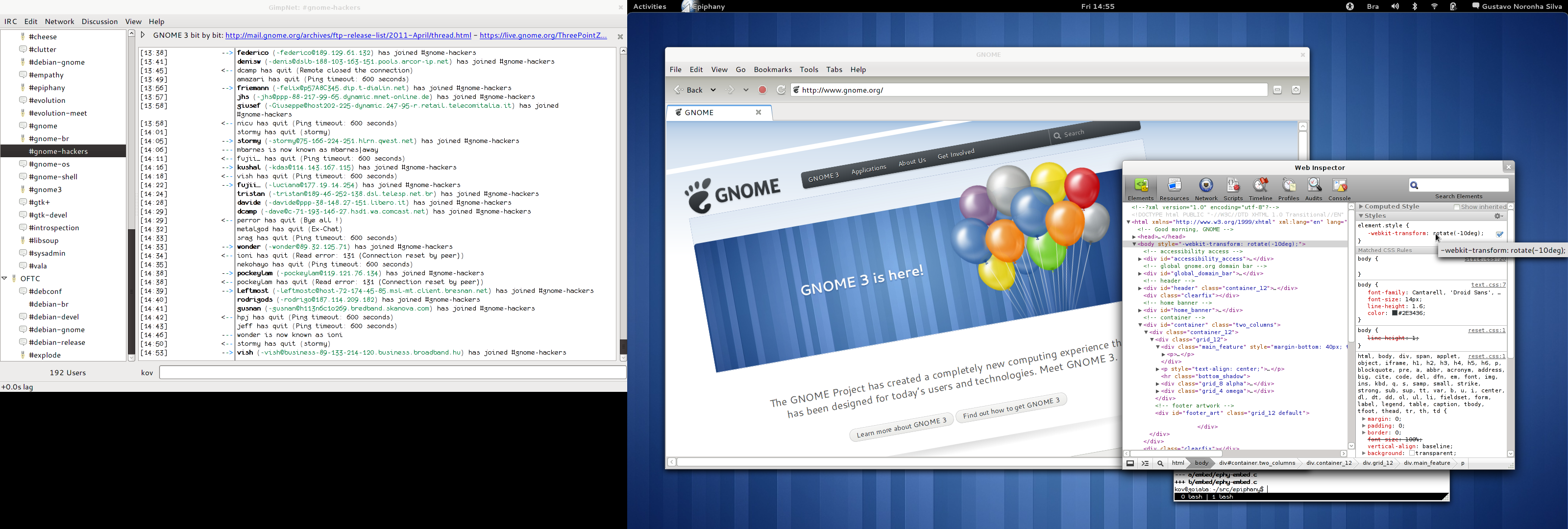
Gustavo Noronha Silva: My experience with GNOME 3 so far

You know, GNOME Shell and I are not really strangers to each other for a long time now. I have been using it almost daily as my main desktop since late 2009, when I started shipping it to Debian experimental. That means that I had ample opportunity to both get used to it and witness the huge improvements it had with every new release. My general feeling towards GNOME 3 is this: . Yes, I love it! I love the new themes, I love the window borders, I love the top panel, the overview, the dynamic workspaces, I love the Me menu, I love the clock and the calendar, the system indicators with the beautiful symbolic icons, being able to search for applications in such a nice way, the window animations, the multi-screen support, the new nautilus, the dash, looking glass. It s hard for me to even express how thankful I am and how much admiration I have for the awesome folks who helped bring this to life. Thanks so much!
My GNOME3 desktop

My GNOME 3 desktop

After all this time, there are only two things I can say I dislike about GNOME3, apart from some minor wishlists: the alt-tab behaviour and the message tray. Let me expand on those. Message Tray Of the very few things I dislike, there is only 1 I hate and cannot see myself living with: the accordion animation in the message tray. No, really, it s such a terrible, terrible idea. Every single time I try to use that thing I overshoot while moving the mouse to the left, then overshoot again moving the mouse to the right because the frigging icon has moved. It s no good knowing that I can click in the text or in the empty area to its right, it feels wrong. It s terrible that my actual target is moving at all. Every single time I use it is a small frustration for me it s as if the message tray was playing games with me, laughing at me for not having good enough mouse pointer driving skills even more than the infamous sub-menus used to. And I had to go through that penance whenever I wanted to find the person I was chating with to resume the conversation. I wrote an extension that disables the accordion animation by simply not showing the title at all when you hover the icon, and I patched GNOME Shell s CSS to make the icons a bit bigger, so that it s easier for me to hit them with the mouse. It s clearly not ideal, and you still have to click the various people icons to figure out which of your friends who were lazy enough to not add a picture to their IM profiles is that one, but it s still much better than chasing the (smaller) ones around to figure that out. Perhaps we should have the icons be bigger and always have the title bellow them? I don t know, I trust the awesome designers who designed the awesomess that s everywhere else will come up with a great idea.
My Message Tray

My message tray with bigger icons and no accordion animation.

Alt Tab The number 1 feature of workspaces for me has always been locality being able to not see all of the other applications and windows that are open elsewhere. This lowers the amount of noise when I m trying to find something. The overview is very nice in this matter only windows in the current workspace are shown, and even when you have an extra screen, the windows in there appear in that screen. The alt-tab behaviour, on the other hand, of showing all windows and apps, even with the separator, bothers me. It s really useful to have when you want to go to a specific window no matter where it is (I usually use the dash for that, though), but it adds noise when you want to go to a specific window _in this_ workspace, which is the most common use case for my usage. So I copied the alt-tab code over to an extension and modified it so that only windows in the current workspace would be considered. In addition to that, with the windows in the extra screen always being there no matter what workspace you re in (which I think is an awesome idea), they are effectively in all workspaces, so they add constant noise even with my extension. It s also weird to have to look at the main screen to switch to a window in the extra screen. There s a huge discontinuity. What I would prefer is having alt-tab to follow the mouse regarding screens only show windows in the extra screen if you hit alt-tab in there, making sure the selector thing appears in there as well.

Lars Wirzenius: vmdebootstrap, for real

Some months ago I wished for a tool to create virtual disk images, something similar to debootstrap except it would create a disk image instead of a directory. It would be used like this:
sudo ./vmdebootstrap --image test.img --size 1G \
--log test.log --mirror http://mirror.lan/debian/
debootstrap is wonderful for creating a basic Debian system for use with chroot. In the modern world, something similar but for virtual machines (such as KVM) would be nice to have, I thought. Particularly if it is something that is not tied to a particular virtualization technology, and does not require running in an actual virtual machine (for speed and simplicity). I could imagine using a tool like this for automatically building appliance-like system images, for example for FreedomBox. Being able to do that in a fully automatic manner would make development simpler and more easy for others to reproduce, and would allow for things like automatic integration testing: build image, boot it in a virtual machine, run automatic tests, report results. There are a bunch of tools that almost do this, but not quite. For example, live-build builds a disk image, but it's one that is aimed for live CDs and such. This brings in some limitations. By default, the image is not persistent. You can make a persistent image, but that requires you to provide a second partition (or disk) that holds the modified parts, using copy-on-write. It also means that if the bootloader or initramfs needs to be updated, then the read-only image needs to be updated. That's fine for live CDs, but not so good if you want a real installed system that you can upgrade to all future releases of Debian. (Ben Armstrong kindly helped me use live-build the right way. Thanks!) There's also grml-debootstrap which seems to work on a real system, but not installing onto a virtual disk image (and the difference is crucial to me). Based on feedback I received back then, and some experimentation I've done the past couple of days, I wrote a very rudimentary version of the tool I want. The code is on gitorius. (You need my cliapp library to run it.) Be warned: it really is a very rudimentary version. For example, it provides not flexibility in choice of partitioning, filesystem type, what packages get installed, etc. It does not configure networking, and the root password is disabled. Some of that flexibility would be quite easy to add. It also uses extlinux as the bootloader, since I utterly failed to get grub2 to install onto the virtual disk. (I did, however, manage to overwrite my develpment machine's bootloader.) The command above works, and results in a RAW format disk image that boots under KVM. It might boot off a hard disk or USB flashdrive too, but I haven't tried that. I now have several questions:

Pietro Abate: Eating you own dog food - mpm

After a bit of work, today I decided to start using mpm, the mancoosi package manager, to upgrade my laptop. My first use of it on a production system - until now I run all my experiments in throw-away virtual machines - and it works ! Not rocket science here. During the last month David Kalnischkies (of APT fame) visited our offices in Paris and together with zack worked out a communication protocol between apt-get and the mancoosi cudf solvers (EDSP). I guess somebody is going to announce all details about this endeavor soon. This cooperation enabled us to advance in the integration of apt-get and the mancoosi technology. Reusing the same protocol and backend I developed to translate the apt problem to cudf (and to call a suitable solver), I've re-wrote large part of mpm and added the possibility to generate the installation plan before calling dpkg and really installing the selected packages. Below notice the intermediate calls as Inject Model , Simulate, Compare Models . These are at the moment stubs that are going to call the simulation framework developed at mancoosi. The food :
abate@zed.fr:~/Projects/git-svn-repos/mpm$sudo ./mpm.py -c mpm.conf update
Reading package lists... Done
Building dependency tree
Reading state information... Done
Inject Model ...


abate@zed.fr:~/Projects/git-svn-repos/mpm$sudo ./mpm.py -c mpm.conf upgrade
Reading package lists... Done
Building dependency tree
Reading state information... Done
The following new packages will be installed:
libtracker-client-0.8-0 libnet-ip-perl libio-socket-ssl-perl libasyncns0 libapr1
5 to install
Simulate
Proceed ? yes/[no]
yes
Reading package fields... Done
Reading package status... Done
Retrieving bug reports... Done
Parsing Found/Fixed information... Done
Reading changelogs... Done
apt-listchanges: Mailing root: apt-listchanges: changelogs for zed
Reading package fields... Done
Reading package status... Done
Retrieving bug reports... Done
Parsing Found/Fixed information... Done
Reading changelogs... Done
apt-listchanges: Mailing root: apt-listchanges: changelogs for zed
(Reading database ... 179534 files and directories currently installed.)
Preparing to replace libapr1 1.4.2-8 (using .../libapr1_1.4.4-1_amd64.deb) ...
Unpacking replacement libapr1 ...
Preparing to replace libasyncns0 0.8-1 (using .../libasyncns0_0.8-2_amd64.deb) ...
Unpacking replacement libasyncns0 ...
Preparing to replace libio-socket-ssl-perl 1.40-1 (using .../libio-socket-ssl-perl_1.43-1_all.deb) ...
Unpacking replacement libio-socket-ssl-perl ...
Preparing to replace libnet-ip-perl 1.25-2 (using .../libnet-ip-perl_1.25-3_all.deb) ...
Unpacking replacement libnet-ip-perl ...
Preparing to replace libtracker-client-0.8-0 0.8.17-2 (using .../libtracker-client-0.8-0_0.8.18-1_amd64.deb) ...
Unpacking replacement libtracker-client-0.8-0 ...
Processing triggers for man-db ...
Setting up libapr1 (1.4.4-1) ...
Setting up libasyncns0 (0.8-2) ...
Setting up libio-socket-ssl-perl (1.43-1) ...
Setting up libnet-ip-perl (1.25-3) ...
Setting up libtracker-client-0.8-0 (0.8.18-1) ...
localepurge: Disk space freed in /usr/share/locale: 0 KiB
localepurge: Disk space freed in /usr/share/man: 0 KiB
localepurge: Disk space freed in /usr/share/gnome/help: 0 KiB
localepurge: Disk space freed in /usr/share/omf: 0 KiB

Total disk space freed by localepurge: 0 KiB

localepurge: Disk space freed in /usr/share/locale: 0 KiB
localepurge: Disk space freed in /usr/share/man: 0 KiB
localepurge: Disk space freed in /usr/share/gnome/help: 0 KiB
localepurge: Disk space freed in /usr/share/omf: 0 KiB

Total disk space freed by localepurge: 0 KiB

Inject Model ...
Compare Models ...
abate@zed.fr:~/Projects/git-svn-repos/mpm$
Reg the installation plan, this is an xml file that will be passed to a simulator developed by the university of L'Aquila to make sure that the installation script (well, a model of them), will not cause any problem during the installation. The format is a very simple xml file as follows :
<selectionStates>
<selectionState type="Install">
<param name="package" value="libapr1" />
<param name="version" value="1.4.4-1" />
<param name="architecture" value="amd64" />
</selectionState>
<selectionState type="Install">
<param name="package" value="libasyncns0" />
<param name="version" value="0.8-2" />
<param name="architecture" value="amd64" />
</selectionState>
<selectionState type="Install">
<param name="package" value="libio-socket-ssl-perl" />
<param name="version" value="1.43-1" />
<param name="architecture" value="all" />
</selectionState>
[...]
Soon APT will ship a patch to use the very same infrastructure of mpm (yeii !!!). This will on one hand make mpm useless as package manager on its own. It is a simple hack in python and I never tough to compete with its big brothers. On the other hand I think it will stand as a nice workbench to experiment with new ideas, to prototype new features and to make it easier for poeple that are not c++ experts to play with the APT library (thanks to python-apt) in a semi structured environment. The code is in the mancoosi svn if you want to have a look.

Pietro Abate: Eating my own dog food - mpm

After a bit of work, today I decided to start using mpm, the mancoosi package manager, to upgrade my laptop. My first use of it on a production system - until now I run all my experiments in throw-away virtual machines - and it works ! Not rocket science here. During the last month David Kalnischkies (of APT fame) visited our offices in Paris and together with zack worked out a communication protocol between apt-get and the mancoosi cudf solvers (EDSP). I guess somebody is going to announce all details about this endeavor soon. This cooperation enabled us to advance in the integration of apt-get and the mancoosi technology. Reusing the same protocol, and backend I developed to translate the apt problem to cudf (and to call a suitable solver), I've re-wrote large part of mpm and added the possibility to generate the installation plan before calling dpkg and really installing the selected packages. Below notice the intermediate calls as Inject Model , Simulate, Compare Models . These are at the moment stubs that are going to call the simulation framework developed at mancoosi. The food :
abate@zed.fr:~/Projects/git-svn-repos/mpm$sudo ./mpm.py -c mpm.conf update
Reading package lists... Done
Building dependency tree
Reading state information... Done
Inject Model ...


abate@zed.fr:~/Projects/git-svn-repos/mpm$sudo ./mpm.py -c mpm.conf upgrade
Reading package lists... Done
Building dependency tree
Reading state information... Done
The following new packages will be installed:
libtracker-client-0.8-0 libnet-ip-perl libio-socket-ssl-perl libasyncns0 libapr1
5 to install
Simulate
Proceed ? yes/[no]
yes
Reading package fields... Done
Reading package status... Done
Retrieving bug reports... Done
Parsing Found/Fixed information... Done
Reading changelogs... Done
apt-listchanges: Mailing root: apt-listchanges: changelogs for zed
Reading package fields... Done
Reading package status... Done
Retrieving bug reports... Done
Parsing Found/Fixed information... Done
Reading changelogs... Done
apt-listchanges: Mailing root: apt-listchanges: changelogs for zed
(Reading database ... 179534 files and directories currently installed.)
Preparing to replace libapr1 1.4.2-8 (using .../libapr1_1.4.4-1_amd64.deb) ...
Unpacking replacement libapr1 ...
Preparing to replace libasyncns0 0.8-1 (using .../libasyncns0_0.8-2_amd64.deb) ...
Unpacking replacement libasyncns0 ...
Preparing to replace libio-socket-ssl-perl 1.40-1 (using .../libio-socket-ssl-perl_1.43-1_all.deb) ...
Unpacking replacement libio-socket-ssl-perl ...
Preparing to replace libnet-ip-perl 1.25-2 (using .../libnet-ip-perl_1.25-3_all.deb) ...
Unpacking replacement libnet-ip-perl ...
Preparing to replace libtracker-client-0.8-0 0.8.17-2 (using .../libtracker-client-0.8-0_0.8.18-1_amd64.deb) ...
Unpacking replacement libtracker-client-0.8-0 ...
Processing triggers for man-db ...
Setting up libapr1 (1.4.4-1) ...
Setting up libasyncns0 (0.8-2) ...
Setting up libio-socket-ssl-perl (1.43-1) ...
Setting up libnet-ip-perl (1.25-3) ...
Setting up libtracker-client-0.8-0 (0.8.18-1) ...
localepurge: Disk space freed in /usr/share/locale: 0 KiB
localepurge: Disk space freed in /usr/share/man: 0 KiB
localepurge: Disk space freed in /usr/share/gnome/help: 0 KiB
localepurge: Disk space freed in /usr/share/omf: 0 KiB

Total disk space freed by localepurge: 0 KiB

localepurge: Disk space freed in /usr/share/locale: 0 KiB
localepurge: Disk space freed in /usr/share/man: 0 KiB
localepurge: Disk space freed in /usr/share/gnome/help: 0 KiB
localepurge: Disk space freed in /usr/share/omf: 0 KiB

Total disk space freed by localepurge: 0 KiB

Inject Model ...
Compare Models ...
abate@zed.fr:~/Projects/git-svn-repos/mpm$
Reg the installation plan, this is an xml file that will be passed to a simulator developed by the university of L'Aquila to make sure that the installation script (well, a model of them), will not cause any problem during the installation. The format is a very simple xml file as follows :
<selectionStates>
<selectionState type="Install">
<param name="package" value="libapr1" />
<param name="version" value="1.4.4-1" />
<param name="architecture" value="amd64" />
</selectionState>
<selectionState type="Install">
<param name="package" value="libasyncns0" />
<param name="version" value="0.8-2" />
<param name="architecture" value="amd64" />
</selectionState>
<selectionState type="Install">
<param name="package" value="libio-socket-ssl-perl" />
<param name="version" value="1.43-1" />
<param name="architecture" value="all" />
</selectionState>
[...]
Soon APT will ship a patch to use the very same infrastructure of mpm (yeii !!!). This will on one hand make mpm useless as package manager on its own. It is a simple hack in python and I never tough to compete with its big brothers. On the other hand I think it will stand as a nice workbench to experiment with new ideas, to prototype new features and to make it easier for poeple that are not c++ experts to play with the APT library (thanks to python-apt) in a semi structured environment. The code is in the mancoosi svn if you want to have a look.

Mike Hommey: Debian Squeeze + btrfs = FAIL

Executive summary: Don t use btrfs on Debian Squeeze.
Longer summary: Don t use btrfs RAID with the kernel Debian Squeeze comes with. About six months ago, I set up a new server to handle this web site, mail, and various other things. The system and most services (including web and mail) was set to use an MD RAID 1 array across two small partitions on two separate disks, and the remaining space was setup in three different btrfs file systems: Three days ago, this happened:
May 10 10:18:04 goemon kernel: [3545898.548311] ata4: hard resetting link
May 10 10:18:04 goemon kernel: [3545898.867556] ata4: SATA link up 1.5 Gbps (SStatus 113 SControl 310)
May 10 10:18:04 goemon kernel: [3545898.874973] ata4.00: configured for UDMA/33
followed by other ATA related messages, then, garbage such as:
May 10 10:18:07 goemon kernel: [3545901.28123] sd3000 d]SneKy:AotdCmad[urn][ecitr
May 10 10:18:07 goemon kernel: 4[550.821 ecio es aawt es ecitr i e)
May 10 10:18:07 goemon kernel: 6[550.824     20 00 00 00 00 00 00 00 <>3491225     16 44 <>3491216]s ::::[d]Ad es:N diinlsneifrain<>3491216]s ::::[d]C:Ra(0:2 00 03 80 06 0
3491217]edrqet / ro,dvsb etr2272
May 10 10:18:07 goemon kernel: 3[550.837 ad:sb:rshdln etr2252
May 10 10:18:07 goemon kernel: 6[551214]s ::::[d]Rsl:hsbt=I_Kdiebt=RVRSNE<>3491215]s ::::[d]SneKy:AotdCmad[urn][ecitr
May 10 10:18:07 goemon kernel: 4[550.833 ecitrsnedt ihsnedsrpos(nhx:<>3491216]    7 b0 00 00 c0 a8 00 00 0
Then later on:
May 10 12:01:18 goemon kernel: [3552089.226147] lost page write due to I/O error on sdb4
May 10 12:01:18 goemon kernel: [3552089.226312] lost page write due to I/O error on sdb4
May 10 12:10:14 goemon kernel: [3552624.625669] btrfs no csum found for inode 23642 start 0
May 10 12:10:14 goemon kernel: [3552624.625783] btrfs no csum found for inode 23642 start 4096
May 10 12:10:14 goemon kernel: [3552624.625884] btrfs no csum found for inode 23642 start 8192
etc. and more garbage. At that point, I wanted to shutdown the server, check the hardware, and reboot. Shutdown didn t want to proceed completely. Btrfs just froze on the sync happening during the shutdown phase, so I had to power off violently. Nothing seemed really problematic on the hardware end, and after a reboot, both disks were properly working. The MD RAID would resynchronize, and the btrfs filesystems would be automatically mounted. It would work for a while, until such things could be seen in the logs, with more garbage as above in between:
May 10 14:41:18 goemon kernel: [ 1253.455545] __ratelimit: 35363 callbacks suppressed
May 10 14:45:04 goemon kernel: [ 1478.717749] parent transid verify failed on 358190825472 wanted 42547 found 42525
May 10 14:45:04 goemon kernel: [ 1478.717936] parent transid verify failed on 358316642304 wanted 42547 found 42515
May 10 14:45:04 goemon kernel: [ 1478.717939] parent transid verify failed on 358190825472 wanted 42547 found 42525
May 10 14:45:04 goemon kernel: [ 1478.718128] parent transid verify failed on 358316642304 wanted 42547 found 42515
May 10 14:45:04 goemon kernel: [ 1478.718131] parent transid verify failed on 358190825472 wanted 42547 found 42525
Then there would be kernel btrfs processes going on and on sucking CPU and I/O, doing whatever it was doing. At such moment, most file reading off one of the btrfs volumes would either take very long or freeze, and un-mounting would only freeze. At that point, considering the advantages of btrfs (in my case, mostly, snapshots) were outweighed by such issues (this wasn t my first btrfs fuck up, but by large, the most dreadful) and the fact that btrfs is just so slow compared to other filesystems, I decided I didn t want to care trying to save these filesystems from their agonizing death, and that I d just go with ext4 on MD RAID instead. Also, I didn t want to just try (with the possibility of going through similar pain) again with a more recent kernel. Fortunately, I had backups of most of the data (only problem being the time required to restore that amount of data), but for the few remaining things which, by force of bad timing, I didn t have a backup of, I needed to somehow get them back from these btrfs volumes. So I created new file systems to replace the btrfs volumes I could directly throw away and started recovering data from backups. I also, at the same time, tried to copy a big disk image from the remaining btrfs volume. Somehow, this worked, with the system load varying between 20 and 60 (with a lot of garbage in the logs and other services deeply impacted as well) But when trying to copy the remaining files I wanted to recover, things got worse, so I had to initiate a shutdown, and power cycle again. Since apparently the kernel wasn t going to be very helpful, the next step was to just get other things working, and get the data back some other way. What I did was to use a virtual machine to get the data off the remaining btrfs volume. The kernel could become unusable all it wanted to, I could just hard reboot without impacting the other services. In the virtual machine, things got interesting . I did try various things I ve seen on the linux-btrfs list, but nothing really did anything at all except spew some more parent transid messages. I should mention that the remaining btrfs volume was a RAID 0. To mount those, you d mount one of the constituting disks like this:
$ mount /dev/sdb /mnt
Except that it would complain that it can t find a valid whatever (I don t remember the exact term, and I threw the VM away already) so it wouldn t mount the volume. But when mounting the other constituting disk, it would just work. Well, that s kind of understandable, but what is not is that on the next boot (I had to reboot a lot, see below), it would error out on the disk that worked previously, and work on the disk that was failing before. So, here is how things went: Ain t that fun? The good thing is that in the end, despite the pain, I recovered all that needed to be recovered. I m in the process of recreating my build chroots from scratch, but that s not exactly difficult. It would just have taken a lot more time to recover them the same way, 50 files at a time. Side note: yes, I did try newer versions of btrfsck ; yes I did try newer kernels. No, nothing worked to make these btrfs volumes viable. No, I don t have an image of these completely fucked up volumes.

12 May 2011

Andrew Pollock: [life] Bike to Work Day 2011

Today was Bike to Work Day, and I biked to work, just like I do most other days. I missed out on it last year because I was still out on paternity leave at the time. That means I've almost been back at work a year. Since we only have one car, and when Zoe was little and sleeping a lot, it made most sense for me to start biking to work again. I'm really glad I did, because not only is it faster compared to the round trip time that Sarah would need to take to drop me off and pick me up, it's a lot easier on her and Zoe. It used to be a challenge for Sarah to get from home to work and back in the mornings without Zoe falling asleep in the car. The only times I've needed a lift have been in wet weather during winter, and when I've been sick. Now that we're out of winter, we should have endless sunshine for months, and it's starting to warm up, which makes biking so much more pleasant. It takes about 10-12 minutes door to door, which is short and sweet, and most of that is on the lovely Stevens Creek Trail. I'm glad I've been able to stick at it for the whole year. I see no reason to stop any time soon.

Matthew Garrett: LightDM, or: an examination of a misunderstanding of the problem

LightDM's a from-scratch implementation of an X display manager, ie the piece of software that handles remote X connections, starts any local X servers, provides a login screen and kicks off the initial user session. It's split into a nominally desktop-agnostic core (built directly on xcb and glib) and greeters, the idea being that it's straightforward to implement an environment-specific greeter that integrates nicely with your desktop session. It's about 6500 lines of code in the core, 3500 lines of code in the gtk bindings to the core and about 1000 in the sample gtk greeter, for a total of about 11,000 lines of code for a full implementation. This compares to getting on for 60,000 in gdm. Ubuntu plan to switch to LightDM in their next release (11.10).

This is a ridiculous idea.

To a first approximation, when someone says "Lightweight" what they mean is "I don't understand the problems that the alternative solves". People see gtk and think "Gosh, that's kind of big for a toolkit library. I'll write my own". And at some point they have to write a file dialog. And then they need to implement support for handling remote filesystems. And then they need to know whether the system has a functioning network connection or not, and so they end up querying state from Network Manager. And then they suddenly have a library that's getting on for the size of gtk, has about the same level of complexity and has had much less testing because why would you want to use a lightweight toolkit that either does nothing or is 90% of the size of the alternative and crashes all the time.

Adding functionality means that code gets larger. Given two codebases that are of significantly different sizes, the two possible conclusions are either that (a) the smaller one is massively more competently written than the larger one, or (b) the smaller one does less. The gdm authors have never struck me as incompetent, even if some people may disagree with some of their design decisions, and the LightDM authors don't seem to have argued on that basis either. So the obvious conclusion is that LightDM does less.

And, indeed, LightDM does less. Part of this is by design - as the proposal to the Gnome development list shows, one of the key advantages of LightDM is claimed as it not starting a Gnome session. And from that statement alone, we can already see that there's been a massive failure of understanding the complexity of the problem.

Let's go back to the comparisons of code size. LightDM's simple GTK greeter is about 1000 lines of code. gdm's greeter is almost 20,000. Some of this is arbitrary shiny stuff like the slidy effects that occur, but a lot of it is additional functionality. For example, some of it is devoted to handling the interface with AccountsService so gdm can automatically update when users are created or deleted. Some of it is providing UI for accessibility functionality. Some of it is drawing a clock, which I'll admit may be a touch gratuitous.

But if your argument is that your software is better because it's doing less, you should be able to ensure that you can demonstrate that the differences aren't important. And the differences here are important. For example, one of the reasons gdm starts a local gnome session is that it wants gnome-power-manager to be there to handle power policy. Closing the lid of my laptop should suspend the system regardless of whether it's logged in or not. LightDM takes a different approach. Because there's no session, it has to take care of this kind of thing itself. So the backend daemon code speaks to upower directly, and the greeters ask the daemon to implement their policy decisions.

This is pretty obviously miserable. Now you've got two sets of policy - one at the login screen, and one in your session. How do I ensure they're consistent? The only sane solution is to ignore the functionality the backend provides and have my greeter run gnome-power-manager. And now how about accessibility preferences? Again, if I want to have the same selection of policy, I need to run the same code. So you end up with a greeter that's about as complex and large as the gdm one, and unused functionality in the backend. Lighter weight through code duplication. We have always been at war with Eurasia.

The entirety of LightDM's design is based on a false premise - that you can move a large set of common greeter functionality into a daemon and just leave UI presentation up to the greeter code. And if you believe that, then yes, you can absolutely implement a greeter in 1000 lines of code. It'll behave differently to your desktop - the range of policy you can implement will be limited to what the daemon provides, even if your desktop environment has a different range of features. It'll have worse accessibility for much the same reason. And eventually you'll end up with a daemon that's absolutely huge in order to attempt to provide the superset of functionality that each different desktop makes use of.

The only real problem LightDM solves is that it makes it easier to write custom greeters, and if you're really seeking to differentiate your project based on your login screen then maybe your priorities are a little out of line. I'm sure that Ubuntu will release with a beautiful 3D greeter that has a wonderful transition to the desktop. It's just a shame that it won't do any of the useful things that the existing implementations already do.

And if you think that when LightDM finally has the full feature set of gdm, kdm and lxdm it'll still be fewer lines of code and take less memory - I hear the BSD kernel is lighter weight than Linux. Have fun with it.

( Comments Comment on this)

11 May 2011

Julian Andres Klode: underscores and undefined behavior

As everyone should know, underscores in C are not cool, as they cause undefined behavior per 7.1.3:
All identifiers that begin with an underscore and either an uppercase letter or another underscore are always reserved for any use.
[...]
If the program declares or defines an identifier in a context in which it is reserved (other than as allowed by 7.1.4), or defines a reserved identifier as a macro name, the behavior is undefined.
Yet, they are widely used everywhere. Here are some examples: All of this triggers undefined behavior and is thus uncool. Of course in APT, it s most stupid, as we do not have any namespace and could thus
end up redefining things we should not much more likely then the other two. But why were those solutions chosen in the first place, and what is the alternative? I cannot answer the first question, but for the second one, the obvious alternative is to use trailing underscores: Then there is another class of reserved identifiers with underscores:
All identifiers that begin with an underscore are always reserved for use as identifiers
with file scope in both the ordinary and tag name spaces.
Meaning that everything except for parameters, local variables and members of structs/unions that starts with an underscore is reserved. So, if you happen to create a variable _mylibrary_debug_flag, you trigger undefined behavior as well. And while we re at it, do not think you can create a type ending in _t: POSIX reserves all identifiers ending in _t for its own use. In summary, whenever you write C and want to be 100% safe of undefined-behavior-because-of-naming, do not start any identifier with an underscore and do not end any identifier with _t.
Filed under: General

Vincent Bernat: New website with Hyde

My previous website was generated (dynamically) with mod_autoindex, a module from Apache targeted at rendering an index page for the files contained in a directory. Pretty basic (but themable). Here is a new revamped web site using Hyde, a static web generator written in Python.

Static or dynamic ? It has been a long time since almost everybody is creating dynamic websites. Most often, they are powered by some blog engine written in PHP like DotClear or WordPress. Infrequently, they are crafted with bare hands using one s preferred language. Nowadays, hosting a dynamic website is pretty easy. There are a lot of cheap virtual servers solution that allow you to get a root access. However, dynamic websites have some drawbacks:
  • Security need to be monitored tightly, especially security upgrades; some platforms are more often vulnerable than others.
  • Dynamic websites may have some problem to handle increased load.
With a static website, security problems are easier: there are far less components to monitor and most of them (for example, the web server) are pretty solid and well audited. A site powered by nginx can handle several thousands of new connections per second without any special tuning. Getting this kind of performance with a dynamic website is far more difficult. Scaling is also easier. Just add more webservers and copy the content. No database, no synchronisation mechanism needed. Hosting can even be done on simple platforms like Amazon S3, even if there is now more appropriate platforms for this like Amazon CloudFront. Moreover, even a static website can receive comments using a system like Disqus which leverages the use of Javascript to add comment system to any static page.

Hyde Hyde is a static website generator written in Python. There exists a lot of those beasts. On StackOverflow, a question about this got some interesting answers. You will also find a fairly complete list on this blog. If you like Ruby, I assume that nanoc and Webgen are good candidates. Let s go back to Hyde. It was rewritten recently and the documentation is a bit incomplete. You will need to read the source code or look at examples (like the shipped one or this site) to understand how things are handled. Everything is handled by a plugin system. I hope it will not become a mess in one year (I play a large part in this). Hyde takes your files, apply a lot of filters on them and generate the final website. It uses Jinja as a template system, Markdown for markup syntax, Less to write CSS in a more efficient way (and to minify them), UglifyJS to minify Javascript, etc. It is also possible to add metadata to files (title, author, creation date, etc.). But since everything comes as a plugin, you can use any technology you like. In the end, you can tune all knobs but you need to do most of the work (HTML, CSS, Javascript), as well. Conveniently, there is a small web server that rebuild modified files on the fly. This comes handy but this is a common feature with this kind of generator.

New website Here is a new website crafted with Hyde. It is translated both in French and in English. This is done with the help of a small plugin plugin. I am quite happy about the result. Technically, there is one minified CSS file, one minified Javascript file and the dependencies (like jQuery) are loaded with the help of yepnope.js which will become part of Modernizr. I don t want to support Internet Explorer 6, but I plan to support Firefox 3, Internet Explorer 7 and recent versions of Chrome and Safari. For the design, I have always been undecided. I am pretty impressed by some raw website but also by some others more elaborate. Since I am not a talented graphic designer, I have tried to keep things plain and simple. If you are interested, sources are available on GitHub !

Next.

Previous.