Search Results: "tin"

30 November 2014

Johannes Schauer: simple email setup

I was unable to find a good place that describes how to create a simple self-hosted email setup. The most surprising discovery was, how much already works after:
apt-get install postfix dovecot-imapd
Right after having finished the installation I was able to receive email (but only in in /var/mail in mbox format) and send email (bot not from any other host). So while I expected a pretty complex setup, it turned out to boil down to just adjusting some configuration parameters.

Postfix The two interesting files to configure postfix are /etc/postfix/main.cf and /etc/postfix/master.cf. A commented version of the former exists in /usr/share/postfix/main.cf.dist. Alternatively, there is the ~600k word strong man page postconf(5). The latter file is documented in master(5).

/etc/postfix/main.cf I changed the following in my main.cf
@@ -37,3 +37,9 @@
mailbox_size_limit = 0
recipient_delimiter = +
inet_interfaces = all
+
+home_mailbox = Mail/
+smtpd_recipient_restrictions = permit_mynetworks reject_unauth_destination permit_sasl_authenticated
+smtpd_sasl_type = dovecot
+smtpd_sasl_path = private/auth
+smtp_helo_name = my.reverse.dns.name.com
At this point, also make sure that the parameters smtpd_tls_cert_file and smtpd_tls_key_file point to the right certificate and private key file. So either change these values or replace the content of /etc/ssl/certs/ssl-cert-snakeoil.pem and /etc/ssl/private/ssl-cert-snakeoil.key. The home_mailbox parameter sets the default path for incoming mail. Since there is no leading slash, this puts mail into $HOME/Mail for each user. The trailing slash is important as it specifies qmail-style delivery'' which means maildir. The default of the smtpd_recipient_restrictions parameter is permit_mynetworks reject_unauth_destination so this just adds the permit_sasl_authenticated option. This is necessary to allow users to send email when they successfully verified their login through dovecot. The dovecot login verification is activated through the smtpd_sasl_type and smtpd_sasl_path parameters. I found it necessary to set the smtp_helo_name parameter to the reverse DNS of my server. This was necessary because many other email servers would only accept email from a server with a valid reverse DNS entry. My hosting provider charges USD 7.50 per month to change the default reverse DNS name, so the easy solution is, to instead just adjust the name announced in the SMTP helo.

/etc/postfix/master.cf The file master.cf is used to enable the submission service. The following diff just removes the comment character from the appropriate section.
@@ -13,12 +13,12 @@
#smtpd pass - - - - - smtpd
#dnsblog unix - - - - 0 dnsblog
#tlsproxy unix - - - - 0 tlsproxy
-#submission inet n - - - - smtpd
-# -o syslog_name=postfix/submission
-# -o smtpd_tls_security_level=encrypt
-# -o smtpd_sasl_auth_enable=yes
-# -o smtpd_client_restrictions=permit_sasl_authenticated,reject
-# -o milter_macro_daemon_name=ORIGINATING
+submission inet n - - - - smtpd
+ -o syslog_name=postfix/submission
+ -o smtpd_tls_security_level=encrypt
+ -o smtpd_sasl_auth_enable=yes
+ -o smtpd_client_restrictions=permit_sasl_authenticated,reject
+ -o milter_macro_daemon_name=ORIGINATING
#smtps inet n - - - - smtpd
# -o syslog_name=postfix/smtps
# -o smtpd_tls_wrappermode=yes

Dovecot Since above configuration changes made postfix store email in a different location and format than the default, dovecot has to be informed about these changes as well. This is done in /etc/dovecot/conf.d/10-mail.conf. The second configuration change enables postfix to authenticate users through dovecot in /etc/dovecot/conf.d/10-master.conf. For SSL one should look into /etc/dovecot/conf.d/10-ssl.conf and either adapt the parameters ssl_cert and ssl_key or store the correct certificate and private key in /etc/dovecot/dovecot.pem and /etc/dovecot/private/dovecot.pem, respectively. The dovecot-core package (which dovecot-imapd depends on) ships tons of documentation. The file /usr/share/doc/dovecot-core/dovecot/documentation.txt.gz gives an overview of what resources are available. The path /usr/share/doc/dovecot-core/dovecot/wiki contains a snapshot of the dovecot wiki at http://wiki2.dovecot.org/. The example configurations seem to be the same files as in /etc/ which are already well commented.

/etc/dovecot/conf.d/10-mail.conf The following diff changes the default email location in /var/mail to a maildir in ~/Mail as configured for postfix above.
@@ -27,7 +27,7 @@
#
# <doc/wiki/MailLocation.txt>
#
-mail_location = mbox:~/mail:INBOX=/var/mail/%u
+mail_location = maildir:~/Mail

# If you need to set multiple mailbox locations or want to change default
# namespace settings, you can do it by defining namespace sections.

/etc/dovecot/conf.d/10-master.conf And this enables the authentication socket for postfix:
@@ -93,9 +93,11 @@


# Postfix smtp-auth
- #unix_listener /var/spool/postfix/private/auth
- # mode = 0666
- #
+ unix_listener /var/spool/postfix/private/auth
+ mode = 0660
+ user = postfix
+ group = postfix
+

# Auth process is run as this user.
#user = $default_internal_user

Aliases Now Email will automatically put into the '~/Mail' directory of the receiver. So a user has to be created for whom one wants to receive mail...
$ adduser josch
...and any aliases for it to be configured in /etc/aliases.
@@ -1,2 +1,4 @@
-# See man 5 aliases for format
-postmaster: root
+root: josch
+postmaster: josch
+hostmaster: josch
+webmaster: josch
After editing /etc/aliases, the command
$ newaliases
has to be run. More can be read in the aliases(5) man page.

Finishing up Everything is done and now postfix and dovecot have to be informed about the changes. There are many ways to do that. Either restart the services, reboot or just do:
$ postfix reload
$ doveadm reload
Have fun!

29 November 2014

Laura Arjona: Debian meeting in Madrid, GPG keysigning

Yesterday some Debian people in Madrid we met to have a drink together and GPG keysigning.I have received 2 signs already #oleole! :)Some minutes ago, I signed all the keys and sent the corresponding emails. Since I have to dedicate some minutes to verify fingerprints and emails, I have dedicated some time to remember each person too: his face, the topics that we talked about, etc. (we were 8 people!).
It s been nice to meet Debian people in person, in Madrid (it was the first time I attended). I like to speak Spanish in a Debian context (and different than the translators mailing list), it s kind of funny, relaxing. It has been also an opportunity to meet new people that can be very different from me, and so, open my mind to new thoughts. I hope we meet more often so we strengthen not only the web of trust but also the face-to-face social network :)
Filed under: Uncategorized Tagged: Communities, Debian, encryption, English, gpg, social networks

Dirk Eddelbuettel: RcppArmadillo 0.4.550.1.0

A week ago, Conrad provided another minor release 4.550.0 of Armadillo which has since received one minor correction in 4.550.1.0. As before, I had created a GitHub-only pre-release of his pre-release which was tested against the almost one hundred CRAN dependents of our RcppArmadillo package. This passed fine as usual, and results are as always in the rcpp-logs repository. Processing and acceptance at the CRAN took a little longer as around the same time a fresh failure in unit tests had become apparent on an as-of-yet unannounced new architecture (!!) also tested at CRAN. The R-devel release has since gotten a new capabilities() test for long double, and we now only run this test (for our rmultinom()) if the test asserts that the given R build has this capability. Phew, so with all that the new version in now on CRAN; Windows binaries have been built and I also uploaded new Debian binaries. Changes are summarized below; our end also includes added support for conversion of Field types takes to short pull request by Romain.
Changes in RcppArmadillo version 0.4.550.1.0 (2014-11-26)
  • Upgraded to Armadillo release Version 4.550.1 ("Singapore Sling Deluxe")
    • added matrix exponential function: expmat()
    • faster .log_p() and .avg_log_p() functions in the gmm_diag class when compiling with OpenMP enabled
    • faster handling of in-place addition/subtraction of expressions with an outer product
    • applied correction to gmm_diag relative to the 4.550 release
  • The Armadillo Field type is now converted in as<> conversions
Courtesy of CRANberries, there is also a diffstat report for the most recent release. As always, more detailed information is on the RcppArmadillo page. Questions, comments etc should go to the rcpp-devel mailing list off the R-Forge page.

This post by Dirk Eddelbuettel originated on his Thinking inside the box blog. Please report excessive re-aggregation in third-party for-profit settings.

Dirk Eddelbuettel: CRAN Task Views for Finance and HPC now (also) on GitHub

The CRAN Task View system is a fine project which Achim Zeileis initiated almost a decade ago. It is described in a short R Journal article in Volume 5, Number 1. I have been editor / maintainer of the Finance task view essentially since the very beginning of these CRAN Task Views, and added the High-Performance Computing one in the fall of 2008. Many, many people have helped by sending suggestions or even patches; email continues to be the main venue for the changes. The maintainers of the Web Technologies task view were, at least as far as I know, the first to make the jump to maintaining the task view on GitHub. Karthik and I briefly talked about this when he was in town a few weeks ago for our joint Software Carpentry workshop at Northwestern. So the topic had been on my mind, but it was only today that I realized that the near-limitless amount of awesome that is pandoc can probably help with maintenance. The task view code by Achim neatly converts the very regular, very XML, very boring original format into somewhat-CRAN-website-specific html. Pandoc, being as versatile as it is, can then make (GitHub-flavoured) markdown out of this, and with a minimal amount of sed magic, we get what we need. And hence we now have these two new repos: Contributions are now most welcome by pull request. You can run the included converter scripts, it differs between both repos only by one constant for the task view / file name. As an illustration, the one for Finance is below.
#!/usr/bin/r
## if you do not have /usr/bin/r from littler, just use Rscript
ctv <- "Finance"
ctvfile  <- paste0(ctv, ".ctv")
htmlfile <- paste0(ctv, ".html")
mdfile   <- "README.md"
## load packages
suppressMessages(library(XML))          # called by ctv
suppressMessages(library(ctv))
r <- getOption("repos")                 # set CRAN mirror
r["CRAN"] <- "http://cran.rstudio.com"
options(repos=r)
check_ctv_packages(ctvfile)             # run the check
## create html file from ctv file
ctv2html(read.ctv(ctvfile), htmlfile)
### these look atrocious, but are pretty straight forward. read them one by one
###  - start from the htmlfile
cmd <- paste0("cat ", htmlfile,
###  - in lines of the form  ^<a href="Word">Word.html</a>
###  - capture the 'Word' and insert it into a larger URL containing an absolute reference to task view 'Word'
  "   sed -e 's ^<a href=\"\\([a-zA-Z]*\\)\\.html <a href=\"http://cran.rstudio.com/web/views/\\1.html\" '   ",
###  - call pandoc, specifying html as input and github-flavoured markdown as output
              "pandoc -s -r html -w markdown_github   ",
###  - deal with the header by removing extra  , replacing  ** with ** and **  with **:              
              "sed -e's/ //g' -e's/ \\*\\*/\\*\\*/g' -e's/\\*\\* /\\*\\* /g' -e's/ $/  /g' ",
###  - make the implicit URL to packages explicit
              "-e's ../packages/ http://cran.rstudio.com/web/packages/ g' ",
###  - write out mdfile
              "> ", mdfile)
system(cmd)                             # run the conversion
unlink(htmlfile)                        # remove temporary html file
cat("Done.\n")
I am quite pleased with this setup---so a quick thanks towards the maintainers of the Web Technologies task view; of course to Achim for creating CRAN Task Views in the first place, and maintaining them all those years; as always to John MacFarlance for the magic that is pandoc; and last but not least of course to anybody who has contributed to the CRAN Task Views.

This post by Dirk Eddelbuettel originated on his Thinking inside the box blog. Please report excessive re-aggregation in third-party for-profit settings.

28 November 2014

Richard Hartmann: Release Critical Bug report for Week 48

Holy bug-count-drop, Batman! Some bugs which need loving: The UDD bugs interface currently knows about the following release critical bugs: How do we compare to the Squeeze release cycle?
Week Squeeze Wheezy Jessie
43 284 (213+71) 468 (332+136) 319 (240+79)
44 261 (201+60) 408 (265+143) 274 (224+50)
45 261 (205+56) 425 (291+134) 295 (229+66)
46 271 (200+71) 401 (258+143) 427 (313+114)
47 283 (209+74) 366 (221+145) 342 (260+82)
48 256 (177+79) 378 (230+148) 274 (189+85)
49 256 (180+76) 360 (216+155)
50 204 (148+56) 339 (195+144)
51 178 (124+54) 323 (190+133)
52 115 (78+37) 289 (190+99)
1 93 (60+33) 287 (171+116)
2 82 (46+36) 271 (162+109)
3 25 (15+10) 249 (165+84)
4 14 (8+6) 244 (176+68)
5 2 (0+2) 224 (132+92)
6 release! 212 (129+83)
7 release+1 194 (128+66)
8 release+2 206 (144+62)
9 release+3 174 (105+69)
10 release+4 120 (72+48)
11 release+5 115 (74+41)
12 release+6 93 (47+46)
13 release+7 50 (24+26)
14 release+8 51 (32+19)
15 release+9 39 (32+7)
16 release+10 20 (12+8)
17 release+11 24 (19+5)
18 release+12 2 (2+0)
Graphical overview of bug stats thanks to azhag:

Daniel Pocock: XCP / XenServer and Debian Jessie

In 2013, Debian wheezy was released with a number of great virtualization options include the Xen Cloud Platform (XCP / Xen-API) toolstack packaged by Thomas Goirand to run in a native Debian host environment. Unfortunately, XCP is not available as a host (dom0) solution for the upcoming Debian 8 (jessie) release. However, it is possible to continue running a Debian wheezy system as the dom0 host and run virtualized (domU) jessie systems inside it. It may also be possible to use the packages from wheezy on a jessie system, but I haven't looked into that myself so far. Newer kernel boot failures in Xen After successfully upgrading a VM (domU in Xen terminology) from wheezy to jessie, I tried to reboot the VM and found that it wouldn't start. People have reported similar problems booting newer versions of Ubuntu and Fedora in XCP and XenServer environments. PyGrub displayed an error on the dom0 console:
# xe vm-start name-label=server05
Error code: Using  to parse /grub/grub.cfg
Error parameters: Traceback (most recent call last):,
   File "/usr/lib/xcp/lib/pygrub.xcp", line 853, in ,
     raise RuntimeError, "Unable to find partition containing kernel"
There is a quick and easy workaround. Hard-code the kernel and initrd filenames into config values that will be used to boot. A more thorough solution will probably involve using a newer version of PyGrub in wheezy. If the /boot tree is a separate filesystem inside the VM, use commands like the following (substitute the correct UUID for the VM and the exact names/versions of the vmlinuz and initrd.img files):
xe vm-param-set uuid=da654fd0-74db-11e4-82f8-0800200c9a66 \
   PV-bootloader-args="--kernel=/vmlinuz-3.16-3-amd64
   --ramdisk=/initrd.img-3.16-3-amd64"
xe vm-param-set uuid=da654fd0-74db-11e4-82f8-0800200c9a66 \
   PV-args="root=/dev/mapper/vg00-root ro quiet"
and if /boot is on the root filesystem of the VM, this will do the trick:
xe vm-param-set uuid=da654fd0-74db-11e4-82f8-0800200c9a66 \
   PV-bootloader-args="--kernel=/boot/vmlinuz-3.16-3-amd64
   --ramdisk=/boot/initrd.img-3.16-3-amd64"
xe vm-param-set uuid=da654fd0-74db-11e4-82f8-0800200c9a66 \
   PV-args="root=/dev/mapper/vg00-root ro quiet"
Future strategy Once a comprehensive XCP solution appears in Debian again, hopefully it will be possible to migrate running VMs into the new platform without any downtime and retire the wheezy dom0. Other upgrade/migration options exist and the choice will depend on various factors, such as whether or not you have built your own tools around the XCP API and whether you use a solution like OpenStack that depends on it. Debian's pkg-xen-devel mailing list may be a good place to discuss these options further.

Ian Wienand: rstdiary

I find it very useful to spend 5 minutes a day to keep a small log of what was worked on, major bugs or reviews and a general small status report. It makes rolling up into a bigger status report easier when required, or handy as a reference before you go into meetings etc. I was happily using an etherpad page until I couldn't save any more revisions and the page got too long and started giving javascript timeouts. For a replacement I wanted a single file as input with no boilerplate to aid in back-referencing and adding entries quickly. It should be formatted to be future-proof, as well as being emacs, makefile and git friendly. Output should be web-based so I can refer to it easily and point people at it when required, but it just has to be rsynced to public_html with zero setup. rstdiary will take a flat RST based input file and chunk it into some reasonable looking static-HTML that looks something like this. It's split by month with some minimal navigation. Copy the output directory somewhere and it is done. It might also serve as a small example of parsing and converting RST nodes where it does the chunking; unfortunately the official documentation on that is "to be completed" and I couldn't find anything like a canonical example, so I gathered what I could from looking at the source of the transformation stuff. As the license says, the software is provided "as is" without warranty! So if you've been thinking "I should keep a short daily journal in a flat-file and publish it to a web-server but I can't find any software to do just that" you now have one less excuse.

27 November 2014

Keith Packard: Black Friday 2014

Altus Metrum's 2014 Black Friday Event BLACK FOREST, Colorado USA Altus Metrum announces two special offers for "Black Friday" 2014. We are pleased to announce that both TeleMetrum and TeleMega will be back in stock and available for shipment before the end of November. To celebrate this, any purchase of a TeleMetrum, TeleMega, or EasyMega board will include, free of charge, one each of our 160, 400, and 850 mAh Polymer Lithium Ion batteries and a free micro USB cable! To celebrate NAR's addition of our 1.9 gram recording altimeter, MicroPeak, to the list of devices approved for use in contests and records, and help everyone get ready for NARAM 2015's altitude events, purchase 4 MicroPeak boards and we'll throw in a MicroPeak USB adapter for free! These deals will be available from 00:00 Friday, 28 November 2014 through 23:59 Monday, 1 December, 2014. Only direct sales through our web store at http://shop.gag.com are included; no other discounts apply. Find more information on all Altus Metrum products at http://altusmetrum.org. Thank you for your continued support of Altus Metrum in 2014. We continue to work on more cool new products, and look forward to meeting many of you on various flight lines in 2015!

26 November 2014

Gunnar Wolf: Guests in the classroom: @Rolman talks about persistent storage and filesystems

On November 14, as a great way to say goodbye to a semester, a good friend came to my class again to present a topic to the group; a good way to sum up the contents of this talk is "everything you ever wondered about persistent storage". As people who follow my blog know, I like inviting my friends to present selected topics in my Operating Systems class. Many subjects will stick better if presented by more than a single viewpoint, and different experiences will surely enrich the group's learning. So, here is Rolando Cedillo A full gigabyte of him, spawning two hours (including two hiccups where my camera hit a per-file limit...). Rolando is currently a RedHat Engineer, and in his long career, he has worked from so many trenches, it would be a crime not to have him! Of course, one day we should do a low-level hardware session with him, as his passion (and deep knowledge) for 8-bit arcades is beyond any other person I have met. So, here is the full video on my server. Alternatively, you can get it from The Internet Archive.

Enrico Zini: calypso-davdroid

Calypso and DAVDroid calypso and DAVdroid appeal to me. Let's try to make the whole thing work. Update: radicale seems to also support git as a backend, and I plan to give it a try, too. A self-signed SSL certificate Generating the certificate:
$ openssl req -nodes -x509 -newkey rsa:2048 -keyout cal-key.pem -out cal-cert.pem -days 3650
[...]
Country Name (2 letter code) [AU]:IT
State or Province Name (full name) [Some-State]:Bologna
Locality Name (eg, city) []:
Organization Name (eg, company) [Internet Widgits Pty Ltd]:enricozini.org
Organizational Unit Name (eg, section) []:
Common Name (e.g. server FQDN or YOUR name) []:cal.enricozini.org
Email Address []:postmaster@enricozini.org
Installing it on my phone:
$ openssl x509 -in cal-cert.pem -outform DER -out cal-cert.crt
$ adb push cal-cert.crt /mnt/sdcard/
$ enrico --follow-instructions http://davdroid.bitfire.at/faq/entry/importing-a-certificate
Installing calypso in my VPS An updated calypso package:
$ git clone git://keithp.com/git/calypso
$ git checkout debian -b enrico
$ git remote add chrysn  git://prometheus.amsuess.com/calypso-patches
$ git fetch chrysn
$ git merge chrysn/chrysn/integration
$ dch -v 1.4+enrico  "Merged with chrysn integration branch"
$ debuild -us -uc -rfakeroot
Install the package:
# dpkg -i calypso_1.4+enrico_all.deb
Create a system user to run it:
# adduser --system --disabled-password calypso
# chsh calypso  # /bin/dash
Make it run at boot time (based on calypso-init from the git repo):
# cat /etc/default/calypso
CALYPSO_OPTS="-d -P $PIDFILE"
# diff -Nau calypso-init calypso-init.enrico
--- calypso-init        2014-11-26 11:50:35.301001194 +0100
+++ calypso-init.enrico 2014-11-26 12:18:16.564138554 +0100
@@ -62,8 +62,8 @@
          return 1
    mkdir -p $(dirname $PIDFILE)
-       chown calypso:calypso $(dirname $PIDFILE)
-       start-stop-daemon --start -c $NAME --quiet --pidfile $PIDFILE --exec $DAEMON -- \
+       chown calypso:nogroup $(dirname $PIDFILE)
+       start-stop-daemon --start -c $NAME:nogroup --quiet --pidfile $PIDFILE --exec $DAEMON -- \
        $CALYPSO_OPTS \
          return 2
    # Add code here, if necessary, that waits for the process to be ready
# cp calypso-init.enrico /etc/init.d/calypso
# update-rc.d calypso defaults
Setting up the database
# su - calypso
Certificates and server setup:
$ mkdir .config/calypso/certs
$ mv cal-key.pem .config/calypso/certs/cal.key
$ mv cal-cert.pem .config/calypso/certs/cal.pem
$ chmod 0600 .config/calypso/certs/*
$ cat > .config/calypso/config << EOF
[server]
certificate=/home/calypso/.config/calypso/certs/cal.pem
key=/home/calypso/.config/calypso/certs/cal.key
[acl]
type=htpasswd
encryption=sha1
filename=/home/calypso/.config/calypso/htpasswd
    EOF
User passwords:
    $ htpasswd -s .config/calypso/htpasswd enrico
Database initialization:
$ mkdir -p .config/calypso/calendars
$ cd .config/calypso/calendars
$ git init
    $ cat > .calypso-collection << EOF
[collection]
is-calendar = True
is-addressbook = False
displayname = Test
description = Test calendar
EOF
    $ git add .calypso-collection
$ git commit --allow-empty -m'initialize new calendar'
Start the server
# /etc/init.d/calypso start
DAVdroid configuration
  1. Add a new DAVdroid sync account
  2. Use server/username configuration
  3. For server, use https://:5233
  4. Add username and password
It should work. Related links

Francois Marier: Hiding network disconnections using an IRC bouncer

A bouncer can be a useful tool if you rely on IRC for team communication and instant messaging. The most common use of such a server is to be permanently connected to IRC and to buffer messages while your client is disconnected. However, that's not what got me interested in this tool. I'm not looking for another place where messages accumulate and wait to be processed later. I'm much happier if people email me when I'm not around. Instead, I wanted to do to irssi what mosh did to ssh clients: transparently handle and hide temporary disconnections. Here's how I set everything up.

Server setup The first step is to install znc:
apt-get install znc
Make sure you get the 1.0 series (in jessie or trusty, not wheezy or precise) since it has much better multi-network support. Then, as a non-root user, generate a self-signed TLS certificate for it:
openssl req -x509 -sha256 -newkey rsa:2048 -keyout znc.pem -nodes -out znc.crt -days 365
and make sure you use something like irc.example.com as the subject name, that is the URL you will be connecting to from your IRC client. Then install the certificate in the right place:
mkdir ~/.znc
mv znc.pem ~/.znc/
cat znc.crt >> ~/.znc/znc.pem
Once that's done, you're ready to create a config file for znc using the znc --makeconf command, again as the same non-root user:
  • create separate znc users if you have separate nicks on different networks
  • use your nickserv password as the server password for each network
  • enable ssl
  • say no to the chansaver and nickserv plugins
Finally, open the IRC port (tcp port 6697 by default) in your firewall:
iptables -A INPUT -p tcp --dport 6697 -j ACCEPT

Client setup (irssi) On the client side, the official documentation covers a number of IRC clients, but the irssi page was quite sparse. Here's what I used for the two networks I connect to (irc.oftc.net and irc.mozilla.org):
servers = (
   
    address = "irc.example.com";
    chatnet = "OFTC";
    password = "fmarier/oftc:Passw0rd1!";
    port = "6697";
    use_ssl = "yes";
    ssl_verify = "yes";
    ssl_cafile = "~/.irssi/certs/znc.crt";
   ,
   
    address = "irc.example.com";
    chatnet = "Mozilla";
    password = "francois/mozilla:Passw0rd1!";
    port = "6697";
    use_ssl = "yes";
    ssl_verify = "yes";
    ssl_cafile = "~/.irssi/certs/znc.crt";
   
);
Of course, you'll need to copy your znc.crt file from the server into ~/.irssi/certs/znc.crt. Make sure that you're no longer authenticating with the nickserv from within irssi. That's znc's job now.

Wrapper scripts So far, this is a pretty standard znc+irssi setup. What makes it work with my workflow is the wrapper script I wrote to enable znc before starting irssi and then prompt to turn it off after exiting:
#!/bin/bash
ssh irc.example.com "pgrep znc   znc"
irssi
read -p "Terminate the bouncer? [y/N] " -n 1 -r
echo
if [[ $REPLY =~ ^[Yy]$ ]]
then
  ssh irc.example.com killall -sSIGINT znc
fi
Now, instead of typing irssi to start my IRC client, I use irc. If I'm exiting irssi before commuting or because I need to reboot for a kernel update, I keep the bouncer running. At the end of the day, I say yes to killing the bouncer. That way, I don't have a backlog to go through when I wake up the next day.

25 November 2014

Enrico Zini: mock-webserver

A mock webserver to use for unit testing HTTP clients With python -m SimpleHTTPServer it's easy to bring up an HTTP server to use to test HTTP client code, however it only supports GET requests, and I needed to test an HTTP client that needs to perform a file upload. It took way more than I originally expected to put this together, so here it is, hopefully saving other people (including future me) some time:
#!/usr/bin/python3
import http.server
import cgi
import socketserver
import hashlib
import json
PORT = 8081
class Handler(http.server.SimpleHTTPRequestHandler):
    def do_POST(self):
        info =  
            "method": "POST",
            "headers":   k: v for k, v in self.headers.items()  ,
         
        # From https://snipt.net/raw/f8ef141069c3e7ac7e0134c6b58c25bf/?nice
        form = cgi.FieldStorage(
            fp=self.rfile,
            headers=self.headers,
            environ= 'REQUEST_METHOD':'POST',
                     'CONTENT_TYPE':self.headers['Content-Type'],
                      )
        postdata =  
        for k in form.keys():
            if form[k].file:
                buf = form.getvalue(k)
                postdata[k] =  
                    "type": "file",
                    "name": form[k].filename,
                    "size": len(buf),
                    # json.dumps will not serialize a byte() object, so we
                    # return the shasum instead of the file body
                    "sha256": hashlib.sha256(buf).hexdigest(),
                 
            else:
                vals = form.getlist(k)
                if len(vals) == 1:
                    postdata[k] =  
                        "type": "field",
                        "val": vals[0],
                     
                else:
                    postdata[k] =  
                        "type": "multifield",
                        "vals": vals,
                     
        info["postdata"] = postdata
        resbody = json.dumps(info, indent=1)
        print(resbody)
        resbody = resbody.encode("utf-8")
        self.send_response(200)
        self.send_header("Content-type", "application/json")
        self.send_header("Content-Length", str(len(resbody)))
        self.end_headers()
        self.wfile.write(resbody)
class TCPServer(socketserver.TCPServer):
    # Allow to restart the mock server without needing to wait for the socket
    # to end TIME_WAIT: we only listen locally, and we may restart often in
    # some workflows
    allow_reuse_address = True
httpd = TCPServer(("", PORT), Handler)
print("serving at port", PORT)
httpd.serve_forever()

Chris Lamb: Validating Django model attribute assignment

Ever done the following?
>>> user = User.objects.get(pk=102)
>>> user.superuser = True
>>> user.save()
# Argh, why is this user now not a superuser...
Here's a dirty hack to validate these:
import sys
from django.db import models
from django.conf import settings
FIELDS =  
EXCEPTIONS =  
    'auth.User': ('backend',),
 
def setattr_validate(self, name, value):
    super(models.Model, self).__setattr__(name, value)
    # Real field names cannot start with underscores
    if name.startswith('_'):
        return
    # Magic
    if name == 'pk':
        return
    k = '%s.%s' % (self._meta.app_label, self._meta.object_name)
    try:
        fields = FIELDS[k]
    except KeyError:
        fields = FIELDS[k] = set(
            getattr(x, y) for x in self._meta.fields
            for y in ('attname', 'name')
        )
    # Field is in allowed list
    if name in fields:
        return
    # Field is in known exceptions
    if  name in EXCEPTIONS.get(k, ()):
        return
    # Always allow Django internals to set values (eg. aggregates)
    if 'django/db/models' in sys._getframe().f_back.f_code.co_filename:
        return
    raise ValueError(
        "Refusing to set unknown attribute '%s' on %s instance. "
        "(Did you misspell %s?)" % (name, k, ', '.join(fields))
    )
# Let's assume we have good test coverage
if settings.DEBUG:
    models.Model.__setattr__ = setattr_validate
Now:
>>> user = User.objects.get(pk=102)
>>> user.superuser = True
...
ValueError: Refusing to set unknown attribute 'superuser' on auth.User instance. (Did you misspell 'username', 'first_name', 'last_name', 'is_active', 'email', 'is_superuser', 'is_staff', 'last_login', 'password', 'id', 'date_joined')
(Django can be a little schizophrenic on this Model.save()'s update_fields keyword argument validates its fields, as does prefetch_related, but it's taking select_related a little while to land.)

Dirk Eddelbuettel: Rcpp now used by 300 CRAN packages

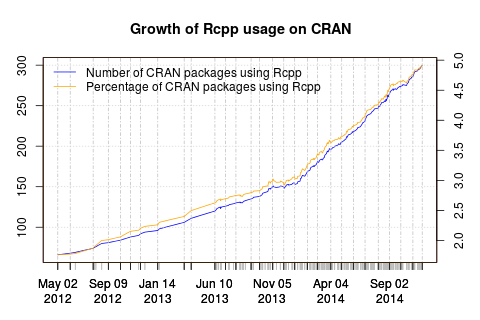
max-heap image This morning, Rcpp reached another round milestone: 300 packages on CRAN now depend on it (as measured by Depends, Imports and LinkingTo declarations). The graph is on the left depicts the growth of Rcpp usage over time. There are 41 more on BioConductor (which is not included in the chart). The first and less detailed part uses manually save entries, the second half of the data set was generated semi-automatically via a short script appending updates to a small file-based backend. A list of user package is kept on this page. Also displayed in the graph is the relative proportion of CRAN packages using Rcpp. The four per-cent hurdle was cleared just before useR! 2014 where I showed a similar graph (as two distinct graphs) in my invited talk. We may well hit five per-cent before the end of the year. 300 is a pretty humbling and staggering number. Also interesting that we we cleared 200 only at the end of April, and 250 in early August. So from everybody behind Rcpp, a heartfelt Thank You! to all the users and of course other contributors.

This post by Dirk Eddelbuettel originated on his Thinking inside the box blog. Please report excessive re-aggregation in third-party for-profit settings.

DebConf team: DebConf14 final report (Posted by Uli Scholler, and the DebConf Team)

The Final Report for DebConf14 is complete and the DebConf team proudly presents it to the world. DebConf14, which was held in Portland, Oregon, USA, in August 2014, was a big success. Our final report captures the essence of this year s conference in pictures and words: And of course there are numbers, budget, and statistics. Read, enjoy, and share! The DebConf team

Erich Schubert: Installing Debian with sysvinit

First let me note that I am using systemd, so these things here are untested by me. See e.g. Petter's and Simon's blog entries on the same overall topic.
According to the Debian installer maintainers, the only accepted way to install Debian with sysvinit is to use preseeding. This can either be done at the installer boot prompt by manually typing the magic spell:
preseed/late_command="in-target apt-get install -y sysvinit-core"
or by using a preseeding file (which is a really nice feature I used for installing my Hadoop nodes) to do the same:
d-i preseed/late_command string in-target apt-get install -y sysvinit-core
If you are a sysadmin, using preseeding can save you a lot of typing. Put all your desired configuration into preseeding files, put them on a webserver (best with a short name resolvable by local DNS). Let's assume you have set up the DNS name d-i.example.com, and your DHCP is configured such that example.com is on the DNS search list. You can also add a vendor extension to DHCP to serve a full URL. Manually enabling preseeding then means adding
auto url=d-i
to the installer boot command line (d-i is the hostname I suggested to set up in your DNS before, and the full URL would then be http://d-i.example.com/d-i/jessie/./preseed.cfg. Preseeding is well documented in Appendix B of the installer manual, but nevertheless will require a number of iterations to get everything work as desired for a fully automatic install like I used for my Hadoop nodes.

There might be an easier option.
I have filed a wishlist bug suggesting to use the tasksel mechanism to allow the user to choose sysvinit at installation time. However, it got turned down by the Debian installer maintainers quire rudely in a "No." - essentially this is a "shut the f... up and go away", which is in my opinion an inappropriate to discard a reasonable user wishlist request.
Since I don't intend to use sysvinit anymore, I will not be pursuing this option further. It is, as far as I can tell, still untested. If it works, it might be the least-effort, least-invasive option to allow the installation of sysvinit Jessie (except for above command line magic).
If you have interest in sysvinit, you (because I don't use sysvinit) should now test if this approach works.
  1. Get the patch proposed to add a task-sysvinit package.
  2. Build an installer CD with this tasksel (maybe this documentation is helpful for this step).
  3. Test whether the patch works. Report results to above bug report, so that others interested in sysvinit can find them easily.
  4. Find and fix bugs if it didn't work. Repeat.
  5. Publish the modified ("forked") installer, and get user feedback.
If you are then still up for a fight, you can try to convince the maintainers (or go the nasty way, and ask the CTTE for their opinion, to start another flamewar and make more maintainers give up) that this option should be added to the mainline installer. And hurry up, or you may at best get this into Jessie reloaded, 8.1. - chance are that the release manager will not accept such patches this late anymore. The sysvinit supporters should have investigated this option much, much earlier instead of losing time on the GR.
Again, I won't be doing this job for you. I'm happy with systemd. But patches and proof-of-concept is what makes open source work, not GRs and MikeeUSA's crap videos spammed to the LKML...
(And yes, I am quite annoyed by the way the Debian installer maintainers handled the bug report. This is not how open-source collaboration is supposed to work. I tried to file a proper wishlist bug reporting, suggesting a solution that I could not find discussed anywhere before and got back just this "No. Shut up." answer. I'm not sure if I will be reporting a bug in debian-installer ever again, if this is the way they handle bug reports ...)
I do care about our users, though. If you look at popcon "vote" results, we have 4179 votes for sysvinit-core and 16918 votes for systemd-sysv (graph) indicating that of those already testing jessie and beyond - neglecting 65 upstart votes, and assuming that there is no bias to not-upgrade if you prefer sysvinit - about 20% appear to prefer sysvinit (in fact, they may even have manually switched back to sysvinit after being upgraded to systemd unintentionally?). These are users that we should listen to, and that we should consider adding an installer option for, too.

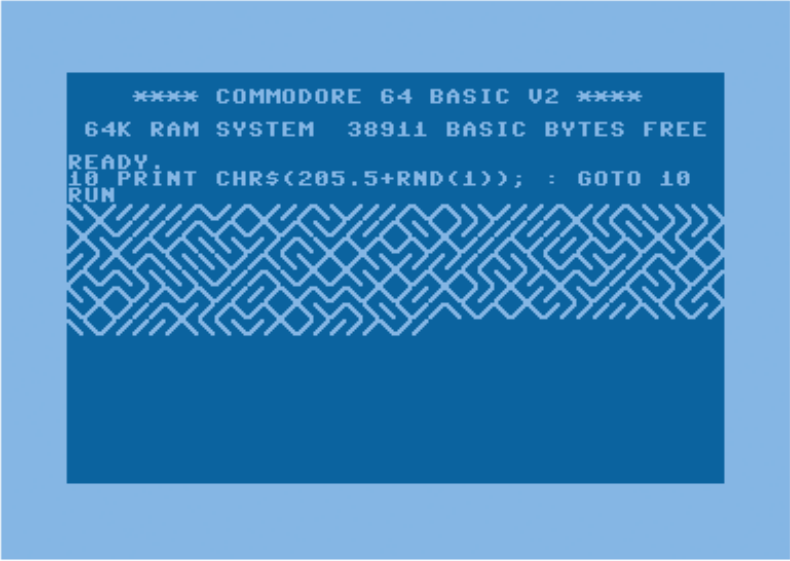
Gunnar Wolf: 10 PRINT CHR$(205.5+RND(1)); : GOTO 10 (also known as #10print )

The line of BASIC code that appears as the subject for this post is the title for a book I just finished reading And enjoyed thoroughly. The book is available online for download under a CC-BY-NC-SA 3.0 License, so you can take a good look at it before (or instead of) buying it. Although it's among the books I will enjoy having on my shelf; the printing is of a very enjoyable good quality. And what is this book about? Well, of course, it analizes that very simple line of code, as it ran on the Commodore 64 thirty years ago. And the analysis is made from every possible angle: What do mazes mean in culture? What have they meant in cultures through history? What about regularity in art (mainly 20th century art)? How would this code look (or how it would be adapted) on contemporary non-C64 computers? And in other languages more popular today? What does randomness mean? And what does random() mean? What is BASIC, and how it came to the C64? What is the C64, and where did it come from? And several other beautiful chapters. The book was collaboratively written by ten different authors, in a Wiki-like fashion. And... Well, what else is there to say? I enjoyed so much reading through long chapters of my childhood, of what attracted me to computers, of my cultural traits and values... I really hope that, in due time, I can be a part of such a beautiful project!

Kenshi Muto: Bug #668001

If the bug title of #668001 was not "debootstrap: cant install systemd instead of sysvinit", but was like "debootstrap ignores everything from the first pipe character to the end of Depends/Pre-Depends line.", it would be treated more carefully ;) My patch posting #20 aims to fix it. Well, I wish this bug will be solved on jessie+1 or backports.

Dirk Eddelbuettel: YATORP -- Yet Another Tutorial on R Packaging

What the world needs right now is yet another tutorial on R packages and their creation. Luckily, this last Friday and Saturday, I had the opportunity to present in a workshop organized by Frank DiTraglia at Penn's shiny new Warren Center, and held at Wharton. Given the Warren Center's focus, the workshop centered around Big Data and Open Science with R. Yihui Xie and myself alternated on delivering four units on an Introduction to R, Writing R packages, Dynamic Documents with R, and HPC with Rcpp and RcppArmadillo. So I had to come up with a plan for teaching creating R packages -- and decided to do it from the very bottom up, clearly introducing the underlying R CMD ... commands and only then switching to taking advantage of an environment such as the RStudio IDE. The resulting slides are now available on my presentations page. The code examples are in a repo subdirectory on GitHub as well. While both were designed to support the parallel live instruction offered in the workshop, I would be interested in feedback (preferably via email) about how useful the slides are by themselves.

This post by Dirk Eddelbuettel originated on his Thinking inside the box blog. Please report excessive re-aggregation in third-party for-profit settings.

24 November 2014

Rog rio Brito: Problems with Emacs 24.4

This is, essentially, a call for help, as I don't really know which program is at a fault here. Given that Emacs's upstream converted their repository from bzr to git, all the commits in mirror repositories became "invalid" in relation to the official repository. What does this mean in practical terms, in my case? Well, bear with me while I try to report my steps.

Noticing a regression and reporting a bug There is a regression with Emacs 24.4 relative to 24.3, which I discovered after Emacs 24.4 became available in Debian's sid. The regression in particular is that Emacs 24.4 doesn't seem to respect my Xresources, while 24.3 does (and this is 100% reproducible: I kept the binary packages of version 24.3 of emacs24 and I can install and reinstall things). When I reported this to upstream, I received a reply that it worked fine with another person that was using XFCE with unstable.

Testing various Desktop environments As I am using the MATE desktop environment, I proceeded to test this assertion by installing XFCE. Emacs 24.4 read my Xresources. I went ahead and installed LXDE. It worked again. I tried once more with GNOME 3, but "regular" GNOME 3 just crashed. I tried with GNOME 3 Classic and Emacs 24.4 just worked again.

Going deep into the rabbit's hole Then, I got more curious and I tried to see why things worked the way that they did and given that there was a mirror of the Emacs repo on github, I cloned it and started to git bisect to find the first problematic commit (I have no idea if bzr even offers something like git's bisect and I wouldn't really know how to do it as quickly as I do with git). To cut short a long story, after many recompiles, many wasted hours, a lot of wasted electrical energy, I found a bad commit and reported it. I received no response after that.

The new repo enters in action Of course, all my hard work bisecting things was completely invalidated after the transition to the new repository went live. To make things relevant again, I used the awesome powers of git, restricting the changes of the newly cloned repository to the e-mail of the committer in question (Chong Yidong) and, from there, I proceeded to another painful process of git bisects. And, sure enough, the first bad commit was the same one that I found with the previous tree. Semi-blindly reverting this commit, and also semi-blindly resolving the conflicts make Emacs's from master work again on my system, but I highly suspect that (given the way that I did it), it would not really be appropriate for upstream. But given also that I failed to receive feedback after my original report, I am not too confident that this bug can be solved soon (even if it doesn't qualify for being fixed in Debian 8). After all this, I don't really know what else to do. I even filed a bug report (more like a request for help) to the Debian MATE maintainers. As a side note, I would have filed a bug to upstream MATE, but it is not really clear what the proper procedure to report bugs to them is---they seem to use github's issues system, but given that they have separate repositories for each component of the project, and that I don't know precisely what repository to report to (or even if it applies to MATE after all), I am more or less paralyzed.

A side note I must say that the conversion was well done by Eric Raymond, because the whole .git repository of the new repo is only about 200MB, with history going back to 1985, while the other repository had about 800GB.

Next.

Previous.