Evgeni Golov: Desktop in a shell: mutt
 Continuing my series about a desktop in a shell, today I will present you my
 mutt setup. I use mutt because it has no bugs and is a really good MUA for people loving consoles ;)First of all you have to know, that all my mail is forwarded to my server and sorted into Maildirs via maildrop, so I do not care about sorting on my desktop , which just fetches the mail via IMAP from the server ;)I m running mutt-patched from Debian Squeeze, so not all options may be available for you if you do not have the same patchset as I do.First, tell mutt to fetch mail from imap.die-welt.net via IMAP:set imap_user=username set imap_pass=password set folder="imaps://imap.die-welt.net/INBOX" set spoolfile="imaps://imap.die-welt.net/INBOX"Now, enable IMAP-IDLE, list subscribed folders, reconnect to the server if needed and mark mail as read when you open it:
set imap_idle
set imap_check_subscribed
unset imap_passive
unset imap_peek
Let mutt save sent mail to the Sent directory on the IMAP server, and postponed mail to Drafts:
set record=+Sent
set postponed=+Drafts
Read mail should stay where it is:
set mbox="!"We use IMAP-IDLE, thus check for new mail manually only every 90 seconds:
set mail_check=90Instead timeout after 15 seconds if no user input is given:
set timeout=15Set default mail from address to my default mail address:
set from=evgeni@golov.deAnd send mail via mstmp (see below for mstmp configuration):
set sendmail="/usr/bin/msmtp"Tell mutt which addresses I recieve mail to (danger, ugly regex!):
alternates (evgeni@(debian.org golov.(de eu)) sargentd@(die-welt sargentd).net evgeni.golov@uni-duesseldorf.de)As mutt knows where I receive mail, let it set From accordingly:
set reverse_nameLet mutt cache some stuff and find its certificates:
set header_cache="~/.mutt/cache/headers"
set message_cachedir="~/.mutt/cache/bodies"
set certificate_file=~/.mutt/certificates
set ssl_ca_certificates_file=/etc/ssl/certs/ca-certificates.crt
Show only interesting headers in an useful order:
ignore headers *
unignore headers from to subject date cc
hdr_order from to cc subject date
Fix stupid MUAs behaviour (e.g. filenames like
=?iso-8859-1?Q?file=5F=E4=5F991116=2Ezip?=):set rfc2047_parametersBeep on new mail, will generate a ! in the window name in screen:
set beep_newmutt-patched has the great sidebar patch, assign ctrl-n, ctrl-p to select next, prev folder, ctrl-o to open selected folder:
bind index \Cp sidebar-prev
bind index \Cn sidebar-next
bind index \Co sidebar-open
And toggle sidebar visibility with ctrl-b:
macro index \Cb '<enter-command>toggle sidebar_visible<enter><refresh>'
macro pager \Cb '<enter-command>toggle sidebar_visible<enter><redraw-screen>'
Since 1.5.20-2, mutt patched contains my sidebar-dotted and sidebar-sorted patches.
Let mutt shorten the displayed path (e.g.
debian-devel instead of INBOX.ml.debian-devel) and sort the folders (the are returned in random order when using imap_check_subscribed):set sidebar_shortpath set sidebar_sortNow let s set some colors (that match the rest of my desktop ):
color sidebar_new yellow default
color normal white default
color hdrdefault brightcyan default
color signature green default
color attachment brightyellow default
color quoted green default
color quoted1 white default
color tilde blue default
And add some useful macros for marking new and old messages as read:
macro index .n "<tag-pattern>~N<enter><tag-prefix><clear-flag>N<clear-flag>*" "Catchup all new messages"
macro index .o "<tag-pattern>~O<enter><tag-prefix><clear-flag>O<clear-flag>*" "Catchup all old messages"
When forwarding mail, I like it to be forwarded as an attachment (YMMV):
set mime_forward=yesI m using goobook in mutt to fetch my addressbook from Google. As there is no Debian package for goobook (yet), you have to install it yourself (via
easy_install):apt-get install python-argparse python-gdata python-simplejson python-keyring python-nose easy_install goobookConfiguration is easy via
~/.goobookrc:[DEFAULT] # If not given here, email and password is taken from .netrc using # machine google.com email: me@gmail.com password: passwordAnd then add the following to your
.muttrc:set query_command="goobook query '%s'" bind editor complete-query macro index,pager a "<pipe-message>goobook add<return>" "add the sender address to Google contacts"That s all for mutt, but We are running mutt in a screen, so let s add the following to
.screenrc to fix transparency and cut&paste (see http://wiki.mutt.org/?MuttFaq/Appearance):defbce on term screen-bceAnd as mutt uses mstmp (yes, I know, mutt can handle SMTP itself ), this is my
.msmtprc:defaults domain dorei.kerker.die-welt.net tls on account die-welt.net host smtp.die-welt.net from sargentd@die-welt.net auth on user username password password tls_starttls on tls_certcheck off # Set a default account account default : die-welt.netC est tout! That is my personal mutt configuration, you can download it as one file here: my .muttrc. And as everyone loves screenshots, here is one:
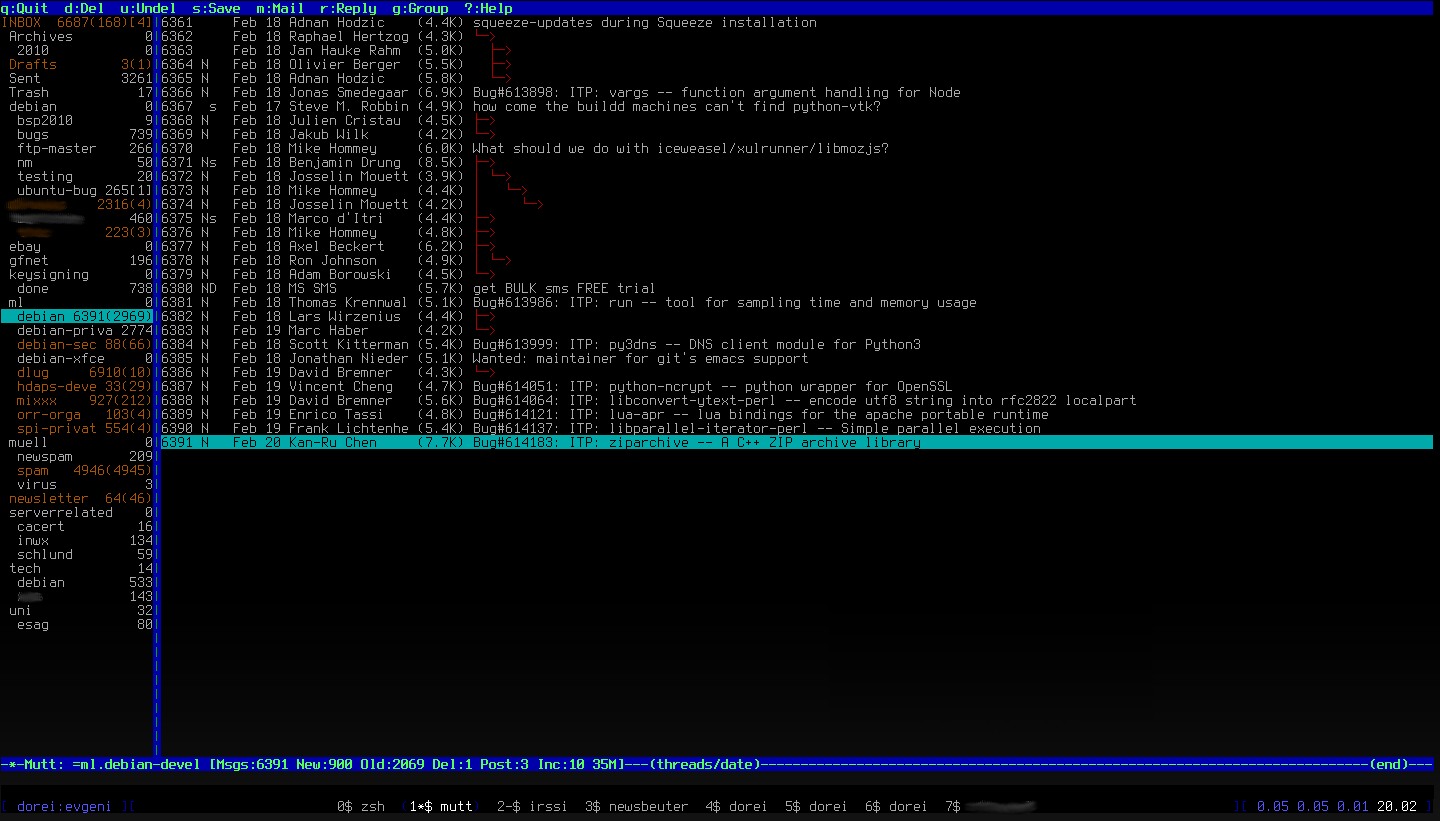 Oh, the next chapter will be about
 irssi, but not before next Sunday (March 6th) as I ll be offline for a week, skiing in Austria :)
 In Ubuntu, the use of
  Dear lazyweb,
I m using Gnome for quite some time now and I m always satisfied with the interfaces I have to whatever I need. There is one thing, though, that I miss: a calendar. I don t like evolution, I don t need another mail client. What I want is a simple, yet sophisticated application that I can put appointments in and which reminds me of them (recurring issues should be possible, too). It may but doesn t have to be somehow attached to the Gnome clock or whatever. Though I expect it to look Gnome-like and be accessible from the panel. Do you know such? And is there even a Debian package for it?
Thanks.
Dear lazyweb,
I m using Gnome for quite some time now and I m always satisfied with the interfaces I have to whatever I need. There is one thing, though, that I miss: a calendar. I don t like evolution, I don t need another mail client. What I want is a simple, yet sophisticated application that I can put appointments in and which reminds me of them (recurring issues should be possible, too). It may but doesn t have to be somehow attached to the Gnome clock or whatever. Though I expect it to look Gnome-like and be accessible from the panel. Do you know such? And is there even a Debian package for it?
Thanks.
 So I guess I just drop Triaging for week 13, 14 and maybe 15
Now the bugs I triaged just before :
So I guess I just drop Triaging for week 13, 14 and maybe 15
Now the bugs I triaged just before :


 My questions are in bold, the rest is by Mike.
Who are you?
I am Mike Hommey. I am French, even if my name doesn t sound so.
I have been a GNU/Linux user since 1995, using Debian since 1999, and
started packaging in 2003. After a long time in the NM queue, I became
a DD in 2005.
The main reason I started being actively involved is quite selfish: I
wanted some things done, and I just did them. My first packages were
extensions for the Mozilla Suite, the old one that directly inherited
from Netscape Communicator. Later on, I wanted some of these extensions
to work with the new kid on the block: Phoenix; or maybe it was already
Firebird. By then, integrating extensions was a hassle, and the
mozilla-browser maintainer had come up with a script that would make it
easier for extension packages. So I ported that script for use with
Phoenix/Firebird and sent it to the BTS.
Then Phoenix/Firebird became Firefox, and it grew a real extension
manager. Except that is was entirely not suited for extensions installed
by the packaging system. So I made it work better. And made a few more
changes to make Firefox work better. All through patches or NMUs.
Then I became co-maintainer, then Firefox couldn t keep its name and
became Iceweasel, and, fast-forward until today, I m now taking care of
Iceweasel/Xulrunner and Iceape in stable, unstable, experimental and
an
My questions are in bold, the rest is by Mike.
Who are you?
I am Mike Hommey. I am French, even if my name doesn t sound so.
I have been a GNU/Linux user since 1995, using Debian since 1999, and
started packaging in 2003. After a long time in the NM queue, I became
a DD in 2005.
The main reason I started being actively involved is quite selfish: I
wanted some things done, and I just did them. My first packages were
extensions for the Mozilla Suite, the old one that directly inherited
from Netscape Communicator. Later on, I wanted some of these extensions
to work with the new kid on the block: Phoenix; or maybe it was already
Firebird. By then, integrating extensions was a hassle, and the
mozilla-browser maintainer had come up with a script that would make it
easier for extension packages. So I ported that script for use with
Phoenix/Firebird and sent it to the BTS.
Then Phoenix/Firebird became Firefox, and it grew a real extension
manager. Except that is was entirely not suited for extensions installed
by the packaging system. So I made it work better. And made a few more
changes to make Firefox work better. All through patches or NMUs.
Then I became co-maintainer, then Firefox couldn t keep its name and
became Iceweasel, and, fast-forward until today, I m now taking care of
Iceweasel/Xulrunner and Iceape in stable, unstable, experimental and
an  ... yet it is not a Belgian final. How is this possible?
Answer:
... yet it is not a Belgian final. How is this possible?
Answer:  (Update: Link to Tomeu s blog post, repost for
  )!
So what did I do?
Application porting
After already having ported four Ubuntu PyGTK applications to GI before (
)!
So what did I do?
Application porting
After already having ported four Ubuntu PyGTK applications to GI before ( Thanks to our sponsors!
Many thanks to the
Thanks to our sponsors!
Many thanks to the 
 When my wife bought her HP 2605dn color laser, she had also ordered a set of
replacement cartridges because the originals would supposedly not last very
long. It turned out that they would last over two years, though.
Now, the black cartridge was empty. The replacements are original HP
components, but recycled/refilled second hand from a different source. I put in
the black one, and the trouble started with the new drum having a big scratch
that would appear in every print. After two years, returning the cartridge was
not an option. As the old drum was still good, the idea was
to put the new toner into the old cartridge. A bit of googling (and visual
inspection) quickly revealed that you are not supposed to do this, the device
doesn't have any facilities to access anything.
Some post did indicate though that the cartridge actually consists of two parts
that are only held together by two pivot pins and two small springs. If you
pull the two parts apart a bit, you can feel the axis the parts are moving
around. So, I would try to use the old drum part with the new toner container
part.
Removing the springs is easy (also removing the flap covering the drum, along
with a tiny third spring). The two pivot pins are pretty inaccessible, but I
managed to pull out both using a pointy tong. One pin is made of metal, if you
need more space you can drill a small hole right next to it. The other pin is
made of plastic with a small hole in it, in one case I succeeded by screwing in
a little screw and pulling at it.
Reassembling the parts is not so hard. I put the "new" cartridge into the
printer, waited for the initialization to finish, only to find out the printer
would still think the cartridge was empty and should be replaced. Duh.
I then discovered a small chip attached to one corner of the drum unit,
probably carrying product ID and some serial number. Luckily, it was easy to
be removed and exchanged with the other drum unit. Still, the printer thought
the cartridge was empty. Some (windows) driver re-installations later it was
clear that there is no "ignore fill level and print anyway" option. (Cups
didn't print either.)
The HP Support Forum has a long
When my wife bought her HP 2605dn color laser, she had also ordered a set of
replacement cartridges because the originals would supposedly not last very
long. It turned out that they would last over two years, though.
Now, the black cartridge was empty. The replacements are original HP
components, but recycled/refilled second hand from a different source. I put in
the black one, and the trouble started with the new drum having a big scratch
that would appear in every print. After two years, returning the cartridge was
not an option. As the old drum was still good, the idea was
to put the new toner into the old cartridge. A bit of googling (and visual
inspection) quickly revealed that you are not supposed to do this, the device
doesn't have any facilities to access anything.
Some post did indicate though that the cartridge actually consists of two parts
that are only held together by two pivot pins and two small springs. If you
pull the two parts apart a bit, you can feel the axis the parts are moving
around. So, I would try to use the old drum part with the new toner container
part.
Removing the springs is easy (also removing the flap covering the drum, along
with a tiny third spring). The two pivot pins are pretty inaccessible, but I
managed to pull out both using a pointy tong. One pin is made of metal, if you
need more space you can drill a small hole right next to it. The other pin is
made of plastic with a small hole in it, in one case I succeeded by screwing in
a little screw and pulling at it.
Reassembling the parts is not so hard. I put the "new" cartridge into the
printer, waited for the initialization to finish, only to find out the printer
would still think the cartridge was empty and should be replaced. Duh.
I then discovered a small chip attached to one corner of the drum unit,
probably carrying product ID and some serial number. Luckily, it was easy to
be removed and exchanged with the other drum unit. Still, the printer thought
the cartridge was empty. Some (windows) driver re-installations later it was
clear that there is no "ignore fill level and print anyway" option. (Cups
didn't print either.)
The HP Support Forum has a long
 I've been doing a bit of work recently on the
 I mostly like Debian the way it is. What
frustrated me in the past were flamewars that could have been
avoided. To me being respectful to each other is important, I don t
like flames and insults because I like solving problems and fighting
like this rarely helps that. The other attitude I don t like is to
blame people and complain instead of trying to help and be positive
(the difference between it sucks because it does not support
$foo instead of it would be so helpful if we had $foo because it
enables me to let me do $bar ).
For a long time, I had the feeling you were mostly alone working on APT and were just ensuring that it keeps working. Did you also had this feeling and are things better nowadays ?
I felt a bit alone sometimes
I mostly like Debian the way it is. What
frustrated me in the past were flamewars that could have been
avoided. To me being respectful to each other is important, I don t
like flames and insults because I like solving problems and fighting
like this rarely helps that. The other attitude I don t like is to
blame people and complain instead of trying to help and be positive
(the difference between it sucks because it does not support
$foo instead of it would be so helpful if we had $foo because it
enables me to let me do $bar ).
For a long time, I had the feeling you were mostly alone working on APT and were just ensuring that it keeps working. Did you also had this feeling and are things better nowadays ?
I felt a bit alone sometimes