Search Results: "spa"

27 December 2023

David Bremner: Generating links to a web IDE from org-beamer

The Emacs part is superceded by a cleaner approach I the upcoming term I want to use KC Lu's web based stacker tool. The key point is that it takes (small) programs encoded as part of the url. Yesterday I spent some time integrating it into my existing org-beamer workflow. In my init.el I have
(defun org-babel-execute:stacker (body params)
  (let* ((table '(? ?\n ?: ?/ ?? ?# ?[ ?] ?@ ?! ?$ ?& ??
                    ?( ?) ?* ?+ ?, ?= ?%))
         (slug (org-link-encode body table))
         (simplified (replace-regexp-in-string "[%]20" "+" slug nil 'literal)))
    (format "\\stackerlink %s " simplified)))
This means that when I "execute" the block below with C-c C-c, it updates the link, which is then embedded in the slides.
#+begin_src stacker :results value latex :exports both
  (deffun (f x)
    (let ([y 2])
      (+ x y)))
  (f 7)
#+end_src
#+RESULTS:
#+begin_export latex
\stackerlink %28deffun+%28f+x%29%0A++%28let+%28%5By+2%5D%29%0A++++%28%2B+x+y%29%29%29%0A%28f+7%29 
#+end_export
The \stackerlink macro is probably fancier than needed. One could just use \href from hyperref.sty, but I wanted to match the appearence of other links in my documents (buttons in the margins). This is based on a now lost answer from stackoverflow.com; I think it wasn't this one, but you get the main idea: use \hyper@normalise.
\makeatletter
% define \stacker@base appropriately
\DeclareRobustCommand* \stackerlink \hyper@normalise\stackerlink@ 
\def\stackerlink@#1 %
  \begin tikzpicture [overlay]%
    \coordinate (here) at (0,0);%
    \draw (current page.south west  - here)%
    node[xshift=2ex,yshift=3.5ex,fill=magenta,inner sep=1pt]%
     \hyper@linkurl \tiny\textcolor white stacker \stacker@base?program=#1 ; %
  \end tikzpicture 
\makeatother

26 December 2023

Russ Allbery: Review: A Study in Honor

Review: A Study in Honor, by Claire O'Dell
Series: Janet Watson Chronicles #1
Publisher: Harper Voyager
Copyright: July 2018
ISBN: 0-06-269932-6
Format: Kindle
Pages: 295
A Study in Honor is a near-future science fiction novel by Claire O'Dell, a pen name for Beth Bernobich. You will see some assertions, including by the Lambda Literary Award judges, that it is a mystery novel. There is a mystery, but... well, more on that in a moment. Janet Watson was an Army surgeon in the Second US Civil War when New Confederacy troops overran the lines in Alton, Illinois. Watson lost her left arm to enemy fire. As this book opens, she is returning to Washington, D.C. with a medical discharge, PTSD, and a field replacement artificial arm scavenged from a dead soldier. It works, sort of, mostly, despite being mismatched to her arm and old in both technology and previous wear. It does not work well enough for her to resume her career as a surgeon. Watson's plan is to request a better artificial arm from the VA (the United States Department of Veterans Affairs, which among other things is responsible for the medical care of wounded veterans). That plan meets a wall of unyielding and uninterested bureaucracy. She has a pension, but it's barely enough for cheap lodging. A lifeline comes in the form of a chance encounter with a former assistant in the Army, who has a difficult friend looking to split the cost of an apartment. The name of that friend is Sara Holmes. At this point, you know what to expect. This is clearly one of the many respinnings of Arthur Conan Doyle. This time, the setting is in the future and Watson and Holmes are both black women, but the other elements of the setup are familiar: the immediate deduction that Watson came from the front, the shared rooms (2809 Q Street this time, sacrificing homage for the accuracy of a real address), Holmes's tendency to play an instrument (this time the piano), and even the title of this book, which is an obvious echo of the title of the first Holmes novel, A Study in Scarlet. Except that's not what you'll get. There are a lot of parallels and references here, but this is not a Holmes-style detective novel. First, it's only arguably a detective novel at all. There is a mystery, which starts with a patient Watson sees in her fallback job as a medical tech in the VA hospital and escalates to a physical attack, but that doesn't start until a third of the way into the book. It certainly is not solved through minute clues and leaps of deduction; instead, that part of the plot has the shape of a thriller rather than a classic mystery. There is a good argument that the thriller is the modern mystery novel, so I don't want to overstate my case, but I think someone who came to this book wanting a Doyle-style mystery would be disappointed. Second, the mystery is not the heart of this book. Watson is. She, like Doyle's Watson, is the first-person narrator, but she is far more present in the book. I have no idea how accurate O'Dell's portrayal of Watson's PTSD is, but it was certainly compelling and engrossing reading. Her fight for basic dignity and her rage at the surface respect and underlying disinterested hostility of the bureaucratic war machinery is what kept me turning the pages. The mystery plot is an outgrowth of that and felt more like a case study than the motivating thread of the plot. And third, Sara Holmes... well, I hesitate to say definitively that she's not Sherlock Holmes. There have been so many versions of Holmes over the years, even apart from the degree to which a black woman would necessarily not be like Doyle's character. But she did not remind me of Sherlock Holmes. She reminded me of a cross between James Bond and a high fae. This sounds like a criticism. It very much is not. I found this high elf spy character far more interesting than I have ever found Sherlock Holmes. But here again, if you came into this book hoping for a Holmes-style master detective, I fear you may be wrong-footed. The James Bond parts will be obvious when you get there and aren't the most interesting (and thankfully the misogyny is entirely absent). The part I found more fascinating is the way O'Dell sets Holmes apart by making her fae rather than insufferable. She projects effortless elegance, appears and disappears on a mysterious schedule of her own, thinks nothing of reading her roommate's diary, leaves meticulously arranged gifts, and even bargains with Watson for answers to precisely three questions. The reader does learn some mundane explanations for some of this behavior, but to be honest I found them somewhat of a letdown. Sara Holmes is at her best as a character when she tacks her own mysterious path through a rather grim world of exhausted war, penny-pinching bureaucracy, and despair, pursuing an unexplained agenda of her own while showing odd but unmistakable signs of friendship and care. This is not a romance, at least in this book. It is instead a slowly-developing friendship between two extremely different people, one that I thoroughly enjoyed. I do have a couple of caveats about this book. The first is that the future US in which it is set is almost pure Twitter doomcasting. Trump's election sparked a long slide into fascism, and when that was arrested by the election of a progressive candidate backed by a fragile coalition, Midwestern red states seceded to form the New Confederacy and start a second civil war that has dragged on for nearly eight years. It's a very specific mainstream liberal dystopian scenario that I've seen so many times it felt like a cliche even though I don't remember seeing it in a book before. This type of future projection of current fears is of course not new for science fiction; Cold War nuclear war novels are probably innumerable. But I had questions, such as how a sparsely-populated, largely non-industrial, and entirely landlocked set of breakaway states could maintain a war footing for eight years. Despite some hand-waving about covert support, those questions are not really answered here. The second problem is that the ending of this book kind of falls apart. The climax of the mystery investigation is unsatisfyingly straightforward, and the resulting revelation is a hoary cliche. Maybe I'm just complaining about the banality of evil, but if I'd been engrossed in this book for the thriller plot, I think I would have been annoyed. I wasn't, though; I was here for the characters, for Watson's PTSD and dogged determination, for Sara's strangeness, and particularly for the growing improbable friendship between two women with extremely different life experiences, emotions, and outlooks. That part was great, regardless of the ending. Do not pick this book up because you want a satisfying deductive mystery with bumbling police and a blizzard of apparently inconsequential clues. That is not at all what's happening here. But this was great on its own terms, and I will be reading the sequel shortly. Recommended, although if you are very online expect to do a bit of eye-rolling at the setting. Followed by The Hound of Justice, but the sequel is not required. This book reaches a satisfying conclusion of its own. Rating: 8 out of 10

25 December 2023

Sergio Talens-Oliag: GitLab CI/CD Tips: Automatic Versioning Using semantic-release

This post describes how I m using semantic-release on gitlab-ci to manage versioning automatically for different kinds of projects following a simple workflow (a develop branch where changes are added or merged to test new versions, a temporary release/#.#.# to generate the release candidate versions and a main branch where the final versions are published).

What is semantic-releaseIt is a Node.js application designed to manage project versioning information on Git Repositories using a Continuous integration system (in this post we will use gitlab-ci)

How does it workBy default semantic-release uses semver for versioning (release versions use the format MAJOR.MINOR.PATCH) and commit messages are parsed to determine the next version number to publish. If after analyzing the commits the version number has to be changed, the command updates the files we tell it to (i.e. the package.json file for nodejs projects and possibly a CHANGELOG.md file), creates a new commit with the changed files, creates a tag with the new version and pushes the changes to the repository. When running on a CI/CD system we usually generate the artifacts related to a release (a package, a container image, etc.) from the tag, as it includes the right version number and usually has passed all the required tests (it is a good idea to run the tests again in any case, as someone could create a tag manually or we could run extra jobs when building the final assets if they fail it is not a big issue anyway, numbers are cheap and infinite, so we can skip releases if needed).

Commit messages and versioningThe commit messages must follow a known format, the default module used to analyze them uses the angular git commit guidelines, but I prefer the conventional commits one, mainly because it s a lot easier to use when you want to update the MAJOR version. The commit message format used must be:
<type>(optional scope): <description>
[optional body]
[optional footer(s)]
The system supports three types of branches: release, maintenance and pre-release, but for now I m not using maintenance ones. The branches I use and their types are:
  • main as release branch (final versions are published from there)
  • develop as pre release branch (used to publish development and testing versions with the format #.#.#-SNAPSHOT.#)
  • release/#.#.# as pre release branches (they are created from develop to publish release candidate versions with the format #.#.#-rc.# and once they are merged with main they are deleted)
On the release branch (main) the version number is updated as follows:
  1. The MAJOR number is incremented if a commit with a BREAKING CHANGE: footer or an exclamation (!) after the type/scope is found in the list of commits found since the last version change (it looks for tags on the same branch).
  2. The MINOR number is incremented if the MAJOR number is not going to be changed and there is a commit with type feat in the commits found since the last version change.
  3. The PATCH number is incremented if neither the MAJOR nor the MINOR numbers are going to be changed and there is a commit with type fix in the the commits found since the last version change.
On the pre release branches (develop and release/#.#.#) the version and pre release numbers are always calculated from the last published version available on the branch (i. e. if we published version 1.3.2 on main we need to have the commit with that tag on the develop or release/#.#.# branch to get right what will be the next version). The version number is updated as follows:
  1. The MAJOR number is incremented if a commit with a BREAKING CHANGE: footer or an exclamation (!) after the type/scope is found in the list of commits found since the last released version.In our example it was 1.3.2 and the version is updated to 2.0.0-SNAPSHOT.1 or 2.0.0-rc.1 depending on the branch.
  2. The MINOR number is incremented if the MAJOR number is not going to be changed and there is a commit with type feat in the commits found since the last released version.In our example the release was 1.3.2 and the version is updated to 1.4.0-SNAPSHOT.1 or 1.4.0-rc.1 depending on the branch.
  3. The PATCH number is incremented if neither the MAJOR nor the MINOR numbers are going to be changed and there is a commit with type fix in the the commits found since the last version change.In our example the release was 1.3.2 and the version is updated to 1.3.3-SNAPSHOT.1 or 1.3.3-rc.1 depending on the branch.
  4. The pre release number is incremented if the MAJOR, MINOR and PATCH numbers are not going to be changed but there is a commit that would otherwise update the version (i.e. a fix on 1.3.3-SNAPSHOT.1 will set the version to 1.3.3-SNAPSHOT.2, a fix or feat on 1.4.0-rc.1 will set the version to 1.4.0-rc.2 an so on).

How do we manage its configurationAlthough the system is designed to work with nodejs projects, it can be used with multiple programming languages and project types. For nodejs projects the usual place to put the configuration is the project s package.json, but I prefer to use the .releaserc file instead. As I use a common set of CI templates, instead of using a .releaserc on each project I generate it on the fly on the jobs that need it, replacing values related to the project type and the current branch on a template using the tmpl command (lately I use a branch of my own fork while I wait for some feedback from upstream, as you will see on the Dockerfile).

Container used to run itAs we run the command on a gitlab-ci job we use the image built from the following Dockerfile:
Dockerfile
# Semantic release image
FROM golang:alpine AS tmpl-builder
#RUN go install github.com/krakozaure/tmpl@v0.4.0
RUN go install github.com/sto/tmpl@v0.4.0-sto.2
FROM node:lts-alpine
COPY --from=tmpl-builder /go/bin/tmpl /usr/local/bin/tmpl
RUN apk update &&\
  apk upgrade &&\
  apk add curl git jq openssh-keygen yq zip &&\
  npm install --location=global\
    conventional-changelog-conventionalcommits@6.1.0\
    @qiwi/multi-semantic-release@7.0.0\
    semantic-release@21.0.7\
    @semantic-release/changelog@6.0.3\
    semantic-release-export-data@1.0.1\
    @semantic-release/git@10.0.1\
    @semantic-release/gitlab@9.5.1\
    @semantic-release/release-notes-generator@11.0.4\
    semantic-release-replace-plugin@1.2.7\
    semver@7.5.4\
  &&\
  rm -rf /var/cache/apk/*
CMD ["/bin/sh"]

How and when is it executedThe job that runs semantic-release is executed when new commits are added to the develop, release/#.#.# or main branches (basically when something is merged or pushed) and after all tests have passed (we don t want to create a new version that does not compile or passes at least the unit tests). The job is something like the following:
semantic_release:
  image: $SEMANTIC_RELEASE_IMAGE
  rules:
    - if: '$CI_COMMIT_BRANCH =~ /^(develop main release\/\d+.\d+.\d+)$/'
      when: always
  stage: release
  before_script:
    - echo "Loading scripts.sh"
    - . $ASSETS_DIR/scripts.sh
  script:
    - sr_gen_releaserc_json
    - git_push_setup
    - semantic-release
Where the SEMANTIC_RELEASE_IMAGE variable contains the URI of the image built using the Dockerfile above and the sr_gen_releaserc_json and git_push_setup are functions defined on the $ASSETS_DIR/scripts.sh file:
  • The sr_gen_releaserc_json function generates the .releaserc.json file using the tmpl command.
  • The git_push_setup function configures git to allow pushing changes to the repository with the semantic-release command, optionally signing them with a SSH key.

The sr_gen_releaserc_json functionThe code for the sr_gen_releaserc_json function is the following:
sr_gen_releaserc_json()
 
  # Use nodejs as default project_type
  project_type="$ PROJECT_TYPE:-nodejs "
  # REGEX to match the rc_branch name
  rc_branch_regex='^release\/[0-9]\+\.[0-9]\+\.[0-9]\+$'
  # PATHS on the local ASSETS_DIR
  assets_dir="$ CI_PROJECT_DIR /$ ASSETS_DIR "
  sr_local_plugin="$ assets_dir /local-plugin.cjs"
  releaserc_tmpl="$ assets_dir /releaserc.json.tmpl"
  pipeline_runtime_values_yaml="/tmp/releaserc_values.yaml"
  pipeline_values_yaml="$ assets_dir /values_$ project_type _project.yaml"
  # Destination PATH
  releaserc_json=".releaserc.json"
  # Create an empty pipeline_values_yaml if missing
  test -f "$pipeline_values_yaml"   : >"$pipeline_values_yaml"
  # Create the pipeline_runtime_values_yaml file
  echo "branch: $ CI_COMMIT_BRANCH " >"$pipeline_runtime_values_yaml"
  echo "gitlab_url: $ CI_SERVER_URL " >"$pipeline_runtime_values_yaml"
  # Add the rc_branch name if we are on an rc_branch
  if [ "$(echo "$CI_COMMIT_BRANCH"   sed -ne "/$rc_branch_regex/ p ")" ]; then
    echo "rc_branch: $ CI_COMMIT_BRANCH " >>"$pipeline_runtime_values_yaml"
  elif [ "$(echo "$CI_MERGE_REQUEST_SOURCE_BRANCH_NAME"  
      sed -ne "/$rc_branch_regex/ p ")" ]; then
    echo "rc_branch: $ CI_MERGE_REQUEST_SOURCE_BRANCH_NAME " \
      >>"$pipeline_runtime_values_yaml"
  fi
  echo "sr_local_plugin: $ sr_local_plugin " >>"$pipeline_runtime_values_yaml"
  # Create the releaserc_json file
  tmpl -f "$pipeline_runtime_values_yaml" -f "$pipeline_values_yaml" \
    "$releaserc_tmpl"   jq . >"$releaserc_json"
  # Remove the pipeline_runtime_values_yaml file
  rm -f "$pipeline_runtime_values_yaml"
  # Print the releaserc_json file
  print_file_collapsed "$releaserc_json"
  # --*-- BEG: NOTE --*--
  # Rename the package.json to ignore it when calling semantic release.
  # The idea is that the local-plugin renames it back on the first step of the
  # semantic-release process.
  # --*-- END: NOTE --*--
  if [ -f "package.json" ]; then
    echo "Renaming 'package.json' to 'package.json_disabled'"
    mv "package.json" "package.json_disabled"
  fi
 
Almost all the variables used on the function are defined by gitlab except the ASSETS_DIR and PROJECT_TYPE; in the complete pipelines the ASSETS_DIR is defined on a common file included by all the pipelines and the project type is defined on the .gitlab-ci.yml file of each project. If you review the code you will see that the file processed by the tmpl command is named releaserc.json.tmpl, its contents are shown here:
 
  "plugins": [
     - if .sr_local_plugin  
    "  .sr_local_plugin  ",
     - end  
    [
      "@semantic-release/commit-analyzer",
       
        "preset": "conventionalcommits",
        "releaseRules": [
            "breaking": true, "release": "major"  ,
            "revert": true, "release": "patch"  ,
            "type": "feat", "release": "minor"  ,
            "type": "fix", "release": "patch"  ,
            "type": "perf", "release": "patch"  
        ]
       
    ],
     - if .replacements  
    [
      "semantic-release-replace-plugin",
        "replacements":   .replacements   toJson    
    ],
     - end  
    "@semantic-release/release-notes-generator",
     - if eq .branch "main"  
    [
      "@semantic-release/changelog",
        "changelogFile": "CHANGELOG.md", "changelogTitle": "# Changelog"  
    ],
     - end  
    [
      "@semantic-release/git",
       
        "assets":   if .assets   .assets   toJson   else  []  end  ,
        "message": "ci(release): v$ nextRelease.version \n\n$ nextRelease.notes "
       
    ],
    [
      "@semantic-release/gitlab",
        "gitlabUrl": "  .gitlab_url  ", "successComment": false  
    ]
  ],
  "branches": [
      "name": "develop", "prerelease": "SNAPSHOT"  ,
     - if .rc_branch  
      "name": "  .rc_branch  ", "prerelease": "rc"  ,
     - end  
    "main"
  ]
 
The values used to process the template are defined on a file built on the fly (releaserc_values.yaml) that includes the following keys and values:
  • branch: the name of the current branch
  • gitlab_url: the URL of the gitlab server (the value is taken from the CI_SERVER_URL variable)
  • rc_branch: the name of the current rc branch; we only set the value if we are processing one because semantic-release only allows one branch to match the rc prefix and if we use a wildcard (i.e. release/*) but the users keep more than one release/#.#.# branch open at the same time the calls to semantic-release will fail for sure.
  • sr_local_plugin: the path to the local plugin we use (shown later)
The template also uses a values_$ project_type _project.yaml file that includes settings specific to the project type, the one for nodejs is as follows:
replacements:
  - files:
      - "package.json"
    from: "\"version\": \".*\""
    to: "\"version\": \"$ nextRelease.version \""
assets:
  - "CHANGELOG.md"
  - "package.json"
The replacements section is used to update the version field on the relevant files of the project (in our case the package.json file) and the assets section includes the files that will be committed to the repository when the release is published (looking at the template you can see that the CHANGELOG.md is only updated for the main branch, we do it this way because if we update the file on other branches it creates a merge nightmare and we are only interested on it for released versions anyway). The local plugin adds code to rename the package.json_disabled file to package.json if present and prints the last and next versions on the logs with a format that can be easily parsed using sed:
local-plugin.cjs
// Minimal plugin to:
// - rename the package.json_disabled file to package.json if present
// - log the semantic-release last & next versions
function verifyConditions(pluginConfig, context)  
  var fs = require('fs');
  if (fs.existsSync('package.json_disabled'))  
    fs.renameSync('package.json_disabled', 'package.json');
    context.logger.log( verifyConditions: renamed 'package.json_disabled' to 'package.json' );
   
 
function analyzeCommits(pluginConfig, context)  
  if (context.lastRelease && context.lastRelease.version)  
    context.logger.log( analyzeCommits: LAST_VERSION=$ context.lastRelease.version  );
   
 
function verifyRelease(pluginConfig, context)  
  if (context.nextRelease && context.nextRelease.version)  
    context.logger.log( verifyRelease: NEXT_VERSION=$ context.nextRelease.version  );
   
 
module.exports =  
  verifyConditions,
  analyzeCommits,
  verifyRelease
 

The git_push_setup functionThe code for the git_push_setup function is the following:
git_push_setup()
 
  # Update global credentials to allow git clone & push for all the group repos
  git config --global credential.helper store
  cat >"$HOME/.git-credentials" <<EOF
https://fake-user:$ GITLAB_REPOSITORY_TOKEN @gitlab.com
EOF
  # Define user name, mail and signing key for semantic-release
  user_name="$SR_USER_NAME"
  user_email="$SR_USER_EMAIL"
  ssh_signing_key="$SSH_SIGNING_KEY"
  # Export git user variables
  export GIT_AUTHOR_NAME="$user_name"
  export GIT_AUTHOR_EMAIL="$user_email"
  export GIT_COMMITTER_NAME="$user_name"
  export GIT_COMMITTER_EMAIL="$user_email"
  # Sign commits with ssh if there is a SSH_SIGNING_KEY variable
  if [ "$ssh_signing_key" ]; then
    echo "Configuring GIT to sign commits with SSH"
    ssh_keyfile="/tmp/.ssh-id"
    : >"$ssh_keyfile"
    chmod 0400 "$ssh_keyfile"
    echo "$ssh_signing_key"   tr -d '\r' >"$ssh_keyfile"
    git config gpg.format ssh
    git config user.signingkey "$ssh_keyfile"
    git config commit.gpgsign true
  fi
 
The function assumes that the GITLAB_REPOSITORY_TOKEN variable (set on the CI/CD variables section of the project or group we want) contains a token with read_repository and write_repository permissions on all the projects we are going to use this function. The SR_USER_NAME and SR_USER_EMAIL variables can be defined on a common file or the CI/CD variables section of the project or group we want to work with and the script assumes that the optional SSH_SIGNING_KEY is exported as a CI/CD default value of type variable (that is why the keyfile is created on the fly) and git is configured to use it if the variable is not empty.
Warning: Keep in mind that the variables GITLAB_REPOSITORY_TOKEN and SSH_SIGNING_KEY contain secrets, so probably is a good idea to make them protected (if you do that you have to make the develop, main and release/* branches protected too).
Warning: The semantic-release user has to be able to push to all the projects on those protected branches, it is a good idea to create a dedicated user and add it as a MAINTAINER for the projects we want (the MAINTAINERS need to be able to push to the branches), or, if you are using a Gitlab with a Premium license you can use the api to allow the semantic-release user to push to the protected branches without allowing it for any other user.

The semantic-release commandOnce we have the .releaserc file and the git configuration ready we run the semantic-release command. If the branch we are working with has one or more commits that will increment the version, the tool does the following (note that the steps are described are the ones executed if we use the configuration we have generated):
  1. It detects the commits that will increment the version and calculates the next version number.
  2. Generates the release notes for the version.
  3. Applies the replacements defined on the configuration (in our example updates the version field on the package.json file).
  4. Updates the CHANGELOG.md file adding the release notes if we are going to publish the file (when we are on the main branch).
  5. Creates a commit if all or some of the files listed on the assets key have changed and uses the commit message we have defined, replacing the variables for their current values.
  6. Creates a tag with the new version number and the release notes.
  7. As we are using the gitlab plugin after tagging it also creates a release on the project with the tag name and the release notes.

Notes about the git workflows and merges between branchesIt is very important to remember that semantic-release looks at the commits of a given branch when calculating the next version to publish, that has two important implications:
  1. On pre release branches we need to have the commit that includes the tag with the released version, if we don t have it the next version is not calculated correctly.
  2. It is a bad idea to squash commits when merging a branch to another one, if we do that we will lose the information semantic-release needs to calculate the next version and even if we use the right prefix for the squashed commit (fix, feat, ) we miss all the messages that would otherwise go to the CHANGELOG.md file.
To make sure that we have the right commits on the pre release branches we should merge the main branch changes into the develop one after each release tag is created; in my pipelines the fist job that processes a release tag creates a branch from the tag and an MR to merge it to develop. The important thing about that MR is that is must not be squashed, if we do that the tag commit will probably be lost, so we need to be careful. To merge the changes directly we can run the following code:
# Set the SR_TAG variable to the tag you want to process
SR_TAG="v1.3.2"
# Fetch all the changes
git fetch --all --prune
# Switch to the main branch
git switch main
# Pull all the changes
git pull
# Switch to the development branch
git switch develop
# Pull all the changes
git pull
# Create followup branch from tag
git switch -c "followup/$SR_TAG" "$SR_TAG"
# Change files manually & commit the changed files
git commit -a --untracked-files=no -m "ci(followup): $SR_TAG to develop"
# Switch to the development branch
git switch develop
# Merge the followup branch into the development one using the --no-ff option
git merge --no-ff "followup/$SR_TAG"
# Remove the followup branch
git branch -d "followup/$SR_TAG"
# Push the changes
git push
If we can t push directly to develop we can create a MR pushing the followup branch after committing the changes, but we have to make sure that we don t squash the commits when merging or it will not work as we want.

Russ Allbery: Review: The Blackwing War

Review: The Blackwing War, by K.B. Spangler
Series: Deep Witches #1
Publisher: A Girl and Her Fed Books
Copyright: March 2021
ISBN: blackwing-war
Format: Kindle
Pages: 284
The Blackwing War is the first book of a projected space opera series. I previously reviewed Stoneskin, which was intended as a prelude to this series. In theory you can start here, but I would read Stoneskin first. Tembi is a Witch, which means she can ask the Deep to do things for her. At the start of the book, those things mostly involve disarming bombs. The galaxy is in the middle of a genocidal war between the well-equipped and all-but-officially supported Sagittarius Armed Forces, also known as the Blackwings, and the Sabenta resistance movement. To settle the galaxy, humans fiddled with their genes to adapt themselves to otherwise-hostile planets. The Blackwings take exception, in the tradition of racist humans throughout history, and think it's time to purify human bloodlines again. Both sides are using bombs. The Deep is the brilliant idea of this series. It seems to exist everywhere simultaneously, it's alive, it adores teleporting things, and it's basically a giant cosmic puppy. Humans are nearly incomprehensible to the Deep, and it's nearly incomprehensible to humans, but it somehow picks out specific humans who can (sort of) understand it and whom it gets attached to and somehow makes immortal. These are the Witches, and they have turned the Deep into the logistical backbone of human civilization. Essentially all commerce and travel is now done through Deep teleportation, requested by a Witch and coordinated by Lancaster, the Witches' governing council. The exception is war. Lancaster is strictly neutral; it does not take sides, even in the face of an ongoing genocide, and it refuses to transport military ships, any type of weapons, or even war refugees. Domino, Lancaster's cynically manipulative leader, is determined to protect its special privileges and position at all costs. Tembi is one of the quasi-leaders of a resistance against that position, but even they are reluctant to ask the Deep to take sides in a war. To them, the Deep is a living magical creature that they are exploiting, and which also tends to be a bundle of nerves. Using it as a weapon feels like a step too far. That's how the situation lies at the start of this book when, after a successful bomb defusing, the Deep whisks Tembi away to watch an unknown weapon blow up a moon. A lot of this book consists of Tembi unraveling a couple of mysteries, starting with the apparent experimental bomb and then expanding to include the apparent drugging and disappearance of her former classmate. The low-grade war gets worse throughout, leaving Tembi torn between the justifications for Lancaster's neutrality and her strong sense of basic morality. The moments when Tembi gets angry enough or impatient enough to take action are the best parts, but a lot of this book is quite grim. Do not expect all to be resolved in a happy ending. There is some catharsis, but The Blackwing War is also clearly setup for a longer series. Tembi is a great character and the Deep is even better. I thoroughly enjoyed reading about both of them, and Tembi's relationship with the Deep is a delight. Usually I get frustrated by baffling incomprehensibility as a plot devices, but Spangler pulls it off as well as I've seen it done. But unfortunately, this book is firmly in the "gets worse before it will get better" part of the overall story arc, and the sequels have not yet appeared. The Blackwing War ends on a cliffhanger that portends huge changes for the characters and the setting, and if I had the next book to rush into, I wouldn't mind the grimness as much. As is, it was a somewhat depressing reading experience despite its charms, and despite a somewhat optimistic ending (that I doubt will truly resolve anything). I think the world-building elements were a touch predictable, and I wish Spangler wouldn't have her characters keep trying to justify Domino's creepy, abusive, and manipulative actions. But the characters are so much fun, and the idea of the Deep as a character is such a delight, that I am hooked on this series regardless. Recommended, although I will (hopefully) be able to recommend it more heartily once at least one sequel has been published. Content warnings: genocide, racism, violent death. Rating: 7 out of 10

24 December 2023

Russ Allbery: Review: Liberty's Daughter

Review: Liberty's Daughter, by Naomi Kritzer
Publisher: Fairwood Press
Copyright: November 2023
ISBN: 1-958880-16-7
Format: Kindle
Pages: 257
Liberty's Daughter is a stand-alone near-future science fiction fix-up novel. The original stories were published in Fantasy and Science Fiction between 2012 and 2015. Beck Garrison lives on New Minerva (Min), one of a cluster of libertarian seasteads 220 nautical miles off the coast of Los Angeles. Her father brought her to Min when she was four, so it's the only life she knows. As this story opens, she's picked up a job for pocket change: finding very specific items that people want to buy. Since any new goods have to be shipped in and the seasteads have an ambiguous legal status, they don't get Amazon deliveries, but there are enough people (and enough tourists who bring high-value goods for trade) that someone probably has whatever someone else is looking for. Even sparkly high-heeled sandals size eight. Beck's father is high in the informal power structure of the seasteads for reasons that don't become apparent until very late in this book. Beck therefore has a comfortable, albeit cramped, life. The social protections, self-confidence, and feelings of invincibility that come with that wealth serve her well as a finder. After the current owner of the sandals bargains with her to find a person rather than an object, that privilege also lets her learn quite a lot before she starts getting into trouble. The political background of this novel is going to require some suspension of disbelief. The premise is that one of those harebrained libertarian schemes to form a freedom utopia has been successful enough to last for 49 years and attract 80,000 permanent residents. (It's a libertarian seastead so a lot of those residents are indentured slaves, as one does in libertarian philosophy. The number of people with shares, like Beck's father, is considerably smaller.) By the end of the book, Kritzer has offered some explanations for why the US would allow such a place to continue to exist, but the chances of the famously fractious con artists and incompetents involved in these types of endeavors creating something that survived internal power struggles for that long seem low. One has to roll with it for story reasons: Kritzer needs the population to be large enough for a plot, and the history to be long enough for Beck to exist as a character. The strength of this book is Beck, and specifically the fact that Beck is a second-generation teenager who grew up on the seastead. Unlike a lot of her age peers with their Cayman Islands vacations, she's never left and has no experience with life on land. She considers many things to be perfectly normal that are not at all normal to the reader and the various reader surrogates who show up over the course of the book. She also has the instinctive feel for seastead politics of the child of a prominent figure in a small town. And, most importantly, she has formed her own sense of morality and social structure that matches neither that of the reader nor that of her father. Liberty's Daughter is told in first-person by Beck. Judging the authenticity of Gen-Z thought processes is not one of my strengths, but Beck felt right to me. Her narration is dryly matter-of-fact, with only brief descriptions of her emotional reactions, but her personality shines in the occasional sarcasm and obstinacy. Kritzer has the teenage bafflement at the stupidity of adults down pat, as well as the tendency to jump head-first into ideas and make some decisions through sheer stubbornness. This is not one of those fix-up novels where the author has reworked the stories sufficiently that the original seams don't show. It is very episodic; compared to a typical novel of this length, there's more plot but less character growth. It's a good book when you want to be pulled into a stream of events that moves right along. This is not the book for deep philosophical examinations of the basis of a moral society, but it does have, around the edges, is the humans build human societies and develop elaborate social conventions and senses of belonging no matter how stupid the original philosophical foundations were. Even societies built on nasty exploitation can engender a sort of loyalty. Beck doesn't support the worst parts of her weird society, but she wants to fix it, not burn it to the ground. I thought there was a profound observation there. That brings me to my complaint: I hated the ending. Liberty's Daughter is in part Beck's fight for her own autonomy, both moral and financial, and the beginnings of an effort to turn her home into the sort of home she wants. By the end of the book, she's testing the limits of what she can accomplish, solidifying her own moral compass, and deciding how she wants to use the social position she inherited. It felt like the ending undermined all of that and treated her like a child. I know adolescence comes with those sorts of reversals, but I was still so mad. This is particularly annoying since I otherwise want to recommend this book. It's not ground-breaking, it's not that deep, but it was a thoroughly enjoyable day's worth of entertainment with a likable protagonist. Just don't read the last chapter, I guess? Or have more tolerance than I have for people treating sixteen-year-olds as if they're not old enough to make decisions. Content warnings: pandemic. Rating: 7 out of 10

22 December 2023

Russ Allbery: Review: Wintersmith

Review: Wintersmith, by Terry Pratchett
Series: Discworld #35
Publisher: Clarion Books
Copyright: 2006
Printing: 2007
ISBN: 0-06-089033-9
Format: Mass market
Pages: 450
Wintersmith is the 35th Discworld novel and the 3rd Tiffany Aching novel. You could probably start here, since understanding the backstory isn't vital for following the plot, but I'm not sure why you would. Tiffany is now training with Miss Treason, a 113-year-old witch who is quite different in her approach from Miss Level, Tiffany's mentor in A Hat Full of Sky. Miss Level was the unassuming and constantly helpful glue that held the neighborhood together. Miss Treason is the judge; her neighbors are scared of her and proud of being scared of her, since that means they have a proper witch who can see into their heads and sort out their problems. On the surface, they're quite different; part of the story of this book is Tiffany learning to see the similarities. First, though, Miss Treason rushes Tiffany to a strange midnight Morris Dance, without any explanation. The Morris Dance usually celebrates the coming of spring and is at the center of a village party, so Tiffany is quite confused by seeing it danced on a dark and windy night in late autumn. But there is a hole in the dance where the Fool normally is, and Tiffany can't keep herself from joining it. This proves to be a mistake. That space was left for someone very different from Tiffany, and now she's entangled herself in deep magic that she doesn't understand. This is another Pratchett novel where the main storyline didn't do much for me. All the trouble stems from Miss Treason being maddeningly opaque, and while she did warn Tiffany, she did so in that way that guarantees a protagonist of a middle-grade novel will ignore. The Wintersmith is a boring, one-note quasi-villain, and the plot mainly revolves around elemental powers being dumber than a sack of hammers. The one thing I will say about the main plot is that the magic Tiffany danced into is entangled with courtship and romance, Tiffany turns thirteen over the course of this book, and yet this is not weird and uncomfortable reading the way it would be in the hands of many other authors. Pratchett has a keen eye for the age range that he's targeting. The first awareness that there is such a thing as romance that might be relevant to oneself pairs nicely with the Wintersmith's utter confusion at how Tiffany's intrusion unbalanced his dance. This is a very specific age and experience that I think a lot of authors would shy away from, particularly with a female protagonist, and I thought Pratchett handled it adroitly. I personally found the Wintersmith's awkward courting tedious and annoying, but that's more about me than about the book. As with A Hat Full of Sky, though, everything other than the main plot was great. It is becoming obvious how much Tiffany and Granny Weatherwax have in common, and that Granny Weatherwax recognizes this and is training Tiffany herself. This is high-quality coming-of-age material, not in the traditional fantasy sense of chosen ones and map explorations, but in the sense of slowly-developing empathy and understanding of people who think differently than you do. Tiffany, like Granny Weatherwax, has very little patience with nonsense, and her irritation with stupidity is one of her best characteristics. But she's learning how to blunt it long enough to pay attention, and to understand how people she doesn't like can still be the right people for specific situations. I particularly loved how Granny carries on with a feud at the same time that Tiffany is learning to let go of one. It's not a contradiction or hypocrisy; it's a sign that Tiffany is entitled to her judgments and feelings, but has to learn how to keep them in their place and not let them take over. One of the great things about the Tiffany Aching books is that the villages are also characters. We don't see that much of the individual people, but one of the things Tiffany is learning is how to see the interpersonal dynamics and patterns of village life. Somehow the feelings of irritation and exasperation fade once you understand people's motives and see more sides to their character. There is a lot more Nanny Ogg in this book than there has been in the last few, and that reminded me of how much I love her character. She has a completely different approach than Granny Weatherwax, but it's just as effective in different ways. She's also the perfect witch to have around when you've stumbled into a stylized love story that you don't want to be a part of, and yet find oddly fascinating. It says something about the skill of Pratchett's characterization that I could enjoy a book this much while having no interest in the main plot. The Witches have always been great characters, but somehow they're even better when seen through Tiffany's perspective. Good stuff; if you liked any of the other Tiffany Aching books, you will like this as well. Followed by Making Money in publication order. The next Tiffany Aching novel is I Shall Wear Midnight. Rating: 8 out of 10

20 December 2023

Ryan Kavanagh: Battery charge start and stop threshold on OpenBSD

I often use my laptops as portable desktops: they are plugged into AC power and an external monitor/keyboard 95% of time. Unfortunately, continuous charging is hard on the battery. To mitigate this, ThinkPads have customizable start and stop charging thresholds, such that the battery will only start charging if its level falls below the start threshold, and it will stop charging as soon as it reaches the stop threshold. Suggested thresholds from Lenovo s battery team can be found in this comment. You can set these thresholds on Linux using tlp-stat(8), and you can make the values persist across reboots by setting START_CHARGE_THRESH_BAT0 and STOP_CHARGE_THERSH_BAT0 in /etc/tlp.conf. I recently installed OpenBSD on my work ThinkPad, but struggled to find any information on how to set the thresholds under OpenBSD. After only finding a dead-end thread from 2021 on misc@, I started digging around on how to implement it myself. The acpithinkpad and acpibat drivers looked promising, and a bit of Google-fu lead me to the following small announcement in the OpenBSD 7.4 release notes:
New sysctl(2) nodes for battery management, hw.battery.charge*. Support them with acpithinkpad(4) and aplsmc(4).
Lo and behold, setting the start and stop threshold in OpenBSD is simply a matter of setting hw.battery.chargestart and hw.battery.chargestop with sysctl. The documentation was not committed in time for the 7.4 release, but you can read it in -CURRENT s sysctl(2). I personally set the following values in /etc/sysctl.conf:
hw.battery.chargestart=40
hw.battery.chargestop=60

Melissa Wen: The Rainbow Treasure Map Talk: Advanced color management on Linux with AMD/Steam Deck.

Last week marked a major milestone for me: the AMD driver-specific color management properties reached the upstream linux-next! And to celebrate, I m happy to share the slides notes from my 2023 XDC talk, The Rainbow Treasure Map along with the individual recording that just dropped last week on youtube talk about happy coincidences!

Steam Deck Rainbow: Treasure Map & Magic Frogs While I may be bubbly and chatty in everyday life, the stage isn t exactly my comfort zone (hallway talks are more my speed). But the journey of developing the AMD color management properties was so full of discoveries that I simply had to share the experience. Witnessing the fantastic work of Jeremy and Joshua bring it all to life on the Steam Deck OLED was like uncovering magical ingredients and whipping up something truly enchanting. For XDC 2023, we split our Rainbow journey into two talks. My focus, The Rainbow Treasure Map, explored the new color features we added to the Linux kernel driver, diving deep into the hardware capabilities of AMD/Steam Deck. Joshua then followed with The Rainbow Frogs and showed the breathtaking color magic released on Gamescope thanks to the power unlocked by the kernel driver s Steam Deck color properties.

Packing a Rainbow into 15 Minutes I had so much to tell, but a half-slot talk meant crafting a concise presentation. To squeeze everything into 15 minutes (and calm my pre-talk jitters a bit!), I drafted and practiced those slides and notes countless times. So grab your map, and let s embark on the Rainbow journey together! Slide 1: The Rainbow Treasure Map - Advanced Color Management on Linux with AMD/SteamDeck Intro: Hi, I m Melissa from Igalia and welcome to the Rainbow Treasure Map, a talk about advanced color management on Linux with AMD/SteamDeck. Slide 2: List useful links for this technical talk Useful links: First of all, if you are not used to the topic, you may find these links useful.
  1. XDC 2022 - I m not an AMD expert, but - Melissa Wen
  2. XDC 2022 - Is HDR Harder? - Harry Wentland
  3. XDC 2022 Lightning - HDR Workshop Summary - Harry Wentland
  4. Color management and HDR documentation for FOSS graphics - Pekka Paalanen et al.
  5. Cinematic Color - 2012 SIGGRAPH course notes - Jeremy Selan
  6. AMD Driver-specific Properties for Color Management on Linux (Part 1) - Melissa Wen
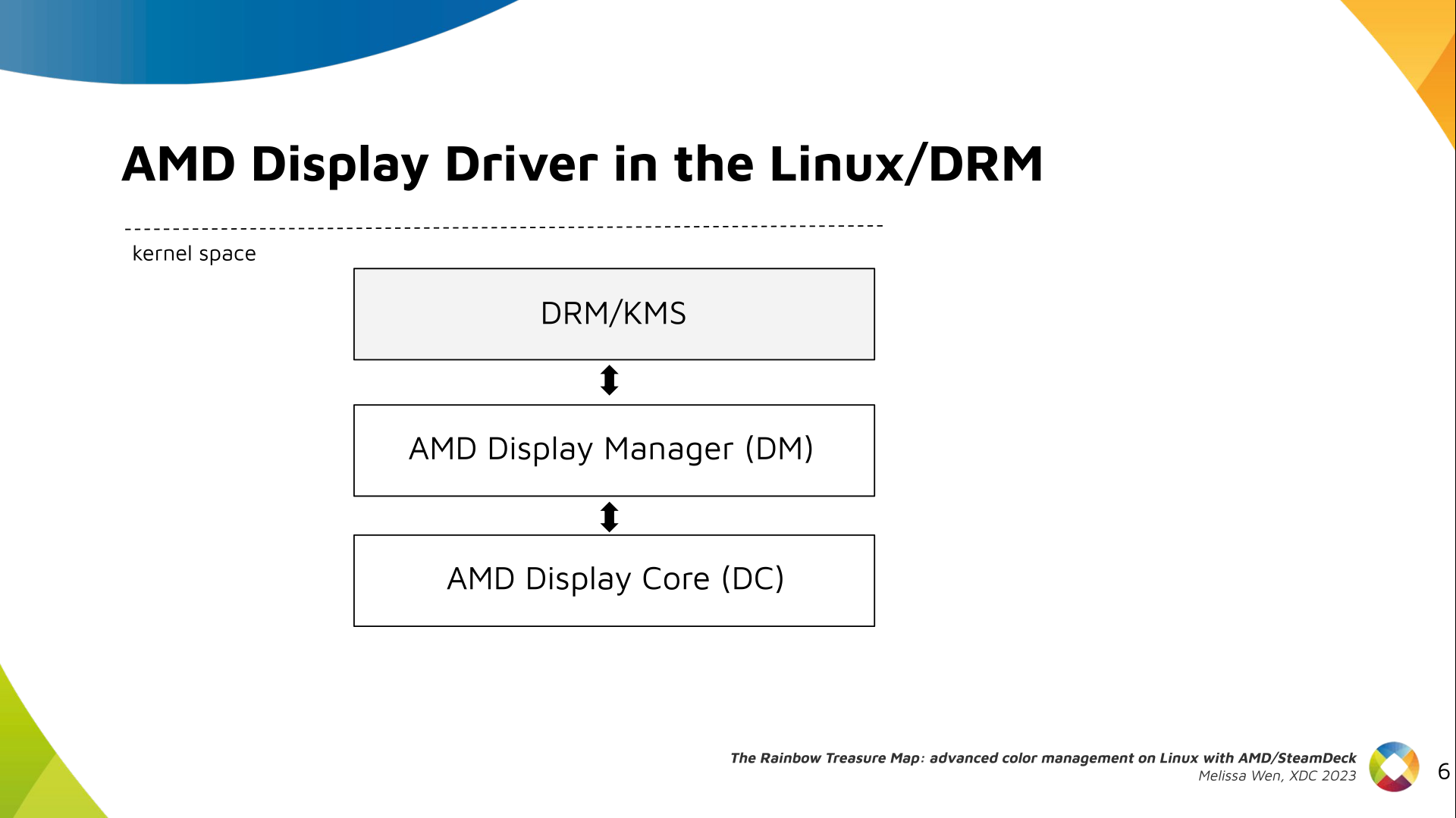
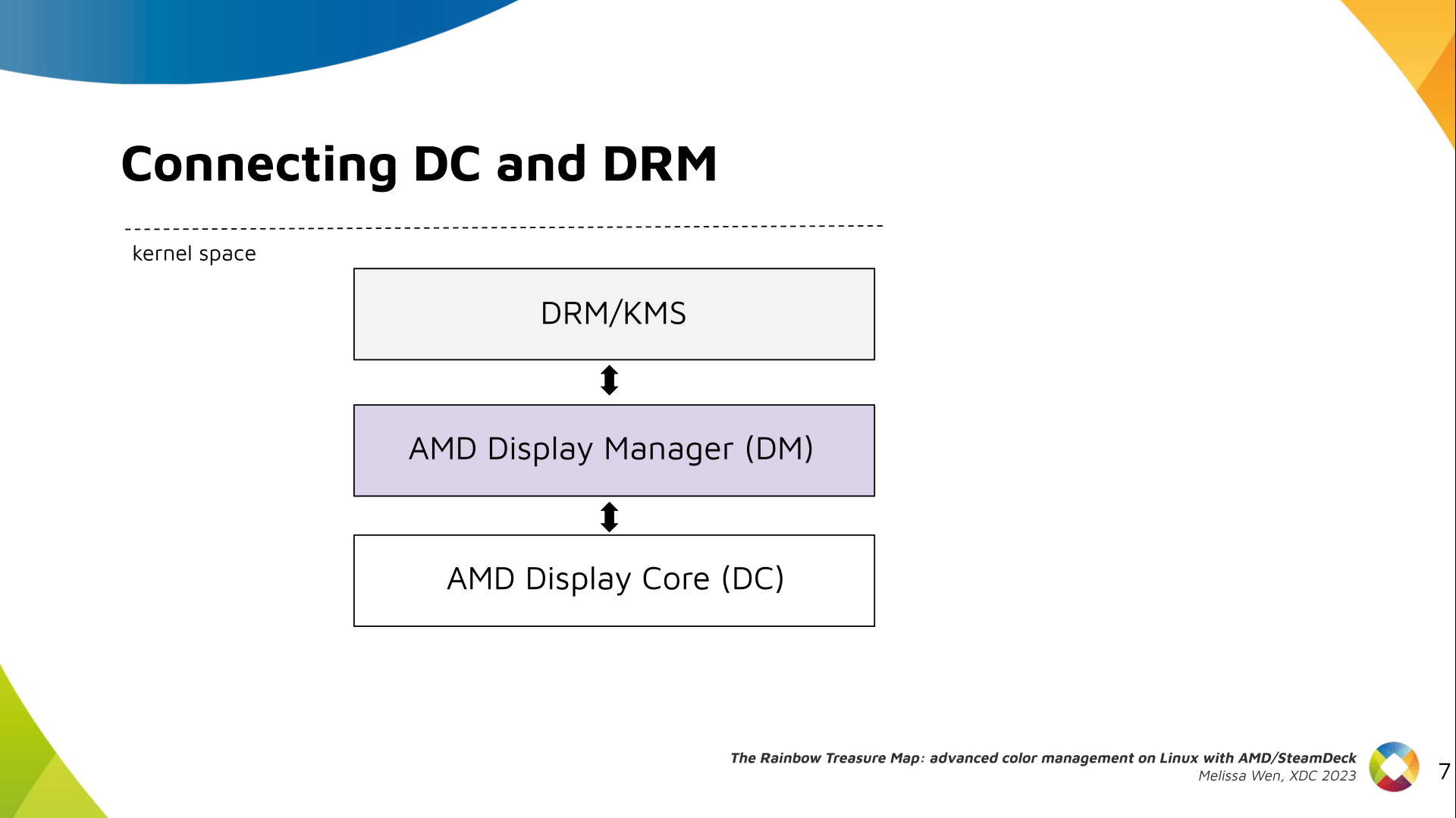
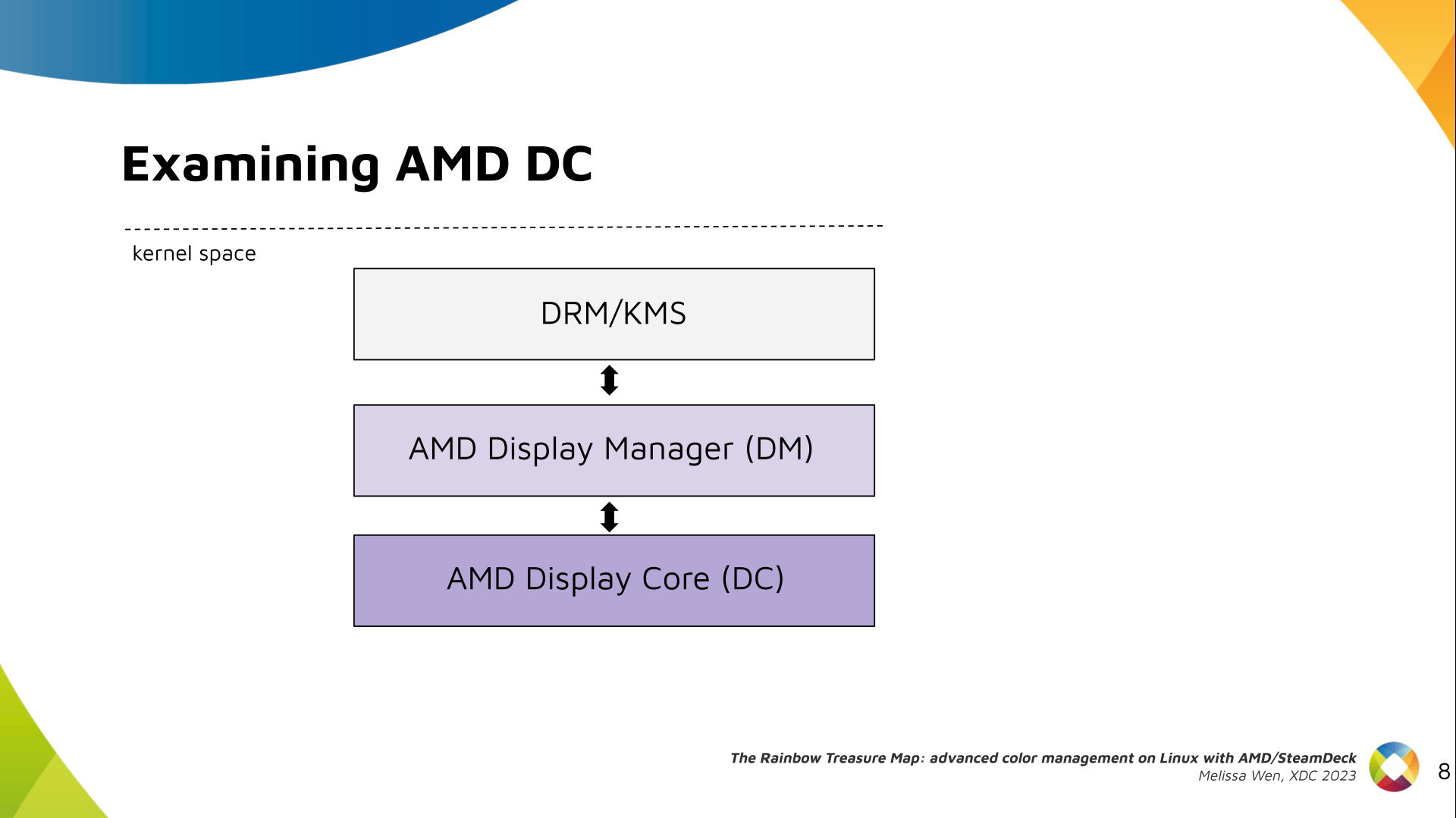
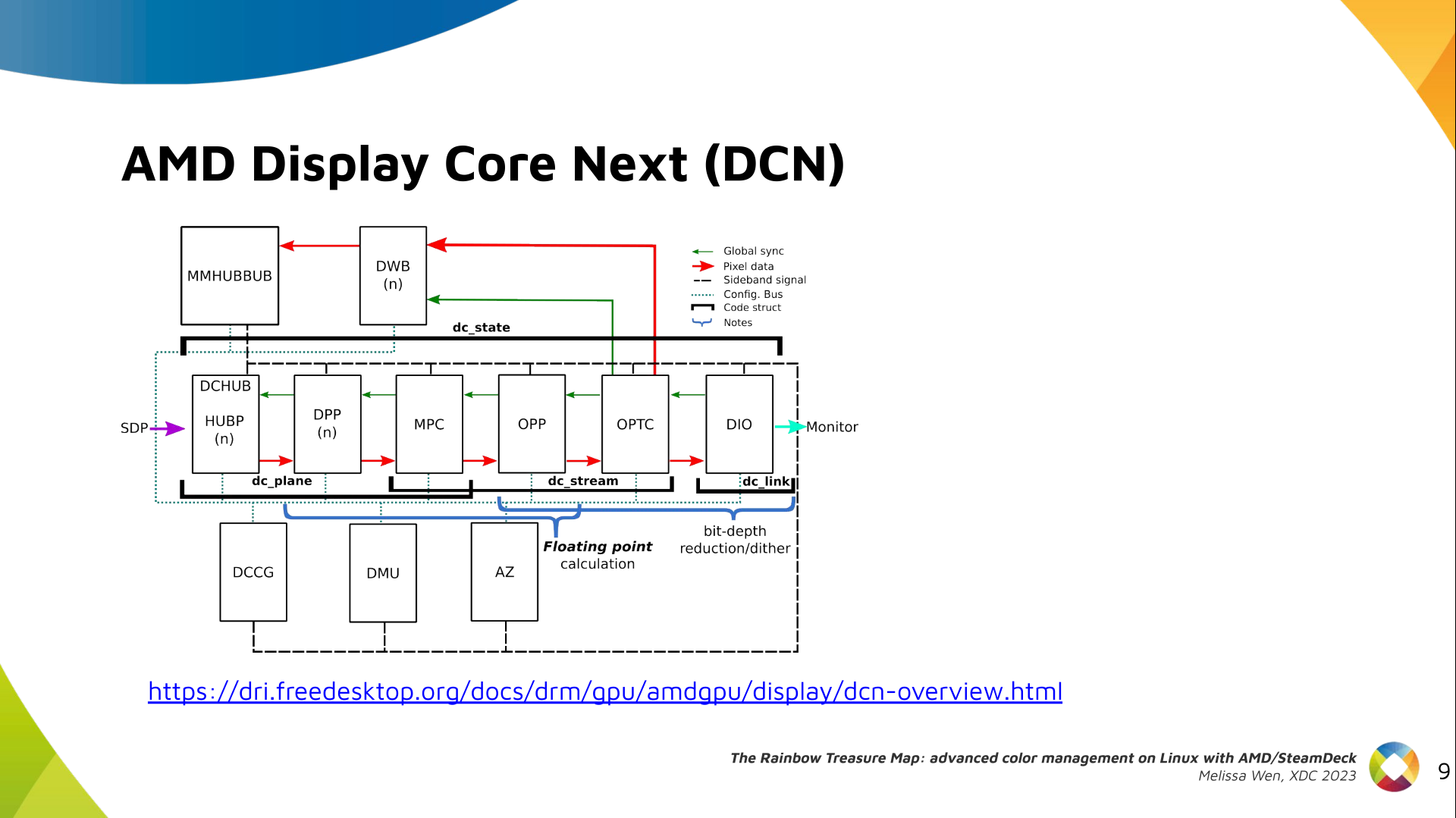
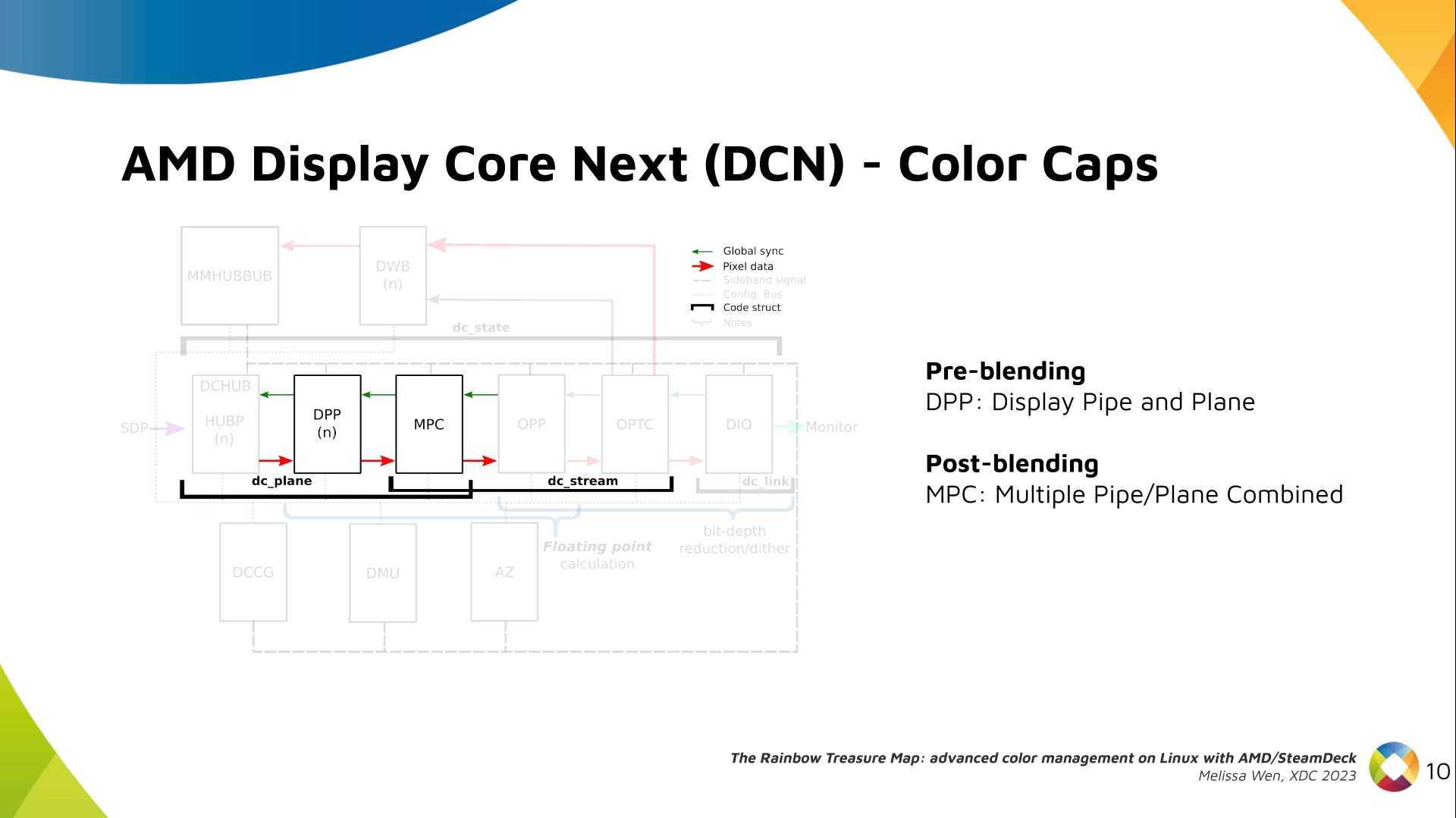
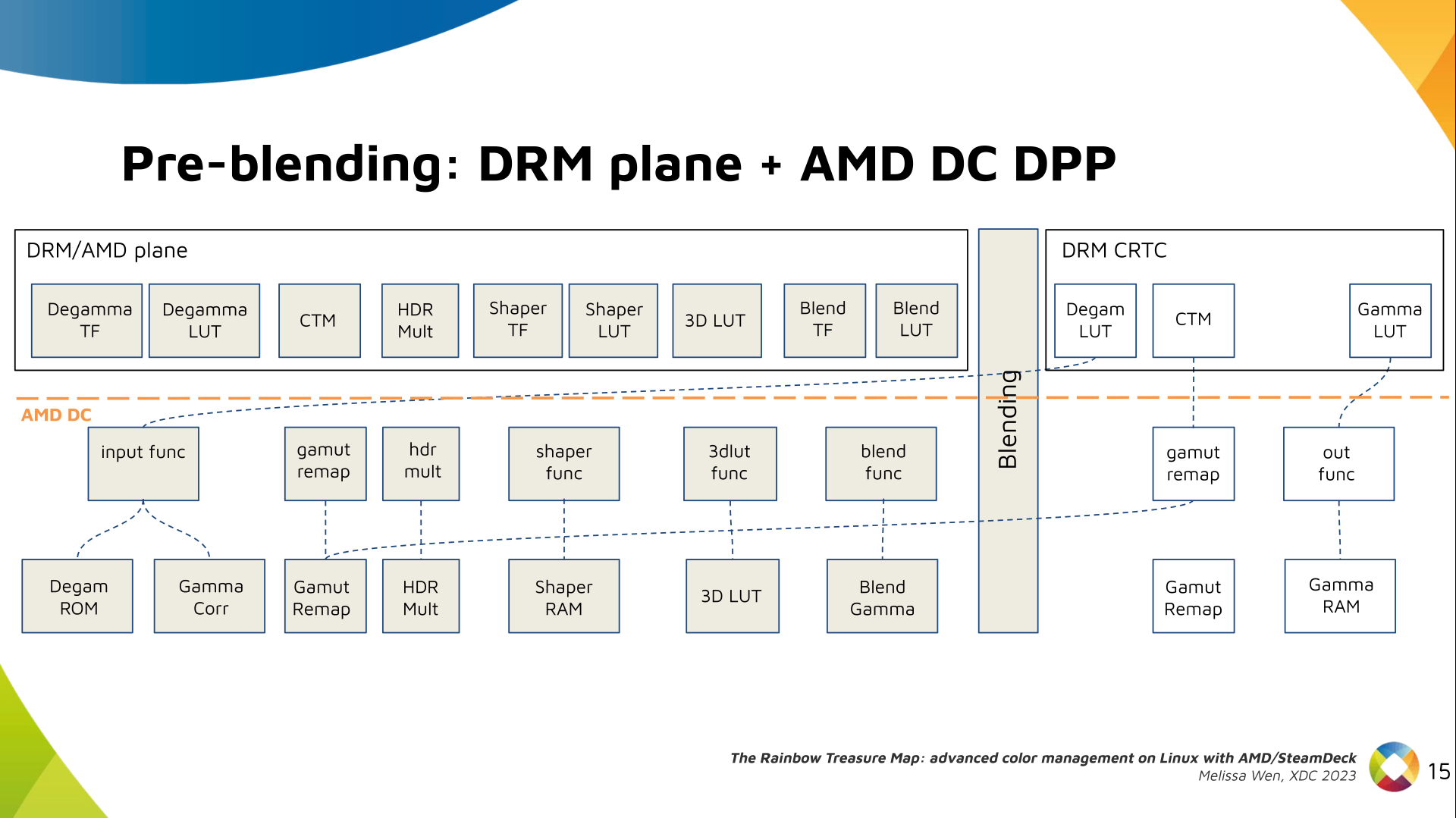
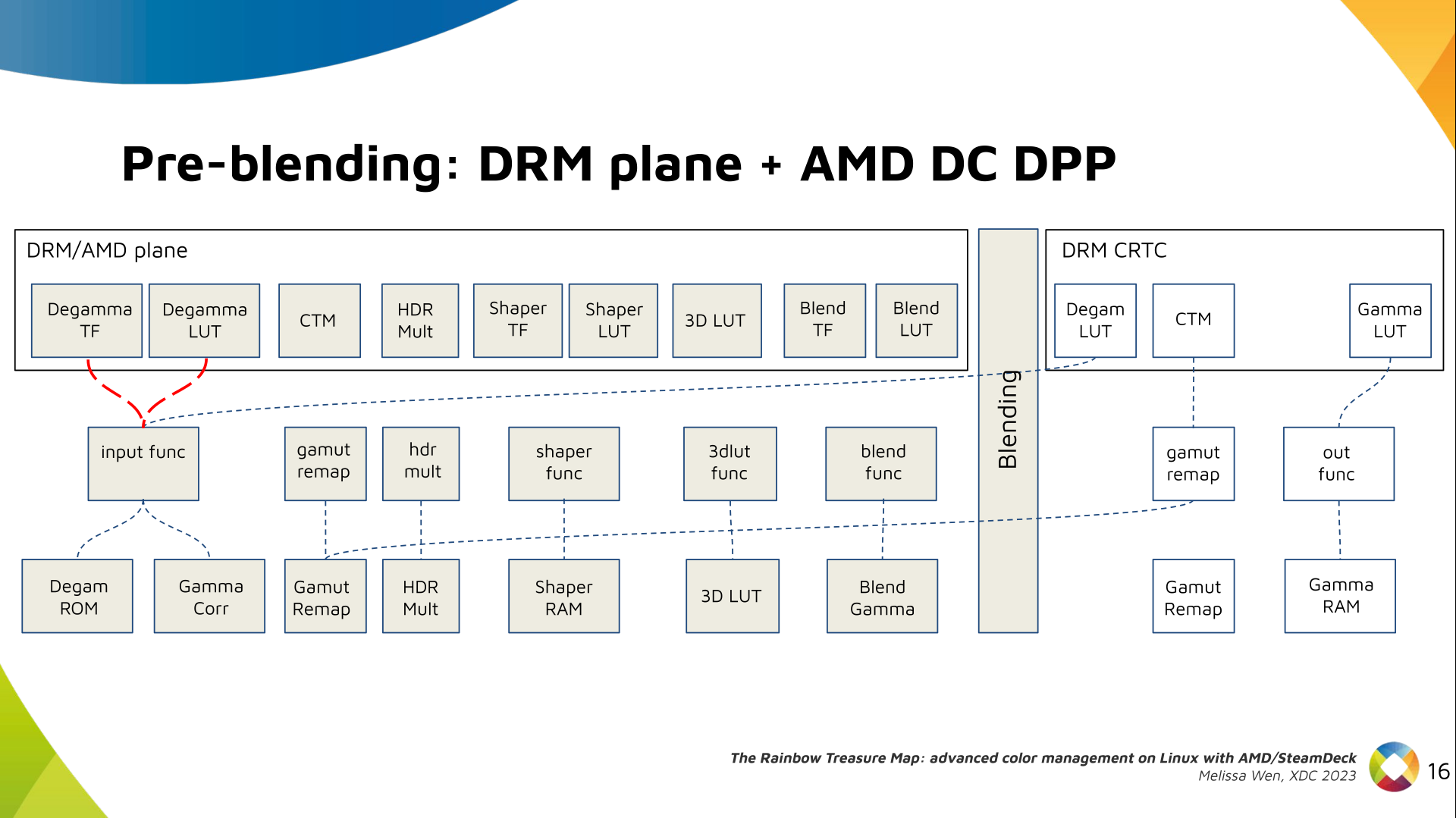
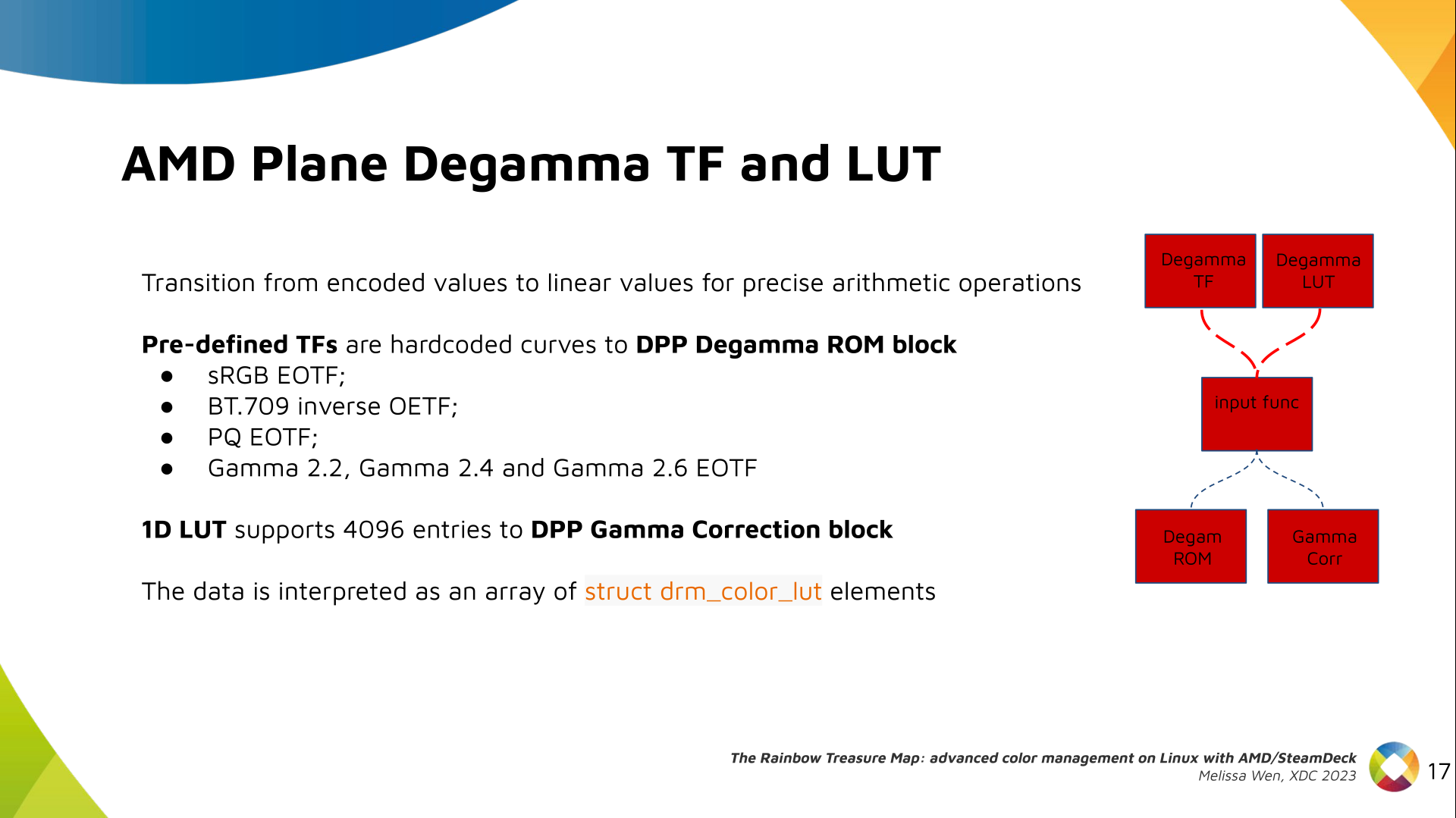
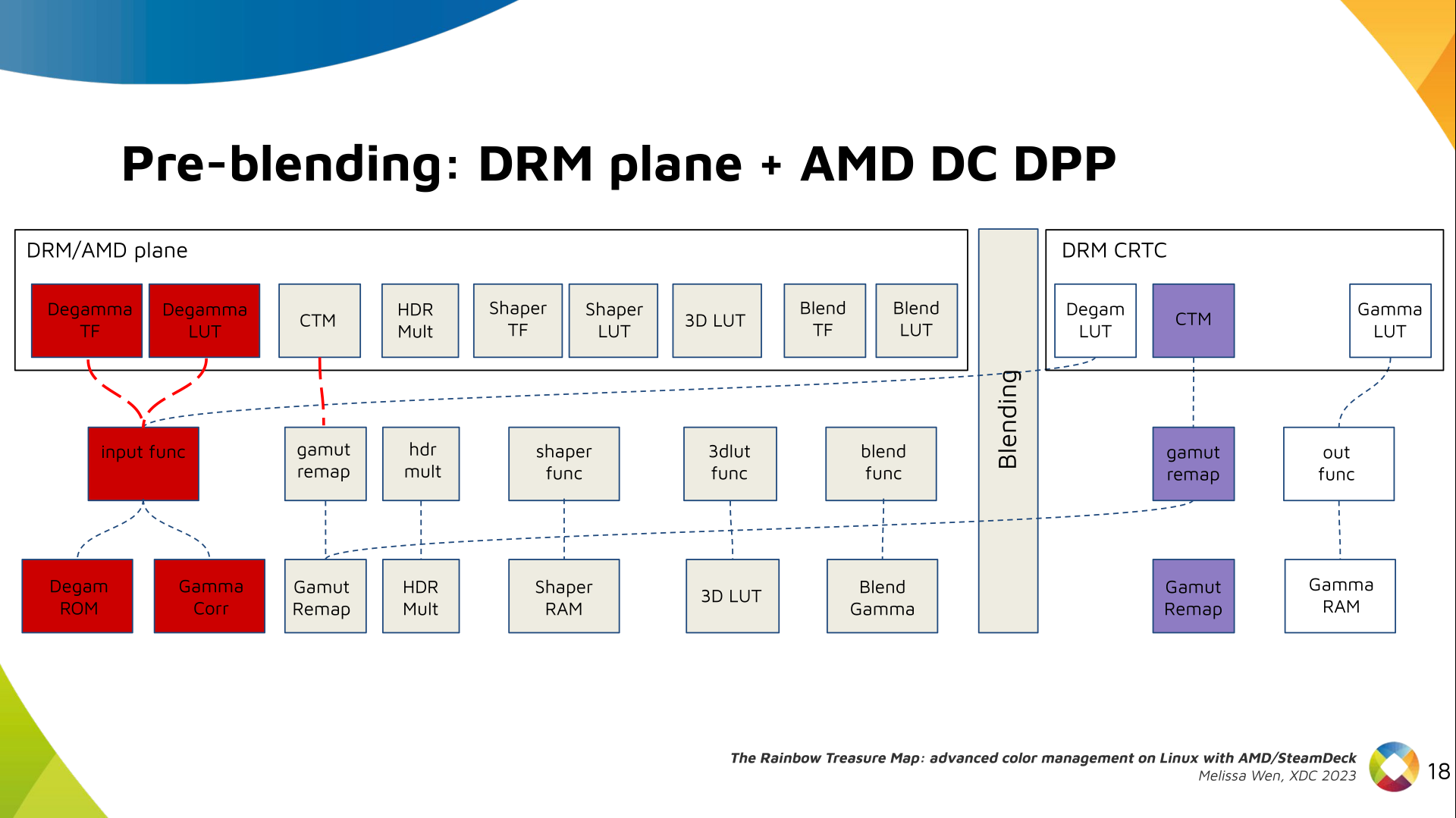
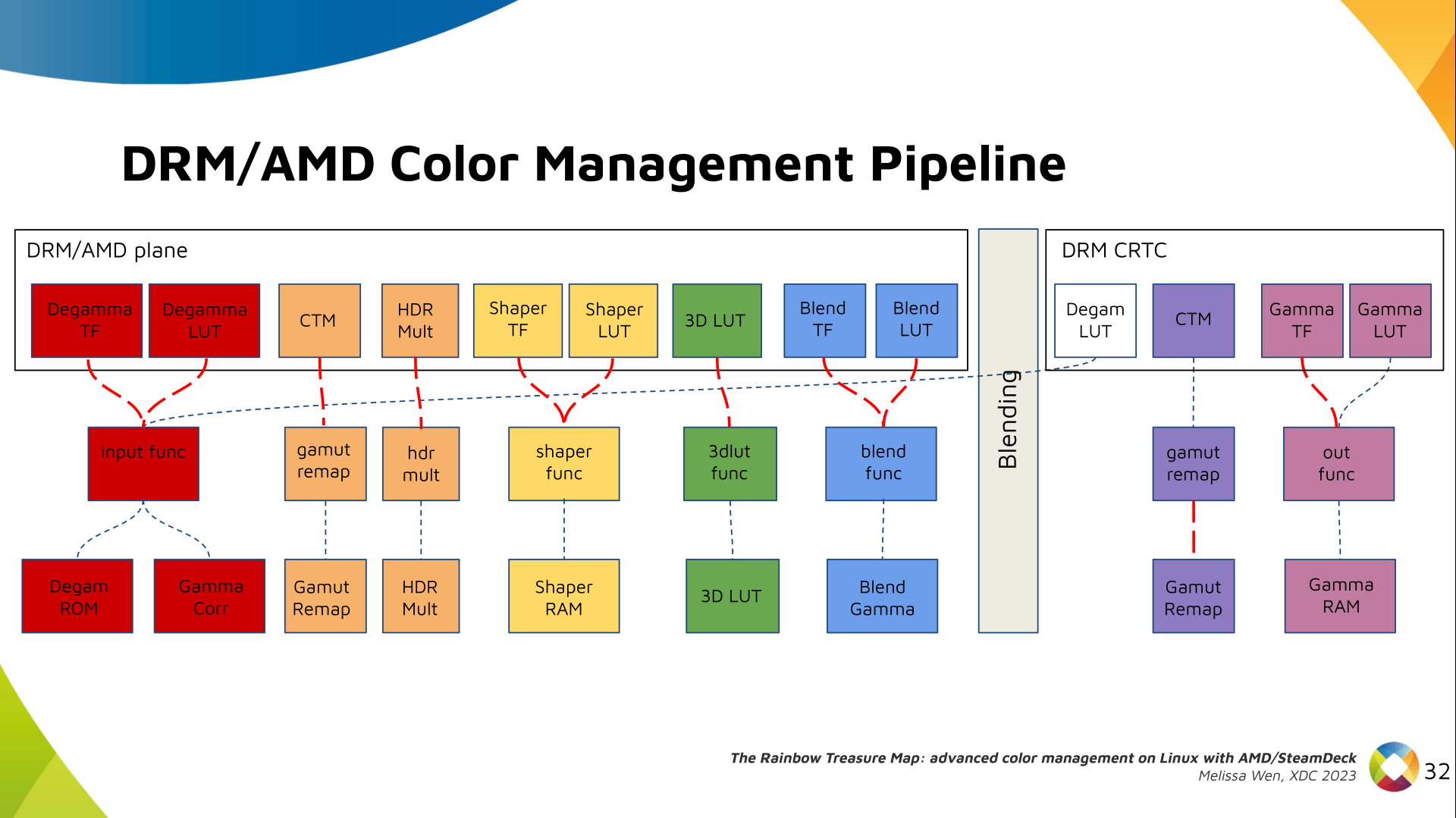
Slide 3: Why do we need advanced color management on Linux? Context: When we talk about colors in the graphics chain, we should keep in mind that we have a wide variety of source content colorimetry, a variety of output display devices and also the internal processing. Users expect consistent color reproduction across all these devices. The userspace can use GPU-accelerated color management to get it. But this also requires an interface with display kernel drivers that is currently missing from the DRM/KMS framework. Slide 4: Describe our work on AMD driver-specific color properties Since April, I ve been bothering the DRM community by sending patchsets from the work of me and Joshua to add driver-specific color properties to the AMD display driver. In parallel, discussions on defining a generic color management interface are still ongoing in the community. Moreover, we are still not clear about the diversity of color capabilities among hardware vendors. To bridge this gap, we defined a color pipeline for Gamescope that fits the latest versions of AMD hardware. It delivers advanced color management features for gamut mapping, HDR rendering, SDR on HDR, and HDR on SDR. Slide 5: Describe the AMD/SteamDeck - our hardware AMD/Steam Deck hardware: AMD frequently releases new GPU and APU generations. Each generation comes with a DCN version with display hardware improvements. Therefore, keep in mind that this work uses the AMD Steam Deck hardware and its kernel driver. The Steam Deck is an APU with a DCN3.01 display driver, a DCN3 family. It s important to have this information since newer AMD DCN drivers inherit implementations from previous families but aldo each generation of AMD hardware may introduce new color capabilities. Therefore I recommend you to familiarize yourself with the hardware you are working on. Slide 6: Diagram with the three layers of the AMD display driver on Linux The AMD display driver in the kernel space: It consists of three layers, (1) the DRM/KMS framework, (2) the AMD Display Manager, and (3) the AMD Display Core. We extended the color interface exposed to userspace by leveraging existing DRM resources and connecting them using driver-specific functions for color property management. Slide 7: Three-layers diagram highlighting AMD Display Manager, DM - the layer that connects DC and DRM Bridging DC color capabilities and the DRM API required significant changes in the color management of AMD Display Manager - the Linux-dependent part that connects the AMD DC interface to the DRM/KMS framework. Slide 8: Three-layers diagram highlighting AMD Display Core, DC - the shared code The AMD DC is the OS-agnostic layer. Its code is shared between platforms and DCN versions. Examining this part helps us understand the AMD color pipeline and hardware capabilities, since the machinery for hardware settings and resource management are already there. Slide 9: Diagram of the AMD Display Core Next architecture with main elements and data flow The newest architecture for AMD display hardware is the AMD Display Core Next. Slide 10: Diagram of the AMD Display Core Next where only DPP and MPC blocks are highlighted In this architecture, two blocks have the capability to manage colors:
  • Display Pipe and Plane (DPP) - for pre-blending adjustments;
  • Multiple Pipe/Plane Combined (MPC) - for post-blending color transformations.
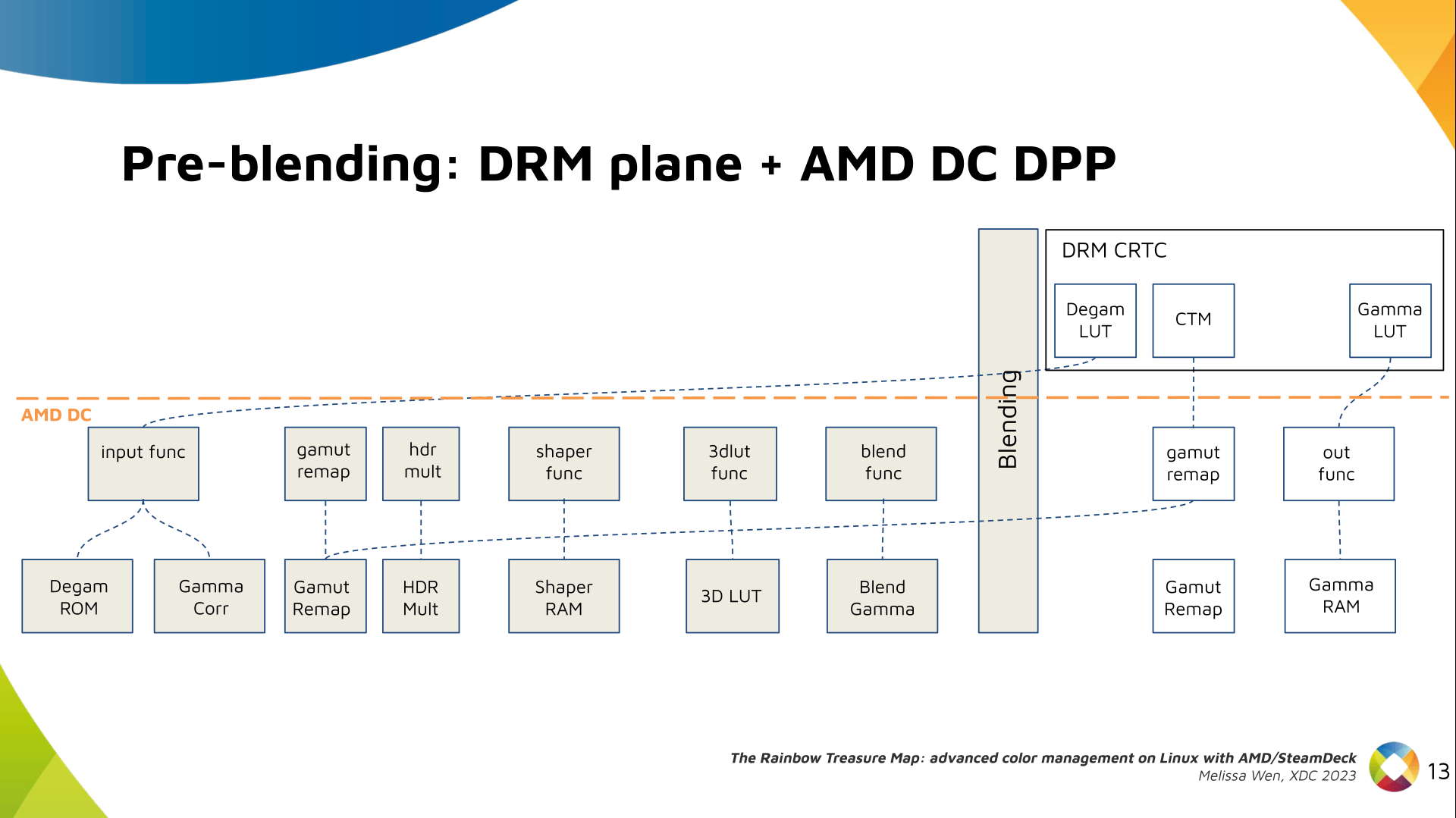
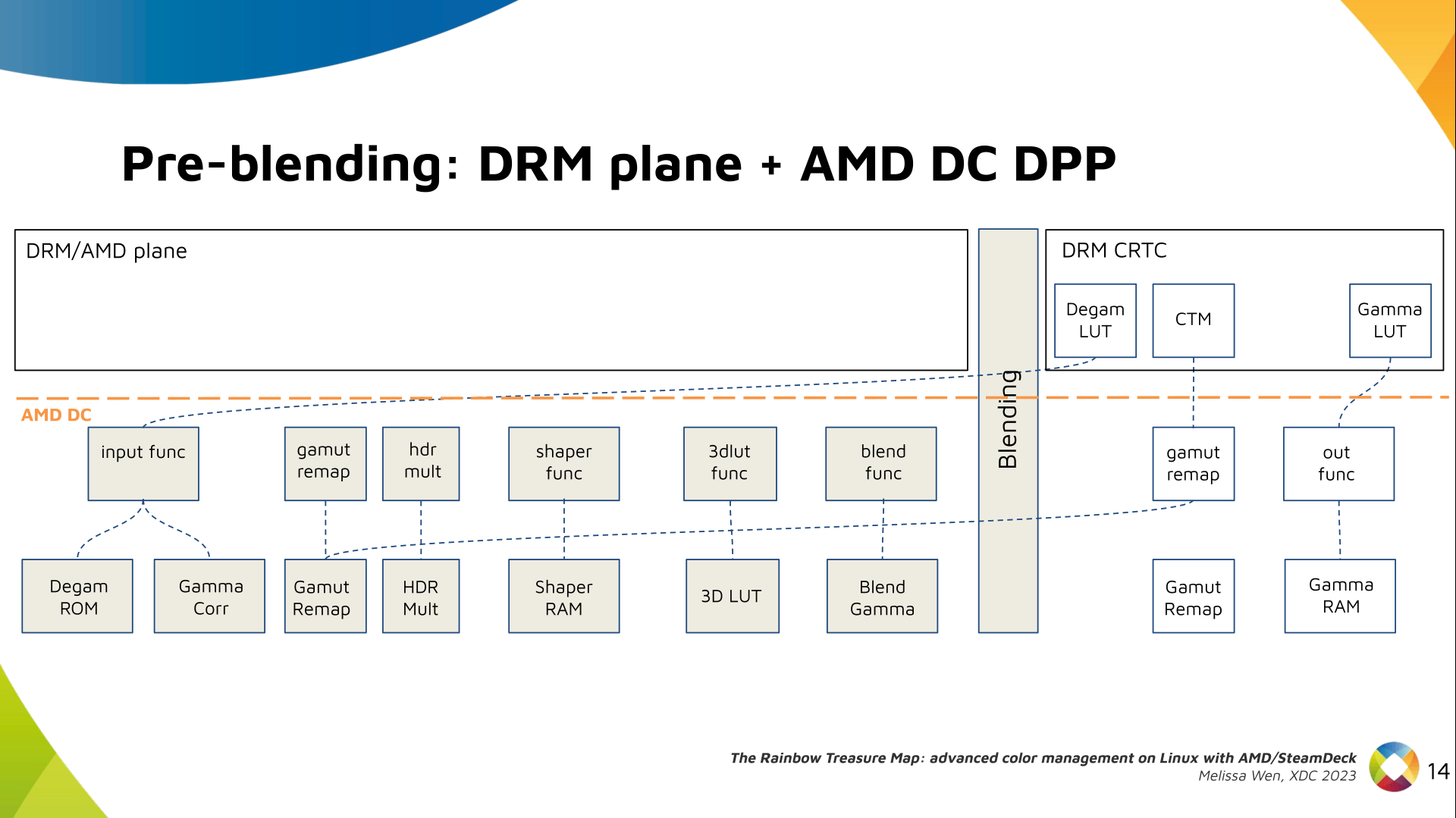
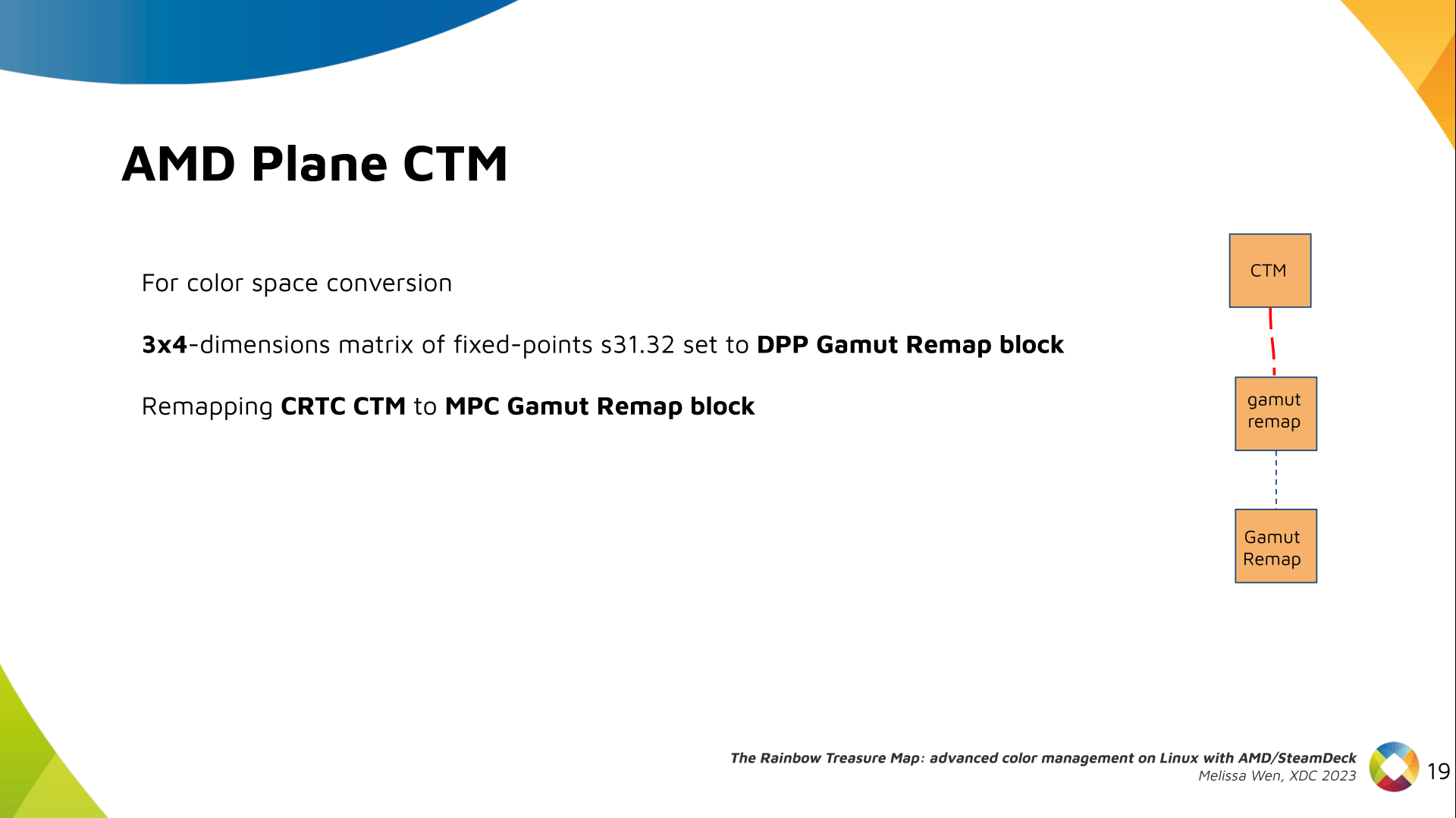
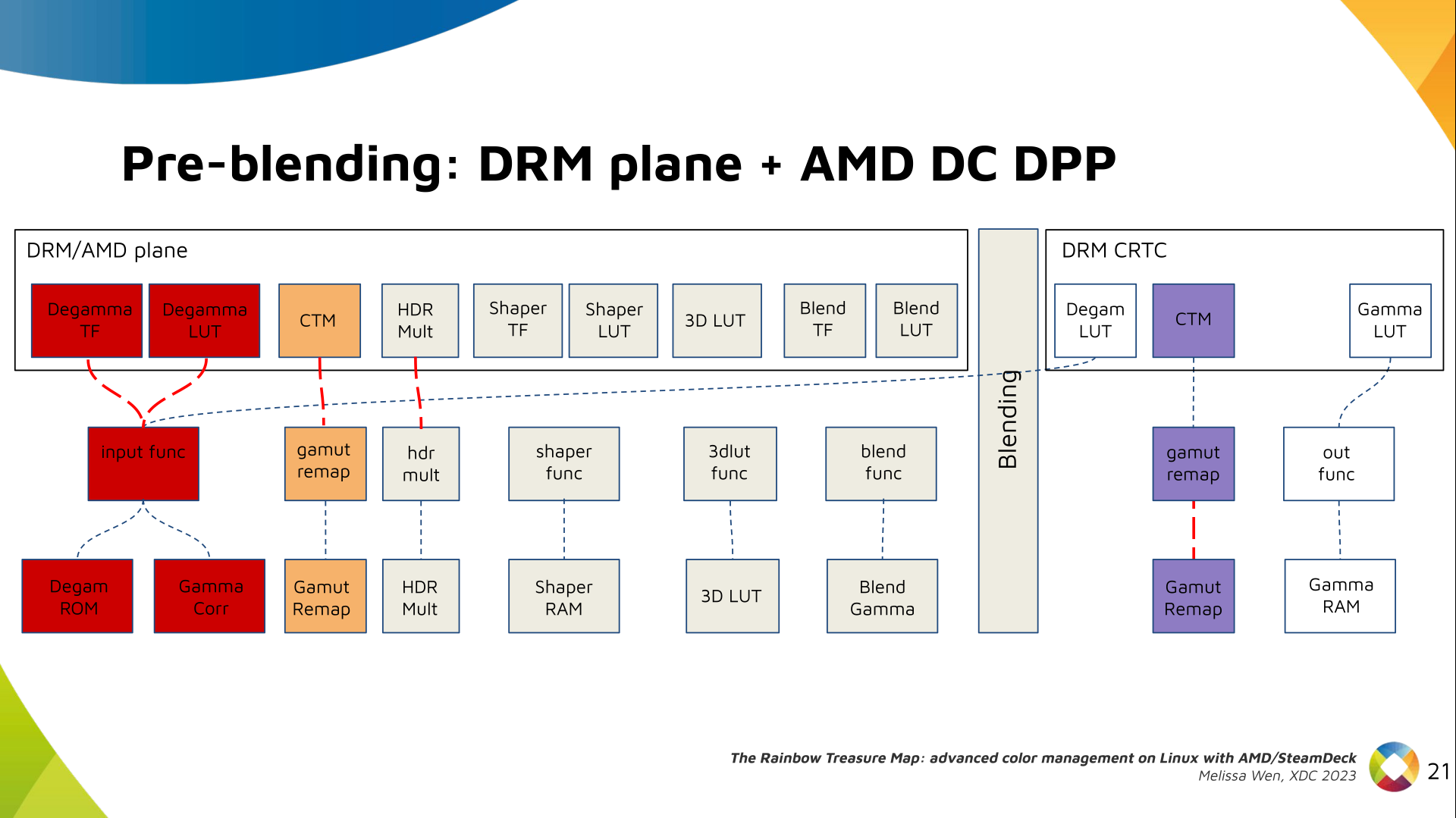
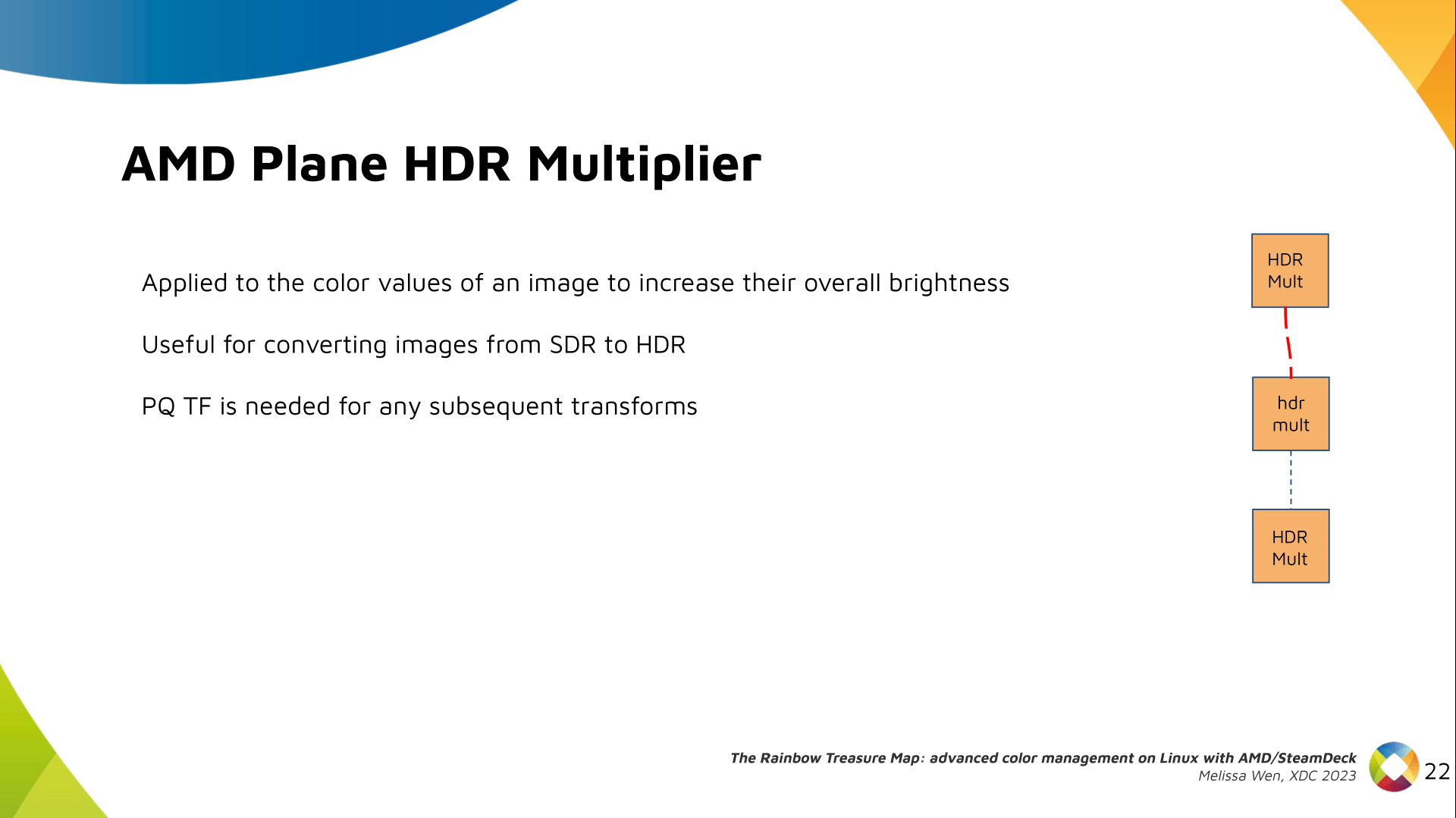
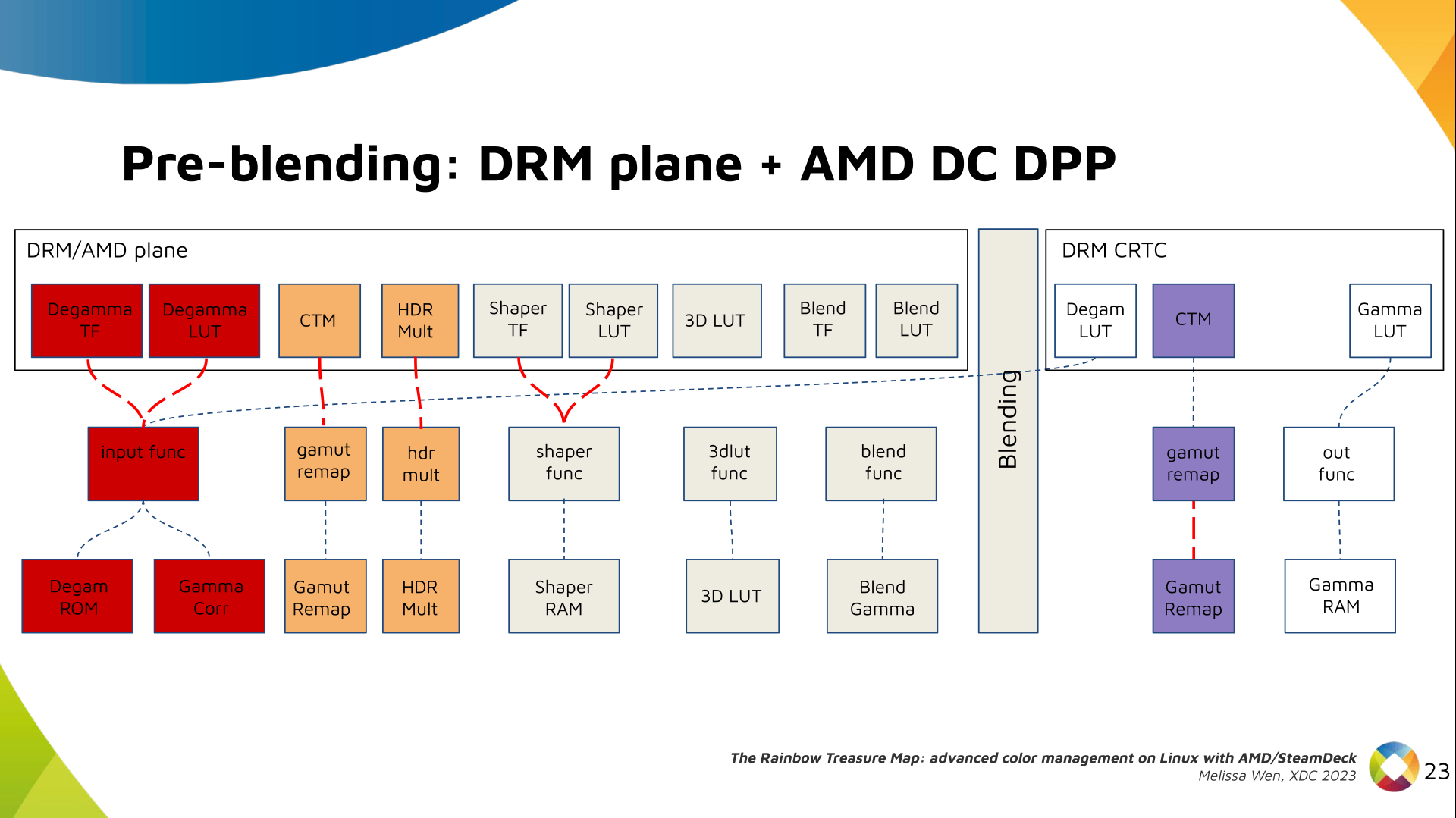
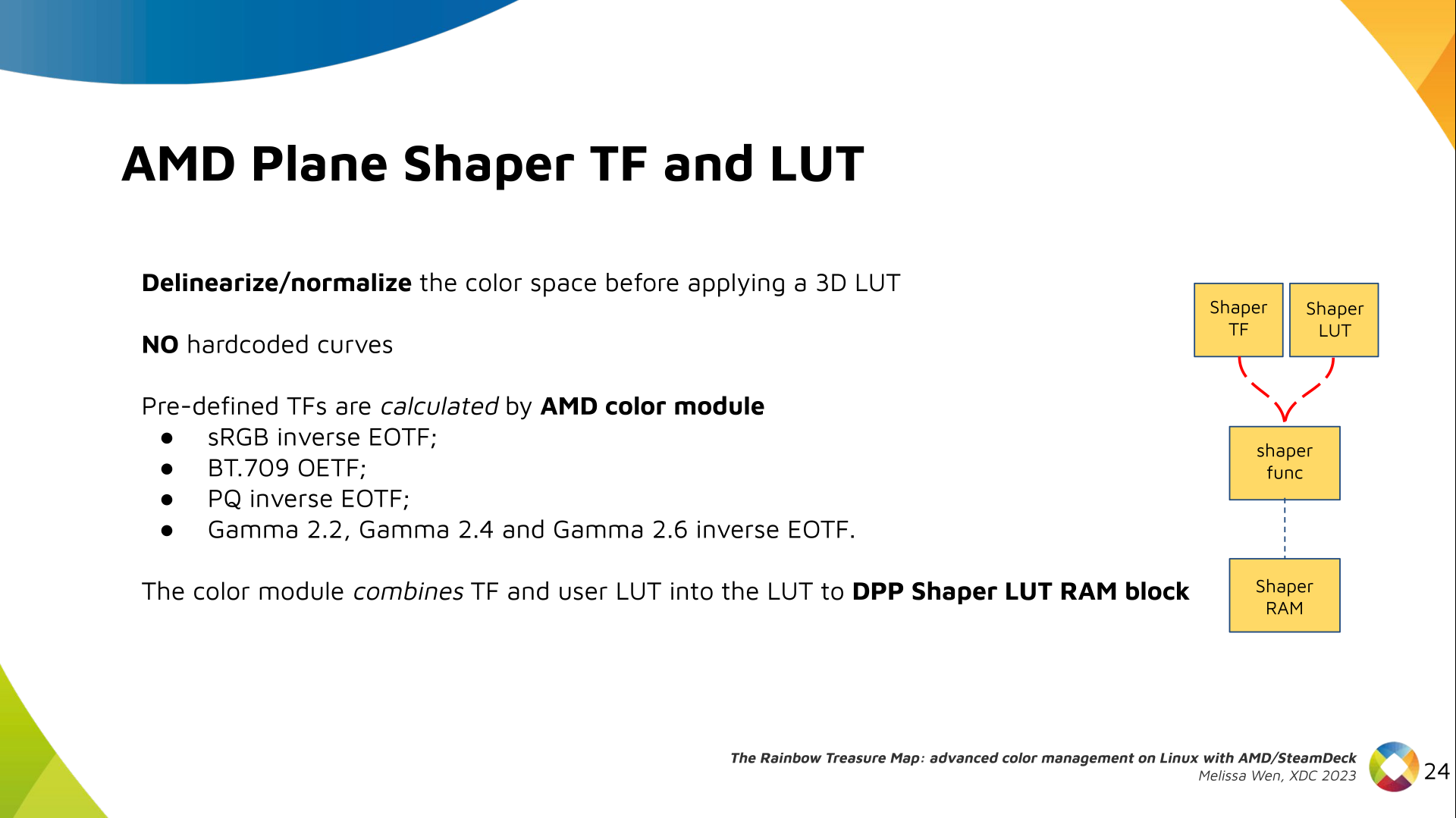
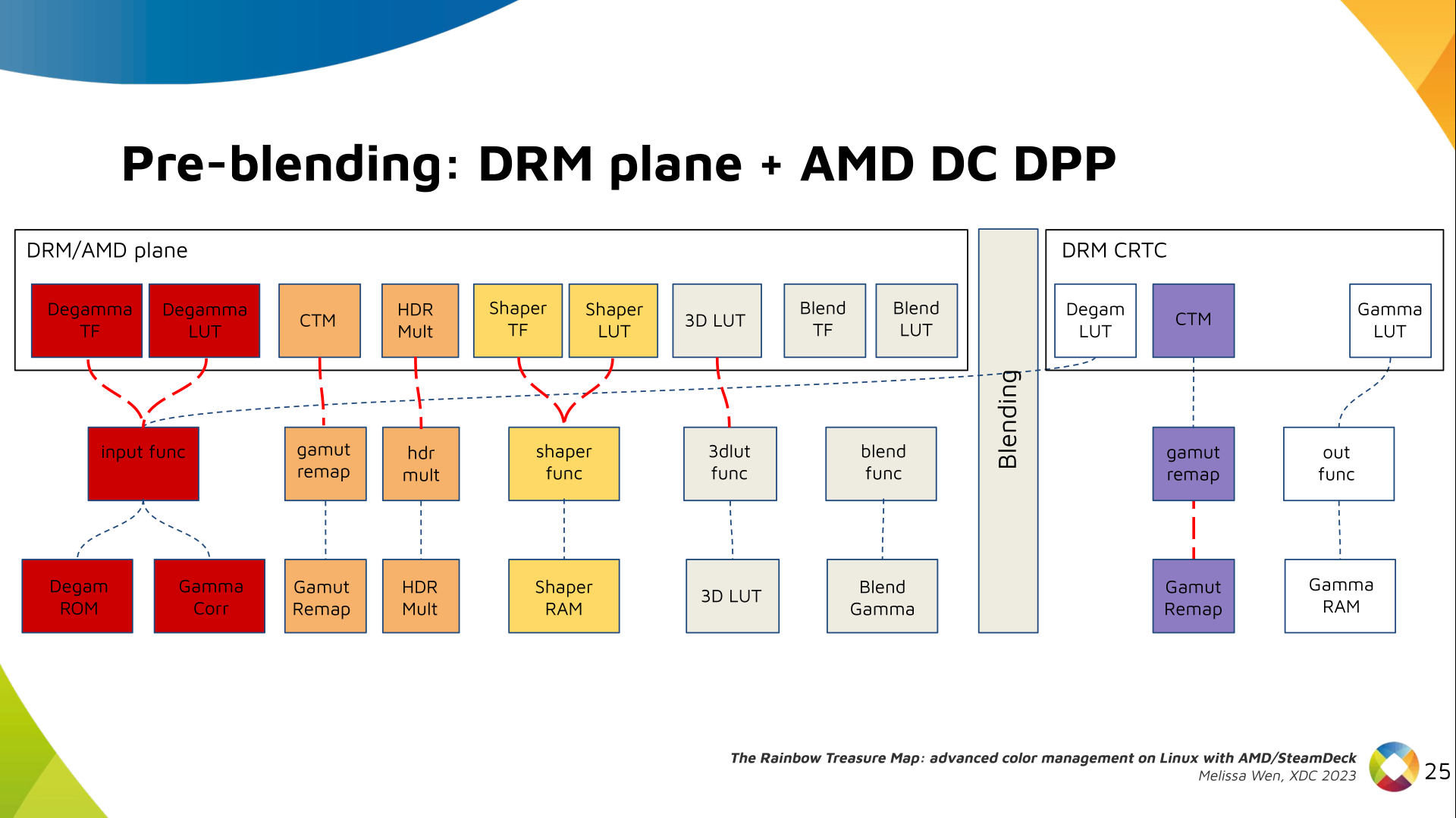
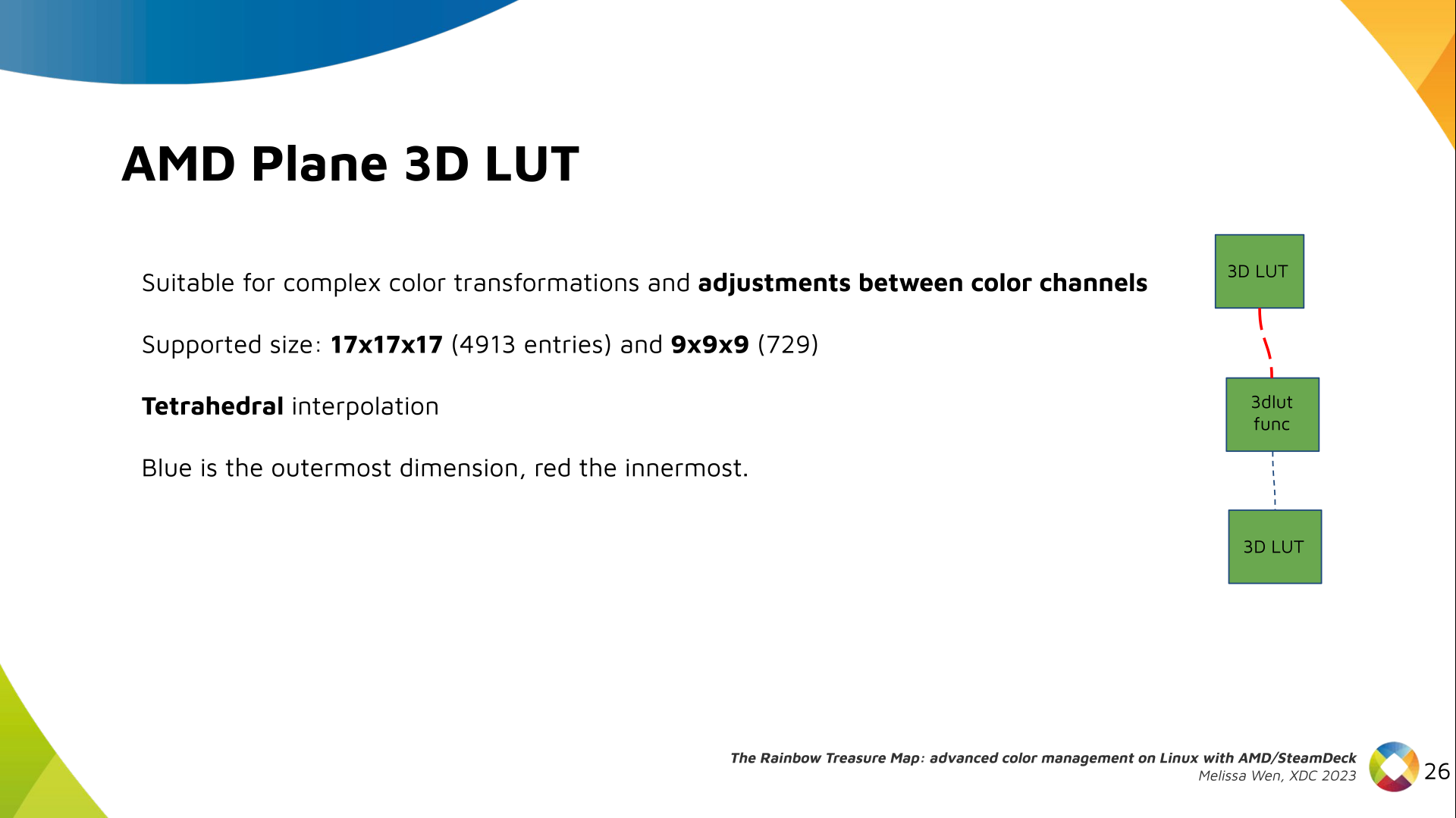
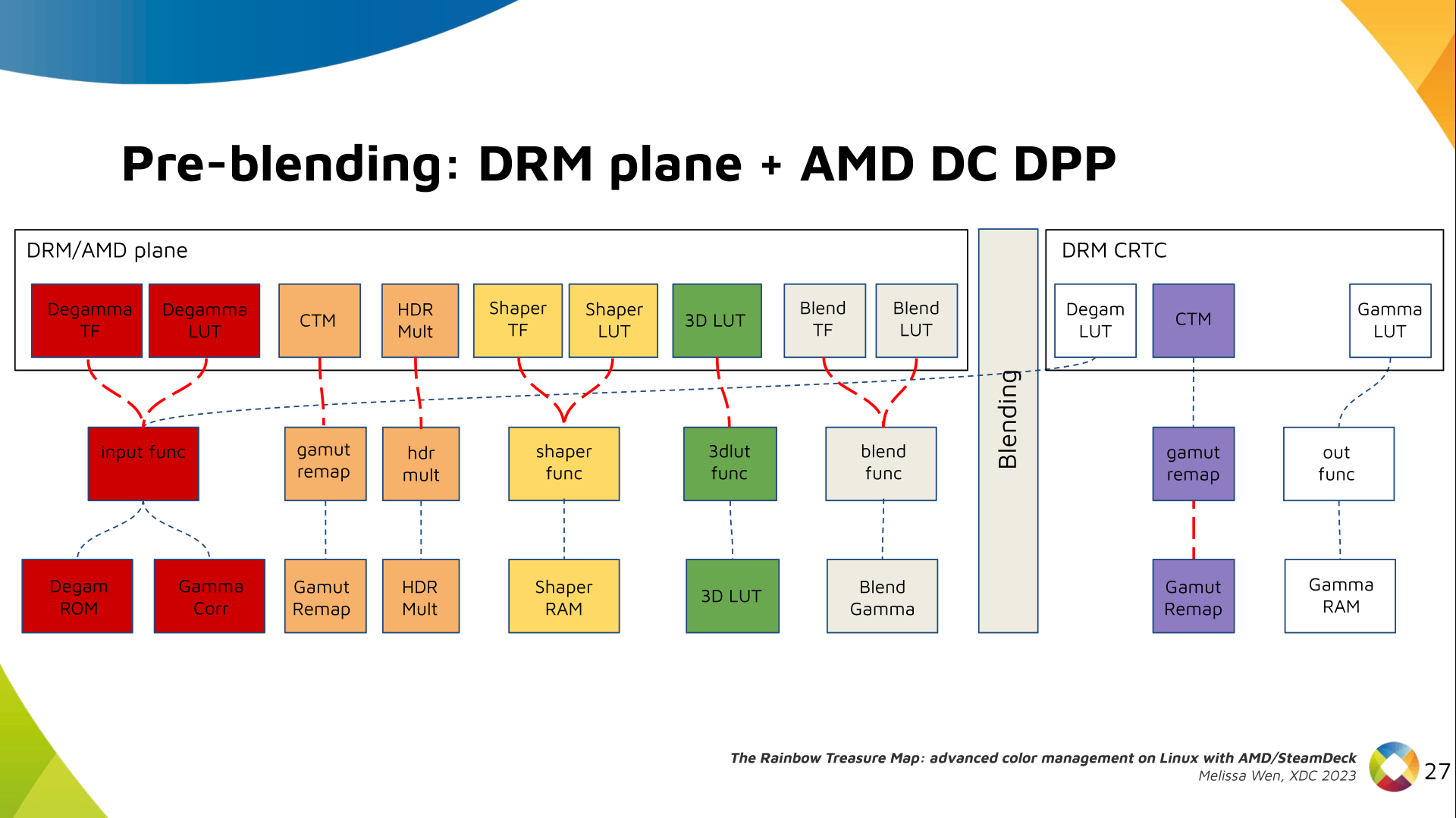
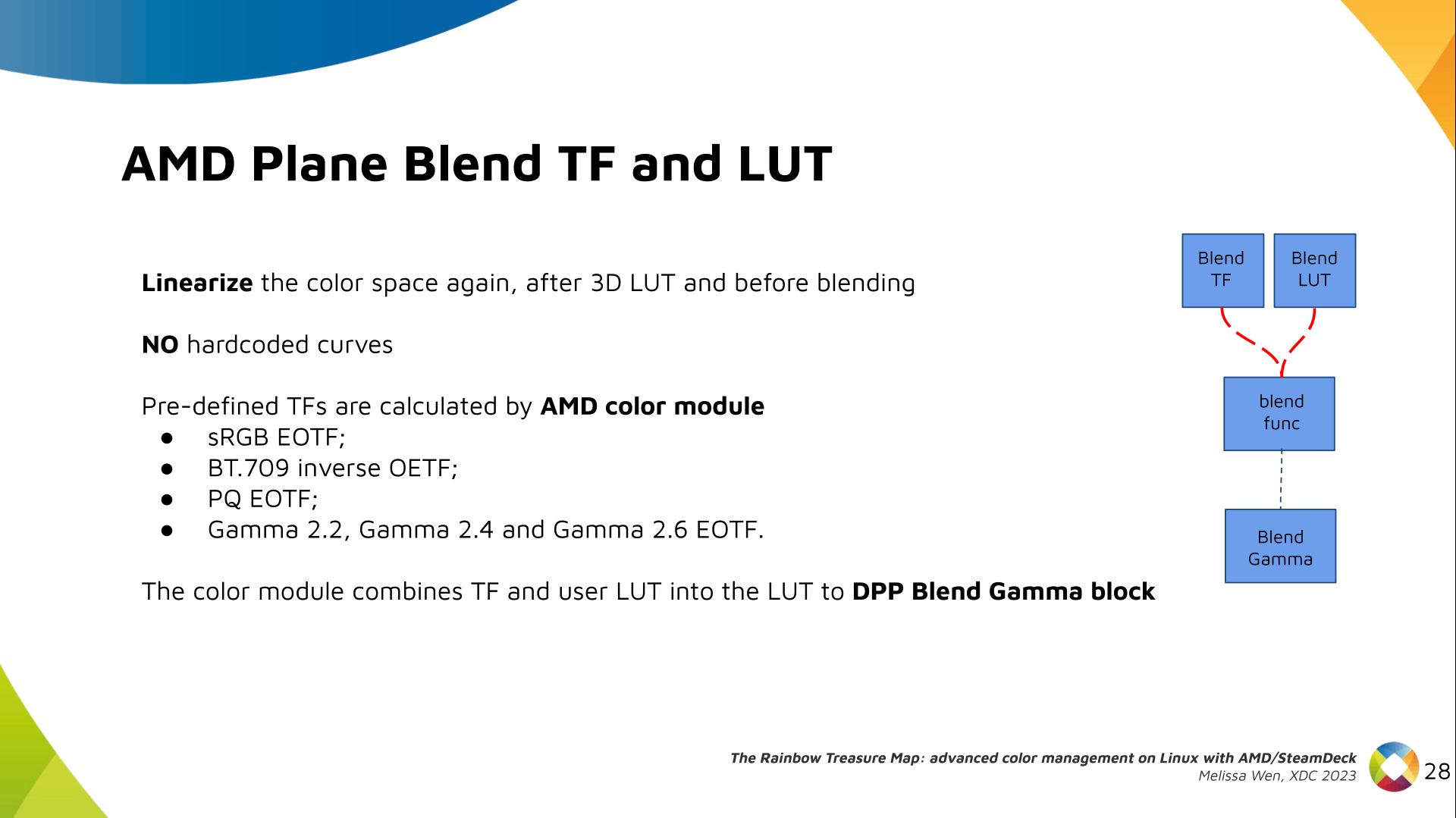
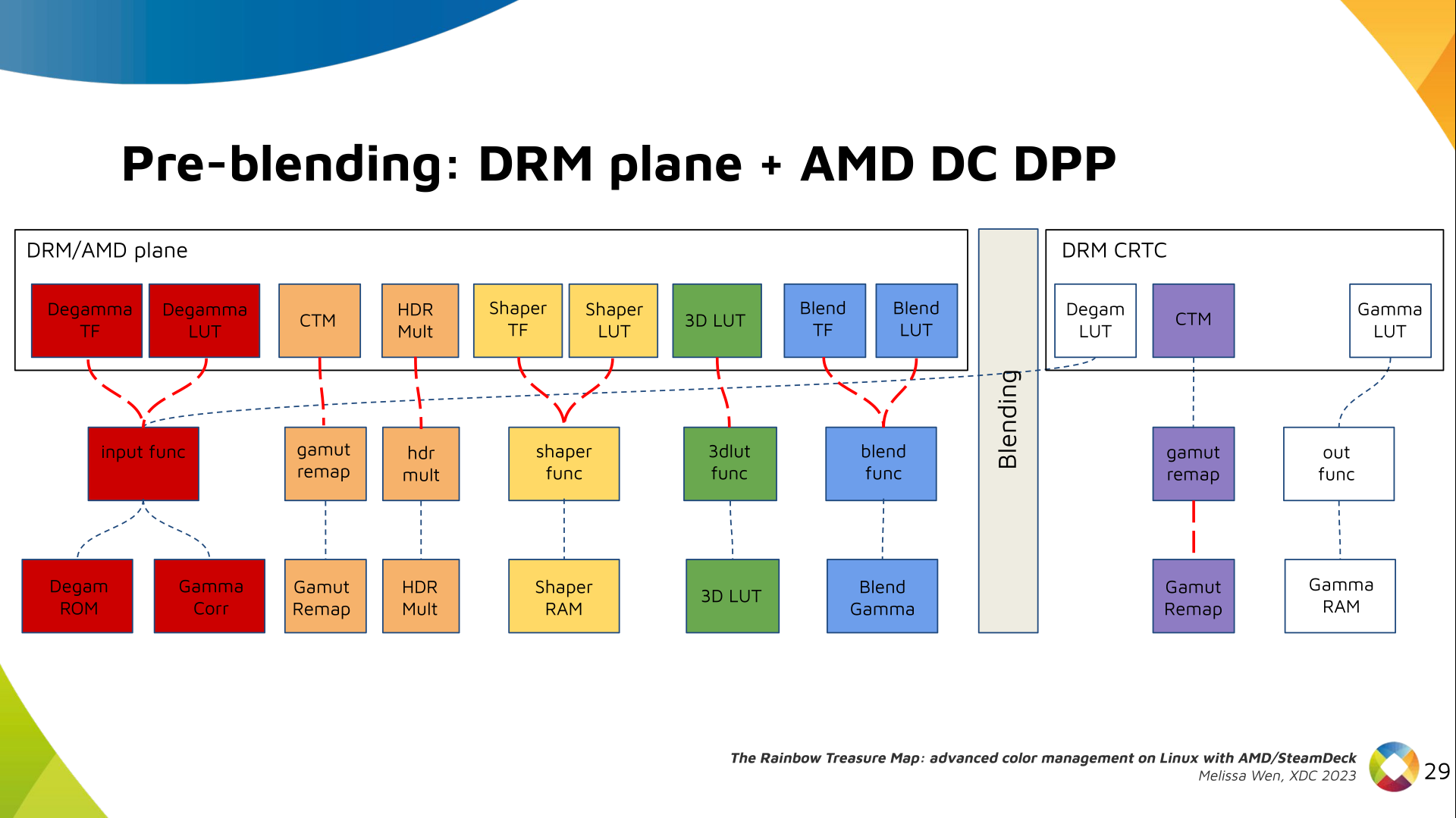
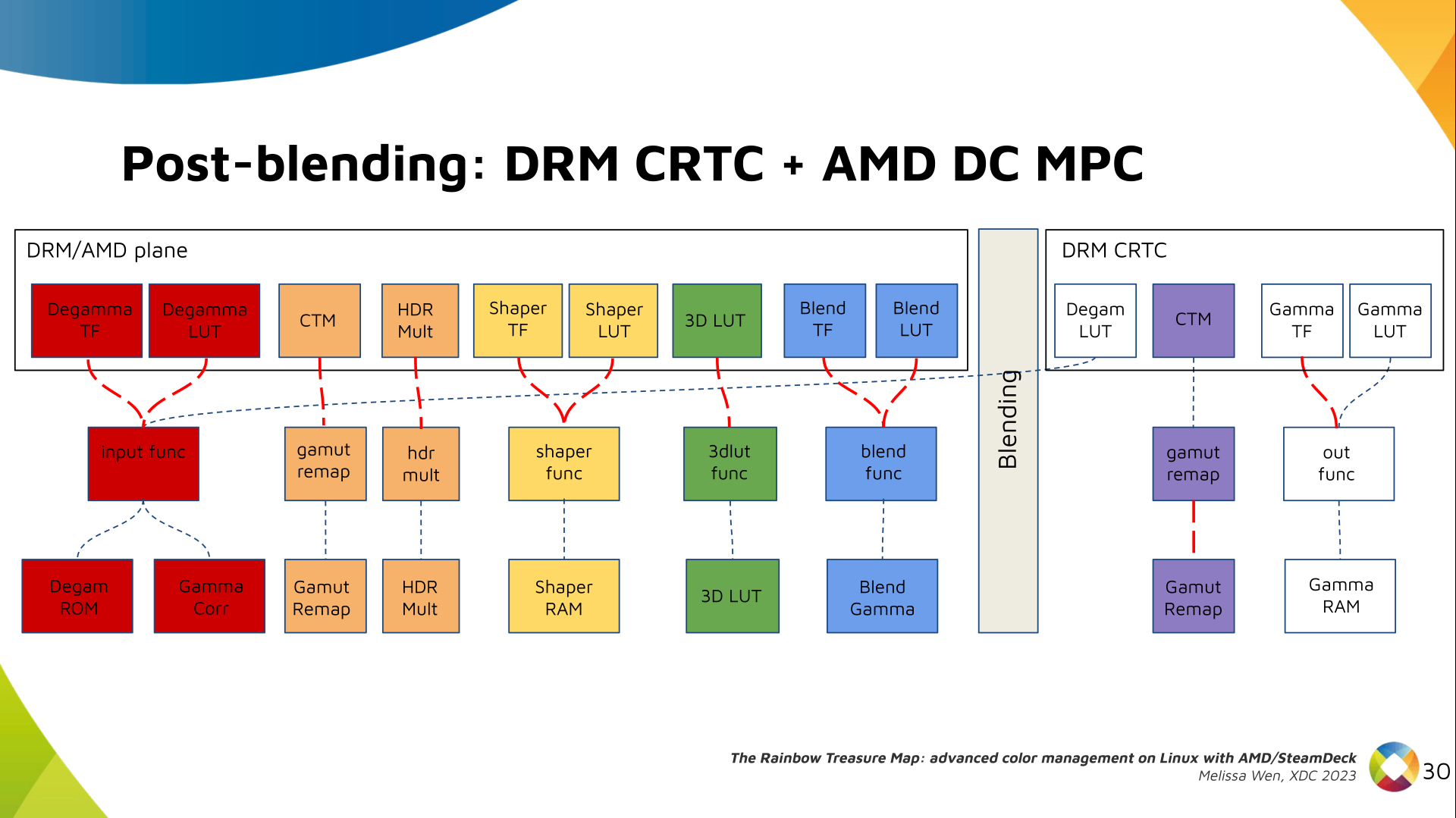
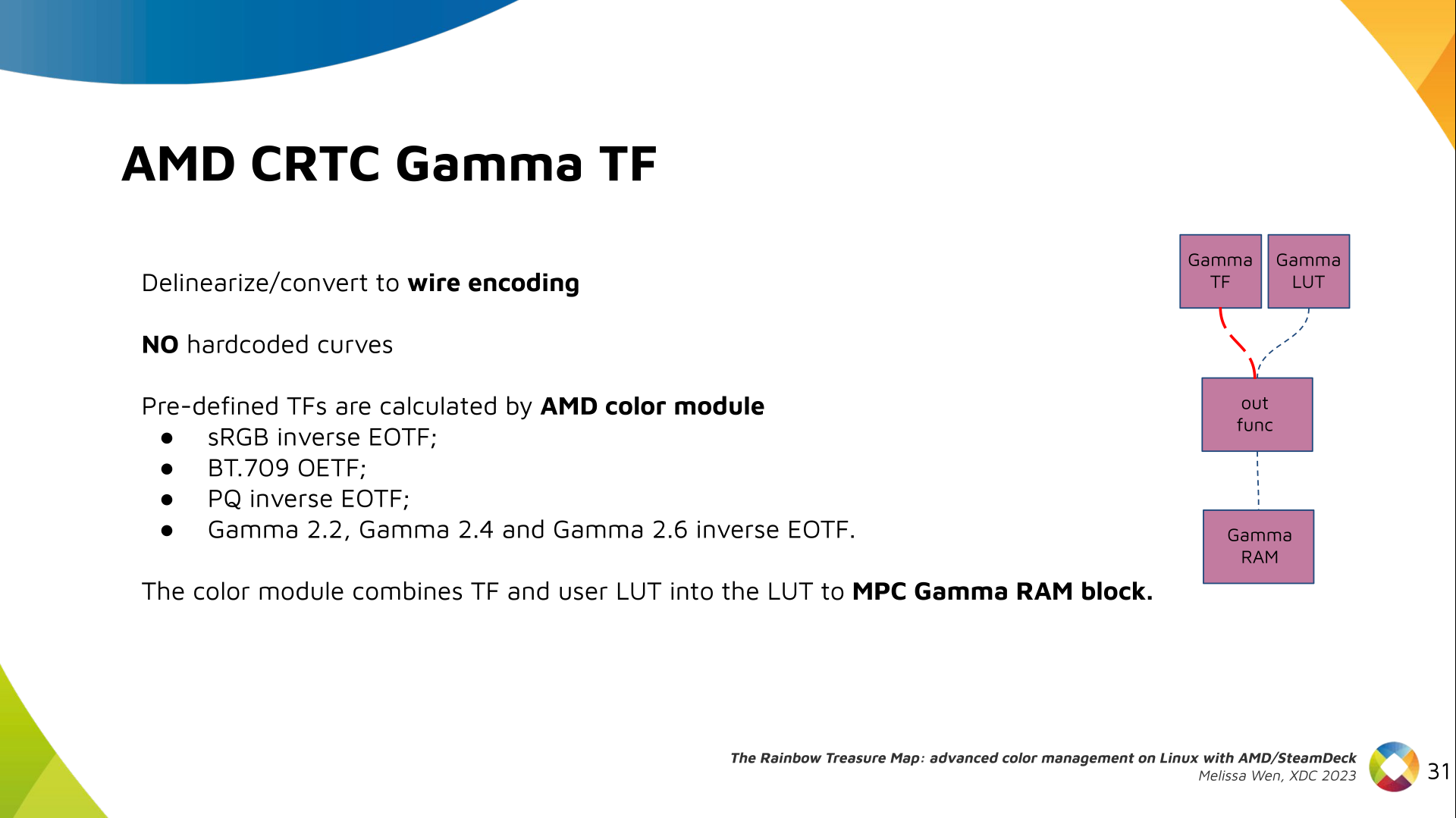
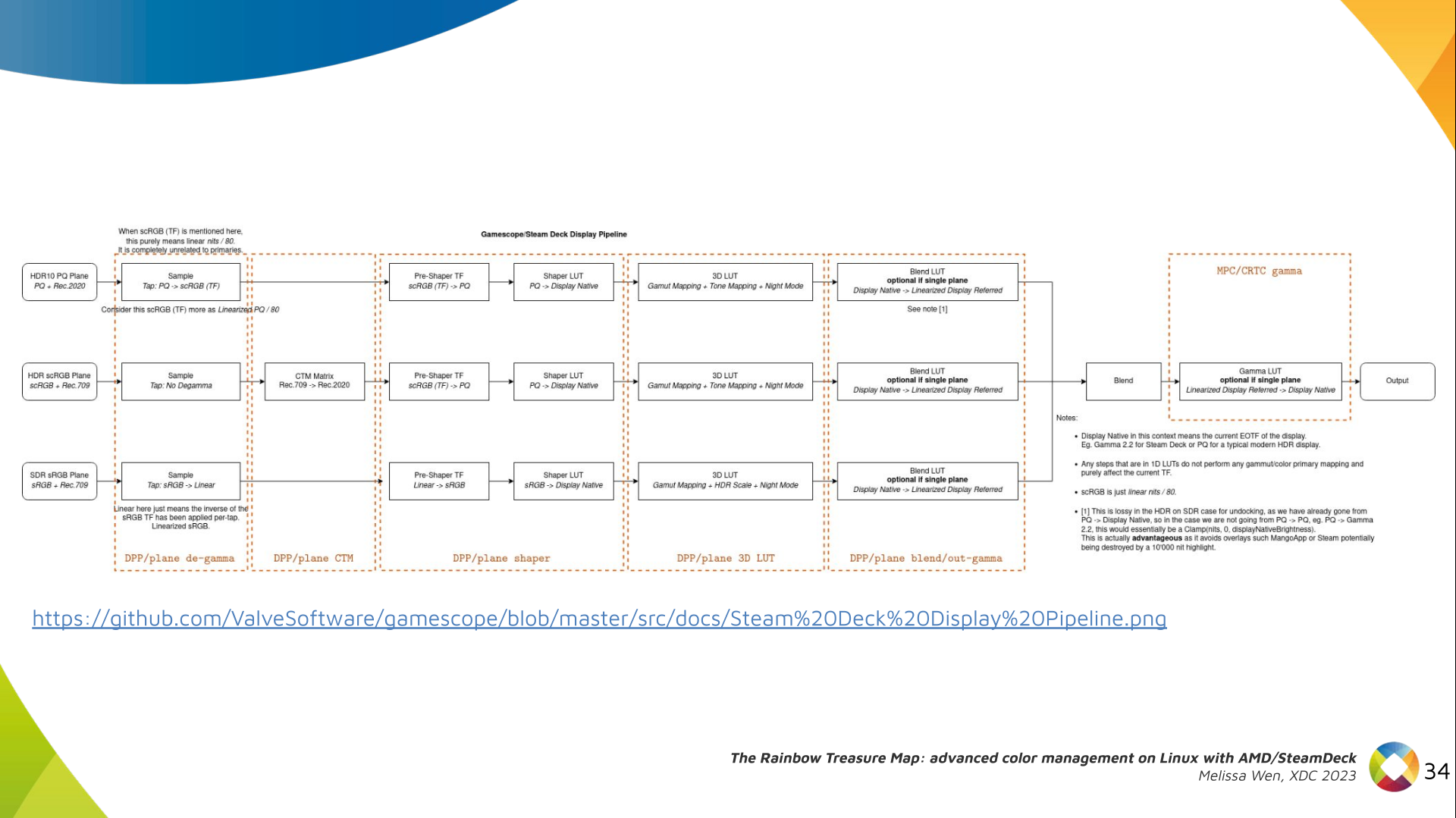
Let s see what we have in the DRM API for pre-blending color management. Slide 11: Blank slide with no content only a title 'Pre-blending: DRM plane' DRM plane color properties: This is the DRM color management API before blending. Nothing! Except two basic DRM plane properties: color_encoding and color_range for the input colorspace conversion, that is not covered by this work. Slide 12: Diagram with color capabilities and structures in AMD DC layer without any DRM plane color interface (before blending), only the DRM CRTC color interface for post blending In case you re not familiar with AMD shared code, what we need to do is basically draw a map and navigate there! We have some DRM color properties after blending, but nothing before blending yet. But much of the hardware programming was already implemented in the AMD DC layer, thanks to the shared code. Slide 13: Previous Diagram with a rectangle to highlight the empty space in the DRM plane interface that will be filled by AMD plane properties Still both the DRM interface and its connection to the shared code were missing. That s when the search begins! Slide 14: Color Pipeline Diagram with the plane color interface filled by AMD plane properties but without connections to AMD DC resources AMD driver-specific color pipeline: Looking at the color capabilities of the hardware, we arrive at this initial set of properties. The path wasn t exactly like that. We had many iterations and discoveries until reached to this pipeline. Slide 15: Color Pipeline Diagram connecting AMD plane degamma properties, LUT and TF, to AMD DC resources The Plane Degamma is our first driver-specific property before blending. It s used to linearize the color space from encoded values to light linear values. Slide 16: Describe plane degamma properties and hardware capabilities We can use a pre-defined transfer function or a user lookup table (in short, LUT) to linearize the color space. Pre-defined transfer functions for plane degamma are hardcoded curves that go to a specific hardware block called DPP Degamma ROM. It supports the following transfer functions: sRGB EOTF, BT.709 inverse OETF, PQ EOTF, and pure power curves Gamma 2.2, Gamma 2.4 and Gamma 2.6. We also have a one-dimensional LUT. This 1D LUT has four thousand ninety six (4096) entries, the usual 1D LUT size in the DRM/KMS. It s an array of drm_color_lut that goes to the DPP Gamma Correction block. Slide 17: Color Pipeline Diagram connecting AMD plane CTM property to AMD DC resources We also have now a color transformation matrix (CTM) for color space conversion. Slide 18: Describe plane CTM property and hardware capabilities It s a 3x4 matrix of fixed points that goes to the DPP Gamut Remap Block. Both pre- and post-blending matrices were previously gone to the same color block. We worked on detaching them to clear both paths. Now each CTM goes on its own way. Slide 19: Color Pipeline Diagram connecting AMD plane HDR multiplier property to AMD DC resources Next, the HDR Multiplier. HDR Multiplier is a factor applied to the color values of an image to increase their overall brightness. Slide 20: Describe plane HDR mult property and hardware capabilities This is useful for converting images from a standard dynamic range (SDR) to a high dynamic range (HDR). As it can range beyond [0.0, 1.0] subsequent transforms need to use the PQ(HDR) transfer functions. Slide 21: Color Pipeline Diagram connecting AMD plane shaper properties, LUT and TF, to AMD DC resources And we need a 3D LUT. But 3D LUT has a limited number of entries in each dimension, so we want to use it in a colorspace that is optimized for human vision. It means in a non-linear space. To deliver it, userspace may need one 1D LUT before 3D LUT to delinearize content and another one after to linearize content again for blending. Slide 22: Describe plane shaper properties and hardware capabilities The pre-3D-LUT curve is called Shaper curve. Unlike Degamma TF, there are no hardcoded curves for shaper TF, but we can use the AMD color module in the driver to build the following shaper curves from pre-defined coefficients. The color module combines the TF and the user LUT values into the LUT that goes to the DPP Shaper RAM block. Slide 23: Color Pipeline Diagram connecting AMD plane 3D LUT property to AMD DC resources Finally, our rockstar, the 3D LUT. 3D LUT is perfect for complex color transformations and adjustments between color channels. Slide 24: Describe plane 3D LUT property and hardware capabilities 3D LUT is also more complex to manage and requires more computational resources, as a consequence, its number of entries is usually limited. To overcome this restriction, the array contains samples from the approximated function and values between samples are estimated by tetrahedral interpolation. AMD supports 17 and 9 as the size of a single-dimension. Blue is the outermost dimension, red the innermost. Slide 25: Color Pipeline Diagram connecting AMD plane blend properties, LUT and TF, to AMD DC resources As mentioned, we need a post-3D-LUT curve to linearize the color space before blending. This is done by Blend TF and LUT. Slide 26: Describe plane blend properties and hardware capabilities Similar to shaper TF, there are no hardcoded curves for Blend TF. The pre-defined curves are the same as the Degamma block, but calculated by the color module. The resulting LUT goes to the DPP Blend RAM block. Slide 27: Color Pipeline Diagram  with all AMD plane color properties connect to AMD DC resources and links showing the conflict between plane and CRTC degamma Now we have everything connected before blending. As a conflict between plane and CRTC Degamma was inevitable, our approach doesn t accept that both are set at the same time. Slide 28: Color Pipeline Diagram connecting AMD CRTC gamma TF property to AMD DC resources We also optimized the conversion of the framebuffer to wire encoding by adding support to pre-defined CRTC Gamma TF. Slide 29: Describe CRTC gamma TF property and hardware capabilities Again, there are no hardcoded curves and TF and LUT are combined by the AMD color module. The same types of shaper curves are supported. The resulting LUT goes to the MPC Gamma RAM block. Slide 30: Color Pipeline Diagram with all AMD driver-specific color properties connect to AMD DC resources Finally, we arrived in the final version of DRM/AMD driver-specific color management pipeline. With this knowledge, you re ready to better enjoy the rainbow treasure of AMD display hardware and the world of graphics computing. Slide 31: SteamDeck/Gamescope Color Pipeline Diagram with rectangles labeling each block of the pipeline with the related AMD color property With this work, Gamescope/Steam Deck embraces the color capabilities of the AMD GPU. We highlight here how we map the Gamescope color pipeline to each AMD color block. Slide 32: Final slide. Thank you! Future works: The search for the rainbow treasure is not over! The Linux DRM subsystem contains many hidden treasures from different vendors. We want more complex color transformations and adjustments available on Linux. We also want to expose all GPU color capabilities from all hardware vendors to the Linux userspace. Thanks Joshua and Harry for this joint work and the Linux DRI community for all feedback and reviews. The amazing part of this work comes in the next talk with Joshua and The Rainbow Frogs! Any questions?
References:
  1. Slides of the talk The Rainbow Treasure Map.
  2. Youtube video of the talk The Rainbow Treasure Map.
  3. Patch series for AMD driver-specific color management properties (upstream Linux 6.8v).
  4. SteamDeck/Gamescope color management pipeline
  5. XDC 2023 website.
  6. Igalia website.

19 December 2023

Matthew Garrett: Making SSH host certificates more usable

Earlier this year, after Github accidentally committed their private RSA SSH host key to a public repository, I wrote about how better support for SSH host certificates would allow this sort of situation to be handled in a user-transparent way without any negative impact on security. I was hoping that someone would read this and be inspired to fix the problem but sadly that didn't happen so I've actually written some code myself.

The core part of this is straightforward - if a server presents you with a certificate associated with a host key, then make the trust in that host be whoever signed the certificate rather than just trusting the host key. This means that if someone needs to replace the host key for any reason (such as, for example, them having published the private half), you can replace the host key with a new key and a new certificate, and as long as the new certificate is signed by the same key that the previous certificate was, you'll trust the new key and key rotation can be carried out without any user errors. Hurrah!

So obviously I wrote that bit and then thought about the failure modes and it turns out there's an obvious one - if an attacker obtained both the private key and the certificate, what stops them from continuing to use it? The certificate isn't a secret, so we basically have to assume that anyone who possesses the private key has access to it. We may have silently transitioned to a new host key on the legitimate servers, but a hostile actor able to MITM a user can keep on presenting the old key and the old certificate until it expires.

There's two ways to deal with this - either have short-lived certificates (ie, issue a new certificate every 24 hours or so even if you haven't changed the key, and specify that the certificate is invalid after those 24 hours), or have a mechanism to revoke the certificates. The former is viable if you have a very well-engineered certificate issuing operation, but still leaves a window for an attacker to make use of the certificate before it expires. The latter is something SSH has support for, but the spec doesn't define any mechanism for distributing revocation data.

So, I've implemented a new SSH protocol extension that allows a host to send a key revocation list to a client. The idea is that the client authenticates to the server, receives a key revocation list, and will no longer trust any certificates that are contained within that list. This seems simple enough, but a naive implementation opens the client to various DoS attacks. For instance, if you simply revoke any key contained within the received KRL, a hostile server could revoke any certificates that were otherwise trusted by the client. The easy way around this is for the client to ensure that any revoked keys are associated with the same CA that signed the host certificate - that way a compromised host can only revoke certificates associated with that CA, and can't interfere with anyone else.

Unfortunately that still means that a single compromised host can still trigger revocation of certificates inside that trust domain (ie, a compromised host a.test.com could push a KRL that invalidated the certificate for b.test.com), because there's no way in the KRL format to indicate that a given revocation is associated with a specific hostname. This means we need a mechanism to verify that the KRL update is legitimate, and the easiest way to handle that is to sign it. The KRL format specifies an in-band signature but this was deprecated earlier this year - instead KRLs are supposed to be signed with the sshsig format. But we control both the server and the client, which means it's easy enough to send a detached signature as part of the extension data.

Putting this all together: you ssh to a server you've never contacted before, and it presents you with a host certificate. Instead of the host key being added to known_hosts, the CA key associated with the certificate is added. From now on, if you ssh to that host and it presents a certificate signed by that CA, it'll be trusted. Optionally, the host can also send you a KRL and a signature. If the signature is generated by the CA key that you already trust, any certificates in that KRL associated with that CA key will be incorporated into local storage. The expected flow if a key is compromised is that the owner of the host generates a new keypair, obtains a new certificate for the new key, and adds the old certificate to a KRL that is signed with the CA key. The next time the user connects to that host, they receive the new key and new certificate, trust it because it's signed by the same CA key, and also receive a KRL signed with the same CA that revokes trust in the old certificate.

Obviously this breaks down if a user is MITMed with a compromised key and certificate immediately after the host is compromised - they'll see a legitimate certificate and won't receive any revocation list, so will trust the host. But this is the same failure mode that would occur in the absence of keys, where the attacker simply presents the compromised key to the client before trust in the new key has been created. This seems no worse than the status quo, but means that most users will seamlessly transition to a new key and revoke trust in the old key with no effort on their part.

The work in progress tree for this is here - at the point of writing I've merely implemented this and made sure it builds, not verified that it actually works or anything. Cleanup should happen over the next few days, and I'll propose this to upstream if it doesn't look like there's any showstopper design issues.

comment count unavailable comments

Jonathan Dowland: William Basinski, Gateshead, 2022

I was looking over the list of live music I'd seen this year and realised that avante-garde composer William Basinski was actually last year and I had forgotten to write about it! In November 2022, Basinski headlined a night of performances which otherwise featured folk from the venue's "Arists in Residence" programme, with some affiliation to Newcastle's DIY music scene. Unfortunately we arrived too late to catch any of the other acts: partly because of the venue's sometimes doggiest insistence that people can only enter or leave the halls during intervals, and partly because the building works surrounding it had made the southern entrance effectively closed, so we had to walk to the north side of the building to get in1. Basinski was performing work from Lamentations. Basinski himself presented very unexpectedly to how I imagined him: he's got the Texas drawl, mediated through a fair amount of time spent in New York; very camp, in a glittery top; he kicked off the gig complaining about how tired he was, before a mini rant about the state of the world, riffing on a title from the album: Please, This Shit Has Got To Stop. We were in Hall 1, the larger of the two, and it was sparsely attended; a few people walked out mid performance. My gig-buddy Rob (a useful barometer for me on how things have gone) remarked that it was one of the most unique and unusual gigs he'd been to. I recognised snatches of the tracks from the album, but I'm hard-placed to name or sequence them, and they flowed into each other. I don't know how much of what we were hearing was "live" or what, if anything, was being decided during the performance, but Basinski's set-up included what looked like archaic tape equipment, with exposed loops of tape running between spools that could be interfered with by other tools. The encore was a unique, unreleased mix of Melancholia (II), which (making no apologies) Basinski hit play on before retiring backstage. I didn't take any photos. From memory, I think the venue had specifically stated filming or photos were not allowed for this performance. People at prior shows in New York and London filmed some of their shows; which were substantially similar: I've included embeds of them above. Lots of Basinski's work is on Bandcamp; the three pieces I particularly enjoy are Lamentations, Lamentations by William Basinski On Time Out of Time, On Time Out of Time by William Basinski and his best-known work, The Disintegration Loops. The Disintegration Loops by William Basinski

  1. I don't want to speak ill of the venue, though: The Sage, as it was, and the Glasshouse, as it is now known, has ended up being the venue I've attended most this year (2023), and it's such a civilised place: plenty of bars, great drinks selection (both alcoholic and not, hot and cold), loads of clean toilets, a free cloakroom, fantastic accoustics, polite staff; the list goes on.

Fran ois Marier: Filtering your own spam using SpamAssassin

I know that people rave about GMail's spam filtering, but it didn't work for me: I was seeing too many false positives. I personally prefer to see some false negatives (i.e. letting some spam through), but to reduce false positives as much as possible (and ideally have a way to tune this). Here's the local SpamAssassin setup I have put together over many years. In addition to the parts I describe here, I also turn off greylisting on my email provider (KolabNow) because I don't want to have to wait for up to 10 minutes for a "2FA" email to go through. This setup assumes that you download all of your emails to your local machine. I use fetchmail for this, though similar tools should work too.

Three tiers of emails The main reason my setup works for me, despite my receiving hundreds of spam messages every day, is that I split incoming emails into three tiers via procmail:
  1. not spam: delivered to inbox
  2. likely spam: quarantined in a soft_spam/ folder
  3. definitely spam: silently deleted
I only ever have to review the likely spam tier for false positives, which is on the order of 10-30 spam emails a day. I never even see the the hundreds that are silently deleted due to a very high score. This is implemented based on a threshold in my .procmailrc:
# Use spamassassin to check for spam
:0fw: .spamassassin.lock
  /usr/bin/spamassassin
# Throw away messages with a score of > 12.0
:0
* ^X-Spam-Level: \*\*\*\*\*\*\*\*\*\*\*\*
/dev/null
:0:
* ^X-Spam-Status: Yes
$HOME/Mail/soft_spam/
# Deliver all other messages
:0:
$ DEFAULT 
I also use the following ~/.muttrc configuration to easily report false negatives/positives and examine my likely spam folder via a shortcut in mutt:
unignore X-Spam-Level
unignore X-Spam-Status
macro index S "c=soft_spam/\n" "Switch to soft_spam"
# Tell mutt about SpamAssassin headers so that I can sort by spam score
spam "X-Spam-Status: (Yes No), (hits score)=(-?[0-9]+\.[0-9])" "%3"
folder-hook =soft_spam 'push ol'
folder-hook =spam 'push ou'
# <Esc>d = de-register as non-spam, register as spam, move to spam folder.
macro index \ed "<enter-command>unset wait_key\n<pipe-entry>spamassassin -r\n<enter-command>set wait_key\n<save-message>=spam\n" "report the message as spam"
# <Esc>u = unregister as spam, register as non-spam, move to inbox folder.
macro index \eu "<enter-command>unset wait_key\n<pipe-entry>spamassassin -k\n<enter-command>set wait_key\n<save-message>=inbox\n" "correct the false positive (this is not spam)"

Custom SpamAssassin rules In addition to the default ruleset that comes with SpamAssassin, I've also accrued a number of custom rules over the years. The first set comes from the (now defunct) SpamAssassin Rules Emporium. The second set is the one that backs bugs.debian.org and lists.debian.org. Note this second one includes archived copies of some of the SARE rules and so I only use some of the rules in the common/ directory. Finally, I wrote a few custom rules of my own based on specific kinds of emails I have seen slip through the cracks. I haven't written any of those in a long time and I suspect some of my rules are now obsolete. You may want to do your own testing before you copy these outright. In addition to rules to match more spam, I've also written a ruleset to remove false positives in French emails coming from many of the above custom rules. I also wrote a rule to get a bonus to any email that comes with a patch:
describe FM_PATCH   Includes a patch
body FM_PATCH   /\bdiff -pruN\b/
score FM_PATCH  -1.0
since it's not very common in spam emails :)

SpamAssassin settings When it comes to my system-wide SpamAssassin configuration in /etc/spamassassin/, I enable the following plugins:
loadplugin Mail::SpamAssassin::Plugin::AntiVirus
loadplugin Mail::SpamAssassin::Plugin::AskDNS
loadplugin Mail::SpamAssassin::Plugin::ASN
loadplugin Mail::SpamAssassin::Plugin::AutoLearnThreshold
loadplugin Mail::SpamAssassin::Plugin::Bayes
loadplugin Mail::SpamAssassin::Plugin::BodyEval
loadplugin Mail::SpamAssassin::Plugin::Check
loadplugin Mail::SpamAssassin::Plugin::DKIM
loadplugin Mail::SpamAssassin::Plugin::DNSEval
loadplugin Mail::SpamAssassin::Plugin::FreeMail
loadplugin Mail::SpamAssassin::Plugin::FromNameSpoof
loadplugin Mail::SpamAssassin::Plugin::HashBL
loadplugin Mail::SpamAssassin::Plugin::HeaderEval
loadplugin Mail::SpamAssassin::Plugin::HTMLEval
loadplugin Mail::SpamAssassin::Plugin::HTTPSMismatch
loadplugin Mail::SpamAssassin::Plugin::ImageInfo
loadplugin Mail::SpamAssassin::Plugin::MIMEEval
loadplugin Mail::SpamAssassin::Plugin::MIMEHeader
loadplugin Mail::SpamAssassin::Plugin::OLEVBMacro
loadplugin Mail::SpamAssassin::Plugin::PDFInfo
loadplugin Mail::SpamAssassin::Plugin::Phishing
loadplugin Mail::SpamAssassin::Plugin::Pyzor
loadplugin Mail::SpamAssassin::Plugin::Razor2
loadplugin Mail::SpamAssassin::Plugin::RelayEval
loadplugin Mail::SpamAssassin::Plugin::ReplaceTags
loadplugin Mail::SpamAssassin::Plugin::Rule2XSBody
loadplugin Mail::SpamAssassin::Plugin::SpamCop
loadplugin Mail::SpamAssassin::Plugin::TextCat
loadplugin Mail::SpamAssassin::Plugin::TxRep
loadplugin Mail::SpamAssassin::Plugin::URIDetail
loadplugin Mail::SpamAssassin::Plugin::URIEval
loadplugin Mail::SpamAssassin::Plugin::VBounce
loadplugin Mail::SpamAssassin::Plugin::WelcomeListSubject
loadplugin Mail::SpamAssassin::Plugin::WLBLEval
Some of these require extra helper packages or Perl libraries to be installed. See the comments in the relevant *.pre files. My ~/.spamassassin/user_prefs file contains the following configuration:
required_hits   5
ok_locales en fr
# Bayes options
score BAYES_00 -4.0
score BAYES_40 -0.5
score BAYES_60 1.0
score BAYES_80 2.7
score BAYES_95 4.0
score BAYES_99 6.0
bayes_auto_learn 1
bayes_ignore_header X-Miltered
bayes_ignore_header X-MIME-Autoconverted
bayes_ignore_header X-Evolution
bayes_ignore_header X-Virus-Scanned
bayes_ignore_header X-Forwarded-For
bayes_ignore_header X-Forwarded-By
bayes_ignore_header X-Scanned-By
bayes_ignore_header X-Spam-Level
bayes_ignore_header X-Spam-Status
as well as manual score reductions due to false positives, and manual score increases to help push certain types of spam emails over the 12.0 definitely spam threshold. Finally, I have the FuzzyOCR package installed since it has occasionally flagged some spam that other tools had missed. It is a little resource intensive though and so you may want to avoid this one if you are filtering spam for other people. As always, feel free to leave a comment if you do something else that works well and that's not included in my setup. This is a work-in-progress.

Antoine Beaupr : (Re)introducing screentest

I have accidentally rewritten screentest, an old X11/GTK2 program that I was previously using to, well, test screens.

Screentest is dead It was removed from Debian in May 2023 but had already missed two releases (Debian 11 "bullseye" and 12 "bookworm") due to release critical bugs. The stated reason for removal was:
The package is orphaned and its upstream is no longer developed. It depends on gtk2, has a low popcon and no reverse dependencies.
So I had little hope to see this program back in Debian. The git repository shows little activity, the last being two years ago. Interestingly, I do not quite remember what it was testing, but I do remember it to find dead pixels, confirm native resolution, and various pixel-peeping. Here's a screenshot of one of the screentest screens: screentest screenshot showing a white-on-black checkered background, with some circles in the corners, shades of gray and colors in the middle Now, I think it's safe to assume this program is dead and buried, and anyways I'm running wayland now, surely there's something better? Well, no. Of course not. Someone would know about it and tell me before I go on a random coding spree in a fit of procrastination... riiight? At least, the Debconf video team didn't seem to know of any replacement. They actually suggested I just "invoke gstreamer directly" and "embrace the joy of shell scripting".

Screentest reborn So, I naively did exactly that and wrote a horrible shell script. Then I realized the next step was to write an command line parser and monitor geometry guessing, and thought "NOPE, THIS IS WHERE THE SHELL STOPS", and rewrote the whole thing in Python. Now, screentest lives as a ~400-line Python script, half of which is unit test data and command-line parsing.

Why screentest Some smarty pants is going to complain and ask why the heck one would need something like that (and, well, someone already did), so maybe I can lay down a list of use case:
  • testing color output, in broad terms (answering the question of "is it just me or this project really yellow?")
  • testing focus and keystone ("this looks blurry, can you find a nice sharp frame in that movie to adjust focus?")
  • test for native resolution and sharpness ("does this projector really support 4k for 30$? that sounds like bullcrap")
  • looking for dead pixels ("i have a new monitor, i hope it's intact")

What does screentest do? Screentest displays a series of "patterns" on screen. The list of patterns is actually hardcoded in the script, copy-pasted from this list from the videotestsrc gstreamer plugin, but you can pass any pattern supported by your gstreamer installation with --patterns. A list of patterns relevant to your installation is available with the gst-inspect-1.0 videotestsrc command. By default, screentest goes through all patterns. Each pattern runs indefinitely until the you close the window, then the next pattern starts. You can restrict to a subset of patterns, for example this would be a good test for dead pixels:
screentest --patterns black,white,red,green,blue
This would be a good sharpness test:
screentest --patterns pinwheel,spokes,checkers-1,checkers-2,checkers-4,checkers-8
A good generic test is the classic SMPTE color bars and is the first in the list, but you can run only that test with:
screentest --patterns smpte
(I will mention, by the way, that as a system administrator with decades of experience, it is nearly impossible to type SMPTE without first typing SMTP and re-typing it again a few times before I get it right. I fully expect this post to have numerous typos.)
Here's an example of the SMPTE pattern from Wikipedia: SMPTE color bars For multi-monitor setups, screentest also supports specifying which output to use as a native resolution, with --output. Failing that, it will try to look at the outputs and use the first it will find. If it fails to find anything, you can specify a resolution with --resolution WIDTHxHEIGHT. I have tried to make it go full screen by default, but stumbled a bug in Sway that crashes gst-launch. If your Wayland compositor supports it, you can possibly enable full screen with --sink waylandsink fullscreen=true. Otherwise it will create a new window that you will have to make fullscreen yourself. For completeness, there's also an --audio flag that will emit the classic "drone", a sine wave at 440Hz at 40% volume (the audiotestsrc gstreamer plugin. And there's a --overlay-name option to show the pattern name, in case you get lost and want to start with one of them again.

How this works Most of the work is done by gstreamer. The script merely generates a pipeline and calls gst-launch to show the output. That both limits what it can do but also makes it much easier to use than figuring out gst-launch. There might be some additional patterns that could be useful, but I think those are better left to gstreamer. I, for example, am somewhat nostalgic of the Philips circle pattern that used to play for TV stations that were off-air in my area. But that, in my opinion, would be better added to the gstreamer plugin than into a separate thing. The script shows which command is being ran, so it's a good introduction to gstreamer pipelines. Advanced users (and the video team) will possibly not need screentest and will design their own pipelines with their own tools. I've previously worked with ffmpeg pipelines (in another such procrastinated coding spree, video-proxy-magic), and I found gstreamer more intuitive, even though it might be slightly less powerful. In retrospect, I should probably have picked a new name, to avoid crashing the namespace already used by the project, which is now on GitHub. Who knows, it might come back to life after this blog post; it would not be the first time. For now, the project lives along side the rest of my scripts collection but if there's sufficient interest, I might move it to its own git repositories. Comments, feedback, contributions are as usual welcome. And naturally, if you know something better for this kind of stuff, I'm happy to learn more about your favorite tool! So now I have finally found something to test my projector, which will likely confirm what I've already known all along: that it's kind of a piece of crap and I need to get a proper one.

Dirk Eddelbuettel: tinythemes 0.0.1 at CRAN: New Package

Delighted to announce a new package that arrived on CRAN today: tinythemes. It repackages the theme_ipsum_rc() function by Bob Rudis from his hrbrthemes package in a zero (added) dependency way. A simple example is (also available as a demo inside the packages in the next update) contrasts the default style (on left) with the one added by this package (on the right): The GitHub repo also shows this little example: total dependencies of hrbrthemes over what ggplot2 installs:
> db <- tools::CRAN_package_db()
> deps <- tools::package_dependencies(c("ggplot2", "hrbrthemes"), recursive=TRUE, db=db
> Filter(\(x) x != "ggplot2", setdiff(deps[[2]], deps[[1]]))
 [1] "extrafont"         "knitr"             "rmarkdown"         "htmltools"        
 [5] "tools"             "gdtools"           "extrafontdb"       "Rttf2pt1"         
 [9] "Rcpp"              "systemfonts"       "gfonts"            "curl"             
[13] "fontquiver"        "base64enc"         "digest"            "ellipsis"         
[17] "fastmap"           "evaluate"          "highr"             "xfun"             
[21] "yaml"              "bslib"             "fontawesome"       "jquerylib"        
[25] "jsonlite"          "stringr"           "tinytex"           "cachem"           
[29] "memoise"           "mime"              "sass"              "fontBitstreamVera"
[33] "fontLiberation"    "shiny"             "crul"              "crayon"           
[37] "stringi"           "cpp11"             "urltools"          "httpcode"         
[41] "fs"                "rappdirs"          "httpuv"            "xtable"           
[45] "sourcetools"       "later"             "promises"          "commonmark"       
[49] "triebeard"        
>
Comments and suggestions are welcome at the GitHub repo. If you like this or other open-source work I do, you can sponsor me at GitHub.

This post by Dirk Eddelbuettel originated on his Thinking inside the box blog. Please report excessive re-aggregation in third-party for-profit settings.

15 December 2023

Scarlett Gately Moore: KDE: Snaps, KDEneon, Debian and my future.

First I want to thank KDE for this wonderful write up on LinkedIn. https://www.linkedin.com/posts/kde_akademy-2023-over-a-million-reasons-why-activity-7139965489153208320-PNem?utm_source=share&utm_medium=member_desktop It made my heart explode with happiness as I prepped for my interview on Monday. I didn t get the job ( Just the usual we were very impressed with your experience, but we went with another candidate ). I think the cosmos is determined for me to hold out for the project even though it is only part time work, it is work and if I have learned nothing else this year, I have learned how to live on a very tight budget! It turns out many of the things we think we need, we don t. So with hard work of Kevin Ottens ( Thank you!!!! ), this should be finalized after the first of the year. This plan also allows me time for KDEneon and Debian work. I am happy with it and look forward to the coming year and the exciting things to come. My holiday plans are to help the Debian KDE team with the KF6 packaging, On-going KDEneon efforts, and continue to make sure the snaps Qt6 transition is a painless as possible. I will also be working on the qt6 kde-neon extension. In closing, despite my terrible luck with job-hunting, I am in an amazing community and I am truly grateful to each and every one of you. It has been a great year and I have added many new things to my skillset and I look forward to many more next year. As usual, it is that time of month where I have not raised enough to pay my internet bill ( phone company taking an extra 200.00 didn t help ) If you can spare any change ( any amount helps! ) please consider a donation https://gofund.me/b74e4c6f Thank you! I hope everyone has a wonderful <insert your holiday here> !!!!! ~ Scarlett

14 December 2023

Arturo Borrero Gonz lez: OpenTofu: handcrafted include-file mechanism with YAML

Post logo I recently started playing with Terraform/OpenTofu almost on a daily basis. The other day I was working with Amazon Managed Prometheus (or AMP), and wanted to define prometheus alert rules on YAML files. I decided that I needed a way to put the alerts on a bunch of files, and then load them by the declarative code, on the correct AMP workspace. I came up with this code pattern that I m sharing here, for my future reference, and in case it is interesting to someone else. The YAML file where I specify the AMP workspace, and where the alert rule files live:
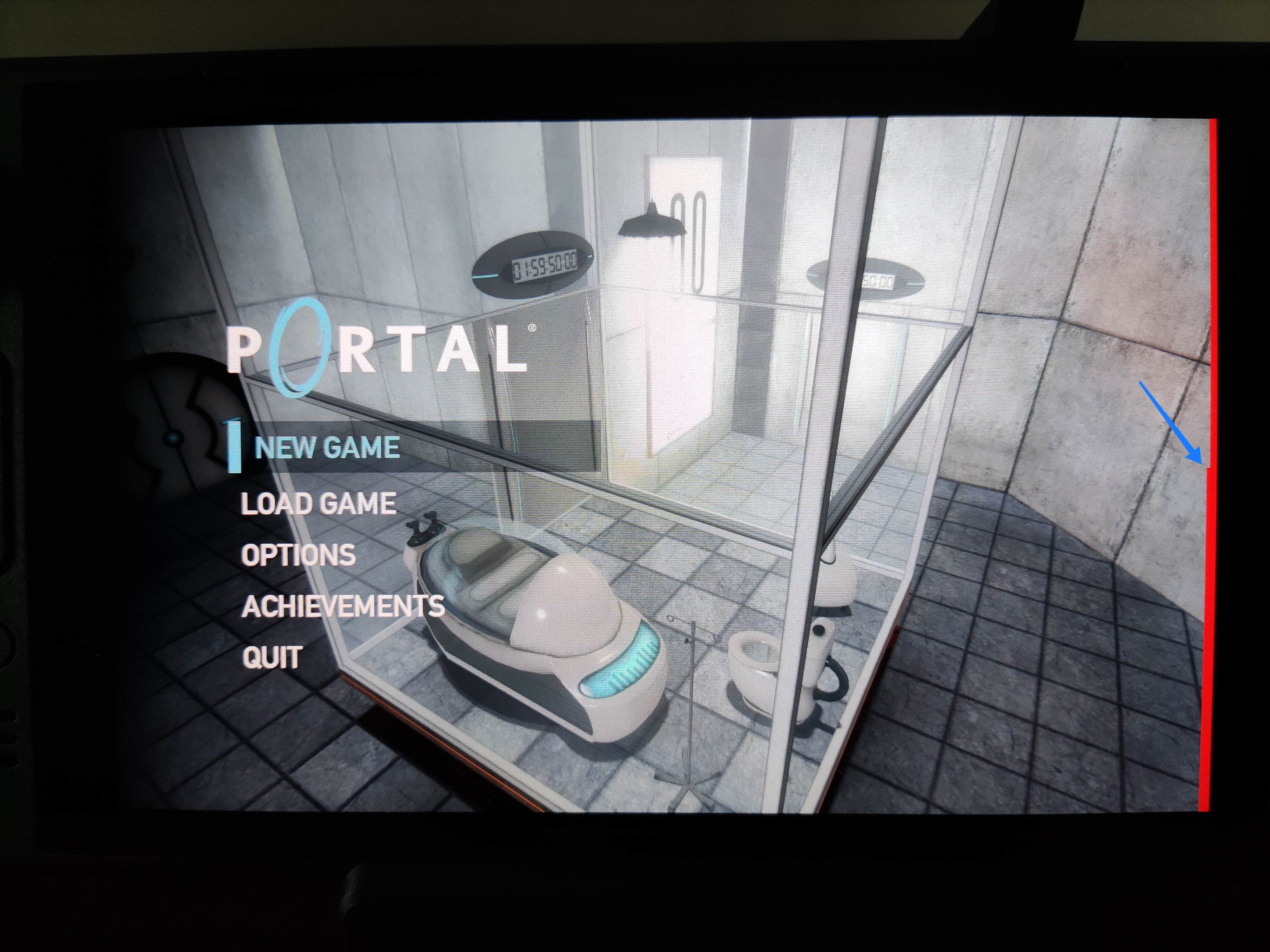
---
alert_files:
  my_alerts_production:
    amp:
      workspace: "production"
    files: "alert_rules/production/*.yaml"
  my_alerts_staging:
    amp:
      workspace: "staging"
    files: "alert_rules/staging/*.yaml"
Note the files entry contains a file pattern. I will later expand the pattern using the fileset() function. Each rule file would be something like this:
---
name: "my_rule_namespace"
rule_data:  
  # this is prometheus-specific config
  groups:
    - name: "example_alert_group"
      rules:
      - alert: Example_Alert_Cpu
        # just arbitrary values, to produce an example alert
        expr: avg(rate(ecs_cpu_seconds_total container=~"something" [2m])) > 1
        for: 10s
        annotations:
          summary: "CPU usage is too high"
          description: "The container average CPU usage is too high."
I m interested in the data structure mutating into something similar to this:
---
alert_files:
  my_alerts_production:
    amp:
      workspace: "production"
    alerts_data:
      - name: rule_namespace_1
        rule_data:  
          # actual alert definition here
          [..]
      - name: rule_namespace_2
        rule_data:  
          # actual alert definition here
          [..]
  my_alerts_staging:
    amp:
      workspace: "staging"
    alerts_data:
      - name: rule_namespace_1
        rule_data:  
          # actual alert definition here
          [..]
      - name: rule_namespace_2
        rule_data:  
          # actual alert definition here
          [..]
This is the algorithm that does the trick:
locals  
  alerts_config =  
    for x, y in  
      for k, v in local.config.alert_files :
      k =>  
        amp : (v.amp),
        files : fileset("", v.files)
       
        : x =>  
      amp : (y.amp),
      alertmanager_data : [
        for z in(y.files) :
        yamldecode(file(z))
      ]


Because the declarative nature of the Terraform/OpenTofu language, I needed to implement 3 different for loops. Each loop reads the map and transforms it in some way, passing the result into the next loop. A bit convoluted if you ask me. To explain the logic, I think it makes more sense to read it from inside out. First loop:
    for k, v in local.config.alert_files :
    k =>  
        amp : (v.amp),
        files : fileset("", v.files)
     
This loop iterates the input YAML map in key-value pairs, remapping each amp entry, and expanding the file globs using the fileset() into a temporal files entry. Second loop:
    for x, y in  
        # previous fileset() loop
        : x =>  
      amp : (y.amp),
      alertmanager_data : [
        # yamldecode() loop
      ]
     
This intermediate loop is responsible for building the final data structure. It iterates the previous fileset() loop to remap it calling the next loop, the yamldecode() one. Note how the amp entry is being rebuilt in each remap (first loop and this one), otherwise we would lose it! Third loop:
    alertmanager_data : [
        for z in(y.files) :
        yamldecode(file(z))
    ]
And finally, this is maybe the easiest loop of the 3, we iterate the temporal file entry that was created in the first loop, calling yamldecode() for each of the file names generated by fileset(). The resulting data structure should allow you to easily create resources later in a for_each loop.

Russell Coker: Fat Finger Shell

I ve been trying out the Fat Finger Shell which is a terminal emulator for Linux on touch screen devices where the keyboard is overlayed with the terminal output. This means that instead of having a tiny keyboard and a tiny terminal output you have the full screen for both. There is a YouTube video showing how the Fat Finger Shell works [1]. Here is a link to the Github page [2], which hasn t changed much in the last 11 years. Currently the shell is hard-coded to a 80*24 terminal and a 640*480 screen which doesn t match any modern hardware. Some parts of this are easy to change but then there s the comment I ran once XGetGeometry and I am harcoded (bad) values for x, y, etc.. which is followed by some magic numbers that are not easy to change which are hacked into the source of xvt. The configuration of this is almost great. It has a plain text file where each line has 4 numbers representing the X and Y coordinates of opposite corners of a rectangle and additional information on what the key is, which is relatively easy to edit. But then it has an image which has to match that, the obvious improvement would be to not have an image but to just display rectangles for each pair of corner coordinates and display the glyph of the character in question inside it. I think there is a real need for a terminal like this for use on devices like the PinePhonePro, it won t be to everyone s taste but the people who like it will really like it. The features that such a shell needs for modern use are being based on Wayland, supporting a variety of screen resolutions and particularly the commonly used ones like 720*1440 and 1920*1080 (with terminal resolution matching the combination of screen resolution and font), and having code derived from a newer terminal emulator. As a final note it would be good for such a terminal to also take input from a regular keyboard so when you plug your Linux phone into a dock you don t need to close your existing terminal sessions. There is a Debian RFP/ITP bug for this [3] which I think should be closed due to nothing happening for 11 years and the fact that so much work is required to make this usable. The current Fat Finger Shell code is a good demonstration of the concept, but I don t think it makes sense to move on with this code base. One of the many possible ways of addressing this with modern graphics technology might be to have a semi transparent window overlaying the screen and generating virtual keyboard events for whichever window happens to be below it so instead of being limited to one terminal program by the choice of input method have that input work for any terminal that the user may choose as well as any other text based program (email, IM, etc).

13 December 2023

Melissa Wen: 15 Tips for Debugging Issues in the AMD Display Kernel Driver

A self-help guide for examining and debugging the AMD display driver within the Linux kernel/DRM subsystem. It s based on my experience as an external developer working on the driver, and are shared with the goal of helping others navigate the driver code. Acknowledgments: These tips were gathered thanks to the countless help received from AMD developers during the driver development process. The list below was obtained by examining open source code, reviewing public documentation, playing with tools, asking in public forums and also with the help of my former GSoC mentor, Rodrigo Siqueira.

Pre-Debugging Steps: Before diving into an issue, it s crucial to perform two essential steps: 1) Check the latest changes: Ensure you re working with the latest AMD driver modifications located in the amd-staging-drm-next branch maintained by Alex Deucher. You may also find bug fixes for newer kernel versions on branches that have the name pattern drm-fixes-<date>. 2) Examine the issue tracker: Confirm that your issue isn t already documented and addressed in the AMD display driver issue tracker. If you find a similar issue, you can team up with others and speed up the debugging process.

Understanding the issue: Do you really need to change this? Where should you start looking for changes? 3) Is the issue in the AMD kernel driver or in the userspace?: Identifying the source of the issue is essential regardless of the GPU vendor. Sometimes this can be challenging so here are some helpful tips:
  • Record the screen: Capture the screen using a recording app while experiencing the issue. If the bug appears in the capture, it s likely a userspace issue, not the kernel display driver.
  • Analyze the dmesg log: Look for error messages related to the display driver in the dmesg log. If the error message appears before the message [drm] Display Core v... , it s not likely a display driver issue. If this message doesn t appear in your log, the display driver wasn t fully loaded and you will see a notification that something went wrong here.
4) AMD Display Manager vs. AMD Display Core: The AMD display driver consists of two components:
  • Display Manager (DM): This component interacts directly with the Linux DRM infrastructure. Occasionally, issues can arise from misinterpretations of DRM properties or features. If the issue doesn t occur on other platforms with the same AMD hardware - for example, only happens on Linux but not on Windows - it s more likely related to the AMD DM code.
  • Display Core (DC): This is the platform-agnostic part responsible for setting and programming hardware features. Modifications to the DC usually require validation on other platforms, like Windows, to avoid regressions.
5) Identify the DC HW family: Each AMD GPU has variations in its hardware architecture. Features and helpers differ between families, so determining the relevant code for your specific hardware is crucial.
  • Find GPU product information in Linux/AMD GPU documentation
  • Check the dmesg log for the Display Core version (since this commit in Linux kernel 6.3v). For example:
    • [drm] Display Core v3.2.241 initialized on DCN 2.1
    • [drm] Display Core v3.2.237 initialized on DCN 3.0.1

Investigating the relevant driver code: Keep from letting unrelated driver code to affect your investigation. 6) Narrow the code inspection down to one DC HW family: the relevant code resides in a directory named after the DC number. For example, the DCN 3.0.1 driver code is located at drivers/gpu/drm/amd/display/dc/dcn301. We all know that the AMD s shared code is huge and you can use these boundaries to rule out codes unrelated to your issue. 7) Newer families may inherit code from older ones: you can find dcn301 using code from dcn30, dcn20, dcn10 files. It s crucial to verify which hooks and helpers your driver utilizes to investigate the right portion. You can leverage ftrace for supplemental validation. To give an example, it was useful when I was updating DCN3 color mapping to correctly use their new post-blending color capabilities, such as: Additionally, you can use two different HW families to compare behaviours. If you see the issue in one but not in the other, you can compare the code and understand what has changed and if the implementation from a previous family doesn t fit well the new HW resources or design. You can also count on the help of the community on the Linux AMD issue tracker to validate your code on other hardware and/or systems. This approach helped me debug a 2-year-old issue where the cursor gamma adjustment was incorrect in DCN3 hardware, but working correctly for DCN2 family. I solved the issue in two steps, thanks for community feedback and validation: 8) Check the hardware capability screening in the driver: You can currently find a list of display hardware capabilities in the drivers/gpu/drm/amd/display/dc/dcn*/dcn*_resource.c file. More precisely in the dcn*_resource_construct() function. Using DCN301 for illustration, here is the list of its hardware caps:
	/*************************************************
	 *  Resource + asic cap harcoding                *
	 *************************************************/
	pool->base.underlay_pipe_index = NO_UNDERLAY_PIPE;
	pool->base.pipe_count = pool->base.res_cap->num_timing_generator;
	pool->base.mpcc_count = pool->base.res_cap->num_timing_generator;
	dc->caps.max_downscale_ratio = 600;
	dc->caps.i2c_speed_in_khz = 100;
	dc->caps.i2c_speed_in_khz_hdcp = 5; /*1.4 w/a enabled by default*/
	dc->caps.max_cursor_size = 256;
	dc->caps.min_horizontal_blanking_period = 80;
	dc->caps.dmdata_alloc_size = 2048;
	dc->caps.max_slave_planes = 2;
	dc->caps.max_slave_yuv_planes = 2;
	dc->caps.max_slave_rgb_planes = 2;
	dc->caps.is_apu = true;
	dc->caps.post_blend_color_processing = true;
	dc->caps.force_dp_tps4_for_cp2520 = true;
	dc->caps.extended_aux_timeout_support = true;
	dc->caps.dmcub_support = true;
	/* Color pipeline capabilities */
	dc->caps.color.dpp.dcn_arch = 1;
	dc->caps.color.dpp.input_lut_shared = 0;
	dc->caps.color.dpp.icsc = 1;
	dc->caps.color.dpp.dgam_ram = 0; // must use gamma_corr
	dc->caps.color.dpp.dgam_rom_caps.srgb = 1;
	dc->caps.color.dpp.dgam_rom_caps.bt2020 = 1;
	dc->caps.color.dpp.dgam_rom_caps.gamma2_2 = 1;
	dc->caps.color.dpp.dgam_rom_caps.pq = 1;
	dc->caps.color.dpp.dgam_rom_caps.hlg = 1;
	dc->caps.color.dpp.post_csc = 1;
	dc->caps.color.dpp.gamma_corr = 1;
	dc->caps.color.dpp.dgam_rom_for_yuv = 0;
	dc->caps.color.dpp.hw_3d_lut = 1;
	dc->caps.color.dpp.ogam_ram = 1;
	// no OGAM ROM on DCN301
	dc->caps.color.dpp.ogam_rom_caps.srgb = 0;
	dc->caps.color.dpp.ogam_rom_caps.bt2020 = 0;
	dc->caps.color.dpp.ogam_rom_caps.gamma2_2 = 0;
	dc->caps.color.dpp.ogam_rom_caps.pq = 0;
	dc->caps.color.dpp.ogam_rom_caps.hlg = 0;
	dc->caps.color.dpp.ocsc = 0;
	dc->caps.color.mpc.gamut_remap = 1;
	dc->caps.color.mpc.num_3dluts = pool->base.res_cap->num_mpc_3dlut; //2
	dc->caps.color.mpc.ogam_ram = 1;
	dc->caps.color.mpc.ogam_rom_caps.srgb = 0;
	dc->caps.color.mpc.ogam_rom_caps.bt2020 = 0;
	dc->caps.color.mpc.ogam_rom_caps.gamma2_2 = 0;
	dc->caps.color.mpc.ogam_rom_caps.pq = 0;
	dc->caps.color.mpc.ogam_rom_caps.hlg = 0;
	dc->caps.color.mpc.ocsc = 1;
	dc->caps.dp_hdmi21_pcon_support = true;
	/* read VBIOS LTTPR caps */
	if (ctx->dc_bios->funcs->get_lttpr_caps)  
		enum bp_result bp_query_result;
		uint8_t is_vbios_lttpr_enable = 0;
		bp_query_result = ctx->dc_bios->funcs->get_lttpr_caps(ctx->dc_bios, &is_vbios_lttpr_enable);
		dc->caps.vbios_lttpr_enable = (bp_query_result == BP_RESULT_OK) && !!is_vbios_lttpr_enable;
	 
	if (ctx->dc_bios->funcs->get_lttpr_interop)  
		enum bp_result bp_query_result;
		uint8_t is_vbios_interop_enabled = 0;
		bp_query_result = ctx->dc_bios->funcs->get_lttpr_interop(ctx->dc_bios, &is_vbios_interop_enabled);
		dc->caps.vbios_lttpr_aware = (bp_query_result == BP_RESULT_OK) && !!is_vbios_interop_enabled;
	 
Keep in mind that the documentation of color capabilities are available at the Linux kernel Documentation.

Understanding the development history: What has brought us to the current state? 9) Pinpoint relevant commits: Use git log and git blame to identify commits targeting the code section you re interested in. 10) Track regressions: If you re examining the amd-staging-drm-next branch, check for regressions between DC release versions. These are defined by DC_VER in the drivers/gpu/drm/amd/display/dc/dc.h file. Alternatively, find a commit with this format drm/amd/display: 3.2.221 that determines a display release. It s useful for bisecting. This information helps you understand how outdated your branch is and identify potential regressions. You can consider each DC_VER takes around one week to be bumped. Finally, check testing log of each release in the report provided on the amd-gfx mailing list, such as this one Tested-by: Daniel Wheeler:

Reducing the inspection area: Focus on what really matters. 11) Identify involved HW blocks: This helps isolate the issue. You can find more information about DCN HW blocks in the DCN Overview documentation. In summary:
  • Plane issues are closer to HUBP and DPP.
  • Blending/Stream issues are closer to MPC, OPP and OPTC. They are related to DRM CRTC subjects.
This information was useful when debugging a hardware rotation issue where the cursor plane got clipped off in the middle of the screen. Finally, the issue was addressed by two patches: 12) Issues around bandwidth (glitches) and clocks: May be affected by calculations done in these HW blocks and HW specific values. The recalculation equations are found in the DML folder. DML stands for Display Mode Library. It s in charge of all required configuration parameters supported by the hardware for multiple scenarios. See more in the AMD DC Overview kernel docs. It s a math library that optimally configures hardware to find the best balance between power efficiency and performance in a given scenario. Finding some clk variables that affect device behavior may be a sign of it. It s hard for a external developer to debug this part, since it involves information from HW specs and firmware programming that we don t have access. The best option is to provide all relevant debugging information you have and ask AMD developers to check the values from your suspicions.
  • Do a trick: If you suspect the power setup is degrading performance, try setting the amount of power supplied to the GPU to the maximum and see if it affects the system behavior with this command: sudo bash -c "echo high > /sys/class/drm/card0/device/power_dpm_force_performance_level"
I learned it when debugging glitches with hardware cursor rotation on Steam Deck. My first attempt was changing the clock calculation. In the end, Rodrigo Siqueira proposed the right solution targeting bandwidth in two steps:

Checking implicit programming and hardware limitations: Bring implicit programming to the level of consciousness and recognize hardware limitations. 13) Implicit update types: Check if the selected type for atomic update may affect your issue. The update type depends on the mode settings, since programming some modes demands more time for hardware processing. More details in the source code:
/* Surface update type is used by dc_update_surfaces_and_stream
 * The update type is determined at the very beginning of the function based
 * on parameters passed in and decides how much programming (or updating) is
 * going to be done during the call.
 *
 * UPDATE_TYPE_FAST is used for really fast updates that do not require much
 * logical calculations or hardware register programming. This update MUST be
 * ISR safe on windows. Currently fast update will only be used to flip surface
 * address.
 *
 * UPDATE_TYPE_MED is used for slower updates which require significant hw
 * re-programming however do not affect bandwidth consumption or clock
 * requirements. At present, this is the level at which front end updates
 * that do not require us to run bw_calcs happen. These are in/out transfer func
 * updates, viewport offset changes, recout size changes and pixel
depth changes.
 * This update can be done at ISR, but we want to minimize how often
this happens.
 *
 * UPDATE_TYPE_FULL is slow. Really slow. This requires us to recalculate our
 * bandwidth and clocks, possibly rearrange some pipes and reprogram
anything front
 * end related. Any time viewport dimensions, recout dimensions,
scaling ratios or
 * gamma need to be adjusted or pipe needs to be turned on (or
disconnected) we do
 * a full update. This cannot be done at ISR level and should be a rare event.
 * Unless someone is stress testing mpo enter/exit, playing with
colour or adjusting
 * underscan we don't expect to see this call at all.
 */
enum surface_update_type  
UPDATE_TYPE_FAST, /* super fast, safe to execute in isr */
UPDATE_TYPE_MED,  /* ISR safe, most of programming needed, no bw/clk change*/
UPDATE_TYPE_FULL, /* may need to shuffle resources */
 ;

Using tools: Observe the current state, validate your findings, continue improvements. 14) Use AMD tools to check hardware state and driver programming: help on understanding your driver settings and checking the behavior when changing those settings.
  • DC Visual confirmation: Check multiple planes and pipe split policy.
  • DTN logs: Check display hardware state, including rotation, size, format, underflow, blocks in use, color block values, etc.
  • UMR: Check ASIC info, register values, KMS state - links and elements (framebuffers, planes, CRTCs, connectors). Source: UMR project documentation
15) Use generic DRM/KMS tools:
  • IGT test tools: Use generic KMS tests or develop your own to isolate the issue in the kernel space. Compare results across different GPU vendors to understand their implementations and find potential solutions. Here AMD also has specific IGT tests for its GPUs that is expect to work without failures on any AMD GPU. You can check results of HW-specific tests using different display hardware families or you can compare expected differences between the generic workflow and AMD workflow.
  • drm_info: This tool summarizes the current state of a display driver (capabilities, properties and formats) per element of the DRM/KMS workflow. Output can be helpful when reporting bugs.

Don t give up! Debugging issues in the AMD display driver can be challenging, but by following these tips and leveraging available resources, you can significantly improve your chances of success. Worth mentioning: This blog post builds upon my talk, I m not an AMD expert, but presented at the 2022 XDC. It shares guidelines that helped me debug AMD display issues as an external developer of the driver. Open Source Display Driver: The Linux kernel/AMD display driver is open source, allowing you to actively contribute by addressing issues listed in the official tracker. Tackling existing issues or resolving your own can be a rewarding learning experience and a valuable contribution to the community. Additionally, the tracker serves as a valuable resource for finding similar bugs, troubleshooting tips, and suggestions from AMD developers. Finally, it s a platform for seeking help when needed. Remember, contributing to the open source community through issue resolution and collaboration is mutually beneficial for everyone involved.

12 December 2023

Raju Devidas: Nextcloud AIO install with docker-compose and nginx reverse proxy

Nextcloud AIO install with docker-compose and nginx reverse proxyNextcloud is a popular self-hosted solution for file sync and share as well as cloud apps such as document editing, chat and talk, calendar, photo gallery etc. This guide will walk you through setting up Nextcloud AIO using Docker Compose. This blog post would not be possible without immense help from Sahil Dhiman a.k.a. sahilisterThere are various ways in which the installation could be done, in our setup here are the pre-requisites.
Step 1 : The docker-compose file for nextcloud AIOThe original compose.yml file is present in nextcloud AIO&aposs git repo here . By taking a reference of that file, we have own compose.yml here.
services:
  nextcloud-aio-mastercontainer:
    image: nextcloud/all-in-one:latest
    init: true
    restart: always
    container_name: nextcloud-aio-mastercontainer # This line is not allowed to be changed as otherwise AIO will not work correctly
    volumes:
      - nextcloud_aio_mastercontainer:/mnt/docker-aio-config # This line is not allowed to be changed as otherwise the built-in backup solution will not work
      - /var/run/docker.sock:/var/run/docker.sock:ro # May be changed on macOS, Windows or docker rootless. See the applicable documentation. If adjusting, don&apost forget to also set &aposWATCHTOWER_DOCKER_SOCKET_PATH&apos!
    ports:
      - 8080:8080
    environment: # Is needed when using any of the options below
      # - AIO_DISABLE_BACKUP_SECTION=false # Setting this to true allows to hide the backup section in the AIO interface. See https://github.com/nextcloud/all-in-one#how-to-disable-the-backup-section
      - APACHE_PORT=32323 # Is needed when running behind a web server or reverse proxy (like Apache, Nginx, Cloudflare Tunnel and else). See https://github.com/nextcloud/all-in-one/blob/main/reverse-proxy.md
      - APACHE_IP_BINDING=127.0.0.1 # Should be set when running behind a web server or reverse proxy (like Apache, Nginx, Cloudflare Tunnel and else) that is running on the same host. See https://github.com/nextcloud/all-in-one/blob/main/reverse-proxy.md
      # - BORG_RETENTION_POLICY=--keep-within=7d --keep-weekly=4 --keep-monthly=6 # Allows to adjust borgs retention policy. See https://github.com/nextcloud/all-in-one#how-to-adjust-borgs-retention-policy
      # - COLLABORA_SECCOMP_DISABLED=false # Setting this to true allows to disable Collabora&aposs Seccomp feature. See https://github.com/nextcloud/all-in-one#how-to-disable-collaboras-seccomp-feature
      - NEXTCLOUD_DATADIR=/opt/docker/cloud.raju.dev/nextcloud # Allows to set the host directory for Nextcloud&aposs datadir.   Warning: do not set or adjust this value after the initial Nextcloud installation is done! See https://github.com/nextcloud/all-in-one#how-to-change-the-default-location-of-nextclouds-datadir
      # - NEXTCLOUD_MOUNT=/mnt/ # Allows the Nextcloud container to access the chosen directory on the host. See https://github.com/nextcloud/all-in-one#how-to-allow-the-nextcloud-container-to-access-directories-on-the-host
      # - NEXTCLOUD_UPLOAD_LIMIT=10G # Can be adjusted if you need more. See https://github.com/nextcloud/all-in-one#how-to-adjust-the-upload-limit-for-nextcloud
      # - NEXTCLOUD_MAX_TIME=3600 # Can be adjusted if you need more. See https://github.com/nextcloud/all-in-one#how-to-adjust-the-max-execution-time-for-nextcloud
      # - NEXTCLOUD_MEMORY_LIMIT=512M # Can be adjusted if you need more. See https://github.com/nextcloud/all-in-one#how-to-adjust-the-php-memory-limit-for-nextcloud
      # - NEXTCLOUD_TRUSTED_CACERTS_DIR=/path/to/my/cacerts # CA certificates in this directory will be trusted by the OS of the nexcloud container (Useful e.g. for LDAPS) See See https://github.com/nextcloud/all-in-one#how-to-trust-user-defined-certification-authorities-ca
      # - NEXTCLOUD_STARTUP_APPS=deck twofactor_totp tasks calendar contacts notes # Allows to modify the Nextcloud apps that are installed on starting AIO the first time. See https://github.com/nextcloud/all-in-one#how-to-change-the-nextcloud-apps-that-are-installed-on-the-first-startup
      # - NEXTCLOUD_ADDITIONAL_APKS=imagemagick # This allows to add additional packages to the Nextcloud container permanently. Default is imagemagick but can be overwritten by modifying this value. See https://github.com/nextcloud/all-in-one#how-to-add-os-packages-permanently-to-the-nextcloud-container
      # - NEXTCLOUD_ADDITIONAL_PHP_EXTENSIONS=imagick # This allows to add additional php extensions to the Nextcloud container permanently. Default is imagick but can be overwritten by modifying this value. See https://github.com/nextcloud/all-in-one#how-to-add-php-extensions-permanently-to-the-nextcloud-container
      # - NEXTCLOUD_ENABLE_DRI_DEVICE=true # This allows to enable the /dev/dri device in the Nextcloud container.   Warning: this only works if the &apos/dev/dri&apos device is present on the host! If it should not exist on your host, don&apost set this to true as otherwise the Nextcloud container will fail to start! See https://github.com/nextcloud/all-in-one#how-to-enable-hardware-transcoding-for-nextcloud
      # - NEXTCLOUD_KEEP_DISABLED_APPS=false # Setting this to true will keep Nextcloud apps that are disabled in the AIO interface and not uninstall them if they should be installed. See https://github.com/nextcloud/all-in-one#how-to-keep-disabled-apps
      # - TALK_PORT=3478 # This allows to adjust the port that the talk container is using. See https://github.com/nextcloud/all-in-one#how-to-adjust-the-talk-port
      # - WATCHTOWER_DOCKER_SOCKET_PATH=/var/run/docker.sock # Needs to be specified if the docker socket on the host is not located in the default &apos/var/run/docker.sock&apos. Otherwise mastercontainer updates will fail. For macos it needs to be &apos/var/run/docker.sock&apos
    # networks: # Is needed when you want to create the nextcloud-aio network with ipv6-support using this file, see the network config at the bottom of the file
      # - nextcloud-aio # Is needed when you want to create the nextcloud-aio network with ipv6-support using this file, see the network config at the bottom of the file
      # - SKIP_DOMAIN_VALIDATION=true
    # # Uncomment the following line when using SELinux
    # security_opt: ["label:disable"]
volumes: # If you want to store the data on a different drive, see https://github.com/nextcloud/all-in-one#how-to-store-the-filesinstallation-on-a-separate-drive
  nextcloud_aio_mastercontainer:
    name: nextcloud_aio_mastercontainer # This line is not allowed to be changed as otherwise the built-in backup solution will not work
I have not removed many of the commented options in the compose file, for a possibility of me using them in the future.If you want a smaller cleaner compose with the extra options, you can refer to
services:
  nextcloud-aio-mastercontainer:
    image: nextcloud/all-in-one:latest
    init: true
    restart: always
    container_name: nextcloud-aio-mastercontainer
    volumes:
      - nextcloud_aio_mastercontainer:/mnt/docker-aio-config
      - /var/run/docker.sock:/var/run/docker.sock:ro
    ports:
      - 8080:8080
    environment:
      - APACHE_PORT=32323
      - APACHE_IP_BINDING=127.0.0.1
      - NEXTCLOUD_DATADIR=/opt/docker/nextcloud
volumes:
  nextcloud_aio_mastercontainer:
    name: nextcloud_aio_mastercontainer
I am using a separate directory to store nextcloud data. As per nextcloud documentation you should be using a separate partition if you want to use this feature, however I did not have that option on my server, so I used a separate directory instead. Also we use a custom port on which nextcloud listens for operations, we have set it up as 32323 above, but you can use any in the permissible port range. The 8080 port is used the setup the AIO management interface. Both 8080 and the APACHE_PORT do not need to be open on the host machine, as we will be using reverse proxy setup with nginx to direct requests. once you have your preferred compose.yml file, you can start the containers using
$ docker-compose -f compose.yml up -d 
Creating network "clouddev_default" with the default driver
Creating volume "nextcloud_aio_mastercontainer" with default driver
Creating nextcloud-aio-mastercontainer ... done
once your container&aposs are running, we can do the nginx setup.

Step 2: Configuring nginx reverse proxy for our domain on host. A reference nginx configuration for nextcloud AIO is given in the nextcloud git repository here . You can modify the configuration file according to your needs and setup. Here is configuration that we are using

map $http_upgrade $connection_upgrade  
    default upgrade;
    &apos&apos close;
 
server  
    listen 80;
    #listen [::]:80;            # comment to disable IPv6
    if ($scheme = "http")  
        return 301 https://$host$request_uri;
     
    listen 443 ssl http2;      # for nginx versions below v1.25.1
    #listen [::]:443 ssl http2; # for nginx versions below v1.25.1 - comment to disable IPv6
    # listen 443 ssl;      # for nginx v1.25.1+
    # listen [::]:443 ssl; # for nginx v1.25.1+ - keep comment to disable IPv6
    # http2 on;                                 # uncomment to enable HTTP/2        - supported on nginx v1.25.1+
    # http3 on;                                 # uncomment to enable HTTP/3 / QUIC - supported on nginx v1.25.0+
    # quic_retry on;                            # uncomment to enable HTTP/3 / QUIC - supported on nginx v1.25.0+
    # add_header Alt-Svc &aposh3=":443"; ma=86400&apos; # uncomment to enable HTTP/3 / QUIC - supported on nginx v1.25.0+
    # listen 443 quic reuseport;       # uncomment to enable HTTP/3 / QUIC - supported on nginx v1.25.0+ - please remove "reuseport" if there is already another quic listener on port 443 with enabled reuseport
    # listen [::]:443 quic reuseport;  # uncomment to enable HTTP/3 / QUIC - supported on nginx v1.25.0+ - please remove "reuseport" if there is already another quic listener on port 443 with enabled reuseport - keep comment to disable IPv6
    server_name cloud.example.com;
    location /  
        proxy_pass http://127.0.0.1:32323$request_uri;
        proxy_set_header X-Forwarded-For $proxy_add_x_forwarded_for;
        proxy_set_header X-Forwarded-Port $server_port;
        proxy_set_header X-Forwarded-Scheme $scheme;
        proxy_set_header X-Forwarded-Proto $scheme;
        proxy_set_header X-Real-IP $remote_addr;
        proxy_set_header Accept-Encoding "";
        proxy_set_header Host $host;
    
        client_body_buffer_size 512k;
        proxy_read_timeout 86400s;
        client_max_body_size 0;
        # Websocket
        proxy_http_version 1.1;
        proxy_set_header Upgrade $http_upgrade;
        proxy_set_header Connection $connection_upgrade;
     
    ssl_certificate /etc/letsencrypt/live/cloud.example.com/fullchain.pem; # managed by Certbot
    ssl_certificate_key /etc/letsencrypt/live/cloud.example.com/privkey.pem; # managed by Certbot
    ssl_session_timeout 1d;
    ssl_session_cache shared:MozSSL:10m; # about 40000 sessions
    ssl_session_tickets off;
    ssl_protocols TLSv1.2 TLSv1.3;
    ssl_ciphers ECDHE-ECDSA-AES128-GCM-SHA256:ECDHE-RSA-AES128-GCM-SHA256:ECDHE-ECDSA-AES256-GCM-SHA384:ECDHE-RSA-AES256-GCM-SHA384:ECDHE-ECDSA-CHACHA20-POLY1305:ECDHE-RSA-CHACHA20-POLY1305:DHE-RSA-AES128-GCM-SHA256:DHE-RSA-AES256-GCM-SHA384:DHE-RSA-CHACHA20-POLY1305;
    ssl_prefer_server_ciphers on;
    # Optional settings:
    # OCSP stapling
    # ssl_stapling on;
    # ssl_stapling_verify on;
    # ssl_trusted_certificate /etc/letsencrypt/live/<your-nc-domain>/chain.pem;
    # replace with the IP address of your resolver
    # resolver 127.0.0.1; # needed for oscp stapling: e.g. use 94.140.15.15 for adguard / 1.1.1.1 for cloudflared or 8.8.8.8 for google - you can use the same nameserver as listed in your /etc/resolv.conf file
 
Please note that you need to have valid SSL certificates for your domain for this configuration to work. Steps on getting valid SSL certificates for your domain are beyond the scope of this article. You can give a web search on getting SSL certificates with letsencrypt and you will get several resources on that, or may write a blog post on it separately in the future.once your configuration for nginx is done, you can test the nginx configuration using
$ sudo nginx -t 
nginx: the configuration file /etc/nginx/nginx.conf syntax is ok
nginx: configuration file /etc/nginx/nginx.conf test is successful
and then reload nginx with
$ sudo nginx -s reload

Step 3: Setup of Nextcloud AIO from the browser.To setup nextcloud AIO, we need to access it using the web browser on URL of our domain.tld:8080, however we do not want to open the 8080 port publicly to do this, so to complete the setup, here is a neat hack from sahilister
ssh -L 8080:127.0.0.1:8080 username:<server-ip>
you can bind the 8080 port of your server to the 8080 of your localhost using Unix socket forwarding over SSH.The port forwarding only last for the duration of your SSH session, if the SSH session breaks, your port forwarding will to. So, once you have the port forwarded, you can open the nextcloud AIO instance in your web browser at 127.0.0.1:8080
Nextcloud AIO install with docker-compose and nginx reverse proxy
you will get this error because you are trying to access a page on localhost over HTTPS. You can click on advanced and then continue to proceed to the next page. Your data is encrypted over SSH for this session as we are binding the port over SSH. Depending on your choice of browser, the above page might look different.once you have proceeded, the nextcloud AIO interface will open and will look something like this.
Nextcloud AIO install with docker-compose and nginx reverse proxynextcloud AIO initial screen with capsicums as password
It will show an auto generated passphrase, you need to save this passphrase and make sure to not loose it. For the purposes of security, I have masked the passwords with capsicums. once you have noted down your password, you can proceed to the Nextcloud AIO login, enter your password and then login. After login you will be greeted with a screen like this.
Nextcloud AIO install with docker-compose and nginx reverse proxy
now you can put the domain that you want to use in the Submit domain field. Once the domain check is done, you will proceed to the next step and see another screen like this
Nextcloud AIO install with docker-compose and nginx reverse proxy
here you can select any optional containers for the features that you might want. IMPORTANT: Please make sure to also change the time zone at the bottom of the page according to the time zone you wish to operate in.
Nextcloud AIO install with docker-compose and nginx reverse proxy
The timezone setup is also important because the data base will get initialized according to the set time zone. This could result in wrong initialization of database and you ending up in a startup loop for nextcloud. I faced this issue and could only resolve it after getting help from sahilister . Once you are done changing the timezone, and selecting any additional features you want, you can click on Download and start the containersIt will take some time for this process to finish, take a break and look at the farthest object in your room and take a sip of water. Once you are done, and the process has finished you will see a page similar to the following one.
Nextcloud AIO install with docker-compose and nginx reverse proxy
wait patiently for everything to turn green.
Nextcloud AIO install with docker-compose and nginx reverse proxy
once all the containers have started properly, you can open the nextcloud login interface on your configured domain, the initial login details are auto generated as you can see from the above screenshot. Again you will see a password that you need to note down or save to enter the nextcloud interface. Capsicums will not work as passwords. I have masked the auto generated passwords using capsicums.Now you can click on Open your Nextcloud button or go to your configured domain to access the login screen.
Nextcloud AIO install with docker-compose and nginx reverse proxy
You can use the login details from the previous step to login to the administrator account of your Nextcloud instance. There you have it, your very own cloud!

Additional Notes:

How to properly reset Nextcloud setup?While following the above steps, or while following steps from some other tutorial, you may have made a mistake, and want to start everything again from scratch. The instructions for it are present in the Nextcloud documentation here . Here is the TLDR for a docker-compose setup. These steps will delete all data, do not use these steps on an existing nextcloud setup unless you know what you are doing.
  • Stop your master container.
docker-compose -f compose.yml down -v
The above command will also remove the volume associated with the master container
  • Stop all the child containers that has been started by the master container.
docker stop nextcloud-aio-apache nextcloud-aio-notify-push nextcloud-aio-nextcloud nextcloud-aio-imaginary nextcloud-aio-fulltextsearch nextcloud-aio-redis nextcloud-aio-database nextcloud-aio-talk nextcloud-aio-collabora
  • Remove all the child containers that has been started by the master container
docker rm nextcloud-aio-apache nextcloud-aio-notify-push nextcloud-aio-nextcloud nextcloud-aio-imaginary nextcloud-aio-fulltextsearch nextcloud-aio-redis nextcloud-aio-database nextcloud-aio-talk nextcloud-aio-collabora
  • If you also wish to remove all images associated with nextcloud you can do it with
docker rmi $(docker images --filter "reference=nextcloud/*" -q)
  • remove all volumes associated with child containers
docker volume rm <volume-name>
  • remove the network associated with nextcloud
docker network rm nextcloud-aio

Additional references.
  1. Nextcloud Github
  2. Nextcloud reverse proxy documentation
  3. Nextcloud Administration Guide
  4. Nextcloud User Manual
  5. Nextcloud Developer&aposs manual

Raju Devidas: How to remove multiple docker images for a specific pattern

altlist of docker images using docker images
In my case I want to remove all images which have the beta tag. to do thatuse docker rmi $(docker images --filter "reference=nextcloud/*:beta" -q)you can modify the reference part according to your use case.Ciao!

Freexian Collaborators: Monthly report about Debian Long Term Support, November 2023 (by Roberto C. S nchez)

Like each month, have a look at the work funded by Freexian s Debian LTS offering. Some notable fixes which were made in LTS during the month of November include the gnutls28 cryptographic library and the freerdp2 Remote Desktop Protocol client/server implementation. The gnutls28 update was prepared by LTS contributor Markus Koschany and dealt with a timing attack which could be used to compromise a cryptographic system, while the freerdp2 update was prepared by LTS contributor Tobias Frost and is the result of work spanning 3 months to deal with dozens of vulnerabilities. In addition to the many ordinary LTS tasks which were completed (CVE triage, patch backports, package updates, etc), there were several contributions by LTS contributors for the benefit of Debian stable and old-stable releases, as well as for the benefit of upstream projects. LTS contributor Abhijith PA uploaded an update of the puma package to unstable in order to fix a vulnerability in that package while LTS contributor Thosten Alteholz sponsored an upload to unstable of libde265 and himself made corresponding uploads of libde265 to Debian stable and old-stable. LTS contributor Bastien Roucari s developed patches for vulnerabilities in zbar and audiofile which were then provided to the respective upstream projects. Updates to packages in Debian stable were made by Markus Koschany to deal with security vulnerabilities and by Chris Lamb to deal with some non-security bugs. As always, the LTS strives to provide high quality updates to packages under the direct purview of the LTS team while also rendering assistance to maintainers, the stable security team, and upstream developers whenever practical.

Debian LTS contributors In November, 18 contributors have been paid to work on Debian LTS, their reports are available:
  • Abhijith PA did 7.0h (out of 0h assigned and 14.0h from previous period), thus carrying over 7.0h to the next month.
  • Adrian Bunk did 15.0h (out of 14.0h assigned and 9.75h from previous period), thus carrying over 8.75h to the next month.
  • Anton Gladky did 10.0h (out of 9.5h assigned and 5.5h from previous period), thus carrying over 5.0h to the next month.
  • Bastien Roucari s did 16.0h (out of 18.25h assigned and 1.75h from previous period), thus carrying over 4.0h to the next month.
  • Ben Hutchings did 12.0h (out of 16.5h assigned and 12.25h from previous period), thus carrying over 16.75h to the next month.
  • Chris Lamb did 18.0h (out of 17.25h assigned and 0.75h from previous period).
  • Emilio Pozuelo Monfort did 15.5h (out of 23.5h assigned and 0.25h from previous period), thus carrying over 8.25h to the next month.
  • Guilhem Moulin did 13.0h (out of 12.0h assigned and 8.0h from previous period), thus carrying over 7.0h to the next month.
  • Lee Garrett did 14.5h (out of 16.75h assigned and 7.0h from previous period), thus carrying over 9.25h to the next month.
  • Markus Koschany did 30.0h (out of 30.0h assigned).
  • Ola Lundqvist did 6.5h (out of 8.25h assigned and 15.5h from previous period), thus carrying over 17.25h to the next month.
  • Roberto C. S nchez did 5.5h (out of 12.0h assigned), thus carrying over 6.5h to the next month.
  • Santiago Ruano Rinc n did 3.25h (out of 13.62h assigned and 2.375h from previous period), thus carrying over 12.745h to the next month.
  • Sean Whitton did 3.25h (out of 10.0h assigned), thus carrying over 6.75h to the next month.
  • Sylvain Beucler did 10.0h (out of 13.5h assigned and 10.25h from previous period), thus carrying over 13.75h to the next month.
  • Thorsten Alteholz did 14.0h (out of 14.0h assigned).
  • Tobias Frost did 12.0h (out of 12.0h assigned).
  • Utkarsh Gupta did 0.0h (out of 6.0h assigned and 17.75h from previous period), thus carrying over 23.75h to the next month.

Evolution of the situation In November, we have released 35 DLAs.

Thanks to our sponsors Sponsors that joined recently are in bold.

Next.

Previous.