Search Results: "ed"

18 November 2015

Daniel Pocock: Improving DruCall and JSCommunicator user interface

DruCall is one of the easiest ways to get up and running with WebRTC voice and video calling on your own web site or blog. It is based on 100% open source and 100% open standards - no binary browser plugins and no lock-in to a specific service provider or vendor. On Debian or Ubuntu, just running a command such as
# apt-get install -t jessie-backports drupal7-mod-drucall
will install Drupal, Apache, MySQL, JSCommunicator, JsSIP and all the other JavaScript library packages and module dependencies for DruCall itself. The user interface Most of my experience is in server-side development, including things like the powerful SIP over WebSocket implementation in the reSIProcate SIP proxy repro. In creating DruCall, I have simply concentrated on those areas related to configuring and bringing up the WebSocket connection and creating the authentication tokens for the call. Those things provide a firm foundation for the module, but it would be nice to improve the way it is presented and optimize the integration with other Drupal features. This is where the projects (both DruCall and JSCommunicator) would really benefit from feedback and contributions from people who know Drupal and web design in much more detail. Benefits for collaboration If anybody wants to collaborate on either or both of these projects, I'd be happy to offer access to a pre-configured SIP WebSocket server in my lab for more convenient testing. The DruCall source code is a Drupal.org hosted project and the JSCommunicator source code is on Github. When you get to the stage where you want to run your own SIP WebSocket server as well then free community support can also be provided through the repro-user mailing list. The free, online RTC Quick Start Guide gives a very comprehensive overview of everything you need to do to run your own WebRTC SIP infrastructure.

17 November 2015

Norbert Preining: Debian/TeX Live 2015.20151116-1

One month has passed since the big multiarch update, and not one bug report concerning it did come in, that are good news. So here is a completely boring update with nothing more than the usual checkout from the TeX Live tlnet distribution as of yesterday. Debian - TeX Live 2015 I cannot recall anything particular to mention here, so this time let me go with the list of updated and new packages only: Updated packages alegreya, algorithm2e, animate, archaeologie, articleingud, attachfile, bankstatement, beebe, biber, biblatex, biblatex-manuscripts-philology, biblatex-opcit-booktitle, bidi, br-lex, bytefield, catcodes, chemfig, chemformula, chemgreek, comprehensive, computational-complexity, ctable, datetime2, dowith, dvipdfmx, dvipdfmx-def, dynamicnumber, e-french, epspdf, etoc, fetamont, findhyph, fix2col, gitinfo2, gradstudentresume, indextools, kotex-oblivoir, kotex-utils, kpathsea, l3build, l3experimental, l3kernel, l3packages, latex, latex2e-help-texinfo, lisp-on-tex, ltxfileinfo, luatexja, makedtx, mathastext, mathtools, mcf2graph, media9, medstarbeamer, morehype, nameauth, nicetext, ocgx2, perltex, preview, prftree, pst-eucl, pstricks, reledmac, resphilosophica, selnolig, substances, tcolorbox, tetex, teubner, tex4ht, texdoc, texinfo, texlive-scripts, toptesi, translations, turabian-formatting, uptex, xepersian, xetex, xetex-def, xint. New packages asciilist, babel-macedonian, bestpapers, bibtexperllibs, fixcmex, iffont, nucleardata, srcredact, texvc, xassoccnt. Enjoy.

Sven Hoexter: Failing with F5: assign a http profile and an irule at the same time

Beside of an upgrade to TMOS 11.4.1HF9 I wanted to use a maintenance today to assign some specific irule to a VS. Within the irule I use some HTTP functions so when I tried to add the irule to the already existing VS the tmsh correctly told me that I also need a http profile on this VS. Thanks tmsh you're right, oversight by myself. So what I did was:
tmsh modify ltm virtual mySpecialVS rules   mySpecialiRule   profiles add   company-http-profile  
tmsh accepted but all my tests ended at the VS. I could connect but got no reply at all. That was strange because I tested this irule extensively. So I reverted back to the known good state with just plain tcp forwarding. My next try was to assign only the http profile without the irule.
tmsh modify ltm virtual mySpecialVS profiles add   company-http-profile  
Tested that and it worked. So what on earth was wrong with my irule? I added some debug statements and readded the irule like this:
tmsh modify ltm virtual mySpecialVS rules   mySpecialiRule  
And now it worked as intended. So I went on and removed my debug statements, tested again and it still works. Let's see if I can reproduce that case some time later this week to fill a proper bugreport with F5. Update: Turns out it was all my fault. Due to a misunderstanding about RULE_INIT and the static namespace, I managed to overwrite important variables globally. Lesson learned: Be very careful if you use "static::" or better avoid it. Also think twice if you start to set things on the RULE_INIT event. Since it's only called on saving an irule or restarts of the device, your errors might show only later when you do not expect that.

Clint Adams: Things I am supposed to look into to mitigate the corrupt evil of Moxie Marlinspike

https://github.com/microg http://o9i.de/2015/10/23/howto-gmscore.html https://github.com/JavaJens/TextSecure https://fdroid.eutopia.cz/

Petter Reinholdtsen: PGP key transition statement for key EE4E02F9

I've needed a new OpenPGP key for a while, but have not had time to set it up properly. I wanted to generate it offline and have it available on a OpenPGP smart card for daily use, and learning how to do it and finding time to sit down with an offline machine almost took forever. But finally I've been able to complete the process, and have now moved from my old GPG key to a new GPG key. See the full transition statement, signed with both my old and new key for the details. This is my new key:
pub   3936R/111D6B29EE4E02F9 2015-11-03 [expires: 2019-11-14]
      Key fingerprint = 3AC7 B2E3 ACA5 DF87 78F1  D827 111D 6B29 EE4E 02F9
uid                  Petter Reinholdtsen <pere@hungry.com>
uid                  Petter Reinholdtsen <pere@debian.org>
sub   4096R/87BAFB0E 2015-11-03 [expires: 2019-11-02]
sub   4096R/F91E6DE9 2015-11-03 [expires: 2019-11-02]
sub   4096R/A0439BAB 2015-11-03 [expires: 2019-11-02]
The key can be downloaded from the OpenPGP key servers, signed by my old key. If you signed my old key (DB4CCC4B2A30D729), I'd very much appreciate a signature on my new key, details and instructions in the transition statement. I m happy to reciprocate if you have a similarly signed transition statement to present.

Dirk Eddelbuettel: RcppAnnoy 0.0.7

A new version of RcppAnnoy, our Rcpp-based R integration of the nifty Annoy library by Erik, is now on CRAN. Annoy is a small, fast, and lightweight C++ template header library for approximate nearest neighbours. This release mostly just catches up with the Annoy release 1.6.2 of last Friday. No new features were added on our side. Courtesy of CRANberries, there is also a diffstat report for this release.

This post by Dirk Eddelbuettel originated on his Thinking inside the box blog. Please report excessive re-aggregation in third-party for-profit settings.

16 November 2015

Daniel Pocock: Quick start using Blender for video editing

Updated 2015-11-16 for WebM Although it is mostly known for animation, Blender includes a non-linear video editing system that is available in all the current stable versions of Debian, Ubuntu and Fedora. Here are some screenshots showing how to start editing a video of a talk from a conference. In this case, there are two input files:
  • A video file from a DSLR camera, including an audio stream from a microphone on the camera
  • A separate audio file with sound captured by a lapel microphone attached to the speaker's smartphone. This is a much better quality sound and we would like this to replace the sound included in the video file.
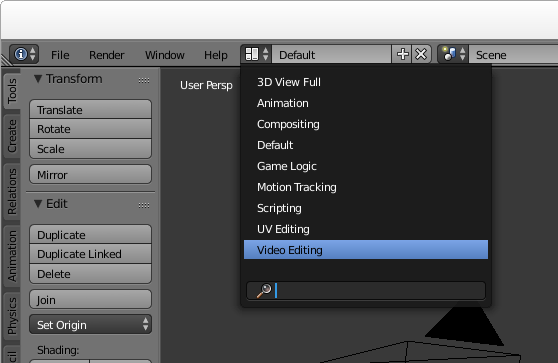
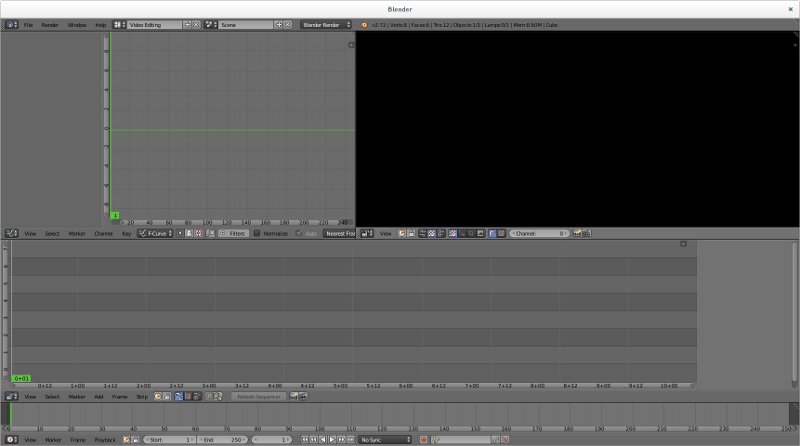
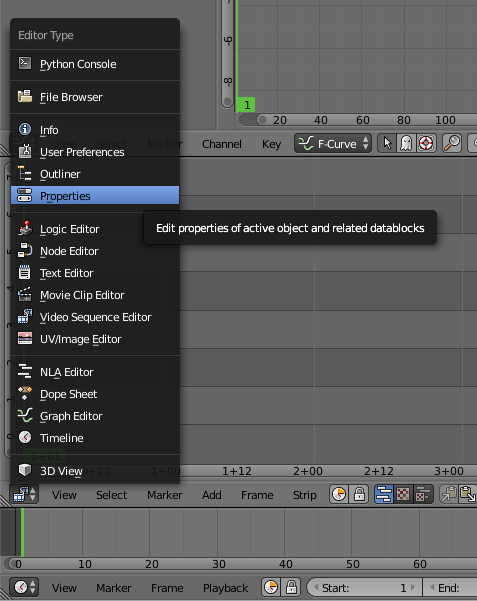
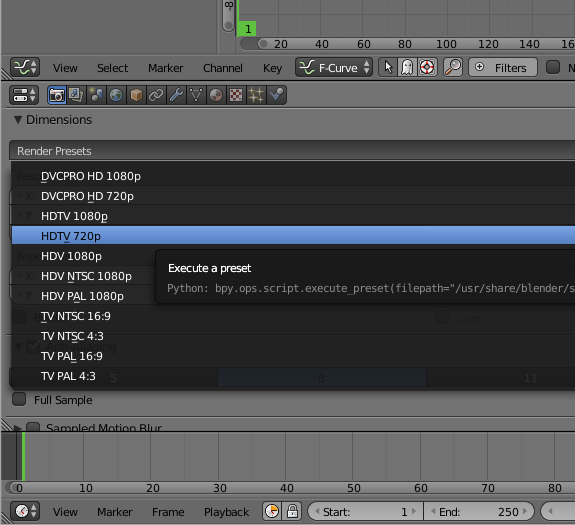
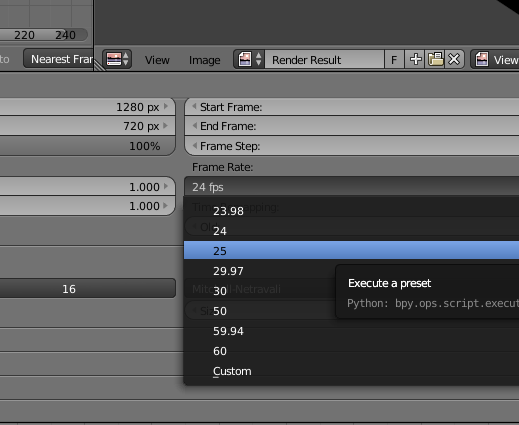
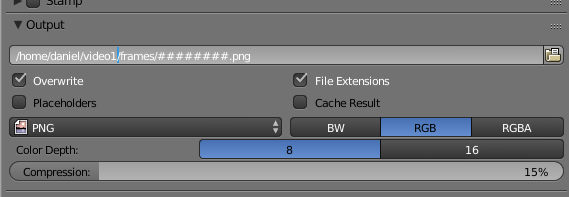
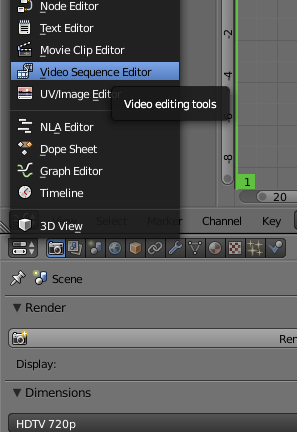
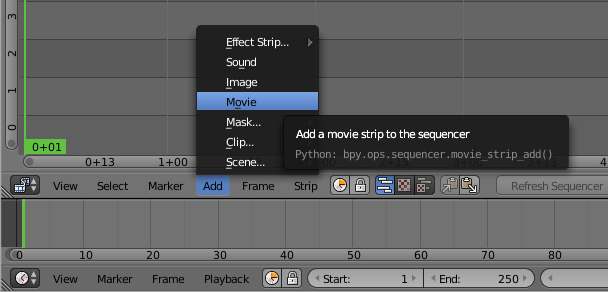
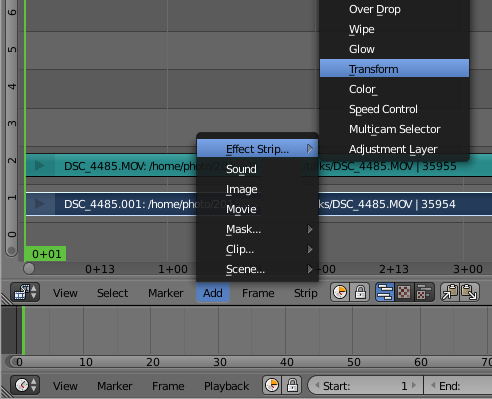
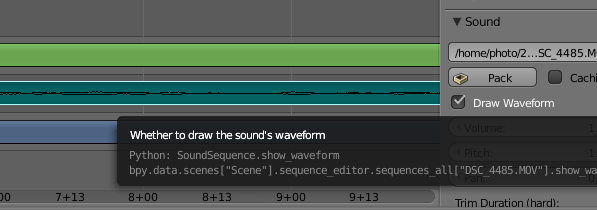
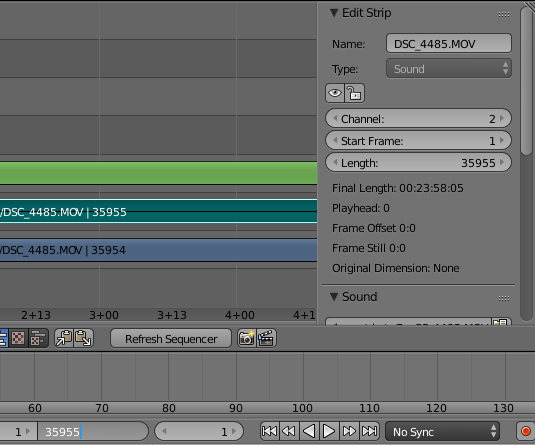
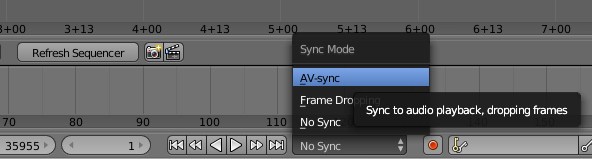
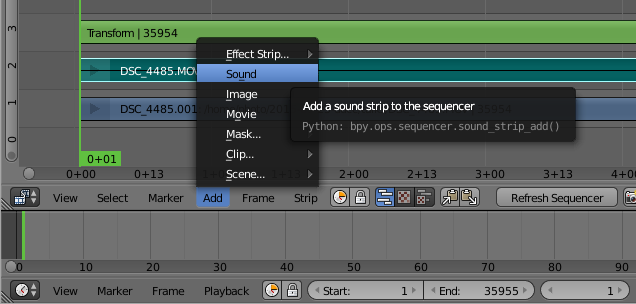
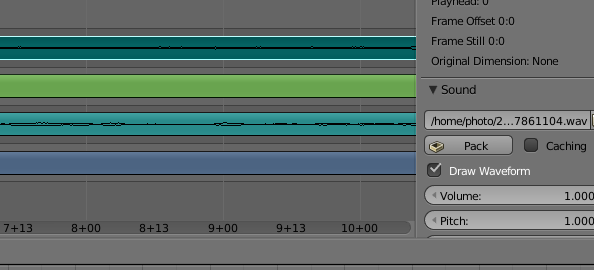
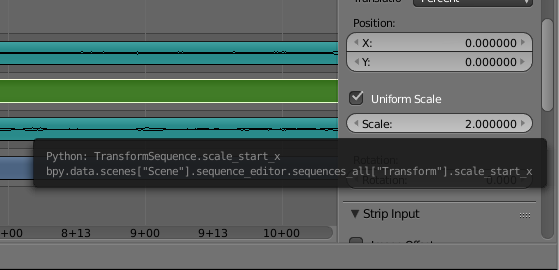
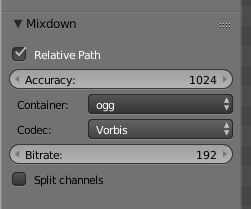
Open Blender and choose the video editing mode Launch Blender and choose the video sequence editor from the pull down menu at the top of the window: Now you should see all the video sequence editor controls: Setup the properties for your project Click the context menu under the strip editor panel and change the panel to a Properties panel: The video file we are playing with is 720p, so it seems reasonable to use 720p for the output too. Change that here: The input file is 25fps so we need to use exactly the same frame rate for the output, otherwise you will either observe the video going at the wrong speed or there will be a conversion that is CPU intensive and degrades the quality. Also check that the resolution_percentage setting under the picture dimensions is 100%: Now specify output to PNG files. Later we will combine them into a WebM file with a script. Specify the directory where the files will be placed and use the # placeholder to specify the number of digits to use to embed the frame number in the filename: Now your basic rendering properties are set. When you want to generate the output file, come back to this panel and use the Animation button at the top. Editing the video Use the context menu to change the properties panel back to the strip view panel: Add the video file: and then right click the video strip (the lower strip) to highlight it and then add a transform strip: Audio waveform Right click the audio strip to highlight it and then go to the properties on the right hand side and click to show the waveform: Rendering length By default, Blender assumes you want to render 250 frames of output. Looking in the properties to the right of the audio or video strip you can see the actual number of frames. Put that value in the box at the bottom of the window where it says 250: Enable AV-sync Also at the bottom of the window is a control to enable AV-sync. If your audio and video are not in sync when you preview, you need to set this AV-sync option and also make sure you set the frame rate correctly in the properties: Add the other sound strip Now add the other sound file that was recorded using the lapel microphone: Enable the waveform display for that sound strip too, this will allow you to align the sound strips precisely: You will need to listen to the strips to make an estimate of the time difference. Use this estimate to set the "start frame" in the properties for your audio strip, it will be a negative value if the audio strip starts before the video. You can then zoom the strip panel to show about 3 to 5 seconds of sound and try to align the peaks. An easy way to do this is to look for applause at the end of the audio strips, the applause generates a large peak that is easily visible. Once you have synced the audio, you can play the track and you should not be able to hear any echo. You can then silence the audio track from the camera by right clicking it, look in the properties to the right and change volume to 0. Make any transforms you require For example, to zoom in on the speaker, right click the transform strip (3rd from the bottom) and then in the panel on the right, click to enable "Uniform Scale" and then set the scale factor as required: Render the video output to PNG Click the context menu under the Curves panel and choose Properties again. Click the Animation button to generate a sequence of PNG files for each frame. Render the audio output On the Properties panel, click the Audio button near the top. Choose a filename for the generated audio file. Look on the bottom left-hand side of the window for the audio file settings, change it to the ogg container and Vorbis codec: Ensure the filename has a .ogg extension Now look at the top right-hand corner of the window for the Mixdown button. Click it and wait for Blender to generate the audio file. Combine the PNG files and audio file into a WebM video file You will need to have a few command line tools installed for manipulating the files from scripts. Install them using the package manager, for example, on a Debian or Ubuntu system: # apt-get install mjpegtools vpx-tools mkvtoolnix
Now create a script like the following:
#!/bin/bash -e
# Set this to match the project properties
FRAME_RATE=25
# Set this to the rate you desire:
TARGET_BITRATE=1000
WORK_DIR=$ HOME /video1
PNG_DIR=$ WORK_DIR /frames
YUV_FILE=$ WORK_DIR /video.yuv
WEBM_FILE=$ WORK_DIR /video.webm
AUDIO_FILE=$ WORK_DIR /audio-mixed.ogg
NUM_FRAMES= find $ PNG_DIR  -type f   wc -l 
png2yuv -I p -f $FRAME_RATE -b 1 -n $NUM_FRAMES \
    -j $ PNG_DIR /%08d.png > $ YUV_FILE 
vpxenc --good --cpu-used=0 --auto-alt-ref=1 \
   --lag-in-frames=16 --end-usage=vbr --passes=2 \
   --threads=2 --target-bitrate=$ TARGET_BITRATE  \
   -o $ WEBM_FILE -noaudio $ YUV_FILE 
rm $ YUV_FILE 
mkvmerge -o $ WEBM_FILE  -w $ WEBM_FILE -noaudio $ AUDIO_FILE 
rm $ WEBM_FILE -noaudio
Next steps There are plenty of more comprehensive tutorials, including some videos on Youtube, explaining how to do more advanced things like fading in and out or zooming and panning dynamically at different points in the video. If the lighting is not good (faces too dark, for example), you can right click the video strip, go to the properties panel on the right hand side and click Modifiers, Add Strip Modifier and then select "Color Balance". Use the Lift, Gamma and Gain sliders to adjust the shadows, midtones and highlights respectively.

Steve Kemp: lumail2 nears another release

I'm pleased with the way that Lumail2 development is proceeding, and it is reaching a point where there will be a second source-release. I've made a lot of changes to the repository recently, and most of them boil down to moving code from the C++ side of the application, over to the Lua side. This morning, for example, I updated the handing of index.limit to be entirely Lua based.
When you open a Maildir folder you see the list of messages it contains, as you would expect. The notion of the index.limit is that you can limit the messages displayed, for example:
  • See all messages: Config:set( "index.limit", "all")
  • See only new/unread messages: Config:set( "index.limit", "new")
  • See only messages which arrived today: Config:set( "index.limit", "today")
  • See only messages which contain "Steve" in their formatted version: Config:set( "index.limit", "steve")
These are just examples that are present as defaults, but they give an idea of how things can work. I guess it isn't so different to Mutt's "limit" facilities - but thanks to the dynamic Lua nature of the application you can add your own with relative ease.
One of the biggest changes, recently, was the ability to display coloured text! That was always possible before, but a single line could only be one colour. Now colours can be mixed within a line, so this works as you might imagine: Panel:append( "$[RED]This is red, $[GREEN]green, $[WHITE]white, and $[CYAN]cyan!" ) Other changes include a persistant cache of "stuff", which is Lua-based, the inclusion of at least one luarocks library to parse Date: headers, and a simple API for all our objects. All good stuff. Perhaps time for a break in the next few weeks, but right now I think I'm making useful updates every other evening or so.

Julien Danjou: Profiling Python using cProfile: a concrete case

Writing programs is fun, but making them fast can be a pain. Python programs are no exception to that, but the basic profiling toolchain is actually not that complicated to use. Here, I would like to show you how you can quickly profile and analyze your Python code to find what part of the code you should optimize. What's profiling? Profiling a Python program is doing a dynamic analysis that measures the execution time of the program and everything that compose it. That means measuring the time spent in each of its functions. This will give you data about where your program is spending time, and what area might be worth optimizing. It's a very interesting exercise. Many people focus on local optimizations, such as determining e.g. which of the Python functions range or xrange is going to be faster. It turns out that knowing which one is faster may never be an issue in your program, and that the time gained by one of the functions above might not be worth the time you spend researching that, or arguing about it with your colleague. Trying to blindly optimize a program without measuring where it is actually spending its time is a useless exercise. Following your guts alone is not always sufficient. There are many types of profiling, as there are many things you can measure. In this exercise, we'll focus on CPU utilization profiling, meaning the time spent by each function executing instructions. Obviously, we could do many more kind of profiling and optimizations, such as memory profiling which would measure the memory used by each piece of code something I talk about in The Hacker's Guide to Python. cProfile Since Python 2.5, Python provides a C module called cProfile which has a reasonable overhead and offers a good enough feature set. The basic usage goes down to:
>>> import cProfile
>>> cProfile.run('2 + 2')
2 function calls in 0.000 seconds

Ordered by: standard name

ncalls tottime percall cumtime percall filename:lineno(function)
1 0.000 0.000 0.000 0.000 <string>:1(<module>)
1 0.000 0.000 0.000 0.000 method 'disable' of '_lsprof.Profiler' objects

Though you can also run a script with it, which turns out to be handy:
$ python -m cProfile -s cumtime lwn2pocket.py
72270 function calls (70640 primitive calls) in 4.481 seconds

Ordered by: cumulative time

ncalls tottime percall cumtime percall filename:lineno(function)
1 0.004 0.004 4.481 4.481 lwn2pocket.py:2(<module>)
1 0.001 0.001 4.296 4.296 lwn2pocket.py:51(main)
3 0.000 0.000 4.286 1.429 api.py:17(request)
3 0.000 0.000 4.268 1.423 sessions.py:386(request)
4/3 0.000 0.000 3.816 1.272 sessions.py:539(send)
4 0.000 0.000 2.965 0.741 adapters.py:323(send)
4 0.000 0.000 2.962 0.740 connectionpool.py:421(urlopen)
4 0.000 0.000 2.961 0.740 connectionpool.py:317(_make_request)
2 0.000 0.000 2.675 1.338 api.py:98(post)
30 0.000 0.000 1.621 0.054 ssl.py:727(recv)
30 0.000 0.000 1.621 0.054 ssl.py:610(read)
30 1.621 0.054 1.621 0.054 method 'read' of '_ssl._SSLSocket' objects
1 0.000 0.000 1.611 1.611 api.py:58(get)
4 0.000 0.000 1.572 0.393 httplib.py:1095(getresponse)
4 0.000 0.000 1.572 0.393 httplib.py:446(begin)
60 0.000 0.000 1.571 0.026 socket.py:410(readline)
4 0.000 0.000 1.571 0.393 httplib.py:407(_read_status)
1 0.000 0.000 1.462 1.462 pocket.py:44(wrapped)
1 0.000 0.000 1.462 1.462 pocket.py:152(make_request)
1 0.000 0.000 1.462 1.462 pocket.py:139(_make_request)
1 0.000 0.000 1.459 1.459 pocket.py:134(_post_request)
[ ]

This prints out all the function called, with the time spend in each and the number of times they have been called. Advanced visualization with KCacheGrind While being useful, the output format is very basic and does not make easy to grab knowledge for complete programs. For more advanced visualization, I leverage KCacheGrind. If you did any C programming and profiling these last years, you may have used it as it is primarily designed as front-end for Valgrind generated call-graphs. In order to use, you need to generate a cProfile result file, then convert it to KCacheGrind format. To do that, I use pyprof2calltree.
$ python -m cProfile -o myscript.cprof myscript.py
$ pyprof2calltree -k -i myscript.cprof

And the KCacheGrind window magically appears!
Concrete case: Carbonara optimization I was curious about the performances of Carbonara, the small timeserie library I wrote for Gnocchi. I decided to do some basic profiling to see if there was any obvious optimization to do. In order to profile a program, you need to run it. But running the whole program in profiling mode can generate a lot of data that you don't care about, and adds noise to what you're trying to understand. Since Gnocchi has thousands of unit tests and a few for Carbonara itself, I decided to profile the code used by these unit tests, as it's a good reflection of basic features of the library. Note that this is a good strategy for a curious and naive first-pass profiling. There's no way that you can make sure that the hotspots you will see in the unit tests are the actual hotspots you will encounter in production. Therefore, a profiling in conditions and with a scenario that mimics what's seen in production is often a necessity if you need to push your program optimization further and want to achieve perceivable and valuable gain. I activated cProfile using the method described above, creating a cProfile.Profile object around my tests (I actually started to implement that in testtools). I then run KCacheGrind as described above. Using KCacheGrind, I generated the following figures.
The test I profiled here is called test_fetch and is pretty easy to understand: it puts data in a timeserie object, and then fetch the aggregated result. The above list shows that 88 % of the ticks are spent in set_values (44 ticks over 50). This function is used to insert values into the timeserie, not to fetch the values. That means that it's really slow to insert data, and pretty fast to actually retrieve them. Reading the rest of the list indicates that several functions share the rest of the ticks, update, _first_block_timestamp, _truncate, _resample, etc. Some of the functions in the list are not part of Carbonara, so there's no point in looking to optimize them. The only thing that can be optimized is, sometimes, the number of times they're called.
The call graph gives me a bit more insight about what's going on here. Using my knowledge about how Carbonara works, I don't think that the whole stack on the left for _first_block_timestamp makes much sense. This function is supposed to find the first timestamp for an aggregate, e.g. with a timestamp of 13:34:45 and a period of 5 minutes, the function should return 13:30:00. The way it works currently is by calling the resample function from Pandas on a timeserie with only one element, but that seems to be very slow. Indeed, currently this function represents 25 % of the time spent by set_values (11 ticks on 44). Fortunately, I recently added a small function called _round_timestamp that does exactly what _first_block_timestamp needs that without calling any Pandas function, so no resample. So I ended up rewriting that function this way:
def _first_block_timestamp(self):
- ts = self.ts[-1:].resample(self.block_size)
- return (ts.index[-1] - (self.block_size * self.back_window))
+ rounded = self._round_timestamp(self.ts.index[-1], self.block_size)
+ return rounded - (self.block_size * self.back_window)

And then I re-run the exact same test to compare the output of cProfile.
The list of function seems quite different this time. The number of time spend used by set_values dropped from 88 % to 71 %.
The call stack for set_values shows that pretty well: we can't even see the _first_block_timestamp function as it is so fast that it totally disappeared from the display. It's now being considered insignificant by the profiler. So we just speed up the whole insertion process of values into Carbonara by a nice 25 % in a few minutes. Not that bad for a first naive pass, right?

Wouter Verhelst: terrorism

noun ter ror ism \ ter- r- i-z m\ no plural The mistaken belief that it is possible to change the world through acts of cowardice. First use in English 1795 in reference to the Jacobin rule in Paris, France. ex.: They killed a lot of people, but their terrorism only intensified the people's resolve.

Dirk Eddelbuettel: Rcpp 0.12.2: More refinements

The second update in the 0.12.* series of Rcpp is now on the CRAN network for GNU R. As usual, I will also push a Debian package. This follows the 0.12.0 release from late July which started to add some serious new features, and builds upon the 0.12.1 release in September. It also marks the sixth release this year where we managed to keep a steady bi-montly release frequency. Rcpp has become the most popular way of enhancing GNU R with C or C++ code. As of today, 512 packages on CRAN depend on Rcpp for making analytical code go faster and further. That is up by more than fifty package from the last release in September (and we recently blogged about crossing 500 dependents). This release once again features pull requests from two new contributors with Nathan Russell and Tianqi Chen joining in. As shown below, other recent contributors (such as such as Dan) are keeping at it too. Keep'em coming! Luke Tierney also email about a code smell he spotted and which we took care of. A big Thank You! to everybody helping with code, bug reports or documentation. See below for a detailed list of changes extracted from the NEWS file.
Changes in Rcpp version 0.12.2 (2015-11-14)
  • Changes in Rcpp API:
    • Correct return type in product of matrix dimensions (PR #374 by Florian)
    • Before creating a single String object from a SEXP, ensure that it is from a vector of length one (PR #376 by Dirk, fixing #375).
    • No longer use STRING_ELT as a left-hand side, thanks to a heads-up by Luke Tierney (PR #378 by Dirk, fixing #377).
    • Rcpp Module objects are now checked more carefully (PR #381 by Tianqi, fixing #380)
    • An overflow in Matrix column indexing was corrected (PR #390 by Qiang, fixing a bug reported by Allessandro on the list)
    • Nullable types can now be assigned R_NilValue in function signatures. (PR #395 by Dan, fixing issue #394)
    • operator<<() now always shows decimal points (PR #396 by Dan)
    • Matrix classes now have a transpose() function (PR #397 by Dirk fixing #383)
    • operator<<() for complex types was added (PRs #398 by Qiang and #399 by Dirk, fixing #187)
  • Changes in Rcpp Attributes:
    • Enable export of C++ interface for functions that return void.
  • Changes in Rcpp Sugar:
    • Added new Sugar function cummin(), cummax(), cumprod() (PR #389 by Nathan Russell fixing #388)
    • Enabled sugar math operations for subsets; e.g. x[y] + x[z]. (PR #393 by Kevin and Qiang, implementing #392)
  • Changes in Rcpp Documentation:
    • The NEWS file now links to GitHub issue tickets and pull requests.
    • The Rcpp.bib file with bibliographic references was updated.
Thanks to CRANberries, you can also look at a diff to the previous release As always, even fuller details are on the Rcpp Changelog page and the Rcpp page which also leads to the downloads page, the browseable doxygen docs and zip files of doxygen output for the standard formats. A local directory has source and documentation too. Questions, comments etc should go to the rcpp-devel mailing list off the R-Forge page.

This post by Dirk Eddelbuettel originated on his Thinking inside the box blog. Please report excessive re-aggregation in third-party for-profit settings.

Norbert Preining: Movies: Monuments Men and Interstellar

Over the rainy weekend we watched two movies: Monuments Men (in Japanese it is called Michelangelo Project!) and Interstellar. Both blockbuster movies from the usual American companies, they are light-years away when it comes to quality. The Monuments Men are boring, without a story, without depth, historically inaccurate, a complete failure. Interstellar, although a long movie, keeps you frozen in the seat while being as scientific as possible and starts your brain working heavily. monuments-men-interstellar My personal verdict: 3 rotten eggs (because Rotten Tomatoes are not stinky enough) for the Monuments Men, and 4 stars for Interstellar. Story First for the plot of the two movies: The Monuments Men is loosely based on a true story about rescuing pieces of art at the end of the second world war, before the Nazis destroy them or the Russian take them away. A group of art experts is sent into Europe and manages to find several hiding places of art taken by the Nazis. Interstellar is set in near future where the conditions on the earth are deteriorating to a degree that human life seems to be soon impossible. Some years before the movie plays a group of astronauts were sent through a wormhole into a different galaxy to search for new inhabitable planets. Now it is time to check out these planets, and try to establish colonies there. Cooper, a retired NASA officer and pilot, now working as farmer, and his daughter are guided by some mysterious way to a secret NASA facility. Cooper is drafted for being a pilot on the reconnaissance mission, and leaves earth and our galaxy through the same wormhole. (Not telling more!) Monuments Men Looking at the cast of Monuments Men (George Clooney, Matt Damon, Bill Murray, John Goodman, Jean Dujardin, Bob Balaban, Hugh Bonneville, and Cate Blanchett) one would expect a great movie but from the very first to the very last scene, it is a slowly meandering shallow flow of sticked together scenes without much coherence. Tension is generated only through unrelated events (stepping onto a landmine, patting a horse), but never developed properly. Dialogs are shallow and boring with one exception: When Frank Stokes (George Clooney) meets the one German and inquires general about the art, predicting his future being hanged. Historically, the movie is as inaccurate as it can be despite Clooney stating that 80 percent of the story is still completely true and accurate, and almost all of the scenes happened . That contrasts starkly with the verdict of Nigel Pollard (Swansea University): There s a kernel of history there, but The Monuments Men plays fast and loose with it in ways that are probably necessary to make the story work as a film, but the viewer ends up with a fairly confused notion of what the organisation was, and what it achieved. The movie leaves a bitter aftertaste, hailing of American heroism paired with the usual stereotypes (French amour, German retarded, Russian ignorance, etc). Together with the half baked dialogues it feels like a permanent coitus interruptus. Interstellar Interstellar cannot serve with a similar cast, but still a few known people (Matthew McConaughey, Anne Hathaway, and Michael Caine!). But I believe this is actually a sign of quality. Well balancing scientific accuracy and the requirements for blockbusters, the movie successfully spans the bridge between complicated science, in particular general gravity, and entertainment. While not going so far to call the move edutainment (like both the old and new Cosmos), it is surprising how much of hard science is packed into this movie. This is mostly thanks to the theoretical physicist Kip Thorne acting as scientific consultant for the movie, but also due to the director Christopher Nolan being serious about it and studying relativity at Caltech. Of course, scientific accuracy has limits nobody knows what happens if one crosses the event horizon of a black hole, and even the existence of wormholes is purely theoretical by now. Still, throughout the movie it follows the two requirements laid out by Kip Thorne: First, that nothing would violate established physical laws. Second, that all the wild speculations would spring from science and not from the fertile mind of a screenwriter. I think the biggest compliment was that, despite the length, despite a long day out (see next blog), despite the rather unfamiliar topic, my wife, who is normally not interested in space movies and that kind, didn t fall asleep throughout the movie, and I had to stop several times to explain details of the theory of gravity and astronomy. So in some sense it was perfect edutainment!

15 November 2015

Manuel A. Fernandez Montecelo: Work on aptitude

Midsummer for me is also known as Noite do Lume Novo (literally New Fire Night ), one of the big calendar events of the year, marking the end of the school year and the beginning of summer. On this day, there are celebrations not very unlike the bonfires in the Guy Fawkes Night in England or Britain [1]. It is a bit different in that it is not a single event for the masses, more of a friends and neighbours thing, and that it lasts for a big chunk of the night (sometimes until morning). Perhaps for some people, or outside bigger towns or cities, Guy Fawkes Night is also celebrated in that way and that's why during the first days of November there are fireworks rocketing and cracking in the neighbourhoods all around. Like many other celebrations around the world involving bonfires, many of them also happening around the summer solstice, it is supposed to be a time of renewal of cycles, purification and keeping the evil spirits away; with rituals to that effect like jumping over the fire when the flames are not high and it is safe enough. So it was fitting that, in the middle of June (almost Midsummer in the northern hemisphere), I learnt that I was about to leave my now-previous job, which is a pretty big signal and precursor for renewal (and it might have something to do with purifying and keeping the evil away as well ;-) ). Whatever... But what does all of this have to do with aptitude or Debian, anyway? For one, it was a question of timing. While looking for a new job (and I am still at it), I had more spare time than usual. DebConf 15 @ Heidelberg was within sight, and for the first time circumstances allowed me to attend this event. It also coincided with the time when I re-gained access to commit to aptitude on the 19th of June. Which means Renewal. End of June was also the time of the announcement of the colossal GCC-5/C++11 ABI transition in Debian, that was scheduled to start on the 1st of August, just before the DebConf. Between 2 and 3 thousand source packages in Debian were affected by this transition, which a few months later is not yet finished (although the most important parts were completed by mid-end September). aptitude itself is written in C++, and depends on several libraries written in C++, like Boost, Xapian and SigC++. All of them had to be compiled with the new C++11 ABI of GCC-5, in unison and in a particular order, for aptitude to continue to work (and for minimal breakage). aptitude and some dependencies did not even compile straight away, so this transition meant that aptitude needed attention just to keep working. Having recently being awarded again with the Aptitude Hat, attending DebConf for the first time and sailing towards the Transition Maelstrom, it was a clear sign that Something Had to Be Done (to avoid the sideways looks and consequent shame at DebConf, if nothing else). Happily (or a bit unhappily for me, but let's pretend...), with the unexpected free time in my hands, I changed the plans that I had before re-gaining the Aptitude Hat (some of them involving Debian, but in other ways maybe I will post about that soon). In July I worked to fix the problems before the transition started, so aptitude would be (mostly) ready, or in the worst case broken only for a few days, while the chain of dependencies was rebuilt. But apart from the changes needed for the new GCC-5, it was decided at the last minute that Boost 1.55 would not be rebuilt with the new ABI, and that the only version with the new ABI would be 1.58 (which caused further breakage in aptitude, was added to experimental only a few days before, and was moved to unstable after the transition had started). Later, in the first days of the transition, aptitude was affected for a few days by breakage in the dependencies, due to not being compiled in sequence according to the transition levels (so with a mix of old and new ABI). With the critical intervention of Axel Beckert (abe / XTaran), things were not so bad as they could have been. He was busy testing and uploading in the critical days when I was enjoying a small holiday on my way to DebConf, with minimal internet access and communicating almost exclusively with him; and he promptly tended the complaints arriving in the Bug Tracking System and asked for rebuilds of the dependencies with the new ABI. He also brought the packaging up to shape, which had decayed a bit in the last few years. Gruesome Challenges But not all was solved yet, more storms were brewing and started to appear in the horizon, in the form of clouds of fire coming from nearby realms. The APT Deities, which had long ago spilled out their secret, inner challenge (just the initial paragraphs), were relentless. Moreover, they were present at Heidelberg in full force, in or close to their home grounds, and they were Marching Decidedly towards Victory: apt BTS Graph, 2015-11-15 In the talk @ DebConf This APT has Super Cow Powers (video available), by David Kalnischkies, they told us about the niceties of apt 1.1 (still in experimental but hopefully coming to unstable soon), and they boasted about getting the lead in our arms race (should I say bugs race?) by a few open bug reports. This act of provocation further escalated the tensions. The fierce competition which had been going on for some time gained new heights. So much so that APT Deities and our team had to sit together in the outdoor areas of the venue and have many a weissbier together, while discussing and fixing bugs. But beneath the calm on the surface, and while pretending to keep good diplomatic relations, I knew that Something Had to Be Done, again. So I could only do one thing jump over the bonfire and Keep the Evil away, be that Keep Evil bugs Away or Keep Evil APT Deities Away from winning the challenge, or both. After returning from DebConf I continued to dedicate time to the project, more than a full time job in some weeks, and this is what happened in the last few months, summarised in another graph, showing the evolution of the BTS for aptitude: aptitude BTS Graph, 2015-11-15 The numbers for apt right now (15th November 2015) are: The numbers for aptitude right now are: The Aftermath As we can see, for the time being I could keep the Evil at bay, both in terms of bugs themselves and re-gaining the lead in the bugs race the Evil APT Deities were thwarted again in their efforts. ... More seriously, as most of you suspected, the graph above is not the whole truth, so I don't want to boast too much. A big part of the reduction in the number of bugs is because of merging duplicates, closing obsolete bugs, applying translations coming from multiple contributors, or simple fixes like typos and useful suggestions needing minor changes. Many of remaining problems are comparatively more difficult or time consuming that the ones addressed so far (except perhaps avoiding the immediate breakage of the transition, that took weeks to solve), and there are many important problems still there, chief among those is aptitude offering very poor solutions to resolve conflicts. Still, even the simplest of the changes takes effort, and triaging hundreds of bugs is not fun at all and mostly a thankless effort althought there is the occasionally kind soul that thanks you for handling a decade-old bug. If being subjected to the rigours of the BTS and reading and solving hundreds of bug reports is not Purification, I don't know what it is. Apart from the triaging, there were 118 bugs closed (or pending) due to changes made in the upstream part or the packaging in the last few months, and there are many changes that are not reflected in bugs closed (like most of the changes needed due to the C++11 ABI transition, bugs and problems fixed that had no report, and general rejuvenation or improvement of some parts of the code). How long this will last, I cannot know. I hope to find a job at some point, which obviously will reduce the time available to work on this. But in the meantime, for all aptitude users: Enjoy the fixes and new features! Notes [1] ^ Some visitors of the recent mini-DebConf @ Cambridge perhaps thought that the fireworks and throngs gathered were in honour of our mighty Universal Operating System, but sadly they were not. They might be, some day. In any case, the reports say that the visitors enjoyed the fireworks.

Carl Chenet: Retweet 0.5 : only retweet some tweets

Retweet 0.5 is now available ! The main new feature is: Retweet now lets you define a list of hashtags that, if they appear in the text of the tweet, this tweet is not retweeted.

You only need this line in your retweet.ini configuration file:

do_not_retweet_hashes=dnr,donotretweet,noretweet,

Have a look at the official documentation to read how it extensively works.

Retweet 0.5 is available on the PyPI repository and is already in the official Debian unstable repository. Proposed Debian Logo Retweet is in production already for Le Journal Du hacker , a French FOSS community website to share and relay news and LinuxJobs.fr , a job board for the French-speaking FOSS community.

logo-journal-du-hacker

linuxjobs-horizontale What about you? does Retweet allow you to develop your Twitter account? Let your comments in this article.

Lunar: Reproducible builds: week 29 in Stretch cycle

What happened in the reproducible builds effort this week: Toolchain fixes Emmanuel Bourg uploaded eigenbase-resgen/1.3.0.13768-2 which uses of the scm-safe comment style by default to make them deterministic. Mattia Rizzolo started a new thread on debian-devel to ask a wider audience for issues about the -Wdate-time compile time flag. When enabled, GCC and clang print warnings when __DATE__, __TIME__, or __TIMESTAMP__ are used. Having the flag set by default would prompt maintainers to remove these source of unreproducibility from the sources. Packages fixed The following packages have become reproducible due to changes in their build dependencies: bmake, cyrus-imapd-2.4, drobo-utils, eigenbase-farrago, fhist, fstrcmp, git-dpm, intercal, libexplain, libtemplates-parser, mcl, openimageio, pcal, powstatd, ruby-aggregate, ruby-archive-tar-minitar, ruby-bert, ruby-dbd-odbc, ruby-dbd-pg, ruby-extendmatrix, ruby-rack-mobile-detect, ruby-remcached, ruby-stomp, ruby-test-declarative, ruby-wirble, vtprint. The following packages became reproducible after getting fixed: Some uploads fixed some reproducibility issues, but not all of them: Patches submitted which have not made their way to the archive yet: reproducible.debian.net The fifth and sixth armhf build nodes have been set up, resulting in five more builder jobs for armhf. More than 10,000 packages have now been identified as reproducible with the reproducible toolchain on armhf. (Vagrant Cascadian, h01ger) Helmut Grohne and Mattia Rizzolo now have root access on all 12 build nodes used by reproducible.debian.net and jenkins.debian.net. (h01ger) reproducible-builds.org is now linked from all package pages and the reproducible.debian.net dashboard. (h01ger) profitbricks-build5-amd64 and profitbricks-build6-amd64, responsible for running amd64 tests now run 398.26 days in the future. This means that one of the two builds that are being compared will be run on a different minute, hour, day, month, and year. This is not yet the case for armhf. FreeBSD tests are also done with 398.26 days difference. (h01ger) The design of the Arch Linux test page has been greatly improved. (Levente Polyak) diffoscope development Three releases of diffoscope happened this week numbered 39 to 41. It includes support for EPUB files (Reiner Herrmann) and Free Pascal unit files, usually having .ppu as extension (Paul Gevers). The rest of the changes were mostly targetting at making it easier to run diffoscope on other systems. The tlsh, rpm, and debian modules are now all optional. The test suite will properly skip tests that need optional tools or modules when they are not available. As a result, diffosope is now available on PyPI and thanks to the work of Levente Polyak in Arch Linux. Getting these versions in Debian was a bit cumbersome. Version 39 was uploaded with an expired key (according to the keyring on ftp.debian.org which will hopefully be updated soon) which is currently handled by keeping the files in the queue without REJECTing them. This prevented any other Debian Developpers to upload the same version. Version 40 was uploaded as a source-only upload but failed to build from source which had the undesirable side effect of removing the previous version from unstable. The package faild to build from source because it was built passing -I to debbuild. This excluded the ELF object files and static archives used by the test suite from the archive, preventing the test suite to work correctly. Hopefully, in a nearby future it will be possible to implement a sanity check to prevent such mistakes in the future. It has also been identified that ppudump outputs time in the system timezone without considering the TZ environment variable. Zachary Vance and Paul Gevers raised the issue on the appropriate channels. strip-nondeterminism development Chris Lamb released strip-nondeterminism version 0.014-1 which disables stripping Mono binaries as it is too aggressive and the source of the problem is being worked on by Mono upstream. Package reviews 133 reviews have been removed, 115 added and 103 updated this week. Chris West and Chris Lamb reported 57 new FTBFS bugs. Misc. The video of h01ger and Chris Lamb's talk at MiniDebConf Cambridge is now available. h01ger gave a talk at CCC Hamburg on November 13th, which was well received and sparked some interest among Gentoo folks. Slides and video should be available shortly. Frederick Kautz has started to revive Dhiru Kholia's work on testing Fedora packages. Your editor wish to once again thank #debian-reproducible regulars for reviewing these reports weeks after weeks.

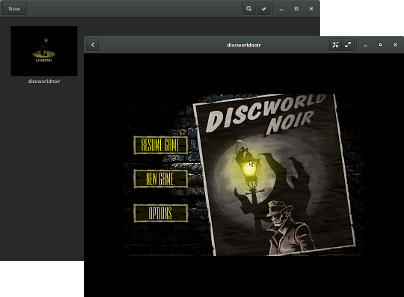
Simon McVittie: Discworld Noir in a Windows 98 virtual machine on Linux

Discworld Noir was a superb adventure game, but is also notoriously unreliable, even in Windows on real hardware; using Wine is just not going to work. After many attempts at bringing it back into working order, I've settled on an approach that seems to work: now that qemu and libvirt have made virtualization and emulation easy, I can run it in a version of Windows that was current at the time of its release. Unfortunately, Windows 98 doesn't virtualize particularly well either, so this still became a relatively extensive yak-shaving exercise. discworldnoir-boxes.jpg These instructions assume that /srv/virt is a suitable place to put disk images, but you can use anywhere you want. The emulated PC After some trial and error, it seems to work if I configure qemu to emulate the following: A modern laptop CPU is an order of magnitude faster than what Discworld Noir needs, so full emulation isn't a problem, despite being inefficient. There is deliberately no networking, because Discworld Noir doesn't need it, and a 17 year old operating system with no privilege separation is very much not safe to use on the modern Internet! Software needed Windows 98 installation It seems to be easiest to do this bit by running qemu-system-i386 manually:
qemu-img create -f qcow2 /srv/virt/discworldnoir.qcow2 30G
qemu-system-i386 -hda /srv/virt/discworldnoir.qcow2 \
    -drive media=cdrom,format=raw,file=/srv/virt/windows98.iso \
    -no-kvm -vga cirrus -m 256 -cpu pentium3 -localtime
Don't start the installation immediately. Instead, boot the installation CD to a DOS prompt with CD-ROM support. From here, run
fdisk
and create a single partition filling the emulated hard disk. When finished, hard-reboot the virtual machine (press Ctrl+C on the qemu-system-i386 process and run it again). The DOS FORMAT.COM utility is on the Windows CD-ROM but not in the root directory or the default %PATH%, so you'll have to run:
d:\win98\format c:
to create the FAT filesystem. You might have to reboot again at this point. The reason for doing this the hard way is that the Windows 98 installer doesn't detect qemu as supporting ACPI. You want ACPI support, so that Windows will issue IDLE instructions from its idle loop, instead of occupying a CPU core with a busy-loop. To get that, boot to a DOS prompt again, and use:
setup /p j /iv
/p j forces ACPI support (Thanks to "Richard S" on the Virtualbox forums for this tip.) /iv is unimportant, but it disables the annoying "billboards" during installation, which advertised once-exciting features like support for dial-up modems and JPEG wallpaper. I used a "Typical" installation; there didn't seem to be much point in tweaking the installed package set when everything is so small by modern standards. Windows 98 has built-in support for the Cirrus VGA card that we're emulating, so after a few reboots, it should be able to run in a semi-modern resolution and colour depth. Discworld Noir apparently prefers a 640 480 16-bit video mode, so right-click on the desktop background, choose Properties and set that up. Audio drivers This is the part that took me the longest to get working. Of the sound cards that qemu can emulate, Windows 98 only supports the SoundBlaster 16 out of the box. Unfortunately, the Soundblaster 16 emulation in qemu is incomplete, and in particular version 2.1 (as shipped in Debian 8) has a tendency to make Windows lock up during boot. I've seen advice in various places to emulate an Eqsonic ES1370 (SoundBlaster AWE 64), but that didn't work for me: one of the drivers I tried caused Windows to lock up at a black screen during boot, and the other didn't detect the emulated hardware. The next-oldest sound card that qemu can emulate is a Realtek AC97, which was often found integrated into motherboards in the late 1990s. This one seems to work, with the "A400" driver bundle linked above. For Windows 98 first edition, you need a driver bundle that includes the old "VXD" drivers, not just the "WDM" drivers supported by Second Edition and newer. The easiest way to get that into qemu seems to be to turn it into a CD image:
genisoimage -o /srv/virt/discworldnoir-drivers.iso WDM_A400.exe
qemu-system-i386 -hda /srv/virt/discworldnoir.qcow2 \
    -drive media=cdrom,format=raw,file=/srv/virt/windows98.iso \
    -drive media=cdrom,format=raw,file=/srv/virt/discworldnoir-drivers.iso \
    -no-kvm -vga cirrus -m 256 -cpu pentium3 -localtime -soundhw ac97
Run the installer from E:, then reboot with the Windows 98 CD inserted, and Windows should install the driver. Installing Discworld Noir Boot up the virtual machine with CD 1 in the emulated drive:
qemu-system-i386 -hda /srv/virt/discworldnoir.qcow2 \
    -drive media=cdrom,format=raw,file=/srv/virt/DWN_ENG_1.iso \
    -no-kvm -vga cirrus -m 256 -cpu pentium3 -localtime -soundhw ac97
You might be thinking "... why not insert all three CDs into D:, E: and F:?" but the installer expects subsequent disks to appear in the same drive where CD 1 was initially, so that won't work. Instead, when prompted for a new CD, switch to the qemu monitor with Ctrl+Alt+2 (note that this is 2, not F2). At the (qemu) prompt, use info block to see a list of emulated drives, then issue a command like
change ide0-cd1 /srv/virt/DWN_ENG_2.iso
to swap the CD. Then switch back to Windows' console with Ctrl+Alt+1 and continue installation. I used a Full installation of Discworld Noir. Transferring the virtual machine to GNOME Boxes Having finished the "control freak" phase of installation, I wanted a slightly more user-friendly way to run this game, so I transferred the virtual machine to be used by libvirtd, which is the backend for both GNOME Boxes and virt-manager:
virsh create discworldnoir.xml
Here is the configuration I used. It's a mixture of automatic configuration from virt-manager, and hand-edited configuration to make it match the qemu-system-i386 command-line. Running the game If all goes well, you should now see a discworldnoir virtual machine in GNOME Boxes, in which you can boot Windows 98 and play the game. Have fun!

14 November 2015

Daniel Pocock: Migrating data from Windows phones

Many of the people who have bought Windows phones seek relief sooner or later. Sometimes this comes about due to peer pressure or the feeling of isolation, in other cases it is the frustration of the user interface or the realization that they can't run cool apps like Lumicall. Frequently, the user has been given the phone as a complimentary upgrade when extending a contract without perceiving the time, effort and potential cost involved in getting their data out of the phone, especially if they never owned a smartphone before. When a Windows phone user does decide to cut their losses, they are usually looking to a friend or colleague with technical expertise to help them out. Personally, I'm not sure that anybody I would regard as an IT expert has ever had a Windows phone though, meaning that many experts are probably also going to be scratching their heads when somebody asks them for help. Therefore, I've put together this brief guide to help deal with these phones more expediently when they are encountered. The Windows phones have really bad support for things like CalDAV and WebDAV so don't get your hopes up about using such methods to backup the data to any arbitrary server. Searching online you can find some hacks that involve creating a Google or iCloud account in the phone and then modifying the advanced settings to send the data to an arbitrary server. These techniques vary a lot between specific versions of the Windows Phone OS and so the techniques I've described below are probably easier. Identify the Windows Live / Hotmail account The user may not remember or realize that a Microsoft account was created when they first obtained the phone. It may have been created for them by the phone, a friend or the salesperson in the phone shop. Look in the settings (Accounts) to find the account ID / email address. If the user hasn't been using this account, they may not recognize it and probably won't know the password for it. It is essential to try and obtain (or reset) the password before going any further, so start with the password recovery process. Microsoft may insist on sending a password reset email to some other email address that the user has previously provided or linked to their phone. Extracting data from the phone In many cases, the easiest way to extract the data is to download it from Microsoft live.com rather than extracting it from the phone. Even if the user doesn't realize it, the data is probably all replicated in live.com and so there is no further loss of privacy by logging in there to extract it. Set up an IMAP mail client An IMAP client will be used to download the user's emails (from the live.com account they may never have used) and SMS. Install Mozilla Thunderbird (IceDove on Debian), GNOME Evolution or a similar program on the user's PC. Configure the IMAP mail client to connect to the live.com account. Some clients, like Thunderbird, will automatically set up all the server details when you enter the live.com account ID. For manual account setup, the details here may help. Email backup If the user was not using the live.com account ID for email correspondence, there may not be a lot of mail in it. There may be some billing receipts or other things that are worth keeping though. Create a new folder (or set of folders) in the user's preferred email account and drag and drop the messages from the live.com Inbox to the new folder(s). SMS backup SMS backup can also be done through live.com. It is slightly more complicated than email backup, but similar.
  • In the live.com Outlook email index page, look for the settings button and click Manage Categories.
  • Enable the Contacts and Photos categories with a tick in each of them.
  • Go back to the main Inbox page and look for the categories section on the bottom left-hand side of the screen, under the folder list. Click the Contacts category.
  • The page may now appear blank. That is normal.
  • On the top right-hand corner of the page, click the Arrange menu and choose Conversation.
  • All the SMS messages should now appear on the screen.
  • Under the mail folders list on the left-hand side of the page, click to create a new folder with a name like SMS.
  • Select all the SMS messages and look for the option to move them to a folder. Send them to the SMS folder you created.
  • Now use the IMAP mail client to locate the SMS folder and copy everything from there to a new folder in the user's preferred mail server or local disk.
Contacts backup On the top left-hand corner of the live.com email page, there is a chooser to select other live.com applications. Select People. You should now see a list of all the user's contacts. Look for the option to export them to Outlook and other programs. This will export them as a CSV file. You can now import the CSV file into another application. GNOME Evolution has an import wizard with an option for Outlook file format. To load the contacts into a WebDAV address book, such as DAViCal, configure the address book in Evolution and then select it as the destination when running the CSV import wizard. WARNING: beware of using the Mozilla Thunderbird address book with contact data from mobile devices and other sources. It can't handle more than two email addresses per contact and this can lead to silent data loss if contacts are not fully saved. Calendar backup Now go to the live.com application chooser again and select the calendar application. Microsoft provides instructions to extract the calendar, summarised here:
  • Look for the Share button at the top somewhere and click it.
  • On the left-hand side of the page, click Get a link
  • On the right-hand side, choose Show event details to ensure you get a full calendar and then click Create underneath it.
  • Look for the link with a webcals prefix. If you are downloading with a tool like wget, change the scheme prefix to https. Fetch the file from this link and save it with an ics extension.
  • Inspect the ics calendar file to make sure it looks like real iCalendar data.
You can now import the ics file into another application. GNOME Evolution has an import wizard with an option for iCalendar file format. To load the calendar entries into a CalDAV server, such as DAViCal, configure the calendar server in Evolution and then select it as the destination when running the import wizard. Backup the user's photos, videos and other data files Hopefully you will be able to do this step without going through live.com. Try enabling the MTP or PTP mode in the phone and attach it to the computer using the USB cable. Hopefully the computer will recognize it in at least one of those modes. Use the computer's file manager or another tool to simply backup the entire directory structure. Reset the phone to factory defaults Once the user has their hands on a real phone, it is likely they will never want to look at that Windows phone again. It is time to erase the Windows phone, there is no going back. Go to the Settings and About and tap the factory reset option. It is important to do this before obliterating the live.com account, otherwise there are scenarios where you could be locked out of the phone and unable to erase it. Erasing may take some time. The phone will reboot and then display an animation of some gears spinning around for a few minutes and then reboot again. Wait for it to completely erase. Permanently close the Microsoft live.com account Keeping track of multiple accounts and other services is tedious and frustrating for most people, especially with services that try to force the user to receive email in different places. You can help eliminate user fatigue by helping them permanently close the live.com account so they never have to worry about it again. Follow the instructions on the Microsoft site. At some point it will suggest certain actions you should take before closing the account, most can be ignored. One thing you should do is remove the link between the live.com account ID and the phone. It is a good idea to do this as otherwise you may have problems erasing the device, if you haven't already done so. Before completely closing the account, also verify that the factory reset of the phone completed successfully. Dispose of the Windows phone safely If you can identify any faults with the phone, the user may be able to return it under the terms of the warranty. Some phone companies may allow the user to exchange it for something more desirable when it fails under warranty. It may be tempting to sell the phone to a complete stranger on eBay or install a custom ROM on it. In practice, neither option may be worth the time and effort involved. You may be tempted to put it beyond use so nobody else will suffer with it, but please try to do so in a way that is respectful of the environment. Putting the data into a new phone Prepare the new phone with a suitable ROM such as Replicant or Cyanogenmod. Install the F-Droid app on the new phone. From F-droid, install the DAVdroid app. DAVdroid will allow you to quickly sync the new phone against any arbitrary CalDAV and WebDAV server to populate it with the user's calendar and contact / address book data. Now is a good time to install other interesting apps like Lumicall, Conversations and K-9 Mail.

Juliana Louback: PaperTrail - Powered by IBM Watson

On the final semester of my MSc program at Columbia SEAS, I was lucky enough to be able to attend a seminar course taught by Alfio Gliozzo entitled Q&A with IBM Watson. A significant part of the course is dedicated to learning how to leverage the services and resources available on the Watson Developer Cloud. This post describes the course project my team developed, the PaperTrail application.

Project Proposal Create an application to assist in the development of future academic papers. Based on a paper s initial proposal, Paper Trail predicts publications to be used as references or acknowledgement of prior art and provides a trend analysis of major topics and methods. The objective is to speed the discovery of relevant papers early in the research process, and allow for early assessment of the depth of prior research concerning the initial proposal.

Meet the Team Wesley Bruning, Software Engineer, MSc. in Computer Science Xavier Gonzalez, Industrial Engineer, MSc. in Data Science Juliana Louback, Software Engineer, MSc. in Computer Science Aaron Zakem, Patent Attorney, MSc. in Computer Science

Prior Art A significant amount of attention has been given to this topic over the past few decades. The table below shows the work the team deemed most relevant due to recency, accuracy and similarity of functionality. priorArt The variation in accuracy displayed is a result of experimentation with different dataset sizes and algorithm variations. More information and details can be found in the prior art report. The main differential of PaperTrail is providing a form of access to the citation prediciton and trend analysis algorithm. With the exception of the project by McNee et al., these algorithmns aren t currently available for general use. The application on researchindex.net is open to use but its objective is to rank publications and authors for given topics.

Algorithm Citation Prediction: PaperTrail builds on the work done by Wolski s team in Fall 2014. This algorithmn builds a reference graph used to define research communities, with an associated vector of topic scores generated by an LDA model. The papers in each research community are then ranked by importance within the community with a custom ranking algorithm. When a target document is given to algorithm as input, the LDA model is used to generate a vector of topics that are present in the document. The communities with the most similar topic vectors are selected and the publications within these communities with highest rank and greatest similarity to the input document are recommended as references. A more detailed description can be found here. Trend Analysis: Initially, the idea was to use the AlchemyData News API to obtain statistics pertaining to the amount of publications on a given topic over time. However, with the exception of buzz-words (i.e. big data ), many more specialized topics appeared very infrequently in news articles, if at all. This isn t entirely surprising given the target audience of PaperTrail. As a work around, we use the Alchemy Language API to extract keywords from the abstracts in the dataset, in addition to relevance scores. The PaperTrail database could then be queried for entry counts for a given year and keyword to provide an indication of publication trends in academia. Note that the Alchemy Language API extracts multiple-word keywords as well as single words.

Data To maintain consistency with Wolski s project, we are using the DBLP data as made available on aminer.org. The DBLP-Citation-network V5 dataset contains 1,572,277 entries; we are limited to the use of entries that contain both abstracts and citations, bringing the dataset size down to 265,865 entries.

Architecture A high-level visualization of the project architecture is displayed below. Before launching PaperTrail, it s necessary to train Wolski s algorithm offline. Currently any documentation with regard to the performance of said algorithm is unavailable; the PaperTrail project will include an evaluation phase and report the findings made. The PaperTrail app and database will be hosted on the Bluemix Platform. ptArchitecture

Status Report Phases completed:
  • Project design
  • Prior art research
  • Data cleansing
  • Development and deployment of an alpha version of the PaperTrail app
Phases under development:
  • Algorithm training and evaluation
  • Keyword extraction
  • MapReduce of publication frequency by year and topic
  • Data visualization component

Craig Small: Mixing pysnmp and stdin

Depending on the application, sometimes you want to have some socket operations going (such as loading a website) and have stdin being read. There are plenty of examples for this in python which usually boil down to making stdin behave like a socket and mixing it into the list of sockets select() cares about. A while ago I asked an email list could I have pysnmp use a different socket map so I could add my own sockets in (UDP, TCP and a zmq to name a few) and the Ilya the author of pysnmp explained how pysnmp can use a foreign socket map. This sample code below is merely an mixture of Ilya s example code and the way stdin gets mixed into the fold. I have also updated to the high-level pysnmp API which explains the slight differences in the calls.
  1. from time import time
  2. import sys
  3. import asyncore
  4. from pysnmp.hlapi import asyncore as snmpAC
  5. from pysnmp.carrier.asynsock.dispatch import AsynsockDispatcher
  6.  
  7.  
  8. class CmdlineClient(asyncore.file_dispatcher):
  9.     def handle_read(self):
  10.     buf = self.recv(1024)
  11.     print "you said  ".format(buf)
  12.  
  13.  
  14. def myCallback(snmpEngine, sendRequestHandle, errorIndication,
  15.                errorStatus, errorIndex, varBinds, cbCtx):
  16.     print "myCallback!!"
  17.     if errorIndication:
  18.         print(errorIndication)
  19.         return
  20.     if errorStatus:
  21.         print('%s at %s' % (errorStatus.prettyPrint(),
  22.               errorIndex and varBinds[int(errorIndex)-1] or '?')
  23.              )
  24.         return
  25.  
  26.     for oid, val in varBinds:
  27.     if val is None:
  28.         print(oid.prettyPrint())
  29.     else:
  30.         print('%s = %s' % (oid.prettyPrint(), val.prettyPrint()))
  31.  
  32. sharedSocketMap =   
  33. transportDispatcher = AsynsockDispatcher()
  34. transportDispatcher.setSocketMap(sharedSocketMap)
  35. snmpEngine = snmpAC.SnmpEngine()
  36. snmpEngine.registerTransportDispatcher(transportDispatcher)
  37. sharedSocketMap[sys.stdin] = CmdlineClient(sys.stdin)
  38.  
  39. snmpAC.getCmd(
  40.     snmpEngine,
  41.     snmpAC.CommunityData('public'),
  42.     snmpAC.UdpTransportTarget(('127.0.0.1', 161)),
  43.     snmpAC.ContextData(),
  44.     snmpAC.ObjectType(
  45.         snmpAC.ObjectIdentity('SNMPv2-MIB', 'sysDescr', 0)),
  46.     cbFun=myCallback)
  47.  
  48. while True:
  49.     asyncore.poll(timeout=0.5, map=sharedSocketMap)
  50.     if transportDispatcher.jobsArePending() or transportDispatcher.transportsAreWorking():
  51.         transportDispatcher.handleTimerTick(time())
Some interesting lines from the above code: With all this I can handle keyboard presses and network traffic, such as a simple SNMP poll.

13 November 2015

Francois Marier: How Tracking Protection works in Firefox

Firefox 42, which was released last week, introduced a new feature in its Private Browsing mode: tracking protection. If you are interested in how this list is put together and then used in Firefox, this post is for you.

Safe Browsing lists There are many possible ways to download URL lists to the browser and check against that list before loading anything. One of those is already implemented as part of our malware and phishing protection. It uses the Safe Browsing v2.2 protocol. In a nutshell, the way that this works is that each URL on the block list is hashed (using SHA-256) and then that list of hashes is downloaded by Firefox and stored into a data structure on disk:
  • ~/.cache/mozilla/firefox/XXXX/safebrowsing/mozstd-track* on Linux
  • ~/Library/Caches/Firefox/Profiles/XXXX/safebrowsing/mozstd-track* on Mac
  • C:\Users\XXXX\AppData\Local\mozilla\firefox\profiles\XXXX\safebrowsing\mozstd-track* on Windows
This sbdbdump script can be used to extract the hashes contained in these files and will output something like this:
$ ~/sbdbdump/dump.py -v .
- Reading sbstore: mozstd-track-digest256
[mozstd-track-digest256] magic 1231AF3B Version 3 NumAddChunk: 1 NumSubChunk: 0 NumAddPrefix: 0 NumSubPrefix: 0 NumAddComplete: 1696 NumSubComplete: 0
[mozstd-track-digest256] AddChunks: 1445465225
[mozstd-track-digest256] SubChunks:
...
[mozstd-track-digest256] addComplete[chunk:1445465225] e48768b0ce59561e5bc141a52061dd45524e75b66cad7d59dd92e4307625bdc5
...
[mozstd-track-digest256] MD5: 81a8becb0903de19351427b24921a772
The name of the blocklist being dumped here (mozstd-track-digest256) is set in the urlclassifier.trackingTable preference which you can find in about:config. The most important part of the output shown above is the addComplete line which contains a hash that we will see again in a later section.

List lookups Once it's time to load a resource, Firefox hashes the URL, as well as a few variations of it, and then looks for it in the local lists. If there's no match, then the load proceeds. If there's a match, then we do an additional check against a pairwise allowlist. The pairwise allowlist (hardcoded in the urlclassifier.trackingWhitelistTable pref) is designed to encode what we call "entity relationships". The list groups related domains together for the purpose of checking whether a load is first or third party (e.g. twitter.com and twimg.com both belong to the same entity). Entries on this list (named mozstd-trackwhite-digest256) look like this:
twitter.com/?resource=twimg.com
which translates to "if you're on the twitter.com site, then don't block resources from twimg.com. If there's a match on the second list, we don't block the load. It's only when we get a match on the first list and not the second one that we go ahead and cancel the network load. If you visit our test page, you will see tracking protection in action with a shield icon in the URL bar. Opening the developer tool console will expose the URL of the resource that was blocked:
The resource at "https://trackertest.org/tracker.js" was blocked because tracking protection is enabled.

Creating the lists The blocklist is created by Disconnect according to their definition of tracking. The Disconnect list is on their Github page, but the copy we use in Firefox is the copy we have in our own repository. Similarly the Disconnect entity list is from here but our copy is in our repository. Should you wish to be notified of any changes to the lists, you can simply subscribe to this Atom feed. To convert this JSON-formatted list into the binary format needed by the Safe Browsing code, we run a custom list generation script whenever the list changes on GitHub. If you run that script locally using the same configuration as our server stack, you can see the conversion from the original list to the binary hashes. Here's a sample entry from the mozstd-track-digest256.log file:
[m] twimg.com >> twimg.com/
[canonicalized] twimg.com/
[hash] e48768b0ce59561e5bc141a52061dd45524e75b66cad7d59dd92e4307625bdc5
and one from mozstd-trackwhite-digest256.log:
[entity] Twitter >> (canonicalized) twitter.com/?resource=twimg.com, hash a8e9e3456f46dbe49551c7da3860f64393d8f9d96f42b5ae86927722467577df
This in combination with the sbdbdump script mentioned earlier, will allow you to audit the contents of the local lists.

Serving the lists The way that the binary lists are served to Firefox is through a custom server component written by Mozilla: shavar. Every hour, Firefox requests updates from shavar.services.mozilla.com. If new data is available, then the whole list is downloaded again. Otherwise, all it receives in return is an empty 204 response. Should you want to play with it and run your own server, follow the installation instructions and then go into about:config to change these preferences to point to your own instance:
browser.trackingprotection.gethashURL
browser.trackingprotection.updateURL
Note that on Firefox 43 and later, these prefs have been renamed to:
browser.safebrowsing.provider.mozilla.gethashURL
browser.safebrowsing.provider.mozilla.updateURL

Learn more If you want to learn more about how tracking protection works in Firefox, you can find all of the technical details on the Mozilla wiki or you can ask questions on our mailing list. Thanks to Tanvi Vyas for reviewing a draft of this post.

Next.

Previous.