Search Results: "sto"

2 December 2009

Margarita Manterola: Languages of the world, unite!

After reading Christian's post about the new ISO 639-3, I thought about the "what is the country in the world which as the highest number of languages listed in ISO 639-3" question, and thought, "It must be India or China", and sure enough they both have a high language count (428 and 236 respectively). However, after clicking around a while, I found out that Nigeria has 510 languages. I thought I had found the highest one for quite a while, until I got to Indonesia, which has 742 languages, and I thought "it's not fair, that's much more than just a country, it's a huge group of islands". Not having learned my lesson, I was quite astonished when I finally found out that the country with the highest number of languages is Papua New Guinea, a neighboring group of islands (although not so big as Indonesia), with 830 languages! In Europe, the coutry with the highest number is Turkey (36), followed by Italy (33) and France (32). It looks like Europe has gone a long way after that stupid Babel incident :). In America, I thought Argentina would be quite up in the list, since we do have a lot of native groups, but it turns out we only have 27 languages and we are on the 9th place. The country with the most languages is Mexico (298), then USA (238), then Brazil (235). And, after all that clicking around the site, I found a very interesting map, that has one red dot per language in the primary location of each living language. It's quite amazing to see the big red New Guinea island. I wonder what happened there that led to the creation of that many languages.

1 December 2009

Adrian von Bidder: Toys, Number One

After I had been living with mostly the same electronic toys over the last few years (ok, I got the netbook earlier this year, but that's about it... and it might even count as a serious work tool given how much I came to use it) all the toys I've agonized over buying suddenly appeared on the doorstep within these two weeks... First part was the QNAP TS-419P which I bought after reading about QNAP on Martin Michlmayr's blog. The decision was quick when I realized that at least part of the Debian related information was not hidden in some obscure web forums but was there on the QNAP wiki itself, indicating quite some level of support from the manufacturer. Beyond that, tbm does an awsome job supporting QNAP users like myself through his excellent QNAP / Kirkwood pages and also, since Debian installer support for the 419 is not quite finished, by email. Kudos to him! So, once I get past some remaining obstacles (for some reason, the initrd refused to mount a raid1 root device when I tried it at first; working on that, but it's not that easy to debug without console access...) our old storage / Internet router (very old! Pentium II 350MHz with 128M RAM and its probably third internal disk, which became ridicolous to use when I bought a (big) external USB disk and realized it only has USB 1...) can be retired. Should be good for the environment, too, I should hope, in terms of power consumption even considering that I now run 3 more disks.

Stephan Peijnik: How to copy partitions under GNU/Linux the easy way

After getting a new disk for my Popcorn Hour A-110 device I had to copy all partitions from the old disk onto the new one so I do not have to reinstall some applications and reconfigure everything.

After searching the web and trying to find a free alternative to Norton Ghost and Acronis True Image, preferably not using a boot disk on its own (I did not want to backup my workstation after all, just a simple partition to partition copy between two SATA disks) I gave up and decided to do the copying manually.

So I fired up gparted to do the partitioning, did a right click and... I noticed that gparted supports copy/paste. Being curious about what this could potentially do I gave it a try. I marked partition one on the old disk, did a copy, went to the new disk and clicked on paste - and guess what, gparted did what I was looking for.

Putting a long story short: you can copy whole partitions using gparted's copy/paste mechanism and even resize them whilst doing so. I am somehow ashamed I did not notice this feature earlier, having been a gparted user for a few years now and I can imagine I am not the only one who missed that.

Raphael Geissert: about scams

Email scams have changed... for good and for bad (depends on the POV and the case).

I decided to pick two samples that demonstrate two directions scams seems to be taking:


NAME
ADDRESS
TELEPHONE
SEX


As simple as that. Now the subject takes a more important role than the content: "Your email ID has been awarded one million pounds. in our Tobacco Promo". This, I must say, seems to be one of the worst scam emails I've ever seen. Compare it to the following:

Dear Raphael,

This email might come to you as a surprise and the temptation to ignore
it as not serious could come into your mind but please consider it and
accept it with a deep sense of humility.
[...]
The sum of ( 10,700, 000.00 Million Pounds), has been floating as
unclaimed since 2002 in my bank as all efforts to get across the
relatives of our customer Mr. Ruben Geissert who deposited the money
have hit the stones. Unfortunately, He died of Cardiac Arrest in the
year 2002, without a registered nest of kin.


I've highlighted the important bits of the email; the difference is clear.

I was already wondering some time ago when this kind of "improvements" to the scam (and spam in general) emails would be seen.

What's next?


P.S. if you haven't voted at the Earth Hour website please consider doing so.
If you are having problems voting because of the flash application, here's a direct link.

30 November 2009

Russell Coker: The Transition to Ext4

I ve been investigating the Ext4 filesystem [1]. The main factor that is driving me to Ext4 at the moment is fsck times. I have some systems running Ext3 on large filesystems which I need to extend. In most cases Ext3 filesystems have large numbers of Inodes free because the relationship between the number of Inodes and the filesystem size is set when it is created, enlarging the filesystem increases the number of Inodes and apart from backup/format/restore there is no way of changing this. Some of the filesystems I manage can t be converted because the backup/restore time would involve an unreasonable amount of downtime. Page 11 of the OLS paper by Avantika Mathur et al [2] has a graph of the relationship between the number of Inodes and fsck time. Ext4 also has a number of other features to improve performance, including changes to journaling and block allocation. Now my most important systems are all virtualised. I am using Debian/Lenny and RHEL5 for the Dom0s. Red Hat might back-port Ext4 to the RHEL5 kernel, but there will probably never be a supported kernel for Debian/Lenny with Ext4 and Xen Dom0 support (there may never be a kernel for any Debian release with such support). So this means that in a few months time I will be running some DomUs which have filesystems that can t be mounted in the Dom0. This isn t a problem when everything works well. But when things go wrong it s really convenient to be able to amount a filesystem in the Dom0 to fix things, this option will disappear for some of my systems, so if virtual machine A has a problem then I will have to mount it s filesystems with virtual machine B to fix it. Of course this is a strong incentive to use multiple block devices for the virtual machine so that a small root filesystem can be run with Ext3 and the rest can be Ext4. At the moment only Debian/Unstable and Fedora have support for Ext4 so this isn t a real issue. But Debian/Squeeze will release with Ext4 support and I expect that RHEL6 will also have it. When those releases happen I will be upgrading my virtual machines and will have these support issues. It s a pity that Red Hat never supported XFS, I could have solved some of these problems years ago if XFS was available. Now for non-virtual machines one factor to consider is that the legacy version of GRUB doesn t support Ext4, I discovered this after I used tune2fs to convert all filesystems on my EeePC to Ext4. I think I could have undone that tune2fs option but instead decided to upgrade to the new version of GRUB and copy the kernel and initramfs to a USB device in case it didn t boot. It turns out that the new version of GRUB seems to work well for booting from Ext4. One thing that is not explicitly mentioned in the howto is that the fsck pass needed to convert to Ext4 will not be done automatically by most distributions. So when I converted my EeePC I had to use sulogin to manually fsck the filesystems. This isn t a problem with a laptop, but could be a problem with a co-located server system. For the long term BTRFS may be a better option, I plan to test it on /home on my EeePC. But I will give Ext4 some more testing first. In any case the Ext3 filesystems on big servers are not going to go away in a hurry.

MJ Ray: Top 10 Crimes of Developer Engagement: a common problem?

savs seemed to agonise about posting it but I think his Top 10 crimes of Developer Engagement is spot on even if it might not be as amusing as Aral Balkan s similar message. I think it applies to my recent RFID development work too: the public information is fluffy and you have to hunt or reverse-engineer most of the technical info, the supplier websites are painful and there s almost no interaction. In the past, I d been factoring in something between 50 and 100% extra time when our co-op needed to coordinate with unknown non-co-ops. With RFID hardware work, it was well over 300% when I last calculated it and that s even though there was one pretty helpful RFID supplier. This sort of nonsense is painful, slows development massively, could kill useful technologies at birth and re-emphasises my commitment to use Open Standards as much as reasonable. Have other people got similar horror stories to share? Can we get savs s Top 10 Crimes under the noses of some high-profile people?

Andrew Pollock: [tech] Review: iGala digital picture frame

Now that I'm not letting the cat out of the bag (I bought these as gifts) I can write a review. The use case was pretty simple: I thought it'd be a cool Christmas present for our parents to give them something Internet-enabled that would give them regular updates on their grandchild (when he/she arrives). I was thinking a picture a day type of thing. So I hunted around for a WiFi-enabled digital picture frame, and found the iGala being sold pretty much exclusively by ThinkGeek. The reviews seemed pretty good. I know WiFi-capable frames have been around for a few years, but they always seemed to be pretty lacking in terms of WiFi functionality. Like they wouldn't do any security, or they'd only do WEP. This particular product claimed to do the whole gamut, including WPA2. The fact that it was a touch screen and ran Linux also made it appealing. So I ordered a couple of them for a few weeks before we headed to Australia, with the intention of making sure that they'd work. Here's the highlights. WPA2 didn't work (nor did WPA) Despite the software on the frames claiming to be able to talk WPA2, the frame would not associate with my Linksys WRTU54G-TM. I had to drop it all the way back to WEP to get it to connect. For me, this was the most disappointing failure. I bought the product specifically on the strength of its claim that it supported WPA2, and it just didn't work. It was also pretty impossible to debug the failure. I downloaded the latest firmware update, and that added additional settings for TKIP or AES when selecting WPA2, but neither option helped. The automatic updates are brain-dead Speaking of downloading firmware updates, the latest firmware that I downloaded and installed on the frames added automatic over-the-air firmware updates. Nice enough feature, except for the implementation. The frame tried to make an HTTP GET request for a non-existent file, every 6 seconds. So the frequency of checking alone is totally ridiculous, but couple with this the fact that it's making a GET request (this is what $DEITY invented the HEAD request for, people!) and the website has a "friendly" 404 Not Found page that weighs in at a little over 10 Kb. By my calculations, that's nearly 150 Mb of failed update checking traffic a day. Taking these frames to a backward country like Australia, where ISP users still have monthly quotas, gives the frame a pretty horrendous running cost in terms of traffic. Not to mention the outbound bandwidth requirements for the server hosting the updates. Crikey, the mind boggles. I'd have thought checking once a day and on power on would be perfectly sufficient. Transitions are unavoidable It may be just me, but I hate cheezy transitions. Digital picture frames tend to come with a myriad of them, but they all look cheap. It's impossible to tell the frame to just change the picture, it has to use at least one transition effect all the time. It defaults to randomly choosing from all the available ones. At least you can tone it down to just one. Automatic on/off time I liked that it was possible to configure operating times. No need to have the thing chewing power 24x7. It just seems to turn off the backlight outside of the programmed operating hours, so it's still doing the lame uber-frequent and bandwidth-intensive checking for updates even when it's "off". Photo check frequency is configurable Another nice feature was the ability to check for new photos at varying intervals. What I wanted for my parents was to just update once a day, so they'd get a new photo every day (assuming we put a new one in the Picasa web album that it's checking). This was very doable, and coupled with the automatic on/off time, means they should wake up to a new photo every day (that we change it). Built in photos are a bit too sticky There's 3 or 4 in-built photos as part of the firmware. If there's nothing accessible or available online, it'll cycle through these. Somewhat annoyingly, you need to have at least two photos in your online source for it to stop wanting to incorporate the stock photos in the mix. The workaround is to put the same photo in the online album twice, so you don't realise it's switching between two images. Lame, but it works... Touch screen UI was adequate Given the alternative user interface for digital picture frames is a little IR remote control and some dinky menus, the iGala was nice to configure. A full on-screen QWERTY keyboard pops up for entering WEP/WPA/WPA2 keys and configuring the Picasa/Flickr connections. Fairly responsive support The main near-showstopper for me was the lack of advertised WPA2 support. I emailed the Aequitech support folks quite a bit during my "evaluation" period. They got back to me fairly quickly most of the time and wanted to know exact details of my setup so they could reproduce it in the lab. They'd be well served having an actual ticketing system, instead of hiding behind an email address, as it made it hard to keep track of the multiple issues I was raising with them. It's written in Lua?! I have no familiarity with Lua, other than I know of its existence as a programming language. I'm curious as to what their motivation was for this language choice. All of the Lua code shipped in the complete firmware refresh ZIP files is bytecode. I have no idea if it's possible to decompile it. The CPU architecture would appear to be a Blackfin based on the few compiled binaries included in the full firmware. Easy to update Prior to the new update "functionality" I've already railed against, it was pretty easy to update. Download a ZIP file and a shell script, put them in the root directory of a USB key, and plug it into the frame and stand back. The updates don't seem to cryptographically verified (even the over-the-air ones), so I wonder if it's possible to break into the frame by way of a cleverly crafted "update". I have no idea what breaking into the frame would buy you. I don't know what sort of computing power they have. Conclusion I still think the iGala is a reasonable, if somewhat immature product. If the software is going to be actively worked on, and the support people continue to be responsive, then I think it's got good potential. For the price, I expected a more polished product, though. I received an email from their support people shortly after returning from Australia saying that they'd fixed the WPA2 problem. Unfortunately I had no intention of trying to remotely talk my parents through how to reconfigure their access point or the frame (interestingly WPA2 didn't work with their Linksys WAG54G2 either, so I'd love to know what WPA2 devices it was tested with), so it's 128-bit WEP until I next go to Australia.

29 November 2009

Torsten Landschoff: New development box installation woes

I got a new computer at home a week ago and finally got around to assemble all the parts. Which wasn t as easy as expected, especially fitting the CPU cooler was a hard fight. Specs For the curious, here are the specs:

CPU
AMD Phenom II X4 965 (4 3.4 GHz)
Mainboard
MSI 790GX-G65
Graphics
ATI Radeon HD 3300 (on-board)
RAM
8 GB, DDR3
Hard drives
2x SATA 1.5 TB (by Western Digital)
Ubuntu installation For testing and having a first look, I installed Ubuntu karmic koala (amd64). Installation went like a breeze, everything was detected and worked out of the box. Well, kind of graphics performance was dreadful. Which was kind of expected. Debian installation I originally thought about using Debian only inside virtual machines or change roots. Still, Ubuntu does not really feel like the real thing . So I went to install Debian, aiming at a sid/unstable installation. The first boot using the official squeeze snapshot netinst image (Binary-1 20091128-11:21) went fine. Up to the first prompt: No input was possible. Probably a problem with the USB keyboard I had connected (Logitech wireless). Out of curiosity I tried the graphical installer, which did not even get so far. It was stuck in an endless loop trying to start an X11 server. So I dug for a PS/2 connected keyboard and had more luck. I got to the point where the installer searches for the CD-ROM drive. As I did not want to dismantle my old system yet, I used an external USB DVD/RW drive. This was not detected by the installer so I was unable to continue installation. I guess, the NIC driver was also on the disc so no ethernet either. Today I installed the DVD burner into the tower and had more luck. It still amazes me how easy it is to create my default storage setup using d-i (LVM on RAID). However, the installer failed to reread the partitions after I created two on each drive, interestingly telling me about /dev/sda2 being busy. Perhaps a left-over swap partition from the Ubuntu install? Anyway, after running fdisk manually and writing the same partition table again, I was able to continue. The remaining d-i steps went fine, with just a nuisance: I was asked for the console font setting twice. And I had no idea what it was asking of me, AFAIK UTF-8 should be fine for all possible uses. I selected # Latin1 and Latin5 western Europe and Turkic languages. Not that I will see the console unless Xorg fails to run After having the base system running, I rebooted without selecting any more software, partly because I knew that the resync on md1 will need restarting after booting into the new system. The new system booted fine and I called aptitude to install build-essential, Xorg and both KDE and Gnome desktops. This pulled in MySQL via akonadi-server (ouch!) and I was asked for a MySQL root password. Seriously, I don t care, this is a desktop system. I tend to forget the password anyway and the last time, root was able to reset it. So I just hit Enter, leaving no password set. This lead to the installation asking me two more times for the password, which really sucks given that the server is only used by Akonadi for whatever reason and the last time I looked, it creates its own MySQL configuration. Albeit my old system is 8 years old, the new system still seemed slower. Which of course is due to disk latencies, given that /dev/md1 was being synchronized in the background. Anyway, I was eager to test the desktop experience and started gdm. X came up fine, but again I had no mouse and no keyboard (USB mouse, keyboard connected as well as PS/2 keyboard). I also was unable to switch to a VT, so I logged in remotely and rebooted the new system. After the reboot, hal obviously picked up the input devices and X11 worked fine now. At this point, I stopped as the sunday almost passed already. Summary: Debian installation still needs some improvements I think. Maybe our distribution is just too stable, after all my last install is 3 years back due to a disk crash Relevant Debian bugs

Jonathan McDowell: DIY laptop SSD "upgrade"

I'm due a new laptop; my Portege R200 is over 4 years old now, I find it much slower than my desktop (no surprise; P-M 1.2GHz/1.2GB vs Core 2 2GHz/4GB), it's had a new battery and it has an annoying whine on the screen unless you press the side in just the right way. It's still better for long periods of use than my EEE 901, which is why I keep it. In particular I'm off to LCA2010 in January, along with some associated travel beforehand, and I'll want more than the EEE for that, but probably not a brand new laptop. Which meant that when the R200 started throwing disk errors recently I wasn't particularly happy.

Having decided it wasn't worth buying a new 1.8" drive I looked for alternatives. eBay offered plenty of options for 1.8" IDE to CF adaptors and I picked up a Kingston 32GB CF card from eBuyer. I copied across the data from the old drive using a USB adaptor, frobbed grub sufficiently that I got it installed on the CF, then swapped out the drive for the adaptor + CF. I had to do the swap a few times; the first I forgot to have a kernel with ext2 support (the HDD was ext3, but I went back to ext2 for the CF). The second I'd done my usual trick of forgetting to populate /dev with things like console and sda* (ie enough to get to the point where udev will run). And then grub needed some prodding to boot without intervention. I got there in the end and I'm currently writing this from said laptop.

I've made a few changes to the Debian install in an attempt to make things smoother; basically the same tricks people have been using on EEEs or other slow SSD devices. No swap, Iceweasel synchronous toolkit writes disabled, filesystems mounted with noatime, /tmp on tmpfs, various daemons that I don't really use disabled. It's still noticably slower than with the HDD, particularly on writes. However it's quieter and as long as it lasts for the next 3 months I'm happy (plus after that I can reuse the 32G CF card somewhere else, which I couldn't have done with a 1.8" HDD as easily).

Now, back to eying the Lenovo X200s (ugly, trackpoint but 1440x900 display, good battery life) and Toshiba R600 (slower, lower res but pretty and trackpad).as potential replacements. Maybe there'll be something even shinier in 12" by next year...

Aigars Mahinovs: New hardware planning

My primary workstation is a 3 and a half year old Dell XPS M1710 laptop and it is getting old the 320 Gb hard drive is getting small and slow, the 3 Gb or RAM (expanded from 2 Gb) look too small and screen is turning brown in one corner. Also dead or dying: keyboard (after cat+coffee incident), built-in speakers, battery, power adapter (twice replaced), DVD writer (rads but does not write any more) and fans (one replaced, one getting louder by the week). Also the video card is a bit slow for nowadays needs. So I set aside some money and started considering the options. In short, I could get another laptop OR get a regular computer for the same price but with twice the power. After considering all the laptop options up to 1000LVL, I decided to get a regular computer and if/when I ll need to travel I ll either take one of the old laptops with me or get a new netbook. Now comes the fun part choosing the components! So far my choices are as follows: And that is it a great setup that will last me a few years for around 700 LVL and it will have more partial upgradability than my laptop that I paid twice as much 3 years ago. Any tips? Did I miss anything? Is it likely that anything in the above list will cause me any trouble in latest Ubuntu/Debian installations? Update: got all of the above, except 500 Gb HDD of the same kind (faster, cooler, but higher price per Gb) and no Blueray (no drive in LV at the moment and did not want to wait a few weeks). The results are good, but I wish I would have gone with a 5 LVL more expensive video card that has a quieter cooler. Now I am buying a separate video card cooler for around 20 LVL that will be both more efficient and much quieter than the stock cooler I have Zalman VF1000 is the model. Has not arrived yet. P.S. It looks like updating a post in WP, automatically bumps it back into the Planet feed. Sorry :(

Antti-Juhani Kaijanaho: New Netnews (Usenet) RFCs

The RFC editor has finally released They obsolete the venerable RFC 1036 (Standard for Interchange of USENET Messages) from December 1987. The new RFCs are the work of the IETF working group USEFOR, chartered November 1997 and concluded March 2009. I ve heard it was not quite the longest lived IETF working group ever. (I personally missed the group by a couple of months, since I started following Netnews and NNTP standardization in April, due to Alue.) Both RFCs are on the Standards Track, currenlty as Proposed Standards. In my opinion, they are a huge improvement over both RFC 1036 and son-of-1036 (which will probably be published as a Historic RFC real soon now).

28 November 2009

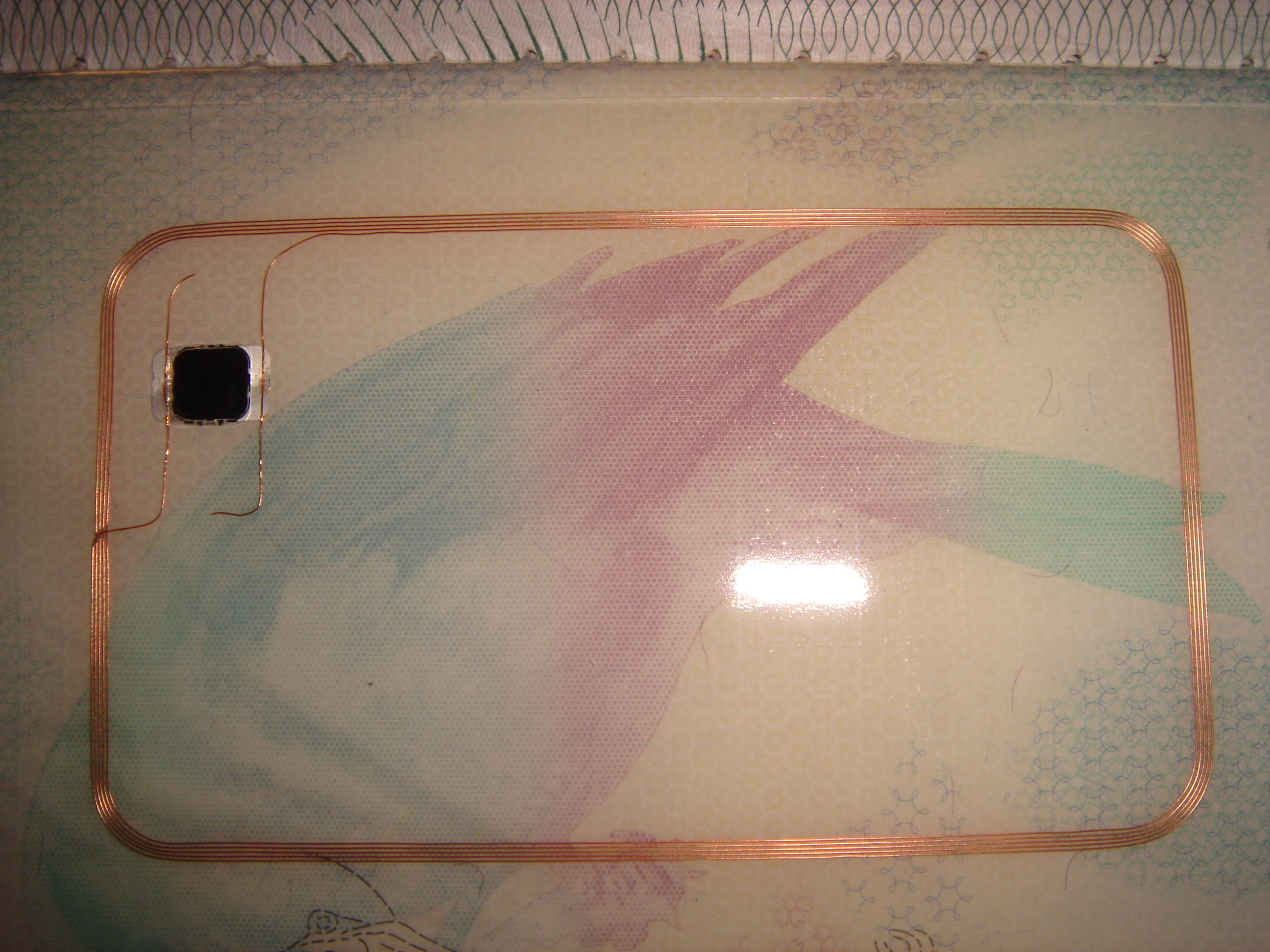
Russell Coker: New RFID Passport


Above is the picture of the RFID device in my new UK passport. The outer wire loop is 72mm * 42mm which is by far the largest RFID device I ve seen. It appears that they want the passport to be RFID readable from distances that are significantly greater than those which are typically used for store security RFID devices. I couldn t properly capture the text on the page which says THIS PAGE IS RESERVED FOR OFFICIAL OBSERVATIONS, IF ANY . The plastic layer that protects the RFID device leaves a 3mm margin that could potentially be used for official observations. Assuming that they don t write in really small letters I guess this means that either they don t make official observations on the passports nowadays or that any such observations are stored electronically where the subject has no good way of discovering them and objecting. Above is a picture of the front cover of my passport which shows the RFID logo. Both images have links to the full resolution pictures. On Sunday I leave for a two week business trip to San Francisco, this will be my first trip with my new passport. I m thinking of taking some aluminium foil to wrap around my passport when it s not being used. I don t expect to really gain any benefit from doing so, it s a matter of principle.

27 November 2009

Joachim Breitner: screen-message now in an online version

Folllowing an idea by Kai Hendry, I re-implemented my Linux application screen-message, which does nothing but display a piece of text that you enter as large as possible, in HTML. So whenever you are in need of screen-message, but don t have it installed at the moment, put your browser into fullscreen mode, go to
http://sm.nomeata.de/
and type away.I only tested it with the web browser galeon, so I expect it to work with Firefox and related browsers. If it does not work with Internet Explorer, I can t help it but patches are welcome. The file is stored in the screen-message Darcs repository at http://darcs.nomeata.de/screen-message.upstream.PS: If anyone wants to donate a shorter domain for this, you are welcome. But I guess all good domains with sm in them are taken...

MJ Ray: Dump the Disconnect Law!

After all the U-turns by politicians, I got confused about how Three Strikes is developing. I think the current status is Mandelson trying to sneak it through as a Statutory Instrument and protect some of the most protectionist foreign interests ever seen. I ve written to my MP to express my disagreement. Andrew Heaney of TalkTalk has submitted a petition to abolish the proposed law that will see alleged illegal filesharers disconnected from their broadband connections, without a fair trial . It s not worded brilliantly, but it covers the vital point without a fair trial so I think it s still worth signing here. Thanks to Glyn Wintle for the updates on fsfe-uk. Meanwhile, unaccountable copyright collections agent PPL have picked the ideal moment to start harassing local community events. Please give generously: EMI only earned 298,000,000 last year. If you ve a bit more time, you could send a Message To Mandelson at ORG. I might not agree with ORG s structure, but they do make some cool protest sites. (Javascript required to view, as far as I can tell.) Even more flamboyantly, the Electronic Frontier Foundation is calling on people to phone up and Stop the Pirate-Finder General!

Russell Coker: Who Should Edit Wikipedia and Where Should they Do It?

Cory Doctorow wrote an interesting little column for Make magazine about Wikipedia and the way that it contains facts about facts [1]. One of the issues with this is that you can t (or at least shouldn t) make corrections based on your own knowledge of a subject, you need to cite references. Cory gives a hypothetical example where a world renowned expert couldn t simply fix an error in Wikipedia, but they could give an interview with the New York Times decrying the quality of Wikipedia and citing the correct data then once the NYT article was published it could be referenced as an authoritative source and the page updated. Mako wrote about the Wikireader (an offline reader for Wikipedia) and advocated a facility for writing changes while offline and uploading them [2]. From the perspective of improving the state of the art in computer science and making new features available for more users this sounds like a great idea. But in terms of fitting in with the way Wikipedia works it doesn t seem viable to me. Any time that you need to use an offline Wikipedia reader it seems that it will either be impossible or unreasonably difficult to gain the net access necessary to find the reference that Wikipedia requires. Sure you could fix spelling errors, reformat paragraphs, etc but not do anything serious. I wonder how many people actually put any serious effort into Wikipedia with the sole purpose of making it more readable. In terms of my own editing I have made a number of changes that improve readability, but all of them were due to reviewing pages for technical accuracy. One of the comments on Mako s post suggested that instead of having an option to directly edit pages there be an option to take notes on pages which could then be used for later editing. Maybe something like a two button combination to flag a particular paragraph as being of dubious accuracy so that the user could later do some Google searches for references. Of course another problem with this is the delay in updating a Wikireader. For most reading of Wikipedia it doesn t matter if the content is 6 months old, so we should expect that most users of the Wikireader don t have the latest data. The Wikireader company offers an update service of posting a new memory card twice a year [3]. Given postage delays etc we should expect that the average age of the content is about 4 months for people who subscribe to the update service, and probably a lot greater for people who download the updates. The popular pages of Wikipedia change fast, in the space of 4 months a page can change significantly. In terms of general Wikipedia operation I wonder if it would be beneficial to have a button to flag content as possibly not meeting the Wikipedia guidelines. It seems that the number of people who can recognise low quality pages is going to be significantly higher than the number of people who have the skill and time to fix them. I m sure that there are many people who would just love to be able to choose from a list of Wikipedia pages that have received many negative votes. Such votes could be stored offline and uploaded later, but again that would rely on having recent content on the reader (it would be annoying for a recently fixed page to keep getting voted down). One area where offline editing of a Wiki would work well is that of niche Wikis. For example if I downloaded a copy of the Debian Wiki (which would only take a tiny fraction of the space in a Wikireader) then I could easily update it every week and the incidence of other people editing a page in the mean time would often be low. I could write long updates that make significant changes to SE Linux related pages while offline without needing any references and in many cases without much risk of conflicts. Implementing a distributed version control system to manage such updates shouldn t be difficult in principle, although the VCS might have to run on a laptop or desktop system after taking raw data from the Wikireader (tools like GIT seem memory hungry and might not fit on a small device). Also Mako refers to the already indefensibly large gap between the number of readers and editors on Wikipedia . Like Mako I don t have a TV watching personality. I agree that it is desirable to facilitate read-write access for everyone, but that doesn t have to involve write access to Wikipedia. I am not convinced that there is a difference between the number of readers and editors of Wikipedia that indicates a problem here. As something becomes more popular the number of people who use it without being committed to it increases, and it also becomes more integrated into society. I don t think it s a problem that many people use their writing time for other tasks such as blogging rather than editing Wikipedia. Wikipedia makes a great reference for blog posts and blog posts drive readers (and thus potential editors) to Wikipedia. Finally I think we should consider the fact that different people have different skill sets. Maybe the Wikipedia reader base gained a significant portion of the people who have the skills to make good editors a long time ago and now the majority of new users just don t have the skills. If that is the case then having the ratio of readers to editors change in favor of readers while the number of readers expands would be a good thing. I don t think that I am being elitist in acknowledging that different people have different skill sets, and that some portion of the population will lack the skills necessary to make good contributions to Wikipedia (good enough to outweigh the mistakes that they make). I think that valuing the contributions of all people in society does not require that we value all contributions to Wikipedia.

26 November 2009

Tore S. Bekkedal: Wardialling for the 21st century

The story behind it My SPA2102 Recently, I decided to set up a subscription with a VoIP provider, Phonzo, here in Norway. On their webpage, Phonzo advertised a VoIP service which actually gave you the SIP information and allowed the user to connect their own equipment to this service. That s really cool , I thought. I can play with Asterisk on the PSTN now! . They also advertised an offer with rent of a Linksys SPA2102 included, at a very affordable rate. Now, I suspected that the box might be locked as I d heard they were with some providers so I searched all over their webpage for any hint that it might be. None was to be found and since they included the specific model designation of the adapter rather than mentioning a generic Analogue Telephone Adapter , I basically assumed it wouldn t be crippled. But when it did arrive (impeccable delivery time, and telephony worked out of the box, btw), I found to my dismay that the box was indeed locked. So I sent a polite email to customer service, saying basically that I know this is a matter mostly interesting to enthusiasts, but they ve advertised an SPA2102 , and what I have receieved is a crippled SPA2102 . They basically replied It says rent , so it belongs to us. I replied Renting does not exempt you from marketing laws; you ve sold me something else than what I paid for . I got the reply: We can t open it, it contains sensitive information and it s not crippled, it s optimized for Phonzo service[sic] (!). Yeah, that s really what they said. A few more emails back and forth, and nothing of value came forth. When I received a letter from customer service saying Stop your nonsense, we re providing you a service and the adapter is a part of it I realized I wasn t getting anywhere there. I ve sent an email to the address in the SSL certificate (who also seems to be one of the founders) hoping I d get in touch with someone of relevance, but I don t have great hopes. (There s a copy of the correspondance in Norwegian, if you re interested.) So over to my plan B. The Linksys SPA2102 has two interfaces for an administrator: The first is the HTTP interface bog-standard, with an admin password. The second is the Interactive Voice Response menu you know the kind, Press 1 for x, 2 for y, . Now, this menu has several different options, including one to enable HTTP access on the WAN port . By default, this option is set to False, and changing it requires an administrator password. But how do you enter an alphanumeric password on a DTMF dialpad? Aha the admin passnumber is derived from the admin password! The mapping is 1=1, [2ABCabc] = 2, [3DEFdef] = 3, , (everything else) = 0. This reduces the keyspace quite dramatically! So basically, what I ve done is kludged together a shell script which tries the different combinations and sounds them out using a software DTMF tone generator, with earphones serving as acoustic couplers. (For now, I ve skipped numbers containing a 1 . The number 1 only represents itself, and thus its value is quite low.) It then tries port 80 on its WAN IP every 100 attempts to see if a passnumber has succeeded. The shellscript is accessible here: http://simula.gunkies.org/~toresbe/dtmfbruteforce.bash. The phone adapter has two lines, but the second one is locked by Phonzo however, it is not possible to disable the IVR menu on this thing, so I have full use of the box while this is happening. (It nearly goes without saying that I ve spoofed the DNS so it connects to my Asterisk box. :) ) I m now averaging about one passkey per second. According to my calculations of each passkey representing the number of symbols per digit raised to the power of the number of digits, I am trying 16807 passwords per second and will be trying 117649 passwords per second when I get to six digits. I have a quite technical readership so please do correct me in the comments if I ve made an error in either the calculations or anywhere else. If there are any Phonzo users out there with an SPA2102, I would very much appreciate it if you contacted me brute force works a whole lot better when it s parallelized. I am currently at #302362. I have not yet been contacted by anyone in the same situation.

25 November 2009

Erich Schubert: Lost an ext3 filesystem

These days, something happened to one of my external USB drives that I so far only knew from ReiserFS (which I since called ReisswolFS, German word play on "shredder" ...). But, it's not ext3 which I blame.Short story what happened: What I will do now: As you can see, something was wrong with the system, not with the file system.I have a strong suspect to have caused this. In case you wondered why I included "resumed from suspend" above: I've been having system stability issues with resume ever since upgrading to the Intel driver 2.9.0 and KMS (Debian unstable+testing) with kernels up to 2.6.31. In about 1 out of 5 resumes, I get a Xorg or system lockup after anything from 1 to 60 minutes. Sometimes I also experience video corruption after a few minutes, trashing some terminal emulation until the next redraw. Just before writing this email I had a typical lockup: when scrolling the terminal emulator. This has been a typical trigger for lockups. On contrast I havn't seen any such crashes (or screen corruption) on a fresh boot.Freedesktop bug reporting the same issue closed as "not our bug, blame it on the kernel".Note that 2.6.32 release candidate Changelog contain many changes for the intel DRI kernel driver. So the bug might already be fixed in the RC kernels.Same report in Kernel Bugzilla is still 'NEW' though.Related bug report in Debian, blaming it on KMS.

Russell Coker: Seatbelts and Transporting Computers

I ve just read an interesting post at Making Light about seat-belts [1]. In Australia seat-belt use is mandatory, you can be fined for failing to wear one and the police (who help clean up the mess when someone dies on the road) are apparently quite aggressive about enforcement. Even aside from the legal requirement the use of seat-belts is fairly ingrained in Australian culture, people tend to use them even when they won t get caught. One of the things I like to do in my spare time is to take unused computer gear from IT companies (which they regard as rubbish) and give it to home users for recreational and educational use. Due to that and my work for some smaller IT companies I ve helped many people load computer gear into their private cars and observed that most people will not take adequate care unless I coerce them. A CRT monitor tends to be large and heavy, you wouldn t want to get hit in the back of the head with one at 60Km/h. With some combinations of monitor and car you can fit a monitor in the front passenger foot-well, but usually the only place a monitor will fit is the back seat. The correct thing to do is to use the seat-belt to strap the monitor in place. It s most likely that the monitor stand (the only part that allows a seat-belt to be attached) would snap off in the event of a serious crash but this would at least slow the monitor down. Also don t put the monitor directly behind your seat if you can avoid it, put it behind the passenger seat. In a collision monitor might be able to push through your seat and cause you a back injury. Between 1992 and 2006 there were 78,000 acute computer-related injuries treated in US hospital emergency rooms [2]. The number of injuries caused by monitors peaked at 37% of the total in 2003 this was largely due to monitors falling on people. Even without the speed of a car a monitor can be a dangerous projectile. Hard drives have a lot of potential to cause damage, they are dense, hard, and the corners often aren t rounded. Storing them above the back seat behind the driver s head (as a friend once tried to do) is a really bad idea. Mythbusters showed that a box of tissues isn t going to kill you in a crash, but a hard drive is much more dangerous. The typical car glove box can store a few drives. If you need to transport a box full then the front passenger foot well is a reasonable place. If your car rolls then that would suck, but it seems that people usually die when they roll their car anyway so just try not to do that. A serious server (EG 2RU or bigger rack-mount) typically weighs 30Kg or more and is solidly constructed. The size and mass of such a machine makes it extremely difficult to safely store inside a car. The ideal place is the boot, but if that isn t an option then behind the passenger seat is the next best option. One final issue that I ve been wondering about is the safest option for laptops that are in use in a moving car. A 3Kg Thinkpad would have to hurt if it hit you in the back of the head at 60Km/h. The child-seat attachments are solid anchor points that can be used for other things. I wonder if a laptop security cable could be attached to one of the child seat points. According to an exhibit at a science museum I can throw a tennis ball at 115Km/h, so I presume that laptop security cables are designed not to break when someone swings the laptop at that speed. Therefore if a car was driving at a legal speed in Australia before crashing then a laptop security cable should be able to stop the laptop. Preventing the cable from injuring the passenger on the way would be the difficult part.

Erich Schubert: Google Wave rolling out?

When I got my Google Wave account, it took the invitation about a week to arrive. A few days ago, I got my first own invites, and invited some colleagues (in an attempt to actually find a use for Google Wave beyond "rich media live messaging"). Within a few minutes they were "in". Now I just got my second set of invites. So is Google Wave now getting ready for mass opening, rocketing user numbers?As you might have already guessed, I'm not convinced by Google Wave. It's technically interesting and well-done. The demos are all nice. It's just that the UI in the browser is a bit fragile and cumbersome, and the big question so far is:
What does Google Wave allow you to do that you couldn't do before?
To me, there has been little actual use so far. Wave can do everything, but isn't optimal in any of them: Yes, I'm aware that you should differentiate between the protocol and the ui. Still pretty much everything is currently designed for the web browser with full JavaScript and Flash capabilities.Of course this isn't the end yet, Google Wave will evolve. Maybe into something cool, maybe it will remain just a niche thing. Maybe some cool apps will just use Wave as protocol. But I figure, I'll mostly wait for these things to happen first before I become a frequent user of Wave.The biggest thing I see is the "spam" (this especially includes 'Quiz', Mafia Wars and similar Scamville type of 'apps' that surely will show up in no time, once Wave is open to the public). What will Wave provide to me to handle this flood of worthless information that I'm getting more and more?P.S. Please don't bother to ask for invitations to Wave.P.P.S. here's how to replace the odd scrollbars with the regular OS scrollbars with a really simple user style (CSS).

Benjamin Mako Hill: Zimmermanhosen Confessions

Between second and seventh grade, I went to a school that required that I wear grey corduroys. Every day. I loathed them. When I left that school, at twelve years old, I swore to myself that I would never wear a pair of corduroys again. And I kept that vow until earlier this year when, in Germany, I came across a couple carpenters in Germany on their one-year traveling post-apprenticeship waltz. As it turns out, journeyman German carpenters wear some pretty wild bellbottom corduroys --- zimmermanhosen. Although I tried, I couldn't resist acquiring a pair at a local work clothing store. http://farm4.static.flickr.com/3306/3519720780_bb9ca7f3c5.jpg A year and a couple more trips to Germany later, I now own several pair of zimmermanhosen and wear them nearly every day. They are tough, distinctive, and have pretty awesome double-zipper flies. And although I love them, I still feel a little conflicted every time I put them on.

Next.

Previous.