Search Results: "zed"

19 September 2020

Vincent Bernat: Syncing NetBox with a custom Ansible module

The netbox.netbox collection from Ansible Galaxy provides several modules to update NetBox objects:
- name: create a device in NetBox
  netbox_device:
    netbox_url: http://netbox.local
    netbox_token: s3cret
    data:
      name: to3-p14.sfo1.example.com
      device_type: QFX5110-48S
      device_role: Compute Switch
      site: SFO1
However, if NetBox is not your source of truth, you may want to ensure it stays in sync with your configuration management database1 by removing outdated devices or IP addresses. While it should be possible to glue together a playbook with a query, a loop and some filtering to delete unwanted elements, it feels clunky, inefficient and an abuse of YAML as a programming language. A specific Ansible module solves this issue and is likely more flexible.

Notice I recommend that you read Writing a custom Ansible module as an introduction, as well as Syncing MySQL tables for a first simpler example.

Code The module has the following signature and it syncs NetBox with the content of the provided YAML file:
netbox_sync:
  source: netbox.yaml
  api: https://netbox.example.com
  token: s3cret
The synchronized objects are:
  • sites,
  • manufacturers,
  • device types,
  • device roles,
  • devices, and
  • IP addresses.
In our environment, the YAML file is generated from our configuration management database and contains a set of devices and a list of IP addresses:
devices:
  ad2-p6.sfo1.example.com:
     datacenter: sfo1
     manufacturer: Cisco
     model: Catalyst 2960G-48TC-L
     role: net_tor_oob_switch
  to1-p6.sfo1.example.com:
     datacenter: sfo1
     manufacturer: Juniper
     model: QFX5110-48S
     role: net_tor_gpu_switch
# [ ]
ips:
  - device: ad2-p6.example.com
    ip: 172.31.115.18/21
    interface: oob
  - device: to1-p6.example.com
    ip: 172.31.115.33/21
    interface: oob
  - device: to1-p6.example.com
    ip: 172.31.254.33/32
    interface: lo0.0
# [ ]
The network team is not the sole tenant in NetBox. While adding new objects or modifying existing ones should be relatively safe, deleting unwanted objects can be risky. The module only deletes objects it did create or modify. To identify them, it marks them with a specific tag, cmdb. Most objects in NetBox accept tags.

Module definition Starting from the skeleton described in the previous article, we define the module:
module_args = dict(
    source=dict(type='path', required=True),
    api=dict(type='str', required=True),
    token=dict(type='str', required=True, no_log=True),
    max_workers=dict(type='int', required=False, default=10)
)
result = dict(
    changed=False
)
module = AnsibleModule(
    argument_spec=module_args,
    supports_check_mode=True
)
It contains an additional optional arguments defining the number of workers to talk to NetBox and query the existing objects in parallel to speedup the execution.

Abstracting synchronization We need to synchronize different object types, but once we have a list of objects we want in NetBox, the grunt work is always the same:
  • check if the objects already exist,
  • retrieve them and put them in a form suitable for comparison,
  • retrieve the extra objects we don t want anymore,
  • compare the two sets, and
  • add missing objects, update existing ones, delete extra ones.
We code these behaviours into a Synchronizer abstract class. For each kind of object, a concrete class is built with the appropriate class attributes to tune its behaviour and a wanted() method to provide the objects we want. I am not explaining the abstract class code here. Have a look at the source if you want.

Synchronizing tags and tenants As a starter, here is how we define the class synchronizing the tags:
class SyncTags(Synchronizer):
    app = "extras"
    table = "tags"
    key = "name"
    def wanted(self):
        return  "cmdb": dict(
            slug="cmdb",
            color="8bc34a",
            description="synced by network CMDB") 
The app and table attributes defines the NetBox objects we want to manipulate. The key attribute is used to determine how to lookup for existing objects. In this example, we want to lookup tags using their names. The wanted() method is expected to return a dictionary mapping object keys to the list of wanted attributes. Here, the keys are tag names and we create only one tag, cmdb, with the provided slug, color and description. This is the tag we will use to mark the objects we create or modify. If the tag does not exist, it is created. If it exists, the provided attributes are updated. Other attributes are left untouched. We also want to create a specific tenant for objects accepting such an attribute (devices and IP addresses):
class SyncTenants(Synchronizer):
    app = "tenancy"
    table = "tenants"
    key = "name"
    def wanted(self):
        return  "Network": dict(slug="network",
                                description="Network team") 

Synchronizing sites We also need to synchronize the list of sites. This time, the wanted() method uses the information provided in the YAML file: it walks the devices and builds a set of datacenter names.
class SyncSites(Synchronizer):
    app = "dcim"
    table = "sites"
    key = "name"
    only_on_create = ("status", "slug")
    def wanted(self):
        result = set(details["datacenter"]
                     for details in self.source['devices'].values()
                     if "datacenter" in details)
        return  k: dict(slug=k,
                        status="planned")
                for k in result 
Thanks to the use of the only_on_create attribute, the specified attributes are not updated if they are different. The goal of this synchronizer is mostly to collect the references to the different sites for other objects.
>>> pprint(SyncSites(**sync_args).wanted())
 'sfo1':  'slug': 'sfo1', 'status': 'planned' ,
 'chi1':  'slug': 'chi1', 'status': 'planned' ,
 'nyc1':  'slug': 'nyc1', 'status': 'planned' 

Synchronizing manufacturers, device types and device roles The synchronization of manufacturers is pretty similar, except we do not use the only_on_create attribute:
class SyncManufacturers(Synchronizer):
    app = "dcim"
    table = "manufacturers"
    key = "name"
    def wanted(self):
        result = set(details["manufacturer"]
                     for details in self.source['devices'].values()
                     if "manufacturer" in details)
        return  k:  "slug": slugify(k) 
                for k in result 
Regarding the device types, we use the foreign attribute linking a NetBox attribute to the synchronizer handling it.
class SyncDeviceTypes(Synchronizer):
    app = "dcim"
    table = "device_types"
    key = "model"
    foreign =  "manufacturer": SyncManufacturers 
    def wanted(self):
        result = set((details["manufacturer"], details["model"])
                     for details in self.source['devices'].values()
                     if "model" in details)
        return  k[1]: dict(manufacturer=k[0],
                           slug=slugify(k[1]))
                for k in result 
The wanted() method refers to the manufacturer using its key attribute. In this case, this is the manufacturer name.
>>> pprint(SyncManufacturers(**sync_args).wanted())
 'Cisco':  'slug': 'cisco' ,
 'Dell':  'slug': 'dell' ,
 'Juniper':  'slug': 'juniper' 
>>> pprint(SyncDeviceTypes(**sync_args).wanted())
 'ASR 9001':  'manufacturer': 'Cisco', 'slug': 'asr-9001' ,
 'Catalyst 2960G-48TC-L':  'manufacturer': 'Cisco',
                           'slug': 'catalyst-2960g-48tc-l' ,
 'MX10003':  'manufacturer': 'Juniper', 'slug': 'mx10003' ,
 'QFX10002-36Q':  'manufacturer': 'Juniper', 'slug': 'qfx10002-36q' ,
 'QFX10002-72Q':  'manufacturer': 'Juniper', 'slug': 'qfx10002-72q' ,
 'QFX5110-32Q':  'manufacturer': 'Juniper', 'slug': 'qfx5110-32q' ,
 'QFX5110-48S':  'manufacturer': 'Juniper', 'slug': 'qfx5110-48s' ,
 'QFX5200-32C':  'manufacturer': 'Juniper', 'slug': 'qfx5200-32c' ,
 'S4048-ON':  'manufacturer': 'Dell', 'slug': 's4048-on' ,
 'S6010-ON':  'manufacturer': 'Dell', 'slug': 's6010-on' 
The device roles are defined like this:
class SyncDeviceRoles(Synchronizer):
    app = "dcim"
    table = "device_roles"
    key = "name"
    def wanted(self):
        result = set(details["role"]
                     for details in self.source['devices'].values()
                     if "role" in details)
        return  k: dict(slug=slugify(k),
                        color="8bc34a")
                for k in result 

Synchronizing devices A device is mostly a name with references to a role, a model, a datacenter and a tenant. These references are declared as foreign keys using the synchronizers defined previously.
class SyncDevices(Synchronizer):
    app = "dcim"
    table = "devices"
    key = "name"
    foreign =  "device_role": SyncDeviceRoles,
               "device_type": SyncDeviceTypes,
               "site": SyncSites,
               "tenant": SyncTenants 
    remove_unused = 10
    def wanted(self):
        return  name: dict(device_role=details["role"],
                           device_type=details["model"],
                           site=details["datacenter"],
                           tenant="Network")
                for name, details in self.source['devices'].items()
                if  "datacenter", "model", "role"  <= set(details.keys()) 
The remove_unused attribute is a safety implemented to fail if we have to delete more than 10 devices: this may be the indication there is a bug somewhere, unless one of your datacenter suddenly caught fire.
>>> pprint(SyncDevices(**sync_args).wanted())
 'ad2-p6.sfo1.example.com':  'device_role': 'net_tor_oob_switch',
                             'device_type': 'Catalyst 2960G-48TC-L',
                             'site': 'sfo1',
                             'tenant': 'Network' ,
 'to1-p6.sfo1.example.com':  'device_role': 'net_tor_gpu_switch',
                             'device_type': 'QFX5110-48S',
                             'site': 'sfo1',
                             'tenant': 'Network' ,
[ ]

Synchronizing IP addresses The last step is to synchronize IP addresses. We do not attach them to a device.2 Instead, we specify the device names in the description of the IP address:
class SyncIPs(Synchronizer):
    app = "ipam"
    table = "ip-addresses"
    key = "address"
    foreign =  "tenant": SyncTenants 
    remove_unused = 1000
    def wanted(self):
        wanted =  
        for details in self.source['ips']:
            if details['ip'] in wanted:
                wanted[details['ip']]['description'] = \
                    f" details['device']  (and others)"
            else:
                wanted[details['ip']] = dict(
                    tenant="Network",
                    status="active",
                    dns_name="",        # information is present in DNS
                    description=f" details['device'] :  details['interface'] ",
                    role=None,
                    vrf=None)
        return wanted
There is a slight difficulty: NetBox allows duplicate IP addresses, so a simple lookup is not enough. In case of multiple matches, we choose the best by preferring those tagged with cmdb, then those already attached to an interface:
def get(self, key):
    """Grab IP address from NetBox."""
    # There may be duplicate. We need to grab the "best".
    results = super(Synchronizer, self).get(key)
    if len(results) == 0:
        return None
    if len(results) == 1:
        return results[0]
    scores = [0]*len(results)
    for idx, result in enumerate(results):
        if "cmdb" in result.tags:
            scores[idx] += 10
        if result.interface is not None:
            scores[idx] += 5
    return sorted(zip(scores, results),
                  reverse=True, key=lambda k: k[0])[0][1]

Getting the current and wanted states Each synchronizer is initialized with a reference to the Ansible module, a reference to a pynetbox s API object, the data contained in the provided YAML file and two empty dictionaries for the current and expected states:
source = yaml.safe_load(open(module.params['source']))
netbox = pynetbox.api(module.params['api'],
                      token=module.params['token'])
sync_args = dict(
    module=module,
    netbox=netbox,
    source=source,
    before= ,
    after= 
)
synchronizers = [synchronizer(**sync_args) for synchronizer in [
    SyncTags,
    SyncTenants,
    SyncSites,
    SyncManufacturers,
    SyncDeviceTypes,
    SyncDeviceRoles,
    SyncDevices,
    SyncIPs
]]
Each synchronizer has a prepare() method whose goal is to compute the current and wanted states. It returns True in case of a difference:
# Check what needs to be synchronized
try:
    for synchronizer in synchronizers:
        result['changed']  = synchronizer.prepare()
except AnsibleError as e:
    result['msg'] = e.message
    module.fail_json(**result)

Applying changes Back to the skeleton described in the previous article, the last step is to apply the changes if there is a difference between these states. Each synchronizer registers the current and wanted states in sync_args["before"][table] and sync_args["after"][table] where table is the name of the table for a given NetBox object type. The diff object is a bit elaborate as it is built table by table. This enables Ansible to display the name of each table before the diff representation:
# Compute the diff
if module._diff and result['changed']:
    result['diff'] = [
        dict(
            before_header=table,
            after_header=table,
            before=yaml.safe_dump(sync_args["before"][table]),
            after=yaml.safe_dump(sync_args["after"][table]))
        for table in sync_args["after"]
        if sync_args["before"][table] != sync_args["after"][table]
    ]
# Stop here if check mode is enabled or if no change
if module.check_mode or not result['changed']:
    module.exit_json(**result)
Each synchronizer also exposes a synchronize() method to apply changes and a cleanup() method to delete unwanted objects. Order is important due to the relation between the objects.
# Synchronize
for synchronizer in synchronizers:
    synchronizer.synchronize()
for synchronizer in synchronizers[::-1]:
    synchronizer.cleanup()
module.exit_json(**result)

The complete code is available on GitHub. Compared to using netbox.netbox collection, the logic is written in Python instead of trying to glue Ansible tasks together. I believe this is both more flexible and easier to read, notably when trying to delete outdated objects. While I did not test it, it should also be faster. An alternative would have been to reuse code from the netbox.netbox collection, as it contains similar primitives. Unfortunately, I didn t think of it until now.

  1. In my opinion, a good option for a source of truth is to use YAML files in a Git repository. You get versioning for free and people can get started with a text editor.
  2. This limitation is mostly due to laziness: we do not really care about this information. Our main motivation for putting IP addresses in NetBox is to keep track of the used IP addresses. However, if an IP address is already attached to an interface, we leave this association untouched.

17 September 2020

Dirk Eddelbuettel: RcppSpdlog 0.0.1: New and Exciting Logging Package

Very thrilled to announce a new package RcppSpdlog which is now on CRAN in its first release 0.0.1. We had tweeted once about the earliest version which had already caught the eyes of Gabi upstream. RcppSpdlog bundles spdlog, a wonderful header-only C++ logging library with all the bells and whistles you would want that was written by Gabi Melman, and also includes fmt by Victor Zverovic. I had meant to package this for a few years now but didn t find an (easy, elegant) way to completely lift stdout / stderr and related uses which R wants us to remove for smoother operations from R itself including synchronized input/output. It was only a few weeks ago that I realized I should subclass a logger (or, more concretely, a sink for a logger) which could then use R input/output. With the right idea the implementaton was easy, and [Gabi]((https://github.com/gabime) was most helpful in making sure R CMD check would not see one or two remaining C++ i/o operations (which we currently do by not activating a default logger, and substituing REprintf() in one call). So this is now clean and sween and a simple use is included in an example in the package we can show here too (in slightly shorter form minus the documentation header):
// this portmanteau include also defines the r_sink we use below, and which
// diverts all logging to R via the Rcpp::Rcout replacement for std::cout
#include <RcppSpdlog>

// [[Rcpp::export]]
void exampleRsink()  

    std::string logname = "fromR";                          // fix a name for this logger
    auto sp = spdlog::get(logname);                         // retrieve existing one
    if (sp == nullptr) sp = spdlog::r_sink_mt(logname);     // or create new one if needed

    // change log pattern (changed from [%H:%M:%S %z] [%n] [%^---%L---%$] )
    sp->set_pattern("[%H:%M:%S.%f] [%n] [%^%L%$] [thread %t] %v");

    sp->info("Welcome to spdlog!");
    sp->error("Some error message with arg:  ", 1);

    sp->warn("Easy padding in numbers like  :08d ", 12);
    sp->critical("Support for int:  0:d ;  hex:  0:x ;  oct:  0:o ; bin:  0:b ", 42);
    sp->info("Support for floats  :03.2f ", 1.23456);
    sp->info("Positional args are  1   0 ..", "too", "supported");
    sp->info(" :<30 ", "left aligned");

 
The NEWS entry for the first release follows.

Changes in RcppSpdlog version 0.0.1 (2020-09-08)
  • Initial release with added R/Rcpp logging sink example

The only sour grapes, if any, are over the CRAN processing. This was originally uploaded three weeks ago. As a new package, it got extra attention and some truly idiosyncratic attention to two details that were already supplied in the first uploaded version. Yet it needed two rounds of going back and forth for really no great net gain, yet wasting a week each time. I am not all that impressed by this, and not particularly pleased either, but I presume is the tax we all pay in order to enjoy the unsurpassed richness of the CRAN repository system which continues to work just flawlessly. If you like this or other open-source work I do, you can now sponsor me at GitHub. For the first year, GitHub will match your contributions.

This post by Dirk Eddelbuettel originated on his Thinking inside the box blog. Please report excessive re-aggregation in third-party for-profit settings.

16 September 2020

Bits from Debian: Debian Local Groups at DebConf20 and beyond

There are a number of large and very successful Debian Local Groups (Debian France, Debian Brazil and Debian Taiwan, just to name a few), but what can we do to help support upcoming local groups or help spark interest in more parts of the world? There has been a session about Debian Local Teams at Debconf20 and it generated quite a bit of constructive discussion in the live stream (recording available at https://meetings-archive.debian.net/pub/debian-meetings/2020/DebConf20/), in the session's Etherpad and in the IRC channel (#debian-localgroups). This article is an attempt at summarizing the key points that were raised during that discussion, as well as the plans for the future actions to support new or existent Debian Local Groups and the possibility of setting up a local group support team. Pandemic situation During a pandemic it may seem strange to discuss offline meetings, but this is a good time to be planning things for the future. At the same time, the current situation makes it more important than before to encourage local interaction. Reasoning for local groups Debian can seem scary for those outside. Already having a connection to Debian - especially to people directly involved in it - seems to be the way through which most contributors arrive. But if one doesn't have a connection, it is not that easy; Local Groups facilitate that by improving networking. Local groups are incredibly important to the success of Debian since they often help with translations, making us more diverse, support, setting up local bug squashing sprints, establishing a local DebConf team along with miniDebConfs, getting sponsors for the project and much more. Existence of a Local Groups would also facilitate access to "swag" like stickers and mugs, since people not always have the time to deal with the process of finding a supplier to actually get those made. The activity of local groups might facilitate that by organizing related logistics. How to deal with local groups, how to define a local group Debian gathers the information about Local Groups in its Local Groups wiki page (and subpages). Other organisations also have their own schemes, some of them featuring a map, blogs, or clear rules about what constitutes a local group. In the case of Debian there is not a predefined set of "rules", even about the group name. That is perfectly fine, we assume that certain local groups may be very small, or temporary (created around a certain time when they plan several activities, and then become silent). However, the way the groups are named and how they are listed on the wiki page sets expectations with regards to what kinds of activities they involve. For this reason, we encourage all the Debian Local Groups to review their entries in the Debian wiki, keep it current (e.g. add a line "Status: Active (2020)), and we encourage informal groups of Debian contributors that somehow "meet", to create a new entry in the wiki page, too. What can Debian do to support Local Groups Having a centralized database of groups is good (if up-to-date), but not enough. We'll explore other ways of propagation and increasing visibility, like organising the logistics of printing/sending swag and facilitate access to funding for Debian-related events. Continuation of efforts Efforts shall continue regarding Local Groups. Regular meetings are happening every two or three weeks; interested people are encouraged to explore some other relevant DebConf20 talks (Introducing Debian Brasil, Debian Academy: Another way to share knowledge about Debian, An Experience creating a local community on a small town), websites like Debian flyers (including other printed material as cube, stickers), visit the events section of the Debian website and the Debian Locations wiki page, and participate in the IRC channel #debian-localgroups at OFTC.

14 September 2020

Russ Allbery: Review: Who Do You Serve, Who Do You Protect?

Review: Who Do You Serve, Who Do You Protect?, edited by Maya Schenwar, et al.
Editor: Maya Schenwar
Editor: Joe Macar
Editor: Alana Yu-lan Price
Publisher: Haymarket Books
Copyright: June 2016
ISBN: 1-60846-684-1
Format: Kindle
Pages: 250
Who Do You Serve, Who Do You Protect? is an anthology of essays about policing in the United States. It's divided into two sections: one that enumerates ways that police are failing to serve or protect communities, and one that describes how communities are building resistance and alternatives. Haymarket Books (a progressive press in Chicago) has made it available for free in the aftermath of the George Floyd killing and resulting protests in the United States. I'm going to be a bit unfair to this book, so let me start by admitting that the mismatch between it and the book I was looking for is not entirely its fault. My primary goal was to orient myself in the discussion on the left about alternatives to policing. I also wanted to sample something from Haymarket Books; a free book was a good way to do that. I was hoping for a collection of short introductions to current lines of thinking that I could selectively follow in longer writing, and an essay collection seemed ideal for that. What I had not realized (which was my fault for not doing simple research) is that this is a compilation of articles previously published by Truthout, a non-profit progressive journalism site, in 2014 and 2015. The essays are a mix of reporting and opinion but lean towards reporting. The earliest pieces in this book date from shortly after the police killing of Michael Brown, when racist police violence was (again) reaching national white attention. The first half of the book is therefore devoted to providing evidence of police abuse and violence. This is important to do, but it's sadly no longer as revelatory in 2020, when most of us have seen similar things on video, as it was to white America in 2014. If you live in the United States today, while you may not be aware of the specific events described here, you're unlikely to be surprised that Detroit police paid off jailhouse informants to provide false testimony ("Ring of Snitches" by Aaron Miguel Cant ), or that Chicago police routinely use excessive deadly force with no consequences ("Amid Shootings, Chicago Police Department Upholds Culture of Impunity" by Sarah Macaraeg and Alison Flowers), or that there is a long history of police abuse and degradation of pregnant women ("Your Pregnancy May Subject You to Even More Law Enforcement Violence" by Victoria Law). There are about eight essays along those lines. Unfortunately, the people who excuse or disbelieve these stories are rarely willing to seek out new evidence, let alone read a book like this. That raises the question of intended audience for the catalog of horrors part of this book. The answer to that question may also be the publication date; in 2014, the base of evidence and example for discussion had not been fully constructed. This sort of reporting is also obviously relevant in the original publication context of web-based journalism, where people may encounter these accounts individually through social media or other news coverage. In 2020, they offer reinforcement and rhetorical evidence, but I'm dubious that the people who would benefit from this knowledge will ever see it in this form. Those of us who will are already sickened, angry, and depressed. My primary interest was therefore in the second half of the book: the section on how communities are building resistance and alternatives. This is where I'm going to be somewhat unfair because the state of that conversation may have been different in 2015 than it is now in 2020. But these essays were lacking the depth of analysis that I was looking for. There is a human tendency, when one becomes aware of an obvious wrong, to simply publicize the horrible thing that is happening and expect someone to do something about it. It's obviously and egregiously wrong, so if more people knew about it, certainly it would be stopped! That has happened repeatedly with racial violence in the United States. It's also part of the common (and school-taught) understanding of the Civil Rights movement in the 1960s: activists succeeded in getting the violence on the cover of newspapers and on television, people were shocked and appalled, and the backlash against the violence created political change. Putting aside the fact that this is too simplistic of a picture of the Civil Rights era, it's abundantly clear at this point in 2020 that publicizing racist and violent policing isn't going to stop it. We're going to have to do something more than draw attention to the problem. Deciding what to do requires political and social analysis, not just of the better world that we want to see but of how our current world can become that world. There is very little in that direction in this book. Who Do You Serve, Who Do You Protect? does not answer the question of its title beyond "not us" and "white supremacy." While those answers are not exactly wrong, they're also not pushing the analysis in the direction that I wanted to read. For example (and this is a long-standing pet peeve of mine in US political writing), it would be hard to tell from most of the essays in this book that any country besides the United States exists. One essay ("Killing Africa" by William C. Anderson) talks about colonialism and draws comparisons between police violence in the United States and international treatment of African and other majority-Black countries. One essay talks about US military behavior oversees ("Beyond Homan Square" by Adam Hudson). That's about it for international perspective. Notably, there is no analysis here of what other countries might be doing better. Police violence against out-groups is not unique to the United States. No one has entirely solved this problem, but versions of this problem have been handled with far more success than here. The US has a comparatively appalling record; many countries in the world, particularly among comparable liberal democracies in Europe, are doing far better on metrics of racial oppression by agents of the government and of law enforcement violence. And yet it's common to approach these problems as if we have to develop a solution de novo, rather than ask what other countries are doing differently and if we could do some of those things. The US has some unique challenges, both historical and with the nature of endemic violence in the country, so perhaps such an analysis would turn up too many US-specific factors to copy other people's solutions. But we need to do the analysis, not give up before we start. Novel solutions can lead to novel new problems; other countries have tested, working improvements that could provide a starting framework and some map of potential pitfalls. More fundamentally, only the last two essays of this book propose solutions more complex than "stop." The authors are very clear about what the police are doing, seem less interested in why, and are nearly silent on how to change it. I suspect I am largely in political agreement with most of the authors, but obviously a substantial portion of the country (let alone its power structures) is not, and therefore nothing is changing. Part of the project of ending police violence is understanding why the violence exists, picking apart the motives and potential fracture lines in the political forces supporting the status quo, and building a strategy to change the politics. That isn't even attempted here. For example, the "who do you serve?" question of the book's title is more interesting than the essays give it credit. Police are not a monolith. Why do Black people become police officers? What are their experiences? Are there police forces in the United States that are doing better than others? What makes them different? Why do police act with violence in the moment? What set of cultural expectations, training experiences, anxieties, and fears lead to that outcome? How do we change those factors? Or, to take another tack, why are police not held accountable even when there is substantial public outrage? What political coalition supports that immunity from consequences, what are its fault lines and internal frictions, and what portions of that coalition could be broken off, pealed away, or removed from power? To whom, institutionally, are police forces accountable? What public offices can aspiring candidates run for that would give them oversight capability? This varies wildly throughout the United States; political approaches that work in large cities may not work in small towns, or with county sheriffs, or with the FBI, or with prison guards. To treat these organizations as a monolith and their motives as uniform is bad political tactics. It gives up points of leverage. I thought the best essays of this collection were the last two. "Community Groups Work to Provide Emergency Medical Alternatives, Separate from Police," by Candice Bernd, is a profile of several local emergency response systems that divert emergency calls from the police to paramedics, mental health experts, or social workers. This is an idea that's now relatively mainstream, and it seems to be finding modest success where it has been tried. It's more of a harm mitigation strategy than an attempt to deal with the root problem, but we're going to need both. The last essay, "Building Community Safety" by Ejeris Dixon, is the only essay in this book that is pushing in the direction that I was hoping to read. Dixon describes building an alternative system that can intervene in violent situations without using the police. This is fascinating and I'm glad that I read it. It's also frustrating in context because Dixon's essay should be part of a discussion. Dixon describes spending years learning de-escalation techniques, doing hard work of community discussion and collective decision-making, and making deep investment in the skills required to handle violence without calling in a dangerous outside force. I greatly admire this approach (also common in parts of the anarchist community) and the people who are willing to commit to it. But it's an immense amount of work, and as Dixon points out, that work often falls on the people who are least able to afford it. Marginalized communities, for whom the police are often dangerous, are also likely to lack both time and energy to invest in this type of skill training. And many people simply will not do this work even if they do have the resources to do it. More fundamentally, this approach conflicts somewhat with division of labor. De-escalation and social work are both professional skills that require significant time and practice to hone, and as much as I too would love to live in a world where everyone knows how to do some amount of this work, I find it hard to imagine scaling this approach without trained professionals. The point of paying someone to do this work as their job is that the money frees up their time to focus on learning those skills at a level that is difficult to do in one's free time. But once you have an organized group of professionals who do this work, you have to find a way to keep them from falling prey to the problems that plague the police, which requires understanding the origins of those problems. And that's putting aside the question of how large the residual of dangerous crime that cannot be addressed through any form of de-escalation might be, and what organization we should use to address it. Dixon's essay is great; I wouldn't change anything about it. But I wanted to see the next essay engaging with Dixon's perspective and looking for weaknesses and scaling concerns, and then the next essay that attempts to shore up those weaknesses, and yet another essay that grapples with the challenging philosophical question of a government monopoly on force and how that can and should come into play in violent crime. And then essays on grass-roots organizing in the context of police reform or abolition, and on restorative justice, and on the experience of attempting police reform from the inside, and on how to support public defenders, and on the merits and weaknesses of focusing on electing reform-minded district attorneys. Unfortunately, none of those are here. Overall, Who Do You Serve, Who Do You Protect? was a disappointment. It was free, so I suppose I got what I paid for, and I may have had a different reaction if I read it in 2015. But if you're looking for a deep discussion on the trade-offs and challenges of stopping police violence in 2020, I don't think this is the place to start. Rating: 3 out of 10

13 September 2020

Jonathan Carter: Wootbook / Tongfang laptop

Old laptop I ve been meaning to get a new laptop for a while now. My ThinkPad X250 is now 5 years old and even though it s still adequate in many ways, I tend to run out of memory especially when running a few virtual machines. It only has one memory slot, which I maxed out at 16GB shortly after I got it. Memory has been a problem in considering a new machine. Most new laptops have soldered RAM and local configurations tend to ship with 8GB RAM. Getting a new machine with only a slightly better CPU and even just the same amount of RAM as what I have in the X250 seems a bit wasteful. I was eyeing the Lenovo X13 because it s a super portable that can take up to 32GB of RAM, and it ships with an AMD Ryzen 4000 series chip which has great performance. With Lenovo s discount for Debian Developers it became even more attractive. Unfortunately that s in North America only (at least for now) so that didn t work out this time.

Enter Tongfang I ve been reading a bunch of positive reviews about the Tuxedo Pulse 14 and KDE Slimbook 14. Both look like great AMD laptops, supports up to 64GB of RAM and clearly runs Linux well. I also noticed that they look quite similar, and after some quick searches it turns out that these are made by Tongfang and that its model number is PF4NU1F. I also learned that a local retailer (Wootware) sells them as the Wootbook. I ve seen one of these before although it was an Intel-based one, but it looked like a nice machine and I was already curious about it back then. After struggling for a while to find a local laptop with a Ryzen CPU and that s nice and compact and that breaks the 16GB memory barrier, finding this one that jumped all the way to 64GB sealed the deal for me. This is the specs for the configuration I got:

This configuration cost R18 796 ( 947 / $1122). That s significantly cheaper than anything else I can get that even starts to approach these specs. So this is a cheap laptop, but you wouldn t think so by using it.
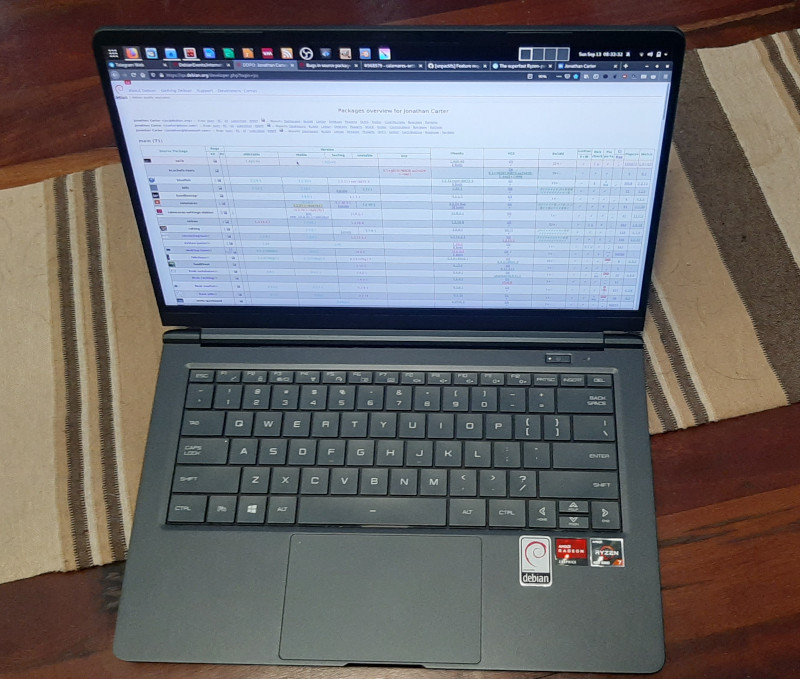
I used the Debian netinstall image to install, and installation was just another uneventful and boring Debian installation (yay!). Unfortunately it needs the firmware-iwlwifi and firmare-amd-graphics packages for the binary blobs that drives the wifi card and GPU. At least it works flawlessly and you don t need an additional non-free display driver (as is the case with NVidia GPUs). I haven t tested the graphics extensively yet, but desktop graphics performance is very snappy. This GPU also does fancy stuff like VP8/VP9 encoding/decoding, so I m curious to see how well it does next time I have to encode some videos. The wifi upgrade was nice for copying files over. My old laptop maxed out at 300Mbps, this one connects to my home network between 800-1000Mbps. At this speed I don t bother connecting via cable at home. I read on Twitter that Tuxedo Computers thinks that it s possible to bring Coreboot to this device. That would be yet another plus for this machine. I ll try to answer some of my own questions about this device that I had before, that other people in the Debian community might also have if they re interested in this device. Since many of us are familiar with the ThinkPad X200 series of laptops, I ll compare it a bit to my X250, and also a little to the X13 that I was considering before. Initially, I was a bit hesitant about the 14 form factor, since I really like the portability of the 12.5 ThinkPad. But because the screen bezel is a lot smaller, the Wootbook (that just rolls off the tongue a lot better than the PF4NU1F ) is just slightly wider than the X250. It weighs in at 1.1KG instead of the 1.38KG of the X250. It s also thinner, so even though it has a larger display, it actually feels a lot more portable. Here s a picture of my X250 on top of the Wootbook, you can see a few mm of Wootbook sticking out to the right.
Card Reader One thing that I overlooked when ordering this laptop was that it doesn t have an SD card reader. I see that some variations have them, like on this Slimbook review. It s not a deal-breaker for me, I have a USB card reader that s very light and that I ll just keep in my backpack. But if you re ordering one of these machines and have some choice, it might be something to look out for if it s something you care about. Keyboard/Touchpad On to the keyboard. This keyboard isn t quite as nice to type on as on the ThinkPad, but, it s not bad at all. I type on many different laptop keyboards and I would rank this keyboard very comfortably in the above average range. I ve been typing on it a lot over the last 3 days (including this blog post) and it started feeling natural very quickly and I m not distracted by it as much as I thought I would be transitioning from the ThinkPad or my mechanical desktop keyboard. In terms of layout, it s nice having an actual Insert button again. This is things normal users don t care about, but since I use mc (where insert selects files) this is a welcome return :). I also like that it doesn t have a Print Screen button at the bottom of my keyboard between alt and ctrl like the ThinkPad has. Unfortunately, it doesn t have dedicated pgup/pgdn buttons. I use those a lot in apps to switch between tabs. At leas the Fn button and the ctrl buttons are next to each other, so pressing those together with up and down to switch tabs isn t that horrible, but if I don t get used to it in another day or two I might do some remapping. The touchpad has en extra sensor-button on the top left corner that s used on Windows to temporarily disable the touchpad. I captured it s keyscan codes and it presses left control + keyscan code 93. The airplane mode, volume and brightness buttons work fine. I do miss the ThinkPad trackpoint. It s great especially in confined spaces, your hands don t have to move far from the keyboard for quick pointer operations and it s nice for doing something quick and accurate. I painted a bit in Krita last night, and agree with other reviewers that the touchpad could do with just a bit more resolution. I was initially disturbed when I noticed that my physical touchpad buttons were gone, but you get right-click by tapping with two fingers, and middle click with tapping 3 fingers. Not quite as efficient as having the real buttons, but it actually works ok. For the most part, this keyboard and touchpad is completely adequate. Only time will tell whether the keyboard still works fine in a few years from now, but I really have no serious complaints about it. Display The X250 had a brightness of 172 nits. That s not very bright, I think the X250 has about the dimmest display in the ThinkPad X200 range. This hasn t been a problem for me until recently, my eyes are very photo-sensitive so most of the time I use it at reduced brightness anyway, but since I ve been working from home a lot recently, it s nice to sometimes sit outside and work, especially now that it s spring time and we have some nice days. At full brightness, I can t see much on my X250 outside. The Wootbook is significantly brighter even (even at less than 50% brightness), although I couldn t find the exact specification for its brightness online. Ports The Wootbook has 3x USB type A ports and 1x USB type C port. That s already quite luxurious for a compact laptop. As I mentioned in the specs above, it also has a full-sized ethernet socket. On the new X13 (the new ThinkPad machine I was considering), you only get 2x USB type A ports and if you want ethernet, you have to buy an additional adapter that s quite expensive especially considering that it s just a cable adapter (I don t think it contains any electronics). It has one hdmi port. Initially I was a bit concerned at lack of displayport (which my X250 has), but with an adapter it s possible to convert the USB-C port to displayport and it seems like it s possible to connect up to 3 external displays without using something weird like display over usual USB3.

Overall remarks When maxing out the CPU, the fan is louder than on a ThinkPad, I definitely noticed it while compiling the zfs-dkms module. On the plus side, that happened incredibly fast. Comparing the Wootbook to my X250, the biggest downfall it has is really it s pointing device. It doesn t have a trackpad and the touchpad is ok and completely usable, but not great. I use my laptop on a desk most of the time so using an external mouse will mostly solve that. If money were no object, I would definitely choose a maxed out ThinkPad for its superior keyboard/mouse, but the X13 configured with 32GB of RAM and 128GB of SSD retails for just about double of what I paid for this machine. It doesn t seem like you can really buy the perfect laptop no matter how much money you want to spend, there s some compromise no matter what you end up choosing, but this machine packs quite a punch, especially for its price, and so far I m very happy with my purchase and the incredible performance it provides. I m also very glad that Wootware went with the gray/black colours, I prefer that by far to the white and silver variants. It s also the first laptop I ve had since 2006 that didn t come with Windows on it. The Wootbook is also comfortable/sturdy enough to carry with one hand while open. The ThinkPads are great like this and with many other brands this just feels unsafe. I don t feel as confident carrying it by it s display because it s very thin (I know, I shouldn t be doing that with the ThinkPads either, but I ve been doing that for years without a problem :) ). There s also a post on Reddit that tracks where you can buy these machines from various vendors all over the world.

12 September 2020

Jelmer Vernooij: Debian Janitor: All Packages Processed with Lintian-Brush

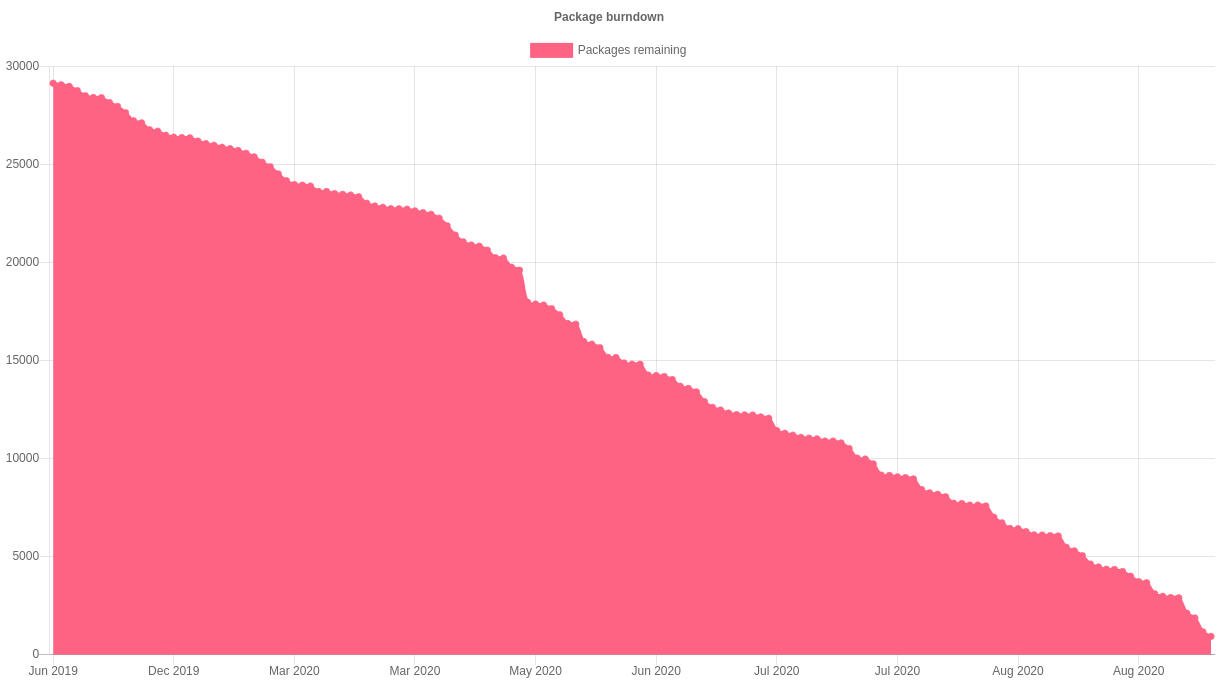
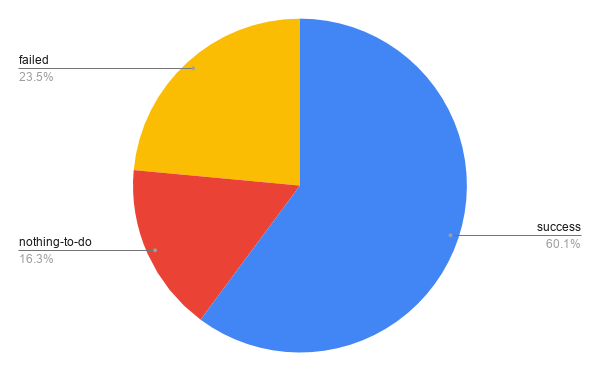
The Debian Janitor is an automated system that commits fixes for (minor) issues in Debian packages that can be fixed by software. It gradually started proposing merges in early December. The first set of changes sent out ran lintian-brush on sid packages maintained in Git. This post is part of a series about the progress of the Janitor. On 12 July 2019, the Janitor started fixing lintian issues in packages in the Debian archive. Now, a year and a half later, it has processed every one of the almost 28,000 packages at least once. Graph with Lintian Fixes Burndown As discussed two weeks ago, this has resulted in roughly 65,000 total changes. These 65,000 changes were made to a total of almost 17,000 packages. Of the remaining packages, for about 4,500 lintian-brush could not make any improvements. The rest (about 6,500) failed to be processed for one of many reasons they are e.g. not yet migrated off alioth, use uncommon formatting that can't be preserved or failed to build for one reason or another. Graph with runs by status (success, failed, nothing-to-do) Now that the entire archive has been processed, packages are prioritized based on the likelihood of a change being made to them successfully. Over the course of its existence, the Janitor has slowly gained support for a wider variety of packaging methods. For example, it can now edit the templates for some of the generated control files. Many of the packages that the janitor was unable to propose changes for the first time around are expected to be correctly handled when they are reprocessed. If you re a Debian developer, you can find the list of improvements made by the janitor in your packages by going to https://janitor.debian.net/m/.

For more information about the Janitor's lintian-fixes efforts, see the landing page.

31 August 2020

Jacob Adams: Command Line 101

How to Work in a Text-Only Environment.

What is this thing? When you first open a command-line (note that I use the terms command-line and shell interchangably here, they re basically the same, but command-line is the more general term, and shell is the name for the program that executes commands for you) you ll see something like this: thisfolder This line is called a command prompt and it tells you four pieces of information:

  1. jaadams: The username of the user that is currently running this shell.
  2. bg7: The name of the computer that this shell is running on, important for when you start accessing shells on remote machines.
  3. /tmp/thisfolder: The folder or directory that your shell is currently running in. Like a file explorer (like Window s Explorer or Mac s Finder) a shell always has a working directory, from which all relative paths (see sidenote below) are resolved.
When you first opened a shell, however, you might notice that is looks more like this: home This is a shorthand notation that the shell uses to make this output shorter when possible. ~ stands for your home directory, usually /home/<username>. Like C:\Users\<username>\ on Windows or /Users/<username> on Mac, this directory is where all your files should go by default. Thus a command prompt like this: downloads actually tells you that you are currently in the /home/jaadams/Downloads directory.


Sidenote: The Unix Filesystem and Relative Paths folders on Linux and other Unix-derived systems like MacOS are usually called directories. These directories are represented by paths, strings that indicate where the directory is on the filesystem. The one unusual part is the so-called root directory . All files are stored in this folder or directories under it. Its path is just / and there are no directories above it. For example, the directory called home typically contains all user directories. This is stored in the root directory, and each users specific data is stored in a directory named after that user under home. Thus, the home directory of the user jacob is typically /home/jacob, the directory jacob under the home directory stored in the root directory /. If you re interested in more details about what goes in what directory, man hier has the basics and the Filesystem Hierarchy Standard governs the layout of the filesystem on most Linux distributions. You don t always have to use the full path, however. If the path does not begin with a /, it is assumed that the path actually begins with the path of the current directory. So if you use a path like my/folders/here, and you re in the /home/jacob directory, the path will be treated like /home/jacob/my/folders/here. Each folder also contains the symbolic links .. and .. Symbolic links are a very powerful kind of file that is actually a reference to another file. .. always represents the parent directory of the current directory, so /home/jacob/.. links to /home/. . always links to the current directory, so /home/jacob/. links to /home/jacob.

Running commands To run a command from the command prompt, you type its name and then usually some arguments to tell it what to do. For example, the echo command displays the text passed as arguments.
jacob@lovelace/home/jacob$ echo hello world
hello world
Arguments to commands are space-separated, so in the previous example hello is the first argument and world is the second. If you need an argument to contain spaces, you ll want to put quotes around it, echo "like so". Certain arguments are called flags , or options (options if they take another argument, flags otherwise) usually prefixed with a hyphen, and they change the way a program operates. For example, the ls command outputs the contents of a directory passed as an argument, but if you add -l before the directory, it will give you more details on the files in that directory.
jacob@lovelace/tmp/test$ ls /tmp/test
1  2  3  4  5  6
jacob@lovelace/tmp/test$ ls -l /tmp/test
total 0
-rw-r--r-- 1 jacob jacob 0 Aug 26 22:06 1
-rw-r--r-- 1 jacob jacob 0 Aug 26 22:06 2
-rw-r--r-- 1 jacob jacob 0 Aug 26 22:06 3
-rw-r--r-- 1 jacob jacob 0 Aug 26 22:06 4
-rw-r--r-- 1 jacob jacob 0 Aug 26 22:06 5
-rw-r--r-- 1 jacob jacob 0 Aug 26 22:06 6
jacob@lovelace/tmp/test$
Most commands take different flags to change their behavior in various ways.

File Management
  • cd <path>: Change the current directory of the running shell to <path>.
  • ls <path>: Output the contents of <path>. If no path is passed, it prints the contents of the current directory.
  • touch <filename>: create an new empty file called <filename>. Used on an existing file, it updates the file s last accessed and modified times. Most text editors can also create a new file for you, which is probably more useful.
  • mkdir <directory>: Create a new folder/directory at path <directory>.
  • mv <src> <dest>: Move a file or directory at path <src> to <dest>.
  • cp <src> <dest>: Copy a file or directory at path <src> to <dest>.
  • rm <file>: Remove a file at path <file>.
  • zip -r <zipfile> <contents...>: Create a zip file <zipfile> with contents <contents>. <contents> can be multiple arguments, and you ll usually want to use the -r argument when including directories in your zipfile, as otherwise only the directory will be included and not the files and directories within it.

Searching
  • grep <thing> <file>: Look for the string <thing> in <file>. If no <file> is passed it searches standard input.
  • find <path> -name <name>: Find a file or directory called <name> somwhere under <path>. This command is actually very powerful, but also very complex. For example you can delete all files in a directory older than 30 days with:
    find -mtime +30 -exec rm  \;
    
  • locate <name>: A much easier to use command to find a file with a given name, but it is not usually installed by default.

Outputting Files
  • cat <files...>: Output (concatenate) all the files passed as arguments.
  • head <file>: Output the beginning of <file>
  • tail <file>: Output the end of <file>

How to Find the Right Command All commands (at least on sane Linux distributions like Debian or Ubuntu) are documented with a manual page, in man section 1 (for more information on manual sections, run man intro). This can be accessed using man <command> You can search for the right command using the -k flag, as in man -k <search>. You can also view manual pages in your browser, on sites like https://manpages.debian.org or https://linux.die.net/man. This is not always helpful, however, because some command s descriptions are not particularly useful, and also there are a lot of manual pages, which can make searching for a specific one difficult. For example, finding the right command to search inside text files is quite difficult via man (it s grep). When you can t find what you need with man I recommend falling back to searching the Internet. There are lots of bad Linux tutorials out there, but here are some reputable sources I recommend:
  • https://www.cyberciti.biz: nixCraft has excellent tutorials on all things Linux
  • Hosting providers like Digital Ocean or Linode: Good intro documentation, but can sometimes be outdated
  • https://tldp.org: The Linux Documentation project is great, but it can also be a little outdated sometimes.
  • https://stackoverflow.com: Oftentimes has great answers, but quality varies wildly since anyone can answer.
These are certainly not the only options but they re the sources I would recommend when available.

How to Read a Manual Page Manual pages consist of a series of sections, each with a specific purpose. Instead of attempting to write my own description here, I m going to borrow the excellent one from The Linux Documentation Project
The NAME section is the only required section. Man pages without a name section are as useful as refrigerators at the north pole. This section also has a standardized format consisting of a comma-separated list of program or function names, followed by a dash, followed by a short (usually one line) description of the functionality the program (or function, or file) is supposed to provide. By means of makewhatis(8), the name sections make it into the whatis database files. Makewhatis is the reason the name section must exist, and why it must adhere to the format I described. (Formatting explanation cut for brevity) The SYNOPSIS section is intended to give a short overview on available program options. For functions this sections lists corresponding include files and the prototype so the programmer knows the type and number of arguments as well as the return type. The DESCRIPTION section eloquently explains why your sequence of 0s and 1s is worth anything at all. Here s where you write down all your knowledge. This is the Hall Of Fame. Win other programmers and users admiration by making this section the source of reliable and detailed information. Explain what the arguments are for, the file format, what algorithms do the dirty jobs. The OPTIONS section gives a description of how each option affects program behaviour. You knew that, didn t you? The FILES section lists files the program or function uses. For example, it lists configuration files, startup files, and files the program directly operates on. (Cut details about installing files) The ENVIRONMENT section lists all environment variables that affect your program or function and tells how, of course. Most commonly the variables will hold pathnames, filenames or default options. The DIAGNOSTICS section should give an overview of the most common error messages from your program and how to cope with them. There s no need to explain system error error messages (from perror(3)) or fatal signals (from psignal(3)) as they can appear during execution of any program. The BUGS section should ideally be non-existent. If you re brave, you can describe here the limitations, known inconveniences and features that others may regard as misfeatures. If you re not so brave, rename it the TO DO section ;-) The AUTHOR section is nice to have in case there are gross errors in the documentation or program behaviour (Bzzt!) and you want to mail a bug report. The SEE ALSO section is a list of related man pages in alphabetical order. Conventionally, it is the last section.

Remote Access One of the more powerful uses of the shell is through ssh, the secure shell. This allows you to remotely connect to another computer and run a shell on that machine:
user@host:~$ ssh other@example.com
other@example:~$
The prompt changes to reflect the change in user and host, as you can see in the example above. This allows you to work in a shell on that machine as if it was right in front of you.

Moving Files Between Machines There are several ways you can move files between machines over ssh. The first and easiest is scp, which works much like the cp command except that paths can also take a user@host argument to move files across computers. For example, if you wanted to move a file test.txt to your home directory on another machine, the command would look like:
scp test.txt other@example.com:
(The home directory is the default path) Otherwise you can move files by reversing the order of the arguments and put a path after the colon to move files from another directory on the remote host. For example, if you wanted to fetch the file /etc/issue.net from example.com:
scp other@example.com:/etc/issue.net .
Another option is the sftp command, which gives you a very simple shell-like interface in which you can cd and ls, before either puting files onto the local machine or geting files off of it. The final and most powerful option is rsync which syncs the contents of one directory to another, and doesn t copy files that haven t changed. It s powerful and complex, however, so I recommend reading the USAGE section of its man page.

Long-Running Commands The one problem with ssh is that it will stop any command running in your shell when you disconnect. If you want to leave something on and come back later then this can be a problem. This is where terminal multiplexers come in. tmux and screen both allow you to run a shell in a safe environment where it will continue even if you disconnect from it. You do this by running the command without any arguments, i.e. just tmux or just screen. In tmux you can disconnect from the current session by pressing Ctrl+b then d, and reattach with the tmux attach command. screen works similarly, but with Ctrl+a instead of b and screen -r to reattach.

Command Inputs and Outputs Arguments are not the only way to pass input to a command. They can also take input from what s called standard input , which the shell usually connects to your keyboard. Output can go to two places, standard output and standard error, both of which are directed to the screen by default.

Redirecting I/O Note that I said above that standard input/output/error are only usually connected to the keyboard and the terminal? This is because you can redirect them to other places with the shell operators <, > and the very powerful .

File redirects The operators < and > redirect the input and output of a command to a file. For example, if you wanted a file called list.txt that contained a list of all the files in a directory /this/one/here you could use:
ls /this/one/here > list.txt

Pipelines The pipe character, , allows you to direct the output of one command into the input of another. This can be very powerful. For example, the following pipeline lists the contents of the current directory searches for the string test , then counts the number of results. (wc -l counts the number of lines in its input)
ls   grep test   wc -l
For a better, but even more contrived example, say you have a file myfile, with a bunch of lines of potentially duplicated and unsorted data
test
test
1234
4567
1234
You can sort it and output only the unique lines with sort and uniq:
$ uniq < myfile   sort
1234
1234
4567
test

Save Yourself Some Typing: Globs and Tab-Completion Sometimes you don t want to type out the whole filename when writing out a command. The shell can help you here by autocompleting when you press the tab key. If you have a whole bunch of files with the same suffix, you can refer to them when writing arguments as *.suffix. This also works with prefixes, prefix*, and in fact you can put a * anywhere, *middle*. The shell will expand that * into all the files in that directory that match your criteria (ending with a specific suffix, starting with a specific prefix, and so on) and pass each file as a separate argument to the command. For example, if I have a series of files called 1.txt, 2.txt, and so on up to 9, each containing just the number for which it s named, I could use cat to output all of them like so:
jacob@lovelace/tmp/numbers$ ls
1.txt  2.txt  3.txt  4.txt  5.txt  6.txt  7.txt  8.txt	9.txt
jacob@lovelace/tmp/numbers$ cat *.txt
1
2
3
4
5
6
7
8
9
Also the ~ shorthand mentioned above that refers to your home directory can be used when passing a path as an argument to a command.

Ifs and For loops The files in the above example were generated with the following shell commands:
for i in 1 2 3 4 5 6 7 8 9
do
echo $i > $i.txt
done
But I ll have to save variables, conditionals and loops for another day because this is already too long. Needless to say the shell is a full programming language, although a very ugly and dangerous one.

28 August 2020

Bits from Debian: DebConf20 welcomes its sponsors!

DebConf20 logo DebConf20 is taking place online, from 23 August to 29 August 2020. It is the 21st Debian conference, and organizers and participants are working hard together at creating interesting and fruitful events. We would like to warmly welcome the 17 sponsors of DebConf20, and introduce them to you. We have four Platinum sponsors. Our first Platinum sponsor is Lenovo. As a global technology leader manufacturing a wide portfolio of connected products, including smartphones, tablets, PCs and workstations as well as AR/VR devices, smart home/office and data center solutions, Lenovo understands how critical open systems and platforms are to a connected world. Our next Platinum sponsor is Infomaniak. Infomaniak is Switzerland's largest web-hosting company, also offering backup and storage services, solutions for event organizers, live-streaming and video on demand services. It wholly owns its datacenters and all elements critical to the functioning of the services and products provided by the company (both software and hardware). Google is our third Platinum sponsor. Google is one of the largest technology companies in the world, providing a wide range of Internet-related services and products such as online advertising technologies, search, cloud computing, software, and hardware. Google has been supporting Debian by sponsoring DebConf for more than ten years, and is also a Debian partner. Amazon Web Services (AWS) is our fourth Platinum sponsor. Amazon Web Services is one of the world's most comprehensive and broadly adopted cloud platforms, offering over 175 fully featured services from data centers globally (in 77 Availability Zones within 24 geographic regions). AWS customers include the fastest-growing startups, largest enterprises and leading government agencies. Our Gold sponsors are Deepin, the Matanel Foundation, Collabora, and HRT. Deepin is a Chinese commercial company focusing on the development and service of Linux-based operating systems. They also lead research and development of the Deepin Debian derivative. The Matanel Foundation operates in Israel, as its first concern is to preserve the cohesion of a society and a nation plagued by divisions. The Matanel Foundation also works in Europe, in Africa and in South America. Collabora is a global consultancy delivering Open Source software solutions to the commercial world. In addition to offering solutions to clients, Collabora's engineers and developers actively contribute to many Open Source projects. Hudson-Trading is a company led by mathematicians, computer scientists, statisticians, physicists and engineers. They research and develop automated trading algorithms using advanced mathematical techniques. Our Silver sponsors are: Linux Professional Institute, the global certification standard and career support organization for open source professionals, Civil Infrastructure Platform, a collaborative project hosted by the Linux Foundation, establishing an open source base layer of industrial grade software, Ubuntu, the Operating System delivered by Canonical, and Roche, a major international pharmaceutical provider and research company dedicated to personalized healthcare. Bronze sponsors: IBM, MySQL, Univention. And finally, our Supporter level sponsors, ISG.EE and Pengwin. Thanks to all our sponsors for their support! Their contributions make it possible for a large number of Debian contributors from all over the globe to work together, help and learn from each other in DebConf20. Participating in DebConf20 online The 21st Debian Conference is being held online, due to COVID-19, from August 23 to 29, 2020. Talks, discussions, panels and other activities run from 10:00 to 01:00 UTC. Visit the DebConf20 website at https://debconf20.debconf.org to learn about the complete schedule, watch the live streaming and join the different communication channels for participating in the conference.

25 August 2020

Jonas Meurer: cryptsetup-suspend

Introducing cryptsetup-suspend Today, we're introducing cryptsetup-suspend, whose job is to protect the content of your harddrives while the system is sleeping. TL;DR:
  • You can lock your encrypted harddrives during suspend mode by installing cryptsetup-suspend
  • For cryptsetup-suspend to work properly, at least Linux kernel 5.6 is required
  • We hope that in a bright future, everything will be available out-of-the-box in Debian and it's derivatives
Before: timeline_old.svg After: timeline_new.svg

Table of contents

What does this mean and why should you care about it? If you don't use full-disk encryption, don't read any further. Instead, think about, what will happen if you lose your notebook on the train, a random person picks it up and browses through all your personal pictures, e-mails, and tax records. Then encrypt your system and come back. If you believe full-disk encryption is necessary, you might know that it only works when your machine is powered off. Once you turn on the machine and decrypt your harddrive, your encryption key stays in RAM and can potentially be extracted by malicious software or physical access. Even if these attacks are non-trivial, it's enough to worry about. If an attacker is able to extract your disk encryption keys from memory, they're able to read the content of your disk in return. Sadly, in 2020, we hardly power off our laptops anymore. The sleep mode, also known as "suspend mode", is just too convenient. Just close the lid to freeze the system state and lift it anytime later in order to continue. Well, convenience usually comes with a cost: during suspend mode, your system memory is kept powered, all your data - including your encryption keys - stays there, waiting to be extracted by a malicious person. Unfortunately, there are practical attacks to extract the data of your powered memory. Cryptsetup-suspend expands the protection of your full-disk encryption to all those times when your computer sleeps in suspend mode. Cryptsetup-suspend utilizes the suspend feature of LUKS volumes and integrates it with your Debian system. Encryption keys are evicted from memory before suspend mode and the volumes have to be re-opened after resuming - potentially prompting for the required passphrases. By now, we have a working prototype which we want to introduce today. We did quite some testing, both on virtualized and bare-metal Debian and Ubuntu systems, with and without graphical stack, so we dare to unseal and set free the project and ask you - the community - to test, review, criticize and give feedback. Here's a screencast of cryptsetup-suspend in action:

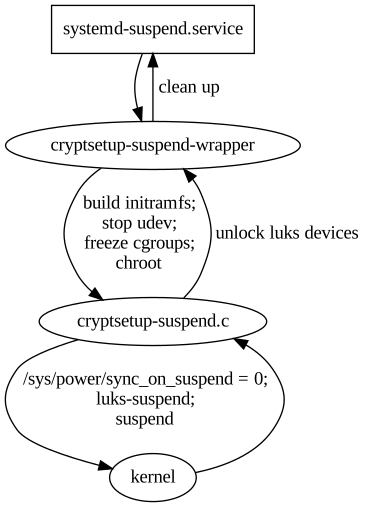
State of the implementation: where are we? If you're interested in the technical details, here's how cryptsetup-suspend works internally. It basically consists of three parts: cryptsetup-suspend.svg
  1. cryptsetup-suspend: A C program that takes a list of LUKS devices as arguments, suspends them via luksSuspend and suspends the system afterwards. Also, it tries to reserve some memory for decryption, which we'll explain below.
  2. cryptsetup-suspend-wrapper: A shell wrapper script which works the following way:
    1. Extract the initramfs into a ramfs
    2. Run (systemd) pre-suspend scripts, stop udev, freeze almost all cgroups
    3. Chroot into the ramfs and run cryptsetup-suspend
    4. Resume initramfs devices inside chroot after resume
    5. Resume non-initramfs devices outside chroot
    6. Thaw groups, start udev, run (systemd) post-suspend scripts
    7. Unmount the ramfs
  3. A systemd unit drop-in file overriding the Exec property of systemd-suspend.service so that it invokes the script cryptsetup-suspend-wrapper.
Reusing large parts of the existing cryptsetup-initramfs implementation has some positive side-effects: Out-of-the-box, we support all LUKS block device setups that have been supported by the Debian cryptsetup packages before. Freezing most processes/cgroups is necessary to prevent possible race-conditions and dead-locks after the system resumes. Processes will try to access data on the locked/suspended block devices eventually leading to buffer overflows and data loss.

Technical challenges and caveats
  • Dead-locks at suspend: In order to prevent possible dead-locks between suspending the encrypted LUKS disks and suspending the system, we have to tell the Linux kernel to not sync() before going to sleep. A corresponding patch got accepted upstream in Linux 5.6. See section What about the kernel patch? below for details.
  • Race conditions at resume: Likewise, there's a risk of race conditions between resuming the system and unlocking the encypted LUKS disks. We went with freezing as many processes as possible as a counter measurement. See last part of section State of the implementation: where are we? for details.
  • Memory management: Memory management is definitely a challenge. Unlocking disks might require a lot of memory (if key derivation function is argon2i) and the swap device most likely is locked at that time. See section All that matters to me is the memories! below for details.
  • systemd dependency: Our implementation depends on systemd. It uses a unit drop-in file for systemd-suspend.service for hooking into the system suspend process and depends on systemds cgroup management to freeze and thaw processes. If you're using a different init system, sorry, you're currently out of luck.

What about the kernel patch? The problem is simple: the Linux kernel suspend implementation enforces a final filesystem sync() before the system goes to sleep in order to prevent potential data loss. While that's sensible in most scenarios, it may result in dead-locks in our situation, since the block device that holds the filesystem is already suspended. The fssync() call will block forever as it waits for the block device to finish the sync() operation. So we need a way to conditionally disable this sync() call in the Linux kernel resume function. That's what our patch does, by introducing a run-time switch at /sys/power/sync_on_suspend, but it only got accepted into the Linux kernel recently and was first released with Linux kernel 5.6. Since release 4.3, the Linux kernel at least provides a build-time flag to disable the sync(): CONFIG_SUSPEND_SKIP_SYNC (that was called SUSPEND_SKIP_SYNC first and renamed to CONFIG_SUSPEND_SKIP_SYNC in kernel release 4.9). Enabling this flag at build-time protects you against the dead locks perfectly well. But while that works on an individual basis, it's a non-option for the distribution Linux kernel defaults. In most cases you still want the sync() to happen, except if you have user-space code that takes care of the sync() just before suspending your system - just like our cryptsetup-suspend implementation does. So in order to properly test cryptsetup-suspend, you're strongly advised to run Linux kernel 5.6 or newer. Fortunately, Linux 5.6 is available in buster-backports thanks to the Debian Kernel Team.

All that matters to me is the memories! One of the tricky parts is memory management. Since version 2, LUKS uses argon2i as default key derivation function. Argon2i is a memory-hard hash function and LUKS2 assigns the minimum of half of your systems memory or 1 GB to unlocking your device. While this is usually unproblematic during system boot - there's not much in the system memory anyway - it can become problematic when suspending. When cryptsetup tries to unlock a device and wants 1 GB of memory for this, but everything is already occupied by your browser and video player, there's only two options what to do:
  1. Kill a process to free some memory
  2. Move some of the data from memory to swap space
The first option is certainly not what you expect when suspending your system. The second option is impossible, because swap is located on your harddrive which we have locked before. Our current solution is to allocate the memory after freezing the other processes, but before locking the disks. At this time, the system can still move data to swap, but it won't be accessed anymore. We then release the memory just in time for cryptsetup to claim it again. The implementation of this is still subject to change. memories.gif

What's missing: A proper user interface As mentioned before, we consider cryptsetup-suspend usable, but it certainly still has bugs and shortcomings. The most obvious one is lack of a proper user interface. Currently, we switch over to a tty command-line interface to prompt for passphrases when unlocking the LUKS devices. It certainly would be better to replace this with a graphical user interface later, probably by using plymouth or something alike. Unfortunately, it seems rather impossible to spawn a real graphical environment for the passphrase prompt. That would imply to load the full graphical stack into the ramfs, raising the required amount of memory significantly. Lack of memory is currently our biggest concern and source of trouble. We'd definitely appreciate to learn about your ideas how to improve the user experience here.

Let's get practical: how to use TL;DR: On Debian Bullseye (Testing), all you need to do is to install the cryptsetup-suspend package from experimental. It's not necessary to upgrade the other cryptsetup packages. On Debian Buster, cryptsetup packages from backports are required.
  1. First, be sure that you're running Linux kernel 5.6 or newer. For Buster systems, it's available in buster-backports.
  2. Second, if you're on Debian Buster, install the cryptsetup 2:2.3.3-2~bpo10+1 packages from buster-backports.
  3. Third, install the cryptsetup-suspend package from experimental. Beware that cryptsetup-suspend depends on cryptsetup-initramfs (>= 2:2.3.3-1~). Either you need the cryptsetup packages from testing/unstable, or the backports from buster-backports.
  4. Now that you have the cryptsetup-suspend package installed, everything should be in place: Just send your system to sleep. It should switch to a virtual text terminal before going to sleep, ask for a passphrase to unlock your encrypted disk(s) after resume and switch back to your former working environment (most likely your graphical desktop environment) afterwards.

Security considerations Suspending LUKS devices basically means to remove the corresponding encryption keys from system memory. This protects against all sort of attacks trying to read them from there, e.g. cold-boot attacks. But, cryptsetup-suspend only protects the encryption keys of your LUKS devices. Most likely there's more sensitive data in system memory, like all kinds of private keys (e.g. OpenPGP, OpenSSH) or documents with sensitive content. We hope that the community will help improve this situation by providing useful pre-/post-suspend scripts. A positive example is KeepassXC, which is able to lock itself when going to suspend mode.

Feedback and Comments We'd be more than happy to learn about your thoughts on cryptsetup-suspend. For specific issues, don't hesitate to open a bugreport against cryptsetup-suspend. You can also reach us via mail - see the next section for contact addresses. Last but not least, comments below the blogpost work as well.

Authors
  • Tim (tim at systemli.org)
  • Jonas (jonas at freesources.org)

24 August 2020

Sven Hoexter: google cloud buster images without python 2

Update I have to stand corrected. noahm@ wrote me, because the Debian Cloud Image maintainer only ever included python explicitly in Azure images. The most likely explanation for the change in the Google images is that Google just ported the last parts of their own software to python 3, and subsequently removed python 2. With some relieve one can just conclude it's only our own fault that we did not build our own images, which include all our own dependencies. Take it as reminder to always build your own images. Always. Be it VMs or docker. Build your own image. Original Post Fun in the morning, we realized that the Debian Cloud image builds dropped python 2 and that propagated to the Google provided Debian/buster images. So in case you use something like ansible, and so far assumed python 2 as the default interpreter, and installed additional python 2 modules to support ansible modules, you now have to either install python 2 again or just move to python 3k. We just try to suffer it through now, and set interpreter_python = auto in our ansible.cfg to anticipate the new default behaviour, which is planned for ansible 2.12. See also https://docs.ansible.com/ansible/latest/reference_appendices/interpreter_discovery.html Other lesson to learn here: The GCE Debian stable images are not stable. Blends in nicely with this rant, though it's not 100% a Google Cloud foul this time.

Ulrike Uhlig: Code reviews: from nitpicking to cooperation

After we gave our talk at DebConf 20, Doing things together, there were 5 minutes left for the live Q&A. Pollo asked a question that I think is interesting and deserves a longer answer: How can we still have a good code review process without making it a "you need to be perfect" scenario? I often find picky code reviews help me write better code. I find it useful to first disentangle what code reviews are good for, how we do them, why we do them that way, and how we can potentially improve processes. What are code reviews good for? Code review and peer review are great methods for cooperation aiming at: Looking at this list, the last point seems to be more like a nice side effect of all the other points. :) How do code reviews happen in our communities? It seems to be a common assumption that code reviews are and have to be picky and perfectionist. To me, this does not actually seem to be a necessity to accomplish the above mentioned goals. We might want to work with precision a quality which is different from perfection. Perfection can hardly be a goal: perfection does not exist. Perfectionist dynamics can lead to failing to call something "good enough" or "done". Sometimes, a disproportionate amount of time is invested in writing (several) code reviews for minor issues. In some cases, strong perfectionist dynamics of a reviewer can create a feeling of never being good enough along with a loss of self esteem for otherwise skilled code authors. When do we cross the line? When going from cooperation, precision, and learning to write better code, to nitpicking, we are crossing a line: nitpicking means to pedantically search for others' faults. For example, I once got one of my Git commits at work criticized merely for its commit message that was said to be "ugly" because I "use[d] the same word twice" in it. When we are nitpicking, we might not give feedback in an appreciative, cooperative way, we become fault finders instead. From there it's a short way to operating on the level of blame. Are you nitpicking to help or are you nitpicking to prove something? Motivations matter. How can we improve code reviewing? When we did something wrong, we can do better next time. When we are told that we are wrong, the underlying assumption is that we cannot change (See Bren Brown, The difference between blame and shame). We can learn to go beyond blame. Negative feedback rarely leads to improvement if the environment in which it happens lacks general appreciation and confirmation. We can learn to give helpful feedback. It might be harder to create an appreciative environment in which negative feedback is a possibility for growth. One can think of it like of a relationship: in a healthy relationship we can tell each other when something does not work and work it out because we regularly experience that we respect, value, and support each other. To be able to work precisely, we need guidelines, tools, and time. It's not possible to work with precision if we are in a hurry, burnt out, or working under a permanent state of exception. The same is true for receiving picky feedback. On DebConf's IRC channel, after our talk, marvil07 said: On picky code reviews, something that I find useful is automation on code reviews; i.e. when a bot is stating a list of indentation/style errors it feels less personal, and also saves time to humans to provide more insightful changes. Indeed, we can set up routines that do automatic fault checking (linting). We can set up coding guidelines. We can define what we call "done" or "good enough". We can negotiate with each other how we would like code to be reviewed. For example, one could agree that a particularly perfectionist reviewer should point out only functional faults. They can spare their time and refrain from writing lengthy reviews about minor esthetic issues that have never made it into a guideline. If necessary, author and reviewer can talk about what can be improved on the long term during a retrospective. Or, on the contrary, one could explicitly ask for a particularly detailed review including all sorts of esthetic issues to learn the best practices of a team applied to one's own code. In summary: let's not lose sight of what code reviews are good for, let's have a clear definition of "done", let's not confuse precision with perfection, let's create appreciative work environments, and negotiate with each other how reviews are made. I'm sure you will come up with more ideas. Please do not hesitate to share them!

17 August 2020

Ian Jackson: Doctrinal obstructiveness in Free Software

Any software system has underlying design principles, and any software project has process rules. But I seem to be seeing more often, a pathological pattern where abstract and shakily-grounded broad principles, and even contrived and sophistic objections, are used to block sensible changes. Today I will go through an example in detail, before ending with a plea: PostgreSQL query planner, WITH [MATERIALIZED] optimisation fence Background history PostgreSQL has a sophisticated query planner which usually gets the right answer. For good reasons, the pgsql project has resisted providing lots of knobs to control query planning. But there are a few ways to influence the query planner, for when the programmer knows more than the planner. One of these is the use of a WITH common table expression. In pgsql versions prior to 12, the planner would first make a plan for the WITH clause; and then, it would make a plan for the second half, counting the WITH clause's likely output as a given. So WITH acts as an "optimisation fence". This was documented in the manual - not entirely clearly, but a careful reading of the docs reveals this behaviour:
The WITH query will generally be evaluated as written, without suppression of rows that the parent query might discard afterwards.
Users (authors of applications which use PostgreSQL) have been using this technique for a long time. New behaviour in PostgreSQL 12 In PostgreSQL 12 upstream were able to make the query planner more sophisticated. In particular, it is now often capable of looking "into" the WITH common table expression. Much of the time this will make things better and faster. But if WITH was being used for its side-effect as an optimisation fence, this change will break things: queries that ran very quickly in earlier versions might now run very slowly. Helpfully, pgsql 12 still has a way to specify an optimisation fence: specifying WITH ... AS MATERIALIZED in the query. So far so good. Upgrade path for existing users of WITH fence But what about the upgrade path for existing users of the WITH fence behaviour? Such users will have to update their queries to add AS MATERIALIZED. This is a small change. Having to update a query like this is part of routine software maintenance and not in itself very objectionable. However, this change cannnot be made in advance because pgsql versions prior to 12 will reject the new syntax. So the users are in a bit of a bind. The old query syntax can be unuseably slow with the new database and the new syntax is rejected by the old database. Upgrading both the database and the application, in lockstep, is a flag day upgrade, which every good sysadmin will want to avoid. A solution to this problem Colin Watson proposed a very simple solution: make the earlier PostgreSQL versions accept the new MATERIALIZED syntax. This is correct since the new syntax specifies precisely the actual behaviour of the old databases. It has no deleterious effect on any users of older pgsql versions. It makes it possible to add the new syntax to the application, before doing the database upgrade, decoupling the two upgrades. Colin Watson even provided an implementation of this proposal. The solution is rejected by upstream Unfortunately upstream did not accept this idea. You can read the whole thread yourself if you like. But in summary, the objections were (italic indicates literal quotes): I find these extremely unconvincing, even taken together. Many of them are very unattractive things to hear one's upstream saying. At best they are knee-jerk and inflexible application of very general principles. The authors of these objections seem to have lost sight of the fact that these principles have a purpose. When these kind of software principles work against their purposes, they should be revised, or exceptions made. At worst, it looks like a collective effort to find reasons - any reasons, no matter how bad - not to make this change. The OFFSET 0 trick One of the responses in the thread mentions OFFSET 0. As part of writing the queries in the Xen Project CI system, and preparing for our system upgrade, I had carefully read the relevant pgsql documentation. This OFFSET 0 trick was new to me. But, now that I know the answer, it is easy to provide the right search terms and find, for example, this answer on stackmumble. Apparently adding a no-op OFFSET 0 to the subquery defeats the pgsql 12 query planner's ability to see into the subquery.
I think OFFSET 0 is the better approach since it's more obviously a hack showing that something weird is going on, and it's unlikely we'll ever change the optimiser behaviour around OFFSET 0 ... wheras hopefully CTEs will become inlineable at some point CTEs became inlineable by default in PostgreSQL 12.
So in fact there is a syntax for an optimisation fence that is accepted by both earlier and later PostgreSQL versions. It's even recommended by pgsql devs. It's just not documented, and is described by pgsql developers as a "hack". Astonishingly, the fact that it is a "hack" is given as a reason to use it! Well, I have therefore deployed this "hack". No doubt it will stay in our codebase indefinitely. Please don't be like that! I could come up with a lot more examples of other projects that have exhibited similar arrogance. It is becoming a plague! But every example is contentious, and I don't really feel I need to annoy a dozen separate Free Software communities. So I won't make a laundry list of obstructiveness. If you are an upstream software developer, or a distributor of software to users (eg, a distro maintainer), you have a lot of practical power. In theory it is Free Software so your users could just change it themselves. But for a user or downstream, carrying a patch is often an unsustainable amount of work and risk. Most of us have patches we would love to be running, but which we haven't even written because simply running a nonstandard build is too difficult, no matter how technically excellent our delta. As an upstream, it is very easy to get into a mindset of defending your code's existing behaviour, and to turn your project's guidelines into inflexible rules. Constant exposure to users who make silly mistakes, and rudely ask for absurd changes, can lead to core project members feeling embattled. But there is no need for an upstream to feel embattled! You have the vast majority of the power over the software, and over your project communication fora. Use that power consciously, for good. I can't say that arrogance will hurt you in the short term. Users of software with obstructive upstreams do not have many good immediate options. But we do have longer-term choices: we can choose which software to use, and we can choose whether to try to help improve the software we use. After reading Colin's experience, I am less likely to try to help improve the experience of other PostgreSQL users by contributing upstream. It doesn't seem like there would be any point. Indeed, instead of helping the PostgreSQL community I am now using them as an example of bad practice. I'm only half sorry about that.

comment count unavailable comments

Arnaud Rebillout: Modify Vim syntax files for your taste

In this short how-to, we'll see how to make small modifications to a Vim syntax file, in order to change how a particular file format is highlighted. We'll go for a simple use-case: modify the Markdown syntax file, so that H1 and H2 headings (titles and subtitles, if you prefer) are displayed in bold. Of course, this won't be exactly as easy as expected, but no worries, we'll succeed in the end. The calling Let's start with a screenshot: how Vim displays Markdown files for me, someone who use the GNOME terminal with the Solarized light theme. Vim - Markdown file with original highlighting I'm mostly happy with that, except for one or two little details. I'd like to have the titles displayed in bold, for example, so that they're easier to spot when I skim through a Markdown file. It seems like a simple thing to ask, so I hope there can be a simple solution. The first steps Let's learn the basics. In Vim world, the rules to highlight files formats are defined in the directory /usr/share/vim/vim82/syntax (I bet you'll have to adjust this path depending on the version of Vim that is installed on your system). And so, for the Markdown file format, the rules are defined in the file /usr/share/vim/vim82/syntax/markdown.vim. The first thing we could do is to have a look at this file, try to make sense of it, and maybe start to make some modifications. But wait a moment. You should know that modifying a system file is not a great idea. First because your changes will be lost as soon as an update kicks in and the package manager replaces this file by a new version. Second, because you will quickly forget what files you modified, and what were your modifications, and if you do that too much, you might experience what is called "maintenance headache" in the long run. So instead, maybe you DO NOT modify this file, and instead you copy it in your personal Vim folder, more precisely in ~/.vim/syntax. Create this directory if it does not exist:
mkdir -p ~/.vim/syntax
cp /usr/share/vim/vim82/syntax/markdown.vim ~/.vim/syntax
The file in your personal folder takes precedence over the system file of the same name in /usr/share/vim/vim82/syntax/, it is a replacement for the existing syntax files. And so from now on, Vim uses the file ~/.vim/syntax/markdown.vim, and this is where we can make our modifications. (And by the way, this is explained in the Vim faq-24.12) And so, it's already nice to know all of that, but wait, there's even better. There's is another location of interest, and it is ~/.vim/after/syntax. You can drop syntax files in this directory, and these files are treated as additions to the existing syntax. So if you only want to make slight modifications, that's the way to go. (And by the way, this is explained in the Vim faq-24.11) So let's forget about a syntax replacement in ~/.vim/syntax/markdown.vim, and instead let's go for some syntax additions in ~/.vim/after/syntax/markdown.vim.
mkdir -p ~/.vim/after/syntax
touch ~/.vim/after/syntax/markdown.vim
Now, let's answer the initial question: how do we modify the highlighting rules for Markdown files, so that the titles are displayed in bold? First, we have to understand where are the rules that define the highlighting for titles. Here there are, from the file /usr/share/vim/vim82/syntax/markdown.vim:
hi def link markdownH1 htmlH1
hi def link markdownH2 htmlH2
hi def link markdownH3 htmlH3
...
You should know that H1 means Heading 1, and so on, and so we want to make H1 and H2 bold. What we can see here is that the headings in the Markdown files are highlighted like the headings in HTML files, and this is obviously defined in the file /usr/share/vim/vim82/syntax/html.vim. So let's have a look into this file:
hi def link htmlH1 Title
hi def link htmlH2 htmlH1
hi def link htmlH3 htmlH2
...
Let's keep digging a bit. Where is Title defined? For those using the default color scheme like me, this is defined straight in the Vim source code, in the file src/highlight.c.
CENT("Title term=bold ctermfg=DarkMagenta",
     "Title term=bold ctermfg=DarkMagenta gui=bold guifg=Magenta"),
And for those using custom color schemes, it might be defined in a file under /usr/share/vim/vim82/colors/. Alright, so how do we override that? We can just define this kind of rules in our syntax additions file at ~/.vim/after/syntax/markdown.vim:
hi link markdownH1 markdownHxBold
hi link markdownH2 markdownHxBold
hi markdownHxBold  term=bold ctermfg=DarkMagenta gui=bold guifg=Magenta cterm=bold
As you can see, the only addition we made, compared to what's defined in src/highlight.c, is cterm=bold. And that's already enough to achieve the initial goal, make the titles (ie. H1 and H2) bold. The result can be seen in the following screenshot: Vim - Markdown file with modified highlighting The rabbit hole So we could stop right here, and life would be easy and good. However, with this solution there's still something that is not perfect. We use the color DarkMagenta as defined in the default color scheme. What I didn't mention however, is that this is applicable for a light background. If you have a dark background though, dark magenta won't be easy to read. Actually, if you look a bit more into src/highlight.c, you will see that the default color scheme comes in two variants, one for a light background, and one for a dark background. And so the definition for Title for a dark background is as follow:
CENT("Title term=bold ctermfg=LightMagenta",
     "Title term=bold ctermfg=LightMagenta gui=bold guifg=Magenta"),
Hmmm, so how do we do that in our syntax file? How can we support both light and dark background, so that the color is right in both cases? After a bit of research, and after looking at other syntax files, it seems that the solution is to check for the value of the background option, and so our syntax file becomes:
hi link markdownH1 markdownHxBold
hi link markdownH2 markdownHxBold
if &background == "light"
  hi markdownHxBold term=bold ctermfg=DarkMagenta gui=bold guifg=Magenta cterm=bold
else
  hi markdownHxBold term=bold ctermfg=LightMagenta gui=bold guifg=Magenta cterm=bold
endif
In case you wonder, in Vim script you prefix Vim options with &, and so you get the value of the background option by writing &background. You can learn this kind of things in the Vim scripting cheatsheet. And so, it's easy enough, except for one thing: it doesn't work. The headings always show up in DarkMagenta, even for a dark background. This is why I called this paragraph "the rabbit hole", by the way. So... Well after trying a few things, I noticed that in order to make it work, I would have to reload the syntax files with :syntax on. At this point, the most likely explanation is that the background option is not set yet when the syntax files are loaded at startup, hence it needs to be reloaded manually afterward. And after muuuuuuch research, I found out that it's actually possible to set a hook for when an option is modified. Meaning, it's possible to execute a function when the background option is modified. Quite cool actually. And so, there it goes in my ~/.vimrc:
" Reload syntax when the background changes 
autocmd OptionSet background if exists("g:syntax_on")   syntax on   endif
For humans, this line reads as:
  1. when the background option is modified -- autocmd OptionSet background
  2. check if the syntax is on -- if exists("g:syntax_on")
  3. if that's the case, reload it -- syntax on
With that in place, my Markdown syntax overrides work for both dark and light background. Champagne! The happy end To finish, let me share my actual additions to the markdown.vim syntax. It makes H1 and H2 bold, along with their delimiters, and it also colors the inline code and the code blocks.
" H1 and H2 headings -> bold
hi link markdownH1 markdownHxBold
hi link markdownH2 markdownHxBold
" Heading delimiters (eg '#') and rules (eg '----', '====') -> bold
hi link markdownHeadingDelimiter markdownHxBold
hi link markdownRule markdownHxBold
" Code blocks and inline code -> highlighted
hi link markdownCode htmlH1
" The following test requires this addition to your vimrc:
" autocmd OptionSet background if exists("g:syntax_on")   syntax on   endif
if &background == "light"
  hi markdownHxBold term=bold ctermfg=DarkMagenta gui=bold guifg=Magenta cterm=bold
else
  hi markdownHxBold term=bold ctermfg=LightMagenta gui=bold guifg=Magenta cterm=bold
endif
And here's how it looks like with a light background: Vim - Markdown file with final highlighting (light) And a dark background: Vim - Markdown file with final highlighting (dark) That's all, that's very little changes compared to the highlighting from the original syntax file, and now that we understand how it's supposed to be done, it's not much effort to achieve it. It's just that finding the workaround to make it work for both light and dark background took forever, and leaves the usual, unanswered question: bug or feature?

15 August 2020

Antonio Terceiro: Useful ffmpeg commands for editing video

For DebConf20, we are recommending that speakers pre-record the presentation part of their talks, and will have live Q&A. We had a smaller online MiniDebConf a couple of months ago, where for instance I had connectivity issues during my talk, so even though it feels too artificial, I guess pre-recording can decrease by a lot the likelihood of a given talk going bad. Paul Gevers and I submitted a short 20 min talk giving an update on autopkgtest, ci.debian.net and friends. We will provide the latest updates on autopkgtest, autodep8, debci, ci.debian.net, and its integration with the Debian testing migration software, britney. We agreed on a split of the content, each one recorded their part, and I offered to join them together. The logical chaining of the topics is such that we can't just concatenate the recordings, so we need to interlace our parts. So I set out to do a full video editing work. I have done this before, although in a simpler way, for one of the MiniDebconfs we held in Curitiba. In that case, it was just cutting the noise at the beginning and the end of the recording, and adding beginning and finish screens with sponsors logos etc. The first issue I noticed was that both our recordings had a decent amount of audio noise. To extract the audio track from the videos, I resorted to How can I extract audio from video with ffmpeg? on Stack Overflow:
ffmpeg -i input-video.avi -vn -acodec copy output-audio.aac
I then edited the audio with Audacity. I passed a noise reduction filter a couple of times, then a compressor filter to amplify my recording on mine, as Paul's already had a good volume. And those are my more advanced audio editing skills, which I acquired doing my own podcast. I now realized I could have just muted the audio tracks from the original clip and align the noise-free audio with it, but I ended up creating new video files with the clean audio. Another member of the Stack Overflow family came to the rescue, in How to merge audio and video file in ffmpeg. To replace the audio stream, we can do something like this:
ffmpeg -i video.mp4 -i audio.wav -c:v copy -c:a aac -map 0:v:0 -map 1:a:0 output.mp4
Paul's recording had a 4:3 aspect ratio, while the requested format is 16:9. This late in the game, there was zero chance I would request him to redo the recording. So I decided to add those black bars on the side to make it the right aspect when showing full screen. And yet again the quickest answer I could find came from the Stack Overflow empire: ffmpeg: pillarbox 4:3 to 16:9:
ffmpeg -i "input43.mkv" -vf "scale=640x480,setsar=1,pad=854:480:107:0" [etc..]
The final editing was done with pitivi, which is what I have used before. I'm a very basic user, but I could do what I needed. It was basically splitting the clips at the right places, inserting the slides as images and aligning them with the video, and making most our video appear small in the corner when presenting the slides. P.S.: all the command lines presented here are examples, basically copied from the linked Q&As, and have to be adapted to your actual input and output formats.

14 August 2020

Keith Packard: picolibc-news

Picolibc Updates I thought work on picolibc would slow down at some point, but I keep finding more things that need work. I spent a few weeks working in libm and then discovered some important memory allocation bugs in the last week that needed attention too. Cleaning up the Picolibc Math Library Picolibc uses the same math library sources as newlib, which includes code from a range of sources: The original SunPro math code had been split into two levels at some point:
  1. IEEE-754 functions. These offer pure IEEE-754 semantics, including return values and exceptions. They do not set the POSIX errno value. These are all prefixed with __ieee754_ and can be called directly by applications if desired.
  2. POSIX functions. These can offer POSIX semantics, including setting errno and returning expected values when errno is set.
New Code Sponsored by ARM Szabolcs Nagy and Wilco Dijkstra's work in the last few years has been to improve the performance of some of the core math functions, which is much appreciated. They've adopted a more modern coding style (C99) and written faster code at the expense of a larger memory foot print. One interesting choice was to use double computations for the float implementations of various functions. This makes these functions shorter and more accurate than versions done using float throughout. However, for machines which don't have HW double, this pulls in soft double code which adds considerable size to the resulting binary and slows down the computations, especially if the platform does support HW float. The new code also takes advantage of HW fused-multiply-add instructions. Those offer more precision than a sequence of primitive instructions, and so the new code can be much shorter as a result. The method used to detect whether the target machine supported fma operations was slightly broken on 32-bit ARM platforms, where those with 'float' fma acceleration but without 'double' fma acceleration would use the shorter code sequence, but with an emulated fma operation that used the less-precise sequence of operations, leading to significant reductions in the quality of the resulting math functions. I fixed the double fma detection and then also added float fma detection along with implementations of float and double fma for ARM and RISC-V. Now both of those platforms get fma-enhanced math functions where available. Errno Adventures I'd submitted patches to newlib a while ago that aliased the regular math library names to the __ieee754_ functions when the library was configured to not set errno, which is pretty common for embedded environments where a shared errno is a pain anyways. Note the use of the word can in remark about the old POSIX wrapper functions. That's because all of these functions are run-time switchable between _IEEE_ and _POSIX_ mode using the _LIB_VERSION global symbol. When left in the usual _IEEE_ mode, none of this extra code was ever executed, so these wrapper functions never did anything beyond what the underlying __ieee754_ functions did. The new code by Nagy and Dijkstra changed how functions are structured to eliminate the underlying IEEE-754 api. These new functions use tail calls to various __math_ error reporting functions. Those can be configured at library build time to set errno or not, centralizing those decisions in a few functions. The result of this combination of source material is that in the default configuration, some library functions (those written by Nagy and Dijkstra) would set errno and others (the old SunPro code) would not. To disable all errno references, the library would need to be compiled with a set of options, -D_IEEE_LIBM to disable errno in the SunPro code and -DWANT_ERRNO=0 to disable errno in the new code. To enable errno everywhere, you'd set -D_POSIX_MODE to make the default value for _LIB_VERSION be _POSIX_ instead of _IEEE_. To clean all of this up, I removed the run-time _LIB_VERSION variable and made that compile-time. In combination with the earlier work to alias the __ieee754_ functions to the regular POSIX names when _IEEE_LIBM was defined this means that the old SunPro POSIX functions now only get used when _IEEE_LIBM is not defined, and in that case the _LIB_VERSION tests always force use of the errno setting code. In addition, I made the value of WANT_ERRNO depend on whether _IEEE_LIBM was defined, so now a single definition (-D_IEEE_LIBM) causes all of the errno handling from libm to be removed, independent of which code is in use. As part of this work, I added a range of errno tests for the math functions to find places where the wrong errno value was being used. Exceptions As an alternative to errno, C also provides for IEEE-754 exceptions through the fenv functions. These have some significant advantages, including having independent bits for each exception type and having them accumulate instead of sharing errno with a huge range of other C library functions. Plus, they're generally implemented in hardware, so you get exceptions for both library functions and primitive operations. Well, you should get exceptions everywhere, except that the GCC soft float libraries don't support them at all. So, errno can still be useful if you need to know what happened in your library functions when using soft floats. Newlib has recently seen a spate of fenv support being added for various architectures, so I decided that it would be a good idea to add some tests. I added tests for both primitive operations, and then tests for library functions to check both exceptions and errno values. Oddly, this uncovered a range of minor mistakes in various math functions. Lots of these were mistakes in the SunPro POSIX wrapper functions where they modified the return values from the __ieee754_ implementations. Simply removing those value modifications fixed many of those errors. Fixing Memory Allocator bugs Picolibc inherits malloc code from newlib which offers two separate implementations, one big and fast, the other small and slow(er). Selecting between them is done while building the library, and as Picolibc is expected to be used on smaller systems, the small and slow one is the default. Contributed by someone from ARM back in 2012/2013, nano-mallocr reminds me of the old V7 memory allocator. A linked list, sorted in address order, holds discontiguous chunks of available memory. Allocation is done by searching for a large enough chunk in the list. The first one large enough is selected, and if it is large enough, a chunk is split off and left on the free list while the remainder is handed to the application. When the list doesn't have any chunk large enough, sbrk is called to get more memory. Free operations involve walking the list and inserting the chunk in the right location, merging the freed memory with any immediately adjacent chunks to reduce fragmentation. The size of each chunk is stored just before the first byte of memory used by the application, where it remains while the memory is in use and while on the free list. The free list is formed by pointers stored in the active area of the chunk, so the only overhead for chunks in use is the size field. Something Something Padding To deal with the vagaries of alignment, the original nano-mallocr code would allow for there to be 'padding' between the size field and the active memory area. The amount of padding could vary, depending on the alignment required for a particular chunk (in the case of memalign, that padding can be quite large). If present, nano-mallocr would store the padding value in the location immediately before the active area and distinguish that from a regular size field by a negative sign. The whole padding thing seems mysterious to me -- why would it ever be needed when the allocator could simply create chunks that were aligned to the required value and a multiple of that value in size. The only use I could think of was for memalign; adding this padding field would allow for less over-allocation to find a suitable chunk. I didn't feel like this one (infrequent) use case was worth the extra complexity; it certainly caused me difficulty in reading the code. A Few Bugs In reviewing the code, I found a couple of easy-to-fix bugs. Time For Testing Once I had uncovered a few bugs in this code, I decided that it would be good to write a few tests to exercise the API. With the tests running on four architectures in nearly 60 variants, it seemed like I'd be able to uncover at least a few more failures: These new tests did find bugs. But not where I expected them. Which is why I'm so fond of testing. GCC Optimizations One of my tests was to call calloc and make sure it returned a chunk of memory that appeared to work or failed with a reasonable value. To my surprise, on aarch64, that test never finished. It worked elsewhere, but on that architecture it hung in the middle of calloc itself. Which looked like this:
void * nano_calloc(malloc_size_t n, malloc_size_t elem)
 
    ptrdiff_t bytes;
    void * mem;
    if (__builtin_mul_overflow (n, elem, &bytes))
     
    RERRNO = ENOMEM;
    return NULL;
     
    mem = nano_malloc(bytes);
    if (mem != NULL) memset(mem, 0, bytes);
    return mem;
 
Note the naming here -- nano_mallocr uses nano_ prefixes in the code, but then uses #defines to change their names to those expected in the ABI. (No, I don't understand why either). However, GCC sees the real names and has some idea of what these functions are supposed to do. In particular, the pattern:
foo = malloc(n);
if (foo) memset(foo, '\0', n);
is converted into a shorter and semantically equivalent:
foo = calloc(n, 1);
Alas, GCC doesn't take into account that this optimization is occurring inside of the implementation of calloc. Another sequence of code looked like this:
chunk->size = foo
nano_free((char *) chunk + CHUNK_OFFSET);
Well, GCC knows that the content of memory passed to free cannot affect the operation of the application, and so it converted this into:
nano_free((char *) chunk + CHUNK_OFFSET);
Remember that nano_mallocr stores the size of the chunk just before the active memory. In this case, nano_mallocr was splitting a large chunk into two pieces, setting the size of the left-over part and placing that on the free list. Failing to set that size value left whatever was there before for the size and usually resulted in the free list becoming quite corrupted. Both of these problems can be corrected by compiling the code with a couple of GCC command-line switches (-fno-builtin-malloc and -fno-builtin-free). Reworking Malloc Having spent this much time reading through the nano_mallocr code, I decided to just go through it and make it easier for me to read today, hoping that other people (which includes 'future me') will also find it a bit easier to follow. I picked a couple of things to focus on:
  1. All newly allocated memory should be cleared. This reduces information disclosure between whatever code freed the memory and whatever code is about to use the memory. Plus, it reduces the effect of un-initialized allocations as they now consistently get zeroed memory. Yes, this masks bugs. Yes, this goes slower. This change is dedicated to Kees Cook, but please blame me for it not him.
  2. Get rid of the 'Padding' notion. Every time I read this code it made my brain hurt. I doubt I'll get any smarter in the future.
  3. Realloc could use some love, improving its efficiency in common cases to reduce memory usage.
  4. Reworking linked list walking. nano_mallocr uses a singly-linked free list and open-codes all list walking. Normally, I'd switch to a library implementation to avoid introducing my own bugs, but in this fairly simple case, I think it's a reasonable compromise to open-code the list operations using some patterns I learned while working at MIT from Bob Scheifler.
  5. Discover necessary values, like padding and the limits of the memory space, from the environment rather than having them hard-coded.
Padding To get rid of 'Padding' in malloc, I needed to make sure that every chunk was aligned and sized correctly. Remember that there is a header on every allocated chunk which is stored before the active memory which contains the size of the chunk. On 32-bit machines, that size is 4 bytes. If the machine requires allocations to be aligned on 8-byte boundaries (as might be the case for 'double' values), we're now going to force the alignment of the header to 8-bytes, wasting four bytes between the size field and the active memory. Well, the existing nano_mallocr code also wastes those four bytes to store the 'padding' value. Using a consistent alignment for chunk starting addresses and chunk sizes has made the code a lot simpler and easier to reason about while not using extra memory for normal allocation. Except for memalign, which I'll cover in the next section. realloc The original nano_realloc function was as simple as possible:
mem = nano_malloc(new_size);
if (mem)  
    memcpy(mem, old, MIN(old_size, new_size));
    nano_free(old);
 
return mem;
However, this really performs badly when the application is growing a buffer while accumulating data. A couple of simple optimizations occurred to me:
  1. If there's a free chunk just after the original location, it could be merged to the existing block and avoid copying the data.
  2. If the original chunk is at the end of the heap, call sbrk() to increase the size of the chunk.
The second one seems like the more important case; in a small system, the buffer will probably land at the end of the heap at some point, at which point growing it to the size of available memory becomes quite efficient. When shrinking the buffer, instead of allocating new space and copying, if there's enough space being freed for a new chunk, create one and add it to the free list. List Walking Walking singly-linked lists seem like one of the first things we see when learning pointer manipulation in C:
for (element = head; element; element = element->next)
    do stuff ...
However, this becomes pretty complicated when 'do stuff' includes removing something from the list:
prev = NULL;
for (element = head; element; element = element->next)
    ...
    if (found)
        break;
    ...
    prev = element
if (prev != NULL)
    prev->next = element->next;
else
    head = element->next;
An extra variable, and a test to figure out how to re-link the list. Bob showed me a simpler way, which I'm sure many people are familiar with:
for (ptr = &head; (element = *ptr); ptr = &(element->next))
    ...
    if (found)
        break;
*ptr = element->next;
Insertion is similar, as you would expect:
for (ptr = &head; (element = *ptr); ptr = &(element->next))
    if (found)
        break;
new_element->next = element;
*ptr = new_element;
In terms of memory operations, it's the same -- each 'next' pointer is fetched exactly once and the list is re-linked by performing a single store. In terms of reading the code, once you've seen this pattern, getting rid of the extra variable and the conditionals around the list update makes it shorter and less prone to errors. In the nano_mallocr code, instead of using 'prev = NULL', it actually used 'prev = free_list', and the test for updating the head was 'prev == element', which really caught me unawares. System Parameters Any malloc implementation needs to know a couple of things about the system it's running on:
  1. Address space. The maximum range of possible addresses sets the limit on how large a block of memory might be allocated, and hence the size of the 'size' field. Fortunately, we've got the 'size_t' type for this, so we can just use that.
  2. Alignment requirements. These derive from the alignment requirements of the basic machine types, including pointers, integers and floating point numbers which are formed from a combination of machine requirements (some systems will fault if attempting to use memory with the wrong alignment) along with a compromise between memory usage and memory system performance.
I decided to let the system tell me the alignment necessary using a special type declaration and the 'offsetof' operation:
typedef struct  
    char c;
    union  
    void *p;
    double d;
    long long ll;
    size_t s;
      u;
  align_t;
#define MALLOC_ALIGN        (offsetof(align_t, u))
Because C requires struct fields to be stored in order of declaration, the 'u' field would have to be after the 'c' field, and would have to be assigned an offset equal to the largest alignment necessary for any of its members. Testing on a range of machines yields the following alignment requirements:
Architecture Alignment
x86_64 8
RISC-V 8
aarch64 8
arm 8
x86 4
So, I guess I could have just used a constant value of '8' and not worried about it, but using the compiler-provided value means that running picolibc on older architectures might save a bit of memory at no real cost in the code. Now, the header containing the 'size' field can be aligned to this value, and all allocated blocks can be allocated in units of this value. memalign memalign, valloc and pvalloc all allocate memory with restrictions on the alignment of the base address and length. You'd think these would be simple -- allocate a large chunk, align within that chunk and return the address. However, they also all require that the address can be successfully passed to free. Which means that the allocator needs to do some tricks to make it all work. Essentially, you allocate 'lots' of memory and then arrange that any bytes at the head and tail of the allocation can be returned to the free list. The tail part is easy; if it's large enough to form a free chunk (which must contain the size and a 'next' pointer for the free list), it can be split off. Otherwise, it just sits at the end of the allocation being wasted space. The head part is a bit tricky when it's not large enough to form a free chunk. That's where the 'padding' business came in handy; that can be as small as a 'size_t' value, which (on 32-bit systems) is only four bytes. Now that we're giving up trying to reason about 'padding', any extra block at the start must be big enough to hold a free block, which includes the size and a next pointer. On 32-bit systems, that's just 8 bytes which (for most of our targets) is the same as the alignment value we're using. On 32-bit systems that can use 4-byte alignment, and on 64-bit systems, it's possible that the alignment required by the application for memalign and the alignment of a chunk returned by malloc might be off by too small an amount to create a free chunk. So, we just allocate a lot of extra space; enough so that we can create a block of size 'toosmall + align' at the start and create a free chunk of memory out of that. This works, and at least returns all of the unused memory back for other allocations. Sending Patches Back to Newlib I've sent the floating point fixes upstream to newlib where they've already landed on master. I've sent most of the malloc fixes, but I'm not sure they really care about seeing nano_mallocr refactored. If they do, I'll spend the time necessary to get the changes ported back to the newlib internal APIs and merged upstream.

John Goerzen: In Which COVID-19 Misinformation Leads To A Bunch of Graphs Made With Rust

A funny and by funny, I mean sad thing has happened. Recently the Kansas Department of Health and Environment (KDHE) has been analyzing data from the patchwork implementation of mask requirements in Kansas. They came to a conclusion that shouldn t be surprising to anyone: masks help. They published a chart showing this. A right-wing propaganda publication got ahold of this, and claimed the numbers were doctored because there were two-different Y-axes. I set about to analyze the data myself from public sources, and produced graphs of various kinds using a single Y-axis and supporting the idea that the graphs were not, in fact, doctored. Here s one graph that s showing that:
In order to do that, I had imported COVID-19 data from various public sources. Many states in the US are large enough to have significant variation in COVID-19 conditions, and many of the source people look at don t show county-level data over time. I wanted to do that. Eventually, I wrote covid19db, which ingests data from a number of public sources and generates a SQLite database file. Using Github Actions, this file is automatically updated every morning and available for download. Or, you can download the code and generate a database yourself locally. Then, I wrote covid19ks, which generates various pretty graphs covering the data. These graphs, incidentally, turn out to highlight just how poorly the United States is doing compared to the rest of the industrialized world. I hope that these resources, and especially covid19db, might be useful to others that would like to analyze the data. The code isn t the prettiest since it was done in a hurry, but I think that functionally this is useful.

12 August 2020

Michael Stapelberg: Optional dependencies don t work

In the i3 projects, we have always tried hard to avoid optional dependencies. There are a number of reasons behind it, and as I have recently encountered some of the downsides of optional dependencies firsthand, I summarized my thoughts in this article.

What is a (compile-time) optional dependency? When building software from source, most programming languages and build systems support conditional compilation: different parts of the source code are compiled based on certain conditions. An optional dependency is conditional compilation hooked up directly to a knob (e.g. command line flag, configuration file, ), with the effect that the software can now be built without an otherwise required dependency. Let s walk through a few issues with optional dependencies.

Inconsistent experience in different environments Software is usually not built by end users, but by packagers, at least when we are talking about Open Source. Hence, end users don t see the knob for the optional dependency, they are just presented with the fait accompli: their version of the software behaves differently than other versions of the same software. Depending on the kind of software, this situation can be made obvious to the user: for example, if the optional dependency is needed to print documents, the program can produce an appropriate error message when the user tries to print a document. Sometimes, this isn t possible: when i3 introduced an optional dependency on cairo and pangocairo, the behavior itself (rendering window titles) worked in all configurations, but non-ASCII characters might break depending on whether i3 was compiled with cairo. For users, it is frustrating to only discover in conversation that a program has a feature that the user is interested in, but it s not available on their computer. For support, this situation can be hard to detect, and even harder to resolve to the user s satisfaction.

Packaging is more complicated Unfortunately, many build systems don t stop the build when optional dependencies are not present. Instead, you sometimes end up with a broken build, or, even worse: with a successful build that does not work correctly at runtime. This means that packagers need to closely examine the build output to know which dependencies to make available. In the best case, there is a summary of available and enabled options, clearly outlining what this build will contain. In the worst case, you need to infer the features from the checks that are done, or work your way through the --help output. The better alternative is to configure your build system such that it stops when any dependency was not found, and thereby have packagers acknowledge each optional dependency by explicitly disabling the option.

Untested code paths bit rot Code paths which are not used will inevitably bit rot. If you have optional dependencies, you need to test both the code path without the dependency and the code path with the dependency. It doesn t matter whether the tests are automated or manual, the test matrix must cover both paths. Interestingly enough, this principle seems to apply to all kinds of software projects (but it slows down as change slows down): one might think that important Open Source building blocks should have enough users to cover all sorts of configurations. However, consider this example: building cairo without libxrender results in all GTK application windows, menus, etc. being displayed as empty grey surfaces. Cairo does not fail to build without libxrender, but the code path clearly is broken without libxrender.

Can we do without them? I m not saying optional dependencies should never be used. In fact, for bootstrapping, disabling dependencies can save a lot of work and can sometimes allow breaking circular dependencies. For example, in an early bootstrapping stage, binutils can be compiled with --disable-nls to disable internationalization. However, optional dependencies are broken so often that I conclude they are overused. Read on and see for yourself whether you would rather commit to best practices or not introduce an optional dependency.

Best practices If you do decide to make dependencies optional, please:
  1. Set up automated testing for all code path combinations.
  2. Fail the build until packagers explicitly pass a --disable flag.
  3. Tell users their version is missing a dependency at runtime, e.g. in --version.

Michael Stapelberg: Hermetic packages (in distri)

In distri, packages (e.g. emacs) are hermetic. By hermetic, I mean that the dependencies a package uses (e.g. libusb) don t change, even when newer versions are installed. For example, if package libusb-amd64-1.0.22-7 is available at build time, the package will always use that same version, even after the newer libusb-amd64-1.0.23-8 will be installed into the package store. Another way of saying the same thing is: packages in distri are always co-installable. This makes the package store more robust: additions to it will not break the system. On a technical level, the package store is implemented as a directory containing distri SquashFS images and metadata files, into which packages are installed in an atomic way.

Out of scope: plugins are not hermetic by design One exception where hermeticity is not desired are plugin mechanisms: optionally loading out-of-tree code at runtime obviously is not hermetic. As an example, consider glibc s Name Service Switch (NSS) mechanism. Page 29.4.1 Adding another Service to NSS describes how glibc searches $prefix/lib for shared libraries at runtime. Debian ships about a dozen NSS libraries for a variety of purposes, and enterprise setups might add their own into the mix. systemd (as of v245) accounts for 4 NSS libraries, e.g. nss-systemd for user/group name resolution for users allocated through systemd s DynamicUser= option. Having packages be as hermetic as possible remains a worthwhile goal despite any exceptions: I will gladly use a 99% hermetic system over a 0% hermetic system any day. Side note: Xorg s driver model (which can be characterized as a plugin mechanism) does not fall under this category because of its tight API/ABI coupling! For this case, where drivers are only guaranteed to work with precisely the Xorg version for which they were compiled, distri uses per-package exchange directories.

Implementation of hermetic packages in distri On a technical level, the requirement is: all paths used by the program must always result in the same contents. This is implemented in distri via the read-only package store mounted at /ro, e.g. files underneath /ro/emacs-amd64-26.3-15 never change. To change all paths used by a program, in practice, three strategies cover most paths:

ELF interpreter and dynamic libraries Programs on Linux use the ELF file format, which contains two kinds of references: First, the ELF interpreter (PT_INTERP segment), which is used to start the program. For dynamically linked programs on 64-bit systems, this is typically ld.so(8). Many distributions use system-global paths such as /lib64/ld-linux-x86-64.so.2, but distri compiles programs with -Wl,--dynamic-linker=/ro/glibc-amd64-2.31-4/out/lib/ld-linux-x86-64.so.2 so that the full path ends up in the binary. The ELF interpreter is shown by file(1), but you can also use readelf -a $BINARY grep 'program interpreter' to display it. And secondly, the rpath, a run-time search path for dynamic libraries. Instead of storing full references to all dynamic libraries, we set the rpath so that ld.so(8) will find the correct dynamic libraries. Originally, we used to just set a long rpath, containing one entry for each dynamic library dependency. However, we have since switched to using a single lib subdirectory per package as its rpath, and placing symlinks with full path references into that lib directory, e.g. using -Wl,-rpath=/ro/grep-amd64-3.4-4/lib. This is better for performance, as ld.so uses a per-directory cache. Note that program load times are significantly influenced by how quickly you can locate the dynamic libraries. distri uses a FUSE file system to load programs from, so getting proper -ENOENT caching into place drastically sped up program load times. Instead of compiling software with the -Wl,--dynamic-linker and -Wl,-rpath flags, one can also modify these fields after the fact using patchelf(1). For closed-source programs, this is the only possibility. The rpath can be inspected by using e.g. readelf -a $BINARY grep RPATH.

Environment variable setup wrapper programs Many programs are influenced by environment variables: to start another program, said program is often found by checking each directory in the PATH environment variable. Such search paths are prevalent in scripting languages, too, to find modules. Python has PYTHONPATH, Perl has PERL5LIB, and so on. To set up these search path environment variables at run time, distri employs an indirection. Instead of e.g. teensy-loader-cli, you run a small wrapper program that calls precisely one execve system call with the desired environment variables. Initially, I used shell scripts as wrapper programs because they are easily inspectable. This turned out to be too slow, so I switched to compiled programs. I m linking them statically for fast startup, and I m linking them against musl libc for significantly smaller file sizes than glibc (per-executable overhead adds up quickly in a distribution!). Note that the wrapper programs prepend to the PATH environment variable, they don t replace it in its entirely. This is important so that users have a way to extend the PATH (and other variables) if they so choose. This doesn t hurt hermeticity because it is only relevant for programs that were not present at build time, i.e. plugin mechanisms which, by design, cannot be hermetic.

Shebang interpreter patching The Shebang of scripts contains a path, too, and hence needs to be changed. We don t do this in distri yet (the number of packaged scripts is small), but we should.

Performance requirements The performance improvements in the previous sections are not just good to have, but practically required when many processes are involved: without them, you ll encounter second-long delays in magit which spawns many git processes under the covers, or in dracut, which spawns one cp(1) process per file.

Downside: rebuild of packages required to pick up changes Linux distributions such as Debian consider it an advantage to roll out security fixes to the entire system by updating a single shared library package (e.g. openssl). The flip side of that coin is that changes to a single critical package can break the entire system. With hermetic packages, all reverse dependencies must be rebuilt when a library s changes should be picked up by the whole system. E.g., when openssl changes, curl must be rebuilt to pick up the new version of openssl. This approach trades off using more bandwidth and more disk space (temporarily) against reducing the blast radius of any individual package update.

Downside: long env variables are cumbersome to deal with This can be partially mitigated by removing empty directories at build time, which will result in shorter variables. In general, there is no getting around this. One little trick is to use tr : '\n', e.g.:
distri0# echo $PATH
/usr/bin:/bin:/usr/sbin:/sbin:/ro/openssh-amd64-8.2p1-11/out/bin
distri0# echo $PATH   tr : '\n'
/usr/bin
/bin
/usr/sbin
/sbin
/ro/openssh-amd64-8.2p1-11/out/bin

Edge cases The implementation outlined above works well in hundreds of packages, and only a small handful exhibited problems of any kind. Here are some issues I encountered:

Issue: accidental ABI breakage in plugin mechanisms NSS libraries built against glibc 2.28 and newer cannot be loaded by glibc 2.27. In all likelihood, such changes do not happen too often, but it does illustrate that glibc s published interface spec is not sufficient for forwards and backwards compatibility. In distri, we could likely use a per-package exchange directory for glibc s NSS mechanism to prevent the above problem from happening in the future.

Issue: wrapper bypass when a program re-executes itself Some programs try to arrange for themselves to be re-executed outside of their current process tree. For example, consider building a program with the meson build system:
  1. When meson first configures the build, it generates ninja files (think Makefiles) which contain command lines that run the meson --internal helper.
  2. Once meson returns, ninja is called as a separate process, so it will not have the environment which the meson wrapper sets up. ninja then runs the previously persisted meson command line. Since the command line uses the full path to meson (not to its wrapper), it bypasses the wrapper.
Luckily, not many programs try to arrange for other process trees to run them. Here is a table summarizing how affected programs might try to arrange for re-execution, whether the technique results in a wrapper bypass, and what we do about it in distri:
technique to execute itself uses wrapper mitigation
run-time: find own basename in PATH yes wrapper program
compile-time: embed expected path no; bypass! configure or patch
run-time: argv[0] or /proc/self/exe no; bypass! patch
One might think that setting argv[0] to the wrapper location seems like a way to side-step this problem. We tried doing this in distri, but had to revert and go the other way.

Misc smaller issues

Appendix: Could other distributions adopt hermetic packages? At a very high level, adopting hermetic packages will require two steps:
  1. Using fully qualified paths whose contents don t change (e.g. /ro/emacs-amd64-26.3-15) generally requires rebuilding programs, e.g. with --prefix set.
  2. Once you use fully qualified paths you need to make the packages able to exchange data. distri solves this with exchange directories, implemented in the /ro file system which is backed by a FUSE daemon.
The first step is pretty simple, whereas the second step is where I expect controversy around any suggested mechanism.

Appendix: demo (in distri) This appendix contains commands and their outputs, run on upcoming distri version supersilverhaze, but verified to work on older versions, too. Large outputs have been collapsed and can be expanded by clicking on the output. The /bin directory contains symlinks for the union of all package s bin subdirectories:
distri0# readlink -f /bin/teensy_loader_cli
/ro/teensy-loader-cli-amd64-2.1+g20180927-7/bin/teensy_loader_cli
The wrapper program in the bin subdirectory is small:
distri0# ls -lh $(readlink -f /bin/teensy_loader_cli)
-rwxr-xr-x 1 root root 46K Apr 21 21:56 /ro/teensy-loader-cli-amd64-2.1+g20180927-7/bin/teensy_loader_cli
Wrapper programs execute quickly:
distri0# strace -fvy /bin/teensy_loader_cli & head cat -n
     1  execve("/bin/teensy_loader_cli", ["/bin/teensy_loader_cli"], ["USER=root", "LOGNAME=root", "HOME=/root", "PATH=/ro/bash-amd64-5.0-4/bin:/r"..., "SHELL=/bin/zsh", "TERM=screen.xterm-256color", "XDG_SESSION_ID=c1", "XDG_RUNTIME_DIR=/run/user/0", "DBUS_SESSION_BUS_ADDRESS=unix:pa"..., "XDG_SESSION_TYPE=tty", "XDG_SESSION_CLASS=user", "SSH_CLIENT=10.0.2.2 42556 22", "SSH_CONNECTION=10.0.2.2 42556 10"..., "SSHTTY=/dev/pts/0", "SHLVL=1", "PWD=/root", "OLDPWD=/root", "=/usr/bin/strace", "LD_LIBRARY_PATH=/ro/bash-amd64-5"..., "PERL5LIB=/ro/bash-amd64-5.0-4/ou"..., "PYTHONPATH=/ro/bash-amd64-5.b0-4/"...]) = 0
     2  arch_prctl(ARCH_SET_FS, 0x40c878)       = 0
     3  set_tid_address(0x40ca9c)               = 715
     4  brk(NULL)                               = 0x15b9000
     5  brk(0x15ba000)                          = 0x15ba000
     6  brk(0x15bb000)                          = 0x15bb000
     7  brk(0x15bd000)                          = 0x15bd000
     8  brk(0x15bf000)                          = 0x15bf000
     9  brk(0x15c1000)                          = 0x15c1000
    10  execve("/ro/teensy-loader-cli-amd64-2.1+g20180927-7/out/bin/teensy_loader_cli", ["/ro/teensy-loader-cli-amd64-2.1+"...], ["USER=root", "LOGNAME=root", "HOME=/root", "PATH=/ro/bash-amd64-5.0-4/bin:/r"..., "SHELL=/bin/zsh", "TERM=screen.xterm-256color", "XDG_SESSION_ID=c1", "XDG_RUNTIME_DIR=/run/user/0", "DBUS_SESSION_BUS_ADDRESS=unix:pa"..., "XDG_SESSION_TYPE=tty", "XDG_SESSION_CLASS=user", "SSH_CLIENT=10.0.2.2 42556 22", "SSH_CONNECTION=10.0.2.2 42556 10"..., "SSHTTY=/dev/pts/0", "SHLVL=1", "PWD=/root", "OLDPWD=/root", "=/usr/bin/strace", "LD_LIBRARY_PATH=/ro/bash-amd64-5"..., "PERL5LIB=/ro/bash-amd64-5.0-4/ou"..., "PYTHONPATH=/ro/bash-amd64-5.0-4/"...]) = 0
Confirm which ELF interpreter is set for a binary using readelf(1):
distri0# readelf -a /ro/teensy-loader-cli-amd64-2.1+g20180927-7/out/bin/teensy_loader_cli grep 'program interpreter'
[Requesting program interpreter: /ro/glibc-amd64-2.31-4/out/lib/ld-linux-x86-64.so.2]
Confirm the rpath is set to the package s lib subdirectory using readelf(1):
distri0# readelf -a /ro/teensy-loader-cli-amd64-2.1+g20180927-7/out/bin/teensy_loader_cli grep RPATH
 0x000000000000000f (RPATH)              Library rpath: [/ro/teensy-loader-cli-amd64-2.1+g20180927-7/lib]
and verify the lib subdirectory has the expected symlinks and target versions:
distri0# find /ro/teensy-loader-cli-amd64-*/lib -type f -printf '%P -> %l\n'
libc.so.6 -> /ro/glibc-amd64-2.31-4/out/lib/libc-2.31.so
libpthread.so.0 -> /ro/glibc-amd64-2.31-4/out/lib/libpthread-2.31.so
librt.so.1 -> /ro/glibc-amd64-2.31-4/out/lib/librt-2.31.so
libudev.so.1 -> /ro/libudev-amd64-245-11/out/lib/libudev.so.1.6.17
libusb-0.1.so.4 -> /ro/libusb-compat-amd64-0.1.5-7/out/lib/libusb-0.1.so.4.4.4
libusb-1.0.so.0 -> /ro/libusb-amd64-1.0.23-8/out/lib/libusb-1.0.so.0.2.0
To verify the correct libraries are actually loaded, you can set the LD_DEBUG environment variable for ld.so(8):
distri0# LD_DEBUG=libs teensy_loader_cli
[ ]
       678:     find library=libc.so.6 [0]; searching
       678:      search path=/ro/teensy-loader-cli-amd64-2.1+g20180927-7/lib            (RPATH from file /ro/teensy-loader-cli-amd64-2.1+g20180927-7/out/bin/teensy_loader_cli)
       678:       trying file=/ro/teensy-loader-cli-amd64-2.1+g20180927-7/lib/libc.so.6
       678:
[ ]
NSS libraries that distri ships:
find /lib/ -name "libnss_*.so.2" -type f -printf '%P -> %l\n'
libnss_myhostname.so.2 -> ../systemd-amd64-245-11/out/lib/libnss_myhostname.so.2
libnss_mymachines.so.2 -> ../systemd-amd64-245-11/out/lib/libnss_mymachines.so.2
libnss_resolve.so.2 -> ../systemd-amd64-245-11/out/lib/libnss_resolve.so.2
libnss_systemd.so.2 -> ../systemd-amd64-245-11/out/lib/libnss_systemd.so.2
libnss_compat.so.2 -> ../glibc-amd64-2.31-4/out/lib/libnss_compat.so.2
libnss_db.so.2 -> ../glibc-amd64-2.31-4/out/lib/libnss_db.so.2
libnss_dns.so.2 -> ../glibc-amd64-2.31-4/out/lib/libnss_dns.so.2
libnss_files.so.2 -> ../glibc-amd64-2.31-4/out/lib/libnss_files.so.2
libnss_hesiod.so.2 -> ../glibc-amd64-2.31-4/out/lib/libnss_hesiod.so.2

10 August 2020

Russ Allbery: rra-c-util 8.3

In this release of my utility library for my other packages, I finally decided to drop support for platforms without a working snprintf. This dates back to the early 2000s and a very early iteration of this package. At the time, there were still some older versions of UNIX without snprintf at all. More commonly, it was buggy. The most common problem was that it would return -1 if the buffer wasn't large enough rather than returning the necessary size of the buffer. Or, in some cases, it wouldn't support a buffer size of 0 and a NULL buffer to get the necessary size. At the time I added this support for INN and some other packages, Solaris had several of these issues. But C99 standardized the correct snprintf behavior, and slowly every maintained operating system was fixed. (I forget whether it was fixed in Solaris 8 or Solaris 9, but regardless, Solaris has had a working snprintf for many years.) Meanwhile, the replacement function (Patrick Powell's version, also used by mutt and other packages) was a huge wad of code and a corresponding test suite. Over time, I've increased the aggressiveness of linters to try to catch more dangerous C pitfalls, and that's required carrying more and more small modifications plus a preamble to disable various warnings that I didn't want to try to fix. The straw that broke the camel's back was Clang's new case fallthrough warning. Clang stopped supporting the traditional /* fallthrough */ comment. It now prefers [[clang:fallthrough]] syntax, but of course older compilers choke on that. It does support the GCC __attribute__((__fallthrough__)) syntax, but older compilers don't like that construction because they think it's an empty statement. It was a mess, and I decided the time had come to drop this support effort. At this point, if you're still running an operating system without C99 snprintf, I think it's essentially a retrocomputing or at least extremely stable legacy production situation, and you're unlikely to want the latest and greatest releases of new software. Hopefully that assumption is correct, or at least correct enough. (I realize the right solution to this problem is probably for me to use Gnulib for portability. But converting to it is a whole other project with a lot of other implications and machinery, and I'm not sure that's what I want to spend time on.) Also in this release is a fix for network tests on hosts with no IPv4 addresses (more on this when I release the next version of remctl), fixes for style issues found by Perl::Critic::Freenode, and some other test suite improvements. You can get the latest version from the rra-c-util distribution page.

Arnaud Rebillout: GoAccess 1.4, a detailed tutorial

GoAccess v1.4 was just released a few weeks ago! Let's take this chance to write a loooong tutorial. We'll go over every steps to install and operate GoAccess. This is a tutorial aimed at those who don't play sysadmin every day, and that's why it's so long, I did my best to provide thorough explanations all along, so that it's more than just a "copy-and-paste" kind of tutorial. And for those who do play sysadmin everyday: please try not to fall asleep while reading, and don't hesitate to drop me an e-mail if you spot anything inaccurate in here. Thanks! Introduction So what's GoAccess already? GoAccess is a web log analyzer, and it allows you to visualize the traffic for your website, and get to know a bit more about your visitors: how many visitors and hits, for which pages, coming from where (geolocation, operating system, web browser...), etc... It does so by parsing the access logs from your web server, be it Apache, NGINX or whatever. GoAccess gives you different options to display the statistics, and in this tutorial we'll focus on producing a HTML report. Meaning that you can see the statistics for your website straight in your web browser, under the form of a single HTML page. For an example, you can have a look at the stats of my blog here: http://goaccess.arnaudr.io. GoAccess is written in C, it has very few dependencies, it had been around for about 10 years, and it's distributed under the MIT license. Assumptions This tutorial is about installing and configuring, so I'll assume that all the commands are run as root. I won't prefix each of them with sudo. I use the Apache web server, running on a Debian system. I don't think it matters so much for this tutorial though. If you're using NGINX it's fine, you can keep reading. Also, I will just use the name SITE for the name of the website that we want to analyze with GoAccess. Just replace that with the real name of your site. I also assume the following locations for your stuff: If you have your stuff in /srv/SITE/ log,www instead, no worries, just adjust the paths accordingly, I bet you can do it. Installation The latest version of GoAccess is v1.4, and it's not yet available in the Debian repositories. So for this part, you can follow the instructions from the official GoAccess download page. Install steps are explained in details, so there's nothing left for me to say :) When this is done, let's get started with the basics. We're talking about the latest version v1.4 here, let's make sure:
$ goaccess --version
GoAccess - 1.4.
...
Now let's try to create a HTML report. I assume that you already have a website up and running. GoAccess needs to parse the access logs. These logs are optional, they might or might not be created by your web server, depending on how it's configured. Usually, these log files are named access.log, unsurprisingly. You can check if those logs exist on your system by running this command:
find /var/log -name access.log
Another important thing to know is that these logs can be in different formats. In this tutorial we'll assume that we work with the combined log format, because it seems to be the most common default. To check what kind of access logs your web server produces, you must look at the configuration for your site. For an Apache web server, you should have such a line in the file /etc/apache2/sites-enabled/SITE.conf:
CustomLog $ APACHE_LOG_DIR /SITE/access.log combined
For NGINX, it's quite similar. The configuration file would be something like /etc/nginx/sites-enabled/SITE, and the line to enable access logs would be something like:
access_log /var/log/nginx/SITE/access.log
Note that NGINX writes the access logs in the combined format by default, that's why you don't see the word combined anywhere in the line above: it's implicit. Alright, so from now on we assume that yes, you have access log files available, and yes, they are in the combined log format. If that's the case, then you can already run GoAccess and generate a report, for example for the log file /var/log/apache2/access.log
goaccess \
    --log-format COMBINED \
    --output /tmp/report.html \
    /var/log/apache2/access.log
It's possible to give GoAccess more than one log files to process, so if you have for example the file access.log.1 around, you can use it as well:
goaccess \
    --log-format COMBINED \
    --output /tmp/report.html \
    /var/log/apache2/access.log \
    /var/log/apache2/access.log.1
If GoAccess succeeds (and it should), you're on the right track! All is left to do to complete this test is to have a look at the HTML report created. It's a single HTML page, so you can easily scp it to your machine, or just move it to the document root of your site, and then open it in your web browser. Looks good? So let's move on to more interesting things. Web server configuration This part is very short, because in terms of configuration of the web server, there's very little to do. As I said above, the only thing you want from the web server is to create access log files. Then you want to be sure that GoAccess and your web server agree on the format for these files. In the part above we used the combined log format, but GoAccess supports many other common log formats out of the box, and even allows you to parse custom log formats. For more details, refer to the option --log-format in the GoAccess manual page. Another common log format is named, well, common. It even has its own Wikipedia page. But compared to combined, the common log format contains less information, it doesn't include the referrer and user-agent values, meaning that you won't have it in the GoAccess report. So at this point you should understand that, unsurprisingly, GoAccess can only tell you about what's in the access logs, no more no less. And that's all in term of web server configuration. Configuration to run GoAccess unprivileged Now we're going to create a user and group for GoAccess, so that we don't have to run it as root. The reason is that, well, for everything running unattended on your server, the less code runs as root, the better. It's good practice and common sense. In this case, GoAccess is simply a log analyzer. So it just needs to read the logs files from your web server, and there is no need to be root for that, an unprivileged user can do the job just as well, assuming it has read permissions on /var/log/apache2 or /var/log/nginx. The log files of the web server are usually part of the adm group (though it might depend on your distro, I'm not sure). This is something you can check easily with the following command:
ls -l /var/log   grep -e apache2 -e nginx
As a result you should get something like that:
drwxr-x--- 2 root adm 20480 Jul 22 00:00 /var/log/apache2/
And as you can see, the directory apache2 belongs to the group adm. It means that you don't need to be root to read the logs, instead any unprivileged user that belongs to the group adm can do it. So, let's create the goaccess user, and add it to the adm group:
adduser --system --group --no-create-home goaccess
addgroup goaccess adm
And now, let's run GoAccess unprivileged, and verify that it can still read the log files:
setpriv \
    --reuid=goaccess --regid=goaccess \
    --init-groups --inh-caps=-all \
    -- \
    goaccess \
    --log-format COMBINED \
    --output /tmp/report2.html \
    /var/log/apache2/access.log
setpriv is the command used to drop privileges. The syntax is quite verbose, it's not super friendly for tutorials, but don't be scared and read the manual page to learn what it does. In any case, this command should work, and at this point, it means that you have a goaccess user ready, and we'll use it to run GoAccess unprivileged. Integration, option A - Run GoAccess once a day, from a logrotate hook In this part we wire things together, so that GoAccess processes the log files once a day, adds the new logs to its internal database, and generates a report from all that aggregated data. The result will be a single HTML page. Introducing logrotate In order to do that, we'll use a logrotate hook. logrotate is a little tool that should already be installed on your server, and that runs once a day, and that is in charge of rotating the log files. "Rotating the logs" means moving access.log to access.log.1 and so on. With logrotate, a new log file is created every day, and log files that are too old are deleted. That's what prevents your logs from filling up your disk basically :) You can check that logrotate is indeed installed and enabled with this command (assuming that your init system is systemd):
systemctl status logrotate.timer
What's interesting for us is that logrotate allows you to run scripts before and after the rotation is performed, so it's an ideal place from where to run GoAccess. In short, we want to run GoAccess just before the logs are rotated away, in the prerotate hook. But let's do things in order. At first, we need to write a little wrapper script that will be in charge of running GoAccess with the right arguments, and that will process all of your sites. The wrapper script This wrapper is made to process more than one site, but if you have only one site it works just as well, of course. So let me just drop it on you like that, and I'll explain afterward. Here's my wrapper script:
 1
 2
 3
 4
 5
 6
 7
 8
 9
10
11
12
13
14
15
16
17
18
19
20
21
22
23
24
25
26
27
28
29
30
31
32
33
34
35
36
37
38
39
40
41
42
43
44
45
46
47
48
49
50
#!/bin/bash
# Process log files /var/www/apache2/SITE/access.log,
# only if /var/lib/goaccess-db/SITE exists.
# Create HTML reports in $1, a directory that must exist.
set -eu
OUTDIR=
LOGDIR=/var/log/apache2
DBDIR=/var/lib/goaccess-db
fail()   echo >&2 "$@"; exit 1;  
[ $# -eq 1 ]   fail "Usage: $(basename $0) OUTPUT_DIRECTORY"
OUTDIR=$1
[ -d "$OUTDIR" ]   fail "'$OUTDIR' is not a directory"
[ -d "$LOGDIR" ]   fail "'$LOGDIR' is not a directory"
[ -d "$DBDIR"  ]   fail "'$DBDIR' is not a directory"
for d in $(find "$LOGDIR" -mindepth 1 -maxdepth 1 -type d); do
    site=$(basename "$sitedir")
    dbdir=$DBDIR/$site
    logfile=$d/access.log
    outfile=$OUTDIR/$site.html
    if [ ! -d "$dbdir" ]   [ ! -e "$logfile" ]; then
        echo "  Skipping site '$site'"
        continue
    else
        echo "  Processing site '$site'"
    fi
    setpriv \
        --reuid=goaccess --regid=goaccess \
        --init-groups --inh-caps=-all \
        -- \
    goaccess \
        --agent-list \
        --anonymize-ip \
        --persist \
        --restore \
        --config-file /etc/goaccess/goaccess.conf \
        --db-path "$dbdir" \
        --log-format "COMBINED" \
        --output "$outfile" \
        "$logfile"
done
So you'd install this script at /usr/local/bin/goaccess-wrapper for example, and make it executable:
chmod +x /usr/local/bin/goaccess-wrapper
A few things to note: As is, the script makes the assumption that the logs for your site are logged in a sub-directory /var/log/apache2/SITE/. If it's not the case, adjust that in the wrapper accordingly. The name of this sub-directory is then used to find the GoAccess database directory /var/lib/goaccess-db/SITE/. This directory is expected to exist, meaning that if you don't create it yourself, the wrapper won't process this particular site. It's a simple way to control which sites are processed by this GoAccess wrapper, and which sites are not. So if you want goaccess-wrapper to process the site SITE, just create a directory with the name of this site under /var/lib/goaccess-db:
mkdir -p /var/lib/goaccess-db/SITE
chown goaccess:goaccess /var/lib/goaccess-db/SITE
Now let's create an output directory:
mkdir /tmp/goaccess-reports
chown goaccess:goaccess /tmp/goaccess-reports
And let's give a try to the wrapper script:
goaccess-wrapper /tmp/goaccess-reports
ls /tmp/goaccess-reports
Which should give you:
SITE.html
At the same time, you can check that GoAccess populated the database with a bunch of files:
ls /var/lib/goaccess-db/SITE
Setting up the logrotate prerotate hook At this point, we have the wrapper in place. Let's now add a pre-rotate hook so that goaccess-wrapper runs once a day, just before the logs are rotated away. The logrotate config file for Apache2 is located at /etc/logrotate.d/apache2, and for NGINX it's at /etc/logrotate.d/nginx. Among the many things you'll see in this file, here's what is of interest for us: In the config file, there is also this snippet:
prerotate
    if [ -d /etc/logrotate.d/httpd-prerotate ]; then \
        run-parts /etc/logrotate.d/httpd-prerotate; \
    fi; \
endscript
It indicates that scripts in the directory /etc/logrotate.d/httpd-prerotate/ will be executed before the rotation takes place. Refer to the man page run-parts(8) for more details... Putting all of that together, it means that logs from the web server are rotated once a day, and if we want to run scripts just before the rotation, we can just drop them in the httpd-prerotate directory. Simple, right? Let's first create this directory if it doesn't exist:
mkdir -p /etc/logrotate.d/httpd-prerotate/
And let's create a tiny script at /etc/logrotate.d/httpd-prerotate/goaccess:
1
2
#!/bin/sh
exec goaccess-wrapper /tmp/goaccess-reports
Don't forget to make it executable:
chmod +x /etc/logrotate.d/httpd-prerotate/goaccess
As you can see, the only thing that this script does is to invoke the wrapper with the right argument, ie. the output directory for the HTML reports that are generated. And that's all. Now you can just come back tomorrow, check the logs, and make sure that the hook was executed and succeeded. For example, this kind of command will tell you quickly if it worked:
journalctl   grep logrotate
Integration, option B - Run GoAccess once a day, from a systemd service OK so we've just seen how to use a logrotate hook. One downside with that is that we have to drop privileges in the wrapper script, because logrotate runs as root, and we don't want to run GoAccess as root. Hence the rather convoluted syntax with setpriv. Rather than embedding this kind of thing in a wrapper script, we can instead run the wrapper script from a [systemd][] service, and define which user runs the wrapper straight in the systemd service file. Introducing systemd niceties So we can create a systemd service, along with a systemd timer that fires daily. We can then set the user and group that execute the script straight in the systemd service, and there's no need for setpriv anymore. It's a bit more streamlined. We can even go a bit further, and use systemd parameterized units (also called templates), so that we have one service per site (instead of one service that process all of our sites). That will simplify the wrapper script a lot, and it also looks nicer in the logs. With this approach however, it seems that we can't really run exactly before the logs are rotated away, like we did in the section above. But that's OK. What we'll do is that we'll run once a day, no matter the time, and we'll just make sure to process both log files access.log and access.log.1 (ie. the current logs and the logs from yesterday). This way, we're sure not to miss any line from the logs. Note that GoAccess is smart enough to only consider newer entries from the log files, and discard entries that are already in the database. In other words, it's safe to parse the same log file more than once, GoAccess will do the right thing. For more details see "INCREMENTAL LOG PROCESSING" from man goaccess. systemd]: https://freedesktop.org/wiki/Software/systemd/ Implementation And here's how it all looks like. First, a little wrapper script for GoAccess:
 1
 2
 3
 4
 5
 6
 7
 8
 9
10
11
12
13
14
15
16
17
18
19
20
21
22
23
24
25
26
27
28
29
30
31
32
#!/bin/bash
# Usage: $0 SITE DBDIR LOGDIR OUTDIR
set -eu
SITE=$1
DBDIR=$2
LOGDIR=$3
OUTDIR=$4
LOGFILES=()
for ext in log log.1; do
    logfile="$LOGDIR/access.$ext"
    [ -e "$logfile" ] && LOGFILES+=("$logfile")
done
if [ $ #LOGFILES[@]  -eq 0 ]; then
    echo "No log files in '$LOGDIR'"
    exit 0
fi
goaccess \
    --agent-list \
    --anonymize-ip \
    --persist \
    --restore \
    --config-file /etc/goaccess/goaccess.conf \
    --db-path "$DBDIR" \
    --log-format "COMBINED" \
    --output "$OUTDIR/$SITE.html" \
    "$ LOGFILES[@] "
This wrapper does very little. Actually, the only thing it does is to check for the existence of the two log files access.log and access.log.1, to be sure that we don't ask GoAccess to process a file that does not exist (GoAccess would not be happy about that). Save this file under /usr/local/bin/goaccess-wrapper, don't forget to make it executable:
chmod +x /usr/local/bin/goaccess-wrapper
Then, create a systemd parameterized unit file, so that we can run this wrapper as a systemd service. Save it under /etc/systemd/system/goaccess@.service:
[Unit]
Description=Update GoAccess report - %i
ConditionPathIsDirectory=/var/lib/goaccess-db/%i
ConditionPathIsDirectory=/var/log/apache2/%i
ConditionPathIsDirectory=/tmp/goaccess-reports
PartOf=goaccess.service
[Service]
Type=oneshot
User=goaccess
Group=goaccess
Nice=19
ExecStart=/usr/local/bin/goaccess-wrapper \
 %i \
 /var/lib/goaccess-db/%i \
 /var/log/apache2/%i \
 /tmp/goaccess-reports
So, what is a systemd parameterized unit? It's a service to which you can pass an argument when you enable it. The %i in the unit definition will be replaced by this argument. In our case, the argument will be the name of the site that we want to process. As you can see, we use the directive ConditionPathIsDirectory= extensively, so that if ever one of the required directories does not exist, the unit will just be skipped (and marked as such in the logs). It's a graceful way to fail. We run the wrapper as the user and group goaccess, thanks to User= and Group=. We also use Nice= to give a low priority to the process. At this point, it's already possible to test. Just make sure that you created a directory for the GoAccess database:
mkdir -p /var/lib/goaccess-db/SITE
chown goaccess:goaccess /var/lib/goaccess-db/SITE
Also make sure that the output directory exists:
mkdir /tmp/goaccess-reports
chown goaccess:goaccess /tmp/goaccess-reports
Then reload systemd and fire the unit to see if it works:
systemctl daemon-reload
systemctl start goaccess@SITE.service
journalctl   tail
And that should work already. As you can see, the argument, SITE, is passed in the systemctl start command. We just append it after the @, in the name of the unit. Now, let's create another GoAccess service file, which sole purpose is to group all the parameterized units together, so that we can start them all in one go. Note that we don't use a systemd target for that, because ultimately we want to run it once a day, and that would not be possible with a target. So instead we use a dummy oneshot service. So here it is, saved under /etc/systemd/system/goaccess.service:
[Unit]
Description=Update GoAccess reports
Requires= \
 goaccess@SITE1.service \
 goaccess@SITE2.service
[Service]
Type=oneshot
ExecStart=true
As you can see, we simply list the sites that we want to process in the Requires= directive. In this example we have two sites named SITE1 and SITE2. Let's ensure that everything is still good:
systemctl daemon-reload
systemctl start goaccess.service
journalctl   tail
Check the logs, both sites SITE1 and SITE2 should have been processed. And finally, let's create a timer, so that systemd runs goaccess.service once a day. Save it under /etc/systemd/system/goaccess.timer.
[Unit]
Description=Daily update of GoAccess reports
[Timer]
OnCalendar=daily
RandomizedDelaySec=1h
Persistent=true
[Install]
WantedBy=timers.target
Finally, enable the timer:
systemctl daemon-reload
systemctl enable --now goaccess.timer
At this point, everything should be OK. Just come back tomorrow and check the logs with something like:
journalctl   grep goaccess
Last word: if you have only one site to process, of course you can simplify, for example you can hardcode all the paths in the file goaccess.service instead of using a parameterized unit. Up to you. Daily operations So in this part, we assume that you have GoAccess all setup and running, once a day or so. Let's just go over a few things worth noting. Serve your report Up to now in this tutorial, we created the reports in /tmp/goaccess-reports, but that was just for the sake of the example. You will probably want to save your reports in a directory that is served by your web server, so that, well, you can actually look at it in your web browser, that was the point, right? So how to do that is a bit out of scope here, and I guess that if you want to monitor your website, you already have a website, so you will have no trouble serving the GoAccess HTML report. However there's an important detail to be aware of: GoAccess shows all the IP addresses of your visitors in the report. As long as the report is private it's OK, but if ever you make your GoAccess report public, then you should definitely invoke GoAccess with the option --anonymize-ip. Keep an eye on the logs In this tutorial, the reports we create, along with the GoAccess databases, will grow bigger every day, forever. It also means that the GoAccess processing time will grow a bit each day. So maybe the first thing to do is to keep an eye on the logs, to see how long it takes to GoAccess to do its job every day. Also, maybe you'd like to keep an eye on the size of the GoAccess database with:
du -sh /var/lib/goaccess-db/SITE
If your site has few visitors, I suspect it won't be a problem though. You could also be a bit pro-active in preventing this problem in the future, and for example you could break the reports into, say, monthly reports. Meaning that every month, you would create a new database in a new directory, and also start a new HTML report. This way you'd have monthly reports, and you make sure to limit the GoAccess processing time, by limiting the database size to a month. This can be achieved very easily, by including something like YEAR-MONTH in the database directory, and in the HTML report. You can handle that automatically in the wrapper script, for example:
sfx=$(date +'%Y-%m')
mkdir -p $DBDIR/$sfx
goaccess \
    --db-path $DBDIR/$sfx \
    --output "$OUTDIR/$SITE-$sfx.html" \
    ...
You get the idea. Further notes Migration from older versions With the --persist option, GoAccess keeps all the information from the logs in a database, so that it can re-use it later. In prior versions, GoAccess used the Tokyo Cabinet key-value store for that. However starting from v1.4, GoAccess dropped this dependency and now uses its own database format. As a result, the previous database can't be used anymore, you will have to remove it and restart from zero. At the moment there is no way to convert the data from the old database to the new one. If you're interested, this is discussed upstream at [#1783][bug-1783]. Another thing that changed with this new version is the name for some of the command-line options. For example, --load-from-disk was dropped in favor of --restore, and --keep-db-files became --persist. So you'll have to look at the documentation a bit, and update your script(s) accordingly. Other ways to use GoAccess It's also possible to do it completely differently. You could keep GoAccess running, pretty much like a daemon, with the --real-time-html option, and have it process the logs continuously, rather than calling it on a regular basis. It's also possible to see the GoAccess report straight in the terminal, thanks to libncurses, rather than creating a HTML report. And much more, GoAccess is packed with features. Conclusion I hope that this tutorial helped some of you folks. Feel free to drop an e-mail for comments.

Next.

Previous.