Simon Josefsson: Static network config with Debian Cloud images
I self-host some services on virtual machines (VMs), and I m currently using Debian 11.x as the host machine relying on the libvirt infrastructure to manage QEMU/KVM machines. While everything has worked fine for years (including on Debian 10.x), there has always been one issue causing a one-minute delay every time I install a new VM: the default images run a DHCP client that never succeeds in my environment. I never found out a way to disable DHCP in the image, and none of the documented ways through cloud-init that I have tried worked. A couple of days ago, after reading the AlmaLinux wiki I found a solution that works with Debian.
The following commands creates a Debian VM with static network configuration without the annoying one-minute DHCP delay. The three essential cloud-init keywords are the NoCloud meta-data parameters
dsmode:local, static network-interfaces setting combined with the user-data bootcmd keyword. I m using a Raptor CS Talos II ppc64el machine, so replace the image link with a genericcloud amd64 image if you are using x86.
wget https://cloud.debian.org/images/cloud/bullseye/latest/debian-11-generic-ppc64el.qcow2
cp debian-11-generic-ppc64el.qcow2 foo.qcow2
cat>meta-data
dsmode: local
network-interfaces:
 iface enp0s1 inet static
 address 192.168.98.14/24
 gateway 192.168.98.12
^D
cat>user-data
#cloud-config
fqdn: foo.mydomain
manage_etc_hosts: true
disable_root: false
ssh_pwauth: false
ssh_authorized_keys:
- ssh-ed25519 AAAA...
timezone: Europe/Stockholm
bootcmd:
- rm -f /run/network/interfaces.d/enp0s1
- ifup enp0s1
^D
virt-install --name foo --import --os-variant debian10 --disk foo.qcow2 --cloud-init meta-data=meta-data,user-data=user-data
Unfortunately virt-install from Debian 11 does not support the cloud-init network-config parameter, so if you want to use a version 2 network configuration with cloud-init (to specify IPv6 addresses, for example) you need to replace the final virt-install command with the following.
cat>network_config_static.cfg
version: 2
 ethernets:
  enp0s1:
   dhcp4: false
   addresses: [ 192.168.98.14/24, fc00::14/7 ]
   gateway4: 192.168.98.12
   gateway6: fc00::12
   nameservers:
    addresses: [ 192.168.98.12, fc00::12 ]
^D
cloud-localds -v -m local --network-config=network_config_static.cfg seed.iso user-data
virt-install --name foo --import --os-variant debian10 --disk foo.qcow2 --disk seed.iso,readonly=on --noreboot
virsh start foo
virsh detach-disk foo vdb --config
virsh console foo
There are still some warnings like the following, but it does not seem to cause any problem:
[FAILED] Failed to start Initial cloud-init job (pre-networking).
Finally, if you do not want the cloud-init tools installed in your VMs, I found the following set of additional user-data commands helpful. Cloud-init will not be enabled on first boot and a cron job will be added that purges some unwanted packages.
runcmd:
- touch /etc/cloud/cloud-init.disabled
- apt-get update && apt-get dist-upgrade -uy && apt-get autoremove --yes --purge && printf '#!/bin/sh\n  rm /etc/cloud/cloud-init.disabled /etc/cloud/cloud.cfg.d/01_debian_cloud.cfg && apt-get purge --yes cloud-init cloud-guest-utils cloud-initramfs-growroot genisoimage isc-dhcp-client && apt-get autoremove --yes --purge && rm -f /etc/cron.hourly/cloud-cleanup && shutdown --reboot +1;   2>&1   logger -t cloud-cleanup\n' > /etc/cron.hourly/cloud-cleanup && chmod +x /etc/cron.hourly/cloud-cleanup && reboot &
The production script I m using is a bit more complicated, but can be downloaded as vello-vm. Happy hacking!



 It s mostly a robotic existence atm. I try to distract myself via movies, web series, the web, books, etc. whatever can take my mind off. From the day she died to date, I have a lower back pain which acts as a reminder. It s been a month, I eat, drink, and am surviving but still feel empty. I do things suggested by extended family but within there is no feeling, just emptiness :(. I have no clue if things will get better and even if I do want the change. I clearly have no idea, so let me share a little about what I know.
 A new release 0.2.11 of
  I spent an enormous amount of time examining the recipient s OpenPGP key. I
made sure it was not expired. I made sure it was actually in my Thunderbird key
store not just in my OpenPGP keychain. I made sure I had indicated that I trust it
enough to use. I re-downloaded it.
I eventually gave up and didn t send the email. Then I responded to another
encrypted email and it worked. What!?!?
I spent more time comparing the recipients before I realized the problem was
the sending address, not the recipient address.
I have an OpenPGP key that lists several identities. I have a Thunderbird
Account that uses the Identities feature to add several from addresses. And, it
turns out that in Thunderbird, you need to indicate which OpenPGP key to use
for your main account but also for each identity. When you drill down to
Manage Identities for your account, you are able to indicate which OpenPGP key
you want to use for each identity. Once I indicated that each identity should
use my OpenPGP key, the issue was resolved.
And here s my
I spent an enormous amount of time examining the recipient s OpenPGP key. I
made sure it was not expired. I made sure it was actually in my Thunderbird key
store not just in my OpenPGP keychain. I made sure I had indicated that I trust it
enough to use. I re-downloaded it.
I eventually gave up and didn t send the email. Then I responded to another
encrypted email and it worked. What!?!?
I spent more time comparing the recipients before I realized the problem was
the sending address, not the recipient address.
I have an OpenPGP key that lists several identities. I have a Thunderbird
Account that uses the Identities feature to add several from addresses. And, it
turns out that in Thunderbird, you need to indicate which OpenPGP key to use
for your main account but also for each identity. When you drill down to
Manage Identities for your account, you are able to indicate which OpenPGP key
you want to use for each identity. Once I indicated that each identity should
use my OpenPGP key, the issue was resolved.
And here s my ![“Screen shot of error message saying: End-to-end encryption requires resolving certificate issues for [blacked out email address]”](https://current.workingdirectory.net/tags/debian/resolving-certificate-issues.png) I spent an enormous amount of time examining the recipient s OpenPGP key. I
made sure it was not expired. I made sure it was actually in my Thunderbird key
store not just in my OpenPGP keychain. I made sure I had indicated that I trust it
enough to use. I re-downloaded it.
I eventually gave up and didn t send the email. Then I responded to another
encrypted email and it worked. What!?!?
I spent more time comparing the recipients before I realized the problem was
the sending address, not the recipient address.
I have an OpenPGP key that lists several identities. I have a Thunderbird
Account that uses the Identities feature to add several from addresses. And, it
turns out that in Thunderbird, you need to indicate which OpenPGP key to use
for your main account but also for each identity. When you drill down to
Manage Identities for your account, you are able to indicate which OpenPGP key
you want to use for each identity. Once I indicated that each identity should
use my OpenPGP key, the issue was resolved.
And here s my
I spent an enormous amount of time examining the recipient s OpenPGP key. I
made sure it was not expired. I made sure it was actually in my Thunderbird key
store not just in my OpenPGP keychain. I made sure I had indicated that I trust it
enough to use. I re-downloaded it.
I eventually gave up and didn t send the email. Then I responded to another
encrypted email and it worked. What!?!?
I spent more time comparing the recipients before I realized the problem was
the sending address, not the recipient address.
I have an OpenPGP key that lists several identities. I have a Thunderbird
Account that uses the Identities feature to add several from addresses. And, it
turns out that in Thunderbird, you need to indicate which OpenPGP key to use
for your main account but also for each identity. When you drill down to
Manage Identities for your account, you are able to indicate which OpenPGP key
you want to use for each identity. Once I indicated that each identity should
use my OpenPGP key, the issue was resolved.
And here s my 



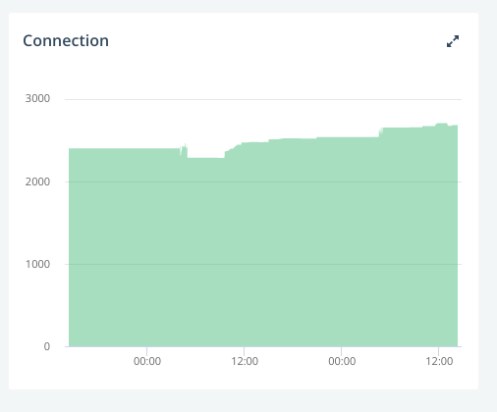 That seemed quite a lot given the low traffic at that time, but not necessarily a problem.
Then, I went to the Azure console, and I got the first hint about the origin of the problem: the SNATs were exhausted on some nodes of the clusters.
That seemed quite a lot given the low traffic at that time, but not necessarily a problem.
Then, I went to the Azure console, and I got the first hint about the origin of the problem: the SNATs were exhausted on some nodes of the clusters. 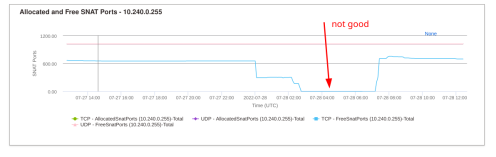 SNATs are involved in connections from the cluster to the outside world, i.e. to our MongoDB server and are quite limited: only 1024 SNAT ports are available per node. This was consistent with the number of used connections on MongoDB.
OK, then the number of used connections on MongoDB was a real problem.
The next question was: which pods and how many connections ?
First I had to filter out the pods that did not use MongoDB. Fortunately, all our pods have labels so I could list all pods using MongoDB:
SNATs are involved in connections from the cluster to the outside world, i.e. to our MongoDB server and are quite limited: only 1024 SNAT ports are available per node. This was consistent with the number of used connections on MongoDB.
OK, then the number of used connections on MongoDB was a real problem.
The next question was: which pods and how many connections ?
First I had to filter out the pods that did not use MongoDB. Fortunately, all our pods have labels so I could list all pods using MongoDB:
 Almost 2 decades ago,
  Recently I've been working with simple/trivial scripting languages, and I guess I finally reached a point where I thought "Lisp? Why not". One of the reasons for recent experimentation was thinking about the kind of minimalism that makes implementing a language less work - being able to actually use the language to write itself.
FORTH is my recurring example, because implementing it mostly means writing a virtual machine which consists of memory ("cells") along with a pair of stacks, and some primitives for operating upon them. Once you have that groundwork in place you can layer the higher-level constructs (such as "for", "if", etc).
Lisp allows a similar approach, albeit with slightly fewer low-level details required, and far less tortuous thinking. Lisp always feels higher-level to me anyway, given the explicit data-types ("list", "string", "number", etc).
Here's something that works in my toy lisp:
Recently I've been working with simple/trivial scripting languages, and I guess I finally reached a point where I thought "Lisp? Why not". One of the reasons for recent experimentation was thinking about the kind of minimalism that makes implementing a language less work - being able to actually use the language to write itself.
FORTH is my recurring example, because implementing it mostly means writing a virtual machine which consists of memory ("cells") along with a pair of stacks, and some primitives for operating upon them. Once you have that groundwork in place you can layer the higher-level constructs (such as "for", "if", etc).
Lisp allows a similar approach, albeit with slightly fewer low-level details required, and far less tortuous thinking. Lisp always feels higher-level to me anyway, given the explicit data-types ("list", "string", "number", etc).
Here's something that works in my toy lisp:








 After I mentioned that