Russell Coker: Installing NextCloud
NextCloud and OwnCloud History
Some time ago I tried OwnCloud, it wasn t a positive experience for me. Since that time I ve got a server with a much faster CPU, a faster Internet connection, and the NextCloud code is newer and running on a newer version of PHP, I didn t make good notes so I m not sure which factors were most responsible for having a better experience this time. According to the NextCloud Wikipedia page [1] the fork of NextCloud from the OpenCloud base happened in 2016 so it s obviously been a while since I tried it, it was probably long before 2016.
Recently the BBC published an interesting article on Turnover contagion which is when one resignation can trigger many more [2] which is interesting to read in the context of OwnCloud losing critical staff failing after one key developer resigned.
I mentioned OwnCloud in a 2012 blog post about Liberty and Mobile Phones [3], since then I haven t done well at achieving those goals. A few days ago I decided to try NextCloud and found it a much better experience than I recall OwnCloud being in the past.
Installation
I installed OwnCloud on an Oracle Cloud ARM VM (see my previous blog post about the Oracle Cloud Free Tier [4]).
This CloudCone article on installing NextCloud on Debian 10 (Buster) covers the basics well [5].
Here is the NextCloud URL for downloading the PHP files (a large ZIP archive) [6]. You have to extract to where Apache is configured to have it s webroot and then run chown -R www-data nextcloud/lib/private/Log nextcloud/config nextcloud/apps (or if you use php-fpm then chown it to the user for that). NextCloud recommend having all of the NextCloud files owned by www-data, but that s just a bad idea, allowing it to rewrite some of it s program files is bad, allowing it to rewrite all of them is worse.
For my installation I used the Apache modiles macro, rewrite, ssl, php7.4, and headers (this is more about how I configure Apache than about NextCloud). Also I edited /etc/php/7.4/apache2/php.ini and changed memory_limit to 512M (the default of 128M is not enough). I m currently only testing it, for a production use I would use php-fpm and run it under it s own UID so that it can t interact with other PHP apps.
After that it was just a matter of visiting the configuration URL and giving it the details of the database etc.
After setting it up the command php -d memory_limit=512M occ app:install richdocumentscode_arm64 when run from the root of the OwnCloud installation installs the Cloudera components for editing LibreOffice documents in OwnCloud, this is the command for ARM64 architecture, I presume the command for other architectures is similar.
Conclusion
OwnCloud is very usable, it has a decent feature set built in and the option to download modules such as the components for editing LibreOffice files on the web is useful. But I am hesitant to install things that require the sort of access it requires. I think it would be better if there was a documented and supported way of installing things and then locking them down so that at runtime it can only write to data files not any program files or configuration files. It would also be better if it was packaged for Debian and had the Debian update process for security fixes. I can imagine many people installing it, forgetting to update it, and ending up with insecure systems.







 We (Robert Tari, the UBports developers team, myself) are very close to releasing Ayatana Indicators 0.9.x. The work on Ayatana Indicators is currently nearly completed funded by the UBports Foundation and over the past half year, many many changes, improvements and clean-ups have been added to the code.
Ayatana Indicators 0.9.x will be the first release series to be in the development tree of Ubuntu Touch 20.04 (which is currently under very heavy development).
Ayatana Indicators 0.9.x will also be used in various other desktop environments available in upcoming Ubuntu 22.04 LTS, such as Ubuntu MATE, Xubuntu, (optionally in) Ubuntu Budgie (please correct my wording, if you know better), (send me a note, if I forgot your desktop env), etc.
So, to all Ubuntu Touch, Ubuntu MATE, Xubuntu, etc. users. If you not already are a translator of Ayatana Indicators and you are good in English and fluent in at least one other language, please consider helping out with translating or improving translations of Ayatana Indicators.
The translation work needs to be done on Hosted Weblate [1], please sign up for an account (if you haven't done so, yet) and chime in.
Thanks so much for your contributions!
light+love
We (Robert Tari, the UBports developers team, myself) are very close to releasing Ayatana Indicators 0.9.x. The work on Ayatana Indicators is currently nearly completed funded by the UBports Foundation and over the past half year, many many changes, improvements and clean-ups have been added to the code.
Ayatana Indicators 0.9.x will be the first release series to be in the development tree of Ubuntu Touch 20.04 (which is currently under very heavy development).
Ayatana Indicators 0.9.x will also be used in various other desktop environments available in upcoming Ubuntu 22.04 LTS, such as Ubuntu MATE, Xubuntu, (optionally in) Ubuntu Budgie (please correct my wording, if you know better), (send me a note, if I forgot your desktop env), etc.
So, to all Ubuntu Touch, Ubuntu MATE, Xubuntu, etc. users. If you not already are a translator of Ayatana Indicators and you are good in English and fluent in at least one other language, please consider helping out with translating or improving translations of Ayatana Indicators.
The translation work needs to be done on Hosted Weblate [1], please sign up for an account (if you haven't done so, yet) and chime in.
Thanks so much for your contributions!
light+love
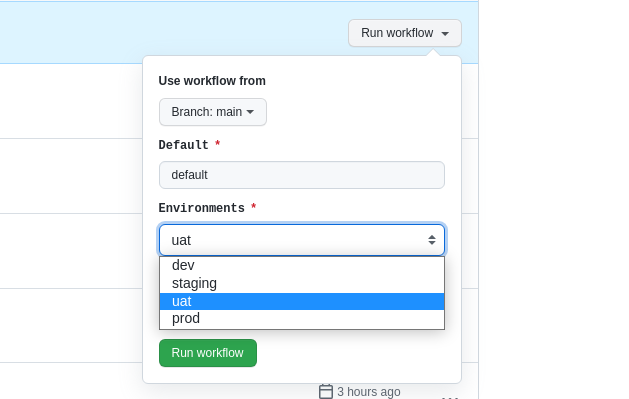
 So I decided to create a solution for this, always thinking about simplicity and in a way that makes it easy to get this missing functionality. I started by creating an input array pattern using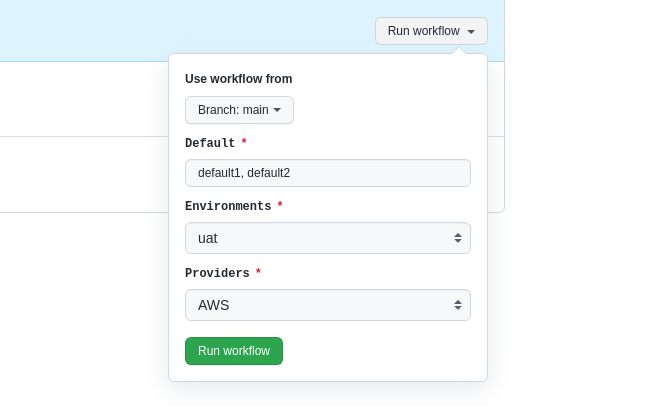
 Almost a year ago I added a script made by

 It was out at 3pm, and I managed to finish uploading the last bits to Unstable at 9pm Of course, that s because all of the packaging and testing work was done before the release date. All of it is, as usual, also available through a Bullseye non-official backports repository that can be added using extrepo (ie: extrepo enable openstack_xena ).





 Using podman for most of my local development environment.
For my personal/upstream development I started using podman
instead of lxc and pbuilder and other toolings. Most
projects provide reasonable docker images (such as rust) and
I am happier keeping my environment as a whole stable while
I can iterate. I have a Dockerfile for the development
environment like this:
Using podman for most of my local development environment.
For my personal/upstream development I started using podman
instead of lxc and pbuilder and other toolings. Most
projects provide reasonable docker images (such as rust) and
I am happier keeping my environment as a whole stable while
I can iterate. I have a Dockerfile for the development
environment like this:

 My
My 
 The key idea of
  Three years ago, I organized a fun and most interesting colloquium at
 I would have loved to share this earlier with the world, but The
university s processes are quite slow (and, to be fair, I also took
quite a bit of time to push things through). But today, I m finally
happy to share the result of that work with all of you. We managed to
get 11 of the talks in the colloquium as articles. The back-cover text
reads (in Spanish):
I would have loved to share this earlier with the world, but The
university s processes are quite slow (and, to be fair, I also took
quite a bit of time to push things through). But today, I m finally
happy to share the result of that work with all of you. We managed to
get 11 of the talks in the colloquium as articles. The back-cover text
reads (in Spanish):