Antoine Beaupr : Qalculate hacks
This is going to be a controversial statement because some people are
absolute nerds about this, but, I need to say it.
Qalculate is the best calculator that has ever been made.
I am not going to try to convince you of this, I just wanted to put
out my bias out there before writing down those notes. I am a total
fan.
This page will collect my notes of cool hacks I do with
Qalculate. Most examples are copy-pasted from the command-line
interface (Qalc commandline primer
On Debian, Qalculate's CLI interface can be installed with:
qalc(1)), but I typically use the graphical interface as
it's slightly better at displaying complex formulas. Discoverability
is obviously also better for the cornucopia of features this fantastic
application ships.
Qalc commandline primer
On Debian, Qalculate's CLI interface can be installed with:
apt install qalc
Then you start it with the qalc command, and end up on a prompt:
anarcat@angela:~$ qalc
>
Then it's a normal calculator:
anarcat@angela:~$ qalc
> 1+1
  1 + 1 = 2
> 1/7
  1 / 7   0.1429
> pi
  pi   3.142
>
There's a bunch of variables to control display, approximation, and so
on:
> set precision 6
> 1/7
  1 / 7   0.142857
> set precision 20
> pi
  pi   3.1415926535897932385
When I need more, I typically browse around the menus. One big issue I
have with Qalculate is there are a lot of menus and features. I had
to fiddle quite a bit to figure out that set precision command
above. I might add more examples here as I find them.
Bandwidth estimates
I often use the data units to estimate bandwidths. For example, here's
what 1 megabit per second is over a month ("about 300 GiB"):
> 1 megabit/s * 30 day to gibibyte
  (1 megabit/second)   (30 days)   301.7 GiB
Or, "how long will it take to download X", in this case, 1GiB over a
100 mbps link:
> 1GiB/(100 megabit/s)
  (1 gibibyte) / (100 megabits/second)   1 min + 25.90 s
Password entropy
To calculate how much entropy (in bits) a given password structure,
you count the number of possibilities in each entry (say, [a-z] is
26 possibilities, "one word in a 8k dictionary" is 8000), extract the
base-2 logarithm, multiplied by the number of entries.
For example, an alphabetic 14-character password is:
> log2(26*2)*14
  log (26   2)   14   79.81
... 80 bits of entropy. To get the equivalent in a Diceware
password with a 8000 word dictionary, you would need:
> log2(8k)*x = 80
  (log (8   000)   x) = 80
  x   6.170
... about 6 words, which gives you:
> log2(8k)*6
  log (8   1000)   6   77.79
78 bits of entropy.
Exchange rates
You can convert between currencies!
> 1 EUR to USD
  1 EUR   1.038 USD
Even fake ones!
> 1 BTC to USD
  1 BTC   96712 USD
This relies on a database pulled form the internet (typically the
central european bank rates, see the source). It will prompt
you if it's too old:
It has been 256 days since the exchange rates last were updated.
Do you wish to update the exchange rates now? y
As a reader pointed out, you can set the refresh rate for
currencies, as some countries will require way more frequent
exchange rates.
The graphical version has a little graphical indicator that, when you
mouse over, tells you where the rate comes from.
Other conversions
Here are other neat conversions extracted from my history
> teaspoon to ml
  teaspoon = 5 mL
> tablespoon to ml
  tablespoon = 15 mL
> 1 cup to ml
  1 cup   236.6 mL
> 6 L/100km to mpg
  (6 liters) / (100 kilometers)   39.20 mpg
> 100 kph to mph
  100 kph   62.14 mph
> (108km - 72km) / 110km/h
  ((108 kilometers)   (72 kilometers)) / (110 kilometers/hour)
  19 min + 38.18 s
Completion time estimates
This is a more involved example I often do.
Background
Say you have started a long running copy job and you don't have the
luxury of having a pipe you can insert pv(1) into to get a nice
progress bar. For example, rsync or cp -R can have that problem
(but not tar!).
(Yes, you can use --info=progress2 in rsync, but that estimate is
incremental and therefore inaccurate unless you disable the
incremental mode with --no-inc-recursive, but then you pay a huge
up-front wait cost while the entire directory gets crawled.)
Extracting a process start time
First step is to gather data. Find the process start time. If you were
unfortunate enough to forget to run date --iso-8601=seconds before
starting, you can get a similar timestamp with stat(1) on the
process tree in /proc with:
$ stat /proc/11232
  File: /proc/11232
  Size: 0               Blocks: 0          IO Block: 1024   directory
Device: 0,21    Inode: 57021       Links: 9
Access: (0555/dr-xr-xr-x)  Uid: (    0/    root)   Gid: (    0/    root)
Access: 2025-02-07 15:50:25.287220819 -0500
Modify: 2025-02-07 15:50:25.287220819 -0500
Change: 2025-02-07 15:50:25.287220819 -0500
 Birth: -
So our start time is 2025-02-07 15:50:25, we shave off the
nanoseconds there, they're below our precision noise floor.
If you're not dealing with an actual UNIX process, you need to figure
out a start time: this can be a SQL query, a network request,
whatever, exercise for the reader.
Saving a variable
This is optional, but for the sake of demonstration, let's save this
as a variable:
> start="2025-02-07 15:50:25"
  save("2025-02-07T15:50:25"; start; Temporary; ; 1) =
  "2025-02-07T15:50:25"
Estimating data size
Next, estimate your data size. That will vary wildly with the job
you're running: this can be anything: number of files, documents being
processed, rows to be destroyed in a database, whatever. In this case,
rsync tells me how many bytes it has transferred so far:
# rsync -ASHaXx --info=progress2 /srv/ /srv-zfs/
2.968.252.503.968  94%    7,63MB/s    6:04:58  xfr#464440, ir-chk=1000/982266)
Strip off the weird dots in there, because that will confuse
qalculate, which will count this as:
2.968252503968 bytes 2.968 B
Or, essentially, three bytes. We actually transferred almost 3TB here:
2968252503968 bytes 2.968 TB
So let's use that. If you had the misfortune of making rsync silent,
but were lucky enough to transfer entire partitions, you can use df
(without -h! we want to be more precise here), in my case:
Filesystem              1K-blocks       Used  Available Use% Mounted on
/dev/mapper/vg_hdd-srv 7512681384 7258298036  179205040  98% /srv
tank/srv               7667173248 2870444032 4796729216  38% /srv-zfs
(Otherwise, of course, you use du -sh $DIRECTORY.)
Digression over bytes
Those are 1 K bytes which is actually (and rather unfortunately)
Ki, or "kibibytes" (1024 bytes), not "kilobytes" (1000 bytes). Ugh.
> 2870444032 KiB
  2870444032 kibibytes   2.939 TB
> 2870444032 kB
  2870444032 kilobytes   2.870 TB
At this scale, those details matter quite a bit, we're talking about a
69GB (64GiB) difference here:
> 2870444032 KiB - 2870444032 kB
  (2870444032 kibibytes)   (2870444032 kilobytes)   68.89 GB
Anyways. Let's take 2968252503968 bytes as our current progress.
Our entire dataset is 7258298064 KiB, as seen above.
Solving a cross-multiplication
We have 3 out of four variables for our equation here, so we can
already solve:
> (now-start)/x = (2996538438607 bytes)/(7258298064 KiB) to h
  ((actual   start) / x) = ((2996538438607 bytes) / (7258298064
  kibibytes))
  x   59.24 h
The entire transfer will take about 60 hours to complete! Note that's
not the time left, that is the total time.
To break this down step by step, we could calculate how long it has
taken so far:
> now-start
  now   start   23 h + 53 min + 6.762 s
> now-start to s
  now   start   85987 s
... and do the cross-multiplication manually, it's basically:
x/(now-start) = (total/current)
so:
x = (total/current) * (now-start)
or, in Qalc:
> ((7258298064  kibibytes) / ( 2996538438607 bytes) ) *  85987 s
  ((7258298064 kibibytes) / (2996538438607 bytes))   (85987 secondes)
  2 d + 11 h + 14 min + 38.81 s
It's interesting it gives us different units here! Not sure why.
Now and built-in variables
The now here is actually a built-in variable:
> now
  now   "2025-02-08T22:25:25"
There is a bewildering list of such variables, for example:
> uptime
  uptime = 5 d + 6 h + 34 min + 12.11 s
> golden
  golden   1.618
> exact
  golden = ( (5) + 1) / 2
Computing dates
In any case, yay! We know the transfer is going to take roughly 60
hours total, and we've already spent around 24h of that, so, we have
36h left.
But I did that all in my head, we can ask more of Qalc yet!
Let's make another variable, for that total estimated time:
> total=(now-start)/x = (2996538438607 bytes)/(7258298064 KiB)
  save(((now   start) / x) = ((2996538438607 bytes) / (7258298064
  kibibytes)); total; Temporary; ; 1)
  2 d + 11 h + 14 min + 38.22 s
And we can plug that into another formula with our start time to
figure out when we'll be done!
> start+total
  start + total   "2025-02-10T03:28:52"
> start+total-now
  start + total   now   1 d + 11 h + 34 min + 48.52 s
> start+total-now to h
  start + total   now   35 h + 34 min + 32.01 s
That transfer has ~1d left, or 35h24m32s, and should complete around 4
in the morning on February 10th.
But that's icing on top. I typically only do the
cross-multiplication and calculate the remaining time in my
head.
I mostly did the last bit to show Qalculate could compute dates and
time differences, as long as you use ISO timestamps. Although it can
also convert to and from UNIX timestamps, it cannot parse arbitrary
date strings (yet?).
Other functionality
Qalculate can:
- Plot graphs;
- Use RPN input;
- Do all sorts of algebraic, calculus, matrix, statistics,
trigonometry functions (and more!);
- ... and so much more!
I have a hard time finding things it cannot do. When I get there, I
typically need to resort to programming code in Python, use a
spreadsheet, and others will turn to more complete engines like
Maple, Mathematica or R.
But for daily use, Qalculate is just fantastic.
And it's pink! Use it!
Further reading and installation
This is just scratching the surface, the fine manual has more
information, including more examples. There is also of course a
qalc(1) manual page which also ships an excellent EXAMPLES
section.
Qalculate is packaged for over 30 Linux distributions, but also
ships packages for Windows and MacOS. There are third-party
derivatives as well including a web version and an Android
app.
Updates
Colin Watson liked this blog post and was inspired to write his own
hacks, similar to what's here, but with extras, check it out!
apt install qalc
anarcat@angela:~$ qalc
>
anarcat@angela:~$ qalc
> 1+1
1 + 1 = 2
> 1/7
1 / 7 0.1429
> pi
pi 3.142
>
> set precision 6
> 1/7
1 / 7 0.142857
> set precision 20
> pi
pi 3.1415926535897932385
> 1 megabit/s * 30 day to gibibyte
(1 megabit/second) (30 days) 301.7 GiB
> 1GiB/(100 megabit/s)
(1 gibibyte) / (100 megabits/second) 1 min + 25.90 s
Password entropy
To calculate how much entropy (in bits) a given password structure,
you count the number of possibilities in each entry (say, [a-z] is
26 possibilities, "one word in a 8k dictionary" is 8000), extract the
base-2 logarithm, multiplied by the number of entries.
For example, an alphabetic 14-character password is:
> log2(26*2)*14
log (26 2) 14 79.81
... 80 bits of entropy. To get the equivalent in a Diceware
password with a 8000 word dictionary, you would need:
> log2(8k)*x = 80
(log (8 000) x) = 80
x 6.170
... about 6 words, which gives you:
> log2(8k)*6
log (8 1000) 6 77.79
78 bits of entropy.
Exchange rates
You can convert between currencies!
> 1 EUR to USD
1 EUR 1.038 USD
Even fake ones!
> 1 BTC to USD
1 BTC 96712 USD
This relies on a database pulled form the internet (typically the
central european bank rates, see the source). It will prompt
you if it's too old:
It has been 256 days since the exchange rates last were updated.
Do you wish to update the exchange rates now? y
As a reader pointed out, you can set the refresh rate for
currencies, as some countries will require way more frequent
exchange rates.
The graphical version has a little graphical indicator that, when you
mouse over, tells you where the rate comes from.
Other conversions
Here are other neat conversions extracted from my history
> teaspoon to ml
teaspoon = 5 mL
> tablespoon to ml
tablespoon = 15 mL
> 1 cup to ml
1 cup 236.6 mL
> 6 L/100km to mpg
(6 liters) / (100 kilometers) 39.20 mpg
> 100 kph to mph
100 kph 62.14 mph
> (108km - 72km) / 110km/h
((108 kilometers) (72 kilometers)) / (110 kilometers/hour)
19 min + 38.18 s
Completion time estimates
This is a more involved example I often do.
Background
Say you have started a long running copy job and you don't have the
luxury of having a pipe you can insert pv(1) into to get a nice
progress bar. For example, rsync or cp -R can have that problem
(but not tar!).
(Yes, you can use --info=progress2 in rsync, but that estimate is
incremental and therefore inaccurate unless you disable the
incremental mode with --no-inc-recursive, but then you pay a huge
up-front wait cost while the entire directory gets crawled.)
Extracting a process start time
First step is to gather data. Find the process start time. If you were
unfortunate enough to forget to run date --iso-8601=seconds before
starting, you can get a similar timestamp with stat(1) on the
process tree in /proc with:
$ stat /proc/11232
File: /proc/11232
Size: 0 Blocks: 0 IO Block: 1024 directory
Device: 0,21 Inode: 57021 Links: 9
Access: (0555/dr-xr-xr-x) Uid: ( 0/ root) Gid: ( 0/ root)
Access: 2025-02-07 15:50:25.287220819 -0500
Modify: 2025-02-07 15:50:25.287220819 -0500
Change: 2025-02-07 15:50:25.287220819 -0500
Birth: -
So our start time is 2025-02-07 15:50:25, we shave off the
nanoseconds there, they're below our precision noise floor.
If you're not dealing with an actual UNIX process, you need to figure
out a start time: this can be a SQL query, a network request,
whatever, exercise for the reader.
Saving a variable
This is optional, but for the sake of demonstration, let's save this
as a variable:
> start="2025-02-07 15:50:25"
save("2025-02-07T15:50:25"; start; Temporary; ; 1) =
"2025-02-07T15:50:25"
Estimating data size
Next, estimate your data size. That will vary wildly with the job
you're running: this can be anything: number of files, documents being
processed, rows to be destroyed in a database, whatever. In this case,
rsync tells me how many bytes it has transferred so far:
# rsync -ASHaXx --info=progress2 /srv/ /srv-zfs/
2.968.252.503.968 94% 7,63MB/s 6:04:58 xfr#464440, ir-chk=1000/982266)
Strip off the weird dots in there, because that will confuse
qalculate, which will count this as:
2.968252503968 bytes 2.968 B
Or, essentially, three bytes. We actually transferred almost 3TB here:
2968252503968 bytes 2.968 TB
So let's use that. If you had the misfortune of making rsync silent,
but were lucky enough to transfer entire partitions, you can use df
(without -h! we want to be more precise here), in my case:
Filesystem 1K-blocks Used Available Use% Mounted on
/dev/mapper/vg_hdd-srv 7512681384 7258298036 179205040 98% /srv
tank/srv 7667173248 2870444032 4796729216 38% /srv-zfs
(Otherwise, of course, you use du -sh $DIRECTORY.)
Digression over bytes
Those are 1 K bytes which is actually (and rather unfortunately)
Ki, or "kibibytes" (1024 bytes), not "kilobytes" (1000 bytes). Ugh.
> 2870444032 KiB
2870444032 kibibytes 2.939 TB
> 2870444032 kB
2870444032 kilobytes 2.870 TB
At this scale, those details matter quite a bit, we're talking about a
69GB (64GiB) difference here:
> 2870444032 KiB - 2870444032 kB
(2870444032 kibibytes) (2870444032 kilobytes) 68.89 GB
Anyways. Let's take 2968252503968 bytes as our current progress.
Our entire dataset is 7258298064 KiB, as seen above.
Solving a cross-multiplication
We have 3 out of four variables for our equation here, so we can
already solve:
> (now-start)/x = (2996538438607 bytes)/(7258298064 KiB) to h
((actual start) / x) = ((2996538438607 bytes) / (7258298064
kibibytes))
x 59.24 h
The entire transfer will take about 60 hours to complete! Note that's
not the time left, that is the total time.
To break this down step by step, we could calculate how long it has
taken so far:
> now-start
now start 23 h + 53 min + 6.762 s
> now-start to s
now start 85987 s
... and do the cross-multiplication manually, it's basically:
x/(now-start) = (total/current)
so:
x = (total/current) * (now-start)
or, in Qalc:
> ((7258298064 kibibytes) / ( 2996538438607 bytes) ) * 85987 s
((7258298064 kibibytes) / (2996538438607 bytes)) (85987 secondes)
2 d + 11 h + 14 min + 38.81 s
It's interesting it gives us different units here! Not sure why.
Now and built-in variables
The now here is actually a built-in variable:
> now
now "2025-02-08T22:25:25"
There is a bewildering list of such variables, for example:
> uptime
uptime = 5 d + 6 h + 34 min + 12.11 s
> golden
golden 1.618
> exact
golden = ( (5) + 1) / 2
Computing dates
In any case, yay! We know the transfer is going to take roughly 60
hours total, and we've already spent around 24h of that, so, we have
36h left.
But I did that all in my head, we can ask more of Qalc yet!
Let's make another variable, for that total estimated time:
> total=(now-start)/x = (2996538438607 bytes)/(7258298064 KiB)
save(((now start) / x) = ((2996538438607 bytes) / (7258298064
kibibytes)); total; Temporary; ; 1)
2 d + 11 h + 14 min + 38.22 s
And we can plug that into another formula with our start time to
figure out when we'll be done!
> start+total
start + total "2025-02-10T03:28:52"
> start+total-now
start + total now 1 d + 11 h + 34 min + 48.52 s
> start+total-now to h
start + total now 35 h + 34 min + 32.01 s
That transfer has ~1d left, or 35h24m32s, and should complete around 4
in the morning on February 10th.
But that's icing on top. I typically only do the
cross-multiplication and calculate the remaining time in my
head.
I mostly did the last bit to show Qalculate could compute dates and
time differences, as long as you use ISO timestamps. Although it can
also convert to and from UNIX timestamps, it cannot parse arbitrary
date strings (yet?).
Other functionality
Qalculate can:
- Plot graphs;
- Use RPN input;
- Do all sorts of algebraic, calculus, matrix, statistics,
trigonometry functions (and more!);
- ... and so much more!
I have a hard time finding things it cannot do. When I get there, I
typically need to resort to programming code in Python, use a
spreadsheet, and others will turn to more complete engines like
Maple, Mathematica or R.
But for daily use, Qalculate is just fantastic.
And it's pink! Use it!
Further reading and installation
This is just scratching the surface, the fine manual has more
information, including more examples. There is also of course a
qalc(1) manual page which also ships an excellent EXAMPLES
section.
Qalculate is packaged for over 30 Linux distributions, but also
ships packages for Windows and MacOS. There are third-party
derivatives as well including a web version and an Android
app.
Updates
Colin Watson liked this blog post and was inspired to write his own
hacks, similar to what's here, but with extras, check it out!
> log2(26*2)*14
log (26 2) 14 79.81
> log2(8k)*x = 80
(log (8 000) x) = 80
x 6.170
> log2(8k)*6
log (8 1000) 6 77.79
> 1 EUR to USD
1 EUR 1.038 USD
> 1 BTC to USD
1 BTC 96712 USD
It has been 256 days since the exchange rates last were updated.
Do you wish to update the exchange rates now? y
Other conversions
Here are other neat conversions extracted from my history
> teaspoon to ml
teaspoon = 5 mL
> tablespoon to ml
tablespoon = 15 mL
> 1 cup to ml
1 cup 236.6 mL
> 6 L/100km to mpg
(6 liters) / (100 kilometers) 39.20 mpg
> 100 kph to mph
100 kph 62.14 mph
> (108km - 72km) / 110km/h
((108 kilometers) (72 kilometers)) / (110 kilometers/hour)
19 min + 38.18 s
Completion time estimates
This is a more involved example I often do.
Background
Say you have started a long running copy job and you don't have the
luxury of having a pipe you can insert pv(1) into to get a nice
progress bar. For example, rsync or cp -R can have that problem
(but not tar!).
(Yes, you can use --info=progress2 in rsync, but that estimate is
incremental and therefore inaccurate unless you disable the
incremental mode with --no-inc-recursive, but then you pay a huge
up-front wait cost while the entire directory gets crawled.)
Extracting a process start time
First step is to gather data. Find the process start time. If you were
unfortunate enough to forget to run date --iso-8601=seconds before
starting, you can get a similar timestamp with stat(1) on the
process tree in /proc with:
$ stat /proc/11232
File: /proc/11232
Size: 0 Blocks: 0 IO Block: 1024 directory
Device: 0,21 Inode: 57021 Links: 9
Access: (0555/dr-xr-xr-x) Uid: ( 0/ root) Gid: ( 0/ root)
Access: 2025-02-07 15:50:25.287220819 -0500
Modify: 2025-02-07 15:50:25.287220819 -0500
Change: 2025-02-07 15:50:25.287220819 -0500
Birth: -
So our start time is 2025-02-07 15:50:25, we shave off the
nanoseconds there, they're below our precision noise floor.
If you're not dealing with an actual UNIX process, you need to figure
out a start time: this can be a SQL query, a network request,
whatever, exercise for the reader.
Saving a variable
This is optional, but for the sake of demonstration, let's save this
as a variable:
> start="2025-02-07 15:50:25"
save("2025-02-07T15:50:25"; start; Temporary; ; 1) =
"2025-02-07T15:50:25"
Estimating data size
Next, estimate your data size. That will vary wildly with the job
you're running: this can be anything: number of files, documents being
processed, rows to be destroyed in a database, whatever. In this case,
rsync tells me how many bytes it has transferred so far:
# rsync -ASHaXx --info=progress2 /srv/ /srv-zfs/
2.968.252.503.968 94% 7,63MB/s 6:04:58 xfr#464440, ir-chk=1000/982266)
Strip off the weird dots in there, because that will confuse
qalculate, which will count this as:
2.968252503968 bytes 2.968 B
Or, essentially, three bytes. We actually transferred almost 3TB here:
2968252503968 bytes 2.968 TB
So let's use that. If you had the misfortune of making rsync silent,
but were lucky enough to transfer entire partitions, you can use df
(without -h! we want to be more precise here), in my case:
Filesystem 1K-blocks Used Available Use% Mounted on
/dev/mapper/vg_hdd-srv 7512681384 7258298036 179205040 98% /srv
tank/srv 7667173248 2870444032 4796729216 38% /srv-zfs
(Otherwise, of course, you use du -sh $DIRECTORY.)
Digression over bytes
Those are 1 K bytes which is actually (and rather unfortunately)
Ki, or "kibibytes" (1024 bytes), not "kilobytes" (1000 bytes). Ugh.
> 2870444032 KiB
2870444032 kibibytes 2.939 TB
> 2870444032 kB
2870444032 kilobytes 2.870 TB
At this scale, those details matter quite a bit, we're talking about a
69GB (64GiB) difference here:
> 2870444032 KiB - 2870444032 kB
(2870444032 kibibytes) (2870444032 kilobytes) 68.89 GB
Anyways. Let's take 2968252503968 bytes as our current progress.
Our entire dataset is 7258298064 KiB, as seen above.
Solving a cross-multiplication
We have 3 out of four variables for our equation here, so we can
already solve:
> (now-start)/x = (2996538438607 bytes)/(7258298064 KiB) to h
((actual start) / x) = ((2996538438607 bytes) / (7258298064
kibibytes))
x 59.24 h
The entire transfer will take about 60 hours to complete! Note that's
not the time left, that is the total time.
To break this down step by step, we could calculate how long it has
taken so far:
> now-start
now start 23 h + 53 min + 6.762 s
> now-start to s
now start 85987 s
... and do the cross-multiplication manually, it's basically:
x/(now-start) = (total/current)
so:
x = (total/current) * (now-start)
or, in Qalc:
> ((7258298064 kibibytes) / ( 2996538438607 bytes) ) * 85987 s
((7258298064 kibibytes) / (2996538438607 bytes)) (85987 secondes)
2 d + 11 h + 14 min + 38.81 s
It's interesting it gives us different units here! Not sure why.
Now and built-in variables
The now here is actually a built-in variable:
> now
now "2025-02-08T22:25:25"
There is a bewildering list of such variables, for example:
> uptime
uptime = 5 d + 6 h + 34 min + 12.11 s
> golden
golden 1.618
> exact
golden = ( (5) + 1) / 2
Computing dates
In any case, yay! We know the transfer is going to take roughly 60
hours total, and we've already spent around 24h of that, so, we have
36h left.
But I did that all in my head, we can ask more of Qalc yet!
Let's make another variable, for that total estimated time:
> total=(now-start)/x = (2996538438607 bytes)/(7258298064 KiB)
save(((now start) / x) = ((2996538438607 bytes) / (7258298064
kibibytes)); total; Temporary; ; 1)
2 d + 11 h + 14 min + 38.22 s
And we can plug that into another formula with our start time to
figure out when we'll be done!
> start+total
start + total "2025-02-10T03:28:52"
> start+total-now
start + total now 1 d + 11 h + 34 min + 48.52 s
> start+total-now to h
start + total now 35 h + 34 min + 32.01 s
That transfer has ~1d left, or 35h24m32s, and should complete around 4
in the morning on February 10th.
But that's icing on top. I typically only do the
cross-multiplication and calculate the remaining time in my
head.
I mostly did the last bit to show Qalculate could compute dates and
time differences, as long as you use ISO timestamps. Although it can
also convert to and from UNIX timestamps, it cannot parse arbitrary
date strings (yet?).
Other functionality
Qalculate can:
- Plot graphs;
- Use RPN input;
- Do all sorts of algebraic, calculus, matrix, statistics,
trigonometry functions (and more!);
- ... and so much more!
I have a hard time finding things it cannot do. When I get there, I
typically need to resort to programming code in Python, use a
spreadsheet, and others will turn to more complete engines like
Maple, Mathematica or R.
But for daily use, Qalculate is just fantastic.
And it's pink! Use it!
Further reading and installation
This is just scratching the surface, the fine manual has more
information, including more examples. There is also of course a
qalc(1) manual page which also ships an excellent EXAMPLES
section.
Qalculate is packaged for over 30 Linux distributions, but also
ships packages for Windows and MacOS. There are third-party
derivatives as well including a web version and an Android
app.
Updates
Colin Watson liked this blog post and was inspired to write his own
hacks, similar to what's here, but with extras, check it out!
> teaspoon to ml
teaspoon = 5 mL
> tablespoon to ml
tablespoon = 15 mL
> 1 cup to ml
1 cup 236.6 mL
> 6 L/100km to mpg
(6 liters) / (100 kilometers) 39.20 mpg
> 100 kph to mph
100 kph 62.14 mph
> (108km - 72km) / 110km/h
((108 kilometers) (72 kilometers)) / (110 kilometers/hour)
19 min + 38.18 s
Background
Say you have started a long running copy job and you don't have the
luxury of having a pipe you can insert pv(1) into to get a nice
progress bar. For example, rsync or cp -R can have that problem
(but not tar!).
(Yes, you can use --info=progress2 in rsync, but that estimate is
incremental and therefore inaccurate unless you disable the
incremental mode with --no-inc-recursive, but then you pay a huge
up-front wait cost while the entire directory gets crawled.)
Extracting a process start time
First step is to gather data. Find the process start time. If you were
unfortunate enough to forget to run date --iso-8601=seconds before
starting, you can get a similar timestamp with stat(1) on the
process tree in /proc with:
$ stat /proc/11232
File: /proc/11232
Size: 0 Blocks: 0 IO Block: 1024 directory
Device: 0,21 Inode: 57021 Links: 9
Access: (0555/dr-xr-xr-x) Uid: ( 0/ root) Gid: ( 0/ root)
Access: 2025-02-07 15:50:25.287220819 -0500
Modify: 2025-02-07 15:50:25.287220819 -0500
Change: 2025-02-07 15:50:25.287220819 -0500
Birth: -
So our start time is 2025-02-07 15:50:25, we shave off the
nanoseconds there, they're below our precision noise floor.
If you're not dealing with an actual UNIX process, you need to figure
out a start time: this can be a SQL query, a network request,
whatever, exercise for the reader.
Saving a variable
This is optional, but for the sake of demonstration, let's save this
as a variable:
> start="2025-02-07 15:50:25"
save("2025-02-07T15:50:25"; start; Temporary; ; 1) =
"2025-02-07T15:50:25"
Estimating data size
Next, estimate your data size. That will vary wildly with the job
you're running: this can be anything: number of files, documents being
processed, rows to be destroyed in a database, whatever. In this case,
rsync tells me how many bytes it has transferred so far:
# rsync -ASHaXx --info=progress2 /srv/ /srv-zfs/
2.968.252.503.968 94% 7,63MB/s 6:04:58 xfr#464440, ir-chk=1000/982266)
Strip off the weird dots in there, because that will confuse
qalculate, which will count this as:
2.968252503968 bytes 2.968 B
Or, essentially, three bytes. We actually transferred almost 3TB here:
2968252503968 bytes 2.968 TB
So let's use that. If you had the misfortune of making rsync silent,
but were lucky enough to transfer entire partitions, you can use df
(without -h! we want to be more precise here), in my case:
Filesystem 1K-blocks Used Available Use% Mounted on
/dev/mapper/vg_hdd-srv 7512681384 7258298036 179205040 98% /srv
tank/srv 7667173248 2870444032 4796729216 38% /srv-zfs
(Otherwise, of course, you use du -sh $DIRECTORY.)
Digression over bytes
Those are 1 K bytes which is actually (and rather unfortunately)
Ki, or "kibibytes" (1024 bytes), not "kilobytes" (1000 bytes). Ugh.
> 2870444032 KiB
2870444032 kibibytes 2.939 TB
> 2870444032 kB
2870444032 kilobytes 2.870 TB
At this scale, those details matter quite a bit, we're talking about a
69GB (64GiB) difference here:
> 2870444032 KiB - 2870444032 kB
(2870444032 kibibytes) (2870444032 kilobytes) 68.89 GB
Anyways. Let's take 2968252503968 bytes as our current progress.
Our entire dataset is 7258298064 KiB, as seen above.
Solving a cross-multiplication
We have 3 out of four variables for our equation here, so we can
already solve:
> (now-start)/x = (2996538438607 bytes)/(7258298064 KiB) to h
((actual start) / x) = ((2996538438607 bytes) / (7258298064
kibibytes))
x 59.24 h
The entire transfer will take about 60 hours to complete! Note that's
not the time left, that is the total time.
To break this down step by step, we could calculate how long it has
taken so far:
> now-start
now start 23 h + 53 min + 6.762 s
> now-start to s
now start 85987 s
... and do the cross-multiplication manually, it's basically:
x/(now-start) = (total/current)
so:
x = (total/current) * (now-start)
or, in Qalc:
> ((7258298064 kibibytes) / ( 2996538438607 bytes) ) * 85987 s
((7258298064 kibibytes) / (2996538438607 bytes)) (85987 secondes)
2 d + 11 h + 14 min + 38.81 s
It's interesting it gives us different units here! Not sure why.
Now and built-in variables
The now here is actually a built-in variable:
> now
now "2025-02-08T22:25:25"
There is a bewildering list of such variables, for example:
> uptime
uptime = 5 d + 6 h + 34 min + 12.11 s
> golden
golden 1.618
> exact
golden = ( (5) + 1) / 2
Computing dates
In any case, yay! We know the transfer is going to take roughly 60
hours total, and we've already spent around 24h of that, so, we have
36h left.
But I did that all in my head, we can ask more of Qalc yet!
Let's make another variable, for that total estimated time:
> total=(now-start)/x = (2996538438607 bytes)/(7258298064 KiB)
save(((now start) / x) = ((2996538438607 bytes) / (7258298064
kibibytes)); total; Temporary; ; 1)
2 d + 11 h + 14 min + 38.22 s
And we can plug that into another formula with our start time to
figure out when we'll be done!
> start+total
start + total "2025-02-10T03:28:52"
> start+total-now
start + total now 1 d + 11 h + 34 min + 48.52 s
> start+total-now to h
start + total now 35 h + 34 min + 32.01 s
That transfer has ~1d left, or 35h24m32s, and should complete around 4
in the morning on February 10th.
But that's icing on top. I typically only do the
cross-multiplication and calculate the remaining time in my
head.
I mostly did the last bit to show Qalculate could compute dates and
time differences, as long as you use ISO timestamps. Although it can
also convert to and from UNIX timestamps, it cannot parse arbitrary
date strings (yet?).
Other functionality
Qalculate can:
- Plot graphs;
- Use RPN input;
- Do all sorts of algebraic, calculus, matrix, statistics,
trigonometry functions (and more!);
- ... and so much more!
I have a hard time finding things it cannot do. When I get there, I
typically need to resort to programming code in Python, use a
spreadsheet, and others will turn to more complete engines like
Maple, Mathematica or R.
But for daily use, Qalculate is just fantastic.
And it's pink! Use it!
Further reading and installation
This is just scratching the surface, the fine manual has more
information, including more examples. There is also of course a
qalc(1) manual page which also ships an excellent EXAMPLES
section.
Qalculate is packaged for over 30 Linux distributions, but also
ships packages for Windows and MacOS. There are third-party
derivatives as well including a web version and an Android
app.
Updates
Colin Watson liked this blog post and was inspired to write his own
hacks, similar to what's here, but with extras, check it out!
date --iso-8601=seconds before
starting, you can get a similar timestamp with stat(1) on the
process tree in /proc with:
$ stat /proc/11232
File: /proc/11232
Size: 0 Blocks: 0 IO Block: 1024 directory
Device: 0,21 Inode: 57021 Links: 9
Access: (0555/dr-xr-xr-x) Uid: ( 0/ root) Gid: ( 0/ root)
Access: 2025-02-07 15:50:25.287220819 -0500
Modify: 2025-02-07 15:50:25.287220819 -0500
Change: 2025-02-07 15:50:25.287220819 -0500
Birth: -
2025-02-07 15:50:25, we shave off the
nanoseconds there, they're below our precision noise floor.
If you're not dealing with an actual UNIX process, you need to figure
out a start time: this can be a SQL query, a network request,
whatever, exercise for the reader.
Saving a variable
This is optional, but for the sake of demonstration, let's save this
as a variable:
> start="2025-02-07 15:50:25"
save("2025-02-07T15:50:25"; start; Temporary; ; 1) =
"2025-02-07T15:50:25"
Estimating data size
Next, estimate your data size. That will vary wildly with the job
you're running: this can be anything: number of files, documents being
processed, rows to be destroyed in a database, whatever. In this case,
rsync tells me how many bytes it has transferred so far:
# rsync -ASHaXx --info=progress2 /srv/ /srv-zfs/
2.968.252.503.968 94% 7,63MB/s 6:04:58 xfr#464440, ir-chk=1000/982266)
Strip off the weird dots in there, because that will confuse
qalculate, which will count this as:
2.968252503968 bytes 2.968 B
Or, essentially, three bytes. We actually transferred almost 3TB here:
2968252503968 bytes 2.968 TB
So let's use that. If you had the misfortune of making rsync silent,
but were lucky enough to transfer entire partitions, you can use df
(without -h! we want to be more precise here), in my case:
Filesystem 1K-blocks Used Available Use% Mounted on
/dev/mapper/vg_hdd-srv 7512681384 7258298036 179205040 98% /srv
tank/srv 7667173248 2870444032 4796729216 38% /srv-zfs
(Otherwise, of course, you use du -sh $DIRECTORY.)
Digression over bytes
Those are 1 K bytes which is actually (and rather unfortunately)
Ki, or "kibibytes" (1024 bytes), not "kilobytes" (1000 bytes). Ugh.
> 2870444032 KiB
2870444032 kibibytes 2.939 TB
> 2870444032 kB
2870444032 kilobytes 2.870 TB
At this scale, those details matter quite a bit, we're talking about a
69GB (64GiB) difference here:
> 2870444032 KiB - 2870444032 kB
(2870444032 kibibytes) (2870444032 kilobytes) 68.89 GB
Anyways. Let's take 2968252503968 bytes as our current progress.
Our entire dataset is 7258298064 KiB, as seen above.
Solving a cross-multiplication
We have 3 out of four variables for our equation here, so we can
already solve:
> (now-start)/x = (2996538438607 bytes)/(7258298064 KiB) to h
((actual start) / x) = ((2996538438607 bytes) / (7258298064
kibibytes))
x 59.24 h
The entire transfer will take about 60 hours to complete! Note that's
not the time left, that is the total time.
To break this down step by step, we could calculate how long it has
taken so far:
> now-start
now start 23 h + 53 min + 6.762 s
> now-start to s
now start 85987 s
... and do the cross-multiplication manually, it's basically:
x/(now-start) = (total/current)
so:
x = (total/current) * (now-start)
or, in Qalc:
> ((7258298064 kibibytes) / ( 2996538438607 bytes) ) * 85987 s
((7258298064 kibibytes) / (2996538438607 bytes)) (85987 secondes)
2 d + 11 h + 14 min + 38.81 s
It's interesting it gives us different units here! Not sure why.
Now and built-in variables
The now here is actually a built-in variable:
> now
now "2025-02-08T22:25:25"
There is a bewildering list of such variables, for example:
> uptime
uptime = 5 d + 6 h + 34 min + 12.11 s
> golden
golden 1.618
> exact
golden = ( (5) + 1) / 2
Computing dates
In any case, yay! We know the transfer is going to take roughly 60
hours total, and we've already spent around 24h of that, so, we have
36h left.
But I did that all in my head, we can ask more of Qalc yet!
Let's make another variable, for that total estimated time:
> total=(now-start)/x = (2996538438607 bytes)/(7258298064 KiB)
save(((now start) / x) = ((2996538438607 bytes) / (7258298064
kibibytes)); total; Temporary; ; 1)
2 d + 11 h + 14 min + 38.22 s
And we can plug that into another formula with our start time to
figure out when we'll be done!
> start+total
start + total "2025-02-10T03:28:52"
> start+total-now
start + total now 1 d + 11 h + 34 min + 48.52 s
> start+total-now to h
start + total now 35 h + 34 min + 32.01 s
That transfer has ~1d left, or 35h24m32s, and should complete around 4
in the morning on February 10th.
But that's icing on top. I typically only do the
cross-multiplication and calculate the remaining time in my
head.
I mostly did the last bit to show Qalculate could compute dates and
time differences, as long as you use ISO timestamps. Although it can
also convert to and from UNIX timestamps, it cannot parse arbitrary
date strings (yet?).
Other functionality
Qalculate can:
- Plot graphs;
- Use RPN input;
- Do all sorts of algebraic, calculus, matrix, statistics,
trigonometry functions (and more!);
- ... and so much more!
I have a hard time finding things it cannot do. When I get there, I
typically need to resort to programming code in Python, use a
spreadsheet, and others will turn to more complete engines like
Maple, Mathematica or R.
But for daily use, Qalculate is just fantastic.
And it's pink! Use it!
Further reading and installation
This is just scratching the surface, the fine manual has more
information, including more examples. There is also of course a
qalc(1) manual page which also ships an excellent EXAMPLES
section.
Qalculate is packaged for over 30 Linux distributions, but also
ships packages for Windows and MacOS. There are third-party
derivatives as well including a web version and an Android
app.
Updates
Colin Watson liked this blog post and was inspired to write his own
hacks, similar to what's here, but with extras, check it out!
> start="2025-02-07 15:50:25"
save("2025-02-07T15:50:25"; start; Temporary; ; 1) =
"2025-02-07T15:50:25"
rsync tells me how many bytes it has transferred so far:
# rsync -ASHaXx --info=progress2 /srv/ /srv-zfs/
2.968.252.503.968 94% 7,63MB/s 6:04:58 xfr#464440, ir-chk=1000/982266)
2.968252503968 bytes 2.968 B
2968252503968 bytes 2.968 TB
df
(without -h! we want to be more precise here), in my case:
Filesystem 1K-blocks Used Available Use% Mounted on
/dev/mapper/vg_hdd-srv 7512681384 7258298036 179205040 98% /srv
tank/srv 7667173248 2870444032 4796729216 38% /srv-zfs
du -sh $DIRECTORY.)
Digression over bytes
Those are 1 K bytes which is actually (and rather unfortunately)
Ki, or "kibibytes" (1024 bytes), not "kilobytes" (1000 bytes). Ugh.
> 2870444032 KiB
2870444032 kibibytes 2.939 TB
> 2870444032 kB
2870444032 kilobytes 2.870 TB
At this scale, those details matter quite a bit, we're talking about a
69GB (64GiB) difference here:
> 2870444032 KiB - 2870444032 kB
(2870444032 kibibytes) (2870444032 kilobytes) 68.89 GB
Anyways. Let's take 2968252503968 bytes as our current progress.
Our entire dataset is 7258298064 KiB, as seen above.
Solving a cross-multiplication
We have 3 out of four variables for our equation here, so we can
already solve:
> (now-start)/x = (2996538438607 bytes)/(7258298064 KiB) to h
((actual start) / x) = ((2996538438607 bytes) / (7258298064
kibibytes))
x 59.24 h
The entire transfer will take about 60 hours to complete! Note that's
not the time left, that is the total time.
To break this down step by step, we could calculate how long it has
taken so far:
> now-start
now start 23 h + 53 min + 6.762 s
> now-start to s
now start 85987 s
... and do the cross-multiplication manually, it's basically:
x/(now-start) = (total/current)
so:
x = (total/current) * (now-start)
or, in Qalc:
> ((7258298064 kibibytes) / ( 2996538438607 bytes) ) * 85987 s
((7258298064 kibibytes) / (2996538438607 bytes)) (85987 secondes)
2 d + 11 h + 14 min + 38.81 s
It's interesting it gives us different units here! Not sure why.
Now and built-in variables
The now here is actually a built-in variable:
> now
now "2025-02-08T22:25:25"
There is a bewildering list of such variables, for example:
> uptime
uptime = 5 d + 6 h + 34 min + 12.11 s
> golden
golden 1.618
> exact
golden = ( (5) + 1) / 2
Computing dates
In any case, yay! We know the transfer is going to take roughly 60
hours total, and we've already spent around 24h of that, so, we have
36h left.
But I did that all in my head, we can ask more of Qalc yet!
Let's make another variable, for that total estimated time:
> total=(now-start)/x = (2996538438607 bytes)/(7258298064 KiB)
save(((now start) / x) = ((2996538438607 bytes) / (7258298064
kibibytes)); total; Temporary; ; 1)
2 d + 11 h + 14 min + 38.22 s
And we can plug that into another formula with our start time to
figure out when we'll be done!
> start+total
start + total "2025-02-10T03:28:52"
> start+total-now
start + total now 1 d + 11 h + 34 min + 48.52 s
> start+total-now to h
start + total now 35 h + 34 min + 32.01 s
That transfer has ~1d left, or 35h24m32s, and should complete around 4
in the morning on February 10th.
But that's icing on top. I typically only do the
cross-multiplication and calculate the remaining time in my
head.
I mostly did the last bit to show Qalculate could compute dates and
time differences, as long as you use ISO timestamps. Although it can
also convert to and from UNIX timestamps, it cannot parse arbitrary
date strings (yet?).
Other functionality
Qalculate can:
- Plot graphs;
- Use RPN input;
- Do all sorts of algebraic, calculus, matrix, statistics,
trigonometry functions (and more!);
- ... and so much more!
I have a hard time finding things it cannot do. When I get there, I
typically need to resort to programming code in Python, use a
spreadsheet, and others will turn to more complete engines like
Maple, Mathematica or R.
But for daily use, Qalculate is just fantastic.
And it's pink! Use it!
Further reading and installation
This is just scratching the surface, the fine manual has more
information, including more examples. There is also of course a
qalc(1) manual page which also ships an excellent EXAMPLES
section.
Qalculate is packaged for over 30 Linux distributions, but also
ships packages for Windows and MacOS. There are third-party
derivatives as well including a web version and an Android
app.
Updates
Colin Watson liked this blog post and was inspired to write his own
hacks, similar to what's here, but with extras, check it out!
> 2870444032 KiB
2870444032 kibibytes 2.939 TB
> 2870444032 kB
2870444032 kilobytes 2.870 TB
> 2870444032 KiB - 2870444032 kB
(2870444032 kibibytes) (2870444032 kilobytes) 68.89 GB
> (now-start)/x = (2996538438607 bytes)/(7258298064 KiB) to h
((actual start) / x) = ((2996538438607 bytes) / (7258298064
kibibytes))
x 59.24 h
> now-start
now start 23 h + 53 min + 6.762 s
> now-start to s
now start 85987 s
x/(now-start) = (total/current)
x = (total/current) * (now-start)
> ((7258298064 kibibytes) / ( 2996538438607 bytes) ) * 85987 s
((7258298064 kibibytes) / (2996538438607 bytes)) (85987 secondes)
2 d + 11 h + 14 min + 38.81 s
Now and built-in variables
The now here is actually a built-in variable:
> now
now "2025-02-08T22:25:25"
There is a bewildering list of such variables, for example:
> uptime
uptime = 5 d + 6 h + 34 min + 12.11 s
> golden
golden 1.618
> exact
golden = ( (5) + 1) / 2
Computing dates
In any case, yay! We know the transfer is going to take roughly 60
hours total, and we've already spent around 24h of that, so, we have
36h left.
But I did that all in my head, we can ask more of Qalc yet!
Let's make another variable, for that total estimated time:
> total=(now-start)/x = (2996538438607 bytes)/(7258298064 KiB)
save(((now start) / x) = ((2996538438607 bytes) / (7258298064
kibibytes)); total; Temporary; ; 1)
2 d + 11 h + 14 min + 38.22 s
And we can plug that into another formula with our start time to
figure out when we'll be done!
> start+total
start + total "2025-02-10T03:28:52"
> start+total-now
start + total now 1 d + 11 h + 34 min + 48.52 s
> start+total-now to h
start + total now 35 h + 34 min + 32.01 s
That transfer has ~1d left, or 35h24m32s, and should complete around 4
in the morning on February 10th.
But that's icing on top. I typically only do the
cross-multiplication and calculate the remaining time in my
head.
I mostly did the last bit to show Qalculate could compute dates and
time differences, as long as you use ISO timestamps. Although it can
also convert to and from UNIX timestamps, it cannot parse arbitrary
date strings (yet?).
Other functionality
Qalculate can:
- Plot graphs;
- Use RPN input;
- Do all sorts of algebraic, calculus, matrix, statistics,
trigonometry functions (and more!);
- ... and so much more!
I have a hard time finding things it cannot do. When I get there, I
typically need to resort to programming code in Python, use a
spreadsheet, and others will turn to more complete engines like
Maple, Mathematica or R.
But for daily use, Qalculate is just fantastic.
And it's pink! Use it!
Further reading and installation
This is just scratching the surface, the fine manual has more
information, including more examples. There is also of course a
qalc(1) manual page which also ships an excellent EXAMPLES
section.
Qalculate is packaged for over 30 Linux distributions, but also
ships packages for Windows and MacOS. There are third-party
derivatives as well including a web version and an Android
app.
Updates
Colin Watson liked this blog post and was inspired to write his own
hacks, similar to what's here, but with extras, check it out!
> now
now "2025-02-08T22:25:25"
> uptime
uptime = 5 d + 6 h + 34 min + 12.11 s
> golden
golden 1.618
> exact
golden = ( (5) + 1) / 2
> total=(now-start)/x = (2996538438607 bytes)/(7258298064 KiB)
save(((now start) / x) = ((2996538438607 bytes) / (7258298064
kibibytes)); total; Temporary; ; 1)
2 d + 11 h + 14 min + 38.22 s
> start+total
start + total "2025-02-10T03:28:52"
> start+total-now
start + total now 1 d + 11 h + 34 min + 48.52 s
> start+total-now to h
start + total now 35 h + 34 min + 32.01 s


 The still very new package






 Dear Debian community,
this is bits from DPL for January.
Sovereign Tech Agency
I was recently pointed to Technologies and Projects supported by the
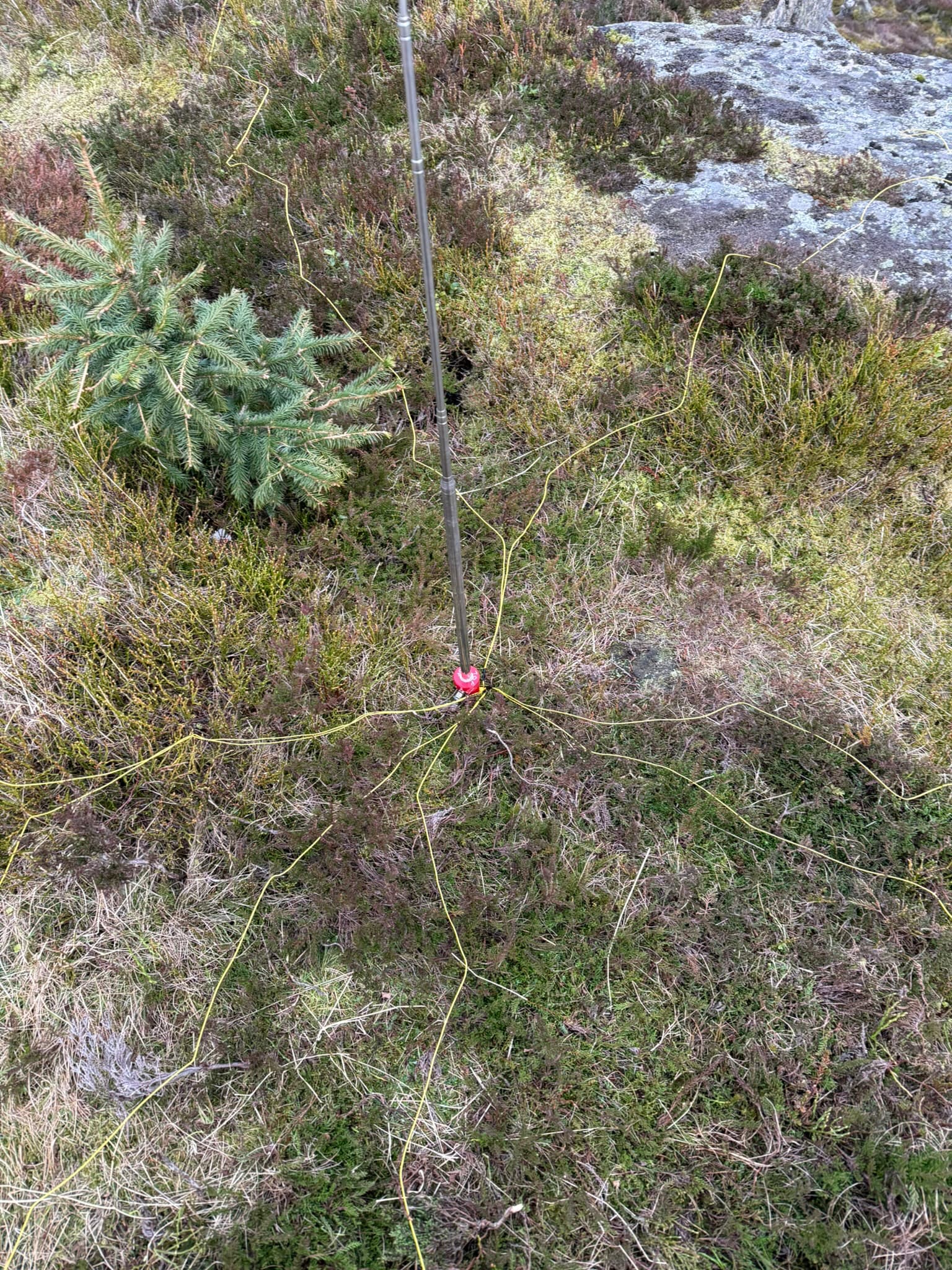 Quick to deploy which is what I was after. My new 5m of coax with a choke fitted attached to the radio and we were off to the races - A convenient thing of beauty when it s up:
 I ve made a single guy with a sotabeams
 Most of my Debian contributions this month were
 For many years I wished I had a setup that would allow me to work (that is, code) productively outside in the bright sun. It s winter right now, but when its summer again it s always a bit. this weekend I got closer to that goal.
TL;DR: Using
 Passively lit coding
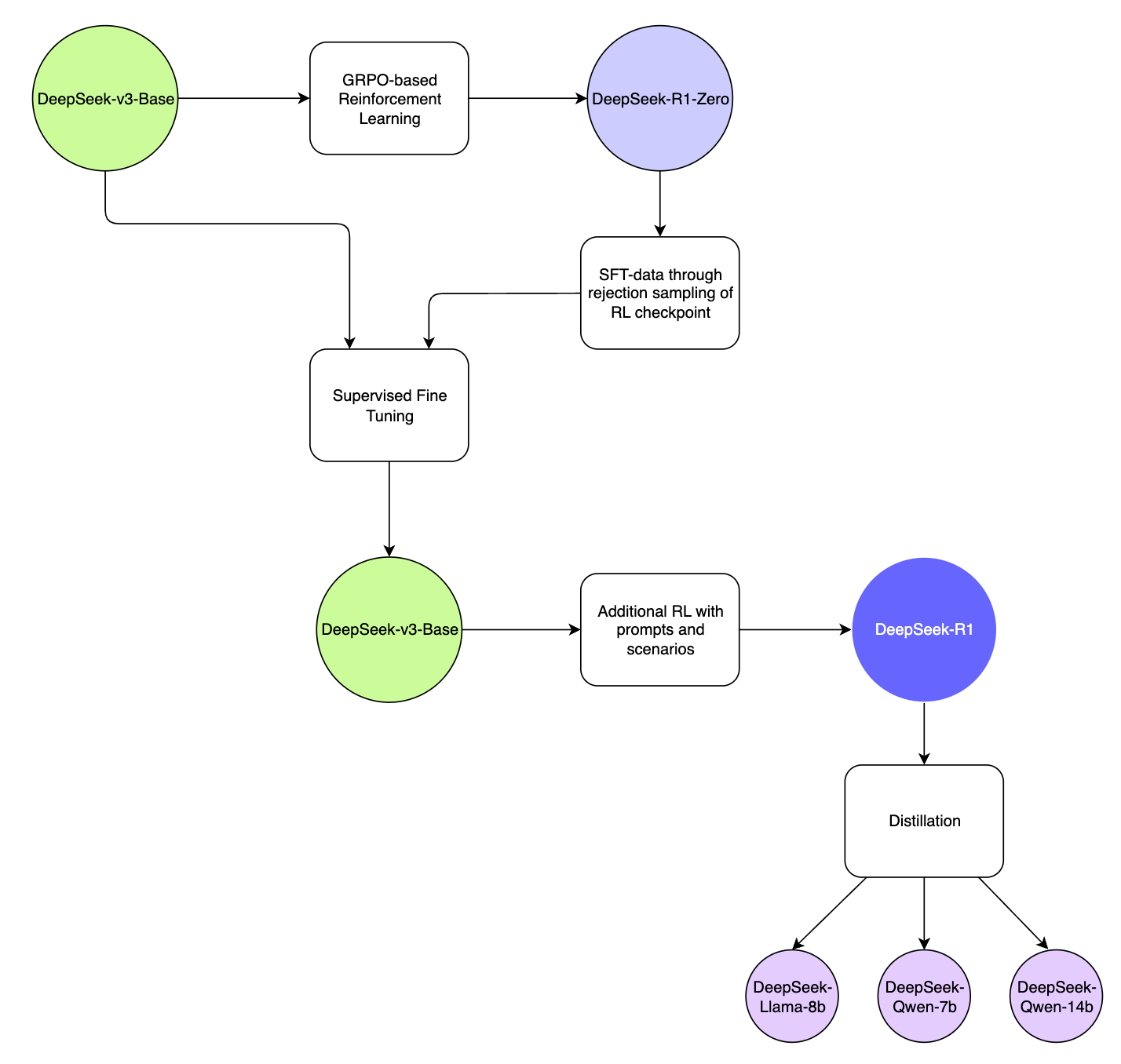
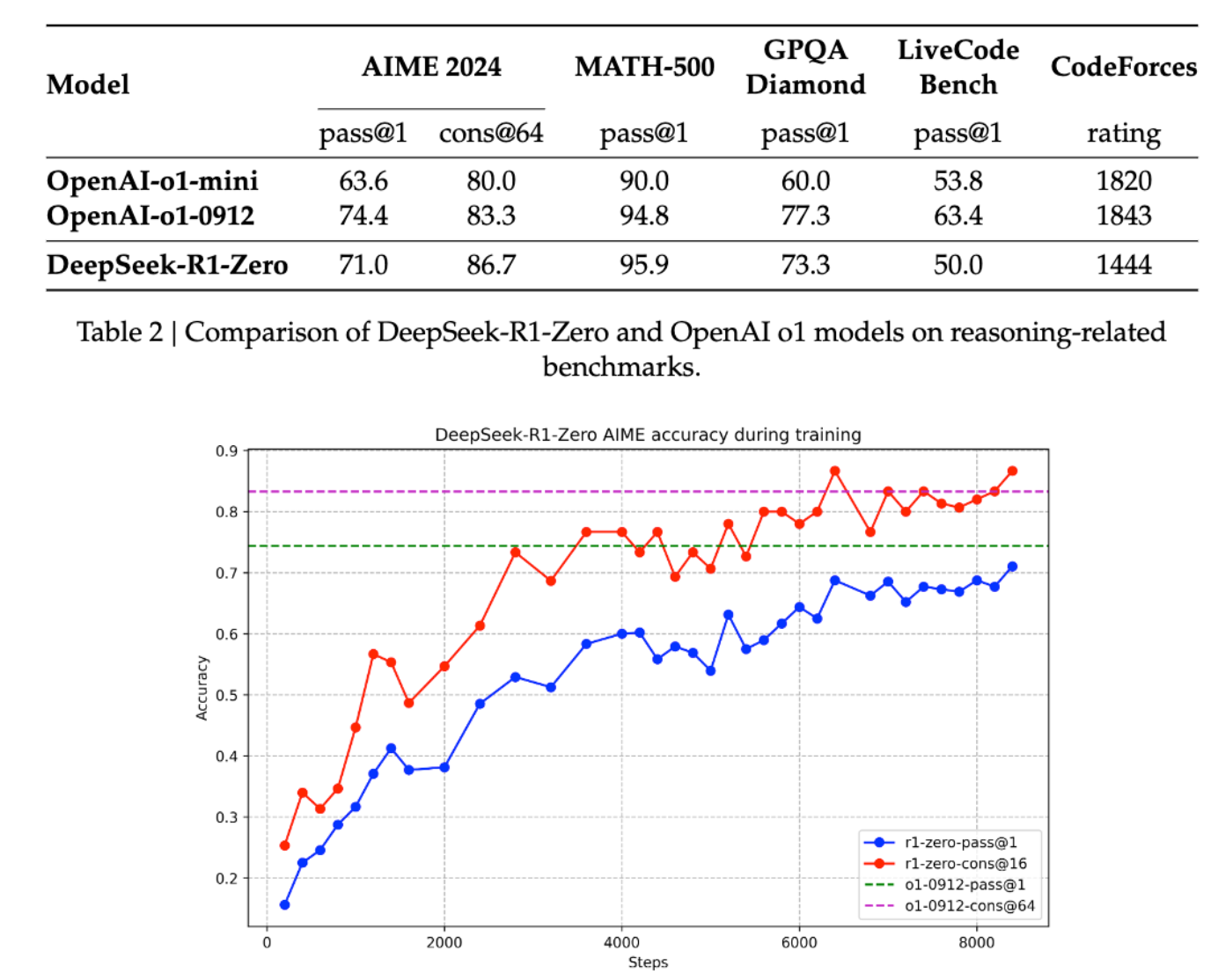
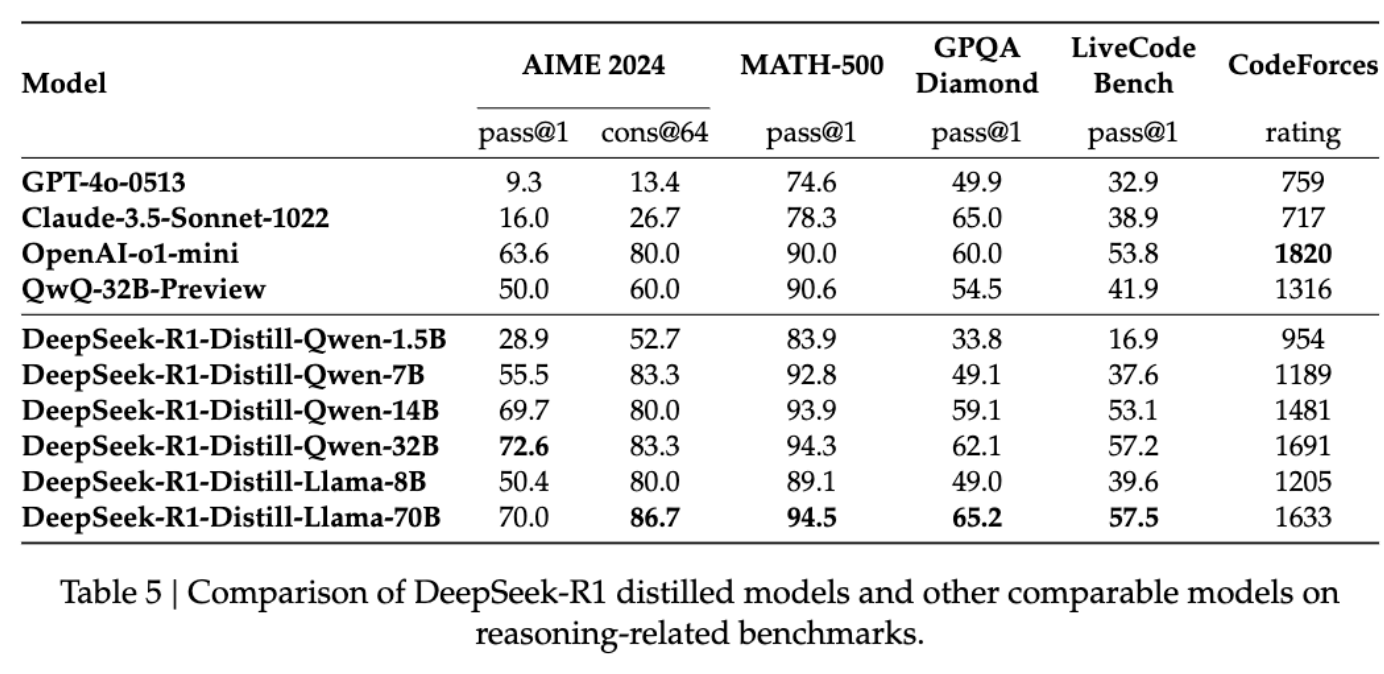
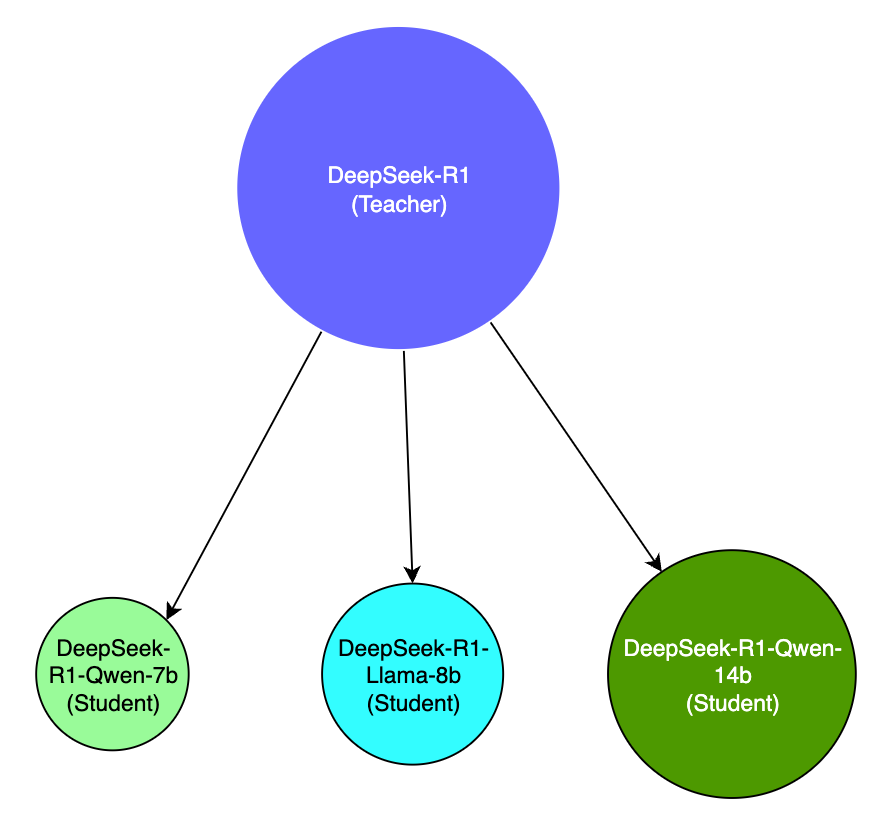
 DeepSeek R1, the new entrant to the Large Language Model wars has created quite a splash over the last few weeks. Its entrance into a space dominated by the Big Corps, while pursuing asymmetric and novel strategies has been a refreshing eye-opener.GPT AI improvement was starting to show signs of slowing down, and has been observed to be reaching a point of diminishing returns as it runs out of data and compute required to train, fine-tune increasingly large models. This has turned the focus towards building "reasoning" models that are post-trained through reinforcement learning, techniques such as inference-time and test-time scaling and search algorithms to make the models appear to think and reason better. OpenAI&aposs o1-series models were the first to achieve this successfully with its inference-time scaling and Chain-of-Thought reasoning.
 Another short status update of what happened on my side last
month. Mostly focused on quality of life improvements in phosh and
cleaning up and improving phoc this time around (including catching up
with wlroots git) but some improvements for other things like
phosh-osk-stub happened on the side line too.

 A new maintenance release of
 Internationalization support in Picolibc
There are two major internationalization APIs in the C library:
locales and iconv. Iconv is an isolated component which only performs
charset conversion in ways that don't interact with anything else in
the library. Locales affect pretty much every API that deals with
strings and covers charset conversion along with a huge range of
localized information from character classification to formatting of
time, money, people's names, addresses and even standard paper sizes.
Picolibc inherits it's implementation of both of these from
newlib. Given that embedded applications rarely need advanced
functionality from either these APIs, I hadn't spent much time
exploring this space.
Newlib locale code
When run on Cygwin, Newlib's locale support is quite complete as it
leverages the underlying Windows locale support. Without Windows
support, everything aside from charset conversion and character
classification data is stubbed out at the bottom of the stack. Because
the implementation can support full locale functionality, the
implementation is designed for that, with large data structures and
lots of code.
Charset conversion and character classification data for locales is
all built-in; none of that can be loaded at runtime. There is support
for all of the ISO-8859 charsets, three JIS variants, a bunch of
Windows code pages and a few other single-byte encodings.
One oddity in this code is that when using a JIS locale, wide
characters are stored in EUC-JP rather than Unicode. Every other
locale uses Unicode. This means APIs like wctype are implemented by
mapping the JIS-encoded character to Unicode and then using the
underlying Unicode character classification tables. One consequence of
this is that there isn't any Unicode to JIS mapping provided as it
isn't necessary.
When testing the charset conversion and Unicode character
classification data, I found numerous minor errors and a couple of
pretty significant ones. The JIS conversion code had the most serious
issue I found; most of the conversions are in a 2d array which is
manually indexed with the wrong value for the length of each row. This
led to nearly every translated value being incorrect.
The charset conversion tables and Unicode classification data are now
generated using python charset support and the standard Unicode data
files. In addition, tests have been added which compare Picolibc to
the system C library for every supported charset.
Newlib iconv code
The iconv charset support is completely separate from the locale
charset support with a much wider range of supported targets. It also
supports loading charset data from files at runtime, which reduces the
size of application images.
Because the iconv and locale implementations are completely separate,
the charset support isn't the same. Iconv supports a lot more
charsets, but it doesn't support all of those available to
locales. For example, Iconv has Big5 support which locale
lacks. Conversely, locale has Shift-JIS support which iconv does not.
There's also a difference in how charset names are mapped in the two
APIs. The locale code has a small fixed set of aliases, which doesn't
include things like US-ASCII or ANSI X3.4. In contrast, the iconv
code has an extensive database of charset aliases which are compiled
into the library.
Picolibc has a few tests for the iconv API which verify charset names
and perform some translations. Without an external reference, it's
hard to know if the results are correct.
POSIX vs C internationalization
In addition to including the iconv API, POSIX extends locale support
in a couple of ways: