Joey Hess: xmonad layouts for netbooks
 How a window manager with tiling layouts makes a 1024x600 resolution livable.
I spend a lot of time in front of a screen, and for the past year I have
used only my netbook. No desktops, no laptops. Just a cheap $200 computer
that is nearly a kid's toy. The most challenging thing about this is
dealing with the 1024x600 screen resolution. When I moved to this screen
from something with many more pixels, it at first seemed very cramped.
After a year, I think that the most important part of coping with the small
screen is the flexability and customizability of layouts provided by the
Xmonad window manager. In this post I will explain a few layouts I have
developed for fitting specific tasks onto the netbook screen.
(I assume that you know maybe 0.1% of Haskell (about what I do),
and can read Haskell code without having a brain aneurysm.)
web browsing
It's important that the web browser have as few toolbars and other
cruft as possible, as horizontal space is especially at a premium. I've
configured both Epiphany and Firefox to put everything in one tool bar.
But now I use Chromium, which comes pre-configured that way.
What the netbook is designed for. You just want a web browser, taking up
the full screen, and with its own tabs. So far, so easy: that's Xmonad's
Full layout.
But, you sometimes want to see two websites side-by-side. This layout
accomplishes that, allowing the sizes to be adjusted as needed. It also
uses Xmonad's Magnifier to zoom the smaller window when it's focused,
which is useful if you briefly need to see more of a web site.
mySplit = magnifiercz' 1.4 $ Tall nmaster delta ratio
    where
        -- The default number of windows in the master pane
        nmaster = 1
        -- Percent of screen to increment by when resizing panes
        delta   = 3/100
        -- Default proportion of screen occupied by master pane
        ratio   = 60/100

 web development
If you're doing web development, you'll want probably one big web browser
window, but also with a nice wide terminal on the same screen, in order to
see web server logs. A simple way to do this is to mirror Xmonad's
Tall
layout by 90 degrees.
myWide = Mirror $ Tall nmaster delta ratio
    where
        -- The default number of windows in the master pane
        nmaster = 1
        -- Percent of screen to increment by when resizing panes
        delta   = 3/100
        -- Default proportion of screen occupied by master pane
        ratio   = 80/100
myWide layout uses the full screen width for a single terminal,
and splits the width when there are more. This is sufficient for viewing logs
and doing minor things at the shell prompt, in between testing the result in
the web browser. Of course a terminal can be temporarily moved to the master
area by pressing mod-return, if you need it to be larger.

 chat
Tips on configuring Pidgin for a netbook: Set it up to use vertical tabs to
save horizontal space. Configure the input area to only 1 line tall, and
turn off as much other cruft as you can. The menu bars, sadly, cannot be
disabled, nor can the excessively large borders. In my screenshots, you
can see that stuff wasting space that could be used to show four more lines
of text.
For chat, you want to put the buddy list on the side of the
screen, and use the rest for conversation windows. Xmonad's IM module
takes care of allocating a sidebar on the screen for the buddy window. The
rest of the screen can be occupied by any layout you choose.
I like to have the conversation windows be as wide as possible, and
typically only want to see two conversations at a time. But sometimes I
might have a dozen visible. A good layout to cope with those needs is
Grid.
myChat' l = withIM size roster l
    where
        -- Ratio of screen roster will occupy
        size = 1%5
        -- Match roster window
        roster = Title "Buddy List"
myChat = myChat' Grid
withIM layout puts the buddy list on the left; I prefer it on the right
for some reason, so I tweaked my layout to do that. All it took was
using the reflectHoriz layout modifier to get a mirror image of
the layout. Then I reflect the inner layout back to its normal orientation.
Being able to throw in a few function calls and mutate a layout like that
is where Xmonad shines.
myChat' l = reflectHoriz $ withIM size roster $
            reflectHoriz $ l

 logs
Ever notice that
I have a dedidated workspace that I use to tail logs, and as a place to
send long-running tasks (such as compiles). The layout for this needs to
keep windows wide, to see whole logged lines, but they need only be five
or so lines tall. And it's convenient to have one bigger window with the
small ones below. Xmonad has a perfect layout for this, called tail -f wastes the last line of the terminal? On a netbook
this matters.
shorttail
lets the last line be used.
Dishes,
because it's sorta like a stack of plates.
myDish = limitWindows 5 $ Dishes nmaster ratio
    where
        -- The default number of windows in the master pane
        nmaster = 1
        -- Default proportion of screen occupied by other panes
        ratio = 1/5


In the second screenshot above, I have 6 windows open, but only 5 are
visible. The
Notice that the screenshots above also have Procmeter in a sidebar on
the right. I (ab)used the limitWindows 5 accomplishes this. It's handy mostly because
gnome-terminal has a bad habit of crashing when resized to 0x0.
(That's gotta be a bug in something!)
withIM layout to do that:
myLogs' l = reflectHoriz $ withIM procmeterSize procmeter $
              reflectHoriz $ l
    where
        -- Ratio of screen procmeter will occupy
        procmeterSize = 1%7
        -- Match procmeter
        procmeter = ClassName "ProcMeter3"
myLogs = myLogs' myDish
As an example of the three window rule:
While I'm writing this post, I have a reference window open
with my
Often, deep into something, I will accumulate many other reference and action
windows. But three seems to be the magic, minimum number for me;
use of .xmonad/xmonad.hs, and an action window open where I am
managing screenshots.
screen or anything else doesn't reduce it; if I can't see all
three at once, I will waste time and concentration flipping back and forth.
The Xmonad layout I've developed to handle this is based on the handy
FixedColumn layout, which automatically keeps the master window 80
columns wide. I modify this by adding the Magnifier, so that my action
and reference windows "pop out" over the master window when focused.
myCode = limitWindows 3 $ magnifiercz' 1.4 $ FixedColumn 1 20 80 10
limitWindows, to only show
three windows, in order to keep them all as big as possible. Other windows
are hidden offscreen, but I can rotate to them with alt-tab as needed.

 reading ebooks
When I'm reading an ebook, I want to have the reader in the middle of the
screen. But a widescreen netbook like mine is too wide to comfortably
read text all the way across, so it's nice to have margins. (In the margins,
I put terminals, or notes.)
The
ThreeColumns module has a layout that does just that.
myBook = ThreeColMid nmaster delta ratio
    where
        nmaster = 1
        -- Percent of screen to increment by when resizing panes
        delta   = 3/100
        -- Default proportion of screen occupied by master pane
        ratio   = 2/3
 putting it all together
I join all my layouts together, so Xmonad will allow switching
between them. These three combinations all have the same layouts,
only ordered differently, so that different workspaces can have
different default layouts.
codeFirst  = myCode    myWide    myGrid    myDish
dishFirst  = myDish    myCode    myWide    myGrid
gridFirst  = myGrid    myDish    myCode    myWide
withTitles l = noFrillsDeco shrinkText myTheme (desktopLayoutModifiers l)
noTitles l = desktopLayoutModifiers l
PerWorkspace module.
Notice that the "web" workspace has only two available layouts.
Meanwhile, the "book" workspace always uses the specialized
myBook
layout; I don't use that layout elsewhere.
perWS = onWorkspace "logs" (withTitles $ myLogs' dishFirst) $
        onWorkspace "web"  (noTitles   $ (mySplit   myWide)) $
        onWorkspace "chat" (noTitles   $ myChat' gridFirst) $
        onWorkspace "book" (noTitles   $ myBook) $
                           (withTitles $ codeFirst)
smartBorders to avoid displaying borders when
there is only one window onscreen.
myLayout = smartBorders $ toggleLayouts Full perWS
PS: Thanks to
#xmonad regulars for always having the answer
I need up their sleeves.



 In the last weeks, I stopped being motivated to work on the
 In desperate need to organize my collection of scientific papers, I had a look at various tools which could help me organizing them. Probably one of the best out there is

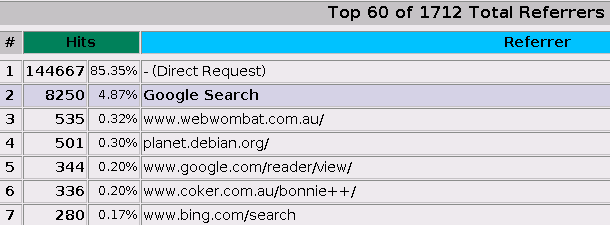 Above are sections of my Webalizer output related to my blog which show the data transfer use of search.msn.com (Bing presumably) which is 50% greater than that of Google and Yahoo combined. Why does MSN need to do 455MB of transfer so far this month to scan my blog when Google gets the job done with 189M and Yahoo only takes 109M? Also judging by the referrals Bing is only 3% as much use to me as Google.
 Above is a sample of the Webalizer output from www.coker.com.au, MSN is using 525MB of data to scan the site which contains about 1.2G of static files that change very rarely. A Russian malware site seems to be downloading it three times a month, and Google only takes 35MB of data transfer to scan the site (which is probably still excessive).
If Bing was a quality search engine that returned appropriate results then this could be forgiven. But however it is a very poor search engine that returns bad results. For example if you query Google or Yahoo for bonnie++ you will get an entire page of search results concerning my Bonnie++ benchmark, and those results are ordered in a sensible way. If you ask Bing then the first four results concern Bonnie (three women and a plant) and most of the first page don t concern my benchmark.
Some time ago I had blocked MSN from scanning a server that I ran. The server in question had all the web servers for my domain plus quite a few other small domains. The total MSN data transfer was 3G per month which was almost half the data allowance for the server in question (data plans in Australia suck that s why my web servers are hosted in Germany now), so it was a question of whether to allow normal operation of the business or MSN searches. With Microsoft not running a popular search engine (then or now) it was an easy decision.
I think that anyone who accepts money from Microsoft/Bing is doing their users a mis-service. Bing is simply an inferior search engine, it gets bad results and imposes excessive costs on service providers. Yahoo however seems to be a reasonable service, not as good as Google for the web hosters but not too bad.
I wonder what would happen if Yahoo offered some sponsorship money to the Debian project in exchange for being the default search engine. I m sure it would be dramatic.
 Just an update about
 I'm glad

 Coming to New Zealand for an extended period of time, I figured
it would make sense to purchase a prepay mobile plan to make it
easier to mix with locals. Not knowing better, I went with
 So, a while back, Google started providing
 Moving today went as about as well as you could possibly ask for. The movers
arrived at a few minutes to 9, had most of the place packed up within 30
minutes, and I think we headed to the new place in a little over an hour.
Mad props to Handle With Care Moving. The guys were really great.
The rain also held off for the duration, thankfully.
There's just dregs left at the old place, oh and the entire kitchen. I think
we're both subconsciously dreading (and therefore avoiding) moving the
kitchen stuff, because we really don't want to unpack at the new place,
because the kitchen is going to get totally destroyed in hopefully a couple
of weeks time.
I'm finding wall space to be a bit of a premium at the new place. We're
trying to keep the second bedroom as usable as a bedroom as possible, while
primarily using it as a study, so that when we have house guests, we can
throw some sort of bed down in that room and not have it all become
ridiculously cluttered. When you've got desks all against one wall, a
built-in wardrobe against another wall, and a full length sliding door on
the other wall, that doesn't leave too many options for a bookshelf and
retaining space for a bed. I think we might have to avail ourselves of some
more