Search Results: "tin"

8 February 2015

Keith Packard: Altos1.6

AltOS 1.6 TeleDongle v3.0 support and bug fixes Bdale and I are pleased to announce the release of AltOS version 1.6. AltOS is the core of the software for all of the Altus Metrum products. It consists of firmware for our cc1111, STM32L151, STMF042, LPC11U14 and ATtiny85 based electronics and Java-based ground station software. This is a major release of AltOS, including support for our new TeleDongle v3.0 board and a selection of bug fixes AltOS Firmware TeleDongle v3.0 added along with some fixes Our updated ground station, TeleDongle v3.0, works just like the original TeleDongle, but is an all-new design: AltOS Bug Fixes We also fixed a few bugs in the firmware: AltosUI and TeleGPS applications A few minor new features are in this release Bug Fixes There are a bunch of minor bug fixes, including the usual collection of attempts to make stuff behave better on Windows platforms.

Laura Arjona: How contributors.debian.org helped in my email address migration

Some months ago I changed my preferred email address. I updated my profile in different sites to point to the new address, and changed my subscriptions in mailing lists. I forgot about subscriptions to Debian bugs. I like that you don t need a user to participate in Debian BTS (you just need an email address) but I learned that there s no way to get a list of the bugs you re subscribed to (for mailing lists it s possible: send mail to majordomo at lists.debian.org with which your.email.address in the body). Then, I remembered that I m listed in contributors.debian.org as BTS contributor, and that there is an extra info link, so I went there and got redirected to: https://bugs.debian.org/cgi-bin/pkgreport.cgi?correspondent=MYOLDADDRESS which lists all the bugs for which I sent an email (not only the bugs that I submitted). So now, I have a list of bug numbers to send -unsubscribe mails from my old address and then -subscribe mails from the new address. I m probably subscribed to some more bugs in which I didn t participate (just lurking or interested in how people deal with them) but I suppose they are not many. (I could have retrieved the list of bugs from the BTS interface, but contributors.debian.org came first to my mind, and it s nice to have that link handy there, isn t it?)
Filed under: Tools Tagged: Bugs, Contributing to libre software, Debian, Email, English

Dirk Eddelbuettel: rfoaas 0.1.3

A brand new version of rfoaas is now on CRAN. It shadows the 0.1.3 release of FOAAS just how an earlier 0.1.2 had done (but there was something not quite right at the server backend which we coded around with an interim release 0.1.2.1; neither one of these was ever released to CRAN). The rfoaas package provides an interface for R to the most excellent FOAAS service--which provides a modern, scalable and RESTful web service for the frequent need to tell someone to f$#@ off. Release 0.1.3 of FOAAS brings support for filters which the initial support going to the absolutely outstanding shoutcloud.io service. This can be enabled by adding filter="shoutcloud" as an argument to any of the access functions. And thanks to shoutcloud.io, the result will be LOUD AND CLEAR. As usual, CRANberries provides a diff to the previous CRAN release. Questions, comments etc should go to the GitHub issue tracker.

This post by Dirk Eddelbuettel originated on his Thinking inside the box blog. Please report excessive re-aggregation in third-party for-profit settings.

Dirk Eddelbuettel: drat Tutorial: First Steps towards Lightweight R Repositories

Now that drat is on CRAN and I got a bit of feedback (or typo corrections) in three issue tickets, I thought I could show how to quickly post such an interim version in a drat repository. Now, I obviously already have a checkout of drat. If you, dear reader, wanted to play along and create your own drat repository, one rather simple way would be to simply clone my repo as this gets you the desired gh-pages branch with the required src/contrib/ directories. Otherwise just do it by hand. Back to a new interim version. I just pushed commit fd06293 which bumps the version and date for the new interim release based mostly on the three tickets addresses right after the initial release 0.0.1. So by building it we get a new version 0.0.1.1:
edd@max:~/git$ R CMD build drat
* checking for file  drat/DESCRIPTION  ... OK
* preparing  drat :
* checking DESCRIPTION meta-information ... OK
* checking for LF line-endings in source and make files
* checking for empty or unneeded directories
* building  drat_0.0.1.1.tar.gz 
edd@max:~/git$ 
Because I want to use the drat repo next, I need to now switch from master to gh-pages; a step I am omitting as we can assume that your drat repo will already be on its gh-pages branch. Next we simply call the drat function to add the release:
edd@max:~/git$ r -e 'drat:::insert("drat_0.0.1.1.tar.gz")'
edd@max:~/git$ 
As expected, now have two updated PACKAGES files (compressed and plain) and a new tarball:
edd@max:~/git/drat(gh-pages)$ git status
On branch gh-pages
Your branch is up-to-date with 'origin/gh-pages'.
Changes not staged for commit:
  (use "git add <file>..." to update what will be committed)
  (use "git checkout -- <file>..." to discard changes in working directory)
        modified:   src/contrib/PACKAGES
        modified:   src/contrib/PACKAGES.gz
Untracked files:
  (use "git add <file>..." to include in what will be committed)
        src/contrib/drat_0.0.1.1.tar.gz
no changes added to commit (use "git add" and/or "git commit -a")
edd@max:~/git/drat(gh-pages)$
All is left to is to add, commit and push---either as I usually via the spectacularly useful editor mode, or on the command-line, or by simply adding commit=TRUE in the call to insert() or insertPackage(). I prefer to use littler's r for command-line work, so I am setting the desired repos in ~/.littler.r which is read on startup (since the recent littler release 0.2.2) with these two lines:

## add RStudio CRAN mirror
drat:::add("CRAN", "http://cran.rstudio.com")
## add Dirk's drat
drat:::add("eddelbuettel")
After that, repos are set as I like them (at home at least):
edd@max:~/git$ r -e'print(options("repos"))'
$repos
                                 CRAN                          eddelbuettel 
            "http://cran.rstudio.com" "http://eddelbuettel.github.io/drat/" 
edd@max:~/git$ 
And with that, we can just call update.packages() specifying the package directory to update:
edd@max:~/git$ r -e 'update.packages(ask=FALSE, lib.loc="/usr/local/lib/R/site-library")'                                                                                                                            
trying URL 'http://eddelbuettel.github.io/drat/src/contrib/drat_0.0.1.1.tar.gz'
Content type 'application/octet-stream' length 5829 bytes
opened URL
==================================================
downloaded 5829 bytes
* installing *source* package  drat  ...
** R
** inst
** preparing package for lazy loading
** help
*** installing help indices
** building package indices
** testing if installed package can be loaded
* DONE (drat)
The downloaded source packages are in
         /tmp/downloaded_packages 
edd@max:~/git$
and presto, a new version of a package we have installed (here the very drat interim release we just pushed above) is updated. Writing this up made me realize I need to update the handy update.r script (see e.g. the littler examples page for more) and it hard-wires just one repo which needs to be relaxed for drat. Maybe in install2.r which already has docopt support...

7 February 2015

Eddy Petri&#537;or: Using Gentoo to create a cross toolchain for the old NSLU2 systems (armv5te)

This is mostly written so I don't forget how to create a custom (Arm) toolchain the Gentoo way (in a Gentoo chroot).

I have been a Debian user since 2001, and I like it a lot. Yet I have had my share of problems with it, mostly because due to lack of time I have very little disposition to try to track unstable or testing, so I am forced to use stable.

This led me to be a fan of Russ Albery's backport script and to create a lot of local backports of packages that are already in unstable or testing.

But this does not help when packages are simply missing from Debian or when something like creating an arm uclibc based system that should be kept up to date, from a security PoV.

I have experience with Buildroot and I must say I like it a lot for creating custom root filesystems and even toolchains. It allows a lot of flexibility that binary distros like Debian don't offer, it does its designated work, creating root filesystems. But buildroot is not appropriate for a system that should be kept up to date, because it lacks a mechanism by which to be able to update to new versions of packages without recompiling the entire rootfs.

So I was hearing from the guys from the Linux Action Show (and Linux Unplugged - by the way, Jupiter Broadcast, why do I need scripts enabled from several sites just to see the links for the shows?) how Arch is great and all, that is a binary rolling release, and that you can customize packages by building your own packages from source using makepkg. I tried it, but Arm support is provided for some specific (modern) devices, my venerable Linksys NSLU2's (I have 2 of them) not being among them.

So I tried Arch in a chroot, then dropped it in favour of a Gentoo chroot since I was under the feeling running Arch from a chroot wasn't such a great idea and I don't want to install Arch on my SSD.

I used succesfully Gentoo in the past to create an arm-unknown-linux-gnueabi chroot back in 2008 and I always liked the idea of USE flags from Gentoo, so I knew I could do this.


So here it goes:


# create a local portage overlay - necessary for cross tools
export LP=/usr/local/portage
mkdir -p $LP/ metadata,profiles
echo 'mycross' > $LP/profiles/repo_name
echo 'masters = gentoo' > $LP/metadata/layout.conf
chown -R portage:portage $LP
echo 'PORTDIR_OVERLAY="'$LP' $ PORTDIR_OVERLAY "' >> /etc/portage/make.conf
unset LP

# install crossdev, setup for the desired target, build toolchain
emerge crossdev
crossdev --init-target -t arm-softfloat-linux-gnueabi -oO /usr/local/portage/mycross
crossdev -t arm-softfloat-linux-gnueabi


Richard Hartmann: Release Critical Bug report for Week 06

Belated post due to meh real life situations. As you may have heard, if a package is removed from testing now, it will not be able to make it back into Jessie. Also, a lot of packages are about to be reoved for being buggy. If those are gone, they are gone. The UDD bugs interface currently knows about the following release critical bugs: How do we compare to the Squeeze and Wheezy release cycles?
Week Squeeze Wheezy Jessie
43 284 (213+71) 468 (332+136) 319 (240+79)
44 261 (201+60) 408 (265+143) 274 (224+50)
45 261 (205+56) 425 (291+134) 295 (229+66)
46 271 (200+71) 401 (258+143) 427 (313+114)
47 283 (209+74) 366 (221+145) 342 (260+82)
48 256 (177+79) 378 (230+148) 274 (189+85)
49 256 (180+76) 360 (216+155) 226 (147+79)
50 204 (148+56) 339 (195+144) ???
51 178 (124+54) 323 (190+133) 189 (134+55)
52 115 (78+37) 289 (190+99) 147 (112+35)
1 93 (60+33) 287 (171+116) 140 (104+36)
2 82 (46+36) 271 (162+109) 157 (124+33)
3 25 (15+10) 249 (165+84) 172 (128+44)
4 14 (8+6) 244 (176+68) 187 (132+55)
5 2 (0+2) 224 (132+92) 175 (124+51)
6 release! 212 (129+83) 161 (109+52)
7 release+1 194 (128+66)
8 release+2 206 (144+62)
9 release+3 174 (105+69)
10 release+4 120 (72+48)
11 release+5 115 (74+41)
12 release+6 93 (47+46)
13 release+7 50 (24+26)
14 release+8 51 (32+19)
15 release+9 39 (32+7)
16 release+10 20 (12+8)
17 release+11 24 (19+5)
18 release+12 2 (2+0)
Graphical overview of bug stats thanks to azhag:

6 February 2015

Antoine Beaupr : Migrating from Drupal to Ikiwiki

TLPL; j'ai chang de logiciel pour la gestion de mon blog. TLDR; I have changed my blog from Drupal to Ikiwiki. Note: since this post uses ikiwiki syntax (i just copied it over here), you may want to read the original version instead of this one. will continue operating for a while to
give a chance to feed aggregators to catch that article. It will also
give time to the Internet archive to catchup with the static
stylesheets (it turns out it doesn't like Drupal's CSS compression at
all!) An archive will therefore continue being available on the
internet archive for people that miss the old stylesheet. Eventually, I will simply redirect the anarcat.koumbit.org URL to
the new blog location, . This will likely be my
last blog post written on Drupal, and all new content will be
available on the new URL. RSS feed URLs should not change.

Why I am migrating away from Drupal because it is basically impossible to
upgrade my blog from Drupal 6 to Drupal 7. Or if it is, I'll have to
redo the whole freaking thing again when Drupal 8 comes along. And frankly, I don't really need Drupal to run a blog. A blog was
originally a really simple thing: a web blog. A set of articles
written on the corner of a table. Now with Drupal, I can add
ecommerce, a photo gallery and whatnot to my blog, but why would I do
that? and why does it need to be a dynamic CMS at all, if I get so
little comments? So I'm switching to ikiwiki, for the following reason:
  • no upgrades necessary: well, not exactly true, i still need to
    upgrade ikiwiki, but that's covered by the Debian package
    maintenance and I only have one patch to it, and there's no data migration! (the last such migration in ikiwiki was in 2009 and was fully supported)
  • offline editing: this is a a big thing for me: i can just note
    things down and push them when I get back online
  • one place for everything: this blog is where I keep my notes, it's
    getting annoying to have to keep track of two places for that stuff
  • future-proof: extracting content from ikiwiki is amazingly
    simple. every page is a single markdown-formatted file. that's it.
Migrating will mean abandoning the
barlow theme, which was
seeing a declining usage anyways.

What So what should be exported exactly. There's a bunch of crap in the old
blog that i don't want: users, caches, logs, "modules", and the list
goes on. Maybe it's better to create a list of what I need to extract:
  • nodes
    • title ([[ikiwiki/directive/meta]] title and guid tags, guid to avoid flooding aggregators)
    • body (need to check for "break comments")
    • nid (for future reference?)
    • tags (should be added as \[[!tag foo bar baz]] at the bottom)
    • URL (to keep old addresses)
    • published date ([[ikiwiki/directive/meta]] date directive)
    • modification date ([[ikiwiki/directive/meta]] updated directive)
    • revisions?
    • attached files
  • menus
    • RSS feed
    • contact
    • search
  • comments
    • author name
    • date
    • title
    • content
  • attached files
    • thumbnails
    • links
  • tags
    • each tag should have its own RSS feed and latest posts displayed

When Some time before summer 2015.

Who Well me, who else. You probably really don't care about that, so let'S
get to the meat of it.

How How to perform this migration... There are multiple paths:
  • MySQL commandline: extracting data using the commandline mysql tool (drush sqlq ...)
  • Views export: extracting "standard format" dumps from Drupal and
    parse it (JSON, XML, CSV?)
Both approaches had issues, and I found a third way: talk directly to
mysql and generate the files directly, in a Python script. But first,
here are the two previous approaches I know of.

MySQL commandline LeLutin switched using MySQL requests,
although he doesn't specify how content itself was migrated. Comments
importing is done with that script:
echo "select n.title, concat('  [[!comment  format=mdwn  username=\"', c.name, '\"  ip=\"', c.hostname, '\"  subject=\"', c.subject, '\"  date=\"', FROM_UNIXTIME(c.created), '\"  content=\"\"\" ', b.comment_body_value, ' \"\"\"]]') from node n, comment c, field_data_comment_body b where n.nid=c.nid and c.cid=b.entity_id;"   drush sqlc   tail -n +2   while read line; do if [ -z "$i" ]; then i=0; fi; title=$(echo "$line"   sed -e 's/[    ]\+ .*//' -e 's/ /_/g' -e 's/[:(),?/+]//g'); body=$(echo "$line"   sed 's/[^ ]*  //'); mkdir -p ~/comments/$title; echo -e "$body" &gt; ~/comments/$title/comment_$i._comment; i=$((i+1)); done
Kind of ugly, but beats what i had before (which was "nothing"). I do think it is the good direction to take, to simply talk to the
MySQL database, maybe with a native Python script. I know the Drupal
database schema pretty well (still! this is D6 after all) and it's
simple enough that this should just work.

Views export [[!img 2015-02-03-233846_1440x900_scrot.png class="align-right" size="300x" align="center" alt="screenshot of views 2.x"]] mvc recommended views data export on Lelutin's
blog. Unfortunately, my experience with the views export interface has
been somewhat mediocre so far. Yet another reason why I don't like
using Drupal anymore is this kind of obtuse dialogs: I clicked through those for about an hour to get JSON output that
turned out to be provided by views bonus instead of
views_data_export. And confusingly enough, the path and
format_name fields are null in the JSON output
(whyyy!?). views_data_export unfortunately only supports XML,
which seems hardly better than SQL for structured data, especially
considering I am going to write a script for the conversion anyways. Basically, it doesn't seem like any amount of views mangling will
provide me with what i need. Nevertheless, here's the [[failed-export-view.txt]] that I was able to
come up with, may it be useful for future freedom fighters.

Python script I ended up making a fairly simple Python script to talk directly to
the MySQL database. The script exports only nodes and comments, and nothing else. It makes
a bunch of assumptions about the structure of the site, and is
probably only going to work if your site is a simple blog like mine,
but could probably be improved significantly to encompass larger and
more complex datasets. History is not preserved so no interaction is
performed with git.

Generating dump First, I imported the MySQL dump file on my local mysql server for easier
development. It is 13.9MiO!!
mysql -e 'CREATE DATABASE anarcatblogbak;'
ssh aegir.koumbit.net "cd anarcat.koumbit.org ; drush sql-dump"   pv   mysql anarcatblogbak
I decided to not import revisions. The majority (70%) of the content has
1 or 2 revisions, and those with two revisions are likely just when
the node was actually published, with minor changes. ~80% have 3
revisions or less, 90% have 5 or less, 95% 8 or less, and 98% 10 or
less. Only 5 articles have more than 10 revisions, with two having the
maximum of 15 revisions. Those stats were generated with:
SELECT title,count(vid) FROM anarcatblogbak.node_revisions group
by nid;
Then throwing the output in a CSV spreadsheet (thanks to
mysql-workbench for the easy export), adding a column numbering the
rows (B1=1,B2=B1+1), another for generating percentages
(C1=B1/count(B$2:B$218)) and generating a simple graph with
that. There were probably ways of doing that more cleanly with R,
and I broke my promise to never use a spreadsheet again, but then
again it was Gnumeric and it's just to get a rough idea. There are 196 articles to import, with 251 comments, which means an
average of 1.15 comment per article (not much!). Unpublished articles
(5!) are completely ignored. Summaries are also not imported as such (break comments are
ignored) because ikiwiki doesn't support post summaries.

Calling the conversion script The script is in [[drupal2ikiwiki.py]]. It is called with:
./drupal2ikiwiki.py -u anarcatblogbak -d anarcatblogbak blog -vv
The -n and -l1 have been used for first tests as well. Use this
command to generate HTML from the result without having to commit and
push all:
ikiwiki --plugin meta --plugin tag --plugin comments --plugin inline  . ../anarc.at.html
More plugins are of course enabled in the blog, see the setup file for
more information, or just enable plugin as you want to unbreak
things. Use the --rebuild flag on subsequent runs. The actual
invocation I use is more something like:
ikiwiki --rebuild --no-usedirs --plugin inline --plugin calendar --plugin postsparkline --plugin meta --plugin tag --plugin comments --plugin sidebar  . ../anarc.at.html
I had problems with dates, but it turns out that I wasn't setting
dates in redirects... Instead of doing that, I started adding a
"redirection" tag that gets ignored by the main page.

Files and old URLs The script should keep the same URLs, as long as pathauto is enabled
on the site. Otherwise, some logic should be easy to add to point to
node/N. To redirect to the new blog, rewrite rules, on original blog, should
be as simple as:
Redirect / http://anarc.at/blog/
When we're sure:
Redirect permanent / http://anarc.at/blog/
Now, on the new blog, some magic needs to happen for files. Both
/files and /sites/anarcat.koumbit.org/files need to resolve
properly. We can't use symlinks because
ikiwiki drops symlinks on generation. So I'll just drop the files in /blog/files directly, the actual
migration is:
cp $DRUPAL/sites/anarcat.koumbit.org/files $IKIWIKI/blog/files
rm -r .htaccess css/ js/ tmp/ languages/
rm foo/bar # wtf was that.
rmdir *
sed -i 's#/sites/anarcat.koumbit.org/files/#/blog/files/#g' blog/*.mdwn
sed -i 's#http://anarcat.koumbit.org/blog/files/#/blog/files/#g' blog/*.mdwn
chmod -R -x blog/files
sudo chmod -R +X blog/files
A few pages to test images:
  • http://anarcat.koumbit.org/node/157
  • http://anarcat.koumbit.org/node/203
There are some pretty big files in there, 10-30MB MP3s - but those are
already in this wiki! so do not import them! Running fdupes on the result helps find oddities. The meta guid directive is used to keep the aggregators from finding
duplicate feed entries. I tested it with Liferea, but it may freak out
some other sites.

Remaining issues
  • postsparkline and calendar archive disrespect meta(date)
  • merge the files in /communication with the ones in /blog/files
    before import
  • import non-published nodes
  • check nodes with a format different than markdown (only a few 3=Full
    HTML
    found so far)
  • replace links to this wiki in blog posts with internal links
More progress information in [[the script drupal2ikiwiki.py]] itself.

Daniel Pocock: Lumicall's 3rd Birthday

Today, 6 February, is the third birthday of the Lumicall app for secure SIP on Android. Happy birthday Lumicall's 1.0 tag was created in the Git repository on this day in 2012. It was released to the Google Play store, known as the Android Market back then, while I was in Brussels, the day after FOSDEM. Since then, Lumicall has also become available through the F-Droid free software marketplace for Android and this is the recommended way to download it. An international effort Most of the work on Lumicall itself has taken place in Switzerland. Many of the building blocks come from Switzerland's neighbours:
  • The ice4j ICE/STUN/TURN implementation comes from the amazing Jitsi softphone, which is developed in France.
  • The ZORG open source ZRTP stack comes from PrivateWave in Italy
  • Lumicall itself is based on the Sipdroid project that has a German influence, while Sipdroid is based on MjSIP which comes out of Italy.
  • The ENUM dialing logic uses code from ENUMdroid, published by Nominet in the UK. The UK is not exactly a neighbour of Switzerland but there is a tremendous connection between the two countries.
  • Google's libPhoneNumber has been developed by the Google team in Zurich and helps Lumicall format phone numbers for dialing through international VoIP gateways and ENUM.
Lumicall also uses the reSIProcate project for server-side infrastructure. The repro SIP proxy and TURN server run on secure and reliable Debian servers in a leading Swiss data center. An interesting three years for free communications Free communications is not just about avoiding excessive charges for phone calls. Free communications is about freedom. In the three years Lumicall has been promoting freedom, the issue of communications privacy has grabbed more headlines than I could have ever imagined. On 5 June 2013 I published a blog about the Gold Standard in Free Communications Technology. Just hours later a leading British newspaper, The Guardian, published damning revelations about the US Government spying on its own citizens. Within a week, Edward Snowden was a household name. Google's Eric Schmidt had previously told us that "If you have something that you don't want anyone to know, maybe you shouldn't be doing it in the first place.". This statement is easily debunked: as CEO of a corporation listed on a public stock exchange, Schmidt and his senior executives are under an obligation to protect commercially sensitive information that could be used for crimes such as insider trading. There is no guarantee that Lumicall will keep the most determined NSA agent out of your phone but nonetheless using a free and open source application for communications does help to avoid the defacto leakage of your conversations to a plethora of marketing and profiling companies that occurs when using a regular phone service or messaging app. How you can help free communications technology evolve As I mentioned in my previous blog on Lumicall, the best way you can help Lumicall is by helping the F-Droid team. F-Droid provides a wonderful platform for distributing free software for Android and my own life really wouldn't be the same without it. It is a privilege for Lumicall to be featured in the F-Droid eco-system. That said, if you try Lumicall and it doesn't work for you, please feel free to send details from the Android logs through the Lumicall issue tracker on Github and they will be looked at. It is impossible for Lumicall developers to test every possible phone but where errors are obvious in the logs some attempt can be made to fix them. Beyond regular SIP Another thing that has emerged in the three years since Lumicall was launched is WebRTC, browser based real-time communications and VoIP. In its present form, WebRTC provides tremendous opportunities on the desktop but it does not displace the need for dedicated VoIP apps on mobile handsets. WebRTC applications using JavaScript are a demanding solution that don't integrate as seamlessly with the Android UI as a native app and they currently tend to be more intensive users of the battery. Lumicall users can receive calls from desktop users with a WebRTC browser using the free calling from browser to mobile feature on the Lumicall web site. This service is powered by JSCommunicator and DruCall for Drupal.

Carl Chenet: Backup Checker 1.0, the fully automated backup checker

Follow me on Identi.ca or Twitter or Diaspora*diaspora-banner Backup Checker is the new name of the Brebis project. Backup Checker is a CLI software developed in Python 3.4, allowing users to verify the integrity of archives (tar,gz,bz2,lzma,zip,tree of files) and the state of the files inside an archive in order to find corruptions or intentional of accidental changes of states or removal of files inside an archive. Brebis version 0.9 was downloaded 1092 times. In order to keep the project growing, several steps were adopted recently: This new version 1.0 does not only provide project changes. Starting from 1.0, Backup Checker now verifies the owner name and the owner group name of a file inside an archive, enforcing the possible checks for both an archive and a tree of files. Moreover, the recent version 0.10 of Brebis published 9 days ago provided the following features As usual, any feedback is welcome, through bug reports, emails of the author or comments on this blog.

Gunnar Wolf: On the number of attempts on brute-force login attacks

I would expect brute-force login attacks to be more common. And yes, at some point I got tired of ssh scans, and added rate-limiting firewall rules, even switched the daemon to a nonstandard port... But I have very seldom received an IMAP brute-force attack. I have received countless phishing scams on my users, and I know some of them have bitten because the scammers then use their passwords on my servers to send tons of spam. Activity is clearly atypical. Anyway, yesterday we got a brute-force attack on IMAP. A very childish atack, attempted from an IP in the largest ISP in Mexico, but using only usernames that would not belong in our culture (mosty English firstnames and some usual service account names). What I find interesting to see is that each login was attempted a limited (and different) amount of times: Four account names were attempted only once, eight were attempted twice, and so on following this pattern:
 1  
 2  
 3  
 4  
 5  
 6  
 7  
 8  
 9  
10  
11  
12  
13  
14  
15  
16  
17  
18  
19  
20  
21  
22  
(each dot represents four attempts) So... What's significant in all this? Very little, if anything at all. But for such a na ve login attack, it's interesting to see the number of attempted passwords per login varies so much. Yes, 273 (over of the total) did 22 requests, and another 200 were 18 and more. The rest... Fell quite shorter. In case you want to play with the data, you can grab the list of attempts with the number of requests. I filtered out all other data, as i was basically meaningless. This file is the result of:
  1. $ grep LOGIN /var/log/syslog.1
  2. grep FAILED.*201.163.94.42
  3. awk ' print $7 " " $8 '
  4. sort uniq -c
AttachmentSize
logins.txt27.97 KB

Olivier Berger: Configuring the start of multiple docker container with Vagrant in a portable manner

I ve mentioned earlier the work that our students did on migrating part of the elements of the Database MOOC lab VM to docker. While docker seems quite cool, let s face it, participants to the MOOCs aren t all using Linux where docker can be available directly. Hence the need to use boot2docker, for instance on Windows. Then we re back quite close to the architecture of the Vagrang VM, which relies too on a VirtualBox VM to run a Linux machine (boot2docker does exactly that with a minimal Linux which runs docker). If VirtualBox is to be kept around, then why not stick to Vagrant also, as it offers a docker provider. This docker provider for Vagrant helps configure basic parameters of docker containers in a Vagrantfile, and basically uses the vagrant up command instead of using docker build + docker run. If on Linux, it only triggers docker, and if not, then it ll start boot2docker (or any other Linux box) in between. This somehow offers a unified invocation command, which renders a bit more portable the documentation. Now, there are some tricks when using this docker provider, in particular for debugging what s happening inside the VM. One nice feature is that you can debug on Linux what is to be executed on Windows, by explicitely requiring the start of the intermediary boot2docker VM even if it s not really needed. By using a custom secondary Vagrantfile for that VM, it is possible to tune some parameters of that VM (like its graphic memory to allow to start it with a GUI allowing to connect another alternative is to ssh -p 2222 docker@localhost once you know that its password is tcuser ). I ve committed an example of such a setup in the moocbdvm project s Git, which duplicates the docker provisioning files that our students had already published in the dedicated GitHub repo. Here s an interesting reference post about Vagrant + docker and multiple containers, btw.

5 February 2015

Holger Levsen: 20150205-lts-january-2015

My LTS January It was very nice to hear many appreciations for our work on Squeeze LTS during the last weekend at FOSDEM. People really seem to like and use LTS a lot - and start to rely on it. I was approached more than once about Wheezy LTS already... (Most of my FOSDEM time I spent with reproducible builds however, though this shall be the topic of another report, coming hopefully soon.) So, about LTS. First I'd like to describe some current practices clearly: I hope this clarifies things. And as usual, things are open for discussion and best practices will change over time. In January 2014 I spent 12h on Debian LTS work and managed to get four DLAs released, plus I've marked some CVEs as not affecting squeeze. The DLAs I released were: Thanks to everyone who is supporting Squeeze LTS in whatever form! We like to hear from you, we love your contributions, but it's also totally ok to silently enjoy a good old quality distribution :-) Finally, something for the future: checking for previous DLAs is currently best done via said mailing list archive, as DLAs are not yet integrated into the website due to a dependency loop of blocking bugs... see #761945 for a starting point.

Daniel Pocock: Debian Maintainer Dashboard now provides iCalendar feeds

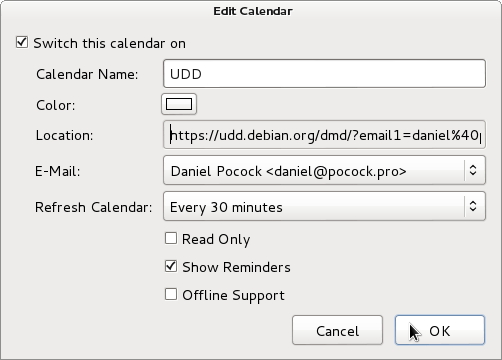
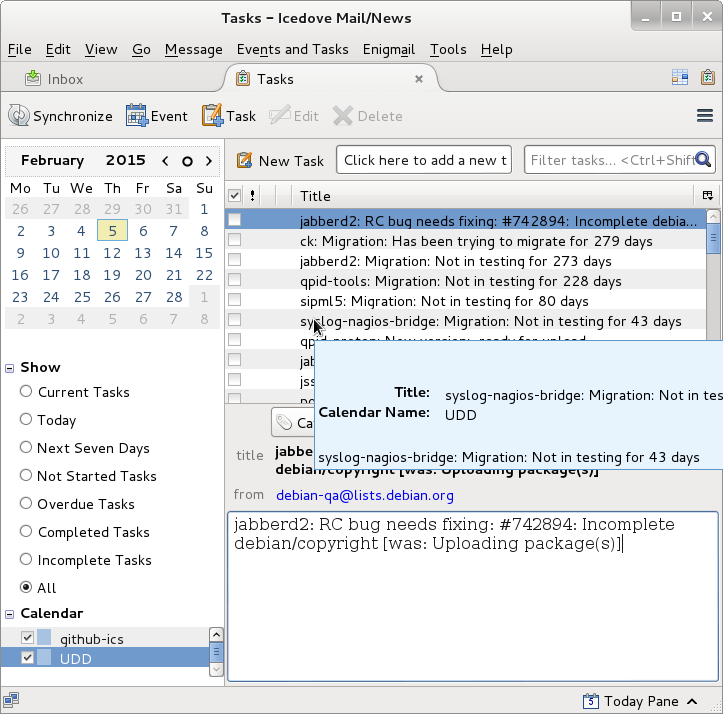
Contributors to Debian can now monitor their list of pending activities using iCalendar clients on their desktop or mobile device. Thanks to the tremendous work of the Debian QA team, the Ultimate Debian Database has been scooping up data from all around the Debian universe and storing it in a PostgreSQL back-end. The Debian Maintainer Dashboard allows developers to see a summary of outstanding issues across all their packages in a range of different formats. With today's update, an aggregated list of Debian tasks and to-dos can now be rendered in iCalendar format and loaded into a range of productivity tools. Using the iCalendar URL Many productivity tools like Mozilla Lightning (Iceowl extension on Debian) allow you to poll any calendar or task list just using a URL. For UDD iCalendar feeds, the URLs look like this:
https://udd.debian.org/dmd/?format=ics&email1=daniel%40pocock.pro
You can also get the data by visiting the Debian Maintainer Dashboard, filling out the form and selecting the iCalendar output format. Next steps Currently, the priority and deadline attributes are not set on any of the tasks in the feed. The strategy of prioritizing issues has been raised in bug #777112. iCalendar also supports other possibilities such as categories and reminders/alarms. It is likely that each developer has their own personal preferences about using these features. Giving feedback through the Debian QA mailing list or the bug tracker is welcome. Screenshots

Dirk Eddelbuettel: Introducing drat: Lightweight R Repositories

A new package of mine just got to CRAN in its very first version 0.0.1: drat. Its name stands for drat R Archive Template, and an introduction is provided at the drat page, the GitHub repository, and below. drat builds on a core strength of R: the ability to query multiple repositories. Just how one could always query, say, CRAN, BioConductor and OmegaHat---one can now adds drats of one or more other developers with ease. drat also builds on a core strength of GitHub. Every user automagically has a corresponding github.io address, and by appending drat we are getting a standardized URL. drat combines both strengths. So after an initial install.packages("drat") to get drat, you can just do either one of
library(drat)
addRepo("eddelbuettel")
or equally
drat:::add("eddelbuettel")
to register my drat. Now install.packages() will work using this new drat, as will update.packages(). The fact that the update mechanism works is a key strength: not only can you get a package, but you can gets its updates once its author replaces them into his drat. How does one do that? Easy! For a package foo_0.1.0.tar.gz we do
library(drat)
insertPackage("foo_0.1.0.tar.gz")
The default git repository locally is taken as the default ~/git/drat/ but can be overriden as both a local default (via options()) or directly on the command-line. Note that this also assumes that you a) have a gh-pages branch and b) have that branch as the currently active branch. Automating this / testing for this is left for a subsequent release. Also available is an alternative unexported short-hand function:
drat:::insert("foo_0.1.0.tar.gz", "/opt/myWork/git")
show here with the alternate use case of a local fileshare you can copy into and query from---something we do at work where we share packages only locally. The easiest way to obtain the corresponding file system layout may be to just fork the drat repository. So that is it. Two exported functions, and two unexported (potentially name-clobbering) shorthands. Now drat away! Courtesy of CRANberries, there is also a copy of the DESCRIPTION file for this initial release. More detailed information is on the drat page.

This post by Dirk Eddelbuettel originated on his Thinking inside the box blog. Please report excessive re-aggregation in third-party for-profit settings.

4 February 2015

Charles Plessy: News of the package mime-support.

The package mime-support is installed by default on Debian systems. It has two roles: first to provide the file /etc/mime.types that associates media types (formerly called MIME types) to suffixes of file names, and second to provide the mailcap system that associates media types with programs. I adopted this package at the end of the development cycle of Wheezy. Changes since Wheezy. The version distributed in Jessie brings a few additions in /etc/mime.types. Among them, application/vnd.debian.binary-package and text/vnd.debian.copyright, which as their name suggest describe two file formats designed by Debian. I registered these types to the IANA, which is more open to the addition of new types since the RFC 6838. The biggest change is the automatic extraction of the associations between programs and media types that are declared in the menu files in FreeDesktop format. Before, it was the maintainer of the Debian package who had to extract this information and translate it in mailcap format by hand. The automation is done via dpkg triggers. A big thank you to Kevin Ryde who gave me a precious help for the developments and corrections to the run-mailcap program, and to all the other contributors. Your help is always welcome! Security updates. In December, Debian has been contacted by Timothy D. Morgan, who found that an attacker could get run-mailcap to execute commands by inserting them in file names (CVE-2014-7209). This first security update for me went well, thanks to the help and instructions of Salvatore Bonaccorso from the Security team. The problem is solved in Wheezy, Jessie and Sid, as well as in Squeeze through its long term support. One of the consequences of this security update is that run-mailcap will systematically use the absolute path to the files to open. For harmless files, this is a bit ugly. This will perhaps be improved after Jessie is released. Future projects The file /etc/mime.types is kept up to date by hand; this is slow and inefficient. The package shared-mime-info contains similar information, that could be used to autogenerate this file, but that would require to parse a XML source that is quite complex. For the moment, I am considering to import Fedora's mailcap package, where the file /etc/mime.types is very well kept up to date. I have not yet decided how to do it, but maybe just by moving that file from one package to the other. In that case, we would have the mime-support package that would provide mailcap support, and the package whose source is Fedora's mailcap package who would provide /etc/mime.types. Perhaps it will be better to use clearer names, such as mailcap-support for the first and media-types for the second? Separating the two main functionalities of mime-support would have an interesting consequence: the possibility of not installing the support for the mailcap system, or to make it optional, and instead to use the FreeDesktop sytem (xdg-open), from the package xdg-utils. Something to keep in mind...

Christoph Berg: apt.postgresql.org statistics

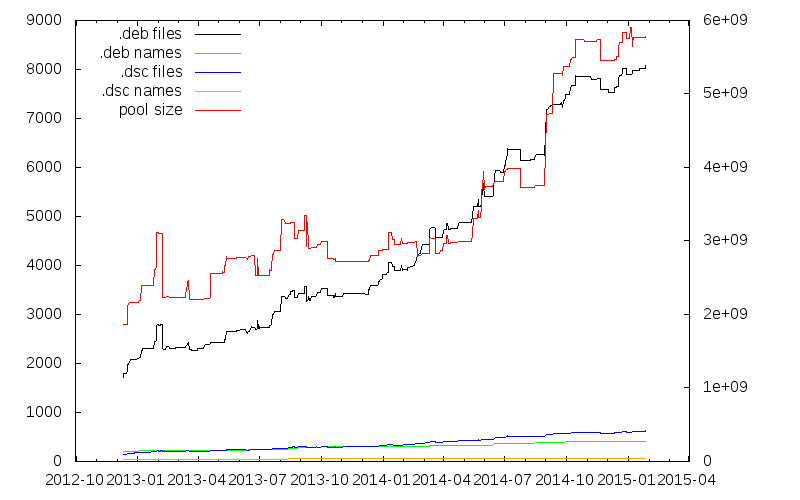
At this year's FOSDEM I gave a talk in the PostgreSQL devroom about Large Scale Quality Assurance in the PostgreSQL Ecosystem. The talk included a graph about the growth of the apt.postgresql.org repository that I want to share here as well: The yellow line at the very bottom is the number of different source package names, currently 71. From that, a somewhat larger number of actual source packages that include the "pgdgXX" version suffixes targeting the various distributions we have is built (blue). The number of different binary package names (green) is in about the same range. The dimension explosion then happens for the actual number of binary packages (black, almost 8000) targeting all distributions and architectures. The red line is the total size of the pool/ directory, currently a bit less than 6GB. (The graphs sometimes decrease when packages in the -testing distributions are promoted to the live distributions and the old live packages get removed.)

Vincent Bernat: Directory bookmarks with Zsh

There are numerous projects to implement directory bookmarks in your favorite shell. An inherent limitation of those implementations is they being only an enhanced cd command: you cannot use a bookmark in an arbitrary command. UPDATED: My initial implementation with Zsh was using dynamic named directories. I have been pointed on Twitter that there is a simpler way to implement bookmarks. The article has been updated to reflect that. As a side note, it is also possible to just use shell variables1. Zsh comes with a not well-known feature called static named directories. They are declared with the hash builtin and can be refered by prepending ~ to them:
$ hash -d -- -lldpd=/home/bernat/code/deezer/lldpd
$ echo ~-lldpd/README.md
/home/bernat/code/deezer/lldpd/README.md
$ head -n1 ~-lldpd/README.md
lldpd: implementation of IEEE 802.1ab (LLDP)
Because ~-lldpd is substituted during file name expansion, it is possible to use it in any command like a regular directory, like shown above. The - prefix is only here to avoid collision with home directories. Bookmarks are kept into a dedicated directory, $MARKPATH. Each bookmark is a symbolic link to the target directory: for example, ~-lldpd should be expanded to $MARKPATH/lldpd which points to the appropriate directory. Assuming that you have populated $MARKPATH with some links, here is how bookmarks are registered:
for link ($MARKPATH/*(N@))  
    hash -d -- -$ link:t =$ link:A 
 
You also automatically get completion and prompt expansion:
$ pwd
/home/bernat/code/deezer/lldpd/src/lib
$ echo $ (%):-%~ 
~-lldpd/src/lib
The last step is to manage bookmarks without adding or removing symbolic links manually. The following bookmark() function will display the existing bookmarks when called without arguments, will remove a bookmark when called with -d or add the current directory as a bookmark otherwise.
bookmark()  
    if (( $# == 0 )); then
        # When no arguments are provided, just display existing
        # bookmarks
        for link in $MARKPATH/*(N@); do
            local markname="$fg[green]$ link:t $reset_color"
            local markpath="$fg[blue]$ link:A $reset_color"
            printf "%-30s -> %s\n" $markname $markpath
        done
    else
        # Otherwise, we may want to add a bookmark or delete an
        # existing one.
        local -a delete
        zparseopts -D d=delete
        if (( $+delete[1] )); then
            # With  -d , we delete an existing bookmark
            command rm $MARKPATH/$1
        else
            # Otherwise, add a bookmark to the current
            # directory. The first argument is the bookmark
            # name.  .  is special and means the bookmark should
            # be named after the current directory.
            local name=$1
            [ $name == "." ] && name=$ PWD:t 
            ln -s $PWD $MARKPATH/$name
        fi
    fi
 
Find the complete version on GitHub.

Dynamic named directories Another (more complex) way to achieve the same thing is using dynamic named directories. I was initially using this solution but it is far more complex. This section is only here for historical reason. You can find the complete implementation in my GitHub repository. During file name expansion, a ~ followed by a string in square brackets is provided to the zsh_directory_name() function which will eventually reply with a directory name. This feature can be used to implement directory bookmarks:
$ cd ~[@lldpd]
$ pwd
/home/bernat/code/deezer/lldpd
$ echo ~[@lldpd]/README.md
/home/bernat/code/deezer/lldpd/README.md
$ head -n1 ~[@lldpd]/README.md
lldpd: implementation of IEEE 802.1ab (LLDP)
Like for static named directories, because ~[@lldpd] is substituted during file name expansion, it is possible to use it in any command like a regular directory.

Basic implementation Bookmarks are still kept into a dedicated directory, $MARKPATH and are still symbolic links. Here is how the core feature is implemented:
_bookmark_directory_name()  
    emulate -L zsh #  
    setopt extendedglob
    case $1 in
        n)
            [ [ $2 != ( #b)"@"(?*) ]] && return 1 #  
            typeset -ga reply
            reply=($ $ :-$MARKPATH/$match[1] :A ) #  
            return 0
            ;;
        *)
            return 1
            ;;
    esac
    return 0
 
add-zsh-hook zsh_directory_name _bookmark_directory_name
zsh_directory_name() is a function accepting hooks2: instead of defining it directly, we define another function and register it as a hook with add-zsh-hook. The hook is expected to handle different situations. The first one is to be able to transform a dynamic name into a regular directory name. In this case, the first parameter of the function is n and the second one is the dynamic name. In , the call to emulate will restore the pristine behaviour of Zsh and also ensure that any option set in the scope of the function will not have an impact outside. The function can then be reused safely in another environment. In , we check that the dynamic name starts with @ followed by at least one character. Otherwise, we declare we don t know how to handle it. Another hook will get the chance to do something. (#b) is a globbing flag. It activates backreferences for parenthesised groups. When a match is found, it is stored as an array, $match. In , we build the reply. We could have just returned $MARKPATH/$match[1] but to hide the symbolic link mechanism, we use the A modifier to ask Zsh to resolve symbolic links if possible. Zsh allows nested substitutions. It is therefore possible to use modifiers and flags on anything. $ :-$MARKPATH/$match[1] is a common trick to turn $MARKPATH/$match[1] into a parameter substitution and be able to apply the A modifier on it.

Completion Zsh is also able to ask for completion of a dynamic directory name. In this case, the completion system calls the hook function with c as the first argument.
_bookmark_directory_name()  
    # [...]
    case $1 in
        c)
            # Completion
            local expl
            local -a dirs
            dirs=($MARKPATH/*(N@:t)) #  
            dirs=("@"$ ^dirs ) #  
            _wanted dynamic-dirs expl 'bookmarked directory' compadd -S\] -a dirs
            return
            ;;
        # [...]
    esac
    # [...]
 
First, in , we create a list of possible bookmarks. In *(N@:t), N@ is a glob qualifier. N allows us to not return nothing if there is no match (otherwise, we would get an error) while @ only returns symbolic links. t is a modifier which will remove all leading pathname components. This is equivalent to use basename or $ something##*/ in POSIX shells but it plays nice with glob expressions. In , we just add @ before each bookmark name. If we have b1, b2 and b3 as bookmarks, $ ^dirs expands to b1,b2,b3 and therefore "@"$ ^dirs expands to the (@b1 @b2 @b3) array. The result is then feeded into the completion system.

Prompt expansion Many people put the name of the current directory in their prompt. It would be nice to have the bookmark name instead of the full name when we are below a bookmarked directory. That s also possible!
$ pwd
/home/bernat/code/deezer/lldpd/src/lib
$ echo $ (%):-%~ 
~[@lldpd]/src/lib
The prompt expansion system calls the hook function with d as first argument and the file name to transform.
_bookmark_directory_name()  
    # [...]
    case $1 in
        d)
            local link slink
            local -A links
            for link ($MARKPATH/*(N@))  
                links[$  #link:A $'\0'$ link:A ]=$ link:t  #  
             
            for slink ($ (@On)$ (k)links )  
                link=$ slink#*$'\0'  #  
                if [ [ $2 = ( #b)($ link )( /*) ]]; then
                    typeset -ga reply
                    reply=("@"$ links[$slink]  $(( $  #match[1]  )) )
                    return 0
                fi
             
            return 1
            ;;
        # [...]
    esac
    # [...]
 
OK. This is some black Zsh wizardry. Feel free to skip the explanation. This is a bit complex because we want to substitute the most specific bookmark, hence the need to sort bookmarks by their target lengths. In , the associative array $links is created by iterating on each symbolic link ($link) in the $MARKPATH directory. The goal is to map a target directory with the matching bookmark name. However, we need to iterate on this map from the longest to the shortest key. To achieve that, we prepend each key with its length. Remember, $ link:A is the absolute path with symbolic links resolved. So, $ #link:A is the length of this path. We concatenate the length of the target directory with the target directory name and use $'\0' as a separator because this is the only safe character for this purpose. The result is mapped to the bookmark name. The second loop is an iteration on the keys of the associative array $links (thanks to the use of the k parameter flag in $ (k)links ). Those keys are turned into an array (@ parameter flag) and sorted numerically in descending order (On parameter flag). Since the keys are directory names prefixed by their lengths, the first match will be the longest one. In , we extract the directory name from the key by removing the length and the null character at the beginning. Then, we check if the extracted directory name matches the file name we have been provided. Again, (#b) just activates backreferences. With extended globbing, we can use the or operator, . So, when either the file name matches exactly the directory name or is somewhere deeper, we create the reply which is an array whose first member is the bookmark name and the second member is the untranslated part of the file name.

Easy typing Typing ~[@ is cumbersome. Hopefully, Zsh line editor can be extended with additional bindings. The following snippet will substitute @@ (if typed without a pause) by ~[@:
vbe-insert-bookmark()  
    emulate -L zsh
    LBUFFER=$ LBUFFER "~[@"
 
zle -N vbe-insert-bookmark
bindkey '@@' vbe-insert-bookmark
In combination with the autocd option and completion, it is quite easy to jump to a bookmarked directory.

  1. For example:
    $ lldpd=/home/bernat/code/deezer/lldpd
    $ echo $lldpd/README.md
    /home/bernat/code/deezer/lldpd/README.md
    $ head -n1 $lldpd/README.md
    lldpd: implementation of IEEE 802.1ab (LLDP)
    
    The drawback is that you don t have a separate namespace for your bookmarks. You can still use a special prefix for that. Also, no prompt expansion.
  2. Other functions accepting hooks are chpwd() or precmd().

Tiago Bortoletto Vaz: Raspberry Pi Foundation moving away from its educational mission?

From the news:
"...we want to make Raspberry Pi more open over time, not less."
Right.
"For the last six months we ve been working closely with Microsoft to bring the forthcoming Windows 10 to Raspberry Pi 2"
Hmmm... From a comment:
I m sad to see Windows 10 as a selling point though. This community should not be supporting restrictive proprietary software The Pi is about tinkering and making things while Microsoft is about marketing and spying.
Right. From an answer:
"But I suggest you rethink your comments about MS, spying is going a bit far, don t you think?"
Wrong.

3 February 2015

Thorsten Alteholz: USB 3.0 hub and Gigabit LAN adapter

Recently I bought an USB 3.0 Hub with three USB 3.0 ports and one Gigabit LAN port. It is manufactured by Delock and I purchased it from Reichelt (Delock 62440). Under Wheezy the USB part is recognized without problems but the kernel (3.2.0-4) does not have a driver for the ethernet part.
The USB Id is idVendor=0b95 and idProduct=1790, the manufacturer is ASIX Elec. Corp. and the product is: AX88179. So Google led me to a product page at Asix, where I could download the driver for kernel 2.6.x and 3.x.

mkdir -p /usr/local/src/asix/ax88179
cd /usr/local/src/asix/ax88179
wget www.asix.com.tw/FrootAttach/driver/AX88179_178A_LINUX_DRIVER_v1.13.0_SOURCE.tar.bz2
tar -jxf AX88179_178A_LINUX_DRIVER_v1.13.0_SOURCE.tar.bz2
cd AX88179_178A_LINUX_DRIVER_v1.13.0_SOURCE
apt-get install module-assistant
module-assistant prepare
make
make install
modprobe ax88179_178a.ko
After editing /etc/network/interfaces and doing an ifup eth1, voila, I have a new network link. I hope the hardware is as good as the installation has been easy.

Thomas Goirand: OpenStack packaging activity, November 2014 to January 2015

November 2014:
Sunday 2nd:
Travel from Moscow to Paris Monday 3rd to Sunday 8th:
Summit in Paris Monday 10th:
Uploaded python-rudolf to Sid (needed by Fuel)
Uploaded python-invoke and python-invocations (needed to run fabric s unit tests)
Uploaded python-requests-kerberos/0.5-2 fixing CVE-2014-8650: failure to handle mutual authentication. Asked the release team for unblock.
Uploaded openstack-pkg-tools version 19 fixing startup with systemd in Jessie (added RuntimeDirectory directive). Asked the release team for unblock.
Opened ticket to remove TripleO, Tuskar and Ironic packages from Jessie. I don t consider them ready for a Debian stable release, and there s no long term support from upstream.
Fixed Designate Juno dbsync process which prevented it from being installed.
Fixed Ironic Juno unowned files after purge (policy 6.8, 10.8): /var/lib/ironic/ cache, ironicdb (eg: purging these folders on purge) Thuesday 11:
Fixed nova-api CVE-2014-3708: Nova network DoS through API filtering in both the Juno and Icehouse release. Asked the release team to unblock the Icehouse version for Jessie. See: https://bugs.debian.org/769163
Uploaded Cinder with Duch debconf translation fix and pt.po
Uploaded python-django-pyscss with upstream patch for Django 1.7 support instead of the Debian one that I wrote 2 months ago. Asked the release team to unblock which they did. Wednesday 12:
Uploaded fix for horizon (see #769101) unowned files after purge (policy 6.8, 10.8). Now purging /usr/share/openstack-dashboard/openstack_dashboard on purge.
Uploaded Ironic with Duch translations of debconf
Uploaded Designate with Duch translations of Debconf screens
Uploaded openstack-trove with Duch translations of Debconf screens
Uploaded Tuskar with Duch translations of Debconf screens
Updated python-oslotest in Experimental to version 1.2.0 Thursday 13:
Uploaded new packages: python-oslo.middleware and python-oslo.concurrency.
Opened a new packaging branch for Nova Kilo, and updated (build-)depends.
Uploaded fix for Icehouse Cinder: delete volume failed due to unicode problems , and asked for unblock.
Uploaded new package: python-pygit2 and python-xmlbuilder, needed for fuel-agent-ci.
Uploaded sheepdog with Duch debconf translation.
Uploaded python-daemonize to Sid (in FTP master NEW queue).
Re-uploaded python-invoke after FTP master rejection (missing copyright information) Friday 14:
Uploaded liberasurecode & python-pyeclib to Sid, now in the FTP masters NEW queue waiting for approval. This will soon be needed by Swift. Monday 17:
Worked on the Cobbler packaging (all day long ) Tuesday 18:
Worked on backporting all of Fuel packages to Wheezy. Done with fuelclient already.
Uploaded ruby-cstruct and ruby-rethtool to Sid (needed by nailgun-agent) Wednesday 19:
Uploaded pyeclib again, with fixes for the build-depends. Package is still in the NEW queue anyway.
Built a Debian-based bootstrap hardware discovery image for Fuel, and it seems that it works already (to be checked )! \o/
To be added as packages in the ISO:
* nailgun-mcagents
* nailgun-net-check
* fuel-agent
* python-tasklib Thursday 20:
Uploaded python-tasklib to Sid (now in NEW queue )
Continued working on the discovery bootstrap ISO Friday 21:
Documented Sahara procedure in Debian in the official install-guide: https://review.openstack.org/136237
Fixed oslo.messaging so it doesn t use PROTOCOL_SSLv3 because its support has been removed from Debian (due to possible protocol downgrade attacks): https://review.openstack.org/136278 and uploaded fixed packages for Sid and Experimental.
Uploaded fixed Neutron packages for CVE-2014-7821 in both Sid and Experimental (eg: Icehouse and Juno) Monday 24:
Uploaded new package: python-os-client-config (in NEW queue)
Installed new Xen server to be used as my new Jenkins build machine
Moved the juno-wheezy VM to it
Finished to package python-pymysql and uploaded to Sid. It s now running all unit tests successfully! \o/ Tuesday 25:
Uploaded fix for openstack-debian-images to add the -o compat=1.0 option when building an image with Qemu > 1.0. Opened bug to the release team to have it unblocked.
Continued working on unit tests for fuel-nailgun. Wednesday 26:
Uploaded python-os-net-config to Sid (new package)
Worked briefly on python-cassandra-driver. It needs cassandra to be in, which is a LOT of work.
Found a (not useable) hack to run nailgun unit tests. It works, however, it doesn t seem like fuel-nailgun is designed to be able to use unix socket for the postgres connection in its unit tests.
Uploaded python-pykmip to Sid (new package)
Updated the Debian wheezy backport repository for libvirt to version 1.2.9 from official wheezy-backports. Removed policykit-1 and libusb from there too, as it broke stuff to use a backported version (X and usb were not useable on my Wheezy laptop when using it ). Thursday 27 & Friday 28:
Uploaded new Javascript packages or dependencies for Fuel: libjs-autonumeric, libjs-backbone-deep-model, libjs-backbone.stickit, libjs-cocktail, libjs-i18next, libjs-require-css, libjs-requirejs, libjs-requirejs-text Sunday 30:
Uploaded debian/copyright fixes for libjs-backbone-deep-model, libjs-backbone.stickit and libjs-cocktail after the packages were accepted by the FTP masters and they gave remarks about copyright. DECEMBER 2014 Monday 01:
Uploaded new Debian image to MOX, after I unerstood the issue was about the architecture field that I was wrongly filling. I ll be able to use that for Tempest checking on my dev account. Tuesday 02:
Uploaded python-q-text-as-data to Sid (new awesome package!)
Uploaded Horizon with some triggers mechanisms to start the compress when one of its JS depends is updated. That s very important for security!
Uploaded a fixed version of heat-cfntools to Sid (it was missing the /usr/lib/python* folder). Asked the release team for an unblock so it can reach Jessie.
Fixed unit tests in fuel-nailgun, thanks to a patch from Sebastian Kalinowski. Now all unit tests are passing but one (for which I opened a launchpad bug: tests are trying to write in /var/log/nailgun, which is impossible at package build time). Wednesday 03:
Uploaded fixed version of ruby-rethtool after FTP master s rejection and upstream correction of licensing files.
Uploaded fixed version of libjs-require-css after FTP master s rejection
Fixed (in Git only) python-sysv-ipc missing build-depends on dh-python as per bug opened by James Page (this is not so important, but I did it still).
Continued working on the tempest-ci scripts.
Added to the image-guide docs about openstack-debian-images: https://review.openstack.org/#/c/138743/ Thursday 04:
Uploaded new package: python-proliantutils. Send patch to upstream about an issue in indentation (mix-up with space and tabs) which made the package uninstallable with Python 3.4. Friday 05:
Worked on the package CI. Monday 07:
Worked on the package CI. All works now, up to all of the Tempest tests for Keystone. Now need to fix the neutron config. Thuesday 08:
Continued working on the CI. Wednesday 09:
Uploaded fix for FTBFS of python-tasklib (Closes: #772606)
Uploaded fix for libjerasure-deb missing dependency on libgf-complete-dev, package already unblocked and will migrate to Jessie.
Uploaded fix for Designate Juno fail to upgrade from Icehouse: this was due to the database_connection directive renamed to connection =.
Uploaded fix for Designate purge in Sid (Icehouse release of Designate).
Commited to git updates of the German debconf translation in both Icehouse and Juno.
Updated nova to use libvirtd as init script dependency instead of libvirt-bin (this was renamed in the libvirt-daemon-system package).
Do not touch the db connection directive if user didn t ask for db handling by the package. Thursday 10 to Saturday 13:
Finally understood the issues with systemd service files not being activated by default. Fixed openstack-pkg-tools, and uploaded version 20 to Sid, after the release team accepted the changes. Sunday 14:
Uploaded Juno 2014.2.1 to Experimental: ceilometer, cinder, glance, python-glance-store, heat, horizon, keystone Monday 15:
Finished uploading Juno 2014.2.1 to Experimental: Nova, Neutron, Sahara Tuesday 16:
Added crontab to flush tokens in Icehouse Keystone
Some more CI work Wednesday 17:
Uploaded keystone with systemd fix and crontab to flush the token table in Sid (eg: Icehouse).
Uploaded nova Icehouse with a bunch of fixes in Sid. Thursday 18:
Updated some issues in Nova Icehouse (Sid/Jessie) Friday 19:
Started building a new Jenkins instance for building Kilo packages Monday 22:
Finished building the new Jenkins instance for building Kilo packages, and rebuilt every packages there, using Jessie as a base. Tuesday 23:
Updated version for the following packages: oslo.utils, oslo.middleware, stevedore, oslo.concurency, pecan, oslo.concurrency, python-oslo.vmware, python-glance-store
Built so far: Ceilometer, Keystone, python-glanceclient, cinder, glance Wednesday 24:
Continued packaging Kilo beta 1. Updated: nova, designate, neutron
Uploaded python-tempest-lib to Debian Unstable (new package) Wednesday 31:
Continued packaging Kilo beta 1. Updated: heat JANUARY 2015 Thursday 01:
Continued packaging Kilo beta 1. Updated: ironic, openstack-trove, openstack-doc-tools, ceilometer Friday 02:
Finished packaging Kilo beta 1. Updated: Sahara, Murano, Murano-dashboard, Murano-agent Sunday 04:
Started testing Kilo beta 1. Fixed a few issues on default configuration for Ceilometer and Glance. Monday 05:
Fixed openstack-pkg-tools which failed to create PID files at boot time, Uploaded to Sid, asked the release team for unblock.
Uploaded ceilometer & cinder to Sid, rebuilt against openstack-pkg-tools 21.
Did more testing of Kilo beta 1, fixed a few more minor issues. Tuesday 06:
Uploaded glance, neutron, nova, designate, keystone, heat, trove to Sid, so that all sysv-rc init scripts are fixed with the new openstack-pkg-tools 21. Designate, heat, keystone and trove contains other minor fixes reported to the Debian BTS. Wednesday 07:
Asked the Debian release team (open bugs with debdiff as attachment) for unblocks of glance, neutron, nova, designate, keystone, heat, trove so they migrate to Jessie.
Fixed a few minor issues tracked in the Debian BTS on various packages. Thesday 08:
James Page from Canonical informed me that they are now using openstack-pkg-tools for maintaining their daemons in Nova, Cinder and Keystone in Ubuntu. That s an awesome news : more QA for both platforms.
James Page found out that dh_installinit *must* be called *after* the call of dh_systemd_enable, otherwise, daemons aren t started automatically at the first install of packages, as the unmask of systemd happens after the invoke-rc.d. Friday 09:
Did some QA checks on the latest upload. Fixed Heat which broke because using the wrong template name (glance instead of heat). Monday 12:
Started re-running the automated openstack-deploy scrip in Icehouse, Juno and Kilo. Found out the issue in Keystone wasn t fixed in Juno (but was fixed in other releases), and fixed it.
Removed the use of ssl.PROTOCOL_SSLv3 from heat (removed form Debian). Uploaded the fixed package to Sid.
All of openstack-deploy (debian/kilo branch) now works and succesfully installs OpenStack again. If dh_installinit is called before, we have:
# Automatically added by dh_installinit
if [ -x "/etc/init.d/keystone" ]; then
update-rc.d keystone defaults >/dev/null
fi
if [ -x "/etc/init.d/keystone" ]   [ -e "/etc/init/keystone.conf" ]; then
invoke-rc.d keystone start   true
fi
# End automatically added section
# Automatically added by dh_systemd_enable
# This will only remove masks created by d-s-h on package removal.
deb-systemd-helper unmask keystone.service >/dev/null   true
# was-enabled defaults to true, so new installations run enable.
if deb-systemd-helper --quiet was-enabled keystone.service; then
# Enables the unit on first installation, creates new
# symlinks on upgrades if the unit file has changed.
deb-systemd-helper enable keystone.service >/dev/null   true
else
# Update the statefile to add new symlinks (if any), which need to be
# cleaned up on purge. Also remove old symlinks.
deb-systemd-helper update-state keystone.service >/dev/null   true
fi
# End automatically added section
If it s called after dh_systemd_enable, we have:
# Automatically added by dh_systemd_enable
# This will only remove masks created by d-s-h on package removal.
deb-systemd-helper unmask keystone.service >/dev/null   true
# was-enabled defaults to true, so new installations run enable.
if deb-systemd-helper --quiet was-enabled keystone.service; then
# Enables the unit on first installation, creates new
# symlinks on upgrades if the unit file has changed.
deb-systemd-helper enable keystone.service >/dev/null   true
else
# Update the statefile to add new symlinks (if any), which need to be
# cleaned up on purge. Also remove old symlinks.
deb-systemd-helper update-state keystone.service >/dev/null   true
fi
# End automatically added section
# Automatically added by dh_installinit
if [ -x "/etc/init.d/keystone" ]; then
update-rc.d keystone defaults >/dev/null
fi
if [ -x "/etc/init.d/keystone" ]   [ -e "/etc/init/keystone.conf" ]; then
invoke-rc.d keystone start   true
fi
# End automatically added section
As a consequence, I have to re-upload version 22 of openstack-pkg-tools and also re-upload all OpenStack core packages to Debian Sid. Fixed a number of issues like:
* dbc_upgrade = true check which shouldn t have been there in postinst.
* <project>/configure_db default value is now always false
* db_sync and pkgos_dbc_postinst are now only done if <project>/configure_db is set to true.
Rebuilt all packages in Juno and Kilo with the above changes. Tuesday 13:
Opened unblock bugs for the release team to unblock all fixed packages.
Made more tests in Juno and Kilo to make sure the fixed bugs in Icehouse are fixed there too.
Fixed numerous issues in Trove (missing trove-conductor.conf, wrong trove-api init file, etc.). More work will be needed for it for both Icehouse and newer releases. Wednesday 14:
Did a doc meeting about debconf. Some doc contributors still want to kill the debconf / debian manual, and I have to not agree.
Made a new patch to better document the keystone install procedure:
Did some bug triaging in the doc about Debian.
Uploaded new versions of core packages to Experimental (eg: Juno) built against openstack-pkg-tools >= 22~, and some fixes forward ported from Icehouse: Keystone, Ceilometer, Cinder, Glance, Heat, Ironic, Murano, Neutron, Nova, Saraha and Murano-agent. All where rebuilt in Juno (Wheezy + Trusty) and Kilo (Jessie only) on my Jenkins. Thuesday 15:
Succesfully booted a live-build Debian live image containing mcollective and nailgun-agent as a Debian replacement for the hardware discovery / boostrap image of Fuel. Now, I need to find a way to use just a kernel + initramfs Friday 16 to Tuesday 20:
Worked on the packaging CI. Wednesday 21:
Fixed https://bugs.debian.org/775636 (Horizon failed to build due to a Moscow timezone change and wrong test). Uploaded to Sid, asked for unblock.
Fixed https://bugs.debian.org/775926: CVE-2015-1195: Glance still allows users to download and delete any file in glance-api server (applied upstream patch). Uploaded to Sid, asked for unblock. Uploaded Juno version to Experimental.
Uploaded openstack-trove with the remaining fixes, asked release team for unblock.
Uploaded python-glanceclient 0.15.0 (Juno) to Experimental because it fixes an issue with HTTPS. Added to it a patch from James Page not yet merged, which fixes unit test with Python 2.7.9 (7 failures otherwise).
Uploaded python-xstatic-d3 as it can t be installed anymore in Sid after a new version of d3 was uploaded. Thursday 22:
Uploaded python-xstatic-smart-table and libjs-angularjs-smart-table to Sid (new packages, now in NEW queue). Friday 23:
Ask for the removal of the below list of packages from Jessie:
python-xstatic
python-xstatic-angular
python-xstatic-angular-cookies
python-xstatic-angular-mock
python-xstatic-bootstrap-datepicker
python-xstatic-bootstrap-scss
python-xstatic-d3
python-xstatic-font-awesome
python-xstatic-hogan
python-xstatic-jasmine
python-xstatic-jquery
python-xstatic-jquery-migrate
python-xstatic-jquery-ui
python-xstatic-jquery.bootstrap.wizard
python-xstatic-jquery.quicksearch
python-xstatic-jquery.tablesorter
python-xstatic-jsencrypt
python-xstatic-qunit
python-xstatic-rickshaw
python-xstatic-spin
libjs-jsencrypt
libjs-spin.js
libjs-twitter-bootstrap-datepicker
libjs-twitter-bootstrap-wizard They are used only in OpenStack Horizon starting on 2014.2 (aka Juno), and Jessie is shipped with Icehouse, so it s IMO best to not carry the burden of maintaining these packages for the life of Jessie. Monday 26:
Enhanced and review requested changes for https://review.openstack.org/147296 (ie: Keystone install with more details about what the package does).
Finished testing network on the CI install. Now need to automate all. Tuesday 27:
Closed all bugs on the rabbitmq-server package (2 correction, one bug triage).
Uploaded a fix for the missing conntrack dependency in neutron-l3-agent.
Restarted working on CI setup of Juno after success with manual install in a Xen domU.
Uploaded fix to make sheepdog build reproducible (patch from the Debian BTS). Thursday 28:
Fixed and uploaded to Sid openstack-debian-images 2 bugs reported by Steve McIntire. Official Debian images for OpenStack are now available at:
http://cdimage.debian.org/cdimage/openstack/ \o/
Note that this is the weekly build of testing. We wont get Debian Stable images before Jessie is out.
Documented the new image thing here: http://docs.openstack.org/image-guide/content/ch_obtaining_images.html#debian-images as a new patch: https://review.openstack.org/#/c/151015/
Fixed my patch for keystone debconf doc at: https://review.openstack.org/#/c/147296/ Wednesday 29:
Continued working on packaging CI Thursday 30:
Fixed CVE on Neutron (Juno): L3 agent denial of service with radvd 2.0+
Fixed CVE on Glance (Icehouse + Juno): Glance user storage quota bypass. Asked release team for unblock.
Fixed the image-guide patch after review (ie: https://review.openstack.org/151015)

Next.

Previous.