Search Results: "he"

25 February 2016

Russell Coker: Ethernet Interface Naming With Systemd

Systemd has a new way of specifying names for Ethernet interfaces as documented in systemd.link(5). The Debian package should keep working with the old 70-persistent-net.rules file, but I had a problem with this that forced me to learn about systemd.link(5). Below is a little shell script I wrote to convert a basic 70-persistent-net.rules (that only matches on MAC address) to systemd.link files. #!/bin/bash RULES=/etc/udev/rules.d/70-persistent-net.rules for n in $(grep ^SUB $RULES sed -e s/^.*NAME..// -e s/.$//) ; do
NAME=/etc/systemd/network/10-$n.link
LINE=$(grep $n $RULES)
MAC=$(echo $LINE sed -e s/^.*address .// -e s/ ATTR.*$//)
echo "[Match]" > $NAME
echo "MACAddress=$MAC" >> $NAME
echo "[Link]" >> $NAME
echo "Name=$n" >> $NAME
done

Matthew Garrett: I bought some awful light bulbs so you don't have to

I maintain an application for bridging various non-Hue lighting systems to something that looks enough like a Hue that an Amazon Echo will still control them. One thing I hadn't really worked on was colour support, so I picked up some cheap bulbs and a bridge. The kit is badged as an iSuper iRainbow001, and it's terrible.

Things seemed promising enough at first, although the bulbs were alarmingly heavy (there's a significant chunk of heatsink built into them, which seems to get a lot warmer than I'd expect from something that claims a 7W power consumption). The app was a bit clunky, but eh - I wasn't planning on using it for long. I pressed the button on the bridge, launched the app and could control the bulbs. The first thing I noticed was that they had a separate "white" and "colour" mode. White mode was pretty bright, but colour mode massively less so - presumably the white LEDs are entirely independent of the RGB ones, and much higher intensity. Still, potentially useful as mood lighting.

Anyway. Next step was to start playing with the protocol, which meant finding the device on my network. I checked anything that had picked up a DHCP lease recently and nmapped them. The OS detection reported Linux, which wasn't hugely surprising - there was no GPL notice or source code included with the box, but I'm way past the point of shock at that. It also reported that there was a telnet daemon running. I connected and got a login prompt. And then I typed admin as the username and admin as the password and got a root prompt. So, there's that. The copy of Busybox included even came with tftp, so it was easy to get copies of tcpdump and strace on there to see what was up.

So. Next step. Protocol sniffing. I wanted to know how discovery worked, so reset the device to factory and watched what happens. The app on my phone sent out a discovery packet on UDP port 18602 which looked like this:

INLAN:CLIP:23.21.212.48:CLPT:22345:MAC:02:00:00:00:00:00

The CLIP and CLPT fields refer to the cloud server that allows for management when you're not on the local network. The mac field contains an utterly fake address. If you send out a discovery packet and your mac hasn't been registered with the device, you get a denial back. If your mac has been (and by "mac" here I mean "utterly fake mac that's the same for all devices"), you get back a response including the device serial number and IP address. And if you just leave out the mac field entirely, you get back a response no matter whether your address is registered or not. So, that's a start. Once you've registered one copy of the app with the device, anything can communicate with it by just using the same fake mac in the discovery packets.

Onwards. The command format turns out to be simple. They start ##, are followed by two ascii digits encoding a command, four ascii digits containing a bulb id, two ascii digits containing the number of following bytes and then the command data (in ascii). An example is:

##05010002ff

which decodes as command 5 (set white intensity) on bulb 1 with two bytes of data following, each of which is an f. This translates as "Set bulb 1 to full white intensity". I worked out the rest pretty quickly - command 03 sets the RGB colour of the bulb, 0A asks the bridge to search for new bulbs, 0B tells you which bulbs are available and their capabilities and 0E gives you the MAC addresses of the bulbs( ). 0C crashes the server process, and 06 spews a bunch of garbage back at you and potentially crashes the bulb in a hilarious way that involves it flickering at about 15Hz. It turns out that 06 is actually the "Rename bulb" command, and if you send it less data than it's expecting something goes hilariously wrong in string parsing and everything is awful.

Ok. Easy enough, but not hugely exciting. What about the remote protocol? This turns out to involve sending a login packet and then a wrapped command packet. The login has some length data, a header of "MQIsdp", a long bunch of ascii-encoded hex, a username and a password.

The username is w13733 and the password is gbigbi01. These are hardcoded in the app. The ascii-encoded hex can be replaced with 0s and the login succeeds anyway.

Ok. What about the wrapping on the command? The login never indicated which device we wanted to talk to, so presumably there's some sort of protection going on here oh wait. The command packet is a length, the serial number of the bridge and then a normal command packet. As long as you know the serial number of the device (which it tells you in response to a discovery packet, even if you're unauthenticated), you can use the cloud service to send arbitrary commands to the device (including the one that crashes the service). One of which involves the device then doing some kind of string parsing that doesn't appear to work that well. What could possibly go wrong?

Ok, so that seemed to be the entirety of the network protocol. Anything else to do? Some poking around on the bridge revealed (a) that it had an active wireless device and (b) a running DHCP server. They wouldn't, would they?

Yes. Yes, they would.

The devices all have a hardcoded SSID of "iRainbow", although they don't broadcast it. There's no security - anybody can associate. It'll then hand out an IP address. It's running telnetd on that interface as well. You can bounce through there to the owner's internal network.

So, in summary: it's a device that infringes my copyright, gives you root access in response to trivial credentials, has access control that depends entirely on nobody ever looking at the packets, is sufficiently poorly implemented that you can crash both it and the bulbs, has a cloud access protocol that has no security whatsoever and also acts as an easy mechanism for people to circumvent your network security. This may be the single worst device I've ever bought.

I called the manufacturer and they insisted that the device was designed in 2012, was no longer manufactured or supported, that they had no source code to give me and there would be no security fixes. The vendor wants me to pay for shipping back to them and reserves the right to deduct the cost of the original "free" shipping from the refund. Everything is awful, which is why I just ordered four more random bulbs to play with over the weekend.

comment count unavailable comments

Steinar H. Gunderson: Frankenmachine

My desktop machine, from the back My video testing machine has now seemingly accumulated: Fascinatingly enough, Debian actually has no problem having installed Intel, NVIDIA and AMD graphics drivers all at once. I can't run more than one at the same time, though; somehow X servers are still bound to this concept of vtys (so you can only run one), and NVIDIA/AMD drivers crash if you try to run them at the same time. You almost certainly could dedicate each card to a VM (PCI-Express passthrough) and run it that way, though, but just being able to switch is fine. Now about that fan noise

24 February 2016

Christoph Egger: doveadm deduplicate

Without further words:
% for i in $(seq 1 90) ; do doveadm mailbox status messages debian.buildd.archive.2011.05   column -t ;  doveadm deduplicate mailbox debian.buildd.archive.2011.05 ; done
debian.buildd.archive.2011.05  messages=8094
debian.buildd.archive.2011.05  messages=7939
debian.buildd.archive.2011.05  messages=7816
debian.buildd.archive.2011.05  messages=7698
debian.buildd.archive.2011.05  messages=7610
debian.buildd.archive.2011.05  messages=7529
debian.buildd.archive.2011.05  messages=7455
debian.buildd.archive.2011.05  messages=7375
debian.buildd.archive.2011.05  messages=7294
debian.buildd.archive.2011.05  messages=7215
debian.buildd.archive.2011.05  messages=7136
debian.buildd.archive.2011.05  messages=7032
debian.buildd.archive.2011.05  messages=6941
debian.buildd.archive.2011.05  messages=6839
debian.buildd.archive.2011.05  messages=6721
debian.buildd.archive.2011.05  messages=6631
debian.buildd.archive.2011.05  messages=6553
debian.buildd.archive.2011.05  messages=6476
debian.buildd.archive.2011.05  messages=6388
debian.buildd.archive.2011.05  messages=6301
debian.buildd.archive.2011.05  messages=6211
debian.buildd.archive.2011.05  messages=6140
debian.buildd.archive.2011.05  messages=6056
debian.buildd.archive.2011.05  messages=6007
debian.buildd.archive.2011.05  messages=5955
debian.buildd.archive.2011.05  messages=5887
debian.buildd.archive.2011.05  messages=5826
debian.buildd.archive.2011.05  messages=5752
debian.buildd.archive.2011.05  messages=5706
debian.buildd.archive.2011.05  messages=5657
debian.buildd.archive.2011.05  messages=5612
debian.buildd.archive.2011.05  messages=5570
debian.buildd.archive.2011.05  messages=5523
debian.buildd.archive.2011.05  messages=5474
debian.buildd.archive.2011.05  messages=5422
debian.buildd.archive.2011.05  messages=5382
debian.buildd.archive.2011.05  messages=5343
debian.buildd.archive.2011.05  messages=5308
debian.buildd.archive.2011.05  messages=5256
debian.buildd.archive.2011.05  messages=5221
debian.buildd.archive.2011.05  messages=5168
debian.buildd.archive.2011.05  messages=5133
debian.buildd.archive.2011.05  messages=5092
debian.buildd.archive.2011.05  messages=5058
debian.buildd.archive.2011.05  messages=5030
debian.buildd.archive.2011.05  messages=4994
debian.buildd.archive.2011.05  messages=4964
debian.buildd.archive.2011.05  messages=4935
debian.buildd.archive.2011.05  messages=4900
debian.buildd.archive.2011.05  messages=4868
debian.buildd.archive.2011.05  messages=4838
debian.buildd.archive.2011.05  messages=4811
debian.buildd.archive.2011.05  messages=4778
debian.buildd.archive.2011.05  messages=4748
debian.buildd.archive.2011.05  messages=4722
debian.buildd.archive.2011.05  messages=4686
debian.buildd.archive.2011.05  messages=4661
debian.buildd.archive.2011.05  messages=4637
debian.buildd.archive.2011.05  messages=4613
debian.buildd.archive.2011.05  messages=4593
debian.buildd.archive.2011.05  messages=4570
debian.buildd.archive.2011.05  messages=4554
debian.buildd.archive.2011.05  messages=4536
debian.buildd.archive.2011.05  messages=4520
debian.buildd.archive.2011.05  messages=4500
debian.buildd.archive.2011.05  messages=4481
debian.buildd.archive.2011.05  messages=4466
debian.buildd.archive.2011.05  messages=4445
debian.buildd.archive.2011.05  messages=4430
debian.buildd.archive.2011.05  messages=4417
debian.buildd.archive.2011.05  messages=4405
debian.buildd.archive.2011.05  messages=4390
debian.buildd.archive.2011.05  messages=4376
debian.buildd.archive.2011.05  messages=4366
debian.buildd.archive.2011.05  messages=4360
debian.buildd.archive.2011.05  messages=4350
debian.buildd.archive.2011.05  messages=4336
debian.buildd.archive.2011.05  messages=4329
debian.buildd.archive.2011.05  messages=4320
debian.buildd.archive.2011.05  messages=4315
debian.buildd.archive.2011.05  messages=4312
debian.buildd.archive.2011.05  messages=4311
debian.buildd.archive.2011.05  messages=4309
debian.buildd.archive.2011.05  messages=4308

Arturo Borrero Gonz lez: Playing with the HA stack in Debian strecth


Given the HA stack is now in very good shape in Debian stretch [testing by now] we can start playing a bit with these tools.

There are 2 main points in doing so now:
  1. reporting bugs
  2. systemd integration
The last HA stack was in Debian wheezy, which didn't include systemd. Good to take that into account.

My hardware: 2 virtual machines with 1 NIC each. I called them node01 and node02.
Packages
Using aptitude. install debian packages corosync, pacemaker, pacemaker-cli-utils and crmsh.

The installation of the packages is enough for corosync to start working.

$ sudo systemctl status corosync
corosync.service - Corosync Cluster Engine
Loaded: loaded (/lib/systemd/system/corosync.service; enabled; vendor preset: enabled)
Active: active (running) since mar 2016-02-09 11:01:24 CET; 3h 7min ago
Main PID: 14610 (corosync)
CGroup: /system.slice/corosync.service
14610 /usr/sbin/corosync -f
$ sudo crm status
Last updated: Tue Feb 9 14:11:33 2016 Last change: Tue Feb 9 11:01:48 2016 by hacluster via crmd on node01
Stack: corosync
Current DC: node01 (version 1.1.14-70404b0) - partition WITHOUT quorum
1 node and 0 resources configured
Online: [ node01 ]

Full list of resources:

Basic configurationYou will need to edit the /etc/corosync/corosync.conf file:

totem
version: 2
cluster_name: lbcluster
transport: udpu
interface
ringnumber: 0
bindnetaddr: 10.0.0.0
mcastaddr: 239.255.1.1
mcastport: 5405
ttl: 1
quorum
provider: corosync_votequorum
two_node: 1
nodelist
node
ring0_addr: 10.0.0.1
name: node01
nodeid: 1
node
ring0_addr: 10.0.0.2
name: node02
nodeid: 2
logging
to_logfile: yes
logfile: /var/log/corosync/corosync.log
to_syslog: yes
timestamp: on

Note that if you choose the proper bindnetaddr directive, you can use the exact same file for all the nodes (see corosync.conf(5))

System, daemons, servicesYou may want to check that the corosync and pacemaker services are auto-started at boot time by systemd.
Do a reboot and check it:

$ sudo systemctl status corosync grep active
Active: active (running) since mi 2016-02-24 18:54:37 CET; 3min 11s ago
$ sudo systemctl status pacemaker grep active
Active: active (running) since mi 2016-02-24 18:54:38 CET; 3min 10s ago

Also, check that no firewall blocks the communication between both nodes.

Now, the status of the cluster should show both nodes working together (with no resources):

$ sudo crm status
Last updated: Wed Feb 24 19:01:13 2016 Last change: Wed Feb 24 18:43:32 2016 by hacluster via crmd on node01
Stack: corosync
Current DC: node02 (version 1.1.14-70404b0) - partition with quorum
2 nodes and 0 resources configured
Online: [ node01 node02 ]
Full list of resources:

ResourcesNow, you can start playing with the cluster resources. Below is an example of a virtual IPv6 address:

$ sudo crm configure primitive test ocf:heartbeat:IPv6addr params ipv6addr="fe00::200" cidr_netmask="64" nic="eth0"

Which should give this cluster status:

$ sudo crm status
Last updated: Wed Feb 24 19:13:46 2016 Last change: Wed Feb 24 19:11:45 2016 by root via cibadmin on node02
Stack: corosync
Current DC: node02 (version 1.1.14-70404b0) - partition with quorum
2 nodes and 1 resource configured
Online: [ node01 node02 ]
Full list of resources:
test (ocf::heartbeat:IPv6addr): Started node01

Congratulations, now you have a working HA cluster with a virtual IP address, using an active/backup approach.

Please, report any bug you may find.

Michal Čihař: Introducing motranslator

Since several years ago we've been using php-gettext in phpMyAdmin, but it's about time to change it. The change will not be that big, we're just moving to own fork of that library :-). You probably ask why to fork? You will probably guess it easily, but to name some reasons: So I've taken existing php-gettext codebase and turned that into motranslator and now 0.1 release of it is out. The recommended way to install it is from Packagist and it has no additional dependencies. What changes you can expect? First of all it supports all current PHP versions. It also performs way better - in my tests loading of mo file is 4-5 times faster and memory consumption went down about 10 percent. You can additionally use object API instead of traditional function based. On the other side some features we don't need were removed - there is no support for using native Gettext, it doesn't do any encoding conversion (assuming that UTF-8 is on both sides these days) and it doesn't support delayed loading of messages. The last change means that it's not suitable for applications with huge MO files. Any feedback is welcome, the code is still fresh and probably needs some polishing.

Filed under: English phpMyAdmin 0 comments

Norbert Preining: Switching from iOS to Android

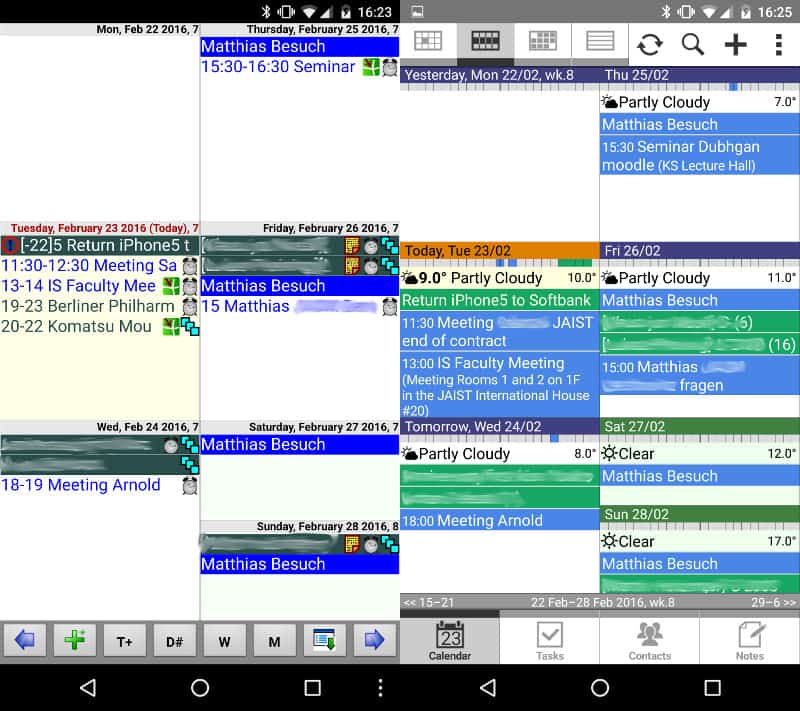
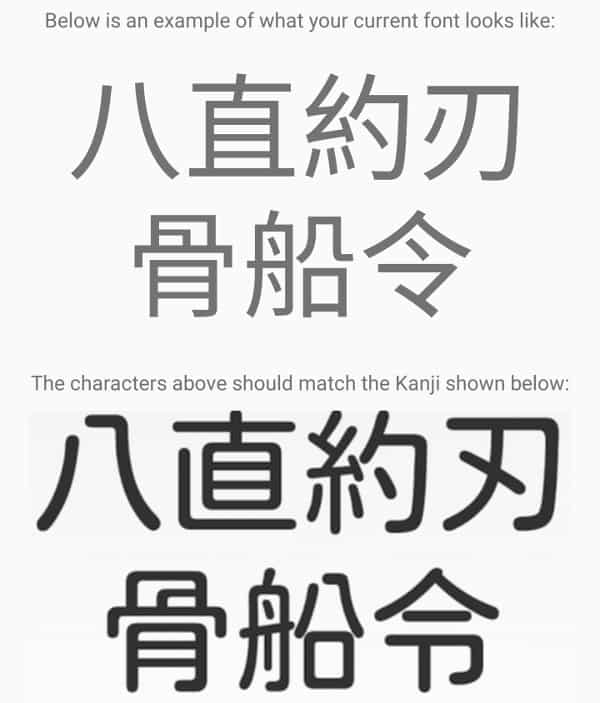
This article starts a series of blogs on my ventures into Android land after having used iOS devices for 6 years. I have never been a strong believer in the Apple ecosystem, and my trials to convince myself to MacBooks and MacPros always ended with installing Linux on them, so I guess I wasn t really the ideal target for iOS. Thus, my iOS devices were also permanently in jailbroken state, otherwise I would feel amputated. But as much as I disliked the lock-in and closed environment of the iOS world, it was from the user perspective surprisingly well done and smooth. So it was with a certain level of tension when I finally switched to Linux^WAndroid. android-ios If you don t want to read on, here the preliminary conclusion: Why didn t I do it earlier! But before we go into details, let me start with my background: History of my devices Originally I was a big opponent of smart phones and preferred the Unix-way, one device for one thing. So I had a normal phone and (various) Palm devices (Tungsten X, Tungsten C, and above all my beloved Handera TRGpro). I loved the Palm world and considered it superior to the then smart phone world, until I came to Japan, where the challenge of a proper input method for Japanese and proper Japanese support posed a big hurdle. The Palm devices had a stick and written input fields, but Japanese input was practically impossible and a huge pain. Searching for a word in Japanese was more hurdle then looking it up in a printed dictionary. In addition, I needed a phone in Japan, so I plunged into the smart phone world and got myself a iPhone (3g). What a world did open for me: easy typing of Japanese, dictionaries, on-the-fly translation, woooow! And above all, I discovered my most beloved and till now one of my most important programs: Flashcards Deluxe. Thanks, and I have to say to 80% thanks to this program my Japanese learning speed has accelerated considerably. There is nothing more important for me than getting drilled in a systematic way. But I derail, anyway, having Flashcard Deluxe on the iPhone within rather short time I had about 10000 or more flashcards created, and moving on to a different architecture (Android) was for quite some time practically impossible without loosing years of statistics and learning, so I renewed my contract after 2 years together with a iPhone 4s. Another two years passed, and these years brought an Android version of Flashcards Deluxe, as well as Dropbox syncing, so I had no excuse anymore to remain in iOS land, wouldn t it be for an iPhone 5s that was passed to me near the end of my forth year, so I again extended the contract for two years. Finally, after 6 years of iPhone devices, this January I finally decided it is time to switch to Android. After lots of thinking, comparing, and requesting advice from good friends with more experience in the smart phone market I went for a Google Nexus 6p. Google Nexus 6p I will not repeat the specs of this phone as they are widely available on the net. My original plan was a Samsung S6, but after consultation with an expert I decided for an original Google phone for better security support. That left me with the option between a Nexus 5x and 6p, and due to prize differences (prizes of mobiles are ridiculously strange in Japan) I went for the 6p instead of the 5x. One point that made the decision for this slight too big device easy was the fact that it uses a great AMOLED display. Moving the data Since I was using Google Calendar and Google Contacts already on the iPhone, moving to the Android phone was far less a hassle than I thought. My contacts and events showed up without a hiccup. Most of the usual apps are nowadays available on both iOS and Android, so the most difficult thing was remembering all the passwords to log into the applications again (SNS like G+, FB, Twitter etc). The same is more or less true for messengers of all kinds (Line, WhatsApp, Threema, etc), but here one is advised to check with the respective web site first to make sure one does not loose all of the important data. Line for example is a stupid ***** that deletes all previous chats on the old phone and does not make them available on the new one. WhatsApp can be converted with a special conversion program. Threema, too allows for transfer of ids. Move of applications After that came the hunt for replacement applications for those that are not available as is on Android: Mail At first like probably everyone I used the shipped GMail program. It might be good for Google Mail accounts, but for anything else it is just a real pain. Thus, I have searched a bit and finally settled (for now) for K-9 Mail: it is open source, open development, feature rich, and more a hackers type email program, perfectly suited to me. There is a commercial variant called K@-Mail that says that it improves the user interface and some usability items as well as features, but I didn t see much of an advantage over the original version (which is completely free) and in fact some of my accounts didn t work at all. So I remain with K9 Mail and I think this is a good decision. Calendar Managing Calendars is one of the most important task for me. I have been a fervent supporter of DateBk4, DateBk 5, and DateBk 6 on the original Palm series, and when I left the Palm World it was with great pain that I had to loose DateBk. Not only because it was a simply fantastic calendar program that allowed me to keep track of all my climbing routes, festivities, in a much more advanced way than any other Calendering application, but also because the programmer of the DateBk series is running the Dewar Wildlife Trust, a Gorilla rescue group and a lot of the money he makes from the app sales is going to rescue Gorillas. With the switch to iOS this option was gone, and I first used the built-in calendar application (which is so weak) and later and for long time Pocket Informant Pro. This is a very good program and probably the only one that can compete with DateBk with respect to functionality and usefulness. During the time of me being locked in in iOS I realized that the world has moved on and a new version of DateBk series for Java was developed, called Pimlical. First only available on Windows, it became later available also on Android and Linux, too. The following screen shot puts Pimlical on the left, and Pocket Informant on the right. I will write a more detailed comparison in future, in short: PInformant is more streamlined and polished, Pimlical has more configuration option. Practically everything can be adjusted to one s need, and in addition there is also a Desktop application that sync either with Google and the phone, or only with the phone if you want to live off the grid. pimlical-pinformant So nowadays on Android I have both Pocket Informant Pro as well as Pimlical, but after a short time I have now switched practically exclusively to Pimlical. Notes Here there is pain HUGE PAIN!!! iOS has an excellent applications for notes, called simply Notebooks. This little pearl was my work horse for everything (more or less) memorable. From poems and song texts to bus time tables, from PDF to GIFs, from MarkDown to HTML, everything could be saved into Notebooks, displayed, edited, ordered. And above all it had automatic background sync with Dropbox. So I could drop new files into the respective sub-folder of my Dropbox folder and could be sure I have the files available on my phone when I leave for a trip. And there is a huge bag of features that I haven t even tapped into! Android is unfortunately not on the list of supported architectures of Notebooks. So I searched far and wide, and without any success. There are all kind of notes, flash colors, overly simple, fast and slow, stylish and plain, but none of them did even provide half of the features of Notebooks. None, not even half. I still hope I might find the ultimate notes application, or even better would be an Android version of the original Notebooks application (but this is not high on the developers todo list), but for now I am in despair The Rest As I said, most apps are nowadays available on both platforms, so there is not much more to do than download the respective Android app and log in again. That worked very nice across practically all apps. Things I don t like (i.e., which are broken!) on Android Although a very convenient system and perfectly made to fit my taste, there are some things that are a huge pain (and a big shame on Google to not being able to fix that for long time!): Japanese fonts when the device is in English interface language In case you are a foreigner living in Japan and want your Android phone in English, but still read emails, news, etc in Japanese, then Android provides you with the worst, namely Chinese fonts: chinese-japanese-mix This is a well known problem and I have blogged about fixing the very same problem on Linux (Debian), and the solution is a simple reshuffling in the fontconfig configuration files. There is even an application for it in the Google store, Kanji Fix, but it needs a rooted device (which I haven t done till now my failure!). I can only hope that Google fixes this completely stupid problem in a future version. The Me problem Another of these beasty problems: The Android Contacts application has an entry for Me , which unfortunately, no idea why, cannot be linked with my normal me in the list of contacts. There are reports all over the Internet, strange suggestions, and no real solution. Again, a simple thing that should work but doesn t. Invisible Images folder in MTP mode A more annoying problem is that the camera folder under Photos does not show up when connecting the device in MTP mode to my computer, and as consequence me being unable to copy photos from the device to my computer. The solution I am using at the moment is moving the photos with a file manager to a new folder which is visible during MTP communcation, and copy the photos from there. But this, too, should be something trivial, but alas, despite a lot of posts on the internet I couldn t find a proper solution. Google Music As written somewhere else, Google Music has switched from 5 star system to up/down system, which is a huge pain and PITA. Things I do like (or I discovered) on Android There are some things I haven t been used/tried on iOS they might be possible which I really like: Yubikey Neo support I will write about this in a different blog, but nowadays I have my GPG keys on an hardware token (Yubikey Neo) and the application OpenKeychain on Android works nicely with both K9 Mail and via NFC with my Yubikey. That is a great tool! Bluetooth streaming Bluetooth on iOS devices was always a bit broken for me, so connecting my phone to my old car radio I needed radio transmitter that was connected to the cable port of the iPhone. With Android I use a Bluetooth Radio device (receives data via bluetooth, and sends music out via radio waves for a car stereo to receive them). Now if my monthly data limit wouldn t be that low  Debian on Android Yes, you can have a full Debian system running in your terminal on Android. There are several applications providing this feature, and I am rather surprised how smooth it works. Conclusion My preliminary conclusion is that the switch to Android at this time was perfectly timed, and from the technological side I should have done much earlier. In future blogs I will discuss particular instances of this transition in more details. If you have any suggestion for me, in particular for a good notes taking application, please let me know!

Dirk Eddelbuettel: RcppEigen 0.3.2.8.0

Another minor release of RcppEigen is on CRAN and getting into Debian. The main focus is an upgrade to the recent 3.2.7 release of Eigen which should address another UBSAN issue. And once again Yixuan Qiu did all the heavy lifting. The NEWS file entry follows.
Changes in RcppEigen version 0.3.2.8.0 (2016-02-23)
  • Updated to version 3.2.8 of Eigen (PR #29 by Yixuan)
Courtesy of CRANberries, there is also a diffstat report for the most recent release.

This post by Dirk Eddelbuettel originated on his Thinking inside the box blog. Please report excessive re-aggregation in third-party for-profit settings.

23 February 2016

Aurelien Jarno: 10 years ago

I joined the Debian GNU libc team and did my first glibc upload. At that time source-only upload were far from exiting, and I was using a HP 9000 model 715/80 HPPA workstation for my Debian builds. Still it seems to me like yesterday.

Enrico Zini: pdftk-inkscape

In praise of pdftk and inkscape To appease the utterly evil, capricious and monstrous gods of Italian bureaucracy, I needed to craft several PDF files to sacrifice to the altar of the Italian Certified Email. Three of those PDFs (let's call them A.pdf, B.pdf and C.pdf) are copies of multi-page PDFs where I need to sign each page and then send them back. One of them (let's say C.pdf) needs to be signed on each page except the last, which needs instead to be signed twice in two special blank spaces. I have a transparent png with my signature (let's call it signature.png). Let's start with C.pdf:
# Split C.pdf into single-page PDFs
pdftk C.pdf burst
# Edit a random page in inkscape, add a signature to the corner of the
    # page, delete the rest of the contents and save as signature.pdf
    inkscape pg_0001.pdf
# Edit the last page in inkscape, add the signatures where needed, save
    # as pg_0005-signed.pdf
    inkscape pg_0005.pdf
# Stamp the signatures all over all pages but the last one
for f in pg_000[1-4].pdf
do
    pdftk $f stamp signature.pdf output  basename $f .pdf -signed.pdf
done
# Put it all together
pdftk pg_000*-signed.pdf cat output C-signed.pdf
And now that I have signature.pdf, I can easily process A and B:
pdftk A.pdf stamp signature.pdf output A-signed.pdf
pdftk B.pdf stamp signature.pdf output B-signed.pdf
pdftk is much smarted than that, and it would have been able to extract a single document with all pages of C.pdf except the last one, but with Italian bureaucracy it is painful enough to get the job done that afterwards one is more likely to need eating chocolate to avoid depression, rather than to try and redo it all again more elegantly. So, there are times when bureaucracy calls for printing a pile of sheets, mindlessly sign them all, scan them again, shred them, plant a new tree, and then finally book a MRI scan of your wrist to assess the state of your carpal tunnel. In those times, pdftk and inkscape can save the day.

Enrico Zini: In praise of pdftk and inkscape

To appease the utterly evil, capricious and monstrous gods of Italian bureaucracy, I needed to craft several PDF files to sacrifice to the altar of the Italian Certified Email. Three of those PDFs (let's call them A.pdf, B.pdf and C.pdf) are copies of multi-page PDFs where I need to sign each page and then send them back. One of them (let's say C.pdf) needs to be signed on each page except the last, which needs instead to be signed twice in two special blank spaces. I have a transparent png with my signature (let's call it signature.png). Let's start with C.pdf:
# Split C.pdf into single-page PDFs
pdftk C.pdf burst
# Edit a random page in inkscape, add a signature to the corner of the
    # page, delete the rest of the contents and save as signature.pdf
    inkscape pg_0001.pdf
# Edit the last page in inkscape, add the signatures where needed, save
    # as pg_0005-signed.pdf
    inkscape pg_0005.pdf
# Stamp the signatures all over all pages but the last one
for f in pg_000[1-4].pdf
do
    pdftk $f stamp signature.pdf output  basename $f .pdf -signed.pdf
done
# Put it all together
pdftk pg_000*-signed.pdf cat output C-signed.pdf
And now that I have signature.pdf, I can easily process A and B:
pdftk A.pdf stamp signature.pdf output A-signed.pdf
pdftk B.pdf stamp signature.pdf output B-signed.pdf
pdftk is much smarted than that, and it would have been able to extract a single document with all pages of C.pdf except the last one, but with Italian bureaucracy it is painful enough to get the job done that afterwards one is more likely to need eating chocolate to avoid depression, rather than to try and redo it all again more elegantly. So, there are times when bureaucracy calls for printing a pile of sheets, mindlessly sign them all, scan them again, shred them, plant a new tree, and then finally book a MRI scan of your wrist to assess the state of your carpal tunnel. In those times, pdftk and inkscape can save the day.

Ritesh Raj Sarraf: Unbricking my Linksys

In trying to improve the WiFi service in my house, I recently dug out my old Linksys WRT54G Router. It is a 802.11 bg router, which can do 54 MBPS. Currently, I use a TPLink based router, with a DD-WRT community firmware, which claims is 802.11 bgn and can do 300 MBPS. The overall wifi signal isn't adequate, so I thought of using the old router as a repeater. The default Linksys VXWorks firmware does not have the bridging capabilities, so it was time to flashback, again, the dd-wrt image onto it (The last time I did, I eventually had to revert back to the stock firmware because my ISP claimed that the router was giving too many packet drops). Being an old device, and me being lazy, I did not pay much attention to the exact steps; and ended up bricking my router, wherein it wouldn't give me the Management Console to flash a new firmware; nor would it give me the old VXWorks firmware interface. All it gave was a White Screen of Death and an active IP connection. Turns out I'm not the only one bricking routers, so some good soul documented the process on unbricking the router. I was in a slightly more better position than the author, cause I did have the network available. My initial hope was to just push the firmware image over tftp, and that it would work. But that didn't happen. So, I was forced to follow the steps in the article, i.e. to use the Windows Tool mentioned in it (Infact that is what triggered me to write the article). Not having Windows available, my choice was to try it out over Crossover/Wine. It got the job done; so Thank You. BTW, does anyone know what goodie does the Windows Tool do that plain tftp did not ? The Windows Tool too pushed the image over tftp, so it must be doing something within the tftp spec to trigger the firmware upload and flash. That done, getting the Repeater Bridge wasn't that painful. If you build a Repeater Bridge setup, just follow dd-wrt instructions. The only extra I'd add is that You should keep your Virtual AP's credentials the same as that of your Primary Router's AP's. I'm not sure why that is needed but that ate my good 2-3 hrs.

Categories:

Keywords:

Like:

Steinar H. Gunderson: Multithreaded OpenGL driver quality

Multithreaded OpenGL is tricky, both for application programmers and drivers. Based on some recent experience with developing an application that would like to run on all three major desktop GPU vendors, allow me to present my survey with sample size 1. I'll let you draw your own conclusions: Curiously, somewhat similar to an Intel/Mesa bug I reported back in July, and which has no response yet. Update: The NVIDIA driver is now up to exposing three bugs in my code. One of them even came with a textual error message when running with a debug context (in apitrace).

Alessio Treglia: Analog thinking: the boldness to be creative

The binary code, although necessary for major social and technological developments, is annihilating the Homo Technologicus, stifling his innate freedom for analog connections.

Rodin1The first widespread use of the binary code was the Morse code alphabet. For decades, this communication system allowed to transmit information over long distances, between ships in the ocean and the mainland, between one continent and another, and today its use is still active in emergency situations. In its disarming simplicity (connect or interrupt two electrical wires), this system proved to be the shortest way to transcribe an alphabet.

Then, the Boolean algebra (binary) represented the language of communication between humans and computers, enabling the translation of instructions and commands towards the processing unit (microprocessor / CPU). This determined the Big Bang of the computers and the technological era

<Read More...>

Uwe Kleine-K nig: Christoph Hellwig vs VMware

On Thursday the lawsuit about GPL compliance of VMware's ESXi products starts. I support Christoph's position and share his view that VMware's product is in conflict with the GPL. Read more on the software freedom conservancy's FAQ about the case. I keep my fingers crossed!

Michal &#268;iha&#345;: Weekly phpMyAdmin contributions 2016-W07

As the flow of incoming bugs for upcoming 4.6.0 has slowed down a bit it was more time for code cleanups and related tasks. But it's also time where potential Google Summer of Code students come to our organization and want to get involved. On the cleanup side the biggest was change to remove embedded PHP libraries which are available on Packagist from our Git and use Composer to manage the dependencies. This change will happen in 4.7.0, so it's still some time ahead, but it's already in our master branch. There still some third party libraries which we use and can not be installed using Composer, so we keep these for now. Besides the usual bug fixing stuff, I've noticed that we lack issues which can be easily understood and fixed by potential Google Summer of Code. We require them to get involved before the program starts, so that we can see they are capable of useful contributions and also to see how they behave if asked for patch improvements. To fix this deficit we're prepared few small cleanup or refactoring tasks, where the students can show their skills. All handled issues:

Filed under: English phpMyAdmin 2 comments

22 February 2016

Matthew Garrett: Freedom, the US Government, and why Apple are still bad

The US Government is attempting to force Apple to build a signed image that can be flashed onto an iPhone used by one of the San Bernardino shooters. To their credit, Apple have pushed back against this - there's an explanation of why doing so would be dangerous here. But what's noteworthy is that Apple are arguing that they shouldn't do this, not that they can't do this - Apple (and many other phone manufacturers) have designed their phones such that they can replace the firmware with anything they want.

In order to prevent unauthorised firmware being installed on a device, Apple (and most other vendors) verify that any firmware updates are signed with a trusted key. The FBI don't have access to Apple's firmware signing keys, and as a result they're unable to simply replace the software themselves. That's why they're asking Apple to build a new firmware image, sign it with their private key and provide it to the FBI.

But what do we mean by "unauthorised firmware"? In this case, it's "not authorised by Apple" - Apple can sign whatever they want, and your iPhone will happily accept that update. As owner of the device, there's no way for you to reconfigure it such that it will accept your updates. And, perhaps worse, there's no way to reconfigure it such that it will reject Apple's.

I've previously written about how it's possible to reconfigure a subset of Android devices so that they trust your images and nobody else's. Any attempt to update the phone using the Google-provided image will fail - instead, they must be re-signed using the keys that were installed in the device. No matter what legal mechanisms were used against them, Google would be unable to produce a signed firmware image that could be installed on the device without your consent. The mechanism I proposed is complicated and annoying, but this could be integrated into the standard vendor update process such that you simply type a password to unlock a key for re-signing.

Why's this important? Sure, in this case the government is attempting to obtain the contents of a phone that belonged to an actual terrorist. But not all cases governments bring will be as legitimate, and not all manufacturers are Apple. Governments will request that manufacturers build new firmware that allows them to monitor the behaviour of activists. They'll attempt to obtain signing keys and use them directly to build backdoors that let them obtain messages sent to journalists. They'll be able to reflash phones to plant evidence to discredit opposition politicians.

We can't rely on Apple to fight every case - if it becomes politically or financially expedient for them to do so, they may well change their policy. And we can't rely on the US government only seeking to obtain this kind of backdoor in clear-cut cases - there's a risk that these techniques will be used against innocent people. The only way for Apple (and all other phone manufacturers) to protect users is to allow users to remove Apple's validation keys and substitute their own. If Apple genuinely value user privacy over Apple's control of a device, it shouldn't be a difficult decision to make.

comment count unavailable comments

Elena 'valhalla' Grandi: Who would you trust?

Who would you trust?

Random person on the internet ha scritto:
The distribution model is broken! if you get your software from a distribution you have to trust the package maintainer not to add malicious code!


While the concern is valid, who would you rather trust? A random upstream author who pushed their code on github or somebody who went through a long procedure to prove their trustworthiness before they were granted the ability to put code in the distribution unsupervised?

Norbert Preining: The Good, the Bad, and the Ugly refugees acceptance

Coming from a country that has taken lots of refugees, especially in the years after the second world war (although not any more), and while living in Japan still feeling connected to Europe and what is going on there, the current situation of refugees from the near east gives lots of material to think about. One of these things recently was passed around on various SNS sites. It is about the number of refugees a country can accept . refugees The situation is difficult, and after an initial wave of empathy it seems that especially governments are retracting and trying to stop the influx of refugees:
We cannot accommodate any more refugees in Europe, that s not possible.
Manuel Valls, Prime Minister of France
I am well aware about the difficult situation in Europe, and consider the dealing with the refugee crisis the biggest challenge of these decade. In this blog, without many words, I only want to focus on how Japan deals with refugees. Europe might be bad, but Japan I am bare of words.
Lebanon European Community Japan
Population 4.467.000 (2013) 503.000.000 127.300.000 (2013)
Refugees 2015 ~1.000.000 850.000 27
Ratio 4.4 : 1 590 : 1 4714814 : 1
Sources of the data: No words are necessary.

Next.

Previous.
