Search Results: "pa"

29 September 2015

Norbert Preining: Multi-boot stick update: TAILS 1.6, SysresCD 4.6.0, GParted 0.23, Debian 8.2

Updates for my multi-boot/multi-purpose USB stick: All components have been updated to the latest versions and I have confirmed that all of them still boot properly although changes in the grub.cfg file are necessary. So going through these explanations one will end up with a usable USB stick that can boot you into TAILS, System Rescue CD, GNU Parted Live CD, GRML, and also can boot into an installation of Debian 8.2 Jessie installation. All this while still being able to use the USB stick as normal media. multi-usb-disk Since there have been a lot of updates, and also changes in the setup and grub config file, I include the full procedure here, that is, merging and updating these previous posts: USB stick with Tails and SystemRescueCD, Tails 1.2.1, Debian jessie installer, System Rescue CD on USB, USB stick update: TAILS 1.4, GParted 0.22, SysResCD 4.5.2, Debian Jessie, and USB stick update: Debian is back, plus GRML. Let us repeat some things from the original post concerning the wishlist and the main players: I have a long wishlist of items a boot stick should fulfill Requirements A USB stick, the iso images of TAILS 1.6, SystemRescueCD 4.6.0, GParted Lice CD 0.23.0, GRML 2014.11, and some tool to access iso images, for example ISOmaster (often available from your friendly Linux distribution). I assume that you have already an USB stick prepared as described previously. If this is not the case, please go there and follow the section on preparing your usb stick. Three types of boot options We will employ three different approaches to boot special systems: the one is directly from an iso image (easiest, simple to update), the other via extraction of the necessary kernels and images (bit painful, needs some handwork), and the last one is a mixture necessary to get Debian booting (most painful, needs additional downloads and handwork). At the moment we have the following status with respect to boot methods: Booting from ISO image Grub has gained quite some time ago the ability to boot directly from an ISO image. In this case the iso image is mounted via loopback, and the kernel and initrd are specified relatively to the iso image root. This system makes it extremely easy to update the respective boot option: just drop the new iso image onto the USB stick, and update the isofile setting. One could even use some -latest method, but I prefer to keep the exact name. For both SystemRescueCD, GNOME Partition Live CD, and GRML, just drop the iso files into /boot/iso/, in my case /boot/iso/systemrescuecd-x86-4.6.0.iso and /boot/iso/gparted-live-0.23.0-1-i586.iso. After that, entries like the following have to be added to grub.cfg. For the full list see grub.cfg:
submenu "System Rescue CD 4.6.0 (via ISO) ---> "  
  set isofile="/boot/iso/systemrescuecd-x86-4.6.0.iso"
  menuentry "SystemRescueCd (64bit, default boot options)"  
        set gfxpayload=keep
        loopback loop (hd0,1)$isofile
        linux   (loop)/isolinux/rescue64 isoloop=$isofile
        initrd  (loop)/isolinux/initram.igz
   
  ...
 
 
submenu "GNU/Gnome Parted Live CD 0.23.0 (via ISO) ---> "  
  set isofile="/boot/iso/gparted-live-0.23.0-1-i586.iso"
  menuentry "GParted Live (Default settings)" 
    loopback loop (hd0,1)$isofile
    linux (loop)/live/vmlinuz boot=live union=overlay username=user config components quiet noswap noeject  ip= net.ifnames=0 nosplash findiso=$isofile
    initrd (loop)/live/initrd.img
   
  ...
 
 
submenu "GRML 2014.11 ---> "  
  menuentry "Grml Rescue System 64bit"  
        iso_path="/boot/iso/grml64-full_2014.11.iso"
        export iso_path
        loopback loop (hd0,1)$iso_path
        set root=(loop)
        kernelopts=" ssh=foobarbaz toram  "
        export kernelopts
        configfile /boot/grub/loopback.cfg
    
 
Note the added isoloop=$isofile and findiso=$isofile that helps the installer find the iso images. Booting via extraction of kernels and images This is a bit more tedious, but still not too bad. Installation of TAILS files Assuming you have access to the files on the TAILS CD via the directory ~/tails, execute the following commands:
mkdir -p /usbstick/boot/tails
cp -a ~/tails/live/* /usbstick/boot/tails/
The grub.cfg entries look now similar to the following:
submenu "TAILS Environment 1.6 ---> "  
  menuentry "Tails64 Live System"  
        linux   /boot/tails/vmlinuz2 boot=live live-media-path=/boot/tails config live-media=removable nopersistent noprompt timezone=Etc/UTC block.events_dfl_poll_msecs=1000 splash noautologin module=Tails
        initrd  /boot/tails/initrd2.img
 
   
  ...
 
The important part here is the live-media-path=/boot/tails, otherwise TAILS will not find the correct files for booting. The rest of the information was extracted from the boot setup of TAILS itself. Mixture of iso image and extraction Debian jessie As mentioned in the previous post, booting Debian/Jessie installation images via any method laid out above didn t work, since the iso images is never found. It turned out that the current installer iso images do not contain the iso-scan package, which is responsible for searching and loading of iso images. But with a small trick one can overcome this: One needs to replace the initrd that is on the ISO image with one that contains the iso-scan package. And we do not need to create these initrd by ourselves, but simply use the ones from hd-media type installer. I downloaded the following four gzipped initrds from one of the Debian mirrors: i386/initrd text mode, i386/initrd gui mode, amd64/initrd text mode, amd64/initrd gui mode, and put them into the USB stick s boot/debian/install.386, boot/debian/install.386/gtk, boot/debian/install.amd, boot/debian/install.amd/gtk, respectively. Finally, I added entries similar to this one (rest see the grub.cfg file):
submenu "Debian 8.2 Jessie NetInstall ---> "  
    set isofile="/boot/iso/firmware-8.2.0-amd64-i386-netinst.iso"
    menuentry '64 bit Install'  
        set background_color=black
        loopback loop (hd0,1)$isofile
        linux    (loop)/install.amd/vmlinuz iso-scan/ask_second_pass=true iso-scan/filename=$isofile vga=788 -- quiet 
        initrd   /boot/debian/install.amd/initrd.gz
     
    ...
 
Again an important point, don t forget the two kernel command line options: iso-scan/ask_second_pass=true iso-scan/filename=$isofile, otherwise you probably will have to make the installer scan all disks and drives completely, which might take ages. Current status of USB stick Just to make sure, the usb stick should contain at the current stage the following files:
/boot/
    iso/
        firmware-8.2.0-amd64-i386-netinst.iso
        gparted-live-0.23.0-1-i586.iso
        grml64-full_2014.11.iso
        systemrescuecd-x86-4.6.0.iso
    tails/
        vmlinuz Tails.module initrd.img ....
    grub/
        fonts/
            lots of files
        locale/
            lots of files
        x86_64-efi/
            lots of files
        font.pf2
        grubenv
        grub.cfg            *this file we create in the next step!!*
/EFI
    BOOT/
        BOOTX64.EFI
The Grub config file grub.cfg The final step is to provide a grub config file in /usbstick/boot/grub/grub.cfg. I created one by looking at the isoboot.cfg files both in the SystemRescueCD, TAILS iso images, GParted iso image, and the Debian/Jessie image, and converting them to grub syntax. Excerpts have been shown above in the various sections. I spare you all the details, grab a copy here: grub.cfg Conclusion That s it. Now you can anonymously provide data about your evil government, rescue your friends computer, fix a forgotten Windows password, and above all, install a proper free operating system. If you have any comments, improvements or suggestions, please drop me a comment. I hope this helps a few people getting a decent USB boot stick running. Enjoy.

Erich Schubert: Ubuntu broke Java because of Unity

Unity, that is the Ubuntu user interface, that nobody else uses. Since it is a Ubuntu-only thing, few applications have native support for its OSX-style hipster "global" menus. For Java, someone once wrote a hack called java-swing-ayatana, or "jayatana", that is preloaded into the JVM via the environment variable JAVA_TOOL_OPTIONS. The hacks seems to be unmaintained now. Unfortunately, this hack seems to be broken now (Google has thousands of problem reports), and causes a NullPointerException or similar crashes in many applications; likely due to a change in OpenJDK 8. Now all Java Swing applications appear to be broken for Ubuntu users, if they have the jayatana package installed. Congratulations! And of couse, you see bug reports everywhere. Matlab seems to no longer work for some, NetBeans appears to have issues, and I got a number of bug reports on ELKI because of Ubuntu. Thank you, not.

28 September 2015

Antoine Beaupr : Fun experiments with laptop battery

After reading up on a eye-opening blog from Petter Reinholdtsen about laptop batteries, or more specifically Lithium-Ion laptop batteries, I figured I needed to try out the "TLP Linux Advanced Power Management" that I had been keeping an eye on for a while. tlp is yet another tool to control power usage on laptops (mostly Thinkpad, mine is a X120e). The novelty of tlp is the "hands off" approach: everything should be automatically configured for you... Obviously, that means I then went on working for a few hours on breaking and fixing my laptop in random operations. I opened a bunch of pull requests on the interesting battery status package that Petter produced to make it work with my setup and make it display graphs directly (instead of into a file). I also rewrote the graphing tool in Python with SciPy in order to have cleaner labels and be able to deduce the date at which a battery would be completely unusuable because it can't recharge high enough. (At the time of writing, the battery estimated death time is december 7th, but that data is skewed because of a quick change in the battery charge after the BIOS upgrade, below.) I then went on to try to limit my laptop charging to 80%, since this seems to make the battery last longer (sources from Petter: 1, 2, 3). Unfortunately, even after building a local (and trivial) backport of the tlp package to Debian stable (8.2/Jessie), I still couldn't access those controls, as TLP is really just a set of shell scripts that glue a bunch of stuff together.
The backport was simply:
apt-get source tlp
cd tlp*/
debuild
sudo dpkg -i ../tlp*.deb
I read here and there (and in Petter's post) that I needed the tp-smapi-dkms package, so I went ahead an installed it:
sudo apt install tp-smapi-dkms
(Yes, Jessie has a neat apt command now, it's great, upgrade now.) Unfortunately, this still didn't work. I think the error back then was something like:
thinkpad_ec: thinkpad_ec_request_row: arg0 rejected: (0x01:0x00)->0x00
thinkpad_ec: thinkpad_ec_read_row: failed requesting row: (0x01:0x00)->0xfffffffb
thinkpad_ec: initial ec test failed
I have seen suggestions here and there to try the acpi-call-dkms package, but that was useless as it doesn't support my model (but may work with others!). The error there was:
acpi_call: Cannot get handle: Error: AE_NOT_FOUND
Note: I still have it installed - it's unclear what impact it has, and I do not want to break my current setup.
So I then started to look at upgrading my BIOS, for some reason. I was running version 1.13 (8FET29WW) from 05/06/2011. I was able to update to 1.17 (8FET33WW) from 11/07/2012, using the memdisk binary from the syslinux-common package, with some help from the quite useful grub-imageboot package:
sudo apt install syslinux-common grub-imageboot
wget https://download.lenovo.com/ibmdl/pub/pc/pccbbs/mobiles/8fuj10uc.iso
sudo mkdir /boot/images
sudo mv 8fuj10uc.iso /boot/images
sudo reboot
I found the image on the Thinkpad x120e support page from Lenovo (which happily bounces around, so don't rely on the above URLs too much). When I rebooted, I was offered to boot from the image by grub, which went on fine, considering it was running some version of DOS, which is always a bit scary considering it is software that is somewhat almost as old as me.
I wish I could have installed some free software in the BIOS instead of the outdated crap that Lenovo provides, but unfortunately, it seems this will never be possible with Libreboot or Coreboot, mostly because Intel is evil and installs backdoors in all their computers. Fun times.
Fortunately and surprisingly, the update worked and went on pretty smoothly. After that, I was able to set the charge limit with:
echo 80   sudo tee /sys/devices/platform/smapi/BAT0/stop_charge_thresh
Amazing! I had almost forgotten why I almost bricked my system on a thursday, good thing that worked! Now the fun part was that, after some reboots or something I did, I am not sure what, the above stopped working: I couldn't load the drivers at all anymore, dmesg treating me with a nasty:
thinkpad_ec: thinkpad_ec_read_row: failed requesting row: (0x01:0x00)->0xfffffff0
thinkpad_ec: initial ec test failed
Now that is some obscure error message material! Fun stuff. I tried uninstalling tlp, the smapi modules, the acpi-call modules, rebooting, turning the machine off, removing the battery, nothing worked. Even more hilarious, the charge controler was now stuck at 80%: I had artificially destroyed 20% of the battery capacity in software. Ouch. I think this may have been related to uninstalling the tp-smapi-dkms package without unloading it at first. I found some weird entries in my kern.log like this:
tp_smapi unloaded.
thinkpad_ec: thinkpad_ec_read_row: failed requesting row: (0x14:0x00)->0xfffffff0
hdaps: cannot power off
hdaps: driver unloaded.
thinkpad_ec: unloaded.
I think that after that point, I couldn't load either module, not even thinkpad_ec... After tearing out a few more hairs and hammering my head on the keyboard randomly, I thought I could just try another BIOS upgrade, just for the fun of it. Turns out you actually can't rerun the upgrade, but you can change the model number through the same software, and this seems to reset some stuff. So I went back in the ISO image I had loaded earlier, and went on to change the model number (actually setting it to the same value, but whatever, it still ran the update). It turns out this seems to have reset a bunch of stuff and now everything works. I can use tlp setcharge and all the neat tools go well. The two key commands are:
# limit charging to 80% of the battery, but not lower than 40%
sudo tlp setcharge 40 80
# clear the above setting and just charge the battery to 100%
sudo tlp fullcharge
It seems that the 40% bit isn't supported by my laptop, but whatever: the battery stays charged when on AC power anyways, so I don't really understand what the setting is for in the first place. The error there is:
smapi smapi: smapi_request: SMAPI error: Function is not supported by SMAPI BIOS (func=2116)
smapi smapi: __get_real_thresh: cannot get start_thresh of bat=0: Function is not supported by SMAPI BIOS
The second command is what I will need to remember to run before I unplug the laptop for a trip. I suspect this will be really annoying and I may end up disabling all this stuff and just yank the power cable out when the battery reaches 80%, by hand, when I need to. But it was a fun geeking out, and hopefully this will be useful for others. And of course, the graphs from Petter will be interesting in a few months... Before the BIOS upgrade, the battery capacity was reported as 100% (actually, at 100.03%, which was strange). Now, the capacity is at 98.09%, which is probably just a more accurate reading that was fixed in the BIOS upgrade. Finally, also see the useful thinkwiki troubleshooting page and especially their interesting BIOS upgrade documentation which inspired me to write my own version. I would have gladly contributed to theirs, but I seem to have lost my password on this site, with no recovery possible... The arch linux wiki has obviously excellent documentation as well, as usual.

Sven Hoexter: HP tooling switches from hpacucli to hpssacli

I guess I'm a bit late in the game but I just noticed that HP no longer provides the venerable hpacucli tool for Debian/jessie and Ubuntu 14.04. While you could still install it (as I did from an internal repository) it won't work anymore on Gen9 blades. The replacement seems to be hpssacli, and it's available as usual from the HP repository. I should've read the manual.

27 September 2015

Sven Hoexter: 1blu hack and the usual TLS certificate key madness

Some weeks ago the german low cost hoster 1blu got hacked and there was a bit of fuss later about the TLS certificates issued by 1blu. I think they reissued all of them. Since I knew that some hoster offer to generate the complete cert + key package for the customer I naively assumed that only the lazy and novice customers were the victims of that issue. Today, while helping someone, I learned that 1blu forces you to use the key generated by them for certificates included in a virtual server bundle and probably other bundles. That makes those bundles a lot less attractive since the included certificate is not useful at all. One could of course argue that a virtual server is not trustworthy anyway, but I'd like to believe for now that it's more complicated to extract stuff from all running virtual servers compared to dumping the central database / key repository. Maybe it's time to create a wrapper around openssl that is less opaque to novice users so we can get rid of key generation by a third party one day. In the end it's a disasterous trend that only got started because of usability issues.

Dominique Dumont: How to automount optical media on Debian Linux for Kodi

Hello This problem has been bugging me for a while: how to setup my Kodi based home cinema to automatically mount an optical media ? Turns out the solution is quite simple, now that Debian has switched for systemd. Just add the following line to /etc/fstab:
/dev/sr0 /media/bluray auto defaults,nofail,x-systemd.automount 0 2
Where: Do not specify noauto: this would prevent systemd to automatically mount a disc, which defeats the purpose. To test you setup: Then, journalctl should show something like:
Sept. 27 16:07:01 frodo systemd[1]: Mounted /media/bluray.
And that s it. No need to have obsolete packages like udisk-glue or autofs. Last but not least: this blog is moderated, please do not waste your time (and mine) posting rants. All the best.
Tagged: automount, debian, kodi, optical, systemd

Ben Armstrong: Annual Bluff Hike, 2015

Here is a photo journal of our hike on the Bluff Wilderness Trail with my friend, Ryan Neily, as is our tradition at this time of year. Rather than hike all four loops, as we achieved last year, we chose to cover only the Pot Lake and Indian Hill loops. Like our meandering pace, our conversations were enjoyable and far ranging, with Nature doing her part, stimulating our minds and bodies and refreshing our spirits.
A break at the summit of Pot Lake loop. Click to start slideshow.A break at the summit of Pot Lake loop. Click to start slideshow.
Northern bayberry A few showers quickly dissipated into light mist on the first leg of the hike Ryan, enjoying one of the many beautiful views Cormorant or shag. Hard to say from this poor, zoomed cellphone shot. Darkened pool amongst the rugged trees Late summer colours A riot of life shoots up in every crevice Large boulders and trees, forming a non-concrete alley along the trail margin Huckleberries still plentiful on the Indian Hill loop Sustenance to keep us going Not at all picked over, like the Pot Lake loop We break here for lunch Just about ready to embark on the last half We are surprised by the productivity of these short, scrubby huckleberries Barely rising from the reindeer moss, each huckleberry twig provides sweet, juicy handfuls A small pond on the trip back A break on the home stretch Common juniper, which nevertheless is not so common out here Immature green common juniper berries (actually cones)
facebooktwittergoogle_plusredditpinterestlinkedinmail

Lunar: Reproducible builds: week 22 in Stretch cycle

What happened in the reproducible builds effort this week: Toolchain fixes Packages fixed The following 22 packages became reproducible due to changes in their build dependencies: breathe, cdi-api, geronimo-jpa-2.0-spec, geronimo-validation-1.0-spec, gradle-propdeps-plugin, jansi, javaparser, libjsr311-api-java, mac-widgets, mockito, mojarra, pastescript, plexus-utils2, powerline, python-psutil, python-sfml, python-tldap, pythondialog, tox, trident, truffle, zookeeper. The following packages became reproducible after getting fixed: Some uploads fixed some reproducibility issues but not all of them: Patches submitted which have not made their way to the archive yet: diffoscope development The changes to make diffoscope run under Python 3, along with many small fixes, entered the archive with version 35 on September 21th. Another release was made the very next day fixed two encoding-related issues discovered when running diffoscope on more Debian packages. strip-nondeterminism development Version 0.12.0 now preserves file permissions on modified zip files and dh_strip_nondeterminism has been made compatible with older debhelper. disorderfs development Version 0.3.0 implemented a multi-user mode that was required to build Debian packages using disorderfs. It also added command line options to control the ordering of files in directory (either shuffled or reversed) and another to do arbitrary changes to the reported space used by files on disk. A couple days later, version 0.4.0 was released to support locks, flush, fsync, fsyncdir, read_buf, and write_buf. Almost all known issues have now been fixed. reproducible.debian.net disorderfs is now used during the second build. This makes file ordering issue very easy to identify as such. (h01ger) Work has been done on making the distributed build setup more reliable. (h01ger) Documentation update Matt Kraii fixed the example on how to fix issues related to dates in Sphinx. Recent Sphinx versions should also be compatible with SOURCE_DATE_EPOCH. Package reviews 53 reviews have been removed, 85 added and 13 updated this week. 46 packages failing to build from source has been identified by Chris Lamb, Chris West, and Niko Tyni. Chris Lamb was the lucky reporter of bug #800000 on vdr-plugin-prefermenu. Issues related to disorderfs are being tracked with a new issue.

Ritesh Raj Sarraf: Laptop Mode Tools 1.68.1

I am please to announce the release of Laptop Mode Tools 1.68.1. The last release (1.68) was mostly about systemd integration, and so is this release. There were a couple of bugs reported, and most of them fixed, with this release. All downstreams are requested to upgrade. For RPM packages for Fedora and OpenSUSE (Tumbleweed), please see the homepage.
1.68.1 - Sun Sep 27 14:00:13 IST 2015
    * Update details about runtime-pm in manpage
    * Revert "Drop out reload"
    * Log error more descriptively
    * Write to common stderr. Do not hardcode a specific one
    * Call lmt-udev in lmt-poll. Don't call the laptop_mode binary directly.
      Helps in a lot of housekeeping
    * Direct stderr/stdout to journal
    * Fix stdout descriptor
    * Install the new .timer and poll service
    * Use _sbindir for RPM

Categories:

Keywords:

Like:

26 September 2015

Norbert Preining: Kobo firmware 3.18.0 mega update (KSM, nickel patch, ssh, fonts)

In short succession a new firmware from Kobo, this time 3.18.0. And here is my mega-update. On request from a reader I have now prepared updates for all three hardwares, Mark4 (Glo), Mark5 (Aura), and Mark6 (GloHD). Kobo Logo Changes since last release: Included patches from the Metazoa firmware patches: Other things that are included are as usual: koreader, pbchess, coolreader, the ssh part of kobohack, and some side-loaded fonts. For details on the respective parts please see the previous post Download Mark6 Kobo GloHD firmware: Kobo 3.18.0 for GloHD Mega update: Kobo-3.18.0-combined/Mark6/KoboRoot.tgz Mark5 Aura firmware: Kobo 3.18.0 for Aura Mega update: Kobo-3.18.0-combined/Mark5/KoboRoot.tgz Mark4 Kobo Glo, Aura HD firmware: Kobo 3.18.0 for Glo and AuraHD Mega update: Kobo-3.18.0-combined/Mark4/KoboRoot.tgz Enjoy.

25 September 2015

Clint Adams: This can or cannot be copyrighted

Honey Mojito Combine 12 oz. of honey with 8 oz. of warm water. Stir mixture together until the honey has completely dissolved. Juice limes in a juicer and pour into the honey and water. Squeeze the bunch of mint sprigs and add to a pitcher of crushed ice. Pour the honey /lime mixture over the ice. Stir and top with sparkling water. Add more honey , water, limes, or rum to your taste. Enjoy! Serves 2

Sven Hoexter: Ubuntu 14.04 php-apcu 4.0.7 backport

Looks like the php-apcu release shipped with Ubuntu 14.04 is really buggy. Since nobody at Ubuntu seems to care about packages in universe I've added a backport of php-apcu 4.0.7 to my ppa. It's just a rebuild, so no magic involved. Update: I've used the requestbackport thingy now to request a backport the Ubuntu way.

Sven Hoexter: getting rid of xchat

I'm lazy. So I sticked to xchat for way too long. It seems to be dead since 2010 but luckily some good souls maintain a fork called hexchat. That's what I moved myself to a few weeks ago. Now looking at the Debian xchat package I feel the urgent need to fill a request for removal. Sine I'm not a member of QA I asked for some advice, but the feedback is a bit sparse so far. Maybe everyone still using xchat could just switch to hexchat so we can remove xchat next year and nobody would notice it? The only obvious drawback I can see at the moment is the missing Tcl plugin. The rest of the migration is more or less reconfiguring everything to your preferences.

Christian Perrier: Bugs #780000 - 790000

Thorsten Glaser reported Debian bug #780000 on Saturday March 7th 2015, against the gcc-4.9 package. Bug #770000 was reported as of November 18th so there have been 10,000 bugs in about 3.5 months, which was significantly slower than earlier. Salvatore Bonaccorso reported Debian bug #790000 on Friday June 26th 2015, against the pcre3 package. Thus, there have been 10,000 bugs in 3.5 months again. It seems that the bug report rate stabilized again. Sorry for missing bug #780000 annoucement. I'm doing this since....November 2007 for bug #450000 and it seems that this lack of attention is somehow significant wrt my involvment in Debian. Still, this involvment is still here and I'll try to "survive" in the project until we reach bug #1000000...:-) See you for bug #800000 annoucement and the result of the bets we placed on the date it would happen.

Christian Perrier: Bug #800000 has been reported...Tomasz Muras wins a 2.5-year-old bet..:-)

Here it is. Debian had eight hundred thousand bugs reported in its history. Tomasz Muras guessed, more than 2 years ago, that it would be reported on September 24h, and it has been reported on 25th. Good catch! Chris Lamb is the happy bug submitter for this release critical bug against the vdr-plugin-prefermenu package. Of course, I will soon open the wiki page for the bug #900000 bet, which will again include a place where you can also bet for bug #1000000. Be patient, the week-end is coming..:-) It took two years, 7 months and 18 days to report 100,000 bugs in Debian since bug #700000 was reported.

Norbert Preining: jfontmaps release 20150923.0

After a year without a release we finally pushed out a new version of the Japanese font maps. The main addition is support for the fonts shipped in the upcoming El Capitan OSX release, which brings a whole new set of Hiragino fonts, most of them in Truetype collections. The update is available from CTAN and will be in TeX Live within one or two days. For suggestions and improvements, please use the issue system at the github development place.

Dirk Eddelbuettel: RcppEigen 0.3.2.5.1

A bugfix release of RcppEigen is now on CRAN and in Debian. The NEWS file entry follows.
Changes in RcppEigen version 0.3.2.5.1 (2015-09-23)
  • Corrected use of kitten() thanks to Grant Brown (#21)
  • Applied upstream change to protect against undefined behaviour with null pointers
Courtesy of CRANberries, there is also a diffstat report for the most recent release.

This post by Dirk Eddelbuettel originated on his Thinking inside the box blog. Please report excessive re-aggregation in third-party for-profit settings.

24 September 2015

Jonathan McDowell: New GPG key

Just before I went to DebConf15 I got around to setting up my gnuk with the latest build (1.1.7), which supports 4K RSA keys. As a result I decided to generate a new certification only primary key, using a live CD on a non-networked host and ensuring the raw key was only ever used in this configuration. The intention is that in general I will use the key via the gnuk, ensuring no danger of leaking the key material. I took part in various key signings at DebConf and the subsequent UK Debian BBQ, and finally today got round to dealing with the key slips I had accumulated. I m sure I ve missed some people off my signing list, but at least now the key should be embedded into the strong set of keys. Feel free to poke me next time you see me if you didn t get mail from me with fresh signatures and you think you should have. Key details are:
pub   4096R/0x21E278A66C28DBC0 2015-08-04 [expires: 2018-08-03]
      Key fingerprint = 3E0C FCDB 05A7 F665 AA18  CEFA 21E2 78A6 6C28 DBC0
uid                 [  full  ] Jonathan McDowell <noodles@earth.li>
I have no reason to assume my old key (0x94FA372B2DA8B985) has been compromised and for now continue to use that key. Also for the new key I have not generated any subkeys as yet, which caff handles ok but emits a warning about unencrypted mail. Thanks to those of you who sent me signatures despite this. [Update: I was asked about my setup for the key generation, in particular how I ensured enough entropy, given that it was a fresh boot and without networking there were limited entropy sources available to the machine. I made the decision that the machine s TPM and the use of tpm-rng and rng-tools was sufficient (i.e. I didn t worry overly about the TPM being compromised for the purposes of feeding additional information into the random pool). Alternative options would have been flashing the gnuk with the NeuG firmware or using my Entropy Key.]

Petter Reinholdtsen: The life and death of a laptop battery

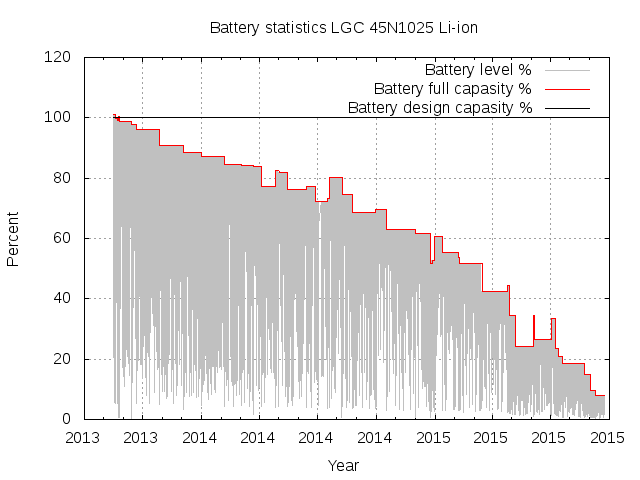
When I get a new laptop, the battery life time at the start is OK. But this do not last. The last few laptops gave me a feeling that within a year, the life time is just a fraction of what it used to be, and it slowly become painful to use the laptop without power connected all the time. Because of this, when I got a new Thinkpad X230 laptop about two years ago, I decided to monitor its battery state to have more hard facts when the battery started to fail. First I tried to find a sensible Debian package to record the battery status, assuming that this must be a problem already handled by someone else. I found battery-stats, which collects statistics from the battery, but it was completely broken. I sent a few suggestions to the maintainer, but decided to write my own collector as a shell script while I waited for feedback from him. Via a blog post about the battery development on a MacBook Air I also discovered batlog, not available in Debian. I started my collector 2013-07-15, and it has been collecting battery stats ever since. Now my /var/log/hjemmenett-battery-status.log file contain around 115,000 measurements, from the time the battery was working great until now, when it is unable to charge above 7% of original capacity. My collector shell script is quite simple and look like this:
#!/bin/sh
# Inspired by
# http://www.ifweassume.com/2013/08/the-de-evolution-of-my-laptop-battery.html
# See also
# http://blog.sleeplessbeastie.eu/2013/01/02/debian-how-to-monitor-battery-capacity/
logfile=/var/log/hjemmenett-battery-status.log
files="manufacturer model_name technology serial_number \
    energy_full energy_full_design energy_now cycle_count status"
if [ ! -e "$logfile" ] ; then
    (
	printf "timestamp,"
	for f in $files; do
	    printf "%s," $f
	done
	echo
    ) > "$logfile"
fi
log_battery()  
    # Print complete message in one echo call, to avoid race condition
    # when several log processes run in parallel.
    msg=$(printf "%s," $(date +%s); \
	for f in $files; do \
	    printf "%s," $(cat $f); \
	done)
    echo "$msg"
 
cd /sys/class/power_supply
for bat in BAT*; do
    (cd $bat && log_battery >> "$logfile")
done
The script is called when the power management system detect a change in the power status (power plug in or out), and when going into and out of hibernation and suspend. In addition, it collect a value every 10 minutes. This make it possible for me know when the battery is discharging, charging and how the maximum charge change over time. The code for the Debian package is now available on github. The collected log file look like this:
timestamp,manufacturer,model_name,technology,serial_number,energy_full,energy_full_design,energy_now,cycle_count,status,
1376591133,LGC,45N1025,Li-ion,974,62800000,62160000,39050000,0,Discharging,
[...]
1443090528,LGC,45N1025,Li-ion,974,4900000,62160000,4900000,0,Full,
1443090601,LGC,45N1025,Li-ion,974,4900000,62160000,4900000,0,Full,
I wrote a small script to create a graph of the charge development over time. This graph depicted above show the slow death of my laptop battery. But why is this happening? Why are my laptop batteries always dying in a year or two, while the batteries of space probes and satellites keep working year after year. If we are to believe Battery University, the cause is me charging the battery whenever I have a chance, and the fix is to not charge the Lithium-ion batteries to 100% all the time, but to stay below 90% of full charge most of the time. I've been told that the Tesla electric cars limit the charge of their batteries to 80%, with the option to charge to 100% when preparing for a longer trip (not that I would want a car like Tesla where rights to privacy is abandoned, but that is another story), which I guess is the option we should have for laptops on Linux too. Is there a good and generic way with Linux to tell the battery to stop charging at 80%, unless requested to charge to 100% once in preparation for a longer trip? I found one recipe on askubuntu for Ubuntu to limit charging on Thinkpad to 80%, but could not get it to work (kernel module refused to load). I wonder why the battery capacity was reported to be more than 100% at the start. I also wonder why the "full capacity" increases some times, and if it is possible to repeat the process to get the battery back to design capacity. And I wonder if the discharge and charge speed change over time, or if this stay the same. I did not yet try to write a tool to calculate the derivative values of the battery level, but suspect some interesting insights might be learned from those. Update 2015-09-24: I got a tip to install the packages acpi-call-dkms and tlp (unfortunately missing in Debian stable) packages instead of the tp-smapi-dkms package I had tried to use initially, and use 'tlp setcharge 40 80' to change when charging start and stop. I've done so now, but expect my existing battery is toast and need to be replaced. The proposal is unfortunately Thinkpad specific.

Joachim Breitner: The Incredible Proof Machine

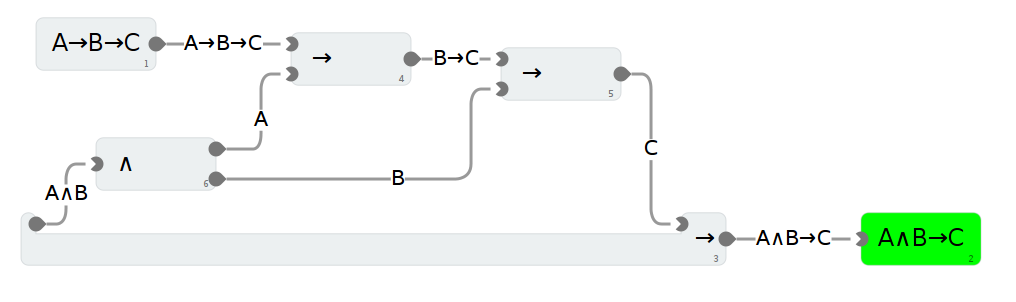
In a few weeks, I will have the opportunity to offer a weekend workshop to selected and motivated high school students1 to a topic of my choice. My idea is to tell them something about logic, proofs, and the joy of searching and finding proofs, and the gratification of irrevocable truths. While proving things on paper is already quite nice, it is much more fun to use an interactive theorem prover, such as Isabelle, Coq or Agda: You get immediate feedback, you can experiment and play around if you are stuck, and you get lots of small successes. Someone2 once called interactive theorem proving the worlds most geekiest videogame . Unfortunately, I don t think one can get high school students without any prior knowledge in logic, or programming, or fancy mathematical symbols, to do something meaningful with a system like Isabelle, so I need something that is (much) easier to use. I always had this idea in the back of my head that proving is not so much about writing text (as in normally written proofs) or programs (as in Agda) or labeled statements (as in Hilbert-style proofs), but rather something involving facts that I have proven so far floating around freely, and way to combine these facts to new facts, without the need to name them, or put them in a particular order or sequence. In a way, I m looking for labVIEW wrestled through the Curry-Horward-isomorphism. Something like this:
A proof of implication currying

A proof of implication currying

So I set out, rounded up a few contributors (Thanks!), implemented this, and now I proudly present: The Incredible Proof Machine3 This interactive theorem prover allows you to do perform proofs purely by dragging blocks (representing proof steps) onto the paper and connecting them properly. There is no need to learn syntax, and hence no frustration about getting that wrong. Furthermore, it comes with a number of example tasks to experiment with, so you can simply see it as a challenging computer came and work through them one by one, learning something about the logical connectives and how they work as you go. For the actual workshop, my plan is to let the students first try to solve the tasks of one session on their own, let them draw their own conclusions and come up with an idea of what they just did, and then deliver an explanation of the logical meaning of what they did. The implementation is heavily influenced by Isabelle: The software does not know anything about, say, conjunction ( ) and implication ( ). To the core, everything is but an untyped lambda expression, and when two blocks are connected, it does unification4 of the proposition present on either side. This general framework is then instantiated by specifying the basic rules (or axioms) in a descriptive manner. It is quite feasible to implement other logics or formal systems on top of this as well. Another influence of Isabelle is the non-linear editing: You neither have to create the proof in a particular order nor have to manually manage a proof focus . Instead, you can edit any bit of the proof at any time, and the system checks all of it continuously. As always, I am keen on feedback. Also, if you want to use this for your own teaching or experimenting needs, let me know. We have a mailing list for the project, the code is on GitHub, where you can also file bug reports and feature requests. Contributions are welcome! All aspects of the logic are implemented in Haskell and compiled to JavaScript using GHCJS, the UI is plain hand-written and messy JavaScript code, using JointJS to handle the graph interaction. Obviously, there is still plenty that can be done to improve the machine. In particular, the ability to create your own proof blocks, such as proof by contradiction, prove them to be valid and then use them in further proofs, is currently being worked on. And while the page will store your current progress, including all proofs you create, in your browser, it needs better ways to save, load and share tasks, blocks and proofs. Also, we d like to add some gamification, i.e. achievements ( First proof by contradiction , 50 theorems proven ), statistics, maybe a share theorem on twitter button. As the UI becomes more complicated, I d like to investigating moving more of it into Haskell world and use Functional Reactive Programming, i.e. Ryan Trickle s reflex, to stay sane. Customers who liked The Incredible Proof Machine might also like these artifacts, that I found while looking whether something like this exists:

  1. Students with migration background supported by the START scholarship
  2. Does anyone know the reference?
  3. We almost named it Proofcraft , which would be a name our current Minecraft-wild youth would appreciate, but it is alreay taken by Gerwin Kleins blog. Also, the irony of a theorem prover being in-credible is worth something.
  4. Luckily, two decades ago, Tobias Nipkow published a nice implementation of higher order pattern unification as ML code, which I transliterated to Haskell for this project.

Next.

Previous.