Search Results: "sto"

18 March 2010

Andrew Pollock: [life] The saga of the kitchen remodel continues

Well, it's been a month since the initial demolition started It's nearly finished. We had a slight bit of scope creep in that we decided to redo the floor now as well. This was brought on by the fact that the new cabinets didn't quite meet up with the footprint of the old ones, on one side, leaving maybe a 5 centimetre gap between the new cabinets and the floor. I wasn't a fan of having to haul the fridge and stove back into the living room again at some point in the future (the fridge is too big for the doorway and needs to have its doors removed) so it seemed like the best thing was to do it while everything else was being done. Fortunately, it hasn't blown out the overall time of the work, as we're still waiting for the counter tops to be cut or manufactured or something. The ETA for them to be installed is Friday or Monday. So in the meantime we got just the kitchen floor tiled. The plan is to replace all of the floating wooden floor with tiles, but just not right now. To do the rest would involve faffing around with the downstairs bathroom, and pulling out the washer and dryer, as well as the hot water heater. Doing that now, on top of having all of the kitchen stuff in the living room just gives me the heebie jeebies, so the compromise is to keep the existing flooring for the rest of downstairs, and just buy enough tiles to cover it later. Maybe at Christmas time, if we go back to Australia, we'll get it done then while we're not around to be disrupted. When they ripped up the floor in the kitchen, some huge cracks in the slab were immediately apparent, so they had to put down some DITRA as a foundation to prevent the tiles cracking as a result of the slab expanding and contracting. The tiling should be finished by tomorrow I hope, and then we have to let the grout cure for 72 hours before we seal it. The one small delay we've had was due to a miscommunication with the kitchen company: we'd never ordered any handles for the cabinets and drawers, so they only got ordered after the cabinet installation was completed. Had we had them on hand, we could have started occupying the cabinets and drawers already, which would have reduced the chaos in the living room a bit. Oh well. Blow-by-blow photos of the work so far (I'm lacking photos of the cabinets with the doors on) are here.

Andrew Pollock: [life/americania] We've officially left our mark on the US

We received our US census form the other day. Sarah's already filled it out, but I wanted to look at it before we mailed it back, just out of curiosity. I'm astounded at how incredibly basic it is. Literally all it asks is name, age, date of birth and race. It's somewhat laughable how you're either "white", or one of a bazillion other racial ethnicities. They don't seem to be interested that I'm Australian. Or if I were a white Samoan, for example. I can only remember having filled out one Australian census since I moved out of home, which was the 2001 census. I missed the 2006 census since I was living in the US. The US census seems to be a 10 year affair, compared to Australia's 5 years. "Census night" was always a big deal in Australia. You were supposed to fill out the form on that particular date, for whoever was in that particular dwelling. So you really didn't want to be out visiting friends that night. The US census form claims to care about the state of affairs on April 1, but it also says to mail it back immediately. It seems to only care about "full-time residents", so the whole visitor problem doesn't seem to exist over here. Wikipedia tells me that the 2006 Australia Census had 60 questions, all compulsory, except for the questions about religion. I'm still gobsmacked by how small an amount of data the US tries to collect. I just quickly reviewed the 2001 Australia Census form, and I'm rather amazed at how many questions it asked. I remember there being a meme at the time of the 2001 census to put down "Jedi" as your religion, with the word on the street being that if enough people said that was their religion, it would become officially recognised as one.

17 March 2010

Theodore Ts'o: The history of General Tso s Chicken

I just came across this story (http://goo.gl/EbqP) today, and given my name, and given that I fancy myself a bit of a foodie, who could resist? (Not that I considered the deep-fried, dunked-in-sugar-syrup mess that passes for General Tso s chicken in most fast food Chinese restaurants to be gourmet food, mind you!)
Here s the first thing you should know: The general had nothing to do with his chicken. You can banish any stories of him stir-frying over the flames of the cities he burned, or heartbreaking tales of a last supper, prepared with blind courage, under attack from overwhelming hordes. Unlike the amoeba-like mythologies that follow so many traditional dishes, the story of General Tso s chicken is compellingly simple. One man, Peng Chang-kuei very old but still alive invented it. But what s it ? Because while chef Peng is universally credited with inventing a dish called General Tso s chicken, he probably wouldn t recognize the crisp, sweet, red nuggets you get with pork fried rice for $4.95 with a choice of soda or soup. All that happened under his nose. It all got away from him
No related posts.

Steve Kemp: Are you sure you don't mind me going without you?

Recently I received a small flurry of patches to my blog compiler, from Chris Frey. These patches significantly speedup rebuilding a static blog when using Danga's memcached. The speedup is sufficiently fast that my prior SQLite based approach is no longer required - and (re)building my blog now takes on the order of 5 seconds. On the topic of other people's blogs I've been enjoying David Watson's recent photo challenge. I was almost tempted to join in, but I'm not sure I could manage one every day - Although I can pretend I recently carried out my my first real photoshoot. I'm still taking pictures of "things/places" but I'm starting to enjoy "people" more. With a bit of luck I'll get some more people to pose in the near future, even if I have to rely upon posting to gumtree for local bodies! ObFilm: Love Actually

David Pashley: Letter to my MP regarding the Digital Economy Bill

I have just sent the following email to my MP, David Lepper MP, outlining my concerns about the Digital Economy Bill. I urge you to write to your MP with a similar letter. Open Rights Group's guide to writing to your MP
From: David Pashley <david@davidpashley.com>
To: David Lepper
Cc: 
Bcc: 
Subject: Digital Economy Bill
Reply-To: 
Dear Mr Lepper, 
I'm writing to you so express my concern at the Digital Economy Bill
which is currently working its way through the House of Commons. I
believe that the bill as it stands will have a negative effect on
the digital economy that the UK and in particular Brighton have
worked so hard to foster. 
Section 4-17 deals with disconnecting people reported as infringing
copyright. As it stands, this section will result in the possibility
that my internet connection could be disconnected as a result of the
actions of my flatmate. My freelance web development business is
inherently linked to my access of the Internet. I currently allow my
landlady to share my internet access with her holiday flat above me.
I will have to stop this arrangement for fear of a tourist's actions
jeopardising my business. 
This section will also result in the many pubs and cafes, much
favoured by Brighton's freelancers, from removing their free wifi. I
have often used my local pub's wifi when I needed a change of
scenery. I know a great many freelancers use Cafe Delice in the
North Laine as a place to meet other freelancers and discuss
projects while drinking coffee and working.
Section 18 deals with ISPs being required to prevent access to sites
hosting copyrighted material. The ISPs can insist on a court
injunction forcing them to prevent access. Unfortunately, a great
many ISPs will not want to deal with the costs of any court
proceedings and will just block the site in question. A similar law
in the Unitied States, the Digital Millenium Copyright Act (DMCA)
has been abused time and time again by spurious copyright claims to
silence critics or embarrassments.  A recent case is Microsoft
shutting down the entire Cryptome.org website because they were
embarrassed by a document they had hosted.  There are many more
examples of abuse at http://www.chillingeffects.org/
A concern is that there's no requirement for the accuser to prove
infringement has occured, nor is there a valid defense that a user
has done everything possible to prevent infringement. 
There are several ways to reduce copyright infringement of music and
movies without introducing new legislation. The promotion of legal
services like iTunes and spotify, easier access to legal media, like
Digital Rights Management free music. Many of the record labels and
movie studios are failing to promote competing legal services which
many people would use if they were aware of them. A fairer
alternative to disconnection is a fine through the courts. 
You can find further information on the effects of the Digital
Economy Bill at http://www.openrightsgroup.org/ and
http://news.bbc.co.uk/1/hi/technology/8544935.stm
The bill has currently passed the House of Lords and its first
reading in the Commons. There is a danger that without MPs demanding
to scrutinise this bill, this damaging piece of legislation will be
rushed through Parliament before the general election.
I ask you to demand your right to debate this bill and to amend the
bill to remove sections 4-18. I would also appreciate a response to
this email. If you would like to discuss the issues I've raised
further, I can be contacted on 01273 xxxxxx or 07966 xxx xxx or via
email at this address.
Thank you for your time.
-- 
David Pashley
david@davidpashley.com
Read Comments (0)

16 March 2010

Bdale Garbee: TeleMetrum v1.0 Order Placed

I've been too busy (work, family, and fighting a nasty cold!) to write much text lately, other than the comments I put on launch photos uploaded to my Flickr stream, but the remainder of our testing of the prototype TeleMetrum v0.2 boards went really well! The only significant change we decided to make before going to production was to change the 3.3 volt regulator from a 100mA to a 150mA part. This will ensure adequate power for the companion boards we have planned, even when the GPS chip is in maximum power mode searching for satellites during a cold start. So... [drum roll, please] Keith and I just placed the orders for our first production lot of TeleMetrum v1.0 boards! With any luck, in 3-4 weeks we should have a pile of altimeters to sell, along with the associated TeleDongle ground stations already in stock. Stay tuned!

Russell Coker: Starting with KVM

I ve just bought a new Thinkpad that has hardware virtualisation support and I ve got KVM running. HugePages The Linux-KVM site has some information on using hugetlbfs to allow the use of 2MB pages for KVM [1]. I put vm.nr_hugepages = 1024 in /etc/sysctl.conf to reserve 2G of RAM for KVM use. The web page notes that it may be impossible to allocate enough pages if you set it some time after boot (the kernel can allocate memory that can t be paged and it s possible for RAM to become too fragmented to allow allocation). As a test I reduced my allocation to 296 pages and then increased it again to 1024, I was surprised to note that my system ran extremely slow while reserving the pages it seems that allocating such pages is efficient when done at boot time but not so efficient when done later. hugetlbfs /hugepages hugetlbfs mode=1770,gid=121 0 0 I put the above line in /etc/fstab to mount the hugetlbfs filesystem. The mode of 1770 allows anyone in the group to create files but not unlink or rename each other s files. The gid of 121 is for the kvm group. I m not sure how hugepages are used, they aren t used in the most obvious way. I expected that allocating 1024 huge pages would allow allocating 2G of RAM to the virtual machine, that s not the case as -m 2048 caused kvm to fail. I also expected that the number of HugePages free according to /proc/meminfo would reliably drop by an amount that approximately matches the size of the virtual machine which doesn t seem to be the case. I have no idea why KVM with Hugepages would be significantly slower for user and system CPU time but still slightly faster for the overall build time (see the performance section below). I ve been unable to find any documents explaining in which situations huge pages provide advantages and disadvantages or how they work with KVM virtualisation the virtual machine allocates memory in 4K pages so how does that work with 2M pages provided to it by the OS? But Hugepages does provide a slight benefit in performance and if you have plenty of RAM (I have 5G and can afford to buy more if I need it) you should just install it as soon as you start. I have filed Debian bug report #574073 about KVM displaying an error you normally can t see when it can t access the hugepages filesystem [6]. Permissions open /dev/kvm: Permission denied
Could not initialize KVM, will disable KVM support One thing that annoyed me about KVM is that the Debian/Lenny version will run QEMU instead if it can t run KVM. I discovered this when a routine rebuild of the SE Linux Policy packages in a Debian/Unstable virtual machine took an unreasonable amount of time. When I halted the virtual machine I noticed that it had displayed the above message on stderr before changing into curses mode (I m not sure the correct term for this) such that the message was obscured until the xterm was returned to the non-curses mode at program exit. I had to add the user in question to the kvm group. I ve filed Debian bug report #574063 about this [2]. Performance Below is a table showing the time taken for building the SE Linux reference policy on Debian/Unstable. It compares running QEMU emulation (using the kvm command but without permission to access /dev/kvm), KVM with and without hugepages, Xen, and a chroot. Xen is run on an Opteron 1212 Dell server system with 2*1TB SATA disks in a RAID-1 while the KVM/QEMU tests are on an Intel T7500 CPU in a Thinkpad T61 with a 100G SATA disk [4]. All virtual machines had 512M of RAM and 2 CPU cores. The Opteron 1212 system is running Debian/Lenny and the Thinkpad is running Debian/Lenny with a 2.6.32 kernel from Testing.
Elapsed User System
QEMU on Opteron 1212 with Xen installed 126m54 39m36 8m1
QEMU on T7500 95m42 42m57 8m29
KVM on Opteron 1212 7m54 4m47 2m26
Xen on Opteron 1212 6m54 3m5 1m5
KVM on T7500 6m3 2m3 1m9
KVM Hugepages on T7500 with NCurses console 5m58 3m32 2m16
KVM Hugepages on T7500 5m50 3m31 1m54
KVM Hugepages on T7500 with 1800M of RAM 5m39 3m30 1m48
KVM Hugepages on T7500 with 1800M and file output 5m7 3m28 1m38
Chroot on T7500 3m43 3m11 29
I was surprised to see how inefficient it is when compared with a chroot on the same hardware. It seems that the system time is the issue. Most of the tests were done with 512M of RAM for the virtual machine, I tried 1800M which improved performance slightly (less IO means less context switches to access the real block device) and redirecting the output of dpkg-buildpackage to /tmp/out and /tmp/err reduced the built time by 32 seconds it seems that the context switches for networking or console output really hurt performance. But for the default build it seems that it will take about 50% longer in a virtual machine than in a chroot, this is bearable for the things I do (of which building the SE Linux policy is the most time consuming), but if I was to start compiling KDE then I would be compelled to use a chroot. I was also surprised to see how slow it was when compared to Xen, for the tests on the Opteron 1212 system I used a later version of KVM (qemu-kvm 0.11.0+dfsg-1~bpo50+1 from Debian/Unstable) but could only use 2.6.26 as the virtualised kernel (the Debian 2.6.32 kernels gave a kernel Oops on boot). I doubt that the lower kernel version is responsible for any significant portion of the extra minute of build time. Storage One way of managing storage for a virtual machine is to use files on a large filesystem for it s block devices, this can work OK if you use a filesystem that is well designed for large files (such as XKS). I prefer to use LVM, one thing I have not yet discovered is how to make udev assign the KVM group to all devices that match /dev/V0/kvm-*. Startup KVM seems to be basically designed to run from a session, unlike Xen which can be started with xm create and then run in the background until you feel like running xm console to gain access to the console. One way of dealing with this is to use screen. The command screen -S kvm-foo -d -m kvm WHATEVER will start a screen session named kvm-foo that will be detached and will start by running kvm with WHATEVER as the command-line options. When screen is used for managing virtual machines you can use the command screen -ls to list the running sessions and then commands such as screen -r kvm-unstable to reattach to screen sessions. To detach from a running screen session you type ^A^D. The problem with this is that screen will exit when the process ends and that loses the shutdown messages from the virtual machine. To solve this you can put exec bash or sleep 200 at the end of the script that runs kvm. start-stop-daemon -S -c USERNAME --exec /usr/bin/screen -- -S kvm-unstable -d -m /usr/local/sbin/kvm-unstable On a Debian system the above command in a system boot script (maybe /etc/rc.local) could be used to start a KVM virtual machine on boot. In this example USERNAME would be replaced by the name of the account used to run kvm, and /usr/local/sbin/kvm-unstable is a shell script to run kvm with the correct parameters. Then as user USERNAME you can attach to the session later with the command screen -x kvm-unstable . Thanks to Jason White for the tip on using screen. I ve filed Debian bug report #574069 [3] requesting that kvm change it s argv[0] so that top(1) and similar programs can be used to distinguish different virtual machines. Currently when you have a few entries named kvm in top s output it is annoying to match the CPU hogging process to the virtual machine it s running. It is possible to use KVM with X or VNC for a graphical display by the virtual machine. I don t like these options, I believe that Xephyr provides better isolation, I ve previously documented how to use Xephyr [5]. kvm -kernel /boot/vmlinuz-2.6.32-2-amd64 -initrd /boot/initrd.img-2.6.32-2-amd64 -hda /dev/V0/unstable -hdb /dev/V0/unstable-swap -m 512 -mem-path /hugepages -append "selinux=1 audit=1 root=/dev/hda ro rootfstype=ext4" -smp 2 -curses -redir tcp:2022::22 The above is the current kvm command-line that I m using for my Debian/Unstable test environment. Networking I m using KVM options such as -redir tcp:2022::22 to redirect unprivileged ports (in this case 2022) to the ssh port. This works for a basic test virtual machine but is not suitable for production use. I want to run virtual machines with minimal access to the environment, this means not starting them as root. One thing I haven t yet investigated is the vde2 networking system which allows a private virtual network over multiple physical hosts and which should allow kvm to be run without root privs. It seems that all the other networking options for kvm which have appealing feature sets require that the kvm process be started with root privs. Is KVM worth using? It seems that KVM is significantly slower than a chroot, so for a basic build environment a secure chroot environment would probably be a better option. I had hoped that KVM would be more reliable than Xen which would offset the performance loss however as KVM and Debian kernel 2.6.32 don t work together on my Opteron system it seems that I will have some reliability issues with KVM that compare with the Xen issues. There are currently no Xen kernels in Debian/Testing so KVM is usable now with the latest bleeding edge stuff (on my Thinkpad at least) while Xen isn t. Qemu is really slow, so Xen is the only option for 32bit hardware. Therefore all my 32bit Xen servers need to keep running Xen. I don t plan to switch my 64bit production servers to KVM any time soon. When Debian/Squeeze is released I will consider whether to use KVM or Xen after upgrading my 64bit Debian server. I probably won t upgrade my 64bit RHEL-5 server any time soon maybe when RHEL-7 is released. My 64bit Debian test and development server will probably end up running KVM very soon, I need to upgrade the kernel for Ext4 support and that makes KVM more desirable. So it seems that for me KVM is only going to be seriously used on my laptop for a while. Generally I am disappointed with KVM. I had hoped that it would give almost the performance of Xen (admittedly it was only 14.5% slower). I had also hoped that it would be really reliable and work with the latest kernels (unlike Xen) but it is giving me problems with 2.6.32 on Opteron. Also it has some new issues such as deciding to quietly do something I don t want when it s unable to do what I want it to do.

Ian Wienand: Handling hostnames, UDP and IPv6 in Python

So, you have some application where you want the user to specify a remote host/port, and you want to support IPv4 and IPv6. For literal addresses, things are fairly simple. IPv4 addresses are simple, and RFC2732 has things covered by putting the IPv6 address within square brackets. It gets more interesting as to what you should do with hostnames. The problem is that getaddrinfo can return you multiple addresses, but without extra disambiguation from the user it is very difficult to know which one to choose. RFC4472 discusses this, but there does not appear to be any good solution. Possibly you can do something like ping/ping6 and have a separate program name or configuration flag to choose IPv6. This comes at a cost of transparency. The glibc implementation of getaddrinfo() puts considerable effort into deciding if you have an IPv6 interface up and running before it will return an IPv6 address. It will even recognise link-local addresses and sort addresses more likely to work to the front of the returned list as described here. However, there is still a small possibility that the IPv6 interface doesn't actually work, and so the library will sort the IPv6 address as first in the returned list when maybe it shouldn't be. If you are using TCP, you can connect to each address in turn to find one that works. With UDP, however, the connect essentially does nothing. So I believe probably the best way to handle hostnames for UDP connections, at least on Linux/glibc, is to trust getaddrinfo to return the sanest values first, try a connect on the socket anyway just for extra security and then essentially hope it works. Below is some example code to do that (literal address splitter bit stolen from Python's httplib).
import socket
DEFAULT_PORT = 123
host = '[fe80::21c:a0ff:fb27:7196]:567'
# the port will be anything after the last :
p = host.rfind(":")
# ipv6 literals should have a closing brace
b = host.rfind("]")
# if the last : is outside the [addr] part (or if we don't have []'s
if (p > b):
    try:
        port = int(host[p+1:])
    except ValueError:
        print "Non-numeric port"
        raise
    host = host[:p]
else:
    port = DEFAULT_PORT
# now strip off ipv6 []'s if there are any
if host and host[0] == '[' and host[-1] == ']':
    host = host[1:-1]
print "host = <%s>, port = <%d>" % (host, port)
the_socket = None
res = socket.getaddrinfo(host, port, socket.AF_UNSPEC, socket.SOCK_DGRAM)
# go through all the returned values, and choose the ipv6 one if
# we see it.
for r in res:
    af,socktype,proto,cname,sa = r
    try:
        the_socket = socket.socket(af, socktype, proto)
        the_socket.connect(sa)
    except socket.error, e:
        # connect failed!  try the next one
        continue
    break
if the_socket == None:
    raise socket.error, "Could not get address!"
# ready to send!
the_socket.send("hi!")

Russell Coker: Thinkpad T61

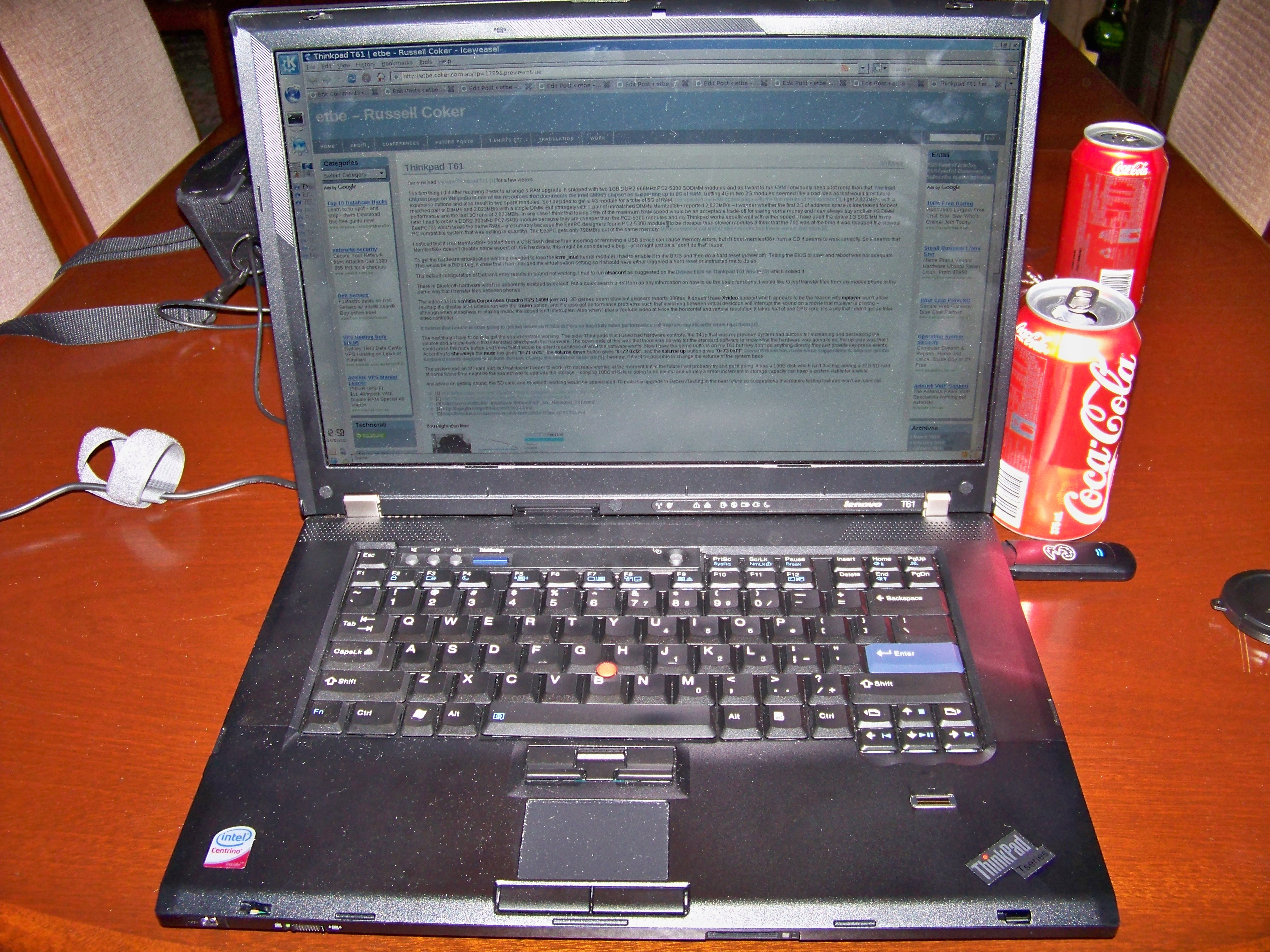
picture of my new Thinkpad T61 I ve now had my new Thinkpad T61 [1] for almost a month. The letters on the keyboard are not even starting to wear off which is unusual, either this Thinkpad is built with harder plastic than the older ones or I m typing more softly. Memory The first thing I did after receiving it was to arrange a RAM upgrade. It shipped with two 1GB DDR2 666MHz PC2-5300 SODIMM modules and as I want to run KVM I obviously need a lot more than that. The Intel Chipset page on Wikipedia is one of the resources that documents the Intel GM965 chipset as supporting up to 8G of RAM. Getting 4G in two 2G modules seemed like a bad idea as that would limit future expansion options and also result in two spare modules. So I decided to get a 4G module for a total of 5G of RAM. I ve updated my RAM speed page with the test results of this system [2], I get 2,823MB/s with a matched pair of DIMMs and 2,023MB/s with a single DIMM. But strangely with a pair of unmatched DIMMs Memtest86+ reported 2,823MB/s I wonder whether the first 2G of address space is interleaved for best performance and the last 3G runs at 2,023MB/s. In any case I think that losing 29% of the maximum RAM speed would be an acceptable trade-off for saving some money and I can always buy another 4G DIMM later. I had to order a DDR2-800MHz PC2-6400 module because they are cheaper than the PC2-5300 modules and my Thinkpad works equally well with either speed. I have used the spare 1G SODIMM in my EeePC701 which takes the same RAM presumably because the EeePC designers found PC2-5300 modules to be cheaper than slower modules (I think that the 701 was at the time it was released the slowest PC compatible system that was selling in quantity). The EeePC gets only 798MB/s out of the same memory. My document about Memtest86+ results has these results and more [2]. I noticed that if I run Memtest86+ booted from a USB flash device then inserting or removing a USB device can cause memory errors, but if I boot memtest86+ from a CD it seems to work correctly. So it seems that Memtest86+ doesn t disable some aspect of USB hardware, this might be considered a bug or it might just be a don t do that issue. Misc To get the hardware virtualisation working (needed to load the kvm_intel kernel module) I had to enable it in the BIOS and then do a hard reset (power off). Telling the BIOS to save and reboot was not adequate. This would be a BIOS bug, it knew that I had changed the virtualisation setting so it should have either triggered a hard reset or instructed me to do so. The default configuration of Debian/Lenny results in sound not working, I had to run alsaconf as suggested on the Debian Etch on Thinkpad T61 howto [3] which solved it. Generally I m happy with this system, the screen resolution is 1680*1050 which has 20% more pixels than the 1400*1050 screen on my Thinkpad T41p, it s a lot faster for CPU operations and should be a lot faster for video when I get the drivers sorted out (currently it s a lot slower), and I have virtualisation working again. But when you buy a system that s much like the last one but 6 years newer you expect it to be better. Generally the amount of effort involved in the process of buying a new system, upgrading the RAM to the desired specs, installing Linux and tweaking all the options is enough to make me want to wait at least another 6 years before buying another. Part of the reason for this difficulty is that I want to get so much functionality from the machine, a machine with more modest goals (such as a Netbook) takes a lot less time to configure. Problems There is Bluetooth hardware which is apparently enabled by default. But a quick search didn t turn up any information on how to do the basic functions, I would like to just transfer files from my mobile phone in the same way that I transfer files between phones. The video card is a nVidia Corporation Quadro NVS 140M (rev a1). 3D games seem slow but glxgears reports 300fps. It doesn t have Xvideo support which appears to be the reason why mplayer won t allow resizing it s display area unless run with the -zoom option, and it s also got performance problems such that switching between virtual desktops will interrupt the sound on a movie that mplayer is playing although when alsaplayer is playing music the sound isn t interrupted. Also when I play a Youtube video at twice the horizontal and vertical resolution it takes half of one CPU core. It s a pity that I didn t get an Intel video controller. It seems that Debian is soon going to get the Nouveau NVidia drivers so hopefully video performance will improve significantly when I get them [4]. The next thing I have to do is to get the sound controls working. The older Thinkpads that I used had hardware controls, the T41p that was my previous system had buttons for increasing and decreasing the volume and a mute button that interacted directly with the hardware. The down-side of this was that there was no way for the standard software to know what the hardware was going to do, the up-side was that I could press the mute button and know that it would be silent regardless of what the software wants. Now I have the same buttons on my T61 but they don t do anything directly, they just provide key-press events. According to showkeys the mute key gives 0 71 0xf1 , the volume down button gives 0 72 0xf2 , and the volume up button gives 0 73 0xf3 . Daniel Pittman has made some suggestions to help me get the keyboard events mapped to actions that can change the sound via software [5] which I haven t yet had time to investigate. I wonder if it will ever be possible to change the volume of the system beep. The system has an SD card slot, but that doesn t seem to work. I m not really worried at the moment but in the future I will probably try and get it going. It has a 100G disk which isn t that big, adding a 32G SD card at some future time might be the easiest way to upgrade the storage copying 100G of data is going to be painful and usually a small increment in storage capacity can keep a system viable for a while. Any advice on getting sound, the SD card, and Bluetooth working would be appreciated. I ll probably upgrade to Debian/Testing in the near future so suggestions that require testing features won t be ruled out.

15 March 2010

Joey Hess: pre to droid

in which the Pre unsuprisingly continues to suck My Palm Pre was killed by a forced over the air WebOS upgrade. You can't avoid those upgrades, even if you are sure they'll be bad news. The previous WebOS upgrade spared my Debian partition, but lost all other customizations (including Palm Pre privacy fixes), and wasted hours. When I went to use my phone and it didn't even boot, and displayed only "http://palm.com/rom", I knew that was the last straw. (Shouldn't forcing an upgrade that breaks a working phone to the point that it can't even call 911 be well, illegal?) switching cell providers in the US: suprisingly doable I thought about ditching the smart phone and using VOIP, but I seem to have gotten addicted. So I got a Droid. That meant switching cell phone companies. I've heard a lot about how horrible the US cell phone company contracts are. My experience has me wondering if all that is well... not overblown, but oversimplified. I was half a year into a two year contract. Today I got my closing statement, and I really got out of it with no early termination fee. The trick seems to be, switch to a different cell phone company. They'll be happy to get you out of your old contract, salivating at the chance of locking you in to a new one. They probably have a script to use when calling to cancel. Or "know a guy". Or claim to know a guy, then just use a script, and get lucky. Given the hard sells and vague promises they tried on me, I assume that these places are where all the car salesmen ended up. Trust == 0. But it worked. If you're good on the phone, and are looking for a new business idea: Start a business of getting people out of their cell phone contracts, for a reasonable fee and no other obligation. Use loopholes like rate changes. As long as the cell phone companies can raise their monthly rate 2 cents, and 99.9999% of their users accept it, and they make untold millions of dollars, for free, they seem to not care if the remaining fraction use a loophole to get out. Especially if they're able to take advantage of other comanies loopholes to switch over users. So there seems to be a niche there in which one could prosper. droid first impressions So now I have a slightly larger lump in my pocket and the Pre is on a shelf, and will either be used for future development and testing of Debian piggyback ideas, or donated to someone like Lennart who can make good use of it. Compared with the Pre, the droid's hardware is all superior. The keyboard, especially, is great, with arrow keys, and all the symbols I need. At the same time, the phone is bigger, and oddly clunky. But in an endearing way. Only thing I really dislike about the hardware is the "back" button is easy to accidentially swipe while typing on the keyboard. Compared with WebOS, the Android UI has some clunkiness and non-obvious things. Like the status bar at the top not doing anything when you click on it. And there being no way to close an app. Especially annoying is that this means opening the web browser returns to whatever page I was on last, which is never what I want. The UI is however much, much snappier. I don't use the Google email, etc services so can't comment on them; I assume the amount of info Google is gathering about me went up by a few percentage points; I've blocked their analytics on my network to knock it back down. (PS: DuckDuckGo now avoids logging IP addresses at all.) The best thing is the ConnectBot application, which is a very usable shell and ssh client. It's a terminal, in my pocket, which I can easily use for an hour without feeling like my interactions are feeding through a stifling soda straw. Between the keyboard and the app, the Pre has nothing at all that compares. Under the hood, Android annoys me terribly, with its lack of busybox, its kernel that does not even have the ext* filesystem, its hard-partitioned storage, and its general lack of every single thing I like in a Linux system. Compare this with the Pre, which has a package manager, a userspace based on busybox with a full standard Linux stack (all the way up to PulseAudio) and a kernel with lots of standard filesystems, and even LVM. Sigh. It's amazing that WebOS and Android have found such broadly different ways to suck. There is significant interest and activity around running a Debian chroot on the Droid. The best tries so far put it on a loop mounted ext2 filesystem (which means you need to get ahold of a matching ext2.ko somehow), living on the FAT formatted SSD. And there are apparently some bad problems with IO to that starving/locking the system, so I have not tried it.

Russell Coker: The Yubikey

Picture of Yubikey Some time ago Yubico were kind enough to send me an evaluation copy of their Yubikey device. I ve finally got around to reviewing it and making deployment plans for buying some more. Above is a picture of my Yubikey on the keyboard of my Thinkpad T61 for scale. The newer keys apparently have a different color in the center of the circular press area and also can be purchased in white plastic. The Yubikey is a USB security token from Yubico [1]. It is a use-based token that connects via the USB keyboard interface (see my previous post for a description of the various types of token [2]). The Yubikey is the only device I know of which uses the USB keyboard interface, it seems that this is an innovation that they invented. You can see in the above picture that the Yubikey skips the metal that is used to surround most USB devices, this probably fails to meet some part of the USB specification but does allow them to make the key less than half as thick as it might otherwise be. Mechanically it seems quite solid. The Yubikey is affordable, unlike some token vendors who don t even advertise prices (if you need to ask then you can t afford it) and they have an online sales site. $US25 for a single key and discounts start when you buy 10. As it seems quite likely that someone who wants such a token will want at least two of them for different authentication domains, different users in one home, or as a backup in case one is lost or broken (although my experiments have shown that Yubikeys are very hardy and will not break easily). The discount rate of $20 will apply if you can find four friends who want to use them (assuming two each), or if you support several relatives (as I do). The next discount rate of $15 applies when you order 100 units, and they advise that customers contact their sales department directly if purchasing more than 500 units so it seems likely that a further discount could be arranged when buying more than 500 units. They accept payment via Paypal as well as credit cards. It seems to me that any Linux Users Group could easily arrange an order for 100 units (that would be 10 people with similar needs to me) and a larger LUG could possibly arrange an order of more than 500 units for a better discount. If an order of 500 can t be arranged then an order of 200 would be a good thing to get half black keys and half white ones you can only buy a pack of 100 in a single color. There is a Wordpress plugin to use Yubikey authentication [3]. It works, but I would be happier if it had an option to accept a Yubikey OR a password (currently it demands both a Yubikey AND a password). I know that this is less secure, but I believe that it s adequate for an account that doesn t have administrative rights. To operate the Yubikey you just insert it into a USB slot and press the button to have it enter the pass code via the USB keyboard interface. The pass code has a prefix that can be used to identify the user so it can replace both the user-name and password fields of course it is technically possible to use one Yubikey for authentication with multiple accounts in which case a user-name would be required. Pressing the Yubikey button causes the pass code to be inserted along with the ENTER key, this can take a little getting used to as a slow web site combined with a habit of pressing ENTER can result in a failed login (at least this has happened to me with Konqueror). As the Yubikey is use-based, it needs a server to track the usage count of each key. Yubico provides source to the server software as well as having their own server available on the net obviously it might be a bad idea to use the Yubico server for remote root access to a server, but for blog posting that is a viable option and saves some effort. If you have multiple sites that may be disconnected then you will either need multiple Yubikeys (at a cost of $20 or $15 each) or you will need to have one Yubikey work with multiple servers. Supporting a single key with multiple authentication servers means that MITM attacks become possible. The full source to the Yubikey utilities is available under the new BSD license. In Debian the base functionality of talking to the Yubikey is packaged as libyubikey0 and libyubikey-dev, the server (for validating Yubi requests via HTTP) is packaged as yubikey-server-c, and the utility for changing the AES key to use your own authentication server is packaged as yubikey-personalization thanks Tollef Fog Heen for packaging all this! The YubiPAM project (a PAM module for Yubikey) is licensed under the GPL [4]. It would be good if this could be packaged for Debian (unfortunately I don t have time to adopt more packages at the moment). There is a new model of Yubikey that has RFID support. They suggest using it for public transport systems where RFID could be used for boarding and the core Yubikey OTP functionality could be used for purchasing tickets. I don t think it s very interesting for typical hobbyist and sysadmin work, but RFID experts such as Jonathan Oxer might disagree with me on this issue.

Adnan Hodzic: FoolControl, Gnome, Squeeze?

Other day I read Refreshing The Ubuntu Brand , upcoming visual style changes for Ubuntu 10.04 Lucid Lynx and my only comment to this whole story was Don t tell me you re moving window control elements to the left side of window in Lucid Side Frown
Either way if this is the revolutionary change for Ubuntu, then I have a visual style suggestion for Squeeze as well. Since Gnome is default desktop environment in Debian and as it looks like right now 2.30 will be what s going to be included into Squeeze; nothing much, or nothing really will visually change in Gnome by then. So how about this Lamp For some time now I ve been troubled by some things in Gnome, and what s bothering me the most is System menu. Why? Well because the list of utilities listed both under Administration and Preferences is so long that it s almost useless. So without losing your precious seconds of your life and losing fair amount of nerves well this is what s required to find what you were initially looking for. Interesting enough is the fact (please do stress) that Gnome consists of a fine thing called gnome-control-center which is not included in any of Gnome menus. IDK I really do enjoy Gnome vanilla flavor (overall am fan of vanilla flavored apps.) but what I ve been doing for quite time now is fixing this ridicule by having my own version of Systems menu, which consists of Add/Remove App. (synaptic) and Fool Control (gnome-control-center) Final result is that I get what I m looking for in couple of seconds without any lost nerves Victory Either way, after reading the redesigning Ubuntu article, this only encouraged me to go live with this suggestion. I know it s a minor change, but how about we have this implemented into Squeeze? Of course change my silly button labels; if not, what are my options? Make package that will do this for you? Rolls Eyes I m really interested to hear your input on this topic. Talking about redesigning stuff, is anyone up to do start doing this with Debian homepage? Yea? Count me in Wink

Gerfried Fuchs: stable RC Bug Squashing, Part 2

A while ago I blogged about squashing release-critical bugs in stable. Yesterday we have reached a big milestone on that area: The amount of release-critical bugs in stable dropped below 1000 (blue graph). This might sound like it's still pretty high but given that we were well over 1600 RC bugs in stable a while ago I consider this quite a success. This is though no time for rest. There is still way too many RC bugs in stable, there are definitely still a lot of bugs that just aren't affecting stable and thus can be marked as such meaning no upload needs to get done for them. I'm taking a close look at those with higher numbers and most of those seem to be validly affecting stable too so they might require a bit more work than just tagging them. Thanks to all people who helped on that area, I can just remember a few names and don't want to make anyone else also working on stable to feel singled out, though I want to thank Lucas for tagging his FTBFS rounds with squeeze sid right from the start because the packages obviously have built before due to his regular rebuilds. Thanks to all, but like said, not the time to rest. The green squeeze graph is still around 250 bugs away from us!

Russell Coker: Types of Security Tokens

The Security Token Wikipedia page doesn t seem to clearly describe the types of token. Categories of Security Token It seems to me that the following categories encompass all security tokens:
  1. Biometric tokens which seems rather pointless to me. Having a device I control verify my biometric data doesn t seem to provide a benefit. The only possible benefit seems to be if the biometric token verifies the identity of the person holding it before acting as one of the other types of token.
  2. Challenge-response devices. The server will send a challenge (usually a random number) and will expect a response (usually some sort of cryptographically secure hash of the number and a shared secret). A challenge-response device may take a password from the user and combine it with the challenge from the server and the shared secret when calculating the response.
  3. Time-based tokens (one-time passwords). They will provide a new pseudo-random number that changes periodically, often a 30 second time interval is used and the number is presumably a cryptographically secure hash of the time and a shared secret. This requires a battery in the token and the token will become useless when the battery runs out. It also requires that the server have an accurate clock.
  4. Use-based tokens. They will give a new pseudo-random number every time a button is pressed (or some other event happens to indicate that a number has been used). These do not work well if you have multiple independent servers and an untrusted network.
Here is my analysis of the theory of token use, note that I am not sure how the implementations of the various token systems deal with these issues.
  1. Biometric security seems like a bad idea for most non-government use. I have seen a retina scanner in use at a government office that made some sense as the people being scanned were in a secure area (they had passed some prior checks) and they were observed (to prevent coercion and the use of fake eyes). Biometric authentication for logging in over the net just seems like a bad idea as you will never know if you can trust the scanner.
  2. It seems to me that challenge-response devices are by far the most secure option. CR is resistant to replay attacks provided that it is not possible to have re-used challenges. If the calculation of the response includes a password (which is performed on some tokens that resemble pocket calculators) then a CR token will meet the something you have and something you know criteria.
    One potential problem with CR systems is that of not including the server or account ID in the calculation. So if I was to use a terminal in an insecure location to login to a server or account with data that is not particularly important then it would be possible for an attacker who had compromised the terminal to perform a Man In The Middle (MITM) attack against other servers. Of course you are supposed to use a different password for each account, if you do this then a CR token that includes a password will be resistant to this attack but I expect that people who use tokens are more likely to use one password for multiple accounts.
  3. Time-based tokens have a weakness in that an attacker who can immediately discover the number used for one connection could then immediately login to other servers. One example of a potential attack using this avenue would be to compromise a terminal in an Internet cafe, steal a hash used for logging in to server A and then immediately login to server B. This means that it may not be safe to use the same token for logging in to servers (or accounts) that have different sensitivity levels unless a strong password was used as well I expect that people who have hardware tokens tend to use weaker passwords.
    Also one factor that will make some MITM attacks a lot easier is the fact that the combination of the hash from the token and the password are valid for a period of time so an attacker could establish a second connection within the 30 second interval. It seems that only allowing one login with a particular time-coded password is the correct thing to do, but this may be impossible if multiple independent servers use the same token.
    Time based tokens expire when the battery runs out. The measures taken to make them tamper-proof may make it difficult or impossible to replace the battery so a new token must be purchased every few years.
  4. Use-based tokens are very similar to time-based tokens, it s just a different number that is used for generating the hash. The difference in the token is that a time-based token needs a battery so that it can track the time while a use-based token needs a small amount of flash memory to store the usage count. The difference at the server end is that for a use-based token the server needs a database of the use count of each token, which is usually not overly difficult for a single server.
    One problem is the case of a restore from backup of the server which maintains the use count database. The only secure way of managing this is to either inspect every token (to discover it s use count) or to issue a new password (for using password plus token authentication). Either option would be really painful if you have many users at remote sites. Also it would be required to get the database transaction committed to disk before an authentication attempt is acknowledged so that a server crash could not lose the count this should be obvious but many people get these things wrong.
    An additional complication for use-based tokens comes with the case of a token that is used for multiple servers. One server needs to maintain the database of the usage counts and the other servers need to query it by secure links. If a login attempt with use count 100 has been made to server A then server B must not accept a login with a hash that has a use count less than or equal to 100. This is firstly to cover the case where a MITM attack is used to login to server B with credentials that were previously used for server A. The second aim of this is to cover the case where a token that is temporarily unguarded is used to generate dozens of hashes while the hashes could be immediately used it is desirable to have them expire as soon as possible, and having the next login update the use count and invalidate such hashes is a good thing.
    The requirement that all servers know the current use count requires that they all trust a single server. In some situations this may not be possible, so it seems that this only works for servers within a single authentication domain or for access to less important data.
Methods of Accessing Tokens It seems that the following are the main ways of accessing tokens. To avoid driver issues and allow the use on random machines it seems that the USB keyboard and manual entry types of token are best. While for corporate Intranet use it seems that a SmartCard is best as it can be used for opening doors as well, you could use a USB keyboard token (such as a Yubikey) to open doors but it would be slower and there is no off the shelf hardware. For low cost and ease of implementation it seems that use-based tokens that connect via the USB keyboard interface are best. For best security it seems that a smart-card or USB interface to a device with a keypad for entering a password is ideal.

14 March 2010

DebConf team: DebConf10 call for contributions (Posted by DebConf10 Talks Team)

The Debconf team is excited to announce that we are now accepting proposals for contributions to this year s Debian conference! We invite you to submit proposals for how you would contribute until the deadline: May 1st, 2010, 23h59 UTC. There are many ways you can contribute, you could present a technical paper, host a panel discussion, put on a tutorial, do a performance, an art installation, a debate, host a meeting (BoFs, or Birds of a Feather Session), or other possibilities that you devise. This year we are also accepting proposals for tracks a thematic grouping around a particular subject, and people to coordinate those tracks. If you are looking for ideas of things that you could contribute, or have ideas for things that you would like to see happen at Debconf, have a look at the Contribution Brainstorm page. DebConf talks will be broadcast live on the Internet where possible, unless otherwise requested. Videos of the talks will be published on the web along with the presentation slides and papers. Step 1. Submit Proposal Proposals should provide an overview of your proposed contribution, similar to an abstract, and be no more than 600 words. Since contributions can cover a range of issues, please describe what your proposal covers, be it political (Free Software, law, advocacy, access, etc.), technical (d-i, OpenPGP, etc.), social (Debian structures and groups). It s okay to hit all three of these. Your proposal should also include some information on why you re qualified to present, or coordinate this topic. For example, you can include links to posts you have made to Debian mailing lists or other material that indicates your qualifications. Proposals and their abstracts will be accepted until May 1st, 2010, 23h59 UTC. To submit your proposal, go to http://debconf10.debconf.org/register.xhtml and register as an attendee. Once you are registered, there is a Submit a proposal link. You will see your proposal on the site. You can choose between different presentation types. If you are unsure what type you should use, please read our definitions first. If it s not there for some reason, or you have questions, please contact us immediately. Step 2. Committee Review The review committee for this year will make its decision by May 1st, 2010. All correspondence will be done by email. Step 3. Paper Submission Like last year, we are asking for papers to be submitted along with the presentations. A full paper is optional, however we strongly encourage you to submit one if possible as we intend to provide written information along with transcripts of the sessions for later viewing. Having written papers in advance will allow us to get translations done to help non-native-English speakers feel more comfortable with the topics presented. Papers are due by July 1st, 2010, and should cover the topic in reasonable depth (3 pages A4 text, plus pictures and diagrams). We will use LaTeX to typeset the proceedings. Please submit your paper formatted in LaTeX. Should you be unfamiliar with LaTeX earlier submission in plain text is also fine. Step 4. Live Presentation Longer presentations may have a break in the middle and should include workshop items that directly involve the participants. If using slides or any other presentation, please consider that your audience will consist of people who use free software, and your choice of application to prepare and display the slides should reflect this if at all possible. Fine Print Publication Rights Debconf requires non-exclusive publication rights to papers, presentations, and any additional handouts or audio/visual materials used in conjunction with the presentation. The authors have the freedom to pick a DFSG-free license for the papers themselves and retain all copyrights. The presentations will be recorded, and may be broadcast over the Internet. Any copies of the presentation will be made available under a license like the MIT/X11 license. Failure to Submit In the event that a deadline is missed we reserve the right to revoke any offer to present.

Biella Coleman: Call for Contributions

It is a little later than we wanted but here it finally is: Debconf10 call for contributions. Do read as it has some new ideas, categories, and prospects. Also make sure to share with us on the brainstorming page.

Biella Coleman: Call for Contributions

It is a little later than we wanted but here it finally is: Debconf10 call for contributions. Do read as it has some new ideas, categories, and prospects. Also make sure to share with us on the brainstorming page.

Biella Coleman: Training it up to Debconf

im_going_to_debconf10 That s right: I am taking the train uptown to my old romping ground, Columbia University, for Debconf10. I am supremely and superbly excited as I tend to really like these events, so much so, that I am also pretty involved with the organizing team. For those on the edge of a decision, here are a few thoughts that might push you toward the edge of f*ck yea, I am gonna go! So one important, one of the MOST important parts of the conf is the venue and Columbia University is a fantabulous venue. In fact, it is the only great venue, imho, in all of Manhattan so I was pretty thrilled (and relieved) to hear that it was secured. It is an oasis in an otherwise bustling city. And better, a compact oasis where everything is nestled and close to each other, within like 3 minutes walking distance of each other. Even better is that the grounds and architecture are quite beautiful and charming. There are these majestic stairs, the steps where you can soak in the sun, great lawns for tossing a Frisbee, wonderful and smaller patches of lawn behind old school red brick buildings, and statutes, one of which is great for climbing on to sit and contemplate the day or night or just life, as I used to love to do. It is a great campus for staying up late and watching the sun rise. My fondest times was when the campus was blanketed under a mountain of snow, but it is pretty nice over the summer as well. We have also secured an all night hack lab, which is a pretty essential touch. We are also thinking beyond the venue, concocting and expanding ideas for contributions, a great day trip (that will likely not entail a bus but a beach, lots of Russians, roller coasters, and even baseball, oh and lots of NY Kitsch), and there are many other ideas swirling around. We are about to release the call for contributions so you will learn more, including some information on how to brainstorm with us, so be on the look out and remember to register if you ve made your decision!

Next.

Previous.