Search Results: "tin"

29 August 2025

Noah Meyerhans: Determining Network Online Status of Dualstack Cloud VMs

When a Debian cloud VM boots, it typically runs cloud-init at various points in the boot process. Each invocation can perform certain operations based on the host s static configuration passed by the user, typically either through a well known link-local network service or an attached iso9660 drive image. Some of the cloud-init steps execute before the network comes up, and others at a couple of different points after the network is up. I recently encountered an unexpected issue when configuring a dualstack (uses both IPv6 and legacy IPv4 networking) VM to use a custom apt server accessible only via IPv6. VM provisioning failed because it was unable to access the server in question, yet when I logged in to investigate, it was able to access the server without any problem. The boot had apparently gone smoothly right up until cloud-init s Package Update Upgrade Install module called apt-get update, which failed and broke subsequent provisioning steps. The errors reported by apt-get indicated that there was no route to the service in question, which more accurately probably meant that there was not yet a route to the service. But there was shortly after, when I investigated. This was surprising because the apt-get invocations occur in a cloud-init sequence that s explicitly ordered after the network is configured according to systemd-networkd-wait-online. Investigation eventually led to similar issues encountered in other environments reported in Debian bug #1111791, systemd: network-online.target reached before IPv6 address is ready . The issue described in that bug is identical to mine, but the bug is tagged wontfix. The behavior is considered correct.

Why the default behavior is the correct one While it s a bit counterintuitive, the systemd-networkd behavior is correct, and it s also not something we d want to override in the cloud images. Without explicit configuration, systemd can t accurately infer the intended network configuration of a given system. If a system is IPv6-only, systemd-networkd-wait-online will introduce unexpected delays in the boot process if it waits for IPv4, and vice-versa. If it assumes dualstack, things are even worse because it would block for a long time (approximately two minutes) in any single stack network before failing, leaving the host in degraded state. So the most reasonable default behavior is to block until any protocol is configured. For these same reasons, we can t change the systemd-networkd-wait-online configuration in our cloud images. All of the cloud environments we support offer both single stack and dual stack networking, so we preserve systemd s default behavior. What s causing problems here is that IPv6 takes significantly longer to configure due to its more complex router solicitation + router advertisement + DHCPv6 setup process. So in this particular case, where I ve got a dualstack VM that needs to access a v6-only apt server during the provisioning process, I need to find some mechanism to override systemd s default behavior and wait for IPv6 connectivity specifically.

What won t work Cloud-init offers the ability to write out arbitrary files during provisioning. So writing a drop-in for systemd-networkd-wait-online.service is trivial. Unfortunately, this doesn t give us everything we actually need. We still need to invoke systemctl daemon-reload to get systemd to actually apply the changes after we ve written them, and of course we need to do that before the service actually runs. Cloud-init provides a bootcmd module that lets us run shell commands very early in the boot process , but it runs too early: it runs before we ve written out our configuration files. Similarly, it provides a runcmd module, but scripts there are towards the end of the boot process, far too late to be useful. Instead of using the bootcmd facility, to simply reload systemd s config, it seemed possible that we could both write the config and trigger the reload, similar to the following:
 bootcmd:
- mkdir -p /etc/systemd/system/systemd-networkd-wait-online.service.d
- echo "[Service]" > /etc/systemd/system/systemd-networkd-wait-online.service.d/10-netplan.conf
- echo "ExecStart=" >> /etc/systemd/system/systemd-networkd-wait-online.service.d/10-netplan.conf
- echo "ExecStart=/usr/lib/systemd/systemd-networkd-wait-online --operational-state=routable --any --ipv6" >> /etc/systemd/system/systemd-networkd-wait-online.service.d/10-netplan.conf
- systemctl daemon-reload
But even that runs too late, as we can see in the logs that systemd-networkd-wait-online.service has completed before bootcmd is executed:
root@sid-tmp2:~# journalctl --no-pager -l -u systemd-networkd-wait-online.service
Aug 29 17:02:12 sid-tmp2 systemd[1]: Starting systemd-networkd-wait-online.service - Wait for Network to be Configured...
Aug 29 17:02:13 sid-tmp2 systemd[1]: Finished systemd-networkd-wait-online.service - Wait for Network to be Configured
.
root@sid-tmp2:~# grep -F 'config-bootcmd ran' /var/log/cloud-init.log
2025-08-29 17:02:14,766 - handlers.py[DEBUG]: finish: init-network/config-bootcmd: SUCCESS: config-bootcmd ran successfully and took 0.467 seconds
At this point, it s looking like there are few options left!

What eventually worked I ended up identifying two solutions to the issue, both of which involve getting some other component of the provisioning process to run systemd-networkd-wait-online.

Solution 1 The first involves getting apt-get itself to wait for IPv6 configuration. The apt.conf configuration interface allows the definition of an APT::Update::Pre-Invoke hook that s executed just before apt s update operation. By writing the following to a file in /etc/apt/apt.conf.d/, we re able to ensure that we have IPv6 connectivity before apt-get tries accessing the network. This cloud-config snippet accomplishes that:
 - path: /etc/apt/apt.conf.d/99-wait-for-ipv6
content:  
APT::Update::Pre-Invoke   "/usr/lib/systemd/systemd-networkd-wait-online --operational-state=routable --any --ipv6";  
This is safe to leave in place after provisioning, because the delay will be negligible once IPv6 connectivity is established. It s only during address configuration that it ll block for a noticeable amount of time, but that s what we want. This solution isn t entirely correct, though, because it s only apt-get that s actually affected by it. Other service that start after the system is ostensibly online might only see IPv4 connectivity when they start. This seems acceptable at the moment, though.

Solution 2 The second solution is to simply invoke systemd-networkd-wait-online directly from a cloud-init bootcmd. Similar to the first solution, it s not exactly correct because the host has already reached network-online.target, but it does block enough of cloud-init that package installation happens only after it completes. The cloud-config snippet for this is
bootcmd:
- [/usr/lib/systemd/systemd-networkd-wait-online, --operational-state=routable, --any, --ipv6]
In either case, we still want to write out a snippet to configure systemd-networkd-wait-online to wait for IPv6 connectivity for future reboots. Even though cloud-init won t necessarily run in those cases, and many cloud VMs never reboot at all, it does complete the solution. Additionally, it solves the problem for any derivative images that may be created based on the running VM s state. (At least if we can be certain that instances of those derivative images will never run in an IPv4-only network!)
write_files:
- path: /run/systemd/system/systemd-networkd-wait-online.service.d/99-ipv6-wait.conf
content:  
[Service]
ExecStart=
ExecStart=/lib/systemd/systemd-networkd-wait-online --any --operational-state=routable --ipv6

How to properly solve it One possible improvement would be for cloud-init to support a configuration key allowing the admin to specify the required protocols. Based on the presence of this key, cloud-init could reconfigure systemd-networkd-wait-online.service accordingly. Alternatively it could set the appropriate RequiredFamilyForOnline= value in the generated .network file. cloud-init supports multiple network configuration backends, so each of those would need to be updated. If using the systemd-networkd configuration renderer, this should be straightforward, but Debian uses the netplan renderer, so that tool might also need to be taught to pass such a configuration along to systemd-networkd.

28 August 2025

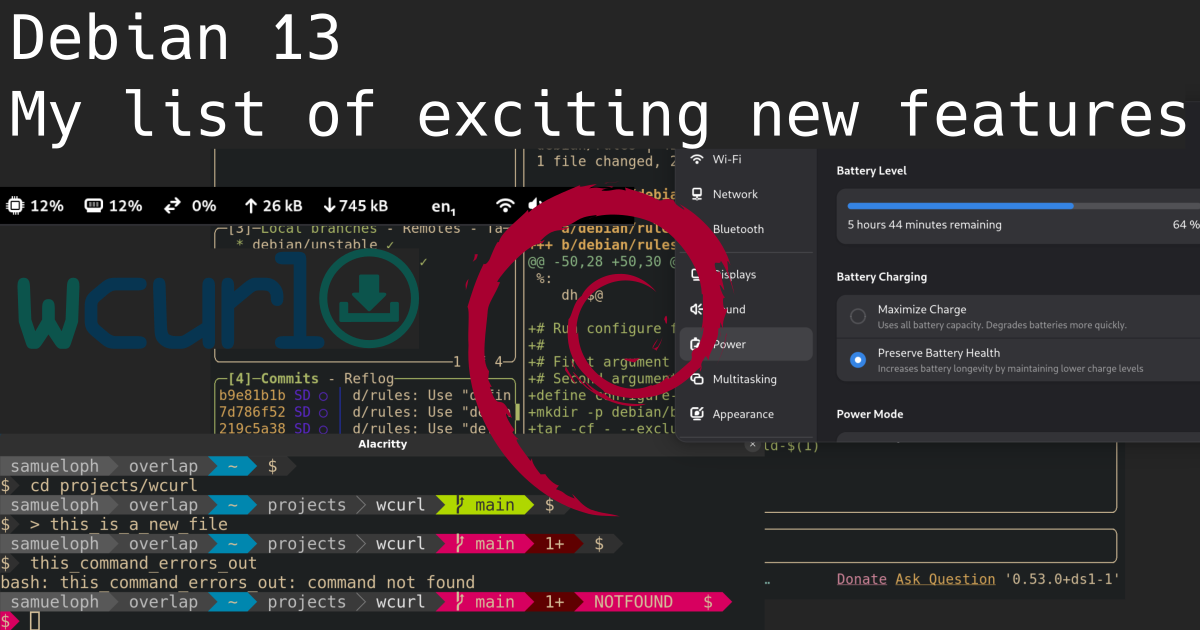
Samuel Henrique: Debian 13: My list of exciting new features

A bunch of screenshots overlaid on top of each other showing different tools: lazygit, gnome settings, gnome system monitor, powerline-go, and the wcurl logo, the text at the top says 'Debian 13: My list of exciting new features', and there's a Debian logo in the middle of image

Beyond Debian: Useful for other distros too Every two years Debian releases a new major version of its Stable series, meaning the differences between consecutive Debian Stable releases represent two years of new developments both in Debian as an organization and its native packages, but also in all other packages which are also shipped by other distributions (which are getting into this new Stable release). If you're not paying close attention to everything that's going on all the time in the Linux world, you miss a lot of the nice new features and tools. It's common for people to only realize there's a cool new trick available only years after it was first introduced. Given these considerations, the tips that I'm describing will eventually be available in whatever other distribution you use, be it because it's a Debian derivative or because it just got the same feature from the upstream project. I'm not going to list "passive" features (as good as they can be), the focus here is on new features that might change how you configure and use your machine, with a mix between productivity and performance.

Debian 13 - Trixie I have been a Debian Testing user for longer than 10 years now (and I recommend it for non-server users), so I'm not usually keeping track of all the cool features arriving in the new Stable releases because I'm continuously receiving them through the Debian Testing rolling release. Nonetheless, as a Debian Developer I'm in a good position to point out the ones I can remember. I would also like other Debian Developers to do the same as I'm sure I would learn something new. The Debian 13 release notes contain a "What's new" section , which lists the first two items here and a few other things, in other words, take my list as an addition to the release notes. Debian 13 was released on 2025-08-09, and these are nice things you shouldn't miss in the new release, with a bonus one not tied to the Debian 13 release.

1) wcurl wcurl logo Have you ever had to download a file from your terminal using curl and didn't remember the parameters needed? I did. Nowadays you can use wcurl; "a command line tool which lets you download URLs without having to remember any parameters." Simply call wcurl with one or more URLs as parameters and it will download all of them in parallel, performing retries, choosing the correct output file name, following redirects, and more. Try it out:
wcurl example.com
wcurl comes installed as part of the curl package on Debian 13 and in any other distribution you can imagine, starting with curl 8.14.0. I've written more about wcurl in its release announcement and I've done a lightning talk presentation in DebConf24, which is linked in the release announcement.

2) HTTP/3 support in curl Debian has become the first stable Linux distribution to ship curl with support for HTTP/3. I've written about this in July 2024, when we first enabled it. Note that we first switched the curl CLI to GnuTLS, but then ended up releasing the curl CLI linked with OpenSSL (as support arrived later). Debian was the first stable Linux distro to enable it, and within rolling-release-based distros; Gentoo enabled it first in their non-default flavor of the package and Arch Linux did it three months before we pushed it to Debian Unstable/Testing/Stable-backports, kudos to them! HTTP/3 is not used by default by the curl CLI, you have to enable it with --http3 or --http3-only. Try it out:
curl --http3 https://www.example.org
curl --http3-only https://www.example.org

3) systemd soft-reboot Starting with systemd v254, there's a new soft-reboot option, it's an userspace-only reboot, much faster than a full reboot if you don't need to reboot the kernel. You can read the announcement from the systemd v254 GitHub release Try it out:
# This will reboot your machine!
systemctl soft-reboot

4) apt --update Are you tired of being required to run sudo apt update just before sudo apt upgrade or sudo apt install $PACKAGE? So am I! The new --update option lets you do both things in a single command:
sudo apt --update upgrade
sudo apt --update install $PACKAGE
I love this, but it's still not yet where it should be, fingers crossed for a simple apt upgrade to behave like other package managers by updating its cache as part of the task, maybe in Debian 14? Try it out:
sudo apt upgrade --update
# The order doesn't matter
sudo apt --update upgrade
This is especially handy for container usage, where you have to update the apt cache before installing anything, for example:
podman run debian:stable bin/bash -c 'apt install --update -y curl'

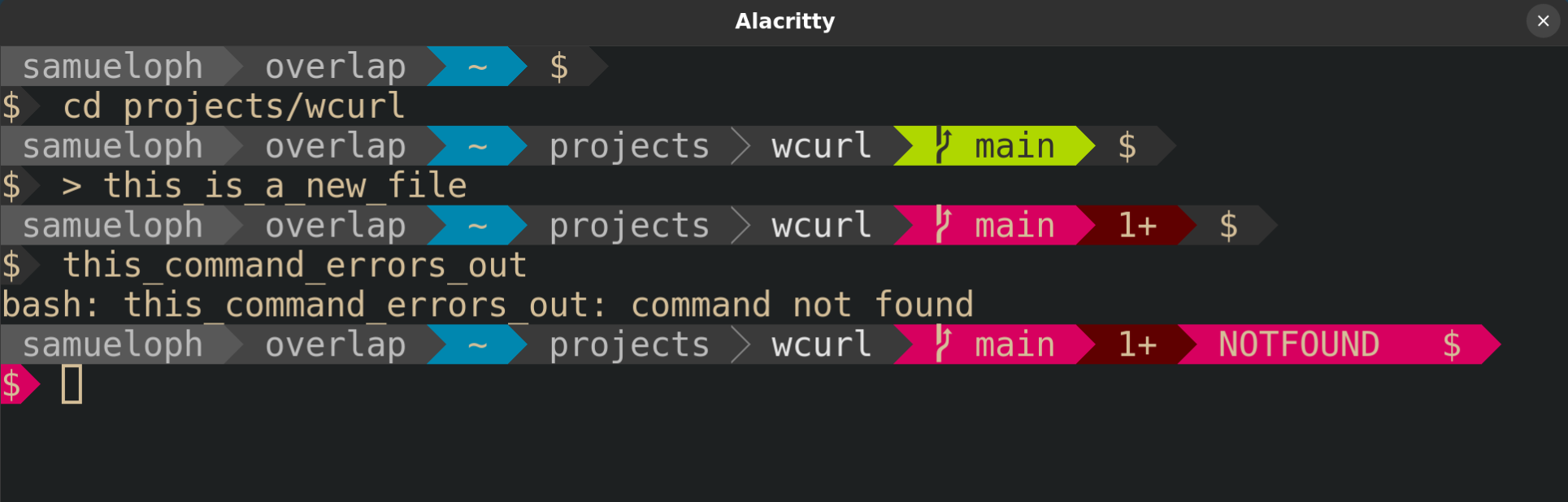
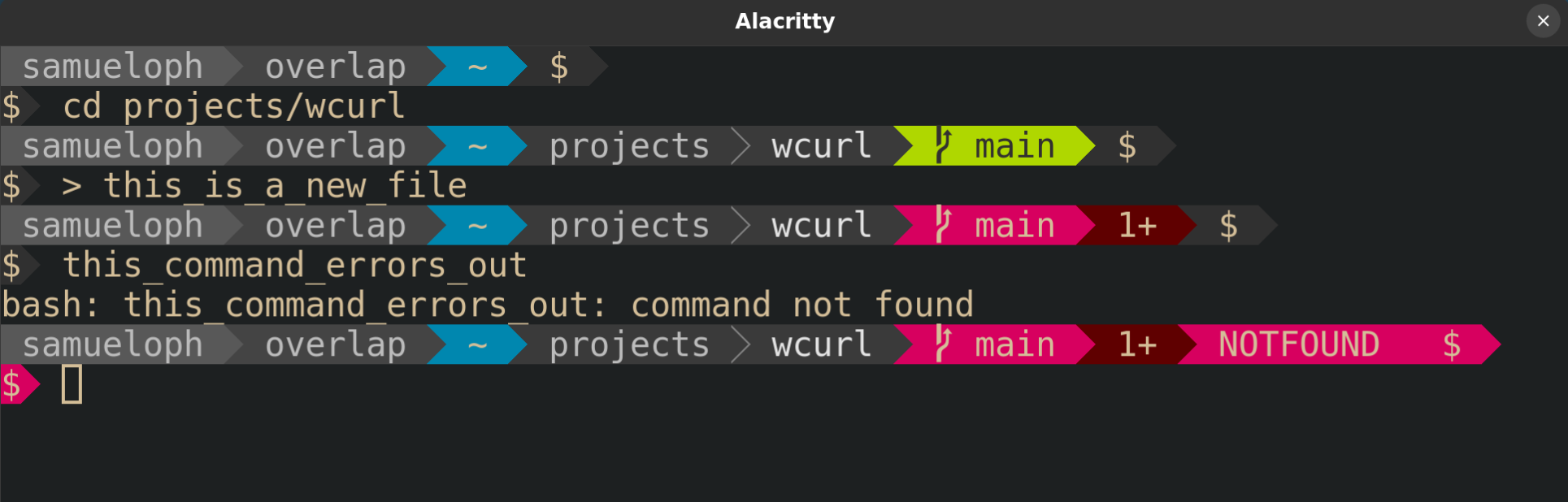
5) powerline-go powerline-go is a powerline-style prompt written in Golang, so it's much more performant than its Python alternative powerline. powerline-style prompts are quite useful to show things like the current status of the git repo in your working directory, exit code of the previous command, presence of jobs in the background, whether or not you're in an ssh session, and more. A screenshot of a terminal with powerline-go enabled, showing how the PS1 changes inside a git repository and when the last command fails Try it out:
sudo apt install powerline-go
Then add this to your .bashrc:
function _update_ps1()  
    PS1="$(/usr/bin/powerline-go -error $? -jobs $(jobs -p   wc -l))"

    # Uncomment the following line to automatically clear errors after showing
    # them once. This not only clears the error for powerline-go, but also for
    # everything else you run in that shell. Don't enable this if you're not
    # sure this is what you want.

    #set "?"
 

if [ "$TERM" != "linux" ] && [ -f "/usr/bin/powerline-go" ]; then
    PROMPT_COMMAND="_update_ps1; $PROMPT_COMMAND"
fi
Or this to .zshrc:
function powerline_precmd()  
    PS1="$(/usr/bin/powerline-go -error $? -jobs $ $ (%):%j :-0 )"

    # Uncomment the following line to automatically clear errors after showing
    # them once. This not only clears the error for powerline-go, but also for
    # everything else you run in that shell. Don't enable this if you're not
    # sure this is what you want.

    #set "?"
 
If you'd like to have your prompt start in a newline, like I have in the screenshot above, you just need to set -newline in the powerline-go invocation in your .bashrc/.zshrc.

6) Gnome System Monitor Extension Tips number 6 and 7 are for Gnome users. Gnome is now shipping a system monitor extension which lets you get a glance of the current load of your machine from the top bar. Screenshot of the top bar of Gnome with the system monitor extension enabled, showing the load of: CPU, memory, network and disk I've found this quite useful for machines where I'm required to install third-party monitoring software that tends to randomly consume more resources than it should. If I feel like my machine is struggling, I can quickly glance at its load to verify if it's getting overloaded by some process. The extension is not as complete as system-monitor-next, not showing temperatures or histograms, but at least it's officially part of Gnome, easy to install and supported by them. Try it out:
sudo apt install gnome-system-monitor gnome-shell-extension-manager
And then enable the extension from the "Extension Manager" application.

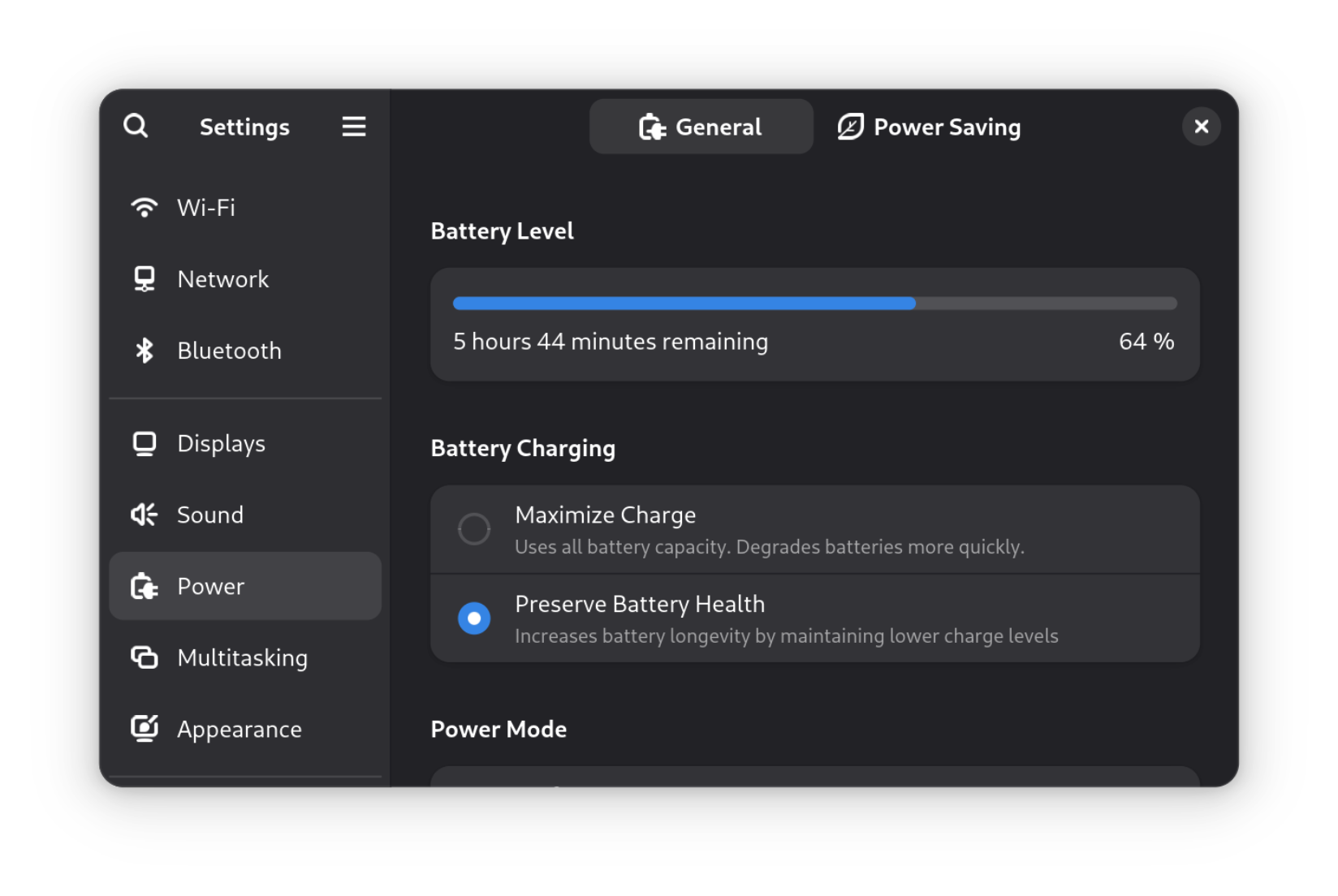
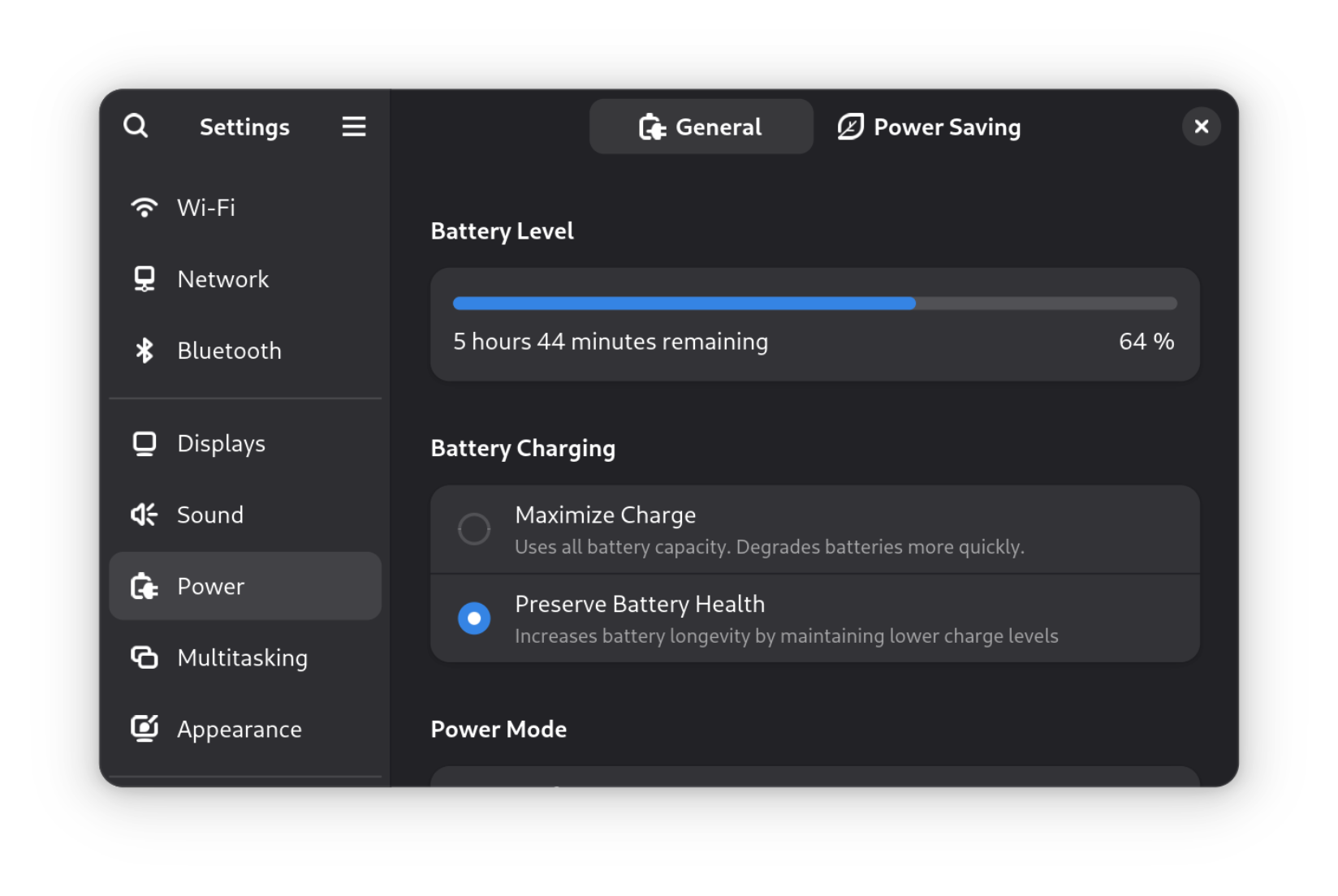
7) Gnome setting for battery charging profile After having to learn more about batteries in order to get into FPV drones, I've come to have a bigger appreciation for solutions that minimize the inevitable loss of capacity that accrues over time. There's now a "Battery Charging" setting (under the "Power") section which lets you choose between two different profiles: "Maximize Charge" and "Preserve Battery Health". A screenshot of the Gnome settings for Power showing the options for Battery Charging On supported laptops, this setting is an easy way to set thresholds for when charging should start and stop, just like you could do it with the tlp package, but now from the Gnome settings. To increase the longevity of my laptop battery, I always keep it at "Preserve Battery Health" unless I'm traveling. What I would like to see next is support for choosing different "Power Modes" based on whether the laptop is plugged-in, and based on the battery charge percentage. There's a GNOME issue tracking this feature, but there's some pushback on whether this is the right thing to expose to users. In the meantime, there are some workarounds mentioned in that issue which people who really want this feature can follow. If you would like to learn more about batteries; Battery University is a great starting point, besides getting into FPV drones and being forced to handle batteries without a Battery Management System (BMS). And if by any chance this sparks your interest in FPV drones, Joshua Bardwell's YouTube channel is a great resource: @JoshuaBardwell.
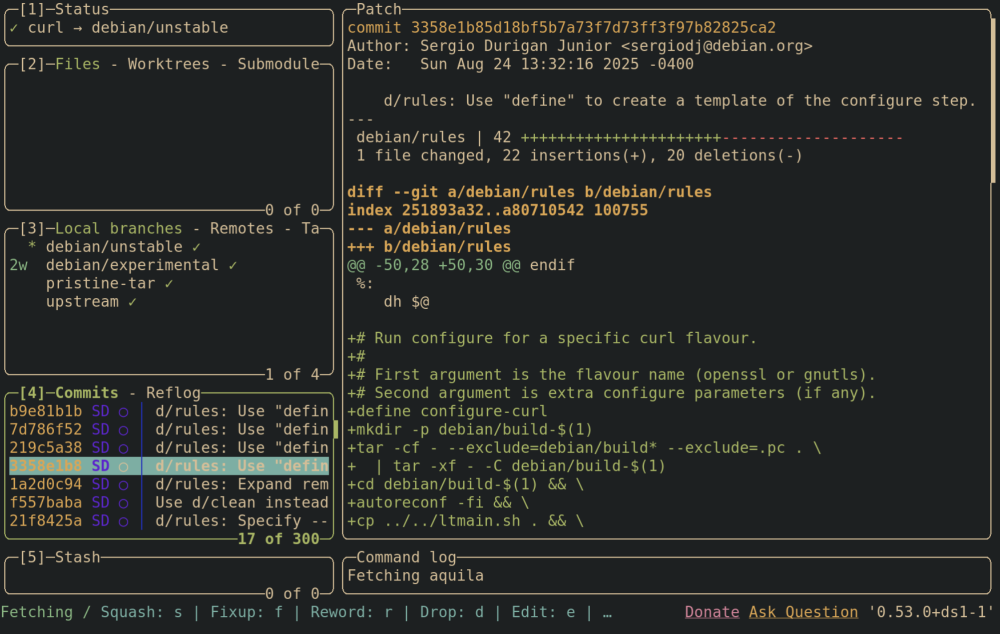
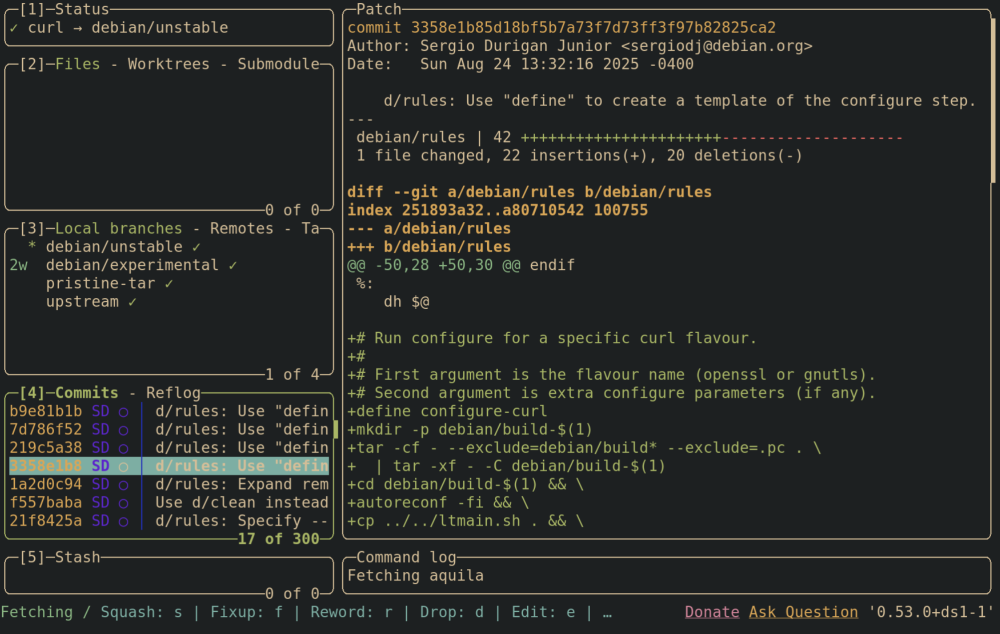
8) Lazygit Emacs users are already familiar with the legendary magit; a terminal-based UI for git. Lazygit is an alternative for non-emacs users, you can integrate it with neovim or just use it directly. I'm still playing with lazygit and haven't integrated it into my workflows, but so far it has been a pleasant experience. Screenshot of lazygit from the Debian curl repository, showing a selected commit and its diff, besides the other things from the lazygit UI You should check out the demos from the lazygit GitHub page. Try it out:
sudo apt install lazygit
And then call lazygit from within a git repository.

9) neovim neovim has been shipped in Debian since 2016, but upstream has been doing a lot of work to improve the experience out-of-the-box in the last couple of years. If you're a neovim poweruser, you're likely not installing it from the official repositories, but for those that are, Debian 13 comes with version 0.10.4, which brings the following improvements compared to the version in Debian 12:
  • Treesitter support for C, Lua, Markdown, with the possibility of adding any other languages as needed;
  • Better spellchecking due to treesitter integration (spellsitter);
  • Mouse support enabled by default;
  • Commenting support out-of-the-box; Check :h commenting for details, but the tl;dr is that you can use gcc to comment the current line and gc to comment the current selection.
  • OSC52 support. Especially handy for those using neovim over an ssh connection, this protocol lets you copy something from within the neovim process into the clipboard of the machine you're using to connect through ssh. In other words, you can copy from neovim running in a host over ssh and paste it in the "outside" machine.

10) [Bonus] Running old Debian releases The bonus tip is not specific to the Debian 13 release, but something I've recently learned in the #debian-devel IRC channel. Did you know there are usable container images for all past Debian releases? I'm not talking "past" as in "some of the older releases", I'm talking past as in "literally every Debian release, including the very first one". Tianon Gravi "tianon" is the Debian Developer responsible for making this happen, kudos to him! There's a small gotcha that the releases Buzz (1.1) and Rex (1.2) require a 32-bit host, otherwise you will get the error Out of virtual memory!, but starting with Bo (1.3) all should work in amd64/arm64. Try it out:
sudo apt install podman

podman run -it docker.io/debian/eol:bo
Don't be surprised when noticing that apt/apt-get is not available inside the container, that's because apt first appeared in Debian Slink (2.1).

Changes since publication

2025-08-30
  • Mention that Arch also enabled HTTP/3.

Samuel Henrique: Debian 13: My list of exciting new features

A bunch of screenshots overlaid on top of each other showing different tools: lazygit, gnome settings, gnome system monitor, powerline-go, and the wcurl logo, the text at the top says 'Debian 13: My list of exciting new features', and there's a Debian logo in the middle of image

Beyond Debian: Useful for other distros too Every two years Debian releases a new major version of its Stable series, meaning the differences between consecutive Debian Stable releases represent two years of new developments both in Debian as an organization and its native packages, but also in all other packages which are also shipped by other distributions (which are getting into this new Stable release). If you're not paying close attention to everything that's going on all the time in the Linux world, you miss a lot of the nice new features and tools. It's common for people to only realize there's a cool new trick available only years after it was first introduced. Given these considerations, the tips that I'm describing will eventually be available in whatever other distribution you use, be it because it's a Debian derivative or because it just got the same feature from the upstream project. I'm not going to list "passive" features (as good as they can be), the focus here is on new features that might change how you configure and use your machine, with a mix between productivity and performance.

Debian 13 - Trixie I have been a Debian Testing user for longer than 10 years now (and I recommend it for non-server users), so I'm not usually keeping track of all the cool features arriving in the new Stable releases because I'm continuously receiving them through the Debian Testing rolling release. Nonetheless, as a Debian Developer I'm in a good position to point out the ones I can remember. I would also like other Debian Developers to do the same as I'm sure I would learn something new. The Debian 13 release notes contain a "What's new" section , which lists the first two items here and a few other things, in other words, take my list as an addition to the release notes. Debian 13 was released on 2025-08-09, and these are nice things you shouldn't miss in the new release, with a bonus one not tied to the Debian 13 release.

1) wcurl wcurl logo Have you ever had to download a file from your terminal using curl and didn't remember the parameters needed? I did. Nowadays you can use wcurl; "a command line tool which lets you download URLs without having to remember any parameters." Simply call wcurl with one or more URLs as parameters and it will download all of them in parallel, performing retries, choosing the correct output file name, following redirects, and more. Try it out:
wcurl example.com
wcurl comes installed as part of the curl package on Debian 13 and in any other distribution you can imagine, starting with curl 8.14.0. I've written more about wcurl in its release announcement and I've done a lightning talk presentation in DebConf24, which is linked in the release announcement.

2) HTTP/3 support in curl Debian has become the first stable Linux distribution to ship curl with support for HTTP/3. I've written about this in July 2024, when we first enabled it. Note that we first switched the curl CLI to GnuTLS, but then ended up releasing the curl CLI linked with OpenSSL (as support arrived later). Debian was the first Linux distro to enable it in the default build of the curl package, but Gentoo enabled it a few weeks earlier in their non-default flavor of the package, kudos to them! HTTP/3 is not used by default by the curl CLI, you have to enable it with --http3 or --http3-only. Try it out:
curl --http3 https://www.example.org
curl --http3-only https://www.example.org

3) systemd soft-reboot Starting with systemd v254, there's a new soft-reboot option, it's an userspace-only reboot, much faster than a full reboot if you don't need to reboot the kernel. You can read the announcement from the systemd v254 GitHub release Try it out:
# This will reboot your machine!
systemctl soft-reboot

4) apt --update Are you tired of being required to run sudo apt update just before sudo apt upgrade or sudo apt install $PACKAGE? So am I! The new --update option lets you do both things in a single command:
sudo apt --update upgrade
sudo apt --update install $PACKAGE
I love this, but it's still not yet where it should be, fingers crossed for a simple apt upgrade to behave like other package managers by updating its cache as part of the task, maybe in Debian 14? Try it out:
sudo apt upgrade --update
# The order doesn't matter
sudo apt --update upgrade
This is especially handy for container usage, where you have to update the apt cache before installing anything, for example:
podman run debian:stable bin/bash -c 'apt install --update -y curl'

5) powerline-go powerline-go is a powerline-style prompt written in Golang, so it's much more performant than its Python alternative powerline. powerline-style prompts are quite useful to show things like the current status of the git repo in your working directory, exit code of the previous command, presence of jobs in the background, whether or not you're in an ssh session, and more. A screenshot of a terminal with powerline-go enabled, showing how the PS1 changes inside a git repository and when the last command fails Try it out:
sudo apt install powerline-go
Then add this to your .bashrc:
function _update_ps1()  
    PS1="$(/usr/bin/powerline-go -error $? -jobs $(jobs -p   wc -l))"

    # Uncomment the following line to automatically clear errors after showing
    # them once. This not only clears the error for powerline-go, but also for
    # everything else you run in that shell. Don't enable this if you're not
    # sure this is what you want.

    #set "?"
 

if [ "$TERM" != "linux" ] && [ -f "/usr/bin/powerline-go" ]; then
    PROMPT_COMMAND="_update_ps1; $PROMPT_COMMAND"
fi
Or this to .zshrc:
function powerline_precmd()  
    PS1="$(/usr/bin/powerline-go -error $? -jobs $ $ (%):%j :-0 )"

    # Uncomment the following line to automatically clear errors after showing
    # them once. This not only clears the error for powerline-go, but also for
    # everything else you run in that shell. Don't enable this if you're not
    # sure this is what you want.

    #set "?"
 
If you'd like to have your prompt start in a newline, like I have in the screenshot above, you just need to set -newline in the powerline-go invocation in your .bashrc/.zshrc.

6) Gnome System Monitor Extension Tips number 6 and 7 are for Gnome users. Gnome is now shipping a system monitor extension which lets you get a glance of the current load of your machine from the top bar. Screenshot of the top bar of Gnome with the system monitor extension enabled, showing the load of: CPU, memory, network and disk I've found this quite useful for machines where I'm required to install third-party monitoring software that tends to randomly consume more resources than it should. If I feel like my machine is struggling, I can quickly glance at its load to verify if it's getting overloaded by some process. The extension is not as complete as system-monitor-next, not showing temperatures or histograms, but at least it's officially part of Gnome, easy to install and supported by them. Try it out:
sudo apt install gnome-system-monitor gnome-shell-extension-manager
And then enable the extension from the "Extension Manager" application.

7) Gnome setting for battery charging profile After having to learn more about batteries in order to get into FPV drones, I've come to have a bigger appreciation for solutions that minimize the inevitable loss of capacity that accrues over time. There's now a "Battery Charging" setting (under the "Power") section which lets you choose between two different profiles: "Maximize Charge" and "Preserve Battery Health". A screenshot of the Gnome settings for Power showing the options for Battery Charging On supported laptops, this setting is an easy way to set thresholds for when charging should start and stop, just like you could do it with the tlp package, but now from the Gnome settings. To increase the longevity of my laptop battery, I always keep it at "Preserve Battery Health" unless I'm traveling. What I would like to see next is support for choosing different "Power Modes" based on whether the laptop is plugged-in, and based on the battery charge percentage. There's a GNOME issue tracking this feature, but there's some pushback on whether this is the right thing to expose to users. In the meantime, there are some workarounds mentioned in that issue which people who really want this feature can follow. If you would like to learn more about batteries; Battery University is a great starting point, besides getting into FPV drones and being forced to handle batteries without a Battery Management System (BMS). And if by any chance this sparks your interest in FPV drones, Joshua Bardwell's YouTube channel is a great resource: @JoshuaBardwell.

8) Lazygit Emacs users are already familiar with the legendary magit; a terminal-based UI for git. Lazygit is an alternative for non-emacs users, you can integrate it with neovim or just use it directly. I'm still playing with lazygit and haven't integrated it into my workflows, but so far it has been a pleasant experience. Screenshot of lazygit from the Debian curl repository, showing a selected commit and its diff, besides the other things from the lazygit UI You should check out the demos from the lazygit GitHub page. Try it out:

sudo apt install lazygit
And then call lazygit from within a git repository.

9) neovim neovim has been shipped in Debian since 2016, but upstream has been doing a lot of work to improve the experience out-of-the-box in the last couple of years. If you're a neovim poweruser, you're likely not installing it from the official repositories, but for those that are, Debian 13 comes with version 0.10.4, which brings the following improvements compared to the version in Debian 12:
  • Treesitter support for C, Lua, Markdown, with the possibility of adding any other languages as needed;
  • Better spellchecking due to treesitter integration (spellsitter);
  • Mouse support enabled by default;
  • Commenting support out-of-the-box; Check :h commenting for details, but the tl;dr is that you can use gcc to comment the current line and gc to comment the current selection.
  • OSC52 support. Especially handy for those using neovim over an ssh connection, this protocol lets you copy something from within the neovim process into the clipboard of the machine you're using to connect through ssh. In other words, you can copy from neovim running in a host over ssh and paste it in the "outside" machine.

10) [Bonus] Running old Debian releases The bonus tip is not specific to the Debian 13 release, but something I've recently learned in the #debian-devel IRC channel. Did you know there are usable container images for all past Debian releases? I'm not talking "past" as in "some of the older releases", I'm talking past as in "literally every Debian release, including the very first one". Tianon Gravi "tianon" is the Debian Developer responsible for making this happen, kudos to him! There's a small gotcha that the releases Buzz (1.1) and Rex (1.2) require a 32-bit host, otherwise you will get the error Out of virtual memory!, but starting with Bo (1.3) all should work in amd64/arm64. Try it out:
sudo apt install podman

podman run -it docker.io/debian/eol:bo
Don't be surprised when noticing that apt/apt-get is not available inside the container, that's because apt first appeared in Debian Slink (2.1).

Valhalla's Things: 1840s Underwear

Posted on August 28, 2025
Tags: madeof:atoms, craft:sewing, FreeSoftWear
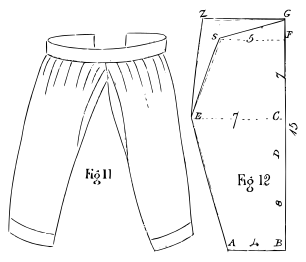
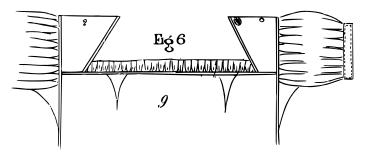
A woman wearing a knee-length shift with very short pleated sleeves and drawers that are a bit longer than needed to be ankle-length. The shift is too wide at the top, had to have a pleat taken in the center front, but the sleeves are still falling down. She is also wearing a black long sleeved t-shirt and leggings under said underwear, for decency. A bit more than a year ago, I had been thinking about making myself a cartridge pleated skirt. For a number of reasons, one of which is the historybounding potential, I ve been thinking pre-crinoline, so somewhere around the 1840s, and that s a completely new era for me, which means: new underwear. Also, the 1840s are pre-sewing machine, and I was already in a position where I had more chances to handsew than to machine sew, so I decided to embrace the slowness and sew 100% by hand, not even using the machine for straight seams. A woman turning fast enough that her petticoat extends a considerable distance from the body. The petticoat is white with a pattern of cording from the hem to just below hip level, with a decreasing number of rows of cording going up. If I remember correctly, I started with the corded petticoat, looking around the internet for instructions, and then designing my own based on the practicality of using modern wide fabric from my stash (and specifically some DITTE from costumers favourite source of dirty cheap cotton IKEA). Around the same time I had also acquired a sashiko kit, and I used the Japanese technique for sewing running stitches pushing the needle with a thimble that covers the base of the middle finger, and I can confirm that for this kind of things it s great! I ve since worn the petticoat a few times for casual / historyBounding / folkwearBounding reasons, during the summer, and I can confirm it s comfortable to use; I guess that during the winter it could be nice to add a flannel layer below it. The technical drawing and pattern for drawers from the book: each leg is cut out of a rectangle of fabric folded along the length, the leg is tapered equally, while the front is tapered more than the back, and comes to a point below the top of the original rectangle. Then I proceeded with the base layers: I had been browsing through The workwoman's guide and that provided plenty of examples, and I selected the basic ankle-length drawers from page 53 and the alternative shift on page 47. As for fabric, I had (and still have) a significant lack of underwear linen in my stash, but I had plenty of cotton voile that I had not used in a while: not very historically accurate for plain underwear, but quite suitable for a wearable mockup. Working with a 1830s source had an interesting aspect: other of the usual, mildly annoying, imperial units, it also used a lot a few obsolete units, especially nails, that my qalc, my usual calculator and converter, doesn t support. Not a big deal, because GNU units came to the rescue, and that one knows a lot of obscure and niche units, and it s quite easy to add those that are missing1 Working on this project also made me freshly aware of something I had already noticed: converting instructions for machine sewing garments into instructions for hand sewing them is usually straightforward, but the reverse is not always true. Starting from machine stitching, you can usually convert straight stitches into backstitches (or running backstitches), zigzag and overlocking into overcasting and get good results. In some cases you may want to use specialist hand stitches that don t really have a machine equivalent, such as buttonhole stitches instead of simply overcasting the buttonhole, but that s it. Starting from hand stitching, instead, there are a number of techniques that could be converted to machine stitching, but involve a lot of visible topstitching that wasn t there in the original instructions, or at times are almost impossible to do by machine, if they involve whipstitching together finished panels on seams that are subject to strong tension. Anyway, halfway through working with the petticoat I cut both the petticoat and the drawers at the same time, for efficiency in fabric use, and then started sewing the drawers. the top third or so of the drawers, showing a deep waistband that is closed with just one button at the top, and the front opening with finished edges that continue through the whole crotch, with just the overlap of fabric to provide coverage. The book only provided measurements for one size (moderate), and my fabric was a bit too narrow to make them that size (not that I have any idea what hip circumference a person of moderate size was supposed to have), so the result is just wide enough to be comfortably worn, but I think that when I ll make another pair I ll try to make them a bit wider. On the other hand they are a bit too long, but I think that I ll fix it by adding a tuck or two. Not a big deal, anyway. The same woman as in the opening image from the back, the shift droops significantly in the center back, and the shoulder straps have fallen down on the top of the arms. The shift gave me a bit more issues: I used the recommended gusset size, and ended up with a shift that was way too wide at the top, so I had to take a box pleat in the center front and back, which changed the look and wear of the garment. I have adjusted the instructions to make gussets wider, and in the future I ll make another shift following those. Even with the pleat, the narrow shoulder straps are set quite far to the sides, and they tend to droop, and I suspect that this is to be expected from the way this garment is made. The fact that there are buttonholes on the shoulder straps to attach to the corset straps and prevent the issue is probably a hint that this behaviour was to be expected. The technical drawing of the shift from the book, showing a the top of the body, two trapezoidal shoulder straps, the pleated sleeves and a ruffle on the front edge. I ve also updated the instructions so that they shoulder straps are a bit wider, to look more like the ones in the drawing from the book. Making a corset suitable for the time period is something that I will probably do, but not in the immediate future, but even just wearing the shift under a later midbust corset with no shoulder strap helps. I m also not sure what the point of the bosom gores is, as they don t really give more room to the bust where it s needed, but to the high bust where it s counterproductive. I also couldn t find images of original examples made from this pattern to see if they were actually used, so in my next make I may just skip them. Sleeve detail, showing box pleats that are about 2 cm wide and a few mm distance from each other all along the circumference, neatly sewn into the shoulder strap on one side and the band at the other side. On the other hand, I m really happy with how cute the short sleeves look, and if2 I ll ever make the other cut of shift from the same book, with the front flaps, I ll definitely use these pleated sleeves rather than the straight ones that were also used at the time. As usual, all of the patterns have been published on my website under a Free license:




  1. My ~/.units file currently contains definitions for beardseconds, bananas and the more conventional Nm and NeL (linear mass density of fibres).
  2. yeah, right. when.

27 August 2025

Russell Coker: ZRAM and VMs

I ve just started using zram for swap on VMs. The use of compression for swap in Linux apparently isn t new, it s been in the Linux kernel since version 3.2 (since 2012). But until recent years I hadn t used it. When I started using Mobian (the Debian distribution for phones) zram was in the default setup, it basically works and I never needed to bother with it which is exactly what you want from such a technology. After seeing it s benefits in Mobian I started using it on my laptops where it worked well. Benefits of ZRAM ZRAM means that instead of paging data to storage it is compressed to another part of RAM. That means no access to storage which is a significant benefit if storage is slow (typical for phones) or if storage wearing out is a problem. For servers you typically have SSDs that are fast and last for significant write volumes, for example the 120G SSDs referenced in my blog post about swap (not) breaking SSD [1] are running well in my parents PC because they outlasted all the other hardware connected to them and 120G isn t usable for anything more demanding than my parents use nowadays. Those are Intel 120G 2.5 DC grade SATA SSDs. For most servers ZRAM isn t a good choice as you can just keep doing IO on the SSDs for years. A server that runs multiple VMs is a special case because you want to isolate the VMs from each other. Support for quotas for storage IO in Linux isn t easy to configure while limiting the number of CPU cores is very easy. If a system or VM using ZRAM for swap starts paging excessively the bottleneck will be CPU, this probably isn t going to be great on a phone with a slow CPU but on a server class CPU it will be less of a limit. Whether compression is slower or faster than SSD is a complex issue but it will definitely be just a limit for that VM. When I setup a VM server I want to have some confidence that a DoS attack or configuration error on one VM isn t going to destroy the performance of other VMs. If the VM server has 4 cores (the smallest VM server I run) and no VM has more than 2 cores then I know that the system can still run adequately if half the CPU performance is being wasted. Some servers I run have storage limits that make saving the disk space for swap useful. For servers I run in Hetzner (currently only one server but I have run up to 6 at various times in the past) the storage is often limited, Hetzner seems to typically have storage that is 8* the size of RAM so if you have many VMs configured with the swap that they might need in the expectation that usually at most one of them will be actually swapping then it can make a real difference to usable storage. 5% of storage used for swap files isn t uncommon or unreasonable. Big Servers I am still considering the implications of zram on larger systems. If I have a ML server with 512G of RAM would it make sense to use it? It seems plausible that a system might need 550G of RAM and zram could make the difference between jobs being killed with OOM and the jobs just completing. The CPU overhead of compression shouldn t be an issue as when you have dozens of cores in the system having one or two used for compression is no big deal. If a system is doing strictly ML work there will be a lot of data that can t be compressed, so the question is how much of the memory is raw input data and the weights used for calculations and how much is arrays with zeros and other things that are easy to compress. With a big server nothing less than 32G of swap will make much difference to the way things work and if you have 32G of data being actively paged then the fastest NVMe devices probably won t be enough to give usable performance. As zram uses one stream per CPU code if you have 44 cores that means 44 compression streams which should handle greater throughput. I ll write another blog post if I get a chance to test this.

Matthew Palmer: StrongBox: Simple, Safe Data Encryption for Rust

Some time ago, I wanted to encrypt a bunch of data in an application I was writing in Rust, mostly to be stored in a database, but also session cookies and sensitive configuration variables. Since Rust is widely known as a secure-yet-high-performance programming language, I was expecting that there would be a widely-used crate that gave me a secure, high-level interface to strong, safe cryptography. Imagine my surprise when I discovered that just didn t seem to exist. Don t get me wrong: Rust is replete with fast, secure, battle-tested cryptographic primitives. The RustCrypto group provides all manner of robust, widely-used crates for all manner of cryptography-related purposes. They re the essential building blocks for practical cryptosystems, but using them directly in an application is somewhat akin to building a car from individual atoms of iron and carbon. So I wrote my own high-level data encryption library, called it StrongBox, and have been happily encrypting and decrypting data ever since.

Cryptography So Simple Even I Can t Get It Wrong The core of StrongBox is the StrongBox trait, which has only two methods: encrypt and decrypt, each of which takes just two arguments. The first argument is the plaintext (for encrypt) or the ciphertext (for decrypt) to work on. The second argument is the encryption context, for use as Authenticated Additional Data, an important part of many uses of encryption. There s essentially no configuration or parameters to get wrong. You can t choose the encryption algorithm, or block cipher mode, and you don t have to worry about generating a secure nonce. You create a StrongBox with a key, and then you call encrypt and decrypt. That s it.

Practical Cryptographic Affordances Ok, ok that s not quite it. Because StrongBox is even easier to use than what I ve described, thanks to the companion crate, StructBox. When I started using StrongBox in the wild , it quickly became clear that what I almost always wanted to encrypt in my application wasn t some ethereal plaintext . I wanted to encrypt things, specifically structs (and enums). So, through the magic of Rust derive macros, I built StructBox, which provides encrypt and decrypt operations on any Serde-able type. Given that using Serde encoders can be a bit fiddly to use, it s virtually easier to get an encrypted, serialized struct than it is to get a plaintext serialized struct.

Key Problems in Cryptography The thing about cryptography is that it largely turns all data security problems into key management problems. All the fancy cryptographic wonkery is for naught if you don t manage the encryption keys well. So, most of the fancy business in StrongBox isn t the encryption and decryption, but instead solving problems around key management.

Different Keys for Different Purposes Using the same key for all of your cryptographic needs is generally considered a really bad idea. It opens up all manner of risks, that are easily avoided if you use different keys for different things. However, having to maintain a big pile of different keys is a nightmare, so nobody s going to do that. Enter: key derivation. Create one safe, secure root key, and then use a key derivation function to spawn as many other keys as you need. Different keys for each database column, another one to encrypt cookies, and so on. StrongBox supports this through the StemStrongBox type. You ll typically start off by creating a StemStrongBox with the root key, and then derive whatever other StrongBoxes you need, for encrypting and decrypting different kinds of data.

You Spin Me Round Sometimes, keys need to be rotated. Whether that s because you actually know (or even have reason to suspect) someone has gotten the key, or just because you re being appropriately paranoid, sometimes key rotation has to happen. As someone who has had to rotate keys in situations where such an eventuality was not planned for, I can say with some degree of authority: it absolutely sucks to have to do an emergency key rotation in a system that isn t built to make that easy. That s why StrongBox natively supports key rotation. Every StrongBox takes one encryption key, and an arbitrary number of decryption keys, and will automatically use the correct key to decrypt ciphertexts.

Will You Still Decrypt Me, Tomorrow? In addition to manual key rotation, StrongBox also supports time-based key rotation with the RotatingStrongBox type. This comes in handy when you re encrypting a lot of ephemeral data, like cookies (or server-side session data). It provides a way to automatically expire old data, and prevents attacks that become practical when large amounts of data are encrypted using a single key.

Invasion of the Invisible Salamanders! I mostly mention this just because I love the name, but there is a kind of attack possible in common AEAD modes called the invisible salamanders attack. StrongBox implements mitigations against this, by committing to the key being used so that an attacker can t forge a ciphertext that decrypts validly to different plaintexts when using different keys. This is why I love cryptography: everything sounds like absolute goddamn magic.

Call Me Crazy, Support Me Maybe? If you re coding in Rust (which you probably should be), encrypting your stored data (which you definitely should be), and StrongBox makes your life easier (which it really will), you can show your appreciation for my work by contributing to my open source code-fund. Simply by shouting me a refreshing beverage, you ll be helping me out, and helping to grow the software commons. Alternately, if you re looking for someone to Speak Rust to Computers on a professional basis, I m available for contracts or full-time remote positions.

25 August 2025

Gunnar Wolf: The comedy of computation, or, how I learned to stop worrying and love obsolescence

This post is a review for Computing Reviews for The comedy of computation, or, how I learned to stop worrying and love obsolescence , a book published in Stanford University Press
The Comedy of Computation is not an easy book to review. It is a much enjoyable book that analyzes several examples of how being computational has been approached across literary genres in the last century how authors of stories, novels, theatrical plays and movies, focusing on comedic genres, have understood the role of the computer in defining human relations, reactions and even self-image. Mangrum structures his work in six thematic chapters, where he presents different angles on human society: How have racial stereotypes advanced in human imagination and perception about a future where we interact with mechanical or computational partners (from mechanical tools performing jobs that were identified with racial profiles to intelligent robots that threaten to control society); the genericity of computers and people can be seen as generic, interchangeable characters, often fueled by the tendency people exhibit to confer anthropomorphic qualities to inanimate objects; people s desire to be seen as truly authentic , regardless of what it ultimately means; romantic involvement and romance-led stories (with the computer seen as a facilitator for human-to-human romances, distractor away from them, or being itself a part of the couple); and the absurdity in antropomorphization, in comparing fundamentally different aspects such as intelligence and speed at solving mathematical operations, as well as the absurdity presented blatantly as such by several techno-utopian visions. But presenting this as a linear set of concepts that are presented does not do justice to the book. Throughout the sections of each chapter, a different work serves as the axis Novels and stories, Hollywood movies, Broadway plays, some covers for the Time magazine, a couple of presenting the would-be future, even a romantic comedy entirely written by bots . And for each of them, Benjamin Mangrum presents a very thorough analysis, drawing relations and comparing with contemporary works, but also with Shakespeare, classical Greek myths, and a very long etc tera. This book is hard to review because of the depth of work the author did: Reading it repeatedly made me look for other works, or at least longer references for them. Still, despite being a work with such erudition, Mangrum s text is easy and pleasant to read, without feeling heavy or written in an overly academic style. I very much enjoyed reading this book. It is certainly not a technical book about computers and society in any way; it is an exploration of human creativity and our understanding of the aspects the author has found as central to understanding the impact of computing on humankind. However, there is one point I must mention before closing: I believe the editorial decision to present the work as a running text, with all the material conceptualized as footnotes presented as a separate, over 50 page long final chapter, detracts from the final result. Personally, I enjoy reading the footnotes because they reveal the author s thought processes, even if they stray from the central line of thought. Even more, given my review copy was a PDF, I could not even keep said chapter open with one finger, bouncing back and forth. For all purposes, I missed out on the notes; now that I finished reading and stumbled upon that chapter, I know I missed an important part of the enjoyment.

Scarlett Gately Moore: A Bittersweet Farewell: My Final KDE Snap Release and the End of an Era

Today marks both a milestone and a turning point in my journey with open source software. I m proud to announce the release of KDE Gear 25.08.0 as my final snap package release. You can find all the details about this exciting update at the official KDE announcement. After much reflection and with a heavy heart, I ve made the difficult decision to retire from most of my open source software work, including snap packaging. This wasn t a choice I made lightly it comes after months of rejections and silence in an industry I ve loved and called home for over 20 years.

Passing the Torch While I m stepping back, I m thrilled to share that the future of KDE snaps is in excellent hands. Carlos from the Neon team has been working tirelessly to set up snaps on the new infrastructure that KDE has made available. This means building snaps in KDE CI is now possible a significant leap forward for the ecosystem. I ll be helping Carlos get the pipelines properly configured to ensure a smooth transition.

Staying Connected (But Differently) Though I m stepping away from most development work, I won t be disappearing entirely from the communities that have meant so much to me:
  • Kubuntu: I ll remain available as a backup, though Rik is doing an absolutely fabulous job getting the latest and greatest KDE packages uploaded. The distribution is in capable hands.
  • Ubuntu Community Council: I m continuing my involvement here because I ve found myself genuinely enjoying the community side of things. There s something deeply fulfilling about focusing on the human connections that make these projects possible.
  • Debian: I ll likely be submitting for emeritus status, as I haven t had the time to contribute meaningfully and want to be honest about my current capacity.

The Reality Behind the Decision This transition isn t just about career fatigue it s about financial reality. I ve spent too many years working for free while struggling to pay my bills. The recent changes in the industry, particularly with AI transforming the web development landscape, have made things even more challenging. Getting traffic to websites now requires extensive social media work and marketing all expected to be done without compensation. My stint at webwork was good while it lasted, but the changing landscape has made it unsustainable. I ve reached a point where I can t continue doing free work when my family and I are struggling financially. It shouldn t take breaking a limb to receive the donations needed to survive.

A Career That Meant Everything These 20+ years in open source have been the defining chapter of my professional life. I ve watched communities grow, technologies evolve, and witnessed firsthand the incredible things that happen when passionate people work together. The relationships I ve built, the problems we ve solved together, and the software we ve created have been deeply meaningful. But I also have to be honest about where I stand today: I cannot compete in the current job market. The industry has changed, and despite my experience and passion, the opportunities just aren t there for someone in my situation.

Looking Forward Making a career change after two decades is terrifying, but it s also necessary. I need to find a path that can provide financial stability for my family while still allowing me to contribute meaningfully to the world. If you ve benefited from my work over the years and are in a position to help during this transition, I would be forever grateful for any support. Every contribution, no matter the size, helps ease this difficult period: https://gofund.me/a9c55d8f

Thank You To everyone who has collaborated with me, tested my packages, filed bug reports, offered encouragement, or simply used the software I ve helped maintain thank you. You ve made these 20+ years worthwhile, and you ve been part of something bigger than any individual contribution. The open source world will continue to thrive because it s built on the collective passion of thousands of people like Carlos, Rik, and countless others who are carrying the torch forward. While my active development days are ending, the impact of this community will continue long into the future. With sincere gratitude and fond farewells, Scarlett Moore

22 August 2025

Daniel Lange: Polkitd (Policy Kit Daemon) in Trixie ... allowing remote users to suspend, reboot, power off the local system

As per the previous Polkit blog post the policykit framwork has lost the ability to understand its own .pkla files and policies need to be expressed in Javascript with .rules files now. To re-enable allowing remote users (think ssh) to reboot, hibernate, suspend or power off the local system, create a 10-shutdown-reboot.rules file in /etc/polkit-1/rules.d/:
polkit.addRule(function(action, subject)
if ((action.id == "org.freedesktop.login1.reboot-multiple-sessions"
action.id == "org.freedesktop.login1.reboot"
action.id == "org.freedesktop.login1.suspend-multiple-sessions"
action.id == "org.freedesktop.login1.suspend"
action.id == "org.freedesktop.login1.hibernate-multiple-sessions"
action.id == "org.freedesktop.login1.hibernate"
action.id == "org.freedesktop.login1.power-off-multiple-sessions"
action.id == "org.freedesktop.login1.power-off") &&
(subject.isInGroup("sudo") (subject.user == "root")))

return polkit.Result.YES;

);
and run systemctl restart polkit.

Russell Coker: Dell T320 H310 RAID and IT Mode

The Problem Just over 2 years ago my Dell T320 server had a motherboard failure [1]. I recently bought another T320 that had been gutted (no drives, PSUs, or RAM) and put the bits from my one in it. I installed Debian and the resulting installation wouldn t boot, I tried installing with both UEFI and BIOS modes with the same result. Then I realised that the disks I had installed were available even though I hadn t gone through the RAID configuration (I usually make a separate RAID-0 for each disk to work best with BTRFS or ZFS). I tried changing the BIOS setting for SATA disks between RAID and AHCI modes which didn t change things and realised that the BIOS setting in question probably applies to the SATA connector on the motherboard and that the RAID card was in IT mode which means that each disk is seen separately. If you are using ZFS or BTRFS you don t want to use a RAID-1, RAID-5, or RAID-6 on the hardware RAID controller, if there are different versions of the data on disks in the stripe then you want the filesystem to be able to work out which one is correct. To use IT mode you have to flash a different unsupported firmware on the RAID controller and then you either have to go to some extra effort to make it bootable or have a different device to boot from. The Root Causes Dell has no reason to support unusual firmware on their RAID controllers. Installing different firmware on a device that is designed for high availability is going to have some probability of data loss and perhaps more importantly for Dell some probability of customers returning hardware during the support period and acting innocent about why it doesn t work. Dell has a great financial incentive to make it difficult to install Dell firmware on LSI cards from other vendors which have equivalent hardware as they don t want customers to get all the benefits of iDRAC integration etc without paying the Dell price premium. All the other vendors have similar financial incentives so there is no official documentation or support on converting between different firmware images. Dell s support for upgrading the Dell version is pretty good, but it aborts if it sees something different. The Attempts I tried following the instructions in this document to flash back to Dell firmware [2]. This document is about the H310 RAID card in my Dell T320 AKA a LSI SAS 9211-8i . The sas2flash.efi program didn t seem to do anything, it returned immediately and didn t give an error message. This page gives a start of how to get inside the Dell firmware package but doesn t work [3]. It didn t cover the case where sasdupie aborts with an error because it detects the current version as 00.00.00.00 not something that the upgrade program is prepared to upgrade from. But it s a place to start looking for someone who wants to try harder at this. This forum post has some interesting information, I gave up before trying it, but it may be useful for someone else [4]. The Solution Dell tower servers have as a standard feature an internal USB port for a boot device. So I created a boot image on a spare USB stick and installed it there and it then loads the kernel and mounts the filesystem from a SATA hard drive. Once I got that working everything was fine. The Debian/Trixie installer would probably have allowed me to install an EFI device on the internal USB stick as part of the install if I had known what was going to happen. The system is now fully working and ready to sell. Now I just need to find someone who wants IT mode on the RAID controller and hopefully is willing to pay extra for it. Whatever I sell the system for it seems unlikely to cover the hours I spent working on this. But I learned some interesting things about RAID firmware and hopefully this blog post will be useful to other people, even if only to discourage them from trying to change firmware.

Reproducible Builds (diffoscope): diffoscope 304 released

The diffoscope maintainers are pleased to announce the release of diffoscope version 304. This version includes the following changes:
[ Chris Lamb ]
* Do not run jsondiff on files over 100KiB as the algorithm runs in O(n^2)
  time. (Closes: reproducible-builds/diffoscope#414)
* Fix test after the upload of systemd-ukify 258~rc3 (vs. 258~rc2).
* Move from a mono-utils dependency to versioned "mono-devel   mono-utils"
  dependency, taking care to maintain the [!riscv64] architecture
  restriction. (Closes: #1111742)
* Use sed -ne over awk -F= to to avoid mangling dependency lines containing
  equals signs (=), for example version restrictions.
* Use sed backreferences when generating debian/tests/control to avoid DRY
  violations.
* Update copyright years.
[ Martin Joerg ]
* Avoid a crash in the HTML presenter when page limit is None.
You find out more by visiting the project homepage.

Reproducible Builds (diffoscope): diffoscope 305 released

The diffoscope maintainers are pleased to announce the release of diffoscope version 305. This version includes the following changes:
[ Chris Lamb ]
* Upload to unstable/sid after the release of trixie.
You find out more by visiting the project homepage.

21 August 2025

Matthew Palmer: Progress on my open source funding experiment

When I recently announced that I was starting an open source crowd-funding experiment, I wasn t sure what would happen. Perhaps there d be radio silence, or a huge out-pouring of interest from people who wanted to see more open source code in the world. What s happened so far has been interesting. I chose to focus on action-validator because it s got a number of open feature requests, and it solves a common problem that people have. The thing is, I ve developed and released a lot of open source over the multiple decades I ve been noodling around with computers. Much of that has been of use to many people, the overwhelming majority of whom I will never, ever meet, hear from, or even know that I ve helped them out. One person, however, I do know about a generous soul named Andy, who (as far as I know) doesn t use action-validator, but who does use another tool I wrote some years ago: lvmsync. It s somewhat niche, essentially rsync for LVM-backed block devices , so I m slightly surprised that it s my most-starred repository, at nearly 400(!) stars. Andy is one of the people who finds it useful, and he was kind enough to reach out and offer a contribution in thanks for lvmsync existing. In the spirit of my open source code-fund, I applied Andy s contribution to the general pool, and as a result have just released action-validator v0.8.0, which supports a new --rootdir command-line option, fixing action-validator issue #54. Everyone who uses --rootdir in their action-validator runs has Andy to thank, and I thank him too. This is, of course, still early days in my experiment. You can be like Andy, and make the open source world a better place, by contributing to my code-fund, and you can get your name up in lights, too. Whether you re an action-validator user, have gotten utility from any of the other things I ve written, or just want to see more open source code in the world, your contribution is greatly appreciated.

20 August 2025

Dirk Eddelbuettel: x13binary 1.1.61.1 on CRAN: Micro Fix

The x13binary team is happy to share the availability of Release 1.1.61.1 of the x13binary package providing the X-13ARIMA-SEATS program by the US Census Bureau which arrived on CRAN earlier today. This release responds to a recent change in gfortran version 15 which now picks up a missing comma in a Fortran format string for printing output. The change is literally a one-char addition which we also reported upstream. At the same time this release also updates one README.md URL to an archive.org URL of an apparently deleted reference. There is now also an updated upstream release 1.1-62 which we should package next. Courtesy of my CRANberries, there is also a diffstat report for this release showing changes to the previous release.

This post by Dirk Eddelbuettel originated on his Thinking inside the box blog. If you like this or other open-source work I do, you can sponsor me at GitHub.

Antoine Beaupr : Encrypting a Debian install with UKI

I originally setup a machine without any full disk encryption, then somehow regretted it quickly after. My original reasoning was that this was a "play" machine so I wanted as few restrictions on accessing the machine as possible, which meant removing passwords, mostly. I actually ended up having a user password, but disabled the lock screen. Then I started using the device to manage my photo collection, and suddenly there was a lot of "confidential" information on the device that I didn't want to store in clear text anymore.

Pre-requisites So, how does one convert an existing install from plain text to full disk encryption? One way is to backup to an external drive, re-partition everything and copy things back, but that's slow and boring. Besides, cryptsetup has a cryptsetup-reencrypt command, surely we can do this in place? Having not set aside enough room for /boot, I briefly considered a "encrypted /boot" configuration and conversion (e.g. with this guide) but remembered grub's support for this is flaky, at best, so I figured I would try something else. Here, I'm going to guide you through how I first converted from grub to systemd-boot then to UKI kernel, then re-encrypt my main partition. Note that secureboot is disabled here, see further discussion below.

systemd-boot and Unified Kernel Image conversion systemd folks have been developing UKI ("unified kernel image") to ship kernels. The way this works is the kernel and initrd (and UEFI boot stub) in a single portable executable that lives in the EFI partition, as opposed to /boot. This neatly solves my problem, because I already have such a clear-text partition and won't need to re-partition my disk to convert. Debian has started some preliminary support for this. It's not default, but I found this guide from Vasudeva Kamath which was pretty complete. Since the guide assumes some previous configuration, I had to adapt it to my case. Here's how I did the conversion to both systemd-boot and UKI, all at once. I could have perhaps done it one at a time, but doing both at once works fine. Before your start, make sure secureboot is disabled, see the discussion below.
  1. install systemd tools:
    apt install systemd-ukify systemd-boot
    
  2. Configure systemd-ukify, in /etc/kernel/install.conf:
    layout=uki
    initrd_generator=dracut
    uki_generator=ukify
    
    TODO: it doesn't look like this generates a initrd with dracut, do we care?
  3. Configure the kernel boot arguments with the following in /etc/kernel/uki.conf:
    [UKI]
    Cmdline=@/etc/kernel/cmdline
    
    The /etc/kernel/cmdline file doesn't actually exist here, and that's fine. Defaults are okay, as the image gets generated from your current /proc/cmdline. Check your /etc/default/grub and /proc/cmdline if you are unsure. You'll see the generated arguments in bootctl list below.
  4. Build the image:
    dpkg-reconfigure linux-image-$(uname -r)
    
  5. Check the boot options:
    bootctl list
    
    Look for a Type #2 (.efi) entry for the kernel.
  6. Reboot:
    reboot
    
You can tell you have booted with systemd-boot because (a) you won't see grub and (b) the /proc/cmdline will reflect the configuration listed in bootctl list. In my case, a systemd.machine_id variable is set there, and not in grub (compare with /boot/grub/grub.cfg). By default, the systemd-boot loader just boots, without a menu. You can force the menu to show up by un-commenting the timeout line in /boot/efit/loader/loader.conf, by hitting keys during boot (e.g. hitting "space" repeatedly), or by calling:
systemctl reboot --boot-loader-menu=0
See the systemd-boot(7) manual for details on that. I did not go through the secureboot process, presumably I had already disabled secureboot. This is trickier: because one needs a "special key" to sign the UKI image, one would need the collaboration of debian.org to get this working out of the box with the keys shipped onboard most computers. In other words, if you want to make this work with secureboot enabled on your computer, you'll need to figure out how to sign the generated images before rebooting here, because otherwise you will break your computer. Otherwise, follow the following guides:

Re-encrypting root filesystem Now that we have a way to boot an encrypted filesystem, we can switch to LUKS for our filesystem. Note that you can probably follow this guide if, somehow, you managed to make grub work with your LUKS setup, although as this guide shows, you'd need to downgrade the cryptographic algorithms, which seems like a bad tradeoff. We're using cryptsetup-reencrypt for this which, amazingly, supports re-encrypting devices on the fly. The trick is it needs free space at the end of the partition for the LUKS header (which, I guess, makes it a footer), so we need to resize the filesystem to leave room for that, which is the trickiest bit. This is a possibly destructive behavior. Be sure your backups are up to date, or be ready to lose all data on the device. We assume 512 byte sectors here. Check your sector size with fdisk -l and adjust accordingly.
  1. Before you perform the procedure, make sure requirements are installed:
    apt install cryptsetup systemd-cryptsetup cryptsetup-initramfs
    
    Note that this requires network access, of course.
  2. Reboot in a live image, I like GRML but any Debian live image will work, possibly including the installer
  3. First, calculate how many sectors to free up for the LUKS header
    qalc> 32Mibyte / ( 512 byte )
      (32 mebibytes) / (512 bytes) = 65536
    
  4. Find the sector sizes of the Linux partitions:
    fdisk  -l /dev/nvme0n1   awk '/filesystem/   print $1 " " $4  '  
    
    For example, here's an example with a /boot and / filesystem:
    $ sudo fdisk -l /dev/nvme0n1   awk '/filesystem/   print $1 " " $4  '
    /dev/nvme0n1p2 999424
    /dev/nvme0n1p3 3904979087
    
  5. Substract 1 from 2:
    qalc> set precision 100
    qalc> 3904979087 - 65536
    
    Or, last step and this one, in one line:
    fdisk -l /dev/nvme0n1   awk '/filesystem/   print $1 " " $4 - 65536  '
    
  6. Recheck filesystem:
    e2fsck -f /dev/nvme0n1p2
    
  7. Resize filesystem:
    resize2fs /dev/nvme0n1p2 $(fdisk -l /dev/nvme0n1   awk '/nvme0n1p2/   print $4 - 65536  ')s
    
    Notice the trailing s here: it makes resize2fs interpret the number as a 512 byte sector size, as opposed to the default (4k blocks).
  8. Re-encrypt filesystem:
    cryptsetup reencrypt --encrypt /dev/nvme0n1p2 --resize-device-size=32M
    
    This is it! This is the most important step! Make sure your laptop is plugged in and try not to interrupt it. This can, apparently, be resumed without problem, but I'd hate to show you how. This will show progress information like:
    Progress:   2.4% ETA 23m45s,      53GiB written, speed   1.3 GiB/s
    
    Wait until the ETA has passed.
  9. Open and mount the encrypted filesystem and mount the EFI system partition (ESP):
    cryptsetup open /dev/nvme0n1p2 crypt
    mount /dev/mapper/crypt /mnt
    mount /dev/nvme0n1p1 /mnt/boot/efi
    
    If this fails, now is the time to consider restoring from backups.
  10. Enter the chroot
    for fs in proc sys dev ; do
      mount --bind /$fs /mnt/$fs
    done
    chroot /mnt
    
    Pro tip: this can be done in one step in GRML with:
    grml-chroot /mnt bash
    
  11. Generate a crypttab:
    echo crypt_dev_nvme0n1p2 UUID=$(blkid -o value -s UUID /dev/nvme0n1p2) none luks,discard >> /etc/crypttab
    
  12. Adjust root filesystem in /etc/fstab, make sure you have a line like this:
    /dev/mapper/crypt_dev-nvme0n1p2 /               ext4    errors=remount-ro 0       1
    
    If you were already using a UUID entry for this, there's nothing to change!
  13. Configure the root filesystem in the initrd:
    echo root=/dev/mapper/crypt_dev_nvme0n1p2 > /etc/kernel/cmdline
    
  14. Regenerate UKI:
    dpkg-reconfigure linux-image-$(uname -r)
    
    Be careful here! systemd-boot inherits the command line from the system where it is generated, so this will possibly feature some unsupported commands from your boot environment. In my case GRML had a couple of those, which broke the boot. It's still possible to workaround this issue by tweaking the arguments at boot time, that said.
  15. Exit chroot and reboot
    exit
    reboot
    
Some of the ideas in this section were taken from this guide but was mostly rewritten to simplify the work. My guide also avoids the grub hacks or a specific initrd system (as the guide uses initramfs-tools and grub, while I, above, switched to dracut and systemd-boot). RHEL also has a similar guide, perhaps even better. Somehow I have made this system without LVM at all, which simplifies things a bit (as I don't need to also resize the physical volume/volume groups), but if you have LVM, you need to tweak this to also resize the LVM bits. The RHEL guide has some information about this.

Sven Hoexter: Istio: Connect via a VirtualService to External IP Addresses

Rant - I've a theory about istio: It feels like a software designed by people who hate the IT industry and wanted revenge. So they wrote a software with so many odd points of traffic interception (e.g. SNI based traffic re-routing) that's completely impossible to debug. If you roll that out into an average company you completely halt the IT operations for something like a year. On topic: I've two endpoints (IP addresses serving HTTPS on a none standard port) outside of kubernetes, and I need some rudimentary balancing of traffic. Since istio is already here one can levarage that, combining the resource kinds ServiceEntry, DestinationRule and VirtualService to publish a service name within the istio mesh. Since we do not have host names and DNS for those endpoint IP addresses we need to rely on istio itself to intercept the DNS traffic and deliver a virtual IP address to access the service. The sample given here leverages the exportTo configuration to make the service name only available in the same namespace. If you need broader access remove or adjust that. As usual in kubernetes you can resolve the name also as FQDN, e.g. acme-service.mynamespace.svc.cluster.local.
---
apiVersion: networking.istio.io/v1beta1
kind: ServiceEntry
metadata:
  name: acme-service
spec:
  hosts:
    - acme-service
  ports:
    - number: 12345
      name: acmeglue
      protocol: HTTPS
  resolution: STATIC
  location: MESH_EXTERNAL
  # limit the availability to the namespace this resource is applied to
  # if you need cross namespace access remove all the  exportTo s in here
  exportTo:
    - "."
  # use  endpoints:  in this setup,  addreses:  did not work
  endpoints:
    # region1
    - address: 192.168.0.1
      ports:
        acmeglue: 12345
    # region2
     - address: 10.60.48.50
       ports:
        acmeglue: 12345
---
apiVersion: networking.istio.io/v1beta1
kind: DestinationRule
metadata:
  name: acme-service
spec:
  host: acme-service
  # limit the availability to the namespace this resource is applied to
  exportTo:
    - "."
  trafficPolicy:
    loadBalancer:
      simple: LEAST_REQUEST
    connectionPool:
      tcp:
        tcpKeepalive:
          # We have GCP service attachments involved with a 20m idle timeout
          # https://cloud.google.com/vpc/docs/about-vpc-hosted-services#nat-subnets-other
          time: 600s
---
apiVersion: networking.istio.io/v1beta1
kind: VirtualService
metadata:
  name: acme-service
spec:
  hosts:
    - acme-service
  # limit the availability to the namespace this resource is applied to
  exportTo:
    - "."
  http:
  - route:
    - destination:
        host: acme-service
    retries:
      attempts: 2
      perTryTimeout: 2s
      retryOn: connect-failure,5xx
---
# Demo Deployment, istio configuration is the important part
apiVersion: apps/v1
kind: Deployment
metadata:
  name: foobar
  labels:
    app: foobar
spec:
  replicas: 1
  selector:
    matchLabels:
      app: foobar
  template:
    metadata:
      labels:
        app: foobar
        # enable istio sidecar
        sidecar.istio.io/inject: "true"
      annotations:
        # Enable DNS capture and interception, IP resolved will be in 240.240/16
        # If you use network policies you've to allow egress to this range.
        proxy.istio.io/config:  
          proxyMetadata:
            ISTIO_META_DNS_CAPTURE: "true"
    spec:
      containers:
      - name: nginx
        image: nginx:latest
        ports:
        - containerPort: 80
Now we can exec into the deployed pod, do something like curl -vk https://acme-service:12345, and it will talk to one of the endpoints defined in the ServiceEntry via an IP address out of the 240.240/16 Class E network. Documentation
https://istio.io/latest/docs/reference/config/networking/virtual-service/
https://istio.io/latest/docs/reference/config/networking/service-entry/#ServiceEntry-Resolution
https://istio.io/latest/docs/reference/config/networking/destination-rule/#LoadBalancerSettings-SimpleLB
https://istio.io/latest/docs/ops/configuration/traffic-management/dns-proxy/#sidecar-mode

Dirk Eddelbuettel: RcppArmadillo 14.6.3-1 on CRAN: Minor Upstream Bug Fixes

armadillo image Armadillo is a powerful and expressive C++ template library for linear algebra and scientific computing. It aims towards a good balance between speed and ease of use, has a syntax deliberately close to Matlab, and is useful for algorithm development directly in C++, or quick conversion of research code into production environments. RcppArmadillo integrates this library with the R environment and language and is widely used by (currently) 1268 other packages on CRAN, downloaded 41 million times (per the partial logs from the cloud mirrors of CRAN), and the CSDA paper (preprint / vignette) by Conrad and myself has been cited 642 times according to Google Scholar. Conrad made three minor bug fix releases since the 4.6.0 release last month. We need to pace releases at CRAN so we do not immediately upload there on each upstream release and then CRAN also had the usual (and well-deserved) summer rest leading to a slight delay relative to the last upstream. The minor changes in the three releases are summarized below. All our releases are always available via the GitHub repo and hence also via r-universe, and still rigorously tested via our own reverse-dependency checks. We also note that the package once again passed with flying colours and no human intervention which remains impressive given the over 1200 reverse dependencies.

Changes in RcppArmadillo version 14.6.3-1 (2025-08-14)
  • Upgraded to Armadillo release 14.6.3 (Caffe Mocha)
    • Fix OpenMP related crashes in Cube::slice() on Arm64 CPUs

Changes in RcppArmadillo version 14.6.2-1 (2025-08-08) (GitHub Only)
  • Upgraded to Armadillo release 14.6.2 (Caffe Mocha)
    • Fix for corner-case speed regression in sum()
    • Better handling of OpenMP in omit_nan() and omit_nonfinite()

Changes in RcppArmadillo version 14.6.1-1 (2025-07-21) (GitHub Only)
  • Upgraded to Armadillo release 14.6.1 (Caffe Mocha)
    • Fix for speed regression in mean()
    • Fix for detection of compiler configuration
    • Use of pow optimization now optional

Courtesy of my CRANberries, there is a diffstat report relative to previous release. More detailed information is on the RcppArmadillo page. Questions, comments etc should go to the rcpp-devel mailing list off the Rcpp R-Forge page.

This post by Dirk Eddelbuettel originated on his Thinking inside the box blog. If you like this or other open-source work I do, you can sponsor me at GitHub.

Emmanuel Kasper: Benchmarking 3D graphic cards and their drivers

I have in the past benchmarked network links and disks, so as to have a rough idea of the performance of the hardware I am confronted at $WORK. As I started to dabble into Linux gaming (on non-PC hardware !), I wanted to have some numbers from the graphic stack as well. I am using the command glmark2 --size 1920x1080 which is testing the performance of an OpenGL implementation, hardware + drivers. OpenGL is the classic 3D API used by most opensource gaming on Linux (Doom3 Engine, SuperTuxCart, 0AD, Cube 2 Engine). Vulkan is getting traction as a newer 3D API however the equivalent Vulkan vkmark benchmark was crashing using the NVIDIA semi-proprietary drivers. (vkmark --size 1920x1080 was throwing an ugly Error: Selected present mode Mailbox is not supported by the used Vulkan physical device. )
# apt install glmark2
$ lspci   grep -i vga # integrated GPU
00:02.0 VGA compatible controller: Intel Corporation HD Graphics 615 (rev 02)
$ glmark2 --size 1920x1080
...
...
glmark2 Score: 2063
$ lspci   grep -i vga # integrated GPU
00:02.0 VGA compatible controller: Intel Corporation Meteor Lake-P [Intel Graphics] (rev 08)
glmark2 Score: 3095
$ lspci   grep -i vga # discrete GPU, using nouveau
0000:01:00.0 VGA compatible controller: NVIDIA Corporation AD107GL [RTX 2000 / 2000E Ada Generation] (rev a1)
glmark2 Score: 2463
$ lspci   grep -i vga # discrete GPU, using nvidia-open semi-proprietary driver
0000:01:00.0 VGA compatible controller: NVIDIA Corporation AD107GL [RTX 2000 / 2000E Ada Generation] (rev a1)
glmark2 score: 4960
Nouveau has currently some graphical glitches with Doom3 so I am using the nvidia-open driver for this hardware. In my testing with Doom3 and SuperTuxKart, post 2015 integrated Intel Hardware is more than enough to play in HD resolution.

Reproducible Builds: Reproducible Builds summit 2025 to take place in Vienna

We are extremely pleased to announce the upcoming Reproducible Builds summit, which will take place from October 28th 30th 2025 in the historic city of Vienna, Austria. This year, we are thrilled to host the eighth edition of this exciting event, following the success of previous summits in various iconic locations around the world, including Hamburg (2023 2024), Venice (2022), Marrakesh (2019), Paris (2018), Berlin (2017), Berlin (2016) and Athens (2015). If you re excited about joining us this year, please make sure to read the event page which has more details about the event and location. As in previous years, we will be sending invitations to all those who attended our previous summit events or expressed interest to do so. However, even if you do not receive a personal invitation, please do email the organizers and we will find a way to accommodate you.

About the event The Reproducible Builds Summit is a unique gathering that brings together attendees from diverse projects, united by a shared vision of advancing the Reproducible Builds effort. During this enriching event, participants will have the opportunity to engage in discussions, establish connections and exchange ideas to drive progress in this vital field. Our aim is to create an inclusive space that fosters collaboration, innovation and problem-solving. With your help, we will bring this (and several other areas) into life:
The main seminar room.

Schedule Although the exact content of the meeting will be shaped by the participants, the main goals will include:
  • Update & exchange about the status of reproducible builds in various projects.
  • Improve collaboration both between and inside projects.
  • Expand the scope and reach of reproducible builds to more projects.
  • Work together and hack on solutions.
  • Establish space for more strategic and long-term thinking than is possible in virtual channels.
  • Brainstorm designs on tools enabling users to get the most benefits from reproducible builds.
  • Discuss how reproducible builds will be usable and meaningful to users and developers alike.
Logs and minutes will be published after the meeting.

Location & date

Registration instructions Please reach out if you d like to participate in hopefully interesting, inspiring and intense technical sessions about reproducible builds and beyond! We look forward to what we anticipate to be yet another extraordinary event!

19 August 2025

Russell Coker: Colmi P80 SmartWatch First Look

I just bought a Colmi P80 SmartWatch from Aliexpress for $26.11 based on this blog post reviewing it [1]. The main things I was after in this was a larger higher resolution screen because my vision has apparently deteriorated during the time I ve been wearing a Pinetime [2] and I now can t read messages on it when not wearing my reading glasses. The watch hardware is quite OK. It has a larger and higher resolution screen and looks good. The review said that GadgetBridge (the FOSS SmartWatch software in the F-Droid repository) connected when told that the watch was a P79 and in a recent release got support for sending notifications. In my tests with GadgetBridge it doesn t set the time, can t seem to send notifications, can t read the battery level, and seems not to do anything other than just say connected . So I installed the proprietary app, as an aside it s a neat feature to have the watch display a QR code for installing the app, maybe InfiniTime should have a similar QR code for getting GadgetBridge from the F-Droid repository. The proprietary app is quote OK for the basic functionality and a less technical relative who is using one is happy. For my use the proprietary app is utterly broken. One of my main uses is to get notifications of Jabber messages from the Conversations app (that s in F-Droid). I have Conversations configured to always have a notification of how many accounts are connected which prevents Android from killing it, with GadgetBridge that notification isn t reported but the actual message contents are (I don t know how/why that happens) but with the Colmi app I get repeated notifcation messages on the watch about the accounts being connected. Also the proprietary app has on/off settings for messages to go to the watch for a hard coded list of 16 common apps and an Others setting for the rest. GadgetBridge lists the applications that are actually installed so I can configure it not to notify me about Reddit, connecting to my car audio, and many other less common notifications. I prefer the GadgetBridge option to have an allow-list for apps that I want notifications from but it also has a configuration option to use a deny list so you could have everything other than the app that gives lots of low value notifications. The proprietary app has a wide range of watch faces that it can send to the watch which is a nice feature that would be good to have in InfiniTime and GadgetBridge. The P80 doesn t display a code on screen when it is paired via Bluetooth so if you have multiple smart watches then you are at risk of connecting to the wrong one and there doesn t seem to be anything stopping a hostile party from connecting to one. Note that hostile parties are not restricted to the normal maximum transmission power and can use a high gain antenna for reception so they can connect from longer distances than normal Bluetooth devices. Conclusion The Colmi P80 hardware is quite decent, the only downside is that the vibration has an annoying tinny feel. Strangely it has a rotation sensor for a rotating button (similar to analogue watches) but doesn t seem to have a use for it as the touch screen does everything. The watch firmware is quite OK (not great but adequate) but lacking a password for pairing is a significant lack. The Colmi Android app has some serious issues that make it unusable for what I do and the release version of GadgetBridge doesn t work with it, so I have gone back to the PineTime for actual use. The PineTime cost twice as much, has less features (no sensor for O2 level in blood), but seems more solidly constructed. I plan to continue using the P80 with GadgetBridge and Debian based SmartWatch software to help develop the Debian Mobile project. I expect that at some future time GadgetBridge and the programs written for non-Android Linux distributions will support the P80 and I will transition to it. I am confident that it will work well for me at some future time and that I will get $26.11 of value from it. At this time I recommend that people who do the sort of things I do get one of each and that less technical people get a Colmi P80.

Next.

Previous.