Search Results: "tim"

12 February 2013

John Goerzen: Catching the mudball

Dad, can I bring my mudball inside? Jacob Ooo, dad, I need a mudball too! Oliver You d have to have been there to see how excited Jacob was about his mudball. We had been out hiking down by the creek a day after a rain, and he, well, made a mudball and carried it around with him. I m not used to finding mud all that exciting. To me, mud is something that my car can get stuck in, that my boots can drag into the house, that needs to be suppressed by a little gravel on top. But to Jacob, he was holding a ball of excitement, of adventure, of discovery. And Oliver wanted in on the fun! Jacob wasn t thinking about consequences of bringing a mudball indoors, because he didn t need to. He wasn t visualizing the damage it could cause, the time of cleaning it up, or even the fact that a mudball doesn t really stay a mudball permanently. He just wanted to carry his ball of excitement with him. Being a parent means being a teacher, an example, and a leader. It is fine for Jacob to not think about the consequences of bringing a mudball into the house at age 6, but part of my duty as a parent is to make sure he thinks about consequences by the time he gets behind the wheel of a car. As we grow up, we are shown, taught, and prodded into thinking about consequences of our choices: getting good grades in school, thinking about the impression the clothes we wear to a job interview might leave, worrying about what people think about us when we talk in front of a group. We take on real responsibilities when we leave childhood, and the consequences of our actions become more significant. But where s the off switch? Shouldn t there be a way for us to wonder about bringing the mudball indoors, too? There was a time in our lives when we didn t care one bit about whether we were wearing fashionable clothes, making a good impression, or doing things the right way. After being in the mindset of taking careful responsibility over life for so many years, it s hard to re-discover that earlier time. A colleague forwarded a little speech about Thanksgiving. It contained, Those who live in thanksgiving daily have a way of opening their eyes and seeing the wonders and beauties of this world as though seeing them for the first time. This is something children know how to do, and we adults have often forgotten, because we are too busy worrying about dirty floors and stained curtains to see the potential for fun in mud. I am convinced that, just as important as being responsible, is learning how to let go, to let our hearts feel peace and joy as if a child. We can t open our eyes and see the wonders of this world if we re too busy worrying about convincing someone else to vote for our preferred candidate, about saying things perfectly, about being right. There s beauty in that daily commute in a car or subway. Look around, and you might see kids with their noses pressed to the window, even if it s mostly black tunnel outside. There s wonder in that business flight, in the mud, in the doctor s office waiting room. When I see people using insults in a discussion thread on the Internet, I am saddened, because it means they have lost sight of the wonder of being able to communicate with and understand a person thousands of miles away, instantly, and are more worried about their position looking good, or are unable to see the beauty in a person that thinks differently. I once had this conversation with Jacob in an airplane, probably surrounded by people impatiently waiting to turn on their electronic devices:
Jacob, we are in the air! Woooooooow! Jacob, we re flying! Dad, I don t know that I ve ever been a butterfly before!
I hope we can all find ways to be a butterfly more often.

Jon Dowland: squishyball

On Friday, I uploaded an initial package for squishyball to Debian experimental. It's now in the NEW queue. squishyball is a command-line tool to help you compare two audio files. It supports basic A/B testing, A/B/X testing and X/X/Y ("triangle") tests to help rule out various selection, confirmation and ordering biases. I'm using it to figure out the optimal lossy audio codec and bitrate to encode my music collection with. It can be a little fiddly to use if you also use pulseaudio. I specify a specific ALSA device via -d, identified via aplay -L, and keep alsamixer running in a separate window to adjust volume if necessary, since GNOME's volume control shortcuts effect the pulseaudio mixers only. This way I can use headphones via the onboard analog stereo output and leave my desktop session configured to use HDMI output. For the time being, I've disabled support for the OPUS audio format. This is to prevent squishyball (GPL) from linking against libssl, which is pulled in by libopusfile. A future version of the package might manage to make this work.

11 February 2013

Francesca Ciceri: DIY: Debian swirl plushie in six easy steps

please, do try this at home finished swirl The first time I met my Debian team mates (from the Publicity and WWW teams) was during DebConf11 in Banja Luka, in 2011. I was very excited, and being the craft geek I am, I decided to bring them little handmade gifts. After some thought, I opted for a Debian swirl plush charm/keychain. And here is how I made it, in six easy steps. It's a really simple project, you just need a bit of patience for the sewing part: the swirl is sewn by hand and it's very important to make regular stitches. The finished swirl measures approximately 7.5x12 cm. What you'll need tools for the project Step 1 first step: trace the swirl on felt Make a sketch of your swirl on paper or, if you don't feel too confident about your drawing skills, print this pattern I made. Trace it on the felt and cut it on felt twice (you'll need two swirl-shaped pieces for the plushie). You can also fold the felt double and cut just one time (as I did). Step 2 second step: where to start sewing Pin the two swirl-shaped pieces together, with the wrong sides inside. With the red thread, using back stitch, sew them together, starting from the lower end as indicated in the image above. Step 3 third step: stuffing When you reach the point marked in the image above, start stuffing the filling into the curved part of the swirl (use a pen to stuff it more easily in the narrow part of the curve). Step 4 fourth step: more stuffing Continue stuffing the swirl and sewing it until you reach the point marked in the picture above. Step 5 fifth step: how to place the ring Now it's time to add the ribbon and the ring: cut 4 cm of ribbon and fold it lenghtwise. Slide on it the ring and fold it again, then put the two ends between the folds of the swirl, as shown in the picture above. Step 6 sixth step: sewing til the end Continue sewing til the end. Congratulations, you now have a Debian plushie. I really loved creating these, and I'm really happy to know that the swirls I made are now scattered around the world: one in Austria, one in Australia, one in Denmark, four in Germany, three in Italy and one in Martinique. And the one I made for this tutorial will end in Italy as well (Mark, it's yours). If you have any doubts about the pattern, you can contact me. And if you make one, please send me a pic. This pattern is released under CC-BY-SA 3.0 license: this means that you can share, distribute, modify and even use it commercially but you'll need to mention the original author (OH HAI! it's me!) and maintain the same license.

Vasudev Kamath: CDBS Packaging : copyright file support

One of the thing CDBS provides is support for verifying / generating debian/copyright file. This feature will be help full if new files show up in newer releases. It can also be helpful to generate the first version of copyright file. But don't blindly follow this feature, you need to cross verify the things it generates. To use this feature add the following line to your debian/rules file first

include /usr/share/cdbs/1/rules/utils.mk 
 
Now create a file called debian/copyright_hints using touch command
touch debian/copyright_hints
Now run the following command to allow CDBS to do its magic and generate a new file called debian/copyright_newhints
DEB_MAINTAINER_MODE=1 fakeroot debian/rules build
As you see we set the variable DEB_MAINTAINER_MODE which means this is feature to help the maintainer rather than targeted for automatic builds. So if there is no new things added to the new release you should see something like this in the build log.
Scanning upstream source for new/changed copyright notices...
licensecheck -c '.*' -r --copyright -i '^debian/(changelog copyright( _hints _newhints))' -l '99999' *   /usr/lib/cdbs/licensecheck2dep5 > debian/co$
yright_newhints
19 combinations of copyright and licensing found.
No new copyright notices found - assuming no news is good news...
In case there are new files added you should get output similar to below
Scanning upstream source for new/changed copyright notices...
licensecheck -c '.*' -r --copyright -i '^debian/(changelog copyright( _hints _newhints))' -l '99999' *   /usr/lib/cdbs/licensecheck2dep5 > debian/co$
yright_newhints
0 combinations of copyright and licensing found.
Format: http://www.debian.org/doc/packaging-manuals/ 
Upstream-Name: FIXME
Upstream-Contact: FIXME
Source: FIXME
Disclaimer: Autogenerated by CDBS
...
To fix the situation please do the following:
  1) Fully compare debian/copyright_hints with debian/copyright_newhints
  2) Update debian/copyright as needed
  3) Replace debian/copyright_hints with debian/copyright_newhints
So as the last 3 points says you need to compare your copyright_hints and the newly generated file by CDBS copyright_newhints for difference and update the debian/copyright as required and replace the existing debian/copyright_hints with debian/copyright_newhints. Tips
  1. This feature can be used to generate the copyright file for the first time you need a copyright file with only debian/* copyright in it.
  2. If you are using it to generate copyright file for the first time be sure to cross verify the things mentioned in the file than just blindly copy pasting.
  3. If there are binary files like images are involved in your project be sure to clean up those from your copyright_hints before trying to build the package. Because of too much of binary cruft in any files means dpkg-source will be angry at you :-).
Last but not the least, I know CDBS provides some really cool features which we will explore with next few posts but always keep in mind this quote by Jonas. (Of course don't ask me to prove that Jonas did say it as there is no pgp signature of him with quote to verify ;-) )
CDBS is tool to help packagers and does not involve any magic.

Andrew Pollock: [life/americania] Final tally of states visited

As my time in the US is rapidly drawing to a close, I thought I should capture the final count of US states that I've visited in the 7 years I've been here. I didn't realise it's been so long since I last did this. US states I've visited as of February 2013 22 states. Not too bad. I'd have liked to have visited Hawaii and Florida. Maybe in my next life. Update: I omitted Illinois.

Vasudev Kamath: New Series of Posts on CDBS packaging

Well this is just an introductory post to set of posts I'm going to write down here on my blog. Idea is to improve the documentation of CDBS but I still don't have any idea on how I can patch the existing documentation, but in the mean time I'm learning new tricks from Jonas which I want to document some where so I thought my blog would be a good place as whole blog is in markdown format and its the same format me and Jonas agreed to convert the existing CDBS documentation. So this blog will act as a documentation and these post will be then altered modified and put back into a proper CDBS documentation later. I know many people don't like CDBS and most of it because there is no proper documentation, so I'm trying to improve the situation so sit back and enjoy the upcoming posts :-). OK I was sloppy in giving theory on what others think about the CDBS thanks to Phill Hands and Jonas for enlightening me. So with these series I'm just trying to explain CDBS features with real examples and examples how you can tame nasty packaging beasts with CDBS easily.

10 February 2013

Andrew Pollock: [life/americania] Final tally of states visited

As my time in the US is rapidly drawing to a close, I thought I should capture the final count of US states that I've visited in the 7 years I've been here. I didn't realise it's been so long since I last did this. US states I've visited as of February 2013 21 states. Not too bad. I'd have liked to have visited Hawaii and Florida. Maybe in my next life.

David Bremner: First Steps with Argyll and ColorHug

In April of 2012 I bought a ColorHug colorimeter. I got a bit discouraged when the first thing I realized was that one of my monitors needed replacing, and put the the colorhug in a drawer until today. With quite a lot of help and encouragment from Pascal de Bruijn, I finally got it going. Pascal has written an informative blog post on color management. That's a good place to look for background. This is more of a "write down the commands so I don't forget" sort of blog post, but it might help somebody else trying to calibrate their monitor using argyll on the command line. I'm not running gnome, so using gnome color manager turns out to be a bit of a hassle. I run Debian Wheezy on this machine, and I'll mention the packages I used, even though I didn't install most of them today.
  1. Find the masking tape, and tear off a long enough strip to hold the ColorHug on the monitor. This is probably the real reason I gave up last time; it takes about 45minutes to run the calibration, and I lack the attention span/upper-arm-strength to hold the sensor up for that long. Apparently new ColorHugs are shipping with some elastic.
  2. Update the firmware on the colorhug. This is a gui-wizard kindof thing.
     % apt-get install colorhug-client
     % colorhug-flash 
    
  3. Set the monitor to factory defaults. On this ASUS PA238QR, that is brightness 100, contrast 80, R=G=B=100. I adjusted the brightness down to about 70; 100 is kindof eye-burning IMHO.
  4. Figure out which display is which; I have two monitors.
     % dispwin -\?
    
    Look under "-d n"
  5. Do the calibration. This is really verbatim from Pascal, except I added the ENABLE_COLORHUG=true and -d 2 bits.
     % apt-get install argyll
     % ENABLE_COLORHUG=true dispcal -v -d 2 -m -q m -y l -t 6500 -g 2.2 test
     % targen -v -d 3 -G -f 128 test
     % ENABLE_COLORHUG=true dispread -v -d 2 -y l -k test.cal test
     % colprof -v -A "make" -M "model" -D "make model desc" -C   "copyright" -q m -a G test
    
  6. Load the profile
     % dispwin -d 2 -I test.icc           
    
    It seems this only loads the x property _ICC_PROFILE_1 instead of _ICC_PROFILE; whether this works for a particular application seems to be not 100% guaranteed. It seems ok for darktable and gimp.

Stefano Zacchiroli: bits from the DPL for January 2013

(insert here: I've been to FOSDEM, I got a nasty flu, and other $lame_excuses for the delay in sending out this report) Dear Project Members, here's the monthly DPL activity report, this time for January 2013. About the next DPL This is the last DPL report before the start of the election process for the next term: around early March, about 20 days from now, the Secretary will send out the call for nominations. I'd like to respond (also) here to inquiries I'm receiving these days: I will not run again as DPL. So you have about 20 days to mob^Wconvince other DDs to run, or decide to run yourself. Do not to wait for the vary last minute, as that makes for lousy campaigns. I'm available to give feedback about my DPL experience to prospective candidates, ... and also to join mobbing^Wconvincing actions toward potential candidates. Just contact me. Call for helps Assets Cloud Images Work has gone on also on the front of supporting Debian installation in public "clouds". Thanks to Arnaud Patard, Jose Miguel Parrella Romero, Pierre Couzy, and Gianugo Rabellino, we now have Debian testing images for Microsoft Azure. Together with Amazon EC2, this is the second large provider supporting Debian via images maintained by Debian Developers. More providers are welcome, exactly as more hardware/CD vendors shipping Debian are always welcome. If you want to contribute support for other providers just show up on the -cloud mailing list and say so. Some documentation effort in view of Wheezy are in need of help too, in order to let our users know about "cloud" options, see #695681. DPL helpers The DPL helpers experiment goes on. We have had 2 more IRC meetings in January (see the minutes). Documentation of the "team" communication channels (mailing list, IRC, Git, etc.) is now available from the DPL wiki page. Talks I've given an invited Debian talk at Polytech'Grenoble, as part of a free software event organized for students of local universities. Slides of the talk are available. I'd like to thank Vincent Danjean for the event organization. Let's release Wheezy now!
Cheers.
PS the day-to-day activity log for January 2013 is available at the usual place master:/srv/leader/news/bits-from-the-DPL.txt.201301

Matthew Garrett: Linux Foundation Secure Boot support released - what does it mean?

The UEFI bootloader that the Linux Foundation have been working on has just been released. That means we now have two signed bootloaders available - this one and shim.
Does this mean Linux distributions can now support Secure Boot?They've actually been able to for a while. Ubuntu shipped with Secure Boot support last October, and Fedora shipped with Secure Boot support in January. Both used Shim rather than the Linux Foundation loader, and Shim's also being used by a variety of smaller distributions. The LF loader is a different solution to the same problem.
Is the Linux Foundation the preferred loader for distributions?Probably not in most cases. One of the primary functional differences between Shim and the LF loader is that the LF loader is based around cryptographic hashes rather than signing keys. This means that the user has to explicitly add a hash to the list of permitted binaries whenever a distribution updates their bootloader or kernel. Doing that involves being physically present at the machine, so it's kind of a pain.
Why use it at all, then?Being hash based means that you don't need to maintain any signing infrastructure. This means that distributions can support Secure Boot without having to change their build process at all. Shim already supports this use case (and some distributions are using it), but the LF loader has nicer UI for managing it.
Any other reasons?Actually, yes. Shim implements Secure Boot loading in a less than entirely ideal way - it duplicates the firmware's entire binary loading, validation, relocation and execution code. This is necessary because the UEFI specification doesn't provide any mechanism for adding additional authentication mechanisms. The main downside of this is that the standard UEFI LoadImage() and StartImage() calls don't work under Shim. The LF loader hooks into the low-level security architecture and installs its own handlers, which means the standard UEFI interfaces work. The upshot is that you can use bootloaders like Gummiboot or efilinux without having to modify them to call out to Shim.
Why doesn't Shim do the same?The UEFI architecture is slightly complicated. The UEFI specification itself defines the upper layers of the firmware, basically covering everything that UEFI applications and operating systems need. It doesn't define the lower layers of a UEFI implementation. Those are contained in the UEFI Platform Initialization spec, and that's what defines the security architecture interfaces that the LF loader hooks into. The problem is that it's completely valid to implement the UEFI specification without implementing the Platform Initialization specification, and if anyone does that then the LF loader will fail.
Can't you try both approaches?Yes, and that's actually pretty much the plan now. I'm working on integrating the LF loader's UI and security code into Shim with the aim of producing one loader that'll satisfy the full set of use cases, and James is happy with this.
Which should I use?Depends. If you want to support gummiboot (and aren't willing to patch it to call out to Shim), you'll need to use the LF loader. If you want to use key-based signing setups to avoid forcing re-enrolment on updates, you'll need to use Shim. If you're somewhere in the middle, you can probably use either. Once we've got the code merged, you won't have to make a choice.

comment count unavailable comments

Bernhard R. Link: Debian version strings

As I did not find a nice explanation of Debian version numbers to point people at, here some random collection of information about: All our packages have a version. For the package managers to know which to replace with which, those versions needs an ordering. As version orderings are like opinions (everyone has one), none of them would match any single one chosen for our tools to implement. So maintainers of Debian packages sometimes have to translate those versions into something the Debian tools understand. But first let's start with some basics: A Debian version string is of the form: [Epoch:]Upstream-Version[-Debian-Revision] To make this form unique, the Upstream-Version may not contain an colon if there is no epoch and not contain a minus, if there is no Debian-Revision. The Epoch must be an integer (so no colons allowed). And the Debian-Revision may not contain a minus sign (so the Debian-Revision is everything right of the right-most minus sign, or empty if there is no such sign). Two versions are compared by comparing all three parts. If the epochs differ, the biggest epoch wins. With same epochs, the biggest upstream version wins. With same epochs and same upstream versions, the biggest revision wins. Comparing first the upstream version and then the revision is the only sensible thing to do, but it can have counter-intuitive effects if you try to compare versions with minus signs as Debian versions:

$ dpkg --compare-versions '1-2' '<<' '1-1-1' && echo true   echo false
true
$ dpkg --compare-versions '1-2-1' '<<' '1-1-1-1' && echo true   echo false
false
To compare two version parts (Upstream-Version or Debian-Revision), the string is split into pairs of digits and non digits. Consecutive digits are treated as a number and compared numerrically. Non-digit parts are compared just like ASCII strings with the exception that letters are sorted before non-letters and the tilde is treated specially (see below). So 3pl12 and 3pl3s are slit into (3, 'pl', 12, '') and (3, 'pl', 3, 's') and the first is the larger version. Comparing digits as characters makes not sense at least at the beginning of the string (otherweise version 10.1 would be smaller than 9.3). For digits later in the string there are two different version schemes competing here: There is GNU style 0.9.0 followed by 0.10.0 and decimal fractions like 0.11 < 0.9. Here a version comparison algorithm has to choose one and the one chosen by dpkg is both the one supporting the GNU numbering and also the one easier supporting the other scheme: Imagine one software going 0.8 0.9 0.10 and one going 1.1 1.15 1.2. With out versioning scheme the first just works, while the second has to be translated into 1.1 1.15 1.20 to still be monotonic. The other way around, we would have to translate the first form to 0.08 0.09 0.10, or better 0.008 0.009 0.010 as we do not know how big those numbers will be, i.e. one would have to know beforehand where the numbers will end up, while adding zeros as needed for our scheme can be done with only knowing the previous numbers. Another decision to be taken is how to treat non-numbers. The way dpkg did this was assuming adding stuff to the end increases numbers. This has the advantage to not needing to special case dots, as say 0.9.6.9 will be bigger than 0.9.6 naturally. I think back then this decision was also easier as usually anything attached was making the version bigger and one often saw versions like 3.3.bl.3 to denote some patches done atop of 3.3 in the 3th revision. But this scheme has the disadvantage that version schemes like 1.0rc1 1.0rc2 1.0 do not map naturally. The classic way to work arround this is to translate that into 1.0rc1 1.0rc2 1.0.0 which works because the dot is a non-letter (it also works with 1.0-rc1 and 1.0+rc1 as the dot has a bigger ASCII number than minus or plus). The new way is the specially treated tilde character. This character was added some years ago to sort before anything else, including an empty string. This means that 1.0~rc1 is less than 1.0:
dpkg --compare-versions '1.0~rc1-1' '<<' '1.0-1' && echo true   echo false
This scheme is especially useful if you want to create a package sorting before a package already there, as you for example do want with backports (as a user having a backport installed upgrading to the next distribution should get the backport replaced with the actual package). That's why backport usually having versions like 1.0-2~bpo60+1. Here 1.0-2 is the version of the un-backported version; bpo60 is a note that this is backported to Debian 6 (AKA squeeze) and the +1 is the number of the backport in case there are multiple tries necessary. (Note the use of the plus sign as the minus sign is not allowed in revisions and would make the part before a part of the upstream version). Now, when to use which technique? Some common examples:

Christian Perrier: Bet for Debian bug #800000

Yesterday, I launched the contest for prediction of the day Debian bugs #800000 and #1000000 will be reported. For bug #1000000, this is the second set of bets after those we placed back in 2008 when bug #500000 was reported. I then proposed that we have different bets, refined each time. That gives an interesting light on how people estimate the bug report rate (and, to some extent, the project's life). Have you bet already? You don't need to be a DD or a DM in order to bet. Just someone wanting to have some fun with Debian contributors. Easy and costless.

Petter Reinholdtsen: Sleep until morning - home automation for the kids

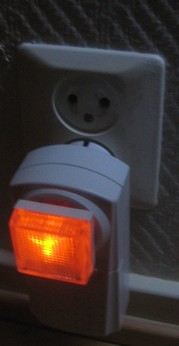
With kids in the house, one challenge is getting them to sleep during the night and wake up when it is morning. I mean, when I believe it is morning, and not two hours earlier. In our household we have decided that 07:00 is the turning point, but getting the kids to sleep until 07:00 is a small challenge every day. They have adapted quite well, and rarely wake up at 05:00 any more, but some times wake up at times like 05:50, 06:15, 06:30 or 06:45, and it is hard to put the awake one to bed again without disturbing and waking the rest. And I understand perfectly well that they fail to sleep until 07:00 some times, as there is no way for them to know if it is before or after the magic moment without coming and asking us parents. But yesterday I came up with a method to solve this problem. It involve home automation. A few years ago I bought a Tellstick and RF switches at the local Clas Ohlson shop, allowing me to control lights and other electrical gadgets using my Linux server. When I moved from the old flat to a small house, I put away all this equipment as most of the lighting in the house was not using wall sockets and thus not easy to connect to the gadgets I had. But recently I bought a Tellstick Net to be able to read sensor input as well as control power sockets. I want to control ovens in the basement to avoid the pipes to freeze, and monitor the humidity to detect flooding. The default setup for Tellstick Net is to be controlled by the vendor web service, which to me is a security problem, but it is also possible to build ones own firmware with local access instead of being controlled by a Swedish company, thanks to the release of the GPL licensed firmware source code. I plan to get that running before I let it control anything important. But while working on this, one idea to make it easier for the kids came to me yesterday. We can set up a night light controlled by the computer, and turn it automatically on at 07:00. The kids can then check the light in the morning to know if they are supposed to get up or not. They joined me in setting everything up, and I repeated the concept several times before bed times to make sure they remembered to check the light before getting up in the morning. We tested it this morning, and all the kids stayed in bed until after 07:00, and every one of them commented on the fact that the "morning light" was turned on and signalled that the morning had arrived. So this look like a success, and I am excited to see how this develops the next few days. :) I really hope this can allow us all to sleep a bit longer in the morning. A nice advantage of this setup is that we can remote control when to tell the kids to get up. We do not have to wait until 07:00, and can also delay it if we want to.

Richard Hartmann: Cables

Leaving for Finland in less than 5 hours and my GPS keeps acting up, external disks refuse to be mounted, and copying data off of SD cards results in I/O errors... The SD card I/O errors are apparently caused by my still-half-broken ThinkPad X201 which never got fixed properly. To be specific, the internal card reader is acting up. But to get back to the GPS and my external drives... I had feared my ThinkPad was in its death throes when I decided to try another cable. Lo and behold, everything (other than my built-in SD card reader) started to work all of a sudden. This is the third time I've had issues with random USB cables. For Micro USB I decided to only use ones that came packaged with a phone or similar as those tend to be high quality. If anyone has a suggestion about where to source high-quality Mini USB cables after returning from Finland, please let me know.

9 February 2013

Christian Perrier: Bug #700000 has been reported...and I won the bet..:-)

Here it is. Debian had seven hundred thousand bugs reported in its history. Yet another French winner, indeed two, this time: The French gang already got #200000 (by Michel Grentzinger) and #400000 (by /me), and #600000 by Cyril "KiBi" Brulebois. We're good at stupid games, as it seems. Of course, I will soon open the wiki page for the bug #800000 bet, which will again include a place where you can also bet for bug #1000000. Be patient, the week-end is coming..:-)

8 February 2013

Philipp Kern: Mozilla's direction

Am I the only one who's disappointed with the route Mozilla's taking and left wondering what the direction is? First they killed off the development of Thunderbird because, as we all know, people mainly use webmail these days. Then they presented us their view that the big Certificate Authorities are too big to fail, as CAs gravely violated our trust (c.f. Trustwave and their MitM authority). And "now" they're also blocking the introduction of new formats into their browser because they cannot be the one who innovates. Instead Microsoft and Apple obviously need to take the lead in introducing a format into their browsers because otherwise it wouldn't be useful. Even though it's safe to say that Chrome and Firefox make up for more than half of the desktop browser market share. It might be that Chrome's nibbling from Firefox's, still IE seems to be in decline and Safari is rather a further mention than something many people would care strongly about.

There were of course some valid reasons for not supporting WebP yet. But most of them got fixed in the meantime and all we hear is the referal to proprietary vendors who need to move first. If I'd want to depend on such vendors I'd go with proprietary operating systems. (Having to deal with hardware products of proprietary vendors at $dayjob is enough.) So what's up Mozilla? The solution is to ignore your users and tag bugs with patches wontfix?

The only real advantage of Firefox over Chromium these days is the vast amount of plugins and extensions (e.g. Pentadactyl, for which there is no real equivalent available). Another sad fact is that you need to pull Firefox from a 3rd party repository (even though packages are coming from the 2nd party) to get a current version onto your Debian system to work with the web. But then it's not Mozilla who's to blame here. Maybe we should've introduced one Iceweasel version that's allowed to have reverse-dependencies and one that cannot.

(This post might contain hyberboles, which should be considered as such.)

Keith Packard: MicroPeakUSB

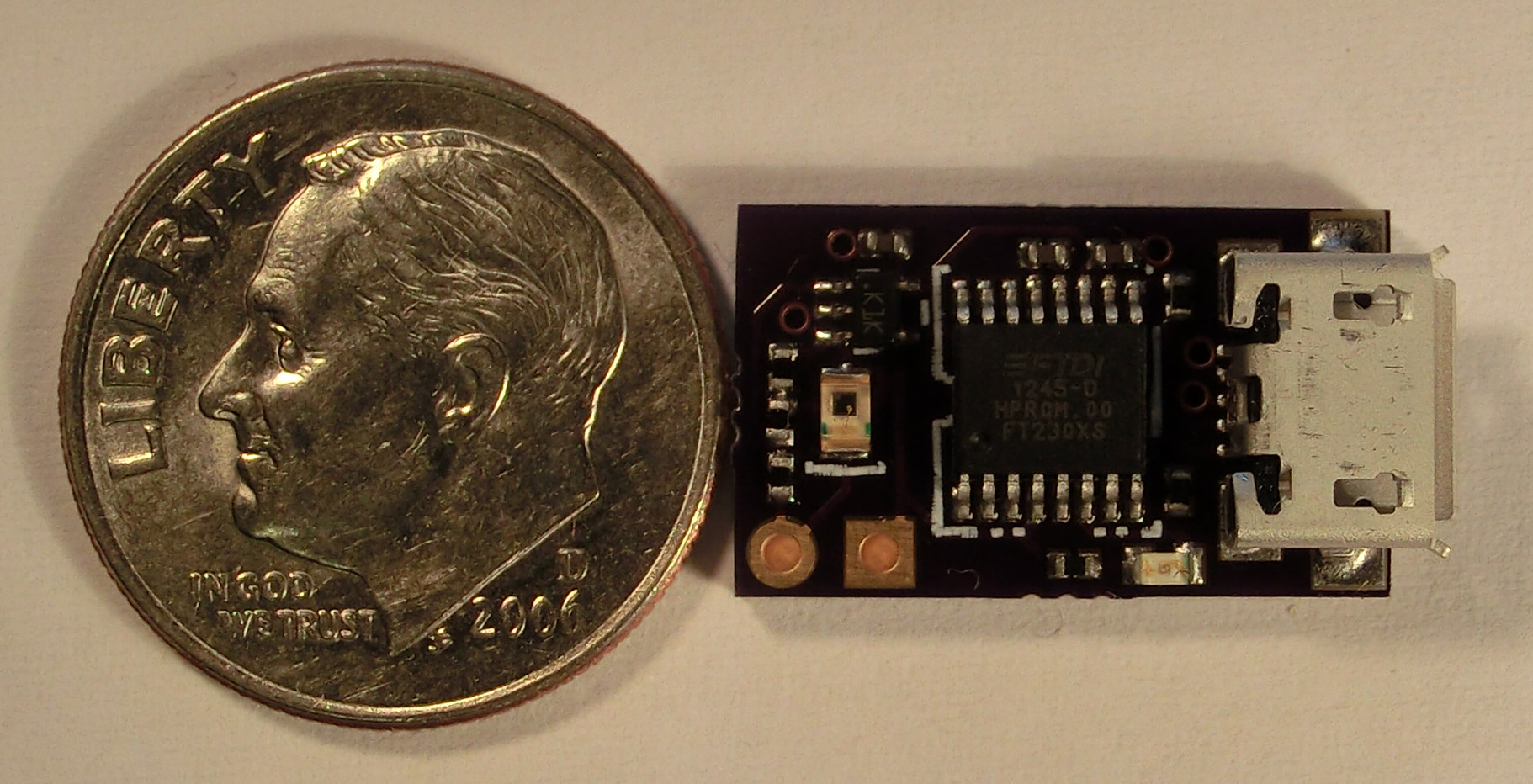
MicroPeak USB Interface now available. Altus Metrum is pleased to announce the immediate availability of the MicroPeak USB interface. MicroPeak USB Interface MicroPeak and the MicroPeak USB Interface MicroPeak is fun to use all by itself, providing a quick way to know how high your rocket has flown. But, for those people itching for more data, MicroPeakUSB offers a way to download raw flight data and analyze that on your computer. MicroPeakUSB doesn t require any changes to the MicroPeak hardware new MicroPeak firmware transmits the entire flight log through the on-board LED to a phototransistor on the MicroPeakUSB Interface and then to the USB port on your computer. Existing MicroPeak owners can contact us for a special deal on the MicroPeak USB interface and upgrading the MicroPeak firmware.
Russ Allbery: Still here

Well, I had a very nice run at the start of this year in writing journal entries nearly every day, and then I seem to have gotten much quieter. This is not actually because less stuff is going on, but I started working on larger projects without meaningful daily progress, and I also got drawn into some very rewarding creative work that has kicked my schedule in the ass. Schedules are something that I've always struggled with. I'm fairly convinced that I have even more than the natural human tendency towards a longer than 24-hour schedule. (I lived in 28-hour days and 6-day weeks for one full quarter when I was a college student and rather liked it, but it wasn't practical enough to stay with.) This means that, without applying a lot of discipline, I tend to stay up later and later because I'm engaged in interesting things and don't want to stop, and then drift further and further out of sync with the world. When I was just out of college and working as just another member of a team that wasn't very close-knit, I just shrugged and let it happen. I used to get into work at about two or three in the afternoon and work until well past midnight. It had some lovely properties, such as getting to work most of my "day" after everyone else had left and the building was quiet. Unfortunately, it's really not compatible with a lead position that requires interaction with people and quite a few meetings and other types of coordination. Given that I can't just let my schedule go wherever, I realized a year or two ago that I do much better if I can stick to a fairly reliable and consistent schedule and go to bed at a regular time, even if I'm involved in something. It cuts off my evenings in a way I don't like, but it makes mornings much more pleasant and it makes it easier to schedule and stick with various chores like exercise. But it's remarkably hard to get back into that mode once I've gotten out of it, particularly when I get caught up in things in the evenings. This meander is mostly my way of getting these thoughts out of my head and on a screen in front of me so that I'll think about them and build up enough willpower to go back to a regular schedule. It really is worth it; I was keeping one through most of January and it had a lot to do with why January was awesome. Hopefully a more sustantive update tomorrow.

Christian Perrier: Bug #700000 has been reported...and I won the bet..:-)

Here it is. Debian had seven hundred thousand bugs reported in its history. Yet another French winner, indeed two, this time: The French gang already got #200000 (by Michel Grentzinger) and #400000 (by /me), and #600000 by Cyril "KiBi" Brulebois. We're good at stupid games, as it seems. Of course, I will soon open the wiki page for the bug #800000 bet, which will again include a place where you can also bet for bug #1000000. Be patient, the week-end is coming..:-)

7 February 2013

Joey Hess: Sydney nostalgia

Sydney opera house viewed from a ferry Last Saturday, when the bus from Canberra pulled into Sydney's central station, I found myself feeling curiously nostalgic for this city, and particularly this bustling and somewhat seedy[1] neighborhood of Haymarket and Redfern. glowing angels in Kimber lane I only spent 5 days in Sydney, but living in a shared house there, walking up to Central every day, and returning to the outskirts of the Haymarket every evening to slurp noodles or other asian food, I got into a routine. And got a sense of the place that goes perhaps a bit beyond the tourist sights. Manly beach panorama Perhaps if I'd had more time I would have found a decent coffee shop that had both free wifi and abundant seating. They seem scarce in Sydney. I instead often got on the ferry to Manly when I wanted some sit down and code time. Cliffside Protect Our Water Dragons sign
One time when I was exploring the headlands above Manly beach, I noticed this sign.
Then I ran into this guy. Click him for an amusing video.
lizard Anyway, Sydney is on my very short list of cities I'd actually enjoy spending some more time in some day, along with San Francisco, Vancouver, Oslo, and London.
[1] Depending on what's inside all the "VIP lounges" and "Thai massage parlours" on every corner that I did not explore, perhaps thoroughly seedy?

Next.

Previous.