Search Results: "ed"

31 January 2016

Daniel Silverstone: The Beer'o'Meter project

As some of you may know, I have been working on a small hardware project called the Beer'o'Meter whose purpose is to allow us to extend Ye Olde Vic's beer board to indicate the approximate fullness of each cask. For some time now, we've been operating an electronic beer board at the Vic which you may see tweeted out from time to time. The pumpotron has become very popular with the visitors to the pub, especially that it can be viewed online in a basic textual form. Of course, as many of you who visit pubs know only too well. That a beer is "on" is no indication of whether or not you need to get there sharpish to have a pint, or if you can take your time and have a curry first. As a result, some of us have noticed a particular beer on, come to the pub after dinner, and then been very sad that if only we'd come 30 minutes previously, we'd have had a chance at the very beer we were excited about. Combine this kind of sadness with a two week break at Christmas, and I started to develop a Beer'o'Meter to extend the pumpotron with an indication of how much of a given beer had already been served. Recently my boards came back from Elecrow along with various bits and bobs, and I have spent some time today building one up for test purposes. As always, it's important to start with some prep work to collect all the necessary components. I like to use cake cases as you may have noticed on the posting yesterday about the oscilloscope I built. Component prep for the Beer'o'Meter Naturally, after prep comes the various stages of assembly. You start with the lowest-height components, so here's the board after I fitted the ceramic capacitors: Step 1, ceramic capacitors And here's after I fitted the lying-down electrolytic decoupling capacitor for the 3.3 volt line: Step 2, capacitors which lie down Next I should have fitted the six transitors from the middle cake case, but I discovered that I'd used the wrong pinout for them. Even after weeks of verification by myself and others, I'd made a mistake. My good friend Vincent Sanders recently posted about how creativity is allowing yourself to make mistakes and here I had made a doozy I hadn't spotted until I tried to assemble the board. Fortunately TO-92 transistors have nice long legs and I have a pair of tweezers and some electrical tape. As such I soon had six transistors doing the river dance: Transistors doing the river-dance With that done, I noticed that the transistors now stood taller than the pins (previously I had been intending to fit the transistors before the pins) so I had to shuffle things around and fit all my 0.1" pins and sockets next: Step 3, pins and sockets Then I could fit my dancing transistors: Step 4, transistors We're almost finished now, just one more capacitor to provide some input decoupling on the 9v power supply: Finished -- decoupling fitted Of course, it wouldn't be complete without the ESP8266Huzzah I acquired from AdaFruit though I have to say that I'm unlikely to use these again, but rather I might design in the surface-mount version of the module instead. Fitted with the module And since this is the very first Beer'o'Meter to be made, I had to go and put a 1 on the serial-number space on the back of the board. I then tried to sign my name in the box, made a hash of it, so scribbled in the gap :-) The back of the finished module Finally I got to fit all six of my flow meters ready for some testing. I may post again about testing the unit, but for now, here's a big spider of a flow meter for beer: The Beer'o'Meter spider This has been quite a learning experience for me, and I hope in the future to be able to share more of my hardware projects, perhaps from an earlier stage. I have plans for a DAC board, and perhaps some other things.

Daniel Silverstone: Building an Oscilloscope

I recently ordered some PCBs from Elecrow for the Vic's beer-measurement system I've been designing with Rob. While on the site, I noticed that they have a single-channel digital oscilloscope kit based on an STM32. This is a JYE Tech DSO138 which arrives as a PCB whose surface-mount stuff has been fitted, along with a whole bunch of pin-through components for you to solder up the scope yourself. There's a non-trivial number of kinds of components, so first you should prep by splitting them all up and double-checking them all. Preparing the components Once you've done that, the instructions start you off fitting a whole bunch of resistors... Step 1, fitting resistors Then some diodes, RF chokes, and the 8MHz crystal for the STM32. Step 2, fitting diodes, a crystal, and chokes The single most-difficult bit for me to solder was the USB socket. Fine pitch leads, coupled with high-thermal-density socket. Step 3, the USB socket There is a veritable mountain of ceramic capacitors to fit... Step 4, all the ceramic capacitors And then buttons, inductors, trimming capacitors and much more... Step 5, buttons, inductors, trimming capacitors, etc THe switches were the next hardest things to solder, after the USB socket... Step 6, Switches, connectors, etc Finally you have to solder a test loop and close some jumpers before you power-test the board. Step 7, Test loop and jumper soldering The last bit of soldering is to solder pins to the LCD panel board... Step 8, LCD panel Before you finally have a working oscilloscope Working oscilloscope! I followed the included instructions to trim the scope using the test point and the trimming capacitors, before having a break to write this up for you all. I'd say that it was a fun day because I enjoyed getting a lot of soldering practice (before I have to solder up the beer'o'meter for the pub) and at the end of it I got a working oscilloscope. For 40 USD, I'd recommend this to anyone who fancies a go.

Martin-Éric Racine: Stupid Design: Facebook's Selling Something feature

Over these past few months, I've been going through my personal belongings to reduce them to the bare essentials more-or-less following the rule "If I cannot remember that I had it, I probably don't need it" with an explicit goal to make it easier for me to relocate in the near future.Part of that iterative process has involved selling surplus items via Facebook groups. While I initially rejoiced at the invention of the new Selling Something feature, the more I use it, the more I end up cursing at the lack of thought that went into designing that feature:For instance, in the feature's most recent implementation, it has become possible to post the same ad in several groups. Great idea, right? Actually, no. What this option does is post individual copies of that exact same ad in each group. Managed to sell a particular item? You'll have to sort through each and every duplicate post in each group to mark the item as sold. Need to edit the ad to lower the price or add requested information about the item? Same thing: go through each individual copy of the ad in each group. Seriously, Facebook? Who the fuck designed that senseless implementation?!Here's a better implementation: centrally manage all items via the user's account preferences, and let the user tick checkboxes besides each item to decide which groups will see that particular item. Ditto whenever editing the ad's content or marking an item as sold; do everything via the user's account preferences. Rather than making the content group-centric, make it user-centric.You're welcome.

Lars Wirzenius: Update on 'Backups as a service in Debian': no news is bad news

At Debconf15 I gave a talk on topic of having backups be a default service on Debian machines. In that talk, I proposed that we create infrastructure to be included in a default Debian install to manage backups. I still think this is a good idea, but over the past several months, I've had nearly no time at all to actually do this. I'm afraid I have to say now that I won't be able to work on this in time for the stretch release. I would be very happy for others to do that, however. The Debian wiki page https://wiki.debian.org/Backup acts as a central point of information for this. If you're interested in working on this, you can just do it.

Chris Lamb: Free software activities in January 2016

Here is my monthly update covering a large part of what I have been doing in the free software world (previously):
Debian
  • Had a talk proposal accepted (Reproducible Builds - fulfilling the original promise of free software) at FOSSASIA 16.
My work in the Reproducible Builds project was also covered in more depth in Lunar's weekly reports (#35, #36, #37, #38, #39)
LTS

This month I have been paid to work 18 hours on Debian Long Term Support (LTS). In that time I did the following:
  • Sevend days of "frontdesk" duties, triaging CVEs, etc.
  • Issued DLA 386-1 for cacti to patch an SQL injection vulnerability.
  • Issued DLA 388-1 for dwarfutils fixing a NULL deference issue.
  • Issued DLA 391-1 for prosody correcting the use of a weak pseudo-random number generator.
  • Issued DLA 404-1 for nginx to prevent against an invalid pointer deference.

Uploads
  • redis (2:3.0.7-1) New upstream stable release, also ensure that test processes are cleaned up and replacing an existing reproducibility patch with a SOURCE_DATE_EPOCH solution.
  • python-django (1.9.1-1) New upstream release.
  • disque (1.0~rc1-4) Make the build reproducible via SOURCE_DATE_EPOCH, ensure that test processes are cleaned up and that the nocheck flag is correctly honoured.
  • gunicorn (19.4.5-1) New upstream release.
  • redis (2:3.2~rc3-1) New upstream RC release (to experimental).


RC bugs


I also filed 100 FTBFS bugs against apache-log4j2, awscli, binutils, brian, ccbuild, coala, commons-beanutils, commons-vfs, composer, cyrus-sasl2, debiandoc-sgml-doc-pt-br, dfvfs, dillo, django-compat, dulwich, git-annex, grpc, hdf-eos5, hovercraft, ideviceinstaller, ircp-tray, isomd5sum, javamail, jhdf, jsonpickle, kivy, klog, libcloud, libcommons-jexl2-java, libdata-objectdriver-perl, libdbd-sqlite3-perl, libpam-krb5, libproc-waitstat-perl, libslf4j-java, libvmime, linuxdcpp, lsh-utils, mailutils, mdp, menulibre, mercurial, mimeo, molds, mugshot, nose, obex-data-server, obexfs, obexftp, orafce, p4vasp, pa-test, pgespresso, pgpool2, pgsql-asn1oid, php-doctrine-cache-bundle, php-net-ldap2, plv8, pngtools, postgresql-mysql-fdw, pyfftw, pylint-common, pylint-django, pylint-django, python-ase, python-axiom, python-biopython, python-dcos, python-falcon, python-instagram, python-markdown, python-pysam, python-requests-toolbelt, python-ruffus, pytsk, pyviennacl, ros-class-loader, ros-ros-comm, ros-roscpp-core, roxterm, ruby-celluloid-extras, ruby-celluloid-fsm, ruby-celluloid-supervision, ruby-eye, ruby-net-scp, ruby-net-ssh, ruby-sidekiq, ruby-sidekiq-cron, ruby-sinatra-contrib, seaview, smc, spatial4j-0.4, swift-plugin-s3, tilecache, typecatcher, ucommon, undertaker, urdfdom, ussp-push, xserver-xorg-video-intel & yt.

FTP Team

As a Debian FTP assistant I ACCEPTed 201 packages: abi-tracker, android-platform-build, android-platform-frameworks-native, android-platform-libcore, android-platform-system-core, animate.css, apitrace, argon2, autosize.js, bagel, betamax, bittorrent, bls-standalone, btfs, caja-dropbox, cegui-mk2, complexity, corebird, courier-authlib, cpopen, ctop, dh-haskell, django-python3-ldap, e2fsprogs1.41, emacs-async, epl, fast5, fastkml, flask-restful, flask-silk, gcc-6, gitlab, golang-github-kolo-xmlrpc, golang-github-kr-fs, golang-github-pkg-sftp, golang-github-prometheus-common, google-auth-library-php, h5py, haskell-aeson-compat, haskell-userid, heroes, hugo, ioprocess, iptables, ivy-debian-helper, ivyplusplus, jquery-timer.js, klaus, kpatch, lazarus, libatteanx-store-sparql-perl, libbrowserlauncher-java, libcgi-test-perl, libdata-sah-normalize-perl, libfsntfs, libjs-fuzzaldrin-plus, libjung-free-java, libmongoc, libmygpo-qt, libnet-nessus-rest-perl, liborcus, libperinci-sub-util-propertymodule-perl, libpodofo, librep, libsodium, libx11-xcb-perl, linux, linux-grsec-base, list.js, lombok, lua-mediator, luajit, maven-script-interpreter, midicsv, mimeo, miniasm, mlpack, mom, mosquitto-auth-plugin, moxie.js, msgpuck, nanopolish, neovim, netcdf, network-manager-applet, network-manager-ssh, node-esprima-fb, node-mocks-http, node-schlock, nomacs, ns3, openalpr, openimageio, openmpi, openms, orafce, pbsim, pd-iemutils, pd-nusmuk, pd-puremapping, pd-purest-json, pg-partman, pg-rage-terminator, pgfincore, pgmemcache, pgsql-asn1oid, php-defaults, php-jwt, php-mf2, php-redis, pkg-info-el, plr, pnmixer, postgresql-multicorn, postgresql-mysql-fdw, powa-archivist, previsat, pylint-flask, pyotherside, python-caldav, python-cookies, python-dcos, python-flaky, python-flickrapi, python-frozendict, python-genty, python-git, python-greenlet, python-instagram, python-ironic-inspector-client, python-manilaclient, python-neutronclient, python-openstackclient, python-openstackdocstheme, python-prometheus-client, python-pymzml, python-pysolr, python-reno, python-requests-toolbelt, python-scales, python-socketio-client, qdox2, qgis, r-cran-biasedurn, rebar.js, repmgr, rfcdiff, rhythmbox-plugin-alternative-toolbar, ripe-atlas-cousteau, ripe-atlas-sagan, ripe-atlas-tools, ros-image-common, ruby-acts-as-list, ruby-allocations, ruby-appraiser, ruby-appraiser-reek, ruby-appraiser-rubocop, ruby-babosa, ruby-combustion, ruby-did-you-mean, ruby-fixwhich, ruby-fog-xenserver, ruby-hamster, ruby-jeweler, ruby-mime-types-data, ruby-monkey-lib, ruby-net-telnet, ruby-omniauth-azure-oauth2, ruby-omniauth-cas3, ruby-puppet-forge, ruby-racc, ruby-reek, ruby-rubinius-debugger, ruby-rubysl, ruby-rubysl-test-unit, ruby-sidekiq-cron, ruby-threach, ruby-wavefile, ruby-websocket-driver, ruby-xmlhash, rustc, s-nail, scrm, select2.js, senlin, skytools3, slurm-llnl, sphinx-argparse, sptk, sunpy, swauth, swift, tdiary, three.js, tiny-initramfs, tlsh, ublock-origin, vagrant-cachier, xapian-core, xmltooling, & yp-tools. I additionally REJECTed 29 packages.

Jamie McClelland: Networking in 2016

So many options, so little time. Many years ago I handled all my network connections via /etc/network/interfaces. Then, I was in desperate need of a Internet connection and all I had was a borrowed USB cell phone modem. My friends running NetworkManager just plugged the stick in and were online. I was left with the task of figuring out how to manually configure this piece of hardware without being online. I ended up borrowing my friend's computer. Then, when I got home, I installed NetworkManager. Once I had NetworkManager installed, I decided it was easier to find, connect to and manage passwords of wireless networks using a graphical tool rather than digging through the copious output of commands run from my terminal and trying to keep track of the passwords. So long wireless. Then I had to help a colleague get on our Virtual Private Network. Wow. There's a NetworkManager GUI for that too. If I'm going to support my colleauge with this tool... I guess I should use it as well. I also managed to write a dispatcher script in /etc/NetworkManager/dispatcher.d that calls su -c "/usr/bin/smbnetfs /media/smbnetfs" -l jamie when it receives and action of "vpn-up" and umount /media/smbnetfs 2>/dev/null on "vpn-down." Now I can mount the samba share by simply connecting to the VPN via NetworkManager. My cable connections are almost always configured using DHCP. Almost everything else is in NetworkManager, why not move enp1s0f2 as well? What's left? My final piece is my bridge. I still run and manage my own KVM guests and I have a bridge to handle that traffic. I first decided to move this functionality to systemd.network because systemd can not only handle the bridge, but can also handle IP Forwarding, DHCP service, and best of all, IP Masquerading. Well, almost... not IP Masquerading after all, at least not yet. Without IP masquerading, I figured I'd go with NetworkManager. Having all networking in the same place gives me an illusion of control at best and at worst makes it easier to debug. So, I setup a crufty script in /etc/NetworkManager/dispatcher.d that configures masquerading via iptables everytime either my wireless or wired network goes up or down, which I'm not crazy about. Maybe when #787480 is fixed I'll got back to systemd. I also edited /etc/sysctl.conf to enable #net.ipv4.ip_forward=1. Then I changed it back and added my own file in /etc/sysctl.d to do the same thing. Then I deleted that file and added sysctl net.ipv4.ip_forward=1 and sysctl net.ipv4.ip_forward=0 to my crufty dispatcher script. I decided to do without DHCP - I can manually configure the few KVM instances that I run. Now /etc/network/interfaces is so lonely.

30 January 2016

Simon McVittie: GNOME Developer Experience hackfest: xdg-app + Debian

Over the last few days I've been at the GNOME Developer Experience hackfest in Brussels, looking into xdg-app and how best to use it in Debian and Debian derivatives. xdg-app is basically a way to run "non-core" software on Linux distributions, analogous to apps on Android and iOS. It doesn't replace distributions like Debian or packaging systems, but it adds a layer above them. It's mostly aimed towards third-party apps obtained from somewhere that isn't your distribution vendor, aiming to address a few long-standing problems in that space: To address the first point, each application uses a specified "runtime", which is available as /usr inside its sandbox. This can be used to run application bundles with multiple, potentially incompatible sets of dependencies within the same desktop environment. A runtime can be updated within its branch - for instance, if an application uses the "GNOME 3.18" runtime (consisting of a basic Linux system, the GNOME 3.18 libraries, other related libraries like Mesa, and their recursive dependencies like libjpeg), it can expect to see minor-version updates from GNOME 3.18.x (including any security updates that might be necessary for the bundled libraries), but not a jump to GNOME 3.20. To address the second issue, the plan is for application bundles to be available as a single file, containing metadata (such as the runtime to use), the app itself, and any dependencies that are not available in the runtime (which the app vendor is responsible for updating if necessary). However, the primary way to distribute and upgrade runtimes and applications is to package them as OSTree repositories, which provide a git-like content-addressed filesystem, with efficient updates using binary deltas. The resulting files are hard-linked into place. To address the last point, application bundles run partially isolated from the wider system, using containerization techniques such as namespaces to prevent direct access to system resources. Resources from outside the sandbox can be accessed via "portal" services, which are responsible for access control; for example, the Documents portal (the only one, so far) displays an "Open" dialog outside the sandbox, then allows the application to access only the selected file. xdg-app for Debian One thing I've been doing at this hackfest is improving the existing Debian/Ubuntu packaging for xdg-app (and its dependencies ostree and libgsystem), aiming to get it into a state where I can upload it to Debian experimental. Because xdg-app aims to be a general freedesktop project, I'm currently intending to make it part of the "Utopia" packaging team alongside projects like D-Bus and polkit, but I'm open to suggestions if people want to co-maintain it elsewhere. In the process of updating xdg-app, I sent various patches to Alex, mostly fixing build and test issues, which are in the new 0.4.8 release. I'd appreciate co-maintainers and further testing for this stuff, particularly ostree: ostree is primarily a whole-OS deployment technology, which isn't a use-case that I've tested, and in particular ostree-grub2 probably doesn't work yet. Source code: Binaries (no trust path, so only use these if you have a test VM): The "Hello, World" of xdg-apps Another thing I set out to do here was to make a runtime and an app out of Debian packages. Most of the test applications in and around GNOME use the "freedesktop" or "GNOME" runtimes, which consist of a Yocto base system and lots of RPMs, are rebuilt from first principles on-demand, and are extensive and capable enough that they make it somewhat non-obvious what's in an app or a runtime. So, here's a step-by-step route through xdg-app, first using typical GNOME instructions, but then using the simplest GUI app I could find - xvt, a small xterm clone. I'm using a Debian testing (stretch) x86_64 virtual machine for all this. xdg-app currently requires systemd-logind to put users and apps in cgroups, either with systemd as pid 1 (systemd-sysv) or systemd-shim and cgmanager; I used the default systemd-sysv. In principle it could work with plain cgmanager, but nobody has contributed that support yet. Demonstrating an existing xdg-app Debian's kernel is currently patched to be able to allow unprivileged users to create user namespaces, but make it runtime-configurable, because there have been various security issues in that feature, making it a security risk for a typical machine (and particularly a server). Hopefully unprivileged user namespaces will soon be secure enough that we can enable them by default, but for now, we have to do one of three things to let xdg-app use them: First, we'll need a runtime. The standard xdg-app tutorial would tell you to download the "GNOME Platform" version 3.18. To do that, you'd add a remote, which is a bit like a git remote, and a bit like an apt repository:
$ wget http://sdk.gnome.org/keys/gnome-sdk.gpg
$ xdg-app remote-add --user --gpg-import=gnome-sdk.gpg gnome \
    http://sdk.gnome.org/repo/
(I'm ignoring considerations like trust paths and security here, for brevity; in real life, you'd want to obtain the signing key via https and/or have a trust path to it, just like you would for a secure-apt signing key.) You can list what's available in a remote:
$ xdg-app remote-ls --user gnome
...
org.freedesktop.Platform
...
org.freedesktop.Platform.Locale.cy
...
org.freedesktop.Sdk
...
org.gnome.Platform
...
The Platform runtimes are what we want here: they are collections of runtime libraries with which you can run an application. The Sdk runtimes add development tools, header files, etc. to be able to compile apps that will be compatible with the Platform. For now, all we want is the GNOME 3.18 platform:
$ xdg-app install --user gnome org.gnome.Platform 3.18
Next, we can install an app that uses it, from Alex Larsson's nightly builds of a subset of GNOME. The server they're on doesn't have a great deal of bandwidth, so be nice :-)
$ wget http://209.132.179.2/keys/nightly.gpg
$ xdg-app remote-add --user --gpg-import=nightly.gpg nightly \
    http://209.132.179.2/repo/
$ xdg-app install --user nightly org.mypaint.MypaintDevel
We now have one app, and the runtime it needs:
$ xdg-app list
org.mypaint.MypaintDevel
$ xdg-app run org.mypaint.MypaintDevel
[you see a GUI window]
Digression: what's in a runtime? Behind the scenes, xdg-app runtimes and apps are both OSTree trees. This means the ostree tool, from the package of the same name, can be used to inspect them.
$ sudo apt install ostree
$ ostree refs --repo ~/.local/share/xdg-app/repo
gnome:runtime/org.gnome.Platform/x86_64/3.18
nightly:app/org.mypaint.MypaintDevel/x86_64/master
A "ref" has roughly the same meaning as in git: something like a branch or a tag. ostree can list the directory tree that it represents:
$ ostree ls --repo ~/.local/share/xdg-app/repo \
    runtime/org.gnome.Platform/x86_64/3.18
d00755 0 0      0 /
-00644 0 0    493 /metadata
d00755 0 0      0 /files
$ ostree ls --repo ~/.local/share/xdg-app/repo \
    runtime/org.gnome.Platform/x86_64/3.18 /files
d00755 0 0      0 /files
l00777 0 0      0 /files/local -> ../var/usrlocal
l00777 0 0      0 /files/sbin -> bin
d00755 0 0      0 /files/bin
d00755 0 0      0 /files/cache
d00755 0 0      0 /files/etc
d00755 0 0      0 /files/games
d00755 0 0      0 /files/include
d00755 0 0      0 /files/lib
d00755 0 0      0 /files/lib64
d00755 0 0      0 /files/libexec
d00755 0 0      0 /files/share
d00755 0 0      0 /files/src
You can see that /files in a runtime is basically a copy of /usr. This is not coincidental: the runtime's /files gets mounted at /usr inside the xdg-app container. There is also some metadata, which is in the ini-like syntax seen in .desktop files:
$ ostree cat --repo ~/.local/share/xdg-app/repo \
    runtime/org.gnome.Platform/x86_64/3.18 /metadata
[Runtime]
name=org.gnome.Platform/x86_64/3.16
runtime=org.gnome.Platform/x86_64/3.16
sdk=org.gnome.Sdk/x86_64/3.16
[Extension org.freedesktop.Platform.GL]
version=1.2
directory=lib/GL
[Extension org.freedesktop.Platform.Timezones]
version=1.2
directory=share/zoneinfo
[Extension org.gnome.Platform.Locale]
directory=share/runtime/locale
subdirectories=true
[Environment]
GI_TYPELIB_PATH=/app/lib/girepository-1.0
GST_PLUGIN_PATH=/app/lib/gstreamer-1.0
LD_LIBRARY_PATH=/app/lib:/usr/lib/GL
Looking at an app, the situation is fairly similar:
$ ostree ls --repo ~/.local/share/xdg-app/repo \
    app/org.mypaint.MypaintDevel/x86_64/master
d00755 0 0      0 /
-00644 0 0    258 /metadata
d00755 0 0      0 /export
d00755 0 0      0 /files
This time, /files maps to what will become /app for the application, which was compiled with --prefix=/app:
$ ostree ls --repo ~/.local/share/xdg-app/repo \
    app/org.mypaint.MypaintDevel/x86_64/master /files
d00755 0 0      0 /files
-00644 0 0   4599 /files/manifest.json
d00755 0 0      0 /files/bin
d00755 0 0      0 /files/lib
d00755 0 0      0 /files/share
There is also a /export directory, which is made visible to the host system so that the contained app can appear as a "first-class citizen" in menus:
$ ostree ls --repo ~/.local/share/xdg-app/repo \
    app/org.mypaint.MypaintDevel/x86_64/master /export
d00755 0 0      0 /export
d00755 0 0      0 /export/share
user@debian:~$ ostree ls --repo ~/.local/share/xdg-app/repo \
    app/org.mypaint.MypaintDevel/x86_64/master /export/share
d00755 0 0      0 /export/share
d00755 0 0      0 /export/share/app-info
d00755 0 0      0 /export/share/applications
d00755 0 0      0 /export/share/icons
user@debian:~$ ostree ls --repo ~/.local/share/xdg-app/repo \
    app/org.mypaint.MypaintDevel/x86_64/master /export/share/applications
d00755 0 0      0 /export/share/applications
-00644 0 0    715 /export/share/applications/org.mypaint.MypaintDevel.desktop
$ ostree cat --repo ~/.local/share/xdg-app/repo \
    app/org.mypaint.MypaintDevel/x86_64/master \
    /export/share/applications/org.mypaint.MypaintDevel.desktop
[Desktop Entry]
Version=1.0
Name=(Nightly) MyPaint
TryExec=mypaint
Exec=mypaint %f
Comment=Painting program for digital artists
...
Comment[zh_HK]= 
GenericName=Raster Graphics Editor
GenericName[fr]= diteur d'Image Matricielle
MimeType=image/openraster;image/png;image/jpeg;
Type=Application
Icon=org.mypaint.MypaintDevel
StartupNotify=true
Categories=Graphics;GTK;2DGraphics;RasterGraphics;
Terminal=false
Again, there's some metadata:
$ ostree cat --repo ~/.local/share/xdg-app/repo \
    app/org.mypaint.MypaintDevel/x86_64/master /metadata
[Application]
name=org.mypaint.MypaintDevel
runtime=org.gnome.Platform/x86_64/3.18
sdk=org.gnome.Sdk/x86_64/3.18
command=mypaint
[Context]
shared=ipc;
sockets=x11;pulseaudio;
filesystems=host;
[Extension org.mypaint.MypaintDevel.Debug]
directory=lib/debug
Building a runtime, probably the wrong way The way in which the reference/demo runtimes and containers are generated is... involved. As far as I can tell, there's a base OS built using Yocto, and the actual GNOME bits come from RPMs. However, we don't need to go that far to get a working runtime. In preparing this runtime I'm probably completely ignoring some best-practices and tools - but it works, so it's good enough. First we'll need a repository:
$ sudo install -d -o$(id -nu) /srv/xdg-apps
$ ostree init --repo /srv/xdg-apps
I'm just keeping this local for this demonstration, but you could rsync it to a web server's exported directory or something - a lot like a git repository, it's just a collection of files. We want everything in /usr because that's what xdg-app expects, hence usrmerge:
$ sudo mount -t tmpfs -o mode=0755 tmpfs /mnt
$ sudo debootstrap --arch=amd64 --include=libx11-6,usrmerge \
    --variant=minbase stretch /mnt http://192.168.122.1:3142/debian
$ sudo mkdir /mnt/runtime
$ sudo mv /mnt/usr /mnt/runtime/files
This obviously has a lot of stuff in it that we don't need - most obviously init, apt and dpkg - but it's Good Enough . We will also need some metadata. This is sufficient:
$ sudo sh -c 'cat > /mnt/runtime/metadata'
[Runtime]
name=org.debian.Debootstrap/x86_64/8.20160130
runtime=org.debian.Debootstrap/x86_64/8.20160130
That's a runtime. We can commit it to ostree, and generate xdg-app metadata:
$ ostree commit --repo /srv/xdg-apps \
    --branch runtime/org.debian.Debootstrap/x86_64/8.20160130 \
    /mnt/runtime
$ fakeroot ostree commit --repo /srv/xdg-apps \
    --branch runtime/org.debian.Debootstrap/x86_64/8.20160130
$ fakeroot xdg-app build-update-repo /srv/xdg-apps
(I'm not sure why ostree and xdg-app report "Operation not permitted" when we aren't root or fakeroot - feedback welcome.) build-update-repo would presumably also be the right place to GPG-sign your repository, if you were doing that. We can add that as another xdg-app remote:
$ xdg-app remote-add --user --no-gpg-verify local file:///srv/xdg-apps
$ xdg-app remote-ls --user local
org.debian.Debootstrap
Building an app, probably the wrong way The right way to build an app is to build a "SDK" runtime - similar to that platform runtime, but with development files and tools - and recompile the app and any missing libraries with ./configure --prefix=/app && make && make install. I'm not going to do that, because simplicity is nice, and I'm reasonably sure xvt doesn't actually hard-code /usr into the binary:
$ install -d xvt-app/files/bin
$ sudo apt-get --download-only install xvt
$ dpkg-deb --fsys-tarfile /var/cache/apt/archives/xvt_2.1-20.1_amd64.deb \
      tar -xvf - ./usr/bin/xvt
./usr/
./usr/bin/
./usr/bin/xvt
...
$ mv usr xvt-app/files
Again, we'll need metadata, and it's much simpler than the more production-quality GNOME nightly builds:
$ cat > xvt-app/metadata
[Application]
name=org.debian.packages.xvt
runtime=org.debian.Debootstrap/x86_64/8.20160130
command=xvt
[Context]
sockets=x11;
$ fakeroot ostree commit --repo /srv/xdg-apps \
    --branch app/org.debian.packages.xvt/x86_64/2.1-20.1 xvt-app
$ fakeroot xdg-app build-update-repo /srv/xdg-apps
Updating appstream branch
No appstream data for runtime/org.debian.Debootstrap/x86_64/8.20160130
No appstream data for app/org.debian.packages.xvt/x86_64/2.1-20.1
Updating summary
$ xdg-app remote-ls --user local
org.debian.Debootstrap
org.debian.packages.xvt
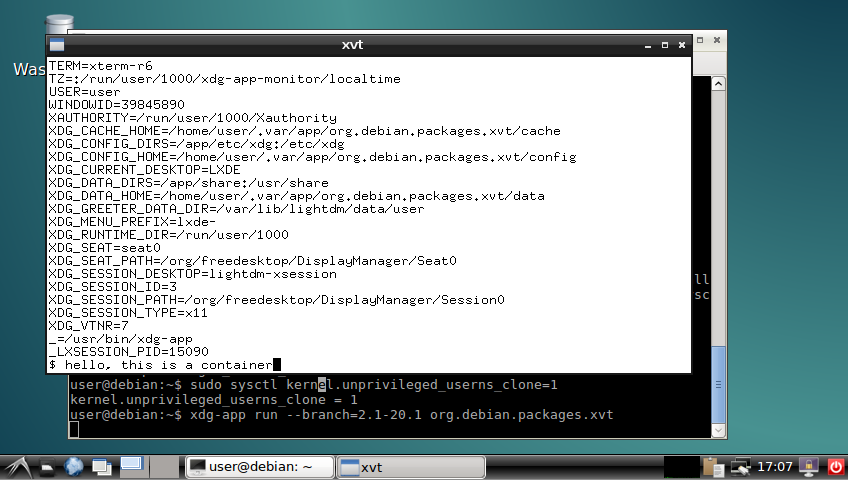
The obligatory screenshot OK, good, now we can install it:
$ xdg-app install --user local org.debian.Debootstrap 8.20160130
$ xdg-app install --user local org.debian.packages.xvt 2.1-20.1
$ xdg-app run --branch=2.1-20.1 org.debian.packages.xvt
xvt in a container and you can play around with the shell in the xvt and see what you can and can't do in the container. I'm sure there were better ways to do most of this, but I think there's value in having such a simplistic demo to go alongside the various GNOMEish apps.
Acknowledgements: Thanks to all those!

Lunar: Only allow outgoing connections through Tor

Using Tor helps take back control of what data one decides to share online. It also helps in avoiding surveillance from the local network (think of someone listening to the public Wi-Fi) or the Internet access provider. But it is easy to make mistakes: Tor Browser, the easiest and most common way to use Tor, is just a web browser. Extra special care is required to make other applications use Tor, and it is easy to forget to change settings, let alone actual attackers. That's why using Tails is often recommended as everything is preconfigured and it requires traffic to go through Tor by various means. Qubes or Whonix also have interesting properties, but require reinstalling systems and changing habits. Meanwhile, securing the network on an already installed system can help you feel better. A potential solution to prevent connections from leaking out without going through Tor is simply to prevent all connections from leaving the computer, except the ones going to the Tor network. This can quite easily be implemented by setting up an outgoing firewall. Using the default settings, a Tor client can potentially connect to any of the 2,000 Guard relays. While there are ways to get such a list and turn it into firewall rules, we are going to use an easier solution. Because the list of Tor relays is public, censors have often used it to prevent people from connecting to the Tor network. The Tor project came up with bridges as a work-around. Bridges are entry nodes in the Tor network. For public bridges, users can only get a few bridge addresses at a time, preventing an adversary from easily blocking them at all once. When configured to use a set of bridges, Tor will only connect to their addresses. This will make our firewall much shorter. The instructions that follow should work on Debian Jessie and later versions. Adapting them to other systems should not be too hard either. We assume that Tor Browser is already installed. As we will want other applications to use Tor than just the browser, we also want to install a system-wide instance:
# apt install tor
Next, visit bridges.torproject.org to request a set of bridges: BridgeDB landing page You then need to select the type of bridges. Tor standard protocol is easy to identify as such. The Tor project has developed pluggable transports to easily disguise the traffic, but using them is outside the scope for this documentation. So lets stay with the default type of bridges: BridgeDB bridge type selection After solving a CAPTCHA, you'll get a list of addresses and fingerprints for a couple of bridges like the following one: Example bridge list from BridgeDB (blurred to protect the actual bridges To tell Tor to use these bridges, edit /etc/tor/torrc, and at the end, add something like:
UseBridges 1
Bridge 109.XXX.XXX.XXX:4XXX 2244XXXXXXXXXXXXXXXXXXXXXXXXXXXXXXXXXXXX
Bridge 37.XXX.XXX.XXX:1XXXX 9CF0XXXXXXXXXXXXXXXXXXXXXXXXXXXXXXXXXXXX
Bridge 171.XXX.XXX.XXX:4XXX 7705XXXXXXXXXXXXXXXXXXXXXXXXXXXXXXXXXXXX
Replace the actual addresses and fingerprints by those you got earlier. Now reload the daemon and make sure that it still connects to the network:
# service tor reload
# tail -f /var/log/tor/log
Tor Browser also needs to be told to use these bridges. Open the onion menu close to the location bar, and select Tor Network Settings . Tor Browser  onion menu In there, tick My Internet Service Provider (ISP) blocks connections to the Tor network and paste the list of bridges below Enter custom bridges: Tor Browser Network Settings Before we restrict outgoing connections to only use the Tor network, lets configure APT to use Tor as well so we can continue installing and upgrading packages in the future:
# apt install apt-transport-tor
The following command will reconfigure APT to use Tor to access the currently configured package repositories. It basically takes care of replacing every http:// by tor+http://:
# sed -e 's/^[^#]*\(deb\(-src\)\?\W\+\)http/\1tor+http/' -i /etc/apt/sources.list /etc/apt/sources.list.d/*.list
Lets see if it still works:
# apt update
One last thing: sometimes, we still need to bypass our restrictions and access the network directly. Some websites sadly deny access to Tor users, or we might need to login through a captive portal before being able to use a random network. To make it practical, we are going to create a new user account. This will enable us to use the desktop user switching capabilities to start a new browser or sudo for command line applications. In this example, the user is going to be named passthrough:
# adduser passthrough
Make sure to set a proper password! Now lets configure the firewall. Here we are going to use ferm which makes it fairly easy to do low-level firewall rule in a readable manner:
# apt install ferm
We want the firewall to be started at boot time. Now edit its configuration in /etc/ferm/ferm.conf. At the end, add:
# Let's block everything for both IPv4 and IPv6, except to localhost,
# already established connections and the special 'passthrough' user.
domain (ip ip6) chain OUTPUT  
    policy DROP;
    outerface lo ACCEPT;
    proto icmp ACCEPT;
    mod state state (ESTABLISHED RELATED) ACCEPT;
    mod owner uid-owner "passthrough" ACCEPT;
 
# Now for IPv4, we want to restrict output to configured Tor bridges
domain ip chain OUTPUT  
    # Don't break network autoconfiguration
    mod owner uid-owner 0 proto udp dport bootps ACCEPT;
    # Allow bridges defined in torrc by getting them directly
    # from the configuration file.
    @include "sed -n -e 's/^Bridge \([^ ]* \)\?\([0-9.]*\):\([0-9]*\).*/daddr \2 proto tcp dport \3 ACCEPT;/p' /etc/tor/torrc  ";
 
# Let's REJECT everything else so we get notice instead of timeouts
domain (ip ip6) chain OUTPUT REJECT;
Reload the firewall through:
# service ferm reload
Lets do some tests:
# ping check.torproject.org
  ping: unknown host check.torproject.org
# tor-resolve check.torproject.org
  38.229.72.22
# ping 38.229.72.22
  From 192.168.7.234 icmp_seq=1 Destination Port Unreachable
# curl https://check.torproject.org/
  curl: (6) Could not resolve host: check.torproject.org
# curl -I https://38.229.72.22/
  curl: (7) Failed to connect to 38.229.72.22 port 443: Connection refused
# curl --socks5 127.0.0.1:9050 https://check.torproject.org/
  curl: (6) Could not resolve host: check.torproject.org
# curl --silent --socks5-hostname 127.0.0.1:9050 https://check.torproject.org/   grep Congratulations
  Congratulations. This browser is configured to use Tor.
# sudo -u passthrough ping -c 1 check.torproject.org
  64 bytes from sergii.torproject.org (38.229.72.22): icmp_seq=1 ttl=54 time=148 ms
# sudo -u passthrough curl --silent https://check.torproject.org/   grep Sorry
  Sorry. You are not using Tor.
One last thing to complete the setup: for command line applications like SSH, torsocks does wonders. Just prefix your usual commands by torsocks and they should work:
# apt install torsocks
# torsocks curl --silent https://check.torproject.org/   grep Congratulations
  Congratulations. This browser is configured to use Tor.
All set! In case you ever need to turn it all off, just ask ferm to reconfigure the firewall:
# service ferm stop
But don't forget to turn it back on later!
# service ferm start
Ideally, we would have a way to automatically configure a different set of bridges for each network we connect to make it more difficult to trace the computer from network to network. But there's quite some more work to be done on various levels before that can be done in an integrated manner (torshiftchange and tordyguards are promising options). Meanwhile, be aware that you might want to keep a fresh set of bridges handy to configure them after leaving for a trip. Another downside of the setup currently is that it doesn't allow for network time synchronization. That might make the system fingerprintable by using its clock drift. To use obfs4 bridges which helps defeating censored networks, you will need two extra steps. First, install the required software:
# apt install obfs4proxy
Then add the following extra line to /etc/tor/torrc:
ClientTransportPlugin obfs2,obfs3,obfs4,scramblesuit exec /usr/bin/obfs4proxy
You can then request obfs4 bridges from BridgeDB. These changes are only required for the system-wide Tor daemon, as Tor Browser comes with obs4proxy preconfigured. Kudos to Micah for proofreading this article.

Neil McGovern: On ZFS in Debian

shutterstock_366995438I m currently over at FOSDEM, and have been asked by a couple of people about the state of ZFS and Debian. So, I thought I d give a quick post to explain what Debian s current plan is (which has come together with a lot of discussion with the FTP Masters and others around what we should do). TLDR: It s going in contrib, as a source only dkms module. Longer version: Debian has always prided itself in providing the unequivocally correct solution to our users and downstream distributions. This also includes licenses we make sure that Debian will contain 100% free software. This means that if you install Debian, you are guaranteed freedoms offered under the DFSG and our social contract. Now, this is where ZFS on Linux gets tricky. ZFS is licensed under the CDDL, and the Linux kernel under the GPLv2-only. The project views that both of these are free software licenses, but they re incompatible with each other. This incompatibility means that there is risk to producing a combined work with Linux and a CDDL module. (Note: there is arguments about if a kernel module, once loaded, is a combined work with the kernel. I m not touching that with a barge pole, as I Am Not A Lawyer.) Now, does this mean that Debian would get sued by distributing ZFS natively compiled into the kernel? Well, maybe, but I think it s a bit unlikely. This doesn t mean it s the right choice for Debian to take as a project though! It brings us back to our promise to our users, and our commercial and non-commercial downstream distributions. If a commercial downstream distribution took the next release of stable, and used our binaries, they may well get sued if they have enough money to make it worthwhile. Additionally, Debian has always taken its commitment to upstream licenses very seriously. If there s a doubt, it doesn t go in official Debian. It should be noted that ZFS is something that is important to a lot of Debian users, who all want to be able to use ZFS in a manner that makes it easier for them to install. Thus, the position that we ve arrived at is that we can ship ZFS as a source only, DKMS module. This means it will be built on the target machines, and we re not distributing binaries. There s also a warning in the README.Debian file explaining that care should be taken if you do things with the resultant binary as we can t promise it complies with the licenses. Finally, I should point out that this isn t my decision in the end. The contents of the archive is a decision for the FTP-Masters, as it s delegated. However, what I have been able to do is coordinate many conflicting views, and I hope that ZFS will be accepted into the archive soon!

B lint R czey: Progress report on hardened1-linux-amd64, a potential Debian port with PIE, ASAN, UBSAN and more

It was more that one and a half years ago when I proposed creating a new security &QA focused port for Debian and now I m happy to share the first bits of it. Last year I started the bootstrapping during the holidays and I now have the prototype in the form of cross built packages which can be installed next to amd64 packages using multiarch. The aim of creating the port is still the same, letting people mix fast (amd64) and reasonably hardened (hardened1-linux-amd64) packages on the same system. You can already try the cross-built packages in an amd64 unstable chroot, but be warned that the packages are not stable yet. In the following session I tested curl which seems to be working OK, and groff, which seems to be too buggy even for debugging:
debootstrap --arch=amd64 unstable test-hardened1
# mount /proc for ASAN
mount --bind /proc test-hardened1/proc
chroot test-hardened1/
apt-get install debian-keyring
# this is my key, I'll create one dedicated release key later
gpg --keyring /usr/share/keyrings/debian-keyring.gpg -a --export 0x21E764DF   apt-key add -
echo "deb http://hardened1-debian.s3.amazonaws.com/debian-cross-built hardened1-unstable main" >> \
/etc/apt/sources.list
apt-get update
# update apt and dpkg to versions handling the new port
apt-get upgrade
apt-get update
dpkg --add-architecture hardened1-linux-amd64
apt-get update
apt-get install curl:hardened1-linux-amd64
curl -s https://www.debian.org   tail -n2
</body>
</html>
apt-get install -t hardened1-unstable groff:hardened1-linux-amd64
groff
ASAN:SIGSEGV
=================================================================
==20642==ERROR: AddressSanitizer: SEGV on unknown address 0x000000000000 (pc 0x7f79cd84698a bp 0x619000006980 sp 0x7ffe89b3a930 T0)
ASAN:SIGSEGV
==20642==AddressSanitizer: while reporting a bug found another one. Ignoring.
The next steps are finalizing the changes to apt, dpkg, GCC, glibc and other packages, rebuilding all packages in hardened1-linux-amd64 sbuild chroots and building the rest of the archive.
Some of the patches are not submitted yet but they are available in a temporary fork of rebootstrap
I hope I ll be back soon with the recompiled and finalized packages, but until then feel free to try the cross-compiled ones! Patches fixing crashes are always welcome! :-) update 1: Some packages like dpkg-dev are not installable, I m working on them.
update 2: There is one similar project I know of which aims creating an address sanitized Gentoo variant and Hanno B ck will give a presentation about that at FOSDEM.

Lars Wirzenius: Obnam 1.19.1 released (backup software)

I have just released version 1.19.1 of Obnam, the backup program. See the website at http://obnam.org for details on what the program does. The new version is available from git (see http://git.liw.fi) and as Debian packages from http://code.liw.fi/debian, and uploaded to Debian, and soon in unstable. The NEWS file extract below gives the highlights of what's new in this version. Basically, it fixes a bug. NOTE: Obnam has an EXPERIMENTAL repository format under development, called green-albatross. It is NOT meant for real use. It is likely to change in incompatible ways without warning. Do not use it unless you're willing to lose your backup. Version 1.19.1, released 2016-01-30 Bug fix:

Mike Hommey: Enabling TLS on this blog

Long overdue, I finally enabled TLS on this blog. It went almost like a breeze. I used simp_le to get the certificate from Let s Encrypt, along Mozilla s Web Server Configuration generator. SSL Labs now reports a rating of A+. I just had a few issues: I m glad that there are tools helping to get a proper configuration of SSL. It is sad, though, that the defaults are not better and that we still need to tweak at all. Setting where the certificate and the private key files are should, in 2016, be the only thing to do to have a secure web server.

Dimitri John Ledkov: Four gunmen outside

There are four gunmen outside of my hotel. They are armed with automatic rifles and pistols. I am scared for my life having sneaked past them inside. Everyone else is acting as if everything is normal. Nobody is scared or running for cover. Nobody called the police. I've asked the reception to talk to the gunmen and ask them to leave. They looked at me as if I am mad. Maybe I am. Is this what shizophrenia feels like?! Can you see them on the picture?! Please help. There are four gunmen outside of my hotel. I am not in central Beirut, I am in central Brussels.

29 January 2016

Jan Wagner: Oxidized - silly attempt at (Really Awesome New Cisco confIg Differ)

Since ages I wanted have replaced this freaking backup solution of our Network Equipment based on some hacky shell scripts and expect uploading the configs on a TFTP server. Years ago I stumbled upon RANCID (Really Awesome New Cisco confIg Differ) but had no time to implement it. Now I returned to my idea to get rid of all our old crap.
I don't know where, I think it was at DENOG2, I saw RANCID coupled with a VCS, where the NOC was notified about configuration (and inventory) changes by mailing the configuration diff and the history was indeed in the VCS.
The good old RANCID seems not to support to write into a VCS out of the box. But for the rescue there is rancid-git, a fork that promises git extensions and support for colorized emails. So far so good. While I was searching for a VCS capable RANCID, somewhere under a stone I found Oxidized, a 'silly attempt at rancid'. Looking at it, it seems more sophisticated, so I thought this might be the right attempt. Unfortunately there is no Debian package available, but I found an ITP created by Jonas. Anyway, for just looking into it, I thought the Docker path for a testbed might be a good idea, as no Debian package ist available (yet). For oxidized configuration is only a configfile needed and as nodes source a rancid compatible router.db file can be used (beside SQLite and http backend). A migration into a production environment seems pretty easy. So I gave it a go. I assume Docker is installed already. There seems to be a Docker image on Docker Hub, that looks official, but it seems not maintained (actually). An issue is open for automated building the image.

Creating Oxidized container image The official documentation describes the procedure. I used a slightly different approach.
docking-station:~# mkdir -p /srv/docker/oxidized/  
docking-station:~# git clone https://github.com/ytti/oxidized \  
 /srv/docker/oxidized/oxidized.git
docking-station:~# docker build -q -t oxidized/oxidized:latest \  
 /srv/docker/oxidized/oxidized.git
I thought it might be a good idea to also tag the image with the actual version of the gem.
docking-station:~# docker tag oxidized/oxidized:latest \  
 oxidized/oxidized:0.11.0
docking-station:~# docker images   grep oxidized  
oxidized/oxidized   latest    35a325792078  15 seconds ago  496.1 MB  
oxidized/oxidized   0.11.0    35a325792078  15 seconds ago  496.1 MB  
Create initial default configuration like described in the documentation.
docking-station:~# mkir -p /srv/docker/oxidized/.config/  
docking-station:~# docker run -e CONFIG_RELOAD_INTERVAL=600 \  
 -v /srv/docker/oxidized/.config/:/root/.config/oxidized \
 -p 8888:8888/tcp -t oxidized/oxidized:latest oxidized

Adjusting configuration After this I adjusted the default configuration for writing a log, the nodes config into a bare git, having nodes secrets in router.db and some hooks for debugging.

Creating node configuration
docking-station:~# echo "7204vxr.lab.cyconet.org:cisco:admin:password:enable" >> \  
 /srv/docker/oxidized/.config/router.db
docking-station:~# echo "ccr1036.lab.cyconet.org:routeros:admin:password" >> \  
 /srv/docker/oxidized/.config/router.db

Starting the oxidized beast
docking-station:~# docker run -e CONFIG_RELOAD_INTERVAL=600 \  
 -v /srv/docker/oxidized/.config/:/root/.config/oxidized \
 -p 8888:8888/tcp -t oxidized/oxidized:latest oxidized
Puma 2.16.0 starting...  
* Min threads: 0, max threads: 16
* Environment: development
* Listening on tcp://127.0.0.1:8888
If you want to have the container get started with the docker daemon automatically, you can start the container with --restart always and docker will take care of it. If I wanted to make it running permanent, I would use a systemd unitfile.

Reload configuration immediately If you don't want to wait to automatically reload of the configuration, you can trigger it.
docking-station:~# curl -s http://localhost:8888/reload?format=json \  
 -O /dev/null
docking-station:~# tail -2 /srv/docker/oxidized/.config/log/oxidized.log  
I, [2016-01-29T16:50:46.971904 #1]  INFO -- : Oxidized starting, running as pid 1  
I, [2016-01-29T16:50:47.073307 #1]  INFO -- : Loaded 2 nodes  

Writing nodes configuration
docking-station:/srv/docker/oxidized/.config/oxidized.git# git shortlog  
Oxidizied (2):  
      update 7204vxr.lab.cyconet.org
      update ccr1036.lab.cyconet.org
Writing the nodes configurations into a local bare git repository is neat but far from perfect. It would be cool to have all the stuff in a central VCS. So I'm pushing it every 5 minutes into one with a cron job.
docking-station:~# cat /etc/cron.d/doxidized  
# m h dom mon dow user  command                                                 
*/5 * * * *    root    $(/srv/docker/oxidized/bin/oxidized_cron_git_push.sh)
docking-station:~# cat /srv/docker/oxidized/bin/oxidized_cron_git_push.sh  
#!/bin/bash
DOCKER_OXIDIZED_BASE="/srv/docker/oxidized/"  
OXIDIZED_GIT_DIR=".config/oxidized.git"
cd $ DOCKER_OXIDIZED_BASE /$ OXIDIZED_GIT_DIR   
git push origin master --quiet  
Now having all the nodes configurations in a source code hosting system, we can browse the configurations, changes, history and even establish notifications for changes. Mission accomplished! Now I can test the coverage of our equipment. The last thing that would make me super happy, a oxidized Debian package!

Steinar H. Gunderson: En route to FOSDEM

FOSDEM is almost here! And in an hour or so, I'm leaving for the airport. My talk tomorrow is about Nageru, my live video mixer. HDMI/SDI signals in, stream that doesn't look like crap out. Or, citing the abstract for the talk:
Nageru is an M/E (mixer/effects) video mixer capable of high-quality output on modest hardware. We'll go through the fundamental goals of the project, what we can learn from the outside world, performance challenges in mixing 720p60 video on an ultraportable laptop, and how all of this translates into a design and implementation that differs significantly from existing choices in the free software world.
Saturday 17:00, Open Media devroom (H.2214). Feel free to come and ask difficult questions. :-) (I've heard there's supposed to be a live stream, but there's zero public information on details yet. And while you can still ask difficult questions while watching the stream, it's unlikely that I'll hear them.)

Iain R. Learmonth: FOSDEM 2016

FOSDEM 2016 starts tomorrow and I will be attending. I've not got off to a brilliant start with my flight being cancelled, though SAS have now rebooked me onto a later flight and I'm going to arrive in time for the start tomorrow morning. Unfortunately, I am going to miss the Friday beer event. On the Saturday, the real-time communications devroom will be happening, and I am one of the devroom admins that helped to organise this. There will be a full day of talks and demonstrations about real-time communications using open standards and free software. I'm rather excited about this. On the Sunday, I'll be giving a talk and quick demonstration in the distributions devroom about real-time communications in free software communities and why it is useful for your community. If you're considering setting up some real-time communications infrastructure for your community but you're not going to be along to FOSDEM, there is a great guide for getting started at rtcquickstart.org.

28 January 2016

Sean Whitton: Becoming a Debian contributor

Over the past two months or so I have become a contributor to the Debian Project. This is something that I ve wanted to do for a while. Firstly, just because I ve got so much out of Debian over the last five or six years both as a day-to-day operating system and a place to learn about computing and I wanted to contribute something back. And secondly, in following the work of Joey Hess for the past three or four years I ve come to share various technical and social values with Debian. Of course, I ve long valued the project of making it possible for people to run their computers entirely on Free Software, but more recently I ve come to appreciate how Debian s mature technical and social infrastructure makes it possible for a large number of people to work together to produce and maintain high quality packages. The end result is that the work of making a powerful software package work well with other packages on a Debian system is carried out by one person or a small team, and then as many users who want to make use of that software need only apt-get it. It s hard to get the systems and processes to make this possible right, especially without a team being paid full-time to set it all up. Debian has managed it on the backs of volunteers. That s something I want to be a part of. So far, most of my efforts have been confined to packaging addons for the Emacs text editor and the Firefox web browser. Debian has common frameworks for packaging these and lots of scripts that make it pretty easy to produce new packages (I did one yesterday in about 30 minutes). It s valuable to package these addons because there are a great many advantages for a user in obtaining them from their local Debian mirror rather than downloading them from the de facto Emacs addons repository or the Mozilla addons site. Users know that trusted Debian project volunteers have reviewed the software I cannot yet upload my packages to the Debian archive by myself and the whole Debian infrastructure for reporting and classifying bugs can be brought to bear. The quality assurance standards built into these processes are higher than your average addon author s, not that I mean to suggest anything about authors of the particular addons I ve packaged so far. And automating the installation of such addons is easy as there are all sorts of tools to automate installations of Debian systems and package sets. I hope that I can expand my work beyond packaging Emacs and Firefox addons in the future. It s been great, though, to build my general knowledge of the Debian toolchain and the project s social organisation while working on something that is both relatively simple and valuable to package. Now I said at the beginning of this post that it was following the work of Joey Hess that brought me to Debian development. One thing that worries me about becoming involved in more contentious parts of the Debian project is the dysfunction that he saw in the Debian decision-making process, dysfunction which eventually led to his resignation from the project in 2014. I hope that I can avoid getting quagmired and demotivated.

Holger Levsen: 20160128-reproducible-ecosystem-at-fosdem

Reproducible builds ecosystem at FOSDEM Last years FOSDEM featured one talk about Reproducible Builds, while this year there will be four at least: On Saturday, there will Reproducible and Customizable Deployments with GNU Guix by Ludovic Court s which which I definitly will be attending! And on Sunday there will three talks and I plan to attend them all: a rather general one about the Reproducible ecosystem by myself, followed by ElectroBSD - Getting a reproducible BSD out of the door by Fabian Keil and finally Reproducible builds in FreeBSD packages by Baptiste Daroussin. The FOSDEM organizers also reached out to me for an interview with me about all this reproducible stuff. I hope you'll like my answers as I enjoyed the questions ;-) But there are many more interesting talks (hundreds they say) and so I'd appreciate if you could share your pointers and explainations, whether here on planet, or on IRC or IRL!

Craig Small: pidof lost a shell

pidof is a program that reports the PID of a process that has the given command line. It has an option x which means scripts too . The idea behind this is if you have a shell script it will find it. Recently there was an issue raised saying pidof was not finding a shell script. Trying it out, pidof indeed could not find the sample script but found other scripts, what was going on? What is a script? Seems pretty simple really, a shell script is a text file that is interpreted by a shell program. At the top of the file you have a hash bang line which starts with #! and then the name of shell that is going to interpret the text. When you use the x option, the pidof uses the following code:
          if (task.cmd &amp;&amp;
                    !strncmp(task.cmd, cmd_arg1base, strlen(task.cmd)) &amp;&amp;
                    (!strcmp(program, cmd_arg1base)  
                    !strcmp(program_base, cmd_arg1)  
                    !strcmp(program, cmd_arg1)))
What this means if match if the process comm (task.cmd) and the basename (strip the path) of argv[1] match and one of the following: The Hash Bang Line Most scripts I have come across start with a line like
#!/bin/sh
Which means use the normal shell (on my system dash) shell interpreter. What was different in the test script had a first line of
#!/usr/bin/env sh
Which means run the program sh in a new environment. Could this be the difference? The first type of script has the following procfs files:
$ cat -e /proc/30132/cmdline
/bin/sh^@/tmp/pidofx^@
$ cut -f 2 -d' ' /proc/30132/stat
(pidofx)
The first line picks up argv[1] /tmp/pidofx while the second finds comm pidofx . The primary matching is satisfied as well as the first dot-point because the basename of argv[1] is pidofx . What about the script that uses env?
$ cat -e /proc/30232/cmdline
bash^@/tmp/pidofx^@
$ cut -f 2 -d' ' /proc/30232/stat
(bash)
The comm bash does not match the basename of argv[1] so this process is not found. How many execve? So the proc filesystem is reporting the scripts differently depending on the first line, but why? The fields change depending on what process is running and that is dependent on the execve function calls. A typical script has a single execve call, the strace output shows:
29332 execve("./pidofx", ["./pidofx"], [/* 24 vars */]) = 0
While the env has a few more:
29477 execve("./pidofx", ["./pidofx"], [/* 24 vars */]) = 0
 29477 execve("/usr/local/bin/sh", ["sh", "./pidofx"], [/* 24 vars */]) = -1 ENOENT (No such file or directory)
 29477 execve("/usr/bin/sh", ["sh", "./pidofx"], [/* 24 vars */]) = -1 ENOENT (No such file or directory)
 29477 execve("/bin/sh", ["sh", "./pidofx"], [/* 24 vars */]) = 0
The first execve is the same for both, but then env is called and it goes on its merry way to find sh. After trying /usr/local/bin, /usr/bin it finds sh in /bin and execs this program. Because of there are two successful execve calls, the procfs fields are different. What Next? So now the mystery of pidof missing scripts now has a reasonable reason. The problem is, how to fix pidof? There doesn t seem to be a fix that isn t a kludge. Hard-coding potential script names seems just evil but there doesn t seem to be a way to differentiate between a script using env and, say, vi ./pidofx . If you got some ideas, comment below or in the issue on gitlab.

Michal &#268;iha&#345;: Security work

As you can now see on phpMyAdmin's security page, we've managed to spend 9 security announcements on todays release. Hopefully it won't continue that bad in rest of the year. Anyway receiving such extensive report was really challenging for us - correctly tracking and fixing all reported issues, discovering which versions are affected. This proven to be quite difficult given that most of the affected code has been refactored meanwhile. But I'm quite happy we've managed to fix ll issues on three supported branches in two weeks. Another challenge (especially for Isaac) was that this all came with change of our release manager, so forgive us some minor problems with the releases (especially not updated changelogs), we will do it better next time! PS: Updated packages are on their way to Debian and phpMyAdmin PPA. PS2: It seems we've messed few more things, so expect quick followup releases for older versions.

Filed under: Debian English phpMyAdmin 4 comments

Next.

Previous.