Search Results: "tach"

14 November 2011

Bdale Garbee: RF Immunity

We've had sporadic Altus Metrum customer reports about RF susceptibility issues with their TeleMetrum installations. In almost every case, these problems have been completely resolved by either making sure the system battery has sufficient charge before launch, or through the application of standard engineering techniques such as twisting wire pairs to reduce differential coupling. However, even when every technique we could think of had been applied, once in a while someone still had issues. Around the time of LDRS this year, the incidence of such reports seemed to increase. One customer, in particular, had an installation in which he virtually always saw continuous resets of the board once his 54mm airframe was put on a launch rail, and several customers reported seeing board resets during ejection charge firing. Keith and I saw a board reset during main charge firing happen in person at NCR's Oktoberfest, and with a couple days available to work together after that launch, we decided it was time to figure out what was really going on. Here's what we've learned. In bench testing, it quickly became clear that the problem was the 3.3 volt power supply rail getting pulled down far enough to reset the CPU. This most frequently happened during ejection charge firing, when the input of the LDO regulator is pulled down by the near-short presented by the e-match when a pyro FET is turned on. To keep the 3.3 volt rail voltage up during firing, we include a 100uF bulk capacitor on the regulator's output. In all of our prior bench testing, we never saw the 3.3 volt rail droop significantly. Clearly something had changed... or maybe several things had changed? The first thing I wondered about was whether the new Kalman filtering code, which requires more compute cycles from the processor, might be consuming enough more power to pull the rail down faster during charge firing. After poking around at it, though, we have no data to suggest the new code makes a measurable difference in power consumption. The next thing we pondered was that at least some of the e-matches we and others are using in the hobby now come from the fireworks industry, where it is apparently considered a feature for the match to retain continuity after firing. This means the input of the LDO gets held down for longer than with the e-matches we used to use and Quest Q2G2 igniters that open when fired. But that still didn't make sense as the root cause, as we chose the FET firing time such that even with a dead short across the igniter terminals, the 3.3 volt rail wouldn't be pulled down far enough to cause trouble during firing. One of the big changes between v1.0 and v1.1 on TeleMetrum was that the newer boards incorporate a better reset circuit. This helps ensure the GPS chip always comes up running at power on, which was a problem at temperature extremes with older boards. However, a side-effect of this change is that a v1.1 board will reset any time the 3.3 volt rail drops below 3.15 volts, whereas older boards didn't trip until a much lower voltage. So the recent increase in reports might just be related to more v1.1 boards being placed in service? While experimenting on the bench, we observed that injecting RF energy into the input of the LDO regulator had the effect of pulling down the output voltage, presumably because the internal reference source accumulates charge and is fooled into thinking the output is too high. Since our designs all have the power switch contacts ahead of the LDO, the wires going out to the switch and back are effectively an antenna... as are, to a lesser extent, the wires going to the e-matches. There is some variability from part to part in just how badly the LDO reacts. But by attaching a tuned length of wire as an antenna to the LDO input and playing around, we were finally able to reproduce the problem reliably on a test board at my bench! On further analysis, we realized that the output of the USB battery charger chip and the input of the LDO both expect a 1uF bypass cap to ground. At some point, those looked redundant and we eliminated one of the two. Unfortunately, we weren't internalizing the fact that the switch leads were between the two caps, and the one we left was on the output of the charger and not at the input of the LDO. Placing a suitable bypass cap right at the input of the LDO turns out to have a truly dramatic effect on RF immunity! Once we realized that RF getting into the LDO input was the problem, Keith pointed out that we used to see "noise" in the accelerometer data on earlier boards that was caused by the 3.3 volt rail moving slightly during radio transmit, which we fixed with a hardware change on v1.1. We are now convinced that this was at least partly related to RF coupling to the LDO input, not just the change in power consumption on the LDO output. We didn't realize what was going on in earlier testing because we often didn't have ematches wired up, so RF coupling was minimal. But going back to flights logged with v1.0 boards that included deployment, and studying the magnitude of the "steps" in acceleration data observed when the transmitter was on, Keith was able to compute the amount the 3.3 volt rail must have sagged if the real acceleration wasn't changing... which in some cases was as much as 180mV! We think this proves that RFI could cause the LDO to drop its output voltage below the reset controller set point on v1.1 boards. Based on these observations, I'm making two hardware changes for the next version of TeleMetrum (version 1.2), and Keith is also making a software change. We have tested all of these changes on real boards both on the bench and in test flights, and the net effect is a major improvement in the RF immunity of TeleMetrum. The first hardware change is moving to a slightly lower trip voltage on the reset controller. Instead of 3.15, the new part trips at 3.00 volts nominal. This gives us more "headroom" to tolerate 3.3 volt rail droop during charge firing, and will allow the board to operate longer on a given battery charge. This change is not relevant for v1.0 and prior. The second hardware change is adding an appropriate bypass capacitor right at the LDO input. This requires a PCB update, but it's possible for me to update existing production boards by adding an 0402 cap right across the appropriate pins on the regulator chip. The software change prevents our altimeters from turning on the radio transmitter while an ejection charge is firing. Since the RF transmitter draws substantial additional power, this should help keep the 3.3 volt rail from drooping. This may not really matter, but it feels like the right thing to do. This change will be part of our next stable firmware release. We think most TeleMetrum customers need not worry about these updates. But if you have seen odd resets on the rail or during ejection charge firing in flight with a TeleMetrum v1.1, feel free to contact me about updating your existing board to include these improvements.

13 November 2011

Joachim Breitner: Running GNOME 3 and noone will notice

Two days ago, I finally brought my system up-to-date with regard to the GNOME packages that I use. I was very reluctant because I am using a heavily customized gnome-panel and I waited until all the applets that I use have been ported to gtk3 and the libgnome-applet library. I am the Debian maintainer of one of these applets, link-notification-daemon, and I have made the changes and tested them in a chroot before, but now that I am actually using it, I found and fixed more visual glitches. I think by now it is as usable as it was before on GNOME 2. I am still looking for someone to step up as the new upstream maintainer for it! I had some trouble with gnome-session and notification-daemon, thought I found the cause and reported it, but a day later I could not reproduce it anymore. Weird. Other problems, such as the busy cursor not disappearing after the session start, or evolution going into a freeze also have stopped occurring by themselves.
Other problems I found and fixed, for example the battery status applet was not visible until a major state change, or panel applets were not loaded due to a race condition, or tooltips not working (which called for a fix in gtk+ itself). I also added to the xmonad package the files required to allow the user to select GNOME with Xmonad in GDM, and found out how to have Galeon appear in the list of possible default browsers.
I don t really have to say much about GNOME3 itself. I disliked the default font, Cantarell, mostly because of the extra spacing that reduced the number of folders and mail I can see in evolution. (Also see what nekohayo has to say about that.) I also was under the impression that the font is much lighter, and I started to adjust the position of my laptop monitor to increase the contrast. So I switch back to DejaVu Sans.
I also disabled the sleep-on-lid-close feature I often run backups, or download stuff, or compile stuff, or calculate stuff, so I want better control over this. So, I guess, now that everything is almost as it was in GNOME2, I can say I like it...

Flattr this post

7 November 2011

Ritesh Raj Sarraf: Seagate FreeAgent GoFlex

I recently purchased a Seagate FreeAgent GoFlex 1 TB hard drive. It is a 2.5" compact disk that you connect over USB. It draws its power from the USB controller. My previous Extern HDDs were all 2.5" laptop drives, for which I bought a USB enclosure. Those devices always worked perfect, as in:The typical kernel messages I got for these devices were:
[56063.268107] usb 1-1: new high speed USB device number 13 using ehci_hcd
[56063.401635] usb 1-1: New USB device found, idVendor=14cd, idProduct=6116
[56063.401645] usb 1-1: New USB device strings: Mfr=1, Product=3, SerialNumber=2
[56063.401652] usb 1-1: Product: USB 2.0 SATA BRIDGE
[56063.401658] usb 1-1: Manufacturer: Super Top
[56063.401663] usb 1-1: SerialNumber: M6116018VF16
[56063.402857] scsi8 : usb-storage 1-1:1.0
[56064.400896] scsi 8:0:0:0: Direct-Access WDC WD50 00BEVT-24A0RT0 PQ: 0 ANSI: 0
[56064.401576] sd 8:0:0:0: Attached scsi generic sg2 type 0
[56064.402102] sd 8:0:0:0: [sdb] 976773168 512-byte logical blocks: (500 GB/465 GiB)
[56064.402615] sd 8:0:0:0: [sdb] Write Protect is off
[56064.402618] sd 8:0:0:0: [sdb] Mode Sense: 03 00 00 00
[56064.403101] sd 8:0:0:0: [sdb] No Caching mode page present
[56064.403105] sd 8:0:0:0: [sdb] Assuming drive cache: write through
[56064.404861] sd 8:0:0:0: [sdb] No Caching mode page present
[56064.404864] sd 8:0:0:0: [sdb] Assuming drive cache: write through
[56064.419657] sdb: sdb1
[56064.421850] sd 8:0:0:0: [sdb] No Caching mode page present
[56064.421854] sd 8:0:0:0: [sdb] Assuming drive cache: write through
[56064.421857] sd 8:0:0:0: [sdb] Attached SCSI disk
But for my Seagate FreeAgent GoFlex HDD, things were different. The kernel would detect but then it would not mount. The error reported is that the device is busy. My FreeAgent's kernel messages look similar to what the regular one has:

[ 168.520140] usb 1-1: new high speed USB device number 5 using ehci_hcd
[ 168.657424] usb 1-1: New USB device found, idVendor=0bc2, idProduct=5021
[ 168.657433] usb 1-1: New USB device strings: Mfr=1, Product=2, SerialNumber=3
[ 168.657439] usb 1-1: Product: FreeAgent GoFlex
[ 168.657444] usb 1-1: Manufacturer: Seagate
[ 168.657449] usb 1-1: SerialNumber: NA0C1BML
[ 168.659079] scsi5 : usb-storage 1-1:1.0
[ 169.657136] scsi 5:0:0:0: Direct-Access Seagate FreeAgent GoFlex 0148 PQ: 0 ANSI: 4
[ 169.708786] sd 5:0:0:0: Attached scsi generic sg3 type 0
[ 169.709079] sd 5:0:0:0: [sdc] 1953525167 512-byte logical blocks: (1.00 TB/931 GiB)
[ 169.709954] sd 5:0:0:0: [sdc] Write Protect is off
[ 169.709963] sd 5:0:0:0: [sdc] Mode Sense: 1c 00 00 00
[ 169.710567] sd 5:0:0:0: [sdc] Write cache: enabled, read cache: enabled, doesn't support DPO or FUA
[ 169.759942] sdc: sdc1
[ 169.762050] sd 5:0:0:0: [sdc] Attached SCSI disk
As the Device Mapper Multipath Debian Maintainer, I have multipath-tools installed on my laptop. Turns out, for some reason, the device is consumer by the device mapper multipath stack.
20:12:58 rrs@champaran:~$ ls /dev/mapper/
1Seagate@ 1Seagate FreeAgent GoFlex N 1Seagate FreeAgent GoFlex Np1 control LocalDisk-ROOT@ LocalDisk-SWAP@

Also the block device ID listing is enumerated as type SCSI.

19:56:44 rrs@champaran:~$ ls /dev/disk/by-id/
ata-HITACHI_HTS723216L9SA60_091220FC1220NCJASEVG@ scsi-SATA_HITACHI_HTS7232091220FC1220NCJASEVG@
ata-HITACHI_HTS723216L9SA60_091220FC1220NCJASEVG-part1@ scsi-SATA_HITACHI_HTS7232091220FC1220NCJASEVG-part1@
ata-HITACHI_HTS723216L9SA60_091220FC1220NCJASEVG-part2@ scsi-SATA_HITACHI_HTS7232091220FC1220NCJASEVG-part2@
ata-HITACHI_HTS723216L9SA60_091220FC1220NCJASEVG-part3@ scsi-SATA_HITACHI_HTS7232091220FC1220NCJASEVG-part3@
ata-HL-DT-ST_DVDRAM_GU10N_M189CNI1127@ scsi-SSeagate_FreeAgent_GoFle_NA0C1BML@
ata-ST1000LM010-9YH146_W1000ZD8@ usb-WDC_WD12_00BEVE-11UYT0_ST_Killer-0:0@
dm-name-1Seagate@ usb-WDC_WD12_00BEVE-11UYT0_ST_Killer-0:0-part1@
dm-name-LocalDisk-ROOT@ wwn-0x5000c5003d19c8c2@
dm-name-LocalDisk-SWAP@ wwn-0x5000cca586e112bc@
dm-uuid-LVM-buywwzKkpfKG2RegankA2nPkmFBBPFe3D5DepV8w8nLrHfoAjIIQVnakOQJZEqJX@ wwn-0x5000cca586e112bc-part1@
dm-uuid-LVM-buywwzKkpfKG2RegankA2nPkmFBBPFe3k9aJfc9B7wRmVIwfoagffHUZjuN6c4cM@ wwn-0x5000cca586e112bc-part2@
dm-uuid-mpath-1Seagate@ wwn-0x5000cca586e112bc-part3@
raid-1Seagate@
But I'm not sure why the same doesn't happend for my external laptop drive. It gets properly tagged as device type USB. So Laptop or Server, if you have a FreeAgent that you want to connect to your machine, and see the device busy error when accessing the device['s] directly, do the following:First, the ID of the device.

20:17:43 rrs@champaran:~$ /lib/udev/scsi_id --whitelisted --page=0x83 --device=/dev/sdc
1Seagate FreeAgent GoFlex N
Add the ID to /etc/multipath.conf under blacklist section

blacklist
wwid "1Seagate FreeAgent GoFlex*"
wwid "1Seagate FA GoFlex Desk*"
# devnode "^(ram raw loop fd md dm- sr scd st)[0-9]*"
# devnode "^hd[a-z][[0-9]*]"
# device
# vendor DEC.*
# product MSA[15]00
#
Run mulitpath -F to flush the unused maps. Run multipath -v3 to ensure that now the device is blacklisted.
Nov 03 20:19:02 sdc: (Seagate:FreeAgent GoFlex) wwid blacklisted

The front cause for the mis-behavior is:

# Coalesce multipath devices before multipathd is running (initramfs, early
# boot)
ACTION=="add change", SUBSYSTEM=="block", RUN+="/sbin/multipath -v0 /dev/$name"

But something else, maybe the default blacklist table, needs the actual fix.

31 October 2011

Raphaël Hertzog: The promising OpenMediaVault failed its debut as free software project

Volker Theile is well known for his work on FreeNAS. But at one point, he decided to give up on it and to restart from scratch but this time based on Debian (instead of FreeBSD). OpenMediaVault is the name of this new Debian based product. Here s how he defines the project:
OpenMediaVault is the next generation network attached storage (NAS) solution based on Debian Linux. It contains services like SSH, (S)FTP, SMB/CIFS, DAAP media server, RSync, BitTorrent client and many more. Thanks to the modular design of the framework it can be enhanced via plugins. OpenMediaVault is primarily designed to be used in home environments or small home offices, but is not limited to those scenarios. It is a simple and easy to use out-of-the-box solution that will allow everyone to install and administrate a Network Attached Storage without deeper knowledge.
Even though all the work was private, he managed to attract an important following, and I must say that I was looking forward to this project. He regularly blogged on his progress, sharing some good-looking video of the resulting product (example here). The first public release (Version 0.2, codenamed Ix) happened on October 17th. I have yet to try it but I took a look on the website. As a Debian developer, I was keen on seeing the source code and how the project was managed. The GPLv3 license is presented as an important feature and I was expecting a well-managed open source project. The fact that it was a private one-man project up to now did not bother me, we re quite used to the scratch your itch kind of start for free software projects. Enough to say is that I have been very disappointed. First you come across a contributor agreement, it s frowned upon by many free software developers. But why not, maybe he bought the argument of Mark Shuttleworth and wants to give it a try. But then I looked at the subversion repository, it s obvious that it s just a dumping ground of files that are managed somewhere else in another repository. A bit like Android which is not developed in the open but released as a whole from time to time. But the worst was yet to be found on the licensing page:
Beside being freely available for personal end-users, System Builders and System Integrators, in general Installers, require a commercial license for OpenMediaVault.
Besides the fact that I m still not sure what this means, I would like to know how he reconciles this requirement with the terms of the GPLv3. It s a shame that a so promising project ends up being a disaster from a free software perspective. Have you tried OpenMediaVault already? If yes, I d be glad to read your thoughts in the comments.

9 comments Liked this article? Click here. My blog is Flattr-enabled.

27 October 2011

MJ Ray: RISE Faces Demutualisation Threat at EGM

Photo of UWE Bristol

UWE Frenchay, Bristol: Venue of the RISE EGM

The RISE co-op is the sole shareholder in the Social Enterprise Mark CIC and its members have been called to an Extraordinary General Meeting during the lunch break of next Tuesday s Knowing and Growing conference at UWE Bristol. The RISE board has proposed Four Special Resolutions that would dissolve the co-op and transfer all assets as windfalls to the SEM CIC and a trust, ignoring RISE Ltd s Memorandum of Association. software.coop is calling on other RISE members to attend the EGM and oppose this demutualisation attempt. Update: dissolved but not demutualised (see below) RISE is constituted as a common ownership co-op and its Memorandum of Association contains a clause that directs the assets to be transferred to another common ownership social enterprise organisation if the co-operative is dissolved. However, unlike the CIC asset lock, there is no independent regulator enforcing it and, unlike in many co-ops, there has been no requirement for new members to pledge to obey the RISE common ownership clause at an individual level and there has been no member education about common ownership in the last three years. This demutualisation is the wrong solution for RISE because: software.coop will vote against the demutualisation, in favour of social enterprise, and calls on other RISE members to show solidarity with the co-operative and common ownership social enterprise movements. Update 2 November: rise has announced its dissolution but they ve got to give further consideration to where the assets go because the demutualisation resolutions were defeated. I fear that they ll still try some way to bail out the Social Enterprise Mark despite the rejection, but I hope they ll do the right thing and give the assets to good common ownership social enterprise like the RISE Memorandum of Association requires.

26 October 2011

Russ Allbery: Review: Scrum and XP from the Trenches

Review: Scrum and XP from the Trenches, by Henrik Kniberg
Publisher: InfoQ
Copyright: 2007
ISBN: 1-4303-2264-0
Format: Trade paperback
Pages: 127
For those not already familiar with it, Scrum is a project management methodology that's most often seen in the agile software development community. It attempts to do for project management what agile techniques do for software development (and, other than test-driven development, I think is more useful than most of agile). I'm not going to explain it here in detail, but if you do software development or project management of software-style projects (including integration and computing infrastructure), it's worth your attention. It provides some nice techniques for dealing with some of the banes of technical projects, particularly constantly changing requirements and the difficulties of estimates. Scrum and XP from the Trenches is subtitled "How we do Scrum" and is exactly what it says on the tin. It is a fairly detailed description of how Crisp (an agile Java development company in Sweden) does Scrum (with a little discussion of Extreme Programming). It doesn't explain what Scrum is, although it does provide a few pointers to resources if you've never heard of it (but this isn't the sort of book you'd be buying if you'd never heard of it). It also doesn't try to convince you that Scrum is wonderful, which is a nice trap to avoid. It gets right down to business and packs quite a bit of relentlessly practical content into a small number of pages. I've been doing Scrum for about a year, across two large projects, both times not entirely following the full Scrum model. Both times, most of the team was learning Scrum during the project. I've gone to some Scrum training and read a bit, largely on-line, but I haven't made an exhaustive study of it. I think I'm exactly the ideal audience for this book, although my guess is that people who have been doing Scrum for longer will also get something out of it. This is not an introduction; I don't think one is likely to get much benefit out of it without a couple of Scrum projects under one's belt so that one has a feel for the problems and failure modes. As Kniberg accurately points out, Scrum is a framework, not a precise rule set, and it can't be applied blindly in one situation using analysis from another. For that audience, though, this book is great. Kniberg has used Scrum in a variety of different situations and tried multiple solutions to many of its problems, so he can provide guidance not only on his preferred solutions but on the other solutions he's tried and why they don't work. I started taking extensive notes just a few pages in; it was exactly the book I needed to read for the full-project retrospective on how Scrum worked for a just-concluded work project, and for planning what changes we'll want to make for the next project. He goes through every step of the Scrum cycle and offers advice on each step, particularly for the sprint planning (which was extremely helpful). He then walks through release planning and advance estimation (one of the best parts of the book; I've seen the concept of a focus factor before, but this is one of the best and clearest explanations I've seen), talks about XP (Extreme Programming) techniques and testing, and then discusses how to coordinate multiple Scrum teams in a larger organization. The chapter on testing was the reason why I bought the book; the rest of the book lives up to it. As mentioned, my Scrum exposure is not broad, so Kniberg may just be following different orthodoxies. That said, he broke with the ones I was previously familiar with in some useful places. One is to attach a time unit to story points, something that I was told was close to anethema, but as presented here looks very useful. Another, not so much a break but an idea that I'd not encountered elsewhere, is downtime between sprints, an brilliant solution to a problem that I'd not even fully articulated but which had been plaguing our Scrum process. He also has some suggestions about communication that, while fairly obvious and common-sense stuff, still were things that hadn't occurred to me and that we should adopt. I paid for a hard-copy version of this book from Lulu because I like things like this on paper and am happy to support the author financially, but you can download a PDF file and read it for free from InfoQ and see whether it works as well for you as it did for me. If you're ramping up on Scrum, seeing some problems, and looking for good ideas on how to fix them, I highly recommend it. I'd love to read two or three more case studies like this to get some more perspectives on how to make Scrum work. The paper book will likely be making a circuit around our office to serve as fodder for our upcoming Scrum projects. Rating: 8 out of 10

22 October 2011

Vincent Sanders: I do not want anything NASty to happen

I have a lot of digital data to store, like most people I have photos, music, home movies, email and lots of other random data. Being a programmer I also tend to have huge piles of source code and builds lying about. If all that was not enough I work from home so I have copious mountains of work data too.

Many years ago I decided I wanted a single robust, backed up, file server for all of this. So I slapped together a machine from leftovers stuffed some drives in a software RAID array, served over NFS and CIFS and never looked back.

Over time the hardware has changed and the system upgraded but the basic approach of a custom built server has remained. When I needed a build engine to churn out hundreds of kernels a day for the ARM Linux autobuilder the system was expanded to cope and mid 2009 the current instantiation was created.

Current full height tower fileserverThe current system is a huge tower case (courtesy of Mark Hymers) containing a Core 2 Quad 2.33GHz (8 threads) with 8Gigabytes of memory and 13 drives across four SATA controllers split into several RAID arrays. Despite buying new drives at higher capacities I have tended to keep the old drives around for extra storage resulting in what you see here.

I recently looked at the power usage of this monster and realised I was paying a lot of money to spin rust which was simply uneconomic. Seriously, why did I have six sub 200Gigabyte drives running when a single 2T to replace them would pay for itself in power saved in under a month! In addition I no longer required the compute power available either, most definitely time for a downsize!

Several friends suggested a HP micro server might be just the thing. After examining and evaluating some other options (Thecus and QNAP NAS) I decided the HP route was most definitely the best value for money.

The HP Proliant micro server is a dual core Athlon II 1.3GHz system with a Gigabyte of memory, space for four SATA hard drives and a single 5 inch bay for an optical drive. All this in a roughly 250mm on a side cube.

My HP proliant microserverI went out and bought the server from ebuyer for 235 with free shipping and 100 cashback. I Immediately sent off the cash back paperwork so I would not forget(what an odd way to get discount) so total cost for the unit was 135. I then used Crucial to select a suitable memory upgrade to take the total to 2 Gigabytes of RAM for 14

The final piece of the solution was the drives for the storage. I decided the best capacity to cost ratio could be had from 2 TB drives and with four bays available would give a raw capacity of 8 TB or more usefully for this discussion 7.8 TiB

I did an experiment with 3x1 TB 7200 RPM drives from the existing server and determined that The overall system would not really benefit enough to justify the 50% price premium of 7200 RPM drives over 5400 RPM devices. I ended up getting four Samsung Spinpoint F4EG 2 TB drives for 230.

I also bought a black LG DVD-RW drive for 16 I would have also required a SATA data cable and a molex to SATA power cable if I had not already got them.

My HP microserver with the front door openPutting the components together was really simple. The internal layout and design of the enclosure mean it is easy to work with and has the feel of build quality I usually associate with HP and IBM server kit not something this small and inexpensive.

The provided documentation is good but unnecessary as most operations are obvious. They even provide the bolts to attach all the drives along with a wrench in the lockable front door, how thoughtful is that!

I then installed the system with Debian squeeze from the optical drive. Principally because I happened to have a network installer CD to hand although the BIOS does have network boot capability.

I used the installer to put the whole initial system together and did not have to resort to the command line even once, very impressed with how far D-I has come.

After asking several people for advice the general consensus was that I should create two partitions on each drive one for a RAID 1 /boot and one for a RAID 5 LVM area.

I did have to perform the entire install a second time because there is a gotcha with GUID Partition Table, RAID 1 boot drives and GRUB. You must have a small "BIOS" partition on the front of the drive or GRUB cannot install in the MBR and your system will not boot!

The partition layout I ended up with looks like:
Model: ATA SAMSUNG HD204UI (scsi)
Disk /dev/sda: 2000GB
Sector size (logical/physical): 512B/512B
Partition Table: gpt

Number Start End Size File system Name Flags
1 17.4kB 32.0MB 32.0MB bios_grub
3 32.0MB 1000MB 968MB raid
2 1000MB 2000GB 1999GB raid

The small Gigabyte partition was configured as a RAID 1 across all four drives and formatted with ext2 and mount point of /boot. The large space was configured as RAID 5 across all four drives with LVM on top. Logical volumes were allocated formatted ext3 (on advice from seevral people about ext4 instability they had observed) for 50 GiB root, 4 GiB swap and 1 TiB home space.

The normal Debian install proceeded and after the post install reboot I was presented with a login prompt. Absolutely no surprises at all no additional drivers required and a correctly running system.

Over the next few days I did the usual sysadmin stuff, rsynced data from the old fileserver including creating logical volumes for the various arrays from the old server none of which presented much of a problem. The 5.5TiB Raid 5 did however take a day or so to sync!

I used the microservers eSATA port to attach external drives I use for backup purposes which has also not been an issue so far.

I am currently running both the new and old systems for a few days and rsyncing data to the microserver until I am sure of it. Actually I will make the switch this weekend and shut the old system down and leave it till next weekend before I scrub the old drives.

Before I made it live I decided to run some benchmarks and gather some data just for interest.
Bonnie (Version 1.96) was run in the root logical volume (I repeated the tests in other volumes, there is sub 1% variation) the test used a 4GiB size and 16 files

Sequential OutputSequential InputRandom SeeksSequential CreateRandom Create
Per ChrBlockRewritePer ChrBlockCreateReadDeleteCreateReadDelete
/sec378K41M37M2216K330M412.811697+++++1833014246+++++14371
%CPU9711891301524+++2829+++22
Latency109ms681ms324ms116ms93389 s250ms29021 s814 s842 s362 s51 s61 s

Does not seem to be any notable issues there, the write speeds are a little lower than I might like but that is the cost of RAID 5 and 5400 RPM drives.

The rsync operations used to sync up the live data seem to manage just short of 20MiB/s for the home partition comprising of 250GiB in two and a half million files with the expected mix of file sizes. The video partition managed 33MiB/s on 1TiB of data in nine thousand files.

The bonnie tests were performed accessing the server over NFS with 24GiB size and 16 files.
Sequential OutputSequential InputRandom SeeksSequential CreateRandom Create
Per ChrBlockRewritePer ChrBlockCreateReadDeleteCreateReadDelete
/sec1733K29M19M4608K106M358.3146537142402157640821529
%CPU98249310108109997
Latency10894 s23242ms69159ms49772 s224ms250ms148ms24821 s157ms108ms2074 s719ms

or alternatively as percentages against the previous direct access values

Sequential OutputSequential InputRandom SeeksSequential CreateRandom Create
Per ChrBlockRewritePer ChrBlockCreateReadDeleteCreateReadDelete
/sec4646851213328712+++1311+++10
CPU1011850104347133+++3231+++31
Latency925121324893227795093049186462983440661178688

Not that that tells us much aside from that write is a bit slower over the network, read is gigabit network bandwidth limited and latency of disc over the network is generally poorer than direct.

In summary the total cost was 395 for a complete ready to use system with 5.5TiB of RAID 5 storage which can be NFS served at nearly 900Mbit/s. Overall I am happy with the result, my only real issue is the write performance is a little disappointing but it is good enough for what I need.

16 October 2011

Tim Retout: BITE server

This week, Google released an extension called BITE which lets you file bug reports from within Chrome (or Chromium). If you are testing web applications, it lets you attach screenshots and/or automated tests to reproduce the bug you've found. There's just one small catch: they haven't released a server to go with the client. Oops. Apparently the internal systems are too tightly integrated to make that possible. I have hacked up enough stubs of a BITE server in Perl to get the client to "log in" and show off some features. (Warning: it doesn't actually do anything useful yet.) So far, I have learnt:

9 October 2011

Axel Beckert: Git Snapshot of GNU Screen in Debian Experimental

I just uploaded a snapshot of GNU Screen to Debian Experimental. The package (4.1.0~20110819git450e8f3-1) is based on upstream s HEAD whose most recent commit currently dates to the 19th of August 2011. While the upload fixes tons of bugs which accumulated over the past two years in Debian s, Ubuntu s and upstream s bug tracker, I don t yet regard it as suitable for the next stable release (and hence for Debian Unstable) since there s one not so nice issue about it: Nevertheless it fixes a lot of open issues (of which the oldest is a wishlist bug report dating back to 1998 :-) and I didn t want to withhold it from the rest of the Debian community so I uploaded it to Debian Experimental. Issues closed in Debian ExperimentalIssues which will be closed in UbuntuPlease test the version from Experimental If you are affected by one of the issues mentioned above, please try the version from Debian Experimental and check if they re resolved for you, too. Thanks to all who contributed! A lot of the fixes have been made or applied upstream by Sadrul Habib Chowdhury who also industriously tagged Debian bug reports as fixed-upstream . Thanks! Thanks also to Brian P Kroth who gave the initial spark to this upload by packaging Fedora 15 s git snapshot for Debian and filing bug although the upload is based on the current HEAD version of GNU Screen as this fixes some more important issues than the snapshot Fedora 15 includes. That way also two patches from Fedora/RedHat s screen package are included in this upload. (Co-) Maintainer wanted! Oh, and if you care about the state of GNU Screen in Debian, I d really appreciate if you d join in and contribute to our collab-maint git repository there are still a lot of issues unresolved and I know that I won t be able to fix all of them myself. And since Hessophanes unfortunately currently has not enough time for the package, we definitely need more people maintaining this package. P.S. Yes, I know about tmux and tried to get some of my setups working with it, too. But I still prefer screen over tmux. :-)

3 October 2011

Tanguy Ortolo: Viewers should stay in foreground

Traditionally, when you start a program to view a document, for instance xpdf resume.pdf, it stays in foreground, and only returns when it finishes, when you are done with the document. Of course you can still run it in background if you want. Nowadays, several programs behave in a different way, for instance Evince. When you first start it, it stays in foreground as usual. However, if you launch it a second time while the first instance it still running, it will reuse this existing instance, asking it to open your document in a new window, and immediately return. Other examples are Firefox and LibreOffice.This behaviour is certainly more efficient in terms of memory usage and speed, but it is non-standard and causes subtle problems. When you open the attachment of an email message, or when you open a document from the Web without saving it permanently, the mailer or the browser saves the document to a temporary file, and then run a viewer with that file. As this is a temporary file, so they cannot leave it forever in /tmp; in fact they should delete it when you are done viewing it. I think the usual way to implement that is to delete it when the viewer returns: with a program that returns immediately, this means deleting it even before it has had a chance to load it. So, if you can no longer directly open a PDF attachment from Mutt, or if you are unable to view the compressed documentation of the LaTeX class Beamer with texdoc (which uncompresses it to a temporary file and calls a PDF viewer on it), you can blame your modern PDF viewer that returns before you are finished and start hacking your mailcap file. And if you are the author of such a program, please consider implementing a way to keep a lightweight process that does not return before the main process has closed the document or to disable process reuse.

2 October 2011

Neil Williams: Uses of Emdebian - special purpose computers

A continuation of my intermittent series on Emdebian and prompted by a query from Paul Wise, I thought I'd cover some of the uses to which a device running Emdebian can be put. It is a bit long this one...

So, yes, there are general purpose computers which could run Emdebian but there are common features amongst general purpose computers:
  1. Lots of different tasks must be supported - lots of different packages installed, each user could quite easily use a distinct set of packages from another user.

  2. Multi-user support - even if any one machine is only used by one person, a general purpose computer must have support for adding another user - not just a system user, a real user with a login, shell, possibly bookmarks and browser history etc.

  3. Connectivity - general purpose computers (and that includes mobile phones) must connect to a variety of other computers to be at all useful.

  4. Multi-modal data input - there needs to be support for a mouse and a keyboard or touchscreen and just as likely, software support for accessibility interfaces like an on screen keyboard and switch inputs.

  5. Storage for user data - the system admin can't know how much data users are going to add and if it is general purpose, it's probably going to support media players, image viewers, even office software. The data files managed and written by such software tend to be large and tend to accumulate into large collections. This means that a general purpose machine cannot anticipate the full storage requirements, so has to allow plenty of room for user data storage. If there's so much storage space available, why use an OS which is primarily designed to take up less space? Just use the full version, Debian.


Now compare with the common features of special purpose or single-purpose computers:
  1. Single task only - a splash screen (without support for removal) covers all the boot information, the single task starts as a daemon and if the user quits the task, the task initiates a shutdown, not quit. Every effort is made to prevent the task from exposing the underlying OS, including auto-restarts if it does crash.

  2. Single-user support - indeed, user is not the typical user. user in this case is a non-login user without a shell, created by the postinst of the task package purely to support running the task without root privileges (because if the task doesn't need privileges, it shouldn't retain privileges).

  3. Single mode input - don't expect these machines to support 105 key keyboards. You'll be lucky to have 5 keys which are really just buttons. The button won't just enter 'J' into the machine, it will fire off a command to charge your bank or start a drill or shutdown a malfunctioning service. (Each button will often be multi-functional as well, depending on context). Some devices will replace the mouse with a touchscreen but many are fitted in places where touchscreens simply won't survive, where keys have to be able to withstand being submerged in water (or oil) for hours. Many machines simply won't have mouse support at all. Many will not have any typical external connectors. Indeed, units which go into dirty or wet environments certainly won't have standard external connectors of any kind. Think boats and factories. Internal battery packs with custom hot-fit replacements, buttons encased in 4mm of clear plastic, screens viewable only through protective mesh / filters.

  4. Restricted connectivity - if the task doesn't need networking, no networking hardware is fitted. If the task doesn't need USB, no USB hardware is fitted. If the task doesn't need serial connections, there will probably be an internal serial connector but also a Warranty void if removed sticker. Don't expect an RS232 inside the case either, this will be a flat cable connector which you'll need to attach to a breakout board which correctly connects the cable wires to the RS232 port pins. That mapping is not standardised (why would it? only service engineers are approved to use it.)

  5. Constrained user data - the task is in complete control and determines what the user can view, store and access. Storage can be expensive and a power drain, so if the task doesn't need Gb of storage, don't fit the machine with Gb of storage. Profit.


So what are these mysterious single-use computers running Emdebian? It's hard to tell because the task has no particular reason to tell the user anything about the OS. Perhaps a different way to phrase the same question would be: Why use a general purpose OS for a special purpose computer?.


This is why Emdebian Grip is popular for these machines - because Emdebian Grip is binary compatible with the equivalent Debian suite and when a bug appears in the high level user interface, it is much easier to debug that on the desktop than on device. Debian stable is a fantastic OS for commercial development - the stability of the OS makes detection of interface bugs much easier. It is rare that developers have to investigate whether bugs in their UI come down to a bug in the underlying OS. That saves time.

The machines themselves? I'm sure others can come up with other examples but these are some which come to my mind (no particular order):


Anywhere where the device simply needs to DoTheRightThing in a variety of unpredictable circumstances, you're going to need a general purpose OS to gather the data and produce the right result. Anywhere where the device has only a single task, you're going to want to not provide access to the rest of the system. There's no point providing "general purpose access" when the device doesn't have "general purpose hardware". There's no point fitting general purpose hardware if the device does not use it. That is a waste of money, a waste of resources and causes unnecessary delays if one component or other becomes unobtainable or changes behaviour. Limit your exposure to hardware bugs and get the product out to the user more quickly and more reliably, everyone is happy. Fit non-standard hardware and you can fit custom hardware which better matches the profile of the device usage - why use standard speakers capable of CD quality across a vast frequency range when the device only makes very very loud alert noises which can be done at lower sample rates and with narrow range, high amplitude, speakers.

There are all sorts of estimates for the number of computers now in the average Western home. It's worth noting that the vast majority of those computers are not PCs or laptops or even game consoles and routers - all instances of general purpose machines with general purpose access / connectivity. A lot of the computers in your home are embedded in machines like white goods, media controllers (set top boxes and the like). Some of these will still use low level firmware written entirely in assembly or COBOL. More complex ones already have a general purpose OS inside yet constrain that OS with a simple, user-friendly interface which is tailored to the hardware actually fitted. It might be cool to connect to your set top box over Bluetooth but really, is that actually going to sell more units? Only if there are other high-end services written for the device which the average customer won't want to see pushing up the price of the base unit. Some machines (particularly in automotive uses) will need to be using Real Time operating systems and Safety Critical operating systems but even some of those are based on general purpose systems - just old versions which have been thoroughly tested.

Finally, consider that for a lot of these devices, the customer is not you. The customer is another business who then put the device into something else which is installed into a factory production line which produces something which goes into creating a consumer product you find in Tesco or on Amazon or bundled in with another service like your TV/broadband contract. There is absolutely no reason for these devices to provide general purpose computing to you, even if the device itself is part of something else which can provide such services.

20 September 2011

Kai Wasserb ch: TNEF or how to lock-up your e-mails

As the administrator for several MTAs I've received my fair share of support requests for "unreadable" e-mails. They generally have an attachment called winmail.dat. This is what all (for exceptions see the rest of this blog post) non-Outlook MUAs can display, when they receive an e-mail with the application/ms-tnef (or application/vnd.ms-tnef) MIME type. TNEF is a propietary format cooked up in Redmond. When chosen, the e-mail in question isn't sent as text/plain or at least text/html, but the entire e-mail is put into an TNEF-encoded attachment, most often called winmail.dat, in which you (most commonly) find the content of the e-mail in RTF, possible attachments are also put into the winmail.dat. The easieast solution for all involved parties is to convince the sender, that her Outlook and/or Exchange setup needs fixing (disabling TNEF in Outlook and Exchange 2003). Sadly this won't work all the time. The other solutions are to either filter the e-mails on your e-mail server and run them through something like ytnef_smtpd.py (please note, that this might be legally problematic for you as a service provider, opening an e-mail, even automatically, is a violation of communication privacy rights in many jurisdictions). Or, if the legal problem is too big or can't be solved through an local server installation (e.g. because there is no server running 24/7), you're left with either using Outlook (probably what Microsoft intended) or you can use a plug-in/add-on for your client. I've tested the LookOut add-on for icedove and it seems to work well. There are of course plug-ins for many other clients, but I can't honestly tell whether they work or not. [UPDATE 2011-09-20]: Fellow Debian Developer Josselin Mouette wrote me, that Evolution is capable of reading TNEF-encoded e-mails out of the box, but he also said that [TNEF e-mails should] be banned by all means.[/UPDATE 2011-09-20] Now, before I close, please always try to convince the sender/postmaster to fix their setup. It has only advantages: text/plain e-mails are smaller, they're less likely to contain malicious code (i.e. no parts hidden away from the virus scanner on the mail server (amavis can read TNEF e-mails, if libconvert-tnef-perl is installed)) and all recipients can open the e-mails with the client of their choice.

17 September 2011

MJ Ray: Tour of Britain: Cheddar Gorge-ous

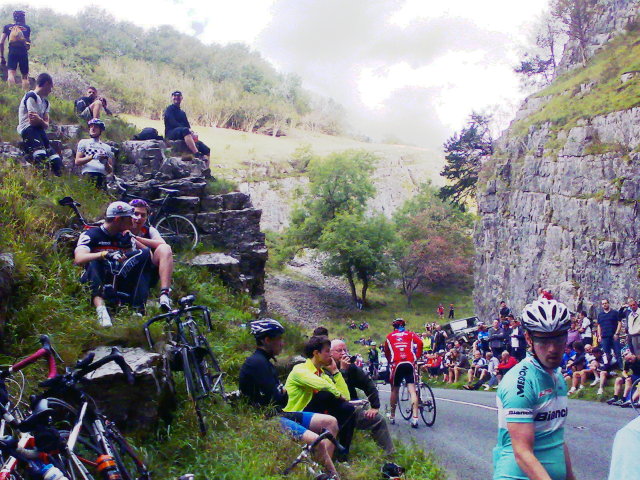
Photo of Fans in the Gorge

Fans in the Gorge

So tired, but so happy. Well worth it as a day out. Yesterday I went to the Tour of Britain as it passed through Cheddar Gorge. It was a fairly social trip, riding along with two from Bristol on the way in (hope they got back OK one bike broke crossing the orchard at Sandford, but I showed them Cheddar Cycle Store) and one from Milton on the way back. When I got there, I rode up the Gorge until I had to stop (or else fall off) and it was still packed with fans. It was a good half-hour before the race would pass by, but already almost every flattish piece of land by the road had either a spectator or a bicycle on it. I watched twitter for race news, posted an update @mjray, then put the phone away as the green-fronted police bikes came through just ahead of the racers. I tried videoing the race, but it s only the second outing for the handlebarcam and I seem to have deleted the recording before hooking it up to the laptop. Thankfully, the itv4 coverage (repeated 13:00) is pretty good. (My back is on TV! Ahem.) Now, today (Saturday) I will be mostly doing the work scheduled for Friday, but it was still worth it. Go along if you get the chance: Suffolk and Norfolk today, Westminster tomorrow. I suggested it to @enterprisehub s #coopsweekend because the Rabobank team are doing well.

16 September 2011

Sha Liu: Test blogging from w.bloggar v4.03 portable build

I just download this tool here. After finishing a really simple setup wizard, which includes choosing your blog service provider, filling in your username&passwd info, I m now writing my first blog with this tool. Before I download and begin to use it, I knew from reviews that this is NOT a WYSIWYG tool. I really doubt it that it could be useful for a person like me who have nearly no HTML knowledge. But so many reviews mention this tool and all give it high options that I decide to give it a try.

screenshot of Editor Tab

The tool looks pretty neat, isn t it? It s simple for me to use any buttons without guessing what they will do. And you can see that there s Preview tab, in which you can check the real layout when published.

screenshot of Preview Tab

The preview tab(it seems the first picture is not uploaded successfully?) In all, I begin to love this editor even this is my first time using it! It s simple yet completely enough for users like me. And with this editing HTML directly, I can even learn a little bit about its syntax. Don t mention all the merits an offline desktop editor can provide. Now, I ll try the last and most important function Publish! See you on my blog!

13 September 2011

Raphaël Hertzog: Understand dpkg and don t get stuck with a maintainer script failure

Continuing my series of articles on dpkg s errors, this time I ll cover a pretty common one which has several variations:
Setting up acpid (1:2.0.12-1) ...
rm: cannot remove  /etc/rc1.d/K20acpid': No such file or directory
dpkg: error processing acpid (--configure):
 subprocess installed post-installation script returned error exit status 1
Errors were encountered while processing:
 acpid
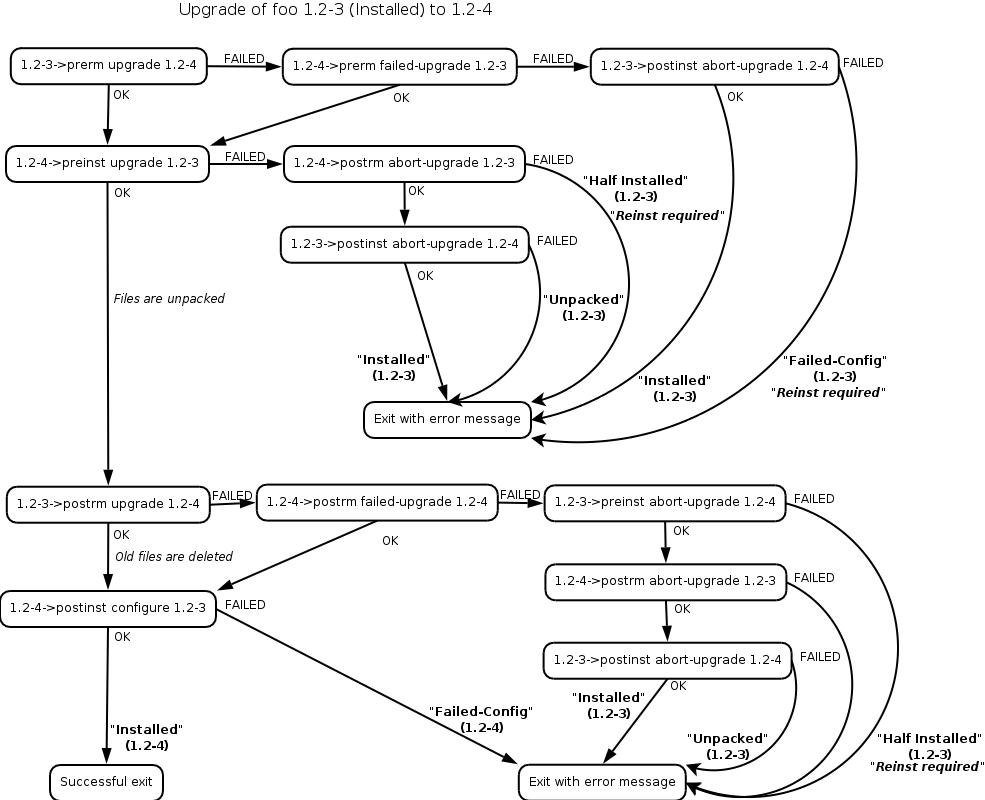
Even if dpkg is failing and outputting the error message, the real problem is not in dpkg but in the installed package (acpid in the example above). As we already learned, a package contains not only files but also maintainer scripts that are executed at various points of the installation process (see some useful graphics to understand how they are called, thanks to Margarita Manterola).

Maintainer scripts in a package upgrade

In the introductory example it was acpid s post-installation script that failed, and dpkg is only forwarding that failure back to the caller. The maintainer scripts are stored in /var/lib/dpkg/info/. You can thus inspect them and even modify them if you hit a bug and want to work around it (do this only if you understand what you do!). One common modification is to add set -x at the start of the script and to retry the failing operation. That way you can see what s executed exactly. Here s what the output could look like after the addition of set -x to /var/lib/dpkg/info/acpid.postinst:
$ sudo dpkg --configure acpid
Setting up acpid (1:2.0.12-1) ...
+ dpkg --compare-versions 1:2.0.11-1 lt-nl 1.0.10-3
+ dpkg --compare-versions 1:2.0.11-1 lt-nl 1.0.6-16
+ dpkg --compare-versions 1:2.0.11-1 lt 1.0.6-6
+ rm /etc/rc1.d/K20acpid
rm: cannot remove  /etc/rc1.d/K20acpid': No such file or directory
dpkg: error processing acpid (--configure):
 subprocess installed post-installation script returned error exit status 1
Errors were encountered while processing:
 acpid
This output helps you locate the command that is actually failing. Here s it s relatively easy since we have an error message from rm . And the fix is trivial too, we replace rm with rm -f so that it doesn t fail when the file doesn t exist (this is a fake bug I made up for this article I just added a failing rm call but it s inspired by real bugs I experienced). Maintainer scripts are supposed to be idempotent: we should be able to execute them several times in a row without bad consequences. It happens from time to time that the maintainer gets this wrong on the first try it works, so he uploads his package and we discover the problem only later once someone ended up executing the same code twice for some reason.

Follow me on Identi.ca, Twitter, Facebook and Google+. Or subscribe to this blog by RSS or by email.

7 comments Liked this article? Click here. My blog is Flattr-enabled.

5 September 2011

Steve Kemp: Scriptable email clients

This is just a quick post to remind myself in the morning, as soon as I've made it I intend to turn my computer off and leave it off until I can re-organize my office. I've been using mutt for my email for the past few years. Nothing compares to the flexibility of procmail/sieve for organizing server-side mail, and then mutt is ideal for reading them. With the addition of the mutt-patched sidebar mode you can even go for a few days before realizing you're not in a graphical environment. But one thing I do long for is the ability to execute scripts at various times. Thus far I've not actually planned what I'd like to do, but as a starting point imagine being able to execute a hook when new mail arrives? Or when you send a message matching a pattern in some fashion? There are some things out there, such as the various hacks which are designed to abort sending a message if you mention "See attachment" in a message body but fail to add one before sendign the message. These hacks generally abuse the sendmail configuration such that they're extremely ad-hoc and hard to chain/nest. I've mellowed out over the years and I have no interest in attempting to write a mail-client (though at the same time how hard can it be? Just restrict yourself to using inotify on ~/Maildir and offload delivery to exim and you're almost done? I guess the hard part is the UI, though I do like the mutt + sidebar layout. Write the whole thing in some scripty language?) I'll re-examine notmuch and gnus over the next week or two, but I suspect both will continue to disappoint in various ways. Anyway, for the moment I'm just pondering. But threading is an obvious concern. Most current mutt hooks relate to the local folder, or the local message. If I were viewing a message in one directory and a new mail notification fired for a delivery to both ~/Maildir and ~/Maildir/.people.foo I'd need to either serialise them or thread them. Ponder ponder. In other news I've been doing more photography recently. Nothing cohesive except for my recent experiment with shooting a "street-girl" outdoors in falling light, but that was an interesting challenge and the results were sufficient to make me want to try shooting outdoors in an organized fashion again. (Some random images have been linked to from my wee twitter page.) ObFilm: "She doesn't get eaten by the eels at this time " - The Princess Bride

1 September 2011

Lars Wirzenius: File copying and removal benchmarking

As part of my development of a backup application, I run benchmarks on it, and that means creating a test data set, running some backups, and then removing the test data set. One of the test data sets I use is a 140 gibibytes of my real data. The benchmark first copies the data to a temporary location. In other words, a fair bit of my current life is spent waiting for files to be copied and removed. The faster that goes, the better. Overnight, I ran a little benchmark on those operations, to compare a couple of ways to do them. The results are below:
  elapsed  cmd
      (s)
    107.2  rm -rf tmp/data
     98.4  find tmp/data -delete
    100.1  find tmp/data -exec rm -rf   +
    116.2  find tmp/data -depth -print0   xargs -0 rm -rf
  elapsed  cmd
      (s)
   3567.5  cp -a tmp/data tmp/copy
   3219.5  cd tmp && mkdir copy && tar -C data -cf - .   tar -C copy -xf -
It is surprising, but it's clear that find is significantly faster than rm in deleting files, by almost ten percent. Since performance is a feature, this would indicate that that feature in rm is buggy. For file copying, the piping of two tars is a common trick, and it really is faster, again by almost ten percent. Obviously, there might also be a problem with the benchmark. I attach the script, which uses benchmark-cmd in extrautils, which I wrote for this kind of thing. If there is a problem with the benchmark, don't hesitate to provide a patch to fix that. There may be other ways to remove or copy files that should be compared, too. rsync? cpio? For file removal, a tool using Linux getdents directly would probably be faster than the portable code in GNU coreutils and findutils. Somebody should write that and compare. In all cases above, the test data set to be removed or copied is 30 GiB. Copies happened to the same disk (that's what happens with my backup benchmarks too). The filesystem used was ext4.

24 August 2011

Russell Coker: Digital Cameras

In May I gave a talk for LUV about the basics of creating video on Linux. As part of the research for that I investigated which cameras were good for such use. I determined that 720p was a good enough resolution, as nothing that does 1080p was affordable and 1080i is lower quality. One thing to note is that 854*480 and 850*480 are both common resolutions for mobile phones and either of those resolutions can be scaled up to full screen on a 1920*1080 monitor without looking too blocky. So it seems that anything that s at least 850*480 will be adequate by today s standards. Of course as Dell is selling a 27 inch monitor that can do 2560*1440 resolution for a mere $899 in the near future 720p will be the minimum that s usable. Cheap Digital Video Cameras The cameras I suggested at the time of my talk (based on what was on offer in Melbourne stores) were the Panasonic Lumix DMC-S3 which has 4*optical zoom for $148 from Dick Smith [1] and the Olympus MJU 5010 which has 5*optical zoom camera for $168 (which is now $128) from Dick Smith [2]. Both of them are compact cameras that do 720p video. They are fairly cheap cameras but at the time I couldn t find anything on offer that had significantly better specs for video without being unreasonably expensive (more than $600). Update: In the comments Chris Samuel pointed out that Kogan has a FullHD digital video camera for $289 [13]. That s a very tempting offer. More Expensive Digital Video Cameras Teds Cameras has a good range of Digital Video Cameras (including wearable cameras, and cameras that are designed to be attached to a helmet, surfboard, or car) [3]. These are specifically designed as video cameras rather than having the video function be an afterthought. Ted sells the Sony Handycam HDR-CX110 which does 1080p video, 3MP photos, and 25* optical zoom for $450 [4]. They also sell the pistol-style Panasonic HX-WA10 which is waterproof to 3M, does 1080p video, 11MP pictures, and 5* optical zoom for $500 [5]. For my use I can t justify the extra expense of the digital video cameras (as opposed to digital cameras that can take video), I don t think that they offer enough. So a cheap $128 Olympus MJU 5010 is what I will probably get if I buy a device for making video. I can afford to replace a $128 camera in a year or two but a device that costs $500 or more needs to last a bit longer. I expect that in a year or two I will be able to buy something that does 1080p for $200. Features to look for in Great Digital Cameras The other option when buying a camera is to buy something that is designed to be a great camera. It seems that RAW file capture [6] is a requirement for good photography. RAW files don t just contain uncompressed data (which is what I previously thought) but they have raw sensor data which may not even be in a cartesian grid. There is some processing of the data that can be best done with raw sensor data (which may be in a hexagonal array) and which can t be done properly once it s been converted to a cartesian array of pixels. Image Magick can convert RAW files to JPEG or TIFF. I haven t yet investigated the options on Linux for processing a RAW file in any way other than just generating a JPEG. A client has several TB of RAW files and has found Image Magick to be suitable for converting them so it should do. The next issue is the F number [7]. A brief summary of the F number is that it determines the inverse-square of the amount of light that gets to the CCD which determines the possible shutter speed. For example a camera set to F1 would have a 4* faster shutter speed than a camera set to F2. The F rating of a camera (or lens for interchangeable lens cameras) is a range on many good cameras (or lenses for detachable lens cameras), if you want to take long exposure shots then you increase the F number proportionally. A casual scan of some web sites indicates that anything less than F3 is good, approaching F1 is excellent, and less than F1 is rare. But you don t want to only use low F numbers, having a higher F number gives a larger Depth of Field, that means that the distance between the nearest and furthest objects that appear to be in focus is greater. So increasing the F number and using a flash can result in more things being in focus than using a low F number without a flash. Another important issue is the focal length, cheap cameras are advertised as having a certain optical zoom which apparently isn t quite how things work. The magnification apparently varies depending on the distance to the object. Expensive cameras/lenses are specified with the range of focal lengths which can be used to calculate the possible magnification. According to DPReview.com Optical zoom = maximum focal length / minimum focal length, so a 28mm-280mm lens would be 10* optical zoom [8]. Finally it seems to be that the specified focal length of cameras is usually in 35mm equivalent. So a lens described as 280mm won t be 28cm long, it will be some fraction of that based on the size of the CCD as a proportion of the 35mm film standard (which is 36*24mm for the image/CCD size). Update: In the comments Aigars Mahinovs said: Don t bother too much with the zoom. The view of a normal person is equivalent to 50mm lens (in 35mm film equivalent). Anything under 24mm is for landscapes and buildings it is for sights where you would actually have to move your head to take in the view. Zooms are rarely useful. Something in 85-100mm range is perfectly fine to capture a bird or a person some distance away or some interesting piece of landscape, but anything more and you are in the range of silly stuff for capturing portraits of football players from the stands or for paparazzi photos. And the more zoom is in the lens the crappier the lens optics will be (or more expensive, or both) that is why the best optics are prime lenses with no zoom at all and just one specific optical length each. For example almost all my Debconf photos of the last two years are taken with one lens Canon 35mm f/2.0 (a 50mm equivalent on my camera) and only the group shots are taken with a lens that is equivalent to 85mm. So I guess if I was going to get an interchangeable lens camera then I could get fixed focus lenses for things that are close and far away and one with a small zoom range for random other stuff. Of course that would get me way outside my budget unless I got some good deals on the second hand market. Also having a camera that can fit into a pocket is a real benefit, and the ability to rapidly get a camera out and take a picture is important! A final item is the so-called ISO Number which specifies how fast the film is. A higher number means that a photograph can be taken with less light but that the quality will generally be lower. It seems that you have a trade-off between a low F number (and therefore low Depth of Field), good lighting (maybe a flash), a long exposure time (blurry if the subject or camera isn t still) and a grainy picture from a high ISO number. Comparing Almost-Affordable Great Digital Cameras I visited Michaels camera store in Melbourne [9] and asked for advice about affordable cameras that support RAW capture (every DSLR does but I don t want to pay for a DSLR). The first option they suggested was the Samsung EX1 that does 10MP, F1.8-F2.4 with a 24-72mm equivalent focal range (3* optical zoom), and 640*480 video [10] for $399. The next was a Nikon P7000 that does 10MP, F2.8-5.6 with 7* optical zoom (28-200mm equivalent), and 720p video [11] for $599. The final option they had was the Canon G12 that does 10MP, F2.8-4.5 with 5* optical zoom (28-140mm equivalent), and 720p video [12] for $599. 3* optical zoom isn t really enough, and $599 is a bit too much for me, so it seems that RAW format might not be an option at this time. Conclusion I can t get what I want for great photography at this time, there seems to be nothing that meets my minimum desired feature set and costs less than $550. A client who s a professional photographer is going to lend me an old DSLR that he has hanging around for some photography I want to do on the weekend. I am also considering buying a Olympus MJU 5010 for making videos and general photography, it s better than anything else I own at this time and $128 is no big deal. Please let me know if I made any errors (as opposed to gross simplifications) in the above summary of the technical issues, also let me know if there are other things to consider. I will eventually buy a camera that can capture RAW images.

23 August 2011

Rudy Godoy: Compute clusters for Debian development and building final report

Compute clusters for Debian development and building final report Summary
-
The goal of this project was intended to have Eucalyptus cloud to
support ARM images so it allows Debian developers and users to be able
to use such facility for taks such package building, software
development (ie. Android) under a Debian pre-set image,
software testing many others. What was expected to have at the end is a modified version of Eucalyptus
Cloud that supports ARM images on the first place. To date this goal has
been reached but is not complete, read production-ready. Extensive test
needs to be done. Besides that we have another goal which is to get
Debian community to use this new extended tool. Project overview
-
Eucalyptus is a hybrid cloud computing platform which has a Open Source
(FLOSS) version. It s targetted to be used for PaaS (Platform as a
Service), IaaS (Infrastructure as a Service) and other distribution
models. It can be used also for cloud management. Given that it has
implemented the EC2, for computing, and the S3, for storage, API, it s
compatible with existing public clouds such Amazon EC2. Currently it
supports running i386 and amd64 images or NC (Node Controllers) in
Eucalyptus naming. Eucalyptus is a complex piece of software. It s architechture it s
modular composed by five components. Cloud Controller (CLC), Walrus (W),
Storage Controller (SC), Cluster Controller (CC) and Node Controller
(NC). The first three are written in Java and the remaining are written
in C. Our project modifications was targetted to the NC component,
altough there is a remaining task for hacking the UI to allow setting
the arch of the uploaded NC image instance. The Node Controller is in charge of setting the proper information for
Eucalyptus to be able to run virtualized images. Eucalyptus uses XEN and
KVM hyphervisor to handle internal virtualization subsystem, and
Libvirt, which is an abstraction of the existing virtualization
libraries, for program interfacing. Having that in mind we are back to our project. For our project to be
sucessful we had various tasks to do. Beginning with understanding such
complex piece of software, followed by hacking the requiered bits and
later integrate the work so it results in a useful tool. Our approach to
the project was then inline with such description. The project s history
I started my participation in GSoC approaching Steffen to discuss about
what was expected, or more accurately, what was in his mind. We
exchanged emails previous to my application and that resulted on my
application being submitted. From the beginning I should tell that I
wasn t much clear on the final product of the project, however we
refined ideas and goals during the weeks following to the official
begining of the project. What was clear for me, after all, is that for
this to see the light and gain adoption Eucalyptus code needed to be
dealt with. Our first task was review ARM image creation from scratch, using the
work done by Aurelien and Dominique in previous GSoC. I ve managed to
get an updated ARM image running under qemu-system-arm. The issues
presented in the past were almost unexistant now that the versatile
kernel is official. You can see this on my first report. After that being done and sometimes in parallel my main goal was then understand
the internals of the Eucalyptus software in order to figure out it s
feasibility, where do we need to extend and how big the task is, we
didn t knew upfront. From the beginning of the project Steffen was kind
to introduce me to the Eucalyptus developers and that have resulted in a
good outcome for Debian, IMHO, to date. Understanding Eucalyptus internals was quite a fun task to say the less. As you
can see on the first part of the report Eucalyptus is modularized and
the component I was expected to work with was the NC (Node
Controller). Given that I isolated my work focus, I started to focus on
learning the internals about that component. Node Controller as described is in charge of talking with
virtualization hyphervisors in order to arrange things to run guest
image instances. The module has basically one main component: handler.c,
in charge to talk to the appropiate hyphervisor and there are
extensions (think of OOP polymorphism but acknoledge it s plain C)
that interact with KVM or XEN. I figured that if qemu-kvm is ran in Hyphervisor mode we can manage to
run an ARM image with qemu-system-arm. Given that Eucalyptus has
interaction with KVM hyphervisor in place, this answered the question of
the project s feasibility. First green light on.
>From this point the scope reduced to interacting with the KVM handler
(node/handler_kvm.c) and extend it to support running an image that is
not amd64 or i386. NC makes use of libvirt to abstract interaction with Hyphervisors. So,
the next phase was learning about it s API and figure what s needed to
be modified next. Libvirt uses a XML file for setting Domain (in
libvirt s naming) definitions. So, Eucalyptus provides a Perl wrapper to
generate this file on runtime and allow the NC to invoke libvirt s API
to run the instance. Next task then, was adapt such script to support
ARM arch. The current script is taiolred for amd64 and i383. I worked on
that front and managed to get a script prototype, that can later be
improved and support more arch s. Generating an adequate Libvirt s XML Domain definition file for ARM can
be a heroic task. There are many things to have in mind given the
diversity of the ARM processor and vendors. I focused on the versatile
flavour given that I was going to test the image I built on the first
place and it ran fine under qemu-system-arm.
The Perl script wrapper then was adapted for such configuration and it
can be tested independently by issuing the following command: $ tools/gen_kvm_libvirt_xml arch arm The arch parameter is what I implemented and it s intended to be
called from the kvm handler on instance creation. With the extensibility
in mind I ve created a hash to associate the arch with their
corresponding emulator. our %arches = (
amd64 => /usr/bin/kvm ,
arm => /usr/bin/qemu-system-arm ,
); Added the arch parameter to the GetOptions() function and used
conditions to tell whether the user is looking for a particular arch,
arm in our case. The most important parts to be considered are the
, and entries. hvm $local_kvm There s also and that require to be tailored for arm. root=0800 As output the script generates an XML template that can be adapted to
your needs and it could be used and tested with tools like Libvirt s
virsh. So that, it can be useful independently of Eucalyptus. I managed
to get to this point before the midterm evaluation. Now that we had the XML wrapper almost done, the next task was to make
the handler call pass the arch as an argument to the script, so the
image is loaded with the proper settings and we are able to run it. Eucalyptus doesn t have a arch field for NC s instances. So, after approaching
Eucalyptus developers, with whom we had already being interacting, I
settled to my proposal of extending the ncInstance struct with an arch
field (util/data.h). The ncInstance_t struct stores the metadata for the
instance being created. It s used for storing runtime data as well as
network configuration and more. It was indeed the right place to add a
new field. I did so by creating the archId field.
Now I needed to make sure the arch information is stored and later used on the
libvirt s call. typedef struct ncInstance_t
char instanceId[CHAR_BUFFER_SIZE];
char imageId[CHAR_BUFFER_SIZE];
char imageURL[CHAR_BUFFER_SIZE];
char kernelId[CHAR_BUFFER_SIZE];
char kernelURL[CHAR_BUFFER_SIZE];
char ramdiskId[CHAR_BUFFER_SIZE];
char ramdiskURL[CHAR_BUFFER_SIZE];
char reservationId[CHAR_BUFFER_SIZE];
char userId[CHAR_BUFFER_SIZE];
char archId[CHAR_BUFFER_SIZE];
int retries; /* state as reported to CC & CLC */
char stateName[CHAR_BUFFER_SIZE]; /* as string */
int stateCode; /* as int */ /* state as NC thinks of it */
instance_states state; char keyName[CHAR_BUFFER_SIZE*4];
char privateDnsName[CHAR_BUFFER_SIZE];
char dnsName[CHAR_BUFFER_SIZE];
int launchTime; // timestamp of RunInstances request arrival
int bootTime; // timestamp of STAGING->BOOTING transition
int terminationTime; // timestamp of when resources are released (->TEARDOWN transition) virtualMachine params;
netConfig ncnet;
pthread_t tcb; /* passed into NC via runInstances for safekeeping */
char userData[CHAR_BUFFER_SIZE*10];
char launchIndex[CHAR_BUFFER_SIZE];
char groupNames[EUCA_MAX_GROUPS][CHAR_BUFFER_SIZE];
int groupNamesSize; /* updated by NC upon Attach/DetachVolume */
ncVolume volumes[EUCA_MAX_VOLUMES];
int volumesSize;
ncInstance; With that in place what was left was modifying the functions that
store/update the ncInstance data, and also the libvirt s function that
calls the gen_kvm_libvirt_xml script. I ve modified the following files:
- util/data.c
- node/handlers_kvm.c
- node/handlers. c,h
- node/test.c
- node/client-marshall-adb.c Most important the allocate_instance() function that is in charge of setting up
the instance metadata a prepare it to pass it to the handler, then
hyphervisor trough Libvirt s API. The function now has a new archId
parameter as well, to keep coherence with the field name. It also
handles whether the field is set or not. We (Eucalyptus developers and
I) haven t settled wether to initialize this field with a default value
or not. I d stepped up and initialized with a NULL value for this string
type var. if (archId != NULL)
strncpy(inst->archId, archId, CHAR_BUFFER_SIZE);
Stores the value only if it s passed to the function. This is essential to
don t break existing functionality and keep consistency for later releases.
With this we almost finished the part of extending Eucalyptus to support
arm images. It took quite long to get to that point. Next step: test. As I mentioned in my previous report the current Eucalyptus packaging
has issues. From the beginning I ve approached the pkg-eucalyptus team,
who were very hepful. So I myself set me up and joined the pkg team with
commit access to the repo. Even the GSoC is not intended for packaging
labour, I needed to clear things on that side because what we want is
adoption so anyone, say a DSA or a user, could setup a cloud that has
support for running arm instances under amd64 arch. Over the weeks between mid-term evaluation and past week I ve worked on
that front. Results were good, as you can see in the pkg-eucalyptus
mailing list and SVN repo.
Eucalyptus has a couple of issues that because of it s nature and complexity
triggered build errors. Those issues came from the Java side of the project and
few form the C-side. The C-part was a problem with AXIS2 Jar used to generate
stubs for later inclusion on build-time. There s no definitive solution to date
because one of the Makefile on gatherlog/Makefile issues a subshell call that
doesn t catches the AXIS_HOME environment variable. I ve worked around this
by defining it as a session env var from .zshrc. The other problem is related
to the Java libary versioning and most likely (we had to investigate further)
to groovy versioning. As I explained Eucalyptus has 3 components written in Java. The Java code uses
extensively the AXIS2 library for implementing webservices calls, the groovy
language for JVM, and many other Java libaries. Eucalyptus open source version
ships both online and offline versions. The difference is basically that
the offline version ships the Java libaries JAR files inside the source code,
so you can build with all required deps. Our former packaging used a file to list which Java libraries the package
depends on and it symlinked them using system wide installed packages. This
rather than helping out triggered a lot of problems I explaing with more detail
on the pkg-eucalyptus ml. I worked around this by telling the debian/rules
not to use such file to symlink and instead use the existing ones from
the source. The last weekend I managed to get to that point and built
sucessfully the software under Debian. I ve done that in order to have a
complete build-cycle for my changes, and then test. In fact today I ve
spotted and fixed a couple of bugs there. What s available now

To date we have a Eucalyptus branch where my patches are sent. The level of
extension is nearly complete, more testing needed. One missing bit is to
change the UI so that the user selects which arch her image is and that
value is passed to the corresponding functions on the Node Controller
component. We also have an ARM image that can be tested and later automated. I ve
recently learned about David Went s VMBuilder repo that extends Ubuntu s
vmbuilder to support image creationg. I might talk to him to adapt the tool
in order to support creation of arm images and use it to upload to an
Eucalyptus cloud. I ve also created a wiki page with different bits on which I was working on.
I ve yet need to craft it to be more educational. I guess I m going to use
this report as a source :) We also had more strong cooperation with the Eucalyptus project and
involved their developers on the packaging and this project, which is
something I consider a great outcome for this project and GSoC goals:
to attract more people to contribute to FLOSS. I ve also been contacted by
people from the Panda Project and we might cooperate also. Future work

I plan to keep working on the project regardless the GSoC ends. Our goal
as Debian could be integrating this into the Eucalyptus upstream
branch. We have good relations with them so expect news from that side.
I also plan to keep working with the Eucalyptus team and related
software in Debian, given that I m familiarized with the tools and
projects.
I m also planning to advocate SoC for Debian in my faculty. To date we
had already 4 students, IIRC, that have participated in the past. Project challenges and lessons
During the project I faced many challenges both in the personal side
and in the technical one. This part is a bit personal but I expect we
learn from this. First challenge was the where do I sit problem. My project was
particular, indeed quite different from the others on it s nature. I had
to work on a software that is not Debian s and then come and say Hey we
have this nice tool for you, come test it! . So, indeed, my focus was on
the understanding of such tool, Eucalyptus, and not much on looking back
at Debian because I didn t feel I had something to advertise yet and
indeed I got most valuable/useful feedback from Eucalyptus developers
rather than Debian s, which for the case is OK IMHO. I had great
mentoring. This situation probably looked a bit of isolation from my
side, from Debian s POV, but it was not intended it s just how it needed
to be IMHO. I felt that I wasn t contributing directly to the
project. I ve spoke about such thing with Steffen a couple of times. I d
like to say that it was also my concern but I probably failed on
communicating this, second challenge. Third challenge was more technical and related to the first one. Since I
was not writing any code for a Debian native package/program but instead for
other project I faced the situation of where to publish my
contributions. Eucalyptus had some issues on managing their FLOSS repo
and the current development one is outdated comparing to the
-src-offline 2.0.3 release. The project didn t fit pkg-eucalyptus repo
neither, even we thought to branch the existing trunk and ship my
contribs as quilt patches, but it involved a lot of more work and burn
on reworking something that has issues now. Later on time I branched the
bzr eucalyptus-devel Launchpad repo and synced there with the
src-offline code. I was slow to react on thing I can say. Fourth challenge was also technical and still dealing with. I was looking to
setup a machine to set a cloud and test my branch. The Dean of my faculty
kindly offered a machine but I ve never managed to get things arranged
with the technical team. Steffen and I discussed about this and evaluated
options, at the end we settled on pushing adoption rather than showcasing it.
Since for adoption we need a use case, I ve spend some SoC money on hardware
for doing this. I should have news this week on that side :) Finally, I d like to thank everyone on the Debian SoC team for this
opportunity to participate. I like to thank Steffen for his effort on
arranging things for me, Graziano from Eucalyptus for his advice on
working with the software code. The different people from Eucalyptus I
interacted with and showed interest on the project s sucess. My
classmates and teachers from the Computer Science School at UCSP in
Arequipa-Peru, friends from the computing community in Peru SPC and
finally my family. Thank you, I learned a lot, specially on the personal
side. As Randy Pausch put: The brick walls are there to give us a
chance to show how badly we want something. Resources
Please see the Wiki page[1] for any reference to the project s resources. 1- http://wiki.debian.org/SummerOfCode2011/BuildWithEucalyptus/ProjectLog Best regards,
Rudy

21 August 2011

Matthew Palmer: Unintended Consequences: Why Evidence Matters

If you were trying to get rid of hiring discrimination (on grounds irrelevant to the ability to do the job), you d think a good way to do it would be to reduce the ability of the hiring manager to discriminate, by restricting their access to irrelevant (but possibly prejudicial) information. It s certainly what I might come up with as an early idea in a brainstorming session. I m not alone: France had this same idea, and gave it a go, by passing a law requiring companies to anonymise resumes before they got to any decision makers. So far, so average. But rather than just coming up with an idea and inflicting it on everyone by a blanket law, they did what should be done with all new ideas: they trialled it (with 50 large corporations, according to the report) before making it universal, to make sure that the theory matched reality. Then, after giving it a good shake, they examined the evidence, and found that the idea had some unintended consequences:
Applicants with foreign names, or who lived in under privileged areas were found to be less likely to be called in for an interview without the listing of their name and address. Researchers reasoned that this was because employers and recruiters made allowances for subpar presentation or limited French speaking if their performance could be explained by deprivation or foreign birth.
The icing on the cake is that now the evidence is in, they re now planning on making it optional (I m not sure how that s different from killing it entirely, but I guess it s worth the same in the end). So we ve got the quinella of decision-making awesome: Far too often, we get far too attached to our ideas, and don t let them go when reality doesn t fit our preconceptions. Kudos to the people involved in this idea for not letting their egos get in the way of good government. Let it be an object lesson for us all.

Next.

Previous.