Search Results: "mt"

7 February 2016

Iustin Pop: mt-st project new homepage

A short public notice: mt-st project new homepage at https://github.com/iustin/mt-st. Feel free to forward your distribution-specific patches for upstream integration! Context: a while back I bought a tape unit to help me with backups. Yay, tape! All good, except that I later found out that the Debian package was orphaned, so I took over the maintenance. All good once more, but there were a number of patches in the Debian package that were not Debian-specific, but rather valid for upstream. And there was no actual upstream project homepage, as this was quite an old project, with no (visible) recent activity; the canonical place for the project source code was an ftp site (ibiblio.org). I spoke with Kai M kisara, the original author, and he agreed to let me take over the maintenance of the project (and that's what I intend to do: maintenance mostly, merging of patches, etc. but not significant work). So now there's a github project for it. There was no VCS history for the project, so I did my best to partially recreate the history: I took the debian releases from snapshots.debian.org and used the .orig.tar.gz as bulk import; the versions 0.7, 0.8, 0.9b and 1.1 have separate commits in the tree. I also took the Debian and Fedora patches and applied them, and with a few other cleanups, I've just published the 1.2 release. I'll update the Debian packaging soon as well. So, if you somehow read this and are the maintainer of mt-st in another distribution, feel free to send patches my way for integration; I know this might be late, as some distributions have dropped it (e.g. Arch Linux).

3 February 2016

Jonathan Dowland: Comparing Docker images

I haven't written much yet about what I've been up to at work. Right now, I'm making changes to the sources of a set of Docker images. The changes I'm making should not result in any changes to the actual images: it's just a re-organisation of the way in which they are built. I've been using the btrfs storage driver for Docker which makes comparing image filesystems very easy from the host machine, as all the image filesystems are subvolumes. I use a bash script like the following to make sure I haven't broken anything:
oldid="$1"; newid="$2";
id_in_canonical_form()  
    echo "$1"   grep -qE '^[a-f0-9] 64 $'
 
canonicalize_id()  
    docker inspect --format '  .Id  ' "$1"
 
id_in_canonical_form "$oldid"   oldid="$(canonicalize_id "$oldid")"
id_in_canonical_form "$newid"   newid="$(canonicalize_id "$newid")"
cd "/var/lib/docker/btrfs/subvolumes"
sumpath()  
    cd "$1" && find . -printf "%M %4U %4G %16s %h/%f\n"   sort
 
diff -ruN "$oldid" "newid"
diff -u <(sumpath "$oldid") <(sumpath "$newid")
Using -printf means I can ignore changes in the timestamps on files which is something I am not interested in. If it is available in your environment, Lars Wirzenius' tool Summain generates manifests that include a file checksum and could be very useful for this use-case.

31 January 2016

Sean Whitton: Clean forks for GitHub pull requests

As I understand it, having a GitHub profile as a portfolio has become an essential element in applying for entry-level computer programming jobs insightfully, a friend of mine draws a comparison with the rise of unpaid internships in other fields. Something about GitHub that gets in the way of maintaining a presentable portfolio is that forks of other people s repositories made just to submit a pull request can crowd out repositories showcasing one s work. Sometimes pull requests can take months to be responded to by upstream maintainers, leaving unimpressive repositories sitting around on one s profile for all that time. The following Python script, clean-github-pr.py, forks a repository and then sets various attributes of it to make it as obvious as GitHub allows that it s just a temporary fork made in order to submit a pull request. Invoke it like this:
$ clean-github-pr.py upstream-owner/repo-to-fork
You will need the PyGitHub python library, which on a Debian Stretch system can be installed with apt-get install python-github.
#!/usr/bin/python
# clean-github-pr --- Create tidy repositories for pull requests
#
# Copyright (C) 2016  Sean Whitton
#
# clean-github-pr is free software: you can redistribute it and/or modify
# it under the terms of the GNU General Public License as published by
# the Free Software Foundation, either version 3 of the License, or
# (at your option) any later version.
#
# clean-github-pr is distributed in the hope that it will be useful,
# but WITHOUT ANY WARRANTY; without even the implied warranty of
# MERCHANTABILITY or FITNESS FOR A PARTICULAR PURPOSE.  See the
# GNU General Public License for more details.
#
# You should have received a copy of the GNU General Public License
# along with clean-github-pr.  If not, see <http://www.gnu.org/licenses/>.
import github
import sys
import time
import tempfile
import shutil
import subprocess
import os
CREDS_FILE = os.getenv("HOME") + "/.cache/clean-github-pr-creds"
def main():
    # check arguments
    if len(sys.argv) != 2:
        print sys.argv[0] + ": usage: " + sys.argv[0] + " USER/REPO"
        sys.exit(1)
    # check creds file
    try:
        f = open(CREDS_FILE, 'r')
    except IOError:
        print sys.argv[0] + ": please put your github username and password, separated by a colon, in the file ~/.cache/clean-github-pr-creds"
        sys.exit(1)
    # just to be sure
    os.chmod(CREDS_FILE, 0600)
    # make the fork
    creds = f.readline()
    username = creds.split(":")[0]
    pword = creds.split(":")[1].strip()
    g = github.Github(username, pword)
    u = g.get_user()
    source = sys.argv[1]
    fork = sys.argv[1].split("/")[1]
    print "forking repo " + source
    u.create_fork(g.get_repo(source))
    while True:
        try:
            r = u.get_repo(fork)
        except github.UnknownObjectException:
            print "still waiting"
            time.sleep(5)
        else:
            break
    # set up & push github branch
    user_work_dir = os.getcwd()
    work_area = tempfile.mkdtemp()
    os.chdir(work_area)
    subprocess.call(["git", "clone", "https://github.com/" + username + "/" + fork])
    os.chdir(work_area + "/" + fork)
    subprocess.call(["git", "checkout", "--orphan", "github"])
    subprocess.call(["git", "rm", "-rf", "."])
    with open("README.md", 'w') as f:
        f.write("This repository is just a fork made in order to submit a pull request; please ignore.")
    subprocess.call(["git", "add", "README.md"])
    subprocess.call(["git", "commit", "-m", "fork for a pull request; please ignore"])
    subprocess.call(["git", "push", "origin", "github"])
    os.chdir(user_work_dir)
    shutil.rmtree(work_area)
    # set clean repository settings
    r.edit(fork,
           has_wiki=False,
           description="Fork for a pull request; please ignore",
           homepage="",
           has_issues=False,
           has_downloads=False,
           default_branch="github")
if __name__ == "__main__":
    main()
If you have any suggestions for clean-github-pr.py, please send me a patch or a pull request against the version in my dotfiles repository.

27 January 2016

Russell Coker: Using LetsEncrypt

Lets Encrypt is a new service to provide free SSL keys [1]. I ve just set it up on a few servers that I run. Issues The first thing to note is that the client is designed to manage your keys and treat all keys on a server equally with a single certificate. It shouldn t be THAT difficult to do things in other ways but it would involve extra effort. The next issue that can make things difficult is that it is designed that the web server will have a module to negotiate new keys automatically. Automatically negotiating new keys will be really great when we get that all going, but as I didn t feel like installing a slightly experimental Apache module on my servers that meant I had to stop Apache while I got the keys and I ll have to do that again every 3 months as the keys have a short expiry time. There are some other ways of managing keys, but the web servers I m using Lets Encrypt with at the moment aren t that important and a couple of minutes of downtime is acceptable. When you request multiple keys (DNS names) for one server to make it work without needless effort you have to get them all in the one operation. That gives you a single key file for all DNS names which is very convenient for services that don t support getting the hostname before negotiating SSL. But it could be difficult if you wanted to have one of the less common configurations such as having a mail server and a web server on the same IP addess but using different keys How To Get Keys deb http://mirror.internode.on.net/pub/debian/ testing main The letsencrypt client is packaged for Debian in Testing but not in Jessie. Adding the above to the /etc/apt/sources.list file for a Jessie system allows installing it and a few dependencies from Testing. Note that there are problems with doing this, you can t be certain that all the other apps installed will be compatible with the newer versions of libraries that are installed and you won t get security updates. letsencrypt certonly --standalone-supported-challenges tls-sni-01 The above command makes the letsencrypt client listen on port 443 to talk to the Lets Encrypt server. It prompts you for server names so if you want to minimise the downtime for your web server you could specify the DNS names on the command-line. If you run it on a SE Linux system you need to run setsebool allow_execmem 1 before running it and setsebool allow_execmem 0 afterwards as it needs execmem access. I don t think it s a problem to temporarily allow execmem access for the duration of running this program, if you use KDE then you will be forced to allow such access all the time for the desktop to operate correctly. How to Install Keys [ssl:emerg] [pid 9361] AH02564: Failed to configure encrypted (?) private key www.example.com:443:0, check /etc/letsencrypt/live/www.example.com/fullchain.pem The letsencrypt client suggests using the file fullchain.pem which has the key and the full chain of certificates. When I tried doing that I got errors such as the above in my Apache error.log. So I gave up on that and used the separate files. The only benefit of using the fullchain.pem file is to have a single line in a configuration file instead of 3. Trying to debug issues with fullchain.pem took me a lot longer than copy/paste for the 3 lines. Under /etc/letsencrypt/live/$NAME there are symlinks to the real files. So when you get new keys the old keys will be stored but the same file names can be used. SSLCertificateFile "/etc/letsencrypt/live/www.example.com/cert.pem"
SSLCertificateChainFile "/etc/letsencrypt/live/www.example.com/chain.pem"
SSLCertificateKeyFile "/etc/letsencrypt/live/www.example.com/privkey.pem" The above commands are an example for configuring Apache 2. smtpd_tls_cert_file = /etc/letsencrypt/live/smtp.example.com/cert.pem
smtpd_tls_key_file = /etc/letsencrypt/live/smtp.example.com/privkey.pem
smtpd_tls_CAfile = /etc/letsencrypt/live/smtp.example.com/chain.pem Above is an example of Postfix configuration. ssl_cert = </etc/letsencrypt/live/smtp.example.com/cert.pem
ssl_key = </etc/letsencrypt/live/smtp.example.com/privkey.pem
ssl_ca = </etc/letsencrypt/live/smtp.example.com/chain.pem Above is an example for Dovecot, it goes in /etc/dovecot/conf.d/10-ssl.conf in a recent Debian version. Conclusion At this stage using letsencrypt is a little fiddly so for some commercial use (where getting the latest versions of software in production is difficult) it might be a better option to just pay for keys. However some companies I ve worked for have had issues with getting approval for purchases which would make letsencrypt a good option to avoid red tape. When Debian/Stretch is released with letsencrypt I think it will work really well for all uses.

Uwe Kleine-K nig: Installing Debian Jessie on a Netgear ReadyNAS 104

The Netgear ReadyNAS 104 comes shipped with U-Boot. To access its "shell" remove the small quadratic sticker at the backside to reveal the UART pins (3V3, pinout available at Arnaud's NAS page[1] and connect a matching adapter. Also connect a network cable to the lower jack. Then on a different machine in the same network setup a tftp server (e.g. apt-get install tftpd-hpa). As of today the latest beta netboot installer (Beta 2) doesn't work any more because the kernel in jessie was updated since the installer was released. So pick up the armhf netboot installer from the daily snapshots. You need initrd.gz and vmlinuz. Furthermore armada-370-netgear-rn104.dtb. Update: As jessie is released now, download the following images: To make the installer ready to boot do:
# apt-get install u-boot-tools
$ cat vmlinuz armada-370-netgear-rn104.dtb > vmlinuz-rn104
$ mkimage -A arm -O linux -T multi -C none -a 0x04000000 -e 0x04000000 -n "Debian Jessie armhf installer" -d vmlinuz-rn104:initrd.gz uImage-installer-rn104
# cp uImage-installer-rn104 /srv/tftp
Then on the U-Boot shell setup networking and start the installer by issuing the following commands:
dhcp
setenv serverip 192.168.1.17
tftp uImage-installer-rn104
bootm $load_addr
With 192.168.1.17 being the IPv4 of the machine you set up the tftp server above, adapt accordingly to your setup. While in U-Boot the default ethernet device is the lower jack, the installer is only able to use the upper, so replug the ethernet cable to the upper receptacle. Go through the installation, and before rebooting do the following: Select "Change debconf priority" and set it to "low". Then "Download installer components" and check "mtd-modules-3.16.0-4-armmp-di". After that "Execute a shell" and do:
# depmod -a 
# modprobe pxa3xx_nand
# apt-install flash-kernel
# mount --bind /proc /target/proc
# chroot /target
# cat >> /etc/flash-kernel/db << EOF
Machine: NETGEAR ReadyNAS 104
DTB-Id: armada-370-netgear-rn104.dtb
DTB-Append: yes
Mtd-Kernel: uImage
Mtd-Initrd: minirootfs
U-Boot-Kernel-Address: 0x04000000
U-Boot-Initrd-Address: 0x05000000
Required-Packages: u-boot-tools
EOF
# flash-kernel
You then need to adapt the u-boot environment to pass the right root parameter to Linux. Alternatively add Bootloader-Sets-Incorrect-Root: yes to /etc/flash-kernel/db. [1] Note this page is about a ReadyNAS 102, the pinout is identical though.

25 January 2016

Antoine Beaupr : Internet in Cuba

A lot has been written about the Internet in Cuba over the years. I have read a few articles, from New York Times' happy support for Google's invasion of Cuba to RSF's dramatic and fairly outdated report about censorship in Cuba. Having written before about Internet censorship in Tunisia, I was curious to see if I could get a feel of what it is like over there, now that a new Castro is in power and the Obama administration has started restoring diplomatic ties with Cuba. With those political changes coming signifying the end of an embargo that has been called genocidal by the Cuban government, it is surprisingly difficult to get fresh information about the current state of affairs. This article aims to fill that gap in clarifying how the internet works in Cuba, what kind of censorship mechanisms are in place and how to work around them. It also digs more technically into the network architecture and performance. It is published in the hope of providing both Cubans and the rest of the world with a better understanding of their network and, if possible, Cubans ways to access the internet more cheaply or without censorship.

"Censorship" and workarounds Unfortunately, I have been connected to the internet only through the the Varadero airport and the WiFi of a "full included" resort near Jibacoa. I have to come to assume that this network is likely to be on a segregated, uncensored internet while the rest of the country suffers the wrath of the Internet censorship in Cuba I have seen documented elsewhere. Through my research, I couldn't find any sort of direct censorship. The Netalyzr tool couldn't find anything significantly wrong with the connection, other than the obvious performance problems related both to the overloaded uplinks of the Cuban internet. I ran an incomplete OONI probe as well, and it seems there was no obvious censorship detected there as well, at least according to folks in the helpful #ooni IRC channel. Tor also works fine, and could be a great way to avoid the global surveillance system described later in this article. Nevertheless, it still remains to be seen how the internet is censored in the "real" Cuban internet, outside of the tourist designated areas - hopefully future visitors or locals can expand on this using the tools mentioned above, using the regular internet. Usual care should be taken when using any workaround tools, mentioned in this post or not, as different regimes over the world have accused, detained, tortured and killed sometimes for the mere fact of using or distributing circumvention tools. For example, a Russian developer was arrested and detained in 2001 by United States' FBI for exposing vulnerabilities in the Adobe e-books copy protection mechanisms. Similarly, people distributing Tor and other tools have been arrested during the period prior to the revolution in Tunisia.

The Cuban captive portal There is, however, a more pernicious and yet very obvious censorship mechanism at work in Cuba: to get access to the internet, you have to go through what seems to be a state-wide captive portal, which I have seen both at the hotel and the airport. It is presumably deployed at all levels of the internet access points. To get credentials through that portal, you need a username and password which you get by buying a Nauta card. Those cards cost 2$CUC and get you an hour of basically unlimited internet access. That may not seem like a lot for a rich northern hotel party-goer, but for Cubans, it's a lot of money, given that the average monthly salary is around 20$CUC. The system is also pretty annoying to use, because it means you do not get continuous network access: every hour, you need to input a new card, which will obviously make streaming movies and other online activities annoying. It also makes hosting servers basically impossible. So while Cuba does not have, like China or Iran, a "great firewall", there is definitely a big restriction to going online in Cuba. Indeed, it seems to be how the government ensures that Cubans do not foment too much dissent online: keep the internet slow and inaccessible, and you won't get too many Arab spring / blogger revolutions.

Bypassing the Cuban captive portal The good news is that it is perfectly possible for Cubans (or at least for a tourist like me with resources outside of the country) to bypass the captive portal. Like many poorly implemented portals, the portal allows DNS traffic to go through, which makes it possible to access the global network for free by using a tool like iodine which tunnels IP traffic over DNS requests. Of course, the bandwidth and reliability of the connection you get through such a portal is pretty bad. I have regularly seen 80% packet loss and over two minutes of latency:
--- 10.0.0.1 ping statistics ---
163 packets transmitted, 31 received, 80% packet loss, time 162391ms
rtt min/avg/max/mdev = 133.700/2669.535/64188.027/11257.336 ms, pipe 65
Still, it allowed me to login to my home server through SSH using Mosh to workaround the reliability issues. Every once in a while, mosh would get stuck and keep on trying to send packets to probe the server, which would clog the connection even more. So I regularly had to restart the whole stack using these commands:
killall iodine # stop DNS tunnel
nmcli n off # turn off wifi to change MAC address
macchanger -A wlan0 # change MAC address
nmcli n on # turn wifi back on
sleep 3 # wait for wifi to settle
iodine-client-start # restart DNS tunnel
The Koumbit Wiki has good instructions on how to setup a DNS tunnel. I am wondering if such a public service could be of use for Cubans, although I am not sure how it could be deployed only for Cubans, and what kind of traffic it could support... The fact is that iodine does require a server to operate, and that server must be run on the outside of the censored perimeter, something that Cubans may not be able to afford in the first place. Another possible way to save money with the captive portal would be to write something that automates connecting and disconnecting from the portal. You would feed that program a list of credentials and it would connect to the portal only on demand, and disconnect as soon as no traffic goes through. There are details on the implementation of the captive portal below that may help future endeavours in that field.

Private information revealed to the captive portal It should be mentioned, however, that the captive portal has a significant amount of information on clients, which is a direct threat to the online privacy of Cuban internet users. Of course the unique identifiers issued with the Nauta cards can be correlated with your identity, right from the start. For example, I had to give my room number to get a Nauta card issued. Then the central portal also knows which access point you are connected to. For example, the central portal I was connected to Wifi_Memories_Jibacoa which, for anyone that cares to research, will give them a location of about 20 square meters where I was located when connected (there is only one access point in the whole hotel). Finally, the central portal also knows my MAC address, a unique identifier for the computer I am using which also reveals which brand of computer I am using (Mac, Lenovo, etc). While this address can be changed, very few people know that, let alone how. This led me to question whether I would be allowed back in Cuba (or even allowed out!) after publishing this blog post, as it is obvious that I can be easily identified based on the time this article was published, my name and other details. Hopefully the Cuban government will either not notice or not care, but this can be a tricky situation, obviously. I have heard that Cuban prisons are not the best hangout place in Cuba, to say the least...

Network configuration assessment This section is more technical and delves more deeply in the Cuban internet to analyze the quality and topology of the network, along with hints as to which hardware and providers are being used to support the Cuban government.

Line quality The internet is actually not so bad in the hotel. Again, this may be because of the very fact that I am in that hotel, and I get a privileged access to the new fiber line to Venezuela, the ALBA-1 link. The line speed I get is around 1mbps, according to speedtest, which selected a server from LIME in George Town, Cayman Islands:
[1034]anarcat@angela:cuba$ speedtest
Retrieving speedtest.net configuration...
Retrieving speedtest.net server list...
Testing from Empresa de Telecomunicaciones de Cuba (152.206.92.146)...
Selecting best server based on latency...
Hosted by LIME (George Town) [391.78 km]: 317.546 ms
Testing download speed........................................
Download: 1.01 Mbits/s
Testing upload speed..................................................
Upload: 1.00 Mbits/s
Latency to the rest of the world is of couse slow:
--- koumbit.org ping statistics ---
122 packets transmitted, 120 received, 1,64% packet loss, time 18731,6ms
rtt min/avg/max/sdev = 127,457/156,097/725,211/94,688 ms
--- google.com ping statistics ---
122 packets transmitted, 121 received, 0,82% packet loss, time 19371,4ms
rtt min/avg/max/sdev = 132,517/160,095/724,971/93,273 ms
--- redcta.org.ar ping statistics ---
122 packets transmitted, 120 received, 1,64% packet loss, time 40748,6ms
rtt min/avg/max/sdev = 303,035/339,572/965,092/97,503 ms
--- ccc.de ping statistics ---
122 packets transmitted, 72 received, 40,98% packet loss, time 19560,2ms
rtt min/avg/max/sdev = 244,266/271,670/594,104/61,933 ms
Interestingly, Koumbit is actually the closest host in the above test. It could be that Canadian hosts are less affected by bandwidth problems compared to US hosts because of the embargo.

Network topology The various traceroutes show a fairly odd network topology, but that is typical of what I would described as "colonized internet users", which have layers and layers of NAT and obscure routing that keep them from the real internet. Just like large corporations are implementing NAT in a large scale, Cuba seems to have layers and layers of private RFC 1918 IPv4 space. A typical traceroute starts with:
traceroute to koumbit.net (199.58.80.33), 30 hops max, 60 byte packets
 1  10.156.41.1 (10.156.41.1)  9.724 ms  9.472 ms  9.405 ms
 2  192.168.134.137 (192.168.134.137)  16.089 ms  15.612 ms  15.509 ms
 3  172.31.252.113 (172.31.252.113)  15.350 ms  15.805 ms  15.358 ms
 4  pos6-0-0-agu-cr-1.mpls.enet.cu (172.31.253.197)  15.286 ms  14.832 ms  14.405 ms
 5  172.31.252.29 (172.31.252.29)  13.734 ms  13.685 ms  14.485 ms
 6  200.0.16.130 (200.0.16.130)  14.428 ms  11.393 ms  10.977 ms
 7  200.0.16.74 (200.0.16.74)  10.738 ms  10.019 ms  10.326 ms
 8  ix-11-3-1-0.tcore1.TNK-Toronto.as6453.net (64.86.33.45)  108.577 ms  108.449 ms
Let's take this apart line by line:
 1  10.156.41.1 (10.156.41.1)  9.724 ms  9.472 ms  9.405 ms
This is my local gateway, probably the hotel's wifi router.
 2  192.168.134.137 (192.168.134.137)  16.089 ms  15.612 ms  15.509 ms
This is likely not very far from the local gateway, probably still in Cuba. It in one bit away from the captive portal IP address (see below) so it is very likely related to the captive portal implementation.
 3  172.31.252.113 (172.31.252.113)  15.350 ms  15.805 ms  15.358 ms
 4  pos6-0-0-agu-cr-1.mpls.enet.cu (172.31.253.197)  15.286 ms  14.832 ms  14.405 ms
 5  172.31.252.29 (172.31.252.29)  13.734 ms  13.685 ms  14.485 ms
All those are withing RFC 1918 space. Interestingly, the Cuban DNS servers resolve one of those private IPs as within Cuban space, on line #4. That line is interesting because it reveals the potential use of MPLS.
 6  200.0.16.130 (200.0.16.130)  14.428 ms  11.393 ms  10.977 ms
 7  200.0.16.74 (200.0.16.74)  10.738 ms  10.019 ms  10.326 ms
Those two lines are the only ones that actually reveal that the route belongs in Cuba at all. Both IPs are in a tiny (/24, or 256 IP addresses) network allocated to ETECSA, the state telco in Cuba:
inetnum:     200.0.16/24
status:      allocated
aut-num:     N/A
owner:       EMPRESA DE TELECOMUNICACIONES DE CUBA S.A. (IXP CUBA)
ownerid:     CU-CUBA-LACNIC
responsible: Rafael L pez Guerra
address:     Ave. Independencia y 19 Mayo, s/n,
address:     10600 - La Habana - CH
country:     CU
phone:       +53 7 574242 []
owner-c:     JOQ
tech-c:      JOQ
abuse-c:     JEM52
inetrev:     200.0.16/24
nserver:     NS1.NAP.ETECSA.NET
nsstat:      20160123 AA
nslastaa:    20160123
nserver:     NS2.NAP.ETECSA.NET
nsstat:      20160123 AA
nslastaa:    20160123
created:     20030512
changed:     20140610
Then the last hop:
 8  ix-11-3-1-0.tcore1.TNK-Toronto.as6453.net (64.86.33.45)  108.577 ms  108.449 ms  108.257 ms
...interestingly, lands directly in Toronto, in this case going later to Koumbit but that is the first hop that varies according to the destination, hops 1-7 being a common trunk to all external communications. It's also interesting that this shoves a good 90 milliseconds extra in latency, showing that a significant distance and number of equipment crossed. Yet a single hop is crossed, not showing the intermediate step of the Venezuelan link or any other links for that matter. Something obscure is going on there... Also interesting to note is the traceroute to the redirection host, which is only one hop away:
traceroute to 192.168.134.138 (192.168.134.138), 30 hops max, 60 byte packets
 1  192.168.134.138 (192.168.134.138)  6.027 ms  5.698 ms  5.596 ms
Even though it is not the gateway:
$ ip route
default via 10.156.41.1 dev wlan0  proto static  metric 1024
10.156.41.0/24 dev wlan0  proto kernel  scope link  src 10.156.41.4
169.254.0.0/16 dev wlan0  scope link  metric 1000
This means a very close coordination between the different access points and the captive portal system. Finally, note that there seems to be only three peers to the Cuban internet: Teleglobe, formerly Canadian, now owned by the Indian [[!wiki Tata group]], and Telef nica, the Spanish Telco that colonized most of Latin America's internet, all the way down to Argentina. This is confirmed by my traceroutes, which show traffic to Koumbit going through Tata and Google's going through Telef nica.

Captive portal implementation The captive portal is https://www.portal-wifi-temas.nauta.cu/ (not accessible outside of Cuba) and uses a self-signed certificate. The domain name resolves to 190.6.81.230 in the hotel. Accessing http://1.1.1.1/ gives you a status page which allows you to disconnect from the portal. It actually redirects you to https://192.168.134.138/logout.user. That is also a self-signed, but different certificate. That certificate actually reveals the implication of Gemtek which is a "world-leading provider of Wireless Broadband solutions, offering a wide range of solutions from residential to business". It is somewhat unclear if the implication of Gemtek here is deliberate or a misconfiguration on the part of Cuban officials, especially since the certificate is self-signed and was issued in 2002. It could be, however, a trace of the supposed involvement of China in the development of Cuba's networking systems, although Gemtek is based in Taiwan, and not in the China mainland. That IP, in turn, redirects you to the same portal but in a page that shows you the statistics:
https://www.portal-wifi-temas.nauta.cu/?mac=0024D1717D18&script=logout.user&remain_time=00%3A55%3A52&session_time=00%3A04%3A08&username=151003576287&clientip=10.156.41.21&nasid=Wifi_Memories_Jibacoa&r=ac%2Fpopup
Notice how you see the MAC address of the machine in the URL (randomized, this is not my MAC address), along with the remaining time, session time, client IP and the Wifi access point ESSID. There may be some potential in defrauding the session time there, I haven't tested it directly. Hitting Actualizar redirects you back to the IP address, which redirects you to the right URL on the portal. The "real" logout is at:
http://192.168.134.138/logout.user?cmd=logout
The login is performed against https://www.portal-wifi-temas.nauta.cu/index.php?r=ac/login with a referer of:
https://www.portal-wifi-temas.nauta.cu/?&nasid=Wifi_Memories_Jibacoa&nasip=192.168.134.138&clientip=10.156.41.21&mac=EC:55:F9:C5:F2:55&ourl=http%3a%2f%2fgoogle.ca%2f&sslport=443&lang=en-US%2cen%3bq%3d0.8&lanip=10.156.41.1
Again, notice the information revealed to the central portal.

Equipment and providers I ran Nmap probes against both the captive portal and the redirection host, in the hope of finding out how they were built and if they could reveal the source of the equipment used. The complete nmap probes are available in nmap, but it seems that the captive portal is running some embedded device. It is confusing because the probe for the captive portal responds as if it was the gateway, which blurs even more the distinction between the hotel's gateway and the captive portal. This raises the distinct possibility that all access points are actually captive portal that authenticate to another central server. The nmap traces do show three distinct hosts however:
  • the captive portal (www.portal-wifi-temas.nauta.cu, 190.6.81.230)
  • some redirection host (192.168.134.138)
  • the hotel's gateway (10.156.41.1)
They do have distinct signatures so the above may be just me misinterpreting traceroute and nmap results. Your comments may help in clarifying the above. Still, the three devices show up as running Linux, in the two last cases versions between 2.4.21 and 2.4.31. Now, to find out which version of Linux it is running is way more challenging, and it is possible it is just some custom Linux distribution. Indeed, the webserver shows up as G4200.GSI.2.22.0155 and the SSH server is running OpenSSH 3.0.2p1, which is basically prehistoric (2002!) which corroborates the idea that this is some Gemtek embedded device. The fact that those devices are running 14 years old software should be a concern to the people responsible for those networks. There is, for example, a remote root vulnerability that affects that specific version of OpenSSH, among many other vulnerabilities.

A note on Nauta card's security Finally, one can note that it is probably trivial to guess card UIDs. All cards i have here start with the prefix 15100, the following digits being 3576 or 4595, presumably depending on the "batch" that was sent to different hotels, which seems to be batches of 1000 cards. You can also correlate the UID with the date at which the card was issued. For example, 15100357XXX cards are all valid until 19/03/2017, and 151004595XXX cards are all valid until 23/03/2017. Here's the list of UIDs I have seen:
151004595313
151004595974
151003576287
151003576105
151003576097
The passwords, on the other hand, do seem fairly random (although my sample size is small). Interestingly, those passwords are also 12 digits long, which is about as strong as a seven-letter password (mixed uppercase and lowercase). If there are no rate-limiting provisions on that captive portal, it could be possible to guess those passwords, since you have free rein on accessing those routers. Depending on the performance of the routers, you could be lucky and find a working password for free...

Conclusion Clearly, Internet access in Cuba needs to be modernized. We can clearly see that Cuba years behind the rest of the Americas, if only through the percentage of the population with internet access, or download speeds. The existence of a centralized captive portal also enables a huge surveillance potential that should be a concern for any Cuban, or for that matter, anyone wishing to live in a free society. The answer, however, lies not in the liberalization of commerce and opening the doors to the US companies and their own systems of surveillance. It should be possible, and even desirable for Cubans to establish their own neutral network, a proposal I have made in the past even for here in Qu bec. This network could be used and improved by Cubans themselves, prioritizing local communities that would establish their own infrastructure according to their own needs. I have been impressed by this article about the El Paquete system - it shows great innovation and initiative from Cubans which are known for engaging in technology in a creative way. This should be leveraged by letting Cubans do what they want with their networks, not telling them what to do. The best the Googles of this world can do to help Cuba is not to colonize Cuba's technological landscape but to cleanup their own and make their own tools more easily accessible and shareable offline. It is something companies can do right now, something I detailed in a previous article.

24 January 2016

Lunar: Reproducible builds: week 39 in Stretch cycle

What happened in the reproducible builds effort between January 17th and January 23rd:

Toolchain fixes James McCoy uploaded subversion/1.9.3-2 which removes -Wdate-time from CPPFLAGS passed to swig enabling several packages to build again. The switch made in binutils/2.25-6 to use deterministic archives by default had the unfortunate effect of breaking a seldom used feature of make. Manoj Srivastava asked on debian-devel the best way to communicate the changes to Debian users. Lunar quickly came up with a patch that displays a warning when Make encounters deterministic archives. Manoj made it available in make/4.1-2 together with a NEWS file advertising the change. Following Guillem Jover's comment on the latest patch to make mtimes of packaged files deterministic, Daniel Kahn Gillmor updated and extended the patch adding the --clamp-mtime option to GNU Tar. Mattia Rizzolo updated texlive-bin in the reproducible experimental repository.

Packages fixed The following packages became reproducible after getting fixed: Some uploads fixed some reproducibility issues, but not all of them: Patches submitted which have not made their way to the archive yet:

reproducible.debian.net Transition from reproducible.debian.net to the more general tests.reproducible-builds.org has started. More visual changes are coming. (h01ger) A plan on how to run tests for F-Droid has been worked out. (hc, mvdan, h01ger) A first step has been made by adding a Jenkins job to setup an F-Droid build environment. (h01ger)

diffoscope development diffoscope 46 has been released on January 19th, followed-up by version 47 made available on January 23rd. Try it online at try.diffoscope.org! The biggest visible change is the improvement to ELF file handling. Comparisons are now done section by section, using the most appropriate tool and options to get meaningful results, thanks to Dhole's work and Mike Hommey's suggestions. Also suggested by Mike, symbols for IP-relative ops are now filtered out to remove clutter. Understanding differences in ELF files belonging to Debian packages should also be much easier as diffoscope will now try to extract debug information from the matching dbgsym package. This means objdump disassembler should output line numbers for packages built with recent debhelper as long as the associated debug package is in the same directory. As diff tends to consume huge amount of memory on large inputs, diffoscope has a limit in place to prevent crashes. diffoscope used to display a difference every time the limit was hit. Because this was confusing in case there were actually no differences, a hash is now internally computed to only report a difference when one exists. Files in archives and other container members are now compared in the original order. This should not matter in most case but overall give more predictable results. Debian .buildinfo files are now supported. Amongst other minor fixes and improvements, diffoscope will now properly compare symlinks in directories. Thanks Tuomas Tynkkynen for reporting the problem.

Package reviews 70 reviews have been removed, 125 added and 33 updated in the previous week, gcc-5 amongst others. 25 FTBFS issues have been filled by Chris Lamb, Daniel Stender, Martin Michlmayr.

Misc. The 16th FOSDEM will happen in Brussels, Belgium on January 30-31st. Several talks will be about reproducible builds: h01ger about the general ecosystem, Fabian Keil about the security oriented ElectroBSD, Baptiste Daroussin about FreeBSD packages, Ludovic Court s about Guix.

21 January 2016

Jonathan Dowland: Network Attached Storage

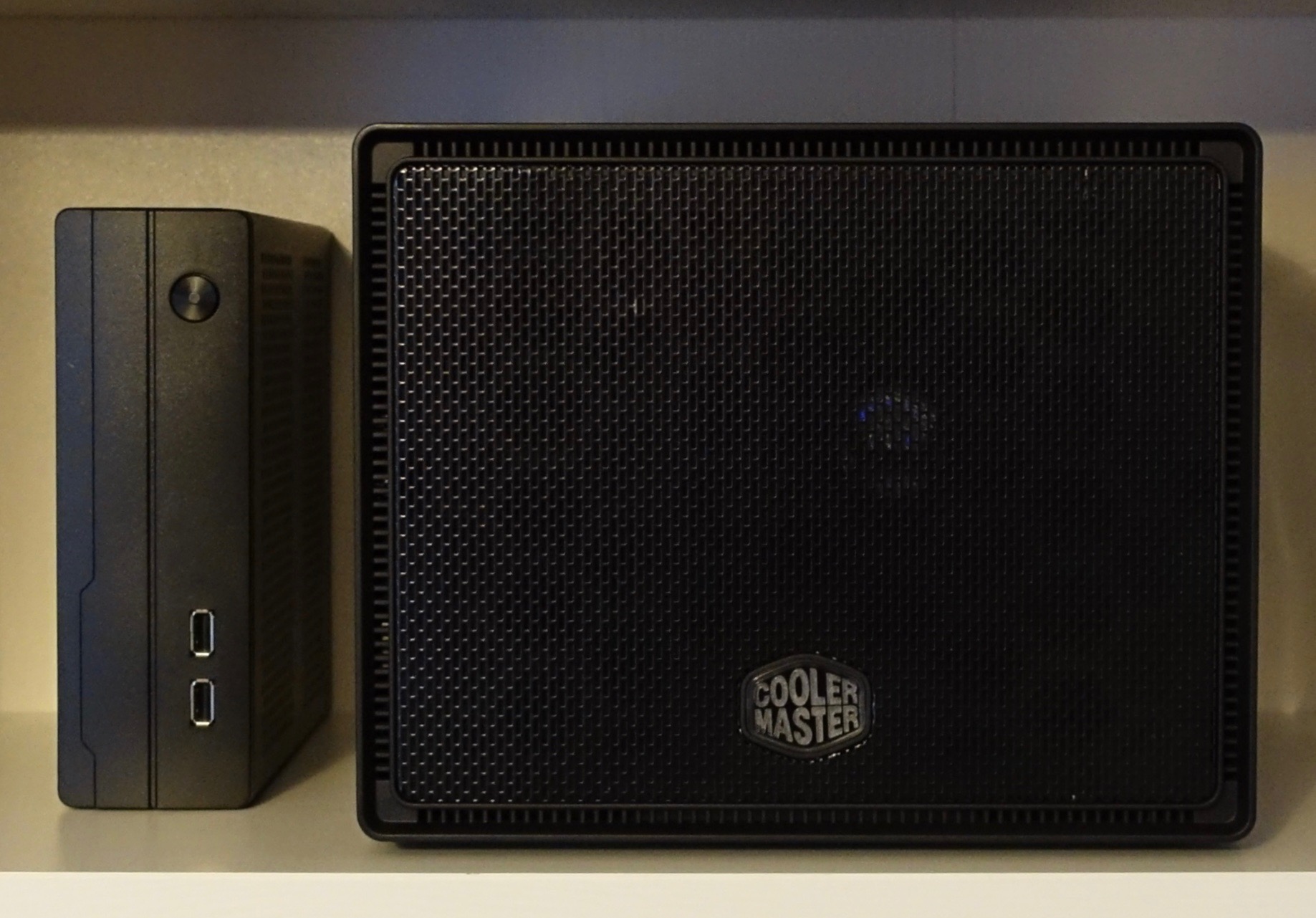
little and large little and large
I've just upgraded my home Network Storage box. Until now, it was very discreet, about the size of a car radio. It lived on one of my bookcases and I was very happy with it but it could only take 2.5" sized hard drives and I've outgrown what you can fit on them. I've ended up moving to 2x4T 3.5" drives, a Coolermaster Elite 110 case and re-using the mainboard/CPU and RAM. This is hopefully enough capacity that I don't need to look at another upgrade for a few years, and the case could take more drives if I need it to. The Elite 110 is - by Mini-ITX case terms - pretty small, but still 6 times larger in volume than the old case. In the consumer NAS market, there are plenty of appliances that takes two 3.5" drives and are much smaller than that (such as the WD MyBook Duo, or Synology DS214). Unfortunately I could not find any cases that were of this size for a DIY build. Did I miss anything obvious? (As to why I choose DIY, that could be the subject for a future post.) The full boring details of the build are on the NAS system page.

17 January 2016

Lunar: Reproducible builds: week 38 in Stretch cycle

What happened in the reproducible builds effort between January 10th and January 16th:

Toolchain fixes Benjamin Drung uploaded mozilla-devscripts/0.43 which sorts the file list in preferences files. Original patch by Reiner Herrmann. Lunar submitted an updated patch series to make timestamps in packages created by dpkg deterministic. To ensure that the mtimes in data.tar are reproducible, with the patches, dpkg-deb uses the --clamp-mtime option added in tar/1.28-1 when available. An updated package has been uploaded to the experimental repository. This removed the need for a modified debhelper as all required changes for reproducibility have been merged or are now covered by dpkg.

Packages fixed The following packages have become reproducible due to changes in their build dependencies: angband-doc, bible-kjv, cgoban, gnugo, pachi, wmpuzzle, wmweather, wmwork, xfaces, xnecview, xscavenger, xtrlock, virt-top. The following packages became reproducible after getting fixed: Some uploads fixed some reproducibility issues, but not all of them: Untested changes:

reproducible.debian.net Once again, Vagrant Cascadian is providing another armhf build system, allowing to run 6 more armhf builder jobs, right there. (h01ger) Stop requiring a modified debhelper and adapt to the latest dpkg experimental version by providing a predetermined identifier for the .buildinfo filename. (Mattia Rizzolo, h01ger) New X.509 certificates were set up for jenkins.debian.net and reproducible.debian.net using Let's Encrypt!. Thanks to GlobalSign for providing certificates for the last year free of charge. (h01ger)

Package reviews 131 reviews have been removed, 85 added and 32 updated in the previous week. FTBFS issues filled: 29. Thanks to Chris Lamb, Mattia Rizzolo, and Niko Tyni. New issue identified: timestamps_in_manpages_added_by_golang_cobra.

Misc. Most of the minutes from the meetings held in Athens in December 2015 are now available to the public.

15 January 2016

Ian Wienand: Australia, ipv6 and dd-wrt

It seems that other than Internode, no Australian ISP has any details at all about native IPv6 deployment. Locally I am on Optus HFC, which I believe has been sold to the NBN, who I believe have since discovered that it is not quite what they thought it was. i.e. I think they have more problems than rolling out IPv6 and I won't hold my breath. So the only other option is to use a tunnel of some sort, and it seems there is really only one option with local presence via SixXS. There are other options, notably He.net, but they do not have Australian tunnel-servers. SixXS is the only one I could find with a tunnel in Sydney. So first sign up for an account there. The process was rather painless and my tunnel was provided quickly. After getting this, I got dd-wrt configured and working on my Netgear WNDR3700 V4. Here's my terse guide, cobbled together from other bits and pieces I found. I'm presuming you have a recent dd-wrt build that includes the aiccu tool to create the tunnel, and are pretty familiar with logging into it, etc. Firstly, on dd-wrt make sure you have JFFS2 turned on for somewhere to install scripts. Go Administration, JFFS2 Support, Internal Flash Storage, Enabled. Next, add the aiccu config file to /jffs/etc/aiccu.conf
# AICCU Configuration
# Login information
username USERNAME
password PASSWORD
# Protocol and server listed on your tunnel
protocol tic
server tic.sixxs.net
# Interface names to use
ipv6_interface sixxs
# The tunnel_id to use
# (only required when there are multiple tunnels in the list)
#tunnel_id <your tunnel id>
# Be verbose?
verbose false
# Daemonize?
daemonize true
# Require TLS?
requiretls true
# Set default route?
defaultroute true
Now you can add a script to bring up the tunnel and interface to /jffs/config/sixxs.ipup (make sure you make it executable) where you replace your tunnel address in the ip commands.
# wait until time is synced
while [  date +%Y  -eq 1970 ]; do
sleep 5
done
# check if aiccu is already running
if [ -n " ps grep etc/aiccu grep -v grep " ]; then
aiccu stop
sleep 1
killall aiccu
fi
# start aiccu
sleep 3
aiccu start /jffs/etc/aiccu.conf
sleep 3
ip -6 addr add 2001:....:....:....::/64 dev br0
ip -6 route add 2001:....:....:....::/64 dev br0
sleep 5
#### BEGIN FIREWALL RULES ####
WAN_IF=sixxs
LAN_IF=br0
#flush tables
ip6tables -F
#define policy
ip6tables -P INPUT DROP
ip6tables -P FORWARD DROP
ip6tables -P OUTPUT ACCEPT
# Input to the router
# Allow all loopback traffic
ip6tables -A INPUT -i lo -j ACCEPT
#Allow unrestricted access on internal network
ip6tables -A INPUT -i $LAN_IF -j ACCEPT
#Allow traffic related to outgoing connections
ip6tables -A INPUT -i $WAN_IF -m state --state RELATED,ESTABLISHED -j ACCEPT
# for multicast ping replies from link-local addresses (these don't have an
# associated connection and would otherwise be marked INVALID)
ip6tables -A INPUT -p icmpv6 --icmpv6-type echo-reply -s fe80::/10 -j ACCEPT
# Allow some useful ICMPv6 messages
ip6tables -A INPUT -p icmpv6 --icmpv6-type destination-unreachable -j ACCEPT
ip6tables -A INPUT -p icmpv6 --icmpv6-type packet-too-big -j ACCEPT
ip6tables -A INPUT -p icmpv6 --icmpv6-type time-exceeded -j ACCEPT
ip6tables -A INPUT -p icmpv6 --icmpv6-type parameter-problem -j ACCEPT
ip6tables -A INPUT -p icmpv6 --icmpv6-type echo-request -j ACCEPT
ip6tables -A INPUT -p icmpv6 --icmpv6-type echo-reply -j ACCEPT
# Forwarding through from the internal network
# Allow unrestricted access out from the internal network
ip6tables -A FORWARD -i $LAN_IF -j ACCEPT
# Allow some useful ICMPv6 messages
ip6tables -A FORWARD -p icmpv6 --icmpv6-type destination-unreachable -j ACCEPT
ip6tables -A FORWARD -p icmpv6 --icmpv6-type packet-too-big -j ACCEPT
ip6tables -A FORWARD -p icmpv6 --icmpv6-type time-exceeded -j ACCEPT
ip6tables -A FORWARD -p icmpv6 --icmpv6-type parameter-problem -j ACCEPT
ip6tables -A FORWARD -p icmpv6 --icmpv6-type echo-request -j ACCEPT
ip6tables -A FORWARD -p icmpv6 --icmpv6-type echo-reply -j ACCEPT
#Allow traffic related to outgoing connections
ip6tables -A FORWARD -i $WAN_IF -m state --state RELATED,ESTABLISHED -j ACCEPT
Now you can reboot, or run the script, and it should bring the tunnel up and you should be correclty firewalled such that packets get out, but nobody can get in. Back to the web-interface, you can now enable IPv6 with Setup, IPV6, Enable. You leave "IPv6 Type" as Native IPv6 from ISP. Then I enabled Radvd and added a custom config in the text-box to get DNS working with google DNS on hosts with:
interface br0
 
AdvSendAdvert on;
prefix 2001:....:....:....::/64
  
  ;
 RDNSS 2001:4860:4860::8888 2001:4860:4860::8844
  
  ;
 ;
(again, replace the prefix with your own) That is pretty much it; at this point, you should have an IPv6 network and it's most likely that all your network devices will "just work" with it. I got full scores on the IPv6 test sites on a range of devices. Unfortunately, even a geographically close tunnel still really kills latency; compare these two traceroutes:
$ mtr -r -c 1 google.com
Start: Fri Jan 15 14:51:18 2016
HOST: jj                          Loss%   Snt   Last   Avg  Best  Wrst StDev
1.  -- 2001:....:....:....::      0.0%     1    1.4   1.4   1.4   1.4   0.0
2.  -- gw-163.syd-01.au.sixxs.ne  0.0%     1   12.0  12.0  12.0  12.0   0.0
3.  -- ausyd01.sixxs.net          0.0%     1   13.5  13.5  13.5  13.5   0.0
4.  -- sixxs.sydn01.occaid.net    0.0%     1   13.7  13.7  13.7  13.7   0.0
5.  -- 15169.syd.equinix.com      0.0%     1   11.5  11.5  11.5  11.5   0.0
6.  -- 2001:4860::1:0:8613        0.0%     1   14.1  14.1  14.1  14.1   0.0
7.  -- 2001:4860::8:0:79a0        0.0%     1  115.1 115.1 115.1 115.1   0.0
8.  -- 2001:4860::8:0:8877        0.0%     1  183.6 183.6 183.6 183.6   0.0
9.  -- 2001:4860::1:0:66d6        0.0%     1  196.6 196.6 196.6 196.6   0.0
10. -- 2001:4860:0:1::72d         0.0%     1  189.7 189.7 189.7 189.7   0.0
11. -- kul01s07-in-x09.1e100.net  0.0%     1  194.9 194.9 194.9 194.9   0.0
$ mtr -4 -r -c 1 google.com
Start: Fri Jan 15 14:51:46 2016
HOST: jj                          Loss%   Snt   Last   Avg  Best  Wrst StDev
1. -- gateway                    0.0%     1    1.3   1.3   1.3   1.3   0.0
2. -- 10.50.0.1                  0.0%     1   11.0  11.0  11.0  11.0   0.0
3. -- ???                       100.0     1    0.0   0.0   0.0   0.0   0.0
4. -- ???                       100.0     1    0.0   0.0   0.0   0.0   0.0
5. -- ???                       100.0     1    0.0   0.0   0.0   0.0   0.0
6. -- riv4-ge4-1.gw.optusnet.co  0.0%     1   12.1  12.1  12.1  12.1   0.0
7. -- 198.142.187.20             0.0%     1   10.4  10.4  10.4  10.4   0.0
When you watch what is actually using ipv6 (the ipvfoo plugin for Chrome is pretty cool, it shows you what requests are going where), it's mostly all just traffic to really big sites (Google/Google Analytics, Facebook, Youtube, etc) who have figured out IPv6. Since these are exactly the type of places that have made efforts to get caching as close as possible to you (Google's mirror servers are within Optus' network, for example) and so you're really shooting yourself in the foot going around it using an external tunnel. The other thing is that I'm often hitting IPv6 mirrors and downloading larger things for work stuff (distro updates, git clones, image downloads, etc) which is slower and wasting someone else's bandwith for really no benefit. So while it's pretty cool to have an IPv6 address (and a fun experiment) I think I'm going to turn it off. One positive was that after running with it for about a month, nothing has broken -- which suggests that most consumer level gear in a typical house (phones, laptops, TVs, smart-watches, etc) is either ready or ignores it gracefully. Bring on native IPv6!

11 January 2016

Thadeu Lima de Souza Cascardo: GNU on Smartphones (part II)

Some time ago, I wrote how to get GNU on a smartphone. This is going to be a long discussion on why and how we should work on more operating systems for more devices. On Android So, why should we bother if we already have Android, some might ask? If it's just because of some binary blobs, one could just use Replicant, right? Well, one of the problems is that Android development is done in hiding, and pushed downstream when a new version is launched. There is no community behind that anyone can join. Replicant ends up either following it or staying behind. It could do a fork and have its own innovations. And I am all for it. But the lack of manpower for supporting devices and keeping up with the latest versions and security fixes already takes most of the time for the one or two developers involved. Also, Android has a huge modularity problem, that I will discuss further below. But it's hard to replace many components in the system, unless you replace them all. And that also causes the problem that applications can hardly share extra components. I would rather see Debian running on my devices and supporting good environments and frameworks for all kinds of devices, like phones, tablets, TVs, cars, etc. It's developed by a community I can join, it allows a diverse set of frameworks and environments, and it's much easier to replace single components on such a system. On Copyleft Hardware I get it. Hardware is not free or libre. Its design is. I love the concept of copyleft hardware, where one applies the copyleft principles to a hardware design. Also, there is the concept of Hardware that Respects Your Freedom, that is, one that allows you to use it with only free software. Note that RYF hardware is not necessarily copyleft hardware. In fact, most of the time, the original vendor has not helped at all, and it required reverse engineering efforts by other people to be able to run free software on those systems. My point here is that we should not prevent people from running free software on hardware that does not RYF or that is not copyleft. We should continue the efforts of reverse engineering and of pushing hardware vendors to not only ship free software for their hardware, but also release their design under free licenses. But in the meantime, we need to make free software flourish in the plethora of devices on the hands of so many people around the world. On Diversity I won't go into details on this post about two things. One topic I love is retrocomputing and how Linux supported so many devices, and how many free or quasi-free operating systems ran on so many of them in the past. I could mention ucLinux, Familiar, PDAs, Palmtops, Motorolas, etc. But I will leave it to another time and go from Openmoko and Maemo forward. The other topic is application scalability. Even Debian with so many software available does not ship all free software there is available. And it doesn't support all third-party services out there. How can we solve that? It has to do with platforms, protocols, open protocols, etc. I will not go into that today. Because I believe that either way, it's healthy for our society to have diversity. I believe we should have other operating systems available for our devices. Even if application developers will not develop for all of them. That is already the case today. There are other ways to fix that, when that needs fixing. Sometimes, it's sufficient that you can have your own operating system on your device, that you can customize it, enhance it and share it with friends. And also, that would allow for innovation. It would make possible that some other operating system would have enough market share on some other niche. Other than Android and iOS, for example. But that requires that we can support that operating system on different devices. And that is the scalability that I want to talk about. How to support more devices with less effort. Options But before I go into that, let me write more about the alternatives we have out there. And some of the history around it. Openmoko Openmoko developed a set of devices that had some free design. And it has some free operating systems running on top. The community developed a lot of their own as well. Debian could (still can) run on it. There is SHR, which uses FSO, a mobile middleware based on D-Bus. It even spawned other devices to be developed, like GTA04, a successor board, that can be shipped inside a Neo Freerunner case. Maemo, Moblin, Meego and Tizen I remember the announcement of Nokia N770. During FISL in 2005, I even criticized a lot, because it shipped with proprietary drivers. And applications. But it was the first time we heard of Maemo. It was based on Debian and GNOME. The GNOME Mobile initiative was born from that, I believe, but died later on. But with the launch of N900, and later events, like the merge of Moblin with Maemo, to create Meego, we all had an operating system that was based on community developed components, that had some community participation, and was much more like the systems we were used to. You could run gcc on N900. You could install Das U-Boot and have other operating systems running there. But Nokia has gone a different path. Intel has started Tizen with Samsung. There is so much legacy there, that could still be developed upon. I am just sad that Jolla decided to put proprietary layers on top of that, to create SailfishOS. But we still have Mer, Nemo. But it looks like Cordia is gone. At least, (http://cordiahd.org) seems to have been registered by a domain seller. Not to forget, Neo900, a project to upgrade the board, in the same vein as GTA04. FirefoxOS and Ubuntu What can I say about FirefoxOS and Ubuntu Phone? In summary, I think we need more than Web, and Canonical has a history of not being too community oriented as we'd like. I won't go too much here in what I think about the Web as a platform. But I think we need a system that has more options for platforms. I haven't participated in projects directed by Mozilla either, so I can't say much about that. Ubuntu Phone should be a system more like what we are used to. But Canonical is going to set the directions to the project, it's not a community project. Nonetheless, I think they add to the diversity, and users should be able to try them, or their free parts or versions. But there are challenges there, that I think need to be discussed. So, both of these systems are based on Android. They don't use Dalvik or the application framework. But they use what is below that, which means device drivers in userspaces, like RIL, for the modem drivers, and EGL, for graphics drivers. The reason they do that is to build on top of all the existing vendor support for Android. If a SOC and phone vendor already supports Android, there should be not much needed to do to support FirefoxOS or Ubuntu Phone. In practice, this has not benefited the users or the projects. Porting should be as simple as getting a generic FirefoxOS or Ubuntu Phone image and run it on top of your Android or CyanogenMod port. Porting usually requires doing all the same work as porting Android. Even though one should be able to take advantage of existing ports, it still requires doing a lot of integration work and building an entire image, most of the time, including the upper layers, that should be equal in all devices. This process should require at most creating a new image based on other images and loading it on the device. I will discuss more about this below. I can't forget to mention the Matchstick TV project. It is based on FirefoxOS. I think it would have much more changes to succeed if it was easier for testers to have images available for all of their gadgets capable of running some form of Android. Replicant And then we have Replicant. It has a lot of the problems Android has. Even so, it's a tremendously important project. First, it offers a free version of Android, removing all proprietary pieces. This is very good for the community. But more than that, it tries to free the devices beyond that. What the project has been done is reverse engineer some of the pieces, mostly the modem drivers. That allows other projects to build upon that work, and support those modems. Without that, there is no telephony or celullar data available on any of these devices. Not without proprietary software, that is. They also have been working on free bootloaders, which is another important step for a completely free system. Next steps There are many challenges here, but I believe we should work on a set of steps that make it more palatable and produce intermediary results that can be used by users and other projects. One of the goals should be good modularity. The ability to replace some pieces with the least trouble necessary. The update of a single framework library should be just a package install, instead of building the entire framework again. If there is ABI breakage, users should still be able to have access to binaries (and accompanying source code) and only need to update the library and its reverse dependencies. If one layer does not have these properties, at least it should be possible to update this big chunk without interfering with the other layers. One example is FirefoxOS and Ubuntu Phone. Even if there is a big image with all system userspace and middleware, the porting, install and upgrade process should allow the user to keep the applications and to leverage porting already done by similar projects. Heck, these two projects should be able to share porting efforts without any trouble. So what follows is a quick discussion on Android builds, then suggestions on how to approach some of the challenges. On Android build The big problem with Android build is its non-modularity. You need to build the world and more to get a single image in the end. Instead of packages that could be built independently, that generated modular package images, that could be bundled in a single system image. Better yet would be the ability to pick only those components that matter. Certainly, portability would be just as interesting, being able to build certain components on top a GNU system with GNU libc. At times, it seems like this is done by design, to make it difficult for "fragmentation" and competition. Basically, making it difficult to exercise the freedom to modify the software and share your modifications with others. Imagine the possibilities of being able to: There are some dangers in promoting the use of Android like this. Since it promotes proprietary drivers, relying on such layers instead of better community oriented layers means giving an advantage to the first. So, the best plan would be to replace those layers, when they are used, for things like ofono and Wayland, for example. But, in the meantime, making it easier for users to experiment with FirefoxOS, Ubuntu Phone, Matchstick TV, Replicant on other devices, without resorting to building the entire Android system, would be a very nice thing. It is possible that there are some challenges with respect to API and ABI. That these layers are too intermingled that some changes present in one port would prevent FirefoxOS to run on top of it without changes in either of the layers. I can't confirm that is the case, but can't deny the possibility. Rooting One of the challenges we have that may have trouble in scaling is rooting devices. Unfortunately, most of the devices are owned by the vendor or carrier, not the user. The user is prevented from replacing software components in the system, by removing its permissions from replacing most of the files in the filesystem, or writing to block devices, or change boot parameters or write to the storage devices. Fortunately, there are many documents, guides, howtos, and whatnots out there instructing on how to root a lot of devices. In some cases, it depends on software bugs that can be patched by the users as instructed by vendors. Certainly, favoring devices that are built to allow rooting, hacking, etc, is a good thing. But we should still help those users out there who do not have such devices, and allow them to run free software on them. Booting Then, comes booting, which is a large discussion on its own, and also related to rooting, or how to allow users to replace their software. First, we have the topic of bootloaders, which are usually not free, and embedded in the chip, not on external storage. So, there are those pieces of the bootloader which we can replace more easily and those that we are not, because they would require changing a piece of ROM, for example. Das U-Boot would be one of the preferred options for a system. It supports a lot of hardware platforms out there, a lot of storage devices and filesystems, network booting, USB and serial booting, and a lot of other things. Porting is not an easy task, but it is possible. Meanwhile, using the bootloaders that ship with the system, when possible, would allow a path where other pieces of the system would be free. One of the challenges here is building single images that could boot everywhere. The lack of a single ARM boot environment is a curse and a blessing. It makes it hard to have this single boot image, but, on the other hand, it has allowed so much of the information for such systems to be free, to be embedded in copyleft software, instead of having blobs executed by our free systems, like ACPI encourages. Device trees have pushed this portability issue from the kernel to the bootloaders. Possibily encouraging vendors to now hide and copyright this information in the form of proprietary device trees. But it has made it easier for single images. In practice, we still need to see a lot of devices out there supporting this single kernel scenario. And this mechanism only brings us the possibility of a single kernel. We still need to ship bootable images that have pieces of bootloaders that are not as portable. This has caused lots of operating systems out there to be built for a single board. Or to support just a small set of boards. I struggle with the concept. Why are we not able to mix device-specific pieces with generic pieces and get a resulting image that will boot on our choice of board? Why does every project need to do all the porting work again, repeating the efforts? Or have one entier ISO image for every supported board? Check how Geexbox does it, for an example. Fortunately, I see Debian going in a good direction. Here, one can see how it instructs the user to combine a system-dependent part with a system-independent part. Installation Which brings us to the installation challenge. We should make this easy and also customizable by the user. Every project might have its own method, and that is part of the diversity that we should allow. The great challenge here is handling rooting and booting for the user. But it's also possible to leave that as separate efforts, as it would be nice to have good installers as we have in the desktop and server environments. Linux Linux is one of the most ported kernels out there. Of course, it would be healthy to the diversity I propose that other kernels and systems out there should work on those mobile devices. NetBSD, for example, has a reputation of being very portable and ported to many platforms. And GNU runs on many of them, either together with the original systems, or as the main system on top of other kernels, as proven by the Debian GNU/kFreeBSD port, which uses GNU libc. But, though I would love to see HURD running directly on those devices, Linux and its derivatives are already running on them. Easier to tackle is to get Linux-libre running on those systems. But though this looks like one of the easier tasks at hand, it is not. If you run a derivative version from Linux, provided by the vendor, things should go smooth. But most of the time, the vendor does not provide patches upstream, and leave their fork to rot, if you are lucky, in the earlier 3.x series. And some times, there is not even source code available. There are vendors out there who do not respect the GPL and that is one of the reasons why GPL enforcement is important. I take this opportunity to call attention to the work of Software Freedom Conservancy and its current efforts to raise funds to continue their work. Running an existing binary version of Linux on your device with a free userspace is part of the strategy of replacing pieces one at a time while allowing for good diversity and reaching more users. Drivers Then we have the matter of drivers. And in this case, it's not only Linux drivers, but drivers running in userspace. Though others exist, there are two important and common cases, which are modem and graphics drivers, both of which are usually provided by Android frameworks, and that other systems try to leverage, instead of using alternatives that are more community friendly. In the case of modem drivers, Android uses its RIL. Besides not using a Radio or Modem at all, there are two strategies for free versions. One is using free versions of the drivers for RIL. That's what Replicant does, because, well, it uses the other Android subsystems after all. The other one is using a system that is developed by the community. ofono is one that, even though it's an Intel iniative, looks more community governed or open to community participation than any Android subsystem ever was. As for Graphics, Canonical even built its Mir project with the goal of being able to use Android GPU drivers. Luckily, there has been a lot of reverse engineering efforts out there for a lot of those GPUs shipped with ARM SoCs. Then, we can use Mesa, Wayland and X.org. Other option, until then, is just using a framebuffer driver, possibly one that does not need any initialization, depending on one done by the bootloader, for example. Middleware and Shells Plasma Active, that I just found out now is Plasma Mobile, looks like a great system. Built by folks behind KDE, we can expect great freedom to come from it. Unfortunately, it suffers from what we have been discussing here, which is lack of good device support, or shipping images that run on top of single devices, without leveraging the porting that has come before of other systems. Fortunately, that is just what I want to accomplish with this effort. FSO, that I mentioned before, is a good middleware, that we should try to run on top of these devices. Running GNOME or Unity shell, and use rpm or deb based systems, that's all part of the plan on diversity. You could use systemd, or System V init systems, whatever gives you the kicks. It's not an easy task, since there are so many new things on these new kinds of devices. Besides touch, there is telephony, which as I mentioned, would be a good task for ofono. As for TV sets or dongles, I would love to see OpenFlint, created by the Matchstick TV guys, flourish out there and allow me to flint stuff from my mobile phone running Debian into my TV dongle running Debian. Project So, is there a project out there you can start contributing to? Well, I pointed out a lot of them. All of them make part of this plan. Contributing to reverse engineering GPUs, or to Plasma Mobile, ofono, GNOME, Linux-libre, bootloaders, Debian, and so many other projects. My plans are to contribute in the scope of Debian and make sure it works well on top of semi-liberated devices, and make sure there is a nice user interface and good applications when using either GNOME or Plasma. Integrating ofono is a good next step, but I am running ahead of myself. Right now, I don't think there is need for an integrated effort. If you think otherwise, please let me know. If you are doing something in this direction, I would love to know. Paul Wise reminded me to point out to the Debian Mobile, where I will probably contribute any documentation and other relevant results. Thanks There are some many people to thank, but I would like to remember Ian Murdock, who created Debian, one of the projects who inspires me the most. I think the best way to handle his passing is to celebrate what he has helped create, and move forward, taking more free software to more people in an easy and modular way. I have been wanting to write something like this for a long time, so I thank Chris Webber for inspiring me on doing it.

8 January 2016

Jonathan Dowland: Game boxes

a big pile of computer game boxes computer game boxes
My brother and I found these whilst tidying up the stuff that we've left at our parent's house. What on earth should we do with them? I have a small number of older game boxes (Doom, Doom 2, Civ 2, etc.) which I use as drawer dividers (both the lid and the 'seat' of the box), but most of these are newer designs, more like a box of cereal, with their openings at the top, so they can't be used as such. (and there's only so many drawer dividers that you need...) This is loosely related to my stalled Amiga floppy disk recovery project, which hasn't made any progress since I last wrote about it.

6 January 2016

Steinar H. Gunderson: IPv6 non-alternatives: DJB's article, 13 years later

With the world passing 10% IPv6 penetration over the weekend, we see the same old debates coming up again; people claiming IPv6 will never happen (despite several years now of exponential growth!), and that if they had only designed it differently, it would have been all over by now. In particular, people like to point to a 2002 3 article by D. J. Bernstein, complete with rants about how Google would never set up useless IPv6 addresses (and then they did that in 2007 I was involved). It's difficult to understand exactly what the article proposes since it's heavy on calling people idiots and light on actual implementation details (as opposed to when DJB's gotten involved in other fields; e.g. thanks to him we now have elliptical curve crypto that doesn't suck, even if the reference implementation was sort of a pain to build), but I will try to go through it nevertheless and show how I cannot find any way it would work well in practice. One thing first, though: Sorry, guys, the ship has sailed. Whatever genius solution DJB may have thought up that I'm missing, and whatever IPv6's shortcomings (they're certainly there), IPv6 is what we have. By now, you can not expect anything else to arise and take over the momentum; we will either live with IPv6 or die with IPv4. So, let's see what DJB says. As far as I can see, his primary call is for a version of IPv6 where the address space is an extension of the IPv4 space. For sake of discussion, let's call that IPv4+ , although it would share a number of properties with IPv6. In particular, his proposal requires changing the OS and other software on every single end host out there, just as IPv6; he readily admits that and outlines how it's done in rough terms (change all structs, change all configuration files, change all databases, change all OS APIs, etc.). From what I can see, he also readily admits that IPv4 and IPv4+ hosts cannot talk to each other, or more clearly, we cannot start using the extended address space before almost everybody has IPv4+ capable software. (E.g., quote: Once these software upgrades have been done on practically every Internet computer, we'll have reached the magic moment: people can start relying on public IPv6 addresses as replacements for public IPv4 addresses. ) So, exactly how does the IPv4 address space fit into the IPv4+ address space? The article doesn't really say anything about this, but I can imagine only two strategies: Build the IPv4+ space around the IPv4 space (ie., the IPv4 space occupies a little corner of the IPv4+ space, similar to how v4-mapped addresses are used within software but not on the wire today, to let applications do unified treatment of IPv4 addresses as a sort of special IPv6 address), or build it as a hierarchical extension. Let's look at the former first; one IPv4 address gives you one IPv4+ addresses. Somehow this seems to give you all the disadvantages of IPv4 and all the disadvantages of IPv6. The ISP is not supposed to give you any more IPv4+ addresses (or at least DJB doesn't want to contact his ISP about more also saying that the fact that automatic address distribution does not change his argument), so if you have one, you're stuck with one. So you still need NAT. (DJB talks about proxies , but I guess that the way things evolved, this either actually means NAT, or it talks about the practice of application-level proxies such as Squid or SOCKS proxies to reach the Internet, which really isn't commonplace anymore, so I'll assume for the sake of discussion it means NAT.) However, we already do NAT. The IPv4 crunch happened despite ubiquitous NAT everywhere; we're actually pretty empty. So we will need to hand out IPv4+ addresses at the very least to new deployments, and also probably reconfigure every site that wants to expand and is out of IPv4 addresses. ( Site here could mean any organizational unit, such as if your neighborhood gets too many new subscribers for your ISP's local addressing scheme to have enough addresses for you.) A much more difficult problem is that we now need to route these addresses on the wire. Ironically, the least clear part of DJB's plan is step 1, saying we will extend the format of IP packets to allow 16-byte addresses ; how exactly will this happen? For this scheme, I can only assume some sort of IPv4 option that says the stuff in the dstaddr field is just the start and doesn't make sense as an IPv4 address on its own; here are the remaining 12 bytes to complete the IPv4+ address . But now your routers need to understand that format, so you cannot do with only upgrading the end hosts; you also need to upgrade every single router out there, not just the end hosts. (Note that many of these do routing in hardware, so you can't just upgrade the software and call it a day.) And until that's done, you're exactly in the same situation as with IPv4/IPv6 today; it's incompatible. I do believe this option is what DJB talks about. However, I fail to see exactly how it is much better than the IPv6 we got ourselves into; you still need to upgrade all software on the planet and all routers on the planet. The benefit is supposedly that a company or user that doesn't care can just keep doing nothing, but they do need to care, since they need to upgrade 100% of their stuff to understand IPv4+ before we can start even deploying it alongside IPv4 (in contrast with IPv6, where we now have lots of experience in running production networks). The single benefit is that they won't have to renumber until they need to grow, at which point they need to anyway. However, let me also discuss the other possible interpretation, namely that of the IPv4+ address space being an extension of IPv4, ie. if you have 1.2.3.4 in IPv4, you have 1.2.3.4.x.x.x.x or similar in IPv4+. (DJB's article mentions 128-bit addresses and not 64-bit, though; we'll get to that in a moment.) People keep bringing this up, too; it's occasionally been called BangIP (probably jokingly, as in this April Fool's joke) due to the similarity with how explicit mail routing would work before SMTP became commonplace. I'll use that name, even though others have been proposed. The main advantage of BangIP is that you can keep your Internet core routing infrastructure. One way or the other, they will keep seeing IPv4 addresses and IPv4 packets; you need no new peering arrangements etc.. The exact details are unclear, though; I've seen people suggest GRE tunneling, ignoring problems they have through NAT, and I've seen suggestions of IPv4 options for source/destination addresses, also ignoring that someting as innocious as setting the ECN bits has been known to break middleboxes left and right. But let's assume you can pull that off, because your middlebox will almost certainly need to be the point that decapsulates BangIP anyway and converts it to IPv4 on the inside, presumably with a 10.0.0.0/8 address space so that your internal routing can keep using IPv4 without an IPv4+ forklift upgrade. (Note that you now lose the supposed security benefit of NAT, by the way, although you could probably encrypt the address.) Of course, your hosts will need to support IPv4+ still, and you will need some way of communicating that you are on the inside of the BangIP boundary. And you will need to know what the inside is, so that when you communicate on this side, you'll send IPv4 and not IPv4+. (For a home network with no routing, you could probably even just do IPv4+ on the inside, although I can imagine complications.) But like I wrote above, experience has shown us that 32 extra bits isn't enough. One layer of NAT isn't doing it, we need two. You could imagine the inter-block routability of BangIP helping a fair bit here (e.g., a company with too many machines for 10.0.0.0/8 could probably easily get more addresses for more external IPv4 addresses, yielding 10.0.0.0/8 blocks), but ultimately, it is a problem that you chop the Internet off in two distinct halves that work very differently. My ISP will probably want to use BangIP for itself, meaning I'm on the outside of the core; how many of those extra bits will they allocate for me? Any at all? Having multiple levels of bang sounds like pain; effectively we're creating a variable-length address. Does anyone ever want that? From experience, when we're creating protocols with variable-length addresses, people just tend to use the maximum level anyway, so why not design it with 128-bit to begin with? (The original IP protocol proposals actually had variable-length addresses, by the way.) So we can create our 32/96 BangIP , where the first 32 bits are for the existing public Internet, and then every IPv4 address gives you a 2^96 addresses to play with. (In a sense, it reminds me of 6to4, which never worked very well and is now thankfully dead.) However, this makes the inside/outside-core problem even worse. I now need two very different wire protocols coexisting on the Internet; IPv4+ (which looks like regular IPv4 to the core) for the core, and a sort of IPv4+-for-the-outside (similar to IPv6) outside it. If I build a company network, I need to make sure all of my routers are IPv4+-for-the-outside and talk that, while if I build the Internet core, I need to make sure all of my connections are IPv4 since I have no guarantee that I will be routable on the Internet otherwise. Furthermore, I have a fixed prefix that I cannot really get out of, defined by my IPv4 address(es). This is called hierarchical routing , and the IPv6 world gave it up relatively early despite it sounding like a great idea at first, because it makes multihoming a complete pain: If I have an address 1.2.3.4 from ISP A and 5.6.7.8 from ISP B, which one do I use as the first 32 bits of my IPv4+ network if I want it routable on the public Internet? You could argue that the solution for me is to get an IPv4 PI netblock (supposedly a /24, since we're not changing the Internet core), but we're already out of those, which is why we started this thing to begin with. Furthermore, if the IPv4/IPv4+ boundary is above my immediate connection to the Internet (say, ISP A doesn't have an IPv4 address, just IPv4+), I'm pretty hosed; I cannot announce an IPv4 netblock in BGP. The fact that the Internet runs on largely the same protocol everywhere is a very nice thing; in contrast, what is described here really would be a mess! So, well. I honestly don't think it's as easy to just do extension instead of alternative when it comes to the address spaces. We'll just need to deal with the pain and realize that upgrading the equipment and software is the larger part of the job anyway, and we'll need to do that no matter what solution we go with. Congrats on reaching 10%! Now get to work with the remaining 90%.

3 January 2016

Niels Thykier: Tor enabled MTA

As I posted earlier, I have migrated to use tor on my machine. Though I had a couple of unsolved issues back then. One of them being my Mail Transport Agent (MTA) did not support tor. A regular user might not have a lot of use for a MTA on their laptop. However, it is needed for a lot of Debian development scripts (bts, mass-bug, nmudiff), if they are to file/manipulate bugs for you. I have some requirements for my MTA I also have some non-requirements: Originally, I used postfix, which supported most of these requirements. Except: Per suggestion of Jakub Wilk, I tried msmtp, which turned out do what I wanted. The only feature I will probably miss is having a local queue, which can be rate limited. But all in all, I am quite happy with it so far. :)
Filed under: Debian

Iustin Pop: Orcas Island day trip, June 2015

I just finished going through my last set of pending-review pictures from 2015, so I'm starting 2016 with a post about the past. In June 2015 I travelled to Seattle/Kirkland area for work purposes, and took advantage of a weekend to plan some more outdoors stuff. After looking around on maps, I settled on the San Juan islands, so I started looking at hiking possibilities, and in the end Orcas island looked the best choice - all the others had much lower elevations. So, early in the morning, I started driving from Kirkland to Anacortes ferry terminal. The drive itself is quite nice: after getting past the more populated areas, passing Everett, the the view are very nice, especially in the early morning hours and with very few traffic. At Anacortes, there was already a small queue, fortunately I had a pre-ordered ticket, and there was not much to do until the ferry arrived except to look forward at the day, and hope that the weather will stay nice. On the ferry then, crossing the straits and enjoying the very nice views: Perfect blue Catching the morning wind The ferry stops at Orcas (is it a town or just the terminal), and the next stop is Eastsound town. I pre-planned here a stop to get a second mini-breakfast: however, I misjudged what the portion sizes are and got myself a maxi-cinnamon roll at Caffe Olga: Second breakfast :) At least I knew I wasn't going to be hungry for a while :) Driving on, briefly stopping at Cascade Lake (I also stopped on the way back, the view is nice), then reaching the parking at the Twin Lakes trail on the shore of Mountain Lake. Good think I arrived somewhat early the parking was quite full already. I also got a bit confused on which way the hike starts, since it's not well marked, but after that I started the hike. It's also possible to drive up to Mount Constitution, but that's just lame; hiking from the base it's quite easy, if you find how to start the hike. Anyway: Starting to climb Finished the steepest part At one point, one meets this particular sign: Which way now? Beware the Little Summit is not to be missed! After ~40 minutes of hiking, with some parts a tiny bit strenuous, the view is really breathtaking. It's definitely worth stopping by, as the view is (IMHO) nicer than the view from the top of Mt. Constitution: Wow! The reason I say this is better is because you look towards ocean, whereas later the view is back towards the continent. And looking towards the big ocean is just perfect! Plus, the many small island, fully covered with forest are also nice. Onwards then towards the peak of Mount Constitution. You cross the "ridge" of the island, and your view shifts to the other side. Which means you see back to the Mountain Lake where the hike starts: Loocking back towards the start Here the path is more exposed, not through tall forest like at the beginning: Watching the horizon Right before reaching the peak, you pass through an interesting forest: A different kind of forest And then you're finally reaching the peak. Compared to Switzerland, it's very much not impressive (730m), but nevertheless, being so close to the ocean results in some very nice views: Couldn't have asked for better weather You can go into the small tower, and read through the history of the location, including the personal life of Robert Moran (shipbuilder), who retired in 1905 to Orcas island to live what (his doctors said to be) his last months, and who instead ended living until 1943. Not bad! To be filled under "too much stress is bad, nature is good" heading, I think. After eating a small packed lunch, I started back. At the beginning the forest is similar to the one back at the beginning of the hike, but then, as you reach the level of lakes, it is slightly different. More tall (old?) trees, more moss and ferns: Afternoon sun in the forest I passed briefly by the Twin Lakes, which were interesting (lots of submerged trunks), and then finally on the Twin Lakes trail back to the start. The views of Mountain Lake from here are also nice, especially in the less harsh afternoon sun: Reached Mountain Lake How did those trees get there? And then the hike was over. I still had some time to spend before the ferry I had a ticket on was scheduled, so I drove down to Olga town, as I was curious what was at the end of "Olga Road". Not much, but again nice views, and this very picturesque pier: Nice pier in Olga And then it was back to the ferry, waiting in line, getting on the ferry, and crossing back: Goodbye Orcas! Overall, it was a day well spent, part different, part similar to last year's mostly road trip. Definitely recommended if you're in the area, and there are a couple of other hikes on Orcas Island, plus all the other islands which make up the San Juans. However, traffic on the way back was not that awesome :/ Small price though!

1 January 2016

Stein Magnus Jodal: December contributions

The following is a short summary of my open source work in December, following up on my first report in November.

Debian

Mopidy
  • The feature/gst1 branch: Finished porting Mopidy from GStreamer 0.10 to PyGI and GStreamer 1.x. Merge of the branch is currently blocked on a single test failure (test_gapless) and issues with transitioning from one track to another with Mopidy-Spotify, which is the only backend using an appsrc for playback. The goal is for this branch to be part of Mopidy 1.2, which I hope to have in Debian/Ubuntu before the Ubuntu 16.04 import freeze February 18.
  • The feature/py3-compat branch: I ve worked quite a bit on this private branch, frequently rebased on top of feature/gst1. Currently Mopidy starts without any crashes on Python 3 and the test suite is down to 262 failed and 1841 passed tests. My current thinking, is that this will become part of a Mopidy 2.0 release, which will support both Python 2.7 and 3.4+. As soon as most of Mopidy s extension ecosystem supports Python 2+3, a new Mopidy major release (3.0?) will drop Python 2 support.
  • Merged a bunch of pull requests, both targeting the 1.1.2 bug fix release and the 1.2 feature release.

31 December 2015

Chris Lamb: Free software activities in December 2015

Here is my monthly update covering a large part of what I have been doing in the free software world (previously):
Debian My work in the Reproducible Builds project was also covered in more depth in Lunar's weekly reports (#31, #32, #33, #34).
LTS

This month I have been paid to work 12 hours on Debian Long Term Support (LTS). In that time I did the following:
  • Issued DLA 363-1 for libphp-phpmailer fixing a header injection vulnerability.
  • Issued DLA 365-1 for foomatic-filters correcting a shell injection vulnerability.
  • Issued DLA 369-1 for pygments fixing an issue shell injection vulnerability.
  • Issued DLA 374-1 for cacti to fix an SQL injection vulnerability.
  • Did some futher investigation of CVE-2011-5325 in busybox.

Uploads
  • python-django (1.9) New upstream release.
  • redis (3.0.6) New upstream stable release. I additionally backported this package to Debian stable.
  • redis (3.2~rc1) Uploaded upstream's "testing/next" branch to experimental for testing.
  • gunicorn (19.4.1) New upstream release.


Patches contributed

I also filed FTBFS bugs against acpid, android-platform-frameworks-base, antlr3, artemis, beignet, bisonc++, bobcat, bustle, cargo, checkbox-ng, code2html, cplay, datanommer.commands, dcmtkpp, debci, diffutils, diod, django-restricted-resource, docker-libkv, doomsday, dvdauthor, dwww, elasticsearch, elki, flask-script, freeipa, fso-frameworkd, funny-manpages, ggcov, ghc-mod, gmpc-plugins, gparted, gs-collections, guacamole-server, guncat, haskell-concrete-typerep, haskell-geniplate, haskell-nats, haskell-x509-util, hawtbuf, heimdal, htsjdk, inspircd, jboss-xnio, jenkins-winstone, jpeginfo, jruby-openssl, kaffeine, kdbg, ktp-accounts-kcm, kuser, libcommons-cli-java, libcommons-openpgp-java, libconfig-model-lcdproc-perl, libdata-faker-perl, libexplain, libgettext-commons-java, libgtk2-ex-printdialog-perl, libmoops-perl, libnet-frame-perl, libsendmail-milter-perl, libupnp, libuv, libvpx, liwc, m4, maven2, meep-mpich2, nagios-plugin-check-multi, natlog, netpipe, ocserv, ogre-1.8, orthanc-dicomweb, perspectives-extension, php-mail, php-pinba, phpseclib, pkg-haskell-tools, plastimatch, plexus-compiler, plexus-compiler-1.0, python-acme, python-crontab, python-cs, python-csscompressor, python-debian, python-distutils-extra, python-django-compressor, python-django-openstack-auth, python-django-tagging, python-pygit2, python-pyramid, python-pywcs, python-releases, python-shade, python-statsd, python-tasklib, python-tasklib, python-webm, python-websockets, regina-normal, rinetd, roboptim-core, rpm2html, rpm2html, ruby-factory-girl, ruby-fogbugz, ruby-i18n-inflector, ruby-loofah, ruby-protected-attributes, ruby-rack-contrib, ruby-rufus-scheduler, ruby-sanitize, ruby-sidetiq, ruby-sinatra, scsh-0.6, shogun, sleekxmpp, slugimage, spatial4j, sqwebmail-de, trac-announcer, ttt, txaws, umbrello, wine-gecko-2.21, xboxdrv, xfonts-wqy, xserver-xorg-video-openchrome, yorick & yoshimi.

22 December 2015

John Goerzen: Amtrak Airlines

I came downstairs this morning and found a surprise waiting for me. Chairs from all over had been gathered up and arranged in rows, airline style. Taped to the wall was a food court sign. At the front was a picture of an airplane, decked out with the Amtrak logo of all things, and a timetable taped to our dining room table. IMG_6123 Jacob soon got out string to be seatbelts, too. And, using his copy machine, printed out a picture of a wing to tape to the side of the airplane . IMG_6128 And here is the food court sign Oliver made: IMG_6126 This plane was, according to the boys, scheduled to leave at 9:30. It left a fashionable 2 hours late or so. They told me I would be the pilot, and had me find headphones to be my headset . (I didn t wear my real headset on the grounds that then I wouldn t be able to hear them.) Jacob decided he would be a flight attendant, his grandma would be the co-pilot, and Oliver would be the food court worker. The food court somehow seemed to travel with the plane. Oliver made up a menu for the food court. It consisted of, and I quote: trail mix, banana, trail mix, half banana, trail mix, trail mix, trail mix . He s already got the limited selection of airport food down pat, I can see. Jacob said the flight would be from Chicago to Los Angeles, and so it was. Since it was Amtrak Airlines, we were supposed to pretend to fly over the train tracks the whole way. If it s not Christmas yet, we just invent some fun, eh? Pretty clever.

Michal &#268;iha&#345;: Weekly phpMyAdmin contributions

Again one week has passed and there has been some progress on phpMyAdmin. This week the focus was on code cleanup and issue fixing. I've identified several pieces of dead code and removed that from our code base (the biggest removal being no longer used PMA_String class). The codebase is quite old and sometimes it's not easy to identify code which is not really being used, as it still might be referenced from some locations, but without actually invoking it. On the issue fixing side, I'm really happy from improving user experience with fields marked as binary - so far phpMyAdmin has displayed them as hexadecimal dump in all cases. Now it will display them as text as long as the content is valid utf-8. Bugs fixed: PS: I will most likely skip report next week due to Christmas.

Filed under: English phpMyAdmin 0 comments

20 December 2015

Iustin Pop: Nikkor 200-500mm f5.6E ED VR tests

So, lately I've been on a telephoto lens learning curve; after the 300mm prime, I said to test a zoom lens. As I found the prime reasonably easy to adapt to (compared to shorter focal length lenses), I thought that a zoom (heavier, bigger) will be the same. Oh, I was wrong. My keeper rate for the first outdoors test was quite bad around 50% only, which (when talking only about focus/sharpness) is much below my standards. I started easy; some close or medium range shots, nothing special: Usual flower picture Lonely snag But then, moving to further distances, things became less straightforward. Shooting two pictures each time meant that usually one of them was sharp, but the other not. I got really confused at this step; the shutter speed was 1/2000s and I also had VR on; either VR was unneeded (i.e. contributing blur instead of helping) or something else was going on. After much head scratching, I think it's a combination of the following factors: So, for such style of shooting, I need to train more both photographic technique and arm strength at the gym In the meantime, it is possible to get such shots reasonably sharp, for example this picture of the (start of the) Alps taken from what is technically still Z rich city: The Alps  viewed from Z rich! I'm happy with the detail (at this distance), however I was not able to correct the colour due to the haze between me and the mountains; note that the trees on the bottom of the distance were not near me, but on the next or after-next hill. This picture confirms that with more practice things will get better. Coming back to shorter distances, and shorter focal lengths, things are looking better. We were passing somewhat near some people playing with RC-controlled planes not near enough to hear them, but near enough to see the plane quickly flying. Switched camera quickly to AF-C and Dynamic-21 focus, and - to my surprise - I was able to capture four good pictures, two so-so and four more clearly out of focus. But, for such a heavy length, hand-held and on the short notice, I was happy; the first picture is one of the so-so ones, but I kept it as I like the way the propeller is seen. All pictures at 290mm plus some cropping, 1/1250s, ISO between 900 and 1800, f/5.6 (i.e wide open): RC plane: continous focus tests RC plane #2 RC plane #3: good results! RC plane #4 RC plane #5: landing? From this exercise, the conclusion is that the lens is OK-ish for tracking, although the not-so good keeper rate tells me that I need to be careful; I'll have to see how a subject moving not left-right, but instead approaching or moving away from the camera would be tracked. But enough pictures of small planes. At 500mm, but still somewhat close, trees: Trees @ 500mm At this step I'm starting to wonder if stopping down a bit would help with the sharpness; I'll have to test that in the future. Walking some more, finally a bird in flight; one of the hopes when I took the camera/lens out was that I'll see some birds, but this was the first. 500mm, heavily cropped, but quite good result for myself (same autofocus settings as before): Bird in flight @ 500mm Bird in flight: difficult light The only problem here is, as always with crows (I think these are crows), is the black bird against the light-blue sky (not even strong blue), which means the picture has a high dynamic range; recovering the shadows on the bird is difficult. But in any case, it's clear the lens can deliver, if the photographer is good. Next, a helicopter was gracious enough to pass by (pretty close): Helicopter: close shot Two minutes later, it was quite far, but since it was going in the direction of the Alps, it gave the opportunity for a nice shot: Helicopter: flying towards the Alps This picture is less sharp, but still I like it due to composition; not successful on small screens though, only if you see it full screen. Light is very difficult though and about 10 seconds earlier would have been even better (more separation between the helicopter and the mountain). And since we're talking about planes, let's see a plane at 500m, directly overhead, and quite high: High-flying plane This picture (@500mm, cropped, 1/2000s) has the most detail of a plane flying high enough to have trails (not sure how to estimate, but at least 5km, maybe more around 7-8 I'd say) that I ever took. So yes, the lens can deliver, but it's not easy. This shot, being shot more or less straight up, had the least distance through low-altitude atmosphere, so it has less problems compared to the mountains pictures. It's still not really sharp (lens wide open), but the amount of detail I'm sold :) And to finish on a more close note: Hunting!! A long focal length lens allows one to get "close" without getting close, which means animals are not disturbed. The first picture with the cat (not shown) had the cat less alert; ears not fully up, although eyes were still seeking; this picture shows it fully alert and concentrated, like it was a wild cat hunting for its survival, and not a city cat, out just for fun. So, summary: All the best to everybody for the coming holidays, and thanks for reading.

Next.

Previous.