Search Results: "ed"

20 September 2025

Thomas Goirand: Real-Time OpenStack Packaging Status with Event-Driven Automation

tl;dr: https://osbpo.debian.net/deb-status is now real-time updated and much better than it used to, helping the OpenStack packaging team be a way more efficient.
How it used to be For years, the Debian OpenStack team has relied on automated tools to track the status of OpenStack packages across Debian releases. Our goal has always been simple: transparency, efficiency, accuracy. We used to use a tool called os-version-checker, written by Michal Arbet, which generated a static status page at https://osbpo.debian.net/deb-status. It was functional and served us well but it had limitations: This meant that when a developer pushed a new package to salsa (the Debian GitLab instance) in the team s repository, the following would happen: For maintainers actively working on a new release, this delay was frustrating. You d fix a bug, push, build and still see your package marked as missing or out of date for minutes. You had no real-time feedback. This was also an annoyance for testing, because when fixing a bug, I often had to trigger the rsync manually in order to not wait for it, so I could do my tests. Now, osbpo is always up-to-date a few seconds after the build of the package. The New Way: Event-Driven, Real-Time Updates We ve rebuilt the system from the ground up to be fast, responsive, and event-driven. Now, the workflow is: The webhook on osbpo does: No more cron. No more waiting

How it works The central osbpo.debian.net server runs: Jenkins instances are configured to curl the webhook on successful build. The status page is generated by openstack-debian-release-manager, a new tool I ve packaged and deployed. The dashboard uses AJAX to load content dynamically (like when browsing from one release to another), with sorting, metadata, and real-time auto-refresh every 10 seconds. openstack-debian-release-manager is easy to deploy and configure, and will do most (if not all) of the needed configuration. Uploading it to Debian is probably not needed, and a bit over-kill, so I believe I ll just keep it in Salsa for the moment, unless there s a way to make it more generic so it can help someone else (another team?) in Debian.
Room for improvement There s still things I want to add. Namely: Special thanks to Michal Arbet for the original os-version-checker that served me for years, helping me to never forget a missing OpenStack package release.

19 September 2025

Dirk Eddelbuettel: RcppArmadillo 15.0.2-2 on CRAN: Transition to Armadillo 15

armadillo image Armadillo is a powerful and expressive C++ template library for linear algebra and scientific computing. It aims towards a good balance between speed and ease of use, has a syntax deliberately close to Matlab, and is useful for algorithm development directly in C++, or quick conversion of research code into production environments. RcppArmadillo integrates this library with the R environment and language and is widely used by (currently) 1261 other packages on CRAN, downloaded 41.4 million times (per the partial logs from the cloud mirrors of CRAN), and the CSDA paper (preprint / vignette) by Conrad and myself has been cited 647 times according to Google Scholar. This versions updates the 15.0.2-1 release from last week. Following fairly extensive email discussions with CRAN, we are now accelerating the transition to Armadillo. When C++14 or newer is used (which after all is the default since R 4.1.0 released May 2021, see WRE Section 1.2.4), or when opted into, the newer Armadillo is selected. If on the other hand either C++11 is still forced, or the legacy version is explicitly selected (which currently one package at CRAN does), then Armadillo 14.6.3 is selected. Most packages will not see a difference and automatically switch to the newer Armadillo. However, some packages will see one or two types of warning. First, if C++11 is still actively selected via for examples CXX_STD then CRAN will nudge a change to a newer compilation standard (as they have been doing for some time already). Preferably the change should be to simply remove the constraint and let R pick the standard based on its version and compiler availability. These days that gives us C++17 in most cases; see WRE Section 1.2.4 for details. (Some packages may need C++14 or C++17 or C++20 explicitly and can also do so.) Second, some packages may see a deprecation warning. Up until Armadillo 14.6.3, the package suppressed these and you can still get that effect by opting into that version by setting -DARMA_USE_LEGACY. (However this route will be sunset eventually too.) But one really should update the code to the non-deprecated version. In a large number of cases this simply means switching from using arma::is_finite() (typically called on a scalar double) to calling std::isfinite(). But there are some other cases, and we will help as needed. If you maintain a package showing deprecation warnings, and are lost here and cannot workout the conversion to current coding styles, please open an issue at the RcppArmadillo repository (i.e. here) or in your own repository and tag me. I will also reach out to the maintainers of a smaller set of packages with more than one reverse dependency. A few small changes have been made internal packaging and documentation, a small synchronization with upstream for two commits since the 15.0.2 release, as well as a link to the ldlasb2 repository and its demonstration regarding some ill-stated benchmarks done elsewhere. The detailed changes since the last CRAN release follow.

Changes in RcppArmadillo version 15.0.2-2 (2025-09-18)
  • Minor update to skeleton Makevars,Makevars.win
  • Update README.md to mention ldlasb2 repository
  • Minor documentation update (#487)
  • Synchronized with Armadillo upstream (#488)
  • Refine Armadillo version selection in coordination with CRAN maintainers to support transition towards Armadillo 15.0.*

Courtesy of my CRANberries, there is a diffstat report relative to previous release. More detailed information is on the RcppArmadillo page. Questions, comments etc should go to the rcpp-devel mailing list off the Rcpp R-Forge page.

This post by Dirk Eddelbuettel originated on his Thinking inside the box blog. If you like this or other open-source work I do, you can sponsor me at GitHub.

18 September 2025

Gunnar Wolf: Still use Twitter/X? Consider dropping it...

Many people that were once enthusiast Twitter users have dropped as a direct or indirect effect of its ownership change and the following policy changes. Given Twitter X is getting each time more irrelevant, it is less interesting and enciting for more and more people But also, its current core users (mostly, hate-apologists of the right-wing mindset that finds conspiration theories everywhere) are becoming more commonplace, and by sheer probability (if not for algorithmic bias), every time it becomes more likely a given piece of content will be linked to what their authors would classify as crap. So, there has been in effect an X exodus. This has been reported in media outlets as important as Reuters, or The Guardianresearch institutes such as Berkeley, even media that no matter how hard you push cannot be identified as the radical left Mr. Trump is so happy to blame for everything, such as Forbes Today I read a short note in a magazine I very much enjoy, Communications of the ACM, where SIGDOC (the ACM s Special Interest Group on Design of Communication) is officially closing their X account. The reasoning is crystal clear. They have the mission to create and study User Experience (UX) implementations and report on it, focused on making communication clearer and more human centered . That is no longer, for many reasons, a goal that can be furthered by the means of an X account. (BTW, and How many people are actually angry that Mr. Musk took the X11 old logo and made it his? I am sure it is now protected under too many layers of legalese, even though I am aware of it since at least 30 years ago )

John Goerzen: Running an Accurate 80 25 DOS-Style Console on Modern Linux Is Possible After All

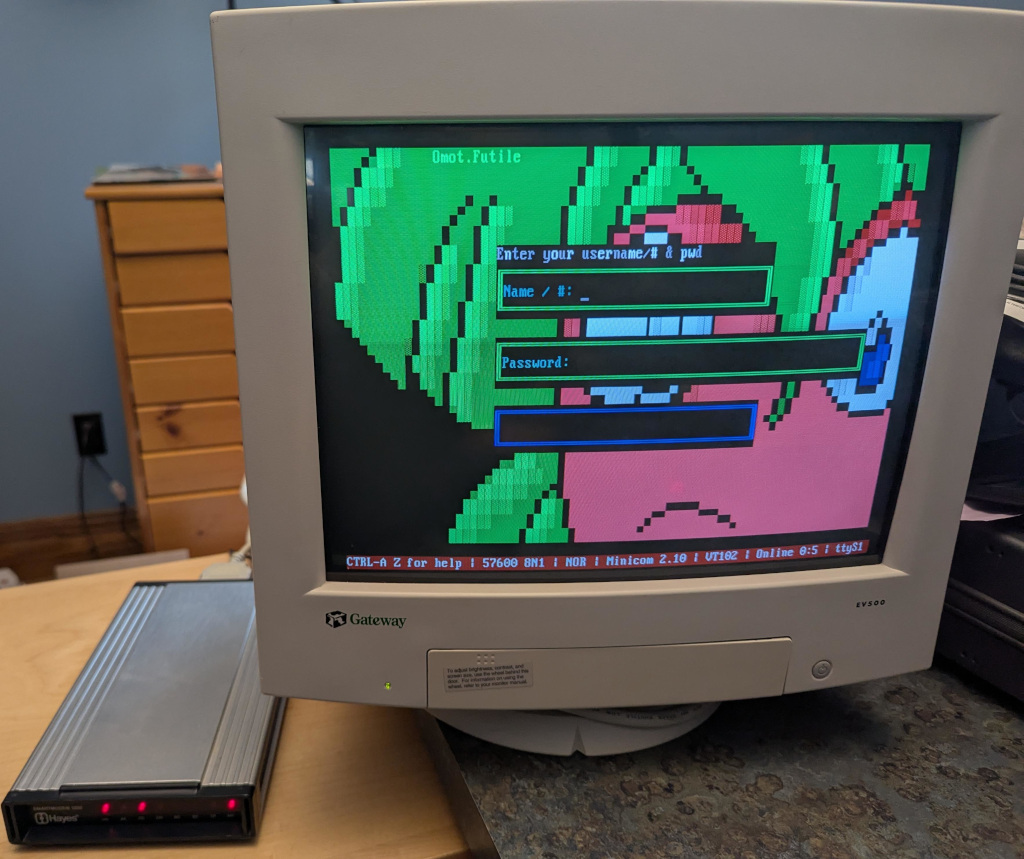
Here, in classic Goerzen deep dive fashion, is more information than you knew you wanted about a topic you ve probably never thought of. I found it pretty interesting, because it took me down a rabbit hole of subsystems I ve never worked with much and a mishmash of 1980s and 2020s tech. I had previously tried and failed to get an actual 80x25 Linux console, but I ve since figured it out! This post is about the Linux text console not X or Wayland. We re going to get the console right without using those systems. These instructions are for Debian trixie, but should be broadly applicable elsewhere also. The end result can look like this: Photo of a color VGA monitor displaying a BBS login screen (That s a Wifi Retromodem that I got at VCFMW last year in the Hayes modem case)

What s a pixel? How would you define a pixel these days? Probably something like a uniquely-addressable square dot in a two-dimensional grid . In the world of VGA and CRTs, that was just a logical abstraction. We got an API centered around that because it was convenient. But, down the VGA cable and on the device, that s not what a pixel was. A pixel, back then, was a time interval. On a multisync monitor, which were common except in the very early days of VGA, the timings could be adjusted which produced logical pixels of different sizes. Those screens often had a maximum resolution but not necessarily a native resolution in the sense that an LCD panel does. Different timings produced different-sized pixels with equal clarity (or, on cheaper monitors, equal fuzziness). A side effect of this was that pixels need not be square. And, in fact, in the standard DOS VGA 80x25 text mode, they weren t. You might be seeing why DVI, DisplayPort, and HDMI replaced VGA for LCD monitors: with a VGA cable, you did a pixel-to-analog-timings conversion, then the display did a timings-to-pixels conversion, and this process could be a bit lossy. (Hence why you sometimes needed to fill the screen with an image and push the center button on those older LCD screens) (Note to the pedantically-inclined: yes I am aware that I have simplified several things here; for instance, a color LCD pixel is made up of approximately 3 sub-dots of varying colors, and that things like color eInk displays have two pixel grids with different sizes of pixels layered atop each other, and printers are another confusing thing altogether, and and and . MOST PEOPLE THINK OF A PIXEL AS A DOT THESE DAYS, OK?)

What was DOS text mode? We think of this as the standard display: 80 columns wide and 25 rows tall. 80x25. By the time Linux came along, the standard Linux console was VGA text mode something like the 4th incarnation of text modes on PCs (after CGA, MDA, and EGA). VGA also supported certain other sizes of characters giving certain other text dimensions, but if I cover all of those, this will explode into a ridiculously more massive page than it already is. So to display text on an 80x25 DOS VGA system, ultimately characters and attributes were written into the text buffer in memory. The VGA system then rendered it to the display as a 720x400 image (at 70Hz) with non-square pixels such that the result was approximately a 4:3 aspect ratio. The font used for this rendering was a bitmapped one using 8x16 cells. You might do some math here and point out that 8 * 80 is only 640, and you d be correct. The fonts were 8x16 but the rendered cells were 9x16. The extra pixel was normally used for spacing between characters. However, in line graphics mode, characters 0xC0 through 0xDF repeated the 8th column in the position of the 9th, allowing the continuous line-drawing characters we re used to from TUIs.

Problems rendering DOS fonts on modern systems By now, you re probably seeing some of the issues we have rendering DOS screens on more modern systems. These aren t new at all; I remember some of these from back in the days when I ran OS/2, and I think also saw them on various terminals and consoles in OS/2 and Windows. Some issues you d encounter would be:
  • Incorrect aspect ratio caused by using the original font and rendering it using 1:1 square pixels (resulting in a squashed appearance)
  • Incorrect aspect ratio for ANOTHER reason, caused by failing to render column 9, resulting in text that is overall too narrow
  • Characters appearing to be touching each other when they shouldn t (failing to render column 9; looking at you, dosbox)
  • Gaps between line drawing characters that should be continuous, caused by rendering column 9 as empty space in all cases

Character set issues DOS was around long before Unicode was. In the DOS world, there were codepages that selected the glyphs for roughly the high half of the 256 possible characters. CP437 was the standard for the USA; others existed for other locations that needed different characters. On Unix, the USA pre-Unicode standard was Latin-1. Same concept, but with different character mappings. Nowadays, just about everything is based on UTF-8. So, we need some way to map our CP437 glyphs into Unicode space. If we are displaying DOS-based content, we ll also need a way to map CP437 characters to Unicode for display later, and we need these maps to match so that everything comes out right. Whew. So, let s get on with setting this up!

Selecting the proper video mode As explained in my previous post, proper hardware support for DOS text mode is limited to x86 machines that do not use UEFI. Non-x86 machines, or x86 machines with UEFI, simply do not contain the necessary support for it. As these are now standard, most of the time, the text console you see on Linux is actually the kernel driving the video hardware in graphics mode, and doing the text rendering in software. That s all well and good, but it makes it quite difficult to actually get an 80x25 console. First, we need to be running at 720x400. This is where I ran into difficulty last time. I realized that my laptop s LCD didn t advertise any video modes other than its own native resolution. However, almost all external monitors will, and 720x400@70 is a standard VGA mode from way back, so it should be well-supported. You need to find the Linux device name for your device. You can look at the possible devices with ls -l /sys/class/drm. If you also have a GUI, xrandr may help too. But in any case, each directory under /sys/class/drm has a file named modes, and if you cat them all, you will eventually come across one with a bunch of modes defined. Drop the leading card0 or whatever from the directory name, and that s your device. (Verify that 720x400 is in modes while you re at it.) Now, you re going to edit /etc/default/grub and add something like this to GRUB_CMDLINE_LINUX_DEFAULT:
video=DP-1:720x400@70
Of course, replace DP-1 with whatever your device is. Now you can run update-grub and reboot. You should have a 720x400 display. At first, I thought I had succeeded by using Linux s built-in VGA font with that mode. But it looked too tall. After noticing that repeated 0s were touching, I got suspicious about the missing 9th column in the cells. stty -a showed that my screen was 90x25, which is exactly what it would show if I was using 8x16 instead of 9x16 cells. Sooo . I need to prepare a 9x16 font.

Preparing a font Here s where it gets complicated. I ll give you the simple version and the hard mode. The simple mode is this: Download https://www.complete.org/downloads/CP437-VGA.psf.gz and stick it in /usr/local/etc, then skip to the Activating the font section below. The font assembled here is based on the Ultimate Oldschool PC Font Pack v2.2, which is (c) 2016-2020 VileR and licensed under Creative Commons Attribution-ShareAlike 4.0 International License. My psf file is derived from this using the instructions below.

Building it yourself First, install some necessary software: apt-get install fontforge bdf2psf Start by going to the Oldschool PC Font Pack Download page. Download oldschool_pc_font_pack_v2.2_FULL.zip and unpack it. The file we re interested in is otb - Bm (linux bitmap)/Bm437_IBM_VGA_9x16.otb. Open it in fontforge by running fontforge BmPlus_IBM_VGA_9x16.otb. When it asks if you will load the bitmap fonts, hit select all, then yes. Go to File -> generate fonts. Save in a BDF, no need for outlines, and use guess for resolution. Now you have a file such as Bm437_IBM_VGA_9x16-16.bdf. Excellent. Now we need to generate a Unicode map file. We will make sure this matches the system s by enumerating every character from 0x00 to 0xFF, converting it from CP437 to Unicode, and writing the appropriate map. Here s a Python script to do that:
for i in range(0, 256):
    cp437b = b'%c' % i
    uni = ord(cp437b.decode('cp437'))
    print(f"U+ uni:04x ")
Save that file as genmap.py and run python3 genmap.py > cp437-uni. Now, we re ready to build the psf file:
bdf2psf --fb Bm437_IBM_VGA_9x16-16.bdf \
  /dev/null cp437-uni 256 CP437-VGA.psf
By convention, we normally store these files gzipped, so gzip CP437-VGA.psf. You can test it on the console with setfont CP437-VGA.psf.gz. Now copy this file into /usr/local/etc.

Activating the font Now, edit /etc/default/console-setup. It should look like this:
# CONFIGURATION FILE FOR SETUPCON

# Consult the console-setup(5) manual page.

ACTIVE_CONSOLES="/dev/tty[1-6]"

CHARMAP="UTF-8"

CODESET="Lat15"
FONTFACE="VGA"
FONTSIZE="8x16"
FONT=/usr/local/etc/CP437-VGA.psf.gz

VIDEOMODE=

# The following is an example how to use a braille font
# FONT='lat9w-08.psf.gz brl-8x8.psf'
At this point, you should be able to reboot. You should have a proper 80x25 display! Log in and run stty -a to verify it is indeed 80x25.

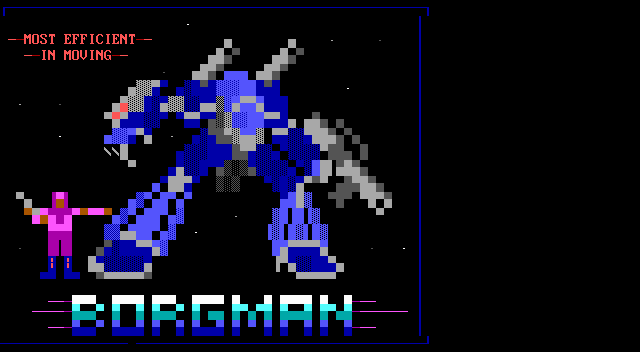
Using and testing CP437 Part of the point of CP437 is to be able to access BBSs, ANSI art, and similar. Now, remember, the Linux console is still in UTF-8 mode, so we have to translate CP437 to UTF-8, then let our font map translate it back to CP437. A weird trip, but it works. Let s test it using the Textfiles ANSI art collection. In the artworks section, I randomly grabbed a file near the top: borgman.ans. Download that, and display with:
clear; iconv -f CP437 -t UTF-8 < borgman.ans
You should see something similar to but actually more accurate than the textfiles PNG rendering of it, which you ll note has an incorrect aspect ratio and some rendering issues. I spot-checked with a few others and they seemed to look good. belinda.ans in particular tries quite a few characters and should give you a good sense if it is working.

Use with interactive programs That s all well and good, but you re probably going to want to actually use this with some interactive program that expects CP437. Maybe Minicom, Kermit, or even just telnet? For this, you ll want to apt-get install luit. luit maps CP437 (or any other encoding) to UTF-8 for display, and then of course the Linux console maps UTF-8 back to the CP437 font. Here s a way you can repeat the earlier experiment using luit to run the cat program:
clear; luit -encoding CP437 cat borgman.ans
You can run any command under luit. You can even run luit -encoding CP437 bash if you like. If you do this, it is probably a good idea to follow my instructions on generating locales on my post on serial terminals, and then within luit, set LANG=en_us.IBM437. But note especially that you can run programs like minicom and others for accessing BBSs under luit.

Final words This gave you a nice DOS-type console. Although it doesn t have glyphs for many codepoints, it does run in UTF-8 mode and therefore is compatible with modern software. You can achieve greater compatibility with more UTF-8 codepoints with the DOS font, at the expense of accuracy of character rendering (especially for the double-line drawing characters) by using /usr/share/bdf2psf/standard.equivalents instead of /dev/null in the bdf2psf command. Or you could go for another challenge, such as using the DEC vt-series fonts for coverage of ISO-8859-1. But just using fonts extracted from DEC ROM won t work properly, because DEC terminals had even more strangeness going on than DOS fonts.

17 September 2025

John Goerzen: Installing and Using Debian With My Decades-Old Genuine DEC vt510 Serial Terminal

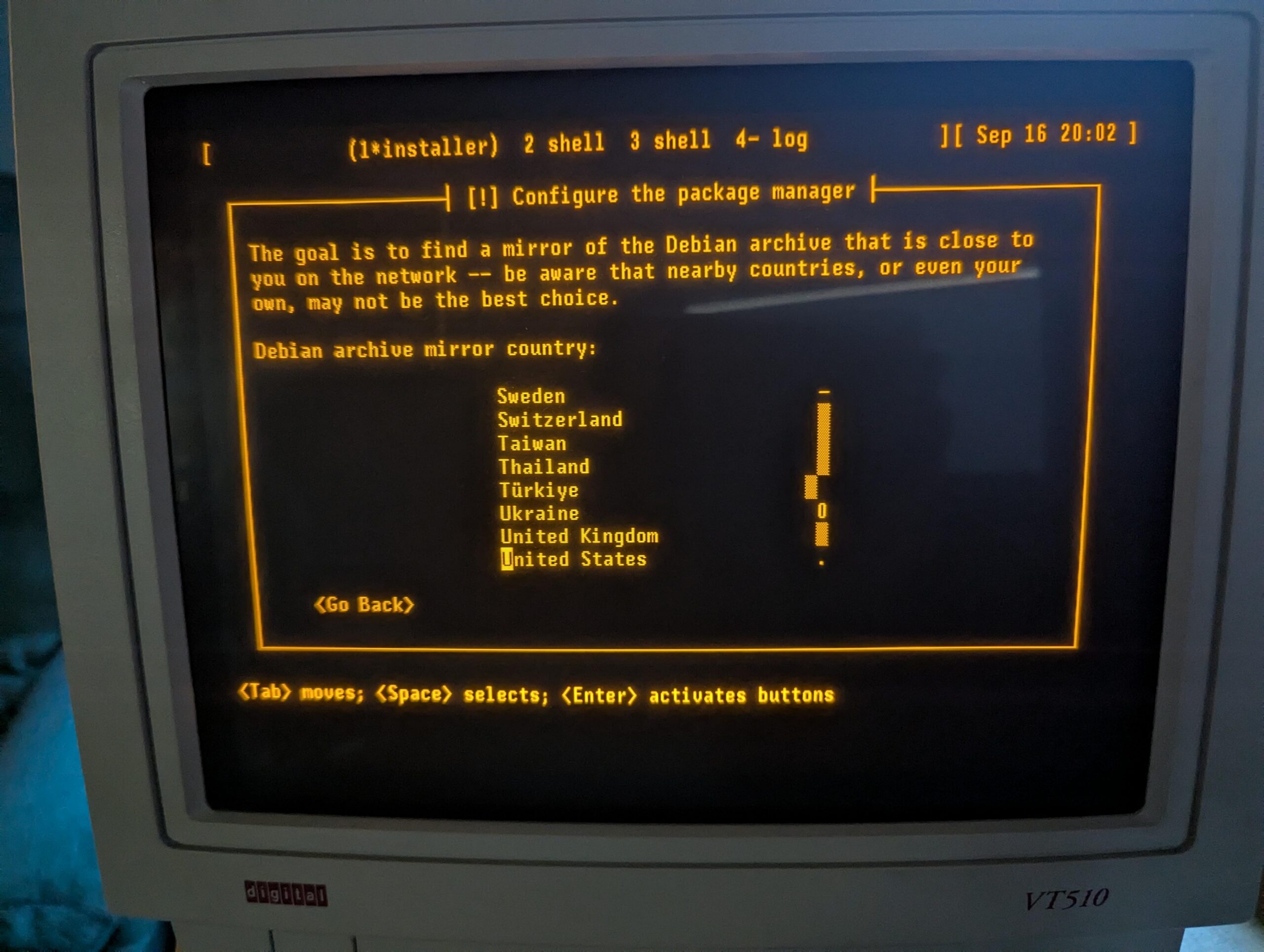
Six years ago, I was inspired to buy a DEC serial terminal. Since then, my collection has grown to include several DEC models, an IBM 3151, a Wyse WY-55, a Televideo 990, and a few others. When you are running a terminal program on Linux or MacOS, what you are really running is a terminal emulator. In almost all cases, the terminal emulator is emulating one of the DEC terminals in the vt100 through vt520 line, which themselves use a command set based on an ANSI standard. In short, you spend all day using a program designed to pretend to be the exact kind of physical machine I m using for this experiment! I have long used my terminals connected to a Raspberry Pi 4, but due to the difficulty of entering a root filesystem encryption password using a serial console on a Raspberry Pi, I am switching to an x86 Mini PC (with a N100 CPU). While I have used a terminal with the Pi, I ve never before used it as a serial console all the way from early boot, and I have never installed Debian using the terminal to run the installer. A serial terminal gives you a login prompt. A serial console gives you access to kernel messages, the initrd environment, and sometimes even the bootloader. This might be fun, I thought. I selected one of my vt510 terminals for this. It is one of my newer ones, having been built in 1993. But it has a key feature: I can remap Ctrl to be at the caps lock position, something I do on every other system I use anyhow. I could have easily selected an older one from the 1980s. A DEC vt510 terminal showing the Debian installer Kernel configuration To enable a serial console for Linux, you need to pass a parameter on the kernel command line. See the kernel documentaiton for more. I very frequently see instructions that are incomplete; they particularly omit flow control, which is most definitely needed for these real serial terminals. I run my terminal at 57600 bps, so the parameter I need is console=ttyS0,57600n8r. The r means to use hardware flow control (ttyS0 corresponds to the first serial port on the system; use ttyS1 or something else as appropriate for your situation). While booting the Debian installer, according to Debian s instructions, it may be useful to also add TERM=vt102 (the installer doesn t support the vt510 terminal type directly). The TERM parameter should not be specified on a running system after instlalation. Booting the Debian installer When you start the Debian installer, to get it into serial mode, you have a couple of options:
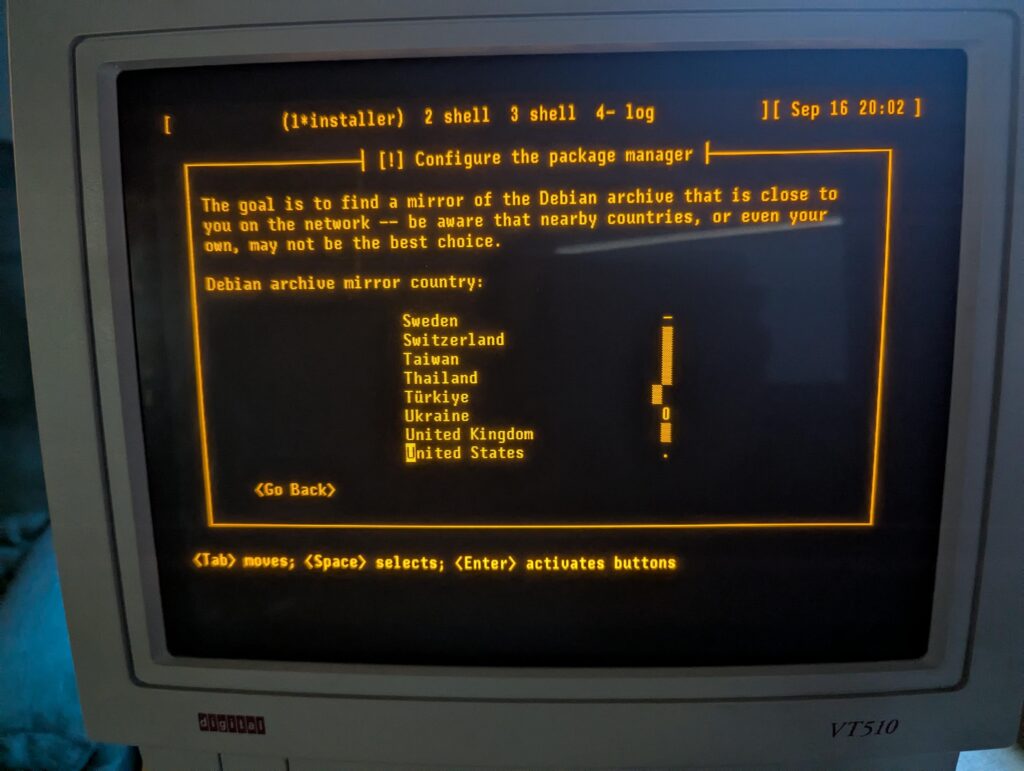
  1. You can use a traditional display and keyboard just long enough to input the kernel parameters described above
  2. You can edit the bootloader configuration on the installer s filesystem prior to booting from it
Option 1 is pretty easy. Option 2 is hard mode, but not that bad. On x86, the Debian installer boots in at least two different ways: it uses GRUB if you re booting under UEFI (which is most systems these days), or ISOLINUX if you are booting from the BIOS. If using GRUB, the file to edit on the installer image is boot/grub/grub.cfg. Near the top, add these lines:
serial --unit=0 --speed=57600 --word=8 --parity=no --stop=1
terminal_input console serial
terminal_output console serial
Unit 0 corresponds to ttyS0 as above. GRUB s serial command does not support flow control. If your terminal gets corrupted during the GRUB stage, you may need to configure it to a slower speed. Then, find the linux line under the Install menuentry. Edit it to insert console=ttyS0,57600n8r TERM=vt102 right after the vga=788. Save, unmount, and boot. You should see the GRUB screen displayed on your serial terminal. Select the Install option and the installer begins. If you are using BIOS boot, I m sure you can do something similar with the files in the isolinux directory, but haven t researched it. Now, you can install Debian like usual! Configuring the System I was pleasantly surprised to find that Debian s installer took care of many, but not all, of the things I want to do in order to make the system work nicely with a serial terminal. You can perform these steps from a chroot under the installer environment before a reboot, or later in the running system. First, while Debian does set up a getty (the program that displays the login prompt) on the serial console by default, it doesn t enable hardware flow control. So let s do that. Configuring the System: agetty with systemd Run systemctl edit serial-getty@ttyS0.service. This opens an editor that lets you customize the systemd configuration for a given service without having to edit the file directly. All you really need to do is modify the agetty command, so we just override it. At the top, in the designated area, write:
[Service]
ExecStart=
ExecStart=-/sbin/agetty --wait-cr -8 -h -L=always %I 57600 vt510
The empty ExecStart= line is necessary to tell systemd to remove the existing ExecStart command (otherwise, it will logically contain two ExecStart lines, which is an error). These arguments say: The systemd documentation refers to this page about serial consoles, which gives more background. However, I think it is better to use the systemctl edit method described here, rather than just copying the config file, since this lets things like new configurations with new Debian versions take effect. Configuring the System: Kernel and GRUB Your next stop is the /etc/default/grub file. Debian s installer automatically makes some changes here. There are three lines you want to change. First, near the top, edit GRUB_CMDLINE_LINUX_DEFAULT and add console=tty0 console=ttyS0,57600n8r. By specifying console twice, you allow output to go both to the standard display and to the serial console. By specifying the serial console last, you make it be the preferred one for things like entering the root filesystem password. Next, towards the bottom, make sure these two lines look like this:
GRUB_TERMINAL="console serial"
GRUB_SERIAL_COMMAND="serial --unit=0 --speed=57600 --word=8 --parity=no --stop=1"
Finally, near the top, you may want to raise the GRUB_TIMEOUT to somewhere around 10 to 20 seconds since things may be a bit slower than you re used to. Save the file and run update-grub. Now, GRUB will display on both your standard display and the serial console. You can edit the boot command from either. If you have a VGA or HDMI monitor attached, for instance, and need to not use the serial console, you can just edit the Linux command line in GRUB and remove the reference to ttyS0 for one boot. Easy! That s it. You now have a system that is fully operational from a serial terminal. My original article from 2019 has some additional hints, including on how to convert from UTF-8 for these terminals. Update 2025-09-17: It is also useful to set up proper locales. To do this, first edit /etc/locale.gen. Make sure to add, or uncomment:
en_US ISO-8859-1
en_US.IBM437 IBM437
en_US.UTF-8 UTF-8 
Then run locale-gen. Normally, your LANG will be set to en_us.UTF-8, which will select the appropriate encoding. Plain en_US will select ISO-8859-1, which you need for the vt510. Then, add something like this to your ~/.bashrc:
if [  tty  = "/dev/ttyS0" -o "$TERM" = "vt510" ]; then
        stty -iutf8
        # might add ixon ixoff
        export LANG=en_US
        export MANOPT="-E ascii"
        stty rows 25
fi
if [ "$TERM" = "screen" -o "$TERM" = "vt100" ]; then
    export LANG=en_US.utf8
fi
Finally, in my ~/.screenrc, I have this. It lets screen convert between UTF-8 and ISO-8859-1:
defencoding UTF-8
startup_message off
vbell off
termcapinfo * XC=B%, -,
maptimeout 5
bindkey -k ku stuff ^[OA
bindkey -k kd stuff ^[OB
bindkey -k kr stuff ^[OC
bindkey -k kl stuff ^[OD

16 September 2025

Raju Devidas: Building Debian 13 Trixie Vagrant Image

I sometimes use Vagrant to deploy my VM&aposs and recently when I tried to deploy one for Trixie, I could see one available. So I checked the official Debian images on Vagrant cloud at https://portal.cloud.hashicorp.com/vagrant/discover/debian and could not find an image for trixie on Vagrant cloud. Also looked at other cloud image sources like Docker hub, and I could see an image their for Trixie. So I looked into how I can generate a Vagrant image locally for Debian to use.
make install-build-deps


Searched on Salsa and stumbled upon https://salsa.debian.org/cloud-team/debian-vagrant-imagesCloned the repo from salsa
$ git clone https://salsa.debian.org/cloud-team/debian-vagrant-images.git
Install the build dependencies
$ make install-build-deps
this will install some dependency packages, will ask for sudo password if need to install something not already installed. Let&aposs call make help
$ make help
To run this makefile, run:
   make <DIST>-<CLOUD>-<ARCH>
  WHERE <DIST> is bullseye, buster, stretch, sid or testing
    And <CLOUD> is azure, ec2, gce, generic, genericcloud, nocloud, vagrant, vagrantcontrib
    And <ARCH> is amd64, arm64, ppc64el
Set DESTDIR= to write images to given directory.
$ make trixie-vagrant-amd64
umask 022; \
./bin/debian-cloud-images build \
  trixie vagrant amd64 \
  --build-id vagrant-cloud-images-master \
  --build-type official
usage: debian-cloud-images build
debian-cloud-images build: error: argument RELEASE: invalid value: trixie
make: *** [Makefile:22: trixie-vagrant-amd64] Error 2
As you can see, trixie is not even in the available options and it is not building as well. Before trying to look at updating the codebase, I looked at the pending MR&aposs on Salsa and found Michael Ablassmeier&aposs pending merge request at https://salsa.debian.org/cloud-team/debian-vagrant-images/-/merge_requests/18So let me test that commit and see if I can build trixie locally from Michael&aposs MR
$ git clone https://salsa.debian.org/debian/debian-vagrant-images.git
Cloning into &aposdebian-vagrant-images&apos...
remote: Enumerating objects: 5310, done.
remote: Counting objects: 100% (256/256), done.
remote: Compressing objects: 100% (96/96), done.
remote: Total 5310 (delta 141), reused 241 (delta 135), pack-reused 5054 (from 1)
Receiving objects: 100% (5310/5310), 629.81 KiB   548.00 KiB/s, done.
Resolving deltas: 100% (2875/2875), done.
$ cd debian-vagrant-images/
$ git checkout 8975eb0 #the commit id of MR 
Now let&aposs see if we can build trixie now
$ make help
To run this makefile, run:
   make <DIST>-<CLOUD>-<ARCH>
  WHERE <DIST> is bullseye, buster, stretch, sid or testing
    And <CLOUD> is azure, ec2, gce, generic, genericcloud, nocloud, vagrant, vagrantcontrib
    And <ARCH> is amd64, arm64, ppc64el
Set DESTDIR= to write images to given directory.
$ make trixie-vagrant-amd64
umask 022; \
./bin/debian-cloud-images build \
  trixie vagrant amd64 \
  --build-id vagrant-cloud-images-master \
  --build-type official
2025-09-17 00:36:25,919 INFO Adding class DEBIAN
2025-09-17 00:36:25,919 INFO Adding class CLOUD
2025-09-17 00:36:25,919 INFO Adding class TRIXIE
2025-09-17 00:36:25,920 INFO Adding class VAGRANT
2025-09-17 00:36:25,920 INFO Adding class AMD64
2025-09-17 00:36:25,920 INFO Adding class LINUX_IMAGE_BASE
2025-09-17 00:36:25,920 INFO Adding class GRUB_PC
2025-09-17 00:36:25,920 INFO Adding class LAST
2025-09-17 00:36:25,921 INFO Running FAI: sudo env PYTHONPATH=/home/rajudev/dev/salsa/michael/debian-vagrant-images/src/debian_cloud_images/build/../.. CLOUD_BUILD_DATA=/home/rajudev/dev/salsa/michael/debian-vagrant-images/src/debian_cloud_images/data CLOUD_BUILD_INFO= "type": "official", "release": "trixie", "release_id": "13", "release_baseid": "13", "vendor": "vagrant", "arch": "amd64", "build_id": "vagrant-cloud-images-master", "version": "20250917-1"  CLOUD_BUILD_NAME=debian-trixie-vagrant-amd64-official-20250917-1 CLOUD_BUILD_OUTPUT_DIR=/home/rajudev/dev/salsa/michael/debian-vagrant-images CLOUD_RELEASE_ID=vagrant CLOUD_RELEASE_VERSION=20250917-1 fai-diskimage --verbose --hostname debian --class DEBIAN,CLOUD,TRIXIE,VAGRANT,AMD64,LINUX_IMAGE_BASE,GRUB_PC,LAST --size 100G --cspace /home/rajudev/dev/salsa/michael/debian-vagrant-images/src/debian_cloud_images/build/fai_config debian-trixie-vagrant-amd64-official-20250917-1.raw
..... continued
Although we can now build the images, we just don&apost see an option for it in the help text, not even for bookworm. Just the text in Makefile is outdated, but I can build and trixie Vagrant box now. Thanks to Michael for the fix.

John Goerzen: I just want an 80 25 console, but that s no longer possible

Update 2025-09-18: I figured out how to do this, at least for many non-laptop screens. This post still contains a lot of good background detail, however. Somehow along the way, a feature that I ve had across DOS, OS/2, FreeBSD, and Linux and has been present on PCs for more than 40 years is gone. That feature, of course, is the 80 25 text console. Linux has, for awhile now, rendered its text console using graphic modes. You can read all about it here. This has been necessary because only PCs really had the 80 25 text mode (Raspberry Pis, for instance, never did), and even they don t have it when booted with UEFI. I ve lately been annoyed that: And, I wanted to run some software on the console that was designed with 80 25 in mind. And I d like to be able to plug in an old VGA monitor and have it just work if I want to do that. That shouldn t be so hard, right? Well, the old vga= option that you are used to doesn t work when you booted from UEFI or on non-x86 platforms. Most of the tricks you see online for changing resolutions, etc., are no longer relevant. And things like setting a resolution with GRUB are useless for systems that don t use GRUB (including ARM). VGA text mode uses 8 16 glyphs in 9 16 cells, where the pixels are non-square, giving a native resolution of 720 400 (which historically ran at 70Hz), which should have streched pixels to make a 4:3 image. While it is possible to select a console font, and 8 16 fonts are present and supported in Linux, it appears to be impossible to have a standard way to set 720 400 so that they present in a reasonable size, at the correct aspect ratio, with 80 25. Tricks like nomodeset no longer work on UEFI or ARM systems. It s possible that kmscon or something like it may help, but I m not even certain of that (video=eDP1:720 400 produced an error saying that 720 400 wasn t a supported mode, so I m unsure kmscon would be any better.) Not that it matters; all the kmscon options to select a font or zoom are broken, and it doesn t offer mode selection anyhow. I think I m going to have to track down an old machine. Sigh.

15 September 2025

Sven Hoexter: HaProxy: Configuring SNI for a TLS Proxy

If you use HaProxy to e.g. terminate TLS on the frontend and connect via TLS to a backend, one has to take care of sending the SNI (server name indication) extension in the TLS handshake sort of manually. Even if you use host names to address the backend server, e.g.
server foobar foobar.example:2342 ssl verify required ca-file /etc/haproxy/ca/foo.crt
HaProxy will try to establish the connection without SNI. You manually have to enforce SNI here, e.g.
server foobar foobar.example:2342 ssl verify required ca-file /etc/haproxy/ca/foo.crt sni str(foobar.example)
The surprising thing here was that it requires an expression, so you can not just write sni foobar.example, you've to wrap it in an expression. The simplest one is making sure it's a string. Update: Might be noteworthy that you've to configure SNI for the health check separately, and in that case it's a string not an expression. E.g.
server foobar foobar.example:2342 check check-ssl check-sni foobar.example ssl verify required ca-file /etc/haproxy/ca/foo.crt sni str(foobar.example)
The ca-file is shared between the ssl context and the check-ssl.

Sven Hoexter: Google Cloud: When the Load Balancer Frontend Hands you an F

If someone hands you an IP:Port of a Google Cloud load balancer, and tells you to connect there with TLS, but all you receive in return is an F (and a few other bytes with none printable characters) on running openssl s_client -connect ..., you might be missing SNI (server name indication). Sadly the other side was not transparent enough to explain in detail which exact type of Google Cloud load balancer they used, but the conversation got more detailed and up to a working TLS connection when the missing -servername foobar.host.name was added. I could not find any sort of official documentation on the responses of the GFE (the frontend part) when TLS parameters do not match the expectations. Also you won't have anything in the logs, because logging at Google Cloud is a backend function, and as long as your requests do not reach the backend, there are no logs. That makes it rather unpleasant to debug such cases, when one end says "I do not see anything in the logs", and the other one says "you reject my connection and just reply F".

14 September 2025

Ian Jackson: tag2upload in the first month of forky

tl;dr: tag2upload (beta) is going well so far, and is already handling around one in 13 uploads to Debian. Introduction and some stats We announced tag2upload s open beta in mid-July. That was in the middle of the the freeze for trixie, so usage was fairly light until the forky floodgates opened. Since then the service has successfully performed 637 uploads, of which 420 were in the last 32 days. That s an average of about 13 per day. For comparison, during the first half of September up to today there have been 2475 uploads to unstable. That s about 176/day. So, tag2upload is already handling around 7.5% of uploads. This is very gratifying for a service which is advertised as still being in beta! Sean and I are very pleased both with the uptake, and with the way the system has been performing. Recent UI/UX improvements During this open beta period we have been hard at work. We have made many improvements to the user experience. Current git-debpush in forky, or trixie-backports, is much better at detecting various problems ahead of time. When uploads do fail on the service the emailed error reports are now more informative. For example, anomalies involving orig tarballs, which by definition can t be detected locally (since one point of tag2upload is not to have tarballs locally) now generally result in failure reports containing a diffstat, and instructions for a local repro. Why we are still in beta There are a few outstanding work items that we currently want to complete before we declare the end of the beta. Retrying on Salsa-side failures The biggest of these is that the service should be able to retry when Salsa fails. Sadly, Salsa isn t wholly reliable, and right now if it breaks when the service is trying to handle your tag, your upload can fail. We think most of these failures could be avoided. Implementing retries is a fairly substantial task, but doesn t pose any fundamental difficulties. We re working on this right now. Other notable ongoing work We want to support pristine-tar, so that pristine-tar users can do a new upstream release. Andrea Pappacoda is working on that with us. See #1106071. (Note that we would generally recommend against use of pristine-tar within Debian. But we want to support it.) We have been having conversations with Debusine folks about what integration between tag2upload and Debusine would look like. We re making some progress there, but a lot is still up in the air. We are considering how best to provide tag2upload pre-checks as part of Salsa CI. There are several problems detected by the tag2upload service that could be detected by Salsa CI too, but which can t be detected by git-debpush. Common problems We ve been monitoring the service and until very recently we have investigated every service-side failure, to understand the root causes. This has given us insight into the kinds of things our users want, and the kinds of packaging and git practices that are common. We ve been able to improve the system s handling of various anomalies and also improved the documentation. Right now our failure rate is still rather high, at around 7%. Partly this is because people are trying out the system on packages that haven t ever seen git tooling with such a level of rigour. There are two classes of problem that are responsible for the vast majority of the failures that we re still seeing: Reuse of version numbers, and attempts to re-tag tag2upload, like git (and like dgit), hates it when you reuse a version number, or try to pretend that a (perhaps busted) release never happened. git tags aren t namespaced, and tend to spread about promiscuously. So replacing a signed git tag, with a different tag of the same name, is a bad idea. More generally, reusing the same version number for a different (signed!) package is poor practice. Likewise, it s usually a bad idea to remove changelog entries for versions which were actually released, just because they were later deemed improper. We understand that many Debian contributors have gotten used to this kind of thing. Indeed, tools like dcut encourage it. It does allow you to make things neat-looking, even if you ve made mistakes - but really it does so by covering up those mistakes! The bottom line is that tag2upload can t support such history-rewriting. If you discover a mistake after you ve signed the tag, please just burn the version number and add a new changelog stanza. One bonus of tag2upload s approach is that it will discover if you are accidentally overwriting an NMU, and report that as an error. Discrepancies between git and orig tarballs tag2upload promises that the source package that it generates corresponds precisely to the git tree you tag and sign. Orig tarballs make this complicated. They aren t present on your laptop when you git-debpush. When you re not uploading a new upstream version, the tag2upload service reuses existing orig tarballs from the archive. If your git and the archive s orig don t agree, the tag2upload service will report an error, rather than upload a package with contents that differ from your git tag. With the most common Debian workflows, everything is fine: If you base everything on upstream git, and make your orig tarballs with git archive (or git deborig), your orig tarballs are the same as the git, by construction. We recommend usually ignoring upstream tarballs: most upstreams work in git, and their tarballs can contain weirdness that we don t want. (At worst, the tarball can contain an attack that isn t visible in git, as with xz!) Alternatively, if you use gbp import-orig, the differences (including an attack like Jia Tan s) are imported into git for you. Then, once again, your git and the orig tarball will correspond. But there are other workflows where this correspondence may not hold. Those workflows are hazardous, because the thing you re probably working with locally for your routine development is the git view. Then, when you upload, your work is transplanted onto the orig tarball, which might be quite different - so what you upload isn t what you ve been working on! This situation is detected by tag2upload, precisely because tag2upload checks that it s keeping its promise: the source package is identical to the git view. (dgit push makes the same promise.) Get involved Of course the easiest way to get involved is to start using tag2upload. We would love to have more contributors. There are some easy tasks to get started with, in bugs we ve tagged newcomer mostly UX improvements such as detecting certain problems earlier, in git-debpush. More substantially, we are looking for help with sbuild: we d like it to be able to work directly from git, rather than needing to build source packages: #868527.

comment count unavailable comments

Dirk Eddelbuettel: RcppSimdJson 0.1.14 on CRAN: New Upstream Major

A brand new release 0.1.14 of the RcppSimdJson package is now on CRAN. RcppSimdJson wraps the fantastic and genuinely impressive simdjson library by Daniel Lemire and collaborators. Via very clever algorithmic engineering to obtain largely branch-free code, coupled with modern C++ and newer compiler instructions, it results in parsing gigabytes of JSON parsed per second which is quite mindboggling. The best-case performance is faster than CPU speed as use of parallel SIMD instructions and careful branch avoidance can lead to less than one cpu cycle per byte parsed; see the video of the talk by Daniel Lemire at QCon. This version includes the new major upstream release 4.0.0 with major new features including a builder for creating JSON from the C++ side objects. This is something a little orthogonal to the standard R usage of the package to parse and load JSON data but could still be of interest to some. The short NEWS entry for this release follows.

Changes in version 0.1.14 (2025-09-13)
  • simdjson was upgraded to version 4.0.0 (Dirk in #96
  • Continuous integration now relies a token for codecov.io

Courtesy of my CRANberries, there is also a diffstat report for this release. For questions, suggestions, or issues please use the issue tracker at the GitHub repo.

This post by Dirk Eddelbuettel originated on his Thinking inside the box blog. If you like this or other open-source work I do, you can now sponsor me at GitHub.

Otto Kek l inen: Zero-configuration TLS and password management best practices in MariaDB 11.8

Featured image of post Zero-configuration TLS and password management best practices in MariaDB 11.8Locking down database access is probably the single most important thing for a system administrator or software developer to prevent their application from leaking its data. As MariaDB 11.8 is the first long-term supported version with a few new key security features, let s recap what the most important things are every DBA should know about MariaDB in 2025. Back in the old days, MySQL administrators had a habit of running the clumsy mysql-secure-installation script, but it has long been obsolete. A modern MariaDB database server is already secure by default and locked down out of the box, and no such extra scripts are needed. On the contrary, the database administrator is expected to open up access to MariaDB according to the specific needs of each server. Therefore, it is important that the DBA can understand and correctly configure three things:
  1. Separate application-specific users with granular permissions allowing only necessary access and no more.
  2. Distributing and storing passwords and credentials securely
  3. Ensuring all remote connections are properly encrypted
For holistic security, one should also consider proper auditing, logging, backups, regular security updates and more, but in this post we will focus only on the above aspects related to securing database access.

How encrypting database connections with TLS differs from web server HTTP(S) Even though MariaDB (and other databases) use the same SSL/TLS protocol for encrypting remote connections as web servers and HTTPS, the way it is implemented is significantly different, and the different security assumptions are important for a database administrator to grasp. Firstly, most HTTP requests to a web server are unauthenticated, meaning the web server serves public web pages and does not require users to log in. Traditionally, when a user logs in over a HTTP connection, the username and password were transmitted in plaintext as a HTTP POST request. Modern TLS, which was previously called SSL, does not change how HTTP works but simply encapsulates it. When using HTTPS, a web browser and a web server will start an encrypted TLS connection as the very first thing, and only once established, do they send HTTP requests and responses inside it. There are no passwords or other shared secrets needed to form the TLS connection. Instead, the web server relies on a trusted third party, a Certificate Authority (CA), to vet that the TLS certificate offered by the web server can be trusted by the web browser. For a database server like MariaDB, the situation is quite different. All users need to first authenticate and log in to the server before getting being allowed to run any SQL and getting any data out of the server. The database server and client programs have built-in authentication methods, and passwords are not, and have never been, sent in plaintext. Over the years, MySQL and its successor, MariaDB, have had multiple password authentication methods: the original SHA-1-based hashing, later double SHA-1-based mysql_native_password, followed by sha256_password and caching_sha256_password in MySQL and ed25519 in MariaDB. The MariaDB.org blog post by Sergei Golubchik recaps the history of these well. Even though most modern MariaDB installations should be using TLS to encrypt all remote connections in 2025, having the authentication method be as secure as possible still matters, because authentication is done before the TLS connection is fully established. To further harden the authentication agains man-in-the-middle attacks, a new password the authentication method PARSEC was introduced in MariaDB 11.8, which builds upon the previous ed25519 public-key-based verification (similar to how modern SSH does), and also combines key derivation with PBKDF2 with hash functions (SHA512,SHA256) and a high iteration count. At first it may seem like a disadvantage to not wrap all connections in a TLS tunnel like HTTPS does, but actually not having the authentication done in a MitM resistant way regardless of the connection encryption status allows a clever extra capability that is now available in MariaDB: as the database server and client already have a shared secret that is being used by the server to authenticate the user, it can also be used by the client to validate the server s TLS certificate and no third parties like CAs or root certificates are needed. MariaDB 11.8 was the first LTS version to ship with this capability for zero-configuration TLS. Note that the zero-configuration TLS also works on older password authentication methods and does not require users to have PARSEC enabled. As PARSEC is not yet the default authentication method in MariaDB, it is recommended to enable it in installations that use zero-configuration TLS encryption to maximize the security of the TLS certificate validation.

Why the root user in MariaDB has no password and how it makes the database more secure Relying on passwords for security is problematic, as there is always a risk that they could leak, and a malicious user could access the system using the leaked password. It is unfortunately far too common for database passwords to be stored in plaintext in configuration files that are accidentally committed into version control and published on GitHub and similar platforms. Every application or administrative password that exists should be tracked to ensure only people who need it know it, and rotated at regular intervals to ensure old employees etc won t be able to use old passwords. This password management is complex and error-prone. Replacing passwords with other authentication methods is always advisable when possible. On a database server, whoever installed the database by running e.g. apt install mariadb-server, and configured it with e.g. nano /etc/mysql/mariadb.cnf, already has full root access to the operating system, and asking them for a password to access the MariaDB database shell is moot, since they could circumvent any checks by directly accessing the files on the system anyway. Therefore, MariaDB, since version 10.4 stopped requiring the root user to enter a password when connecting locally, and instead checks using socket authentication whether the user is the operating-system root user or equivalent (e.g. running sudo). This is an elegant way to get rid of a password that was actually unnecessary to begin with. As there is no root password anymore, the risk of an external user accessing the database as root with a leaked password is fully eliminated. Note that socket authentication only works for local connections on the same server. If you want to access a MariaDB server remotely as the root user, you would need to configure a password for it first. This is not generally recommended, as explained in the next section.

Create separate database users for normal use and keep root for administrative use only Out of the box a MariaDB installation is already secure by default, and only the local root user can connect to it. This account is intended for administrative use only, and for regular daily use you should create separate database users with access limited to the databases they need and the permissions required. The most typical commands needed to create a new database for an app and a user the app can use to connect to the database would be the following:
sql
CREATE DATABASE app_db;
CREATE USER 'app_user'@'%' IDENTIFIED BY 'your_secure_password';
GRANT ALL PRIVILEGES ON app_db.* TO 'app_user'@'%';
FLUSH PRIVILEGES;
Alternatively, if you want to use the parsec authentication method, run this to create the user:
sql
CREATE OR REPLACE USER 'app_user'@'%'
 IDENTIFIED VIA parsec
 USING PASSWORD('your_secure_password');
Note that the plugin auth_parsec is not enabled by default. If you see the error message ERROR 1524 (HY000): Plugin 'parsec' is not loaded fix this by running INSTALL SONAME 'auth_parsec';. In the CREATE USER statements, the @'%' means that the user is allowed to connect from any host. This needs to be defined, as MariaDB always checks permissions based on both the username and the remote IP address or hostname of the user, combined with the authentication method. Note that it is possible to have multiple user@remote combinations, and they can have different authentication methods. A user could, for example, be allowed to log in locally using the socket authentication and over the network using a password. If you are running a custom application and you know exactly what permissions are sufficient for the database users, replace the ALL PRIVILEGES with a subset of privileges listed in the MariaDB documentation. For new permissions to take effect, restart the database or run FLUSH PRIVILEGES.

Allow MariaDB to accept remote connections and enforce TLS Using the above 'app_user'@'%' is not enough on its own to allow remote connections to MariaDB. The MariaDB server also needs to be configured to listen on a network interface to accept remote connections. As MariaDB is secure by default, it only accepts connections from localhost until the administrator updates its configuration. On a typical Debian/Ubuntu system, the recommended way is to drop a new custom config in e.g. /etc/mysql/mariadb.conf.d/99-server-customizations.cnf, with the contents:
[mariadbd]
# Listen for connections from anywhere
bind-address = 0.0.0.0
# Only allow TLS encrypted connections
require-secure-transport = on
For settings to take effect, restart the server with systemctl restart mariadb. After this, the server will accept connections on any network interface. If the system is using a firewall, the port 3306 would additionally need to be allow-listed. To confirm that the settings took effect, run e.g. mariadb -e "SHOW VARIABLES LIKE 'bind_address';" , which should now show 0.0.0.0. When allowing remote connections, it is important to also always define require-secure-transport = on to enforce that only TLS-encrypted connections are allowed. If the server is running MariaDB 11.8 and the clients are also MariaDB 11.8 or newer, no additional configuration is needed thanks to MariaDB automatically providing TLS certificates and appropriate certificate validation in recent versions. On older long-term-supported versions of the MariaDB server one would have had to manually create the certificates and configure the ssl_key, ssl_cert and ssl_ca values on the server, and distribute the certificate to the clients as well, which was cumbersome, so good it is not required anymore. In MariaDB 11.8 the only additional related config that might still be worth setting is tls_version = TLSv1.3 to ensure only the latest TLS protocol version is used. Finally, test connections to ensure they work and to confirm that TLS is used by running e.g.:
shell
mariadb --user=app_user --password=your_secure_password \
 --host=192.168.1.66 -e '\s'
The result should show something along:
--------------
mariadb from 11.8.3-MariaDB, client 15.2 for debian-linux-gnu (x86_64)
...
Current user: app_user@192.168.1.66
SSL: Cipher in use is TLS_AES_256_GCM_SHA384, cert is OK
...
If running a Debian/Ubuntu system, see the bundled README with zcat /usr/share/doc/mariadb-server/README.Debian.gz to read more configuration tips.

Should TLS encryption be used also on internal networks? If a database server and app are running on the same private network, the chances that the connection gets eavesdropped on or man-in-the-middle attacked by a malicious user are low. However, it is not zero, and if it happens, it can be difficult to detect or prove that it didn t happen. The benefit of using end-to-end encryption is that both the database server and the client can validate the certificates and keys used, log it, and later have logs audited to prove that connections were indeed encrypted and show how they were encrypted. If all the computers on an internal network already have centralized user account management and centralized log collection that includes all database sessions, reusing existing SSH connections, SOCKS proxies, dedicated HTTPS tunnels, point-to-point VPNs, or similar solutions might also be a practical option. Note that the zero-configuration TLS only works with password validation methods. This means that systems configured to use PAM or Kerberos/GSSAPI can t use it, but again those systems are typically part of a centrally configured network anyway and are likely to have certificate authorities and key distribution or network encryption facilities already set up. In a typical software app stac however, the simplest solution is often the best and I recommend DBAs use the end-to-end TLS encryption in MariaDB 11.8 in most cases. Hopefully with these tips you can enjoy having your MariaDB deployments both simpler and more secure than before!

12 September 2025

Christoph Berg: The Cost of TDE and Checksums in PGEE

It's been a while since the last performance check of Transparent Data Encryption (TDE) in Cybertec's PGEE distribution - that was in 2016. Of course, the question is still interesting, so I did some benchmarks. Since the difference is really small between running without any extras, with data checksums turned on, and with both encryption and checksums turned on, we need to pick a configuration that will stress-test these features the most. So in the spirit of making PostgreSQL deliberately run slow, I went with only 1MB of shared_buffers with a pgbench workload of scale factor 50. The 770MB of database size will easily fit into RAM. However, having such a small buffer cache setting will cause a lot of cache misses with pages re-read from the OS disk cache, checksums checked, and the page decrypted again. To further increase the effect, I ran pgbench --skip-some-updates so the smaller, in-cache-anyway pgbench tables are not touched. Overall, this yields a pretty consistent buffer cache hit rate of only 82.8%. Here are the PGEE 17.6 tps (transactions per second) numbers averaged over a few 1-minute 3-client pgbench runs for different combinations of data checksums on/off, TDE off, and the various supported key bit lengths:
no checksums data checksums
no TDE 2455,6 100,00 % 2449,7 99,76 %
128 bits 2440,9 99,40 % 2443,3 99,50 %
192 bits 2439,6 99,35 % 2446,1 99,61 %
256 bits 2450,3 99,78 % 2443,1 99,49 %
There is a lot of noise in the individual runtimes before averaging, so the numbers must be viewed with some care (192-bit TDE is certainly not faster with checksums than without), but if we dare to interpret these tiny differences, we can conclude the following: Any workload with a better shared_buffers cache hit rate would see a lower penalty of enabling checksums and TDE than that. The post The Cost of TDE and Checksums in PGEE appeared first on CYBERTEC PostgreSQL Services & Support.

Michael Ablassmeier: qmpbackup and proxmox 9

The latest Proxmox release introduces a new Qemu machine version that seems to behave differently for how it addresses the virtual disk configuration. Also, the regular query-block qmp command doesn t list the created bitmaps as usual. If the virtual machine version is set to 9.2+pve , everything seems to work out of the box. I ve released Version 0.50 with some small changes so its compatible with the newer machine versions.

Freexian Collaborators: Using JavaScript in Debusine without depending on JavaScript (by Enrico Zini)

Debusine is a tool designed for Debian developers and Operating System developers in general. This posts describes our approach to the use of JavaScript, and some practical designs we came up with to integrate it with Django with minimal effort.

Debusine web UI and JavaScript Debusine currently has 3 user interfaces: a client on the command line, a RESTful API, and a Django-based Web UI. Debusine s web UI is a tool to interact with the system, and we want to spend most of our efforts in creating a system that works and works well, rather than chasing the latest and hippest of the frontend frameworks for the web. Also, Debian as a community has an aversion to having parts of the JavaScript ecosystem in the critical path of its core infrastructure, and in our professional experience this aversion is not at all unreasonable. This leads to having some interesting requirements for the web UI, that (rather surprisingly, one would think) one doesn t usually find advertised in many projects:
  • Straightforward to create and maintain.
  • Well integrated with Django.
  • Easy to package in Debian, with as little vendoring as possible, which helps mitigate supply chain attacks
  • Usable without JavaScript whenever possible, for progressive enhancement rather than core functionality.
The idea is to avoid growing the technical complexity and requirements of the web UI, both server-side and client-side, for functionality that is not needed for this kind of project, with tools that do not fit well in our ecosystem. Also, to limit the complexity of the JavaScript portions that we do develop, we choose to limit our JavaScript browser supports to the main browser versions packaged in Debian Stable, plus recent oldstable. This makes JavaScript easier to write and maintain, and it also makes it less needed, as modern HTML plus modern CSS interfaces can go a long way with less scripting interventions. We recently encoded JavaScript practices and tradeoffs in a JavaScript Practices chapter of Debusine s documentation.

How we use JavaScript From the start we built the UI using Bootstrap, which helps in having responsive layouts that can also work on mobile devices. When we started having large select fields, we introduced Select2 to make interaction more efficient, and which degrades gracefully to working HTML. Both Bootstrap and Select2 are packaged in Debian. Form validation is done server-side by Django, and we do not reimplement it client-side in JavaScript, as we prefer the extra round trip through a form submission to the risk of mismatches between the two validations. In those cases where a UI task is not at all possible without JavaScript, we can make its support mandatory as long as the same goal can be otherwise achieved using the debusine client command.

Django messages as Bootstrap toasts Django has a Messages framework that allows different parts of a view to push messages to the user, and it is useful to signal things like a successful form submission, or warnings on unexpected conditions. Django messages integrate well with Bootstrap toasts, which use a recognisable notification language, are nicely dismissible and do not invade the rest of the page layout. Since toasts require JavaScript to work, we added graceful degradation. to Bootstrap alerts Doing so was surprisingly simple: we handle the toasts as usual, and also render the plain alerts inside a <noscript> tag. This is precisely the intended usage of the <noscript> tag, and it works perfectly: toasts are displayed by JavaScript when it s available, or rendered as alerts when not. The resulting Django template is something like this:
<div aria-live="polite" aria-atomic="true" class="position-relative">
    <div class="toast-container position-absolute top-0 end-0 p-3">
     % for message in messages % 
        <div class="toast" role="alert" aria-live="assertive" aria-atomic="true">
            <div class="toast-header">
                <strong class="me-auto">  message.level_tag capfirst  </strong>
                <button type="button"
                        class="btn-close"
                        data-bs-dismiss="toast"
                        aria-label="Close"></button>
            </div>
            <div class="toast-body">  message  </div>
        </div>
     % endfor % 
    </div>
</div>
<!--   -->
 % if messages % 
<noscript>
     % for message in messages % 
        <div class="alert alert-primary" role="alert">
              message  
        </div>
     % endfor % 
</noscript>
 % endif % 
We have a webpage to test the result.

JavaScript incremental improvement of formsets Debusine is built around workspaces, which are, among other things, containers for resources. Workspaces can inherit from other workspaces, which act as fallback lookups for resources. This allows, for example, to maintain an experimental package to be built on Debian Unstable, without the need to copy the whole Debian Unstable workspace. A workspace can inherit from multiple others, which are looked up in order. When adding UI to configure workspace inheritance, we faced the issue that plain HTML forms do not have a convenient way to perform data entry of an ordered list. We initially built the data entry around Django formsets, which support ordering using an extra integer input field to enter the ordering position. This works, and it s good as a fallback, but we wanted something more appropriate, like dragging and dropping items to reorder them, as the main method of interaction. Our final approach renders the plain formset inside a <noscript> tag, and the JavaScript widget inside a display: none element, which is later shown by JavaScript code. As the workspace inheritance is edited, JavaScript serializes its state into <form type='hidden'> fields that match the structure used by the formset, so that when the form is submitted, the view performs validation and updates the server state as usual without any extra maintenance burden. Serializing state as hidden form fields looks a bit vintage, but it is an effective way of preserving the established data entry protocol between the server and the browser, allowing us to do incremental improvement of the UI while minimizing the maintenance effort.

More to come Debusine is now gaining significant adoption and is still under active development, with new features like personal archives coming soon. This will likely mean more user stories for the UI, so this is a design space that we are going to explore again and again in the coming future. Meanwhile, you can try out Debusine on debusine.debian.net, and follow its development on salsa.debian.org!

11 September 2025

Jonathan Wiltshire: Debian stable updates explained: security, updates, and point releases

Please consider supporting my work in Debian and elsewhere through Liberapay. Debian stable updates work through three main channels: point releases, security repositories, and the updates repository. Understanding these ensures your system stays secure and current.

A note about suite names Every Debian release, or suite, has a codename the most recent major release was trixie, or Debian 13. The codename uniquely identifies that suite. We also use changeable aliases to add meaning to the suite s lifecycle. For example, trixie currently has the alias stable, but when forky becomes stable instead, trixie will become known as oldstable. This post uses either codenames or aliases depending on context. In source lists, codenames are generally preferred since that avoids surprise major upgrades right after a release is made.

The stable suites (point releases) stable and oldstable (currently trixie and bookworm) are only updated during a point release. This is a minor update released to a major version. For example, 13.1 is the first minor update to trixie. It s not possible to install older minor versions of a suite except via the snapshots mechanism (not covered here). It s possible to view past versions via snapshot.debian.org, which preserves historical Debian archives. There are also the testing and unstable aliases for the development suites. However, these are not relevant for users who want to run officially released versions. Almost every stable installation of Debian will be opted into a stable or oldstable base suite. An example APT source might look like:
Type: deb
URIs: http://deb.debian.org/debian
Suites: trixie
Components: main
Signed-By: /usr/share/keyrings/debian-archive-keyring.pgp
Or, in legacy sources.list style:
deb https://deb.debian.org/debian trixie main

The security suites (DSAs explained) For urgent security-related updates, the Security Team maintains a counterpart suite for each stable suite. These are called stable-security and oldstable-security when maintained by Debian s security team, and oldstable-security, oldoldstable-security, etc when maintained by the LTS team. Example APT source:
Type: deb
URIs: https://deb.debian.org/debian-security
Suites: trixie-security
Components: main
Signed-By: /usr/share/keyrings/debian-archive-keyring.pgp
Or, in legacy sources.list style:
deb https://deb.debian.org/debian-security trixie-security main
The Debian installer enables the security suites by default. Debian Security Announcements (DSAs) are published to debian-security-announce@lists.debian.org.

The updates suites (SUAs and maintenance) For urgent non-security updates, the final recommended suites are stable-updates and oldstable-updates. This is where updates staged for a point release, but needed sooner, are published. Examples include virus database updates, timezone changes, urgent bug fixes for specific problems and corrections to errors in the release process itself. Example APT source:
Type: deb
URIs: https://deb.debian.org/debian
Suites: trixie-updates
Components: main
Signed-By: /usr/share/keyrings/debian-archive-keyring.pgp
Or, in legacy sources.list style:
deb https://deb.debian.org/debian trixie-updates main
Debian enables the updates suites by default. Stable Update Announcements (SUAs) are published to debian-stable-announce@lists.debian.org. This is also where announcements of forthcoming point releases are published.

Summary These are the recommended suites for all production Debian systems:
SuiteExample codenamePurposeAnnouncements
stabletrixieBase suite containing all the available software for a release. Point releases every 2 4 months including lower-severity security fixes that do not require immediate release.Debian Release Announcements on debian-announce
stable-securitytrixie-securityUrgent security updates.Debian Security Announcements on debian-security-announce
stable-updatestrixie-updatesUrgent non-security updates, data updates and release maintenance.Stable Update Announcements on debian-stable-announce
After a release moves from oldstable to unsupported status, Long Term Support (LTS) takes over for several more years. LTS provides urgent security updates for selected architectures. For details, see wiki.debian.org/LTS. If you d like to stay informed, the official Debian announcement lists and release.debian.org share the latest schedules and updates.
Photo by Brian Wangenheim on Unsplash

John Goerzen: Performant Full-Disk Encryption on a Raspberry Pi, but Foiled by Twisty UARTs

In my post yesterday, ARM is great, ARM is terrible (and so is RISC-V), I described my desire to find ARM hardware with AES instructions to support full-disk encryption, and the poor state of the OS ecosystem around the newer ARM boards. I was anticipating buying either a newer ARM SBC or an x86 mini PC of some sort. More-efficient AES alternatives Always one to think, what if I didn t have to actually buy something , I decided to research whether it was possible to use encryption algorithms that are more performant on the Raspberry Pi 4 I already have. The answer was yes. From cryptsetup benchmark:
root@mccoy:~# cryptsetup benchmark --cipher=xchacha12,aes-adiantum-plain64 
# Tests are approximate using memory only (no storage IO).
#            Algorithm         Key        Encryption        Decryption
xchacha12,aes-adiantum        256b       159.7 MiB/s       160.0 MiB/s
xchacha20,aes-adiantum        256b       116.7 MiB/s       169.1 MiB/s
    aes-xts                   256b        52.5 MiB/s        52.6 MiB/s
With best-case reads from my SD card at 45MB/s (with dd if=/dev/mmcblk0 of=/dev/null bs=1048576 status=progress), either of the ChaCha-based algorithms will be fast enough. Great, I thought. Now I can just solve this problem without spending a dollar. But not so fast. Serial terminals vs. serial consoles My primary use case for this device is to drive my actual old DEC vt510 terminal. I have long been able to do that by running a getty for my FTDI-based USB-to-serial converter on /dev/ttyUSB0. This gets me a login prompt, and I can do whatever I need from there. This does not get me a serial console, however. The serial console would show kernel messages and could be used to interact with the pre-multiuser stages of the system that is, everything before the loging prompt. You can use it to access an emergency shell for repair, etc. Although I have long booted that kernel with console=tty0 console=ttyUSB0,57600, the serial console has never worked but I d never bothered investigating because the text terminal was sufficient. You might be seeing where this is going: to have root on an encrypted LUKS volume, you have to enter the decryption password in the pre-multiuser environment (which happens to be on the initramfs). So I started looking. First, I extracted the initrd with cpio and noticed that the ftdi_sio and usbserial modules weren t present. Added them to /etc/initramfs-tools/modules and rebooted; no better. So I found the kernel s serial console guide, which explicitly notes To use a serial port as console you need to compile the support into your kernel . Well, I have no desire to custom-build a kernel on a Raspberry Pi with MicroSD storage every time a new kernel comes out. I thought well I don t stricly need the kernel to know about the console on /dev/ttyUSB0 for this; I just need the password prompt which comes from userspace to know about it. So I looked at the initramfs code, and wouldn t you know it, it uses /dev/console. Looking at /proc/consoles on that system, indeed it doesn t show ttyUSB0. So even though it is possible to load the USB serial driver in the initramfs, there is no way to make the initramfs use it, because it only uses whatever the kernel recognizes as a console, and the kernel won t recognize this. So there is no way to use a USB-to-serial adapter to enter a password for an encrypted root filesystem. Drat. The on-board UARTs? I can hear you know: The Pi already has on-board serial support! Why not use that? Ah yes, the reason I don t want to use that is because it is difficult to use that, particularly if you want to have RTS/CTS hardware flow control (or DTR/DSR on these old terminals, but that s another story, and I built a custom cable to map it to RTS/CTS anyhow). Since you asked, I ll take you down this unpleasant path. The GPIO typically has only 2 pins for serial communication: 8 and 10, for TX and RX, respectively. But dive in and you get into a confusing maze of UARTs. The mini UART , the one we are mostly familiar with on the Pi, does not support hardware flow control. The PL011 does. So the natural question is: how do we switch to the PL011, and what pins does it use? Great questions, and the answer is undocumented, at least for the Pi 4. According to that page, for the Pi 4, the primary UART is UART1, UART1 is the mini UART, the secondary UART is not normally present on the GPIO connector and might be used by Bluetooth anyway, and there is no documented pin for RTS/CTS anyhow. (Let alone some of the other lines modems use) There are supposed to be /dev/ttyAMA* devices, but I don t have those. There s an enable_uart kernel parameter, which does things like stop the mini UART from changing baud rates every time the VPU changes clock frequency (I am not making this up!), but doesn t seem to control the PL011 UART selection. This page has a program to do it, and map some GPIO pins to RTS/CTS, in theory. Even if you get all that working, you still have the problem that the Pi UARTs (all of them of every type) is 3.3V and RS-232 is 5V, so unless you get a converter, you will fry your Pi the moment you connect it to something useful. So, you re probably looking at some soldering and such just to build a cable that will work with an iffy stack. So, I could probably make it work given enough time, but I don t have that time to spare working with weird Pi serial problems, so I have always used USB converters when I need serial from a Pi. Conclusion I bought a fanless x86 micro PC with a N100 chip and all the ports I might want: a couple of DB-9 serial ports, some Ethernet ports, HDMI and VGA ports, and built-in wifi. Done.

Christoph Berg: A Trip To Vienna With Surprises

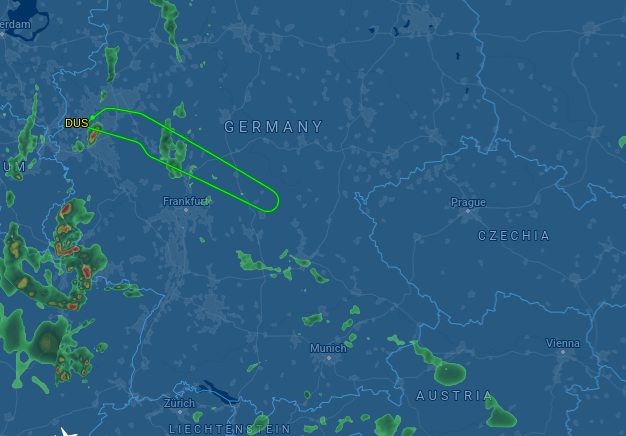
My trip to pgday.at started Wednesday at the airport in D sseldorf. I was there on time, and the plane started with an estimated flight time of about 90 minutes. About half an hour into the flight, the captain announced that we would be landing in 30 minutes - in D sseldorf, because of some unspecified technical problems. Three hours after the original departure time, the plane made another attempt, and we made it to Vienna.
On the plane I had already met Dirk Krautschick who had the great honor of bringing Slonik (in the form of a big extra bag) to the conference, and we took a taxi to the hotel. On the taxi, the next surprise happened: Hans-J rgen Sch nig unfortunately couldn't make it to the conference, and his talks had to be replaced. I had submitted a talk to the conference, but it was not accepted, and neither queued on the reserve list. But two speakers on the reserve list had cancelled, and another was already giving a talk in parallel to the slot that had to be filled, so Pavlo messaged me if I could hold the talk - well of course I could. Before, I didn't have any specific plans for the evening yet, but suddenly I was a speaker, so I joined the folks going to the speakers dinner at the Wiener Grill Haus two corners from the hotel. It was a very nice evening, chatting with a lot of folks from the PostgreSQL community that I had not seen for a while. Thursday was the conference day. The hotel was a short walk from the venue, the Apothekertrakt in Vienna's Schloss Sch nbrunn. The courtyard was already filled with visitors registering for the conference. Since I originally didn't have a talk scheduled, I had signed up to volunteer for a shift as room host. We got our badge and swag bag, and I changed into the "crew" T-shirt. The opening and sponsor keynotes took place in the main room, the Orangerie. We were over 100 people in the room, but apparently still not enough to really fill it, so the acoustics with some echo made it a bit difficult to understand everything. I hope that part can be improved for next time (which is planned to happen!). I was host for the Maximilian room, where the sponsor sessions were scheduled in the morning. The first talk was by our Peter Hofer, also replacing the absent Hans. He had only joined the company at the beginning of the same week, and was already tasked to give Hans' talk on PostgreSQL as Open Source. Of course he did well.
Next was Tanmay Sinha from Readyset. They are building a system that caches expensive SQL queries and selectively invalidates the cache whenever any data used by these queries changes. Whenever actually fixing the application isn't feasible, that system looks like an interesting alternative to manually maintaining materialized views, or perhaps using pg_ivm. After lunch, I went to Federico Campoli's Mastering Index Performance, but really spent the time polishing the slides for my talk. I had given the original version at pgconf.de in Berlin in May, and the slides were still in German, so I had to do some translating. Luckily, most slides are just git commit messages, so the effort was manageable. The next slot was mine, talking about Modern VACUUM. I started with a recap of MVCC, vacuum and freezing in PostgreSQL, and then showed how over the past years, the system was updated to be more focused (the PostgreSQL 8.4 visibility map tells vacuum which pages to visit), faster (12 made autovacuum run 10 times faster by default), less scary (14 has an emergency mode where freezing switches to maximum speed if it runs out of time; 16 makes freezing create much less WAL) and more performant (17 makes vacuum use much less memory). In summary, there is still room for the DBA to tune some knobs (for example, the default autovacuum_max_workers=3 isn't much), but the vacuum default settings are pretty much okay these days for average workloads. Specific workloads still have a whopping 31 postgresql.conf settings at their disposal just for vacuum.
Right after my talk, there was another vacuum talk: When Autovacuum Met FinOps by Mayuresh Bagayatkar. He added practical advice on tuning the performance in cloud environments. Luckily, our contents did not overlap. After the coffee break, I was again room host, now for Floor Drees and Contributing to Postgres beyond code. She presented the various ways in which PostgreSQL is more than just the code in the Git repository: translators, web site, system administration, conference organizers, speakers, bloggers, advocates. As a member of the PostgreSQL Contributors Committee, I could only approve and we should closer cooperate in the future to make people's contributions to PostgreSQL more visible and give them the recognition they deserve.
That was already the end of the main talks and everyone rushed to the Orangerie for the lightning talks. My highlight was the Sheldrick Wildlife Trust. Tickets for the conference had included the option to donate for the elephants in Kenya, and the talk presented the trust's work in the elephant orphanage there. After the conference had officially closed, there was a bonus track: the Celebrity DB Deathmatch, aptly presented by Boriss Mejias. PostgreSQL, MongoDB, CloudDB and Oracle were competing for the grace of a developer. MongoDB couldn't stand the JSON workload, CloudDB was dismissed for handing out new invoices all the time, and Oracle had even brought a lawyer to the stage, but then lost control over a literally 10 meter long contract with too much fine print. In the end, PostgreSQL (played by Floor) won the love of the developer (played by our Svitlana Lytvynenko).
The day closed with a gathering at the Brandauer Schlossbr u - just at the other end of the castle ground, but still a 15min walk away. We enjoyed good beer and Kaiserschmarrn. I went back to the hotel a bit before midnight, but some extended that time quite some bit more. On Friday, my flight back was only in the afternoon, so I spent some time in morning in the Technikmuseum just next to the hotel, enjoying some old steam engines and a live demonstration of Tesla coils. This time, the flight actually went to the destination, and I was back in D sseldorf in the late afternoon.
In summary, pgday.at was a very nice event in a classy location. Thanks to the organizers for putting in all the work - and next year, Hans will hopefully be present in person! The post A Trip To Vienna With Surprises appeared first on CYBERTEC PostgreSQL Services & Support.

Gunnar Wolf: Saying _hi_ to my good Reproducible Builds friends while reading a magazine article

Just wanted to share I enjoy reading George V. Neville s Kode Vicious column, which regularly appears on some of ACM s publications I follow, such as ACM Queue or Communications. Today I was very pleasantly surprised, while reading the column titled Can t we have nice things Kode Vicious answers to a question on why computing has nothing comparable to the beauty of ancient physics laboratories turned into museums (i.e. Faraday s laboratory) by giving a great hat tip to a project stemmed off Debian, and where many of my good Debian friends spend a lot of their energies: Reproducible builds. KV says:
Once the proper measurement points are known, we want to constrain the system such that what it does is simple enough to understand and easy to repeat. It is quite telling that the push for software that enables reproducible builds only really took off after an embarrassing widespread security issue ended up affecting the entire Internet. That there had already been 50 years of software development before anyone thought that introducing a few constraints might be a good idea is, well, let s just say it generates many emotions, none of them happy, fuzzy ones.
Yes, KV is a seasoned free software author. But I found it heart warming that the Reproducible Builds project is mentioned without needing to introduce it (assuming familiarity across the computing industry and academia), recognized as game-changing as we understood it would be over ten years ago when it was first announced, and enabling of beauty in computing. Congratulations to all of you who have made this possible! RB+ACM

Freexian Collaborators: Debian Contributions: Preparing for setup.py install deprecation, Salsa CI, Debian 13 "trixie" release and more! (by Anupa Ann Joseph)

Debian Contributions: 2025-08 Contributing to Debian is part of Freexian s mission. This article covers the latest achievements of Freexian and their collaborators. All of this is made possible by organizations subscribing to our Long Term Support contracts and consulting services.

Preparing for setup.py install deprecation, by Colin Watson setuptools upstream will be removing the setup.py install command on 31 October. While this may not trickle down immediately into Debian, it does mean that in the near future nearly all Python packages will have to use pybuild-plugin-pyproject (though they don t necessarily have to use pyproject.toml; this is just a question of how the packaging runs the build system). Some of the Python team talked about this a bit at DebConf, and Colin volunteered to write up some notes on cases where this isn t straightforward. This page will likely grow as the team works on this problem.

Salsa CI, by Santiago Ruano Rinc n Santiago fixed some pending issues in the MR that moves the pipeline to sbuild+unshare, and after several months, Santiago was able to mark the MR as ready. Part of the recent fixes include handling external repositories, honoring the RELEASE autodetection from d/changelog (thanks to Ahmed Siam for spotting the main reason of the issue), and fixing a regression about the apt resolver for *-backports releases. Santiago is currently waiting for a final review and approval from other members of the Salsa CI team, and being able to merge it. Thanks to all the folks who have helped testing the changes or provided feedback so far. If you want to test the current MR, you need to include the following pipeline definition in your project s CI config file:
---
include:
  - https://salsa.debian.org/santiago/pipeline/raw/sbuild-unshare-02-salsa-ci/salsa-ci.yml
  - https://salsa.debian.org/santiago/pipeline/raw/sbuild-unshare-02-salsa-ci/pipeline-jobs.yml
As a reminder, this MR will make the Salsa CI pipeline build the packages more similar to how it s built by the Debian official builders. This will also save some resources, since the default pipeline will have one stage less (the provisioning) stage, and will make it possible for more projects to be built on salsa.debian.org (including large projects and those from the OCaml ecosystem), etc. See the different issues being fixed in the MR description.

Debian 13 trixie release, by Emilio Pozuelo Monfort On August 9th, Debian 13 trixie was released, building on two years worth of updates and bug fixes from hundreds of developers. Emilio helped coordinate the release, communicating with several teams involved in the process.

DebConf 26 Site Visit, by Stefano Rivera Stefano visited Santa Fe, Argentina, the site for DebConf 26 next year. The aim of the visit was to help build a local team and see the conference venue first-hand. Stefano and Nattie represented the DebConf Committee. The local team organized Debian meetups in Buenos Aires and Santa Fe, where Stefano presented a talk on Debian and DebConf. Venues were scouted and the team met with the university management and local authorities.

Miscellaneous contributions
  • Rapha l updated tracker.debian.org after the trixie release to add the new forky release in the set of monitored distributions. He also reviewed and deployed the work of Scott Talbert showing open merge requests from salsa in the action needed panel.
  • Rapha l reviewed some DEP-3 changes to modernize the embedded examples in light of the broad git adoption.
  • Rapha l configured new workflows on debusine.debian.net to upload to trixie and trixie-security, and officially announced the service on debian-devel-announce, inviting Debian developers to try the service for their next upload to unstable.
  • Carles created a merge request for django-compressor upstream to fix an error when concurrent node processing happened. This will allow removing a workaround added in openstack-dashboard and avoid the same bug in other projects that use django-compressor.
  • Carles prepared a system to detect packages that Recommends packages which don t exist in unstable. Processed (either reported or ignored due to mis-detected problems or temporary problems) 16% of the reports. Will continue next month.
  • Carles got familiar and gave feedback for the freedict-wikdict package. Planned contributions with the maintainer to improve the package.
  • Helmut responded to queries related to /usr-move.
  • Helmut adapted crossqa.d.n to the release of trixie .
  • Helmut diagnosed sufficient failures in rebootstrap to make it work with gcc-15.
  • Helmut fixed the CI pipeline of debvm.
  • Helmut sent patches for 19 cross build problems.
  • Faidon discovered that the Multi-Arch hinter would emit confusing hints about :any annotations. Helmut identified the root cause to be the handling of virtual packages and fixed it.
  • Enrico took some dust off python-debiancontributors and prototyped a receiving end for salsa webpings, to start followup work to contributors.debian.org discussions at DebConf25.
  • Colin upgraded about 70 Python packages to new upstream versions, which is around 10% of the backlog; this included a complicated Pydantic upgrade in collaboration with the Rust team.
  • Colin fixed a bug in debbugs that caused incoming emails to bugs.debian.org with certain header contents to go missing.
  • Thorsten uploaded sane-airscan, which was already in experimental, to unstable.
  • Thorsten created a script to automate the upload of new upstream versions of foomatic-db. The database contains information about printers and regularly gets an update. Now it is possible to keep the package more up to date in Debian.
  • Stefano prepared updates to almost all of his packages that had new versions waiting to upload to unstable. (beautifulsoup4, hatch-vcs, mkdocs-macros-plugin, pypy3, python-authlib, python-cffi, python-mitogen, python-pip, python-pipx, python-progress, python-truststore, python-virtualenv, re2, snowball, soupsieve).
  • Stefano uploaded two new python3.13 point releases to unstable.
  • Stefano updated distro-info-data in stable releases, to document the trixie release and expected EoL dates.
  • Stefano did some debian.social sysadmin work (keeping up quotas with growing databases and filesystems).
  • Stefano supported the Debian treasurers in processing some of the DebConf 25 reimbursements.
  • Lucas uploaded ruby3.4 to experimental. It was already approved by FTP masters.
  • Lucas uploaded ruby-defaults to experimental to add support for ruby3.4. It will allow us to start triggering test rebuilds and catch any FTBFS with ruby3.4.
  • Lucas did some administrative work for Google Summer of Code (GSoC) and replied to some queries from mentors and students.
  • Anupa helped to organize release parties for Debian 13 and Debian Day events.
  • Anupa did the live coverage for the Debian 13 release and prepared the Bits post for the release announcement and 32nd Debian Day as part of the Debian Publicity team.
  • Anupa attended a Debian Day event organized by FOSS club SSET as a speaker.

Next.

Previous.